#networking
1 messages · Page 378 of 1
 thick minnow
please ping me in the response, i need to get back to work. i was thinking about it because it'd be nice to start my computer from work and download a game i just bought to have it ready when i get home
 pulsar thorn
Does WoL work behind NAT? I thought it worked via MAC address
 clear igloo
You can tunnel it over the internet with encapsulation but still not something I'd expose directly, via a VPN though yes
thick minnow
clear igloo
You can tunnel it over the internet with encapsulation but still not something I...
Why not? VPN is secure enough
clear igloo
thick minnow
Why not? VPN is secure enough
That's what I said
thick minnow
Oh I didn't read it right
clear igloo
😛 no worries
clear igloo
thick minnow
Dose anyone know the answer for it?
Why wouldn't they be able to give you a static?
thick minnow
They seed if I want static I must geve up for full speed and downgread to 200M
clear igloo
That's stupid, a plan shouldn't have anything to do with getting a static IP unless they only offer it on a business plan which has different tiers and they only offer slower speeds on their business plans
thick minnow
I hate that mony is everything
clear igloo
I mean it makes sense to charge for a static IP but stupid to force a user to a business plan imo
thick minnow
The more stupid is that I can't even pay for business plan
They seed I must have a business regesterd
clear igloo
lol, that's even more dumb
 gusty cosmos
so i recently baught a internet dongle (AC 1300 Arch T3U Plus) because my pc does not have wireless internet. I have a internet plan of 100 mbps when even i run a game or In a discord call the internet speed drops and causes a internet lag spike i tried everything can anyone help me.
thick minnow
clear igloo
You can tunnel it over the internet with encapsulation but still not something I...
soooo, it's reasonably secure as long as i use my VPN?
clear igloo
Yah
 peak cloak
can't even do WOL over the internet
thick minnow
sweet! im gonna feel like a wizard, turning on and using my pc from my phone :P
peak cloak
needs to be on the same L2 network
what I did, was vpn into my home, then connect to a server that was on the same L2 network to then send a magic packet
clear igloo
There is a way, I think, to do it over L3 and redirect locally but yah it's not easy
thick minnow
well i could boot up my old server rig. probably needs dusted first tho lol
peak cloak
get a pi or something that will always be on
or on the router itself
so it's quiet and efficent
clear igloo
yah
thick minnow
i actually have a pi that i was thinking about making into a pi-hole
i knew my tech knowledge was lacking, but joining this and NetworkChuck's servers has opened my eyes to exactly how little i know lol
 lime spindle
Will these ehternet over coax things work if you have got cable internet running on the same lines?

 waxen scroll
lime spindle
Will these ehternet over coax things work if you have got cable internet running...
waxen scroll
lime spindle
Will these ehternet over coax things work if you have got cable internet running...
dont get tricked. it says 1 pack. you'll need two
lime spindle
waxen scroll
dont get tricked. it says 1 pack. you'll need two
thanks for catching that
lime spindle
peak cloak
Yes
thanks
 hot hawk
lime spindle
Will these ehternet over coax things work if you have got cable internet running...
hot hawk
lime spindle
Will these ehternet over coax things work if you have got cable internet running...
u can get 2 for about 60 tho
nvm the one i was watching went up
a WCB3000N is good if u only need 250 down and up
lime spindle
need 150
hot hawk
lime spindle
need 150
if u want u can try deca lol
i think it might interfere with cable tho
hot hawk

moca for poor people in a nutshell
gets 100/100 but runs at a lower frequency
they were originally designed for direct tv only, but they function as just a reg ethernet cable
lime spindle
thats a nice one, from the screenshot it looks like you have it. How is it?
lime spindle
link does not work, but found it anyways
hot hawk

This third generation Cinema Connection Kit allows a DIRECTV system to connect to a router using an Ethernet cable. These can be powered by either a USB cable or external power supply. The kit contains 2 USB Broadband DECA, 2 Ethernet cables, and 2 power supplies. This unit can be used to run Eth...
okie
lime spindle
 hot hawk
they are pretty cheap usually under 20 bucks for 2
hot hawk
lime spindle
note with the usb one they require data from a usb for what ever reason to work
so a wall wart wont cut it
lime spindle
what do you plug the usb into?
hot hawk
if u want to use it from the wall u have to get a ac to dc adapter
lime spindle
like the cheap ones that come free with almost every gadget?
hot hawk
lime spindle
what do you plug the usb into?
anything that can do data out, so routers with usb, a battery bank that can fuction as a router, smart tv usb, or pc/laptop
one issue i had with them is it doesnt play nice with my openwrt router, but that may be down to openwrt
i get about 70/70 on my coax
i believe there is still some interference from a dish but meh good enough for 20 bucks
lime spindle
thanks for the help
hot hawk
ye np
 tender hazel
what happened to mynameisjuan
 hollow marlin
I'm still here now and then
waxen scroll
hollow marlin
I'm still here now and then
less and less as time goes on
he doesnt answer DMs much either
 low pond
Cool stuff
hollow marlin
@tender hazel Just checked and see they had a YT video on it as well. It actually looks like a decent little router. With ROSv7 improving BGP performance, they spec this at full table convergence of 30s with the new chips.
waxen scroll
hollow marlin
<@!530075635423510548> Just checked and see they had a YT video on it as well. I...
im not interested until their UI is tossed out for new
hollow marlin
 faint bronze
<@!462711605063450628> Are you running your own BGP service?
faint bronze
<@!462711605063450628> Are you running your own BGP service?
Engineer for an ISP, so both
hollow marlin
waxen scroll
im not interested until their UI is tossed out for new
Their CLI is ok at least. But they are still lacking much needed features. But for CE/P routers they'd be ok
faint bronze
@hollow marlin Since you know something more about networking than I what would be one of the easier networking certifications to get?
As in more entry level. Also, how transferable is the knowledge of how to configure a router?
hollow marlin
faint bronze
<@462711605063450628> Since you know something more about networking than I what...
I wouldn't focus on how difficult an exam is. I always advise people getting into the field to get the CCNA. Yes it is Cisco focused but the material for the exam contains the most amount of theory which is more beneficial than just configuration early on and has a decent learning path.
Also its the cert with the most amount of material (books, videos, forums, etc) and being able to use that and follow along hands on with configuration with their free simulation software, Packet Tracer, allows you to learn, lab, learn, lab, etc. That why certs such as Net+ are useless IMO.
From there, once you learn the theory and have an understanding of how it works via labbing, that knowledge transfers between vendors. All thats needed to is to learn the different syntax. Networking thankfully has standards behind it all.
 neat ledge
how do i cat-proof my lan cable that goes across the whole house
faint bronze
So you are having a problem with your cat playing with your cat6? OK
faint bronze
In all seriousness putting them in the wall or in the ceiling would be the best idea. If you have an unfinished basement then that shouldn't be too hard to do. Another option might be to route the cables in a cable tray above so that the cat can hope fully not get into the cables. Maybe use command strips to hang the wires.
 teal blade
Started happing 3 days ago. Getting huge Spikes up too 4000ms in games 🤷♀️
peak cloak
teal blade
Started happing 3 days ago. Getting huge Spikes up too 4000ms in games 🤷♀️
ping isn't a accurate measure of latency
it's the lowest priority packet
teal blade
yes I know, but its bad in games
peak cloak
prob ISP issues or bad wifi interference
teal blade
yeah, had some workmen out on the footpath ripping up the old cable. I bet that has something to do with it
 worthy tusk
any ideas on how to speed up my nas? i barely ever reach 20MBps even though everything is gigabit and im transferring to an ssd. is there a bottleneck somewhere that i could be missing or something i can change to speed it up? the nas is a 1U 10 bay server with a xeon e5 2620 and 32gb ram
ping me if you have any ideas
 primal ice
hrm something wrong somewhere my fedora samba NAS box e5-1650 v3 hits 120MiB/s (112-114 MB/s)
 floral vector
any speed benefits to getting a new modem, or should I just use the isp provided modem-router combo with a new router?
primal ice
depends, most likely it will not effect speeds. specially if you can just put the modem router combo unit into bridge mode.
floral vector
primal ice
depends, most likely it will not effect speeds. specially if you can just put th...
right. and bridge mode, as in, used as a modem for a different router, right?
primal ice
correct
floral vector
thnx mate
 plain siren
hot hawk
moca for poor people in a nutshell
plain siren
hot hawk
moca for poor people in a nutshell
MOCA is not that bad

Get a reliable, super-fast connection for your HDTV or gaming console without running wires! This easy-to-use coax to Ethernet adapter uses your home’s existing coax wires to create a wired Ethernet backbone with speeds up to 1 Gbps. Enjoy reliable, higher speeds for 4K HD streaming, lag-free gam...
MOCA 2.5 gets like no latency 2.5Gbit of Bandwidth and some long runs
peak cloak
plain siren
MOCA is not that bad
he means the other thing
DECA
that DECA is the poor people version of MOCA
cuz like moca adapters are $$$
 pearl plover
anyone know if spectrum business would be better for content creation in terms of stability?
peak cloak
not really
all business is, is that it allows more things, but practically the same network
pearl plover
Cause I'd say 20% of the time it prevents me from streaming even though everything is hardwired except my phone haha. (with a $200 modem, $400 router, and cat8 cabling across entire network)
plain siren
peak cloak
all business is, is that it allows more things, but practically the same network
you basically get your bandwidth guaranteed
So while residential may be like 15 houses on a 10Gbit Shared link with all 15 houses purchasing 1 Gbit Service and maybe 1 2.5 Gbit
Resulting in oversubscribing
If you were on shared link with business, no matter what you get your bandwidth
pearl plover
Right now I'm on the 400/20 plan, get 450/23 on average, but the stability is meh.
plain siren
If the link is shoddy they may want to re-run it to keep the Business SLA requirements resulting in them charging you for the run or not offering it at all
pearl plover
We have fiber... on the opposite side of town
not in my area 😦
seems its 85/mo for my current plan, and it'd be 115/mo for a similar business plan. I don't make any money off my vids, just a hobby I really enjoy, but I do have a part time job to help cover costs.
peak cloak
plain siren
you basically get your bandwidth guaranteed
not always
Most just call it business from what I heard
And maybe slightly better qos
Idk, but like for FiOS, for static IP you need business
hot hawk
peak cloak
that DECA is the poor people version of MOCA
yes
 dawn yoke
I'm looking for a new router but honestly have no idea what to look for, can someone help me?
faint bronze
Router or all in one router, switch, AP (wifi thing)?
 flint rune
GameStop listed a USB display capture device under networking. lol
hot hawk
dawn yoke
I'm looking for a new router but honestly have no idea what to look for, can som...
depends on what you need it to do
plain siren
peak cloak
Idk, but like for FiOS, for static IP you need business
AT&T Offers 8 IPs for 15/mth Static
low pond
plain siren
AT&T Offers 8 IPs for 15/mth Static
Residential proxy hosting all day long
kinda stupidly low given prices for IP's nowerdays
dawn yoke
hot hawk
depends on what you need it to do
provide an internet connection...
dawn yoke
a few idk
hot hawk
bandwith needed?
dawn yoke
I don't wanna go over around 200$ cad
dawn yoke
I think it's like 2200 square feet, basement and main are about the same around 1100
hot hawk
oof basement coverage might be spotty even if u get like a mesh system
dawn yoke
that's fine I have ethernet routed to PC, I mean it's pretty good now from what I can tell and it couldn't get worse right?
hot hawk
dawn yoke
that's fine I have ethernet routed to PC, I mean it's pretty good now from what ...
ig if u got ethernet up its fine

TP-Link Archer AX20, AX1800 Dual-Band Wi-Fi 6 Router The Wi-Fi 6 Experience The latest generation of WiFi technology brings faster speeds, less lag, and higher capacity, enabling more simultaneous connections on your home network. Dual-Band Wi-Fi 6 Up to 1.8 Gbps Every application feels more flui...
wait
actually get the archer AX21
cheaper and newer
tender hazel
waxen scroll
im not interested until their UI is tossed out for new
The UI tossed out for new? You would have a revolt amongst MikroTik users
most of us love using winbox
hot hawk
would i be able to get away with cheap moca by getting two of these?
https://www.ebay.com/itm/124781079262?hash=item1d0d882ade:g:FLsAAOSwSxRg0MRB

eBay
Find many great new & used options and get the best deals for Arris Frontier Ethernet Gateway Wi-Fi Modem Router NVG468MQ with adapter/Cat5 at the best online prices at eBay! Free shipping for many products!
they have moca 2.0/router and for 25 bucks each, it a steal
judging by reddit post and google, it should be possible but was wondering if anyone here have experience
 mortal stirrup
this is so weird, i have two Unifi AP and a opnsense gateway
when i connect back to wifi i get no internet access..
i can ping router and router can ping my computer or phone or whatever..
how do troubleshoot this?
 meager cliff
I asked about this earlier in tech-support channel but was wondering if I could get a different perspective on it
My USB WiFi Adapted/Dongle is fucky for some reason, if there is any file install - games, installers, etc on a browser or game client - and I move to another application, the download gets cancelled under the premise "network error"
essentially if im lets say installing a 10gb game in the background and hop over to youtube or any other app, the download within a few minutes pops up as 'cancelled, network error'. The same occurred to any steam downloads and when downloading any files on my browser
thick minnow
my wifi card on my motherboard doesn't get recognised in fedora
there are packages in /lib/firmware
but it doesn't work idk
faint bronze
Do you have both the firmware and kernel modules? Also if you want help more details would be needed like the wifi chip's model number and manufacturer.
 old magnet
Anyone know much about mesh wifi?
 snow lance
would I be able to directly connect my nas via network card (10 gbps) and also connect it to my home router (ass 100mbps) for my family?
peak cloak
snow lance
would I be able to directly connect my nas via network card (10 gbps) and also c...
wdym
to have local 10 gig, but 100 mb internet?
clear igloo
Yes, a point to point link between your PC and NAS and then another link from the NAS and PC to the main router/switch would work but at 100Mbps of course but the direct access between your PC and NAS would be 10gig
snow lance
I'm gonna get a Nas. the main priority is my pc and I need iscsi so I get 10 gbps in my pc and nas. however, my dad might want to put some of his drives in, so can I connect it to the home router for them?
snow lance
nic?
peak cloak
or you can get a 10gig switch
peak cloak
snow lance
nic?
network interface card
so you would have an sfp+ for your PC, and then another NIC to connect to home router
or get a 10gig switch, connect PC, NAS, and Router to it
snow lance
peak cloak
network interface card
oh but couldn't I use the mobo one
snow lance
peak cloak
or you can get a 10gig switch
oh yeah true
peak cloak
snow lance
oh but couldn't I use the mobo one
yeah, that's just an integrated NIC
snow lance
peak cloak
so you would have an sfp+ for your PC, and then another NIC to connect to home r...
sfp+? sorry I am new to this
peak cloak
still a NIC, didn't know your MB had one
peak cloak
snow lance
sfp+? sorry I am new to this
oh you are using rj45 10 gig
sfp+ is a common interface for 10gig connections
snow lance
peak cloak
yeah, that's just an integrated NIC
alright good
oh I didn't buy anything other than HDDs yet
peak cloak
example of 10 gig switch with SFP+ ports
 snow lance
peak cloak
still a NIC, didn't know your MB had one
snow lance
peak cloak
still a NIC, didn't know your MB had one
I'd assume my motherboard would have an ethernet port
peak cloak
there's some switches with rj45 10gig, but it's more $$
peak cloak
snow lance
I'd assume my motherboard would have an ethernet port
some don't
snow lance
yes this would be pretty low cost
snow lance
peak cloak
some don't
just no ethernet port at all? I'd probs make sure it does but if it does that'd be fine right
snow lance
peak cloak
example of 10 gig switch with SFP+ ports
what does the sfp+ means
peak cloak
snow lance
what does the sfp+ means
small form-factor pluggable
snow lance
basically a small switch?
peak cloak
so you have sfp+ ports, then you have modules, so like rj45 modules, fiber transceivers, DAC cables
peak cloak
snow lance
basically a small switch?
sfp+ is an interface, like rj45
snow lance
ah
peak cloak
peak cloak
so you have sfp+ ports, then you have modules, so like rj45 modules, fiber trans...
don't want to use too many rj45 modules, as they get very hot and consume a bit of power
if it's short distance use DAC cables
rj45 10gig switches are pretty pricey
clear igloo
SFP is a cage/tool to put it better, it can be adapted to RJ45 with an SFP or SFP+ module or fiber with different modules you plug in
snow lance
but if my mobo has an ethernet port I would just connect that one to my router and the other one to my pc right
I would probably use truenas core, would it require complicated setup? I am new
snow lance
clear igloo
SFP is a cage/tool to put it better, it can be adapted to RJ45 with an SFP or SF...
waht
peak cloak
snow lance
but if my mobo has an ethernet port I would just connect that one to my router a...
yeah, but if you would need an pcie card for 10gig
snow lance
wait is 10 gbps cobber cable like not good idea? it would only have to be like 10m max
snow lance
peak cloak
yeah, but if you would need an pcie card for 10gig
yes yes ofc
peak cloak
snow lance
wait is 10 gbps cobber cable like not good idea? it would only have to be like 1...
generally no, it's more expensive
esp on shorter runs
like the eqipment is
clear igloo
snow lance
waht
This is a copper based SFP
 snow lance
but I don't wanna have to get fiber cable converter shit
clear igloo
You can get them in fiber too
snow lance
yes it's only short
peak cloak
clear igloo
This is a copper based SFP
like just this little thing is like 30 bucks I think
snow lance
i would get a tx401 does it need the sfp
peak cloak
that's rj45
snow lance
and what does that need
peak cloak
just ethernet
snow lance
perfect
while you're here, what would I need to connect the harddrives? it'll be 3 hdds
peak cloak
with sfp+ pcie cards tho you can get them used for cheap
peak cloak
snow lance
while you're here, what would I need to connect the harddrives? it'll be 3 hdds
it's just sata no?
sata power and sata to mb
snow lance
my friend said that was bad practise
snow lance
idk I didn't as
peak cloak
truenas uses ZFS, which is very good, but you need to put some thought into your setup
snow lance
raid5 or raid-z1 or whatever truenas calls it
or should I use raid0? since itll be 3
would it be possible to have a raid setup where you can add drives to the array in the future? I heard it was called soft raid or smth
peak cloak
Helpful books by Allan Jude and Michael Lucas:
http://www.amazon.com/dp/B00Y32OHNM/?tag=level1techs-20
http://www.amazon.com/dp/B01E40YIRM/?tag=level1techs-20
Thanks for watching our videos! If you want more, check us out online at the following places:
- Website: http://level1techs.com/
- Forums: http://...
peak cloak
snow lance
or should I use raid0? since itll be 3
with that, if one drive fails you loose everything
snow lance
I can't have audio rn, can you give a brief explanation? added to watch later
snow lance
peak cloak
with that, if one drive fails you loose everything
ik but wouldn't it be fine if there's only 3
peak cloak
no, one drive fails, and you loose everything in the pool
snow lance
I would probably add drives in the future tho so raid5 with ability to add drives would be highly preferable, my case has 12 slots
peak cloak
so you can't just add drives with zfs
you can, but then you need to rebuild it or something which takes time and wear on drives
snow lance
yeah I saw which is ass, but is there a possibility to just use normal raid5 in truenas?
peak cloak
I'm not too familiar
peak cloak
snow lance
yeah I saw which is ass, but is there a possibility to just use normal raid5 in ...
maybe but you should use zfs
snow lance
peak cloak
you can, but then you need to rebuild it or something which takes time and wear ...
it's ironwolf they are made for Nas right
peak cloak
yeah I think
snow lance
peak cloak
maybe but you should use zfs
would I be able to do the rebuild shit with zfs
peak cloak
yeah
peak cloak
ok so 3 drives is the min for raidz1
snow lance
yeh
it's very likely I will add new drives in the future and speed is a fairly important factor for me so I'd want as many drives in the array other than my dad's
that's why I got the 10 gbps I heard with iscsi you get 1/10th real world speed of the connection you have or smth
if that's correct
peak cloak
actually here

iXsystems, Inc. - Enterprise Storage & Servers
The ninth annual OpenZFS Developer Summit took place November 8th and 9th online with iXsystems proudly returning as a Gold sponsor. The OpenZFS Community remains vibrant and is continuing to develop features at a rapid pace. This blog summarizes some of the more interesting talks.
The upcoming OpenZFS 3.0 release roadmap was introduced along with its exciting candidate features including RAIDZ expansion
snow lance
yooo big pog
peak cloak
not in truenas tho rn
snow lance
how much wear does it put on the HDDs when rebuilding tho how much before it's a bad idea
peak cloak
yeah a bit I heard
snow lance
peak cloak
not in truenas tho rn
fuck
when?
peak cloak
idk
snow lance
oof
snow lance
snow lance
that's why I got the 10 gbps I heard with iscsi you get 1/10th real world speed ...
also is this true
peak cloak
idk
snow lance

also would it be bad idea to put the HDDs through the mobo cuz then it has to go through the chipset?
 snow lance
I just thought if it has to go through chipset that might slow down but if you say it no make a difference that's probably true lmao
snow lance
alright I might add in the future, at which point would it be a good idea
 strong tusk

 keen urchin
snow lance
that's why I got the 10 gbps I heard with iscsi you get 1/10th real world speed ...
keen urchin
snow lance
that's why I got the 10 gbps I heard with iscsi you get 1/10th real world speed ...
uhhhh... no.
snow lance
keen urchin
uhhhh... no.
alright then what
https://youtu.be/9JL-RVUHj6o i heard it in this vid

Thanks to Anker for sponsoring today's video. Check out the Anker Nano Pro here: https://ankerfast.club/3zLMIw3
Game installs aren't getting any smaller. And while SSD prices continue to fall, if a game requires 250GB to install, a 500GB drive will only get you so far. What if you could use the extra storage space on your home server to install...
clear igloo
snow lance
alright then what
timestamp?
clear igloo
I haven't watched the video at all but perhaps he mentioned 1GB of throughput, which, on a 10Gb link is about right since 8 bits = 1 byte
snow lance
clear igloo
timestamp?
12:02 I think
oh wait I see yeah cuz it's Mbps over Ethernet and MB/s on drive
I just remember googling it and it said smth with latency shit
so I would still need a 10 gbps network card
thick minnow
snow lance
I just remember googling it and it said smth with latency shit
Just be future proof :) we all have 10Gb
hollow marlin
I don't and never will until it trickles down to the standard in common devices. Even though I have a 10g switch with SFP+ collecting dust (with dust caps of course) sitting around. 1g will be more than enough for the near future
thick minnow
It was a joke cause i still don't have 1Gb I biirly have 50Mb

 faint bronze
What's the silver can with an Ethernet cable coming from it?
Try out some patch cables. You can get them in short sized so you don't need to have a long ethernet that connects to a device 6 in away.
hot hawk
faint bronze
Try out some patch cables. You can get them in short sized so you don't need to ...
yea been thinking of that

 faint niche
I actually have one of those, the WiFi is actually pretty good.
It's basically a re-branded Nokia FastMile 5G Gateway
 cedar igloo
faint niche
I actually have one of those, the WiFi is actually pretty good.
cedar igloo
faint niche
I actually have one of those, the WiFi is actually pretty good.
With these, can you still do stuff like port forwarding?
peak cloak
cedar igloo
With these, can you still do stuff like port forwarding?
It's 5g internet
Would be surprised if not under cgnat
thick minnow
peak cloak
It's 5g internet
What's the problem?
peak cloak
thick minnow
What's the problem?
It's uses 5g, which is wireless and is worse than fiber
thick minnow
I saw in testing that is really stable
peak cloak
If it's the only option sure, but like t mobile tried selling it to be and I'm like nope
peak cloak
Anything wireless won't beat wired, unless it's some really bad wired like dsl or coax maybe
thick minnow
I talk only abut starlink
thick minnow
peak cloak
Dsl can't get around the world
It will in the next year or so (maybe) starlink not DSL
peak cloak
More like 2
thick minnow
peak cloak
More like 2
Why thy even have in the west
peak cloak
They will need to replace their whole v1 constellation with new sats
Cuz right now all the sats do are just relays
thick minnow
Its working for now as they had seed
peak cloak
So if there is no ground station close by, you don't have internet
So like over the ocean
thick minnow
They are using sdelites, no?
peak cloak
thick minnow
They are using sdelites, no?
yes
but they only act as relays for now
no intersat communicaton
thick minnow
But the Rx/Rx is connected to the sdelites
peak cloak
yes but the sats only work if they are in view of a ground station


 peak cloak
Huh, can't see the end clearly but seems like only 4 wires
 dusty solar
Yeah
Kinda hard to get focus on the cable with my phone
its quite sad that the cable says 5e but only has 4 wires
dusty solar
friends setup of the wifi
 hot hawk
cedar igloo
With these, can you still do stuff like port forwarding?
hot hawk
cedar igloo
With these, can you still do stuff like port forwarding?
Can't cgnat
hot hawk
dusty solar
friends setup of the wifi
Network basket
hot hawk
peak cloak
Anything wireless won't beat wired, unless it's some really bad wired like dsl o...
Well it gets about the same ping as cable and is cheaper/faster
hot hawk
dusty solar
its quite sad that the cable says 5e but only has 4 wires
F got scamed
dusty solar
hot hawk
F got scamed
now i have a 8 wire one
dusty solar
was a pain to get through the old hole of the old cable tho
 main sorrel
is the netpi/netpi plus project still updated? i can only find an image from like 2018. basically, i'm looking for a way to easily check connection speeds on my wiring without paying $1500+ for a network verifier
peak cloak
main sorrel
is the netpi/netpi plus project still updated? i can only find an image from li...
for speeds, just grab 2 computers and run iperf3 between them
main sorrel
peak cloak
for speeds, just grab 2 computers and run iperf3 between them
hmm. okay. could one of those be a raspberry pi? i only have my desktop and work laptop, and i don't think work would appreciate that.
peak cloak
main sorrel
hmm. okay. could one of those be a raspberry pi? i only have my desktop and w...
sure I don't see why not
main sorrel
ah, the rpi 4B has gigabit ethernet. so i'd be limited to testing that
OTOH, i have cat 6a for my networking, so i'd like to be able to test up to the 10GBase-T speeds....or at least see how close i can get.
waxen scroll
Not to be a debbie downer but if you're only interested in local you should use a cable certifier ($$$$) or a basic continuity tester ($) and not a speed test to determine cable quality xD
I would think a Pi would be sus for this type of thing too. It might have a gig NIC but can the CPU even handle it?
main sorrel
i've done continuity testing using a fluke thingie. i'd just like to be able to isolate away things like my wifi AP's overhead and know that the physical wires are actually carrying things correctly.
main sorrel
waxen scroll
I would think a Pi would be sus for this type of thing too. It might have a gig ...
that's a good question. i saw an article where somebody got a 10G NIC working on a pi, but they had to overclock and do a bunch of kernel modifications
waxen scroll
main sorrel
that's a good question. i saw an article where somebody got a 10G NIC working o...
I have PTSD from cisco licensing so I ask. Yeah gig everywhere but only does 200mbit
@clear igloo you people and the ISR 4k
main sorrel
yeah, the tester was like...50-80 USD? somewhere in that range, idr. I figured worth it because i'm going to be doing a lot of runs. It's already helped me track down some issues where i accidently shorted one of the twisted pairs in a keystone jack. so i've gotten my money worth
but i'm not paying the $1500+ for a verifier just to satisfy my curiosity and that sort of thing
waxen scroll
certifiers are the worst. One link at a time, always running back and fourth to move it 😄
main sorrel
yeah, that absolutely sounds like a crappy job for one person.
waxen scroll
Now that I think about it, didnt someone make a bluetooth device on a platform like kickstarter for this very purpose?
I thought it was cheap-ish, like $100
main sorrel
Pockethernet is designed to help you easily maintain and trouble-shoot ethernet networks. It comes with 20+ features such as Wiremap, TDR, DHCP, VLAN and more.
waxen scroll
I remember now it was just expensive enough I decided it was not worth it. I dont do wiring much anymore
main sorrel
i might have figured out the problem anyway. i discovered that my phone was on the 2.4Ghz wifi band, not the 5Ghz band. so i'm going to try to force it over to the 5Ghz band and try the speedtest again
 rocky badge
@clear igloo 😳 90W PoE
 main sorrel
what is that even FOR? Like professional video recording stuff?
rocky badge
Yes
CAT6A 10 Gig to camera, SDI program out, smpte timecode, talkback comms, return channels
main sorrel
very cool.
clear igloo
rocky badge
<@!291198741862416384> 😳 90W PoE
I heard you need THE POWA!!!!
waxen scroll
main sorrel
i might have figured out the problem anyway. i discovered that my phone was on ...
2.4 is really sketchy and ive had issues. I dont live in a dense wifi area either but I guess we have just enough neighbors in range that some channels are slow
main sorrel
i live next to a fairly busy street and the interesting thing i've noticed is all the car hotspots driving past. hundreds and hundreds of them
rocky badge
yup...
plain siren
dusty solar
friends setup of the wifi
Fire.jpg
dawn yoke
i’m looking for a new router, can someone recommend a good wifi 6 router? don’t wanna go over $200 cad
house isn’t very big, 2200-2300 square feet i think
 distant wedge
rocky badge
<@!291198741862416384> 😳 90W PoE
distant wedge
rocky badge
<@!291198741862416384> 😳 90W PoE
Lemme guess, 802.3bt? :p
 plucky crescent
Hey can anyone tell me if running TrueNAS in a VM alongside my minecraft server is a good/bad idea?
I have zero VM experience
4790k or something like that?
 hollow tapir
the pi4b bottlenecks around 200-250mbit
if you are going to use a sbc to test with you are better off looking for an asus tinkerboard 2 or similar
peak cloak
huh, not too familiar with pi's so good to know
thick minnow
hm
 dense parcel
Hi everybody. Currently, my house is using a wifi router that extends from the ISP's modem and I connect the network wire directly from the modem to my gaming PC, and the wifi router mainly broadcasts wifi for my parents to use. I want to ask if there is a tool or a way to focus on prioritizing bandwidth and network traffic for my computer? Thanks!
faint bronze
There is QoS to prioritiz latency sensitive packets like video calls, but it is not too likely that it would make a difference on a small network.
 fallen crypt
whats a decent cable to get for ethernet? Has to be somewhat long and go through a door - maybe around 5~ meters? This is a very rough estimation
clear igloo
fallen crypt
whats a decent cable to get for ethernet? Has to be somewhat long and go through...
Anything Cat5e or up that's not CCA (copper clad aluminum) is fine for 2.5GbE or less
fallen crypt
clear igloo
Anything Cat5e or up that's not CCA (copper clad aluminum) is fine for 2.5GbE or...
internet barely hits 500 mbps so i think that's good 😂 - thanks
my router is a room or so away from my pc and I want the network i pay for
clear igloo
Yah, ethernet is rated for 100m in most cases with the exception being 10GbE on Cat6 at 55m but less than 10GbE on Cat6 is 100m. Cat6A can do 10GbE up to 100m
fallen crypt
damn it's really cheap 0.o - i need something to cover the cable to protect it from my door splitting it - what would I be looking for?
clear igloo
That I'm not 100% sure, you can get flat cable to help but as far as protection I'm not really sure on that
fallen crypt
RJ45 Cat5E?
clear igloo
Yup
peak cloak
the standard nowadays is cat6 but cat5e will work just fine
clear igloo
There is flat and round versions, flat is a bit picky but usually easier to run around doors and whatnot.
Yah, Cat6 if you can just because it's less likely to be CCA (aka junk)
CCA is far more prone to breaking and being much less durable since it's just aluminum with some copper on the outside
faint bronze
CAT7
clear igloo
No, just no
faint bronze
It will work...
clear igloo
CAT7 requires TERA to be in spec, otherwise it's junk
faint bronze
Oh, ok.
clear igloo
99.9% of "Cat7" on amazon is cheaper cables with "gaming" and other marketing crud slapped on and marked up
Even most Cat8 (which does use 8p8c RJ45) out today on Amazon is the same way
peak cloak
wait cat 7 needs TERA, but cat8 doesn't, weird never knew this
clear igloo
Yah, Cat7 needs TERA, Cat8 can do either TERA or 8p8c
It's weird because you don't need TERA for 8.1 (25Gb) or 8.2 (40Gb) either iirc
peak cloak
eh, just go to fiber or DAC at that point
clear igloo
Yup, nothing on the market probably will (at least for the next 5-10 years anyway) use 25GbE copper or faster. 10GbE copper is already hot as is with SFP+ connectors
I know most vendors even limit how you can place the 10GbE RJ45 connectors due to the extra heat output when it comes to the high density switches too
Something like double the heat output from a 10GbE copper SFP+ module compared to a 25GbE fiber module, it's crazy. Edit:
Yah, 2.5w of power per 10GbE copper module compared to around 1 to 1.5 watt for a extended range (10km+) 25GbE fiber module (or less for multi-mode)
low pond
Fiber prem
clear igloo
Yah, fiber is op 😄
low pond
Wifi should be fiber
 , lol
clear igloo
, lol
clear igloo
One of the LTT videos recently had a Ruckus AP that was 10GbE fiber for data + RJ45 for PoE
clear igloo
Nice!
low pond
😒 i miss that mikrotik shill which used to be here
clear igloo
lol
hollow marlin
clear igloo
power over fiber 😄
Isn't PoF actually a thing? Something like <1 - 2 watts?
clear igloo
hollow marlin
Isn't PoF actually a thing? Something like <1 - 2 watts?
Possibly, haven't seen it but I wouldn't be surprised
hollow marlin
clear igloo
Possibly, haven't seen it but I wouldn't be surprised
https://ieeexplore.ieee.org/stamp/stamp.jsp?arnumber=9201312 It is. I know I read it somewhere on a blog before. Looks like its in the works under IEEE
clear igloo
Nice!
hollow marlin
Also yeah its way less that a watt but looks like primarily for sensors. I thought it was a little bit more.
 digital urchin
I just moved into a new area. My old modem SB6121 has a max speed of 172 Mbps. I'm getting ~140 mbps. My new internet is suppose to be piping me 1200 mbps. So obvisoulsy I need a new modem/router. My question is before I buy anything, shouldn't I be getting the full 172 mbps right now if I'm getting piped 1200?
Also suggestions on a new modem/router?
clear igloo
digital urchin
I just moved into a new area. My old modem SB6121 has a max speed of 172 Mbps. I...
No, the max is theoretical or in a lab environment. Getting 140 is pretty close though
Generally they're provisioned for a bit less than the max too
digital urchin
Thought it was something like that, just wanted to make sure.
 twilit garnet
Is there a significant difference between mesh wifi or a repeater?
clear igloo
repeater cuts bandwidth in half each time, mesh uses dedicated channels and no bandwidth loss (in general at least)
twilit garnet
so technically I would get almost the same speed from main floor to second floor right?
clear igloo
with a mesh network, yes
with a repeater it depends on the signal strength being repeated along with interference and bandwidth. So if you're far away and install a repeater then you're getting roughly half the bandwidth of that weak signal
peak cloak
twilit garnet
so technically I would get almost the same speed from main floor to second floor...
depends on the the quality of the backbone signal
theoretically yes, in practice not really
clear igloo
Yah, mesh is still going to be better than a repeater though even if the nodes are far from each other
peak cloak
ethernet backbone will beat both
clear igloo
Yup, 100%
twilit garnet
I see. I have a decent internet but it gets crappy on second floor (repeater). Like I would get like packet loss on games and the speed isn't stable. I wonder if I'll get those same thing if I switch to a mesh network
clear igloo
Think of a repeater like the game of telephone, the further away people are the more likely things are to get messed up or slowed down to get the correct message across by yelling to each other. A mesh network is similar but you've got walkie talkies instead for each person and they can move around more easily. A ethernet backhaul is like a direct line between each node and the central node so things are even faster
twilit garnet
I would love to just do the ethernet backhaul. but apparently I have to go wireless sadly
clear igloo
Yah, go with mesh as it's generally more stable and you can adjust the nodes more easily or add more to improve signal between the main node and the other nodes
peak cloak
you have coax in the walls?
clear igloo
I did forget about moca, good point
clear igloo
yup
twilit garnet
peak cloak
you have coax in the walls?
I don't think I have it
How about powerline adapters?
clear igloo
I'd do mesh in most cases over powerline, depending on the age of the building it can be a much worse experience
twilit garnet
My house is recently built
peak cloak
and depends on circuit design, load, etc.
twilit garnet
Like 2-3 years ago  I guess that isnt recent
twilit garnet
so powerline adapters is more of a hit or miss?
 twilit garnet
hmmm
plucky crescent
Anyone know if having one slower HDD would slow down an entire ZFS volume?
I'm trying to set up a home NAS, and trying to figure out which drives to include
primal ice
plucky crescent
Anyone know if having one slower HDD would slow down an entire ZFS volume?
depends on a few factors like disk cache and what not but generally yes it will slow it down
plucky crescent
Would ZFS/TrueNAS Core let me set up an SSD that already has the OS on it as a caching drive?
primal ice
as good practice for the pool you want same size drives and speeds. not sure have not worked with truenas.
plucky crescent
Pardon if my questions are ignorant, I'm diving head-first into this, never done this stuff before.
primal ice
you could use like a 120gb dramless (crucial bx500) as the system drive then have what ever ssd as cache and then your hdd pool.
 clear igloo
Sad switch, needs more ports to be used 😛
rocky badge
clear igloo
Sad switch, needs more ports to be used 😛
It’s being used for the first 8 wireless receivers
 clear igloo
Nice!
rocky badge
(The newer looking ones) lol
rocky badge
clear igloo
Sad switch, needs more ports to be used 😛

We're also using 4 ports on the other side
The black one is 10FDX 
rocky badge
clear igloo
<:KEKW:670048864052445204> 10 Meg, no go brrrrr
tbf
the 10FDX port is just a shitty old netgear router providing DHCP for the Crestron shit
and I'm not touching it
clear igloo
Ah, that's fair
 clear igloo
🤔 So you might have some Audio-Technica Corp stuff? 😛

 visual siren
anyone have a Unif Dream machine pro noticed a latency spike randomly ever 5 minutes? Only on the wireless side?
er sorry just standard dream machine
it been driving me nuts trying to stream games on Parsec from my upstairs pc
pulsar thorn
rocky badge
https://i.ryois.me/BGGBA11ubl.png
This is the best photo I’ve got sadly :(

I know it was taken on a potato but we were busy
rocky badge
lol
faint bronze
@rocky badge What Cisco device is that?
rocky badge
2960S-48LPS-L
faint bronze
Gigabit nice.
rocky badge
@waxen scroll

 rocky badge
 waxen scroll
is that just a repeater?
waxen scroll
DMX
rocky badge
Which image tho, the last one I sent?
waxen scroll
the green LEDs
rocky badge
That's a 5 way optically isolated splitter
faint bronze
Are those zip tied to a rail or something?
rocky badge
We have a big one but we needed more the after fact
Yes
Each series of devices is optically isolated so surges don't get shot back through the whole system
waxen scroll
are the lights daisychained or do you run oneoffs to that box
rocky badge
daisy chained
The big optical splitter is only 16 way, we'd need way more LOL

We are happy
Wireless receivers are no longer in sight
waxen scroll
we didnt have any of this. we had traditional 2 universe daisy chain. no repeating. worked fine
faint bronze
A black channel? I thought lights were additive.
rocky badge
That's sound
faint bronze
Oh, ok.
rocky badge
Just the color of tape on the mics lol
waxen scroll
we also didnt have a ton of multichannel lights. we had like 8 scrollers, two mirrors and 6-7 legit moving lights
rocky badge
I need to see where these go
 waxen scroll
rest were regular lights
faint bronze
Now I fallow.
rocky badge
waxen scroll
we also didnt have a ton of multichannel lights. we had like 8 scrollers, two mi...
💀 ours have 1-17 channels
depending on fixture
waxen scroll
the auditorium I didnt work was mostly moving stuff... two grandMA2s for redundancy.. etc
rocky badge
So glad these are finally networked
I wish we had all new receivers with networking
but 22 channels of that would be way out of budget
waxen scroll
I know the system engineer of this place though, I should be like "pretty please... tour and let me play?"
rocky badge
If we had unlimited money, I'd love ULX-D or Axient Digital
waxen scroll
he told me they couldnt justify the cost of MA 3 cause it didnt do a whole lot more. I wonder what they will get next 🤔
rocky badge
All of the people running MA3s in MA2 mode for the hardware 
 waxen scroll
@rocky badge they used minidisc a LOT the first 3 years I worked there
 waxen scroll
its cause they could stop and restart soundbytes really damn quick. now they have those multi button sound boards... I forget the name for them heh
rocky badge

Would be cool if the whole thing could be PoE powered
@waxen scroll

This mess is now gone thanks to a single CAT6 cable lol
waxen scroll
Y no surround sound
rocky badge
lol
waxen scroll
those two out cables are razor thin
They once had us make audio snakes for a bunch of new rooms. I can still smell the solder
rocky badge
I have to run a CAT6 for DMX
faint bronze
I'm guess they are not amplified and are ran through an amp.
rocky badge
Which means soldering 😩
rocky badge
faint bronze
I'm guess they are not amplified and are ran through an amp.
They are
waxen scroll
at least soldering those connectors is easier than making an RJ-45
waxen scroll
tales from theater... one time I wanted a follow spot but we didn't have one. it was important for this one scene cause it made it look nicer... I put two mirrors in and during the show turned the light on like 1% where I can see it but nobody else can, then I aimed it at the human and used manual control to 100% and a trackball to follow the human around 🤩
was epic
those were simple times, blob
rocky badge
lol

Follow-Me
The Follow-Me system is a remote performer tracking software that allows you to follow performers both manually and automatically. Any moving head can be …

Follow Spot ops
 waxen scroll
wow. what the hell
rocky badge
RF room
 waxen scroll
you were there or pictures from the internet?
rocky badge
Internet
Axient Digital Quad Receivers

A whole rack dedicated to battery charging 😂
 waxen scroll
if I get tired of IT, i need to take a crack at show teching
rocky badge
Their RF/network/audio setup was crazy
Tbh it was probably all networked anyways. Dante audio, remote control, MA net, MA processors, etc
rocky badge
waxen scroll
if I get tired of IT, i need to take a crack at show teching
Doesn't this just look so fun 😩
 waxen scroll
4 light boards
 waxen scroll
WHAT
rocky badge
10 MA3s @ front of house, 2 on the floor
3 sessions, all networked
32 processing units https://i.ryois.me/ecajyEdQrO.png

Art-Net, dmXLAN to monitor, PRTG to monitor network

10Gbps for lighting 😂 😂
waxen scroll
is this all staged and programmed in a warehouse first?
rocky badge
Staged and basic programming in a warehouse
Then LDs from each artist/country gets to program the show either on their own stuff or a MA there

they have 481 fixtures that are $5,200 used 😂

 waxen scroll
wonder what the power bill is on all of that
rocky badge
$$$
waxen scroll
I know someone working on one of the disney tours. It's not as cool
they dont use a crapton of tech
rocky badge
lol
waxen scroll
repeatable shows arent as impressive, its this one time stuff
rocky badge
 peak cloak
This stuff sounds interesting
have like nothing at my school, no auditorium at all lol
waxen scroll
It is
For me it doesn't feel like work either
I dont do it professionally because I want security of not hopping from contract to contract
Also we did just have a massive "not allowed to work" rule for that entire industry
peak cloak
some kid from school has his own company that does lighting
 tender lantern
75€ is this good / trust worthy without a full sector check ?
I want either a HDD connected to USB for raw storage or a NAS server for network like the HDD NAS WD My Cloud ex2 Ultra
any other recommendations up to 150€ ?

 polar trellis
Dumb question, but do modems turn coax into ethernet?
Trying to figure out why the heck our default Comcast modem/router has 2 ethernet ports. Technician looks to have split a normal cat 5 cable into 2 cables to plug into the back of this thing
peak cloak
yes but no
modems are just a general term for anything that modules/demodulates signals
DSL/Coax/Fiber, etc
polar trellis
Yee, Google taught me that tonight haha
peak cloak
but yeah your generic modem will have coax in, then ethernet out, maybe 2 ethernet out, maybe a phone port as well
polar trellis
Yeah, that's the case here
peak cloak
what's popular nowadays is all in one units, which combine a wireless router and modem into one unit
peak cloak
polar trellis
Trying to figure out why the heck our default Comcast modem/router has 2 etherne...
the whole splitting thing tho is weird
polar trellis
Glad I'm not alone thinking that lol. Could be that our switch(es) they plug into aren't fancy enough to handle it all?
peak cloak
polar trellis
Glad I'm not alone thinking that lol. Could be that our switch(es) they plug int...
only thing I think is possible is trying to fit 2 100megabit links over one cat5e cable
it's a hacky solution at best
rocky badge
it's a stupid question, but are you sure it's for Ethernet?
and not something like phone
faint bronze
Some modems are designed to do 2Gbit a second, and standard common Ethernet only does 1GBit. This means that you need two cables to get the full speed. On paper DOCSIS 3.1 can do 10Gbit/s. That would mean you either need 10 gigabit/s ports or a 10Gbit/s Ethernet. Either way they likely will not do that because the 10 Gbit/s is likely per link or some other cable provider logic.
rocky badge
phone would make more sense
rocky badge
faint bronze
Some modems are designed to do 2Gbit a second, and standard common Ethernet only...
Spectrum includes a 2.5GbE cable modem sometimes now
Xfinity is doing the same
AT&T does 2.5GbE and 5GbE
peak cloak
faint bronze
Some modems are designed to do 2Gbit a second, and standard common Ethernet only...
well the 2 cables thing would mean the modem needs to be able to do bonding or whatever that tech is called
which I doubt it is capable of
faint bronze
I have seen that as a selling feature of a modem or two. I don't know if it is popular or even correct. Sometime advertisers don't know what the words they say mean.
For the 2.5Gbit Ethernet routers I don't know who can do that. I have not seen any yet.
Well consumer.
rocky badge
faint bronze
I have seen that as a selling feature of a modem or two. I don't know if it is p...
Xfinity overprovisions to like 1200-1400Mbps
for their Gigabit plan
So with a normal Gigabit modem, you'd probably see 980Mbps
but with a 2.5GbE modem you can go beyond overhead'ed Gigabit lol https://i.ryois.me/k6fmSWK9pa.png
 faint bronze
What's the upload speed?
I am guessing it is not symmetrical unless you have fiber.
 thick minnow
I made my own docker image to do pxe booting 😄
thick minnow
thick minnow
I made my own docker image to do pxe booting 😄
Isn't that VirtualBox?
virtualbox is legacy aka old systems hyperv is doing uefi boot
its just for testing
oh alright
You dont wanna restart your system just to see if the pxe server menu entries work etc
thick minnow
if you can compile you can easily set it up
peak cloak
why do I need to compile?
thick minnow
you need to embed a file with configuration
you need your bootloader to forward to a server with menu file that you can edit
GitHub
iPXE network bootloader. Contribute to ipxe/ipxe development by creating an account on GitHub.
i just use ubuntu you can use wsl for that also even easier
then just apt install make gcc and liblzma-dev
peak cloak
I found another way just now
peak cloak
This article will explain how you can install and configure a PXE Server on RHEL/CentOS 7 x64-bit with mirrored local installation repositories, sources provided by CentOS 7 DVD ISO image, with the help of DNSMASQ Server.
thick minnow
The nic-menu.ipxe file you can just write it in notepad
 low kayak
So ummm cgnat doesn't let you forward ports?
Even if the router shows options for it?
Cus my router shows options for it
But the ports won't open
It even had like presets for applications so I tried that to ensure it wasn't a me error
peak cloak
low kayak
So ummm cgnat doesn't let you forward ports?
yes
low kayak
But no the ports don't open
low kayak
peak cloak
yes
;-; is there a way around this?
peak cloak
yes
low kayak
Elaborate
peak cloak
-get a vps, make a vpn tunnel between your router and it
-use something like zero tier, but it's not nativly on the internet. Need to connect to your zero tier network first.
-ask ISP for public IP
-use ipv6 if ISP has ipv6 service, which wouldn't be natted
low kayak
Ah-
peak cloak
multiple ways
peak cloak
I have the cheapest DO droplet rn, just for second public IP
have vyos on it which tunnels to my router
peak cloak
yes
low kayak
Ohhh
peak cloak
me pinging the vps on my network

 1  _gateway (10.0.20.1)  0.433 ms  0.498 ms  0.393 ms
 2  * 10.1.1.2 (10.1.1.2)  10.319 ms *
on droplet```vyos@vyos:~$ show interfaces
Codes: S - State, L - Link, u - Up, D - Down, A - Admin Down
Interface IP Address S/L Description
eth0 x.x.x.x/20 u/u
eth1 - A/D
lo 127.0.0.1/8 u/u
::1/128
wg0 10.1.1.2/30 u/u Tunnel```
faint bronze
wg0? What is that?
 hexed steppe
Is it VPN related?
 hexed hollow
any one able to tell me if i can run two different cat 6s from my telus fibre box. one to the telus router for optik tv and the other to a different router for better wifi?
primal ice
most likely no only one port will be active the other is there if the one port goes bad or you get a second service line, but that would probably require a different box.
faint bronze
Maybe... Try and you will know.
You could just use the better AP if the Telus is connected to nothing else.
hexed hollow
hm ok, i was under the impression you needed to use the router telus supplies or else optik doesnt work
primal ice
only if the telus router thing has a port dedicated for the tv
hexed hollow
ill probably just go fibre modem, telus router(leave optik tv alone), tp link wifi 6 router.
the stock telus router is poop for wifi. its located in the dead middle of my house and theres almost no wifi on the sides of the house where the bedrooms are. the new TP link router should solve that issue.
polar trellis
Hey all, having a nightmare of a night with a new router and modem setup. New Modem has coax in, ethernet out. Ethernet cable is connected to a new router, which is connected to a wall port, which leads to switches. Wifi is working great. Ethernet, however, is just not working.
Ethernet coming from the switch, that is.
My brain is pudding after 5 hours of this, but unless the NetGear Nighthawk Mesh Wifi 6 has to be CONFIGURED to pass on the the ethernet to the wall, it HAS to be the switch that's borked, right?
pulsar thorn
Could possibly be the cabling between the switches and wall ports
clear igloo
polar trellis
My brain is pudding after 5 hours of this, but unless the NetGear Nighthawk Mesh...
If the wire from the router to the switch works then it's either the switch or the wiring from the switch to the other devices
peak cloak
faint bronze
wg0? What is that?
Wireguard tunnel interface
low pond
Is there any tool (web/locally run) which can make a list with all announced v4 ranges from an ASN?
low kayak
so umm in zerotier is there a way to assign a domain to an ip address?
as in like for ppl in the network connecting
they dont have to use the local ip (in the zerotier network) but a domain instead
peak cloak
low pond
Is there any tool (web/locally run) which can make a list with all announced v4 ...
peak cloak
low kayak
so umm in zerotier is there a way to assign a domain to an ip address?
if you own a domain, just make an A record with the desired IP
peak cloak
peak cloak
http://bgp.he.net
bgp.tools allows you to do bgp debugging and gives insight into internet routing with ease in a user friendly way
low pond
I mean I need it in a file with each block separated
2.0.0.0/8
3.0.0.0/8
etc.. like that
peak cloak
they have an API if you want to write a quick script I guess?https://bgp.tools/kb/api
low kayak
peak cloak
if you own a domain, just make an A record with the desired IP
i dont
(acc caps)
but since its a local ip cant i use just any domain to redirect to that ip instead?
or will that require user-end configuration?
hollow marlin
low pond
Is there any tool (web/locally run) which can make a list with all announced v4 ...
bgpq4
Its the tool us and many ISPs use to pull from the registered databases. It outputs the prefixes in different formats.
faint bronze
You could use a DNS server on you local network to point certain websites to a different web site. Pi hole kinda does this to attempt to block advertisements.
You could also use a hosts file to redirect certain domain names to ip addresses.
peak cloak
low kayak
but since its a local ip cant i use just any domain to redirect to that ip inste...
well what you can do is run a local dns server
peak cloak
hollow marlin
bgpq4
Its the tool us and many ISPs use to pull from the registered databases. I...
good to know
hollow marlin
peak cloak
good to know
Yeah its handy but documentation is meh, and if you are not dealing with route object databases, the syntax would be difficult to know what to enter
low pond
hollow marlin
Yeah its handy but documentation is meh, and if you are not dealing with route o...
Settled for downloading the whole table (every ASN and v4/v6's announced by them), it was less than 10MB (dont ask why i thought it was over half a TB) )
faint bronze
bgpq4 -F "iptables -A FORWARD -d %n/%l -j REJECT\n" as32934| while read line; do $line; done
bgpq4 -F "ip6tables -A FORWARD -d %n/%l -j REJECT\n" as32934 -6 | while read line; do echo $line; done
I think I piped together enough programs to block Facebook on my "Linux router". Although I would imagine there is a better way of doing this.
low pond
if that was a reply to me, that seems like it'd work
 lilac valve
can someone please explain me what does mean "chirping green" I'm french and I know it isn't about birds...
 faint bronze
I'm guessing it might be a different blinking pattern.
 marble plover
My sister has bought 2 flats directly in front of one another, so there is like 5m from one door to the other in straight line but there is no shared wall. I want to share a single firer connection, the networks need to be separated from each other so I was thinking I could get an openWRT router as the main one, create 2 separate VLAN and then connect it via wifi to the main router in the other flat. Good idea or bad?
faint bronze
You can hypothetically use a router and a repeater repeater. You might have to get into different types of antennas. You might have to use a patch antenna at the walls are bad for the radios or the distance is too large.
marble plover
well I have no doubts one router sitting at the doorway will not be enough for the entire flat, but that's just what I meant for a bridge.
 uneven marlin
ayop y'all was just wondering is it worth getting 32GB of ram I'm planning on streaming on my new pc build ontop of playing some games and just the normal programs like discord spotify and some chrome tabs etc.
marble plover
I doubt you will really need 32GB for gaming and such but well... RAM got super cheap recently so actually.. why not.
uneven marlin
And i'm most likely planning on either getting less but faster ram or more but slower ram so i'm kinda torn in what to do since I don't want to spend tooo much money
I'll be running a i7 12700k btw
uneven marlin
marble plover
I doubt you will really need 32GB for gaming and such but well... RAM got super ...
might potentially get like 4000Mhz ram depends tho and will CL18 or 19 have any noticable change compared to CL15-17 in FPS etc?
marble plover
then get some regular speed ram that is easy to overclock and if it's not enough then get 2 extra modules 😄
dunno, I'm more in the server world but 16GB should be plenty
you can always buy more later
hollow marlin
low pond
Settled for downloading the whole table (every ASN and v4/v6's announced by them...
I assumed you did this through RIPE's database?
polar trellis
clear igloo
If the wire from the router to the switch works then it's either the switch or t...
Yup, seems like my dad got a programmed enterprise switch from work and just plugged stuff in thinking it'd magically work lol
rocky badge
@clear igloo @waxen scroll Rack yesterday: https://cdn.discordapp.com/attachments/697311650406989935/915289671666397234/F22C91A0-BC72-452E-8269-16194D1FED6C.jpg

Rack today: https://cdn.discordapp.com/attachments/697311650406989935/915299878207385620/IMG_9859.jpg

https://i.ryois.me/wkJHZPrFtE.png got the switch configured correctly too
 waxen scroll
no no no no cisco switch GUI
rocky badge
Got 2x CAT6, one for DMX and one for Ethernet fished through conduit today.
Gotta fish a shielded CAT6 tomorrow.
waxen scroll
yuck 😦
rocky badge
@waxen scroll https://i.ryois.me/2mE6enZuWC.png
 waxen scroll
rocky badge
Got 2x CAT6, one for DMX and one for Ethernet fished through conduit today.
Gott...
waxen scroll
rocky badge
Got 2x CAT6, one for DMX and one for Ethernet fished through conduit today.
Gott...
how come you get all the dirty work and none of the other students help
rocky badge
They helped
waxen scroll
o

 waxen scroll
does school IT touch any of this?
rocky badge
NO
faint bronze
Why do you have seed and duplex sent on the switch ports? Did auto not work?
waxen scroll
a- means auto
faint bronze
Does the A-1000 then mean that it is plugged in and activated at 1000mbps?
digital urchin
My house has several coaxial jacks. But my modem only seems to work on one of them. Is there a particular reason for this?
digital urchin
The wall?
peak cloak
it may not even be connected
peak cloak
digital urchin
The wall?
yes
digital urchin
I don't know where they go once they go into the wall.
peak cloak
ik the coax in my house don't work cuz they are not connected to anything
peak cloak
digital urchin
I don't know where they go once they go into the wall.
usually there is a place where they all meet up
digital urchin
I'll look in my basement. Could it be that it's the wrong kind of coaxil cable?
peak cloak
no
polar trellis
@copper rover Haha I'm already a bit lost. Any chance you're familiar with Netgear's interface?
 copper rover
What's the model of netgear?
polar trellis
Nighthawk Mesh 6
copper rover
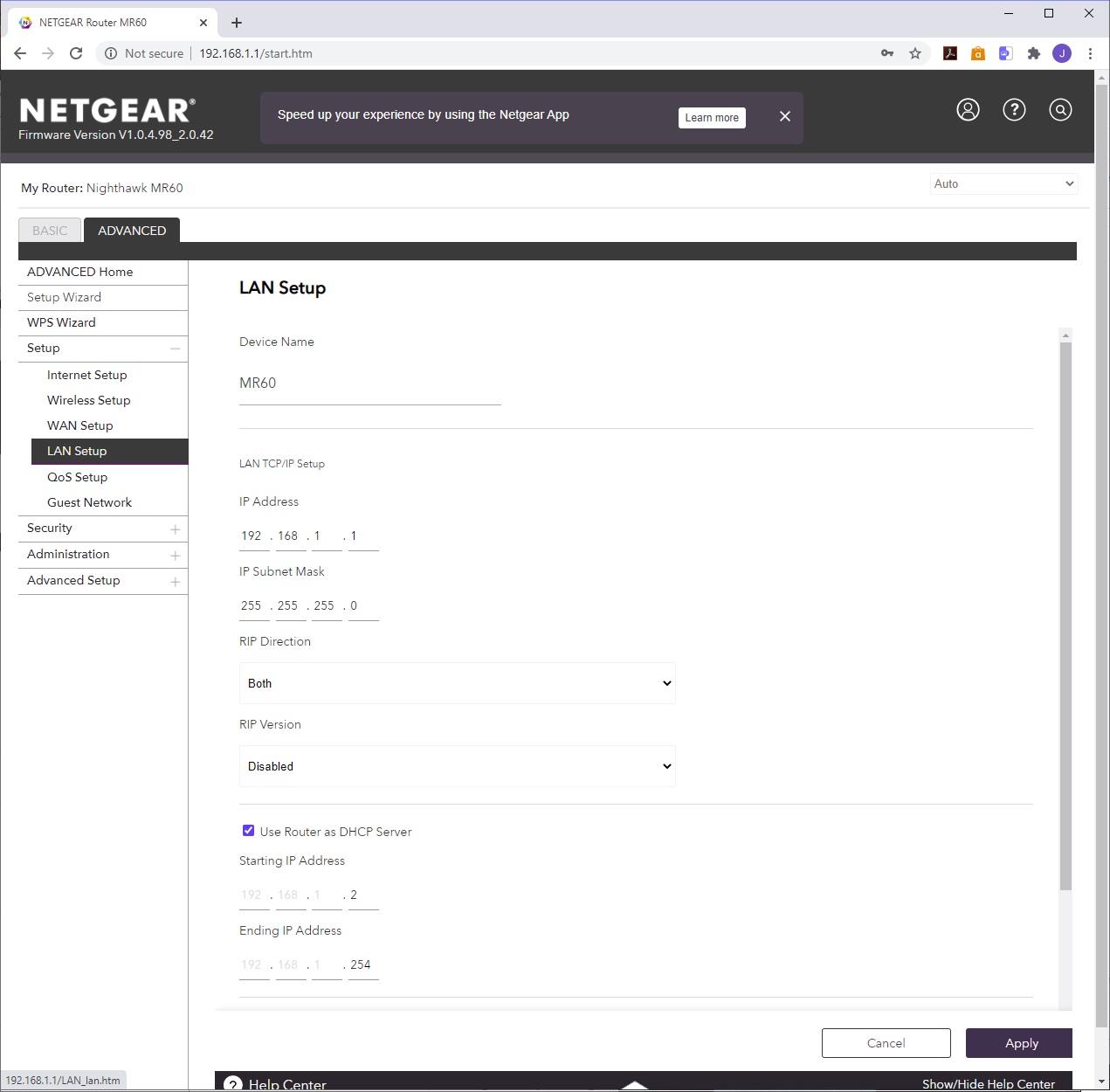
Two tabs - BASIC and ADVANCED. It might be under the Advanced tab to modify the DHCP scope
polar trellis
Weirdly no tab labelled DHCP
 peak cloak
what are you trying to do?
copper rover
polar trellis
This?
Yes
polar trellis
WOO
polar trellis
peak cloak
what are you trying to do?
Get back into my Pi Hole that's on a different IP range (the one from my old router/modem)
copper rover
I recommend starting the scope at 100, and ending in 199. I doubt you will have more than 99 devices in your home
polar trellis
Well it's the 192.168 part that's the issue. The previous router was 10.0.0.X
peak cloak
yeah
peak cloak
polar trellis
Get back into my Pi Hole that's on a different IP range (the one from my old rou...
if you want to do that, get a laptop, plug it directly into pi, statically assign IP to laptop
copper rover
That would be easier, to just change the local subnet to what it was before
peak cloak
I assume Pi IP is static?
polar trellis
Yes.
polar trellis
peak cloak
if you want to do that, get a laptop, plug it directly into pi, statically assig...
Oh lemme do that
peak cloak
polar trellis
Oh lemme do that
what was IP of pi?
copper rover
Oh wait, I think you can setup the local subnet
polar trellis
10.0.0.69
copper rover
 peak cloak
polar trellis
10.0.0.69
peak cloak
polar trellis
10.0.0.69
so set laptop IP and subnet to something like 10.0.0.2 and 255.255.255.0
should be able to communicate with the pi
polar trellis
peak cloak
so set laptop IP and subnet to something like 10.0.0.2 and 255.255.255.0
and that's in the ethernet adapter's properties right?
peak cloak
ye
polar trellis
Rad, I'll try that
copper rover
So, you have two paths to handle this problem.
Option 1. Reconfigure your Pi-Hole box to use the 192.168.1.x subnet.
Option 2. Reconfigure your new router to use the 10.0.0.x subnet, thereby not having to mess with the Pihole (in theory).
peak cloak
option 1 is better
copper rover
Personally, I think using the 192.168.1.x subnet is awful because so many people use that too. I always chose a 10. something.
10.0.10.x would be ok to start with for example
peak cloak
copper rover
Personally, I think using the 192.168.1.x subnet is awful because so many people...
no 192.168.0.0/16 is better
since it has kinda been established as the defacto home network subnet
corperate network VPNs can cause issues
copper rover
Going to suck if he want's to roll his own VPN and he's trying to connect from another network using the same subnet
That's why a loath using 192.168.1.x
polar trellis
So I have the laptop's ipv4 settings as you said
peak cloak
then use 192.168.69.x
polar trellis
Ethernet plugged into pi and laptop
Now am I meant to ssh into it? I tried typing the ip in Chrome but it didn't work
peak cloak
try pinging the pi
polar trellis
Unreachable.
polar trellis
Kk


 peak cloak
also, do you see the ethernet lights blinking?
peak cloak
polar trellis
yeah you didn't set the IP
polar trellis
They do be blinking on the ethernet to micro USB adapter.
Yeah I noticed it reset it lol

Sorry, on my dad's laptop so I can't just do ez screenshots
Is this correct?
peak cloak
looks fine
polar trellis
Oh I didn't press ok on the main ethernet adapter properties prompt
Now it's showing up on chrome
 winter elbow
Does anyone know anything about Myrtille, it's like Apache Guacamole but better? ( Like an all in one combo. ) I need some help setting it up.
https://github.com/cedrozor/myrtille

GitHub
A native HTML4 / HTML5 Remote Desktop Protocol and SSH client - GitHub - cedrozor/myrtille: A native HTML4 / HTML5 Remote Desktop Protocol and SSH client
peak cloak
polar trellis
Now it's showing up on chrome
yeah so just set the ip settings to dhcp
hopefully that should be it
polar trellis
peak cloak
yeah so just set the ip settings to dhcp
Rad. Just gotta remember the password lmao. Thank you!
peak cloak
polar trellis
Rad. Just gotta remember the password lmao. Thank you!
and don't forget to change laptop IP settings back
I've done that before
polar trellis
peak cloak
*and don't forget to change laptop IP settings back*
good call haha
polar trellis
peak cloak
*and don't forget to change laptop IP settings back*
Uh how do I re-enable dhcp? I'm putting in this, but when I hit enter it complains about a Mac address being ()
 peak cloak
polar trellis
Uh how do I re-enable dhcp? I'm putting in this, but when I hit enter it complai...
peak cloak
polar trellis
Uh how do I re-enable dhcp? I'm putting in this, but when I hit enter it complai...
well do you want the pi to be a dhcp server?
that will cause conflicts with router dhcp server
want you want is for it to be a dhcp client
peak cloak
it's prob in IP settings
if not, just use cli
what does /etc/network/interfaces look like rn @polar trellis
polar trellis
Sorry, is that in the web client?
peak cloak
no
polar trellis
Or you mean putty
peak cloak
actually it may be safer to set a static IP in the network for now
peak cloak
polar trellis
Or you mean putty
console
I don't get why putty is so popular tbh
just ssh user@192.168.1.1. works in powershell
winter elbow
Does anyone know anything about Myrtille, it's like Apache Guacamole but better? ( Like an all in one combo. ) I need some help setting it up.
https://github.com/cedrozor/myrtille
GitHub
A native HTML4 / HTML5 Remote Desktop Protocol and SSH client - GitHub - cedrozor/myrtille: A native HTML4 / HTML5 Remote Desktop Protocol and SSH client
polar trellis
Oh weird. Lemme try that then
 cursive valve
Use windows terminal ya foos
peak cloak
polar trellis
Oh weird. Lemme try that then
putty does the same thing, fyi
polar trellis
So I'm trying to connect to 10.0.0.69. Asks for pw. Typing doesn't seem to do anything.
Is that normal? Like the little box for text doesn't move
peak cloak
polar trellis
Is that normal? Like the little box for text doesn't move
yes
linux for passwords doesn't have **** or something
it's just blank
polar trellis
Balls that means I gotta remember this password too lmao. I thought I made it easy
... Time to look into resetting the password. Ffs I could've sworn I knew it.
cursive valve
Passwd
polar trellis
cursive valve
Passwd
Is that a command I'm supposed to use?
peak cloak
polar trellis
Is that a command I'm supposed to use?
it's a command to change the password
but you have to be in first...
polar trellis
Lmao WELP
cursive valve
Oh… facts
polar trellis
Google to the rescue
Oh... I can just reset the SD card... Couldn't I.
It'd mean redoing it all, but still
peak cloak
polar trellis
Oh... I can just reset the SD card... Couldn't I.
yes
polar trellis
Yeah I think I'll just do that
polar trellis
So I keep trying to assign a static IP to my Pi, resetting the Pi, and hoping it takes. It refuses. It IS, however, always popping back up on the same ip 192.168.1.21
faint bronze
Have you disabled the DHCP client?
peak cloak
polar trellis
So I keep trying to assign a static IP to my Pi, resetting the Pi, and hoping it...
in the cli show output of cat /etc/network/interfaces
polar trellis
Weirdly enough, when I ssh into it, it won't accept the Pi default password
oh wait
peak cloak
you took sd card out, and re did the iso thing?
peak cloak
polar trellis
Weirdly enough, when I ssh into it, it won't accept the Pi default password
it needs to be ssh pi@ip
and make sure ssh is enabled
polar trellis
yeah, I'm in now
polar trellis
peak cloak
in the cli show output of `cat /etc/network/interfaces`
how do I get to here
...nvm
polar trellis
interfaces(5) file used by ifup(8) and ifdown(8)
Include files from /etc/network/interfaces.d:
source /etc/network/interfaces.d/*
polar trellis
did it.
peak cloak
this lists files in the /etc/network/interfaces.d directory
peak cloak
polar trellis
did it.
and?
polar trellis
lmao nothing at all
peak cloak
huh
polar trellis
pi@raspberrypi:~ $ ls /etc/network/interfaces.d
pi@raspberrypi:~ $
I press enter and it just asks for the next input
peak cloak
ah, I forgot, you actually need this file
/etc/dhcpcd.conf
so do cat /etc/dhcpcd.conf
peak cloak
polar trellis
well that spit back a lot of text so I won't clog chat with it haha
dm it if you want
waxen scroll
faint bronze
Does the A-1000 then mean that it is plugged in and activated at 1000mbps?
yes
A does not mean activated though, just means auto
ports that are down but are configured for auto just say auto
polar trellis
tfw i was just a dumbass and didn't realize I was trying to use a static IP that was in use.
faint bronze
Imagine what would happen if a device responds to all the arp request that come it's way.
tender hazel
@peak cloak btw, routeros v7 is almost at the place where you could use it instead of VyOS for DN42 if you wanted without really losing out on anything
tender hazel
peak cloak
*but vyos is free*
for a virtual CHR router, the pricing for 1Gbps traffic is pretty cheap.. like $40 and free upgrades for life
so not free but.. not expensive at all
every system has its own syntax.. the vyos syntax makes sense, json based, but outside of ubiquiti EdgeOS which is based on VyOS, not really common
peak cloak
tender hazel
every system has its own syntax.. the vyos syntax makes sense, json based, but o...
I thought it's somewhat similar to Juniper?
tender hazel
I guess it is somewhat similar to juniper
I mostly use Cisco IOS, HPE comware switches, things like that
it doesn't look like it is actually real JSON but just JSON-like
doing a google search for JSON and juniper seem to suggest it is some kind of JSON conversion
but we don't use juniper stuff.. too expensive by far
peak cloak
from what I understand at&t developed vyatta which is what vyos is based on
and now there is also DANOS
tender hazel
sure.. something to be said for buying a product from a company that gives free support though, so if you have problems at least you have a recourse that doesn't involve just searching forums and things like that.. especially if it involves bugs
waxen scroll
Idk. I quite like paid support.
faint bronze
@tender hazel DN42 means "Decentralized network 42" which is a way of doing VPN kinds of tasks. Whats the difference between that and normal global scale networking? Whats decentralized in DN42?
tender hazel
waxen scroll
Idk. I quite like paid support.
I like it too, but at what cost?
and how good is it? as an example, we had a major issue that it took cisco two years to fix.. with paid support
peak cloak
faint bronze
<@!530075635423510548> DN42 means "Decentralized network 42" which is a way of d...
well I find it's used more for learning, but basically it's a bunch of people running routers and creating bgp and ip transit sessions over various tunnels, the most popular is wireguard
tender hazel
similar issues we had mikrotik fix within a few weeks
peak cloak
peak cloak
well I find it's used more for learning, but basically it's a bunch of people ru...
so it's basically a virtual internet
you need to get IP range assigned to you, an AS number, etc.
faint bronze
So kinda like TOR? Except not as much privacy.
peak cloak
not really
I like to think of it as a virtual internet, so you can play with bgp, etc. stuff you can't really do irl without paying a lot
tender hazel
there are a few resources you can access over dn42
for the most part it is just for testing stuff
when I connected to dn42 it was really mostly about just playing around with stuff
peak cloak
yeah, I wanted to learn about bgp
tender hazel
with the new features in routeros v7 I no longer have a second class experience on DN42