#networking
1 messages · Page 371 of 1
 primal ice
yeah you can try that.
 viral sleet
ah shit yea it's booted up
let me connect it
yeah no internet either
right I need to disable DHCP
primal ice
are you getting internet if you connect it to the main router?
viral sleet
yeah
if i wanted to access the D-Link panel do I need to go on 192.128.1.10 now? or is it still 192.168.0.2
 pulsar thorn
1.10
viral sleet
neither are working
pulsar thorn
Connected to dlink?
viral sleet
yeah
primal ice
192.168.1.10
pulsar thorn
viral sleet
if i wanted to access the D-Link panel do I need to go on 192.128.1.10 now? or i...
Just noticed typo in 192.168.1.10...
Make sure you got it right haha
You might have to set an ip address manually on whatever device you're trying to access it with


 pulsar thorn
Okok
In your phone settings do you have an ip address?
Also you need to make sure you disable dhcp server in Settings > Network > Advanced Settings... on dlink
viral sleet
 viral sleet
pulsar thorn
Also you need to make sure you disable dhcp server in Settings > Network > Advan...
viral sleet
pulsar thorn
Also you need to make sure you disable dhcp server in Settings > Network > Advan...
i didnt do that yeah but trying to access it now I can't do it
oh, connected to the main router allows me to open the panel
pulsar thorn
Oh ok
viral sleet
what did I do that doesn't let me connect to the panel if I'm connected to the D-Link? but instead I have to be connected to the TP-Link?
pulsar thorn
Possibly dhcp is still enabled on dlink, so when you connect to it, dlink tells your device that it is the gateway to the internet, and not tplink
viral sleet
just disabled DHCP, restarting in 20s
pulsar thorn
Ok...
primal ice
you have to set that up.
viral sleet
 viral sleet
primal ice
you have to set that up.
viral sleet
primal ice
you have to set that up.
do you mind helping out with that too?
pulsar thorn
That's weird, i have the same setup on PfSense and it grabs an IP address within seconds
 peak cloak
pulsar thorn
That's weird, i have the same setup on PfSense and it grabs an IP address within...
peak cloak
pulsar thorn
That's weird, i have the same setup on PfSense and it grabs an IP address within...
the same second router?
primal ice
connect to the tp-link go to the d-link gui go to settings get a screen shot.
peak cloak
@viral sleet you connected the main router to the second router via WAN or LAN now?
wasn't following
viral sleet
LAN to Internet
peak cloak
try LAN to LAN now
viral sleet
alright
primal ice
yeah yeah
viral sleet
uu
primal ice
I thought he had gone lan to lan.
peak cloak
wdym, so wifi gets internet access?
viral sleet
Yeah
peak cloak
but not when connected to ethernet?
viral sleet
but LAN isn't getting internet access
peak cloak
weird
primal ice
the other lan ports should get internet access too.
viral sleet
holy fuck
 primal ice
in the gui it will show as disconnect
 viral sleet
yeah but how It can go through the 5ghz node
this other router has 5ghz aswell
let me test out the range
primal ice
his wifi is not its the d-link
peak cloak
what you could try too now is have both of them be the same SSID
so you have some sort of roaming, it won't be seamless but still
primal ice
your wifi is going to the dlink now which has better antenna. the it goes wired from the dlink to the tp-link.
eh I would probably leave them separate wifi networks
viral sleet
the living room xbox can't connect to it, it fails checking
nevermind apparently xbox live core is having an outage
thanks a lot guys
I owe you lots
I hope this works out and I get to keep the router's in my room lmao
primal ice
glad to of helped
pulsar thorn
Xbox live is down? Damn i was gonna play forza later
viral sleet
yeah it's the second day in a row
primal ice
could be his CDN of xbox.
viral sleet
my little siblings keep bugging me out about it, I have to force login every like 30 minutes because it keeps kicking them out of their user accounts and failing to log back in, and they don't understand outages so they don't listen lmao
offline games work fine
anything with login, sucks lots
pulsar thorn
Oh bruh mine was fine yesterday
viral sleet
hm actually
xbox status only reports issues with a 2K game and updates, but nothing about profiles or accounts
I'm actually now wondering if im still having the same issue
assuming I had to move the routers I don't have to set anything up for it to work right? I'd just need to connect the two of them together and it's already pre-configured
peak cloak
in theory, yes
viral sleet
for LAN I'll just connect it to the main router for now, unless you guys say it should be working
is there any settings I should configure for the lan to work?
pulsar thorn
Is your lan not working?
viral sleet
let me try another LAN port, it's currently connected to PORT 1
port 4 immediately worked
okay lan is working, all should be good then
pulsar thorn
Ok you had me worried for a second haha
viral sleet
Türk telekom just added a 200mbps campaign so... might upgrade to that but who knows
I'm really tempted to
Thanks a lot guys @pulsar thorn @primal ice @peak cloak, sorry for the ping I just wanna say thanks because this means a lot like really so much
pulsar thorn
I can’t get past 100/20 here
pulsar thorn
viral sleet
Thanks a lot guys <@309253874705891328> <@276416749363134474> <@2224822698293329...
No worries haha, glad we could help
peak cloak
I can go up to symetrical gig fiber, but I just have 300/300 since I don't really need it
 unkempt prawn
i have located ushie
peak cloak
viral sleet
Thanks a lot guys <@309253874705891328> <@276416749363134474> <@2224822698293329...
np
viral sleet
pulsar thorn
I can’t get past 100/20 here
was the same for me but my carrier just expanded its campaign, really hope the same goes for you soon
viral sleet
unkempt prawn
i have located ushie
shhh go back to samsung
unkempt prawn
make me
pulsar thorn
We have fibre to the curb here, so NBN (iykyk) have fibre to the top of the driveway, and then copper for 15m into a dsl modem
viral sleet
now I need some way to make this look not so stupid
viral sleet
pulsar thorn
We have fibre to the curb here, so NBN (iykyk) have fibre to the top of the driv...
wtf
that's depressing (if I understood right)
pulsar thorn
You’d think they could run fibre the entire way right?
pulsar thorn
It’s $3k aud for me
peak cloak
fiber itself is pretty cheap
pulsar thorn
It would cost one of my mates $15k
My girlfriend can’t get a quote, she lives 2km away from the nearest fibre drop
peak cloak
too much
I could technically get 10gig I think from zayo here, but it would expensive and apparently zayo sucks
pulsar thorn
Why is european internet so much better than australian?
pulsar thorn
Oh my googling was bad then
pulsar thorn
I look up zayo and see "zayo.com/fr" and "zayo.com/uk"
peak cloak
ah
pulsar thorn
Yeah fair enough
pulsar thorn
Oooh submarine cables
peak cloak
it's not 100% accurate since it require reporting of lines ofc, but still cool
viral sleet
lmaooo u know what I just realised
peak cloak
I have Lightower and zayo near me
 pulsar thorn
peak cloak
I have Lightower and zayo near me
pulsar thorn
peak cloak
I have Lightower and zayo near me
Doesn't tell me anything about where I live lol
pulsar thorn
viral sleet
it doesnt feel like 1hz tho
Unplug and replug?
 pulsar thorn
There used to be a great website that had every single property and what connection types they had, estimated speeds etc
Had everything from satellite to DOCSIS to FTTP
peak cloak
fcc has something similar, kinda stupid they show how "good" a place is on total number of available ISPs not how good the speed is

FCC Fixed Broadband Deployment
This application provides a visualization of the residential fixed broadband deployment data collected on FCC Form 477. Facilities-based providers of broadband service report Form 477 data in June and December each year. Providers report fixed-broadband deployment data at the census block level. Form 477 data are reported using 2010 Census block...
so basically everyone gets sat as an option
primal ice
us zayo is just way over congested they are one of the major back bone providers but they constantly under provision - or basically over congest their network so you get constant packet loss at their major hubs.
 pulsar thorn
Just found this
 peak cloak
and atlice is fiber now, not cable
it's stupid too, the fiber ONT, is also the all in one router
so you have to mess with passthough apparently and you are at the mercy of atlice
pulsar thorn
That's what I hate about some providers, the stupid ONT thing
peak cloak
while verizon is just a simple dumb ONT
pulsar thorn
Just give us a fibre connection direct into our router please
pulsar thorn
With NBN majority is just a dumb modem like your Verizon thing, plug your own rj45 router in and you get an ip address
It's a shame that with FTTP you can't use your own fibre modem
peak cloak
I mean you can, depends on the tech they use
pulsar thorn
When I get it I'm definitely gonna test it
peak cloak
And how locked off they are
Like people have successfully been able to use just direct sfp with att I think
Still requires Mac changing, cert changing, etc
pulsar thorn
With Fibre to the Curb you're meant to use NBNs proprietary dsl modem, as it shoves 60v back up the line to power the fibre-to-copper thingo in the pit. I got past it, although using my own modem I had horrid speeds
pulsar thorn
Yeah but i get 100/20 most the time
It's funny I was gonna do a massive writeup on it
Hang on lemme grab my notes
peak cloak
With fiber there's lots of different ways of doing things unlike for example coax
Coax you just have dociss, and it's shared
pulsar thorn
I basically had a splitter in the phone jack with both NBN modem and my own dsl modem plugged into either port. As soon as I connect my own modem the NBN box disconnects, and within 5 minutes my personal modem had an uplink
peak cloak
But with fiber, you can have active fiber, passive fiber, different types of pon, you need to set your vlans right since iptv can be on vlan 10 while internet is on vlan 20 for example
pulsar thorn
I hope the bot doesn't pick this up as spam:
10:21: Speedtest through NBN NCD https://jcksn.rip/by
10:51: Speedtest through DSL modem (ANNEX M + SRA off) https://jcksn.rip/bz
10:56: Speedtest through DSL modem (ANNEX M + SRA on) https://jcksn.rip/ca dropped out after a few minutes
11:07: Speedtest through NBN NCD https://jcksn.rip/cb
Yeah coax here is weird some people can get 250/50 in a valley yet people next to the main road get 50/20
It's weird with my speedtests because as soon as I start using the NBN dsl modem my speeds are much higher than usual, almost like something is making up for a lower quality dsl modem that was connected before
peak cloak
It's expecting high voltage?
pulsar thorn
I still have nbn ncd plugged in the whole time, so I'm still able to get a response from the street
It's just a 60v dc 450ma output
I'm sure you could easily make an adapter for your own modem
peak cloak
pulsar thorn
I still have nbn ncd plugged in the whole time, so I'm still able to get a respo...
Oh, prob weird thing with having 2 idk dsl
pulsar thorn
Yeah idk how it all works
All I know is that my internet was slower so I won't run that setup
Especially if I already have a working setup with PfSense
 latent bobcat
question, if my router's DHCP is 10.0.0.2==>10.0.0.255, can i set my device static ip to 10.0.1.1
as long as i set the gateway properly
peak cloak
latent bobcat
question, if my router's DHCP is 10.0.0.2==>10.0.0.255, can i set my device stat...
Yes but no
What is the routers subnet
And what is dhcp advertising
It's probably 255.255.255.0 aka /24
latent bobcat
yeah its /24
peak cloak
10.0.1.1/24 is not in the same network as 10.0.0.1/24 which is assume is router IP
latent bobcat
i have the device's ip set to 10.0.0.201 because i know i can do that
peak cloak
So it wouldn't know how to get to 10.0.1.1 since it's not in the same subnet
You could change the subnet mask, but honestly just change the DHCP range to like start at 30 or something so you can put static ips at the start of the subnet
Or better yet, use static DHCP leases
Dhcp reservation, whatever it's called
pulsar thorn
peak cloak
Dhcp reservation, whatever it's called
Correct
latent bobcat
peak cloak
You could change the subnet mask, but honestly just change the DHCP range to lik...
oh yeah tahts true i can do that
thanks kings and presentmonkey
 copper rover
latent bobcat
question, if my router's DHCP is 10.0.0.2==>10.0.0.255, can i set my device stat...
copper rover
latent bobcat
question, if my router's DHCP is 10.0.0.2==>10.0.0.255, can i set my device stat...
Only if the Subnet Mask is 255.255.254.0. That will let you have IP range from 10.0.0.1 - 10.0.1.254
The Subnet has to be set on both the router as well as the client PC (if static)
 plain siren
peak cloak
Like people have successfully been able to use just direct sfp with att I think
plain siren
peak cloak
Like people have successfully been able to use just direct sfp with att I think
Damn AT&T
viral sleet
kings or presentmonkey or drako (not gonna ping not in a hurry), if i were to add a 3rd router I'd basically do the same thing but with 1.11? or should I choose a different IP
 thick minnow
Is it passable to make comenection bettwen to computers without a router? I need to connect my ipmi card to my laptop
 slow pivot
thick minnow
Is it passable to make comenection bettwen to computers without a router? I need...
slow pivot
thick minnow
Is it passable to make comenection bettwen to computers without a router? I need...
Sure, why wouldn’t it be ok to do that?
slow pivot
Well you would need to use an ip for each device that is on the same network, say 192.168.2.4 and 192.168.2.5
255.x.x.x is reserved for network masks only so you can’t use that range as an ip address
thick minnow
OK thanks
 hollow marlin
You wouldn't use 2.4 and 2.5. 192.168.2.4/30 (mask ending in 252) is a network address. You'd use .1/.2 or .5/.6
thick minnow
?
slow pivot
hollow marlin
You wouldn't use 2.4 and 2.5. 192.168.2.4/30 (mask ending in 252) is a network a...
Er, you can use any two ips. They just want connectivity between two machines. Would need to use 255.255.255.0 or /24 for the netmask though
Or any larger netmask would work
thick minnow
Why larger can't I use smaller?
hollow marlin
You can
thick minnow
Its only two NICs
hollow marlin
I gave the example above if you require only two IPs. I was only pointing out if you are using a /30, x.x.x.4 would not be a usable
slow pivot
thick minnow
Why larger can't I use smaller?
Ok are you trying to setup a permanent ip config between these two machines?
thick minnow
I will tell u for want is it
I have a one powerful server with ipmi and I have pfcense as a router if the machine going off I need to go to ipmi
slow pivot
If that is the case, I would assign a static ip to both your computer that you want to access ipmi from and the ipmi interface that maps to one of the networks already configured on your pfsense router
slow pivot
That shouldn’t matter if both client computer and the ipmi interface are statically configured on the same network. I am only suggesting you use one of the networks you have configured already as that makes it easier to setup
 oak peak
hey i have a problem
slow pivot
Well dhcp can be configured to hand out ips in a subrange of the network you have defined. You can then statically assign the remaining ips in the network. Gets around the problem of when the dhcp server is down
oak peak
how come i have this wifi but only 18 mbps when downloading a game on steam?

someone know why?
slow pivot
oak peak
how come i have this wifi but only 18 mbps when downloading a game on steam?
Because that speed test doesn’t measure the speed of steam’s cache servers or the download itself from steam
oak peak
slow pivot
Because that speed test doesn’t measure the speed of steam’s cache servers or th...
i know but ive had over 100 mbps on steam before so like it doesent really make sense to me
slow pivot
oak peak
i know but ive had over 100 mbps on steam before so like it doesent really make ...
You are downloading from a public server that might be experiencing all sorts of different performance factors than just your network connectivity.
oak peak
slow pivot
You are downloading from a public server that might be experiencing all sorts of...
ok makes sense now thank you
 blazing gorge
Anyone use a firewall for their home network cause they can?
 low pond
what
blazing gorge
a hardware firewall rather
 waxen scroll
hollow marlin
I gave the example above if you require only two IPs. I was only pointing out if...
waxen scroll
hollow marlin
I gave the example above if you require only two IPs. I was only pointing out if...
nerd
 north mulch
blazing gorge
Anyone use a firewall for their home network cause they can?
north mulch
blazing gorge
Anyone use a firewall for their home network cause they can?
yes, but it gets messy real quick if you're new to it. I'm still learning myself.
waxen scroll
blazing gorge
Anyone use a firewall for their home network cause they can?
no. I have to play network at work and my home is not also a place I want to play network
blazing gorge
Yeah I’m looking at the one that has RouterOS. I’m about to put in another raspberry pihole cause mine died
peak cloak
blazing gorge
Yeah I’m looking at the one that has RouterOS. I’m about to put in another raspb...
Which one? Since when does mikrotik make firewall appliances
A hardware firewall for home use is not really needed tbh, just use router for firewall rules
blazing gorge

Mikrotik hEX RB750Gr3 5-port Ethernet Gigabit Router
peak cloak
Just a hex
blazing gorge
peak cloak
A hardware firewall for home use is not really needed tbh, just use router for f...
yeah i know i just want to learn them and its a good way to learn
peak cloak
Not really a firewall
blazing gorge
i have a netgear nighthawk router it doesn't realliy have that much in the way of firewall
 clear igloo
waxen scroll
no. I have to play network at work and my home is not also a place I want to pla...
clear igloo
waxen scroll
no. I have to play network at work and my home is not also a place I want to pla...
You know you want a 3 blade Firepower 9300 😄
 feral depot
Does anyone Know how to use your own Router-modem Using FIOS?
peak cloak
feral depot
Does anyone Know how to use your own Router-modem Using FIOS?
ye
find the ONT, run a ethernet cable to your own router, no modem needed
you don't replace ONT
if currently on Moca (means coax from ONT to fios router) you need to also call them to move it to ethernet
if you are using their tv it's a bit more complicated I think, I don't have TV so idk how that works
 rocky badge
@clear igloo @waxen scroll Wireless ground 😮 🤯

 silver tartan
#propi aka professional VPN Server

 nimble sable
peak cloak
if currently on Moca (means coax from ONT to fios router) you need to also call ...
nimble sable
peak cloak
if currently on Moca (means coax from ONT to fios router) you need to also call ...
coax from ont to fiber router? the hell would anyone do that for?
rocky badge
Use existing coax in place
peak cloak
nimble sable
coax from ont to fiber router? the hell would anyone do that for?
ONT terminates fiber, MOCA over coax for transport to router
nimble sable
oooh that makes sense
rocky badge
If they had DOCSIS before, why not reuse coax
peak cloak
but mine is inside
rocky badge
for most consumers, MoCA is plenty
peak cloak
rocky badge
for most consumers, MoCA is plenty
although I heard that now if you want gigabit they need ethernet?? although moca can do gigabit
nimble sable
so...moca is just a way to use coax cables for digital signal?
rocky badge
MoCA 2.5 should do way more than Gigabit
peak cloak
nimble sable
so...moca is just a way to use coax cables for digital signal?
moca is like powerline but over coax
and much better
rocky badge
it can even have a splitter for multiple as well
nimble sable
oh thats awesome, didn't know coax was still being developed for
peak cloak
cable companies are still trying to get the most bandwidth out of it
nimble sable
why did we switch to fiber then?
peak cloak
fiber is better
nimble sable
like time was coax was the most popular way to get internet to your house
rocky badge
DOCSIS is just IP over MPEG frames

While most fiber (GPON) is time division multiple access, it can happen a lot faster and more data can be sent through it
peak cloak
and then the thing with fiber is that you have active and passive fiber
 smoky estuary
peak cloak
cable companies are still trying to get the most bandwidth out of it
smoky estuary
peak cloak
cable companies are still trying to get the most bandwidth out of it
My ISP is planning to have gigabit fully rolled out over its DOCSIS/Coax Cables by the end of the year (im in england)
rocky badge
DOCSIS can be capable of very high data rates but cable TV 🥴
 peak cloak
rocky badge
DOCSIS can be capable of very high data rates but cable TV 🥴
peak cloak
rocky badge
DOCSIS can be capable of very high data rates but cable TV 🥴
takes up too much of the spectrum?
nimble sable
peak cloak
fiber is better
sorry i'm still confused about better how
rocky badge
Like Spectrum and Comcast
smoky estuary
nimble sable
sorry i'm still confused about better how
Fibre has way better upload speeds
rocky badge
Both of their newer boxes can access YT/Netflix and other IP services
peak cloak
nimble sable
sorry i'm still confused about better how
no electrical interference, high bandwidth
nimble sable
pretty sure my Service Provider just uses the internet to deliver TV
rocky badge
Not uncommon depending on the ISP
smoky estuary
My isp offers gigabit but with 1100 down but 50 up
nimble sable
peak cloak
no electrical interference, high bandwidth
aah
rocky badge
Especially for ones that aren't cable
peak cloak
smoky estuary
My isp offers gigabit but with 1100 down but 50 up
dociss right?
smoky estuary
peak cloak
dociss right?
mine uses docsis
rocky badge
DOCSIS 3.1 can do up to 1Gbps up but that hasn't been deployed irl
peak cloak
since they allocate a lot more for download than upload
nimble sable
wait, there's an extra 100 in there
rocky badge
4.0 can go up to 6Gbps
peak cloak
I honestly rather have something like 500/500 than 1000/50
I have 300/300 rn which is the lowest plan
rocky badge
it seems as my ISP keeps getting more customers the service keeps getting better 😂
peak cloak
rocky badge
it seems as my ISP keeps getting more customers the service keeps getting better...
local?
smoky estuary
This is what the best I can get
 rocky badge
yay for them not just adding more and more customers on the same shit
rocky badge
peak cloak
local?
Yes
peak cloak
smoky estuary
This is what the best I can get
advertises as fiber
isn't fiber
nimble sable
is the "low upload speed" trend just a way to curtail regular home users having servers or smthg?
rocky badge
I went from 7-10ms to the gateway
peak cloak
nimble sable
is the "low upload speed" trend just a way to curtail regular home users having ...
no
rocky badge
to 4ms now
peak cloak
just allocation of bandwidth
smoky estuary
its probably fibre to an external cabinet, then converted to docsis from there
silver tartan
smoky estuary
This is what the best I can get
The upload is shit
rocky badge
yup, FTTN then coax last mile
smoky estuary
silver tartan
The upload is shit
i know
peak cloak
smoky estuary
its probably fibre to an external cabinet, then converted to docsis from there
your internet is fiber at some point everywhere sooo
nimble sable
smoky estuary
its probably fibre to an external cabinet, then converted to docsis from there
yea see in that case wudnt 500/500 make more sense than 1000/50?
smoky estuary
peak cloak
*your internet is fiber at some point everywhere sooo*
every provider in england advertises their internet as fibre, even the ones relying on copper phone networks
peak cloak
rocky badge
Yes
I wish, optimum here used to be kinda a more local company, until it got bought by atlice
 nimble sable
so, ONT doesn't have to convert to ethernet then? there are ONT's that convert to other things?
rocky badge
Usually ONTs convert fiber (GPON/or such) to Ethernet frames
peak cloak
no, verizon's ONT has voice, moca, and ethernet ports
rocky badge
From there they can bridge VOIP VLAN and IPTV VLANs
peak cloak
it all goes over different vlans prob anyway
peak cloak
depends on config
so like it does something like vlan 10 to voice, vlan 20 to ethernet (simplification but that's the idea)
peak cloak
some sort yeah
nimble sable
why
rocky badge
Your router can't decode GPON
nimble sable
it cant?
peak cloak
ONT is a broad term, it can be a sfp module, a big ONT box
rocky badge
nimble sable
it cant?
no
nimble sable
aww dang
peak cloak
some ISPs offer sfp modules for their gpon config
rocky badge
GPON isn't Ethernet frames
nimble sable
@rocky badge oooh right right ok so something has to decode GPON into Ethernet
peak cloak
unless you have active Ethernet fiber
peak cloak
or just use a sfp module
nimble sable
so some ISPs can just give you an SFP module that you could put in your equipment?
peak cloak
ye
rocky badge
 nimble sable
so potentially in that scenario you could have all fiber internet access?
peak cloak
gpon still?
rocky badge
8 POTS lines, 4 DS1, 2 RJ45
peak cloak
nimble sable
so potentially in that scenario you could have all fiber internet access?
wdym
 peak cloak
oh like fiber all the way to pc, yeah
rocky badge
peak cloak
oh like fiber all the way to pc, yeah
I almost have that 😭
peak cloak
I mean it needs to get converted to copper at some point anyway
and fun fact, copper has less latency than fiber technically
nimble sable
peak cloak
wdym
so ISP signal comes in via GPON on fiber line, into an SFP module plugged into a router and then i just have an all fiber switch and all the computers have fiber
i guess INSIDE the computer it gets converted obvs
huh ok yea that maybe kinda silly
nimble sable
peak cloak
and fun fact, copper has less latency than fiber technically
it WHAT? i was always told the opposite
 peak cloak
the biggest thing with fiber is that is does not experience much to any interference
great for long range, and high bandwidth
but DACs in like a server rack are good for low latency
nimble sable
haha..i may have gotten fiber for my server rack just for the "cool factor"
pulsar thorn
when I saw the fibre lines that NBN were putting in the street during the upgrades they were CHONKERS, at least a few inches thick
never thought you could need something that big, but then you think about it and suburbs run on it
rocky badge
mostly for protection
peak cloak
yeah those are all bundles of lots of fibers with protection
rocky badge
The actual strands are small
peak cloak
ye
pulsar thorn
yeah i figured that, 14yo me was mega confused
rocky badge
Kinda like our 64 strand fiber that comes off the curb at school 🤣
nimble sable
rocky badge
I almost have that 😭
yea exactly, i wanted to see if i could get fiber to the PC...but don't think it's plausible in a reasonable manner past the ONT
pulsar thorn
rocky badge
Kinda like our 64 strand fiber that comes off the curb at school 🤣
I wish school would trust me to handle stuff like that :(
nimble sable
pulsar thorn
yeah i figured that, 14yo me was mega confused
my first exposure to fiber was the ISP was connecting mine and i asked him what it looked like and since he was splicing he showed me the core so i just assumed that's all it was
pulsar thorn
yeah i'd only ever seen super thin stuff online like whenever Linus shows it off
nimble sable
the core with a thin jacket like most other cablez
pulsar thorn
yeah exactly
rocky badge
pulsar thorn
I wish school would trust me to handle stuff like that :(
We actually have several now
rocky badge
Because we have multiple providers for fiber
nimble sable
yeap i think thats it
peak cloak
well depends on fiber I guess, MM vs SM
pulsar thorn
rocky badge
Because we have multiple providers for fiber
are you at a private school?
rocky badge
No
peak cloak
prob not all of those strands are active
rocky badge
They are not
pulsar thorn
rocky badge
No
wait USA?
rocky badge
pulsar thorn
wait USA?
yes
pulsar thorn
ok makes more sense then
peak cloak
my school district is it's own ISP technically
pulsar thorn
yeah here in Sydney it's a bit different
pulsar thorn
peak cloak
has it's own AS number
i think most do
peak cloak
I don't think so
rocky badge
We have our own /24 from the IP transit but not own peering
The fiber is only for interconnects
pulsar thorn
Here in NSW, every public elementary school and high school has a fibre connection with Telstra, but run layer 3 VPNs (i think idk this stuff that well) to a datacenter, so every school is in one massive network so it's easier for maintenance of devices or smth
nimble sable
peak cloak
has it's own AS number
ooh i think my university is that
rocky badge
Every school comes back on the same layer 2 switch 🤣
pulsar thorn
basically I can be at a school on one side of the state and access infra on the other side of the state
nimble sable
i FEEL like my workplace should be their own ISP/have their dedicated ASnumber but i don't thinkso
rocky badge

The X670-G2 Series provides high-density Layer 2/3 10Gb networking with low latency cut-through switching to enable enterprise aggregation and deployments.
peak cloak
pulsar thorn
basically I can be at a school on one side of the state and access infra on the ...
I mean that's what they do school district wise, but not state wide
rocky badge
Every school comes back to a port on this switch
pulsar thorn
Our school district is the entire state here
rocky badge
14 schools + 3 aux sites
peak cloak
here it's every town is usually it's own school district
pulsar thorn
big district :)
 pulsar thorn
peak cloak
here it's every town is usually it's own school district
pulsar thorn
peak cloak
here it's every town is usually it's own school district
that makes sense
rocky badge
The furthest site from the high school is 15 minutes
the HS is centrally located in the district
nimble sable
pulsar thorn
i think most do
looking at alist of ASNs here, huh "have my own ASN" doesn't seem to be as big a deal as I thought, most universities around here seem to
peak cloak
nimble sable
looking at alist of ASNs here, huh "have my own ASN" doesn't seem to be as big a...
I mean it's not really
just costs more
peak cloak
biggest advantage is you can have failover using the same ips
pulsar thorn
pull a facebook 
peak cloak
especially in ipv6 where you shouldn't use NAT (1:1 is still fine)
rocky badge
You're in more control of your network
nimble sable
pulsar thorn
makes speedtests look fancy
it does?
pulsar thorn
our network is entirely ipv4
pulsar thorn
nimble sable
it does?
yknow how you can see your ISP on speedtest.net?
peak cloak
nimble sable
it does?
it shows ISP
nimble sable
oooh is that based on ASN
peak cloak
yee
pulsar thorn
it just grabs the ASN from your IP address ye
peak cloak
it checks your public ip and checks what AS owns it
nimble sable
huh can one ASN span multiple locations and countries? didnt know that, that coudl be useful
peak cloak
why not
nimble sable
peak cloak
it checks your public ip and checks what AS owns it
oh cool gottta try that at work on monday
peak cloak
I technically have my own ASN, just not on public internet
pulsar thorn
useful if you want to be your own service provider
he.net is the weirdest site imo
has no ssl, yet helps you get an ipv6 tunnel for free
nimble sable
i figure companies get their own ASN for internal routing easiness
pulsar thorn
never seen it
peak cloak
nimble sable
i figure companies get their own ASN for internal routing easiness
more like external
peak cloak
pulsar thorn
never seen it
?
 pulsar thorn
peak cloak
it does
pulsar thorn
peak cloak
it does
i was wrong, they don't have automatic redirects :/
rocky badge
they do
peak cloak
^
pulsar thorn
sorry lol
peak cloak
@nimble sable if you want to learn some bgp check out DN42
it's kinda a virtual internet
waxen scroll
rocky badge
Every school comes back to a port on this switch
why
they should be using Cisco NCS
rocky badge

pulsar thorn
It just works maybe 🤷♂️
rocky badge
Because k12 IT budget be like
pulsar thorn
it's like saying "why is my principal a PE teacher" idk it's cheaper and it still does the job
rocky badge
They’re all extreme except for routing which is Cisco ASAs
waxen scroll
yeah but k12 pricing is like 80% off so they have no excuse
pulsar thorn
not always
rocky badge
waxen scroll
yeah but k12 pricing is like 80% off so they have no excuse
They want Cisco but pricing turned them off lol
nimble sable
i'm always surprised at schools that have cisco gear
i didn't think there are a lot, esp in k12
peak cloak
nimble sable
i'm always surprised at schools that have cisco gear
idk I see the opposite
primal ice
viral sleet
kings or presentmonkey or drako (not gonna ping not in a hurry), if i were to ad...
you are correct
viral sleet
primal ice
you are correct
thanks lots, planning to add another one next month and run cables around the house, a router in my room and 2 in the living room (the main and a good one)
nimble sable
peak cloak
idk I see the opposite
you mean you seea lot of schools with cisco gear?
peak cloak
nimble sable
you mean you seea lot of schools with cisco gear?
A fair bit, from personal experience and just from what other people say
pulsar thorn
viral sleet
thanks lots, planning to add another one next month and run cables around the ho...
I wanna have something like this that automatically hops between access points, problem is it's expensive for what I'm looking at
viral sleet
pulsar thorn
I wanna have something like this that automatically hops between access points, ...
like how expensive? and what are you exactly referring to?
pulsar thorn
I was looking at either Ubiquiti UAPs or TP-LINK Omada APs, they have the ability to force disconnect clients if they're closer to another AP
Roughly $250aud per ap
peak cloak
pulsar thorn
Roughly $250aud per ap
That expensive? I have the eap225 which is one of the cheaper ones and it can do that if I setup the controller, but I only have 1 AP so meh
rocky badge
$250 AUD is more than I spent on my most expensive AP, ofc converted to USD
peak cloak
Which one were you looking at
rocky badge
https://www.engeniustech.com/engenius-products/802-11ax-4x4-managed-indoor-wireless-access-point/ I've been looking at this AP....its like $600 and it won't integrate with my existing stuff either 😦
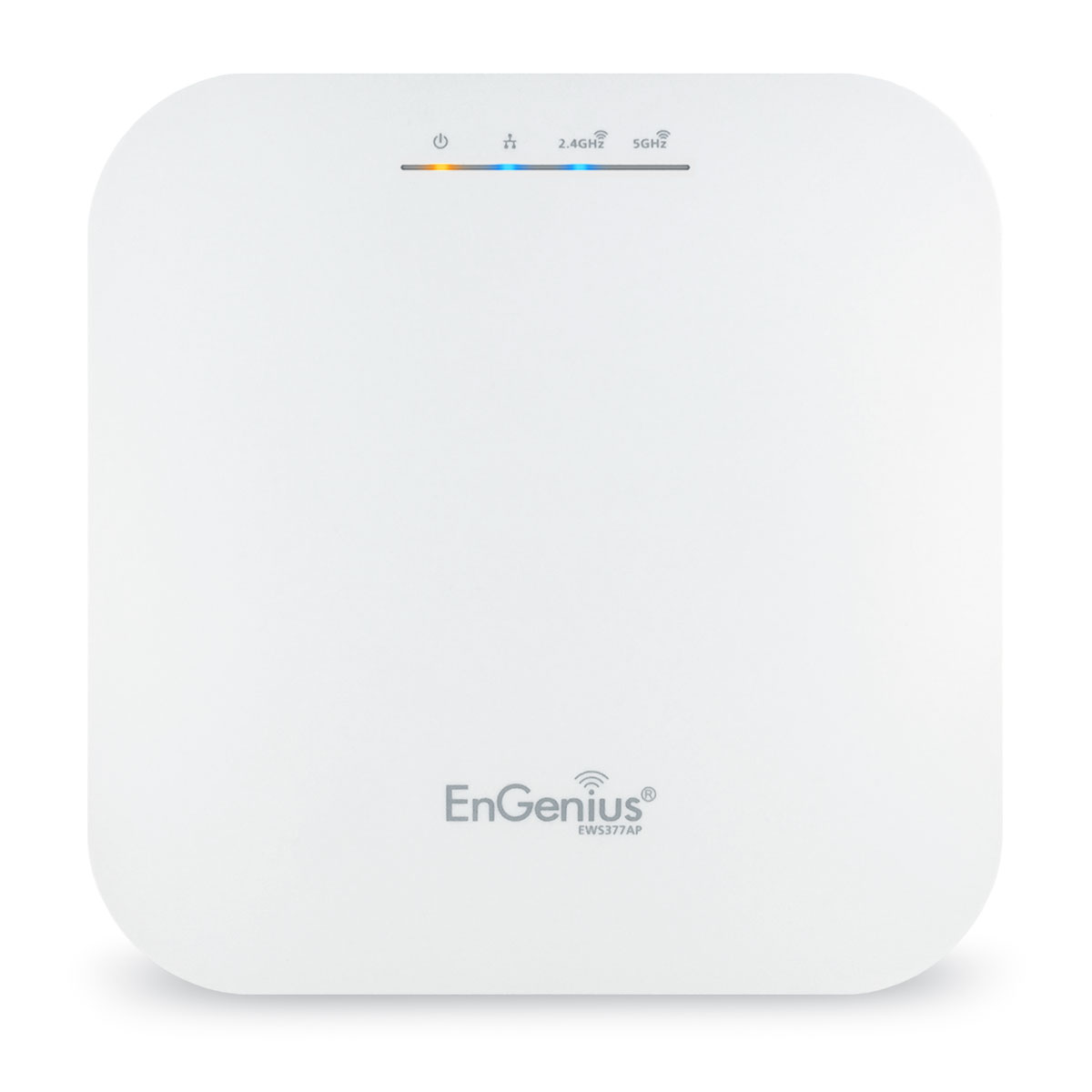
EnGenius EWS377AP WiFi 6 Access Point: 4x4 Managed Indoor Wireless features 802.11ax technology, which deepens and extends the capabilities of Wi-Fi.
but the hardware is so good
pulsar thorn
I'd be happy with anything that can cover my entire house
And is stable
This is our house at the moment, with the AP in my bedroom
 rocky badge
That's nice you have actual floorplans 😩
For one customer I did networking for....they didn't have floorplans
pulsar thorn
I did it with mums ipad haha
pulsar thorn
rocky badge
For one customer I did networking for....they didn't have floorplans
Big f, that's the worst
rocky badge
I literally just used a pic of the evac map
rocky badge
 pulsar thorn
Lmao was it to scale?
rocky badge
Yes....
pulsar thorn
Haha ok
rocky badge
I mean its working really well
Nobody's had any complaints
The whole network was only $2,274.98
pulsar thorn
Jesus that's good
rocky badge
9 APs, 3 switches, router, cables
pulsar thorn
Bruh for 2.2k USD?
rocky badge
Yeah
pulsar thorn
Damn that's cheap
rocky badge

going strong of 80 days no device issues
Only issues with the network so far have been some windows clients needing to remap the printer and fixing signage IP addresses
Since they were static
pulsar thorn
That's easy enough with UBNT tho isn't it?
rocky badge
Yeah, all of which I did remotely lol
pulsar thorn
Haha nice
rocky badge
I was only on site for 5 hours
pulsar thorn
Easy money then haha
rocky badge
 pulsar thorn
Dang
Quick question...
How is discord doing the automatic photos from the url you send
rocky badge
Discord fetches the image
pulsar thorn
I set something up with sharex and my webserver but it don't fetch it
rocky badge
And then proxies it to you
pulsar thorn
Lemme get a test photo
rocky badge
Usually if a web browser can load the image, discord can
pulsar thorn
Yeah I know but it doesn't do it when I send a link
peak cloak
what's the link format? it needs to end with an extension pretty sure
peak cloak
huh
pulsar thorn
You see what I mean?
primal ice
discord settings
 rocky badge
@pulsar thorn Does your web server logs show stuff accessing it
pulsar thorn
Lemme check
rocky badge
No, since the browser doesn't warn about the cert
rocky badge
I looked at those as well, seems ok
pulsar thorn
Something was grabbing robots.txt at the same time as /dpN96.png
Possibly discord?
I'll try with the other domain that resolves to it
rocky badge
you don't have a robots.txt?
pulsar thorn
Nup
rocky badge
then it shouldn't matter
pulsar thorn
Are you using virtualhosts?
rocky badge
do you see an IP starting with 35. pulling images
pulsar thorn
Apache or nginx?
rocky badge
nginx
pulsar thorn
Ok I'm using apache
I can't see starting with 35
I'm thinking about moving the php onto another webserver and getting it to save/serve images over internal net..
I’m gonna have to do some troubleshooting lol
pulsar thorn
rocky badge
nginx
Would I be able to borrow your config 👉 🥺👈
rocky badge
pulsar thorn
Would I be able to borrow your config 👉 🥺👈
👉 👈 🥺
upstream blob-image-hosting {
        server 10.0.10.14:3000;
}
server{
        listen       443 default ssl http2;
        listen       [::]:443 default ssl http2;
        ssl_certificate /etc/nginx/certs/cloudflare-origin-ryois.me-cert.pem;
        ssl_certificate_key /etc/nginx/certs/cloudflare-origin-ryois.me-key.pem;
        server_name _;
        location / {
                proxy_pass  http://blob-image-hosting;
                proxy_set_header    Host            $host;
                proxy_set_header    X-Real-IP       $remote_addr;
                proxy_set_header    X-Forwarded-For $proxy_add_x_forwarded_for;
                proxy_http_version 1.1;
                proxy_set_header Upgrade $http_upgrade;
                proxy_set_header Connection "upgrade";
        }
}
Yay now i'm getting my favourite 403 forbidden error :)
viral sleet
pulsar thorn
This is our house at the moment, with the AP in my bedroom
how did u get such a perfect layout of ur home
pulsar thorn
Mum's iPad Pro has a depth sensor on the back, so I "borrowed" it while she was out hiking and took measurements
I'll send a screen recording of it hang on
viral sleet
I have a nerfed version basically, I have ToF on my S20+ but it's nowhere near as good as LiDAR
its good enough for like a quick ruler, and i think it helps adding depth to images but thats it, the 3D function is horrible
I didnt know u can scan something that big with LiDAR, must've taken a shit crap ton of space
pulsar thorn
You mean storage or area to move around?
I'm uploading a screen recording now, hopefully my server doesn't bug out lmao
rocky badge
pulsar thorn
Mum's iPad Pro has a depth sensor on the back, so I "borrowed" it while she was ...
I need to do this
I have 2 LiDAR devices 
but probably not the patience to do this
pulsar thorn
It's pretty easy
Compare to google earth or a tape measure and you'll be surprised
Should finish processing soon
peak cloak
What do you guys use for storage, that's one aspect in which I'm all over the place in
No real backups, just all over the place
pulsar thorn
I just have 2 2tb usb hdd's plugged into an old gaming laptop running windows, with an SMB share set up
primal ice
build your own NAS 😛
peak cloak
Thinking of maybe b2 cloud, since I don't really want to build a Nas
Could do a jank Nas
pulsar thorn
if your internet is below 100/100 it's probably worth having a NAS on your local network and possibly backing up to cloud overnight?
peak cloak
Yeah maybe something like that, don't want to invest too much tho since I'm going off to college soon
pulsar thorn
just build something janky at home and don't bother going external
you can always chuck a VPN server on it if you don't have one already so you can access NAS from elsewhere
peak cloak
Yeah I already have a vpn
pulsar thorn
you have a server for that or is it on your router?
peak cloak
Never heard of that
I just use wireguard through pivpn which makes managing clients easy
pulsar thorn
Yeah SoftEther does that too

It's good for people who don't know what they're doing
been running it for years and never had an issue
 nimble sable
trying to transfer my domain to cloudflare...says it'll take 5 days? shd i be worried, my domain is "unlocked" for those 5 days...
pulsar thorn
nimble sable
trying to transfer my domain to cloudflare...says it'll take 5 days? shd i be wo...
Who's gonna steal it?
pulsar thorn
rocky badge
WG is pretty snappy
dang
nimble sable
it's a 3 letter domain, pretty rare
rocky badge
You need a domain transfer authorization code anyways
pulsar thorn
You should be fine yeah
nimble sable
so...why the big fat warning?
Your domain might be susceptible to unauthorized transfer while unlocked. Consider locking your domain to enhance security
rocky badge
 nimble sable
step8 doesn't exist with google
 rocky badge
This is a .com
nimble sable
hmm
rocky badge
@pulsar thorn https://i.ryois.me/biKgDlf4jq.png

Wireguard CPU usage on WG VM and my desktop
while under load
nimble sable
rocky badge
This is a .com
odd, im not seeing that
pulsar thorn
nimble sable
> Your domain might be susceptible to unauthorized transfer while unlocked. Cons...
pretty much what I understand is anyone can try and transfer it to their own provider during that time, as long as they have certain keys or smth like that
pulsar thorn
rocky badge
Wireguard CPU usage on WG VM and my desktop
I don't have the headroom for any VMs on my server
rocky badge
 pulsar thorn
My docker container wasn't running so I had 6GB ram free th

 peak cloak
I barely run anything tbh
 peak cloak
Jellyfin for the occasional movie I want to watch on the tv, sometimes a mc server, vpn, dn42 router, and that's basically it
pulsar thorn
Yeah I only have a minecraft server (spigot with dynmap) nextcloud in a docker container and softethervpn
aaaand the occasional project
rocky badge
docker VM running various docker containers, AD dc, nginx reverse proxy for external access for everything, home assistant, image hosting, utility/ssh tunnel server, gitlab, central database for everything, wireguard vpn
pulsar thorn
you have a unifi gateway dont you?
rocky badge
Yes
pulsar thorn
ok so you're not worried about ddos attacks n stuff because you selfhost then
nimble sable
oh SUPER cloudflare has no support phone number? wtaf
rocky badge
pulsar thorn
ok so you're not worried about ddos attacks n stuff because you selfhost then
no
pulsar thorn
fair enough
rocky badge
most stuff is through CF
pulsar thorn
yeah ok
I used to host everything from home but got worried about people dossing me so moved to a VPS i've had for years
pulsar thorn
Mine was originally a FiveM server
rocky badge
 pulsar thorn
now it runs most of my websites and some client websites
pulsar thorn
rocky badge
https://i.ryois.me/893VQs1fyf.png
Multi Wan? Jealous yet again :(
rocky badge
My friend used to have a dedi box with an i7 4790K for MC
I was the one admin'ing it anyways lol
he just paid for it
pulsar thorn
My PfSense router has an i7 4790 lmao
rocky badge
pulsar thorn
Multi Wan? Jealous yet again :(
its nice having multiple IPs and such lol
pulsar thorn
Yeah it would be nice
rocky badge
For stuff I can't just do with SNI and such
peak cloak
rocky badge
its nice having multiple IPs and such lol
You have a IP block?
rocky badge
As many I want
peak cloak
As long as you pay ofc?
rocky badge
no
peak cloak
Wat
rocky badge
My ISP doesn't limit number of DHCP leases
peak cloak
How
rocky badge
Throw something on WAN with DHCP and it gets an IP
peak cloak
rocky badge
My ISP doesn't limit number of DHCP leases
Exploit the system
pulsar thorn
I was gonna suggest just that haha
rocky badge

For example, I just plugged in a USB C Ethernet dongle plugged into a port on my switch with VLAN 69
And it has a public IP 
VLAN 69 is carried on all switches, and its what my ONT plugs into
And anything that needs WAN is on VLAN 69
pulsar thorn
Do I buy dumb switch and plug into modem?
rocky badge
Your ISP is probably smart enough to limit DHCP leases
pulsar thorn
I think so
rocky badge
 pulsar thorn
Ex government ISP
nimble sable
does anyone know a registrar that does DynDNS as well as support for certbot?
pulsar thorn
Problem here is each house is limited to as many connections as your NBN box has WAN ports, so some houses (FTTP) can have 4 connections but most houses (FTTC like me) have 1
pulsar thorn
nimble sable
does anyone know a registrar that does DynDNS as well as support for certbot?
noip might? not sure


 pulsar thorn
oooooh
rocky badge
I need a rack and to clean it

This is the fiber going to my room 🤣

I haven't used it in a while
 nimble sable
pulsar thorn
noip might? not sure
nimble sable
pulsar thorn
noip might? not sure
ooh gonna look into noip
rocky badge
rocky badge
This is the fiber going to my room 🤣
This fiber
 nimble sable
holy crap guys i'm screwed i think i'm going go lose my domain does anyone know how to stop this


 peak cloak
Oh yeah I saw ubiquity out in the wild last week
P2P outside to connect security cams
rocky badge

in one of my ISP's datacenters
They're Cisco internally then Adtran to customers
This PC @ school has a PoE NIC lmao
 nimble sable
pulsar thorn
noip might? not sure
nimble sable
pulsar thorn
noip might? not sure
aww man, no , noip doesn't do certbot :(.
pulsar thorn
nimble sable
aww man, no , noip doesn't do certbot :(.
Shame, it’d be super useful :(
nimble sable
how is there literally NO ONE that does certbot and dyndns
rocky badge
Cloudflare?....
pulsar thorn
Goodnight router :)
 rocky badge
You can do DDNS on it and certbot auto verification
nimble sable
rocky badge
Cloudflare?....
is not a real registrar far as i'm concerned
rocky badge
pulsar thorn
Goodnight router :)

rocky badge
nimble sable
is not a real registrar far as i'm concerned
its in beta, and you can transfer
peak cloak
nimble sable
is not a real registrar far as i'm concerned
Don't need to transfer the domain
rocky badge
^ but yeah, you don't have to either
peak cloak
Just change the nameservers
nimble sable
rocky badge
its in beta, and you can transfer
not really no you can't. as i discovered, they have NO support number, transferring results in your domain being stuck in limbo for weeks and the whole time it's FULLY Exposed to being stolen
rocky badge
just because your domain is unlocked doesn't mean its 100% exposed to be stolen lol
nimble sable
doesn't it?
peak cloak
Wait, did you think you needed to transfer the domain to use a different nameservers provider?
nimble sable
im basically 100% expecting to wake up tommorow to see my domain is no longer mine
nimble sable
peak cloak
Wait, did you think you needed to transfer the domain to use a different nameser...
no but i was hoping to get a better service if i did...which is apparently not true
peak cloak
Also, cf prob has support numbers just not for free
peak cloak
Ah
rocky badge
 nimble sable
rocky badge
❔ https://i.ryois.me/XoCw31mdEl.png
nimble sable
rocky badge
❔ https://i.ryois.me/XoCw31mdEl.png
"within 1-2 business days" that's pretty funny
rocky badge
And you don't pay for support with a Cloudflare domain ¯_(ツ)_/¯
nimble sable
ok but...i paid the same amount as on google, and google gives me support though
rocky badge
What's the TLD
pulsar thorn
Power on
 nimble sable
.com
rocky badge
Google sells those for $12/year, Cloudflare $8.57
pulsar thorn
I already have internet damn
nimble sable
hmm ok that's still pretty bad pricing difference
pulsar thorn
Speedy router
nimble sable
is there anyone else that does certbot integration well?
i don't mind paying $5/mth or something if it means i get support, but not $20/mth
pulsar thorn
@rocky badge hold on a second...
rocky badge
nimble sable
is there anyone else that does certbot integration well?
Just change your Nameservers only to Cloudflare? You don't have to transfer the whole domain to use Cloudflare ¯_(ツ)_/¯
Nameserver updates are really quick today too
Cuz I use this a lot https://certbot-dns-cloudflare.readthedocs.io/en/stable/

 nimble sable
rocky badge
Just change your Nameservers only to Cloudflare? You don't have to transfer the ...
nimble sable
rocky badge
Just change your Nameservers only to Cloudflare? You don't have to transfer the ...
how are the free cloudflare nameservers?
rocky badge
pulsar thorn
kek
 pulsar thorn
Pfsense is offline tho :(
rocky badge
peak cloak
pulsar thorn
At least you get ipv6
pulsar thorn
Yeah aye
nimble sable
rocky badge
https://support.cloudflare.com/hc/en-us/articles/201720164-Creating-a-Cloudflare...
i've doen that yea, i was wondering if you had any longterm experience with it...i inherently don't trust anything that's free
rocky badge
pulsar thorn
Pfsense is offline tho :(
rip
So they'll give you a new lease but cut internet to the other
pulsar thorn
Yup :(
rocky badge
nimble sable
i've doen that yea, i was wondering if you had any longterm experience with it.....
I've been using Cloudflare since like 2018 or something
peak cloak
@pulsar thorn how big of a ipv6 block do they give out
rocky badge
I use it for personal and business use
nimble sable
oh nice, no issues with the free version then?
rocky badge
not really, none that specifically target free verion
pulsar thorn
This thing sucks
 pulsar thorn
peak cloak
<@309253874705891328> how big of a ipv6 block do they give out
pulsar thorn
peak cloak
<@309253874705891328> how big of a ipv6 block do they give out
/58 I think…
peak cloak
Yeah prob 56
pulsar thorn
peak cloak
<@309253874705891328> how big of a ipv6 block do they give out
i dunno ipv6
rocky badge
/64 and /56 are common for residential
pulsar thorn
okok
peak cloak
You should learn
rocky badge
/48 for business
pulsar thorn
I need to
peak cloak
It should be /48 per site
pulsar thorn
i wanna get my ccna when i go to uni
peak cloak
But it's a bit overkill
peak cloak
As long as it's not a singular /64 that's fine
peak cloak
pulsar thorn
i wanna get my ccna when i go to uni
Throw out everything you know about NAT
rocky badge
and they have the audacity to not give us /56s 😡
peak cloak
Shouldn't use nat in v6, only 1:1 Nat is acceptable really
rocky badge
Wait what the shit who's Synology is on IPv6 on my ISP
 scenic igloo
Looking into routers, what are some good options for consumer use that have good functionality (looking to run it in bridge mode w/ ISP combo router)
pulsar thorn
POV: you’re a carrier who uses CGNAT

 peak cloak
Tbh, cgnat with full ipv6 support and public v4 on request is fine
peak cloak
rocky badge
I want IPv6 😡 stupid ISP
Tell me about it, Verizon still doesn't have it
 shrewd needle
neither does comcast smh
rocky badge
Comcast has IPv6
peak cloak
I thought they did
pulsar thorn
Telstra has had it for ages
shrewd needle
wtf mine isnt
pulsar thorn
As far as I can remember we’ve had v6 addresses
shrewd needle
welp thats one more thing on my to do list
rocky badge
You just need to configure it correctly or make sure your modem supports it
peak cloak
Cable providers have been kinda on top of v6 actually
rocky badge
Really old modems prevent IPv6 from working sometimes
if its any Xfinity modem past xb3 it should support IPv6
shrewd needle
lemme look into it
peak cloak
People monitoring dhcpv6-pd have seen some activity on Verizon's end
And some have had service for a day or two apparently
Not in my area tho
rocky badge
The Uni I'm going to has an ASN but only peers with the local ISP and CenturyLink
 rocky badge
They have a total of 132608 addresses
nimble sable
rocky badge
I want IPv6 😡 stupid ISP
emailed my ISP complaining about ipv6...got 2 emails back. 1 from regular customer support with some canned response about how it's coming but they don't support it yet. the second one signed the ceo and a tirade about how one of their infrastructure partners don't support ipv6 so they can't switch until whoever it is does
 nimble sable
wow
pulsar thorn
that's the best website
rocky badge
https://i.ryois.me/0kG71uiWvS.png also your ISP
 pulsar thorn
I can't see our school district supporting it anytime soon
400+ schools on one network, internally that would be a nightmare
rocky badge
My school has IPv6 link local
nimble sable
Our recursive DNS can't handle the extra load
idk a lot about dns, but does that even make sense?
peak cloak
pulsar thorn
400+ schools on one network, internally that would be a nightmare
How tbh
shrewd needle
we got it working 
rocky badge
So with mDNS and such its IPv6 link local
rocky badge
nimble sable
>Our recursive DNS can't handle the extra load
idk a lot about dns, but does tha...
it doesn't
rocky badge
pulsar thorn
400+ schools on one network, internally that would be a nightmare
Ivan Allen College of Liberal Arts
The original system for doling out addresses on the internet, long believed destined for replacement amid an explosion in demand, is now likely to survive indefinitely alongside a newer, more capable standard, according to a major new study published Feb. 20, 2019, by the Georgia Institute of Technology's Internet Governance Project.
shrewd needle
when IPv6 isnt auto enabled 
rocky badge
oh wait on that's not it
this one https://support.cc.gatech.edu/alerts/campus-network-firewall-gtevents-maintenance
They enabled IPv6 on their network 
pulsar thorn
They must know what they're doing then
peak cloak
My school district can't get their nameservers secure
 peak cloak
I honestly don't know why it's like that but basically sometimes it would bring you to some ad filled sites
rocky badge
They even have "in browser VPN" to access internal stuff without GlobalProtect installed
They use AnyConnect but piloting GlobalProtect
pulsar thorn
rocky badge
They even have "in browser VPN" to access internal stuff without GlobalProtect i...
bruh what, we have PaoAlto stuff installed but the GlobalProtect thing don't work
It's a shame there's no voice chat all of us can see, I'd show you what I mean
rocky badge
My uni uses AnyConnect but VPN access is only granted with department signature and reason why
Student accounts will not be granted remote access.
pulsar thorn
that makes sense tbh
rocky badge
At least they don't use fucking Duo
pulsar thorn
hahaha





 pulsar thorn
Fair enough they have a request form
I'm trying to find the globalprotect sign in page
Used to work but it doesn't anymore
I know they've made upgrades over the school holidays recently but I'm not sure what
rocky badge
eduroam
rocky badge
I don't get why they have a separate WiFi for the residence halls
Both are 802.1x
The IoT WiFi "MyDevices" is self service MAC registration open auth
pulsar thorn
there's actually an eduroam network at my local hospital damn
idk what login I have that would work
Oh i can legit go jackson.attwood@detnsw and it'll log me in
that's clever
rocky badge
?
pulsar thorn
I was looking into eduroam
one wifi network that lets you log into wifi with your institutions domain
rocky badge
oh, yeah
pulsar thorn
enter your <institution_username>@<institution_domain> in Identity field and enter your home institution password in Password field; then select "Connect".
rocky badge
I thought you mean email lol
pulsar thorn
haha nah AD
rocky badge
but yeah, its nice with eduroam
pulsar thorn
Need to try it
oh it's a radius server
Turns out there's no institution i'm part of that supports it
damn :(
Bruh I can't wait to get back to school, we've had some IT upgrades over the break
There's now CCTV to stop kids vaping in the bathrooms
camera has motion detection and records when people walk in
Also smoke and vape detectors in the bathrooms
pulsar thorn
looking at the entrance
rocky badge
Oh
pulsar thorn
they can't see in
rocky badge
We’ve always had those here at school
My school has so many cams
I don’t think there’s a single area in the school that doesn’t have cams except the bathrooms
pulsar thorn
the problem is that's where everyone deals vapes
that's why the school only wants them there
nimble sable
pulsar thorn
there's actually an eduroam network at my local hospital damn
oh man eduroam is pretty cool. i logged in eduroam on a holiday on another continent randomly
pulsar thorn
Is it meant to be limited free wifi in certain locations for certain people?
@rocky badge I still haven't got that sharex server working 
plain siren
pulsar thorn
<@!236237361703288842> I still haven't got that sharex server working <:lmaocry:...
docker run -d -p 80:80 --name=pictshare hascheksolutions/pictshare
GitHub
ShareX custom uploaders. Contribute to ShareX/CustomUploaders development by creating an account on GitHub.
pulsar thorn
Nah it works I have a modified version of "imageserve" by Aerouk (https://github.com/aerouk/imageserve) but for some reason discord doesn't try to access my webserver

GitHub
A ShareX image hosting solution for your own domain. - GitHub - aerouk/imageserve: A ShareX image hosting solution for your own domain.
 compact snow
Hello there, I am getting a weird error when trying to connect via https to a node https://cdn.lightdream.dev/images/CWfqYtgT1M.png even if the cert seems to be set correctly https://cdn.lightdream.dev/images/sMK5HzHt9n.png


 viral sleet
hey @pulsar thorn , if i enable bridge mode on my TP-Link (the main router) will it effect the setup
it says Only LAN1 Port and idk what it exactly means by that
 peak cloak
viral sleet
hey <@!309253874705891328> , if i enable bridge mode on my TP-Link (the main rou...
peak cloak
viral sleet
hey <@!309253874705891328> , if i enable bridge mode on my TP-Link (the main rou...
If you do that it will basically act as a modem
You won't have wifi on the main one
viral sleet
that's what i want but idk what it means by Only LAN1 Port
like only that port will work?
peak cloak
Well because it won't be doing any routing
So it can only give out one ip, which it gets from isp, so only one device can use it, like a normal modem
Which is where a router comes in, to NAT the one v4 address to all your devices and provide other functions like dhcp, etc
viral sleet
which means i cant use it because my D-Link router isnt really doing any routing,right?
or am i getting it wrong
peak cloak
viral sleet
which means i cant use it because my D-Link router isnt really doing any routing...
It's plugged lan to lan rn?
viral sleet
yeah
peak cloak
Yeah no, it's not
peak cloak
viral sleet
is there any way to switch it to like WAN to LAN setup or nah
I mean why do you want bridge mode, yes it should be possible
Idk why it wasn't getting a DHCP lease before
viral sleet
peak cloak
I mean why do you want bridge mode, yes it should be possible
isn't it better for a multiple router setup
the two routers are exactly next to eachother
i'd be avoiding double-natting (whatever it is) and my family stops connecting to the bad one
viral sleet
192.168.1.1
peak cloak
And what ip does PC get
viral sleet
my PC is connected to the main router via LAN instead of the new router
do i still tell the ip?
viral sleet
my phone, 192,168,1,106
peak cloak
Ah, seems good then
 cedar igloo
Anyone used to writing Infrastructure as Code?
I am trying to set up a Consul cluster but I am not sure if the servers should be added to the cluster from the Cloud-Init or separate SSH command?
 merry elk
Alright folks, anyone got any CCNA or CEH courses they recommend?
waxen scroll
for CCNA, buy the book, read it all
peak cloak
waxen scroll
for CCNA, buy the book, read it all
Is ccna worth?
clear igloo
peak cloak
Is ccna worth?
Depends on how you use it, as something to slap on your resume and forget? nope
As something to enhance your knowledge and use to move up or get a new job, yah it can be worth it
Obviously if you're using it to move up at a company that's primarily Juniper or something then it probably wont help though XD
rocky badge
clear igloo
Depends on how you use it, as something to slap on your resume and forget? nope
...
All of the network people @ school IT are Cisco certified at some level
Except they use Extreme 🤣 So they all got Extreme certifications
clear igloo
lol
rocky badge
The sysadmin has his A+ and Server+ cert in his email signature
clear igloo
why ;-;
rocky badge
idfk
low pond
rocky badge
The sysadmin has his A+ and Server+ cert in his email signature <:harold3:781554...
"dont forget how cool i am"
clear igloo
I got my A+ with no study time, lel
clear igloo
maybe but I needed to take it to skip a college class so I did
passed first try because the A+ is like:
A) Put peanut butter in the CD drive
B) Yell at customer and curse them out
C) Collect yourself and explain in a calm manner how to perform the steps with instructions
D) Cut them off and hang up
low pond
😂
waxen scroll
peak cloak
Is ccna worth?
Just like college, I don't know. I have no idea what goes through hiring managers heads. It's good if you don't know networking yet. I will tell you that if I see a ccie on your resume I'm going to judge you 1000% more than a ccna
Cause at that point I'm wondering how much you're lying about your experience
90% of the ccies I've met are inexperienced
That's assuming they didn't lie about having one. Seems like all the ccies I go check come up blank
I help hire but personally after looking for various red flags I just want to see actual work experience versus education and certs
I don't work in a place where it's good for your first few jobs so I don't have to think about hiring entry level people and the scrutiny that comes with that
🤣
waxen scroll
@clear igloo you got people destroying the value of CCIE
clear igloo
paper tigers do that 😛
waxen scroll
i havent got a resume with "ccie written" yet. I really want to call someone out for it
clear igloo
lol, that would be funny
merry elk
waxen scroll
for CCNA, buy the book, read it all
Probably the best thing to do, what about the practical side?
Any suggestions about CEH?
waxen scroll
whats CEH?
security is not my domain
the point of my job is to make traffic flow, not block it 😄
 restive isle
Since my pc won’t connect to WiFi very well should I get an antenna?
low pond
waxen scroll
the point of my job is to make traffic flow, not block it 😄
Make all traffic flow
even DDOS, needs to be routed smoothly™️
clear igloo
low pond
even DDOS, needs to be routed smoothly™️
Route the DDOS to the proper location 😄
low pond
😂
restive isle
Since my pc won’t connect to WiFi very well should I get an antenna?