#networking
1 messages · Page 365 of 1
 peak cloak
If you use all ubiquiti and setup a controller you can have seamless roaming if the client supports it
Pretty sure, at least that's how it is with TP-Link omada
 idle idol
thats what they are striving for anyway
peak cloak
You can having roaming with different brands but it won't be seamless
Like 1-2 second drop people have said, I myself only have one AP and I don't need a second one so I can't say from experience
idle idol
I used to do that at my old house. had two DD-wrt Wap, one netgear another Asus, had to make sure different channels, but same SSID, password, etc. They would automaticaly jump to the strongest one.
peak cloak
Yeah, but that's client's choice what AP to choose, with I think 802.11r/k the AP tells it to switch
Pretty sure that's how it works
idle idol
It was entirely the clients choice of when to switch over, etc. But yeah if you can do the other stuff it would work so much better
 autumn bay
i cant find any budget routers
idle idol
err define budget
autumn bay
like 160 USD
i know this stuff aint cheap but ubiquiti doesnt have any
unless i get a router without wifi then get a WAP and do it that way
i have like a budget of like 250 GBP i dont know what that is in USD like 320 or something
peak cloak
autumn bay
unless i get a router without wifi then get a WAP and do it that way
Do it this way
idle idol
Thats the LTT way
autumn bay
AF R Amplifi HD i found but it still has wifi
This is the security gateway is the closest thing to a router
 waxen scroll
thats pretty sexy. too bad their interface is from the 90s
with all these mikrotik fans i'm surprised nobody made a modern UI
I guess its not open source
peak cloak
waxen scroll
thats pretty sexy. too bad their interface is from the 90s
one thing I hate about mtik, the damn ui
idle idol
bloodi MDI win forms
Wouldnt take much to convert it to java and then the thing could run with any OS
just lots and lots of connecting code
waxen scroll
they would never. since oracle owns it and the licensing is toxic
we're lucky as end users that its even free
idle idol
i mean a freelancer could perform it. even if it sent commands over SSH.
waxen scroll
lol @clear igloo didnt ASA do just that?
 rocky badge
@clear igloo lmao https://i.ryois.me/qzEkV8FiXK.png
 waxen scroll
i forget the name of the app
rocky badge
waxen scroll
lol <@!291198741862416384> didnt ASA do just that?
ASDM?
 clear igloo
rocky badge
<@!291198741862416384> lmao https://i.ryois.me/qzEkV8FiXK.png
clear igloo
rocky badge
<@!291198741862416384> lmao https://i.ryois.me/qzEkV8FiXK.png
😦 needs more pew pew lasers
rocky badge
its for a LED marquee anyways....doesn't need much bandwidth
waxen scroll
ASDM is "fine" if you have one firewall. Anything more and ew
peak cloak
idle idol
i mean a freelancer could perform it. even if it sent commands over SSH.
it runs in wine just fine
rocky badge
 idle idol
peak cloak
it runs in wine just fine
idle idol
peak cloak
it runs in wine just fine
OH?!
then why the heck have i been hesitant not to install Mint on this blasted thing. Hold my beer
peak cloak
what's the deal with mint?
clear igloo
waxen scroll
ASDM can suck it. So horrible
You've never used CSM have you?
waxen scroll
mobile?
peak cloak
why do people like it
idle idol
Its the UI
peak cloak
waxen scroll
mobile?
linux
idle idol
And its not Ubuntu
waxen scroll
oh idk
idle idol
but it kinda is :shh:
peak cloak
idle idol
And its not Ubuntu
it is
waxen scroll
clear igloo
You've never used CSM have you?
not that I remember
idle idol
hey at least i can say i didnt install the U word
idle idol
Its just mainstream
clear igloo
waxen scroll
not that I remember
Imagine ASDM but from 1995 and even slower and more clunky 😄
waxen scroll
"Helps enable reuse of security rules and objects" lol... thats why i hate ASDM
peak cloak
just looked it up, mint is just basically ubuntu with Cinnamon DE
waxen scroll
RIP
waxen scroll
https://www.paloguard.com/Firewall-PA-5250.asp i use these and similar instead
 peak cloak
just looked it up, mint is just basically ubuntu with Cinnamon DE
peak cloak
peak cloak
just looked it up, mint is just basically ubuntu with Cinnamon DE
with some other apps
I use KDE Neon
cuz I like plasma
and I like ubuntu backend
idle idol
plasma was smooth
rocky badge
@waxen scroll Palo Alto has a UDM "alternative" lol
 low pond
peak cloak
and I like ubuntu backend
low pond
peak cloak
and I like ubuntu backend
Never heard this before from anyone
A friend recently told his grub fucked up, good old Ubuntu updates being Ubuntu kek, I warned him to rather use a centos like alternative way before
waxen scroll
so does meraki
rocky badge
but there's a $30/mo subscription 😂 😂

Okyo Garde by Palo Alto Networks delivers easy-to-use, robust, enterprise-grade cybersecurity for home and small business. Protect your network today!
clear igloo
I saw that XD
idle idol
definition of florida.. looked up just about five minutes ago sunny and breeze, look up now: torrential downpour!
waxen scroll
ive used the meraki ones at another job
peak cloak
low pond
Never heard this before from anyone
A friend recently told his grub fucked up, g...
I mean, it does everything and no finicking and everything supports it
rocky badge
 peak cloak
there are some issues, but eh
rocky badge
waxen scroll
ive used the meraki ones at another job
Meraki go?
peak cloak
the windows of linux basically lol
low pond
peak cloak
the windows of linux basically lol
I'd even pass on Ubuntu, rather use windows server, probably a bit more reliable
rocky badge
Meraki go looks cool but the perf is subpar
peak cloak
low pond
I'd even pass on Ubuntu, rather use windows server, probably a bit more reliable
wut
are you fr
low pond
I ain't really a windshit fanboy tbh, I like rhel like distros, centos while it lasted, now Rocky Linux
waxen scroll

Cisco Meraki
Learn about the Meraki Z3 specifications, and compare the specs to other Meraki models. If you're ready, learn how to start your trial.
it made a VPN from your house to the company and then broadcast its own company 802.1x wireless signal
rocky badge
Yeah lol
peak cloak
low pond
I ain't really a windshit fanboy tbh, I like rhel like distros, centos while it ...
I used to use centos, now use ubuntu, didn't try rocky
low pond
waxen scroll
https://meraki.cisco.com/product/security-sd-wan/teleworker/z3/
Is Dat a router
rocky badge
The remote office solutions vendors came up with were neat
waxen scroll
low pond
Is Dat a router
yes, specifically for VPN
rocky badge
The university I’m going to setup AWS app stream
low pond
peak cloak
I used to use centos, now use ubuntu, didn't try rocky
Pretty similar to centos actually, try it 😛
low pond
waxen scroll
yes, specifically for VPN
Mmm I see
rocky badge
And it has their standard lab image on it
waxen scroll
like for example if your work laptop auto connects to wifi at work... this device is the same experience
you do nothing. it connects. you have VPN that way
rocky badge
ship to employee, tell them to plug it in. done
waxen scroll
yep. really hard to mess up
rocky badge
Its already configured and will be manageable via Meraki cloud
waxen scroll
plug two wires in and done
low pond
rocky badge
ship to employee, tell them to plug it in. done
them: how to plug this in? And where
clear igloo
Plug into to internet, done 😄
low pond
What is the internet 🤪
clear igloo
yup 😄
waxen scroll
current job is a pain in my ass. it takes two keys to get my computer working, then another password + rsa for vpn
waxen scroll
oops.
rocky badge
oh, that's Toast POS
clear igloo
You can offer them everything under the sun to protect themselves but in the end stupidity will cut through your defenses like butter
waxen scroll
@clear igloo i auto trash their ransomware trainings
😄
they put a ransomware test flag in the headers
autumn bay
does ubiquiti not do routers ? or is it only the big boi ones they have ?
rocky badge
They do
@clear igloo I wonder how cheap it would be to run 3cx compared to using voice from our ISP
idle idol
Look for a edge device
waxen scroll
edgerouter
idle idol
rocky badge
They do
Considering you can run it from a rpi id say fairly cheep
thats what i do
autumn bay

Networks ER-X-SFP - Ethernet WAN - Black - Advanced Gigabit Router with PoE and SFP
low pond
rocky badge
I'm not trusting my parents 3cx on a pi
Totallyyyyy not inspired by networkchuck
idle idol
I have a RPI runing 3cx, with a phone number from CallCentric, and a VOiP phone hardwired
autumn bay
this is all i found but it doesnt have WLAN
waxen scroll
you kids today. I had to learn by using 600 page cisco books
clear igloo
3cx or a obihai
low pond
We deployed 3cx just two days ago XD, on an old HP shitbox. Now just need business phones and a trunk
idle idol
waxen scroll
you kids today. I had to learn by using 600 page cisco books
careful, your dating yourself now 😄
clear igloo
600? Back in my day CCNP Routing was over 1000 😛
waxen scroll
oh god I had that book too
idle idol
XD
rocky badge
Hmm, lets see.
$0.50/mo for fixed phone number
$1.39/mo for E911
Lets factor in 1000 inbound and 1000 outbound... $14/mo
waxen scroll
My worst subject was multicast
idle idol
or just go unlimited for 20$
low pond
rocky badge
Hmm, lets see.
$0.50/mo for fixed phone number
$1.39/mo for E911
Lets factor in ...
What you use, chime?
rocky badge
This is with Flowroute pricing
low pond
Oh floroute m
low pond
idle idol
or just go unlimited for 20$
Also who gives unlimited for that rate
idle idol
low pond
Also who gives unlimited for that rate
North America Residential VoIP Rate Plan - Unlimited calling to USA, Canada, Puerto Rico for residential customers.
autumn bay
can i use the SFP port as WLAN ?
idle idol
yes
peak cloak
autumn bay
this is all i found but it doesnt have WLAN
I use it
it's good, just has some issues
specifically ipv6 with hwnat on
autumn bay
i need a adaptor right ?
idle idol
^
autumn bay
yeah but i want to use it as a router
peak cloak
any port can be setup as LAN/WAN whatever
peak cloak
autumn bay
yeah but i want to use it as a router
ok? it is a router
rocky badge
ER-X is 1 24V passive PoE passthrough
ER-X-SFP is all 5 ports 24V passive PoE
peak cloak
router != wifi
idle idol
like i was saying before, a RoS device can have any port configured for what ever
autumn bay
i dont know a lot about this
peak cloak
same for EdgeOS
idle idol
Yep router doesnt always mean wifi
rocky badge
And router doesn't always mean PAT 😉
peak cloak
router just routes packets over different networks
idle idol
youll need a seperate access point if your router doesnt support any wap
peak cloak
rocky badge
And router doesn't always mean PAT 😉
yep..
low pond
idle idol
Yep router doesnt always mean wifi
Dude on a other group a guy referred to "internet/network access" as wifi
"because wifi can't reach my pc I use wifi over ethernet"
peak cloak
ospf and bgp be like
idle idol
Mikrotik is damn good when its setup right, but if you want something more plug and play Linksys ACM, or ... well i dont really care for the netgear crap
rocky badge
@clear igloo this site has a spare AP in their rack 😄
low pond
idle idol
Mikrotik is damn good when its setup right, but if you want something more plug ...
Net gear dlink tplink all crap
peak cloak
idle idol
Mikrotik is damn good when its setup right, but if you want something more plug ...
edgeos wizard's are pretty descent
rocky badge
I haven't told anyone but they do
clear igloo
rocky badge
<@!291198741862416384> this site has a spare AP in their rack 😄
Just for emergency right? 😛
rocky badge
yeah lol
peak cloak
if you just want a 1 WAN 4 LAN config
rocky badge
I disabled the radios
peak cloak
1 DHCP, flat network
rocky badge
 peak cloak
 rocky badge
@clear igloo The uptime 🤣 https://i.ryois.me/1G25skgZCy.png
 peak cloak
 rocky badge
Since its excluded from any auto update groups
clear igloo
rocky badge
Since its excluded from any auto update groups
Nice, that's a lot of uptime 😄
rocky badge
That's basically from the install date...
clear igloo
Yah, give it a year or two 🙂
low pond
44day lot of uptime?
clear igloo
For the install I mean
rocky badge
Their UPS will probably keep the whole thing alive during their power outages...since its an overkill UPS lol
low pond
rocky badge
Their UPS will probably keep the whole thing alive during their power outages......
Does that power everything
rocky badge
yes
idle idol
UPS = Uninteruptable Power Supply
rocky badge
its a 1000VA/600W UPS
idle idol
that kicks in when power goes out
rocky badge
Just powering the UDMP, core switch, and all PoE devices
Usual load is around 84 minutes of runtime ...
low pond
rocky badge
Just powering the UDMP, core switch, and all PoE devices
Those draw less than 600w? 😮
low pond
Not bad, quite less
rocky badge
only 9 APs
The UDMP consumes a max of 33W and the core switch consumes a max of 25W excluding PoE
low pond
Wait all nine combined take that much
rocky badge
Yes
low pond
No fuggin way
rocky badge
This is what happens when you use specialized equipment for routing and switching....not something like pfSense cough cough x86
autumn bay
wait isnt me getting this like overkill and something i will never actually use?
rocky badge
Shit is actually power efficient
idle idol
autumn bay
wait isnt me getting this like overkill and something i will never actually use?
Depends on who you ask
autumn bay
i mean if you need it sure
rocky badge
@clear igloo I wonder how much Meraki would've cost 
clear igloo
rocky badge
<@!291198741862416384> I wonder how much Meraki would've cost <:KEK:643822265229...
Depends 
peak cloak
autumn bay
wait isnt me getting this like overkill and something i will never actually use?
Er-x really ain't overkill, it's pretty good
clear igloo
peak cloak
Er-x really ain't overkill, it's pretty good
It's not overkill it's just advanced prep for the future 😄
low pond
rocky badge
This is what happens when you use specialized equipment for routing and switchin...
Ouch :( you hurt me, using old Dell box as a router isn't that of a bad idea you know
idle idol
low pond
Ouch :( you hurt me, using old Dell box as a router isn't that of a bad idea you...
😄
low pond
rocky badge
I don't want to support pfSense in prod
I want to to use pfsense in an asr9922
low pond
peak cloak
Why pfsense
Too fucking dumb to use vyos. Legit.
rocky badge
Plus UDMP is helpful since its 1U for controller, routing, firewall, remote management
autumn bay
ER-X and this ? https://www.fs.com/uk/products/89572.html?gclid=CjwKCAjwyvaJBhBpEiwA8d38vAPFX5k5e7zNW-n7H5tPZSE9szjEqza2P76_SCXJZcj3zrzuoaj8JhoCWB0QAvD_BwE

FS United Kingdom
Ubiquiti UF-RJ45-10G Compatible 10GBASE-T SFP+ Copper RJ-45 30m Transceiver Module,Ubiquiti Compatible:UF-RJ45-10G:Vendor Name:FS.COM,Ubiquiti Compatible:UF-RJ45-10G:Vendor Name:FS.COM:Form Factor:SFP+:Data Rate:10Gbps,Ubiquiti Compatible:UF-RJ45-10G:Vendor Name:FS.COM:Form Factor:SFP+:Data Rate:10Gbps:Power Consumption:≤2.3W:Cable Distance:30m@...
peak cloak
autumn bay
ER-X and this ? https://www.fs.com/uk/products/89572.html?gclid=CjwKCAjwyvaJBhBp...
Why
rocky badge
10g is useless, the SFP is only gig
peak cloak
It has 4 Ethernet ports and it's only sfp, not sfp+
rocky badge

1.25G SFP-T, 1000BASE-T Copper SFP, SFP to RJ45 SFP, for Cisco GLC-T/SFP-GE-T, Meraki MA-SFP-1GB-TX, Fortinet, Ubiquiti UniFi UF-RJ45-1G, D-Link, Supermicro, Netgear, TP-Link, Broadcom and More.
rocky badge
if you insist on using the sfp
autumn bay
i dont idk im just googling
waxen scroll
rocky badge
I don't want to support pfSense in prod
this is also why these people pushing custom network automations annoy the crap out of me
clear igloo
SFP is 1G
SFP+ is 10g
rocky badge
@clear igloo I want to murder whoever did their previous AP installs 😡

They just RIPPED off a corner of the tile
instead of...you know...drilling a hole
clear igloo
Take your logic and gtfo @rocky badge
autumn bay
so can a switch be used as a router ?
rocky badge
in some places...they drilled right into the tbar
 waxen scroll
autumn bay
so can a switch be used as a router ?
waxen scroll
autumn bay
so can a switch be used as a router ?
yes, if you pay enough. but FW will be eeeeh
rocky badge
Layer 3 :)
idle idol
wait wait wait let me get the popcorn
low pond
idle idol
wait wait wait let me get the popcorn
🤣
rocky badge
@clear igloo also whatever ISP tech did this needs to be taught a lesson
 idle idol
...
clear igloo
🤢
idle idol
wtf a tech did this?!
rocky badge
yes
low pond
idle idol
wtf a tech did this?!
Probably was depressed
idle idol
smh...
waxen scroll
when people climb the ladder at a telco they start as cable techs who know nothing soooo
rocky badge
That's running from their demarc to the networking closet
clear igloo
That reminds me of the ATT tech who came out, I told them to punch the end as B and they did A, twice
rocky badge
bruh
idle idol
a little pride in your job.. good lord that would make me pissed
waxen scroll
clear igloo
That reminds me of the ATT tech who came out, I told them to punch the end as B ...
I hired a big box store, asked for B, got B
rocky badge
I also disabled all of these ports.... lol
 peak cloak
Switch is used for l2 transit (generally) which uses max addresses. A switch basically allows communication between computers on the same subnet. A router routes between subnets, so let's say you want to get from 192.168.1.0/24 to 192.168.2.0/24, you need a router. These days to get onto the internet you also need to NAT the one ip you get from isp to all your devices. It also does DHCP, DNS, all that fun jazz @autumn bay
rocky badge
because I don't want people using these ports, ✨ hopefully nobody tries to plug anything into that✨
low pond
rocky badge
because I don't want people using these ports, ✨ hopefully nobody tries to plug ...
If they do, program it to shoot some tasty AC voltage to fry the system
autumn bay
peak cloak
Switch is used for l2 transit (generally) which uses max addresses. A switch bas...
yeah i understand that
peak cloak
So it goes isp -> router -> switch
autumn bay
i just dont understand how i can get a router with no wifi and make it work doesnt look to have a wlan port
rocky badge
Every port that I don't know where its going and has a legitimate purpose for a trunk is office VLAN native and LLDP-MED VOIP VLAN @clear igloo
peak cloak
The er-x for example actually has a switch in it, the switch0 interface
idle idol
a switch connectes devices together, but doesnt route. a router connects devices together as well, but is able to push traffic from place to place
waxen scroll
isp -> router -> switch -> firewall -> switch -> proxy -> switch -> switch -> switch -> users
peak cloak
autumn bay
i just dont understand how i can get a router with no wifi and make it work does...
The AP can plug into any port
rocky badge
 idle idol
autumn bay
i just dont understand how i can get a router with no wifi and make it work does...
idle idol
autumn bay
i just dont understand how i can get a router with no wifi and make it work does...
the mikrotik has a wan, it has lan, you just are able to define which ones you want where
rocky badge
So if they ever migrate to VOIP their network is already configured
rocky badge
idle idol
the mikrotik has a wan, it has lan, you just are able to define which ones you w...
ER-X is the same way too, same for any EdgeOS device
And you can make any EdgeOS device a switch, but not all have switch chips
idle idol
rocky badge
ER-X is the same way too, same for any EdgeOS device
point taken. I havent been lucky enough to play with those yet :D.... looking for donations though
autumn bay
how would i get ER-X to work with the ISP ?
peak cloak
@autumn bay you plug wan into eth0, plug laptop or something into eth1 I think, and you can setup router, then plug AP in, it gets a DHCP address, find it in router, go to that IP and setup the AP
peak cloak
autumn bay
how would i get ER-X to work with the ISP ?
You have cable? Fiber? Dsl?
idle idol
hes only got 150 right now. im guessing cable
autumn bay
its fibre
idle idol
da hell
peak cloak
It generally goes modem/ONT -> Ethernet -> router
idle idol
is it asyncronous at least?
rocky badge
Just because it’s fiber doesn’t automatically mean it’s fast lol
Same way DOCSIS can do multi gig but not every ISP does that
waxen scroll
rocky badge
And you can make any EdgeOS device a switch, but not all have switch chips
all this confusion is why big enough businesses give up and hire network people
idle idol
rocky badge
Same way DOCSIS can do multi gig but not every ISP does that
Oh how i wish mediacom would. I got a dual 1G setup for just that reason
rocky badge
it would be cool if we also had another Gigabit fiber connection
We have one from the local ISP and we could get one from AT&T but eh lol
idle idol
I could get a 10G fiber through uniti...
rocky badge
failover :D, even through local ISP never goes out
idle idol
for 2300/month
peak cloak
idle idol
da hell
Also peering/transit costs too
rocky badge
Maybe Starlink or 5G backup
peak cloak
You can have gig link to isp backbone router, shit to anywhere else
idle idol
truth!
mediacom routes us from pensacola FL to Atlanta GA before we are allowed out to the internet
peak cloak
Ah I have Verizon fios, they peer in Newark
idle idol
So things in the GA data center are nice and snappy.. but speed test anything and its crap
rocky badge
My ISP peers with L3, Cogent, and NTT. So I usually go out of those three
peak cloak
Yeah, Verizon peers with alot
rocky badge
They actually peer more with local ISPs too
And sometimes they have better routes to some services
idle idol
realy...
i never thought of using them as a backbone when i was looking into that FISP setup
peak cloak
I mean, Verizon has a pretty big backbone network iirc
rocky badge
One is the main way to HE
The other is a main way to Telia
I get to google via L3 in ATL lol
And most of my friends get to me via L3
autumn bay
wait but the ER-X has passive POE wouldnt it just 12v whatever i plug into it?
peak cloak
autumn bay
wait but the ER-X has passive POE wouldnt it just 12v whatever i plug into it?
No, it has passthrough, and you turn it on/off in the ui
autumn bay
ohhhhhhhhh
peak cloak
The er-x if you want poe out you need to put poe in
rocky badge
ER-X-SFP will provide PoE, ER-X is passthrough only
idle idol
this is in regards to Cloudflare DoH. Its not a certificate issue because i tested for that. IPv6/v4 is working fine. And im still able to access internet. What is this?

 ionic kiln
 idle idol
It shouldnt supply voltage unless the device on the other end requests it
rocky badge
24v passive won't
rocky badge
Yes, which the ER-X does
autumn bay
i can only get the SFP version
idle idol
youve got five ports
only one of them is 24v poe
that device really is intended to connect to another switch
rocky badge
ER-X-SFP is passive 24v PoE on all 5 ports
autumn bay
of well then it wont work for my use case
idle idol
why the x would ubiquity do that?
autumn bay
say i want to plug a WAP to it will that work?
rocky badge
only if its 24v passive PoE powered
idle idol
is this the one your looking at? https://www.amazon.com/Ubiquiti-Networks-ER-X-Router/dp/B0144R449W

Ubiquiti Networks Networks Networks Router (ER-X), Black
rocky badge
no
autumn bay
ER-X-SFP
rocky badge

The EdgeRouter™ X SFP combines cost-effective routing performance with the convenience of passive PoE support in a compact form factor.
idle idol
ER-X-SFP EdgeRouter X Gigabit Router 6-Port PoE, SFP, supports 24V passive PoE to power up to five airMAX devices. 5 Gigabit ports and 1 Gigabit SFP port for backhaul applications.
What about this
Its got a WAP built in

Mikrotik Routerboard RB2011UiAS-2HnD-IN Sfp Port plus 10 Port Ethernet
peak cloak
That one is bad
idle idol
actualy just realized its only 2.4 G
autumn bay
i wanted it to be all one brand so i dont mess with like 10 different software brands at a time
idle idol
Ok. and youve settled with Ubiquity?
autumn bay
yeah i already have a WAP
i need a router and a switch under 250 GBP the cheaper the better
idle idol
Now this does have an AP built in https://store.ui.com/collections/unifi-network-unifi-os-consoles/products/unifi-dream-machine

Ubiquiti Inc.
The Dream Machine (UDM) is an easy-to-use UniFi OS console with a built-in, high-performance WiFi access point.
Designed for the UniFi Network application, the UDM offers an intuitive platform for home and enterprise users to build and manage small-scale wired or WiFi networks, monitor device activity, and explore the world of UniFi.
Features:...
oh... well that changes things a bit

Ubiquiti Unifi Security Gateway (USG) & Networks UniFi Switch 8-Port 150 Watts
peak cloak
idle idol
Now this does have an AP built in https://store.ui.com/collections/unifi-network...
Apparently that one isn't great
peak cloak
autumn bay
i need a router and a switch under 250 GBP the cheaper the better
Edgerouter
autumn bay
ER-X-SFP is all i found available in the UK
peak cloak
Yeah, it will work fine
idle idol

Ubiquiti EdgeRouter 6P, 6-Port Gigabit Router with 1 SFP Port (ER-6P-US)
peak cloak
Overkill
peak cloak
autumn bay
ER-X-SFP is all i found available in the UK
That will work, AP came with Poe injector didn't it?
autumn bay
yeah i did
peak cloak
So you can just use that
peak cloak
And you can get a poe switch for active Poe
autumn bay
so modem to ER-X-SFP then that to WAP?
also to free up a port can i use the SFP port as the WLAN ?
or does that require more tinkering ?
peak cloak
For AP you mean?
You can
Just don't know software wise, since you will prob need to add it to the switch interface
peak cloak
autumn bay
by the looks of it can me added
it ofc can
autumn bay
Also this whole thing literally still makes me uses another app
autumn bay
you know what i dont know what i need and what will work best
 sudden kayak
also yeah I'm pretty sure the edgerouter X is fried somehow... left it powered on but with nothing connected and completely idle overnight and in the morning it was too hot to touch... i know they tend to run hot but that seems extreme
i have a 12v 2a power supply coming in the mail to see if i can rule out any power issues but I'm probably gonna have to return it... problem is i doubt they'll have any more in stock to replace it so i might just be out of luck
 thick minnow
Guys which UPS monitoring/control software do you recommend for an APC UPS? Powerchute isn't compatible with my UPS and I have a shitty app instead.
thick minnow
Looking for an expert on routers please dm me thank you
autumn bay
Is cisco a better brand choice than ubiquiti?
sudden kayak
they're very different brands for different purposes
this is a bit reductive but you could say ubiquiti is the apple of networking and then Cisco is kinda like the Microsoft in that metaphor
but that will probably piss off both ubiquiti and apple fans
sudden kayak
nobody has ever gotten fired for going with cisco for some massive enterprise deployment
peak cloak
keep in mind, those big cisco routers aren't something you would want
like, there are routers that are amazing in bgp and routing, but can't do NAT
sudden kayak
yeah i don't even know if Cisco makes anything akin to an edgerouter or dream machine.... at least nowhere near those price points
autumn bay
I just cant figure out what i need
I should probably check out the new house before i do anything
peak cloak
imo, you can't go wrong with an edgerouter
autumn bay
It probably has ethernet pre run since it already has aerial tv connections
apparently they overheat real quick
peak cloak
I'm not a fan of ubiquitu unifi
autumn bay
I mean it does the job for someone that doesnt need much
peak cloak
autumn bay
apparently they overheat real quick
maybe without hardware acceleration
but I'm like usually at 0-10% cpu usage
 autumn bay
Is it true that you should restart your router every month ?
autumn bay
Oh thats what the ISP quick start guide said
autumn bay
Dam
peak cloak
autumn bay
Oh thats what the ISP quick start guide said
that router must be really bad
clear igloo
peak cloak
that router must be really bad
Gotta flush out the bits every so often, they get stuck 
clear igloo
sudden kayak
yeah i don't even know if Cisco makes anything akin to an edgerouter or dream ma...
Closest I know of is Meraki's Go lineup which you can get off Amazon but I've heard the performance isn't that great
rocky badge
autumn bay
Oh thats what the ISP quick start guide said
I mean, unless they push out updates or some shit.
sudden kayak
yeah thats why im sad this edgerouter is fried
its absolutely the best price/performance ratio of anything in this category
and its out of stock everywhere so even if i bring it back its not like i can get a replacement any time soon
peak cloak
sudden kayak
its absolutely the best price/performance ratio of anything in this category
there's also mikrotik, but the ui is not user friendly whatsoever
and has some weird things it does
like handing dhcp leases back to front
autumn bay
rocky badge
I mean, unless they push out updates or some shit.
They have had the same version for years i replaced 3 of these and its the same firmware
What do you think of the ubiquiti USG?
rocky badge
Falling towards EOL
 jaunty talon
peak cloak
```presentmonkey@prox:~# uptime
08:30:02 up 209 days, 17:57, 2 users, load av...
jaunty talon
peak cloak
```presentmonkey@prox:~# uptime
08:30:02 up 209 days, 17:57, 2 users, load av...
16:56:06 up 2840 days, 3:45, 1 user, load average: 0.00, 0.01, 0.05
:D
peak cloak
jaunty talon
```suom1@hub:~$ w
16:56:06 up 2840 days, 3:45, 1 user, load average: 0.00, 0...
god damn
7 years
almost 8
jaunty talon
Soon 8 :)
indeed :D
It's hub.se.quakenet.org running on a Intel Atom CPU D525 and 4GB of ram :D
peak cloak
jaunty talon
It's hub.se.quakenet.org running on a Intel Atom CPU D525 and 4GB of ram :D
ECC?
jaunty talon
peak cloak
ECC?
Naah, non-ecc :D
peak cloak
jaunty talon
Naah, non-ecc :D
damn
jaunty talon
Will swap it to new machine soon(tm)
low pond
jaunty talon
```suom1@hub:~$ w
16:56:06 up 2840 days, 3:45, 1 user, load average: 0.00, 0...
OMFG.
waxen scroll
i quit IRC when discord came out. I dont miss it
autumn bay
Are there any advantages to having a router without wifi ?
peak cloak
autumn bay
Are there any advantages to having a router without wifi ?
most of the good ones don't have wifi
autumn bay
Oh
I found 3 routers that look decent but idk which one to get and idk which switch is worth the money i looked on amazon they have only netgear stuff
ER-X-SFP (£63+£14 Delivery) https://www.senetic.co.uk/product-er-x-sfp/?
Gigabit SFP to RJ45 (£20) https://www.amazon.co.uk/gp/product/B07TXRYJGF/ref=ox_sc_saved_image_2?
Or-----------------
Linksys WRT1900ACS (£110) https://www.amazon.co.uk/gp/product/B01562PSIU/ref=ox_sc_saved_image_1?
Or-----------------
Mikrotik hAPac3 (£106) https://www.amazon.co.uk/Mikrotik-hAPac3-Router-5x1GbE-WiFi/dp/B08MLB51ZS/ref=sr_1_36?
autumn bay
peak cloak
most of the good ones don't have wifi
which of these do you think is the better option ?
jaunty talon
waxen scroll
i quit IRC when discord came out. I dont miss it
I will never quit IRC. Most of my industry channels are still on IRC etc :) If you need something solved at a large ISP in the world IRC is the place where you find the engineers who actually solve the problems :D
peak cloak
autumn bay
which of these do you think is the better option ?
er-x-sfp or hapac3
waxen scroll
ER-X-SFP
waxen scroll
are you going to do vlans at all?
autumn bay
yes
waxen scroll
anyone know if theres a GUI on https://store.ui.com/collections/unifi-network-switching/products/unifi-switch-lite-8-poe ?

Ubiquiti Inc.
Layer 2, PoE switch with (8) GbE RJ45 ports, including (4) 802.3at PoE+ ports.
The Switch Lite 8 PoE (USW Lite 8 PoE) is a fully managed switch with (8) GbE RJ45 ports, including (4) 802.3at PoE+ ports, and a 52W total PoE supply for your UniFi access points and other PoE devices. The USW Lite 8 PoE also offers an extensive suite of Layer 2 sw...
or do you /really/ need a controller?
autumn bay
i need a switch that is going to be upstairs
peak cloak
I think
 grave ferry
waxen scroll
anyone know if theres a GUI on https://store.ui.com/collections/unifi-network-sw...
grave ferry
waxen scroll
anyone know if theres a GUI on https://store.ui.com/collections/unifi-network-sw...
you need a controller, but only for setting it up, meaning that if you don't want to have the controller collecting logs and stuff, you can run the controller on your computer, set everything up, backup the controller and store the backup somewhere, and uninstall the controller
grave ferry
But if you don't have a server at home, I'd put a raspberry pi (+ cooler). They are a quick and cheap way to have a few services at home, and can run controller + a few cool apps (backup, dns, ...)
waxen scroll
@autumn bay USW-Lite-8-PoE or USW-Lite-16-PoE
autumn bay
its all sold out in the UK
peak cloak
I mean mtik is okay too I heard
autumn bay
dam it what about mikrotik ?
waxen scroll
mikrotik will be fine but go google how to configure it. you might not like what you see
peak cloak
Yeah
autumn bay
i like a challenge
peak cloak
Biggest issue is the not begginer friendly ui
I heard there's a descent app
Which makes it easier
autumn bay
can i make the router with wifi and the WAP work as one ?
waxen scroll
yeah probably. you can turn wifi off on most routers
autumn bay
does knowing cisco packet tracer stuff help ?
but i want wifi to work on both but as one network
waxen scroll
then no
autumn bay
so how do i make it so it switches to the faster connection ?
peak cloak
autumn bay
but i want wifi to work on both but as one network
I mean you can
Like one SSID
waxen scroll
you need multiple ubnt APs and a controller running 24/7
peak cloak
It just won't be seamless
peak cloak
waxen scroll
you need multiple ubnt APs and a controller running 24/7
Only if you want seamless roaming
Having the client choose what AP to connect to I heard is fine too
peak cloak
If you for example go all unifi, then it will be a pretty nice and intergrated experience
With the controller that is
peak cloak
Where? For unifi controller I think you either need the cloud key, or self host the controller on a raspberry pi, or any computer
autumn bay
peak cloak
Where? For unifi controller I think you either need the cloud key, or self host ...
will the 3b do ?
grave ferry
if you run the controller only yes
autumn bay
oh but if i want to do other things with it im guessing i will need the 4
grave ferry
yeah, the controller is quite heavy so it kind of saturate a 3b (still runs though),
(not exactly linked to this conversation, but if you buy a pi 4, buy either a fan shield (https://www.amazon.com/Argon-Raspberry-Provides-Shutdown-Rebooting/dp/B07Y9LFP1J) or at least passive radiator for the pi, you almost double the performances)
autumn bay
is it better if i get 2x 3b for a pihole and controller or should i get a 4
grave ferry
if you don't have any right now, I'd go with a pi4,
it's more "future proof", you're kind of sure that you can always find something to do with a 4,
grave ferry
2x3b would be totally fine if you only want piehole + controller, 1x3b + 1x4 would be better of course as you can put additional stuff to it
but count 76 for the 4, as a 4 with no fan is not worth it
whereas 3b with no fan is cool
autumn bay
ok this ubiquiti stuff is wayyyyy tooo expensive
low pond
we werent lying when we said its apple of networking
peak cloak
you pay for "ease of use"
autumn bay
i just need a switch now imma go with mikrotik
ease of taking my money
Mikrotik hAPac3 + a switch
grave ferry
peak cloak
you pay for "ease of use"
and sadly, very bad customer service, unpatched bugs for years etc. ^^
autumn bay
then im going to change the WAP to something better when i get everything sorted
grave ferry
(+ security issues, leaks, bad communication)
low pond
grave ferry
and sadly, very bad customer service, unpatched bugs for years etc. ^^
No v6 proper support too atleast from what some people told here
grave ferry
indeed
low pond
grave ferry
indeed
plus featureset, the software has limitations respective to what product you buy. microtik's cheapest stuff has BGP :D
peak cloak
low pond
plus featureset, the software has limitations respective to what product you buy...
not that it would work well
but it's there
low pond
peak cloak
*not that it would work well*
oh sure but i mean they are decently prices anyway, even the mid-sized routers are priced decently and in those it'd probably work decently i guess
autumn bay
what about for the other switch?
grave ferry
low pond
oh sure but i mean they are decently prices anyway, even the mid-sized routers a...
I do criticise them a lot but I have a lot of sites where I use their products, UDM/UDM-pro are very cheap for the confort it provide with almost 0 setup time.
low pond
grave ferry
I do criticise them a lot but I have a lot of sites where I use their products, ...
I see
I know someone awhile ago told the BGP function was f'ed up, the "lookup" or something was single-threaded badly
grave ferry
autumn bay
what about for the other switch?
you only need a switch? not a router ?
autumn bay
i need a router and a switch
the router will be downstairs and the switch will be upstairs
in my room that i will use ethernet im the only person that needs it
grave ferry
If you're planning on "having fun" with your router (tinker around and all), I'd go with any cheap thing that can run pfsense
peak cloak
grave ferry
If you're planning on "having fun" with your router (tinker around and all), I'd...
I would not recomend pfsense
just get a dedicated machine that is designed for routing
power efficent, better performance
autumn bay
nah i dont need pfsense
grave ferry
I find pfsense to be a good platform for low budget "learning" homelabs, if you don't plan on tinkering it's not usefull indeed,
peak cloak
also pfsense as an os itself kinda sucks
vyos all the way
people also reccomend OPNsense but never used it
grave ferry
never used opnsense either,
autumn bay
i just need something to run
low pond
miktrotik
 plain siren
peak cloak
vyos all the way
plain siren
peak cloak
vyos all the way
VyOS Is Lovely
 quartz cobalt
Im dealing with the weirdest issue i have ever had: im trying to use a router as an access point, and its working fine on my macbook and 2 iphones. However, on my android and windows devices, neither wifi nor ethernet works. Ive ruled out the wifi cards in the devices by testing on other routers, and ive ruled out cable by testing on macbook
Cant even access local router settings via IP to the router on the affected devices
Also tried resetting the network settings on all devices
 heady tapir
Hey, I have problems with ownCloud
Apache5 cant be reloaded and if I start the ownCloud website, i cant make an admin account. Also, apache status shows that the HTTP server could not be started
The owncloud website says following:
My directory is possibly visible from the internet because the .htaccess isnt working
 north mulch
i installed opnsense because i read that it was slightly better than pfsense
 cedar igloo
plain siren
VyOS Is Lovely
cedar igloo
plain siren
VyOS Is Lovely
The main thing VyOS is missing currently is Terraform support. Once that comes out (which I hear will be the next few months), I will switch to it
peak cloak
cedar igloo
The main thing VyOS is missing currently is Terraform support. Once that comes ...
source?
that sounds nice
 little schooner
peak cloak
people also reccomend OPNsense but never used it
little schooner
peak cloak
people also reccomend OPNsense but never used it
I used opnsense. it's better laid out than pfsense, but still, has software limitation with achieving line speed bc no offloading
the edgerouter 4 was a remarkable upgrade
peak cloak
little schooner
I used opnsense. it's better laid out than pfsense, but still, has software limi...
yeah anything pure software will have limitation
little schooner
peak cloak
yeah anything pure software will have limitation
yeh, unless I get something like a fortinet where in the tech specs it says it can reach such speeds with x feature enabled
cedar igloo
peak cloak
source?
I mentioned it in their Slack and got a reply a couple weeks ago
Maybe not next few months. Reading it back it sounds like within a year
peak cloak
cedar igloo
I mentioned it in their Slack and got a reply a couple weeks ago
huh, nice
thick minnow
I had wifi speed limits on my wifi and they are gone from doing a router reboot not a reset
Can someone help
 grave rune
No
thick minnow
(repost from #tech-support )
Hey ppl, I have a networking/windows/security question:
I'm having trouble getting bitdefender to play nice with Teredo, which is needed for xbox games to have multiplayer on pc. By default its blocked (something something IMCP being used as an attack vector?). I managed to fix the blocking issue... by allowing all apps on my PC through my firewall... which kinda defeats the purpose.
So instead, I will make a custom rule for every app that uses Teredo (for teredo virtual adapter and my actual internet connection), and the result should be similar.
- do you'se think this makes sense?
- if so, do you'se know where I could find a list of all the windows apps that use Teredo?
you may @ me
thick minnow
Actually I just realised an alternative
I could customise game mode for Bitdefender
 tender hazel
I don't think anybody uses Teredo anymore
thick minnow
So firewall drops when gaming
tender hazel
I thought it was deprecated and was already supposed to be gone?
tender hazel
that seems really unusual
like what if you already have IPv6? you need teredo in that case too?
thick minnow
Maybe. I don't know enough to know
All I know is Bitdefender is going out of it's way to prevent teredo dependent stuff in windows from connecting to xbox servers
Unless I bring down the firewall on outbound traffic completely
With Bitdefender uninstalled the problem does not exist
I mean I could technically get around it by manually changing the setting every time I wanna play forza but that is kinda dumb imo, also if I forget to turn it on again that's not good
rocky badge
tender hazel
I don't think anybody uses Teredo anymore
Still used for non IPv6 hosts: Xbox still uses out
tender hazel
weird
thick minnow
Indeed
Hmmm
I wonder, could I set up so that everything internet security is handled by Bitdefender... except for firewall, would be handled by windows security?
thick minnow
works
 late burrow
Ok so i decided to test my internet and ive got to say im speechless. I believe it shouldn't ve this bad

 heavy ember
Hey, what should I use to deploy a windows 10 iso to 10 pc via local network ?
Is clonezilla capable of doing that?
Something like mdt but bootable live on a existing pc
 analog ice
Yo how do I get my phone to stop continuously hopping between AP’s? It’s interfering with my connection while I’m at college.
 tepid trail
Downloading legit torrent loads my cpu up to 80%.. about 100-130 Mbps on the network
Is that normal?
tepid trail
Intel i5-4670K using integrated realtek nic on the motherboard
I also have a PCIe x1 intel nic but ive heard that they have the same performance
i have enabled tcp/udp offloading in the adapter settings so it should offload cpu
north mulch
I'm not sure what would be causing it, but i don't think it's normal. Maybe check for driver updates, and reboot?
tepid trail
what about the other adapter any benefits using my pcie x1?
north mulch
you can try it.
what software are you using? It could be something with that software
tepid trail
yeah, ive seen it happen both with steam updates and also with my torrent.. im using utorrent web so it can be related to that.. are there any tools i can try to benchmark or stress adapter with? in the past ive used iperf
north mulch
I wouldn't know the answer to that. but if you see it with steam updates as well, then it could be a driver / adapter issue.
tepid trail
i will try to investigate a bit more
heavy ember
peak cloak
Pxe?
Sure pxe for the client, but what do I need to use to send the iso image over pxe ?
peak cloak
heavy ember
Sure pxe for the client, but what do I need to use to send the iso image over px...

This topic describes how to configure a PXE server to load Windows PE so that it can be used with an image file to install Windows 10 from the network.
apprently FOG is also used?
https://fogproject.org/, idk I'm not too familiar with this stuff
 frigid pine
heavy ember
Sure pxe for the client, but what do I need to use to send the iso image over px...
frigid pine
heavy ember
Sure pxe for the client, but what do I need to use to send the iso image over px...
Serva
frigid pine
You need to extract the ISO
 cobalt musk
peak cloak
https://docs.microsoft.com/en-us/windows/deployment/configure-a-pxe-server-to-lo...
cobalt musk
peak cloak
https://docs.microsoft.com/en-us/windows/deployment/configure-a-pxe-server-to-lo...
what is this? Minecraft PE?
xd
sorry im just being a troll
low pond
cobalt musk
what is this? Minecraft PE?
Windows Portable Enviroment
heady tapir
I have a question concerning VMs on Linux. The Raspberry Pi 4 has to network devices: wlan0 and eth0. When I now start a VM inside of the raspbian pc itself, can that be 64bit although the system itself is 32bits ? If yes, can I use the same wlan0 chip for both OS running ?
peak cloak
heady tapir
I have a question concerning VMs on Linux. The Raspberry Pi 4 has to network dev...
- You could emulate 64 bit on a 32 bit host but I wouldn't reccomend it
- I wouldn't recommend using VMs on a pi (what are you trying to do exactly?)
- You don't share interfaces between VMs, what you need to do is create a bridge and either nat it to the wlan or eth interface or can do something like macvtap which proxmox does by default
heady tapir
peak cloak
1) You could emulate 64 bit on a 32 bit host but I wouldn't reccomend it
2) I wo...
I currently have a 32bit Raspbian OS. I have a second SD-Card but after the first setup it didn’t boot anymore. I also do not want to set up Pi-Hole again cause I ran into issues and I had to configure it three times until it showed the stats on the IP/Admin/index.php
I want to use Folding@Home in the VM (I know that’s stupid) and try to configure ownCloud cause the Apache2 server for some reason WONT WORK according to the terminal but shows the normal IT WORKS page
 wanton fox
I was wondering if someone could point me in the fight direction, i have changed out my cable modem from a xFinity gate way to a Netgear Nighthawk CM2000. I have already had Comcast do their part. When i have it direct connected to my PC i can get online. When i plug the modem into an 8 port switch, non of the PC in the house can conect to the internet. I run windows diagnose and i get "Ethernet" doesn't have a valid IP configuration. im not sure when to do from here.
peak cloak
wanton fox
I was wondering if someone could point me in the fight direction, i have changed...
you need a router
you need router for NATing, routing, firewall, dhcp, all that fun stuff
wanton fox
Ya I had it connected up backwards
peak cloak
wanton fox
Ya I had it connected up backwards
It works now?
wanton fox
Yep,I'm just a dyslexic dumbass
 cold trout
Currently using a pcie wifi card in my pc $50 aud, which is connected to a cheap 300mbps 2.4ghz wifi repeater, which is connected to the default telstra smart modem from my isp. Should I upgrade the modem, repeater or wifi card? (Ethernet and powerline are not options for various reasons)
 alpine basalt
Let
cold trout
alpine basalt
Let
?
 raven mural
pls help me i don't have a vpn but bedwars is showing that i have a vpn
alpine basalt
cold trout
?
 cold trout
alpine basalt
cold trout
alpine basalt
Monster
alpine basalt
Lmao
 proud eagle
why is my download so much slower compared to my upload? i've tried changing servers but nothing works

like my isp promises 5gig up and down so yeah im not sure why download only capped at 1.5gb+
low pond
Because that's not how the internet works anyway, your isp doesn't promise 5Gbit to every single server in the world kek
that's probably total saturated bandwidth, you could probably achieve that with stuff like torrents
Plus, just go few servers far away (maybe a different country or so) and you wouldnt be even getting a gigabit, because thats just how it all works
proud eagle
i see, because i tried the other day it managed about 4.1gbps then recently it rarely exceeds 1.5gbps
low pond
Depends, it's anyways just the speedtest servers, how does it even matter
proud eagle
kindof but not really
low pond
there's a lot of factors that naturally apply really
proud eagle
alright thank you
 trim cape
Any Unraid nerds here? having issues booting into unraid if you can help please ping me! thank you
 ashen spruce
proud eagle
like my isp promises 5gig up and down so yeah im not sure why download only capp...
ashen spruce
proud eagle
like my isp promises 5gig up and down so yeah im not sure why download only capp...
As bjk says it's likely that the server is likely struggling on the download as people typically have faster download than upload which is why downloading from that server is restricted.
Also torrents is a great way to go downloading an iso - or anything large in size. You could also try iperf there are many public servers available and you can easily select the number of threads also. Visit iperf.fr and iperf.cc to see public servers the first website also has the download repositories to set up iperf
 devout kiln
I have a question. I pay for 100 Megabit download, how am I able to download something from steam at 25 megabytes. 25 megabytes = 200 megabits which is more than I pay for. I'm able to download stuff this fast basically eveywhere at any time. Just curious.
 small plinth
so i have 2 ALPHA USB wifi cards (RALINK3070 and atheros AR9271 ) and i want to use them in a bond to connect to the ame SSID(sometimes same ap as wel but possibly different ap's with same ssid using WPA2-enterprice PEAP no-cert) as a network bond, usually this would be pointless as both antennas are located near eachother and use the same medium (air) so one would end up stealing bandwith from the other resulting in no speed gain,... but the AP i connect to allow 4 connections using the same account (meant to be pc laptop mobile and 1 other) but each seperate connection is limited to : DN:2MB/s ,UP:256KB/s so im testing on my pc atm but the goal is to transfer it to a rasberry pi(with all 4 wifi connected to the ap and ethernet to my own router ( BGNA+C+X) over ethhernet... , hoping this wil result in 8mb/down and 1mb/up , but i cant even get my 2usb connections an a wifi bond (wifi +ethernet ethernet+ehternet bonds are no problem but wifi+wifi seems to be a problem, im using a default (lts 5.x kernel from arch (lts repo) atm, but similar in my manally configured gentoo kernel (broken atm due to intel wifi firmware did not bake in wile i did bake in the iwlmvm module), all info on this topic i find online (forums) end with, wifi bonding is useless (due tue the poind i mentioned in the beginning), but in my case since the connection is bandwith limmited it would make sense- i remember there being some ethernet bonding stuff in the kernel config somewhere but i wasnt able to figure out of find the switch for wifi bonding at the time)
any body know where i can find a (preferably written/text over youtube/vid) manual on how to do it or with some more info
small plinth
devout kiln
I have a question. I pay for 100 Megabit download, how am I able to download som...
100mbit = ~8MiB/s, so 25MiB would be ~300MBit
also watch the little i i between M adn B, MiB therefore is not MegaBit but MibiByte (2^100 = 1024 x 1024Byte) where as MB would be (1*10^6 =1000 x 1000 byte) , and 1 byte would be 8 bit ( the numbers above x8 )so could it be that your actually paying for 100MiB/s theoretically
 gusty slate
Hello networking friends! I'm looking for a recommendation between an Orbi AX4200 mesh system or adopt the Ubiquiti ecosystem and hook up some NanoHD APs to my UDM Pro.
Just looking to saturate my 1Gbit uplink lol. I have some crap Nighthawk AX1800 boxes currently. I would love the configurability of the NanoHD with my UDM but would also love AX that actually runs through the whole house at breakneck speed
What should I do?
peak cloak
gusty slate
Just looking to saturate my 1Gbit uplink lol. I have some crap Nighthawk AX1800 ...
Don't do mesh
Ubiquity sells wifi 6 APs
If you really want blazing speed, Ethernet
gusty slate
peak cloak
If you really want blazing speed, Ethernet
Yeah, i wish IoT had Ethernet. I have some areas where cable isn't an option, mostly aesthetic and the fact there arent any Cat6 runs in those areas.
peak cloak
gusty slate
Yeah, i wish IoT had Ethernet. I have some areas where cable isn't an option, mo...
IOT doesn't need high bandwidth
gusty slate
If I can do wired back haul APs and one AP on a wireless back haul, that would be cool too
small plinth
so it would be possible that you actually pay for a 1Gbit connection , but somehow a step in the connection is maxing out at 25/bit/s (possibly ethernet nic on the router if it uses a non PCI-e link to the soc (ive seen cheap ones using usb 2.0 connections intenally to connect to the ehternet and wifi modulles, as its allot simpeler pcb layout and much cheaper in components ) wich would explain the 25MB/s (wich is somewhat the max a shared usbhub would be able to handle after removing both tcp and usb overhead), how its also possible that the places you download form (servers and there location + bandwidh aswell as the protocol u use), a decentralised protocol with lots of seeds (eg when torrenting linux iso's with 1000seeds and peers) or using a protocol not intended for data (like https) that are the bottle neck (if your actually paying for 100Mbyte (or possibly 1GBit (125Mbyte/s with correction ~100Mbyte , but a real world maximum of around 60MB/s depenting on as i said multiple vars) , you could try testing this (if your isp has an FTP mirror (usually mirroring linux distros and other opensource projects) try downloading a big file of that server using ftp (eg ftp://ftp.belnet.be (if you are close to belgium make sure your browser supports ftp and does not convert it to :http://ftp.belnet.be) if your isp does not have a ftp mirror look for the nearest (large) University or te Inet Exchange of your country , , firefox no longer supports the ftp protocol , nor does chromeium (you can use old IE or enter it into explorer like
 small plinth
peak cloak
IOT doesn't need high bandwidth
small plinth
peak cloak
IOT doesn't need high bandwidth
unless your running windows iot 😛 updates and telemetry
small plinth
to download and test from ftp you can also use wget (i shouild be in windows aswell , butthe gnu version is just C:>choco install Wget

 livid aspen
couldn't they just google speed test and use google's speed test.
 grizzled cove
This is fast for me in Australia

This was on a 1st gen Telstra smart modem which we got when we got NBN. Turns out the guy who installed nbn couldn’t be bothered to change any of the connectors out the from of the house, and they were over 20 years old.
Btw that’s over a LAN cable, it’s not slow because it’s using wifi
Our internet plan has us paying $70 extra a month to get 700 mbps (the fastest option) instead of 100 but after seeing this, I think I’m just going to change to the slower plan.
 fluid steeple
Might be getting a switch. Pog
fluid steeple
grizzled cove
This is fast for me in Australia
Aussie buddy, lol yeah, it’s most like the console as it’s never been that good. But idk what speeds you get where you are.
This is what I’m currently on for internet, it’s only temporary though, as Optus gave us a boost with our plan for 6 months.
 thick minnow
Does anyone know a good program to manage and monitor an APC UPS that for some stupid reason isn't supported by powerchute?
little schooner
Windows has built-in basic battery monitoring but I don't think it monitors information from it beyond what is provided by "powercfg /batteryreport" command output
is your apc ups on the listed of supported models?
if it is, it should just work over the USB cable
fluid steeple
(Was about to tell the kid to not @ everyone)
 bold drum
Oh my. Local ISP rolling in to town is going right to 2 gigabit
little schooner
bold drum
Oh my. Local ISP rolling in to town is going right to 2 gigabit
yesss
gusty slate
I'm ready to be judged on cable management

Went full dummy mode on the wifi overhaul
 low pond
gusty slate
low pond
gusty slate
Looks neat IMO
gusty slate
Can you believe they punched my precious Cat 6 into a telephone block 🤮
Next up are some VLANs and ACLs
low pond
gusty slate
Can you believe they punched my precious Cat 6 into a telephone block 🤮
Oh xD
 fallen crypt
I want to use my old nokia router to act as a wireless extended till I get a technician to install another ethernet port
How do I do this? I can't find an option. G-140W-C is the model
livid aspen
gusty slate
practical
 ornate jungle
fallen crypt
I want to use my old nokia router to act as a wireless extended till I get a tec...
ornate jungle
fallen crypt
I want to use my old nokia router to act as a wireless extended till I get a tec...
Assuming I found the correct picture of your Nokia G-140W-C modem, it doesn't look like you could use it as a router, unless the firmware allows turning one of the LAN ethernet ports into a WAN port that would then feed the other 3 ports, so I cannot imagine it would allow you to turn it into a range extender either.
https://fccid.io/SFK-140W

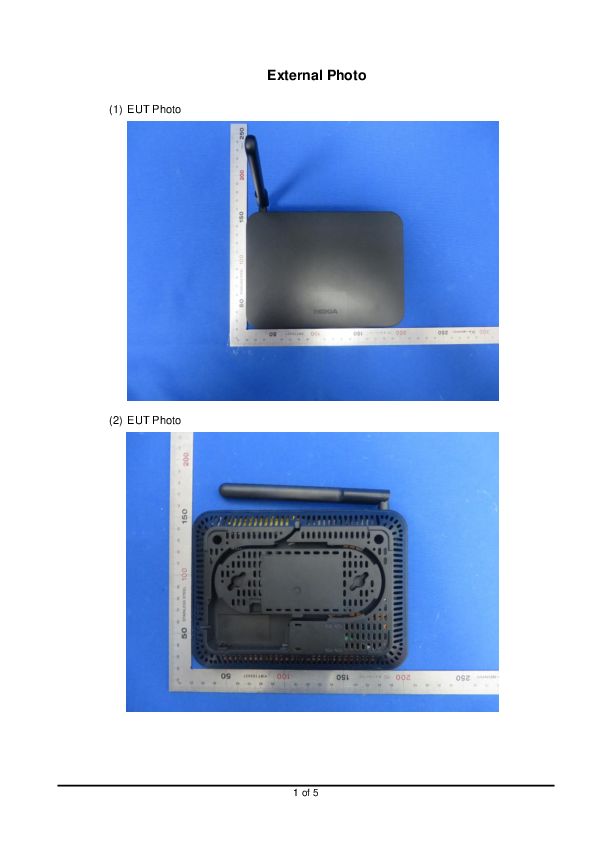
FCC ID
FCC ID application submitted by CIG SHANGHAI CO., LTD. for G-140W-C for FCC ID SFK-140W ( SFK -140W ) User Manual, Frequency, Reports, Images and more.
 sterile galleon
Does anyone know any decent 10Gb Network Switches which are relatively cheap? Just looking for a small-ish one really
peak cloak
sterile galleon
Does anyone know any decent 10Gb Network Switches which are relatively cheap? Ju...
Mikrotik
sterile galleon
peak cloak
Mikrotik
I'll check 'em out, any model you'd recommend?
peak cloak
sterile galleon
I'll check 'em out, any model you'd recommend?

MikroTik is a Latvian company which was founded in 1996 to develop routers and wireless ISP systems. MikroTik now provides hardware and software for Internet connectivity in most of the countries around the world.
Lots of people like this for the price
sterile galleon
peak cloak
Lots of people like this for the price
Cheers, that one looks decent and will do the job 👍
 hazy imp
Hello guys, I'm interested in finding some tool which I can use to test different routers.
What do I want to test? Mostly lot of concurent connections and how does router handle them.
Why do I need this? Well I am a member of one crypto project that has node working and opening lot of p2p type connections. So I need something so people can test out their router and they will see if router is good or bad. Wifi is not important here, just LAN connection.
I am into networking, but I don't know how to rate router hardware and to troubleshoot these things. If Linus team could make a video about this, I would make sure that every person that is in this project will have to see it before joining. I did not find any videos on youtube that are testing these things.
peak cloak
There is a max limit on number of connections regardless or router
when NATing
with ipv6 it's not a factor
hazy imp
Oh, gotcha, and since at my country we are still using ipv4, we have double NATing in place in ISP access network. So it can mean that it's not only up to routers capabilities, but on ISP NATing limitation. And who knows how is that supported at different ISP's in different areas. Insightfull thanks. But also that tool could non the less show that as well. If multiple connections are the problem, either for router or ISP network.
peak cloak
yeah it's a theoredical max of 65,535 connections per IP
and if ISP is CGNATing
that number for you gets reduced down even more
hazy imp
Oh that is called CGNAT 😄 ok
peak cloak
yep
sterile galleon
Will I need a 10Gb router in order to use the 10Gb speeds from my switch to NAS?
rocky badge
If the PC and NAS are on the same VLAN and you're not going to the router to route between networks, only switches and everything between have to be 10 Gbps
sterile galleon
rocky badge
If the PC and NAS are on the same VLAN and you're not going to the router to rou...
Alrighty cheers!
little schooner
sterile galleon
Will I need a 10Gb router in order to use the 10Gb speeds from my switch to NAS?
routers that can do line rate 10gbps are still pretty expensive too
sterile galleon
little schooner
routers that can do line rate 10gbps are still pretty expensive too
Yeah just been looking at the price on them, glad I don't need one (yet) 😛
 hollow marlin
little schooner
routers that can do line rate 10gbps are still pretty expensive too
hollow marlin
little schooner
routers that can do line rate 10gbps are still pretty expensive too
Line rate 10g routers really only exist in the enterprise space which is why it's so expensive. Otherwise I'll shill for Mikrotik and say the 4011 or new 5009 is dirt cheap for 10g routing
 crude scroll
Hey guys, I don't know if this is the right place but this is networking so ig
I'm trying to set up a mc server in my house but allow for friends to connect, I've already let everything through the firewall, but they still can't connect. When I checked with port scanner it said that the port I had forwarded for the server was closed. How do I open it up?
clear igloo
Well that depends, the first thing I would check is if you're behind CGNAT. On your router (192.168.1.1 or similar) what is the WAN IP address? Does it start with 100.64.x.x to 100.127.x.x because if so then you're SoL for opening up ports for the most part
crude scroll
So I guess WAN IP is the public IP of the router?
clear igloo
yah, or if that's different than what google or another site says your public IP address is then you're behind CG-NAT too
clear igloo
ok, then you're good there
crude scroll
Phew
clear igloo
is the server started and working? Is it listening on 25565 (I think that's the default port)? Is your router pointing the to internal IP of the server?
crude scroll
So server is up, and I can connect when using my own wifi, but not when I try from other networks. I have set it to listen to port 27005, and have set port forwarding in my router
I have set it to connect to the internal ip of the laptop, on the router as well as inside the server properties file
clear igloo
Everything sounds like it's setup correctly then at least internally, and so long as you're connected via 27005 internally too then you should be good there
Is the firewall (I assume Windows) disabled on the laptop?
crude scroll
I tried checking using get-nettcpconnection but I don't see the port in the list
It should be in the local port side right?
clear igloo
yah
crude scroll
Yep, its not there
clear igloo
Hmmm, that's odd, have you tried rebooting the MC server?
crude scroll
Yep
peak cloak
you only have one router right?
crude scroll
Its been like this for a few weeks actually, I just got too frustrated after a while trying to get it back up
clear igloo
set "server-ip=" to have nothing after and reboot
crude scroll
I have 2, but I'm connected to the main one, the secondary is too far away
crude scroll
clear igloo
set "server-ip=" to have nothing after and reboot
OK, I'll try that
peak cloak
crude scroll
I have 2, but I'm connected to the main one, the secondary is too far away
could be the issue with double nating?
crude scroll
I'm sorry, I'm very new to networking so I don't know what you mean
Is that like its been double booked kinda?
clear igloo
Double NAT is usually you go from one router to another to the internet (similar to CGNAT)
crude scroll
I mean, technically it shouldn't be, the router I am connected to is directly connected to the modem
peak cloak
peak cloak
to which router is the mc server connected to
it should be the one you had that WAN IP
hazy imp
hazy imp
Hello guys, I'm interested in finding some tool which I can use to test differen...
Sorry to jump in all of the sudden, I think I have found usefull tool for checking out your connection
http://www.dslreports.com/speedtest
crude scroll
OK so my network is set up like this
modem goes to main router
main router splits into my switch for everything in my room, one port each for the other 2 routers in different parts of the house
My pc is connected to the switch, but the laptop is connected to main router wifi
OOf, I might have made it more confusing...
clear igloo
Yah, shouldn't have issues with double nat in that case
crude scroll
Originally the server was on my pc, but I wanted to offload it to a different computer to save system resources. But towards the end it didn't even work on my pc
peak cloak
hazy imp
Sorry to jump in all of the sudden, I think I have found usefull tool for checki...
stuff like bufferbloat you can't really improve btw
clear igloo
I know there is a
server-port=
and
query-port=
Are they both set to 27005?
crude scroll
Yup
clear igloo
Hmmm, ok, and removing the IP for server-ip and rebooting didn't fix it I assume?
crude scroll
Hold on, my laptop died, need to get the charger
clear igloo
ok, sure
crude scroll
Sigh, no luck
clear igloo
Is it showing up under the tcp connections command?
clear igloo
No, if it's not even showing locally then something is wrong with the server
How about when you connect from your computer, does it show anything Established then?
crude scroll
Should I change the rcon port or should I keep it at 25565
clear igloo
You can leave that, that's for other stuff
clear igloo
It shows up under get-nettcpconnection as a connection specifically on 27005?
crude scroll
No, still not port 27005
peak cloak
@crude scroll wait what port are you forwarding
hazy imp
peak cloak
stuff like bufferbloat you can't really improve btw
Oh well at least for now, it shows good result. People who did fail validation, indeed they have connection rated as D, C, but people who have no problem and have passed validation, have B rating. And right now that test is very usefull for me as I can send it to person and tell him that his wifi is bad, and he should try to connect his pc using lan cable.
crude scroll
I forgot how frustrating this is
peak cloak
it should be 25565
peak cloak
hazy imp
Oh well at least for now, it shows good result. People who did fail validation, ...
I mean all it does is test speed
clear igloo
He changed it to 27005 but I'm thinking trying 25565 might be good to reduce variables
peak cloak
25565 is default, keep it that way
crude scroll
I forwarded to 27005, and made sure that in router and server properties its 27005
OK, I'll try putting everything back to 25565
peak cloak
and when you connected locally did you add :27005 at the end?
clear igloo
Question, is there a connection to 25565 right now?
crude scroll
clear igloo
Question, is there a connection to 25565 right now?
Nope
clear igloo
crude scroll
Nope
Hmmm, ok
peak cloak
hmm ok
crude scroll
I even use the public ip when connecting through my pc
clear igloo
crude scroll
I even use the public ip when connecting through my pc
Wait, that shouldn't work
peak cloak
clear igloo
Wait, that shouldn't work
that means nat is working right?
it's doing nat reflection
clear igloo
Normally at least, not without NAT loopback
crude scroll
clear igloo
Wait, that shouldn't work
Wait really?
peak cloak
@crude scroll how are you testing "on other networks"
clear igloo
By default the firewall should reject loopback like that. You can configure it to not reject it but that's usually the default for most stuff
hazy imp
peak cloak
I mean all it does is test speed
You mean also rate latency while under full speed? Because link speed is not realy important here. Application can work using 20/2 link or so. But router needs to perform good.
crude scroll
I use my phone as a hotspot to connect my spare laptop to the server, I also force whatever friend who is still awake to try
peak cloak
hmm ok
peak cloak
hazy imp
You mean also rate latency while under full speed? Because link speed is not rea...
I mean all that test you linked tests is bandwidth test and latency
clear igloo
Have to head out for a bit but if you figure anything out tag me, I'm perplexed right now 🙂
peak cloak
just like other speed tests
peak cloak
clear igloo
Have to head out for a bit but if you figure anything out tag me, I'm perplexed ...
same, really confused
crude scroll
Ok, so I've double checked my minecraft, it is connecting through public ip, not internal, and I have set everything to 25565
Sorry guys, it's been stumping me for weeks now, so I can relate to what you guys are feeling too
hazy imp
Are you interested in running this software so you can see it for yourself? I need some big brain networking people's insight and I bet you could tell me your opinion of it's communication?
crude scroll
I guess I should sleep, its 6am here and I've been at it for 7 hours
peak cloak
crude scroll
Sorry guys, it's been stumping me for weeks now, so I can relate to what you guy...
ask your ISP maybe if they block hosting, that's the only thing I can think of
peak cloak
hazy imp
Are you interested in running this software so you can see it for yourself? I ne...
what is it
hazy imp
dunno if i can post link here, i dont want to get ban or something, maybe pm? It's called Idena
peak cloak
a crypto?
hazy imp
Yes
crude scroll
peak cloak
ask your ISP maybe if they block hosting, that's the only thing I can think of
I guess I'll have to try that. maybe they've blocked it since the last time the server ran properly
peak cloak
idk, already had a fair share of debunking "cryptos"
crude scroll
I tried with 25565, it still doesn't work so I guess that's my last resort besides trying a different router
 sudden tartan
hey @crude scroll , is it okay if I dm you? I have a potential workaround, but I don't want to appear to be advertising
crude scroll
um, yeah sure ig
crude scroll
So that bypasses something in the network?
peak cloak
crude scroll
So that bypasses something in the network?
yeah, it's basically a tunnel that goes to a server and then out to the internet
peak cloak
ngrok secure introspectable tunnels to localhost webhook development tool and debugging tool
I mean there is a free tier
you can also go the more complicated route of getting a cheap VPS and running a vpn tunnel like wireguard between the vps and home network
crude scroll
That sounds a lot more complicated
I'll try this when I wake up. Hopefully I wake up before noon
sudden tartan
gn
crude scroll
Well I'll be damned, the tunneler worked
For the time being I'll use that, until I can get to the root of the issue
Thanks for the help, although I might be back again soon lol @sudden tartan @peak cloak @clear igloo
 quaint hearth
I heard that its very uncomsistant like it loses conetion witha satilite evey hour or 2 and i stream so thats dosnt work so well
rocky badge
@waxen scroll Ran Wireshark on a PC at school..so much Arp and other Broadcast 🤣
"Who has 10.x.x.x? Tell 10.0.0.3" From Cisco:40:20:3F....so much shit
thick minnow
quaint hearth
I heard that its very uncomsistant like it loses conetion witha satilite evey h...
I've got a second WAN port on my dream machine pro which I have configured to fail over when starlink drops out, so I only end up with about 3-4 seconds of no connection at a time, it's only happened once when I was gaming which was enough to time me out of the session but apart from that it's great
 tidal frost
ill be adding a 3rd machine to my network. unsure of what im using it for at the moment, it was just given to me. how do i go about starting remote monitoring between the now 3 pcs? Ubuntu 20.04 as a server/media browsing machine. 1 windows 10 gaming pc already on the network.
so i know the status of all my stuff when im not home
livid aspen
well there are device management services. They usually give you features like remote access, remote terminal, file access, patch management, extra.
some remote access services offer some of that as well.
But they usually aren't free..


 wheat flicker
Hi guys, when I'm watching twitch on my phone it slows down my laptop bandwidth by a lot. I have 250/250 internet so what causes this?
 pulsar thorn
what's the age difference between your phone and laptop?
wheat flicker
The phone is 2 years older than the laptop
Note that the consumption of bandwidth is really bad that it makes the laptop only have 1/1 speeds.
pulsar thorn
oh damn ok
there's this thing that routers do sometimes where they change the protocols/speeds whatever you wanna call it, so that they can be backwards compatible with older hardware, sometimes a printer or an old phone or laptop can be enough to send the network haywire
wheat flicker
hmm, I don't think that's the cause
Cuz when I do the opposite effect, say watching twitch on the laptop, the phone becomes useless with speeds
It's like each device prevents the other from getting any
peak cloak
It's a wifi issue prob
pulsar thorn
do you know if your router has any quality of service or speed optimisation enabled?
wheat flicker
yeah it's enabled on the router
I think next week I'm swapping out a new router and see if that helps
Because this is definitely not normal behaviour
peak cloak
Turn off qos
wheat flicker
Tbf it didn't fix anything whether or not that was on
livid aspen
 craggy osprey
when gigabit internet and god mode router (this was on wifi btw)
craggy osprey
when gigabit internet and god mode router (this was on wifi btw)
Like you should be able to get more on 1gb.
But my experience with 1gb+ is like business grade fiber.
peak cloak
livid aspen
Like you should be able to get more on 1gb.
That's wifi
And Gigabit isn't 1000mbps
 rustic minnow
i got a question about networking... so i have an ax1800 router, and an ax200 wifi card in my streaming pc for nvidia gamestream to my phone with a kishi.
so i drop bars occasionally in my room vs where the router is in the main room. i have onemesh capability
would a onemesh ac750 range extender, close to the desktop in my room where ive got full bars be enough for that router? i think 433mb/s on the 5ghz channel is alot anyways, is there any downside to using ethernet off an extender vs the faster wifi card in the machine? i figure not using wifi to wifi to an extender next to it would minimize interference.... also onemesh would make my phone connect to it effortlessly
any sudden drop in connection quality momentarily tanks my bandwidth sometimes even momentarily dissconnects entirely on my phone.... making the gamestream rubberband and or disconnect... would a stable connection, extender plugged into streaming pc, and phone connected to said extender, with no middleman be better? id be using onemesh so it would be seamless if i went elsewhere.
i enabled qos high priority device for my streaming machine and phone, although im not sure if that would make a difference. not exactly sure if that would work locally, as its kind of vauge in its description. but i thought it could possibly help prioritize local traffic in some way, but im doubtful. its not a matter of not enough local bandwidth as it is a matter of interference.
 dense acorn
peak cloak
normal, nothing god mode about it
dense acorn
peak cloak
normal, nothing god mode about it
In my area, nobody gets more than 50 mbs lol
peak cloak
dense acorn
In my area, nobody gets more than 50 mbs lol
I meant the router
dense acorn
Oh
 latent bobcat
hey guys
if i get 10 gig ethernet cards, will i be able to connect them directly together?

i also still want both computers to be able to connect to the internet
peak cloak
latent bobcat
i also still want both computers to be able to connect to the internet
you would need other ethernet ports for internet access
latent bobcat
peak cloak
you would need other ethernet ports for internet access
yes, both motherboards have 1 gig ports
if i just plug those into switches (i have a 1 gig switch) and then plug the two 10 gigs into each other, that should work, correcr?
peak cloak
latent bobcat
if i just plug those into switches (i have a 1 gig switch) and then plug the two...
yeah, but you will need to setup static ips on the two 10gig nics
and maybe static routes
latent bobcat
much googling shall commence
peak cloak
you could also just get a 10gig switch
latent bobcat
aren't they hundreds of dollars each
for now i only have 2 things to hook up to 10 gig networking, so i don't think i'll get a switch yet
peak cloak
latent bobcat
aren't they hundreds of dollars each
nah, there is one for 130
latent bobcat
peak cloak
nah, there is one for 130
show
peak cloak
latent bobcat
show
correction, 150
MikroTik is a Latvian company which was founded in 1996 to develop routers and wireless ISP systems. MikroTik now provides hardware and software for Internet connectivity in most of the countries around the world.
latent bobcat
peak cloak
https://mikrotik.com/product/crs305_1g_4s_in
is it plug n play?
peak cloak
latent bobcat
is it plug n play?
Not sure, I think so if you don't want to do anything advanced
latent bobcat
peak cloak
Not sure, I think so if you don't want to do anything advanced
Wait shit
That’s not exactly rj45 is it

Fiber optic
peak cloak
latent bobcat
That’s not exactly rj45 is it
sfp+
yeah, it's the standard for 10gig
10gig over ethernet copper is eh
latent bobcat
peak cloak
sfp+
I assume it needs a special cable and software too?
All in all ima be spending like 500 aren’t I
peak cloak
latent bobcat
I assume it needs a special cable and software too?
software no?
I mean you can get sfp+ to ethernet modules
sfp+ is meant to plug a module in
peak cloak
peak cloak
I mean you can get sfp+ to ethernet modules
but on the switch it's not reccomended to put them in lets say every port since they use a bit a power and run quite hot
and they are kinda expensive
latent bobcat
Ah
peak cloak
more expensive than fiber pretty sure
latent bobcat
So I can get SFP+ PCIE modules
peak cloak
yes
peak cloak
I mean yeah, it's just different layer 1 (pysical) transport
latent bobcat
Because I’m planning on sticking about 40 TB into this thing and I’m not waiting 60 years for a transfer
I just moved a 80 GB file at 110 MB/s
It hurts
latent bobcat
peak cloak
is the server right next to pc?
About 10 feet
peak cloak
same room?
latent bobcat
This is gigabit through a switch
latent bobcat
peak cloak
same room?
Yeah
I’m gonna move it tho because it gets quite noisy when rendering
When the time comes I will run cabling through the walls or floor to get the server downstairs
peak cloak
so like 4meters (more than 10ft) os2 fiber is $5.30
latent bobcat
I’m sitting directly under the spot where my server is now… I’d say through the floor to the spot I’d like to put the switch is about 35 feet
peak cloak
and a transceiver is 20 bucks
peak cloak
yeah, it's kinda expensive
latent bobcat
Bruh
 peak cloak

FS
FS is a new brand in Data Center, Enterprise, Telcom Solutions. We make it easy and cost-effective for IT professionals to enable their business solutions.
they are pretty good
latent bobcat
peak cloak
they are pretty good
Bro they don’t make budget switches sadly
peak cloak
latent bobcat
Bro they don’t make budget switches sadly
well not for switches
I mean for like transcievers and fiber
latent bobcat
Ah
peak cloak
I haven't done this stuff really
latent bobcat
I’m gonna see if I can find CRS305-1G-4S+IN
peak cloak
I have no reason for it tbh

 primal ice
more power.!.
 primal ice
yes it does that is why I have not gone 10gb.
latent bobcat
primal ice
yes it does that is why I have not gone 10gb.
The 10x faster transfers will be real nice
peak cloak
cooper rj45 switches are even more $$$
latent bobcat
Especially because I have shit tons of things to transfer
peak cloak
rj45 takes a lot of power and heat apparently
latent bobcat
I already have 3 external 2.5” hdd and 2 internal drives almost full
Transfer speeds have been bothering me for a while lol
That’s why I even thought about it in the first place
It’s not like networking gear breaks down over time so I’ll probably still be able to use this stuff in 10 years anyways
I’ll put it down as an investment

primal ice
also do not expect 10x transfer rates. you will be bottlenecked at drive speeds at that point but should see 300-500MB/s depending on your array speed.
latent bobcat
primal ice
also do not expect 10x transfer rates. you will be bottlenecked at drive speeds ...
Gonna be doing RAIDED hdds and cache SSD
if my tiny ass brain can figure that out
tender hazel
@plain siren what was that windows server technology you mentioned before that acts sorta like a VPN? for remote clients to still be able to log into the domain normally even when they aren't at the site?
plain siren
tender hazel
<@!589542595341058048> what was that windows server technology you mentioned bef...
DirectAcess
tender hazel
thanks
plain siren
It redirects all Internal Domain Requests (*.yourdomain.tld) over the VPN
While letting you keep the User Traffic local to them
Also allows AD Logon to be always "with quotes" avail
Ofc, the User can VPN normally and opt to be inside the Network instead of their local network for whatever reason if needed
tender hazel
thanks
yeah I'm just trying to figure out what we are going to do.. we are going to have azure ad soon too and are thinking about moving to cloudflare zero trust for both internal and remote access security
but I don't think cloudflare zero trust does anything about domain controller logins... but maybe we don't need that with azure ad available? so I'm not sure there
livid aspen
peak cloak
https://www.fs.com
everything i've gotten from them has been solid.
 bitter shell
how do i share my printer through 2 Modem?
I have a modem downstairs which has weak wifi signal so i placed another modem in my second floor connected via lan
can i share my printer from the second floor modem to ground floor modem?
livid aspen
bitter shell
how do i share my printer through 2 Modem?
With the home grade stuff, usually you'd get a router that supports repeaters / extenders. So you have one seemless network that's extended across multiple devices. For instance google nest.
There the pro stuff like ubiquiti.
Like if you have a 2nd router, and your just trying to use it. You might be able to set it up in bridge mode or something. but it's not going to be as seamless.
It's not uncommon for router to split wired and wireless apart, but you can usually turn that off in setting if you want.
bitter shell
So if i use my second modem as a repeater/ extender i will be using only 1 network and i can share my printer and files isnt it?
peak cloak
bitter shell
So if i use my second modem as a repeater/ extender i will be using only 1 netwo...
For clarification, modem is what is used to convert cable/dsl to Ethernet. A router is what then routes you to the internet. You really only want 1 router in a network or you will have problems with double Nat. On the second router check if there is an AP mode. This will stop routing features and just wifi. You can also try plugging Ethernet into the LAN port
low pond
peak cloak
For clarification, modem is what is used to convert cable/dsl to Ethernet. A rou...
Your dumbing down the explaintion innit? Modem does quite a bit more than that I'm pretty sure you know 😛
bitter shell
Will there be a chance of increasing in ingame ping if i use AP mode?
peak cloak
bitter shell
Will there be a chance of increasing in ingame ping if i use AP mode?
Maybe a tiny tiny bit


 bitter shell
 peak cloak
bitter shell
peak cloak
bitter shell
No
bitter shell
I think my router doesnt have it