#networking
1 messages · Page 364 of 1
 autumn bay
I wanted a NAS that i can access through my VPN and a PiHole
 peak cloak
Also how much storage are we taking about
And what?
Like important files that you need, or just a nice to have
autumn bay
like 2 TB should be enough important files
and Uni work i can access but i will do that down the line
unless its pretty cheap to do
autumn bay
peak cloak
But people have done it on a pi
Do you have any experience with synology ?
or QNAP

Ebuyer.com
Get a great deal on a QNAP TR-002 2 Bay Expansion Desktop as well as thousands of products at Ebuyer!
something like this ?
autumn bay
i mean it would be cheaper
the Pi is like 70 gbp here then i would need a case drivers and all of this and it would be cheaper if i just get that
peak cloak
autumn bay
https://www.ebuyer.com/921138-qnap-tr-002-2-bay-expansion-desktop-tr-002
also
fyi that's not a nas
autumn bay
what
autumn bay

Lenovo EMC 70BA9004EA Diskless 2 Bay Desktop Network Attached Storage
peak cloak
key word: expansion
autumn bay
what about the last one i sent ?
autumn bay
has support for SSDs
peak cloak
I mean, sata has existed for a while
 kindred vector
Looking to wire my house-to-be-built with cat 6 cable. Recommendations?
 plain siren
kindred vector
Looking to wire my house-to-be-built with cat 6 cable. Recommendations?
plain siren
kindred vector
Looking to wire my house-to-be-built with cat 6 cable. Recommendations?
I had my houe built and I had some specifics when I wired it.
So for one, make sure there is at least 2 pull threads put the the gang box in addition to the Networking/Low Voltage Cable Drops
Dont allow the builders to staple the Networking Cables
2 Drops Per Room, One on Each side of the room, Doesnt mean it has to be used, could be blanked out but just to have them
Have drops put on the ceiling of 4 Corner Rooms of the House + the Middle Room (prob living room) [For APs]
Have drops put at the HVAC Thermostat to run along side the LV Cable
Drops put at every point you are gonna have a TV
if you got a "Center Closet" or like Storage Closet that is more accessible, have the Alarm and Drop Terminations Put there
Have hardwired LV cable pulled for alarm sensors at every sensor point dont use wireless
LV Cable pulled from the Garage Carriage Motor to the same Closet
The Doorbell should also be wired to the same closet, not to some stupid mount in the attic with the doorbell Transformer
Have Cat cable also pulled to the doorbell too
 crisp bay
any idea?
 frigid pine
crisp bay
any idea?
frigid pine
crisp bay
any idea?
Which OS are you using in the VM?
plain siren
You need to have a running website on port 80
Even if its basic
The LE Servers need to see a working website
crisp bay
plain siren
You need to have a running website on port 80
I have Nginx
plain siren
Is it running with a basic webpage at least
crisp bay
I mean the welcome site sure works .
plain siren
Is it set to bind/respond to the DNS Domain and/or Subdomain you are trying to get a cert for?
Like xyz.example.com... the welcome site would show up for that
Also make sure you restart firewalld after applying the firewall config
sudo firewall-cmd --permanent --zone=public --add-service=http
sudo systemctl restart firewalld
good question, the IP is dynamic...
plain siren
also make sure
sudo ufw allow 'Nginx HTTP'
your nginx site config block should have:
server {
        listen 80;
        listen [::]:80;

        root /var/www/your_domain/html;
        index index.html index.htm index.nginx-debian.html;

        server_name your_domain www.your_domain;

        location / {
                try_files $uri $uri/ =404;
        }
}``` as an example...
the important part being:
server_name domain.tld www.domain.tld;
or server_name default;
Your Actual Domain needs to be pointing to the webserver IP
OR, If you are wanting to
You can also use DNS based Authentication
crisp bay
plain siren
also make sure
```
sudo ufw allow 'Nginx HTTP'
```
added that already
crisp bay
plain siren
your nginx site config block should have:
```
server {
listen 80;
...
going to check.
plain siren
if you are using cloudflare for example you can install certbot-dns-cloudflare
crisp bay
crisp bay
good question, the IP is dynamic...
checked, still the same
huh tried looking if it displays the test site on IP only, it doesn't, blocking 80
is it because ICMP 3, 4 is blocking that?
plain siren
Shouldnt be
do curl 127.0.0.1:80 on the host machine
see if the welcome site shows up
should just print the html
crisp bay
ye
plain siren
did you restart firewalld also
crisp bay
I reloaded though
plain siren
Restart it
crisp bay
lemme do that
plain siren
crisp bay
going to check.
If you are trying to access with IP, make sure you use server_name default;
So it responds to all requests on port 80
crisp bay
afk 40mins..
 crisp bay
plain siren
your nginx site config block should have:
```
server {
listen 80;
...
crisp bay
plain siren
your nginx site config block should have:
```
server {
listen 80;
...
sites-available or conf.d?

I think it's the config on Oracle cloud panel
or that's what I was thinking from the beginning
frigid pine
I tried setting up a webserver few weeks ago on oracle and I just had to 'ufw allow 80'.
And it worked.
crisp bay
it was a source port issue
of course it works now and I can see the welcome page if I go to that subdomain
 low pond
welcome to nginx!
 waxen scroll
wow. I've never seen anyone use oracle cloud before
 signal stag
Hey um, I am trying to setup a proxy server on my VPS. It is running ubuntu 20.04 and I have setup squid server on it properly. But it doesnt seem to work. I open firefox, ,setup proxy settings as shown in img below. At the end of the /etc/squid/squid.conf, I added the following line : http_access allow all. But firefox keeps giving me The connection timed out
 plain siren
signal stag
Hey um, I am trying to setup a proxy server on my VPS. It is running ubuntu 20.0...
plain siren
signal stag
Hey um, I am trying to setup a proxy server on my VPS. It is running ubuntu 20.0...
You do know SSH Is capable of doing a SOCKS 5 proxy by itself right?
Also, you need to open the port on Firewalld
Then you need to tell ufw to allow squid.
signal stag
plain siren
You do know SSH Is capable of doing a SOCKS 5 proxy by itself right?
No I did not know about it. I am an absolute noob in networking
signal stag
plain siren
Also, you need to open the port on Firewalld
I think all ports are open on my vps. Is there a way to check
plain siren
well do me a favor:
systemctl status ufw
systemctl status firewalld
Ok sure
plain siren
Which of them came back as "Running"?
 peak cloak
signal stag
and um,
peak cloak
signal stag
and um,
sudo ufw status
peak cloak
basically
signal stag
so my proxy server should work?
plain siren
signal stag
so my proxy server should work?

C:\Users>netstat -a | find "1080"
  TCP    127.0.0.1:1080         North1:0               LISTENING
  TCP    [::1]:1080             North1:0               LISTENING
After you open SSH and set forwarded Ports in that
You would just configure Firefox/Edge/Whatever to SOCKS5 Proxy through 127.0.0.1:1080
OpenSSH can handle this all by itself, and seeing as you are ssh'd in.... you got OpenSSH Already
Any linux server can instantly become a SOCKS Proxy
plain siren
signal stag
Hey um, I am trying to setup a proxy server on my VPS. It is running ubuntu 20.0...
Also when you change configurations, you need to make sure to restart the service
systemctl restart squid
but I would just turn it off.
signal stag
plain siren
Also when you change configurations, you need to make sure to restart the servic...
Have done that
plain siren
And use standard SSH Proxy if thats all you really want
signal stag
Also, I don't want to exactly use proxy in firefox. I just thought that was the easiest way to check it
plain siren
Ah, well anything could use it so long as that SSH tunnel remains open
signal stag
what if I want to do it without ssh
signal stag
signal stag
what if I want to do it without ssh
.
plain siren
Squid was the right move then,
signal stag
Well it doesnt work so
plain siren
acl localnet src yourpublicip
signal stag
plain siren
`acl localnet src yourpublicip`
I also tried that but nope. So for testing, I just did http_access allow all
 plain siren
replacing the denied function right?
signal stag
What does the local=[::]3128 and remote=[::] mean
plain siren
[::] means everything (all IPs) and 3128 is port
signal stag
Why does remote have no port
low pond
plain siren
Any linux server can instantly become a SOCKS Proxy
You could also just use native SSH command via PS and just pass a - D flag with the port you want to use as a socks 5

 signal stag
signal stag
signal stag
and this is at the end of the file
plain siren
Uh yeah

Ok so put http_access allow yourpublicip here
REmove the http_access allow all, you shouldnt do this
signal stag
plain siren
REmove the http_access allow all, you shouldnt do this
For testing, I used allow all. Since just allowing my ip wasnt working
plain siren
So dump your entire config file in here
signal stag
lemme create a gist rq
signal stag
whoa. I didnt know that
plain siren
cool shit eh
signal stag
whats the nc command
plain siren
netcat
netcat is the guy that does all your I/O Read and Write on TCP and UDP for your Linux
signal stag
alright I think this gist is it
https://gist.github.com/Chiggy-Playz/ec4f6fd84e9514a3ae7bc421c165c993
signal stag
plain siren
netcat is the guy that does all your I/O Read and Write on TCP and UDP for your ...
ah ok

 signal stag
plain siren
ah thats why
signal stag
plain siren
ah thats why
Can you elaborate please
signal stag
Okie
plain siren
acl localnet src 0.0.0.1-0.255.255.255
acl localnet src 10.0.0.0/8
acl localnet src 100.64.0.0/10
acl localnet src 169.254.0.0/16
acl localnet src 172.16.0.0/12
acl localnet src 192.168.0.0/16
acl localnet src fc00::/7
acl localnet src fe80::/10
acl SSL_ports port 443
acl Safe_ports port 80
acl Safe_ports port 21
acl Safe_ports port 443
acl Safe_ports port 70
acl Safe_ports port 210
acl Safe_ports port 1025-65535
acl Safe_ports port 280
acl Safe_ports port 488
acl Safe_ports port 591
acl Safe_ports port 777
acl CONNECT method CONNECT
http_access deny !Safe_ports
http_access deny CONNECT !SSL_ports
http_access allow localhost manager
http_access deny manager
include /etc/squid/conf.d/*
http_access allow localhost
http_port 3128
coredump_dir /var/spool/squid
refresh_pattern ^ftp:        1440    20%    10080
refresh_pattern ^gopher:    1440    0%    1440
refresh_pattern -i (/cgi-bin/|\?) 0    0%    0
refresh_pattern \/(Packages|Sources)(|\.bz2|\.gz|\.xz)$ 0 0% 0 refresh-ims
refresh_pattern \/Release(|\.gpg)$ 0 0% 0 refresh-ims
refresh_pattern \/InRelease$ 0 0% 0 refresh-ims
refresh_pattern \/(Translation-.*)(|\.bz2|\.gz|\.xz)$ 0 0% 0 refresh-ims
refresh_pattern .        0    20%    4320
http_access allow all
#http_port 6869 transparent
Thats better
now that I can actually read it
signal stag
So the issue is in my config?
plain siren
Well ima ask, whos the host provider
signal stag
Of the vps?
plain siren
yes
signal stag
Well uh its sorta weird. My friend bough a bare metal server, runs vmware esxi or something on it, and he created this vm for me.
plain siren
Annnnnd thats the rest of the story
peak cloak
that means, you don't have a public ip?
peak cloak
and you need him to port forward?
plain siren
include /etc/squid/conf.d/*
http_port 3128
coredump_dir /var/spool/squid
refresh_pattern ^ftp:        1440    20%    10080
refresh_pattern ^gopher:    1440    0%    1440
refresh_pattern -i (/cgi-bin/|\?) 0    0%    0
refresh_pattern \/(Packages|Sources)(|\.bz2|\.gz|\.xz)$ 0 0% 0 refresh-ims
refresh_pattern \/Release(|\.gpg)$ 0 0% 0 refresh-ims
refresh_pattern \/InRelease$ 0 0% 0 refresh-ims
refresh_pattern \/(Translation-.*)(|\.bz2|\.gz|\.xz)$ 0 0% 0 refresh-ims
refresh_pattern .        0    20%    4320
http_access allow all
Heres a always work config for you
signal stag
he also got me a public ip. I pay for it lol
peak cloak
ah
plain siren
Question is, did he need to do any firewall allowing on his hosts side
plain siren
22 is almost always allowed, sometimes providers do firewalling per IP
signal stag
Actually I'll have to ask.
plain siren
Hmmm
signal stag
and I didnt need to tell my friend to open this port for me or anything
pretty sure 19999 isnt a common port lol
its for netdata
plain siren
You paid for a public IP.... buuuuuuuuut there is someone running netdata on your IP?
Which means its not a direct Public IP to your VM
signal stag
huh?
peak cloak
you are running netdata?
plain siren
Because if that public IP was entirely forwarded to your VM only, nothing but 22 would be on it
peak cloak
I mean check what ips you get
signal stag
peak cloak
you are running netdata?
yes
peak cloak
ip a
plain siren
curl icanhazip.com
signal stag
plain siren
`curl icanhazip.com`
returns the ip which I use for ssh, and to access netdata (http://ip:19999)
plain siren
you are running netdata on your VM rn?
signal stag
yep
signal stag
peak cloak
I mean check what ips you get
127.0.0.1 and the public ip
plain siren
whats under /etc/squid/conf.d/
signal stag
debian.conf
plain siren
cat debian.conf | nc termbin.com 9999
Whatever it is, its being autoloaded too so better check
plain siren
So here you go
include /etc/squid/conf.d/*
http_port 3128
coredump_dir /var/spool/squid
refresh_pattern ^ftp:        1440    20%    10080
refresh_pattern ^gopher:    1440    0%    1440
refresh_pattern -i (/cgi-bin/|\?) 0    0%    0
refresh_pattern \/(Packages|Sources)(|\.bz2|\.gz|\.xz)$ 0 0% 0 refresh-ims
refresh_pattern \/Release(|\.gpg)$ 0 0% 0 refresh-ims
refresh_pattern \/InRelease$ 0 0% 0 refresh-ims
refresh_pattern \/(Translation-.*)(|\.bz2|\.gz|\.xz)$ 0 0% 0 refresh-ims
refresh_pattern .        0    20%    4320
http_access allow all
``` This in theory should work with *everyone* on *everything* on *port 3128*I certainly don't need all of it, do I? What changes did you make
plain siren
just kinda uh...
wget http://hastebin.com/raw/xolaliwohu -O /etc/squid.conf
I basically removed everything
signal stag
um ok
signal stag
plain siren
just kinda uh...
`wget http://hastebin.com/raw/xolaliwohu -O /etc/squid.conf`
its /etc/squid/squid.conf btw
plain siren
I mean, yeah, anything that can use a SOCKS5 client
curl --socks5 vpsip:3128 google.com
``` if you got curl on your machinelol
 plain siren
oh well on windows thats diff
peak cloak
signal stag
Failed to connect, connection refused
make sure you replaced vpsip
peak cloak
just making sure
signal stag
But I did not forward any port
peak cloak
no NAT, no port forwarding
signal stag
huh?
peak cloak
signal stag
huh?
you have your own public IP right
so you don't need to port forward as you are not behind NAT
signal stag
I see
peak cloak
and firewall is off right?

 plain siren
netstat
Also try a diff port since were using squid's common port the provider may block it outright for security reasons
plain siren
try it with the really insecure conf I gave you

 plain siren
its a change from timing out
 plain siren
kek
signal stag
let me check it
what is my ip gives me vps ip
YO ITS WORKING
but doing curl --socks5 vpsip:6869 google.com seems to like, get stuck (is it getting timed out?)
curl: (7) Unable to receive initial SOCKS5 response.
doing it with –-http1.0 works
Thank you so much @plain siren
now how do I make the config safe lol
peak cloak
for one activate ufw, but before you do so, allow ssh and the proxy ports
signal stag
peak cloak
for one activate ufw, but before you do so, allow ssh and the proxy ports
can you guide me on it a bit please
peak cloak
signal stag
thanks
peak cloak
sudo ufw enable
that should block everything, except ssh and 6869
as for the proxy config idk how
signal stag
peak cloak
`sudo ufw enable`
Fingers crossed 🤞
yay
activate is the wrong command lol. Its enable it seems
peak cloak
signal stag
activate is the wrong command lol. Its enable it seems
oh yeah oops
 peak cloak
signal stag
I just don't want to get locked out of my vm lol
peak cloak
signal stag
I just don't want to get locked out of my vm lol
as long as you have the allow ssh rule applied you should be good
signal stag
yay mission successful
 peak cloak
that's what I did and I was fine
and for extra access security use ssh keys, not password auth
signal stag
I use ssh keys yeah
peak cloak
if you are not doing that already
signal stag
Can I tell ufw that only my computers public ip will be using port 6869, and to deny all other ip connections?
peak cloak
signal stag
Can I tell ufw that only my computers public ip will be using port 6869, and to ...
yes
peak cloak
signal stag
Can I tell ufw that only my computers public ip will be using port 6869, and to ...
sudo ufw allow from 203.0.113.4 to any port 22?
replace the ips accordingly
then you may need to delete the other allow 22 rule
signal stag
hmm
signal stag
what if I take my laptop somewhere else and its a different ip? cant I use this rule for 6869 (squid's port) only?
peak cloak
signal stag
what if I take my laptop somewhere else and its a different ip? cant I use this ...
well if you only allow a specific ip, then it won't work from another
peak cloak
signal stag
what if I take my laptop somewhere else and its a different ip? cant I use this ...
oh yeah I misread you, yeah you can just use it for squid
signal stag
yeah thats fine with me, but only for port 6869. I will be accessing squid only from 1 IP always. But ssh, I can be out of home yeah
peak cloak
sudo ufw allow from 123.123.123.13 to any port 6869?
then sudo ufw delete allow 6869?
signal stag
whats with the ?s lol
peak cloak
I"m not 100% sure lol
signal stag
hmm
peak cloak
I've used ufw but never did by ip
 rocky badge
@clear igloo  This switch isn't the loudest thing in the rack anymore
 signal stag
@peak cloak this should be it then?
 peak cloak
yeah looks good
signal stag
yep proxy still seems to work
Thank you @peak cloak and @plain siren . I was struggling with this for like 3 days. I don't think my squid proxy config needs to be changed since I made a ufw rule for it directly. But if it still needs to be changed, let me know.
 stuck oar
I need to route all traffic from a java application (game server) through a proxy, and I need to be able to monitor the packets contents to filter packets or disconnect clients (maybe ban).
Does anyone know of decent toolage for these?
like so

Though, the filter could also be on the game server machine.
I am currently using Node to execute and manage the game server, it probably wouldn't be hard to throw that into a wrapper of some sort, but I haven't had much luck finding out good ideas
I intend to write the code to parse the packets myself, but finding a way stop a packet from reaching the game server is turning out hard
There are many malicious actors in the greater game community, and I see this as a necessary way to combat their shenanigans
peak cloak
stuck oar
I need to route all traffic from a java application (game server) through a prox...
so what I am currently doing is my "proxy" to be wireguard. On the proxy server you can just use iptables to block specific ips
tho this won't really stop a ddos
stuck oar
peak cloak
so what I am currently doing is my "proxy" to be wireguard. On the proxy server ...
That won't do, I want to make an application around this game server to detect cheaters via packet inspection, as well as saving packet histories per player in the even of a server crash or moderator emergency button push
There are even cheats that enable assholes to crash the clients of every player in their view distance. These can only be detected via external means (to the game), and will be a constantly changing target (ip bans are ineffective).
for just the vpn part, that does sound neet, I am looking into it. Thank you
peak cloak
stuck oar
That won't do, I want to make an application around this game server to detect c...
hmm, what you are trying to do is pretty advanced
you would want to kill the connections on the OS level pretty sure
I guess you could use something like tcpkill?
but that's for an already established tcp connection
stuck oar
peak cloak
hmm, what you are trying to do is pretty advanced
I can just tell the game server to ban things if I wanted to end connections...
Ideally, I intercept every packet going each way and then process or put it into the pipe to its destination- nothing goes either way without review
private messages in this game are not visable to moderators, and can be a point of secret harassment- this will be present in packet data though and I need to be able to find and display these logs to mods if necessary
peak cloak
stuck oar
I can just tell the game server to ban things if I wanted to end connections...
...
hmm, that would need to need to be a pretty efficiently written program
stuck oar
peak cloak
hmm, that would need to need to be a pretty efficiently written program
I am intelligent enough to make things fast, but finding out how to do them at all in this case is...
peak cloak
but for just stopping a packet, you just don't pass to the gameserver?
stuck oar
yea basically
peak cloak
this minecraft?
stuck oar
yup
the community I am part of prides themselves on using the official jar, and it changes too often to dig into, and the network protocol hasn't changed in forever. so here I am lol
peak cloak
stuck oar
the community I am part of prides themselves on using the official jar, and it c...
whyy, isn't the offical one like kinda bad
I just always use papermc
stuck oar
peak cloak
whyy, isn't the offical one like kinda bad
hence needing all the protection we can muster
peak cloak
stuck oar
hence needing all the protection we can muster
but performance wise
stuck oar
peak cloak
but performance wise
yea
peak cloak
security wise it ain't that bad...?
stuck oar
peak cloak
security wise it ain't that bad...?
eh
peak cloak
the 2b2t player tracking exploit was because of a quick papermc fix right?
stuck oar
iidk anythign but vanilla man
I live in my own mc community's bubble, except the various discords I am on for occasional debugging
I would also like to rewrite some packet information, to eliminate an exploit
I have to go through a bunch of hassle with in-game systems to bandaid it, mussing with the packets would be much more seamless
stuck oar
It's beyond the scope of my question in here
I just need some sort of custom tunnel / proxy / firewall. if I need to write it in c or c++ or node or julia or python I'll do it XD
I'd prefer to do it in something that will work regardless of OS though. java is a strong candidate
peak cloak
stuck oar
It's beyond the scope of my question in here
what was the question again?
ok??
kinda confused
on like what you want me to help answer
stuck oar
peak cloak
what was the question again?
I just need some sort of custom tunnel / proxy / firewall. if I need to write it in c or c++ or node or julia or python I'll do it XD
I need to capture all of the packets between a java application (mc server over tcp http) and the clients (mc clients over tcp http). I don't care about what it sends to mojangs servers, so I don't care if I capture or can inspect those packets
I want to do this so I can intercept and capture, then process, and potentially block or modify any data crossing between the server and clients
I edited, so reposted
I came here in case anyone happened to know a solution for this problem I have been researching for a while now x3
 thick minnow
hello guys, someone here have an idea of what "454 4.7.0 TLS not available due to local problem" error is?
may wanna provide some context as to where you are getting that error and what you're trying to do...
eh, you are right
so, basically, i help one guy with his small business, he have this custom program that use to send invoices, quotes, etc. Sometimes he can't send email from this program and get an error. He ask the guys of his support and they send him back a log from testtls that show this error (should be the same error he get locally)
what i don't know is how to fix it, i know he have a server installed locally that he use as a pc too (not the same one that get the error)
this server is used only for this program, but mainly it's used by another one for business stuff (email, navigation, etc) and works fine, even the mails from outlook works
the log was on his imap server, and that's not local
stuck oar
I may have found a github repo with just what I need ❤️
waxen scroll
@rocky badge wat

Ubiquiti Inc.
Powerful server with (2) 16 GB DDR4 DIMM, (2) 25GbE SFP28 ports, (2) 1GbE RJ45 ports, (1) 1GbE RJ45 management port and (2) 750W redundant PSUs.
The SMC Server is powered with (2) Intel Xeon Bronze 3204, 6 core, 1.9 GHz processors and is equipped with (2) 16 GB DDR4 DIMM. It also features a secure TPM 2.0 chip and an accommodating storage that...
rocky badge
@waxen scroll Yeah lol\
thick minnow
If I have a home network with 4 servers and guests wifif, wired lan and wifi, should I use the 192 or 10 IPS ?
 jaunty talon
thick minnow
If I have a home network with 4 servers and guests wifif, wired lan and wifi, sh...
jaunty talon
thick minnow
If I have a home network with 4 servers and guests wifif, wired lan and wifi, sh...
192.168.0.0/16 = 65536 addresses, 10.0.0.0/8 = 16777216 addresses. I would say it depends on your needs! :)
thick minnow
jaunty talon
192.168.0.0/16 = 65536 addresses, 10.0.0.0/8 = 16777216 addresses. I would say i...
right now i have 10.0.0.0/24 and 10.0.10.0/24
and i want to rebuild eveything on the network so i think i will switch to 192.x.x.x, thx
 slow pivot
@stuck oar i don’t want to sound mean, but writing a basic proxy server is infinitely easier than reverse engineering a network protocol (that I assume is somewhat secured, either with SSL or something similar) and then doing in-flight modifications to said data packets without the server noticing. Good luck though.
peak cloak
slow pivot
<@143405402271252480> i don’t want to sound mean, but writing a basic proxy serv...
It's mc, people have made mc proxies
And he runs the server
Geysermc is an example of a really popular one
slow pivot
Ah well that makes it easier for sure
 fallow python
can i use an srv record to point subdomain.domain.net to domain.net:port ?
peak cloak
fallow python
can i use an srv record to point subdomain.domain.net to domain.net:port ?
yes and no
you aren't going to actually redirect anything
fallow python
we meet again
peak cloak
but some services like minecraft will check the srv records for that domain and see what port it should connect to
but others don't resepect srv records
fallow python
so i wont be able to use it for a standard webserver ?
peak cloak
fallow python
so i wont be able to use it for a standard webserver ?
for http(s), no
fallow python
got it
peak cloak
http needs to always be on port 80 and https on 443
unless otherwise specified in the url
you can have a reverse proxy, but the public endpoint always needs to be 80 or 443
if you don't want to have to write the port in the url
fallow python
my isp doesnt let me forward port 80 so i have forwarded wan port 2280 that then points to lan port 80
and im trying to make it so i dont have to type :2280 in the url
peak cloak
fallow python
and im trying to make it so i dont have to type :2280 in the url
you would need some sort of reverse proxy in front of you
 waxen scroll

low pond
So, question... yet again about POTS and stuff
Is there any PCIe to POTS card, that is if I wanted to use a old system as a PBX, and wanted proper POTS working, I would need a card like that innit?
stuck oar
slow pivot
<@143405402271252480> i don’t want to sound mean, but writing a basic proxy serv...
For sure, but that is the functionality I need. And some hours later I discovered that someone had already done much of the leg work for me,
in a piece of software that acts as a middle-man, it acts like the server to the clients, and acts the clients to the server, so that it can encrypt data to the clients and see all data going to everyone and so that the data to and from the server is unencrypted
This will limit a couple points of functionality within the server, because the clients are not seen to be connecting fron their real IP addresses, but I can replace that functionality in my app
 reef gazelle
@low pond there's FXS/FXO cards but you're better getting an VoIP ATA
If you're wanting to use Google Voice, Obihai Obi212 is a good fit
rocky badge
@waxen scroll So that Supermicro Server on Ubiquiti's store... bruh https://store.ui.com/pages/it-marketplace

Ubiquiti Inc.
 cedar igloo
What is the best way to find out vSphere/ESXi bottlenecks? I currently have 3×7200rpm drives (RAID 1) in my current system and am looking to get 8×SSDs (RAID 1). How do I know if this will improve performance?
rocky badge
You already answered your question
cedar igloo
I am wanting an improvement on OS install times and general OS speed increase
cedar igloo
rocky badge
You already answered your question
But how do I know if it's the disk or something like CPU causing it to slow?
rocky badge
I can assure you its 99% the disks
Running multiple VMs onn HDDs, even in RAID, is slow
Especially only 3 HDDs
Also, don't run 8 SSDs in RAID 1, or even 3 HDDs in RAID 1
cedar igloo
I'm not concerned about redundancy at all. This is in my homelab which is 100% infra as code
Sorry, I mean raid 0
I get mixed up
rocky badge
even then, I still wouldn't run them in all RAID 0 ¯_(ツ)_/¯
Even if you weren't worried about data redundancy, in a RAID 0, one drive takes the whole array offline
 sonic notch
Is it possible to track only packets coming to and from my PC in Wireshark?
peak cloak
sonic notch
Is it possible to track *only* packets coming to and from my PC in Wireshark?
I mean, that's what wireshark does
All packets on that interface
On Ethernet at least
But you can also filter so it only has the destination of your pc
dst host 192.16.135.134 for example
sonic notch
peak cloak
All packets on that interface
So it doesn't actively seek/search for packets on the entire network? Just looks at what my interface sees?
E.g. it's impossible for my laptop on my home network to know that my PC on my network is sniffing packets?
peak cloak
sonic notch
So it doesn't actively seek/search for packets on the entire network? Just looks...
how would it be able to? only on wifi
On Ethernet it works like this: the switch chip in your router, or on a switch only sends packets destined to your device
On wifi (I may be wrong), everything is open, just like bus based ethernet, so you can see packets going to other devices, unless you are using a type of wifi encryption where each device gets it's own key
It can't "search" for packets? how would that work
it's just a packet capture tool
sonic notch
I just wanted to know whether it sends requests to the router or something
So I guess no
peak cloak
no, it's literally just packet capture
sonic notch
Thanks for the info
sonic notch
The reason I thought it was something other than capture was because I saw a ton of weird IP addresses
And this is the first time I've used Wireshark/similar
peak cloak
sonic notch
The reason I thought it was something other than capture was because I saw a ton...
give me an example of weird ips
I can prob explain
like ones that end with .255?
sonic notch
Weird as in a ton of local ones
peak cloak
yeah, there's ARP, all sorts of broadcast traffic
sonic notch
peak cloak
yeah, there's ARP, all sorts of broadcast traffic
What exactly does promiscuous mode do?
peak cloak
sonic notch
What exactly does promiscuous mode do?
tries to allow the NIC to see all network data
I think
 bitter shell
hey even though i have enabled network discovery in my laptop and PC the Laptop cant find my PC in the network but PC can access laptop.
 void flicker
Anyone knows the location of squid.conf file location in pfsense?
 trim oriole
so i found out its possible to put a dynamic dns on my router
but... no. for some reason i keep getting an error message when trying to get it to connect
i tried using ddclient, but cant get the ports to forward right
 grizzled cove
@trim orioleWhat router do you have
cedar igloo
NetworkChuck did a video on running a DDNS service on a raspberry pi
 final glacier
Guys some LTT video are sponsored by Glasswired. I know sponsor and real "Wow this app is cool" are different. but anyone know if this app can be usefull for a normal PC use with the free mode ?
waxen scroll
NETWORK CHUCK: "You MUST learn <technology from 20 years ago thats no longer used> NOW!"
I dont see the draw of glasswire. Seems more like scareware
You don't really need to see what your network traffic is at a consumer level. At a business level you'll have other tools
windows firewall is just fine too
cedar igloo
waxen scroll
NETWORK CHUCK: "You MUST learn <technology from 20 years ago thats no longer use...
Some of it is useful, but I agree, most isn't.
waxen scroll
right. I think some of his stuff is really good for learners but he oversells the lessons with his titles
final glacier
thanks
 little schooner
waxen scroll
You don't really need to see what your network traffic is at a consumer level. A...
little schooner
waxen scroll
You don't really need to see what your network traffic is at a consumer level. A...
ultimately, that's what I decided on after trying syslog and things like graylog and stuff. I just don't care what's happening on my own network the same way as the college I work for or my profs sandboxed lab
I'm happy things just work and they are mostly secure from 99.9999% of things that try to break in
 bold drum
Bleh. I don't wanna crawl around under the house running network 😑
final glacier
bold drum
Bleh. I don't wanna crawl around under the house running network 😑
done it ... meh it's a one time thing ... ok you get our dirty but you will have a nice ethernet connection everywhere ...
low pond
waxen scroll
NETWORK CHUCK: "You MUST learn <technology from 20 years ago thats no longer use...
Meh he's one of those click bait guys
However he's alright I think, did learn a few things from the channel
 burnt pagoda
extreme noob with this thing but i setup openvpn server on my ddwrt router., and i set up the certificates and everything else .
Now i get a TLS handshake error. I am behind CGNAT but i have 2 ports forwarded at the ISP level to my router. Now if i check the external ipaddress say dictator95.ddns.net:3100
I setup a port forward from 3100 to 1194 on the 192.168.1.1(router)
if i do a portcheck on port 3100 shouldnt it be open >
bold drum
final glacier
done it ... meh it's a one time thing ... ok you get our dirty but you will have...
Yeah I know, but right after doing my entire garage electrical system and drywall, I want a break 🥲
 night sorrel
Question for those in Lower Mainland BC. I’m looking to see if it’s worth signing up to Telus PureFibre due to my now more permanent work from home environment. (Transferring files via VPN to the office server tends to be painful). Currently I use TekSavvy cable modem plugged into a Qotom pfSense firewall/router. My entire network is 1000. My question is, if I continued to use my pfSense as my router (by setting up the PureFibre modem in passthrough mode) would one expect to still see 940Mbps as Telus advertises? I just don’t want to commit for 2 years and be forced to use Telus’s firmware. I’d rather continue with my pfSense unit.
 hollow marlin
night sorrel
Question for those in Lower Mainland BC. I’m looking to see if it’s worth signin...
hollow marlin
night sorrel
Question for those in Lower Mainland BC. I’m looking to see if it’s worth signin...
If you are looking at getting 940mbps transferring files over a VPN, no. Not with overhead and added latency.
night sorrel
hollow marlin
If you are looking at getting 940mbps transferring files over a VPN, no. Not wit...
I’m not expecting full bandwidth when connected to VPN to the office but I don’t want my pfSense router which is only 1000 lan adding bottleneck with regular browsing.
peak cloak
I mean what do you have rn
browsing doesn't take much bandwidth
the average load on my network with 3 people working is like 1mbps
unless you start downloading
hollow marlin
I think he might be referring to overloading his router. AFAIK, gig on Pfsense is trivial.
night sorrel
I am referring to overloading the router. Thank you. I just saw some blogs out there where people used a Ubiquity device that has SFP ports and connected the Telus fibre line directly to the Ubiquity device. As far as I know, the only pfSense firewall device you can get with SFP is a Netgate device. What I have right now is a QOTOM Q355G4. Not that I think I’d overload it often I just want to make sure I get the speed I pay for.
Nothing worse than paying for something only to find out something else on your network is slowing performance.
 blazing gorge
ok random question... anyone know the command to run a traceroute in rasbian?
apparently "traceroute google.com" is wrong..
cedar igloo
Is it tracert?
hollow marlin
What error is it giving you?
 primal ice
night sorrel
I am referring to overloading the router. Thank you. I just saw some blogs out t...
primal ice
night sorrel
I am referring to overloading the router. Thank you. I just saw some blogs out t...
QOTOM Q355G4 should be more than capable of running full gigabit connections with no interruptions. even if it falls back to using the cpu. (as a side note for a cpu to handle full gigabit connections it needs to be 1.27ghz or faster dual core (or single core dual thread)) -- why most consumer trash is trash they uses dual 800mhz processors which can not keep up with gigabit.
blazing gorge
hollow marlin
What error is it giving you?
command not found... turns out you have to install it separately
night sorrel
primal ice
QOTOM Q355G4 should be more than capable of running full gigabit connections wit...
Thanks Drako!
low pond
blazing gorge
command not found... turns out you have to install it separately
Try mtr, almost a better traceroute tool
 cinder marten
 waxen scroll
Great culture we have here
 jovial haven
i think you said something very important
low pond
mmmmmm
waxen scroll
jovial haven
i think you said something very important
this
low pond
i thought it was sarcasm but yes
so LZ, do you have experience with PBX's n shit, i think mynameisjuan does he answered my questions earlier
waxen scroll
no. I do 0 voice or video
low pond
aw 😦
hollow marlin
I have to deal with voice more than Id like to
low pond
I see :P
I mean how hard can it get, like in networking you can sometimes be asked to setup stuff like BGP and stuff but, in the voice world it seems pretty simple
I was just gonna ask if you know a good cheap affordable hardware PBX 😛 , the reason I dont wanna use an old shitstem as one is because I think I may need an PSTN port
waxen scroll
I work at such a complex level that I have no time to do other functions.... Voice, Load Balancing, Security, etc
strictly route/switch
hollow marlin
low pond
I was just gonna ask if you know a good cheap affordable hardware PBX 😛 , the r...
Asterisk is the most common with SIP. For POTS, Cisco SPAs work just fine and you can get them in 2 port models.
low pond
is yeastar an known one?
hollow marlin
Ive heard that vendor before but I thought they just provided phone models
low pond
hollow marlin
Ive heard that vendor before but I thought they just provided phone models
they do hardware PBX and the business phone's itself
and offer cloud PBX's and stuff
it has a nice panel, i wonder if panels like freepbx or something have it like this
hollow marlin
I know our custom HPBX platform has a freepbx module installed. I don't deal with it so I am not sure what the panel looks like but I think they have it disabled.
Is this a business you're looking to setup or just residential?
low pond
hollow marlin
Is this a business you're looking to setup or just residential?
totally residental and a small setup
hollow marlin
low pond
Also juan
do you now know good cheap business phones itself?
We use Mitel and are solid. Other than that I have had to assist customers with Polycomm and they seem decent. That's all I know
hollow marlin
@tender hazel https://www.reddit.com/r/networking/comments/plh3gc/microtikbased_botnet_on_the_rise_being_used_for/
It seems to be up in the air about this recent uptik in Mikrotiks being compromised, have you seen any of this on your equipment?

reddit
72 votes and 33 comments so far on Reddit
low pond
hollow marlin
We use Mitel and are solid. Other than that I have had to assist customers with ...
I see mm
waxen scroll
ok ppl. @clear igloo @hollow marlin tales from my linkedin inbox time
This position is 100% onsite and requires travel (50% locally and 5% nationally).

We are looking for someone who has experience with Cisco routers and switches, firewalls, VPN, DNS, virtualization, Windows administration and Exchange.

Our client is also a MSP, meaning you will be responsible for 3-5 customer network infrastructures at a time.

Salary is $80k - $90k depending on experience.```in this market for that skillset Salary should be $140k, 100% remote\
hollow marlin
Story time 
waxen scroll
im gonna write back to them with 🤣 🤦♂️
just two emojis
"Cisco routers and switches, firewalls, VPN" just this part is $100-120k. "DNS, virtualization, Windows administration" just this part is $65-90k. "Exchange" just this part is $120k
hollow marlin
Don't forget the required travel which is always a jump in pay
waxen scroll
I sent it. Lets see if they took the bait
low pond
where i live stuff like that (with "all IT knowledge") goes for like 40k$ or lesser
 tender hazel
@hollow marlin no
not seeing any of that
there probably is no new vulnerability, it is instead devices that were exploited with the old vulnerability and never cleaned up
we were never vulnerable to the old ones because we never had winbox open to the internet
too many people opened winbox to the internet and relied entirely on brute force attack detection blocking scripts / firewall rules
hollow marlin
tender hazel
there probably is no new vulnerability, it is instead devices that were exploite...
Agreed. Im still under the assumption this originated from the clients and the config was not up to par.
rocky badge
waxen scroll
strictly route/switch
There's this guy in another server who wants a Juniper MX204 for PAT, Firewall, DHCP...basically a home router...
The Juniper guy in that server is like, eh he'll learn that the MX can't do that
waxen scroll
i mean it looks like it does all that
rocky badge
The Juniper guy even DMed the guy and told him it wouldn't work but he insisted it would work....having never touched a Juniper before
hollow marlin
We have those for PEs, they are just routers, no stateful FW, limited NAT
rocky badge
^
waxen scroll
key features: "Full service suite – 1:1 NAT, firewall, IPS"
no way its not stateful
rocky badge
No PAT
hollow marlin
Juniper- firewall=ACLs
waxen scroll
stateful is a basic feature on cisco ACLs
rocky badge
 waxen scroll
🤔
rocky badge
A SRX would though...and provide the routing perf they want
but the Juniper guy is like haha fuck him just let him find out on his own
hollow marlin
Depends on what speeds they are looking for
hollow marlin
I don't think you can get that without going to the SRX5k chassis
 clear igloo
But bigger number make zoom zoom!!
hollow marlin
Id like to see what their budget was
clear igloo
Some people just have to learn the hard way, lol
waxen scroll
@rocky badge realistically you'll get a free demo unit from them anyway
rocky badge
hollow marlin
Id like to see what their budget was
high ™️
waxen scroll
if hes not, big mistake
hollow marlin
I will bet he'll buy the MX204 then complain that Juniper is garbage because it cannot do what he was expecting
They are the go to BGP edge routers and I don't think I have every heard someone suggest using them for stateful FW
hollow marlin
MX204s are dirt cheap which is probably why he chose it
waxen scroll
hell he can just skip that and buy a palo
they route just fine
I do BGP with a lot of them
@hollow marlin

its been like 2hr. no reply. I know they're online. the emoji really drove it home
It's like a hobby of mine to respond to inquiries that mention 100% on site
its like covid never happened. its like IT people never realized they can do their job from anywhere
Local market has been hybrid for IT more and more since 4 years ago. Now its going to 3-5 days at home
hollow marlin
waxen scroll
It's like a hobby of mine to respond to inquiries that mention 100% on site
I really should check my linkedin to do the same
hollow marlin
waxen scroll
I do BGP with a lot of them
I doubt thats what they need it for, thats just what the MX204 shines at and whats its primarily used for. Id agree he needs to look at Palo or it does look like Juniper has a new SRX series that is a mirror of the MX2xx
peak cloak
hopefully I can fix my vps tunnel issue, got a vyos qemu image built finally
rocky badge
hollow marlin
I doubt thats what they need it for, thats just what the MX204 shines at and wha...
Yes. A SRX would be better
They want to use it as a “consumer” router but with higher throughput…so PAT, stateful firewall, DHCP…
 split heron
Hello, I am looking for some help on my network. I have a home network that came with it, but its been in a crappy configuration. Trying to figure out what I need to buy to make the network reach my entire home. I made a diagram showing off what I have. If anyone could help I would really appreciate it.

Top is what I currently have, bottom is what I think I am trying to achieve.
 dire osprey
how's the wiring situation at your place? is it mostly 5e, 6 or some other standard?
split heron
Its all 5e
The weird modem/hub/thing has phone ports and coaxial, but Im not hooking those up or using em.
 dire osprey
hmm personally never dealt with this phone thing but the rest of the network looks like a reasonable config
split heron
Each ethernet port goes to an area in the house. So I think I just feed like 4 5e cables in there, what would I buy from the ONT to bridge to that thing?
dire osprey
couldn't you just plug in a ethernet cable from the fiber ont to the 8 port ethernet switch? or do you need a connection from this phone thing to the ont as well
tbh not too sure abt this phone thing, probs gonna wait for someone who knows more abt this lol
peak cloak
split heron
Hello, I am looking for some help on my network. I have a home network that came...
2 family?
why the 2 ONTs
split heron
peak cloak
2 family?
Sorry, what?
peak cloak
split heron
Sorry, what?
like is it a 2 unit house?
split heron
Ah sorry, the top is current state, the bottom is desired state
split heron
dire osprey
couldn't you just plug in a ethernet cable from the fiber ont to the 8 port ethe...
I could try that, I would have to move the Frontier router in before to see if I get internet
When it was on the top setup, connecting to another port in the house didnt work.
peak cloak
split heron
hmm so I would not touch anything behind the telephone thing
let me try to figure out what it is exactly
split heron
Oh I mean the Arris on the other side of the connection. I am totally not going to physically go behind/open it up
This is what I found, with the datasheet in the link https://octopart.com/rmd08-hellermanntyton-7290006
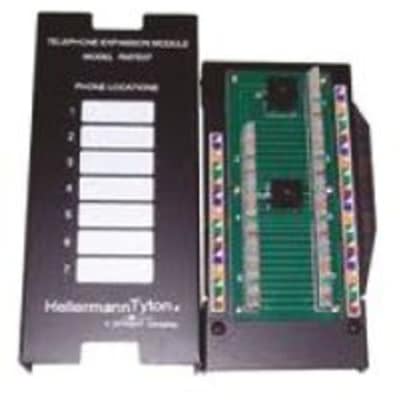
Octopart
Find the best pricing for HellermannTyton RMD08 by comparing bulk discounts from 3 distributors. Octopart is the world's source for RMD08 availability, pricing, and technical specs and other electronic parts.
peak cloak
also what is this?
 split heron
Thats the weird data module.
The picture in the visio is what it is.
RMD08 HellermannTyton
peak cloak
split heron
Thats the weird data module.
but that's this?
 split heron
Oh sorry, youre correct. THAT right there is the RMD08.
The Bridge ??? is what I was wondering if I should buy a bridge there to connect to the RMD08. Apologies
split heron
Um. Guess connect the ONT to a switch/router and then from the switch/router connect four 5e cables to the RMD08. Thus bridging the connection 😅
peak cloak
split heron
Um. Guess connect the ONT to a switch/router and then from the switch/router con...
but why
you only want one router in a home network
split heron
Yah. I think my issue was I need to connect the ONT to the Frontier Router (gateway right?). Then connect the Frontier Router to the RMD08. Which should hopefully allow all the ports in the house to work
Apologies if I am off in my terminology.
peak cloak
split heron
@hollow marlin do you know if this is just a fancy patch panel?
from what websites say and the price, it looks like just a patch panel
split heron
Patch panel is just a male/female connection to an endpoint and would not create a lan?
peak cloak
split heron
Patch panel is just a male/female connection to an endpoint and would not create...
patch panel is literally just a physical thing to help terminate wires in one spot
no switching, routing, anything
split heron
Cool, thats what I thought it was. I should be able to test.
Assuming its a patch panel, I would get a router for between it and the ONT?
peak cloak
depends on the config
you would want router and switch behind it
let me show a quick diagram
split heron
Er, ONT --> Gateway --> Switch --> Four 5e connections to patch pannel --> room's computer
peak cloak
@split heron
 split heron
Thats perfect, yup. Thank you.
peak cloak
if that's a patch panel that is, which I'm 99% sure it is
split heron
Any suggestions on Router/Switch? I am chucking this crappy frontier one. Bought a Access Point.
peak cloak
I have ER-X right now
upgrading to HEX-S by Mikrotik soon
as for switch, I just have this dlink POE switch I got for free
and for AP I use tp-link omada eap225
split heron
Sweet, thank you so much!
peak cloak
split heron
Sweet, thank you so much!
I wouldn't really reccomend er-x as it has some issues
like ipv6
hence why I am upgrading
split heron
Ill pick up a mikrotik. https://mikrotik.com/product/hex_s

MikroTik is a Latvian company which was founded in 1996 to develop routers and wireless ISP systems. MikroTik now provides hardware and software for Internet connectivity in most of the countries around the world.
peak cloak
split heron
Ill pick up a mikrotik. https://mikrotik.com/product/hex_s
be warned though, the user interface is not easy
kinda hard tbh
very advanced
hollow marlin
peak cloak
<@!462711605063450628> do you know if this is just a fancy patch panel?
Yeah, essentially a giant keystone
split heron
I'm kinda stuck at 5e cabling in the place, which is fine, but woulda been nice to have 10gb
peak cloak
that's one thing I like about the er-x, the ui is pretty descent
split heron
Hmm, you wanna sell me your ER-X?
peak cloak
are you in NY area?
peak cloak
idk
split heron
no worries! Thought I would offer as you are upgrading
thick minnow
hi guys, I'm noticing my PC is getting an IPv6 address despite my network only being setup for ipv4, does this mean I'll be able to access my PC from the internet? or do I have to do something in my firewall to allow it?
peak cloak
thick minnow
hi guys, I'm noticing my PC is getting an IPv6 address despite my network only b...
does it start with fe80?
thick minnow
yea
peak cloak
that's link local
thick minnow
oh I read the wrong one
peak cloak
not a public ip, just used internally
peak cloak
hmm let me think
hmm I think that isn't public either
In the Internet addressing architecture, the Internet Engineering Task Force (IETF) and the Internet Assigned Numbers Authority (IANA) have reserved various Internet Protocol (IP) addresses for special purposes.
fc00::/7 is for unique local addresses
it could be if doing 1:1 NAT, but I would have no clue
@thick minnow https://test-ipv6.com/

This will test your browser and connection for IPv6 readiness, as well as show you your current IPv4 and IPv6 address.
just use this to check
thick minnow
aah ok, thanks
hollow marlin
peak cloak
fc00::/7 is for unique local addresses
Yeah FD00::/8 falls under ULA. Actually its technically still a requirement for the L-bit (8th bit) to be set to 1, as FC00::/8 is reserved. Because some manic was trying to push FC00::/8 as an assigned ULA, AKA, equivalent to requesting a private v4 from ARIN
 sudden kayak
scored an edgerouter X on clearance on my last day of work at micro center lol
ready to go wild with a completely overbuilt home networking setup
peak cloak
sudden kayak
ready to go wild with a completely overbuilt home networking setup
Er-x ain't really overbuilt
It's pretty good, just has a few flaws though
sudden kayak
i mean the router itself isn't but it enables a network setup that would be overbuilt by most standards for a home network with two laptops and two phones and basically nothing else lol
 sudden kayak
lmao exactly
peak cloak
No point
I really only have 3 vlans in use
Management, Main LAN, WAN servers
The most overkill, impractical thing would be, router in every room, iBGP or OSPF for routing between routers

 waxen scroll
Nerd
rocky badge

@waxen scroll A UDMP i manage for another site https://i.ryois.me/di1aLAEQrp.png

A UDMP was overkill for them but it's nice to have anyways lol
sudden kayak
that's fun lol
yeah my micro center hasnt been able to keep any of the dream machines in stock
rocky badge
Because UDMP is the only rack mounted UniFi router....that's not old or GA
sudden kayak
when i put a rack in our apartment is when my family kicks me out
but someday, in a bigger apartment
 sudden kayak
niiice
rocky badge
non rack mounted wasn't an option
sudden kayak
I'm planning to wall mount all my network gear under the desk
so far i just have a cheap ass modem, consumer router, and a switch
rocky badge
👀

Been rock solid for...https://i.ryois.me/eSr88l0d9T.png

Not everything has that uptime, but that's how long its been since the install
Because you know...I actually patch their shit
peak cloak
We are showing off setups now?
 peak cloak
Not bad
 low pond
peak cloak
We are showing off setups now?
low pond
peak cloak
We are showing off setups now?
That looks like something my friend has, his homelab is just some wooden planks screwed to gether and he calls it a rack
 pulsar thorn
I would send a photo of my setup but it's just two laptops and a desktop surrounded by loads of dust and ethernet cables
low pond
i can send my friends rack, its pretty ok actually
peak cloak
low pond
That looks like something my friend has, his homelab is just some wooden planks ...
If it works, it works
Before I had the wall mount setup, but I needed a rack to mount the switch in
low pond
I see :P
 silver tapir
Would this be the right channel to ask for advice on home servers or would that be tech-support?
Specifically, I have my old mobo with a 6600K and 16GB RAM, considering that it's free would this be a workable platform for a home storage server? Mostly for media storage, plex etc. Probably 4x 4TB drives in a beginner-friendly NAS OS.
peak cloak
silver tapir
Specifically, I have my old mobo with a 6600K and 16GB RAM, considering that it'...
Would prob work just fine
silver tapir
Cheers.
I guess worst that can happen is it falls short in some regard and I check ebay for an EOL server with a xeon from 2012 or something like that.
peak cloak
silver tapir
Cheers.
I guess worst that can happen is it falls short in some regard and I che...
Ehh, those old servers ain't good
Power hungry and loud
silver tapir
Good point, and while I've got a spare room to put it in and I've got concrete walls it'd still be a 20k RPM 1U fella, y'know, the reason that DC techs are allowed to expense ANC headphones.
clear igloo
Depends, some servers allow for you to lock their fan speed with IPMI, if you can monitor the load or keep it consistent then it's not bad to reduce noise
peak cloak
I mean like hp gen8 is as low as I'd go or dell rx20
clear igloo
yup
silver tapir
Sure. For now I have a spare mobo/CPU/RAM so I'll work with those and see where it takes me.
peak cloak
Yeah, I was thinking of buying an actual server but what I have works
The biggest thing I wish I had was remote management
silver tapir
Simple; never leave home and you don't need to remotely manage
(this coming from a bloke in Sydney, we've been in lockdown since the end of June)
silver tapir
If the above wasn't already a giveaway that's well outside my sphere of knowledge - I'm a data centre cabling engineer by day, so my understanding of networking and enterprise hardware more or less stops at the VCSEL in the SFP.
peak cloak
silver tapir
Simple; never leave home and you don't need to remotely manage
Nah, I can connect from anywhere it's just so I don't need to connect a monitor to it
To do stuff like install an os, or do a change that will break network connectivity
silver tapir
I'm assuming that there's a very good reason that RDP, VNC, Teamviewer, SSH etc. won't work for you?
Ahh yes, I see
peak cloak
No, I'm talking about something like iDRAC
silver tapir
So you don't just want RM, you want OoB too
peak cloak
Yeah
cedar igloo
Is it best to configure RAID at a hardware level rather than OS level?
final glacier
anyone here know anything about NAS prebuild ? like qnap, synology, asustor ...
final glacier
i know it is more to redirect to PC-hardware for helping someone which question is too advance for me 🙂
sudden kayak
so this clearance edgerouter x might be fried 😭
peak cloak
sudden kayak
so this clearance edgerouter x might be fried 😭
what's the issue
sudden kayak
i was having really weird connection issues to the console, kinda looked like it was having power supply brownouts or something
not sure now - i might have just not waited long enough for it to finish booting
peak cloak
hmm
sudden kayak
hmm cautiously optimistic that i might just have been a dumbass for a few minutes and now it's finr
but i got this far once before and then it suddenly lost connection and when i logged back in all the settings were default
so I'll see how it goes
currently on edgeos 1 so i might update it depending on how worthwhile that is (relative to the small risk of bricking it i guess)
sudden kayak
yeah this seems like either the whole thing is fried or a power issue..... i had it working fine with one switch on the LAN but as soon as i plugged in the WAN the whole thing rebooted
peak cloak
Yeah doesn't sound good
split heron
Do i need a poe injection on the other side of a patch panel?
cedar igloo
99% sure not, but I don't have one so would be happy to be corrected
 upbeat portal
Hey I have a question about ethernet if anyone is knowledgeable lmk. I have had ethernet connected, but it says “no internet” I tried running commands in command prompt to renew ip configuration and whatnot, and I also verified that my router and ethernet cable are working. When I plug in my cable, the lights turn on, and I can see bytes are being sent and received. Is there any way I can know if my ethernet port is just screwed up, or does anyone have another solution?
peak cloak
upbeat portal
Hey I have a question about ethernet if anyone is knowledgeable lmk. I have had ...
Can you ping the router?
peak cloak
split heron
Do i need a poe injection on the other side of a patch panel?
You know the diagram I showed you?
It doesn't really matter on which side it is, but generally you would want to do it right after the switch
Or you can just have a poe switch
upbeat portal
peak cloak
Can you ping the router?
It says “request timed out” 100% packets lost
If I do it without the ethernet plugged, it pings perfectly fine
peak cloak
upbeat portal
It says “request timed out” 100% packets lost
Hmm, anything between you and router
upbeat portal
I’m on an extender
peak cloak
Wifi?
upbeat portal
Which plugs into my pc
peak cloak
So its not pure Ethernet
upbeat portal
It’s ethernet from the extender, but not direct ethernet
peak cloak
I bet it's the wifi extender
upbeat portal
Is there any way I can check?
peak cloak
Those always cause issues
peak cloak
upbeat portal
Is there any way I can check?
Bypass it?
This is some new setup or has it worked before?
upbeat portal
It worked before, I’ve had it for about a year
It seemed to happen out of the blue, when I logged on the other day it just stopped working
peak cloak
Idk, best way would be to somehow get Ethernet to router to verify it's a issue with extender but those extenders always cause issue I found
upbeat portal
Alright well, I tested it with the router and same result happened, I also tried replacing the ethernet cord and nothing changed
peak cloak
Huh
upbeat portal
I think it may be a software issue but I can’t pinpoint what it is
upbeat portal
Here’s the little diagnostic I ran on a fresh install of windows.

Something wrong with DNS or some form of gateway
peak cloak
Nah, it just means it's trying to basically get to the router and it can't
upbeat portal
peak cloak
Nah, it just means it's trying to basically get to the router and it can't
So I’ve narrowed it down to my pc being the issue
I tried the extender and cord on another system and it worked
Just my pc can’t seem to communicate to the router
peak cloak
upbeat portal
So I’ve narrowed it down to my pc being the issue
Hmm, maybe just a restart could fix it?
Windows is weird like that
upbeat portal
Restarting didn’t work, maybe my ethernet port is just messed up
peak cloak
Or drivers
peak cloak
Ok so I think I narrowed down my VPS tunnel issue to something with routing. So the wireguard link is just fine. When I use telnet to the VPS on the opened port, I can see the requests on the wg0 interface using tcpdump : pool-x-x-x-x.x.fios.verizon.net.38682 > 10.10.30.60.25565 The VPS nats the connection and I can see it the connection tracking. I can also see the requests on my router on the wg0 interface pool-x-x-x-x.x.fios.verizon.net.38682 > 10.10.30.60.25565 However I do not see the requests on the server itself, which I cannot figure out why. From the vps itself I can telnet successfully into the server, but not with a connection from the internet. Here is a diagram of the setup

pretty sure it's a routing issue, but I have no clue how to solve
maybe by source nating on the vps? but that would cause issues as you wouldn't be able to see the user ip
hollow marlin
@peak cloak Yeah it's going to need to be src. NAT'd as the syn-ack is going to attempt to go out the WAN instead of back over the tunnel. If the outbound FW doesn't drop it (syn-ack before seeing a syn is an invalid state), the client FW will.
You can either src. NAT, policy-based routing, or get your hands dirty and start messing with VRFs
You will be able to see the client IP with src. NAT but only in connection tracking in the VPS.
peak cloak
hollow marlin
<@222482269829332992> Yeah it's going to need to be src. NAT'd as the syn-ack i...
Yeah going back over wan is what I thought is happening. I'll just src, and find a way to like somehow "tag" the packets with their IP
 dark sphinx
Need help with picking a router.
Currently have the Netgear r6300 v2 have 2 computers hardwired in 1 direct tv box wired In and 1 Poe and 7 connected through wifi
 radiant basin
halp
i need a new router
2 actually, will be in a mesh configuration
need atleast 4 ports on each router tho
 grave rune
Lol mesh
 ionic kiln
 low pond
that's prem
clear igloo
Nice
rocky badge

On Thursday evening, KrebsOnSecurity was the subject of a rather massive (and mercifully brief) distributed denial-of-service (DDoS) attack. The assault came from "Meris," the same new "Internet of Things" (IoT) botnet behind record-shattering attacks against Russian search giant Yandex this…
clear igloo
I saw that, crazy
rocky badge
Mikrotik routers in the bot net oof
clear igloo
Yup, probably misconfigured routers but have to see
autumn bay
so my new house is like 200sq m how can i get wifi all over the house without having visible WAP ?
waxen scroll
put the router in the spot closest to the middle of the house, off to the side in a TV cabinet is probably fine
I have 288sq m and thats how I do mine
autumn bay
what about in 2 separate corners of the house ?
peak cloak
Best is middle, with having it in corners you are wasting a bit of coverage as your normal wifi APs are omnidirectional
waxen scroll
it should but it might not be comfortable right on the very edges
autumn bay
would i need one per floor ?
waxen scroll
i use long range ubiquiti myself
no, one should cover all floors as long as its on the 1st floor
autumn bay
its a 2 story so i think it will work just fine
waxen scroll
you'll basically have it rest on some furniture pointing up. I have a basement and two more floors. i get coverage in the basement fine with it pointing up
autumn bay
so basically somewhere on the floor?


 autumn bay
which ap do you have ?
waxen scroll
no, just put it on top of some furniture... like a TV cabinet or something

Ubiquiti Inc.
U6-LR is a high-performance Access Point leveraging advanced WiFi 6 technology to provide powerful wireless coverage to enterprise environments.
It delivers an aggregate radio rate of up to 3.0 Gbps with 5 GHz (4x4 MU-MIMO and OFDMA) and 2.4 GHz 4x4 MIMO radios. The U6-LR seamlessly blends into any environment, and is capable of being mounted in...
waxen scroll
yes, a little but I don't suspect much as long as you're inside the house. if you already have it why aren't you testing it in different spots?
autumn bay
i dont have the keys yet
waxen scroll
oh
waxen scroll
if you can return the lite i can tell you that LR is worth it
just be careful cause they dont ship a power brick with it
autumn bay
i cant but i can just get a new one
i want as little cables as possible
so i was thinking of getting a poe switch
waxen scroll
i was mad when I opened mine and no brick. I had a POE brick to use though
waxen scroll
i have an 1207 sq m property and the LR actually reaches the whole damn outside
I was impressed
peak cloak
autumn bay
whats a good wifi analyser ?
Wifiman is pretty good
autumn bay
is it good at close range to or is it better at range >
peak cloak
Should be on ios
waxen scroll
close is fine
im actually thinking of turning the signal down just so neighbors cant receive it 😄
autumn bay
my brother will be using it as a way of connecting his ps4 and the wrest are like 2 laptops and 5 phones so i guess it would do just fine
also will a 8 port switch do or should a get a 5 port and get a better router ?
since the stock one overheats in seconds and i just get a new one from them
 sick pecan
I don't really mess with networking much. but ive been learning a bit more about it, and turns out giving out my public IP for the games servers i run on my NAS is a bad idea, also since its ever changing i have to keep updating people whenever my ISP changes my ip. I keep seeing things about just running them through a vpn, but i dont really get it if im being honest. i should just keep a VPN running on my router all the time? thats going to slow down all of my connections on my network then i think right?
low pond
You don't need to run the VPN on the router per se, the "server" here can run it only and still work
sick pecan
hmm yeah, i suppose i could, that would let it not mess with my plex server that I have running. ill give it a shot, TY
little schooner
waxen scroll
https://store.ui.com/products/unifi-6-long-range-access-point
why would the long range one be better for any client? is it better for ap to ap?
 idle idol
Anyone else have mediacom near the panhandle of florida that is able to get an IPv6 prefix at the moment?
peak cloak
sick pecan
I don't really mess with networking much. but ive been learning a bit more about...
no, those people are saying to to get a vps and run basically a proxy. I actually just finished setting that up myself kinda to hide my ip and in case of ddos I can just disconnect that connection and not have it affect my home network. You can also use dynamic dns which means basically when your router gets a different ip from ISP it will send a requests to the ddns service to update the dns record
peak cloak
peak cloak
no, those people are saying to to get a vps and run basically a proxy. I actuall...
the VPN part is just to get tunnel working between server and vps


my setup
simplified ofc
sick pecan
hmm thanks a bunch for the reply. i'll have to try and set something like that up.
peak cloak
sick pecan
hmm thanks a bunch for the reply. i'll have to try and set something like that u...
this repo has some helpful instructions but ik a bit of networking already so I mainly did things my own way (ended up using VYOS) https://github.com/mochman/Bypass_CGNAT
sick pecan
awesome, i appreciate the link!
peak cloak
peak cloak
this repo has some helpful instructions but ik a bit of networking already so I ...
like here they use a server behind router as wireguard endpoint, while I use the router itself
autumn bay
at how many device will i start noticing performance drops ?
on wifi ofc
or does that depends on the device and stuff ?
Also will a router upgrade from the ISPs one make a huge difference to the performance ?
peak cloak
autumn bay
or does that depends on the device and stuff ?
depends on a lot
peak cloak
autumn bay
Also will a router upgrade from the ISPs one make a huge difference to the perfo...
I just use my own router. Do you have issues right now?
also with own router you can do a lot more
autumn bay
yeah like disconnecting and stuff
its a crappy router it makes crackling sounds when i restart it or turn it off to wrest for a bit
idle idol
Might be headed for the bin anyway if its doing that
autumn bay
idle idol
Might be headed for the bin anyway if its doing that
its brand new from the ISP as the old one cooked itself
idle idol
0.o
peak cloak
ISP supplied routers are usually ehh
autumn bay
it has no options
idle idol
Brand new doesnt mean brand new in the world of ISPs
autumn bay
just basic things
autumn bay
yeah its got 5ghz thats their selling factor
idle idol
thats a selling factor??
peak cloak
5ghz is standard at this point
idle idol
I used to work with Comcast Xfinity Support. You want to go get your own modem, and your own router. Can save you a little each month and youll own your equiptment.
autumn bay
not for the ISP ;)
idle idol
those wireless gateway pos suck to no end
autumn bay
In the UK they wont care
 latent bobcat
can you port forward through wireguard?
like i want to run a minecraft server on my home server but host it through my VPS' IP addr
because currently i cant port forward on my home internet (my parents)
peak cloak
latent bobcat
can you port forward through wireguard?
like i want to run a minecraft server on...
wireguard is just a vpn protocol, it doesn't care what ip traffic it carries
idle idol
If your asking for advice on a router to get, this one albeit a little old works wonderfuly. supports 5G, and if you throw OpenWRT on it you get way more out of it https://duckduckgo.com/?q=Linksys+WRT3200ACM&t=newext&atb=v280-1
DuckDuckGo. Privacy, Simplified.
peak cloak
I don't really like OpenWRT myself
autumn bay
latent bobcat
peak cloak
wireguard is just a vpn protocol, it doesn't care what ip traffic it carries
but how do i forward that? or will wireguard take the (VPS IP):25565 and put it to (HOME SERVER):25565?
autumn bay
would that router do ?
peak cloak
latent bobcat
but how do i forward that? or will wireguard take the (VPS IP):25565 and put it ...
wireguard is just for the tunnel, you would need to use iptables on the vps to NAT the traffic
I can show you my vyos config
latent bobcat
yes please
im a noob at this stuff, i only know how to configure my home network and use this rudimentary VPN setup
peak cloak
latent bobcat
im a noob at this stuff, i only know how to configure my home network and use th...
this repo is also descent
latent bobcat
im ssh'ing in holup
idle idol
autumn bay
would that router do ?
That would do, looks like its the upgraded version of it. I loved that system. But i absolutly put OpenWRT on it because of my home lab self. It runs just fine with the factory firmware.
Youll need to get your ISP to place your modem into bridge mode to plug that in.
autumn bay
yeah when they install it at my new place i will tell them
latent bobcat
i sometimes forget that port 22 is closed and i need my vpn to do things lmfao
peak cloak
@latent bobcat https://hastebin.com/ukawoqoliq.properties
peak cloak
latent bobcat
i sometimes forget that port 22 is closed and i need my vpn to do things lmfao
locally?
latent bobcat
peak cloak
locally?
yuh
peak cloak
why
latent bobcat
peak cloak
<@!342101128244101120> https://hastebin.com/ukawoqoliq.properties
location of file in ubuntu?
latent bobcat
peak cloak
why
idfk tbh
peak cloak
oh no, this is vyos
latent bobcat
hmmm
peak cloak
I honestly like it better than messing with iptables
it's really just a nice layer in front of iptables
latent bobcat
hmmmmm
peak cloak
latent bobcat
idfk tbh
wait so you have a server that is local, and your pc is also local and both are on the subnet, but you need a vpn to connect to it 
latent bobcat
i just need a very basic way to forward (HOME SERVER):25565 to (VPS):25565
peak cloak
yes, that's bascially what it does
latent bobcat
peak cloak
wait so you have a server that is local, and your pc is also local and both are ...
i want my friends to be able to play
peak cloak
no for ssh?
latent bobcat
ssh'ing into my VPS
peak cloak
ohhh
latent bobcat
locally all ports are open
but the open to internet ports are like https and one other port which i forgor 💀
peak cloak
wait so you can't ssh to vps directly?
latent bobcat
no, port 22 is closed
peak cloak
whyy
latent bobcat
parents
peak cloak
are they some tech savvy people?
latent bobcat
no, my uncle is tech savvy
peak cloak
even then whyy
latent bobcat
wait how do i install it for not costing 800 dollras
peak cloak
latent bobcat
wait how do i install it for not costing 800 dollras
oh yeah the rolling releases are free, but the other's are not unless you build it yourself
autumn bay
what are some router brands i should look for ?
idle idol
autumn bay
what are some router brands i should look for ?
Wana go fancy? go get a MikroTik 
autumn bay
i cant find any in the UK
autumn bay
idle idol
Wana go fancy? go get a MikroTik <:aggressivelipbite:852789360435658769>
this ?
is it better than the other one ?
idle idol

www.msdist.co.uk
autumn bay
thats like overkill
autumn bay
yeah
autumn bay
it has a 3090 heatsink on it
idle idol
what kind of internet speed do you have
autumn bay
150 but im going to upgrade to 300 or 500
because its actually cheaper
and 150 isnt enough
idle idol
id be buying that 5002 if i didnt already have a 4011. I have a seperate AP for different parts of the house, hardwired back to the wiring closet. got the RB4011 as the backbone with a Cisco Catalyst 3560 switch connected with a 10G Fiber as a back haul... But im overkill 😄
If its just that much the one you linked to would work fine.
It will work up to 800 some odd mbps
autumn bay
oh ok
i was going to get 1gb but its too overkill for me like toooooooooooo overkill
what are some features i should look for ?
idle idol
phahaha 😄 soon youll be saying its too little
autumn bay
that will come in useful
idle idol
well RoS is fairly beefy. for general home use it will perform just about everything you need softwar wise.
It has a basic setup tool that will get you off the ground running, but the fine tuning you can perform is nice. Supports IPv6. built in NTP server, built in DHCP server, built in Radius server if you ever need it, built in VPN server, built in link aggregation if you decide you need redundent ISP connection, the list goes on for a good bit
Oh, and the ports you see. alhough they are marked, they can be reassigned to anything else. So the wan could be turned into a lan, and the lan into a wan, or you can plug in a link aggregated nas and have a dual link nas setup, or in my case ive got two links to my modem for a 1GB full duplex link
idle idol
PiHole would be a nice touch. looking at doing that myself since RoS isnt too friendly to the lists required. But yeah, it would run it all. You've got 5 ports to play with local, or you can throw on another switch and the world is endless
autumn bay
im planning to put a switch in my room and just run a AP from it and get a direct connection for my PC since im the only person that cares about that stuff