#networking
1 messages · Page 360 of 1
 bronze swift
 peak cloak
So it's a bit deeper than that
 rocky badge
@waxen scroll @clear igloo Scary updating PtP firmware remotely when the site is 50 minutes away one way https://i.ryois.me/vnJzoFb7BI.png
 peak cloak
A router, routes at a basic level (does other stuff too). So for example one of it's roles is to get an IP from your ISP. You know how you have a default gateway when you look at network settings. That's the ip of the router and your device sends all packets to that IP if it's not on your LAN. Then your router will send those packets to a ISPs router which will then do all the complicated routing across the internet
A router operates on layer 3 of the osi model (IP addresses)
A basic switch on the other hand doesn't deal with IPs, it works on a layer 2 level, switching based on MAC addresses
@bronze swift
bronze swift
Thanks
 peak cloak
bronze swift
Thanks
peak cloak
bronze swift
Thanks
Another thing consumer routers do by default is something called NAT. It allows many devices behind the router to share the same public IP
 little schooner
is there a better managed multi gig switch with poe+ and 10g ports than this netgear?
https://www.netgear.com/business/wired/switches/smart/ms510txpp/

NETGEAR
Looking for Smart Switches? Discover Netgear MS510TXPP 8-Port Multi-Gigabit Ethernet PoE+ smart managed pro switch with 2 dedicated Gigabit Uplink Ports. Buy Now!
it's not an instant buy because three times this year I had my current netgear switch lock up
as if it had a memory leak over time or something
rocky badge
 little schooner
I like the graphic they used for the hacker lol
 dusty geyser
Hey everyone, I use comcast internet and for the past two months I have been having constant dropouts and ping spikes. Im getting tired of it and I havent even tried reaching out to xfinity because their customer support is awful so I have decided to come here first. I have multiple questions.
- What is a good way to do a long term ping test for free so I can try to figure out how often these dropouts happen?
- How do my numbers look in terms of SNR and Power for the downstream and upstream?


 last crane
I had a stroke and a slight trying to read this comment LOL


 clear igloo
It's the automated stand 😛
 waxen scroll
rocky badge
<@!186123993412141057> <@!291198741862416384> Scary updating PtP firmware remote...
waxen scroll
rocky badge
<@!186123993412141057> <@!291198741862416384> Scary updating PtP firmware remote...
I've done it while the site was in china
 small glade
A small PSA for anyone with an android phone that doesn't want to roam between 2.4 and 5ghz networks on different ssids: turn off randomized mac addresses for the 2 ssids. That was my problem now my phone switches over between the 2 bands much better
(i reccomend only selectively turning that off for your home ssids so you still have randomized mac addresses for public wifi)

 low pond
harold
 hollow marlin
@clear igloo Saw your comment on the new LTT video. Missed a lot.
The thing is, he actually has no Marvis license. Look at the left colum second down and the yellow lock. Marvis chat is not the same
clear igloo
hollow marlin
<@291198741862416384> Saw your comment on the new LTT video. Missed a lot.
The t...
Ah, that makes sense, I'm surprised they would even bother at that point to do a sponsor spot and not give a demo license or something that can really show it off
hollow marlin
It's mostly useless. Only rare cases where it really speeds up troubleshooting. I'm in Mist daily and still a lot of manual tshooting
clear igloo
Yah, there was plenty wrong with the video for sure but manually cycling an AP just seemed to be the one that stood out most for me
hollow marlin
They probably gave him the new guaranteed switch license too which the 2300/44000 tie into Mist, in which you can just click reboot and the switch will bounce the port
clear igloo
Yah, I figured they had to have an easy port bounce button
hollow marlin
It's an odd sponsor. I know they did Cisco in the past but $1800 APs might be outside the audience
clear igloo
Next time on L...T...T!!!
Water cooling an access point!
hollow marlin
Those APs can get warm but they are actually solid aluminum. The AP41, 33s are like 10lbs, or at least feel like it.
clear igloo
Sounds about right, I remember the older Cisco 4800 APs, those are heavy!
 heady brook
If I have starlink (satellite based) internet with an okay connection quality and a smartphone with 4g connection both hooked up to my PC, is there a way to merge them both to get faster upload, download, and potentially lower ping?
clear igloo
No
 tall pagoda
I have that one too, It is really good
Actually the price have been increased. I paid €50 for it in Mid-2019 and now it is €75+
 eager fractal
i just bought this power line adaptor from tp link its working great im getting my full speed but for some reason the internet keeps shutting down for the whole house any advice on what i should do
Message #tech-support
 hollow axle
hollow marlin
They probably gave him the new guaranteed switch license too which the 2300/4400...
hollow axle
hollow marlin
They probably gave him the new guaranteed switch license too which the 2300/4400...
That's actually pretty slick. Does this allow a l1 to do that simple step without giving rights to actually mess up the port?
 formal harness
hollow marlin
hollow axle
That's actually pretty slick. Does this allow a l1 to do that simple step witho...
formal harness
hollow marlin
hollow axle
That's actually pretty slick. Does this allow a l1 to do that simple step witho...
Yeah its part of the tool set. If you have the Marvis license it will show a problem exist and one of the options with be to bounce the port. If not you can always do it under the switch in Mist as well.
I am sitting on 30 of the firewall/switch integration licenses and mean to toss on in a lab to see what further things can be done, but that was at least shown in the demo
hollow axle
Now if only I worked in an environment with wifi I would definitely be poking juniper for a demo
hollow marlin
We're an ISP with pretty much all Juniper and out "managed services" comprises of an SRX/EX and Mist APs. Mist is nice but frustrating as hell at times.
 limpid lion
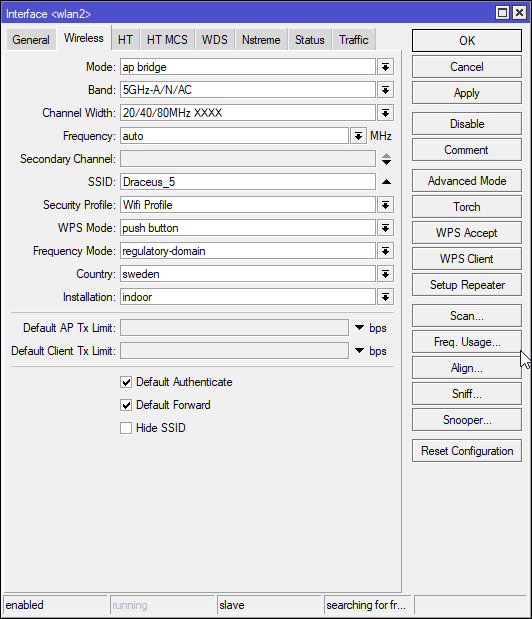
Anyone know why this wireless network won't show up on my phone?
https://i.imgur.com/4SvmljA.png
 hollow marlin
@limpid lion Is it working with other devices? Is the phone international or US based?
limpid lion
Have no other device to try with at the moment. Phone is EU based
Sweden
Changing channel width from XXXX to Ceee seems to have solved the issue. Not sure why automatic doesn't work
hollow marlin
Depends what freq. the phone accepts. C is the control/center freq. so it could automatically choose outside the range the device accepts. Found auto can be iffy sometimes
limpid lion
Gotcha
small glade
eager fractal
i just bought this power line adaptor from tp link its working great im getting ...
Lucky I have powerline for my basement test shit and I get 20 Mbps at best over it
Still idk if there's enough reason to run a cable to the basement I'm very rarely there for any long periods of time
Idk why it would cause shit to shut down tho. Are you tryi g to plug in a second router as an ap but still have its dhcp and nat and similar things enabled? Those esp dhcp will cause your 2 routers to compete on who assigns who ip addresses and who is the actual router that routes shit on the network and that will end in a calamity very quickly
waxen scroll
*wonders if @little schooner ever quit his job
little schooner
which one?
I never quit a job
yet
my prof that I used to help keeps pushing me to apply to amazon and work there in their security department for some reason lol
waxen scroll
You worked for the school
little schooner
its paid this time, which makes me happy. all my coworkers have only said good things about me since I started
I am not able to help him though and they locked out his classroom from any internet access, which is weird
funny how last summer it was working and they randomly decide to disable the port
 tender hazel
rocky badge
<@!186123993412141057> <@!291198741862416384> Scary updating PtP firmware remote...
tender hazel
rocky badge
<@!186123993412141057> <@!291198741862416384> Scary updating PtP firmware remote...
you think that is scary? we typically have to upgrade those radios that are several hours flight time away, or an 8-10 hour drive
rocky badge
still scary ¯_(ツ)_/¯
 thick minnow
Hi, is there a way to configure a second wifi adapter as a hotspot with its own name and password? All while being "fed" by the service received through adapter 1
The deal is; my neighbor is cool enough to let me use his wifi, and I have good reception in my computer but it's basically impossible to connect through my phone
And I just happen to have a spare wifi dongle
 acoustic dagger
So anyone ever see coax be used for internet?
 lone sun
acoustic dagger
So anyone ever see coax be used for internet?
lone sun
acoustic dagger
So anyone ever see coax be used for internet?
🤷♂️ Uh its used for Xfinity.
 topaz patrol
it's quite common
acoustic dagger
Huh interesting, is it a bottleneck at all?
acoustic dagger
I thought so, I live in the middle@of nowhere so 600 isn’t happening here lol I get 120
topaz patrol
lol
probs the same cable as pay tv
or cable as my us friends call it
the speed really depends on the age of the cable and what equipment your isp is using.
also depends how many users are on the same line as you. you could be sharing bandwidth with up to about 50 people
 compact snow
Hello I have just setted up an ftp server with this config
listen_ipv6=NO
anonymous_enable=NO
local_enable=YES
write_enable=YES
local_umask=022
dirmessage_enable=YES
use_localtime=YES
xferlog_enable=YES
connect_from_port_20=YES
chroot_local_user=YES
secure_chroot_dir=/var/run/vsftpd/empty
pam_service_name=vsftpd
rsa_cert_file=/etc/ssl/certs/ssl-cert-snakeoil.pem
rsa_private_key_file=/etc/ssl/private/ssl-cert-snakeoil.key
ssl_enable=NO
pasv_enable=Yes
pasv_min_port=10000
pasv_max_port=10100
allow_writeable_chroot=YES```
But when I try to connect to it I get this
```Status:    Connecting to ip:21...
Status:    Connection established, waiting for welcome message...
Status:    Insecure server, it does not support FTP over TLS.
Status:    Server does not support non-ASCII characters.
Status:    Logged in
Status:    Retrieving directory listing...
Command:    PWD
Response:    257 "/" is the current directory
Command:    TYPE I
Response:    200 Switching to Binary mode.
Command:    PASV
Response:    227 Entering Passive Mode (31,214,245,152,39,93).
Command:    LIST
Error:    Connection timed out after 20 seconds of inactivity
Error: Failed to retrieve directory listing```Anyone has any idea why it failed to retrieve directory listing?
peak cloak
acoustic dagger
So anyone ever see coax be used for internet?
Yes very common
It's called dociss
 slow pivot
compact snow
Anyone has any idea why it failed to retrieve directory listing?
slow pivot
compact snow
Anyone has any idea why it failed to retrieve directory listing?
Running that through a NATed firewall?
compact snow
slow pivot
Running that through a NATed firewall?
all firewalls are turned off
slow pivot
compact snow
all firewalls are turned off
So this from server is directly listening on the internet?
compact snow
yes
slow pivot
Anything odd in the logfile?
compact snow
Not really it accepts the connection and then timeouts before handing the dir
slow pivot
compact snow
Not really it accepts the connection and then timeouts before handing the dir
Well it looks like the FTP client is timing out due to not being able to connect to the data port as instructed by the server
clear igloo
compact snow
Not really it accepts the connection and then timeouts before handing the dir
Have you disabled passive mode or tired a range in the passive port range specified?
slow pivot
clear igloo
Have you disabled passive mode or tired a range in the passive port range specif...
If the client is behind a firewall, it is highly unlikely non-passive mode will work
clear igloo
Yah, would help to know the full flow from client to server 🙂
I know they said the server was on the internet directly connected but the client side would be helpful too
compact snow
clear igloo
Have you disabled passive mode or tired a range in the passive port range specif...
tried the range
compact snow
slow pivot
Well it looks like the FTP client is timing out due to not being able to connect...
I see
 cedar igloo
Anyone successfully used FileBeat or MetricBeat on a Solaris machine?
 daring heron
a bought a usb wifi dongle recently and the speeds are very bad on it like 5 Mbps when i get 80+ on any other device is there a way to improve the speed?
 late talon
I have a strange issue where my pc is stuck at like 10% of my network speeds, I tried different network adapters etc and it's still stuck at ~20mbps when other devices in the house get 150, anyone know what the issue could be? it's a very odd issue so
 still quarry
10/10 network switch 

 umbral granite
late talon
I have a strange issue where my pc is stuck at like 10% of my network speeds, I ...
umbral granite
late talon
I have a strange issue where my pc is stuck at like 10% of my network speeds, I ...
For network related hardware could be: Bad network cable, connection running at half-duplex, or bad switch port on network equipment the PC is connected too.
For software related could be: Tons of Malware eating your connection to nothing via spyware/malicious software.
late talon
umbral granite
For network related hardware could be: Bad network cable, connection running at ...
2 things, is half duplex based on the connection itself or something else, and also would spyware etc show the network activity in task managers resource monitor
 proper grotto
Hello Guys, I have a question I just moved and I have to get some new network stuff like router and AP now I was thinking should I get an Wifi6 capable AP? The thing is I dont really have many Wifi6 capable devices. So do you guys think the "upgrade" would be worth it or should I just get another good AP?
And I also heard some "older" devices having problems with Wifi6?
Pls tag me when you're answering thx
 plain siren
proper grotto
Hello Guys, I have a question I just moved and I have to get some new network s...
plain siren
proper grotto
Hello Guys, I have a question I just moved and I have to get some new network s...
Well the issues arise from the WPA3 stuff
peak cloak
plain siren
Well the issues arise from the WPA3 stuff
Wut
You don't need to use wpa3 on wifi 6
plain siren
That is correct, its just some people dont change the default option these Wifi6 Routers have set and get confused
plain siren
this is one of those fun perception biases that come from newer developing technologies. One thing gets an upgrade, and since it was in same time period as another sub-feature upgrade... the newer devices just go ahead with both and default both to the newer stuff, then the blame gets misplaced
 whole trout
I know this was a while back, but when you did lighting, what console or lighting desk did you use?
waxen scroll
Leprechaun LPX, ETC express, Hog2/3 PC. Some grandMA but I stopped doing it right around the time we got one
rocky badge
@clear igloo  installing Adobe via a NAS be like
 waxen scroll
if the intent was to make all of that line up... why Curr? if not just spell the damn words out
hollow marlin
Its output like that that makes me think "what the hell are the devs thinking"
waxen scroll
it was fine until someone decided to add another r
@hollow marlin its like when a previous manager was supposed to give me a promotion because I met all KPIs and when he didnt (who could have seen that coming) his response to getting called out was "oh. sorry. I just wasn't thinking about it"
hollow marlin
Same response for mine that was supposed to be back in Feb. Got the same "I forgot about it" from upper mgmt.
waxen scroll
and radio silence since? they didnt make it right?
in my case they decided to lay us all off 2 month later anyway
waxen scroll
@clear igloo network chuck be like: "you need to learn port security RIGHT NOW"
Me, an intellectual with sit anywhere offices and conference rooms: 
other than the occasional "dont allow more than X mac addresses" i've never seen a company use port security
 raw timber
How do we deal with Verizon ont trip a gfci and then knocking internet out and then it not coming back up I pfsenc route and a pi hole run on my home sever
raw timber
Well it happened once and now don't again I don't know thr time od day it happened
And mom want to waiting till it keep happened
waxen scroll
@plain siren a 20A load wont trip a 15A gfci outlet itself right?
raw timber
Could be ont issue outside
@waxen scroll I was more talking about network not coming back so easy
raw timber
Yes it was more about pihole acking up
raw timber
It all working now
Yes I was just wondering why promos went down when thr internet went off
peak cloak
Promos?
raw timber
It was down hum I bet I confused it when I unplug th wrong network cable
My family is lazy about label stuff
raw timber
How should I set up a home nas when I decide I want something better than just a small nas on my main sever
plain siren
waxen scroll
<@!589542595341058048> a 20A load wont trip a 15A gfci outlet itself right?
20A of load will not trip a GFCI Outlet
However, if your GFCI is randomly tripping, something is shorting or you have a Surge Protector that has died
(Surge protectors dump to ground and will trip a GFCI)
(This is a double-saftey design and intended. It allows for the GFCI to cut off the surge preventing further damage if it happens to be more than just a spike)
raw timber
plain siren
However, if your GFCI is randomly tripping, something is shorting or you have a ...
Ther is no surge protector
 plain siren
raw timber
waht do this mean
plain siren
raw timber
waht do this mean
Packet Loss. As in 16% of the data being sent out is not making it to its destination
anything over an intermittent 1% every now and then is bad..... 16% is absolutely terrible
raw timber
So odd you would think it cable related or isp but restart a router thepfsence router that being doing fine no issue for months
Fix it
I bet the internet outage for hoe long mess it all up
plain siren
Yeah since its the WAN interface I would guess either the physical link to your ISP or the ISP internally is having issues.
raw timber

thes is how cheap my dad is he use used network cable from his old job
and plug them togerter thenre anotehr one or 2
and say it part of life
raw timber
it been work fine for a year or more
plain siren
How to cause a failed inspection
raw timber
what do you mean
plain siren
LV Cable actually has Regulations and Laws
raw timber
i am confused
and dad would not care
all he caer about saving mony to retired sooner
or help people ugg hate slow mode
plain siren
Whats the point of retiring if you are going to retire in a shithole
raw timber
he disagree say he have less stress in life and it work fine
raw timber
He say bad words and tell me find nrw friends and to blocks people
raw timber
 plain siren
I bet he changes his oil and throws it into the storm drains.
raw timber
no he have a repair place do it
he just cheap on network stuff
and computer
This is wher it comes in
raw timber
plain siren
I bet he changes his oil and throws it into the storm drains.
No he just run that cable because I want to use my own router and not just be happy restart a lock up isp router once a week run on moca over Wan
So he run the cable the cheapest he can or told me live with it was my opinion 6 years ago
And blam my new gaming pc and steam
plain siren
There is a proper way to patch a wire like that. Its literally cheap af to do so, using electrical tape and hillbilly rigging it like that is just lazy and trashy
raw timber
plain siren
There is a proper way to patch a wire like that. Its literally cheap af to do so...
How do you patch it

This is waht we use
To plug 2 end together there tape because the tabs on the cable are broke or weak
And we don't have the 20 $ tool to replace them or the knowledge
plain siren
raw timber
How do you patch it

This is called an Inline Junction Box

You can use a Flathead Screwdriver.
raw timber
Are you sure that works with 1 gig network
plain siren
You end up with this
 low pond
plain siren
You end up with this
low pond
plain siren
You end up with this
Looks clean
plain siren
This is the proper way to fix these
low pond
plain siren
This is the proper way to fix these
psst just soder it and then put the rubber thingys on
plain siren

InstallerParts Cat.5E Junction Box - 110 Punch Down Type - Secure Shielded Outdoor Junction Box - UL Listed
raw timber
I am confused it not easy since it mean cut end off the cable
And then get pairs correctly
plain siren
You literally just match the colors on both sides
Theres the color chart too

Its literally easier than a keystone or RJ45 Head too since you have a better angle and more room to work with
 raw timber
Still more work vs this
 plain siren
You would have to put 2 RJ45 Heads on
plain siren
Wait lol is that whats being used rn? omg
raw timber
Yes just a white one
plain siren
jfc
raw timber
That a different make
plain siren
https://www.amazon.com/VIVO-Cat5e-Ethernet-Cable-CABLE-V002/dp/B00SNQX14K/ $37 for 500Ft of Cat5e...

VIVO 500 ft Bulk Cat5e Ethernet Cable CABLE-V002 Wire UTP Pull Box Grey
$24 for 250ft
Some next level lols
raw timber
Dad spend 0 $ on it othe then a pack of 8 of them from dome cheap Amazon seller
The cable were pre end from his old job that was rebuild
And free
And one end go outside
plain siren
Free and Trashy
or $25 and Quality....
Now thats what I call standards-1
 plain siren
the trick is, you tie the bulk cable to that end, then yank and itll pull the new cable with it
magic
wtf

I assume this is like irrigation
God help it if its coax
raw timber
Nah phone cable
plain siren
D:
raw timber
And can't yank it stable up using cable clip
plain siren
Yank harder >:D
So from the looks of it, this is actually fiber on that Internet Service Box. There is an ONT in there
And I cant even see where its getting the feed from
But from the looks of it.... you can literally yeet 2 of those service boxes as they are useless
And do a nicer single feed termination
low pond
Such prem wiring
raw timber
plain siren
But from the looks of it.... you can literally yeet 2 of those service boxes as ...
Can't it all own by Comcast and Verizon I just own blue cable
plain siren
You really think they actually know who did what?
you could rip up everything to the feed split/pole and they really wont care. You break it though and cant fix it, gotta buy new stuff (pay for it)
Now, you go messing with the service access point... thats a new story
raw timber
It under ground
So it a lock box
And this is 2 provider
It the same as all house in our area
raw timber
plain siren
you could rip up everything to the feed split/pole and they really wont care. Yo...
So try to remove it would leave marks in ground and some onr would report it since the cox and phone line belong to Verizon and Comcast
plain siren
Someone can report it all they want, they wont do shit about it
You start ripping up the service feed in the easement tho
Well, thats an issue
raw timber
Cna we talk about some else
plain siren
If you please, I just tag along. Its networking.
raw timber
I was more figured out why a pfsense router would ack up I test network plug from isp in computer and internet was fine
While on router it was not able to finish a speed test when it work last night
raw timber
plain siren
If you please, I just tag along. Its networking.
The 18% lost is what started it what was odd was speed t not working discord being slow othe stuff but if plug righ in network cable

The othe end of this one blue one
Speed test works perfectly
thick minnow
130 bucks
thick minnow
fair enough, granted it came with 2tb of storage and 72gb of ram.
peak cloak
ddr2 tho?
thick minnow
ddr3
acoustic dagger
Any got a suggestion for my network setup I’m working on, I want an rog rapture router, but my isp has used coax for my line, any adapters from coax to cat?
peak cloak
acoustic dagger
Any got a suggestion for my network setup I’m working on, I want an rog rapture ...
You still need a modem
 wispy abyss
@thick minnow I have an r710 which is essentially the same as that. He's right that thing is hot garbage. The power is "fine enough" for for very basic stuff, but the power consumption is HORRID. My r710 SUCKS power even at idle
Unless you got free power try to sell it to someone who has free power
peak cloak
it's the new server buyer trap, I really heavily did research and just ended up not buying a real server
just have 2 business pcs as servers
but remote managment is one thing I would love to have
wispy abyss
peak cloak
it's the new server buyer trap, I really heavily did research and just ended up ...
Eh buying a real server is worth it depending on what your going for
peak cloak
wispy abyss
Eh buying a real server is worth it depending on what your going for
yeah, but for my case, I didn't really need it
wispy abyss
Westmere is only worth it in very edge case scenarios like you have access to free power
I got my r710 for $250 with 6 1tb 7200rpm wd red drives
This was in 2017 If I remember correctly
The lowest I'd go now is xeon v3
Or V2 if it is more of a testing server to see if the hobby is interesting to someone
thick minnow
i bought it mainly just to mess around with, so knowing me it might not even run all the time.
 hardy sandal
thick minnow
HP ProLiant DL380 G6
hardy sandal
thick minnow
HP ProLiant DL380 G6
G8 is better
small glade
Just tried the new ar wifi mapper thingy from ubiquiti
Passable but not perfect as a signal mapper but scarily accurate as a dead accurate minimap of where you are in your house
Anyways this is what I got for my 1st floor in 5ghz

Not bad
Next time I'm going to the countryside imma take my openwrt 2.4ghz ap that's currently vibing in the basement and test the limits of this ar mapping over very large distances
lone sun
🤔 For those who know, how valuable is the CCNA certificate and what kind of jobs can I get with it? What about this job here? I have a net+ cert already. Is getting a CCNA worth it? https://www.google.com/search?q=it+support+engineer+amazon&rlz=1C1VDKB_enUS957US957&biw=2235&bih=1114&ei=iNcKYc-sN_CO9PwPjbKZmAo&oq=it+support+engineer+&gs_lcp=Cgdnd3Mtd2l6EAEYATIECAAQQzIECAAQQzIECAAQQzIFCAAQgAQyBwgAEMkDEEMyBQgAEIAEMgQIABBDMgQIABBDMgQIABBDMgUIABCABDoHCAAQRxCwAzoHCAAQsAMQQ0oECEEYAFDgN1jgN2DsPmgBcAJ4AIABSYgBhQGSAQEymAEAoAEByAEKwAEB&sclient=gws-wiz&ibp=htl;jobs&sa=X&ved=2ahUKEwj-oMz--pfyAhUMB50JHbIEDTMQkd0GMAB6BAgaEAE#fpstate=tldetail&htivrt=jobs&htiq=it+support+engineer+amazon&htidocid=p5mkyK51I1YhTtD5AAAAAA%3D%3D
waxen scroll
lone sun
🤔 For those who know, how valuable is the CCNA certificate and what kind of job...
It wont get you jobs, just getting past HR or any interviewer who highly values certs. I work what might be considered CCNP/CCIE jobs and I only have an expired CCNA. You have to get the experience some how and that's the hard part. Just doing a CCNA, that knowledge qualifies for a NOC at most non-ISP companies. Since they refreshed the CCNA I assume its way better than a net+ now.
lone sun
waxen scroll
It wont get you jobs, just getting past HR or any interviewer who highly values ...
🤔 NOC?
waxen scroll
network operations center.... mostly troubleshooting
lone sun
🤔 I see...well that sounds like what I'm trying to get at Amazon as an IT support Engineer at least...I think. 😕
 tidal ivy
Hey, I would just wondering if it was possible if I had 2 intakes for broadband could I connect 2 routers? Or like a broadband splitter that can do 2 routers? Is that possible?
Ping me if you can answer
little schooner
waxen scroll
It wont get you jobs, just getting past HR or any interviewer who highly values ...
I agree. I didn't get a job with my ccna being the reason.
I had connections and I was able to get hired shortly after graduation
peak cloak
tidal ivy
Hey, I would just wondering if it was possible if I had 2 intakes for broadband ...
Why do you need 2 routers
Sounds like the wrong solution to a problem
Do you just want to have bigger wifi coverage?
tidal ivy
peak cloak
Do you just want to have bigger wifi coverage?
No, my flat mate and I want 2 different routers for different things
I was just wondering if having 2 routers was possible
peak cloak
tidal ivy
No, my flat mate and I want 2 different routers for different things
It is kinda. You can't split you internet service in a way. Your ISP only will allow one device per line. Only one public IP. The optimal solution would be to have 3 routers (1 main, and then 1 for each person) and get 2 public ips from the isp. However ISPs don't usually give more than 1 ip without business + paying more. What you could do is also have the 3 routers (get one public IP, then NAT) setup, however both of individual routers will only get a private ip, not a public one, which means port forwarding will be kinda a mess.
clear igloo
If it's coax based you can with separate lines each depending on the ISP, fiber ISPs generally are iffy, but DSL is generally a no go
peak cloak
clear igloo
If it's coax based you can with separate lines each depending on the ISP, fiber ...
Would still need to pay more
clear igloo
peak cloak
Would still need to pay more
Oh for sure
peak cloak
Yeah, I don't think OP wants to do that
clear igloo
You might get lucky with a fiber or coax ISP who will sell you multiple public IPs and a modem or ONT+router with multiple ports and then each router behind gets its own public IP
In the states I don't know of any DSL providers who will sell you multiple public IPs but that might not be true elsewhere
 short quarry
Why is xfinity ass
peak cloak
short quarry
Why is xfinity ass
it's comcast, what do you expect
short quarry
Nothing more than you get
tidal ivy
peak cloak
It is kinda. You can't split you internet service in a way. Your ISP only will a...
Thank you so much!
 hot hawk
I have a cable modem router combo netgear c6250-100nas
if i get some of these
https://www.amazon.com/gp/product/B08ML1TSXC
could i use those with the cable modem to extend my wifi?

Actiontec by ScreenBeam Bonded MoCA 2.5 Network Adapter True 2.5 Gbps Ethernet Port for Ethernet Over Coax (2 Pack) – Extremely Fast Streaming, Gaming, Work/Learn from Home (Model: ECB7250K02)
hot hawk
ok from the reviews it seems possible

note i do NOT have internet coming through coax
im using tmobile home internet
hardy sandal
Hey guys i need a litle help im making a data diode for my network and idk how to start.
peak cloak
hardy sandal
Hey guys i need a litle help im making a data diode for my network and idk how t...
Data diode?
hardy sandal
Yes
peak cloak
What's that
hardy sandal

Data diode is when u separate RX and TX and u make only RX or TX for network
With protocols
peak cloak
Yeah idk how
 peak cloak
I mean in theory don't you just block the rx
hardy sandal
Whell with protocols u disable RX or TX
hardy sandal
hardy sandal
This
I think u just somehow disable RX on one side and on other side u disable TX and enable RX
peak cloak

Advenica provides expertise and world-class high assurance cybersecurity solutions for critical data in motion up to Top Secret classification.
hardy sandal
Yes
As i said only RX or TX but in case is probably only RX cause data diode disable TX
peak cloak
I don't get it, why do you need software, the whole point of a diode is that it's all hardware based from what I read
peak cloak
Protocols to do what?
hardy sandal
hardy sandal
Khm
peak cloak
Everything makes sense until they talk software
hardy sandal
If i understand correct data diode is some kind a router ?
hardy sandal
Ik
But how to block this?
My father works in army in cybersecurity force and he say they have Data diode + VPN machine in one machine so u have black side and red red side u can configure with web interface black side u can't configure and black side is connect to another device (data diod + VPN machine in one) and this machine is in kosovo and network in kosovo is connected to red side :/
@peak cloak https://youtu.be/vSMLC6PAj5k this video explain more

A demo that shows how a critical system can be monitored through a data diode.
 hidden socket
 small glade
just found out my carrier has ipv6 support but my home isp still doesnt
what the hell
what ritual did they perform to get ipv6 over 2g
Although 2g is so slow that tests don't seem to want to even think there's any sort of connection

Yep ipv6 over 2g is real
 waxen scroll
@hollow marlin they made it right.... RIGHTTTTT?
hollow marlin
small glade
what ritual did they perform to get ipv6 over *2g*
Doesn't matter if its 2/3/4G which is just the transport. v6 was a priority in cell networks because there is not enough v4 space to accommodate to amount of cellular devices.
small glade
hollow marlin
Doesn't matter if its 2/3/4G which is just the transport. v6 was a priority in c...
dont all mobile providers use cgnat to overcome the not enough addresses problem with minimal disruption to use? (not like may will be hosting servers from their phones but i mean home 4g internet exists)
also it appears as if my ipv6 address on mobile is still cgnatted although its hard to tell
hollow marlin
Not CGNAT, they use more NAT64/NAT-PT to 6>4 translation
hollow marlin
small glade
also it appears as if my ipv6 address on mobile is still cgnatted although its h...
No, v6 eliminates the need for NAT
small glade
i managed to get some sort of ipv6 address on my home network by enabling 6to4 tunnel in my router settings
thats not true ipv6 right?
my brain refuses to understand ipv6 fully
waxen scroll
"No, v6 eliminates the need for NAT" not in all scenarios
if you want to be basic about it, sure

hollow marlin
I was mentioning along the lines of CGNAT and v6. You still need translation for 6to4
waxen scroll
anddddddd translation for corporate with multiple internet outlets
most of the time nobodys buying DIA for their many offices
peak cloak
small glade
just found out my carrier has ipv6 support but my home isp still doesnt
I have same situation
peak cloak
small glade
i managed to get some sort of ipv6 address on my home network by enabling 6to4 t...
No it's not
small glade
peak cloak
No it's not
at least i can access like ipv6 only shit and it appears as if it functions as an external ip as in i can go to my http web page if i enter the ipv6 address in my phone even over mobile data not just local

 drowsy fossil
So, I've got a pair of 100gb omnipath cards, but I'm running windows
Anyone have the windows drivers for these omnipath cards? (Intel has scrubbed them from their website)
@me or pm me if you know anything
peak cloak
small glade
at least i can access like ipv6 only shit and it appears as if it functions as a...
I have a HE tunnelbroker tunnel
hardy sandal
@peak cloak https://en.wikipedia.org/wiki/Unidirectional_network this is explanation for Unidirectional network aka data diode
A unidirectional network (also referred to as a unidirectional gateway or data diode) is a network appliance or device that allows data to travel in only one direction. Data diodes can be found most commonly in high security environments, such as defense, where they serve as connections between two or more networks of differing security classifi...
thick minnow
Is their any way to put this hardware in a server rack case?
 small glade
Tfw home 10gbit but no ipv6
 hardy sandal
thick minnow
Is their any way to put this hardware in a server rack case?
hardy sandal
thick minnow
Is their any way to put this hardware in a server rack case?
Yes
What case do u want 1U, 2U, 3U
?
thick minnow
hardy sandal
What case do u want 1U, 2U, 3U
the smallest
thick minnow
no i mean the smallest as i can
hardy sandal
Yes 1U is the smallest case for rack
thick minnow
like if the smallest is 2u so this one
thick minnow
hardy sandal
Yes 1U is the smallest case for rack
no i mean for this hardware
did u get me? ; )
 thick minnow
3u will be fine?
hardy sandal
Cooler ...
thick minnow
oh god
hardy sandal
With this cooler u need 4U+ case
hardy sandal
Idk, rack case's are expensiv
thick minnow
ok th u so match
hardy sandal
I have 1U rack case and i still looking for 1U ram
thick minnow
hardy sandal
I have 1U rack case and i still looking for 1U ram
like ram really big? it dosnet look like it
hardy sandal
Well, ram it's problem cause have aluminium case
small glade
Pushing the range limits of wifi-200 meters line of sight (ap is on the car)


100mw TX power with omni antennas. No interference from any other wifi networks (only a single one on ch6 at one point I weakly picked up)
Apparently not even line of sight... Someone opened the trunk
 thick minnow
what the deference between firewall in side my net and my firewall in my router (im using mikrotik router if it matter)?
peak cloak
thick minnow
what the deference between firewall in side my net and my firewall in my router ...
Wdym inside your net?
Your network?
Router takes care of that
thick minnow
peak cloak
Wdym inside your net?
like i mean ther are some software to run like in side your net like any server but if i all ready have a fw in the router why to do that?
peak cloak
thick minnow
like i mean ther are some software to run like in side your net like any server ...
I mean yeah, a firewall can only filter traffic pass through it
A router can filter anything that passes through it
A server firewall tho can be more strict since it's not the whole network
Idk how to explain it well
hollow axle
Has anyone had any experience with the Intel x810 NICs?
clear igloo
thick minnow
like i mean ther are some software to run like in side your net like any server ...
Firewall in the router filters outside to inside traffic
A firewall inside the network filters local traffic you don't want to reach that box/subnet/etc. for example
thick minnow
clear igloo
Firewall in the router filters outside to inside traffic
A firewall inside the n...
i can still use the firewall in the router
this is what im doing right now for like month
clear igloo
So you can filter port 80 traffic to a local server from specific hosts on your current router that's all on the same subnet? I'd like to know which home router does this
Because most just say block from outside to inside or vice versa, not inside to inside
peak cloak
Oh yeah that
@thick minnow router can only filter traffic that goes through it's routing chip, anything switching on LAN isn't going to be filtered
thick minnow
clear igloo
So you can filter port 80 traffic to a local server from specific hosts on your ...
mikrotik
thick minnow
clear igloo
So you can filter port 80 traffic to a local server from specific hosts on your ...
mikrotik
i think the best in the market
peak cloak
It still can't
peak cloak
I guarantee you it can't filter lan traffic
thick minnow
it can
peak cloak
Vlans are a different story
You can filter traffic between vlans since it needs to be routed
thick minnow
even not only vlans before i know what r they i just block spcifick ips
peak cloak
But you can't filter within a lan
thick minnow
i can i guarantee, all ready try
peak cloak
Impossible
Setup a webserver on one computer
And access it within the same lan
No vlans
All same l2 network
I guarantee you wouldn't be able to block it
peak cloak
Again, impossible
thick minnow
but its works before without vlans
peak cloak
In the situation I described?
thick minnow
yes
peak cloak
It wouldn't even hit the routing chip
thick minnow
same dhcp same mask
thick minnow
?
let me tall you what i did
i block for exm evry trafic from 10.0.0.4-10.0.0.10 to 10.0.0.50-10.0.0.60
its in the firewall settings within routerOS
clear igloo
Did you verify it with anything? That pings or other traffic is dropped?
It can be done but that means you're doing everything in CPU and not in the switch ASIC
https://forum.mikrotik.com/viewtopic.php?t=89953
thick minnow
clear igloo
Did you verify it with anything? That pings or other traffic is dropped?
of course
thick minnow
clear igloo
It can be done but that means you're doing everything in CPU and not in the swit...
its fine its not geting slower its only me on the net and 4 servers
i all so prefer this bec i dont need to go and backup alot of disks
 worldly nacelle
Looking to extend wifi coverage from 1 house to another. The houses are about 50-60 meters apart, but they do have a direct line of sight with no obstructions. Is it begger to dig down a long Ethernet cable or is there some wireless solution that’s reliable?
Also, what will the reduction in speed be with a 60m Ethernet cable compared to wireless?
clear igloo
worldly nacelle
Also, what will the reduction in speed be with a 60m Ethernet cable compared to ...
zero speed reduction, copper can do 100m
Although I would suggest fiber instead so if lightening strikes you don't lose equipment
worldly nacelle
Ahh alright. Do you know of any good wireless solutions that doesn’t involve digging down a long cable?
clear igloo
Unifi has some Point to Point solutions, I forget the exact name/models
worldly nacelle
Oh, my basic brain was just thinking of running an Ethernet cable from one of the ports on router 1 to a second router that’s in the other house. Does that work fine or is there some other way i should do it?
worldly nacelle
clear igloo
Unifi has some Point to Point solutions, I forget the exact name/models
Thanks 🙂
I’ll have a look
clear igloo
Yah, if you want to run cable look at fiber OR outdoor rated ethernet (direct burial) cable
Then you can get a media converter at either end and convert it back to ethernet cable
worldly nacelle
so i would need a converter at each end to convert back to ethernet. got it
if i am to go wireless though. is a Ubiquiti NBE-5AC-GEN2 good? https://www.ui.com/airmax/nanobeam-ac-gen2/

Incorporating innovative industrial design with proprietary airMAX® ac technology, the NanoBeam® AC is ideal for CPE deployments requiring maximum performance from the smallest possible footprint.
also, this might be a dumb question, but is there a spesific height above the ground they need to be to avoid interference?
another possibly dumb question, can i just plug one of these right into a port on the router (through a POE injector if the router doesn't do POE)
hardy sandal
small glade
Apparently not even line of sight... Someone opened the trunk
mount antennas on car
thick minnow
Hey yall update on my ethernet link speed situation redid one of the connections and its now a gigabit link speed connection, turns out the wires were not done properly when setting up the head piece of the other end, so everything works completely fine now, let's go
small glade
hardy sandal
mount antennas on car <:KEKW:670048864052445204>
It's not mounted on the car it's just an ap running off a power pack on the roof
hardy sandal
small glade
It's not mounted on the car it's just an ap running off a power pack on the roof
Im not say it's mounted i say u need to mount antennas on the card
 hardy kestrel
OMG I think I did something really dumb
So... our family friend is having wifi range issues lately and bought an extender and didn't configure it right
so without me knowing, I bought them a wifi extender and now I have two wifi extenders on that house
and because I was so confused and was in a rush. I connected both the wifi extenders with the same SSID to have one SSID in that house, and now the two wifi extenders are talking to each other, rendering the internet downstairs totally dead and not connecting to the main router/modem upstairs
peak cloak
hardy kestrel
and because I was so confused and was in a rush. I connected both the wifi exten...
sounds like stupid extenders
you can have multiple seperate radios have the same SSID
hardy kestrel
one is an okay brand (TP Link) and one is an idk brand (Xiaomi)
hardy kestrel
can't fish an ethernet cable unfortunately
peak cloak
coax?
hardy kestrel
house is not wired with coax
hardy kestrel
hardy kestrel
can't fish an ethernet cable unfortunately
this
peak cloak
fish means in the wall
hardy kestrel
peak cloak
if I were you, I would run wire along the walls
they don't want to, would ruin the look of the house
peak cloak
rip
peak cloak
hardy kestrel
I thought it meant the same thing
nah because for going through walls you can use fish tape, to pull in the walls

very handy tool tbh
hardy kestrel
I should get one of those
for now... I guess I should set one extender to be its separate SSID (until I figure out a way to run ethernet cables or give up and gift them a WiFi mesh)
peak cloak
hardy kestrel
for now... I guess I should set one extender to be its separate SSID (until I fi...
I mean wifi mesh isn't that great either
still wireless backhaul
hardy kestrel
I mean it's probably better than what I did right now where the two communicates with each other and not communicating to the modem
peak cloak
yeah, sounds like just bad extender
hardy kestrel
the thing I hate with the Xiaomi WiFi extender is I can't set the IP manually
peak cloak
you could try and capture the packets to see whats happening
peak cloak
hardy kestrel
the thing I hate with the Xiaomi WiFi extender is I can't set the IP manually
why, use dhcp always
hardy kestrel
on both WiFi extenders?
peak cloak
theoredically, shouldn't the extenders be doing no NAT, no DHCP, no nothing just rebroadcasting wifi and, just have an IP for managment
so the ip shouldn't really matter
hardy kestrel
I'll just take a look at the wifi again once I'm there
inb4 the internet magically works again because of my presence in that house
peak cloak
idk how those cheap wifi extenders work
 formal lily
I need a proprietary modem but can use any router with an isp correct?
Not proprietary but one thatll work with them from what i understand
small glade
does wifi 6 also use 256 and 1024qam over the 2.4ghz band or only 5 and 6ghz?
clear igloo
small glade
does wifi 6 also use 256 and 1024qam over the 2.4ghz band or only 5 and 6ghz?
I think (could be incorrect on what I've read) it supports 256 QAM on 2.4GHz but not 1024
Edit: I was incorrect, there is mention of 1024 QAM support on 2.4GHz bands
topaz patrol
formal lily
I need a proprietary modem but can use any router with an isp correct?
depends what technology is connecting you to the internet
peak cloak
topaz patrol
depends what technology is connecting you to the internet
Not really
clear igloo
^ If the modem converts whatever to ethernet then any ethernet based router is fine
peak cloak
formal lily
I need a proprietary modem but can use any router with an isp correct?
Well depends, by modem you are talking about coax/dsl or fiber. Coax for example is pretty standardized with DOCISS and most likely you can get any compatible modem, but check with your ISP first since some do vendor lockin. Fiber is more complicated and most likely you need to use their proprietary ONT.
As for router, you should be able to use anything, unless your ISP is using some weird other access tech, that isn't PPPoE or just plain DHCP
peak cloak
clear igloo
^ If the modem converts whatever to ethernet then any ethernet based router is f...
Although there are been people here from Asia where their ISPs had some weird access tech
clear igloo
peak cloak
Although there are been people here from Asia where their ISPs had some weird ac...
Yah, true, if you need to authenticate in some weird manner then always good to double check
low pond
What do the red flashing lights mean on a cisco AP
I am seeing many mall AP's all of them flashing red, and even after like a month they don't seem to be fixed :/
clear igloo
low pond
What do the red flashing lights mean on a cisco AP
Depends but usually indicates a failure of some kind, either software failure that requires a reboot or if it's flashing other colors then lack of power or something
If it's a hardware issue they might just be waiting on the truck roll or are waiting for replacements to come in
peak cloak
how cheap?
like 60 dollars cheap?
like 20 dollars cheap?
I wouldn't, only has a 10/100 ethernet interface and only wireless N
I have the EAP225
umm, that's not the point of an AP
clear igloo
Access point is for wireless clients to connect to
You want a wifi card
peak cloak
the point of an AP, is to provide wifi, not act as a client. More configurable APs may be able to do it
clear igloo
Yup ^
peak cloak
as Lurick said, you want a wifi card
clear igloo
bad, I mean unless you're fine with like 50Mbps
small glade
peak cloak
As for router, you should be able to use anything, unless your ISP is using some...
Even then you could use a custom ap or even do a nested nat if it's actual wifi signal you are worried about not routing
clear igloo
That would depend on distance and noise. That's only a 2.4GHz card too which is what's usually crowded
small glade
Wireless n on 2.4ghz will like never exceed 100mbps even in the best case and will always have unstable jitter and stuff because congestion and old protocol
Pci express signifies you are gonna use it in a stationary pc. Is an ethernet cable an option?
Why not?
Also in some cases if the electrical wiring and other things gods are on your side powerline will get better speeds and stability than 802.11n in a congested are and/or with a weaker signal
So that may be an option but both are horrid imo
Although my powerline experiance is only that-my experiance.
Apparently some people can get close to the advertised max link speeds
Instead of 25 ish Mbps from 1st floor to the basement
That's over the basement aps 2.4ghz link tho I haven't tried hooking some ethernet device to it and running iperf but I can't imagine it being much better
Could I run iperf on the ap itself? It's running openwrt
Apparently you can but the damn ap doesn't want to connect to the internet
peak cloak
small glade
Could I run iperf on the ap itself? It's running openwrt
probobly but not reccomended
small glade
It's probably expecting the internet to be on the Wan port not Lan but it's been repurposed to be an ap so only connection is on the 4 port Lan interface
peak cloak
since the hardware isn't designed for high cpu loads like generating packets
it's why it's not good to use any network device as an iperf client/server
small glade
small glade
It's probably expecting the internet to be on the Wan port not Lan but it's been...
Manually setting dns server addresses for the lan interface made it connect
Anyway this is what I'm getting from my phone to the ap (not connected to the ap but to an upstairs one over 5ghz so this is almost purely a measure of the powerline adapter speed)

Phone connected to a 5ghz ap upstairs not to the basement ap
I think the main bottleneck is the powerline adapter for sure
Boy I love android I was able to configure the ap to properly connect to the internet and then ssh into the ap to install iperf on it and start it as a server then I could use my phone as an iperf client all without moving my ass from the chair I am on rn
peak cloak
small glade
Boy I love android I was able to configure the ap to properly connect to the int...
you have termux?
small glade
I used juicessh but I do have termux installed
peak cloak
you can put it in a cable raceway
rocky badge
@waxen scroll @clear igloo https://i.ryois.me/Fo4VBHa4lk.png

The project is complete for now ™️

 waxen scroll
wat
small glade
gaming on 2.4g 802.11n
 cobalt iris
Gaming on 3G is the best
 carmine cliff
my ethernet connection keeps disconnecting constantly for some reason, instead of having 500mbps stable it hangs constantly on 300mbps and freezes constantly, sometimes i even have 2mbps.
This is a newly bought brand new cable of cat6E
i can fix this by using "resolve problems" in windows whenever it tells me i dont have wifi and then it tells me "ip configuration was not set correctly"
this happens every single time i start up my desktop and i have the power saving settings disabled.
in games like rainbow six siege i literally see people teleporting.
how do i fix this?
peak cloak
carmine cliff
my ethernet connection keeps disconnecting constantly for some reason, instead o...
your using dhcp right? not a static ip
peak cloak
carmine cliff
<@!222482269829332992>
run ipconfig /all
in cmd
prob dhcp since you don't know
carmine cliff
dhcp enabled = yes
peak cloak
show the whole output under ethernet
small glade
does it only happen with that ethernet cable?
carmine cliff
output as in?
it only happens with that ethernet cable
but its fixed if i resolve the problems via windows help
peak cloak
carmine cliff
output as in?
the output of that command
carmine cliff
but it only detects the issue when i lost connection
DHCP Enabled. . . . . . . . . . . : Yes
Autoconfiguration Enabled . . . . : Yes
Connection-specific DNS Suffix . : home
Description . . . . . . . . . . . : Realtek PCIe 2.5GbE Family Controller
peak cloak
carmine cliff
DHCP Enabled. . . . . . . . . . . : Yes
Autoconfiguration Enabled . . . . : Y...
the whole output
carmine cliff
im not sharing my ip adress
peak cloak
carmine cliff
im not sharing my ip adress
   Connection-specific DNS Suffix  . : lan.presentmonkey.me
   Description . . . . . . . . . . . : Intel(R) Ethernet Connection (2) I219-V
   Physical Address. . . . . . . . . : 10-7B-44-15-AD-4A
   DHCP Enabled. . . . . . . . . . . : Yes
   Autoconfiguration Enabled . . . . : Yes
   IPv4 Address. . . . . . . . . . . : 10.0.20.71(Preferred)
   Subnet Mask . . . . . . . . . . . : 255.255.255.0
   Lease Obtained. . . . . . . . . . : Tuesday, August 3, 2021 8:09:01 PM
   Lease Expires . . . . . . . . . . : Sunday, August 8, 2021 9:41:23 AM
   Default Gateway . . . . . . . . . : 10.0.20.1
   DHCP Server . . . . . . . . . . . : 10.0.20.1
   DNS Servers . . . . . . . . . . . : 10.0.20.1
   NetBIOS over Tcpip. . . . . . . . : Enabled
   Connection-specific DNS Suffix Search List :
                                       lan.presentmonkey.me
mine aren't private
peak cloak
what do they start with
carmine cliff
192
peak cloak
192.168.x.x
carmine cliff
yes
peak cloak
yeah that's private
peak cloak
nothing
you should be using dhcp
when it happens again, I just want to see the ip configuration, mainly the v4 address, subnet mask, and default gateway
carmine cliff
let me restart my pc
peak cloak
since it's saying ip configuration was not set correctly
it could also be driver issue
also you would want to maybe try with another cable
carmine cliff
i dont have the issue right now, its really random
 toxic warren
your microwave is not close to the cable ? longshot ^^
carmine cliff
i have it 50% of the time i start up my pc
no i have nothing close to the cable
thats why its instantly fixed when i "resolve problems" via windows
toxic warren
carmine cliff
thats why its instantly fixed when i "resolve problems" via windows
software based then
peak cloak
carmine cliff
i did notice there was (preferred) next to my IP
yeah nothing out of the ordinary
carmine cliff
and ipv6
peak cloak
when you have multiple interfaces then one ip will be the preffered one
carmine cliff
i do have the dns servers set to google
peak cloak
not an issue
carmine cliff
Host Name . . . . . . . . . . . . : DESKTOP-MDS91T5
Primary Dns Suffix . . . . . . . :
Node Type . . . . . . . . . . . . : Hybrid
IP Routing Enabled. . . . . . . . : No
WINS Proxy Enabled. . . . . . . . : No
DNS Suffix Search List. . . . . . : home
i checked logfiles in windows
toxic warren
Do you have many devices on your network ?
peak cloak
only really way to check is to use windows event viewer
carmine cliff
 small glade
if it only happens with that ethernet cable its probably a faulty cable
peak cloak
carmine cliff
not applicable
carmine cliff
thats what its normally at
peak cloak
yeah, do you have another cable
peak cloak
anything cat5e or above
carmine cliff
yes
toxic warren
cat6e doesn't exist ^^
peak cloak
wifi
carmine cliff
i have an orange cable cat6a but it came in the same package as the current cable
dns client events warning
could that be the cause?
peak cloak
nah
toxic warren
carmine cliff
dns client events warning
probably a consequence however
carmine cliff
There is a timeout exercise in the name resolution for the wpad name because none of the configured DNS servers are responding.
i only see that in the logfiles
peak cloak
@carmine cliff check under Applications and Services Logs -> Microsoft -> Windows -> Diagnostics-Networking
and Microsoft-Windows-NetworkProfile
carmine cliff
NewInternetConnectionProfile true
ConnectionCostChanged true
DomainConnectivityLevelChanged false
NetworkConnectivityLevelChanged true
HostNameChanged true
WwanRegistrationStateChanged false
TetheringOperationalStateChanged false
TetheringClientCountChanged false
like 8 hours ago
 flat wagon
guys quick question, so since Cat7 and Cat8 isn't a real standard, I should just do cat6a, right?
clear igloo
Cat8 is a real standard BUT probably 99% of the consumer cables advertised as such are junk
Cat7 is an ISO standard BUT calls for a TERA connector which is NOT compatible with RJ45 ports
rocky badge
stick with Cat6/Cat6a from a reputable vendor
clear igloo
Yes, just get some good quality Cat6a 🙂
rocky badge
Monoprice is one
clear igloo
yup ^
 void yew
Can anybody help me out with an extremely strange problem that I am having?
My internet goes out whenever somebody is on a call. This has been going on for about a week now. If you know a fix please ping, reply, or DM me!
waxen scroll
clear igloo
yup ^
why not fibre
hot hawk
Could you use a moca adapter with a cable modem router combo ?

 meager tapir
 lethal marlin
itll do all the stuff you probably want it to do
lethal marlin
itll do all the stuff you probably want it to do
Also how do I allow me to access my PC outside without port forward
lethal marlin
what do you want to do?
meager tapir
lethal marlin
what do you want to do?
I need to expose a Minecraft server
But I can't port forward
lethal marlin
idk how to do that
 lunar crest
Has anyone played with powerline adapters or just know what tech has the best range 🙂
tp link has lots of models but i have no idea if the range is basically always the same
D-link also have some that arent too hard to get but other brands not that much
 supple hare
Hi,
I have this Devmel Airsend which allows regular shutters to be controlled using Nest Hubs. I configured everything but I have a problem (I can control the shutters using my phone but not with a browser or Nest Hub). The support told me that it must come from a DHCP incompatibility. Since I'm a real noobie in networking can anyone help me fix this please
toxic warren
lunar crest
Has anyone played with powerline adapters or just know what tech has the best ra...
I have never seen a real range limitation. The only thing that stops it it if it goes threw a circuit breaker. Then it starts weakening that's why you can't go into your neighbors house and plug a power line adapter. I personally used the devolo brand and they served me well. I think d-link and tp link would be safe bet as well
toxic warren
supple hare
Hi,
I have this Devmel Airsend which allows regular shutters to be controlled us...
Don't know much about these things but DHCP incompatibility ?? I doubt it, especially if your router have the default settings. Try finding the ip address of the Devmel thing. Then try and ping it from your computer. If that doesn't work then maybe it's DHCP
lunar crest
@toxic warren yeah i was under the impression it doesnt like circuit breakers but i think the electrician knew my situation and it might work to get the signal working upstream to the other house. (wifi link was bit pita to get to work)
probably was thinking if i used the correct aka the same phase in both buildings it might work
 sterile galleon
So I've had pretty slow Internet for a while now, and decided to look at the OpenReach socket today. Does anyone know if this is set up correctly? Seems strange that 2,3,5 have no cables connected.


 warped storm
Yes
thick minnow
How to setup local NTP? I couldn't find it any ware
clear igloo
thick minnow
How to setup local NTP? I couldn't find it any ware
Setup a VM or raspberry pi?
thick minnow
clear igloo
Setup a VM or raspberry pi?
But what sowfter to install? Or what port to listiob on? That my problem
clear igloo
You listen on 123 and never open it up (that port) to the internet
It completely depends on your VM OS but generally ntpd
thick minnow
If it's arch?
clear igloo
clear igloo
Then you just point your local machines to that server and that's it
plain siren
clear igloo
You listen on 123 and never open it up (that port) to the internet
It completely...
Unless you wanna be a bro and make one to help add to the NTP pools
https://github.com/ntpsec/ntpsec Also NTPSec ftw

GitHub
The Network Time Protocol suite, refactored GitHub is a mirror of https://gitlab.com/NTPsec/ntpsec - GitHub - ntpsec/ntpsec: The Network Time Protocol suite, refactored GitHub is a mirror of ht...
waxen scroll
@clear igloo did you know cisco routers respond to ntp requests if you dont stop it?
plain siren
waxen scroll
<@!291198741862416384> did you know cisco routers respond to ntp requests if you...
They are in broadcast mode by default right
plain siren
clear igloo
You listen on 123 and never open it up (that port) to the internet
It completely...
chrony ftw
waxen scroll
i learned that when a coworker put a router on the internet and a scan caught it
could be worse.... at another job [major company all US people know] they put a dual stack router up to test ipv6, no ACLs. I found it a year later and went "hey whats this?"
SSH open to the internet the whole time
waxen scroll
then of course i asked to approve an ipv6 project, got approved, then laid off 2 months later
i cant get anywhere to put ipv6 in
current job we have no capacity for an ipv6 project even though we kind of need it externally soon
plain siren
I get a lot of calls with residential users over their VPN not working for their Company and their Company IT cant figure it out
Its because they have IPv6 only @ Company and IPv4 only @ Client
waxen scroll
weird
we're actually so short on address space they want to steal one of our VPN ipv4s to migrate something else lol
plain siren
Setup IPv6 annnnnnd works
Yeah at that point just move everything to v6
NAT64 for legacy use
waxen scroll
we provide services to many other companies over the IP we need to migrate so I dont think the v6 support is there at other companies anyway
plain siren
Just wait until ARIN strikes them like they have been doing to others.
"Hiiiiii, were here for your ❤️🔥 IPV4!"
The hardest thing to explain to most of these guys is "ipv6 is literally easier to setup"
"What you mean there is no NAT?"
even my printer is Ipv6 now lol
waxen scroll
mine is so old it came out right as printers were supporting 802.11g
says 802.11b on the sticker too
it prints maybe 100 sheets a year and still works on wireless sooooo
it does not die
plain siren
waxen scroll
mine is so old it came out right as printers were supporting 802.11g
check to see if it has a firmware update
Mine was about that old too
A brother printer. They added WPA3 even lol
waxen scroll
yeah this is brother
waxen scroll
there is an update but its just for bugs. probably security
hollow marlin
@peak cloak I see on r/fios someone in NJ mentioned they got v6. It might be worth seeing if you're as well. Up here in NY I am seeing nothing
supple hare
toxic warren
Don't know much about these things but DHCP incompatibility ?? I doubt it, espec...
Can you tell me how to ping it plz
thick minnow
Is it fine if I use nextcloud as a nas? (Webdav mount)
 vapid gust
Hey
Can anybody help me out with an extremely strange problem that I am having?

Only getting downloading i tried different ethernet port and different connectors but same issue and also update my driver thats not working and reset my computer networking settings
It's like my uploading speed locked at 25mbps
peak cloak
hollow marlin
<@!222482269829332992> I see on r/fios someone in NJ mentioned they got v6. It m...
Ohh, on vacation so I'll check in a week
Don't have high hopes tho
low pond
You dont have v6? :(
 sly wadi
Weird question: is it possible to have a wireguard configuration between a cloud server and a router (in my case a home server) in which all devices outside the home network that connect to the wireguard cloud server share the same subnet with and can communicate with all the devices on the home network?
hollow marlin
low pond
You dont have v6? :(
Fios only does in select areas
peak cloak
sly wadi
Weird question: is it possible to have a wireguard configuration between a cloud...
Yeah it's possible
Doesn't need to be same subnet
sly wadi
I was thinking to set it up so that all wireguard peers appear as if they were on the home network (so that all ports would be accessible from all peers)
cedar igloo
Anyone using Solaris in production, how do you make maintaining them more bearable? What tools do you find useful?
I can't seem to find any decent log shippers to feed into something like logstash. Neither can I find anything to monitor metrics
peak cloak
cedar igloo
I can't seem to find any decent log shippers to feed into something like logstas...
Idk anything about Solaris, but I know someone who does
Used to work for them I think
tender hazel
sly wadi
Weird question: is it possible to have a wireguard configuration between a cloud...
Wireguard doesn't support bridging, it is a layer 3 VPN
you might be able to simulate this with proxy arp but it this is generally not recommended
peak cloak
tender hazel
Wireguard doesn't support bridging, it is a layer 3 VPN
Yeah, but it doesn't need to be on the same subnet to be accessible
tender hazel
yes, you just have to have the allowed networks in wireguard configured correctly, as well as NAT/routing/firewall configured correctly for that
plain siren
cedar igloo
I can't seem to find any decent log shippers to feed into something like logstas...
Works on solaris
formal lily
What would a router need for it to have multiple ip’s so that I could run a server off my home network but have it be separate from it?
Looking for something in the max $150 range not sure if that’s possible
Multiple ssids I guess?
peak cloak
formal lily
What would a router need for it to have multiple ip’s so that I could run a serv...
Any advanced router can
Multiple interfaces, vlans stuff like that
Er-x, HEX by mikrotik
They don't have wifi
I have the eap225 for wifi
formal lily
Would using a guest network with a different ssid do basics the same thing
plain siren
formal lily
What would a router need for it to have multiple ip’s so that I could run a serv...
Depends what you mean by multiple IPs here. Multiple WAN IP's or?
Multiple LANs
formal lily
Wan
I think I’m pretty sure. Like let’s say I want to run a game server off my home network but I don’t want it going off my main ip that my home devices connect to and I’d like the server to run on a different ip but the same network I guess
plain siren
formal lily
Wan
Well, in this case you would use DNAT and SNAT or 1:1 NAT depending on the implementation here.
1:1 NAT
It maps a WAN IP directly to a Single LAN IP
formal lily
What router would have that would it be something more high end looking for something super basic
plain siren
formal lily
What router would have that would it be something more high end looking for some...
Yeah you are kinda getting into semi-medium-adv routing territory. You need a gateway capable of this. You wont get this on a super basic consumer grade Wi-Fi Router
plain siren
formal lily
How would I get wifi for er-x?
You add a Wi-Fi AP After it.
Take notice: Not a Wi-Fi Router, but Access Point.
You can however use most/some newer Wi-Fi Routers in "AP Mode" to make it easier
However if not, you would plug the LAN port of the Wi-Fi router into the ER-X/Switch thats connected to the ER-X and not the WAN Port (you wouldnt use the WAN port) then it would act as an AP with no routing functions
formal lily
Ah I see
 dark kayak
Hey peoples, I'm just about to set up a couple of UniFi APs - but want to check is the linux software all GUI or is it CLI? I want the latter but if it's GUI then I'll just put it on a Windows box.
 frigid pine
dark kayak
Hey peoples, I'm just about to set up a couple of UniFi APs - but want to check ...
frigid pine
dark kayak
Hey peoples, I'm just about to set up a couple of UniFi APs - but want to check ...
It is GUI.
dark kayak
bugger 😦
unless, that is, it's a daemon that's accessed via a browser, which seems to be what the Windows version is.
supple hare
What's a DHCP problem and how can I fix it ?
dark kayak
"what's a DHCP problem"? oh boy, now that's a long list of things that could go wrong...
Can you be more specific? 😄
supple hare
dark kayak
Can you be more specific? 😄
I have a Devmel Airsend (not popular) which allows regular shutters to be controlled using Nest Hubs. Right now I can't control the shutters with a browser or Nest Hub even though it works on my phone. The support told me that it must come from a DHCP incompatibility
dark kayak
And they came to that conclusion how?
frigid pine
supple hare
I have a Devmel Airsend (not popular) which allows regular shutters to be contro...
What error do you get when you try to access with browser?
supple hare
dark kayak
And they came to that conclusion how?
"If no command works on the cloud side, there may be a DHCP compatibility problem with your internet box."
supple hare
frigid pine
What error do you get when you try to access with browser?
When I try to close a shutter (I can see them on the main page) it just says "Connection failed"
And then in the logs I get this
 dark kayak
Nothing about that log detail is helpful :/
frigid pine
supple hare
When I try to close a shutter (I can see them on the main page) it just says "Co...
Is your PC and your phone both on the same network?
supple hare
frigid pine
Is your PC and your phone both on the same network?
My pc is connected by ethernet but yes
supple hare
dark kayak
Nothing about that log detail is helpful :/
Unfortunately there really isn't much
cedar igloo
plain siren
https://www.fluentd.org/
Thank you. That seems to be the most popular solution (with the tens of people who use Solaris)
frigid pine
supple hare
My pc is connected by ethernet but yes
Then it is most likely not a DHCP problem. DHCP just hands out random IPs to the devices requesting it, in your case those would be your shutters (don't know anything about any device that you are talking about xD) as I can understand. Since you can access the shutters via your phone that means the DHCP is working fine.
dark kayak
Now that's not to say that various devices might not be getting DHCP leases from different places and all kinds of messed up issues (believe me, I'm fixing one now) - but that just sounds like an easy blame without any actual evidence, or any info that helps identify and correct the issue.
(I have this annoying issue where a Google WiFi router is issuing 172.xx.2/24 IPs where my main router issues .0/24 with the gateway being on .0/24, but the google device wanting it to make 'its' clients use .2.x and... yeah it's a bloody mess and I want the danm things gone 😄
frigid pine
dark kayak
(I have this annoying issue where a Google WiFi router is issuing 172.xx.2/24 IP...
why would you use overlapping pools on two different devices?
dark kayak
cos google wifi is annoying and shit.
Basically if you want to use GW in Mesh mode, it needs to be a router. But you also need the mesh APs to be connected to the same wired network. So if the clients connect to the mesh rather than the primary AP, the first DHCP server it sees is the 'main' one not the GW one. And yeah I could prooooobably fix this with vlans on a managed network... but I don't run one here.
In an ideal world all WiFi traffic would route via the main GW AP/Router... in reality, it does not work that way.
omfg. So I've just set up the first of the UniFi APs, connected my phone as a test, what IP does it get? a .2/24 address rofl. I hate this 😄
In an ideal world I actually do want all wifi traffic on its own subnet routed to .0 with a reverse route for .0 clients to get to .2, but the set-up I have here is just not that advanced or capable of handling that :/
supple hare
frigid pine
Then it is most likely not a DHCP problem. DHCP just hands out random IPs to the...
Oh ok thank you. I guess I don't have any clue where the problem might come from then x).
The guy in the support told me he thought that bc the app on my phone connects directly to the Devmel Box compared to the pc which goes through internet
frigid pine
Your Demvel box is a WiFi router?
dark kayak
Well that took some effort, but I finally got there. I had to install the controller on a linux box because windows firewall wanted to be 'helpful'.
But after lots of messing around I now have 2 AC Lite APs set up with 6 alexa devices, 2 chromecasts, and a bunch of notebooks connected.
plain siren
cedar igloo
Thank you. That seems to be the most popular solution (with the tens of people ...
No problem. Honestly its really neat for just about everything
 low kayak
What is the best way to set up a home network as I have done this before lwt alone have more than 1 at a time
carmine cliff
it happened again, i started up my pc and i had no wifi via ethernet.
When i ran the problem solver it told me no valid ip configuration

 silk hare
Hey does anyone know in the new latest UniFi OS, how to assign the network to a guest hotspot? Right now its defaulting to the incorrect network.
NEVER MIND, IT'S NOT IN THE NEW UI LOL, had to go back to the classic
 hasty kettle
 small glade
Met a person involved with mikrotik here in a place in latvia
He says the software dapertment is way short staffed
That's why ac wave 2 is half baked and there are no plans for wifi 6 support yet
low pond
hasty kettle
Heh
 tawny vessel
small glade
tawny vessel
small glade
2.4ghz is a meme in the city

Even the 5ghz band was overcrowded in places
Esp the non dfs channels
void yew
Can anybody help me out with an extremely strange problem that I am having?
My internet goes out whenever somebody is on a call. This has been going on for about a week now. If you know a fix please ping, reply, or DM me!
waxen scroll
small glade
He says the software dapertment is way short staffed
same with UBNT afaik
barely any feature updates to edgerouter line
lucky to get a bug patch
 gusty dove
Does anyone know why a Level 3 Communications IP would be using over 40K packets Tx?
 swift hornet
why so slow
thick minnow
Slow?
You've got to be kidding me
cedar igloo
Strange question, but is there any way to add latency to a machine? Make it seem like they are in different locations rather than on the same host?
low pond
cedar igloo
Strange question, but is there any way to add latency to a machine? Make it see...
yes, you could. I don't recall the exact utlity or tool but I am very sure you could "delay" packets or soemthign like that
low pond
thick minnow
Hi, i'm replacing a mikrotik hap ac² access point, because the range is insufficient. Is there any recommendations for under 70£ that can cover at least 70m² with ac wireless?(mikrotik was too hard to configure,so something thats easy to configure aswell
thick minnow
And also i cant get more than 200 mbps on it, while on my isps ap+modem can do 1100 on ac,but the range is still better on the mikrotik
carmine cliff
@peak cloak its happening again
what do i look for?
DHCP Enabled. . . . . . . . . . . : No
 spice glen
hi. i would like to setup AP with my router. Is it possible?

 gritty valley
spice glen
hi. i would like to setup AP with my router. Is it possible?
gritty valley
spice glen
hi. i would like to setup AP with my router. Is it possible?
Yes, but dont expect stable speeds or latency
spice glen
gritty valley
Yes, but dont expect stable speeds or latency
so it would be worst than with normal wireless wifi?
gritty valley
Possibly
spice glen
is there a way how can i use two routers to get better signal?
gritty valley
i.e how You drawn it in the provided paint drawing?
spice glen
if i connect router with ap. will it increase its range?
carmine cliff
carmine cliff
my ethernet connection keeps disconnecting constantly for some reason, instead o...
this happened again and i have even enabled dhcp but its still cutting off
gritty valley
spice glen
if i connect router with ap. will it increase its range?
Yes (that is - depends on the hardware). But at the cost of speed and latency
carmine cliff
i disabled and enabled the adapter and now its perfectly fine again, does anyone know how this could be caused every time i start up my pc?
peak cloak
spice glen
hi. i would like to setup AP with my router. Is it possible?
That's not what an AP is for
That's a wireless bridge
You could configure some access points in such configuration
But most not
gritty valley
afaik Dlinks and tplinks alow for wireless bridging
Then again - the speed penalties are imo not worth it
peak cloak
gritty valley
afaik Dlinks and tplinks alow for wireless bridging
Not mine
Unless it's some hidden config
Didn't see it
gritty valley
Been way too long since I have touched an TPLink but afaik You could set up in the wireless settings tab
Maybe Im wrong
gritty valley
I stand corrected then
thick minnow
hi im using proxy manager for nginx and i need to that proxy will leat my servers containers the real ip of the request
gusty dove
What's the solution for the frag vulnerability for a Modem/Router not updated in almost a year?
 ornate jungle
gusty dove
What's the solution for the frag vulnerability for a Modem/Router not updated in...
ornate jungle
gusty dove
What's the solution for the frag vulnerability for a Modem/Router not updated in...
Update the firmware of any/all devices vulnerable to such attacks. If they cannot be updated, replace them, or if you must continue using them, take precautionary measures.
https://www.fragattacks.com/#notpatched
We present three security design flaws in Wi-Fi and widepread implementation flaws. These can be abused to exfiltrate user data and attack local devices.
 crystal shale
carmine cliff
i disabled and enabled the adapter and now its perfectly fine again, does anyone...
crystal shale
carmine cliff
i disabled and enabled the adapter and now its perfectly fine again, does anyone...
Try to update or reinstall your drivers, if that doesn't work, maybe reinstall windows. Or switch to linux for possibly better results
thick minnow
I'm having trouble to created l2tp VPN in routeros (mikrotik) could so.e please help me?
gusty dove
ornate jungle
Update the firmware of any/all devices vulnerable to such attacks. If they canno...
Do you know if Google Mesh Wi-Fi has been updated yet?
All of my main devices get security updates with the OS etc.
Some of them haven't gotten a driver update in 5+ years though for the Wi-Fi card...
ornate jungle
gusty dove
Do you know if Google Mesh Wi-Fi has been updated yet?
I wouldn't know; I don't use Google's MESH WiFi products nor do I work for Google. I'd recommend visiting the support site and/or asking Google Support for more information. I did go looking briefly on Google's support forums for official information from Google on whether their latest updates have patched out "Frag" attacks, but alas, could not find anything.
gusty dove
 snow sable
Anyone have recommendations for a cheap 5 GbE switch?
 low kayak
Can anyone here help me setup flow rules in zerotier?
I wanna only allow connections to one specific ip in our network
Amd only allow ports necessary for a mc server
low kayak

Tried this
This should only allow connections to/from the zerotier address specified yes?
low kayak
changed it a bit
but i still cant ping the ip with that zt destination address

its all uncommented in use ofc
low kayak
low kayak
but i still cant ping the ip with that zt destination address
This should under ideal scenario drop all traffic that isn't (from the server) or to the server yes?
 nimble sable
so...my netgate box finally died. Question for you guys: should I: use a spare 7th Gen Intel CPU/Mobo i have lying around to spin up a pfsense box (but it'll be desktop sized), go opnsense with the same 7th gen processor, buy a NUC, buy another netgate device, The latter 2 are expensive but have the advantage of small form factor+potentially lower energy requirement?
little schooner
I tried both pfsense and opnsense and both products did not let me reach wire speed like an edgerouter does at a lower power requirement. your cheapest option is to use the desktop
nimble sable
little schooner
I tried both pfsense and opnsense and both products did not let me reach wire sp...
oh interesting. I was doing OK with my netgate 2240 actually but it's VERY expensive and idk if it's worth it just to lower the power requirements
little schooner
not sure, maybe try the desktop first and then make a determination
 bold orbit
Hey guys, could maybe someone help me out with a some basic MikroTik NAT & Firewall configuration?
 umbral slate
What would the best budget WiFi card be with WiFi 6?
silk hare
Anyone on that could help me clarify a couple of things regarding UniFi's VLANs? Willing to pay.

 fluid sigil
Hi I was wondering what kind of wi-fi solution can go about 600 feet that has an outdoor access point. The issue is that there is a hotel that is just across the street from beach access, there is a narrow tunnel to the beach that are just trees. I am trying to find a solution for this specific area, it is at 15709 Lakeshore Rd, Union Pier, MI 49129, I was thinking maybe sector antenna, or something else like a UAP-AC-M-PRO-US that claims to do 600 feet. Any help would be appreciated.
@silk hare How are unifi's vlans different than any other managed switches that have vlan's?
silk hare
Well it's the same in principle, but it's a little interesting how they use port profiles, and I am looking for some advice and clarification or some terms used by UniFi they may have a different meaning. @fluid sigil
thick minnow
is it a good rack for home? (std ize)
15U rack

• Depth 60 cm
• Height 75 cm (U = 5cm)
• Width 60 cm
• black color
• Includes glass door
 thorny vector
thick minnow
is it a good rack for home? (std ize)
```txt
15U rack
• Depth 60 cm
• Height ...
thorny vector
thick minnow
is it a good rack for home? (std ize)
```txt
15U rack
• Depth 60 cm
• Height ...
Looks good to me, as long as it fits all your equipment vertically
thick minnow
ok thanks
 worthy stirrup
if i connected to internet behind 3 level of router (ISP -> Main Router -> My Building's Router) and 95% of Users are connecting their Devices on My Building's Router. Would I get a really bad bottleneck? (ISP --CAT6--> Main Router --CAT5E--> My Building's Router)
also all but ISP Router is ASUS WiFi 6 Router
rocky badge
silk hare
Well it's the same in principle, but it's a little interesting how they use port...
What questions do you have
 tepid citrus
How to configure S MIME on windows live mail?
 slender frigate
OI guys whats the best way to get internet if you don't have an Ethernet cable
 rugged fern
usb/pcie dongle for wifi or get a cable
hasty kettle
small glade
Met a person involved with mikrotik here in a place in latvia
Well that's because we live in Latvia and here pretty much all tech companies are understaffed, also MicroTik isn't the only networking company we have that's knownworld wide lol
hasty kettle
small glade
He says the software dapertment is way short staffed
Should I consider to go work for them? Although, not sure I want to sit only on programming
 hazy sandal
Looking for a cheap, expandable network for a family that needs better wifi coverage, and found a deal with 3 Zyxel Multy U (AC2100) nodes, and as I understand it, one of them will act like the basestation, replacing their ISP router? https://www.zyxel.com/us/en/products_services/AC2100-Tri-Band-WiFi-System-Multy-U/
rocky badge
@clear igloo
 low pond
hwut is that
rocky badge
low pond
an active fiber to residental stuff
hollow marlin
Adtran ONTs, pain to manage but super cheap
rocky badge
 good thing I don't manage them
 dusk saddle
I can't barely manage my diabetes
low pond
😂
heady brook
Anyone know why a ssh would stop working?

 muted needle


 waxen scroll
@rocky badge no illegal pls
thick minnow
I need help with setting up vpn on mikrotik coulssome one please help me?
 hot laurel
thick minnow
I need help with setting up vpn on mikrotik coulssome one please help me?
hot laurel
thick minnow
I need help with setting up vpn on mikrotik coulssome one please help me?
what dya need?
thick minnow
hot laurel
what dya need?
Its not passing the real IP to my servers
thick minnow
waxen scroll
<@!236237361703288842> no illegal pls
Its look like local IP
hot laurel
traffic is routing through the mikrotik, are you trying to see the ip address of the machine connecting to the vpn?
hot laurel
thick minnow
Its not passing the real IP to my servers
and is the server on lan?
thick minnow
hot laurel
and is the server on lan?
Yes all of them are on docker and on the same host
hot laurel
why are you using a vpn if they're all on the same host?
thick minnow
hot laurel
traffic is routing through the mikrotik, are you trying to see the ip address of...
No I don't have any vpm
On what are you talking?
hot laurel
could you provide a little more detail on what exactly you're trying to do?
thick minnow
Oh you are trying to help with the vpn, sorry I just wok up