#networking
1 messages · Page 355 of 1
 lean pebble
 crisp bay
ow
lean pebble
Yeah I did the wrong command for get the list of crontabs I did cron -r instead cron -l or cron -e 😅
crisp bay
so I did iptables -t nat -A PREROUTING -i wg0 -p tcp --dport 25565 -j DNAT --to-destination 192.168.6.1 on a VPS and iptables -t nat -A POSTROUTING -o wg0 -p tcp --dport 25565 -d 192.168.6.1 -j SNAT --to-source 192.168.6.2 on my home server, still not working...
wg0 because it's the name of the interface (wireguard)

 plain siren
 waxen scroll
just... why? the ceiling is right there and the proper mount point
waxen scroll
just... why? the ceiling is right there and the proper mount point
CBA to get up into the tiles safely
crisp bay
@plain siren sorry for ping but, managed it to work with just cloudflare's proxy, seems to work, I don't know...also do you know more about mounting in Ptero? The fact is that the Docker can't find the jar file, assuming I mounted the directory wrong..
 bright oriole
Im using an old pc as a nas, what free software should I go with? Is FreeNAS the best?
 primal ice
any linux distro that supports zfs and samba - wsdd to announce to windows computers. I use fedora.
plain siren
primal ice
any linux distro that supports zfs and samba - wsdd to announce to windows compu...
I mean they all support it
 unborn sluice
plain siren
I mean they all support it
unborn sluice
plain siren
I mean they all support it
indeed
it's like saying which linux distro supports HTTP
 spiral bluff
Anyone who can explain why the AP-AC-Mesh isnt graphed through a wire connection like the other APs?

Everything is working fine and it acts like an AP in the practical application, so cant really understand why it is graphed like this in the topology
 sharp patrol
Hello, I need some help with my laptop wifi connectivity. So basically my laptop keeps disconnecting from the 2.4ghz band and will stay on the 5 ghz one
spiral bluff
Isnt that a good thing?
sharp patrol
Um I don't think its the router its the laptop itself
cause I was connected to the 2.4ghz one until i made a recovery reset on the laptop
spiral bluff
Dont know if there is any standard windows setting for that
sharp patrol
"Oh, go to windows settings, and select the network, there should be an option to change the connection options There should be a thing there that allows you to select which band to choose", this is what they told me but I got lost and they stopped replying
spiral bluff
hmh...
@sharp patrol https://www.top-password.com/blog/change-preferred-band-for-wifi-adapter-in-windows-10/
How can I enable 5GHz WiFi network band on Windows 10 computer? This tutorial shows you how to view or change preferred band for WiFi adapter in Windows 10.
spiral bluff
Are you sure that there isnt something with the router
sharp patrol
no, i had a different router before and it had the same problem but i had the same laptop
i switched router not long ago
 sharp patrol
Weird
spiral bluff
That should basically mean the entire wifi adpater is turned off in etc power saving move
sharp patrol
I'll go check into that
 tawny flint
hi there so my Netgear ReadyNAS pro 6 is on the latest OS 6. something it been up for i think almost a whole month now it look like it crash or frozen i cant access the webpage for it should i hold it and let it restart?
It has E2160 Pentium duo core 4gb ram
 sudden jackal
Yo guys. I want to upgrade my router. Is it just plug and turn on or there are few setting should i tweak?
Never done this
plain siren
sharp patrol
um thats the thing, it keeps disconnecting from the band im choosing
Turn off Packet Coleasing
Cba to correct spelling but

idk why windows be jank with this
 dull mirage
I have domain for a game. And when people connecting it work but few guys cant connect and getting unkown host. Any ideas?
 cedar igloo
Does anybody here know of an open source or free loadbalancer that has support for VIPs? I know I could use something like NGINX/HaProxy with Keepalived but would prefer a single configuration.
I don't need Layer 7 but do require ssl termination
spiral bluff
sudden jackal
Yo guys. I want to upgrade my router. Is it just plug and turn on or there are f...
Change standard DNS server. 1.1.1.1 is a good choice
sudden jackal
spiral bluff
Change standard DNS server. 1.1.1.1 is a good choice
But the rest is just moved the cable and plug right
 frigid pine
sudden jackal
But the rest is just moved the cable and plug right
frigid pine
sudden jackal
But the rest is just moved the cable and plug right
Probably not. Did your ISP gave you something like IPs or a username/password?
sudden jackal
frigid pine
Probably not. Did your ISP gave you something like IPs or a username/password?
Nah
Just wifi password tho
frigid pine
you have access to your router's login page?
sudden jackal
Yea
frigid pine
Show the WAN settings.
 peak cloak
and I'm back
peak cloak
spiral bluff
Anyone who can explain why the AP-AC-Mesh isnt graphed through a wire connection...
prob some unifi thing. Network side, everything is on one L2 domain
unless you have vlans, or different subnets
so unifi probobly isn't coded for this scenario
and falls back to the whole L2 domain thing
plain siren
peak cloak
prob some unifi thing. Network side, everything is on one L2 domain
Honestly, UniFi has been shit at getting the map right.
At random times itll send an AP off into the void
sharp patrol
plain siren
Cba to correct spelling but
Thanks this did the magic
Nvm its bugging out
It doesn't disconnect now but ut says I don't have wifi
spiral bluff
sharp patrol
It doesn't disconnect now but ut says I don't have wifi
Do another factory reset, maybe consider doing an ISO reinstall as well.
lean pebble
Does anyone have experience with replacing lan card on Lenovo g40-80?
 tough cypress
Hi everyone I just joined the server in hope to get some help with my question about some network stuff can anyone help me out here? 
 hot hawk
dont ask to ask
crisp bay
hi, so I did "maintenance" on my server (added an UPS), before that the domain I set up, was working (cloudflare proxied worked), but now it doesn't anymore...I can access the server using my public IP (verified with VPN)..
tough cypress
So the thing is that I decided to swap ISP cuz the current one gone pretty bad and the new one I checked has a package which is a multi gig connection 2gig down / 1 up now I know this is overkill and stupid but I was just thinking about it how could I make this setup like they said they give me an ONT which has 4 ports each 1 gig at max so if u need the full 2 gig speed u gotta have 2 cables go to your pc. Now how does that work really I read something about network aggregation. And could I do that like I have a network card in my pc that has 2 ports both supports gigabit connection and plug that two cables going from the ONT?
Also is there any chance to make this setup work on a laptop that has only 1 port which is 1 gigabit too? Could be possible to do it with the built in port + an usb adapter?
@hot hawk
lean pebble
I really need to get UPS for my truenas server and for my main pc with my network gear
crisp bay
agree, I need it, because I don't want to turn the server off while the thunderstorm reaches
lean pebble
Do your server have static ip?
hot hawk
tough cypress
So the thing is that I decided to swap ISP cuz the current one gone pretty bad a...
yes u could have a usb to Ethernet for dual Ethernet ports
make sure its usb 3, autho why
lean pebble
I mean does your IP address change if your dhcp leases pass his time ?
hot hawk
unless your laptop is a server u dont need a full 2 gig
crisp bay
no, I set it up already using netplan
lean pebble
Ok
crisp bay
ahhhh who are u asking
lean pebble
You
crisp bay
ah
lean pebble
Let me turn my pc on and I'll help you
hot hawk
tough cypress
So the thing is that I decided to swap ISP cuz the current one gone pretty bad a...
dont think network aggregation will do u much good, cat5 and cat6 only have a gig max speed, so you would just need more cables
crisp bay
lean pebble
Let me turn my pc on and I'll help you
everything's fine except the domain..static IP's been set up since the install, I'm suspicious about nginx stuff, but not sure (I haven't even touched it)
tough cypress
hot hawk
dont think network aggregation will do u much good, cat5 and cat6 only have a gi...
I taught cat5e can do 1 gig but cat 6 can do 10 gig
 rocky badge
cat5e can do more than 1 gig
hot hawk
most consumer pcs only do 1-2gigs
hot hawk
rocky badge
cat5e can do more than 1 gig
i thought its maxes at 1 gig
lean pebble
rocky badge
nbase-t (2.5Gbps and 5Gbps)
For short distance right ?
primal ice
distance is the problem for cat5e
rocky badge
lean pebble
For short distance right ?
up to 100m, same as gigabit already
hot hawk
@tough cypressi guess nbase-t would work for speeds of 2gig or higher
depending on distance
but your pc/chipset also has to support that
primal ice
some school did a test on cat5e and yeah they got it up to 10gb at like 50m I think..
lean pebble
Didn't touched network cables for long distances for a long time 😅
I'm using only cat 6
rocky badge
nbase-t was designed for WiFi 6 APs in environments with 5e cabling already, so they can get 2.5Gig and such to APs without redoing wiring
lean pebble
Nice good to know
rocky badge
Although consumers get stuff slowly lol
@clear igloo @waxen scroll My school got 90W PoE switches 😳
Extreme 5520-48Ws
 tough cypress
@hot hawk yes but the issue is that the thing they give me that u connect the fiber to that thing have 1gb ports so no use if I have multi gig supported network card and other stuff like that. They could give me a better ONT that has better ports like 5g or 10g supported ports but that would be super expensive I think that's why they do it this way with the 2 lan cable coming out from the thing to achieve the 2gig connection
 clear igloo
rocky badge
<@!291198741862416384> <@!186123993412141057> My school got 90W PoE switches 😳
clear igloo
rocky badge
<@!291198741862416384> <@!186123993412141057> My school got 90W PoE switches 😳
I thought you were going to say 90w across all ports 😛
rocky badge
14 of them cost $56 grand
 hot hawk
tough cypress
<@526806117993545748> yes but the issue is that the thing they give me that u c...
hot hawk
tough cypress
<@526806117993545748> yes but the issue is that the thing they give me that u c...
lol
could u like buy your own?
rocky badge
@clear igloo I also told you they got more WiFi 6 APs?
tough cypress
Anyway I was just wondering if I could use a laptop bult in port + and adapter to run them as one to have 2g on the laptop too @hot hawk
I could buy my own but that still would be expensive xd even then I have to buy expensive network card and still the issue remains with the laptop cuz u can't upgrade that :
clear igloo
no, nice
clear igloo
2x2, lol
hot hawk
@tough cypressnot sure if this is a thing, but wonder if there is some sort of device that would take two 1 gig and use nbase-t to make 2 gig or more
rocky badge
They also got 2 copies of ExtremeCloud Virtual Appliance lol
$15k for the APs, 2 grand for the controllers
hot hawk
tough cypress
So the thing is that I decided to swap ISP cuz the current one gone pretty bad a...
i mean unless u have 8 servers on your network
see if u can just get a 1 gig up and down
cuz u prob wont ever saturate a 2 gig connection at home
rocky badge

CDW.com
Buy a ExtremeCloud Adoption - license - 100 devices at CDW.com
@clear igloo I wonder what the new IT director is going to do.... lol
tough cypress
@hot hawk I'm sure there is such a device but still if u have that the laptop is still have the only one bult in port with max 1gig support :(
I know its super overkill to have multi gig I was just wondering if it could work like that on the laptop
I might just go one package lower and have the 1000/1000 one then there won't be any issue like this and it's still a very fast connection.
Thx for the chat. Hope you have a good day/night
hot hawk
yea i would just use a 1 gig up and down if i were u
anyways hope you have a good day/night too
ftp server 100/100 any good
prob a cpu bottle neck on the nas side
well 10x better than my old setup of readyshare on a hot router/modem
wonder if there is a faster protocol than ftp
primal ice
my samba gets 113MB/s transfers on large files.
lots of small files normally drops it down to about 70MB/s or lower.
lean pebble
hot hawk
im only getting 100/100 _mbps_
Better than mine...
I get 40/4
hot hawk
f
 round violet
i got 250/12
 round violet
how are they
hot hawk
well it worked
primal ice
yeah its probably hardware limited then :p
round violet
yeah probably cheapo adapter
hot hawk
quad core arm64 at 1.15 ghz
round violet
is it Ethernet supported?
round violet
okay that port might be a cheapo one
hot hawk
round violet
okay that port might be a cheapo one
thonk
lemme try a speed test on it
my network should get around 500-600/40 mbps
hot hawk
round violet
okay that port might be a cheapo one
yep crappy ethernet port
speeds are only 93 mpbs

this is what i should get
 rocky badge
smb 
 hot hawk
rocky badge
smb <:blobnauseated:331878047437291521>
hot hawk
rocky badge
smb <:blobnauseated:331878047437291521>
thats almost a gig speed
not bad smh
rocky badge
iSCSI 
 rocky badge
hot hawk
thats almost a gig speed
rocky badge
hot hawk
thats almost a gig speed
more like 8Gbps
hot hawk

round violet
hot hawk
speeds are only 93 mpbs
try the wifi adapter in it
rocky badge
992MB/s is like 7.9Gbps
hot hawk
round violet
try the wifi adapter in it
u right
round violet
okay
hot hawk
50 mbps
round violet
both are shitty
hot hawk
it is legit a foot above the router
i wounder
would a usb ethernet adapter be better
round violet
thing is would it register it
primal ice
rocky badge
more like 8Gbps
yea I don't have 10gb lan :p
rocky badge
lol
hot hawk
round violet
thing is would it register it
looks like no
autho its a usb 3 adaptar
i could try the usb 3 port but would need to unmout the hard drive
 short condor
Guys is this a good or bad idea? I’m planning of configuring my network like this. ISP Modem in pass through mode -> pfSense box -> UniFi Switch -> Devices outside of vpn. From UniFi Switch -> PcEngines Apu box running pfsense with openvpn on it -> switch -> all my units that needs to be begind a vpn.
lean pebble
rocky badge
iSCSI <:DrakeYes:679833452874694666>
Can my m.2 be that fast ? 😂
Without paying kidney for enterprise grade ?
primal ice
huh, mine are
 lean pebble
I have 10gb network card but not switch 😆
primal ice
oh well yeah.
lean pebble
I bought 10gb network card for 25$ I just need switch with sftp port
primal ice
nice all the ones I looked at when I thought about upgrading were $180 + but those were multi port cards. I need at least 1x4 port 10gb card.
lean pebble
Mine is double 10Gb port but still haven't contacted it to my computer / server
 rugged fern
sorry, late to this convo, just wanted to say, that optical cables and switches are cheaper than sfp and rj-45
so can try that instead
peak cloak
rugged fern
sorry, late to this convo, just wanted to say, that optical cables and switches ...
Wut
Fiber is sfp
rocky badge
@clear igloo o.O this ISP ran fiber all the way into the router on the 2nd floor in this Airbnb
clear igloo
nice
rocky badge
A Calix gigacenter lol
 clear igloo
just a bit of cable
waxen scroll
blob wat
primal ice
rocky badge
Holy shit lmao
they wanted to make sure they could reach any where in the place. 😄
waxen scroll
i leave slack in my cables too
its expensive to rerun a cable cause you need the patch panel to move a few U down
primal ice
yeah I have about 9 feet of slack not 30 feet.
peak cloak
and crystal is gone
waxen scroll
does that mean I can pitch UBNT with no resistance
peak cloak
Lol
waxen scroll
I was like I wonder what happened to them and typed @Doo and was like OOOOOOHHHH
clear igloo
blob is here, need to push that extreme networks stuff now 😛
waxen scroll
i used purple box a lot early career
its OK
i like their CLI better in some ways. you get better info in one spot vs cisco
rocky badge
waxen scroll
blob wat
This Airbnb’s fiber
 coarse storm
how hard is it to cut an ethernet cable take the end off and re splice the end back in? i have a cable that got pinched in a door too many times and there’s broken wires and i wanna use ethernet
frigid pine
coarse storm
how hard is it to cut an ethernet cable take the end off and re splice the end b...
There is no way to properly rejoin the cable from the middle. But you can peel off the protection and then tie them (colorfully of course) together like you would do to a electric wire. This may give you performance issue if not done properly.
But if you wanna redo the end connectors you need proper tools for that, which generally are not available in a regular household. If you got the tools, it's pretty easy.
peak cloak
coarse storm
how hard is it to cut an ethernet cable take the end off and re splice the end b...
You can't use the same end connector twice
However if you just buy an end and a crimping tool, it's pretty easy
 plain siren
Crossover patch cables in 2021.
wot
peak cloak
crisp bay
Crossover clears a lot of noise
Wut
 distant wedge
lmao, imagine not having auto MDI-x
 daring relic
If anyone network savvy here could help me, I found something that really confuses me. It can be found in the support channel
*tech chat 2
crisp bay
peak cloak
Wut
yeah, our professor has been teaching that, is it completely wrong?
frigid pine
crisp bay
Crossover clears a lot of noise
Where's the noise coming from? Is the window open?
 hybrid nimbus
Does anyone know if Verizon throttles your internet if you use a non-Verizon router?
because it sure seems like they are.
crisp bay
frigid pine
Where's the noise coming from? Is the window open?
from nearby devices, interference
clear igloo
The only part of a straight through terminated cable that's not twisted is the connector, so the noise difference is very minimal if it is even measurable at all at that point
hybrid nimbus
@frigid pine you can try to buy shielded cables Cat 6a should do it
clear igloo
crisp bay
from nearby devices, interference
If your connector has enough interference on/near it to cause packet loss then you have much larger problems nearby than crossover vs straight through termination of the end
frigid pine
Guys it was a joke. 😁
clear igloo
frigid pine
Where's the noise coming from? Is the window open?
probably traffic nearby 😛
need to build a fence to stop that
frigid pine
Why are there weird emojis on Discord. The default ones are the best.
Nevermind they are there too. Lel. Discord noob alert!
crisp bay
clear igloo
If your connector has enough interference on/near it to cause packet loss then y...
yeah that probably...I wasn't listening to online class on that subject haha
peak cloak
hybrid nimbus
because it sure seems like they are.
No, I have fios
peak cloak
crisp bay
yeah, our professor has been teaching that, is it completely wrong?
Kinda, what you want is twisted
Not crossover
waxen scroll
@clear igloo see you at LTX this year?
clear igloo
waxen scroll
<@!291198741862416384> see you at LTX this year?
what's that? 😛
clear igloo
peak cloak
Kinda, what you want is twisted
(shielded) twisted pair for the cable, straight through connections at the end, yup
cedar igloo
Why do all these loadbalancers default to strange ports rather than 80 or 443? How do they expect you to connect to them?
 frozen tundra
what load balancers? not sure I'll really have an answer for you, just curious
cedar igloo
Fabio defaults to 9999
frozen tundra
oh, sorry I just think AWS when I read load balancer :)
 hollow sand
I have a dsl network and i want to know a good dsl router with fast speeds
cedar igloo
cedar igloo
Fabio defaults to 9999
the firewall forwards port 443 to 9999?
 sonic coyote
Hi guys. Today I upgraded from 200mbps to gigabit, but for whatever reason my wireless internet is slower? I have an ax3000 router and on the 200mbps internet I got 200mbps on my wireless devices, but on the gigabit I'm only getting 100mbps. All the firmware and drivers are up to date on everything. If I plug my pc into the ethernet that goes to my router, it gets 1000/1000
 little schooner
Did you verify that you are using the 5GHz band and not that 2GHz one?
also, the antenna array and band on the client will matter in terms of the speeds you can ultimately achieve
e.g. an intel ax wireless card supports 160 channel width and is 2x2
you can get really high speeds with something like that.
after speed halving, it should be about 1.2 gbps for receive and transmit in the most ideal conditions
@sonic coyote
sonic coyote
it is using the 5ghz band. i know it wont be a full gigabit, but why is it getting half of what it got before on my 200mbps internet?
little schooner
try rebooting your router. Turn off any QoS settings too. In my edgerouter, I wasn't getting my full speed because I had QoS enabled. You dont want a feature that disabled hardware offloading basically
sonic coyote
i have rebooted my router already, and ill try turning qos off
Before I had 200/15 internet, and I got 180/10 wireless on my phone and pc, but now we have 1000/1000, and only get 100/100 on my phone and pc
little schooner
that is odd, ill agree
 little schooner
are you testing the speed next to the router?
sonic coyote
next to the router its 100/100, in my bedroom its like 98/98
not a huge difference
when i run the speed test directly on the router, it gets 800/400
the router itself i mean
interesting that it says 100mbps for lan2 when it should be 1 gig... does the cable matter?
 little schooner
for lan2 no, for Internet, yes it matters
because wifi traffic will go through that cable to reach internet
Lan2 is never going to reach gigabit
sonic coyote
yeah we have the right cable from our ont box to our router
little schooner
whats on lan2?
sonic coyote
lan1 is an xbox and lan2 is my tv
little schooner
well the TV port is probably 100mbps only
sonic coyote
ah true
little schooner
for hahas, temporarily remove the cable from lan2 and try wifi speed test again
not sure if the router is making sure all devices have fair share of bandwidth
operating at the slowest speed
sonic coyote
 little schooner
yeah. now try the speed test
little schooner
lol
sonic coyote
what the fuck
little schooner
thats some dumb design on the router
sonic coyote
it mightve been getting 150/150 before
i didnt test it before i started talking here
sonic coyote
yeah
 sonic coyote
yeah i plugged the tv and xbox back in and its still getting 150/150
sonic coyote
little schooner
can you screenshot your current wifi settings?
there are SOOO many pages
which do you want
sonic coyote
theres nothing there but wifi password and ssid
little schooner
oh hold on
Try Advanced > Wireless > Wireless Settings
you can hide the password
sonic coyote
 little schooner
So I see you have smart connect on
plain siren
Doesnt the AX 3000 only do 5GHz as either the choice of AX, AC, or N and the 2.4 as a/b/g?
sonic coyote
i dont know
little schooner
Smart connect makes one ssid and it might be jumping to the 2ghz one
sonic coyote
little schooner
Smart connect makes one ssid and it might be jumping to the 2ghz one
i can confirm my pc and phone are on 5ghz
god please dont let this be a router problem
we just got this router 2 months ago and my mom would be pissed
little schooner
Encryption should also be set to AES, not auto
sonic coyote
why?
little schooner
im happy to see airtime fairness is disabled that would be another problem
tkip not as secure as aes
plain siren
Please tell me it as WPA3
little schooner
hehe
sonic coyote
maybe i should pull out our old netgear router and see if it works?
sonic coyote
plain siren
> Please tell me it as WPA3
it doesnt
plain siren
KRACK goes the router
sonic coyote
 peak cloak
plain siren
> Please tell me it as WPA3
peak cloak
plain siren
> Please tell me it as WPA3
What does wpa3 improve on?
Also, wasn't it also cracked
little schooner
Set it to the bare minimum. Disable OFDMA, disable Smart Connect, Set WPA2-PSK, Set AES, Transmit High, Airtime Fairness off
and try it
little schooner
they wont if you use the same password
What will happen is one ssid with have _5GHz appended at the end of the name
sonic coyote
im gonna pull out the netgear router we used to use and see if that works
peak cloak
It will autoconnect
plain siren
peak cloak
What does wpa3 improve on?
It fixes KRACK buut
little schooner
yeah it will autoconnect for other people just fine still
they wont notice you're making change
peak cloak
As long as it's the same SSID and password
plain siren
peak cloak
Also, wasn't it also cracked
There is another issue that is outside any encryption and auth mode that can basically work around even a WPA4 if it was released
I forget the name of it
little schooner
Why not just make WPA-as-a-service then
plain siren
But its fun as hell to run around with an android and have free Wi-Fi all the time.
peak cloak
plain siren
But its fun as hell to run around with an android and have free Wi-Fi all the ti...
You need root tho?
little schooner
if its always flawed
peak cloak
Or not?
plain siren
peak cloak
You need root tho?
Not if you are using a USB C Hub and Wi-Fi USB Adapter
little schooner
@sonic coyote you know by pulling out the old netgear router and disconnect the AX3000, thats more disruptive
right?
sonic coyote
Yes
peak cloak
plain siren
Not if you are using a USB C Hub and Wi-Fi USB Adapter
Ah, but if you want to use the internal wan card, you need root
plain siren
There was some funny patch you can do to a Radius server to make it request you authenticate as if it was a Wired Connection and you just leave it as open Wi-Fi.
sonic coyote
So disruptive to have the internet go out for 5 minutes instead of making everyone re enter the password
little schooner
they wont have to re-enter the password....
little schooner
because you bought a new router
sonic coyote
no
little schooner
with a new name no?
little schooner
the ssid was probably different
peak cloak
If it's the same SSID, it will reconnect, I had the same
little schooner
trust us, we know what were talking about :)
peak cloak
I replaced my old all in one router to an actual AP and set it up with the same creds and everything reconnected
little schooner
if your in your return window, best to just return it then
plain siren
GTK Rekeying is a fun little feature that if you enable it on WPA2/WPA3 Shared then suddenly move to WPA3 Only, The SSID may be same but all the devices will see it as if its a Diff SSID despite having same Name.
sonic coyote
We got it 2 months ago so idk if it's refundable
I'll talk to my mom about it and see
plain siren
So nothing will reconnect until you manually reneter pass
little schooner
sure
little schooner
plain siren
GTK Rekeying is a fun little feature that if you enable it on WPA2/WPA3 Shared t...
huhh thats quite strange
sonic coyote
Shouldn't this old router be outputting 1000/1000? It has 5ghz support
little schooner
if its not AX, no
sonic coyote
Why is it doing 500/500
plain siren
I love that little issue, its like a "kick everything off without changing name/pass" feature
sonic coyote
Its a netgear nighthawk r7000
plain siren
Wi-Fi as a whole needs an entire rework
little schooner
@sonic coyote you also could just understand wifi as a whole is always going to be a worse experience than wire
500/500 over wifi is nothing to sneeze at
peak cloak
500/500 wifi in my book is good
little schooner
yeah its great
plain siren
Im sick of the layered specification design in regards to RF Networking
Capsule the whole framework into a set start and end date then when its EOL, go back to start and do it all over again.
WiFi Alliance is made of paid off trash administration anyways
sonic coyote
little schooner
500/500 over wifi is nothing to sneeze at
Oh absolutely, I'm just thinking it should be closer to gigabit considering the routers max speed is 1900mbps
plain siren
someone rip them out their chairs while we are at it
little schooner
max aggregrated speed
peak cloak
sonic coyote
Oh absolutely, I'm just thinking it should be closer to gigabit considering the ...
Does it even have a port above 1g
little schooner
yeah
plain siren
And I mean by with your 2 bare hands
plain siren
you mean the Ethernet Cable?
sonic coyote
How do you know it does?
sonic coyote
plain siren
you mean the Ethernet Cable?
Yes
peak cloak
My Roku doesn't have 1g
little schooner
bc most tv brands use 100mbps port to save cost
peak cloak
It just has 100/100
plain siren
Unless you got a telephone cable, or Cat3, its Gigabit Ethernet Cable.
sonic coyote
Oh I'm an idiot nvm. I plugged the ethernet from my ont box into my pc and it got 1 gig
So def fast enough cable
peak cloak
plain siren
Unless you got a telephone cable, or Cat3, its Gigabit Ethernet Cable.
Or split weirdly
little schooner
@sonic coyote wanna give those settings i suggested a try?
plain siren
Oh yeah like taking 2 conductors and using them for Telephone
Which is honestly the most stupid thing I see in 2021 from Installers
sonic coyote
little schooner
<@!579849354828054528> wanna give those settings i suggested a try?
Sure
little schooner
Please verify QoS is actually off too
sonic coyote
It is
little schooner
k
little schooner
again, the client you use to test will matter
tested with a phone or your computer?
sonic coyote
Phone
little schooner
what phone is it
sonic coyote
Note20 ultra
little schooner
k
sonic coyote
What the hell? Now the new router is doing 550/500?
little schooner
what did you change?
sonic coyote
This shit is seriously weird
sonic coyote
little schooner
what did you change?
Nothing I was just testing it before I did your settings
little schooner
and you said you had already rebooted it?
plug the cable for the TV into lan2 and try again
sonic coyote
Yes, and it's already plugged in
little schooner
maybe it needed a power cycle, which unplugged it completely did just that
also some people report that the note can reach over 700 mbps
your speeds are within the acceptable range
its wifi after all
little schooner
ok, now make the changes i suggested
you still have smart connect on, which is probably broken
sonic coyote
Yeah
little schooner
you will get two ssids, apply the same settings to both
There are some extra settings that I wasnt aware of. Do you see "Mode" and "Channel Width"? What does "Mode" present as options?
little schooner
ok
little schooner
what was set for Mode and Channel width

 little schooner
do they let you change those?
sonic coyote
maybe? i cant find it
little schooner
Advanced > Wireless > Wireless Settings
sonic coyote
not in there
little schooner
hmm, then this manual is not updated
 little schooner
PC via wifi or wire?
sonic coyote
wifi
little schooner
channel width can play a part in this
if its not set to the highest one
you will never reach the speeds you want
sonic coyote
i cant find anywhere to change channel width
little schooner
as for mode, I was wondering if its downgrading the connection to support legacy wifi
little schooner
it would be where your SSID and wifi password settings are located
they are not there?
sonic coyote
no
 little schooner
I dont remember if Group Key update period should be 0
sonic coyote
if i were to be looking for a new router, whats a good one for fairly cheap?
sonic coyote
 little schooner
yeah but then clients are constantly recycling this key
i would think that affects speed
at 0 its doing unnecessary key updates over and over and over
or maybe 0 means disabled... hmm.
ok the manual does say 0 is fine
little schooner
change it back to 0
sonic coyote
I didn't change it
little schooner
k
just need to find that channel width and mode setting
or return the router.
lol this router has alexa support
funny
"Alexa, make my wifi faster"
sonic coyote
If I were to be able to return this and get a new router
Whats a good one
there is no channel width or mode settings
frigid pine
You may also wanna have a look at your client device. Maybe it's Wifi chip is the bottleneck. Just saying.
sonic coyote
you guys aren't understanding at all
I got 200mbps from this router before from my 200mbps internet
Now I get 100mbps from my 1 gig internet
nothing has changed with the router or my devices except that we have gigabit speeds now
frigid pine
How do you know you have gigabit internet when you are getting 100Mbps?
I would first check with the ISP if they have configured the speed properly.
short condor
I get stuck in this when I try reinstalling pfsense. Any good ideas? 😕
 frigid pine
What is the image you are using? What is the system you are installing in? Clear full picture of your screen!
frigid pine
frigid pine
How do you know you have gigabit internet when you are getting 100Mbps?
Nevermind, I just read the old chats which I decided to ignore earlier. Did you try resetting the router?
 wild hare
@frigid pine i have the same problem on my computer, and i reset the router, and even got a new Cat 7 cable for my pc, i tried to reinstall my os (Win 10 pro) with no luck...
little schooner
@sonic coyote just get a better router. You'll save yourself the headache since you can't find the settings that are necessary to narrow down the problem.
@short condor did you try wiping the disk completely before reinstalling?
short condor
Yes. I tried using a usb 2.0 8gb thumb drive and it worked. A usb 3.0 64gb one did not.
 compact patio
Maybe some gpt/mbr partitioning issues 🤔
compact patio
@short condor Depending on your system when you make a install usb with Ruffus then make sure that you select MBR or GPT probably you'll need MBR and also make sure that the disk that you want to install pfsense on is formatted correctly

 hollow marlin
Sadly that is spot on
waxen scroll
Nope. Those rooms are useless and are mostly to make execs go OOOOOOH
When I worked noc it was a cube farm
Nobody used the marketing room
When I worked data center it was the same. They put two TVs up and slapped a graph on then
Looks cool for tours
 low pond
huh. i see
hybrid nimbus
Anyone have a recommendation for a wifi router that can handle a 1GB internet connect?
apparently this one isn't cutting it and/or it's going bad: https://smile.amazon.com/NETGEAR-R6700-Nighthawk-Gigabit-Ethernet/dp/B00R2AZLD2
Buy NETGEAR Nighthawk Smart Wi-Fi Router, R6700 - AC1750 Wireless Speed Up to 1750 Mbps | Up to 1500 Sq Ft Coverage & 25 Devices | 4 x 1G Ethernet and 1 x 3.0 USB Ports | Armor Security: Routers - Amazon.com ✓ FREE DELIVERY possible on eligible purchases
linked the wrong one
i just want something as fast as possible... i dont need any fancy features, it doesn't need to look cool, and is under $300, will hopefully last longer than 2 years
nevermind, i saw a $340 router on sale for $180 refurbished. just gonna jump on that
hybrid nimbus
my wifi is just fine tbh, i asked for some help on reddit and the concensus my slow internet speed is because my router either sucks or is dying
me speed is like 10% of advertized
which is gigabit fibre
so they told me i need a "more powerful" "more expensive" router
my internal network speed is fine. it's the internet that sucks
and i already called my ISP, they couldn't find anything wrong
peak cloak
If you want to learn networking, something like an er-x or hex, would work just fine. Idk about any plug and play solutions for an ethernet router. Maybe someone else can reccomend something
Also, what is the max speed you are getting
On ethernet
If you can check, just so we can verify the router is actually slow
 peak cloak
Ah, so yeah router
hybrid nimbus

this is the woest
when i plug my PC directly into the ONT, it's not a whole lot better imo, but it's better
peak cloak
I mean, if it's fluctuating that sounds like isp issues as long as you are testing with noone using bandwidth
hybrid nimbus
when I use the verizon speed test tool (with my PC plugged directly into the ONT), of course it says it's OVER 9000
but none of the third parties even get close
frigid pine
did you try changing the servers?
hybrid nimbus
yeah, it only gets worse
frigid pine
verified the optical powers?
hybrid nimbus
whats that mean
frigid pine
your ONT. It has a fiber coming in?
hybrid nimbus
i think it's coax actually
frigid pine
okay you were saying ONT so I thought you had fiber.
peak cloak
hybrid nimbus
i think it's coax actually
You have fios right?
So you are plugging your router into their router?
And their router is connected to the ont with coax?
Coax could be the issue?
hybrid nimbus
actually, i took a closer look, it is fibre
i just didnt recognize the wire, it's a thick black one thats a bit flat
mistaked it for coax
fibre into the ONT, ethernet to my router
no verizon router at all
peak cloak
Ah
hybrid nimbus
so it's super slow through my router, but only sort of slow directly plugged into the ONT
unless i use verizon's speed test tool
in which case it's awlays maexed out
go figure
hybrid nimbus
yeah, so i think they're throttling me because they want me to use their router
peak cloak
New router won't help, unless the fios speed tool is speed to ont?
peak cloak
hybrid nimbus
yeah, so i think they're throttling me because they want me to use their router
I don't have issues using my own
hybrid nimbus
but everyone on reddit said that couldn't be the case
peak cloak
Verizon makes it pretty easy to use your own
hybrid nimbus
see, they said my router is junk, so i bought a "better" one. mine was only 2 years old
and i asked specifically "should i replace my router OR get Verizon's router"
and everyone said not to use verizon's router
but then verizon support will ALWAYS blame my router
and won't help me
peak cloak
Well yeah
You got work around that, plug your laptop/computer directly into ont
And work from there
hybrid nimbus
yeah but then the speed is like over 9000 and they're like "nothing wrong"
peak cloak
You got to get over the level 1 techs
hybrid nimbus
i did actually
it was my 3rd call, and they called me back
and it was not someone from east asia
hybrid nimbus
starting to think i should get their stupid router
and just return it once i get it sorted out
peak cloak
hybrid nimbus
starting to think i should get their stupid router
I really doubt it will fix things
Oh, didn't see the second part
hybrid nimbus
no it wont, but at least they'll talk to me
peak cloak
It costs a lot tho
peak cloak
hybrid nimbus
i was going to rent it from them
There may be a min time or something like that
Read the fine print, just so you are not surprised
hybrid nimbus
yeah...
oh, worth noting that when I used ookla speed test when connected to the ONT, it was better but still not good
peak cloak
hybrid nimbus
oh, worth noting that when I used ookla speed test when connected to the ONT, it...
Exactly
So it's not the router
hybrid nimbus
yeah
so if i buy a better, newer one. it might help
but, verizon will continue to blame my router
peak cloak
hybrid nimbus
so if i buy a better, newer one. it might help
No?
You literally connected without a router and it didn't help much
hybrid nimbus
ok so then i dont replace my router, then what
'cause in my current situation, verizon won't do anything
ugh new router won't fix that either
in any case, new router "might" help
prob wont fix it though
 ornate jungle
No point in replacing the router if the problem still exists between a client device and the ONT... I would be running multiple tests from multiple devices over a wired connection to rule out limitations with the devices or speed test sites.
You can also prove out your speeds by running multiple tests from multiple devices at the same time then adding the totals together. Internet speeds depend on a huge variety of factors, and can fluctuate by the minute, making it hard to get an accurate representation of what you can actually receive sometimes.
hybrid nimbus
problem is, verizon will only care about speed tests from their speed testing tool
which always gives great results so long as i don't use my router
ornate jungle
Sounds like it's time to switch ISPs he says as he cries in only 2 ISPs available in his area, making switching kind of pointless.
ornate jungle
Most ISP testing sites connect to a server in their headend - they'll still reveal your provisioned speeds, but won't represent what you can pull from non-ISP servers. If the speed test server you connect to is overloaded or limited in speed, you'll only be able to pull what it provides, even if your ONT is provisioned for gigabit speeds.
That's why I recommend running multiple different speediest sites from multiple WIRED devices at the same time, then adding the totals together.
hybrid nimbus
what if they say "dont do that, it doesn't count" lol
im trying to get them to come out and look at the box on the pole outside
ornate jungle
Why would you care what they say if the speeds add up to your total package? 😉 if the speeds don't add up, then you know they're not providing close to what you're supposed to get, but if they do add up, they've done their job.
hybrid nimbus
i doubt it will. its not just my speedtests that are bad
all it takes to fuck the whole houses' internet is watching a youtube video
ornate jungle
Oof if that's true, something is wonky indeed. Is the house wired for ethernet by chance? And when did this issue begin happening? (For example, is this a newly moved into house?)
hybrid nimbus
been here 5 years, the past few months it's been slow, but manageable, now it's almost unusable
 river cosmos
I had purchased a 5 tb 100 mbps plan from my isp for a year and 10 mbps as fup . I thought that 10 mbps is 10 MB . I finished my 100 mbps 5tb within 5 months . And once that got over I realised that my epic store is downloading games a t less than 1 Mb so I did some investigation and found out that 10mbps is 1MB . And now im never gonna pay for his internet evr again .
hybrid nimbus
most of the time, it runs at about 40% of the advertized speed (like 400/120)
when it gets really bad
it's like 120/12
and i live in a major city, so they should have the bandwidth
as for the house wired with ethernet - my computers are in the basement, where the ONT is. Gigabit ethernet down here.
only the laptops and phones and stuff use wifi
ok so i cancelled my router order, will maybe try that some other time. i rented to the Verizon router... will rent it long enough to troubleshoot the connection
if it just fixes it... i might just keep it. I'd rather not
but i need to work from home, as does my wife and our connection currenty SUCKS
cedar igloo
As long as it's all on the same power circuit, I dont see there being an issue with powerlines. I dont know about the Cisco stuff though
ornate jungle
Check into whether or not the Cisco gear requires a software license to function. Not all of their stuff does, but some of it literally stops working if you don't pay the yearly license fee.
I have yet to find a Ubiquiti product that requires a license just to function. There are add-ons you can purchase, like licenses for more IP cameras in their surveillance station software, but after you buy the hardware it runs without further payment.
Of course, always do research. I recommend Crosstalk Solutions and Lawrence Technology Systems YouTube channels for everything Ubiquiti.
All hardware will eventually reach end of life - this just means it's not getting updates anymore, leaving it open to unpatched security vulnerabilities or simply unable to keep up with the demands of new client devices. It'll still function though.
rocky badge
ornate jungle
I have yet to find a Ubiquiti product that requires a license just to function. ...
AFAIK, Protect doesn’t, Video is EOL and no longer supported
Protect is just limited by hardware and storage
waxen scroll
@rocky badge that feel when your surface pro 3 still works fine and windows 11 wont support it
rocky badge
lol
waxen scroll
maybe ill get an SP8 if thats a thing
im sure the 3 will die soon when I least expect it
 bronze swift
Guys if I were to connect 1 Ethernet cable from my modem to a network switch then to my pc in one room, then another Ethernet cable from my modem to my pc directly without a network switch, would the speeds be the same assuming the pc parts are the same?
And if I were to make a network share folder with them, would it be as fast as the download speed? (Idk what speeds the network share folders use)
 upper garnet
my download speed is so less compared to my upload speed
My internet package is of 50 mbps

btw I am on ethernet cable on PC and my laptop gives like 6 or 7 mb with wireless connection
😕
 somber ember
bronze swift
And if I were to make a network share folder with them, would it be as fast as t...
somber ember
bronze swift
And if I were to make a network share folder with them, would it be as fast as t...
It sounds like you’re using the Combo modem/router/switch/AP from your ISP, it would already have a switch built in between the Ethernet ports on the back and this is usually a 1 gigabit switch. So assuming your own switch is at least 1 gigabit and your pcs support 1 gigabit Ethernet(specs don’t really matter besides the interface speed) so you’ll be looking at ~110Megabytes/second from pc to pc
somber ember
bronze swift
Guys if I were to connect 1 Ethernet cable from my modem to a network switch the...
And yes the speeds will be the same between the pcs if nothing else is connected to your switch
 distant heart
moving this here

in short, using my old router as a wireless access point for my new LTE plan is only getting me 0.5mbps down, but im not sure where that throttling happens
but i could check the ethernet cable
 south blade
What do I need to do to connect to my modem 192.168.100.1 from behind PFSense 192.168.10.1
 waxen scroll
if the cable is fine and the wireless is not, probably too many access points on the channel you used
distant heart
if you mean theres wireless interference, there arent any other networks in range. im in a rural area
if not, i dont know what you mean
can i test my connection speed to a router with no internet?
 vestal sundial
iperf3 between two machines?
bronze swift
somber ember
And yes the speeds will be the same between the pcs if nothing else is connected...
What if the switches had let’s say, 3 PCs connected to them, not talking about transfer from pc to pc speed but download speed, would it be slower since 3 PCs are connected to the switch?
clear igloo
bronze swift
What if the switches had let’s say, 3 PCs connected to them, not talking about t...
Depends, are all three downloading at the same time from the internet?
rocky badge
Just having the 3 PCs connected, no. But if all 3 (or some) are download that will affect download speeds
somber ember
bronze swift
What if the switches had let’s say, 3 PCs connected to them, not talking about t...
What Luke and blob said, so with networking your speeds are always going to be limited to the weakest link in the chain, be it your internet or even a switch. So if you have 3 pcs all downloading at the same time the weakest link (9/10 times, your internet) will be spread across them, just having them connected shouldn’t pose any problems :)
 ivory pivot
https://twitter.com/ElectroBOOMGuy/status/1409218712633167872?s=20 mehdi explaining networking quite well



 waxen scroll
@clear igloo >luke
 gilded kite
does someone here have experience with swag on unraid? I want to access my nextcloud instance over http/https via dyndns.
I've set everything up so far that I reach the swag page over the domain, but now I struggle to route that to my nextcloud instance.
can someone maybe help me?
primal ice
south blade
What do I need to do to connect to my modem 192.168.100.1 from behind PFSense 19...
need to change your network to a /16 - but my question is why do you have the modem behind pfsense? is the pfsense getting a wan connection? if pfsense is getting a wan connection then pfsense is acting as the modem would have and is the router now.
bronze swift
somber ember
What Luke and blob said, so with networking your speeds are always going to be l...
Probably not 3 of them at once but mostly 1 at a time, and less often 2 thx for the help
 thick minnow
i set up an srv + a record for my minecraft server to use a subdomain but i cant connect through the sub domain (it shows up on minecraft server check sites) ive port forwarded already and ive allowed 25565 inbound and outbound in my firewall but still wont connect to the server, im using cloudflare to redirect the dns stuff
any help?
south blade
primal ice
need to change your network to a /16 - but my question is why do you have the mo...
Modem > PFSense > Router > To all my devices... did I say it wrong? >_>
Ended up going to Walmart and buying a replacement modem (same Arris SB6183), used the same power cable and internet light was just blinking green, nothing else turned on, 30 mins on the phone with ISP they set up an appointment for a technician to come Tuesday, 2+ days without internet!? I thought, what haven't I tried...couldn't be the damn power cable...sure enough I swap out what I thought should be a fine power adapter from the old modem with the new one and I get more lights on the replacement modem. So I don't know if it really was the power cable, enough of a difference in my 5 year old SB6183 and the new one? Or it just so happens that something on their end was taking a while to configure.
But anyways, I was able to get to the Arris GUI only WHILE it was still configuring, after it got it's config and I was online suddenly I can't see it anymore? I don't understand. And you say I need to change my network to a /16, not sure what that means.
I feel like you're going to tell me I have something setup wrong, modem is 192.168.100.1 (which I would think isn't changeable) PFSense is 192.168.10.1 handling DHCP at 192.168.10.100-120, router is 192.168.10.10 with DHCP disabled. Actually just thought of doing a speed test, for WEEKS I thought maybe my VPN had changed something to throttle users, I was sure I was stuck with 1/4 my bandwidth now (I stay behind a VPN) but I just did a speed test again and I'm back to 3/4 my speed again! So my modem must have been slowly dying for a while.
primal ice
pfsense will just route to the 192.168.10.1/24 so anything that does not match 192.168.10.XXX will get passed out to the gateway but will not return -- the modem being 192.168.100.1/24 won't be able to send anything through the pfsense cause pfsense goes that is not from my subnet. if you change the subnet on each device to a /16 then it will match 192.168.xxx.xxx and pfsense will go okay that matches let it through. the other thing you can do is set the pfsense box to the same address range 192.168.100.4 and then change the router to 192.168.100. 6 .@south blade
primal ice
south blade
I feel like you're going to tell me I have something setup wrong, modem is 192.1...
btw delete the speedtest.
 tender hazel
in this case the pfsense is probably doing NAT again, so probably it is a double NAT scenario
I assume the router being mentioned is a wireless router that is not being used to route (i.e. they bought a router and used it as an access point)
primal ice
he could also set up forwarding rules etc, but lets just keep it simple.
tender hazel
if there is double NAT happening, changing to /16 without understanding the topology could cause their internet to stop working
the best thing to do in this case would be to put the arris into bridge mode if possible so that the pfsense gets a public IP on the WAN port
south blade
tender hazel
in this case the pfsense is probably doing NAT again, so probably it is a double...
_> I have this enabled under NAT in PFSense
 tender hazel
can you reconfigure the arris into bridge mode?
that's the ideal way of setting this up
because otherwise the arris is acting as another router and you are doing NAT twice
south blade
...maybe triple? Cause...my TP-Link has this enabled:
 south blade
tender hazel
can you reconfigure the arris into bridge mode?
south blade
tender hazel
can you reconfigure the arris into bridge mode?
I don't know, and as I said as soon as I get internet access I can't access the GUI anymore
tender hazel
check on the pfsense to see what IP address the WAN interface is getting
primal ice
192.168.100 does not equal 192.168.10
tender hazel
it may not be triple NAT depending on how the TP-Link is plugged in - if you don't have anything connected to the Internet/WAN port on the TP-Link you might not have triple NAT happening
south blade
WAN_DHCP starts with
 tender hazel
ok so then the arris is already in bridge mode
because otherwise the pfsense would be getting something like 192.168 or 10. or 172.16 on the WAN port
if I were using a wifi router as an access point, the way I would do it is by disabling dhcp on the wifi router and plugging in only one of the lan ports to the uplink, and not the WAN port
doing that essentially converts the wifi router into an access point
south blade
tender hazel
if I were using a wifi router as an access point, the way I would do it is by di...
Yes, this is how I have it...so that should be fine then?
tender hazel
yup
south blade
ok, so it's got to be something I got to change on PFSense to get into the modem GUI
primal ice
and yes with the modem in bridge mode you will not be able to access it.
south blade
primal ice
and yes with the modem in bridge mode you will not be able to access it.
But it's just a setting thing isn't it? Had I had GUI access before modem died I mightt have had some idea why I was getting 20% of my speed maybe.
Port Forwarding, 1:1, and NPt are blank, only here is where I have stuff setup right now.
 primal ice
you would have to hard reset it. to restore factory settings. make it a modem router again to get to the web interface.
tender hazel
I wouldn't say that is always the case, I can get access to the web interface on my modem even on bridge mode
but sometimes it takes extra config on the device
I'm not sure why your first rule is there
south blade
I was hoping it was just a port forwarding issue or something simple
tender hazel
wan source 192.168.100.0/24 to 192.168.0.0/24
that doesn't make sense to me
I don't use pfsense but I don't think that rule is doing anything helpful for you
south blade
hmmmm, I followed a guide on setting up my VPN on the PFSense box (so I can get more than the 100Mbps my desktop was able to get from the VPN software)
tender hazel
south blade
hmmmm, I followed a guide on setting up my VPN on the PFSense box (so I can get ...
what network is 192.168.0.0/24? you did not mention that network
primal ice
 tender hazel
and still even with the VPN guide I don't see what that has to do with that rule
south blade
hmmm, yeah guess I don't have anything that's supposed to be in 192.168.0.ANYTHING
tender hazel
what that rule does is says if the arris was plugged into the LAN side of your pfsense (not the wan side) and if it was trying to go to an IP in the subnet 192.168.0.0/24, it should be NATted through your public IP
that's why I'm saying it is nonsensical
you wouldn't plug your modem into the LAN port of your pfsense router
because otherwise there is nothing plugged into the WAN port of your pfsense and you have no internet
and even if you did plug the modem into the LAN port of the pfsense for no reason, why would you care how the wrongly-plugged-in Arris modem gets to non-existent network 192.168.0.0/24?
so I think that rule is there as a result of a misunderstanding of how things work
south blade
probably, I don't even remember what guide I followed but it allowed me to be able to toggle specific devices off the VPN, I didn't question it cause it got me what I wanted. 😛
tender hazel
anyway, that rule is not doing anything practically so it doesn't really matter
I don't know how pfsense works, but here is what you would need to do to be able to log into the modem
you probably need to have the pfsense get two IP addresses on the WAN port - one DHCP to get your public IP to get online, the second one static, something in the management range of the arris modem (ex. 192.168.100.2/24)
then you would need to create a NAT rule that says that if anything in 192.168.10.0/24 wants to go to 192.168.100.0/24, it has to be NATted through that special arris modem management IP (192.168.100.2/24)
I haven't used pfsense so I don't know how to do all of that
but in your screenshot above you would need to have a NAT rule with source 192.168.10.0/24, destination 192.168.100.0/24, NAT address "Arris management" or whatever you call it
because you need to trick the arris into thinking that when you are going to its web UI that you are actually coming from something on the 192.168.100.0/24 network
south blade
Ok, I see what you're saying
Found this guide https://blog.linuxserver.io/2019/11/10/modem-webui-pfsense/ but I don't see how to add the same interface twice, poster said to look at a Netgate guide on how to do it but to me it sounds the same, still no way to add the same WAN port twice to give it a different address

LinuxServer.io
How to access your modem webui whilst using sense
tender hazel
it is sometimes called a "secondary IP address"
when you need to add another IP onto a port like that
I just did a quick google search and found this: https://bobcares.com/blog/pfsense-multiple-wan-ip/
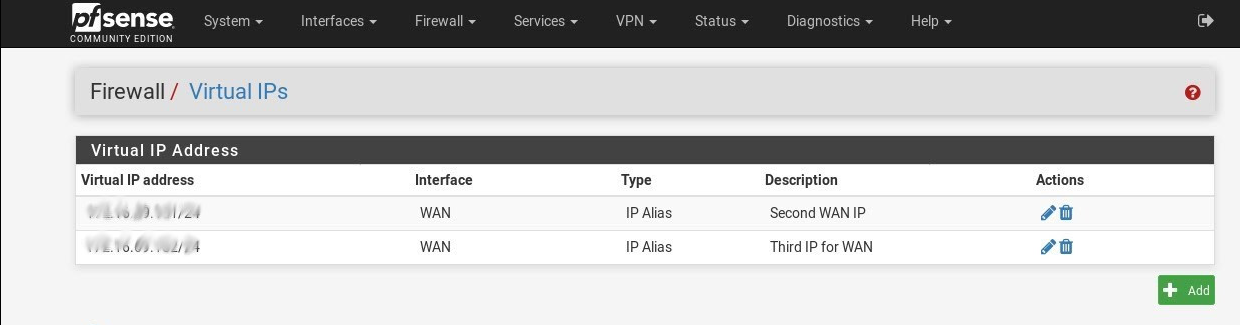
pfSense is a feature-rich, robust, and very flexible software. Also, it is possible to add multiple IP addresses in WAN using pfsense.
I think that is probably what you want
so if you add an address in that Virtual IPs screen like 192.168.100.2/24 with description "Arris management", probably you can create an outbound NAT rule for source 192.168.10.0/24 to 192.168.100.0/24 to use "Arris management" as the NAT address
I am just using conjecture here as I have never worked with pfsense myself
these are just educated guesses based on work on other routers/firewalls
 quasi cliff
Ok here is "probably" a simple problem to solve but I have no clue how to solve it.
I have a 500gb SSD attached to my router which then attatches to my Laptop and TV, my problem is my TV (Samsung series 7) doesnt seem to properly read what is on the SSD but my laptop does.
round violet
does your router support UPnP
peak cloak
Upnp has nothing to do with that
round violet
okay then find a app on your tv that works with UPnp media servers
it's also called DLNA
quasi cliff
I cant find anything like that, the only thing I can find is when I can directly view the content on the SSD
round violet
Do some research Asus routers support it
peak cloak
That's it
peak cloak
round violet
Do some research Asus routers support it
Ik what upnp is
You don't need it
@quasi cliff what type of media share is the router doing
Samba?
quasi cliff
I honestly I have no clue, how do I find that out?
peak cloak
What router
quasi cliff
Archer VR600v
waxen scroll
Pro tip to people wanting to upgrade to windows 11. You don't need a TPM module in many cases. It turns out that a lot of mobos being used for gaming support onboard TPM in the BIOS and do not require a module to be added on. You can still do so if you wish, cause there are advantages to a module.
Maybe LTT can do a PSA cause theres a lot of articles out there saying TPM required and TPMs are being sold out.
😄
peak cloak
quasi cliff
Archer VR600v
Ah so it supports samba
Show the settings for the media share?
quasi cliff
Its ok, have found out my TV doesnt support DLNA
hot hawk
how do i connect a lan connection to a phone
i have a usb c hub that has ethernet
but phone doesnt detect a lan connection
my s20 is able to access the internet via lan, but my lg k40 cant
the device does support otg
the adapdar does show connected
but the data light is not blinking
 viral glade
anyone know where i can get a older version of my software for a huawei b315-936 ?
frigid pine
viral glade
anyone know where i can get a older version of my software for a huawei b315-936...
Google my friend.
low pond
<@&750150305383186585> ^ (problem resolved... message deleted)
lean pebble
@low pond
 tidal frost
Can anyone help me with truenas? Im trying to add a group (family) to easily handout access to my wife, her mom, etc. The problem im having is users cannot access the dataset unless in "wheel" group. According to the ACL, "family" group should be able to access. But cannot
Like ive spent the last hour googling and everythings telling me to do exactly what ive just done
 slow pivot
SMB share?
 alpine walrus
hey, I need some help
I am having a work laptop(MI Notebook 14) it got no LAN port, I want to know if I should buy a USB type A adapter or a Type-C adapter ?
tidal frost
@slow pivot yes its set as smb so windows can see it.
My main user profile can access the server fine. The only issue that has is deleting files from other people which is whatever ill do that through command line when needed. Other users access it fine when in wheel.
slow pivot
tidal frost
<@189577713026072576> yes its set as smb so windows can see it.
I seem to remember that SMB can have permissions set both on the service and on the files
hot hawk
lean pebble
Did you turned otg on ?
Wasn't a samsung device
Acectel 7
Otg is supported
Best guess is they didn't put drivers because dumb :/
lean pebble
hot hawk
Otg is supported
It doesn't mean that rj45 otg supported.
hot hawk
lean pebble
It doesn't mean that rj45 otg supported.
yea prob not
if i had to guess, phone maker didnt put drivers for it
same thing happens on lineage os
primal ice
to annouce to windows system use wsdd (https://github.com/christgau/wsdd) if you want everyone on the network to access the share try in the smb.conf file
    comment = Media 01
    path = /sharemedia01
    inherit owner = yes
    create mask = 777
    directory mask = 777
    force create mode = 644
    force directory mode = 775
    read only = yes
        writable = no
    guest ok = yes
    write list = (users you want to have write privileges)

available = yes
browsable = yes
public = yes

[next media device if you have more than one]```@tidal frost
GitHub
A Web Service Discovery host daemon. Contribute to christgau/wsdd development by creating an account on GitHub.
 deep walrus
Does anyone have experiences with Wi-Fi Mesh routers in a apartment that has thick concrete walls, would this be better than using powerline adapters?
 flint ember
I’m building a home network and smart home. So far I have ubiquiti wifi 6 LR and 1000 ft of cat6, and a 24 port patch panel. Im undecided on what switch to get, or if i should just build a server and host VMs. Idea is everything would stay with the house. I am planning on getting 4 NVR cameras, and all Lurton smart switches. Any advice is greatly appreciated. This is not my forever home. I plan on selling within the year.
deep walrus
flint ember
I’m building a home network and smart home. So far I have ubiquiti wifi 6 LR and...
flint ember
What is the question ? Or needs further explanation
flint ember
deep walrus
Does anyone have experiences with Wi-Fi Mesh routers in a apartment that has thi...
I personally would never use power line adapters.
waxen scroll
@clear igloo @hollow marlin i hear cisco about to eat cienas lunch
appliance coming that does what ciena does, plus layer 3 built in
i dont remember the name though. we're having a sales pitch next week I think
hollow marlin
waxen scroll
appliance coming that does what ciena does, plus layer 3 built in
Ciena has some barebones L3 in the standard image but if you want more you need to flash the device with a more router focused image. I am pretty sure that image as well is only manageable via their controller software. God I hate Ciena more and more lately
 cobalt canopy
deep walrus
Does anyone have experiences with Wi-Fi Mesh routers in a apartment that has thi...
cobalt canopy
deep walrus
Does anyone have experiences with Wi-Fi Mesh routers in a apartment that has thi...
will not be the best, i life in a house that is relatively Old and got Massive Walls, tried Wifi, but its not really a good Experience, Powerline where better but the wiring is really old (part of it where made in the 80s). If you have relatively recent wiring i would probably Opt for Powerline, mostly due to being less restricted by the Thick walls.
i dont use Powerline anymore tho, got some CAT7 runs down and the difference is night and day
clear igloo
waxen scroll
i dont remember the name though. we're having a sales pitch next week I think
So long as it's a 9000 something to not confuse with all the other 9000 series XD
 grave ferry
deep walrus
Does anyone have experiences with Wi-Fi Mesh routers in a apartment that has thi...
grave ferry
deep walrus
Does anyone have experiences with Wi-Fi Mesh routers in a apartment that has thi...
depending on your usage PLC could work but I would never recommend it (unless you have a crazy clean and brand new electrical network).
Running a few clean rj45 cables around the appartement (with PoE AP at the end for simplicity and cleanliness) is the goto solution for me.
Ofc your main desktop machines are better off wired.
Not exactly a networking question, but sysadmin kind of profile are probably more around here so ...
A friend is having two Synology RackStation RS10613xs (2014), barely used, collecting dust for years for years, so I'm thinking about buying them from him (planning on using them as offsight "cold" backup for my home server). But neither him nor I have any idea how to price those (as we cannot find any in the market). Anybody from that field could advice me on what would be a fair price ?
 muted needle
so our modem has the ability to do sort of a router/bridge hybrid at the same time, assigning some port its own public IPv4 address... and I did that and seems like I can't connect to the server (through its public IPv4) from the main network anymore
why the hell?
like I can connect to it from my mobile data but I'm unable to connect from the Wi-Fi on the same modem
peak cloak
wut
grave ferry
when on your wifi, do you try to access your server through your public ip or it's local ip ?
grave ferry
muted needle
so our modem has the ability to do sort of a router/bridge hybrid at the same ti...
if you're using the public IP, most router do not allow hairpinning (NAT loopback)(when you try do access the public interface from inside your network), at least not by default
muted needle
grave ferry
when on your wifi, do you try to access your server through your public ip or it...
I think you're misunderstanding:
Modem —> Router (and all devices connected to it)
|
V
One bridged port (where the server is)
the server has a different public IP from the others
and so the server (via its only IP, it's not behind a NAT) can't be accessed through the NATted network
rocky badge
oof no hairpin 
grave ferry
You sure the server does not have a local ip ? (you can check easily by running ip a/ifconfig/ipconfg directly on the server)
muted needle
yes, its IP is 81.###.243.###
muted needle
rocky badge
Can you traceroute to it
ah, not a bad idea that
wait I forgot lol I was connected via phone
peak cloak
muted needle
I think you're misunderstanding:
Modem —> Router (and all devices connected to ...
what woudn't work
unless you have 2 public ips
or modem is doing NAT
grave ferry
I think he has multiple public ips
peak cloak
I doubt it
muted needle
rocky badge
Can you traceroute to it
1?: [LOCALHOST] pmtu 1500
1: no reply
2: no reply
3: no reply
...
muted needle
grave ferry
I think he has multiple public ips
yes, I get up to 5 public IPs, right now I have 2
rocky badge
muted needle
1?: [LOCALHOST] pmtu 1500
1: no reply
2: no reply
3: no reply
...
Is this from your PC
rocky badge
Yeah, that's linux ping lol that's why i was asking
rocky badge
muted needle
I think you're misunderstanding:
Modem —> Router (and all devices connected to ...
What about tracerouting from the router, if possible
muted needle
so I go see what the public IP of my laptop connected to the wifi is, it says 81.###.245.###
on server the NIC has been assigned the IP 81.###.243.###, which is also the public IP
rocky badge
And I saw stuff outside can, ie your phone?
muted needle
yeah, my phone's mobile data can connect
muted needle
ping, curl, SSH
rocky badge
is it a timeout or conn refused?
muted needle
just timeout
rocky badge
Sounds like a routing issue then 🤔
muted needle
yeah it probably is
but it's so weird, maybe it could be a bug in the router firmware that it's saying it knows the route but just doesn't say it
actually I should try if I can get to it through an SSH tunnel via an off-site server
yes, that works lol
rocky badge
So somewhere between you and your modem, its not routing properly. You said it was a different subnet though?
What's your WAN subnet size/mask
if its small enough where 243 and 245 aren't in the same subnet, it would have to route through your ISP outside of the modem I guess?
muted needle
ah, a few secs
rocky badge
Then again, I'm not that great at troubleshooting for someone else 😂
peak cloak
yeah me neither
rocky badge
So 240-247
Hmm 🤔
its probably your modem then....or ISP
Is there a web gui for your modem?
muted needle
yes
clear igloo
I'm a bit perplexed as to why the ISP is giving such a wide range of addresses though, usually, even though they would have it on on a large subnet they would give you a few consecutive addresses from that pool
or I missed something up top 🙂
muted needle
it's DHCP'd somehow
rocky badge
clear igloo
I'm a bit perplexed as to why the ISP is giving such a wide range of addresses t...
yeah, if they're gonna give you X addresses, why not give it in like a /29
clear igloo
Sounds like the modem might have a firewall built in and maybe a firmware update said no more hairpinning?
muted needle
maybe I just have to hook the server up to both networks
but in that case I'd need to get another NIC, FreeBSD doesn't play well with one of them
but yeah thanks a lot guys, I'm pretty sure it's a firmware issue
clear igloo
Yah, that's what I can glean from all of this too, something updated and changed something that's not obvious or transparent to you on your side/GUI
muted needle
as some context, I assigned it an own IP just today and have been scratching my head for 2 hours, so it's not an update, probably a bug
but yeah
rocky badge
@clear igloo
 clear igloo
@rocky badge 2.5Gbps yes?
peak cloak
rocky badge
<@!291198741862416384>
that's a good price
if it's a no bs one
iirc verizon's 1gig is actually like in the hundred somethings
I actually got a thing in the mail saying there was a new internet in town and was excited for a sec, but then I saw it was just T-Mobile shitty LTE internet
and they were charging 60/ month for it
no mention of speeds anywhere
grave ferry
rocky badge
<@!291198741862416384>
wait, GBps or Gbps ?
rocky badge
Gbps
hollow marlin
peak cloak
iirc verizon's 1gig is actually like in the hundred somethings
My payment is $79.99 for Fios gig
peak cloak
hollow marlin
My payment is $79.99 for Fios gig
how long have you had it
hollow marlin
1.5 years
peak cloak
I heard they jack it up after 2 years
hollow marlin
They definitely could, we'll wait an see
Just checked the bill and it says $79.00, no expiration. Quick glace at reddit and looks like they changed the price structure over the past year or 2
peak cloak
hollow marlin
Just checked the bill and it says $79.00, no expiration. Quick glace at reddit a...
diving in to the fine print of Verizon’s website reveals that even if a customer is eligible for the $70 per month price, that service is actually a $195 / month plan which is reduced to $70 through a $10 online discount and a $115 "special bonus discount,” which is only valid for either 12 or 24 months. (The site isn’t totally clear.)
that was written in 2017
hollow marlin
Looked like the change was made in Jan 2020. My bill is literally $89 for gig, -$10 for autopay. Both marked with "no expiration". It will eventually go up but for the meantime it doesn't appear to be a thing anymore
peak cloak
huh
we'll see what increase we get here
on 300/300 since no need for gig or 500/500 tbh
hollow marlin
Oh I definitely don't need gig, most dont. But with working from home and some of the large files I need to pull, saving a min when there isn't enough time in a work day as is, its a nice perk
plain siren
I observe things like 4K Streaming and ever increasing device amounts do start be chewing chunks out of gigabit WAN links now
peak cloak
I don't even have one 4k screen in the house lol
although at school there are some pc's with 4k displays and they are crisp
grave ferry
man I love Switzerland (in practice I have symmetrical 8Gbps)

(but yeah, unless you have a very specific usage, 300/300 is more than enough)
crisp bay
bruuu I have 300/75, but 8Gbps is overkill
rocky badge
waxen scroll
200 is overkill
When I move out, my parents are downgrading to 250/250 from Gigabit lol
Because the only speed below 250/250 is 25/3
crisp bay
oof
I had 20/2, changed the ISP, now 300/75 their lowest packet for less price than the previous one
 hidden socket
rocky badge
When I move out, my parents are downgrading to 250/250 from Gigabit lol
hidden socket
rocky badge
When I move out, my parents are downgrading to 250/250 from Gigabit lol
how much a gig for you cost? 🤔
rocky badge
$65/mo
grave ferry
crisp bay
bruuu I have 300/75, but 8Gbps is overkill
that's the only offer this ISP provide, and it's cheaper than any other ISP here
crisp bay
true
rocky badge
250/250 will be $50/mo lol
crisp bay
I'm paying like 35€/mo
rocky badge
Which is plenty for them, and they're saving $180 annually
hidden socket
rocky badge
$65/mo
well damn I could get 530/36 for that money (though website states thats average)
with my provider
crisp bay
here 500/500
rocky badge
@waxen scroll @clear igloo Playing around with WPA3
hidden socket
Im waiting for fibre optic to come to my neighbourhood so I can get 1gb
But i fear that would take a few years
rocky badge
The only device that doesn't support is my dad's Surface Pro 6 😐
 dusk saddle
What's the point of negotiating trunking? If you know a link is going to move traffic from multiple VLANs why not just make it a trunk port?
peak cloak
dusk saddle
What's the point of negotiating trunking? If you know a link is going to move tr...
negotiating trunking? never heard that before
peak cloak
where?
dusk saddle
In the CLI on a cisco switch
peak cloak
ah
dusk saddle
switchport mode dynamic desirable is the command
peak cloak
maybe @hollow marlin would know
dusk saddle
I was thinking the same haha
hollow marlin
DTP and VTP in Cisco are enabled by default and really meant for an average IT person to purchase a few switches, connect them up, create a few VLANs and it just works.
tender hazel

Muerte (Stanley Tucci) scenes from the movie Undercover Blues
@hollow marlin your handle always makes me think of that
hollow marlin
Setting up VTP as transparent and always setting switchports to access/trunk are pretty much the standard.
tender hazel
@hollow marlin so I spent like 12 hours or more troubleshooting this adtran
which stopped passing all customer traffic after upgrading
finally the support guy gets back to me, and we were working on it for like an hour
and then he sees that we are not using an adtran optic and explained that in version 8.7 adtran added a "feature" for third party optics to block customer data traffic but allow management traffic through
I didn't think it was the optic because it worked before the upgrade, and after the upgrade it was still passing management traffic
hollow marlin
@tender hazel welcome to 2017 when we upgraded a fully populated 5k. They must have changed the code because at the time when it rebooted, no interfaces came back. It was a hard no support at all.
We immediately reached out to support when we found out the change where no 3rd party SFPs are supported. At the time there was a critical security patch that was needed, we wouldn't be able to get optics for a few days and used the power of E911 to escalate it. One of their engineers provided internal firmware of the same version that had this "fix" that restored support for 3rd party SFPs.
From that point on we had an even mix of Adtran and Calix and tossed the 5ks for E7s.