#networking
1 messages · Page 352 of 1
 thick minnow
 nimble sable
Are there cable out there that aren't 1gbps anymore? The oldest I've seen is cat5 I think, that does 1gbps right?
thick minnow
i love how i get 100 megabytes per second according to this speedtest but i'm downloading this game at 1.5
 primal ice
cat5e (4 pair ) does 1gbps -- cat5 ( 2 pair ) goes to 100mbps
thick minnow
gotta wait an hour and 30 minutes for this shit
these genshin impact servers are ass
 half holly
nimble sable
Are there cable out there that aren't 1gbps anymore? The oldest I've seen is cat...
half holly
nimble sable
Are there cable out there that aren't 1gbps anymore? The oldest I've seen is cat...
Cat5e does gigabit, cat5 itself only does fast ethernet
Oh looks like drako already answered
half holly
thick minnow
these genshin impact servers are ass
Hm that might be your ISP then
Genshin impacts servers have been decent from my experience
About 100mbps download iirc
Can't remember whether it was 100 or 200
thick minnow
half holly
Hm that might be your ISP then
well i did a speed test and my ethernet is running at 750 mbp/s
thick minnow
i managed to up it to 4.5 MB/s
thick minnow
it's manageable. i don't mind
half holly
It only took me around 5 or so minutes to download genshin
And start playing
I guess your ISP doesn't play well with genshin then
nimble sable
half holly
Cat5e does gigabit, cat5 itself only does fast ethernet
Wow did not know that
thick minnow
half holly
I guess your ISP doesn't play well with genshin then
it's funny because it'll probably download fine on my phone
just not my PC
 crisp bay
So I installed Pterodactyl linux management GUI, but when I try to access the login screen using the local IP, it gives me 404 error soo nothing on it, I have set up the DNS on Cloudflare that I have the domain and can access it while I'm not on my local network, so ports are opened correctly...the only issue is that can't access the panel locally. I have tried opening ports 80 and 443 using iptables for INPUT (if it needs to be output, let me know...). The GUI is based on nginx tho... I'll be glad for some help! (ping me)
the main issue is that I can't access the site locally
but can access it outside my network

 tame carbon
@crisp bay sup
I see you are using nginx, does your server (site) configuration use a server_name field?
I'm suspecting nginx is filtering on hostname,
if you set up server_name foo.com
then foo.com may resolve to the IP address of that machine, but it'll only serve the page if the hostname matches
so if you enter a local IP of the same machine, it won't be using that hostname foo.com but rather: 192.168.88.100 or something similair
solution is quite simple:
either, forward your ports properly, with a hairpin, so you can reach the public interface through your hostname
or
add the address from the local network, to the server_name field, you can have more than one entry
 peak cloak
crisp bay
So I installed Pterodactyl linux management GUI, but when I try to access the lo...
peak cloak
crisp bay
So I installed Pterodactyl linux management GUI, but when I try to access the lo...
If it works from wan, but not from lan using the wan ip, you need nat loopback on the router enabled
nimble sable
peak cloak
If it works from wan, but not from lan using the wan ip, you need nat loopback o...
Or split dns?
nimble sable
It is? Ooh. I always thought of nat reflection as more complex
tame carbon
You already have a network translator in place.
nimble sable
tame carbon
split dns is messy in home scenarios
How come?
peak cloak
tame carbon
So why not use it?
You need to setup a dns server and all lan devices need to use that dns server
tame carbon
yeah, and those who use their own dns and ignore the one they get from dhcp?
peak cloak
While with nat loopback it should just work
tame carbon
hairpinning NAT, fixes the issue
your public IP, when used from your LAN, will just get forwarded as well
@nimble sable

This is the solution to the problem that arises with port forwarding, and reachability behind the translator
quite a lot of consumer routers include a hairpin NAT by default when you port forward
other brands, don't
nimble sable
tame carbon
quite a lot of consumer routers include a hairpin NAT *by default* when you port...
ooh actually did not know that it was on by default on forwards for consumer routers. i ended up turning it off cuz in my head the dns thing made more sense
tame carbon
@nimble sable It used to automatically hairpin on those tplinks I used for many years
until I used mikrotik
and realized, that hairpin is a 2nd NAT rule
nimble sable
and i just use external url all the time, so the problem was always that "i'd like for it to use the internal ip address when i'm inside"
nimble sable
tame carbon
and realized, that hairpin is a 2nd NAT rule
oh interesting. on pf/opnsense it's just a setting overall
tame carbon
in a professional scenario, you wouldn't even have NAT
NAT is a solution to bring internet to peasants
because we can't seem to get around to using v6
nimble sable
true
tame carbon
/ip firewall nat
add chain=srcnat src-address=192.168.1.0/24 \
  dst-address=192.168.1.2 protocol=tcp dst-port=80 \
  out-interface=LAN action=masquerade
Hairpin on mikrotik ^
tame carbon
To the server on 192.168.1.2, the connection from the LAN will appear as though it comes from the router itself
because its masquerading
nimble sable
yea my issue with hairpin was that it involves the router in internal traffic
i think
like i cud turn off my router and my samba/nfs stuff would be fine
tame carbon
However, the web server only ever sees a source IP address of 192.168.1.1 for all requests from internal clients regardless of the internal client's real IP address. There is no way to avoid this without either using a router that can do application level DNS inspection and can rewrite A records accordingly, or a split DNS server that serves the internal clients the internal server IP address and external clients the external server IP address.
This is called - among other terms - hair pin NAT because the traffic flow has clients enter the router through the same interface it leaves through, which when drawn looks like a hair pin.
nimble sable
yeap
tame carbon
nimble sable
i was just surprised to here folks like hairpin that's itneresting to know
tame carbon
Its generally not an issue
because the ones that run into this problem, are the ones most often using consumer routers
and those usually hairpin for you
but knowing about it is useful
nimble sable
why wouldn't not consumer folks not encounter this issue?
tame carbon
if you ever run into the scenario where it doesn't work
you know why it doesn't work
@nimble sable Like I said earlier, those consumer routers often do hairpinning by default
they forward all interfaces port <X> to <IP>:<Y>
on mikrotik you'd do this more select
you create a NAT rule for your WAN interface only
nimble sable
oh no i meant
the ones that run into this problem, are the ones most often using consumer routers
implying that folks who do not use consumer rrouters don't run into this issue generally?
tame carbon
People who dont buy consumer gear, because they are in a professional setting
probably wont be using NAT
nimble sable
oh
tame carbon
Because NAT is a typical feature used by end customers
To multiplex a single public IP
nimble sable
i think my company does nat? maybe
nimble sable
but that more has to do with security likely
nimble sable
right
nimble sable
oh right
tame carbon
The only reason we're using NAT in the first place
is because ipv4 is not large enough in terms of address space
we can't give every person a public IP
nimble sable
tame carbon
if you ever run into the scenario where it doesn't work
ugh i had an ISP that did double CGNAT, it was insane to try to do ANYTHING even remotely complex
crisp bay
tame carbon
I see you are using nginx, does your server (site) configuration use a `server_n...
so far that I have done to nginx is just install and get with it..haven't even touched configs yet...
nimble sable
tame carbon
I sit on my own /29 IP block
v6? wait do you not have v4 traffic at all
crisp bay
peak cloak
If it works from wan, but not from lan using the wan ip, you need nat loopback o...
it's not on wan, it's on lan
tame carbon
@nimble sable I don't have v6 either :P
ISP doesn't support it yet
but I have a /29 IPv4 range
8 IP addresses
nimble sable
wtf how?
tame carbon
$$
peak cloak
You can get a /48 of v6 for free
tame carbon
^
peak cloak
Using tunnelbroker
tame carbon
I have a /48 as well, though I dont have my 4to6 tunnel enabled right now
GeoIP breaks netflix for me
I hate geofencing
its idiotic
It doesn't work
and it only makes legitimate use more annoying
nimble sable
@tame carbon where does netflix think ure from?
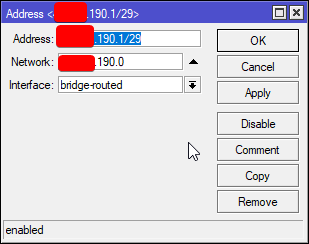 nimble sable
nice
tame carbon
@nimble sable and then ofcourse
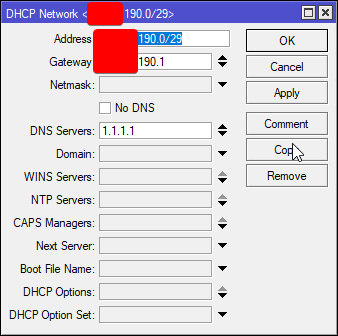
I have my own DHCP server that hands out public IPs :)
nimble sable
i wish my ISP did ipv6
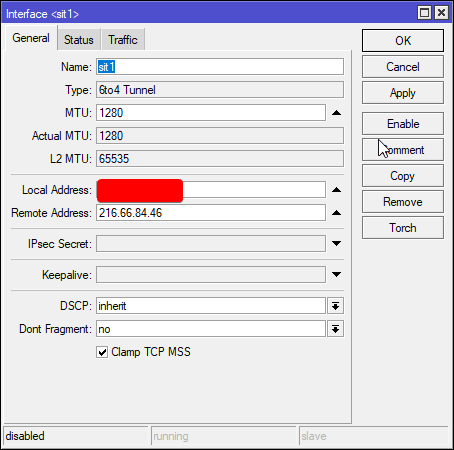 nimble sable
i tried that once, does the traffic just go thru a tunnel then out as a v6?
tame carbon
@nimble sable no it establishes a route and prefix
your router will have a /48 prefix or /64
and hurricane electric just routes that network to your router
so you essentially have both v4 and v6.
I have it disabled rn
but
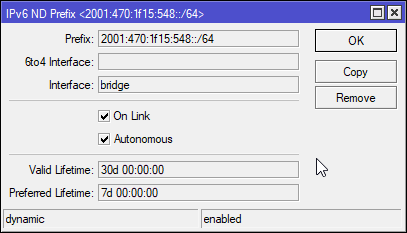 nimble sable
ooh cool
peak cloak
HE uses actually another /64 for transport
tame carbon
You have a prefix configured that your router routes for
yep ^
but this is a /64 prefix
I dont have the /48 on this router
@nimble sable IPv6 uses a different protocol to hand out IP addresses
you can use dhcpv6, but you don't have to
it can just use NDP (Neighbor discovery protocol)
Your router advertises its prefix
peak cloak
^and that doesn't work on prefixes smaller than /64
tame carbon
ye
nimble sable
hmm i'm gonna try tunnelbroker
i tried a long time ago but that was when my ISP at the time did duoble cgnat
i don't remember the details but it was insane to try to setup around it
also, cgnat is evil
tame carbon
@nimble sable depending on your ISP, IPv6 may feel identical to v4, or be lots slower
Hurricane Electric peers with my ISP, so when I use v6, I only have a 0.5ms increase in latency
nimble sable
nice
tame carbon
You don't get more than 50mbit/s bandwidth, until you finish certification
You have to self-certify ipv6
its automated
they give a small quiz
all the answers to the quiz, you should be able to figure out by just googling
or just think, its not that hard
nimble sable
oooh ok
peak cloak
tame carbon
You don't get more than 50mbit/s bandwidth, *until* you finish certification
You know, I actually got my t-shirt
After like 5 or so months
But it was a Large
Pretty sure I put medium but whatever
Free shirt
tame carbon
@peak cloak they saw the US shipping address and were like: naaaah we need bigger one
nimble sable
yea that wud be the issue, now that i have a public IP i'll try out tunnelbroker
oh another question, is it POSSIBLE to do 1gbps over wifi?
tame carbon
@peak cloak I thought tunnelbroker worked behind CG-NAT
peak cloak
No
peak cloak
nimble sable
oh another question, is it POSSIBLE to do 1gbps over wifi?
Yeah in ideal conditions
nimble sable
tame carbon
<@!222482269829332992> I thought tunnelbroker worked behind CG-NAT
i remember trying VERY hard to get around it, and then giving up
nimble sable
peak cloak
Yeah in ideal conditions
do i need wifi6?
tame carbon
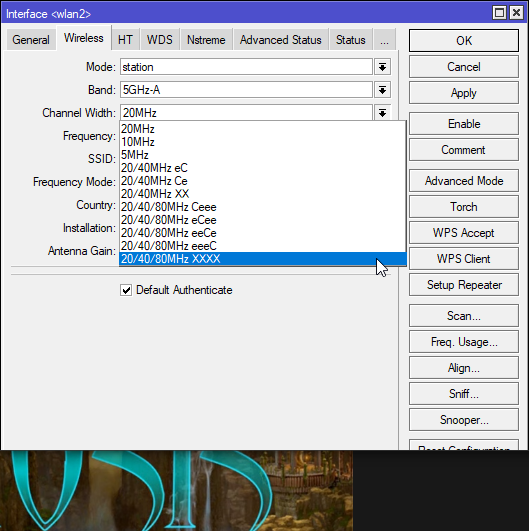
@peak cloak not with 80MHz you wont
peak cloak
nimble sable
do i need wifi6?
Wifi 6 is more improvement in timing, but with 6e you'll get better speeds
peak cloak
I thought ac in ideal conditions could do gigabit
tame carbon
Depends on channel width.
tame carbon
If you assume perfect signal, then channel width is your limit
Ye, but not with 80MHz.
nimble sable
btw for 1Gbps i need a wifi AP that is advertised for 2 right? someone told me smthg about half duplex and that u only actually get half the speed?
tame carbon
You top out around ~433mbit/s 866 duplex
peak cloak
Ye
tame carbon
@nimble sable most wireless radios can't do more than 80MHz
peak cloak
I think about it this way
nimble sable
tame carbon
<@!213721799202963457> most wireless radios can't do more than 80MHz
oh u need MORE than 80? i see
peak cloak
Do you really need more than 700mbps wifi
tame carbon
use a cable
don't hog the air
@nimble sable yeah but with 160MHz channels, you are quickly running out of channels to use
There's only like 2 160MHz blocks you can use
also depends on region you are in
US is even more restricted
nimble sable
peak cloak
Do you really need more than 700mbps wifi
i mean...who wants to do 2160p streaming on not gigabit
tame carbon
use cable
peak cloak
Use a cable
nimble sable
tame carbon
also depends on region you are in
i did manage to unlock my unifi once even though i bouhgt the US version, but i can't seem to remember how i did it
 peak cloak
nimble sable
i did manage to unlock my unifi once even though i bouhgt the US version, but i ...
peak cloak
nimble sable
i did manage to unlock my unifi once even though i bouhgt the US version, but i ...
Btw you are legally responsible if someone finds out
tame carbon
FCC
peak cloak
If you are using not right channels for your area
tame carbon
If you squat on frequencies and interfere with something critical
you can be held accountable
nimble sable
oooh yea good point
tame carbon
@peak cloak the RB4011 can do 20/40/80/160 Ceeeeeee
nimble sable
i did it before to get to a free channel
tame carbon
ultrawide channels
nimble sable
when iw as living in a particularly crowded location every single channel was massively used
nimble sable
yea
tame carbon
turn up radio TX
nimble sable
even on 5ghz every channel was chocker blocked
tame carbon

nimble sable
these days most consumer isp router things use 5ghz
tame carbon
For that big outdoor wireless network I'm helping dad out with soon, I will be using 60GHz
60GHz between the tower on the house, and the individual wireless zones
tame carbon

MikroTik is a Latvian company which was founded in 1996 to develop routers and wireless ISP systems. MikroTik now provides hardware and software for Internet connectivity in most of the countries around the world.
60GHz stuff is great for backhaul
no interference
tame carbon
Yeah you need line of sight
@peak cloak this radio in particular, has dual band
it switches to 5GHz if the 60GHz link dies
so its slower, but still connected
 silent flax
i need new cables for my rooms, while i only got gigabit ethernet, i wonder if i should grab Cat7 or Cat8 cables for connecting stuff... even tho i know my walls have only 6a cables in them, but still, if i buy new cables, i won't go for crap (also i can't seem to find Cat6 SFTP cables at my retailer)
tame carbon
@silent flax you really need foiled cables?
peak cloak
Nah don't waste money on 7 or 8
tame carbon
isn't STP good enough?
peak cloak
6a is more than enough
silent flax
again, as i said, Cat6A SFTP cables aren't available right now. And there only alternative is Cat6 UTP
primal ice
cat8 are thick boi cables.
tame carbon
@silent flax are these in conduits&housewall interiors?
because you'll want shielded cables for permanent installs
cat6 UTP would do, but not futureproof
cat6a (STP) would be better
silent flax
tame carbon
<@!216257714416910337> are these in conduits&housewall interiors?
no, i have a wall ethernet plug and i need to connect my PC 5 meters away from it. Unfortunately it seems for some reason it drops to 100mbps at that one spot, so i want to make sure it is shielded and long enough, to rule out switch issue.
tame carbon
@silent flax distance?
silent flax
and spending 8 euros on cat8 5 meters, 5.5 euros on Cat 7 5 meters or 6.2 euros on CAT6 FTP, doesn't change the stuff much
like we talk about 2.5 euro difference
tame carbon
< 20 meters, and you get 100M instead of 1G?
that's guaranteed, 100% termination issue
silent flax
tame carbon
< 20 meters, and you get 100M instead of 1G?
yeah, but again, as i said, when i am replacing the cable, i might as well buy the best when the price diff is 2.5 euros 🙂
tame carbon
@silent flax lol while you are at it, do yourself a favor, and buy one of those $10 Ethernet continuity testers
they come as a split unit, master & slave

these are dirt cheap
they do RJ11 and RJ45
thick minnow
btw, is any of these, good?: https://www.amazon.ae/TP-Link-TL-WN823N-Wireless-network-Raspberry/dp/B0088TKTY2/ref=sr_1_2?dchild=1&keywords=wifi+adapter&qid=1623500745&sr=8-2
or would you recommend something else? Looking for something below ~20 usd
Buy TP-Link TL-WN823N N300 Mini USB Wireless WiFi network Adapter for pc, Ideal for Raspberry Pi, Black online on Amazon.ae at best prices. ✓ Fast and free shipping ✓ free returns ✓ cash on delivery available on eligible purchase.
tame carbon
@thick minnow lel
that thing is smaller than the wavelength of 2.4GHz
reception = awful
need at least 4-5 cm of antenna
tame carbon
@silent flax if it costs more than $10 dont buy it
tame carbon
Its just a battery, a simple clock generator, and 8 LEDs
It cycles one wire after the other
and the order of LEDs blinking ,should be the same on both ends
unless you crafted a cross-over cable
if LEDs do not blink in same order or doesn't light up at all, you made a mistake when terminating
silent flax
tame carbon
unless you crafted a cross-over cable
it was a purchased cable, i don't make my own cables. obviously the guys who built the house and did the wiring could have messed up the wall plugs & wiring, but oh well
i just want to rule out stuff outside the walls before i start redoing the wall plugs & wires in walls 😄
silent flax
that is very, very old
do you only have 802.11n wifi ?
for sub-$30, you can get cards with AX200, with 802.11ax support https://www.amazon.com/COMFAST-ax200-WiFi-pcbluetooth-Frequency/dp/B08QMN6MXK/
Buy COMFAST ax200 WiFi pcbluetooth 5.0 | PCIe WiFi Card | 3000 Mbps Dual Frequency: Network Cards - Amazon.com ✓ FREE DELIVERY possible on eligible purchases
 tacit mantle
i just want something cheap
thick minnow
tame carbon
<@456226577798135808> lel
Well, it's supposed to be for a server of sorts....
So could recommend something?
thick minnow
What cat cable is the best for a new house? something future proof
cost is no problem
for like in the walls
 clear igloo
cat6a
 cedar igloo
Anyone know what encryption is used in an autounattend.xml file for passwords? I do not want to use WSIM
silent flax
tacit mantle
i just want something cheap
and $26 is expensive ?
thick minnow
silent flax
and $26 is expensive ?
In some places, yes
 little schooner
@thick minnow in what place?
thick minnow
In android there is something that calld "private dns" and I need to use that with domain name. How can I create my own? ( I have a pihole that feaching to the internet but on ip and I own a domain)
 twin zealot
for example you want to use the dns of google, normaly that would be 8.8.8.8 or 8.8.4.4 but now that is dns.google
tame carbon
you need to run your own nameserver
and be the authority for resolving DNS requests on your domain
then other dns servers will pull from your nameserver
not sure if pihole can be used for this
the whole idea of running your own dns server on public internet is sketch af
because it can be abused
I know my ISP doesn't allow it, and this is all corporate
thick minnow
little schooner
<@456226577798135808> in what place?
The middle east
next to the Arabian gulf
thick minnow
tame carbon
you need to run your own nameserver
So no that, there is any way to change DNS is wide?
For every new wifi and data
thick minnow
Yes
tame carbon
Either, you use their nameservers
or you can also use your own
but I wouldn't publicly host a dns server otherwise
thick minnow
No I don't want to use private DNS I did some research and its not what I want
I want to put my pihole to my friend but she don't know how to do that every time
tame carbon
wat
thick minnow
Alright from the start
My goal is to let my fride use my pihole but she don't know how to change the DNS without me to do that
tame carbon
Her DNS resolving will be much slower
thick minnow
I know its not matter to us
tame carbon
idk
like
public port 53 is sketch
good luck
lol
this is how DDoS attacks happen
because idiots run public DNS servers
thick minnow
tame carbon
public port 53 is sketch
Its all ready faceing to the world
tame carbon
use a vpn
thick minnow
I will not let her to get in side my network
tame carbon
@thick minnow make sure your port forward for the DNS server that's public facing, only permits certain IPs
otherwise it can be abused
I'm honestly surprised your ISP isnt blocking this
they should

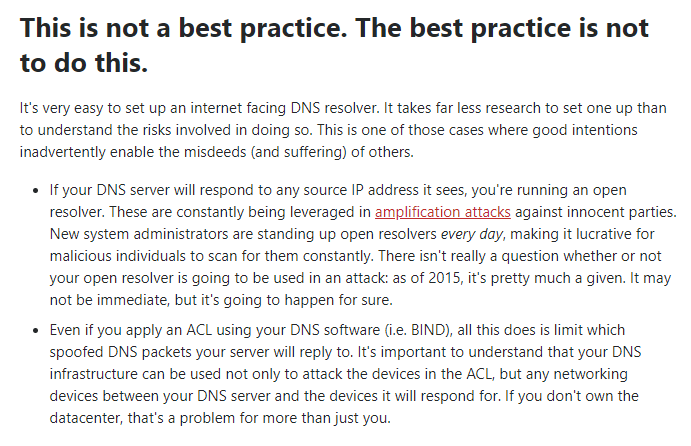
Server Fault
This is a Canonical Question about securing public DNS resolvers
Open DNS servers seem pretty neat and convenient, as they provide IP addresses that we can use consistently across our company rega...
 thick minnow
tame carbon
https://i.imgur.com/UTgOh6e.png
thick minnow
tame carbon
https://i.imgur.com/UTgOh6e.png
What they can do? I didn't understand
tame carbon
It takes far less research to set one up than to understand the risks involved in doing so.
A Domain Name Server (DNS) Amplification attack is a popular form of Distributed Denial of Service (DDoS), in which attackers use publically accessible open DNS servers to flood a target system with DNS response traffic. The primary technique consists of an attacker sending a DNS name lookup request to an open DNS server with the source address ...
tl;dr; don't run public facing dns servers if you don't know what you are doing
thick minnow
OK th u
tame carbon
@thick minnow its just a technical flaw in the way DNS works, that its bad practice to run your own dns server
hence, pihole is for LAN or VPN only, shouldn't be public facing, unless you do IP whitelisting
but even that can be spoofed
tame carbon
@thick minnow DNS requests are UDP, and its a single request, reply structure
the DNS request contains an IP address where the reply needs to go
this address can be changed to something else
you can use a DNS server to amplify a network attack like a DDoS UDP flood attack
take down a website
thick minnow
Oh u mean men in the middle attack?
tame carbon
@thick minnow no
normally its your computer <--> dns server
but with dns spoofing
attacker -> your dns server -> victim
so they can use your dns server, to attack someone else
NTP is another prime example of this
thick minnow
So if I want for esm to still ur credit card I will make my version of papyl andnlet ur phone to know its the real one?
tame carbon
its another one of those protocols
Network Time Protocol
in the past, those have been used to take down government websites lol
because the ones running NTP publicly, happen to also have Atomic Clocks, and a very fast fiber connection
Oops
thick minnow
tame carbon
in the past, those have been used to take down government websites lol
What 😄
tame carbon
yeah
so they send a bunch of time requests to the NTP server, and it has this one useless feature
where it just spits out random data
and the attacker then just sends a single small packet to the NTP server
and the destination address for the reply, is spoofed by the attacker so its something else
and then the NTP server sends like 200x the amount of traffic as a reply to the victim
do this with 10 timeservers at the same time
all targetting the same IP address
that network will most likely be unreachable because its completely congested
so you and your broadband internet
can take down a datacenter
using unsecured services
like DNS
DDoS = Distributed Denial of Service
The first D = everyone who runs a public pihole without knowing squat
@thick minnow https://www.youtube.com/watch?v=BcDZS7iYNsA

Audible free book: http://www.audible.com/computerphile
DoS or Denial of Service Attacks are one thing, but Amplified Denial of Service Attacks could threaten the internet itself. Tom Scott explains what they are.
More from Tom Scott: http://www.youtube.com/user/enyay and https://twitter.com/tomscott
@thick minnow DoS is quite simple
Faster connection wins
if I had your public IP, and started a UDP flood
your internet would go down
probably because my fiber connection is faster than whatever you have
- this is illegal
- I'm not that kind of person
thick minnow
And u already have my ip ;)
thick minnow
Yeh u helped me to setup
tame carbon
once you've been on the receiving end of one of these attacks for a week, you sing a different tune
its just a dick move
thick minnow
So I don't know if u save but I trust u
thick minnow
tame carbon
once you've been on the receiving end of one of these attacks for a week, you si...
My fride did me once that and it was fany only because I let him
thick minnow
Tell me
tame carbon
thats why you run public facing services elsewhere
somewhere with good net and some kind of filter
 lean pebble
My old cs:s server had 35gbit attack at 2014 I closed it a year later because the hosting company didn't had a good DDOS protection
 low pond
lean pebble
My old cs:s server had 35gbit attack at 2014 I closed it a year later because th...
low pond
lean pebble
My old cs:s server had 35gbit attack at 2014 I closed it a year later because th...
😆
silent flax
lean pebble
My old cs:s server had 35gbit attack at 2014 I closed it a year later because th...
i once hosted a VPS at a cheap host, and twice someone decided to do a DDoS attack on my server for some reason (i have next to nothing running there, so no idea why). Their solution was to nullroute my server without informing me, i had to contact support to ask why is my server dead, only then they said it was nullrouted. After they did it second time i stopped using them and switched to Vultr.
i mean i understand the nullrouting. But dammit, at least send a stupid email "You are under attack, we nullrouted your server"
low pond
Nulleoute is what many cheap providers do actually
The hosting company im on Hetzner, also nullroutes the specific IP your getting ddos'ed or so for 24 hours im pretty sure
But i never ever got ddos'ed
🤷
lean pebble
I used to use vultr they are good but I wanted dedicated server so went to hetzner 😁
Ovh was too expensive I used them to for 6 months.
 hollow marlin
low pond
Nulleoute is what many cheap providers do actually
hollow marlin
low pond
Nulleoute is what many cheap providers do actually
Null routing is not associated with a cheap provider. RTBH is widely used across all providers. Flowspec is the next iteration but not at such a scale in a VPS environment
silent flax
low pond
Nulleoute is what many cheap providers do actually
nullrouting was not the issue. Not communicating them doing it was.
you nullroute, you fire an email to the owner of the damn VPS
 waxen scroll
hollow marlin
Null routing is not associated with a cheap provider. RTBH is widely used across...
waxen scroll
hollow marlin
Null routing is not associated with a cheap provider. RTBH is widely used across...
it is. it means your provider is too low spec
silent flax
well, i moved elsewhere as i said
waxen scroll
a real provider is going to want the ddos to even out peering agreements
all of a sudden level 3 gonna owe a ton of free traffic

 potent lake
can someone help me fix my hyperv network issues?

 ornate jungle
 cosmic steeple
How I get the switch to do the power over what ever
cosmic steeple
How I get the switch to do the power over what ever
If you have the US-8-60W the 4 ethernet ports on the right should Auto-Sense devices that use 802.3af PoE when they're plugged in. That being said, you may also need to configure the switch in your Unifi Controller. https://www.ui.com/unifi-switching/unifi-switch-8/

The UniFi Switch 8-port models feature Gigabit Ethernet ports in a compact form factor. The switches are fully manageable, delivering robust performance and intelligent switching for your networks.
 rocky badge
cosmic steeple
How I get the switch to do the power over what ever
rocky badge
cosmic steeple
How I get the switch to do the power over what ever
Ports 5-8 auto sense PoE (af only) Plug in a device and it should get PoE power. If its a 24v passive PoE device, it will not work.
UniFi switches act as dumb switches if not adopted & managed through a controller, which also includes PoE
tacit mantle
cosmic steeple
im sorry but nice router and all but that looks scuffed and disgusting
 tender hazel
nice router?
I notice a lot of people seem to get very impresssed the more that a router looks like a UFO/alien spacecraft about to take off
nimble sable
My router is just a pc...in retrospect kind of a waste of electricity, maybe
tender hazel
I have an RB4011 wifi model.. it is nice because it has a PoE out port with passive PoE, I use it to power another AP for more coverage
rocky badge
@clear igloo Setup my parents iPads to use a wireguard on demand VPN for SSIDs that aren't home or their workplaces
Lets see how this goes
I have my phone and iPad setup to on demand wireguard but I can't setup their phones to 😐
Because Android doesn't have on demand 😡
 shadow garden
anyone know of any good consumer-grade switches? I need something with 4 ports at least and small enough to comfortably fit on a desk, since i'm looking to connect two computers, a printer, my Switch, and (eventually, if I can find one cheap enough) a PS5 or Xbox Series X/S.
Plus some spare ports just in case I need them.
rocky badge
pretty solid for unmanaged/consumer grade https://www.amazon.com/Ethernet-Splitter-Optimization-Unmanaged-TL-SG105/dp/B00A128S24
Buy TP-Link TL-SG105 | 5 Port Gigabit Unmanaged Ethernet Network Switch, Ethernet Splitter | Plug & Play | Fanless Metal Design | Shielded Ports | Traffic Optimization | Limited Lifetime Protection: Switches - Amazon.com ✓ FREE DELIVERY possible on eligible purchases
tender hazel
I personally only like to use managed switches
for a little more money, you could look at this: https://www.amazon.com/Mikrotik-RB260GS-CSS106-5G-1S-Ethernet-Original/dp/B00GAZ2HHS
Buy Mikrotik RB260GS (CSS106-5G-1S) small SOHO Switch 5x Gigabit Ethernet, one SFP cage powered by an Atheros Switch Chip, plastic case, SwOS (Original Version): Networking Products - Amazon.com ✓ FREE DELIVERY possible on eligible purchases
it has an SFP port too
tender hazel
Best router for what?
 viscid warren
My house.
I am interested in learning about networking. I want to buy one that has a good range of function while also being something I can make use of in my study. Essentially high market but something more technical.
I do plan on getting a home lab but that might be a different conversation.
tender hazel
some model of MikroTik router then
viscid warren
I know I heard about unifi dream machine pro.
tender hazel
nah, if you want to learn about networking you'll want a MikroTik device
Ubiquiti stuff, especially things like Unifi and Amplifi and Aircube, are meant for the prosumer market rather than people who want to learn about networking
it is both an advantage and a disadvantage of mikrotik that they use the same OS for their core routers intended to serve as the primary routers for ISPs that they do for their home routers
when you buy a mikrotik home router it has the full feature set of the routers used to run large ISPs
and so you don't end up missing anything
there are many different devices available though
viscid warren
@tender hazel thank you for your advice. I appreciate the response.
thick minnow
Can someone help me i have at problem with the network issues in my computer i download something it just drop to 0 kb for some reason but in my phone is just working fine i try at diffent wifi it sitll the same in the computer what is the problem i don't understand >?
is it the computer issue or the wifi i m so stree out know
clear igloo
rocky badge
<@!291198741862416384> Setup my parents iPads to use a wireguard on demand VPN f...
noice!
silent flax
tame carbon
<@!216257714416910337> if it costs more than $10 dont buy it
wire at pin 1 was completely disconnected according to the tester, there was no light on that pin whatsoever on either side. no short, no signal, nothing. replaced the cable with that cat8 cable, instant gigabit 🤷♂️
silent flax
the bad one was a premade patch cable directly from store
tame carbon
That happens more than you think
I throw those cables into the bin immediately, if I cannot reterminate them
because its always a hastle with that one cable
silent flax
reminds me of 😛
 tame carbon
does it do wifi?
clear igloo
If you believe hard enough, yes
silent flax
read the last word 🙂

if you can't be bothered to not have typos on box, how much effort did you put in product 😄
tame carbon
Sounds like a french guy with a cold trying to pronounce ethernet
@silent flax When you order off aliexpress in netherlands, you can select which country it should ship from
silent flax
anyway yes, i thrown that cable in ewaste bin as well
silent flax
this was sold locally, ugreen is often available here
silent flax
for my country, shipping from China or Russia is same thing from July
tame carbon
yeah but its just cringe translate mistakes all over
and you can see how Aliexpress first translates Chinese -> English, before they do English -> Dutch
silent flax
has to pay VAT from 1st July on everything, even sub-22 euro items. Which requires either a modern ID card with signing capabilities, or pay 9 euro per shipment RIP 😄
Also yes, classical Engrish.
tame carbon
yeah its bs
@silent flax or german customs preventing you from importing anything from outside of EU with a wireless radio
if you order wifi equipment from US, imported to germany, it has to be licensed if it has a radio
even though, the radios certified for the US, when operating in europe, do not violate any frequency allocations
since US frequency space, is more restricted than european models are
wifi specifically.
silent flax
i mean, if i order a 200 euro board & cpu combo from ali, 9 euro customs fee won't annoy me next to the 50 euro VAT payment. But if i order a 10 euro phone case, then a 9 euro customs fee will annoy me next to the 2 euro VAT payment 😄
tame carbon
@silent flax or when they send a package as 2 units instead of one
twice that 12,50 administration fee
its stupid
but you can't berate the mailguy, he's just doing his job
but they want it, cash, right then and there
they dont even offer bank transfer
silent flax
anyway, networking fixed... now only if i had use for my old routers LOL
tame carbon
paperweight
silent flax
Edgerouter X SFP, ASUS RT-N66U, Linksys E2000, in descending order of usability in current internet speeds
tame carbon
I got a pile of 'ol switches
nobody needs a 52 port fast ethernet switch
It has 4x SFP
silent flax
the saddest part is that the N66U would serve well at mom's place, but the VDSL supplier requires their own modem
tame carbon
but the only reason I haven't thrown these away
you never know when you might have to throw a lan party
or if you ever go mad or insane, and you rig your entire house with IoT stuff
nice to have a swith with lots of ports
100M more than enough for IoT purposes
silent flax
i don't need that much, i bought this for myself https://www.dlink.com/en/products/dgs-1016s-16-port-gigabit-desktop-switch
 visual thunder
What requirements do I need to know before learning socket programming
 maiden hedge
Anyone running a pi-hole with unbound?
silent flax
visual thunder
What requirements do I need to know before learning socket programming
programming and a computer with TCP/IP stack 🤷♂️
visual thunder
bruh
peak cloak
silent flax
Edgerouter X SFP, ASUS RT-N66U, Linksys E2000, in descending order of usability ...
Erx is still pretty usable
silent flax
peak cloak
Erx is still pretty usable
not for my use case, which is what i talk about. i have these things sitting in box, doing nothing 😄
peak cloak
Sell it
peak cloak
silent flax
not for my use case, which is what i talk about. i have these things sitting in ...
You need more than gigabit?
silent flax
visual thunder
bruh
it is real. what is socket programming ? 1) code a socket server 2) code a socket client 3) connect the client to server and send messages one or other way 😄
silent flax
peak cloak
You need more than gigabit?
my ISP (and mom's ISP) demands to use their modem, thus i don't have use for internal routers
peak cloak
Raw websockets are also relatively easy
peak cloak
silent flax
my ISP (and mom's ISP) demands to use their modem, thus i don't have use for int...
Ah rip
Those damn all in one routers
Another isp here does the same
Optimum with their fiber
For cable you can use a modem
silent flax
peak cloak
Ah rip
Mom's Orange VDSL wouldn't run on the ASUS ADSL/VDSL router she have, we had to use the Zyxel modem Orange provided.
My ISP requires their own modem, hands out a /64 IPv6 plus IPv4 via DS-Lite, thus all i could use my routers for is double-NAT with internal DNS at best
peak cloak
But with their new fiber you need to use their ont, where passthrough apparently doesn't work
silent flax
thus, i have 3 routers sitting in a box, doing nothing. and trying to sell them in covid time, that is another story
silent flax
peak cloak
But with their new fiber you need to use their ont, where passthrough apparently...
usually there is no passthrough because of IPv6 DS-Lite.
peak cloak
Really? Go on r/homelabsales
silent flax
peak cloak
Really? Go on r/homelabsales
i live in a small country, shipping fees would kill any interest
silent flax
i can't be bothered to sell much other stuff 😄
i have a 3700X with 32GB RAM, 970 Evo 500GB, R9 380X, EVGA P2 650 in a case sitting in my bedroom as 'HTPC' 😄
 plain siren
silent flax
usually there is no passthrough because of IPv6 DS-Lite.
plain siren
silent flax
usually there is no passthrough because of IPv6 DS-Lite.
Ugh DS-Lite
peak cloak
silent flax
i have a 3700X with 32GB RAM, 970 Evo 500GB, R9 380X, EVGA P2 650 in a case sitt...
That's some good stuff
silent flax
plain siren
Ugh DS-Lite
every ISP here does it these days, sadly
peak cloak
What even is ds-lite, never heard of it
silent flax
peak cloak
What even is ds-lite, never heard of it
IPv6 DS-Lite is IPv4 over IPv6
so you have no public IPv4
peak cloak
Ah
silent flax
An IPv6 transition mechanism is a technology that facilitates the transitioning of the Internet from the Internet Protocol version 4 (IPv4) infrastructure in use since 1983 to the successor addressing and routing system of Internet Protocol Version 6 (IPv6). As IPv4 and IPv6 networks are not directly interoperable, transition technologies are de...
plain siren
Its a V4 in V6 basically
silent flax
 plain siren
DS-Lite kinda is like the reverse of having No IPv4
silent flax
there are many transititioning schemes. DS-Lite is the most common deployment i seen
realistically, for most users the only drawback is 'no public IPv4'
plain siren
https://en.wikipedia.org/wiki/NAT64
Is one method
464XLAT is another
NAT64 is an IPv6 transition mechanism that facilitates communication between IPv6 and IPv4 hosts by using a form of network address translation (NAT). The NAT64 gateway is a translator between IPv4 and IPv6 protocols, for which function it needs at least one IPv4 address and an IPv6 network segment comprising a 32-bit address space. The "well-k...
silent flax
plus obviously the inability to use own routers, because ISPs are dumb and they restrict IPv6 assignment from their router to /64, so you can't put another IPv6 router behind
plain siren
4rd/6rd too
peak cloak
plain siren
https://en.wikipedia.org/wiki/NAT64
Is one method
464XLAT is another
That's what I was thinking of
silent flax
another visualization of DS-Lite
 plain siren
Yeah I prob did at one point
peak cloak
silent flax
plus obviously the inability to use own routers, because ISPs are dumb and they ...
Ah they should at least give a /56
plain siren
 silent flax
peak cloak
Ah they should at least give a /56
silent flax
peak cloak
Ah they should at least give a /56
yes, would be nice
plain siren
DirectAccess VPN (Windows RAS Server with DA), uses NAT64 + DNS64
silent flax
peak cloak
Could you request a bigger subnet?
no. the router gets /56 from IPS, but hands out only /64 and there is no way to request more, the ISP doesn't allow such modifications
silent flax
peak cloak
That's stupid
it's what happens when you order your HW + firmware from china 🙂
for the minimum possible money
plain siren
AT&T thankfully is now properly supporting IPv6 on all their Fiber and Cable (DOCSIS 3/3.1) Networks
silent flax
i have given up questioning the ISPs, i have only two bad options really. in IPv4/Ipv6 situation i mean 🙂
peak cloak
And both isps here are still stuck on v4 only
plain siren
There is actually a reason these transition technologies are being used
So we got 2 "waves" heading over majority of global Retail/Provider infra
First one is: Were out of IPv4, Thanks to shit like Work VPN's only having V6 or new services only having v6, they are finding ways to patch old infra in place with v6 support
silent flax
option 1 is my current ISP, 1000/50 or 500/30, public IPv6 (but no way to put router behind it because of /64), no public IPv4, cheaper.
option 2 is a FTTH ISP, up to 1000/300, either same situation as above (public IPv6, no public IPv4) or public IPv4, no IPv6 at all, more expensive 🤷♂️
plain siren
This is because its an in place fix while the "second wave" is hitting
Which is going to drop as final very close to the tipping point of "v4 is basically not adequate" timing
- The deadlines that the Number Authorities have assigned
The second wave is a "breather" moment for ISP's to finally go over their entire infra and actually clean it up and sort it out into a central system
Because this is the time they make transition to proper v6 networks

TECHNICAL STEERING TEAM (TST) Brian O’Connor (Lead, ONF) Alireza Ghaffarkhah Max Pudelko Craig Stevens Yi Tseng Enabling the era of next generation SEBA™ SEBA™ is a lightweight platform based on a variant of R-CORD. It supports a multitude of virtualized access technologies at the edge of the carrier network, including PON, G.Fast, and eventuall...

TECHNICAL STEERING TEAM (TST) David Bainbridge, Ciena Saurav Das, ONF Amit Ghosh, Radisys Mahir Gunyel, Netsia Nursimulu Khenaidoo, Ciena VOLTHA™ is an open source project to create a hardware abstraction for broadband access equipment. It supports the principle of multi-vendor, disaggregated, “any broadband access as a service” for the Central ...
This is all cutting very close in terms of time limitations to each other

This is basically the "SDN" or "Software Defined Networking" of the ISP World
 low kayak
can someone help me block ports on a linux firewall?
i have zerotier and i want to block some ports specifically on zerotier
so they remain open to lan
crisp bay
Is anyone here familliar with Pterodactyl linux manager? Ping me...
plain siren
So what this is coming down to is ISP's waited till last moment
@crisp bay Yes... sadly
peak cloak
low kayak
can someone help me block ports on a linux firewall?
Ubuntu?
plain siren
Its that gameserver panel that uses Docker
low kayak
mint
plain siren
"Eggs" are the Server Images IIRC,
low kayak
can i block ports to like... a specific network?
i dont want them blocked on lan
only on zerotier
peak cloak
peak cloak
low kayak
can i block ports to like... a specific network?
Yes
low kayak
how do i do that the rules section is only asking me ports or the application itself i wanna block
not which ip to block them on
peak cloak
Example sudo ufw allow from 192.168.0.0/24 to any port
peak cloak
low kayak
how do i do that the rules section is only asking me ports or the application it...
Use cli
low kayak
k
peak cloak
And ufw
crisp bay
plain siren
<@!399633180661121034> Yes... sadly
yeah so umm I wanna install panel on the VPS and wings (for managing server ig) on my home server..and I have proxying on that server (accessing IP with domain on Cloudflare to my IP at home)...would that work? I have already installed both panel and wings on my home server without luck, starting again, may you please suggest me a tutorial with success or is the official documentation enough?
low kayak
peak cloak
Example `sudo ufw allow from 192.168.0.0/24 to any port`
this will allow all connections from any ip like 192.168.XX.XX to all ports yea?
low kayak
how do i define tcp or udp tho?
plain siren
crisp bay
yeah so umm I wanna install panel on the VPS and wings (for managing server ig) ...
A CF Proxy Will not forward your ports, open wings up to the public Panel on Internet/Cloud, etc
peak cloak
It's all explained in there
plain siren
So the VPS would need to access Port 8080 (Wings Daemon Port)
So you would have to Port forward 8080 from that server to your Public IP
And the CF Proxy only works if you change wings to 8443 as CF will only proxy that
Pterodactyl is an open-source game server management panel built with PHP 7, React, and Go. Designed with security in mind, Pterodactyl runs all game servers in isolated Docker containers while exposing a beautiful and intuitive UI to end users.
crisp bay
well I'm not expecting CF to forward my ports but it's just for the domain tho
open wings up to the public Panel on Internet/Cloud
wdym?
plain siren
Port Forward basically
crisp bay
8080 for wings Daemon?
crisp bay
plain siren
Ideally: In Firewall/Port Forward Config, only allow the VPS IP To Connect
that on my home server?
plain siren
ye
plain siren
UFW is just an IPTables Interface Basically
With things running docker, I disable or remove UFW
Run IPTables only
Personally
low pond
firewalld prem
plain siren
Your Public IP:8080 <--> Home Game Server:8080
crisp bay
yeah I have some IPTables rules on my VPS so this will work out
but I can just install panel only on VPS and wings on home server, forward 8080 on both, that will work?
plain siren
You only need to forward 8080 on the wings server IIRC
80/443 On panel for WebUI Access
crisp bay
also, the domain system (for accessing panel), can be configurable with nginx, but then for SSL has to be only the full domain, not the subdomain right?
plain siren
SSL needs to cover the Subdomain
I just use wildcards
*.domain.tld
domain.tld
Covers everything
crisp bay
definetely easier than let's encrypt?
I don't want to bother you too much tho  (I don't know much abt networking that's why I'm a bit confused from here and here...)
plain siren
Lets Encrypt lets you use Wildcards
crisp bay
hmm okay, I can just start installing panel and wings, then I can start configuring SSL and accessing the panel..?
low kayak
does linux tend to not mount harddrives unless you tell it to?
or is that a ntfs thing
crisp bay
if on a GUI, It'll automatically mount them
crisp bay
yeah you have to do it yourself then
low kayak
im hosting like a file server of a drive that it isnt liking rn
wont mount drive
on boot that is
plain siren
low kayak
does linux tend to not mount harddrives unless you tell it to?
You have to edit your fstab to auto mount
crisp bay

Enable Sysadmin
plain siren
<device> <dir> <type> <options> <dump> <fsck>
UUID=0a3407de-014b-458b-b5c1-848e92a327a3 / ext4 noatime 0 1
Would mount partition with UUID (That UUID) @ / (Root) and were saying its EXT4 Formatted
low kayak
do i need to restart for that btw?
crisp bay
yes
low kayak
k ty
crisp bay
to make it work and apply it
 hot hawk
Looking on buying a new router for my tmobile trashcan
Right now eyeing the archer ax50
Decent price for wut u get
Autho Broadcom chip = prob no openwrt ever
Any recommendations on other routers or is the ax 50 good enough
tame carbon
asus? no
@hot hawk depends on your skill level on what you really want to get, those home wifi routers are generally trash
hot hawk

I mean I prefer having a custom firmware, autho ax support seems to be non existent
Pretty sure I can live with home routers or 30 day return
 tame carbon
Again, depends on what level of skill you have, and how much you want to spend
hot hawk
Prob 150 is as high as I'll go
tame carbon
I use all mikrotik here
hot hawk
O
tame carbon
MikroTik is a Latvian company which was founded in 1996 to develop routers and wireless ISP systems. MikroTik now provides hardware and software for Internet connectivity in most of the countries around the world.
Learning curve is steep
but they sell wide range of products, all running same OS, so once you are familair its lot easier
more user friendly solution would be unifi
hot hawk
Can u flash openwrt on it
tame carbon
No
hot hawk
berh
tame carbon
@hot hawk OpenWRT is crap compared to RouterOS
hot hawk
Router os is what it comes with?
tame carbon
Yeah its Mikrotik's propietary operating system
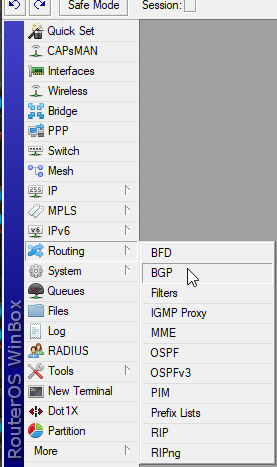
has webgui, ssh cli and their special management tool winbox, which doesn't even need an IP to connect, just a MAC
very useful when setting up devices
 tame carbon
Yeah that's the only issue
They are Wifi 5 only
but idk, never had the need for 6
I get ~390mbit/s download on my wifi
perfectly fine
that hAP ac2
has dual band, and 5x gigabit
for like 60 bucks
tame carbon
depends on the material and walls
obstructions
but the way I did that here, because we have brick here
hot hawk
Prob wood and wood
tame carbon
is I bought a 2nd one, and used RouterOS's AP manager
you can set up multiple radios on the same network, and it handle it for you
hot hawk
Hmm
tame carbon
similair to what unifi would do
but they are more expensive, but do support wifi 6
idk, once you have their controller, their APs and such, you're already 500, 700 bucks
with mikrotik, you can just buy 2-3 hAP ac2's
and use one of them as controller
:P
the only major downside is
this is not plug and play
you have to manually dial in the configs, which if you haven't done this before, is hard
low pond
mikrotik shill.
tame carbon
@low pond what
if I go to the computer store
and want to buy a router with wifi
all I can buy is gamer crap
for insane markups and terrible build quality and software/support
 tame carbon
more better
low pond
tame carbon
<@!760788184237211669> what
I didn't mean it as a insult :P I see you shilling and fanboying Mikrotik a lot
hot hawk
Idk if I'm buying a ac router, might as well find one that supports openwrt
tame carbon
wired with ethernet
hot hawk
Don't see much of a point for a mesh system
Most decent devices have good wifi antennas anyways
tame carbon
@hot hawk https://i.imgur.com/YxubVRq.png
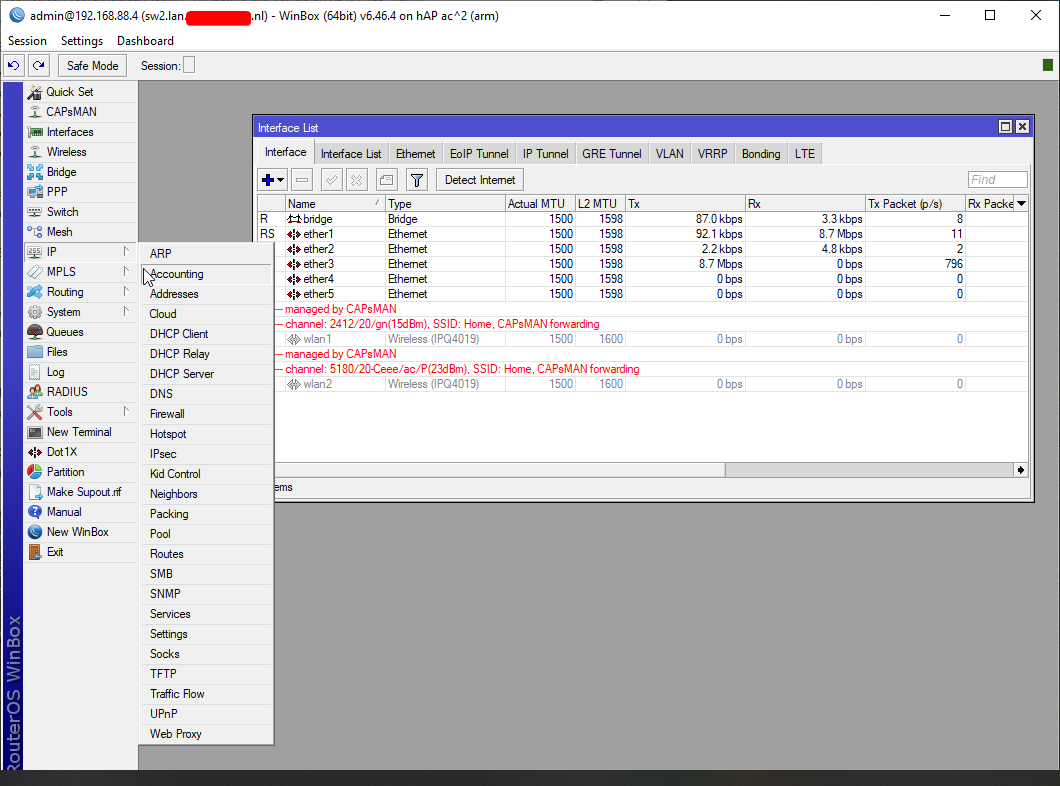
This isn't a mesh system
its just multiple wireless APs handing off clients between one another
hot hawk
Yea ik
tame carbon
and you have 1 controller who does the authentication
quadcore arm processor
does ~2gbit/s routing
not bad for $60
and it has ipsec acceleration for vpn stuff, up to 400mbit/s
hot hawk
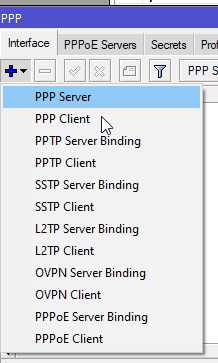
Can u host a vpn server on it r no
 low pond
tame carbon
https://i.imgur.com/Fcr0LAM.png
low pond
tame carbon
https://i.imgur.com/Fcr0LAM.png
dude the amount of stuff it has
tame carbon
range isnt really a big factor
 hot hawk
Wait
tame carbon
everything static
hot hawk
Have u tried a nas
low pond
tame carbon
https://i.imgur.com/7XuMQ3Q.png
OMG w o a h
hot hawk
With it
tame carbon
@hot hawk I have an RB4011 as router
has 10gbit port
the NAS at home here, is connected to a switch, which goes to that 10G port on the router

There's a wireless variant of this one as well
That one is pretty nice
low pond
ah yes the picture which you shared like for the 350th time here :P
low pond
 tame carbon
Thanks
low pond
:P
tame carbon
@low pond I am just here to promote fiber optic use lol
hot hawk
tame carbon
the NAS at home here, is connected to a switch, which goes to that 10G port on t...
O
tame carbon
and cheap 10G equipment exists
low pond
tame carbon
<@!760788184237211669> I am just here to promote fiber optic use lol
are you not sure makret a few mikrotik products also :P
get a affilate link from them you'd earn a lot 🤣
tame carbon
@low pond I dont' get paid lol
low pond
Yea that's the thing
hot hawk
Got no fiber here
low pond
xD
tame carbon
and mikrotik doesn't do advertising
hot hawk
I got a tmobile home internet trashcan
tame carbon
I didnt know about them, until someone showed it
low pond
y'know i'll get a mtik also
tame carbon
@hot hawk meh, that is crap. I always try to get around that, and have an IP on my own router, not something inbetween
in that image up there, you can see a fiber on the left, going into a 1G SFP converter
hot hawk
Rn I prob will need to double nat
tame carbon
ew
hot hawk
Can't even have bridge mode
low pond
"cgnat" :P
tame carbon
oh
hot hawk
:p
tame carbon
gaaaarbage
hot hawk
Cheaper than spectrum tho
And much better speeds
No
I can get gaigbit
But 300 a mo
Vs tmobile 60 a mo for speeds 160-600/70
Might just pick up the archer ax50 and hope it doesn't die
Already have a openwrt router
Just it doesn't have 5ghz
Only 802.11 n
:/
Autho got it for free
So can't say much lol
plain siren
hot hawk
I got a tmobile home internet trashcan
Heheh
 craggy osprey
I have network
low pond
great, we all do
 ebon locust
What are good specs for a cache server?
peak cloak
This is prob something real dumb, but for some reason I can't find my answer online. How do I get my ssh signature where it looks like this:
signature ...
-----END SSH SIGNATURE-----
I need it for verifying my git commit
peak cloak
ah nevermind
rocky badge
@clear igloo Making my main SSID 5GHz only 👀
clear igloo
do it!
 clear igloo
wow, I've got like 70% of devices on 2.4Ghz still 😛
rocky badge
Should I make my guest 5GHz only 😛 @clear igloo
clear igloo
lol, yes
rocky badge
Just leave 2.4GHz for IoT
shadow garden
heh.
my 2.4 is just for legacy devices and stuff that doesn't support 5ghz
like my laptop
i'm still in awe at the sheer speed of gigabit
never did i ever think i'd be in a position where I could actually download gta 5 in under 15 minutes (gigabit to nvme ssd, of course, as gigabit to a 2.5 inch hard drive caps at just under 50 MB/s)
rocky badge
We have zero personal devices that don't support 5GHz
I would also move to WPA3 only on main SSID @clear igloo but not every device supports that

center of the house lol
clear igloo
rocky badge
I would also move to WPA3 only on main SSID <@!291198741862416384> but not every...
yah, still a lot that don't 😦
 lucid matrix
I'm looking to upgrade my home network, and I'm set on the Ubiquiti line of products. I'm trying to choose between the security gateway, and the Dream Machine.
The Dream Machine has a built in AP.
I'm going to be getting one or two of their WiFi 6 AP's, but the AP built into the DM is only WiFi 5.
Will that cause issues related to jumping between them, or cause instabilities?
 thorn osprey
Posted network issue in #tech-support . It's related so download speeds. Pls help
tender hazel
@thorn osprey the guys on there didn't advise you very well.. I can guarantee that your slow downloads are not limited by the hard drive
even slow hard drives will write data much much faster than you can download at that speed
thorn osprey
so then the network is also showing at atleast 11 mbps. it should go till there. could it be a problem from there side> if it was it should have been resolved by now
i have no clue what it could be
all games have been running fine
no drops in frames or ping
i havetn started any during the download but before they were running fine
i painstakingly restarted the download and its still only at 18 percent
this time iexcluded the hd graphics optional download tho
tender hazel
it could be that someone is limiting the download rate per user
hot hawk
Any way to fix double nat without turning on bridge mode
Because I physically can't do that
primal ice
whats your set up? how are you getting double nat?
hot hawk
Tmobile trashcan can has trash qos and can't disable dhcp server
To fix trash qos, got my owner router, and connected via wan
Which leads to double nat
@primal ice ^
peak cloak
You could setup a tunnel to a vps you buy
hot hawk
Berh not buying a vps :/
peak cloak
You won't get rid of double nat tho
primal ice
okay what router did you buy?
peak cloak
You need to get rid of the first router doing nat
hot hawk
Netgear ax1800 rax10-100nas
hot hawk
peak cloak
You need to get rid of the first router doing nat
Well I cant
peak cloak
Or disable nat on yours
hot hawk
Does dhcp also do qos
peak cloak
No
primal ice
he can yeah if it will let him
hot hawk
Or can I have one device do qos and another do dhcp
peak cloak
Qos in a home env does little to nothing
hot hawk
?
peak cloak
Unless you reallly need to stretch that bandwidth to lots of devices
hot hawk
The bandwidth the trash can gets is good
peak cloak
hot hawk
?
More likely than not, you don't need qos
hot hawk
Just qos is trash
hot hawk
peak cloak
More likely than not, you don't need qos
Use the trash can and you'll find out

peak cloak
hot hawk
Just qos is trash
Why do you need qos?
hot hawk
Cant even load two pages at the same time
peak cloak
Doubt that's qos
hot hawk

How to & Pros/Cons of adding 2nd router as well as how to do port forwarding and get a public IP with T-mobile 5G Home Internet gateway. Google Wifi Mesh and Netgear routers seems to have an issue of 1/2 speed vs connecting directly to the Gateway.
T-Mobile is just now rolling out 5G service and their software on these gateways (and their home...
guy goes into detail on why u may want second router with double nat
peak cloak
Not watching a vid rn
hot hawk
peak cloak
Why do you need qos?
Well then take my word
thorn osprey
tender hazel
it could be that someone is limiting the download rate per user
nope that isnt happening can confirm
primal ice
hot hawk
guy goes into detail on why u may want second router with double nat
looks like with the standard interface you can not control the port settings so the only thing I can suggest is to not use the WAN port and plug it into one of the lan ports. let the trash can assign all the IP's. that will remove the NAT and Firewall from being used. then you should be able to control the QOS on each of the remaining ports and wireless.
hot hawk
primal ice
looks like with the standard interface you can not control the port settings so ...
What if the trash can has qos
That means two devices are doing qos?
primal ice
yeah, you could just disable (turn off) the qos on the trash can.
 primal ice
set it to some absurd number so it never triggers.
hot hawk
Your funny cuz u think I have settings
Because I dont


All I can touch are change ssid
And turn them off or on
That's ir
It
Literally dog shit with metal poles will have more settings than trash can


 hot hawk
?
 still oasis
Does anyone know what brands I should go with starting off. Since I don't have much money atm
little schooner
tplink, netgear, linksys
tender hazel
those are all inexpensive consumer vendors - I wouldn't say any of those are anything special though
there is D-Link too
low pond
They are in the US.
primal ice
that was for the guy using t-mobile wireless gateway. I personally have 1g fiber FTTH
thick minnow
Can anyone recomend a router under 150 euros right now i looking at tp-link archer ax73
 errant bronze
So bois i got a question.
Somehow i got 2 networks in my house.
1 is from GPON terminal which my desktops are wired to.
2nd is from router (wired to gpon)
Is there a way to connect these to together. Right now i can't connect locally to PCs from wifi because all wireless devices connected to router and PCs are to the terminal.
peak cloak
errant bronze
So bois i got a question.
Somehow i got 2 networks in my house.
1 is from GPON...
Double nat
Turn off nat on your router
tame carbon
@errant bronze You'll want to make sure you only have one gateway locally
errant bronze
Thanks guys, i will check it now
 vale storm
Yo guys, I have a weird problem... My internet works normally (I can connect to all sites that I have randomly tested) but can't ping 8.8.8.8 in a terminal... If I type 8.8.8.8 in a browser though, it does forward me to dns.google. What could be the reason?
 slow pivot
Can you ping any server outside your private network?
slow pivot
You can ping both of those in a terminal?
vale storm
All of those, yes.
slow pivot
Well then I have no idea
slow pivot
Maybe something is blocking that ip, but seems odd to me if that were the case
*blocking ping
vale storm
Yes, it is weird, because the website under that IP works fine.
8.8.8.8 is my standard DNS, maybe that's the reason why it's the only one (I've found so far) that doesn't work?
slow pivot
Those two things (http and ping) use different transports, so that isn’t that weird. What is weird is it seems to be that particular ip