#networking
1 messages · Page 345 of 1
 dull mirage
 tame carbon
yeah but a domain name just translates to an IP address
dull mirage
yeah. But if u have A and SRV and try to ping SRV record.. It will not work..
So how to do that in website.
dull mirage
yeah its used for game...
tame carbon
no its used to provide port and host information alongside a dns name
dull mirage
But how to protect website.. From people being able to see ip
tame carbon
..
@dull mirage You are misunderstanding
People need the IP, to connect to the website
What you are asking is nonsensical
tame carbon
Cloudflare just proxies requests, if that's what you were asking for
so they sit inbetween the person accessing the site, and the webserver responsible for hosting said content
 charred meadow
Do any Canadians here have any reccomdations for where to buy bulk ethernet cable?
 waxen scroll
@hollow marlin im not ur buddy, guy
 clear igloo
waxen scroll
<@!462711605063450628> im not ur buddy, guy
clear igloo
waxen scroll
<@!462711605063450628> im not ur buddy, guy
He's not your guy, pal
waxen scroll
clear igloo
He's not your guy, pal
and i'm not your pal, friend.
clear igloo
charred meadow
Do any Canadians here have any reccomdations for where to buy bulk ethernet cabl...
Monoprice or Cable Matters from Amazon are my go to, they should be available in canada
waxen scroll
@clear igloo i once worked for a colo where 90% of the cable plant was monoprice
clear igloo
wow
clear igloo
they make good stuff though
 rocky badge
@clear igloo I wonder if I could get IoT to work over a VPN 
clear igloo
define work
rocky badge
I can already communicate, but no mDNS/etc
waxen scroll
@rocky badge how does $350/m sound for a cable pull that cost $100?
rocky badge

waxen scroll
thats how it works
sure you paid $5000/m for your internet circuit but your rack isnt in the same room
so you need a $350/m cable pull ontop of it
its even worse if you ordered a $40/m POTS line
yep, $350/m more just to access it
charred meadow
clear igloo
Monoprice or Cable Matters from Amazon are my go to, they should be available in...
Thanks!
 trail ingot
Hey peeps, I have a Dell S5148 switch I'm trying to silence (or make acceptably quiet) and I'm looking for some tips / advice 🙂 I'm considering watercooling it but I don't have the tools or know how to make my own block
 peak cloak
trail ingot
Hey peeps, I have a Dell S5148 switch I'm trying to silence (or make acceptably ...
peak cloak
trail ingot
Hey peeps, I have a Dell S5148 switch I'm trying to silence (or make acceptably ...
I wouldn't water cool
too complex
and prone to failure
just get some noctua fans
what's what I've seen others reccomend
trail ingot
Alright makes sense
 clear igloo
haha, 10/10 wiring
clear igloo
lol
clear igloo
Did they run the permanent line?
rocky badge
They also have some phone lines hanging in our driveway
They were moving stuff from one pole to a new one
And just left his fiber line like that
clear igloo
wow
rocky badge
My dad can't get to someone at AT&T because he doesn't have an AT&T account
 little shard
check out Linus in his fancy Cisco shirt doing an unboxing over on Cisco TV https://video.cisco.com/video/6254871168001

Check out the unboxing of the new Catalyst 9105I and the 9105W with Linus Sebastian. Learn more at cisco.com/go/cat9K
 oblique linden
rocky badge
I can already communicate, but no mDNS/etc
oblique linden
rocky badge
I can already communicate, but no mDNS/etc
You can use something like avahi to do the forward, but beware that for example iOS completely ignores VPN interfaces when scanning for mDNS.
rocky badge
Also that would make sense for iOS to ignore vpns for mdns
oblique linden
For most use cases that's probably a safe bet, yea.
 cedar igloo
Anyone able to advise on a free/open source router (no firewall required) that can be configured with a cloud-init file or similar? Thinking about making my own with Ubuntu Server but would be easier using an existing one
peak cloak
cedar igloo
Anyone able to advise on a free/open source router (no firewall required) that c...
vyos?
vyos I find pretty easy to use
 snow lance
ive been trying to get port forwarding to work for the longest time now so i can stop using this stupid tunneling program for my mc server
things ive tried/know is working:
ive bought the server tier from my isp, and port forwarding is allowed
my ip is static
my local ip is static
i have whitelisted port 25565 in my windows defender firewall
this is my port forwarding settings (i have tried filling in all spots in too as above) RT-AC51U
 cedar igloo
Bad idea opening SSH imo
snow lance
yeah i wanted it so i could turn off my pc via nfc but ig i dont need it
snow lance
 little schooner
that shouldn't work the way its configured
little schooner
that shouldn't work the way its configured
it's not about SSH
I said I tried both and none of them worked
look at the one below
snow lance
should that just be 25565?
peak cloak
yes
snow lance
ok I will try
cedar igloo
should work using
"minecraft" | BLANK | "25565" | "192.168.2.170" | "25565" | "BOTH"?
snow lance
didn't say in the manual tho
peak cloak
idk manuals barely help in these routers
little schooner
cedar igloo
should work using
"minecraft" | BLANK | "25565" | "192.168.2.170" | "25565" | "...
yes that looks correct now
cedar igloo
peak cloak
vyos?
That looks like what i need. Thank you 🙂
 peak cloak
How are you checking?
snow lance
my friend is connecting to me
peak cloak
And what are the first 2 octets of the wan ip on the router
snow lance
no sign of any attempts
 snow lance
peak cloak
And what are the first 2 octets of the wan ip on the router
snow lance
peak cloak
And what are the first 2 octets of the wan ip on the router
octets?
oh the ip number?
peak cloak
Like
snow lance
87
peak cloak
192.168.x.x
snow lance
waht
peak cloak
Huh
peak cloak
No
snow lance
192.168.2.1
peak cloak
Well yes the router ip, but on the wan interface
cedar igloo
the first two numbers of the public ip. e.g. if your ip was 82.32.11.33, he wants 82.32
snow lance
87.72
snow lance
i searched whats my ip
peak cloak
No
snow lance
 peak cloak
That will always show a public ip
snow lance
oh i need to find it in the router?
peak cloak
Yes
snow lance
ok and you say in wan?
snow lance
hmhmhmh
snow lance
peak cloak
Just look around
i cant find it closest i see is here
 peak cloak
network map?
 snow lance
aight
peak cloak
do you have another pc?
peak cloak
to the mc server
snow lance
ohh well let me try
peak cloak
just try connecting to the server
snow lance
ill have to download minecraft
snow lance
yee
snow lance
yee
gotta love this fucking 100 kbps wifi signal
lmao
@peak cloak i can connect locally
peak cloak
hmm
cedar igloo
quick question. How is your network layed out? Is the same router/firewall used for 192.168.1.0/24 and 192.168.2.0/24? (thats assuming you have that network)
peak cloak
cedar igloo
quick question. How is your network layed out? Is the same router/firewall used...
for seperate vlaned subnets?
yes
I only have one router
well
another one, but that's just for kubernetes
cedar igloo
sorry, was asking askejm
peak cloak
no worries
 low pond
cedar igloo
quick question. How is your network layed out? Is the same router/firewall used...
low pond
cedar igloo
quick question. How is your network layed out? Is the same router/firewall used...
If I am guessing they really probably just have a router and that's it
cedar igloo
making sure he doesnt have a second router for his 192.168.2.0/24 net. I've found many consumer routers from ISPs cant have more than 1 subnet (as far as i can tell)
peak cloak
cedar igloo
making sure he doesnt have a second router for his 192.168.2.0/24 net. I've fou...
yeah most people don't need it
also
you shouldn't really nest subnets
cedar igloo
that probably wasnt the correct term
snow lance
cedar igloo
quick question. How is your network layed out? Is the same router/firewall used...
i have my pc plugged into a router with AP mode plugged into my main router going straight into the wall
cedar igloo
snow lance
i have my pc plugged into a router with AP mode plugged into my main router goin...
Is the main routers private ip address 192.168.1.x?
snow lance
cedar igloo
Is the main routers private ip address 192.168.1.x?
no my main router is 192.168.2.1
and the one in AP mode doesnt have any ip
cedar igloo
oh. it wasnt what I thought then. it just seems a bit strange to me that the ip is 192.168.2.x
snow lance
cedar igloo
oh. it wasnt what I thought then. it just seems a bit strange to me that the i...
the one i have in AP mode used to be the main router it used to be 192.168.1.0 i think
or 0.1
 copper rover
snow lance
i searched whats my ip
snow lance
copper rover
ipchicken.com
copper rover
snow lance
i searched whats my ip
snow lance
copper rover
ipchicken.com
??
copper rover
snow lance
??
It's how you search for your current public IP
snow lance
copper rover
It's how you search for your current public IP
i literally already found it ages ago by searching whats my ip 😂😂
snow lance
snow lance
bruh moment
 tender hazel
ipchicken isn't that fresh, they still don't support IPv6
rocky badge
Tells you WTF your IP address is
Dark theme too
Simple and easy, no ads
no cookies
clear igloo
google.com
what is my ip
tells you your IP too 😛
rocky badge
not ipv6 and v4 tho 😛
clear igloo
yup, ipv6 too
rocky badge
whatever you connect to google with

 worn hollow
cedar igloo
quick question. How is your network layed out? Is the same router/firewall used...
worn hollow
cedar igloo
quick question. How is your network layed out? Is the same router/firewall used...
router is 172.16.10.1, ISP's router 192.168.100.1
but that's manually set up that way
 wise sedge
I am ineed to block a deice from wifi access. but somehow that device is not showing up on the connected devices in on the router? How is that possible?
worn hollow
if you can't see it then you won't be able to block it
the only other option you have is to change you wifi password, or only allow some MAC addresses to connect to your WIFI network
worn hollow
wise sedge
I am ineed to block a deice from wifi access. but somehow that device is not sho...
my best suggestion would to be to purchase a third party router with that functionality. TP Link do a pretty neat router called the Archer AX10, which from what I have seen, is a great router for the price depending on your region.
wise sedge
Is there a reason I cant see it? I can see every other device
worn hollow
It must not be currently connected.
peak cloak
worn hollow
router is 172.16.10.1, ISP's router 192.168.100.1
so double nating?
peak cloak
wise sedge
Is there a reason I cant see it? I can see every other device
depends on how the router software works
peak cloak
worn hollow
It must not be currently connected.
wrong
a router in itself will just route packets
a dhcp server hands out ips
so thats what most routers probably base their connected devices off of
but then there is also the wifi side of things
there each device connected to wifi will have to show iirc
peak cloak
peak cloak
so thats what most routers probably base their connected devices off of
here someone could get around that by just setting a static ip
rocky badge
arp tables
rocky badge
and for switches MAC/CAM
wise sedge
so a static up will make the device not show up on the list?
peak cloak
well switches still use arp?
rocky badge
current addressable memory
peak cloak
wise sedge
so a static up will make the device not show up on the list?
depends
rocky badge
they use MAC/CAM tables
peak cloak
yep
worn hollow
peak cloak
so double nating?
yes, feature built into the VM's superhub routers
peak cloak
worn hollow
yes, feature built into the VM's superhub routers
that's not a good thing
worn hollow
And why would that be?
rocky badge
All a layer 2 switch needs https://blob.rocks/ZfvYMT16i6.png
 peak cloak
worn hollow
And why would that be?
peak cloak
worn hollow
And why would that be?
because you really only want to NAT once, NATing multiple times makes things messy and causes all sorts of issues
worn hollow
peak cloak
because you really only want to NAT once, NATing multiple times makes things mes...
apologies, just checked the spec and in "modem only mode" which is what the router is configured for, there is no double natting
peak cloak
ah
yeah
that's good
I hate those all in one isp routers
that passthrough doesn't even work correctly on
worn hollow
same, but i like the convenience of everything in one box
the VM passthrough appears to work fine, i have had no issues at all
worn hollow
v**gin media
peak cloak
oh
worn hollow
i can't say it, the bot goes funny about it
peak cloak
yeah ik
worn hollow
I don't have room for a UDM Pro, and switch, not the cabling infrastructure for another AP
so i use the UDM base as my router, which is a all in once device .
just a "well made" one
peak cloak
it's eh
rocky badge
worn hollow
so i use the UDM base as my router, which is a all in once device .
Been looking at UDM for grandmother for that reason lol
worn hollow
hence the quotation marks...
rocky badge
Then I can S2S to my UDMP
peak cloak
rocky badge
Been looking at UDM for grandmother for that reason lol
just get a ER
worn hollow
well, that's what you get with L2TP
rocky badge
Neither of the sites have static IPs lol
worn hollow
ouchies
rocky badge
L2TP perf is fine, OpenVPN isn't
peak cloak
rocky badge
Neither of the sites have static IPs lol
wdym, I though you did?
rocky badge
no lol
peak cloak
you use a vps?
rocky badge
peak cloak
you use a vps?
eh, don't feel like it lol
worn hollow
rocky badge
L2TP perf is fine, OpenVPN isn't
that's what i meant, L2TP has got really good performance from my tests
rocky badge
OpenVPN can handle hostnames pretty ok
worn hollow
i'm on DHCP but for some reason it has never renewed in years
so not really sure how VM have that set up...
rocky badge
worn hollow
that's what i meant, L2TP has got really good performance from my tests
Ah, I haven't used L2TP in a while
psudeo static
peak cloak
as long as I don't turn off the router and leave it off for a while it stays the same
rocky badge
based on your MAC address
rocky badge
maybe account based? idk
worn hollow
no idea... i assume they pre-configure the routers before sending them out
as you don't sign into the router with your VM account
peak cloak
it could just be port based
rocky badge
They still know which device is each customer's
peak cloak
yeah
worn hollow
peak cloak
it could just be port based
didn't think of that...
rocky badge
Cable = MAC of the modem
Fiber = MAC of the ONT
etc
worn hollow
Coax here 😎
peak cloak
fiber
worn hollow
wish it was FTTP
rocky badge
lol
Probably going to give Spectrum a call tomorrow
to add Internet to my grandmother's account
worn hollow
what routers and APs do you guys run?
rocky badge
 rocky badge
I had pfSense & a cisco switch
but I'm graduating and moving out of the house next year
So I'm trying to simplify stuff
peak cloak
I have an Er-X (now HEX-S), DGS-1210-10P, EAP225, unifi flex mini, and some netgear switch
worn hollow
yeah makes sense
peak cloak
and some other servers
rocky badge
So moving to one ecosystem makes that easy when I move out
worn hollow
oh sweet
rocky badge
I dunno if I'm taking a server with me or not lol
worn hollow
im trying to migrate my current desktop server to a Proliant ML310e Gen8 v2 - was in the ewaste pile at work so I saved it...
peak cloak
 rocky badge
My servers aren't "critical" to the network
worn hollow
fans are too noisy though so im having to mod the fans
rocky badge
but they're running some stuff my parents use
peak cloak
I don't like ubiquiti unifi
worn hollow
same here, i run Plex, PiHole in a docker container, 2 Minecraft servers and amazon photos client for cloud backup. Also use AOMEI backupper for a local backup to a external HDD
peak cloak
I only have the flex mini because I needed a cheap managed poe powered switch
rocky badge
worn hollow
same here, i run Plex, PiHole in a docker container, 2 Minecraft servers and ama...
My pi hole is running on the UDMP

GitHub
A collection of things I have made to make the Unifi Dream Machine more useful - boostchicken/udm-utilities
worn hollow
oh you got some saucy mods on it
rocky badge
run podman shit on the OS
worn hollow
i like to keep mine stock and simple lol
rocky badge
I only have the pi hole lol
worn hollow
is pihole able to update itself using the command?
 worn hollow
oh nice. with docker i have to delete the container, clear the image cache, redownload the new version and install
then reconfigure all my settings
peak cloak
can't you just pull a new image
rocky badge
you're not giving pi hole the data mounts?
peak cloak
^
rocky badge
peak cloak
can't you just pull a new image
doing that does nothing
Pulling a new image doesn't auto use it
peak cloak
rocky badge
doing that does nothing
well pull and deploy
worn hollow
peak cloak
I don't like ubiquiti unifi
their wifi devices are great, routing is not so great...
rocky badge
the container still runs the old image
worn hollow
i cba to play around with pulling the data out then putting it back in
not read into it
rocky badge
So if you don't give them a volume, it doesn't save anything in the container
rocky badge
worn hollow
their wifi devices are great, routing is not so great...
As long as you're not really doing anything advanced with the routing its fine tbh
peak cloak
their wording is confusing
rocky badge
The most "advanced" stuff I do lol https://blob.rocks/DKpFcUwx89.png

otherwise, its mainly just VLANs and firewall rules
rocky badge
oof
worn hollow
nice speaking to y'all
 copper rover
Right now, I've got 3.868 million domains on my PiHole block list. 21.7% of DNS queries blocked. Life is good 🙂
When used with Brave browser, it's clean browsing greatness
waxen scroll
artnet
peak cloak
I need to get pihole up again
rocky badge
its not even artnet lol
waxen scroll
its the school buying it
 waxen scroll
why is it designed like its a stage device
rocky badge
because its by MA lighting
waxen scroll
oh
rocky badge
but its not just for artnet
 waxen scroll
dumb
rocky badge
most people I know just use standard switches lol
waxen scroll
is that a screen from the console or do you have to hit the switches IP?
rocky badge
there's a screen on the front but that's the web gui
waxen scroll
lame
rocky badge
 waxen scroll
for $5k i expect you to be able to configure it on the console
rocky badge
the front screen
waxen scroll
whats "sound" being used for
waxen scroll
oh thats not yours
rocky badge
lolol no
waxen scroll
i'd love to play some more but it would involve a ton of unpaid hours
tender hazel
I'm impressed by how modern D-Link routers seem to work automatically with our IPv6 out of the box
I noticed a trend among our customers who use their own store-bought routers instead of ours - the ones who buy D-Link consistently have working IPv6
the ones who buy TP-Link - nothing
peak cloak
tender hazel
I'm impressed by how modern D-Link routers seem to work automatically with our I...
is their anything special about your v6?
or just normal dhcp-pd
waxen scroll
ill give MA credit, thats dead simple for noobs
waxen scroll
you need a certain mental capacity to use an MA to begin with, so that switch is EZ mode
tender hazel
it's normal, but there are two common problems with consumer routers with DHCPv6-PD
rocky badge
but usually at shows you're gonna have a networking guy
tender hazel
problem 1, and this is becoming less common - the router asks for a prefix+address, it gets only a prefix, and doesn't accept it
tender hazel
problem 2, still super common - the router asks for a prefix, sticks the entire prefix on the LAN interface, and if it isn't a /64 then SLAAC doesn't work and nothing has connectivity
tender hazel
yes
a /64 is worthless if you want a guest network or a second network for anything
 wanton dagger
my brother and i can join eachother in games like minecraft and bfme via lan but we cant join other people using himachi or radmin nor can they join us any suggestions?
peak cloak
seems a bit big tbh
tender hazel
the home routers should work properly when the ISP gives something larger than a /64
what a lot of the big ISPs do to work around this is give a /64 by default and require a prefix-hint if you want a /56 or whatever
I disagree with that approach b/c it is less user friendly since if the customer does want to have a guest network or second network for whatever reason they have to know to set the prefix hint to /56
tender hazel
it makes things harder for customers in the long term, in order to work around short term bugs in the router software
rocky badge
I mean
Most people who are going to have a second network would know, or have the knowledge/apt to search that, no?
peak cloak
no
peak cloak
the amount of posts I've seen on something like r/homelab
rocky badge
normal people lol
peak cloak
and they nat everything
tender hazel
and if you think about it, a lot of routers have something like a guest network something simple like a checkbox
peak cloak
yep
rocky badge
those are shit
they don't even separate most of the time lol, and if they claim they do, they don't do it well lol
tender hazel
imagine if you were greeted by "sorry, you can't set up a guest network, you require a larger prefix from your ISP"
some poor random home user is going to have no idea what a prefix is and how to get a larger prefix
waxen scroll
neither do most sysadmins
peak cloak
fr?
waxen scroll
yep
rocky badge
Does any home router even handle guest like that lol
most are just "lets just broadcast a new ssid and ap isolate"
waxen scroll
most sys people I meet are network dumb
rocky badge
on the same subnet as the current network
tender hazel
well home routers doing stupid things when it comes to guest network isolation is a whole different matter
waxen scroll
im a big favorite of the "my server looks great! it must be a network issue"
rocky badge
plus, most people I know just give guests main WiFi
waxen scroll
but they barely checked the server
rocky badge
because they haven't dug around in their router settings, just easier to give them your wifi creds
peak cloak
yeah
rocky badge
Although me
 rocky badge
"You are alone."
peak cloak
when you don't even have guests
rocky badge
😔
rocky badge
peak cloak
*when you don't even have guests*
There's other devices connected
👀
Guests can't see other guests
peak cloak
true
rocky badge
I remember just playing around with this old netgear router we have and the guest wifi doesn't do shit lol
tender hazel
mikrotik actually has a "guest wifi" checkbox in quickset
I've never actually clicked it to see what it does
wanton dagger
my brother and i can join eachother in games like minecraft and bfme via lan but we cant join other people using himachi or radmin nor can they join us any suggestions?
peak cloak
try zerotier
tender hazel
Just tried it - it creates a second SSID off the same interface
only advantage is a different password for guests than regular users, and the ability to apply rate limiting to guests
 hollow marlin
waxen scroll
im a big favorite of the "my server looks great! it must be a network issue"
hollow marlin
waxen scroll
im a big favorite of the "my server looks great! it must be a network issue"
It's never the server, always the network
"Everything looks good to me, can you get me a PCAP", "it's clearly the network please look again".
Aannnnnddd, close ticket
waxen scroll
@hollow marlin when are they making you go back to the office
tender hazel
I don't deal with a lot of customers who run servers
so I haven't had to go through that
hollow marlin
Supposedly Jun 15th, but for the engineers we have a meeting next week on how much that applies to us.
Most the sysadmins stuff I deal with is in house. But very similar tickets get open from customers
tender hazel
I only had one ticket regarding customer servers that was problematic, and that was a request from a customer who decided to set up an on prem exchange server in a rural area to have their PTR set
it took more than a year to get that done
our IPv4 blocks are rented from another provider as part of a partnership
they haven't SWIP'ed them to us and so we have to get them to make any PTR changes
because we aren't really their customer, we are their partner, we get put on the backburner
if the blocks had been SWIP'ed to us we could have made the change in minutes, but it was drawn out for a year before it finally got resolved by them going into their BIND zones and adding the record
hollow marlin
Have you tried purchasing those blocks and registering with ARIN? Ive heard of times where if you own enough for long enough and provide it to ARIN you can get some leeway in forcing them to sell the blocks
tender hazel
I mean we have an AS number, and we have our own IPv6 /32, and we have our own /24 from ARIN through the IPv6 transition policy.. but I also don't necessarily want to mess up our relationship with this other provider
besides, they still advertise the larger /19's that our /21's are in, and they don't want to change their advertisements to /21's to cut holes for our advertisements because they say that some of their peers at TorIX will not accept anything smaller than a /19
we used to not have our own BGP and used them as a default gateway
we only got our AS number like 3 or 4 years ago, even though we've been in operation as an ISP since 2007 or so
hollow marlin
We have a few WISP that rent /24s from us just using default routes. Which for their setup is fine.
Also not f'ing off your peer is a reasonable response. But it does hurt productivity in some ways
tender hazel
I keep following up with them on a regular basis about getting the blocks SWIP'ed
I don't know why it is such a big deal
hollow marlin
Our ILEC side is like 80 years old where our CLEC is around 30. Pretty sure the CLEC said got our AS first
tender hazel
I mean I'm not thrilled with the current situation in terms of their responsiveness, but they do give us three /21's of IPv4 space
hollow marlin
Pretty reasonable cost?
tender hazel
yeah - and our C-Band satellite network uses them as a gateway, it is disconnected from our terrestrial network
so even though we have our challenges I'm not necessarily wanting to dump them and try to do everything alone, and we have a long history of working with each other too
basically three ISPs formed a partnership back in the mid-2000's - ours (in Manitoba), the main one (in Ontario, our partner), and a third one (in Quebec)
different provinces meant we would never compete with each other
the partner in Quebec still doesn't have an ASN and uses the Ontario provider as a default gateway.. our satellite network goes through montreal and is connected to the Quebec partner's infrastructure, which default routes to the Ontario partner
so our network ends up spanning all three companies involved in the partnership
tame carbon

Ars Technica
Former staffer alleges "a hostile entity is now in control... and has your data."
 flat wagon
which korea are we talking about
 thick minnow
South, I assume
 nimble trail
A bit hard to have royalty in the north when there's just one Dear Leader(TM)
snow lance
whats a good really cheap ($50ish) router for my friend who isnt that tech savvy?
itll be in ap mode
flat wagon
snow lance
whats a good really cheap ($50ish) router for my friend who isnt that tech savvy...
mikrotik has neat $50 APs, may require a tutorial to setup to non-tech savvy users tho. but they also got a user-friendly app.
however, I do suggest spending slightly more and stepping up to the: https://mikrotik.com/product/hap_ac2 for $69.99
but if you need to restrict yourself to the $50:
https://mikrotik.com/product/RB952Ui-5ac2nD-TC (suggested for $50 budget)
https://mikrotik.com/product/RBcAP2nD (ceiling/wallmountable)

MikroTik is a Latvian company which was founded in 1996 to develop routers and wireless ISP systems. MikroTik now provides hardware and software for Internet connectivity in most of the countries around the world.
MikroTik is a Latvian company which was founded in 1996 to develop routers and wireless ISP systems. MikroTik now provides hardware and software for Internet connectivity in most of the countries around the world.
MikroTik is a Latvian company which was founded in 1996 to develop routers and wireless ISP systems. MikroTik now provides hardware and software for Internet connectivity in most of the countries around the world.
 short igloo
I want to to buy a Server pc. It will mainly host Minecraft, Ark and some files. I have a budget of round about 900$. I would be fine with buying used parts with the priority of 64 gigs ram. Anyone has ideas for a config? ||you wanted it so||
tame carbon
@short igloo Ryzen 2000 or 3000 series
I've got a $900 build over here
Ryzen 2600 on a Mini ITX board, 16GB DDR4 (ECC) Memory
short igloo
Yeah but our mc server is hosted on 16 gigs right now. And cuz we want it to run 24/7 and our friend is not running his pc that long we need a extra Server pc. With more ram.
On a Server i may also consider atx
thick minnow
A server can basically be any pc
Just install a server distro
boom
But yea
You could increase the ram
thick minnow
And I f you're look at Xeons and Epyc CPUs, Servethehome has pretty good reviews on them
short igloo
thick minnow
And I f you're look at Xeons and Epyc CPUs, Servethehome has pretty good reviews...
I'll look into that, thx.
snow lance
flat wagon
mikrotik has neat $50 APs, may require a tutorial to setup to non-tech savvy use...
oh man no way he is ever gonna be able to comprehend mikrotik
thats exactly why i said for non tech savvy user 😂
is the RT-AC51U good? its the one i have. one of my friends recommended it saying its a good bang for buck router and i personally have never had any issues with it
and it also has a very simple UI and simple tutorial
idk how good it performs doe
 nocturne orbit
any linux guys around? I was wondering why my ax200 on linux seems to not be faster than 270mbit, when the antenna is right next to the router. the router can do wifi6, my ax200 as well...
tame carbon
@snow lance asus routers are ass
software implementation is very buggy
and they dont patch it
snow lance
well it wont matter as itll be in ap mode, but what is the wifi signal?
thick minnow
nocturne orbit
any linux guys around? I was wondering why my ax200 on linux seems to not be fas...
The ax200 seems to be having some issues with linux atm
snow lance
ass us routers
snow lance
short igloo
I'll look into that, thx.
and remember if you are getting a ryzen cpu you will need a gpu to start
ryzen cpus cant without a gpu even if its over network
nocturne orbit
thick minnow
The ax200 seems to be having some issues with linux atm
wellp.. looks like it 😉
tame carbon
@snow lance I got a Mini ITX board with a ryzen, no GPU :P
I only installed a GPU for the installation of the system, set the bios to boot even without graphics
snow lance
tame carbon
<@!313064248693751809> I got a Mini ITX board with a ryzen, no GPU :P
my friend did say some boards can bypass it, which do you have?
tame carbon
GIGABYTE
Lasting Quality from GIGABYTE.GIGABYTE Ultra Durable™ motherboards bring together a unique blend of features and technologies that offer users the absolute ...
snow lance
tame carbon
<@!313064248693751809> https://www.gigabyte.com/nl/Motherboard/B450-I-AORUS-PRO-...

welp my friend has to run it with his spare 750 lol
tame carbon
Cheapest board I could find, that supports ECC
 lean pebble
Ipmi
Does it worth the money go replace old xeon x5520 with Xeon x5690 / x5680 on my old hp g6 server full tower at home?
Instead use my old i7 4770 for backup server
lean pebble
Someone heard on this brand?
Kllisre X79 Motherboard
 thorny vector
@lean pebble x5670's are the best value. CAn usually buy a pair off ebay for 40usd
lean pebble
Yeah I saw, looking to find a nice bundle because I'm not sure that I can connect my new 2x4tb HDD to this g6 server
thorny vector
that depends on the raid card mostly, 6i doesnt support above 2tb i believe
But the h700i is a easy upgrade
lean pebble
nah I mean because the size of the hdd
all the hdds here are 2.5 or 1.5 I think its very old server
copper rover
Anyone here good with Windows disk partition management?
tame carbon
how is it different from any other partition management?
copper rover
Oh, I'm so glad you asked....
-_-

Windows OS Hub
Once I saw that one of the test virtual machines was running out of free space on system drive C:. I increased the disk size in the virtual machine settings…
tame carbon
Extending is to the right -->
copper rover
Is there a cleaner way of doing this
Yeah. no. Read the link
Epic fail on MS
I'm looking for a utility that can make this easy. This HAS to be a solved issue by now
Rather not dive into that process manually if I can avoid it
tame carbon
Does windows even need those recovery partitions to boot?
Fairly certain you can just delete them
@copper rover there's nothing clean about this. Moving partitions or re-arranging them on disk, is a very tricky operation..
One I wouldn't do without a full backup
waxen scroll
it shouldnt. you can see C: is boot flagged anyway
tame carbon
Yeah but regardless, that 500MB recovery partition, is moot
pretty sure it doesn't need that to boot
its only used by system recovery (if you made a save-point)
waxen scroll
i dont think so, i think thats the OEM reformat tool
tame carbon
confusion
waxen scroll
you press a shortcut at bios, you go into a screen and press X to reformat the PC with new windows
 tame carbon
I have this screen when I hold SHIFT when I press restart
rocky badge
yes
tame carbon
but i do not have such a partition
 waxen scroll
huh. i dont remember having one but I checked and do
copper rover
FYI - the issue I'm having is that I've got a Server 2016 VM. I'm able to give it more virtual disk space in VMWare, but as you can see, I can't expand the C partition due to that damned thing in the way
tame carbon
Why doesn't M$ make it so those things are on the left side of the disk
rocky badge
its also an easy shortcut into the BIOS if you don't know the system's bios key or it boots too fast
tame carbon
@rocky badge lol, SHIFT, then select "UEFI Firmware Settings"
rocky badge
like with fast boot on some BIOSes
tame carbon
boop BIOS screen
rocky badge
yup
tame carbon
Pretty sure its the only way to get into BIOS with secureboot enabled, on EFI
@copper rover tl;dr you need to (re)move the partition
copper rover
tame carbon
<@!821472301627080766> tl;dr you need to (re)move the partition
Yes, I knew that. I was hoping there was a utility that would make this rather painless
 craggy osprey
for those helping me the other day, all I needed to do was buy a little usb c adapter that was 2.5gb capatable, and then change the port on my modem to the 2.5 one.
 tame carbon
nice
 cosmic bronze
hey so my internet has been running really slow on my pc and pc only so does anyone know the reason for that?
i remember some time ago i switch the dns server or something like that to a google one or something to bypass a restriction but idk if its that or
i also got this
 peak cloak
show output of ipconfig /all
cosmic bronze
where do i run that?
peak cloak
cosmic bronze
where do i run that?
in command line
cosmic bronze
i mean this shows my ip so idk
peak cloak
that's your private ip
not a public internet facing ip
if you want
you can blur it out
I don't need to see the ip
peak cloak
the output under the current inferface

example
what I really want is what the DNS server is
peak cloak
yeah
cosmic bronze
the wireless land adapter wifi?
peak cloak
whichever one has the most information
peak cloak
like ip and everything
cosmic bronze
sent u in dms
 steel tulip
Anyone in here know how to fix ethernet issues at a good level?, had an issue for the last couple days and I've tried every YouTube video under the sun and I'm still unable to connect properly
peak cloak
steel tulip
Anyone in here know how to fix ethernet issues at a good level?, had an issue fo...
try ping 1.1.1.1
or 8.8.8.8
steel tulip
I have
peak cloak
what's the latency
peak cloak
steel tulip
I have
what's the result
steel tulip
It hasn't had any effect when I play games as I'm always using it, my latency when I checked was between 14-17ms
Thats why I'm stumped
Its fine, then every other minute it disconnects and reconnects
Then it stays connected but has no Internet connection
tame carbon
what kind of line do you have
steel tulip
Then it will say I don't have a valid ip config and the default gateway is unavailable
Line?
tame carbon
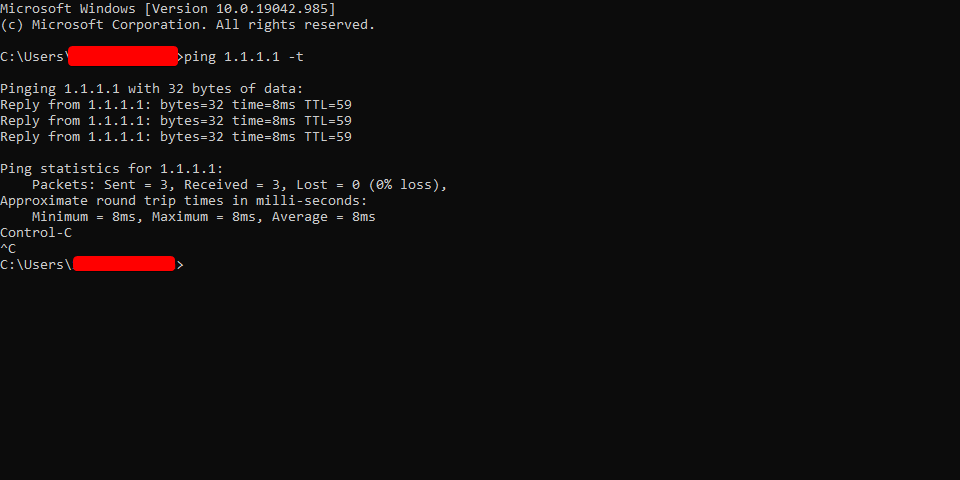
@steel tulip open a console window and run ping 1.1.1.1 -t
see what it says when your internet goes funny
steel tulip
In code as administrator?
steel tulip
Type 1.1.1.1-t
 peak cloak
reset the windows ip stack?
tame carbon
he's like the, what, 5th person to have come in here with this problem
steel tulip
Ipconfig /reset?
tame carbon
idk much about windows
steel tulip
Is there a way of fixing it?
steel tulip
It all says OK, apart from one which says failed and it said access denied but after that it said I need to restart computer
I think I've done this before and it didnt fix it but it's restarting now
tame carbon
@steel tulip that last command does require a command prompt with administrator rights
peak cloak
oh yeah you need to do it in admin
steel tulip
I press run as administrator
It hasn't done anything, and I just checked that my account is an admin
I hope its a cable issue and that it will be resolved tmrw
lean pebble
did you try to reconnect the same cable? change his port on the router ?
tame carbon
wat
lean pebble
I had the same issue long time ago I just reconnect the same cable and changed his port in the router and fixed.
steel tulip
So use the same cable but change the port on my router
lean pebble
yeah
steel tulip
The ethernet I use is an adapter that connects in to the wall that wirelessly connects to the router
lean pebble
My friend have it with his repeater all the time. because his ISP router sucks so always changing between Ethernet ports on the router
tame carbon
you can just say wireless ethernet adapter
tame carbon
wait
tame carbon
adapter that connects in to the wall that wirelessly connects to the router
lean pebble
but the ISP router WIFI sucks so it just spreading the wifi from my own router
tame carbon
👀
lean pebble
its an old router I had that I turned his wifi on instead his ISP router
steel tulip
I got what you said when you said it, I just didnt know what to call it so I described it
lean pebble
ok 🙂
wanton dagger
vpn softwares like himachi and radmin arent working for any computers on my network anyone got any suggestions?
peak cloak
wanton dagger
vpn softwares like himachi and radmin arent working for any computers on my netw...
zerotier
although zerotier really isn't a vpn
more than a vpn
copper rover
craggy osprey
for those helping me the other day, all I needed to do was buy a little usb c ad...
And they're about 30 bucks. Relatively cheap 🙂
Amazon.com: Plugable 2.5G USB C and USB to Ethernet Adapter, 2-in-1 Adapter Compatible with USB C/Thunderbolt 3 or USB 3.0, USB-C to RJ45 2.5 Gigabit LAN Compatible with Mac and Windows: Computers & Accessories
 leaden minnow
Anyone use MikroTik hAP AC as their router/AP?
steel tulip
@lean pebble it looks like its worked thank you
peak cloak
leaden minnow
Anyone use MikroTik hAP AC as their router/AP?
not hap but I use the hex
leaden minnow
Hex S? What are your thoughts on it? Was thinking of getting the hap ac or hex s and another unifi ap ac lite
peak cloak
leaden minnow
Hex S? What are your thoughts on it? Was thinking of getting the hap ac or hex s...
yeah
the HEX S
it's just a router
no wifi
leaden minnow
do you have an AP hooked up to it?
leaden minnow
ah ok, tplink then
any issues with getting that all setup or is RouterOS easy enough to manage?
peak cloak
routeros is uhh, complex
you can use quickset
but it's kinda complex
very powerful
leaden minnow
yeah, I mean I have unifi dream machine now which is GUI oriented
leaden minnow
very simple gui based on yt vids I saw
peak cloak
leaden minnow
I figured I can do a quickset to start, then do more setup over time
leaden minnow
ahhh ok
tame carbon
@peak cloak is your tik in prod yet?
peak cloak
Kinda
peak cloak
Its just slow
tame carbon
no no
peak cloak
Sometimes it loads sometimes it doesn't
tame carbon
when I load it on my phone
it works
when I turn on wireless
it stops working
I am seriously suspecting they block this in their OS
peak cloak
Any errors in dev tools
 tame carbon
times out
waxen scroll
@rocky badge have you ever seen a Dot2 ?
rocky badge
Yeah
waxen scroll
the place I used to work at moved to that platform for most of the smaller rooms
hollow marlin
@waxen scroll Just had to deal with a core router experiencing a memory overflow, damn was it annoying trying to access equipment crashing every 4 mins
waxen scroll
hollow marlin
<@!186123993412141057> Just had to deal with a core router experiencing a memory...
I would have just called remote hands and said power cycle
low pond
Also remote hands: that'd be 60$
waxen scroll
drop in the bucket for his big problem
lean pebble
Does 770.808 USD is a good price for fiber installation? Or too expensive.
 rugged fern
hello guys,
im gonna cut off my head ... i switched from the cat 5e cable to a cat 6, bought cat 6 jacks and it recognises a "unidentified" network with no lights on my switchesnor pcs and no interent
then i tried fitting some cat 5e FTP jacks ... they fit perfectly
same story
or the light blinks for 1 sec every 20 secs or something
same problem on 2 cables
no matter what connector is on it
first time running into this issue so i figured i'd ask here lol
peak cloak
rugged fern
hello guys,
im gonna cut off my head ... i switched from the cat 5e cable to a ...
did you crimp the cables correctly
that's prob the issue
how did you wire it
rugged fern
normally same as always, same coloring on both sides, fitted the cables till the end
and crimped
peak cloak
rugged fern
normally same as always, same coloring on both sides, fitted the cables till the...
you have a cable tester?
get one
rugged fern
i've got a lan tester and all wires are okay according to it
peak cloak
oh
rugged fern
red light on all of them
peak cloak
you know what
you sure you did it the right way
let me explain
I had this same exact problem which I did as a newb
rugged fern
lan tester says " cable okay "
pc and switches " no f u"
peak cloak
you know how the diagrams say clip pointed away from you
I did one with clip pointed away
and one with clip pointed towards me
ethernet tester showed everything fine
rugged fern
checked that, both facing the same way ... clip away from me on both same coloring
I've rewired the whole firm's cabling for ethernet just a few months back (CAT 7) and last year i've installed over 1.5km of cabling in my home (CAT 5)
never had the issue i've explained above
peak cloak
weird
peak cloak
rugged fern
never had the issue i've explained above
see if there is traffic on the interface?
rugged fern
peak cloak
weird
yeah exactly
peak cloak
using wireshark
rugged fern
hmmm one sec gotta replug lotta shit from my switches
peak cloak
had a similar kinda issue when I first learned to do vlans
it just wasn't get a dhcp lease
and no internet
but then it just worked
prob something with arp
rugged fern
yeah worked for me too like 2 times till i unplugged - and never again
well one thing, will check with wireshark but my current setup is router - switch - switch - pc, i guess i'll plug directly into pc to check (the cable i made is for connection between the switches)
but am afraid if i unplug to plug back into the switch it's gonna be the same thing
rugged fern
peak cloak
had a similar kinda issue when I first learned to do vlans
so uhm - the sec i've started to capture traffic the icon for lan turned to the monitor with cable and said i've had internet even tho i could only see cached sites but after refresh they didnt work as expected and seems to be traffic on the cable ... can see all my links and devices
but the second i've stopped the capture
it dies again
peak cloak
hmm
rugged fern
😄
fucking hate it
linux without a desktop kinda guy
only thing windows is good for is active directory
and that's about it
peak cloak
ah
rugged fern
left my laptop in my office but will not be there due to covid for a few days
the wierdest part is ...
even the lights on my switches dont show them as linked
with the cables i made today
every other OLD cable is perfect
tender hazel
try pinging your router
 peak cloak
 jolly sable
probobly just waiting for cpu to finish up decompression
hollow marlin
waxen scroll
I would have just called remote hands and said power cycle
Already called them at that point. Once I shut the BGP peers to it, I finally gain some bit of stability. Still unsure that this point why memory pinned out to the point swap kicked in
 mint juniper
Can any1 help me fix a issue with my Ethernet
copper rover
mint juniper
Can any1 help me fix a issue with my Ethernet
What's going on?
mint juniper
copper rover
What's going on?
I have all my cables plugged in but my Wifi isant showing up on my pc
copper rover
Well, WiFi and Ethernet cabling are very different things.
Are you saying that from your PC, you can't detect your WiFi identifier (SSID)?
Or are you saying that your WiFi adapter isn't listed as a piece of installed hardware?
mint juniper
@copper rover I have a Ethernet cord going from my router to the wall than I have another going from my wall into my pc, when I plug it into my pc nothing happens but when it goes directly with 1 cord from my router to my of it instantly works
Also the cord going from my router to the wall is 5e and the 1 going from my wall to pc is cat 8
So I’m not sure if that would be a problem
copper rover
Maybe, but I'm a bit confused on the topology. So I have a few questions...
mint juniper
Ok
copper rover
When you say wall, you mean RJ45 jack wall plate?
If so, how many RJ45 jacks are you using from the wall plate?
mint juniper
That
 copper rover
Is that two RJ45 jacks. Or one RJ45 and the top RJ11 (analog phone) ?
 copper rover
Ahh ok
So the RJ11 not using. The middle and bottom are RJ45. That's your two Ethernet right there. Ok, clear on that so far
mint juniper
Ya
copper rover
So, the WiFi router...are you using it as a router, or just a WiFi access point?
mint juniper
Both, here’s a photo
 copper rover
Ahh ok
So your router is provided by your ISP. It's a modem, router, WiFi all in one box
mint juniper
Ya
copper rover
So, you're able to plug your PC directly into one of the four yellow jacks in the back of the router and it works?
mint juniper
Ya it works perfectly fine
copper rover
Right, ok.
So about the other wall jack with the RJ45 jacks. Do any of those work when you connect your PC?
mint juniper
I can try different 1
copper rover
I'm just trying to clearify the issue
Do either one of those work to your PC? That is what you're trying to do, yes?
Because here's the thing, the wiring at the other end of those wall jacks with CAT cable will most likely be terminated to a patch panel. From there, you should have a least three patch cables into a networking switch. Do you have a networking switch at the other end?
mint juniper
I’m a little confused on that last part but I tried another wall jack and it didn’t work
copper rover
Right
It seems as though both jacks in different areas are tied directly to each-other somehow. The yellow cable going into the wall jack near the router is terminating to the one jack that is working at the other wall plate
flat wagon
bro how do you pull out a DAC cable from an SFP+ port? It has like black tabs on it and I've been trying to pull on that and it won't budge.
copper rover
flat wagon
bro how do you pull out a DAC cable from an SFP+ port? It has like black tabs on...
Picture please. But I think I know the problem you're having. The pull tab isn't releasing the "claw" thinggy that lets it come out. Yes?
mint juniper
copper rover
It seems as though both jacks in different areas are tied directly to each-other...
So my Ethernet pretty much just doesn’t work?
copper rover
mint juniper
So my Ethernet pretty much just doesn’t work?
Let's start here... There is a room or area where both of those wall plates have cabling that terminate to another area. Maybe it's a wall mounted distribution panel, a closet, or in the attic.. Do you have any idea?
Are you in a home or apartment building that managed by maintenance staff?
flat wagon
what claw
copper rover
I call it a claw, but it's not. Nevermind
Anyways, yeah, try with one hand pushing the cable into the socket, then pull the tab, and while it's pulled, let go and see if the plug comes out
That tab is a release mechanism that frees it. It's a shitty design frankly. Hate it. I've had my share of freeing those.
Don't wrestle with it too much or it could break. There is a "process" of sorts to get it free
copper rover
Yeah, been there done that, got the tee shirt 😉
flat wagon
LMFAO
copper rover
Now you know the secret handshake process at removing those
tame carbon
gently pull on the plastic tab, this should release the latch
you can then pull the entire module out
if it requires force, you are not doing it right
lean pebble
Hello
thick minnow
Hallo
lean pebble
How are we doing today?
thick minnow
I'd say pretty good
low pond
Someone on my youtube replies acting like an asshole cuz laptop has so many stickers on them (intel, nvidia, etc etc)
so yeah. having fun
 hybrid cave
Anyone else have issues with their UDM and abrupt shutdowns / outtages?
Mine can take up to 40 mins untill it's back online when that happens
It just lights up with a grey / white light and stays like that
snow lance
im tryna set up wol on my phone and im confused by this step the link doesnt go anywhere
 peak cloak
snow lance
im tryna set up wol on my phone and im confused by this step the link doesnt go ...
peak cloak
snow lance
im tryna set up wol on my phone and im confused by this step the link doesnt go ...
you don't really need it
snow lance
leave blank?
snow lance
well i tried it and it didnt work
lean pebble
Wake on lan on phone? 🤔
snow lance
wdym
snow lance
the port???
peak cloak
no
lean pebble
Like 10.0.0.0/24
peak cloak
wdym
peak cloak
to where
snow lance
to my pc
snow lance
i can just set the source to only be from my phone 4g doe right
in the port forwarding
or is that local ip only
peak cloak
no because that ip will always change
snow lance
let me look
peak cloak
idk much about celluar
plus
these days
it may not even have a public ip
and your sharing an ip pool with many others
snow lance
hmhmhm well it does say i have one
peak cloak
and being nated
peak cloak
snow lance
hmhmhm well it does say i have one
how did you check
snow lance
what is my ip
snow lance
is that network app or smth
peak cloak
snow lance
yes arent we talking about public ips
yes, but we are checking if you have your own or is it natted
snow lance
ah
peak cloak
snow lance
is that network app or smth
no it's a linux terminal
snow lance
ah linux moment
snow lance
blabalbal lli nxujrhe glinxu
peak cloak
use ip


 copper rover
peak cloak
it may not even have a public ip
copper rover
peak cloak
it may not even have a public ip
Yup, this. CGNAT for IPv4 with Cellular, so the phone won't get a public IPv4 address. IPv6 however might be public, so that might work if the other end is also supporting IPv6 too. Regardless, best to address it via Dynamic DNS host name for sanity
peak cloak
copper rover
Yup, this. CGNAT for IPv4 with Cellular, so the phone won't get a public IPv4 ad...
yeah I have att and v4 is natted, but I get v6
v6 is like almost always public
copper rover
Makes sense
Enough public IPv6 spacing that my toaster and fridge could have one. lol
Not that I would want them too...
copper rover
BTW, VPN apps over cellular via IPv4 is broken with anything that uses GRE protocol. I'm not sure if SSL VPNs uses GRE, but I've had better success with SSL; also more secure
copper rover
Majority of traffic is going over port 443 nowadays
Port 80 will just redirect to 443 for the most part
 inner cliff
not will ... should 😄
peak cloak
copper rover
Port 80 will just redirect to 443 for the most part
well that's on the webserver's side
copper rover
peak cloak
well that's on the webserver's side
Right, i'm just saying that the end-game is everything goes 443. lol
thick minnow
copper rover
Right, i'm just saying that the end-game is everything goes 443. lol
You sure it ain't 404
copper rover
thick minnow
*You sure it ain't **404***
only if you block 443 🙂
inner cliff
if you block 443 it's "site can't be reached"
copper rover
inner cliff
if you block 443 it's "site can't be reached"
Fair enough, but same thing from the end-user's perspective. But noted
peak cloak
inner cliff
if you block 443 it's "site can't be reached"
no it's the blocked error
ERR_CONNECTION_RESET
or no
ERR_CONNECTION_REFUSED
copper rover
Doesn't' that depend on the FW settings? Couldn't it just drop the packets without an ack?