#networking
1 messages · Page 342 of 1
 tame carbon
those are shit
if you have to crimp 100s of jacks
takes gonna take days
or rather
it took me 3-5 mins for 1 of them
with the new ones I can do it in like a minute
 potent shuttle
I know, but the real issue for me is the cable order, because it's not standardized. I only have to crimp one so it's not a big deal
tame carbon

just easier getting the insulation inside it
@potent shuttle just write down the order
:P
as long as its the same on other side, doesnt matter what color the wires are
but I look at that picture of yours
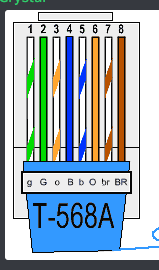
that looks like https://i.imgur.com/wBvL9f0.png
waiiit
did this come from a factory?
or was this done by hand??
potent shuttle
As you can see, the orange and blue wires are together so it doesn't match the standard. Also the brown wire is not the last one left to right either
 potent shuttle
tame carbon
did this come from a factory?
potent shuttle
tame carbon
did this come from a factory?
I bought it, so it was probably made in a factory
potent shuttle
potent shuttle
As you can see, the orange and blue wires are together so it doesn't match the s...
So, since it doesn't match the pattern, would this cause issues even if I replicated the order in the other end?
 tender hazel
potent shuttle
So, since it doesn't match the pattern, would this cause issues even if I replic...
tender hazel
potent shuttle
So, since it doesn't match the pattern, would this cause issues even if I replic...
You should look at the underside of it, not the top.. it is too hard to see the top, you usually use the underside to make sure you have the wires in the correct places
 icy oxide
Was wondering if I could set up a switch that's connected directly to the modem, and have another cable connect to the router from the that switch
 clear igloo
icy oxide
Was wondering if I could set up a switch that's connected directly to the modem,...
clear igloo
icy oxide
Was wondering if I could set up a switch that's connected directly to the modem,...
Depends, if the router is the ONLY device connected and the switch is unmanaged and doesn't grab an IP then yes
tame carbon
@icy oxide you should be able to, with vlans
icy oxide
It would be a TL-SG105 connecting to a Tp 1500x
Would experiment myself, but I'd have an angry family with no internet lol
tame carbon
you'd set up a vlan between the modem and the router through the switch
clear igloo
tame carbon
<@!143142097560666113> you should be able to, with vlans
If something else plugs in then it won't get an IP or it will steal it from the router causing everything else to drop
tame carbon
Ingress protection :P
clear igloo
You'd have to do a lot of tagging and trunking to make it work so it goes through the router and not touch the modem causing issues
icy oxide
So I'd be better off connecting the Modem to Router to Switch?
clear igloo
yes
icy oxide
Aight
tender hazel
connecting the modem to the switch then to the router is a fairly common setup, "router-on-a-stick" it is often called, but if you do not know what you are doing, it is going to be a lot trickier to set it up properly than simply connecting the modem to the router
 rocky badge
@tender hazel@clear igloolol my friend was asking how to do multi wan multi router and I suggested just plugging both wans into a switch...blew their mind
Since their customer has a biz fiber connection with multiple statics, so they wanted both of their routers to use the same connection
Then starlink failover
tame carbon
@tender hazel I was helping someone with their Telus fiber optic connection, and we got the Alcatel Lucent functional on the SFP+ port
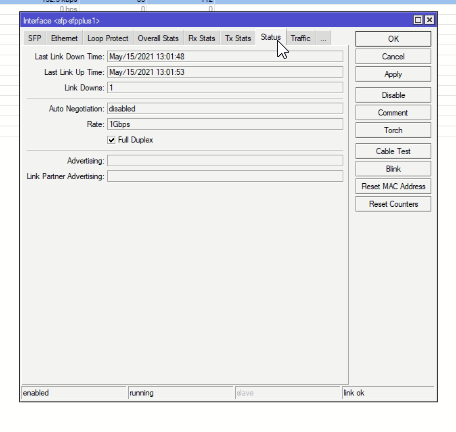
However only at 1G
It does not work with auto negotiate, and there is no way to me to set ethernet to 2.5G when I manually assign a speed
Any idea on what to do?
tender hazel
on the SFP+ port on what device?
tame carbon

@tender hazel currently an RB4011, soon to be CRS309 (once they have all the cables)
We've got it functional @ 1G
but they have 1.5G fiber service, so it needs to run at higher rate
tender hazel
is that a GPON ONT SFP?
 vestal lotus
After speaking with someone over in the r/Apple server, I think a much simpler solution would be to get a new router, set it up in the second floor of the house at the most central point and bridge mode the BBox, connecting it to the bridge mode BBox and get everything set up, I guess?
tame carbon
@tender hazel yes. https://i.imgur.com/OSNcUtu.png
 vestal lotus
After speaking with someone over in the r/Apple server, I think a much simpler s...
vestal lotus
vestal lotus
After speaking with someone over in the r/Apple server, I think a much simpler s...
I interpreted it to mean:
The BBox in bridge mode will pass stuff to the new router, who will do all the work.
tame carbon
@vestal lotus in bridge mode, it will only act as a modem. It sets up an ethernet network
PPPoE is PPP, a tunnel for IP packets, over ethernet
PPP = Point to Point Protocol
this is how you "login" to your ISP network
vestal lotus
https://eu.store.ui.com/products/unifi-dream-machine
I currently have some interest in Ubiquiti's Dream Machine.

Ubiquiti Store Europe
All-in-one device with access point, 4-port switch, and security gateway. Everything you need for a small-scale wired and Wi-Fi network.
UniFi Dream Machine (UDM) is the easiest way to introduce UniFi to homes and businesses. The UDM includes everything you need for a small-scale wired or Wi-Fi network. It's easy to use and still offers all th...
tender hazel
the issue is that it is an RB4011.. the SFP+ port on the RB4011 doesn't work with GPON SFP modules at 2.5G
tender hazel
yes, the module would work in any mikrotik device except the RB4011
vestal lotus
tame carbon
<@!399563484951609354> in bridge mode, it will only act as a modem. It sets up a...
If I got it right, the WAN port could likely be used and connected to the Dream Machine.
vestal lotus
...don't ask why Ubiquiti named it that.
tender hazel
probably it is to imply "this is the all-in-one Uni-Fi device that you have been dreaming of"
tame carbon
@tender hazel for me, that would be an RB4011
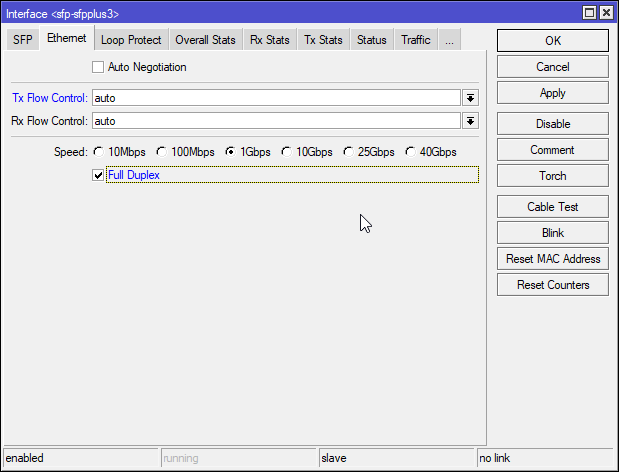
@tender hazel one interesting point, the CRS305 I have, has same kind of switching chip, just a smaller model
and it doesn't have the 2.5G option either
 tall grotto
tender hazel
probably it is to imply "this is the all-in-one Uni-Fi device that you have been...
tall grotto
tender hazel
probably it is to imply "this is the all-in-one Uni-Fi device that you have been...
Lmao wasup
tender hazel
tame carbon
and it doesn't have the 2.5G option either
yeah nothing will have the 2.5G option, it will probably work on auto though
tame carbon
@tender hazel so wait, that would mean it would work on auto negotiate with 1G
and it didn't.
it didnt auto negotiate at all
tender hazel
you mean you tried it in something other than an RB4011 on auto?
tall grotto
rocky badge
<@!530075635423510548><@!291198741862416384>lol my friend was asking how to do m...
Why not just grab another eth card?
tame carbon
@tender hazel is this a flake with the RB4011?
rocky badge
tall grotto
Why not just grab another eth card?
Wants both wans on both routers
tall grotto
Oh yea okay.
tender hazel
The RB4011 is based on Annapurna Labs chipset AL21400
any device based on that chipset will have that issue
rocky badge
@tall grotto I do the same at home lol, its super nice....anything on VLAN 69 is directly connected to WAN
rocky badge
And since my ISP just gives out DHCP to anything on the network  I can have multiple devices on WAN
tender hazel
back when mikrotik used to sell their own GPON ONU SFP module, they had a warning on the RB4011 page that the SFPONU was not compatible with it
rocky badge
 tender hazel
they removed the warning when they discontinued the SFPONU
tall grotto
rocky badge
<@!386972347816607766> I do the same at home lol, its super nice....anything on ...
brb gonna port scan that IP
rocky badge
I already moved my computer back over to another port on the switch 😛
Nothing's on that IP anymore
tame carbon
tender hazel
they removed the warning when they discontinued the SFPONU
Ohhhhh. so thats why they removed it. I thought they somehow patched it
Because I could remember reading this warning
tall grotto
Ill scan the whole range then lmao
tall grotto
rocky badge
And since my ISP just gives out DHCP to anything on the network <:HaHaa:28092511...
Thats cool though, I have two modems running from the same ISP.
I had to upgrade to the newer ones they were using. But they never asked for the old one back and left it enabled on there network. So i run them both on a gateway group on PFsense get double the speeds for the same price lmao
rocky badge
wow....they didn't disassociate the old mac...
tall grotto
the mac on the old modem isnt linked to my account anymore either but its still connects and receives new packages lmao
rocky badge
Usually you have to activate your new modem's MAC
 low pond
I taught they at least allowed one PPPoE thing to work at a single time
rocky badge
A lot of coaxial/fiber connections in the US don't use PPPoE
Its just DHCP over Ethernet
to the customer
low pond
Ah we have fiber here and use PPPoE actually
tall grotto
I didnt even know PPPoE was a thing for a long time
It basically dosent exist in the US
rocky badge
my ISP doesn't seem to give a shit what I've done so far lol
tame carbon
it exists wherever DSL exists
rocky badge
Including when I asked for 5 IPs 😂
Handy when I can't rely on SNI for web servers/etc 😂
tame carbon
I have DHCP over Ethernet here as well
rocky badge
Yeah, PPPoE is common for DSL
rocky badge
Most ISPs are already using VLANs if they're doing other IP services
Usually the ONT/modem/etc. handles them
tame carbon
the guy I helped out today
he got a GPON module from Telus
and I expected them to use two vlans
rocky badge
Some may do VOIP to POTS conversion
tame carbon
but they don't use any at all
its straight DHCP on vlan1, and IPTV is on same network interface
tall grotto
rocky badge
Most ISPs are already using VLANs if they're doing other IP services
Oh yea, funny thing about that. I got a new mikrotik switch after I virtualized my firewall. went to connect to the default IP and didn't see my device. Come to find out I can view there entire network
rocky badge
Yeah, DOCSIS is shared lol
tame carbon
untested firewall rules are the best ones
rocky badge
you'll see other customers too
tame carbon
@rocky badge loool yes
rocky badge
 tall grotto
I can SSH onto my neighbors modem
rocky badge
Lol
tall grotto
lmao still fun tho
tame carbon
or your ISPs
rocky badge
My ISP doesn't do any isolation between IPs but you don't directly see it
tame carbon
why would you?
rocky badge
just MACs in the same domain
tender hazel
I'm on DOCSIS cable and I certainly do not see other customers traffic
tame carbon
ARP'n'go
rocky badge
tender hazel
I'm on DOCSIS cable and I certainly do not see other customers traffic
you don't see the traffic, but you can see others
tall grotto
Oh yea I can see the traffic
tender hazel
define what you mean by "see others"
tall grotto
I can get to the login page of the gateway
tender hazel
yeah, I can't
rocky badge
Belkin router lol https://blob.rocks/jmqv2nyPIN.png

ASUS router https://blob.rocks/efW70kHxnc.png
Adtran gpon shit https://blob.rocks/g5eEhxfkd2.png
A Synology MAC...

 tender hazel
so there must be a way of doing it if my ISP is doing it
tame carbon
I had 25mbit coaxial internet in 2008,
Then I moved to a place with 8mbit dsl.
Moved again, in 2013 to a place with 4mbit dsl.
Finally got fiber optics,
Then I had to move again
and now I have singlemode fiber optics. as much bandwidth as I want
rocky badge
Either someone has their Synology NAS on the Internet or hopefully its the Synology router
tender hazel
i.e. somehow my ISP at home is doing layer 2 isolation on DOCSIS
tall grotto
Did i mention telnets open on a lot of there infrastructure as well
rocky badge
filters on the cmts side?
tame carbon
why would you do filtering lol
if you just treat all addresses as WAN
then there's no need?
rocky badge
finrod's isp
low pond
I am after a modem... which means I can't peek onto the neighbors traffic or what
tame carbon
warscript loading...
tender hazel
@rocky badge yes but they were just saying that that isn't possible with DOCSIS
but it must be because as I said, my ISP is doing it
rocky badge

tender hazel
and they are also doing local-proxy-arp
both are good practice
I'm surprised that I'm hearing here that what my ISP is doing is not possible somehow
because I've always thought it made a lot of sense
the combination of isolation and local proxy ARP solves a lot of security issues that you would have with DHCP on big shared subnets
tall grotto
Paying for 1 150x15 connection lmao
 tender hazel
tame carbon
then there's no need?
tender hazel
tame carbon
then there's no need?
for security reasons, there is a need
tall grotto
Its a speed test shot but its relevant
rocky badge
lmao, my ISP isn't filtering 445
tall grotto
My isp dosent filter anything lmao
low pond
Mine does 80,8080,443 so far
rocky badge
this guy in the same /24 as me: https://blob.rocks/7WC9dFoL4V.png
 tame carbon
lets hope the fun police isn't active.
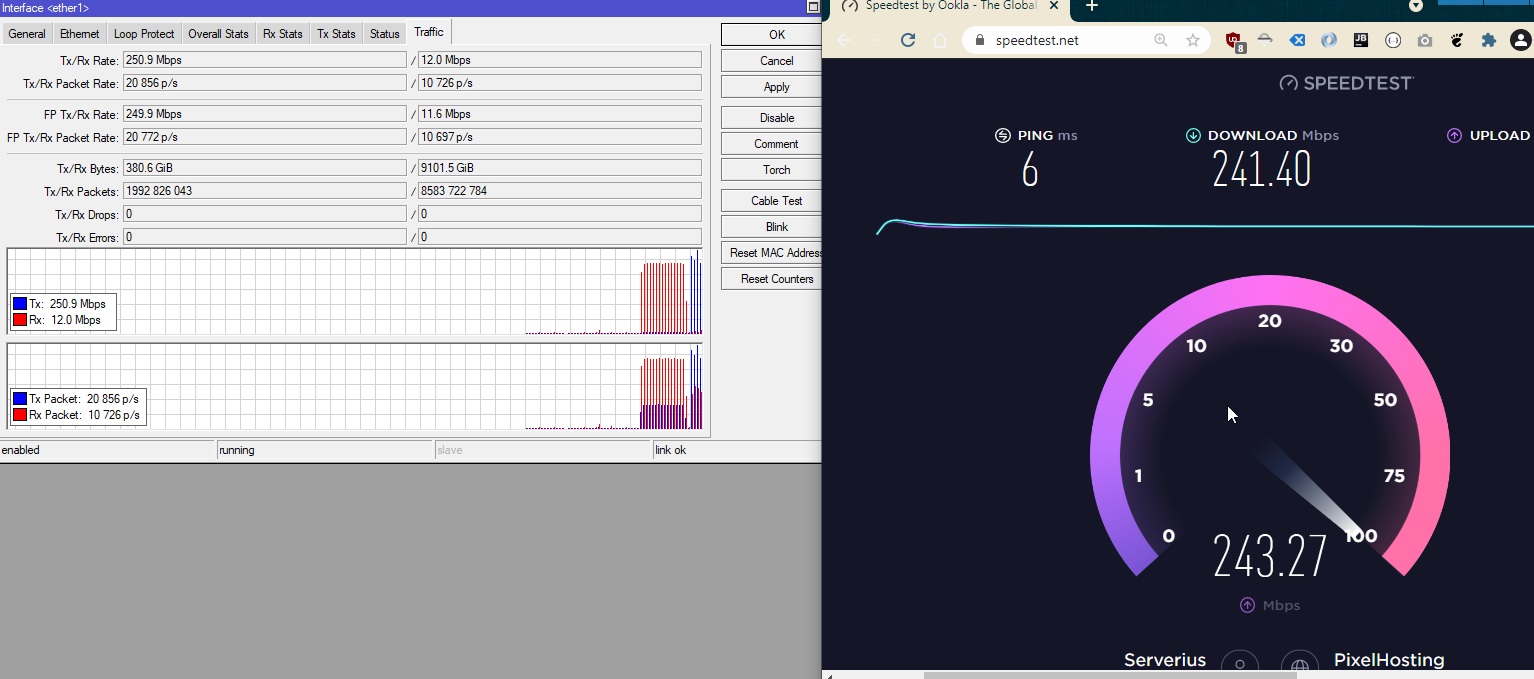
https://i.imgur.com/qfvepa5.png
 low pond
tame carbon
and I get exactly 250
low pond
tame carbon
and I get exactly 250
Me too, 260 tbh, but yeha
tall grotto
I usually get exactly 250x25
tame carbon
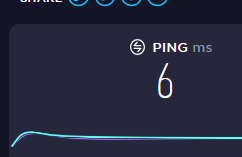
you can see that here https://i.imgur.com/ssZBBxH.png
 tame carbon
It goes to 800mbit and then back down
rocky badge
Although Gigabit Pro....
 rocky badge
2Gbps/2Gbps and 1Gbps/1Gbps connection
you get 3Gbps worth of service for $300/mo
With a static v4 and /48
tall grotto
low pond
Mine does 80,8080,443 so far
Just use https://ipv6.he.net/ lmao
host ipv6 only but
tame carbon
currency adjusted, I pay around $150 month for 250/250M and a public /29, and TV plan
rocky badge
$65/mo USD for Gig/500
tender hazel
but yeah if it is possible to do client isolation on DOCSIS I'm really surprised that the cable providers you are all on are not doing it
tall grotto
I pay $60 for 150x10 
low pond
tame carbon
currency adjusted, I pay around $150 month for 250/250M and a public /29, and TV...
I think 200$, for 250/100, and TV
tender hazel
seems pretty bad
tame carbon
I quite like having more IPs, first ISP that I've used that offers this
rocky badge
this guy in another server said $90/mo for 100/100 was good
tame carbon
all my virtual machines have their own public IP
low pond
low pond
I think 200$, for 250/100, and TV
Actually 100$ but yea
tender hazel
when I said seems pretty bad, I meant the lack of client isolation
you should not see other customer's MAC addresses, and certainly not be able to ssh into their modems
tall grotto
I could get multiple IPS but each one is $5 a month so if i need a new IP I throw another virtual adapter on one of the wan nics connected to pfsense on my virtualizer and it gets a new DHCP address
tame carbon
yeah here its like 2 euros/ip/month
and you can either get a vlan with a publicly addressed IP
or they route the entire subnet
I have the latter
tame carbon
I basically treat that entire subnet as a 'DMZ', I have vlans on it for some other devices
two tennants in other building rent 50/50mbit from me
tall grotto
I could very easliy do that tbh
tender hazel
I have IPv6 through my cable provider since I upgraded my modem early this year
tall grotto
my ISP dosent support v6 yet
tender hazel
I have a /56 and it hasn't changed yet, and it has been a few months at least
low pond
tender hazel
I have IPv6 through my cable provider since I upgraded my modem early this year
Same here, I got a new modem in 2019 and got v6 working fully
tame carbon
@tender hazel btw, I couldn't figure out how to get local-forwarding working across different bridges with capsman
tall grotto
tame carbon
I basically treat that entire subnet as a 'DMZ', I have vlans on it for some oth...
But everything would be DHCP so
rocky badge
yeah
 low pond
tender hazel
I have a /56 and it hasn't changed yet, and it has been a few months at least
low pond
tender hazel
I have a /56 and it hasn't changed yet, and it has been a few months at least
A /64 here but changes the prefix of it every reboot 😛
rocky badge
Finally found it lmao
tame carbon
I created a master interface, and a slave interface with a 2nd SSID and configuration
clear igloo
low pond
A /64 here but changes the prefix of it every reboot 😛
Spectrum?
low pond
Ah nah in the UAE xD not US
tame carbon
the slave was on a different bridge, and wouldn't work without encapsulation
clear igloo
low pond
Ah nah in the UAE xD not US
lol, well we've got providers here who do that too 😛
tender hazel
different bridges? why would you have the slave on a different bridge?
tender hazel
yeah put the slave on a VLAN, it is much easier
tall grotto
rocky badge
yeah
Damn I wish lmao
rocky badge
 tall grotto
I wanna know who they expect to buy that
tame carbon
@tender hazel so what even is the point of creating a 2nd bridge?
rocky badge
They have quite a few customers
tame carbon
because I've got 5 xD
rocky badge
Its basically business at "consumer prices"
tender hazel
there is not much point in creating a second bridge in most cases
tall grotto
Its a consumer product?
rocky badge
its active ethernet, and that juniper is to vlans and monitoring
tall grotto
why not use a 10Gig Pon?
rocky badge
They do have GPON some new developments
tall grotto
For them anyway
rocky badge
$500 install and $500 equip fee
tall grotto
damn
clear igloo
Isn't it $299 a month?
rocky badge
Yes
tall grotto
so lol?
tall grotto
yea ik I wasnt saying it was
tame carbon
yeah
tall grotto
Its insanely expensive
tame carbon
need lots of tubes and fibers
rocky badge
tame carbon
lucky me
tall grotto
And all of your nodes need power
 tame carbon
🤣
rocky badge
But still expensive
low pond
rocky badge
https://www.juniper.net/us/en/partners/state-and-local-price-list/juniper-state-...
What's the most expensive thing on that list
tame carbon
this network I am using was built using taxpayer's money
clear igloo
Probably the MX10003 linecards
rocky badge
Too bad it isn't an Excel lol
tame carbon
what does it cost if I want a DWDM to an IXP?
tall grotto
The big ISPS here get money form the government pocket 60% of it and then service 15% of the Tax area
rocky badge
@tall grotto the switch is crazy overkill too
Comcast is only using 3 ports
XE in, XE out, GE out
tall grotto
tame carbon
what does it cost if I want a DWDM to an IXP?
Depends on distance
tame carbon
35km
tall grotto
just a single WL or the whole spectrum
tame carbon
what do you think? whole spectrum
tall grotto
I hope your kidding
tame carbon
no I am curious lol
rocky badge
tall grotto
The big ISPS here get money form the government pocket 60% of it and then servic...
My ISP got funding for rural internet and municipal isps
tall grotto
basically dark fiber at that point
rocky badge
They cover all prices for install
clear igloo
low pond
What's the most expensive thing on that list
So far it's a $15m license 😄
tall grotto
Yea, I have lots of experience with those rural funding programs
tame carbon
piece of paper
tall grotto
they always go the same way
rocky badge
They’ll rate your area on a 5 star scale, the higher the better. Depending on your area you may be “charged” for install, but that becomes credit on your bill
low pond
clear igloo
So far it's a $15m license 😄
Mmmmniceee 😛
tame carbon
@tall grotto idk, they were forced here to open the network, so its a neutral thing. I could choose between like 8 different ISPs
rocky badge
So if you pay $100 for install, that can cover a month or two depending on your plan
tall grotto
tame carbon
<@!386972347816607766> idk, they were forced here to open the network, so its a...
But its still dark fiber if your after the whole thing.
rocky badge
For fiber, I have this ISP or AT&T. Cable I can get Spectrum.
tall grotto
and you basically need a splice from PTP
tame carbon
yeah, but I was just saying, that is what I've got right now
tall grotto
you have ptp splice?
rocky badge
 tame carbon
I can get 10G if I wanted
rocky badge
Best page on Spectrum's website
tall grotto
So your fiber runs from the IX to your location without anything in between
rocky badge
@clear igloo you still on AT&T?
tall grotto
so they are both DS an UP?
rocky badge
oh god at school we have to have one router to send and one to receive
tame carbon
Its just a patch box, with 1 and 2, line 1 goes directly to my router
rocky badge
and then another for Spectrum enterprise
tame carbon
I am using their SFP module
tall grotto
where does the other one go
tame carbon
not connected
tall grotto
oh strange
tame carbon
they told me that its in case theres a local fibercut
they can move all the lines over to the 2nd one
and the physical light goes other way on the circle
tall grotto
So your on a patly lit ring?
rocky badge
@tall grotto oh also with gigabit pro https://blob.rocks/EtWAu5UbGe.png

 lean pebble
Hey
rocky badge
there's a hefty cancellation fee
tame carbon
@tall grotto lit ring? is that what they call it?
I saw their maps
and it was bunch of circles
rocky badge
because they're not going to run fiber all the way to your house and for you to cancel it lol
tame carbon
with loops that go through the strees
tall grotto
is it a residential connection?
tame carbon
yes, but rural
farmland
I just have a business ISP
fiber carrier is another party
rocky badge
then its technically a biz connection lol
lean pebble
I just have no way to sleep 😤
 tame carbon
its just too much imagery and js bullcrap
webdevs have gone collectively insane
I see it all over the web
rocky badge
ttfb was 1.6s
tender hazel
ttfb?
rocky badge
time til first byte
tender hazel
ahh
rocky badge
ew ew ew its going over cogentco
rocky badge
lol
tender hazel
 tame carbon
lol nice iframe
rocky badge
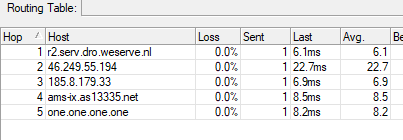
I think we're overseas now https://blob.rocks/FQz4vJDkXw.png

 tender hazel
ccr there stands for cloud core router?
tame carbon
@tender hazel yes
tender hazel
I wouldn't expect cogent to use CCR's
tender hazel
yes I know
tender hazel
but I didn't think ccr22 in the cogent trace route meant it was a cloud core router
rocky badge
 rocky badge
tender hazel
but I didn't think ccr22 in the cogent trace route meant it was a cloud core rou...
rocky badge
tender hazel
but I didn't think ccr22 in the cogent trace route meant it was a cloud core rou...
probably not
agr tho, aggregate?
tender hazel
crystal said it was so that is why I was surprised
tame carbon
juan said those are ccr's
tender hazel
the CCR1072 would not be nearly enough for cogent I would think
tame carbon
when we had a lengthy talk on voice about ISP peerings
tender hazel
hmm.. interesting
rocky badge
I'm used to stuff like this 😂 https://blob.rocks/5giJCxKAqI.png
 tender hazel
the best way to optimize routing performance with a CCR1072 would be to get rid of all firewall rules and use IP range limits on the services to control who can winbox or ssh in
rocky badge
XE 10 gig and AE aggregate
tame carbon
@tender hazel they might just have a beefy edge machine, and then a bunch of CCR's for their peer links
bunch of 10G's
potent shuttle
tender hazel
You should look at the underside of it, not the top.. it is too hard to see the ...
So, looking by any angle it is very clear that the cable I bought is wrongly sorted (at least it doesn't match the T-568A or T-568B standards). I saw a pic that shows that there is a "patch" and a "crossover" wire layout. Is my cable an example of a crossover cable? And if it is, how should I proceed? This is the order looking from the bottom of my connector, left to right: green, white and green, orange, blue, white and blue, white and orange, brown and white and brown
This is the image for reference
rocky badge
@clear igloo Wait, Cisco's bundle ethernet = be, right?
clear igloo
depends on the platform, but some it's bundle-ether, yah
rocky badge
because my friend is saying be in that is bundle ethernet
then whatever
then airport codes & number
tender hazel
yeah somebody wired that strangely @potent shuttle
the funny thing is they wired it almost with the white/color and color reversed, except for pair 1
if they reversed everything it would probably be fine, even though it would still be wrong
but they reversed all pairs except for pair 1
that's the only thing that might be a bit of a red flag for getting higher rates
if you only need it to work at 1Gbps and it is working it will probably be ok
but if it only comes up at 100Mbps and you are expecting 1Gbps you'll probably want to replace it or redo the ends yourself
potent shuttle
So the cable order only matters for speed?
tame carbon
@potent shuttle you need 2 pairs for 100M, and 4 pairs for 1000M/1G
potent shuttle
I see
It's a cat 5e cable so I want it to go full speed for futureproofing and using it for a home network
tame carbon
thats not ideal for permanent installation
potent shuttle
So I should recrimp both ends right?
potent shuttle
tame carbon
thats not ideal for permanent installation
I know, but 1gbps is enough for me
 hollow marlin
tame carbon
juan said those are ccr's
hollow marlin
tame carbon
juan said those are ccr's
Yeah, I've been in their COLO and they do indeed have quite a bit of em
tender hazel
hollow marlin
Yeah, I've been in their COLO and they do indeed have quite a bit of em
interesting.. I wouldn't think that their routing performance would be high enough for their needs
I had imagined like 100Gbps links all over the place
rocky badge
Maybe at peering & colo
but I doubt at their core backbone network, which that traceroute shows
Since its transatlantic
 pale ridge
100G is not all the common still
tame carbon
40G is kinda what you see a lot
pale ridge
we are mid refresh and still only have 10g and very few 40G
it is also a case of why get it if you are not using it
100G is big ask if you are not working with large data
tame carbon
I could see why 100G to a peering point would be nice
pale ridge
also in Aus so yer we are tiny compared to the USA or euro
tame carbon
you can use the existing hardware and scale up easily
pale ridge
i have multi 10G peerings but we hardly get over 1G
tender hazel
I'm talking about backhaul connections - the core, not the edge
tender hazel
and giant providers like cogent can easily push through a lot of data
pale ridge
you will a big router for that
tame carbon
@tender hazel yeah but isnt that just tunnelled then?
or somehow it doesnt show up in the trace
because of some other kind of routing protocol
tender hazel
the trace above with the "ccrXX" hostnames showed incrementing latency for each hop
tame carbon
do you think cogent just dynamically allocates these?
tender hazel
so that suggests that MPLS is not in use there
tame carbon
they just add capacity in the form of smaller units
because the naming alone suggests 100s of them
pale ridge
i think i missed part of this conversation as i had a bit of a read up
what is the issue?>
tender hazel
if cogent was using MPLS you should see the same latency for a bunch of hops
tame carbon
cogent running high end mikrotiks
pale ridge
that is not really true
tender hazel
and instead the latency is gradually incrementing from hop to hop across their core
tame carbon
@tender hazel what if lol, its just a bunch of stacked 10G's on a fiber? xD
tender hazel
what isn't really true?
pale ridge
if it is mpls it would be the same latency at a load of hope
tame carbon
could just be a cost saving measure
pale ridge
if could take different paths
pale ridge
MPLS everything appears next to each other
tame carbon
if you put one of those next to a big juniper
tame carbon
@rocky badge I've not had any issues with them
tender hazel
cognet would be a better name for them.. a network of cogs
rocky badge
Compared to Level3 & others
pale ridge
they could also be using bgp multipathing
rocky badge
My friend has worked with them before at DigitalOcean....they are bad
tender hazel
the biggest issue with cogent is how their actions and policies have resulted in us having two separate IPv6 internets
and they show no sign of changing that
pale ridge
i am not up with ipv6 how is that?
i always feel dumper talking to other network people
tender hazel
well, a lot of the early IPv6 internet was dominated by Hurricane Electric, who are not considered a tier 1 provider
so many businesses and people got connected to the IPv6 internet through HE, either by buying transit or peering or getting a tunnel
they wanted to peer with cogent but cogent said "you aren't a Tier 1 - our policy is to peer only with other tier 1's. You will have to buy transit from us instead."
and cogent did the same thing to Google
they told google "you are not a tier 1 - you have to buy transit from us"
so hurricane electric, which has probably way more IPv6 customers and subnets advertised than cogent does, does not have connectivity to cogent on the IPv6 internet
and google is not reachable via cogent IPv6
pale ridge
wow
pale ridge
that is a bit fucked up
tender hazel
yeah, basically like Cogent was like "screw you google, you puny worthless company, we are a big tier 1, and you have to buy transit from us!"
pale ridge
The internet, where everyone works together....
tender hazel
so if you only have ipv6 from cogent, google takes longer to load, because it will try connecting to it over ipv6 first, fail, and then fail over to ipv4
tender hazel
so you rely entirely on happy eyeballs for google to load
yeah
it causes a delay though
rocky badge
Cogent is one of the world's largest Internet Service Providers, delivering high-quality Internet, Ethernet and Colocation services.
no route to google 
 tame carbon
they should redistribute IPv6 blocks into a blockchain
where ownership is just passed on
although, it would make it rigid and stale
pale ridge
breakfast time
rocky badge
 tender hazel
yup
so we have this stupid double IPv6 internet.. so if you are unlucky enough to have Cogent as your only IPv6 feed then there are a bunch of things you can't get
and I think there is hardly anything on the IPv6 internet that is only available on Cogent and not elsewhere
tender hazel
pale ridge
happyeyes
I deal with how happy eyeballs works on a regular basis.. my home computer has an IPv4-only VPN connection into work.. when I resolve DNS names at the office I often get an AAAA record for something but it can't load because blocked by firewall (because that traffic isn't going through the VPN). It takes about 10-15 seconds for it to decide IPv6 isn't responding and load the page over IPv4
the delay is.. annoying
tender hazel
I know with happy eyeballs it is supposed to be fast to move to v4 but my experience is that it doesn't always work as designed
once the site has loaded it responds quickly after that
it is only when I try going to it the first time on a given day or whatever that I get that delay
rocky badge
I want my ISP to do v6
pale ridge
HE timers are meant to be subsec?
 tender hazel
pale ridge
HE timers are meant to be subsec?
tender hazel
pale ridge
HE timers are meant to be subsec?
hmm?
rocky badge
A /28 is 1 million /48s
or 256 million /56s

Provides step-by-step instructions for removing a CA from Windows Server 2012 R2.

tender hazel
pale ridge
HE timers are meant to be subsec?
I don't know what you are asking
oh happy eyeball timers

 tender hazel
HE is an acronym for Hurricane Electric
so I thought you were saying Hurricane Electric timers are supposed to be subsecond
tender hazel
well, it doesn't work so well for me
at least not in windows 10 with firefox
if I disable ipv6 when I am on the vpn everything loads instantly
I know what it is supposed to do, but in my experience it doesn't always work that great, it is possibly that in certain situations other factors impact it and prevent it from failing over as quickly as intended
based on that I wouldn't really comfortable being in a situation where you were dual stack and your only Ipv6 feed was cogent
there is an online happy eyeballs test that says my happy eyeballs is fine
yet on the VPN it doesn't seem to work
 tame carbon

Futurama Season 6 Episode 3 : Attack of the Killer App
Comedy Central
tame carbon
this one was pretty spot on though
 thick minnow
is 10 gigabit worth it? ive been thinking of getting it
it costs 70 dollars per month and my gigabit plan rn costs 40
tame carbon
@thick minnow entry is quite expensive you need a fast router, new network cards, cables everything
ofcourse you can still use 1G clients
hollow marlin
rocky badge
I want my ISP to do v6 <:HaHaa:280925116089630730>
Same with fios, but seeing how they cannot fix their ICMP replies, I have no hope we are getting v6 anytime soon
tame carbon
they just will be bottlenecked
rocky badge
lol
tame carbon
@tender hazel this one would be quite nice for 10G, https://mikrotik.com/product/ccr2004_1g_12s_2xs#fndtn-specifications

MikroTik is a Latvian company which was founded in 1996 to develop routers and wireless ISP systems. MikroTik now provides hardware and software for Internet connectivity in most of the countries around the world.
right?
tender hazel
when it stabilizes.. and it only has around the overall performance of a CCR1016
the main thing it has is that the individual cores are faster than those of a 1016 even though it has fewer of them
so any single core tasks will be much faster than on a CCR1016
thick minnow
tame carbon
<@456226577798135808> entry is quite expensive you need a fast router, new netwo...
yea just realized im gonna need a new motherboard for 10 gbps, a new cpu cable and m.2 nvme ssd
tender hazel
the CCR1036 and CCR1072 both have multiple SFP+ ports
tame carbon
@thick minnow do you have a router?
tender hazel
but the CCR2004 has more than either and has two 25G ports as well
tame carbon
@tender hazel yes
tender hazel
I'm more excited about the CCR2016
tame carbon
but have you seen the pricetag on those? xD
tender hazel
supposed to be out later this year
tame carbon
The CCR2004 is only $595
thick minnow
tame carbon
<@456226577798135808> do you have a router?
yea ofc
tame carbon
@thick minnow which one?
thick minnow
idk some shit from vodafone which does gigabit
tender hazel
tame carbon
The CCR2004 is only $595
yes, it is a good cost, if only it was more stable
only I think they have almost finished getting the bugs fixed
thick minnow
its not really shit lol
tame carbon
@thick minnow but not fast enough for 10G
thick minnow
tame carbon
<@456226577798135808> but not fast enough for 10G
tru
tender hazel
they are getting closer to getting the bugs fixed, people are now reporting that their CCR2004's are no longer spontaneously rebooting once a week
so that is progress
some of the early adopters swapped them out for CCR1036's due to the stability issues
tame carbon
@thick minnow so the stable option with mikrotik, $1000 
the newer one they have which is still being fixed, CCR2004 is only $600
it has all the connectivity you need
tender hazel
this is one issue that people are starting to report fixed in the latest 6.49beta

one user reported the reboots are all fixed in 6.48.2, another reported that they are still getting watchdog reboots.. but the person who is still getting the reboots might not have updated their routerboot firmware
not enough varied feedback to be sure that everything is fixed, but it is promising at least
tame carbon
mh interesting
wish they would really give us more access to source
it would make their already awesome system even more awesome
tender hazel
they only give access to the GPL code that they modified
but a lot of their stuff is proprietary
their platform support for TILE, their routing engine and routing protocols, and the OpenVPN client are all proprietary and not based on open source code
tender hazel
oh I like my new profile avatar way more than the old one
I didn't like the old one but I picked it in a hurry.. I was going to get kicked off a server b/c I only had the default game icon picture
 tame bane
dose anyone know if alexa devices can be used as a hotspot because my wifi at home dislike my pc because it is over 10 years old and has a i5-4590T and hotspot works better than wifi and i need to to work done and my Chromebook (i am in 8th grade i'm 14) and it is controlled by my my school so stuff is disabled and i was wondering if my alexa devices can be used as a hot spot i have 2 i have a kindal fire hd 10 5th gen and a alexa dot clock 4th gen the WiFi on bot is always on so if anyone can help please dm me if you can thank you.
and a add to it i also have a echo show 8
 flat wagon
tame bane
dose anyone know if alexa devices can be used as a hotspot because my wifi at ho...
flat wagon
tame bane
dose anyone know if alexa devices can be used as a hotspot because my wifi at ho...
no it doesn't
you can have your phone as a hotspot though
using wifi on it and not your data
tame bane
flat wagon
no it doesn't
thank you
tame carbon
Typical behavior for windows:
- Turn on Machine
- Windows installs updates
- Machine turns itself off.
- ??? Why is it off?
.
5. Turns it on again
6. Login screen
 clear igloo
@low pond Is that for 21H1?
 tame carbon
I am on 20H2 now
low pond
ah yes same
tame carbon
I was on 1909 until yesterday
clear igloo
I've been on 21H1 for a couple months, no issues so far 🙂
low pond
how to upgrade xD
low pond
i installed dis like 15 days ago fresh (ye i migrated from archleenux)
tame carbon
"Install"
low pond
 clear igloo
Ah, it's installed, just need to reboot to finish then
clear igloo
Yah and your pc reboots
low pond
kden bye
clear igloo
tame carbon
but why
I like beta testing 😛
tame carbon
windows is 2nd grade citizen
@clear igloo and I am afraid whenever windows updates
I've got a bad track record with windows & updates
clear igloo
Ah, I've never had issues
tame carbon
If you run windows as only EFI image on a disk, and you have no esoteric hardware, then you'll likely never encounter these issues
clear igloo
except with Asus Aura and updates
tame carbon
but the moment, you run some kind of dual boot, with a modified bootloader and EFI installation
clear igloo
or armoury crate or whatever it's called
tame carbon
windows just breaks with updates
clear igloo
tame carbon
but the moment, you run some kind of dual boot, with a modified bootloader and E...
Ah, yah, I don't dual boot
clear igloo
I'm sure
tame carbon
It works
but you have to sometimes, change settings for windows updates to propegate
like that feature update
bugfixes and patches are installed without problem
clear igloo
ah, good to know
tame carbon
@clear igloo windows in chainload configuration = trouble
windows bootloader has to be your primary
@clear igloo for the longest time it was possible to use the Metro bootloader instead of grub
but since the 1909 version of windows, I have been unable to turn it on, on home versions of windows
clear igloo
ah, I use pro or enterprise everywhere
tame carbon
Yeah, I dont have that kind of money.. for a fucking operating system xD
only Pro Install I run is at my dad's camping
Their POS server software (for restaurant, and receptionist) runs only on windows
clear igloo
ah
tame carbon
And they use RDP to login
clear igloo
yup, need pro for that
tame carbon
its just on a VMWare server in their office
@clear igloo oh the fun, with hardware keys for licenses xD
passthrough the license key to the virtual machine
so annoying
@clear igloo is there not a way to do RDP on Home versions of windows?
I saw some kind of registry hack that would enable it
clear igloo
Not sure, I've never tried
clear igloo
tame carbon
passthrough the license key to the virtual machine
oh during initial setup where you only have the vmware console, yah
tame carbon
Nahh, the software their POS system uses
the manufacturer has a hardware key for their propietary software
clear igloo
Ah
tame carbon
its in the form of a USB stick
and they just installed this on the receptionists' computer
kinda dumb.
so I contacted the installer
and over the phone, had them reinstall it on a Windows Pro VM
clear igloo
There were/are some versions of windows where you had to put in the key before continuing install so you have to manually type in the key because the console won't let you copy paste
tame carbon
and then just recently, everything broke
when windows updated itself without prompting
and RDP broke
clear igloo
Ah, you have a backup server?
clear igloo
I'd look into Nakivo for VM backups, $99 per physical CPU in the server (not CPU in the VM)
tame carbon
the server program there basically just talks to all the cash registers in the building
it prints the "jobs" for the kitchen
on little labels
clear igloo
ah, I know that stuff
tame carbon
so they know what food to prepare
Kassensysteme und Lösungen von Vectron ✔ Über 225.000 Installationen ✔ Erfahrung seit 1990 ✔ Marktführer in Gastronomie, Bäckereien und Hotel-Schnittstellen
@clear igloo I am still not happy with it though
they put the entire cash registration system on the LAN
and I had a look around with wireshark
yeah.. not encrypted
I will be re-doing their entire network soon anyways, upgrading their gear to 802.1q-capable switches
clear igloo
lol, wow
clear igloo
vlan all the things!
tame carbon
I feel like the way Vectron installed their software on the computer that is "always on"
its like a mom&pap shop, except one crypto attack, and you are fucked.
clear igloo
yah
low pond
tame carbon
but why
i came back 😭
tame carbon
did you break your install? :P
low pond
Oh, I was greeted by T E A M S on logon
but everything is alright 😛

I dont kno, i am still on 20h2
that wasnt an update, just that .NET patch probably
thick minnow
low pond
Oh, I was greeted by T E A M S on logon
Why don't you turn it off then?
tame carbon
teams enables itself
thick minnow
ik, I am asking why don't you turn it off
tame carbon
its another stupid thing brought to your by: microshit
low pond
I just installed office suite today too so probably forgot and even disabling from the starting stuff it anyways starts on boot
 tame carbon
cortana
low pond
https://www.youtube.com/watch?v=8mbV-YIV9Uc amazing quality AD tho
thick minnow
Why it no embed?
low pond
i used < and >
I dont want it to embed on purpsoe xD
you can use it too to stop embeding
useful for rickrolls etc
thick minnow
Interesting
 short condor
SDD or HDD preferred when using pfSense?
tame carbon
doesnt really matter
@short condor it loads the OS from disk, and all runtime stuff, routing, is all done from memory
short condor
@tame carbonA HDD should then be "safer" right?
 zenith kettle
Hi guys , I'm configuring my Tenda D151 Router as a extender via wireless connection and use it as a ethernet port , but im not able to connect to the old router though
can someone help me on how to connect to it?
edit : now im able to connect to it via ethernet thanks!
so what is the term for using your old router connected wirelessly to the main router and using the old router to connect other devices via ethernet? Bridge or Repeater or Extender?a
tame carbon
@zenith kettle access point, wireless bridge
bridge AP
various names
but the point is, its a bridge, with an ethernet interface and a wireless ethernet interface
no dhcp server, no firewall, no routing
zenith kettle
okie
zenith kettle
tame carbon
<@!574913539370909696> access point, wireless bridge
can you tell me a good video to set up my router : Tenda D151
zenith kettle
okay any general video regrdless of the model will do
tame carbon
but basic things you can do on your too
@zenith kettle usually there's only two parts to it
your WAN and LAN configuration
WAN is the connection to your ISP
and your LAN is your local network
most of the settings are usually under those categories
zenith kettle
okay so can WAN Be configured from different ISP's?
tame carbon
WAN is just an interface you designate
zenith kettle
cuz my old router uses a phone cable named DSP , and my newer ones uses fibre connection
tame carbon
and you define a method for it to obtain an addreses
the idea is that, anything that isn't on your lan, gets routed out to wan
local area network, wider area network
your local network is a private range, 192.168.0.0/24 most likely
and your wan is a public IP address
your router just exchanges the packets of data between those two networks
it "routes"
the consumer market has ruined the word "router"
zenith kettle
okay
tame carbon
to most people, router just means: box that gives internet and wifi
anyways, I'd love to chat about this
but I just got called for dinner
zenith kettle
okay thanks for helping!
tame carbon
@zenith kettle Thing for you to look at are NAT, and DHCP
NAT is important for port forwarding, if you wish to host your own services
and DHCP is the protocol responsible for handing out IP addresses to connected devices
both of these are handled by the router
low pond
Is there no MTR for windows with v6
I just can't seem to find a way
WinMTR only does v4, WSL with the stuff doesnt do v6 either
tame carbon

low pond
Aw comeon man
 soft sky
Hey guys, I have a question concerning my network switch. I have a 1gb/s that arrives to the switch. Then the switch is split up into 2 cables that go on 2 different computers. Do I get 1gb/s on both computer or 500 mb/s or does it depends on if the computers ask a lot of bandwith?
low pond
it should split... equally
soft sky
even if 1 of the 2 computers do not ask for any bandwith?
 waxen saddle
soft sky
Hey guys, I have a question concerning my network switch. I have a 1gb/s that ar...
waxen saddle
soft sky
Hey guys, I have a question concerning my network switch. I have a 1gb/s that ar...
All ports get 1gb speed.
soft sky
but it can't at all time right
waxen saddle
It can, all the time. But if 2 computers are talking to a 3rd at max speed, they will each get half of the 3rd’s port speed
soft sky
Cause imagine I have 1gb/s that arrives at my house which is sent to the router. Then both computers want to download. Then they will both download at 500mb/s each
 copper rover
The connection is split 500b/s per PC if they're simultaneously downloading
waxen saddle
soft sky
Cause imagine I have 1gb/s that arrives at my house which is sent to the router....
Exactly
soft sky
and if one is just cruising the internet and the other downloading? 10mb/s and 990mb/s for the other?
copper rover
Yes
copper rover
For this very reason, QoS is a factor in ensuring gaming and VOIP traffic maintains low latency on a saturated WAN connection.
No, split up all the time is Token Ring. That doesn't exist 😉
waxen saddle
copper rover
For this very reason, QoS is a factor in ensuring gaming and VOIP traffic mainta...
Note: Works on upload only. Which helpful, but only half the equation.
copper rover
soft sky
wym

Token Ring is a computer networking technology used to build local area networks. It was introduced by IBM in 1984, and standardized in 1989 as IEEE 802.5.
It uses a special three-byte frame called a token that is passed around a logical ring of workstations or servers. This token passing is a channel access method providing fair access for all ...
Emphasis on fair access. Again, that's no longer applicable with Ethernet.
Trivia: there was an obsolete 100BaseVG standard that was similar
100BaseVG is a 100 Mbit/s Ethernet standard specified to run over four pairs of category 3 cable (cable also known as voice grade, hence the "VG"). It is also called 100VG-AnyLAN because it was defined to carry both Ethernet and Token Ring frame types.
100BaseVG was originally proposed by Hewlett-Packard, ratified by the IEEE in 1995 and was pra...
low pond
Your probably confusing him >.>
copper rover
Probably.
soft sky
And do y’all recommend me to test my speed between 2 Ethernet ports in my house?
I meant what app or software should I use to test my speed
clear igloo
iperf3
low pond
ye between computers or servers within a local or public too iperf works best
soft sky
So I need 2 computers with gigabit ethernet
low pond
Well technically yes, in this case you'd be testing your switch

 cedar igloo
Is anyone using Netgate TNSR? I don't know if it's actually worth learning if nobody uses it
clear igloo
rocky badge
<@!291198741862416384> 😔 I need more SFP+ ports
😦
soft sky
rocky badge
I don’t have any more <:HaHaa:280925116089630730>
what are these metal thing in front of the ethernet connectors lmao
rocky badge
SFP
only the top one is an Ethernet cable
the others are DACs

The small form-factor pluggable (SFP) is a compact, hot-pluggable network interface module used for both telecommunication and data communications applications. An SFP interface on networking hardware is a modular slot for a media-specific transceiver in order to connect a fiber-optic cable or sometimes a copper cable. The advantage of using SFP...
@clear igloo I don't have a 10 gig link between my server and PC 😭
clear igloo

low pond
Damn you need that huge SFP switch itself blob
rocky badge
if I had $900 + tax to drop on a switch https://blob.rocks/fCOYpfy9TV.png
 low pond
seriously ubiqituti?
rocky badge
¯_(ツ)_/¯
Works
My friend has one and its super nice lol
Then I can go 25 Gig to my PC  /s
/s
low pond
god im getting too jealous for a day
rocky badge
@clear igloo Have you looked at replacing your amcrest any time recently?
clear igloo
I have not
rocky badge
oof
clear igloo
All the options that are good don't seem to have what I need and everything that does have a cohesive set of cameras that do what I need are on par or worse than my current setup
rocky badge
rip
I wanna see if I can convince my parents to rip out our nest hello lol
for a g4 doorbell
clear igloo
lol
rocky badge
So we don't have to pay Google to store footage
Plus, Protect opens so much faster than Nest app
clear igloo
not stealing your data 😛
copper rover
rocky badge
Plus, Protect opens so much faster than Nest app
Nest sucks after Google purchased them. Though I do like Ring doorbell regardless of the controversy with Amazon.
rocky badge
Oop
copper rover
The neighborhood is basically a collective Watch for stuff
It help police nail thieves
 waxen scroll
rocky badge
waxen scroll
rocky badge
lol
thick minnow
You(american) should totally buy this 50 feet Cat7 SFTP(28awg?..) cable for 5$(-5$ coupon) & give it a review.  https://www.amazon.com/Ethernet-QGeeM-Internet-Computer-Connector/dp/B0888BFQS9
Buy Cat7 Ethernet Cable, QGeeM 10ft Cat7 RJ45 LAN Network Cable High Speed Professional Gold Plated Plug Ethernet Patch Internet Cable for Switch/Router/Modem/Patch Panel: Cat 7 Cables - Amazon.com ✓ FREE DELIVERY possible on eligible purchases
thick minnow
thick minnow
You(american) should totally buy this 50 feet Cat7 SFTP(28awg?..) cable for 5$(-...
You even get free usb 2-usb c cable together with it?  https://www.amazon.com/dp/B07DZQ4T48
Buy QGeeM USB C Cable, Type C Charging Cable 3A Fast Charging, USB-A 2.0 to USB-C Fast USB C Charger, Compatible with Samsung Galaxy S8 S20 Plus, Moto Z: USB Cables - Amazon.com ✓ FREE DELIVERY possible on eligible purchases
 willow hinge
Will I need 2 wifi AP's for a guest network and employee network for maximum security
And what would I do to make guests sign a TOS whenever they login to the wifi
guest wifi
waxen saddle
Just assign a different VLAN to the WiFi networks and set up a captive portal on the guest WiFi with whatever ToS you want. Ubiquiti Unifi handles this quite nicely I might add.
1 AP can easily handle at least 2 SSID’s
willow hinge
Alright, how do I setup a captive portal?
waxen saddle
Not sure. I’m only familiar with Ubiquiti’s implementation.
willow hinge
Alright
tender hazel
there are a bunch of captive portal solutions that can run on linux servers
mikrotik also has a captive portal
 acoustic fog
In need of some guidance. I'm trying to figure out how to set up networking in Virtualbox so that when the host connects through Pritunl or any VPN for that matter, all the of the guest vms automatically get routed through as well.
Use case - I have multiple users running game servers on guests but I dont want them to individually have to be responsible for connecting through to a VPS that has active ddos protection plus domains resolving to it. No game servers have conflicting ports.
Thank you very much in advance if anyone can walk me through it, or at least point me in the right direction. Please ping or DM, again thank you!
thick minnow
Ok, can somebody help me. Im setting up PFsense with an DHCP ipv4 of 192.52.255.48 (testing purposes) and it asks me to enter the start adress of the IPv4 client adress. give him 192.52.255.40 and then it says This ip adress must be in the interface's subnet
If anybody know, please dm me, cuz im heading to bed, cuz its 4.26 am, and my head is exploded by all these ip's
 noble ridge
@thick minnow I would explain it but you need to enter 192.52.255.1/24 is the easy answer. This simply means that from 192.52.255.1 to 192.52.255.255 addresses will be assigned from pfsense.
acoustic fog
^
noble ridge
if you put 192.52.1.1/16 this means 192.52.1.1 to 192.52.255.255 can be assigned from a router
acoustic fog
Are those chains or iptables? ...:Or chains used for iptables?
tender hazel
you shouldn't use 192.52.x.x
it is theoretically unused as a public range but it is hard to say if that will be the case forever
noble ridge
I am wondering if I will ever see IPv6 in my lifetime.
tender hazel
hmm?
noble ridge
I should say where IPv4 is no longer used due to its limitations for IPv4 of address.
hollow marlin
You'll never see v4 go away in our lifetime
tender hazel
I'm a bit more optimistic than that, only because v6 has been growing steadily over the past 5 or 6 years
 hollow marlin
Majority of growth is due to carriers and really screws with the numbers. The chicken and egg situation with devs/sysadmins and SP as well as the number of people legit intimidated by v6 will mean it's here for the long haul
The best hope is the end of next year when the US gov has a mandate for 80% of the network be v6 only. Whether or not they actually follow through, hopefully 3rd times the charm and will force a big push forward
tender hazel
for a lot of residential users who want public IPv4, it is mostly for gaming.. but if most online gaming supports ipv6 (and PS5 finally has IPv6 support) there will be less of a need for residential users to have public IPv4
if ISPs hit a point where 80-90% of traffic is IPv6 there is less of a downside to only offering CG-NAT to home users
potentially involving 464XLAT or DS-Lite
the pressure for companies to move will come from the home users, who want to be able to do things like VPN in without issue
it is exactly what has been happening with meraki and the cellular providers moving to v6 only, notably T-Mobile in the US and Rogers in canada, and using 464XLAT for v4 access which breaks IPv4 VPN access
T-Mobile and Rogers aren't getting blamed, instead Meraki is getting blamed for not being quicker to implement IPv6 support
hollow marlin
I'd disagree. Pressure comes from the businesses. Residential can make noise but in reality, they are not the ones paying a majority of the bills for the big players. Even if residential complains to their workplace and it becomes a NOC time sink, many of the times they don't push and just find work arounds.
We'll see though, but I'd stand firm though that v4 will be around until I croak
Especially if the new buzz word of the month "zero trust" gains steam where it doesn't matter about transit and VPNs are the past.
tender hazel
right, but if CEO's or other higher-ups find they can't do something because their company is running the older IPv4 only and it isn't working because their home service is IPv6 and does v4 only through transition technologies
then you begin to have top-down pressure on the IT department to do something about the situation
hollow marlin
That's my point, when I mean businesses, typically I just mean the ones who make the decisions. It's only when it affects the business in some way either financial or the top in their day to day work is when something is done. Most the time it's pressure on the engineers and either they're reasonable and listen which they push their providers or sadly and more common, engineers need to make it work or get the boot
tender hazel
yeah - like what I suspect is going to start happening is CEO's are going to start saying "this isn't working for me from home/mobile", is the IT team really going to be like "oh yeah, it is because we are running old IPv4, all of the home/mobile providers are on IPv6 now, but it is too much work to upgrade, so you'll just have to live without it"?
they might come up with workarounds, but how many CEO's want to be told that they are using ancient networking technology and are behind the times and that that is why they are having to come up with workarounds?
it's kinda like if they said "sorry sir, we are having a huge number of problems, our fleet of 80486 computers is failing.."
hollow marlin
Too many don't know nor care. All they know is it's working and the the business is still making money. They'll end up getting another provider, a mobile hotspot or they're engineers will incorporate a legacy system to make them happy.
Unfortunately it's the mindset of most businesses corporates. Just make it work!+IPv4 still works will stagnate so much of the progress
Out of all the large enterprise customers we have, the amount of them that get escalated to me about v6 in someway shape or form can be counted on no hands. Even the problem child ones that we end up getting dragged into doing thinga for them
I mean look at the number or enterprises still relying on AS400 for billing. Devs and support is becoming scarce and this can/will have a major impact on finances, but decades later...
low pond
welllll
the answer should be to just forecebilly "yeet" the ip's as a RIR or so
I heard that they are doing it, slowly taking IP's away or so
tender hazel
but I don't think that is the type of taking-IPs-away that will impact enterprise
I'm guessing that not many enterprise customers actually have lots of internal systems on public IPv4
aside from government and universities
government and university clients typically put all internal systems on public IPv4 and do not use NAT
We have a big government customer and they are running into big problems because they are being forced to use public IPv4 for everything and cannot use NAT, and they are out of addresses
 thorny vector
Having internal systems having public IP addresses is a real quick way for any hole to immediately be exploited. Think of all the vsphere boxes people just left connected to the internet, and just this year an exploit came out that just let you auth as admin
tender hazel
thorny vector
Having internal systems having public IP addresses is a real quick way for any h...
No - internal systems on public IP addresses by itself doesn't cause any issues, if your firewall is configured properly
thorny vector
As the person that responds to incidents like that - they're not
tender hazel
well, that's the problem of whoever did that and didn't put a firewall in place
thorny vector
It's a consistent trend of firewalls that are rendered useless because a test port was open, or a sysadmin left a backdoor in, etc
tender hazel
doing NAT is not a good solution for that because it introduces more problems than it fixes
thorny vector
Or just exploits that are just a few special characters in a tcp connection away from root, where firewalls just don't matter
tender hazel
we need to get better firewalls, not remove public IP addresses
with IPv6 everything is global.. except for some businesses who might run ULA but ULA is only recommended in certain cases
thorny vector
We need a lot. The past 6 months has demonstrably shown that security needs to be rethought from the ground up
Can't just rely on people taking care of keeping everything secure after the fact.
tender hazel
I think that's what juan was bringing up in terms of zero trust
you can't treat everything inside the perimeter as being completely trusted, because otherwise once you have access to anything inside the perimeter you get into everything
thorny vector
The trick (other than forcing dev's to focus more on security when they make stuff) is high fidelity monitoring, with heuristic models, and a modicum of machine learning
tender hazel
As an aside, about 10-15% of our network traffic now is IPv6.. given that only about 20% of our customers have routers that work properly with IPv6, that's actually quite good
 void shell


 tender hazel
@void shell your ISP has to provide IPv6 - otherwise you'll have to get a tunnel through a provider like Hurricane Electric
it is best of your ISP provides it
since if you are going through Hurricane Electric, it can impact your ability to watch netflix
 tawny flint
Hi so is it normal for a memory test on a NAS taking up to 75 hours....... for just two stick 2x2gb 4gb in total

 safe blade
Hello!
I just made an update install for TrueNAS from 12.0 U1 to U3.1. It worked out so far, the pools are back online and the shares seem to be set right. But when I want to access my files now from windows it says my credentials are false. The webinterface works but i can't access the server through the explorer / total commander etc. Is there something I have to change?
Already restarted the SMB service but that didn't help
thick minnow
noble ridge
<@456226577798135808> I would explain it but you need to enter 192.52.255.1/24 i...
Ok. Thank you
thick minnow
thick minnow
You(american) should totally buy this 50 feet Cat7 SFTP(28awg?..) cable for 5$(-...
It's out of stock now
Who bought it?
I demand a review. :triumph:
@lurker
thick minnow
So i have the lan interface soot up. When i ping it it replys


But i still ain getting any ethernet thru
 peak cloak
thick minnow
But i still ain getting any ethernet thru
peak cloak
thick minnow
But i still ain getting any ethernet thru
Seems good?
Although that isn't a private ip range
Why are you using it
thick minnow
This is not the finished build, im just doing some testing in vm
peak cloak
Yeah but why the not private range
thick minnow
Well im kinda new to pfsense. But ive pretty much used 192 in most instances
peak cloak
That's not exclusive to pfsense
Its just routing
192.x.x.x is not a private range
192.168.x.x is tho
But 192.52 isn't
If you want a bit address space use 10.0.0.0/8
thick minnow
Ah.... now it makes sense
peak cloak
Aka 10.x.x.x
You can subnet that of course
At home for example my trusted lan is 10.0.20.0/24
And management is 10.10.10.0/24
thick minnow
So trusted lan static on the Lan side right

Cuz this is current interface config
Dont know how i got static on the wan end
peak cloak
thick minnow
Dont know how i got static on the wan end
it is static
just you have a dhcp6 client listening on that interface
for v6 addresses
thick minnow
Well now i managed to change it to dhcp4 wich is equal ipv4 right
peak cloak
yeah
thick minnow
Yes cuz im using ipv4 adresses
peak cloak
then for it to get a address you need to have a dhcp server somewhere on the subnet that the wan interface is connected to
thick minnow
So now WAN is 192.168.222.105/24
peak cloak
what's WAN connected to?
thick minnow
peak cloak
then for it to get a address you need to have a dhcp server somewhere on the sub...
Its connected to another laptop briging two connections briged and passing it thru
peak cloak
yeah, so I assume that's your main router subnet