#networking
1 messages · Page 341 of 1
 vestal lotus
 vestal lotus
Wow.
 tame carbon
but upload is dandy
network is busy right now
if I stand next to the AP
I get like 400mbit/s
vestal lotus
But also, I looked at some reviews... RouterOS doesn't seem like much fun to learn for more complicated things beyond me, but also, it seems to come with presets of sorts.
I guess that's fine.
tame carbon
@vestal lotus firewall comes with sensible defaults
doing port forwarding with NAT is relatively easy
The thing is just, if you add a new NAT rule, there's over 50 fields you can fill out
but you only need like 3
most things you don't have to set
and it doesn't really tell you these things
you can enter whatever you want, it doesn't really prevent you from doing things wrong
it just wont yield anything useful, just a broken network
but the thing that makes mikrotik a compelling argument, is quality, price and featureset
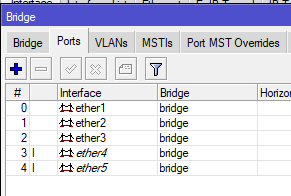
@vestal lotus but basically, on your hAP ac2 in the living room, you will end up with a list of all ports and interfaces.
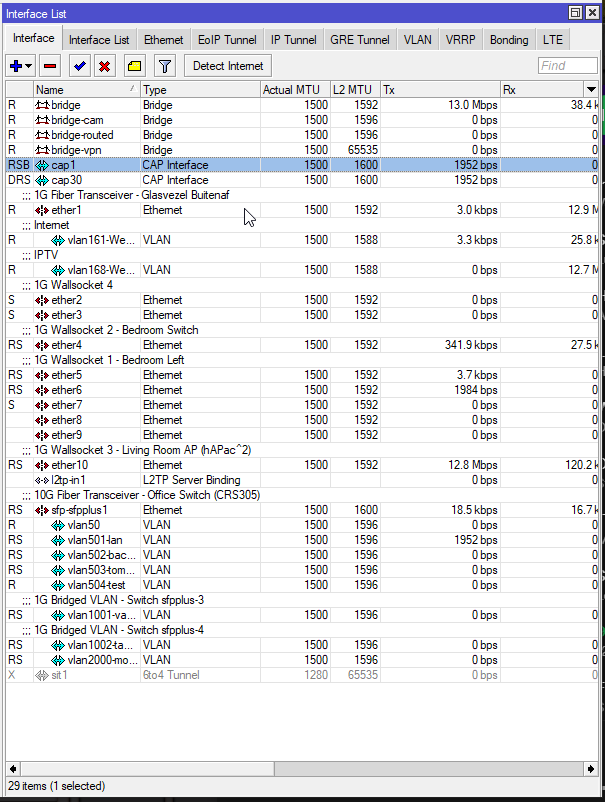
Looks a bit like this
You can see my two CAP interfaces
vestal lotus
Looks complicated.
tame carbon
@vestal lotus all the ones with ether1-10 those are ethernet ports
VLANs are not something you'd have to concern yourself with
Those are the blue ones at the bottom >_>
Those go to another building, because people rent internet from me
@vestal lotus you will end up with 1 location where you configure everything
your PPPoE client will be in this list too
that will be your internet access
your wireless APs will be in this list
vestal lotus
And the software for windows allows me to tinker?
tame carbon
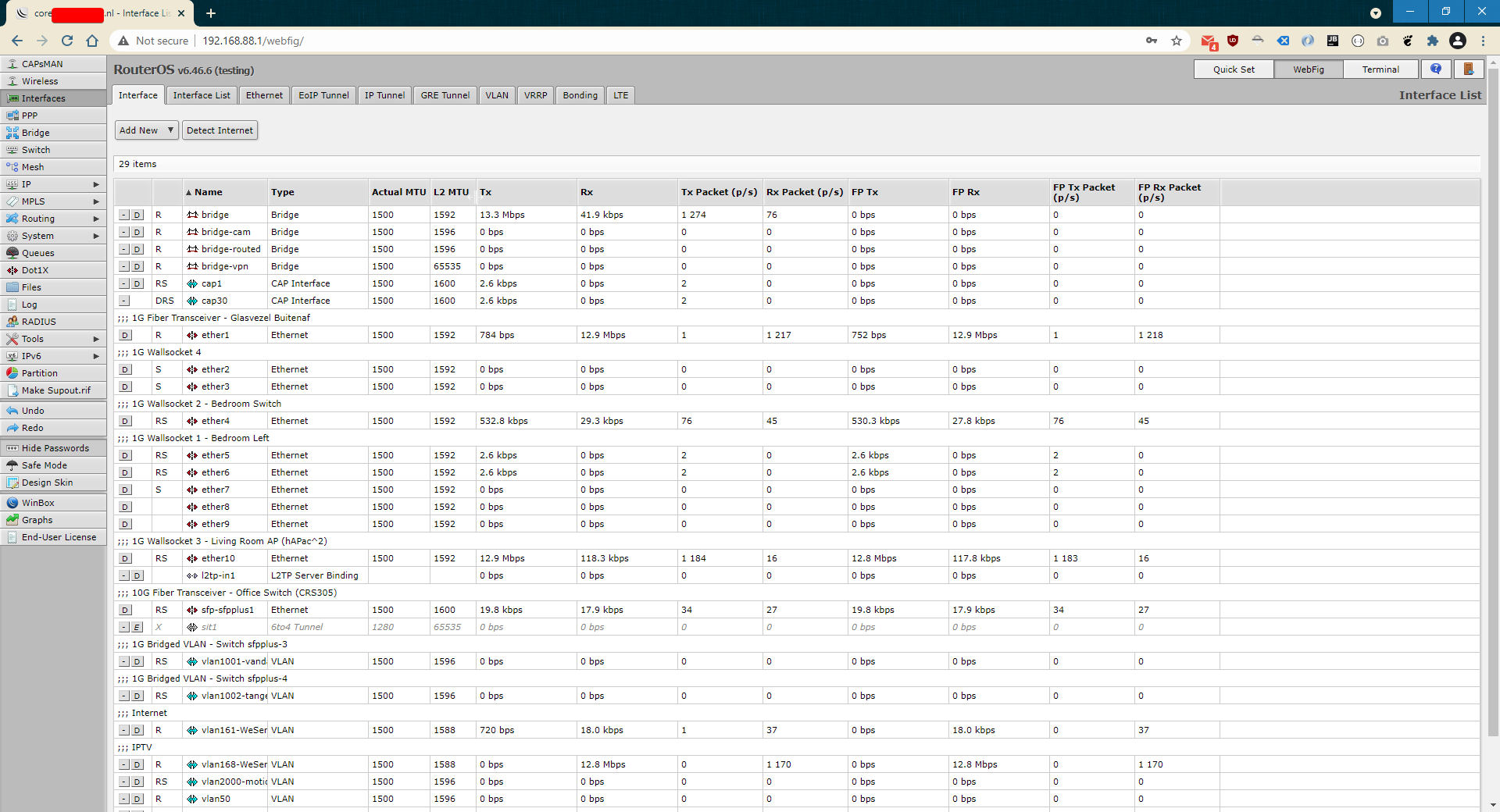
You can either go through the web configuration
https://i.imgur.com/3L83QCZ.png
 green forge
@lean pebbleI think resetting the router fixed itself
tame carbon
or their desktop utility winbox: https://i.imgur.com/J3jjc93.png
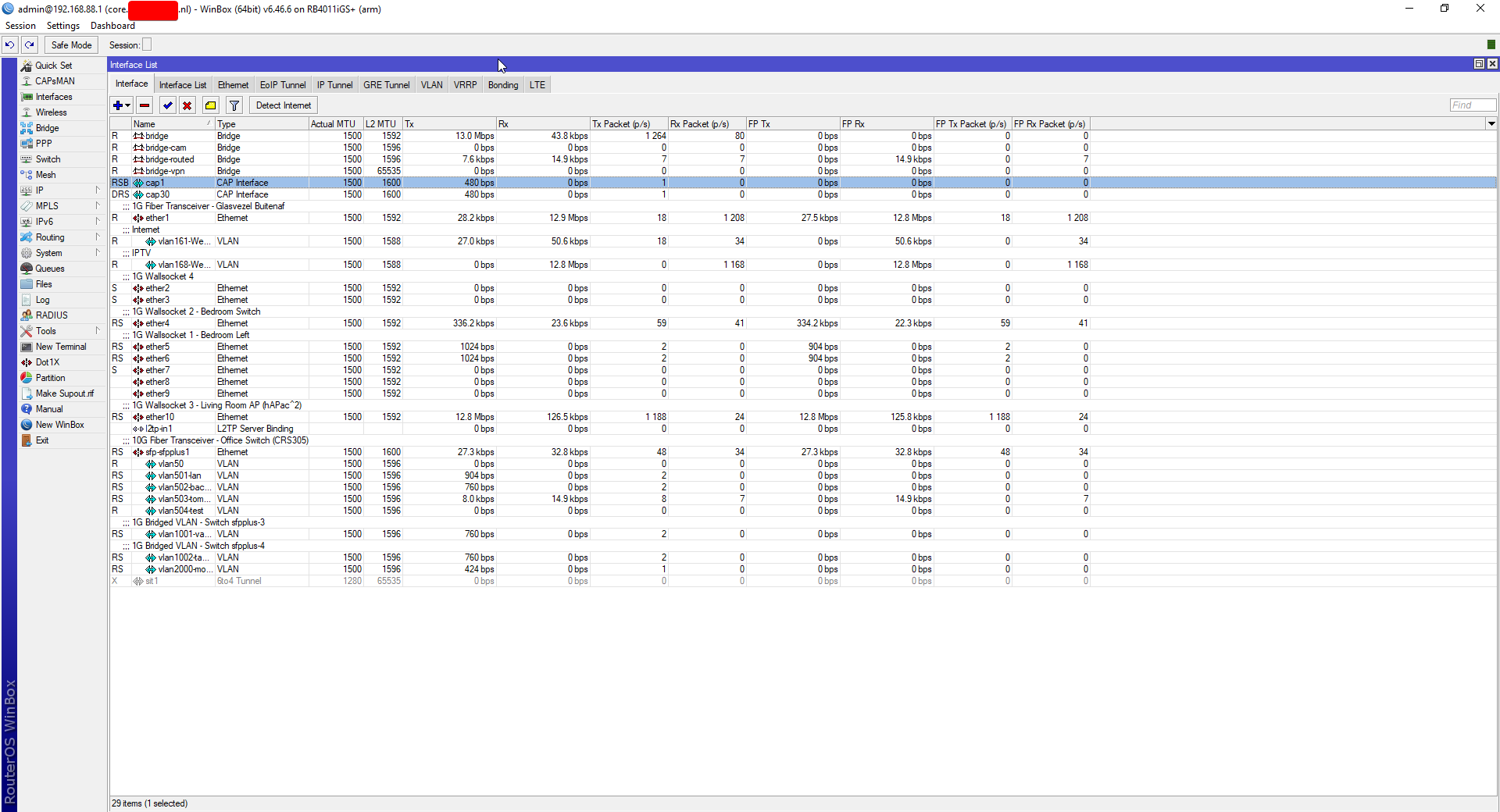
@vestal lotus it looks complicated, because there's lots of interfaces on my core router
This is what it would look like for the hAP in your attic: https://i.imgur.com/ThjknkW.png
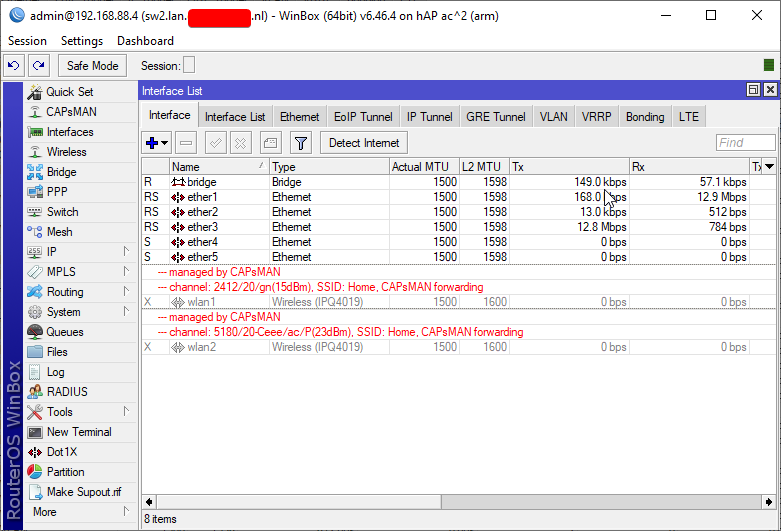
its wireless interfaces are handled remotely (forwarded by caps)
I can help you configure this stuff
when time comes
vestal lotus
Would bridge be the one handling the internet or something?
tame carbon
nah, a bridge is to connect multiple interfaces together
vestal lotus
Oh.
tame carbon
interfaces are assigned to a bridge
 plain siren
A switch is a Bridge with multiple ports.
 plain siren
I think we can get the login creds off that BBox, too bad we dont have a soldering iron
tame carbon
@vestal lotus make up your mind first. If you decide to buy these things, you're welcome to ask us here for guidance to setting them up
Quite a few people here use mikrotik, or know how to use it
vestal lotus
How much of a difference would I expect, if we were to compare the hAP ac2 to that hilarious WiFi booster from Proximus? (oddly enough, that booster is made by a company called technicolor)
tame carbon
stability and coverage would be better
tame carbon
^
@vestal lotus boosters are terrible
its like having two wifi connections in series
wifi is already trash
lets not do it twice
plain siren
vestal lotus
How much of a difference would I expect, if we were to compare the hAP ac2 to th...
technicolor also made your routers software/firmware (the bbox's) specific for your ISP
vestal lotus
plain siren
technicolor also made your routers software/firmware (the bbox's) specific for y...
[Something] Sagemcom was what I saw in that ninja label on the Bbox.
tame carbon
@plain siren he has bbox3
plain siren
vestal lotus
[Something] Sagemcom was what I saw in that ninja label on the Bbox.
Sagemcom was who they copied from, Technicolor was the contractor to hire to make the further modifications
vestal lotus
plain siren
Sagemcom was who they copied from, Technicolor was the contractor to hire to mak...
I have reason to believe the original box doesn't have those mods.
Same thing could be said about that booster.
🤔
Really makes me think that the ISP equipment customers are given are just rebrands with specific mods.
tame carbon

Ik weet dat het mogelijk is (en door Proximus toegestaan) om een PPPoE sessie te starten op een eigen router die 'achter' the BBOX3 hangt. Ik slaag er echter niet in om dit aan de praat te krijgen.
Mijn setup is de volgende:
- Fiber modem GE1 poort BBOX3 WAN poort, met PPP disabled op de BBOX...
vestal lotus
Like a coat of paint on a crappy product.
tame carbon
@vestal lotus btw do you use voice at all? :p
plain siren
Was it Sagemcom F@ST By any chance
vestal lotus
tame carbon
<@!399563484951609354> btw do you use voice at all? :p
I do, but here specifically, no. I'm a lurker.
tame carbon
@vestal lotus according to internet it says
plain siren
I think we got ourself a way in per chance.
 tame carbon
you can log into MyProximus
and request the PPPoE details online
you just have to go to the ISPs website
and login with your account
vestal lotus
tame carbon
and login with your account
tame carbon
Fuck
I just realized
@vestal lotus you were right. https://i.imgur.com/6zrvRs3.png
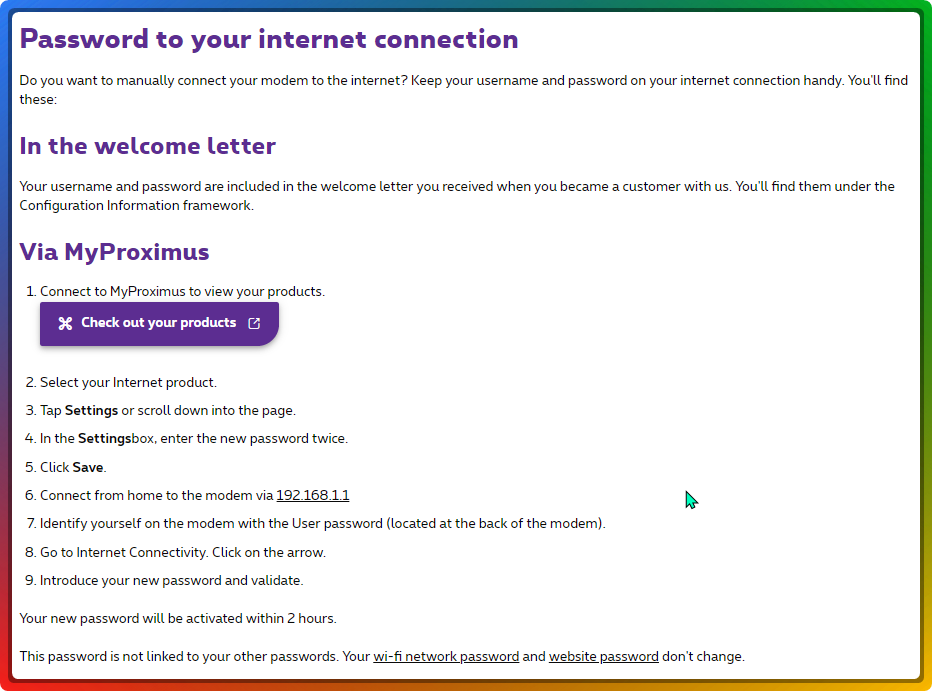
Do this ^
vestal lotus
tame carbon
and login with your account
I think it wasn't like that before Corona hit.
But hey, if it makes it easier for the employees to not have to do that manually, the better. 🤷
tame carbon
@vestal lotus this is basically what you want
I thought this was your router's webpage
and not the help pages from your service provider
 hollow marlin
plain siren
A switch is a Bridge with multiple ports.
hollow marlin
plain siren
A switch is a Bridge with multiple ports.
Well technically a bridge is software and a switch is hardware.
tame carbon
@vestal lotus don't change this now though.
vestal lotus
tame carbon
I thought this was your router's webpage
Pfft.
tame carbon
Dont want to change the password
because you still depend on it right now
@vestal lotus perhaps you still have the welcome letter
you should have received this information when you first started using the internet
but good
at least we know you can request them
plain siren
Wow, thanks fucking Warship
tame carbon
@vestal lotus being in control of your own internet connection is kinda, beneficial
you have much greater degree of control
and if you ever want something specific
you can be sure you can dial it in
and having your net speed, you could even host a couple games or such
vestal lotus
Yeah. That, and there's this convo I had:
Mom, me: at garage
Mom: motions to copper cables "if you can get the copper out of those, i'll sell them, give 1/2 to you and 1/2 to [Aquarius BF - absolute asshole]"
Me: doesn't have a job yet, doesn't have own house but also thinks it's better to stay close to family
Also me: motivated by the money thing, but also, because i can direct my destructive touch into something that's safe to destroy, won't be missed and won't have any negative consequences "okay"
tame carbon
developers work from home most of the time
its booming bussiness
I just have a 2nd room as my office
and work 9 to 5
my team I keep in touch with over internet :P
its just that due to the pandemic
lots of industries have completely crashed
vestal lotus
If I were to work from home, I'd want to compartmentalize.
tame carbon
that's what I did yeah
I have a seperate computer for work
first day, I immediately installed linux on it xD
so some actual work can be done
vestal lotus
I'd assume Windows is distracting?
tame carbon
It slows me down too much and it makes me angry
@plain siren after 2 years I finally patched away from 1909 today
took 30 minutes
vestal lotus
(also, retired the MX Vertical for the OG MX Master I have- vertical has a bit of a double click problem)
tame carbon
And it didnt crash, I am happy.
vestal lotus
Good to hear! 😄
tame carbon
Didnt want to spend my day off having to install windows
I wanted to play videogames
vestal lotus
I'm looking forward to the currently being tested in insider which has cool things big update for Win10.
tame carbon
Yeah idk, all the windows stuff the workflows and such
plain siren
Windows is getting some nice comfort feature updates for sure
tame carbon
too much third party stuff you have to install
Yeah but...
Why cant it just be stable
lol
this other day, one server just rebooted itself
and broke RDP session and POS processor
vestal lotus
tame carbon
Why cant it just be stable
There's an early bug fix level in Windows Insider. Release Preview it's called.
tame carbon
for a restaurant
vestal lotus
Basically an early Patch Tuesday.
tame carbon
You don't understand xD
vestal lotus
Oh.
tame carbon
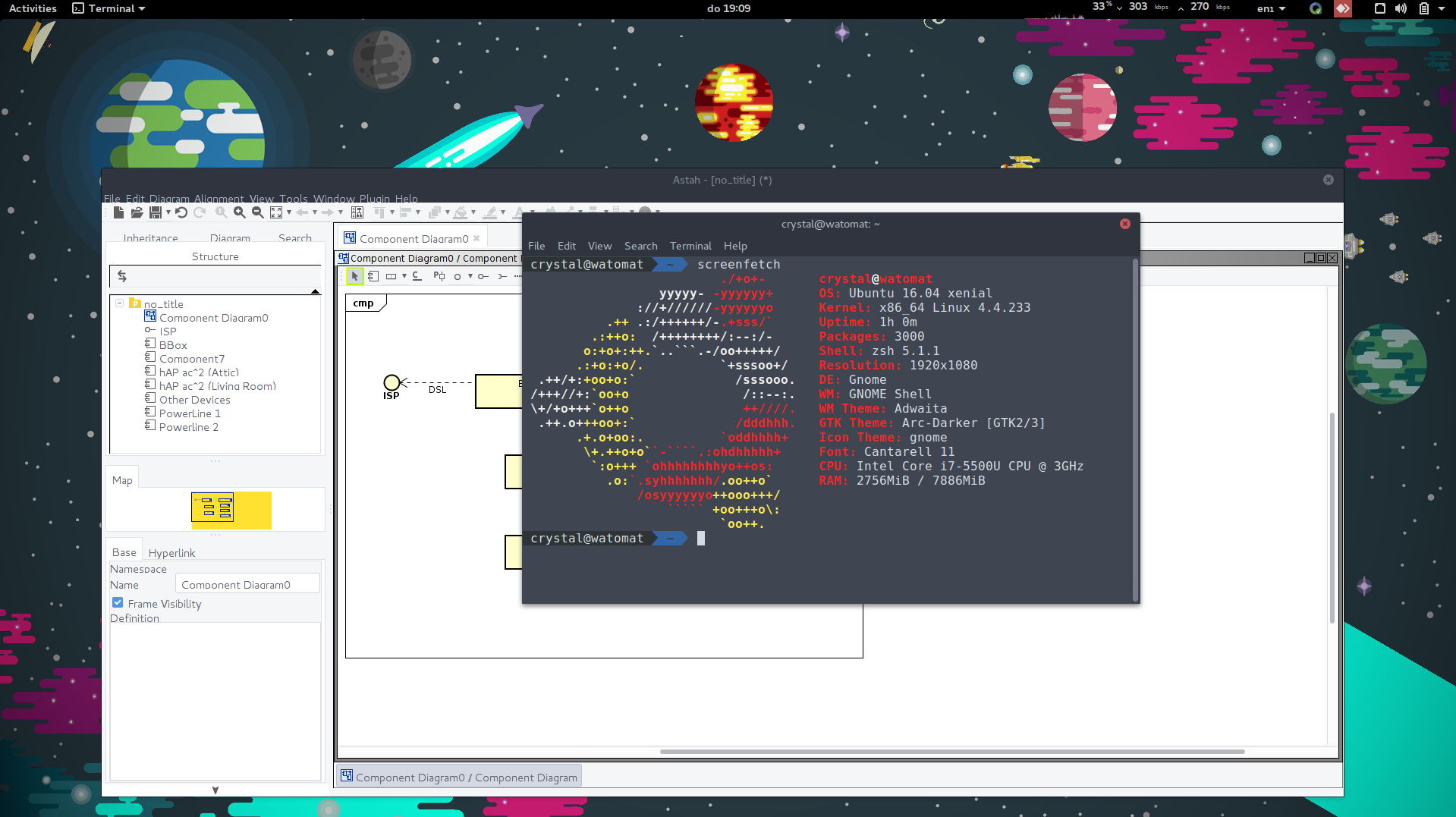
Last login: Tue Apr 20 20:53:22 2021 from 10.244.164.109
crystal@main:~$ uptime
 17:03:33 up 661 days, 23:45,  8 users,  load average: 2.10, 2.52, 2.23
Should have kept the 420 days. 😏
plain siren
You honestly shouldnt run a box that long
vestal lotus
tame carbon
this other day, one server just *rebooted itself*
So, it caused a little bit of a domino effect? Because other things were relying on that server?
tame carbon
@plain siren its completely fw'd off
database server
xD
I am not rebooting this machine
all those users are just dangling tmux sessions from various users
tame carbon
vestal lotus
So, it caused a little bit of a domino effect? Because other things were relying...
that's how they figured out something was wrong
and I logged into the VM hypervisor remotely, to see what the windows virtual machine was up to
it had rebooted itself installed feature update and was stuck at some kind of "Accept license agreement" screen
the thing is
That machine is completely isolated
it only has one job
vestal lotus
One thing people give Win10 shit for?
It doing things the people don't want it to do.
 plain siren
tame carbon
<@!589542595341058048> its completely fw'd off
plain siren
tame carbon
<@!589542595341058048> its completely fw'd off
Who knows if itll reboot
tame carbon
I really do have to upgrade my distro though
@plain siren not an issue
if it does get rebooted
I have a toolkit ready on the hypervisor
and I can just use a rescue image to fix bootloader
as long as kernel starts lol
I can fix all other issues
hardware issue cannot be solved by keyboard mashing
kernel update breaking boot only happened to me like once.
on ubuntu that is
on Arch I actually had it 3 times where some update just broke something
and I got fed up
and went back to ubuntu
new 20.04 is very nice
 vestal lotus
Not sure why Amazon is telling me about the TL-PA8030PKIT.
New model, makes sense. But why though.
tame carbon
@vestal lotus thats their whole business model
they sell you something
and in 5 years it breaks
and you buy their new and improved™️
t
hat's a different one
@vestal lotus the one I recommended only has 1 port
@vestal lotus interesting
I didnt know mikrotik sold these


sadly only 2.4Ghz
they are limited to 100mbit
but thats best case ofcourse
and they actually run RouterOS xD
vestal lotus
Gotta love it when the booster craps out.
tame carbon
@vestal lotus these just run as a network router lol
except they have a powerline interface built in
and runs routerOS
these would be configurable in same way you can configure a hAP as a controlled AP
 hidden socket
What does buying a new router really help with? cause from what i know theirs really no market for it here in the uk
tame carbon
well you need at least one xD
generally its because the one provided by your ISP is terrible and you wish to do some more advanced network configurations
and if you run your own highspeed NAS and such, you may want to also look into this kind of stuff
@hidden socket if you wanted to have a larger wireless network without using a booster, you may want a different brand and hardware to do this properly
at low speeds generally you don't notice this
but once you go higher speed, lot of devices it can get complicated
 tender hazel
MikroTik also has PWR-LINE PRO
tender hazel
the regular powerline probably cannot sustain a very high data rate to begin with, which is why they only put a 100Mbps port on it and 2.4ghz wireless instead of dual band
tame carbon
@tender hazel the wireless one wouldnt make sense
they are just dropping two hAP ac2s in the place
one in living room, the other in attic
and a powerline inbetween
and the existing BBox will just forward ethernet, the hap handles pppoe
hidden socket
tame carbon
<@!471657768080637963> if you wanted to have a larger wireless network without u...
Alright, Thank you!
vestal lotus
vestal lotus
Gotta love it when the booster craps out.
sigh
Well, it wasn't the router, it was Asshole BF purposefully unplugging the booster and bbox to get me to come down for dinner. Because of this 7 PM = Dinner time rule.
tame carbon
@vestal lotus they better not do that shit with your new router
it will break if you do that often enough
best to gracefully shut them down
vestal lotus
tame carbon
<@!399563484951609354> they better not do that shit with your new router
UK: They did that with that ADSL box the UK has (microfilter), even straight up unplugging the PSU.
Belgium: Not that I recall. But they did just now.
vestal lotus
Oh, he will.
vestal lotus
Again, he'd probably find out.
I mean, with NextDNS, I can control the domains and such, what gets blocked, what doesn't.
tame carbon
what would do even do that to begin with
just..
its utilities
dont fuck around with them
if he is
who does he think he is
xD
vestal lotus
tame carbon
who does he think he is
looks at onenote with 29 questions clearly highlighting things he has done in the past while also questioning mom on some of it
You don't want to open that box.
That's all I'll say.
Anyway, moving on.

AdGuard Blog
AdGuard DNS is the first public DNS resolver to support the new DNS-over-QUIC protocol! We believe that DNS-over-QUIC (or simply DoQ) is the future of DNS encryption and we're extremely proud be the first to present you with the opportunity to try it out.
vestal lotus
From what I can tell, this might not improve very fast internet speeds?
But it does seem to do something TCP doesn't: just deliver the rest of the stuff.
vestal lotus
I suppose you have a point.
Who DNS-Over-QUIC is for, I'm... not sure.
But it's a cool technology, even if it's in its infancy.
 peak cloak
vestal lotus
From what I can tell, this might not improve very fast internet speeds?
peak cloak
vestal lotus
From what I can tell, this might not improve very fast internet speeds?
kinda
QUIC is tcp kinda on udp
 peak cloak
reason to use ethernet
 mighty wind
Ill have to get a 50' network cable so i can walk around my apartment with my phone tethered.
hollow marlin
vestal lotus
Who DNS-Over-QUIC is for, I'm... not sure.
DoH + QUIC to reduce the latency from TCP. If they already use DoH, it might be of benefit but DoH or DoQ and security is really a moot point in the overall picture
 little schooner
@peak cloak with the help of some cable clips that tape to the walls, I migrated off my WiFi access to a physical copper cable. at the same time, that's when Comcast started offering internet packages that made sense
could get a gig for 69.99
upload is 35 but someday I hope it improves
@mighty wind my cable runs along the trim and door frames, mostly hidden
I think it was a 70 foot cable
peak cloak
little schooner
<@222482269829332992> with the help of some cable clips that tape to the walls, ...
nice
little schooner
Now.... to determine if they will stay sticked to the wall during the hot summer months
I've had things come down from the wall bc of that
 thorny vector
When in doubt, more screws/nails
 nova furnace
Zip ties never fail
thorny vector
They do when they melt. Ask me how I know
thorny vector
Used zipties to fasten a heatsink to a cpu
nova furnace
Ok you tried
thorny vector
It worked. Ish.
 thick minnow
peak cloak
reason to use ethernet
thick minnow
peak cloak
reason to use ethernet
exactly.....
thorny vector
Nothing new. Same end state, different path. Wifi has always been sad-bad
Although, if you're being target by someone who's weaponized this round of exploits, you got other problems
thick minnow
f
tame carbon
morning folks


 short condor
Hi guys. Is there a product that will let me connect a hdmi cable from my server to it and then give me access to what the server displays via this cable and broadcast it over the network?
thorny vector
@short condor What kind of server? Just set up some remote client to do it
short condor
thorny vector
<@!210652179269156864> What kind of server? Just set up some remote client to do...
Unraid. Problem is I want to get access to it when it goes down (it crashes for some reason) without connecting a display to it. It is on the attic.
I can not access it over the network when it crashes. I have to hard-restart it.
thorny vector
If the server itself has an ipmi port, or supports wake-over-lan, you can do something like that. Otherwise you'll have to physically restart it anyways
short condor
I have a pc close by though. Both with hdmi ports. Can a hdmi output act as a hdmi input? 😅
short condor
thorny vector
If the server itself has an ipmi port, or supports wake-over-lan, you can do som...
I know, but when it crashes I can’t see the logs over the internet. I want to be able to access the hdmi output to see what error it gives. Because when it crashes I can’t access it through the web-interface over IP or through smb or ssh.
thorny vector
When you say crash, are you saying services crash, or the server? Because if the server crashes, the logs get dumped anyways
short condor
thorny vector
When you say crash, are you saying services crash, or the server? Because if the...
I am not sure. The problem I am having is that for some reason, on seemingly random occasions it becomes unavailable over smb and i can not access it over the web on my local network. Only solution is that I press the restart button. This is my setup.
 thorny vector
Try checking syslog, faillog, and kern.log to see why its failing
Before spending money on a remote use solution, spend it fixing the error
short condor
I have one type of log already downloaded. No errors showing. Only transfers.
thorny vector
Sure
short condor
thorny vector
any older kern.logs or older syslogs?
short condor
i only find syslogs
thorny vector
/var/log ?
short condor
in terminal?
thorny vector
well, yeah
short condor
which ones do you want? 🙂
 thorny vector
messages, syslog.1, and debug
 spiral anchor
how well do powerline adapters work? I have gigabit internet in my house on the ground floor. However, my pc is in my room one floor up and it's pretty much impossible to route an ethernet cable to my room. The wifi is absolute crap up here.
short condor
i have connected my NIBE heater and some other stuff and it works fine for me. i get around 300mb up/down no problem.
spiral anchor
short condor
i have connected my NIBE heater and some other stuff and it works fine for me. i...
do you have any recommended brands and models?
peak cloak
spiral anchor
how well do powerline adapters work? I have gigabit internet in my house on the ...
powerline depends on a lot
like wiring quality
etc
electrical load
short condor
i use these: TP-Link TL-PA4010KIT
spiral anchor
peak cloak
powerline depends on a lot
the thing is i don't know anything about those stuff
short condor
Best you can do is buy and try them out. if it works it works. otherwise return them. 🙂
spiral anchor
short condor
i use these: TP-Link TL-PA4010KIT
thanks
spiral anchor
short condor
Best you can do is buy and try them out. if it works it works. otherwise return ...
we dont have any return policies here unfortunately
peak cloak
spiral anchor
we dont have any return policies here unfortunately
amazon?
spiral anchor
peak cloak
amazon?
nope
we dont have amazon here "locally"
i'm from the southeast asia
short condor
Aha, ok. Well i dont know then 😄
spiral anchor
thanks though
tame carbon
@spiral anchor powerline is suboptimal
but the ones from tplink are "good enough"
real world performance heavily depends on quality of house wiring, and local noise on the grid
spiral anchor
I see. So the only thing I can do is get one and try it, right?
tame carbon
They aren't that expensive
I've got ones here in suboptimal configuration
and they still push ~45mbit/s
enough for a networked printer
spiral anchor
yeah it's kinda a tough choice because 5GHz wifi reaches my room and I get ~30 Mbps sometimes 100. It's just very, very unstable and unreliable
tame carbon
yeah 5GHz through a wall is iffy at best
mighty wind
Well I ordered my Mikrotik CRS326-24G-2S+RM to replace two desktop TP-Link SG108E switches
tame carbon
Noice
@mighty wind welcome to the club
moving up in the world, unmanaged --> managed
mighty wind
no those little TP-Links are managed not much but the cheapest and smallest switches that support 802.1Q Vlans
tame carbon
@mighty wind some of those unmanaged switches are very nasty. They strip vlan headers
for whatever reason.
mighty wind
Yeah that's why I went with the E variant to get some management with VLAN support. Comes in handy as an access switch on job sites.
tame carbon
Have you used mtik before?
mighty wind
Saved my butt in Vietnam where they only speced 24 port switches with all ports used. I have one of the 4 port 10G switches already for my NAS, PC, and PVE host
mighty wind
yep
tame carbon
I use it as backbone here
All my highspeed devices are connected to it
Router, Server, Desktop
and then another switch, which goes to another building
and vlans throughout
theoretically
if you only had that CRS326, and <1G internet
you could use it as a router too xD
mighty wind
Im working on setting up an Odroid H2+ as a pfsense router to save power and last longer stand alone if teh power goes out
 lyric nebula
Does disabling windows defender and update affect performance in low end pc’s?
mighty wind
right now its on my PVE host
tame carbon
@mighty wind That CRS326 can route too, though it pins the CPU @ 1200mbit
not sure what your odroid can push
mighty wind
Yeah but i need more than just a router which is why i use pf sense
peak cloak
pfsense...
tame carbon
I mean..
peak cloak
mighty wind
Yeah but i need more than just a router which is why i use pf sense
what do you need?
tame carbon
CRS326 can do all of what RouterOS can do
It'd beat your odroid without blinking
Its not really ment for routing, but its fast enough to do so at 1200mbit/s tops
mighty wind
I dont have a need for much L3 routing on my LAN more just firewall and vpn capabilities
tame carbon
PPP -> Create new Interface
though may want a hAP ac2 if you use ipsec and such
really straining the CPU on the CRS326 if you were to do that
@mighty wind firewall and vpn can be done yeah
peak cloak
mighty wind
I dont have a need for much L3 routing on my LAN more just firewall and vpn capa...
so firewall and vpn?, routeros can do both.
tame carbon
though all depends on what rates you need
peak cloak
pfsense is ehhh
tame carbon
if its <1G you can use the CRS for it xD
mighty wind
I'd rather not have my switch be the all in one solution plus Im not confident with RouterOS. Its interface is less than desired and Id rather not have to get into the CLI for everything
peak cloak
vyos is also good
tame carbon
Don't need the CLI to use it, but fine :)
mighty wind
Also I have not seen any major audits for Mikrotik RouterOS
tame carbon
lol
mighty wind
Ill keep to having a seperate firewall on my wan instead of teh main switch im using for everything
peak cloak
netgate also is kinda bad
tame carbon
I trist mikrotik more in that regard
peak cloak
they claim open source
tame carbon
I can be sure there's no NSA backdoor in it
With Cisco, I know there's a backdoor in it
Same with Juniper
mighty wind
Everything is hackable
tame carbon
@mighty wind yeah but that is not the same as deliberately putting a backdoor in it
Cisco has been caught with this before, on two occasions
Juniper once, at least that I know of
I dont need premium-entrance for NSA on my network.
 willow hinge
Any good 10Gb routers and modem for a large warehouse style building?
willow hinge
Yes
tame carbon
@willow hinge Full 10G in and out? Duplex ?
peak cloak
why
willow hinge
Full 10g in and out
peak cloak
willow hinge
Full 10g in and out
modem? or for fiber?
tame carbon
CCR-something
willow hinge
peak cloak
modem? or for fiber?
Fiber
tame carbon
@willow hinge many vendors exist. but if you require full 10G duplex routing.. you'll be looking at something like this:
https://mikrotik.com/product/ccr2004_1g_12s_2xs

MikroTik is a Latvian company which was founded in 1996 to develop routers and wireless ISP systems. MikroTik now provides hardware and software for Internet connectivity in most of the countries around the world.
I only know of this one vendor
This one can do 10G and then some
 indigo ore
tame carbon
indigo ore
tame carbon
@peak cloak I finally got some actual progress at work :D
I can now push code, and it automatically gets built and deployed
nova furnace
are there m.2 network "cards" with black pcb ?
tame carbon

nova furnace
why do you laugh at me ? i like black pcbs
tame carbon
You had me at m.2 network cards
I died when I saw the black pcb part
could always use a riser
nova furnace
isnt it m.2 ?
 tame carbon
that's a wireless network adapter
thick minnow
nova furnace
are there m.2 network "cards" with black pcb ?
What do you need?
nova furnace
thats what imeant sorry
thick minnow
You want Wifi?
nova furnace
just a tiny network wifi in black
tame carbon
idk
nova furnace
or a way to get it black 
nova furnace
ok so i gonna throw a heatsink on it thx
tame carbon
have you tried googling google?
thick minnow
nova furnace
just a tiny network wifi in black
Why black?
Is it for a pc with a window
nova furnace
my complete build is black
and without having an gpu only an apu it would burn your eyes
thick minnow
why do you want an m.2 wifi card, they arent meant for desktops
Do you have a free pcie slot?
nova furnace
3x 16x and 4x 1x
thick minnow
Get a pcie one
nova furnace
yeah with heatsink on it it should be fine thx
thick minnow
nova furnace
yeah with heatsink on it it should be fine thx
How strong is the signal in the room
nova furnace
i really only want it for bluetooth and i will have a router 10 meters away
thick minnow
I'd just get a cheap one then
tame carbon
Someone ought to invent IP over Marx Generator
thick minnow
TP-LINK WLAN Adapter ARCHER TX50E or something, its black
nova furnace
ok thx
 proud harbor
Hi guys, i'm interested in a NAS, but i don't fully understand the way it is connected and accesed via an OS, any tutorials?
tender hazel
you access it by browsing the network for it in windows explorer on a PC, or by mapping a network drive to it
 unborn hamlet
for under 3.5k USD what storage server can i get that has more than 15tb of usable space after zfs overhead and that stuff
tender hazel
You can look at something in the Q-Nap line
the drives aren't sold with the Q-Nap so you have some options for what drives you want
 waxen saddle
I have a QNAP TS-332X non-cloud integrated, love the little guy. ~14TB of usable space with 3 8TB drives. Samsung 970 NVME as a cache and I can read and write at 1GB line speed. It has a 10GB port on it too, but I don’t have that set up yet.
It took some finagling with initial setup for windows file sharing to get the permissions the way I want them, but I was able to do it and it just straight-up works. No worries on my part. Even have automated backup.
 simple frigate

chrome has been very slow..
I have a 100mbps connection and only on chrome It takes forever to download even small things
(or any other browser)
 slow sparrow
it really depends on the bandwidth of the server too
if you do get 100 mbps network, then probably is is the server bottle necking you
vestal lotus
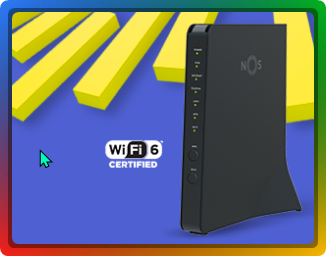
NOS (Portuguese ISP, essentially my grandma's choice for a while) seems to be using this router for their fiber clients.
I think I did take a look at the bottom of it at some point.
What I'm not sure of was if Technicolor or Sagemcom gave them that model.
It's Sagemcom.
Still, not that bad of an ISP router! 👍
 steep grail
so I got that Asus router up and running. Looking good so far  . Very easy UI and no random drops yet.
 lean pebble
simple frigate
lean pebble
simple frigate
Feels like my friend old hosting company that sells dedicated server as vps with limited upload speed even inside the same datacenter
tame carbon
@lean pebble transit is expensive
even in a datacenter
these are still billed in megabit/second/month
lean pebble
tame carbon
<@!109801863771074560> transit is expensive
Man he get 0.5MBps
 low pond
tame carbon
<@!109801863771074560> transit is expensive
low pond
tame carbon
<@!109801863771074560> transit is expensive
Not as much as 1Gbps from my ISP apparently.
😆
lean pebble
tame carbon
even in a datacenter
The bill mention dedicated server but he gets vps instead
Vps that runs on on VMware esxi
short condor
how do i get into the bios on my unraid machine? i have tried everything. connected a display and restarted like i do on a regular pc but it wont give me the press del (or similar) to boot into bios and so on. it just goes straight into booting unraid
I have two "lsi pcie to 8xSata" cards installed. can this make things not work?
lean pebble
Why this dkms not working properly...
thick minnow
short condor
how do i get into the bios on my unraid machine? i have tried everything. connec...
What OEM?
short condor
Asus is the motherboard manufacturor. it is self built. The lsi cards are probably the problem because it seems that they still have their bios on them and it boots into them instead of the motherboard bios. how do i get around this?
 sly zealot
hey ppl NAS noob here
ok , so i wanna make a NAS
but the thing is i am not allowed to use a router or a central network
so , i wanna make it such that , when i power it on , it would create a wifi hotspot to which i can connect with my other devices and transfer data that way and i dont know how to do that , what image would be suitable for it and any other help is appriciated
alr8 , ping me if u reply 🙃
tame carbon
@sly zealot do you have your own private internet access?
I mean
you don't need internet to use a NAS
sly zealot
it would be used just like a normal nas , i.e just at home , i dont need to access it from elsewhere
tame carbon
There's your storage, and then there's your network
the thing that makes it a NAS, is a program that provides this storage to the network
that's only one small part of it
sly zealot
yes , but generally there is a central network that all these device including nas connect to
tame carbon
Yeah, that would best be by wire
sly zealot
and the thing is i just wanna totally ditch the network
tame carbon
The NAS connects to the network that all the devices that access the NAS are on
sly zealot
i have already explained what i have in mind in the question , i want to have a hotspot on the nas machine that other devices can connect to
tame carbon
So you need a wireless access point and a computer with a storage on it
sly zealot
yes , so currently i have a machine just lying around
tame carbon
Does it have wireless ?
tame carbon
athlon > 2gigs
sly zealot
like a wireless adapter ??
tame carbon
@sly zealot might want to get a seperate device for the wireless
since you are kinda running your own tiny network
with wireless access
sly zealot
lol
tame carbon
You connect the computer with a network cable
and provide a wireless network on the AP
sly zealot
and how can i do that ??
tame carbon
Do you have a router or something you can use for this?
otherwise, I could recommend you a product
sly zealot
i am not sure what u mean bye wireless ap (i know its access point) , but like what product ?? like , is a usb wifi adapter an ap ??
tame carbon
MikroTik is a Latvian company which was founded in 1996 to develop routers and wireless ISP systems. MikroTik now provides hardware and software for Internet connectivity in most of the countries around the world.
Can be configured to do anything you want
has 5x gigabit ethernet
and dual band wireless
sly zealot
but i dont want the ethernet ??
sly zealot
🤦♂️
tame carbon
and it would provide the wireless access you wanted
thick minnow
Wait, I think he wants a NAS connected over WiFi
 sly zealot
i am not gonna stream fhd videos over it
i just wanna back some pics up to it
tame carbon
@sly zealot toss any old wireless card in the computer
and just have it connect to your existing network
ezgame
sly zealot
i dont think u understand
wait
i have a better example
do u know about raspberry pi ??
tame carbon
Yes
sly zealot
ok , so lets say , i connect a 1tb hdd to it , put some NAS os on it so that , it wont need to be connnected to a network and i can just take it anywhere
and whenever i wanna back up my photos i would power it on , it would create a wifi hotspot , i would connect to it with my lets say mobile and transfer data that way
tame carbon
...
thick minnow
That's literally what he was saying
sly zealot
peak cloak
That's not a nas
well , yes technically not a nas
tame carbon
I said:
45 PM] Crystal: You connect the computer with a network cable
[4:46 PM] Crystal: and provide a wireless network on the AP
The product I recommended would create a wireless network
you could also do this on the computer itself, but it would require a wireless network adapter
sly zealot
tame carbon
The product I recommended would create a wireless network
do i need to have that device ??
sly zealot
hmm
tame carbon
to hand out IP addresses to clients connected to it
@sly zealot I still think this will be an iffy solution
every phone will complain when it connects
because it doesnt provide internet
and you have to explicitly select that you want to connect only for its resources
and not for internet
really annoying
sly zealot
tame carbon
because it doesnt provide internet
it would be a matter of minutes for which i will connect to it coz i will disconnect from it when i am done
tame carbon
@sly zealot I mean, if you wanted it to be self contained
You could use a network adapter
alternatively
you use an external device to provide the hotspot
I'd say that is easier
sly zealot
peak cloak
There are already solutions for that
like ??
tame carbon
idk, this sort of hacky stuff, I would do myself
tame carbon
I dont trust a manufacturer to be able to provide a product to do exactly that
tame carbon
just google hAP ac2
sly zealot
k , on it
tame carbon
make sure you Do NOT get the TC or the Lite version
regular hAP ac2
its around $60
peak cloak
Amazon.com: WD 250GB My Passport Wireless SSD External Portable Drive, WiFi USB 3.0, Up to 390 MB/s - WDBAMJ2500AGY-NESN: Computers & Accessories
tame carbon
@sly zealot funny enough
peak cloak
I guess this could work
peak cloak
The one thing you don't get with diy is compactness
sly zealot
peak cloak
I guess this could work
$500 for that ?? 😂
peak cloak
See
sly zealot
no thanks ill do it manually 😂
peak cloak
The price
tame carbon
@sly zealot the thing is, do you want this to be battery powered? :D
peak cloak
sly zealot
$500 for that ?? 😂
Its 130
sly zealot
tame carbon
<@!671318664280145920> the thing is, do you want this to be battery powered? :D
i am not sure yet , i am gonna implement this on that junk pc and if it works , then maybe yes
sly zealot
peak cloak
Its 130
for 1tb ??
thick minnow
And HDDs are well...... Fragile
sly zealot
peak cloak
Ssds aren't exactly cheap
i dont even need a ssd
sly zealot
peak cloak
If you want it to be portable
not yet
sly zealot
peak cloak
Use ssds
if i do it on a raspberry pi , ofc i would use a ssd
@tame carbon can a esp8266 do that ?? 🤔
wait ill send a pic of what it is

it says soft AP , so it probably wont do it
tame carbon
that hAP ac2 will push ~400-500mbit in ideal scenarios
on 5GHz
and an esp8266 is hillariously underpowered
 sly zealot
 peak cloak
sly zealot
<@!167698274969452544> can a esp8266 do that ?? 🤔
peak cloak
sly zealot
<@!167698274969452544> can a esp8266 do that ?? 🤔
That's more for like iot thing's
sly zealot
peak cloak
That's more for like iot thing's
ik 👍
tame carbon
having it all in one box feels wrong
sly zealot
exactly 😂
tame carbon
@sly zealot you'll likely end up with some linux distribution
manually creating a hotspot in there, is kindof a big pain
sly zealot
tame carbon
<@!671318664280145920> you'll likely end up with some linux distribution
like ??
sly zealot
maybe ?
tame carbon
Its what I'd use
but thats mostly because all my linux distros are debian, or debian-like
Ubuntu for the most part
sly zealot
ok , so a linux os on which some sort of nas service right ??
tame carbon
@sly zealot for networked storage there are multiple solutions
thick minnow
sly zealot
ok , so a linux os on which some sort of nas service right ??
You could just install Plex onto any Linux distro that support sit
peak cloak
I've never really seen suse used anywhere
tame carbon
Samba is used for things like windows network drives
peak cloak
Like
peak cloak
Whats suse good for?
tame carbon
openSUSE
Discover Tumbleweed and get the newest Linux packages with our rolling release. Fast! Integrated! Stabilized! Tested!. Discover Leap and get the most complete Linux distribution with openSUSE’s latest regular-release version!
peak cloak
Like what's good about it
tame carbon
Bleeding edge, developing
sly zealot
ok , thanks for the help ppl , ill do a bit more research and update u guys later
thick minnow
Stable?
thick minnow
Well, from my experince Both of them are pretty stable
tame carbon
Choice of distro is down to preference
peak cloak
I'm most familiar with debian based distros
peak cloak
Followed by red hat
tame carbon
redhat is meh
they invent a shitty standard, and then force everyone to use that
instead of making their own shit interoperable with existing systems
looking at you systemd.
 coarse marsh
hey what's a good wifi mesh system
tame carbon
no such thing
sly zealot
hey @tame carbon , can i use a wifi repeater ??
coarse marsh
tame carbon
no such thing
what can you recommend then?
tame carbon
@coarse marsh what is you are looking for? Wider coverage on your network?
coarse marsh
yes
tame carbon
Solution is more access points
but connected by cable
mesh only crowds the airspace even more, making it less reliable
tame carbon
What kind of speed you have/want ?
Because you can always get yourself some powerline adapters
coarse marsh
I rn have 200mb
tame carbon
They plug into the wall, and use the electric system to pair to another
Though not ideal, they are more reliable than a mesh
coarse marsh
I see
tame carbon
Problem with mesh is that.. it has to connect to another AP that may already have a poor signal
coarse marsh
Got itg
coarse marsh
alright
tame carbon
I tried looking for it, but the stuff they sell here is not what they have in the US
different plugs and such
@coarse marsh as for wireless access points, depends. various solutions that exist
Tplink omeda has a managed solution for multiple access points too
so the APs work together
its quite affordable
I myself use mikrotik to do this, but that's a lot more involved in configuration
coarse marsh
alright thanks
low pond
tame carbon
what about Fedora?
Fedora is bleeding edge
 opaque stirrup
ive got a situation that i cant figure out i have a server running windows 10 pro with hyper v i run a few ubuntu server virtual machines on it but they can access my home network is there anyway i could only allow certain ports out or re route all the traffic to a vpn ive tried messing with vlans but my router and switches cant do it 😦
tame carbon
vlans are the way yes
you create a vlan interface for the virtual machine
and then another one, on the VPN client
either your router, or another machine
 kindred oar
I wanna learn about networking i am like fresh and noob in this topic where to look?
tame carbon
@kindred oar oof. that's a tough one
@kindred oar are you looking for formal education/certification? or just home lab?
kindred oar
Home lab
 opaque stirrup
@tame carbonso make one private switch between the guest vms and a virtual machine running some firewall software and an external connection going to the firewall?
tame carbon
They also have a discord server
kindred oar
tame carbon
for starters: https://www.reddit.com/r/homelab/
Thanksssss
tame carbon
And ofcourse, you're always welcome to ask here
We nerd out at times over hardware too
tame carbon
@kindred oar many of us who frequent this channel have their own home lab
https://cdn.discordapp.com/attachments/776722183119699988/777646103775674368/IMG-20200922-WA0001.jpg

I have a 10G local network for example :)
fiber optics ❤️
kindred oar
Ooooooooo looks interesting
opaque stirrup
If i blocked all ports to the ubuntu server apart from the openvpn port would that work?
tame carbon
@opaque stirrup can you not just create some kind of wireguard client on the host itself?
if its just one machine, why try to do it at your network level
you'd want a device that can do this
doesn't your router have a feature for this?
tame carbon
well then, replace that junk
and get something that is workable
@kindred oar that setup I posted, totalled about $500 bucks, $900 for the server (NAS) underneath
There's another switch in this setup (not in this picture)
kindred oar
tame carbon
<@!700628541447864361> that setup I posted, totalled about $500 bucks, $900 for ...
Woaahh great!!
opaque stirrup
the default modem one is rubbish and the mesh wifi works well i could put a router in the middle of the 2 but would i not need to buy new switches to allow vlans?
thick minnow
tame carbon
<@!700628541447864361> many of us who frequent this channel have their own home ...
Or at least try to
kindred oar
I will be setting up a NAS for my small office :) so will learn a lot setting it up will use truenas
opaque stirrup
eww nas i use windows file sharing 😎
tame carbon
Debian here, btrfs for storage and the NAS is just good old samba and sshfs
pushes ~3.5gbit/s
kindred oar
For a noobie like me ig truenas is better right??
tame carbon
I mean
sure
but at some point
you'll want to learn how to use linux
its kinda, the OS to run network services with
thick minnow
But also, Yea. Linux might also end up being sorta easier. idk
tame carbon
I know I can fix something on linux
kindred oar
I guess i Will learn as i go
tame carbon
freebsd is at least unix based, but it still hurts my head when dealing with issues
same with macOS
I can do basic stuff with the terminal
kindred oar
Will check freebsd too
tame carbon
but hardware and kernel settings, are beyond me
@kindred oar no TrueNAS is a FreeBSD system
Its a kernel
kindred oar
I wanted to know how to access the nas online?? Any easy way to set it up?
tame carbon
@kindred oar there exist protocols for providing storage on the network
 grave zodiac
32TB + 12TB NAS'es will turn into one Proxmox-server with TrueNAS as a VM, will keep the 4x8TB drives and get either get 4x8TB more drives to expand the pool or larger ones and create a second pool
thick minnow
Also, if you're gonna be using Linux. nextcloud might be useful for setting up a NAS
tame carbon
@kindred oar most common program used to provide windows shares from a linux or unix system is Samba
Samba is a free software re-implementation of the SMB networking protocol, and was originally developed by Andrew Tridgell. Samba provides file and print services for various Microsoft Windows clients and can integrate with a Microsoft Windows Server domain, either as a Domain Controller (DC) or as a domain member. As of version 4, it supports A...
its quite possible that TrueNAS uses samba internally to do this
I am not that familiar with it
kindred oar
Oooo thanks!
tame carbon
There's tutorials on how to set up samba on say, ubuntu server
Ubuntu generally has tutorials for everything
kindred oar
Again these technical words confuse me but nonetheless its fun to learn them while directly applying it practically!
tame carbon
if you dont know what something is, just ask
kindred oar
Sure i will!
tame carbon
there's a lot of jargon and acronyms
thick minnow
Tell me about it
tame carbon
Ubuntu
Ubuntu is the modern, open source operating system on Linux for the enterprise server, desktop, cloud, and IoT.
kindred oar
The thing is we are a incubator company which have a lot of events so we want a system to store and access those images. We could always pay for a solution but being a student startup incubator and me being a student they encourage us to come up with solutions hence i thought of setting up a NAS
tame carbon
I recommend setting that up in a raid configuration, and having an external device to do backups to
kindred oar
Okay sure will do that!
tame carbon
raid will make sure the system stays running, even if a drive fails
your backup is there, in case the filesystem got corrupted or something
you can do things like daily backups
kindred oar
kindred oar
The thing is we are a incubator company which have a lot of events so we want a ...
And file sharing with the team over the internet through simba right?
kindred oar
tame carbon
raid will make sure the system stays running, even if a drive fails
Okay so even if one fails the ither is there
tame carbon
the protocol SMB has a history of being insecure
we're up to verion 3.1 something now
microsoft technology
thick minnow
Might wanna get a domain and ssl certificate to access it over the interwebs as well
tame carbon
@kindred oar VPN is easier
Each user has a VPN which they can use to connect to the network directly
and then can just use Samba as if they were a local user

WireGuard: fast, modern, secure VPN tunnel
runs on everything
kindred oar
Any good specific tutorials for vpn setup or i can just google it?
kindred oar
tame carbon
runs on everything
Awesome!
tame carbon
wireguard is pretty straight forward
you set up a server on your NAS
and then have to do some port forwarding
you create client keys on each computer, and a server key
and then you just have to make a config for each user
and when they start up the program, it connects to the VPN server, sets up an encrypted tunnel
and then you can just access the NAS through a 10.0.0.0/24 something IP
kindred oar
Screenshotting this bro!! Thankssssss !! Needed something like this!
thick minnow
Crystal, would that road warrior script to set up wireguard help?
tame carbon
errrrrr
the thing is
I never use those things, ever
xD
I install this by hand usually
on ubuntu its quite easy to install
apt install wireguard
thick minnow

GitHub
WireGuard road warrior installer for Ubuntu, Debian, CentOS and Fedora - Nyr/wireguard-install
tame carbon
yeah..
thick minnow
This would be the script
tame carbon
thats a script that does a bunch of stuff
thick minnow
But sure
tame carbon
if you actually follow the tutorial to do it by hand
you understand how it works
and why its done in such a way
@thick minnow because what do you do
if your script crashes
and then you have a broken install
thick minnow
True
tame carbon
that's even more ugly than just doing it from the ground up
and doing it properly
@kindred oar another solution would be
idk what kind of network speed you have available
because this will rely heavily on upload
and if you don't have at least 50mbit/s it will be a pain to use
kindred oar
We have a 40mbps but planning on upgrading it to 100
tame carbon
mh, that's fair
alternative is
renting a VPS in the cloud
and setting the VPN and samba up there
and just keeping it firewalled off to the VPN only
kindred oar
So that way i can access the data anywhere since its up there in the cloud!
tame carbon
and you dont have to run your own server
thick minnow
But it's probably gonna cost you
tame carbon
I have a NAS here locally, because I want to pull off NVMe
But yeah
it has a monthly cost
and you are limited in space
thick minnow
If you're student, Azure has a student plan
tame carbon
but I wouldnt do that for a company
but yeah
the benefit of a vps
you can get like 2gbit/s network speed on those
so you can handle 100s of users
datacenter perks
I have 250/250 at home
thick minnow
thick minnow
If you're student, Azure has a student plan
And there's AWS with their Student service
thick minnow
tame carbon
but I wouldnt do that for a company
Yea, fair
kindred oar
The only issue which i was facing in this setup was the issue of accessing the server over the internet but that i can now try with vpn
Will check out all the options
tame carbon
SSH
The Secure Shell Protocol (SSH) is a cryptographic network protocol for operating network services securely over an unsecured network. Typical applications include remote command-line, login, and remote command execution, but any network service can be secured with SSH.
SSH provides a secure channel over an unsecured network by using a client–se...
You'll learn to start loving this
second best protocol in existence, next to IP, TCP and IRC
thick minnow
Yup, can agree there
kindred oar
Niiiceee!
waxen saddle
Agreed. You can even pipe GUI programs over it
kindred oar
Will study this for sure!
thick minnow
Azure's Bastion is a Pain to run. SSH was so much simpler
tame carbon
SSH can transfer files, drop you a shell, forward GUI programs, forward IP packets
so you can use it as NAS, VPN, Graphical shell, backdoor program whatever
and its all encrypted by default
you can use 4096 bit keys
kindred oar
This is great!
tame carbon
so not even the NSA can break it
thick minnow
But one thing, keep the keys safe
opaque stirrup
you guys use keys? strange
tame carbon
@opaque stirrup passwords can leak
each user has its own key
that key can be password protected
kindred oar
I will!!
Thanks! @Crystal#3166 and @! Good At#1235
Anyway thanks for all the tips guys! Gotta go :)
waxen saddle
I don’t bother with keys as I only use SSH on my LAN
tame carbon
yeah me too
opaque stirrup
my ssh servers dont run on the internet i use zerotier to connect to my servers
tame carbon
but only on my desktop
on my laptop I use keys
@waxen saddle I run an ssh agent on my laptop
I lock my laptop when I leave
opaque stirrup
anyone use mobaxterm?
tame carbon
and it basically keeps the key unlocked when I sign in
so when i use ssh
I dont have to enter a password at all
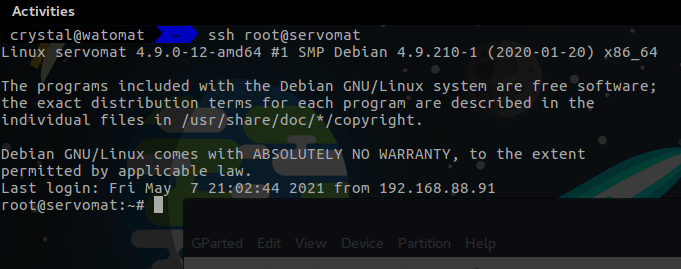
see?
no password prompt
opaque stirrup
if i managed to not corrupt or destroy every linux machine i use i would use ssh keys
thick minnow
wow
thick minnow
Have you tried breaking debian?
tame carbon
you enter your password
and it copies your key
you can generate a key with:
ssh-keygen -t rsa -b 4096 -C "my@email.com"
the -C "email" is optional
but its common to do so


 opaque stirrup
lmao naming them i play the guessing game
tame carbon
you can configure if you want to use a different default username to a server
normally it uses your username
thats just configured in /etc/ssh/ssh_config
sshd_config is the server
idk, ssh keys just so much easier
easier to manage and maintain
dont need passwords
opaque stirrup
i wish github showed you how nany people downloaded something or added a review section
waxen saddle
I need to go through and rename all my servers. I have 2 different naming schemes and some names don’t really make sense anymore now that I have a docker environment (dns server is now secondary to docker dns server, so doesn’t make sense to call it “dns” since it is rarely used now)
tame carbon
rexec is basically, a program designed to do remote code execution
something which would be considered malware these days
and its unencrypted
@waxen saddle you need to set up a domain on your DHCP server
I use lan.redacted.nl
my laptop is called watomat, so it becomes watomat.lan.redacted.nl
and then on your DNS server, you enable regular expressions
waxen saddle
I try to use “home.arpa”, but some devices are rebellious
tame carbon
that allows you to shorten it to watomat
or watomat.lan
Yeah you use to use a DNS domain prefix
then you can let your local DNS resolver do it
waxen saddle
I’ve got all that set up, that was just an example. 🙂
tame carbon
On my mikrotik I just set the Domain field in my DHCP server
and that assigns the lease to the hostname

Due to YouTube sound source copyright issues, if you want to see other genres of music, please come to my Instagram.
what is this mad science
waxen saddle
I want to use Linux/posix/programmer principles for a lot of things, so I’ll take some time and figure out a new naming scheme such that I’ll never have to deviate from it
opaque stirrup
is wireguard better than openvpn?
tame carbon
is that a joke question?
waxen saddle
He might not know..
tame carbon
 opaque stirrup
well ive only ever used openvpn since wireguard was confusing me on setting up
but that script just done it correctly
low pond
Wireguard still confuses me
tame carbon
have you used L2TP/IPsec before?
that's even more confusing
That's what I'm currently using
still waiting for RouterOS v7 to become stable
that includes wireguard
 potent shuttle
Hello, can I ask here how should I crimp an RJ45 connector? I looked online but it just made me more confused
tame carbon
@potent shuttle do you have a crimp tool?
tame carbon
hehe
yeah that takes practice :P
there's a standard for this
whats important is you want both sides the same way
potent shuttle
So, the issue is that I can't recognize the standard of my cable
 tame carbon
 potent shuttle
So, the issue is that I can't recognize the standard of my cable
potent shuttle
potent shuttle
So, the issue is that I can't recognize the standard of my cable
The order is different than what's considered usual apparently
tame carbon
could be T-568A

Most cables are Straight-through
but you can also get a crossover cable, where you flip the pairs
but you dont really need those anymore
modern interfaces have Auto-MDX
idk what kind of crimp you have
potent shuttle
tame carbon
could be T-568A
The orange and blue cables are together, so it's different than those other standards
tame carbon
but the keystones I have are like this;

The crimp then cuts of the excess
lot easier to install
 potent shuttle
No, mine isn't like that
potent shuttle
