#networking
1 messages · Page 340 of 1
 peak cloak
then it's all ISP end
peak cloak
@weak tinsel this is my setup https://cdn.discordapp.com/attachments/387022787480387605/829745549652918312/20210401_121908.jpg

 thick minnow
oho
beefy bwoi

this is whats showin
rn
still runnin
ok this is final result

tell me if its me or someone else
peak cloak
ISP end
peak cloak
thick minnow
so nthn i do will help me
not really
thick minnow
oh man
then anything i "CAN" do to help me?
omggg im angry at isp
they gib beeeg ping and smol speed
 hollow marlin
thick minnow
ok this is final result
hollow marlin
thick minnow
ok this is final result
There is nothing wrong with the traceroute. That spike is irrelevant and just a hop that does not have priority to ICMP respond
thick minnow
hollow marlin
There is nothing wrong with the traceroute. That spike is irrelevant and just a ...
huh
explain pls?
hollow marlin
Neither with the ISP also
hollow marlin
Could be multiple things, weak CPU, low priority with ICMP, reply taking a bad path back
peak cloak
yeah the spike is just ICMP
hollow marlin
Each run is round trip, if latency is ~20ms on hop 8, then hop 9 is ~200ms, but then hop 10 is ~30ms which runs through hop 9 then the issue is non-existent
thick minnow
hollow marlin
Could be multiple things, weak CPU, low priority with ICMP, reply taking a bad p...
ryzen 5 apu...not too weak
ooh
ok
i accidently found out a dns server wery close to me becus of tracerting some random id
lol
hollow marlin
By CPU I and referring to the router responding on hop 10 in your test. Router CPUs are not that powerful and responses are purposely given the lowest priority.
thick minnow
ooof
my router def bad cpu
its some random uk brand
ok i fixed it thanks guys
just dns issue
switched dns to an old isp dns, speeds returned to normal.....apparently the new ones are cloggy ig
whats request timed out?
woaaaaah full fail
 peak cloak
thick minnow
woaaaaah full fail
peak cloak
thick minnow
woaaaaah full fail
they may drop ICMP packets
thick minnow
icmp?
peak cloak
thick minnow
icmp?
Internet Control Message Protocol
ping
traceroute
if someone blocks ICMP
you can't ping them
 tame carbon
My mind = blown
Jenkins declarative pipelines supports java programming
you can just define variables and strings, even use string functions to manipulate it
GIT_BRANCH_ESCAPED = "${env.BRANCH_NAME}".replace("/", "-")
this takes feature/something and turns that into feature-something
 lean pebble
My country is blowing boom boom
 low pond
Some centeral fiber line = boom
low pond
hollow marlin
By CPU I and referring to the router responding on hop 10 in your test. Router C...
Do you know why sometimes pinging a far server would spike to 400+ms, and then go back to like its normal 250 or so
I have had it happen many times :p
hollow marlin
low pond
Do you know why sometimes pinging a far server would spike to 400+ms, and then g...
There a multiple variables that could cause that especially depending on high hop count or overseas
hollow marlin
lean pebble
My country is blowing boom boom
Seriously, be safe dude
lean pebble
thanks 🙂
thick minnow
Does anyone know why my movie sometimes lags when streaming via my homenetwork with plex from my pc to tv? The movie is 65gb and 2 hours, 16 min long. The bitrate is 68274 kbps
could the problem be something with our homenetwork bcs everything is gigabit
 plain siren
thick minnow
Does anyone know why my movie sometimes lags when streaming via my homenetwork w...
plain siren
thick minnow
Does anyone know why my movie sometimes lags when streaming via my homenetwork w...
Could be the decoder
Not enough powah
plain siren

 thick minnow
plain siren
Could be the decoder
thick minnow
plain siren
Could be the decoder
I have an i7 6850k I think it should be able to handle it
plain siren
low pond
dem what will happen
You could set it up for actual use at that point. Normally Windows will try to take it over if its not provisioned
low pond
now i will get fedora on here when i stop being lazy
plain siren
Its used in BitLocker
thick minnow
thick minnow
I have an i7 6850k I think it should be able to handle it
I've set it to "make my cpu hurt"
plain siren
But, TPM Can be used With much more than bitlocker
 molten roost
Does single and dual ranks matter in ram
low pond
yea actually
Giving less load to the MMU and stuff, I dont know how it exactly works but it does.
 green forge
Guys, my ethernet and my wifi fully died
What do I do
Every other computer or phone works
Just my computer acting weird
molten roost
low pond
yea actually
Is there any problem if I put 1 single rank stick and and 1 dual rank stick?
When I turn on Xmp with this ,pc not booting
So I wanted to know whether this is causing the issue
 tulip bough
peak cloak
they may drop ICMP packets
tulip bough
peak cloak
they may drop ICMP packets
I learned the other day (I may have at some point earlier and forgot) that the return packet for a ping is called a pong
low pond
ask for new DHCP lease
 tender hazel
"No Internet" means you aren't getting an IP most likely
low pond
forget the network and re try again
peak cloak
can you ping your router IP
green forge
I thought it was my virtual VMware
low pond
DNS probably then if IP works
green forge
But not the case
peak cloak
low pond
DNS probably then if IP works
then it would throw a dns error
low pond
eh true
peak cloak
oh that stupid warp thing
green forge
Does this help?
green forge
Hmph
Maybe something's wrong with the onboard ethernet
But that wouldn't help fix my wifi thing
Because originally
It was just Ethernet that didn't work
Man maybe dragon could help
He's offline
tender hazel
if you can get to the router it isn't likely to be something on your system
most likely the router itself isn't getting online
but you say other systems are getting online through the router?
green forge
U
Yes
Phones and Ethernet connected laptops work
No prob
I tried taking my laptop and plugging it with the Ethernet cable in my room
Ethernet show Ed internet
plain siren
netsh winsock reset
green forge
plain siren
`netsh winsock reset`
Didn't do anything
 lone sun
🤷♂️ Have you tried actually resetting the modem/router? Restarting is not resetting.
green forge
lone sun
🤷♂️ Have you tried actually resetting the modem/router? Restarting is not rese...
it fixed itself for now
thanks tho
 alpine glade
Con: Firewall upgrade installation stalled
Pro: 69%
tender hazel
what firewall?
 waxen scroll
vpns arent free.
google kind of sort of has a vpn for pixels but thats google so no privacy anyway
I think they make you pay for it now ;p
peak cloak
 coral goblet
what is a good but free vpn for phones
coral goblet
what is a good but free vpn for phones
do you need a vpn
most people dont
and its just marketing
 silk hare
A private IP address is a non-routable address meaning it cannot connect to the internet?
True or False?
tender hazel
a private IP address cannot connect to the internet without NAT
tender hazel
yes
silk hare
ty sir
tender hazel
although you shouldn't have had to ask me about such an elementary networking question
silk hare
Learning.
tender hazel
you can work it out logically - the web server on the internet will never see the host's private ip address 192.168.0.1
silk hare
Exactly as I thought
Wanted to make sure I wasn't getting tripped up with that SRC and DST in the pic
Because NAT will take care of the endpoint it goes to
tender hazel
yes
silk hare
the web server never knows who requested it in the private sector
just the external address
tender hazel
yes, that is correct
tender hazel
@silk hare btw, I don't want to give you the impression that I mind answering questions or helping, but certain types of questions give the impression of trying to get help on homework or on a test
and in those cases there can potentially be issues
moral/ethical issues
the questions you were asking sounded like some kind of test questions
 rigid yarrow
Anyone living in Hawaii have recommendations for a decent ISP? I'm moving out there next week.
plain siren
rigid yarrow
Anyone living in Hawaii have recommendations for a decent ISP? I'm moving out th...
AT&T or Xfinity is really the only 2 "Decent" ones out there
 runic glade
Anyone thinking of buying the Google Nest Mesh router; don't do it. Been using it for the past 4 months now and It hasn't been very pleasing, LAN latency is 3-4ms with CAT 6 cables and the speeds decide to drop randomly without touching any settings.

Lucky day today I guess, speeds like to cut in half from time to-time

 hard tusk
Hello, could someone help me with a opnSense configuration?
I just set it up to explore it a bit, but I can't connect from the LAN into WAN.
From LAN the Firewall is pingable on both WAN and LAN address.
But I cant ping my router in WAN from LAN. Even if it is set as WAN gateway.
plain siren
hard tusk
Hello, could someone help me with a opnSense configuration?
I just set it up to...
You <> OPNSENSE <> ROUTER <> INTERNET right?
hard tusk
One moment
plain siren
You wont be able to ping the router on the other side of OPNSense if this is teh case
hard tusk
WAN Router (192.168.188.1) |(Gateway on WAN Interface set to 192.168.188.1) | |---Test PC One | |---OPNSense (WAN: 192.168.188.221, LAN: 192.168.149.1) | |(Gateway on LAN set to 192.168.149.1 --> OPNSense) |---Test PC Two
From PC one internet connection is totally normal.
From PC two, I can ping both interfaces, the 188.221 and the 149.1 but I cannot ping other hosts on the 188 network, as example the router.
Even with firewall disabled, it would not work.
@plain siren
tame carbon
I've dreaded this moment..

Going from 1909 to 20H2
Let's hope I don't have to spend the rest of my day reinstalling a broken install
 vestal lotus
Not sure if this would fit here, but the Wi-Fi signal from the router is a bit weak whenever I go to my attic bedroom.
From my view, there are some options:
-Upgrade the router (which would benefit me and family)
-Get a mesh Wi-Fi system (which would likely extend the signal and make it look all uniform)
-Get a repeater (which repeats the signal)
tame carbon
Get a managed AP
peak cloak
yeah
tame carbon
More access points is the answer, but not meshed. Rather, fed by Ethernet
peak cloak
get another AP
vestal lotus
Huh.
tame carbon
I have like 3 access points now
vestal lotus
I assume there are wireless APs?
tame carbon
All sending out the same network
Phone grabs whichever is closest
Handover between APs takes less than half a second, you don't notice it
vestal lotus
Because I don't think I can feed an Ethernet cable upstairs to feed said AP.
peak cloak
vestal lotus
I assume there are wireless APs?
no, AP by defenition has an ethernet "input", wifi "output"
tame carbon
Its a wireless bridge
tame carbon
@vestal lotus I've got a CAPsMAN network here. Router acts as controller, to multiple APs
Individual APs cost $60
And eithe have dedicated router as. Controller, or elevate one of the APs as controller
 tame carbon
What kind of netspeed do you have?
vestal lotus
And then there's its little cousin doing all the work.

How they're connected, I have no idea- well... Maybe I do.
vestal lotus

 vestal lotus
tame carbon
Wifi boosters 🤣
vestal lotus
tame carbon
Wifi boosters 🤣
Yeah, the little cousin is a WiFi booster, if the label on his back is anything to go by.
tame carbon
@vestal lotus any budget you are giving yourself to improve the situation?
vestal lotus
tame carbon
<@399563484951609354> any budget you are giving yourself to improve the situatio...
At least let me test the WiFi first before giving you a number. 😆
 copper horizon
Powerline adapters if you really don’t want to run Ethernet lines
vestal lotus
Good in the living room. Now what about the attic? Goes upstairs
 copper horizon
Switch > powerline > powerline > wifi AP
vestal lotus
(according to Netflix)
tame carbon
@vestal lotus 70mbit is about all you're going to get on 2.4GHz
5GHz can be much faster
but doesn't penetrate walls as well
@copper horizon issue is that they often do not run at full speed
I've got wall adapters rated for 500mbit/s
but in reality I get around 35-40mbit/s
copper horizon
He’s working with 70mbps 🤷
vestal lotus
 tame carbon
yeah..
copper horizon
Lol
vestal lotus
Attic bedroom.
vestal lotus
That and the occasional disconnect-but-quick reconnect.
copper horizon
What’s your internet plan speed?
tame carbon
okay so unstable connection
tame carbon
copper horizon
What’s your internet plan speed?
this @vestal lotus
vestal lotus

(aka one moment)
Well, it's more what my family is paying Proximus for, speed wise.
But...
tame carbon
all I we need is a number
so we can roughly estimate what you'll need
is it 100mbit, is it 500mbit?
or is that 70mbit about all you can get?
vestal lotus
Checked on the carrier app here.
 vestal lotus
Uhhh... My PC is a tower. And it's up at the attic.
tame carbon
@vestal lotus wait, is this... mobile internet? :o
copper horizon
Lowest plan on their website is 50mbps highest is 100 😱
tame carbon
or is this a regular old landline?
low pond
vestal lotus
Checked on the carrier app here.
Nice OP6
tame carbon
wait. 3 TB
vestal lotus
low pond
Nice OP6
Mom's. It does what it does and does it well for her.
tame carbon
you have a data limit? :o
copper horizon
Internet maxi is 100mbps
vestal lotus
Considering my usage case at my PC (cloud gaming + media consumption), that limit is... Worrying.
copper horizon
Does your modem/router have extra Ethernet ports ? I may just said get an actual dedicated wifi ap and call it a day...
tame carbon
@vestal lotus ideally, you get yourself two new APs, and a powerline adapter
you replace the existing AP in your living room
and place another AP in your attic, feed it via powerline
vestal lotus
Very empty.

 tame carbon
No extra wiring or drilling needed, the TL-PA7017P KIT extends a gigabit network to every room via existing wiring. Simply plug it in to an outlet like you would a normal plug.
not sure why it picked 'baltic' as region, but you can get em globally
copper horizon
DSL damn
tame carbon
This uses the existing electric cables in your house to transmit data
@copper horizon heavily vectored probs, and 100mbit requires bonding too
copper horizon
Yeah didn’t realize dsl can go 100
copper horizon
I’m behind/ahead(?) of the times?
tame carbon
@copper horizon no
vestal lotus
copper horizon
DSL damn
Consider that my aunt had problems with Proximus at her building (concierge) which they wouldn't fix, supposedly, unless there was enough complaints about it.
tame carbon
this isnt an option everywhere
for 100mbit, you need a max of like 500meters from the local hub
and probably two lines
instead of just one
vestal lotus
That, and the internet at her place going pbhhht at times.
tame carbon
The issue with bonded VDSL is that it is very unstable
you rely on two lines, and they have to balanced
if one of them jitters, or causes crosstalk with the other one
you get lot of jitter on line, and maybe even packet loss
from my experience, bonded VDSL is much faster, but also less reliable
copper horizon
Don’t know how we survived before fiber
vestal lotus
After my aunt switched to Telenet (fiber), said problems just fucked off.
Much better experience.
tame carbon
@copper horizon I was on ADSL for a long time
ADSL is slow, but more reliable than VDSL
copper horizon
But yeah do what crystal recommended if you want to squeeze out that extra performance
tame carbon
@vestal lotus these https://www.amazon.com/Powerline-Ethernet-Adapter-Extender-TP-Link/dp/B084CZMYNM
cost only $50 on amazon
You plug one of these in the wall next to your modem
vestal lotus
tame carbon
<@!399563484951609354> these https://www.amazon.com/Powerline-Ethernet-Adapter-E...
I assume those are available on Amazon.fr as well?
tame carbon
and the other one in the attic
@vestal lotus yeah
@vestal lotus one thing to keep in mind
these things are not ideal as a dedicated ethernet wire is
you cannot operate multiple pairs on the same electric network
they would interfere
but they can get ~100mbit/s in good situations to another place in the house
latency is very good
about 1ms
lemme ping my printer
_>
vestal lotus
So, you're saying to
-Replace that carrier provided Wi-Fi booster for a better one
-Use the power line adapter to power the second AP?
tame carbon
Pinging 192.168.88.87 with 32 bytes of data:
Reply from 192.168.88.87: bytes=32 time=4ms TTL=255
Reply from 192.168.88.87: bytes=32 time=3ms TTL=255
Reply from 192.168.88.87: bytes=32 time=3ms TTL=255
Reply from 192.168.88.87: bytes=32 time=4ms TTL=255

Ping statistics for 192.168.88.87:
    Packets: Sent = 4, Received = 4, Lost = 0 (0% loss),
Approximate round trip times in milli-seconds:
    Minimum = 3ms, Maximum = 4ms, Average = 3ms
PC --> Switch -> Router -> Wall Adapter -> Wall Adapter -> Switch -> Printer
vestal lotus
...I'm overthinking things, aren't i.
tame carbon
@vestal lotus you basically use this kit
to provide wired ethernet to your attic
then you plug another AP on that
and then you have more than that 16mbit/s wifi upstairs
and if you want a good AP, I can give you some recommendations on that as well
vestal lotus
I mean, I live in the EU, so, the building materials are different here compared to the US.
tame carbon
@vestal lotus Same :D
I'm from the netherlands
I forget how the french named my country
something entirely different
vestal lotus
You might be close to 🇧🇪 .
copper horizon
Your proximus box > connect wire into power adapter one.
Power adapter two (plug in your attic) > connect to your wifi booster (but switch it into access point mode)
vestal lotus
And powerlines are like- you plug it in (power and wire) and it gives internet?
 vestal lotus
Didn't expect Ubiquiti to cameo here.
tame carbon

MikroTik is a Latvian company which was founded in 1996 to develop routers and wireless ISP systems. MikroTik now provides hardware and software for Internet connectivity in most of the countries around the world.
vestal lotus
Damn it.
vestal lotus
tame carbon
Ubiquiti is overpriced
And irresponsible. See data breach.
tame carbon
That's only for cloud connected systems
copper horizon
Lol mikrotik is probably not the most user friendly option for him 🙂
tame carbon
not required, but still a bit mh
@copper horizon actually
the app on the phone
is quite easy for simple things like changing passwords
and I can help him set up the CAPsMAN
its not that difficult
I can just run him through the steps
and then it works, forever
vestal lotus
copper horizon
Lol mikrotik is probably not the most user friendly option for him 🙂
Yeah, networking isn't my specialty.
copper horizon
If there’s an app that’s fine
tame carbon
@vestal lotus generally, you configure these things once
copper horizon
You won’t be needing to go into settings anyway
tame carbon
and then it works
@copper horizon in the Quickset feature which you can use on mobile too
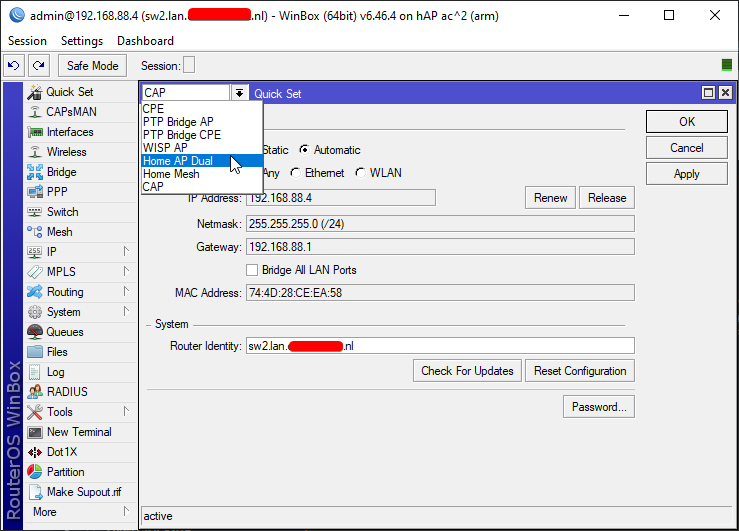
You can basically select a bunch of defualt profiles
the CAP is what you need for a remotely controlled AP
vestal lotus
Although, I have an interest in it (mostly looking at those ridiculous routers ASUS makes - see the 'spider router' ax89x) but it doesn't go that deep.
 copper horizon
I have an asus that I use and then a ruckus that’s sitting next to it unused xd
I’m the lazy network person
tame carbon
even tplink routers are Meh.
copper horizon
If it works, meh whatever
vestal lotus
tame carbon
that never gets patched
Except if it's running that open source router firmware (openwrt, i think)?
tame carbon
yeah but the hardware is also meh quality
@copper horizon idk, I've owned 3 tplink routers
and every single one of them died
after 3-4 years
this mikrotik has a MTBF of like 15-20 years
so those will last a while
vestal lotus
tame carbon
after 3-4 years
I'd like to imagine it's a capacitor that went pbhhht.
tame carbon
Yeah but that is just shitty engineering and cost saving
and you get what you pay for
mikrotik APs aren't that expensive, 60 euros
but they will last for a long while
copper horizon
My asus has been going strong for 5 years now so oh well . It’s an all in one switch and wifi for me so less wires makes me a happy camper
tame carbon
@copper horizon idk I had so many issues with the asus thingies lol
I have one of their smaller ones
but only used it briefly
vestal lotus
I mean, I have an Asus monitor back in my home country that was made in 2007. Motherfucker was made to last, I swear.
tame carbon
Recently guy came in here with an asus router that had issues
it stopped giving out DHCP leases
because it ran out of disk space
🤣
so everytime someone connects to the network
they subject this poor flash chip to torture
copper horizon
I guess my own home isn’t that advanced, few devices
tame carbon
a bug caused it to write more than expected, crashing the device
and after 5 years, flash is worn out
and it ceases function alltogether
copper horizon
As soon as it requires me to spend a minute more to reset or configure that’s when I’ll throw it out lol
Otherwise I haven’t touched the thing in years
tame carbon
@vestal lotus and about those 8 legged wifi routers they sell..
Those cost 500 bucks
 broken jetty
Question:
What's the best way of expanding the number of ethernet ports on your home network? Switches to me look pretty expensive (a very quick look and the cheapest I can find is £30, maybe I'm looking in the wrong places?) and I don't know if managed or unmanaged is better for my use case. I've also considered Switches but this article I found (https://www.maketecheasier.com/ethernet-switch-vs-hub-vs-splitter/) says not to use them for some reason

Find out the differences between an Ethernet switch vs. hub vs. splitter and see which one is the best for sharing your Ethernet connection.
tame carbon
and if you were to buy each part individually from mikrotik
you'd have a 10gbit capable router, and 4 APs
and still have money left over.
and you have enterprise features, for a consumer price.
vestal lotus
tame carbon
<@!399563484951609354> these https://www.amazon.com/Powerline-Ethernet-Adapter-E...
Looked at the graphic.
So, one gets fed that Proximus box via wired, then it does some wizardry to pass the internet up to the attic?
copper horizon
broken jetty
Question:
What's the best way of expanding the number of ethernet ports on your...
Get a unmanaged switch and call it a day
tame carbon
@vestal lotus yeah they use the electrical network of the house to talk to eachother
Data transfer is much higher frequency
grid frequency is only 50Hz
vestal lotus
tame carbon
<@!399563484951609354> yeah they use the electrical network of the house to talk...
I'm impressed.
copper horizon
broken jetty
Question:
What's the best way of expanding the number of ethernet ports on your...
NETGEAR 5-Port Gigabit Ethernet Unmanaged Switch (GS305) - Home Network Hub, Office Ethernet Splitter, Plug-and-Play, Silent Operation, Desktop or Wall Mount https://www.amazon.com/dp/B07S98YLHM/ref=cm_sw_r_cp_api_glt_fabc_Q1N3F372AQFHCFK6G6FG?_encoding=UTF8&psc=1
tame carbon
@vestal lotus but that also means they are subjected to all kinds of electrical interference.
peak cloak
broken jetty
Question:
What's the best way of expanding the number of ethernet ports on your...
switch
tame carbon
so if you have some kind of heavy inductive load like a 3 phase motor
peak cloak
only way
tame carbon
you can get data glitches
peak cloak
this is not coax where you can just split it
all the other methods are OLD
when ethernet used to be more like a bus system
but slow
tame carbon
@broken jetty TL-SG108
broken jetty
copper horizon
Get a unmanaged switch and call it a day
Thank you, all the ones I found were $50+ except for a Ubiquiti one which is managed
tame carbon
if not, just get the TL-SG108
peak cloak
unmanaged are cheap
vestal lotus
tame carbon
<@!399563484951609354> but that also means they are subjected to all kinds of el...
Hmmm... Not aware of anything in the house or out that could cause it.
broken jetty
You're now recommending over each-other and it's confusing but I will look at all your suggestions
peak cloak
it's when you get into managed and l3 switches where things get expensive
tame carbon
This is an 8 port switch
for slightly more
its better choice than those 5 port ones
@vestal lotus I mean, just buy the kit from amazon
and test it
if it gives you good speed, then invest into some wireless APs
broken jetty
I don't think I really want more than four ports for now because I don't need it and due to circumstances beyond my control the router setup is a little cramped
tame carbon
18 bucks for 5 ports or 25 bucks for 8 ports ¯_(ツ)_/¯
I got only 5 ports on my switch as well..
 broken jetty
After consulting TP-Link's buying guide they selected this Switch for me, does it look OK?
https://www.amazon.co.uk/TP-Link-TL-SG1005D-Desktop-Gigabit-Ethernet/dp/B00ZOOJXEG?ref_=ast_sto_dp
broken jetty
Good to know, thank you
broken jetty
Is that a...concern?
tame carbon
it will be
but probably isnt right now
this will work with your setup
idk, might not be this switch
but I've seen ones behave strangle
broken jetty
I don't think I have any VLANs and my router is an ISP one so it almost certainly doesn't support WiFi 6 so I think it will be fine
tame carbon
no v6, ipv6
tame carbon
@peak cloak had one that wouldn't allow ipv6 to pass xD
for no good reason
since switches operate on layer 2
not 3
peak cloak
tame carbon
<@!222482269829332992> had one that wouldn't allow ipv6 to pass xD
yeah me too I think
never tested it too well
broken jetty
Doesn't say what layer this one runs on on Amazon
tame carbon
@broken jetty 2.
peak cloak
but I think it was just blocked v6 packets
tame carbon
Unmanaged switches run on layer 2
peak cloak
broken jetty
Doesn't say what layer this one runs on on Amazon
all switches are L2
tame carbon
all do
vestal lotus
@tame carbon Reviews that Amazon is showing for that kit aren't that good... 😬
broken jetty
Oh
vestal lotus
Though, the 4 star one mentions GFCI?
tame carbon
@vestal lotus yes, because it heavily depends on your house' electrical system
broken jetty
OK so I will buy this one and return it if I notice any IPV6 problems
tame carbon
@vestal lotus you are in europe
vestal lotus
Bot auto-deleted your message or something?
tame carbon
yes because it had a no-no word in it
vestal lotus
Oh. But yeah, I did see it. I don't think I'll have any worries.
tame carbon
@vestal lotus ideally, you also only use that socket on the wall, only for that adapter
if you use an extension cord, or plug an appliance into the wallsocket next to the powerline adapter
you can cause interference
which reduces speed
so, no extension cords, ideally no other devices plugged into that same wallsocket array
the adapters come with a built in socket
you plug your extension cord into that
it filters the interference out
vestal lotus
Guess the extension plugged into the outlet is a no-go then (also say Hi to my Potato PC, the Lenovo H30-00 with an awful Celeron that's been my PC since 2015-16).
 vestal lotus
Don't ask me how I can tolerate it's awfulness.
Just- don't. All I know is that despite SATA 2's limits, the SSD I fed it was the best upgrade I could ask for.
tame carbon
These are the ones
They have a socket in them, for your appliances
you plug your extension cord into that
vestal lotus
vestal lotus
Just- *don't*. All I know is that despite SATA 2's limits, the SSD I fed it was ...
Well, first big upgrade. Second one was giving it an A6210 dongle which allows Potato PC to see 5 GHz.
 tame carbon

data plugs in underneath
they have a little button to pair, but they should be pre-paired

 mighty wind
I hate those
broken jetty
Second-worst type
mighty wind
true
vestal lotus
This one... Is distant and doesn't seem to be that type of outlet.

Not so sure I trust it though.
tame carbon
@vestal lotus no that isnt ok
vestal lotus
mighty wind
just doesnt support grounding
Is grounding important?
tame carbon
it needs grounding
peak cloak
anything with a metal case
mighty wind
^ditto
peak cloak
needs grounding
tame carbon
chances are the wire has a grounding lead
just not the socket
but you are halfway to finding out, it's missing a screw
if it has one
vestal lotus
 vestal lotus
Found this sneaky boy hiding behind the night shelf.
tame carbon
@vestal lotus we have similar sockets here
except ours don't have a pin like that
our plugs do support the pin
but we have metal prongs on 2 sides
 mighty wind
arguably the better version
tame carbon
plug doesnt care either way
 vestal lotus
But yeah, this plug is a bit too distant from the PC.
tame carbon
That doesn;t matter
you can always run an ethernet cable
your wireless AP also doesn't have to be where your adapter is
as long as you can run a cable
vestal lotus
Although, I do have an excessively long cat6 Ethernet cable (didn't know it was going to be that long!).
But hey, it works in my favor.
tame carbon
its not that expensive
I always pick out old networking cable that people throw away
and I terminate them to what I need
with a clamp
vestal lotus
...yes, it's 100 meters.
vestal lotus
tame carbon
yeah that's a bit excessive
I had no idea at the time, but hey! At least I have enough length.
mighty wind
Meanwhile In Vietnam where I just flew back from.
 tame carbon
@mighty wind with suicide usb ports included?
broken jetty
I have a couple of questions about the switch I found:
- Do they usually include an ethernet cable or do I need to buy one seperately
- Is there a separate input port and one output, or will one port be used for input (effectively making it four ports)?
mighty wind
not always but sometimes in the hotels
tame carbon
@broken jetty on an unmanaged switch, all ports are treated the same way
packets are switched using the mac address
the switch knows which MAC is on which port
peak cloak
broken jetty
I have a couple of questions about the switch I found:
1. Do they usually includ...
usually no ethernet cable
and as crystal said
tame carbon
and just forwards using a little table it builds up
peak cloak
no input/output
broken jetty
OK so I will have to use one of the five ports to link it to the router?
peak cloak
yes
tame carbon
@broken jetty yeah the switch is just a switchboard. Your router actually has a built in switch most likely. If it has multiple LAN ports, that's a tiny built in switch
broken jetty
Cool
tame carbon
Managed switches are for more complicated setups
where you isolate networks
and do other kinds of failover thingies
vestal lotus
So yeah, I think I get the idea of what is going to be done:
Modem/router combo gets a powerline which will send the internet through the electrical network to Night Shelf Powerline which I can plug an Ethernet into to use Ethernet on my PC.
That about right? @tame carbon
peak cloak
looks at my switch
tame carbon
with Spanning tree
peak cloak
never did anything with stp
tame carbon
@peak cloak imagine you had 4 switches, all connected to eachother directly
STP helps make sure no loops are created
tame carbon
and disables those links
RSTP has a faster convergence, like 3 seconds after fault, it switches
and MSTP is for complicated multi trees
 tame carbon
xD
MPLS
layer "2.5"
@vestal lotus looks good, might want to look into getting a small switch for the 2nd powerline
so you can plug in more than 1 device
like your wireless AP, and your PC
vestal lotus
...
vestal lotus
 tame carbon
You only have 1 port on that :P
vestal lotus
Oh. Heck
tame carbon
toss a 25 euro switch in, you got 8 ports
vestal lotus
But then again, it's just my PC that'll get plugged in.
tame carbon
because you need one for the powerline
vestal lotus
Shit.
tame carbon
@vestal lotus yeah, idk how much you want to spend, but at this point a small wireless AP might be a good idea
vestal lotus
I mean, I do like the concept of the Powerline.
 vestal lotus
That looks so adorable.
tame carbon
Its the cheapest router they sell lol
MikroTik is a Latvian company which was founded in 1996 to develop routers and wireless ISP systems. MikroTik now provides hardware and software for Internet connectivity in most of the countries around the world.
But runs the same advanced software as the big boy routers they sell
vestal lotus
And MikroTik goes for a long time?
tame carbon
MTBF Approximately 100'000 hours at 25C
vestal lotus
Fucking-
tame carbon
 low pond
That's just the MTBF, it probably won't even last half as long reality
tame carbon
no that just means, if you have a bunch of them running
on average, after 11 years they start failing
but I've seen RB2011's
that have been running for 15 years
and still work
vestal lotus
Can you technically power a wireless AP off of Ethernet?
tame carbon

@vestal lotus yeah those cAP ac's I linked earlier use PoE
MikroTik is a Latvian company which was founded in 1996 to develop routers and wireless ISP systems. MikroTik now provides hardware and software for Internet connectivity in most of the countries around the world.

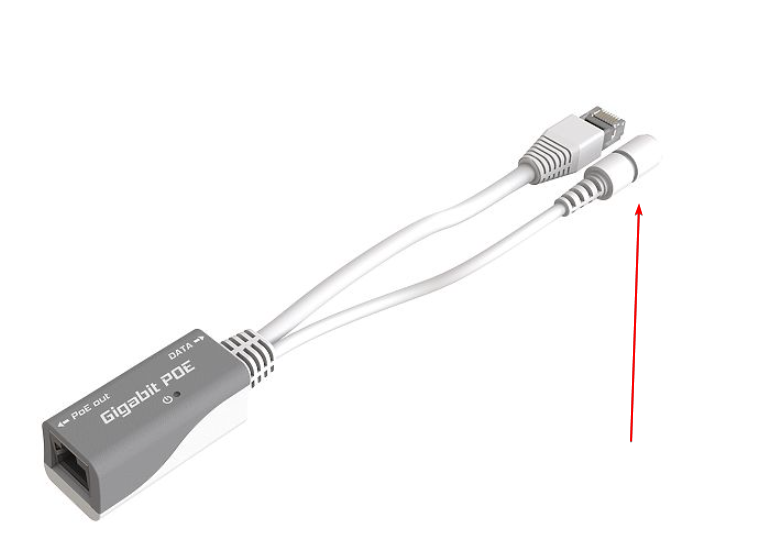
They have an injector like this
You plug power and data into one the leads on the top right
and the bottom left plugs a cable, that goes to your AP
PoE is ment for low power devices like access points, or IP phones
security cameras
etc
ideal for wall mounted devices, you don't have adapters everywhere
there are switches with PoE output
but you can just use injectors
vestal lotus
So, I guess the power line could just give the switch Internet and the switch can power the AP.
tame carbon
it just becomes a hastle if you run 20+ devices with PoE
you have a rats nest of injectors
vestal lotus
And I can just use another port to give my PC wired internet.
tame carbon
those cAP ac's actually ship with an injector
60 euros, gives you an AP + injector
yeah you can use those ports for your PC
@vestal lotus these on the other hand, are ment for on your desk: https://mikrotik.com/product/hap_ac2
MikroTik is a Latvian company which was founded in 1996 to develop routers and wireless ISP systems. MikroTik now provides hardware and software for Internet connectivity in most of the countries around the world.
They have the same chipset and hardware as the wallmounted variant
but more ports
I have this one in the living room, to provide network to the TV receiver (IPTV), smart TV (for netflix) and wireless access

small and quite powerful
they can be powered by PoE, but do not include in an injector, sold seperately I think like 10 bucks
vestal lotus
Hmmm...
tame carbon
These can be a router, switch and wireless AP
they are an all-in-one
but all software configurable to your needs
and a quadcore cpu if you want to do fancy VPN stuff and whatnot
I use mine only as a switch and wireless AP
tame carbon
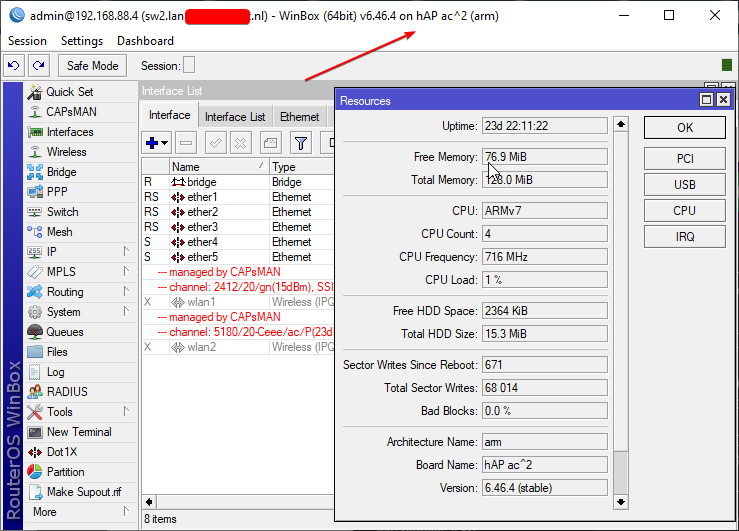
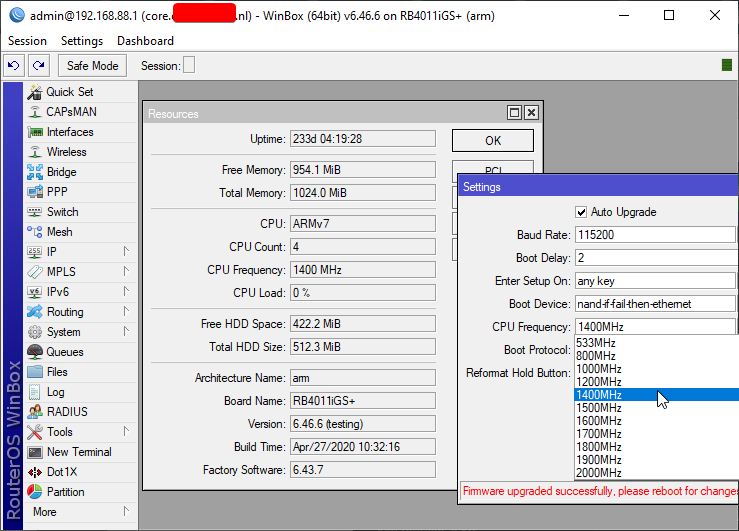
@copper horizon I figured out you can overclock these things 
I wouldn't ever try to... but..
there's the option to do so >_>
https://i.imgur.com/y4NNnjw.png
 vestal lotus
I mean, the router/AP AiO sounds good in theory. @tame carbon
vestal lotus
Yeah, but I think it'd be in the attic, used exclusively by me
tame carbon
if you had another one of those hAP ac2's downstairs, you can configure them as a managed solution
vestal lotus
Huh.
tame carbon
and then you have 1 network, and it dynamically hands over clients
essentially you'd be able to roam while calling on discord
and move from downstairs to upstairs
without any interruptions
vestal lotus
So, 2 of those could solve the signal problem and possibly give a better experience throughout this 4 (excluding basement) floor house?
tame carbon
idk if you have any boosters currently
but you'd replace those

This is kinda what you do ^
except in your situation, one of the hAP ac2's is both CAP and controller
CAP = controlled access point
It basically allows one device, to control the wireless on another device
and you can use 1 network configuration on all of them
but that's something you can always decide to do later on
vestal lotus
I might be overthinking things...
But that WiFi booster could just go poof, replaced by an ac2?
tame carbon
yes
This is how you "boost" wireless properly :P
you have more APs
centrally managed
vestal lotus
And I could get another up in the attic through a power line, said ac2 being PoE by the switch?
tame carbon
benefit of capsman is that you can just add more CAPs easily
@vestal lotus hap ac2 would just be on your desk
plugged directly into the powerline
no switch
vestal lotus
Huh.
tame carbon
you then have 4 more free ports on the hAP ac2

your powerline goes into any of these
and it can be a switch/wireless AP
It says internet/poe on port 1, but internet can be any port you want, and doesn't even apply in your situation
poe is only port 1
you dont need poe
you can just plug in an adapter

ships with this
So powerline + hap ac2 for upstairs
if you want to replace the boosters downstairs
you can get another hAP ac2, and use that as your controller
and the AP upstairs would be controlled by the one downstairs
vestal lotus
I might have to use PoE, if you peeked at my extension earlier, the converter is being selfish with the middle port.
 vestal lotus
I guess the middle outlet can stay lonely then.
tame carbon
bigger extension cord? :o
vestal lotus
Maybe, if it's available.
tame carbon
@vestal lotus if you really want to make this network your own, you could look into the ISP modem, and see if it can be bridged
vestal lotus
Well, other extensions are busy.
vestal lotus
tame carbon
<@!399563484951609354> if you really want to make this network your own, you cou...
There's... Not many stickers on it that tell me anything.
tame carbon
You'd have to log into its web interface
and see if it has that option
you can forward your public IP to your mikrotik instead
and not have to deal with the ISP gear anymore
vestal lotus
 tame carbon
port forwarding, firewall and such could all be one on your hap ac2
vestal lotus
Not sure what this rubber doober does.
tame carbon
@vestal lotus do you know how to log into it?
 vestal lotus
It's a b-box.
vestal lotus
tame carbon
its all wireless?
Looks like it. Only explanation I have for that WiFi booster.
tame carbon
I think they do support bridge mode
@vestal lotus okay, do you have a PC you can access right now?
could see if we can get into the settings screen
and see if it supports bridge mode
vestal lotus
I do, Potato PC is plugged in and survived the flight trip.
tame carbon
Windows?
vestal lotus
Yeah. Switched over from Insider to Stable (used the new 870 Evo for the switch).
vestal lotus
Let me boot it up first.
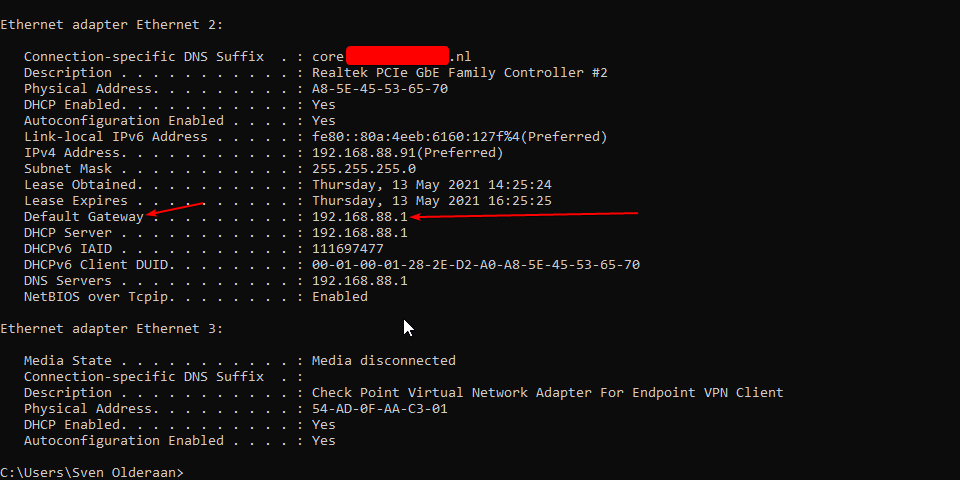 vestal lotus
Found it. I had to scroll a little through the mess of adapters, but I got it.
We hit a bump.
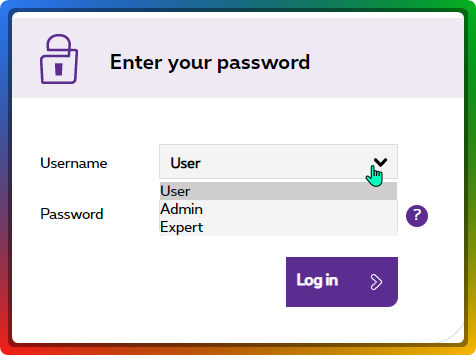
I only know the user pasword, so, I'm gonna use that and peek around.
vestal lotus
Let me take a look around User, see what I can do.
tame carbon
admin password is admin

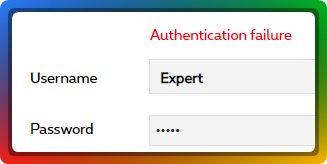 vestal lotus
Same thing.
plain siren
vestal lotus
Same thing.
Can you leave Username Blank?
vestal lotus
plain siren
Can you leave Username Blank?
Doesn't look like it.
tame carbon
I'm amazed that I'm still amazed by these shitty routers
they keep inventing new crap
and it still sucks
vestal lotus
 plain siren
Whos the provider?
vestal lotus
plain siren
Whos the provider?
None other than Belgian ISP, Proximus themselves.
plain siren
A1B2C3D4
tame carbon
wow. what genius password is that
vestal lotus
No dice on either Admin or Expert for that one.
plain siren
Actually no try it
https://IP/index.php/index.cgi?user_name=admin&password=BGCVDSL2 This should be how the URL is laid out too
vestal lotus
No dice for that one.
...what are the chances of that working.
tries it anyway
Didn't.
 vestal lotus
tame carbon
with the password: password
vestal lotus
tame carbon
with the password: password
Nope.
vestal lotus
For expert or admin?
tame carbon
admin
vestal lotus
If it is, I'm going to be mad that I'm gonna have to type that in.
tame carbon
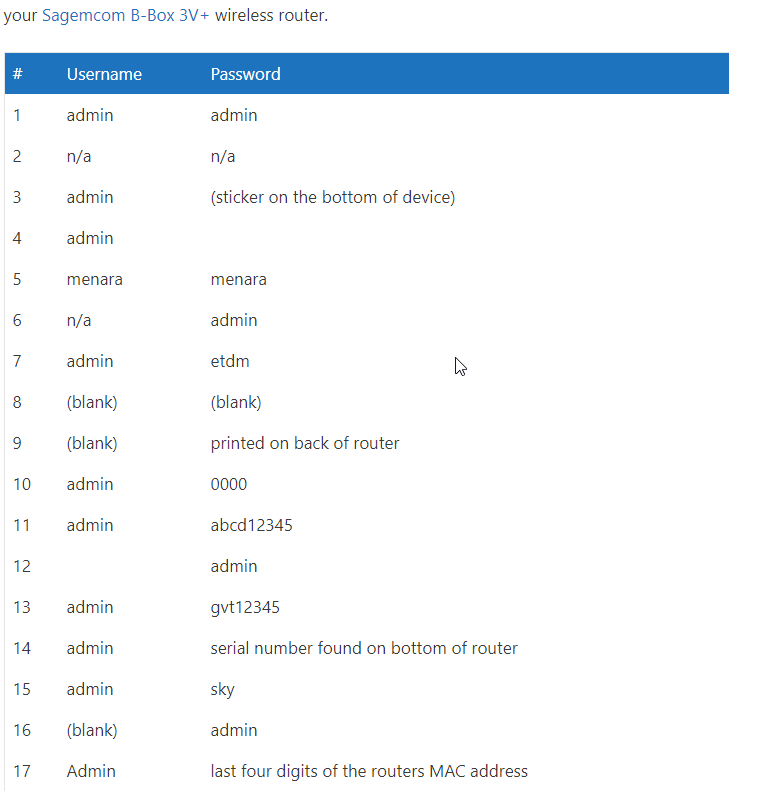
xD
every isp is different
if none of that works
chances are
someone changed it
vestal lotus
BRB (phone is charging 🔋 )
tame carbon

Comment mettre sa Proximus B-Box 3 en mode Bridge
@vestal lotus theoretically, it should be possible
plain siren
AHhhh his Passwords are set on demand
tame carbon
changes every day
plain siren
The tech requests them, 24 hr laters gone
tame carbon
yep
stupid.
I mean, secure
but still
stupid
if he can get it in bridge mode, he only needs his PPPoE details
@vestal lotus its possible to use this device as purely a modem.
By configuring it as bridge mode, like in that article above.
You will however need to ask your ISP for your PPPoE login credentials
Shouldn't be that big of an issue
these PPPoE login credentials are entered in your hAP ac2
and then you entirely skip the routing stuff on the bbox
@plain siren so I started new job last week
and my first observation: total chaos
1 server (no vm, or containerizing) that is used for
- Production instance
- Test/Dev instance
- Git via ssh for source code
Releases are done via putty & filezilla
there's no review process embedded into the toolchain
in fact
there's no toolchain at all
I set them up with gitea, and am now busy with configuring jenkins.
setting up a review procedure for the team, and organizing automatic deployment of test & acceptance instances
thank fuck they already use git
so moving to gitea was a 0 hastle operation
vestal lotus
I go away for a few min to this news. Fantastic.
But yeah, S/N didn't work... and now I learn that.
Great.
tame carbon
@vestal lotus can you log in as user?

LOOK, THE LATENCY FALLS EVERY TIME YOU CLAP YOUR HANDS AND SAY YOU BELIEVE
vestal lotus
tame carbon
<@!399563484951609354> can you log in as user?
I can, one moment.

Got in.
tame carbon
ok click on network connectivity
vestal lotus
Okay
tame carbon
send screenshot via dm
 peak cloak
yeah
tame carbon
@vestal lotus correct
So basically, you disable the PPP on the modem
this allows you to register your own PPP client, through your own router
like that hAP ac2
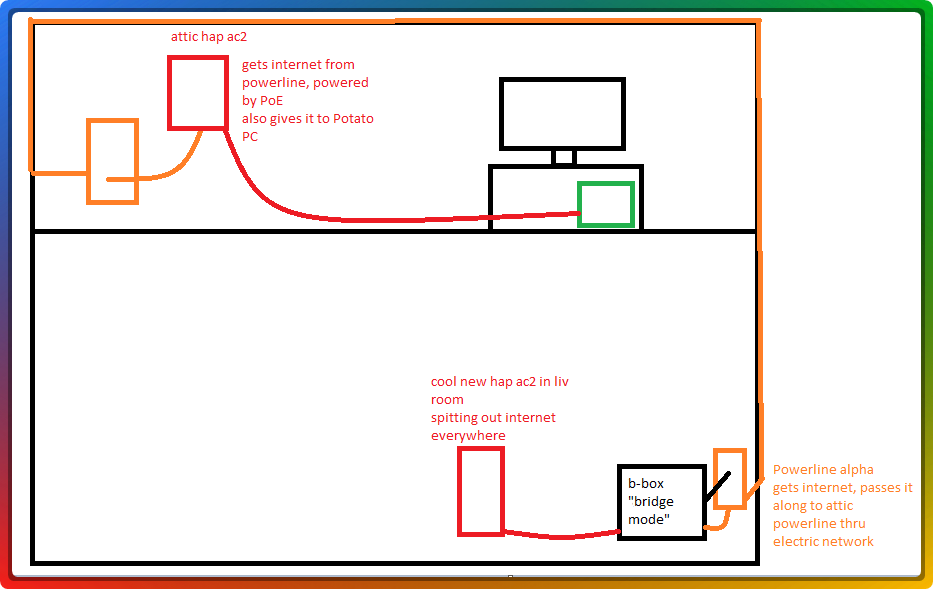 green forge
@plain siren I'm just gonna try to update my windows, I have no idea if it's drivers or what
@tame carbon Do you know how to fix Ethernet and wifi problems
lean pebble
Today I saw hosting company that sells "dedicated server" but gives the customer vps instead without administrator permission to windows and upload speed that even slower then home network.
green forge
 tame carbon
@vestal lotus your hAP ac2 should be the one that is connected to your powerline
tender hazel
On the bright side, while you have no internet, at least you are secured.
tame carbon
both bbox and your 2nd AP are connected to the main router (your hAP ac2 in livingroom)
lean pebble
Hahaha thats true secured it's when you can't access the internet
tame carbon
let me whip up a diagram
green forge
@tender hazel I do have internet
Just my computer started doing this ever since I moved
lean pebble
But it says no internet
lean pebble
Maybe windows
green forge
Yeah
lean pebble
Sometimes windows does this stupid things
green forge
And it only fixes itself when I restart the network closet
lean pebble
Try give it static IP
I had it once with my Linux laptop I needed to give it static IP to find the issue
green forge
I've noticed it goes out if I'm trying to scroll though YouTube or loading into a game
vestal lotus
tame carbon
both bbox and your 2nd AP are connected to the main router (your hAP ac2 in livi...
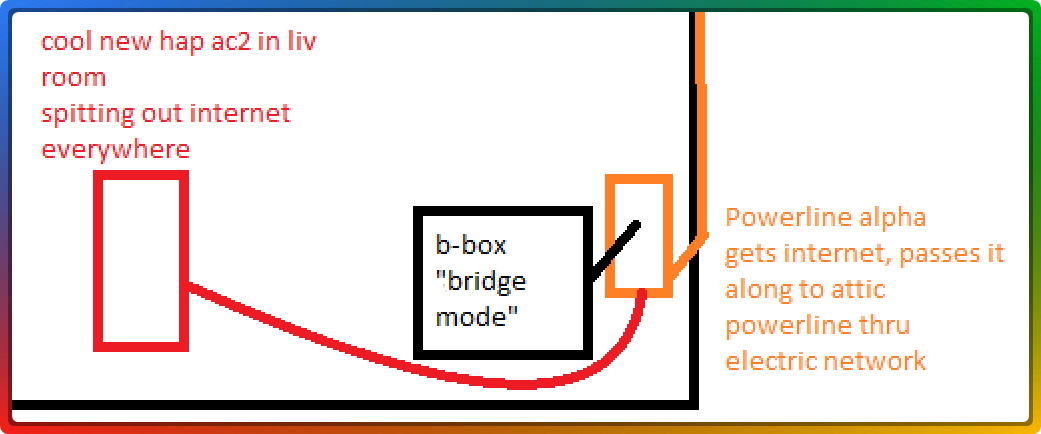
Better?
green forge
@lean pebble What static IP should I uze
lean pebble
What is the internal network IPs you got ?
192.168.0.1/24 or something like 10.0.0/8
Do ipconfig in cmd
 lean pebble
Ok
green forge
Even though there inst internet on my pc I can access router
tame carbon
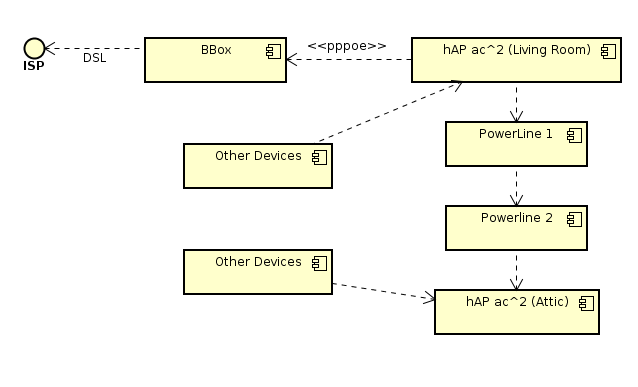
@vestal lotus https://i.imgur.com/oY90s8X.png
 green forge
And it shows wifi fine
lean pebble
I always setting up my network subnet alone that's why I know what IP should be free
lean pebble
green forge
Even though there inst internet on my pc I can access router
Yeah because it's inside your internal network
green forge
Ok and what do I do with that ip
So I have my pc ip
Do I make it static or something
lean pebble
Need to see how your router configure IPs and find what free.
green forge
Idk how to do that
lean pebble
Need to connect to your router be look for DHCP
tame carbon
@vestal lotus the direction the arrows point do not really matter, since there's traffic in either direction
lean pebble
You can connect to your router if you get IP address.
192.168.0.1 is your router internal IP
green forge
Yeah
lean pebble
Write it in your browser
green forge
Since I have 2 ethernet ports I connected to 2.5 and it works for now
Just update please
lean pebble
Ok
lean pebble
So it's not IP problem I think maybe driver update
lean pebble
Or antivirus that block your network
lean pebble
Only this pc have this issue ?
lean pebble
I need to see it
vestal lotus
tame carbon
<@!399563484951609354> the direction the arrows point do not really matter, sinc...
I think I get it now? Correct me if I got something wrong.
Living Room would be talking with BBox (who would be talking to the ISP), while also handling Powerline 1 and serving other devices.
Powerline 1 would talk to Powerline 2, who would talk to AC2 (who is handling other devices).
tame carbon
@vestal lotus think of the powerline as just a way to plug a cable between the two APs
both of them can be a router or wifi AP, at same time or seperately
you will only use one of them as your router
the other will just be there to distribute the internet
the firewall configuration and such will all be on the one in your living room
vestal lotus
tame carbon
you will only use one of them as your router
Powerline 1 would be the router in this case, right?
 vestal lotus
Which would leave 3 ports free.
green forge
@lean pebble I'm in what do I do after this
tame carbon
the other side of the powerline, that is in your attic
that will just plug into any port
that 2nd hAP you have, will not have a firewall or routing.
It just forwards packets as if it were a switch
vestal lotus
tame carbon
you can use those for TV or whatever else you need wired network on
TV is a smart one (samsung), so, it has wifi. I'll use Wi-Fi for it.
tame carbon
@vestal lotus the more you can put on wired, the more stable your wireless will be
less clients = less chatter = faster
TV is a constant 14mbit/s stream
that sort of stuff is best on wire
green forge
@lean pebble I have sys logs would that help?
tame carbon
@vestal lotus https://i.imgur.com/0ois79d.png Quite a few devices xD
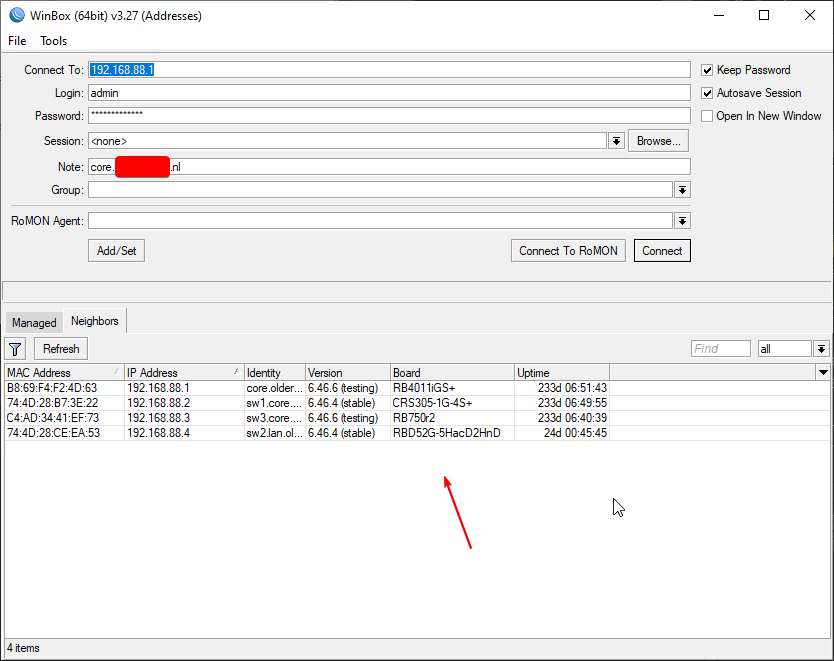





 vestal lotus
tame carbon
TV is a constant 14mbit/s stream
vestal lotus
tame carbon
TV is a constant 14mbit/s stream
Hmmm...
tame carbon
if its in the same room
and you can use 5GHz, then don't bother
thats fast enough
I am behind a wall, and on 5GHz I still get ~160mbit/s
vestal lotus
tame carbon
that 2nd hAP you have, will not have a firewall or routing.
It just forwards p...
So, Attic would be the guy handling the packets from powerline 2, while Powerline 1 and the living room hAP are doing all the work?