#networking
1 messages · Page 339 of 1
 tender hazel
 shy cosmos
175/90 (Mbps)
tender hazel
that seems low unless it is try to save power
shy cosmos
tender hazel
that seems low unless it is try to save power
ok
so how do i change it?
or
tender hazel
you don't really have a lot of control over that - are you plugged in right now or are you on battery
shy cosmos
im on a desktopp
shy cosmos
like which in spesific
tender hazel
your wireless driver
 tender hazel
that's not a good way of updating
go to intel, they have a driver update thing
the drivers in windows update are often older than the ones from the manufacturer
also, see this: https://community.intel.com/t5/Wireless/Why-is-my-upload-so-slow-on-the-AX200/td-p/630281
Hey, Just got a new MSI tomahawk x570 motherboard which includes this wifi card. However for some reason the speed of the upload is unreasonably slow. We have 200/200mbps fiber internet which worked fine with the previous netgear ac1200 a6210 usb dongle. however with this card I can't even reach 5mb...
not sure if you have an MSI motherboard, if you do, that might be impacting things
some kind of program called "cfosspeed" that comes with "MSI Dragon Center"
apparently slows down the wireless upload speed
tender hazel
what did?
tender hazel
great
shy cosmos
thank you
tender hazel
you're welcome
 tame carbon
KILLLER™️ Network Interface 
tender hazel
killer with three L's?
 low pond
tame carbon
KILLLER™️ Network Interface <:kek:770338921241640971>
low pond
tame carbon
KILLLER™️ Network Interface <:kek:770338921241640971>
KILLER 2.5G LAN
 thick minnow
low pond
**KILLER 2.5G LAN**
thick minnow
low pond
**KILLER 2.5G LAN**
I had a killer nic once
low pond
WTF YOU NIC IS A KILLER?
thick minnow
e2100? Idr name
low pond
so bad. how much packets did it murder
thick minnow
Was goat
low pond
xD
thick minnow
Gave it away when I got tired of unstable internet & used Intel nic instead

Or was it bad win10 support
Cant remember
 copper rover
Anyone familiar with WSD printing? How does it advertise over the network? Is this printer or client initiated on multi-cast lookup? Does it use mDNS?
I'm thinking I need to allow mDNS IP helper on a NAT between WLAN and LAN, but not sure if mDNS will help in that regard.
 flat wagon
tame carbon
KILLLER™️ Network Interface <:kek:770338921241640971>
flat wagon
tame carbon
KILLLER™️ Network Interface <:kek:770338921241640971>
why do people hate on KILLER network interfaces? what disadvantage does it have over the Intel one? many high end motherboards always advertising killer network ports so I always assumed it was good until I saw forum posts about how bad it is
 peak cloak
flat wagon
why do people hate on KILLER network interfaces? what disadvantage does it have ...
peak cloak
flat wagon
why do people hate on KILLER network interfaces? what disadvantage does it have ...
support
 mighty wind
Yeah that's my problem. I have an issue where I plugin in a network cable and it wont do anything. I have to disable and enable the port again to get it to realize there is a network available. No support...
copper rover
Modern NICs do TCP/IP offloading. Though more of the stack is offloaded with Windows Server edition which is why some consumer NICs aren't compatible.
I do believe that KILLER is just a sever grade NIC chipset that does more offloading in Windows Home/Pro with software QoS. Basically you would in theory get the same out of Windows Server

Learn how to tune the performance network adapters for computers that are running Windows Server 2016 and later versions.
low pond
I never knew that was possible, the offloading stuff
I taught NIC was just a, piece of hardware connected directly. The kernel has all the code of how to operate it
peak cloak
low pond
I taught NIC was just a, piece of hardware connected directly. The kernel has al...
like arp, arp is done by the nic, not really the kernel
iirc
low pond
Oh i see
tame carbon
flat wagon
why do people hate on KILLER network interfaces? what disadvantage does it have ...
They try to do some kind of QoS to "decrease" lag. But this is nonsensical. QoS is done with a queue, and queues increase latency
also, their marketing is 90% bullshit
@low pond kernel takes care of networking too. Layers 1-3 are the media layers those are handled by the NIC, or close to it (firmware)
These protocols are standardized in the kernel
layer 4 and up is entirely done by the host

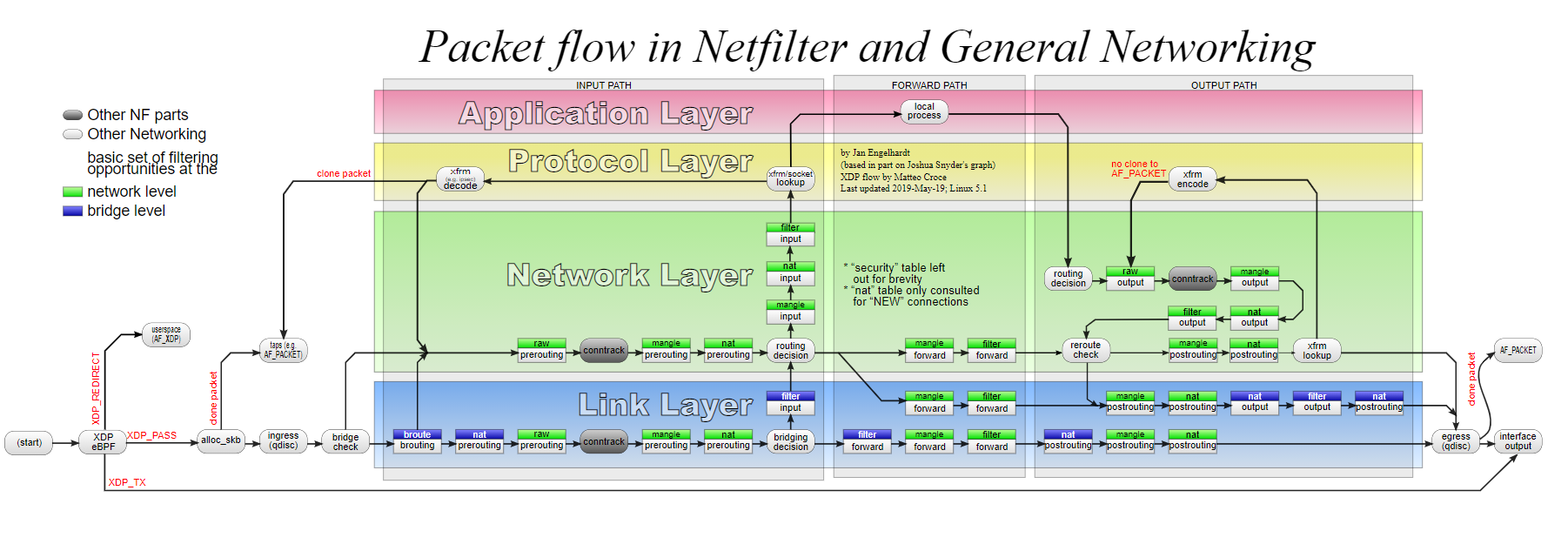
windows does not apply.
it has its own network stack
tame carbon
@peak cloak lol https://i.imgur.com/6gQr4zt.png

have a go yourself

MSI Afterburner is the world’s most recognized and widely used graphics card overclocking utility. It provides detailed overview of your hardware and comes with some additional features like customizing fan profiles, benchmarking and video recording.
also, try the download button, its amusing
also, love it when websites change my cursor
peak cloak
tame carbon
<@!222482269829332992> lol https://i.imgur.com/6gQr4zt.png
I mean it loads, but like download doesn't work at all and the curser is just cringe
 peak cloak
yeahhh
I hate those
I mean it looks nice in certain situations, but this is just cringe
tame carbon
look, material design can be really cool
peak cloak
and overdone
tame carbon
but
you have to do it properly
look at apple
they nailed it
they have some adverts
peak cloak
spacex did it well too https://www.spacex.com/vehicles/falcon-9/
the website is honestly pretty good
tame carbon
yeah but that has clear page seperations
and just
junk that appears when you scroll enough
peak cloak
also @tame carbon do you have any experience with rollup?
tame carbon
nope
peak cloak
trying to pass along a .env
tame carbon
javascript
peak cloak
yeah
tame carbon
idek what that is
@peak cloak my only time using webpack was last semester of school yeah, but I regularly chatted about this
that was my first and only time, doing actual programming for web with node
I was just given a script
peak cloak
@tame carbon so the full situation is I'm making a discord bot in js, wanted to use ts. However I wanted to use es6 import/export. Node supports that, however you need to use .mjs files, which tsc won't do
tame carbon
and tweaked it a bit to my needs
the only reason i can just draw from knowledge with java is because, I've been doing that for 9 years...
node in particular, with all its libraries is just a bit unknown to me
angular, and the codebase at work is..
peak cloak
tried tsdx, which I'm trying rn, but a whole whopping 250mb of node_modules
tame carbon
ooooof
I looked at it for 2 hours today
and my head started hurting
garbage everywhere
like i open a file
entire bar on the right side in my IDE
completely red.
yet it runs
?!
peak cloak
tame carbon
entire bar on the right side in my IDE
what ide
tame carbon
IDEA
peak cloak
tame carbon
completely red.
maybe because jsx
tame carbon
no its just angular
peak cloak
maybe need angular plugin
peak cloak
ohh
tame carbon
because of all the poor style
; intermittendly
and
lots of trailing whitespace
everything is red
maybe have to disable the linter for a while
peak cloak
maybe I should just use deno..
copper rover
peak cloak
I mean it looks nice in certain situations, but this is just cringe
It's to cater to the tablet UI as the common denominator. And yes, that paradigm is total ass!
low pond
Damn is switching back to windows so bad
One of my friends are really hating me legit for it
 waxen saddle
low pond
One of my friends are really hating me legit for it
waxen saddle
low pond
One of my friends are really hating me legit for it
Might want to consider if they are actually your friend or shallow enough to drop them as a friend. Seriously, their attitude appears to be immature and elitist.
low pond
waxen saddle
Might want to consider if they are actually your friend or shallow enough to dro...
No one is my friend, not gonna put my emotional breakdown here but they are anyways just online Discord people tbh
I made them interested in Linux, yea
I am temporarily just going to windows and they say they feel betrayed and stuff but at the end they concluded it is my laptop anyway so its my wish but "please dont talk about your windows here"
tender hazel
for certain things, linux just isn't an option
I do music technology stuff professionally, and linux is not an option for that, period
(in addition to my network engineer job)
peak cloak
yep, it's ok to switch between OSes
linux for dev
music and video is basically windows
you can get stuff done on linux, but it's kinda a pain
tender hazel
well it is not only that - for things like music production, 90%+ of the good commercial tools and sample libraries and samplers and plugins are windows and mac only
no linux support
peak cloak
yeah
tender hazel
so if you are trying to sell music, and it sounds kinda crappy compared to everybody else's music who is on windows and mac because you have to restrict yourself to the few things that will run on linux, that's not a good way to sell music
you can put up a disclaimer saying "sorry this kinda sounds like crap, but I use linux and there is no good music stuff available for linux"
but that's not likely to make stuff sell
tender hazel
exactly, you have to be pragmatic about things
some people are just so FOSS fanboy-ish and refuse to use any commercial software b/c they believe it is immoral to actually make money from software
but for niche software programs you are almost never going to get the amount of investment compared to open source software that everybody uses, like apache web server and nginx
developers have to live
 lean pebble
https://64.media.tumblr.com/374c1e053241f9bd99721187e81be4ae/tumblr_inline_pto5pvl8Fl1skb2to_640.jpg
 tender hazel
windows doesn't have to update that often
I have to reboot like once every month or two to update
waxen saddle
Once a month, on "Patch Tuesday". I've set it up as a calendar item so I'm notified the day before.
 simple frigate
you guys think that the reason my chrome download speeds are really slow is cause of malware? I normally get 100mbps on a speedtest and 10-15mbps on games. downloading on chrome takes 1-2 hours for a 10gb file..
copper rover
tender hazel
I have to reboot like once every month or two to update
I've seen a Windows HyperV server run for 580+ days before. Obviously never patched in that time. But hey, it ran that long. Can't say it's not reliable so long as the underlying hardware is.
And no, it wasn't mine. I inherited that little project as part of a job
 worthy tusk
anyone have experience with proxmox?
my vm just moved to another node for some reason
im not sure what happened
 plain siren
worthy tusk
my vm just moved to another node for some reason
plain siren
worthy tusk
my vm just moved to another node for some reason
It shouldnt just randomly move
Unless there is some sort of load balancing enable in your cluster manager
 low horizon
I've been trying to setup a minecraft server to play with my friends but I'm just not able to get it to work. I've setup port forwarding on my router with the right port number for TCP and UDP anol. can anyone help me with this?
tame carbon
@low horizon sure
You only need to forward 25565/tcp
Could you run a traceroute for me? (To verify if you are not behind a CG-NAT)
open command prompt and run: tracert 1.1.1.1 (on macOS/linux: traceroute 1.1.1.1)
 keen urchin
tender hazel
but for niche software programs you are almost never going to get the amount of ...
keen urchin
tender hazel
but for niche software programs you are almost never going to get the amount of ...
exactly. Get software from someone that it's their whole job. Because they give a shit a lot more than you ever will. Works for personal and work. eg... I bought teracopy ages ago, and I bought a lifetime subscription to digital blasphemy, as well as a display fusion license
tame carbon
imagine using an operating system where your file browser is optional
windows workflows are gross
and all the paid solutions that try to fix it, aren't attack the problem the right way
why would you pay for a program to copy files more efficiently 🤣
keen urchin
Why wouldn't you pay to make your life easier
plain siren
keen urchin
exactly. Get software from someone that it's their whole job. Because they give ...
One I personally paid for because I loved it so much:
TC4Shell
Its 7zip in Explorer basically.
 keen urchin
yep
exactly.
I mean, don't get me wrong, I didn't pay for shit when I was a poor student, because my time was also worthless
 little schooner
@plain siren TC4Shells let's you save changes to files directly in the archive too?
or is it just for quickly viewing contents
plain siren
little schooner
<@589542595341058048> TC4Shells let's you save changes to files directly in the ...
Yes
little schooner
I see myself using it for quickly editing .wim image files
sometimes I just want to replace one file in wim and repackage
not going through the whole dism process
plain siren
little schooner
not going through the whole dism process
I try to avoid making modifications to the source image
lean pebble
tender hazel
windows doesn't have to update that often
but every update take long time to download and install
 rose sparrow
Hey! Any cable internet expert here?
peak cloak
rose sparrow
Hey! Any cable internet expert here?
just ask your question
rose sparrow
My modem keeps reseting (dropping connection) so I complained about it to my provider. Their technician said that my upstream is bad and the modem has to shout-out too loud for upstream
and because of lockdown in my area; the technicians can't visit
So any sugessions how can i improve upstream quality?
Modem is good, it has no issues
peak cloak
rose sparrow
So any sugessions how can i improve upstream quality?
not really, it's an issue on the ISPs end
Idk too much about DOCISS but maybe someone here may have other suggestions
rose sparrow
They say it's a small issue and they just have to change the socket
plain siren
From what they are saying, they are suggesting there is too much noise on the line
rose sparrow
peak cloak
Idk too much about DOCISS but maybe someone here may have other suggestions
yeah thats the issue, no one is much aware about DOCSIS
plain siren
And that it may be caused by a bad connection
rose sparrow
plain siren
From what they are saying, they are suggesting there is too much noise on the li...
They say there's too much signal loss on upstream
plain siren
DOCSIS is basically RF over Coax without actually using RF
 fathom plover
rose sparrow
So any sugessions how can i improve upstream quality?
fathom plover
rose sparrow
So any sugessions how can i improve upstream quality?
How many splitters do you have on the line?
plain siren
How old is the coax
rose sparrow
the main line is since 2003
plain siren
Yeah, I bet the link is starting to degrade then...
rose sparrow
and my line is since 2019
plain siren
They prob need to change the service terminal block
Those things get weathered over time
Rust away, break down, etc
fathom plover
what provider might I ask?
rose sparrow
they recently changed the tap and the fat the cable that comes from the previous tap
rose sparrow
fathom plover
what provider might I ask?
YouBroadband
peak cloak
ah, India
rose sparrow
yup 😅
plain siren
rose sparrow
they recently changed the tap and the fat the cable that comes from the previous...
Well, ok everyone here can ostracize me later but Ima suggest it anyways:
You got access to the service box outside?
rose sparrow
yes
plain siren
The one that feeds the easement, not the one on your house
fathom plover
plain siren
Well, ok everyone here can ostracize me later but Ima suggest it anyways:
You go...
might break tos be very careful
fathom plover
plain siren
The one that feeds the easement, not the one on your house
nonononononono
that breaks so many laws
rose sparrow
I have access to the tap
plain siren
"bite me"
rose sparrow
thats all
A bit of googling led me to a conclusion that if I insert my coax to the termination point, it will help a bit
mine is the last tap
plain siren
Uhm, so wait... this is a single line that breaks off into many connection points right?
plain siren
Are we talking Termination > HOUSE1, HOUSE2, HOUSE3 or Termination > HOUSE1 > Room1, Room2, Room3
rose sparrow
the first case
rose sparrow
As we are talking, I called up the technician; he suggested that they would be putting a device called Active Signal return
plain siren
So you dont wanna bypass a Tap
Its gonna cause noise issues with your upstream neighbors
rose sparrow
plain siren
So you dont wanna bypass a Tap
Is that a option
rose sparrow
Cuz i dont think so i can do that
plain siren
It doesnt fix signal fidelity
rose sparrow
Yes ik, these technicians comeup with useless solutions, I have had a similar experience in the past
plain siren
From what I am betting
One of the taps feeding your neighbors is degrading
is this a multi family unit?
Like an apt or town home
 plain siren
Do you know if its MAIN FEED > TAP 1 Device > TAP 2 Device > TAP 3 Device...etc
or is it 1 box with multiple taps
rose sparrow
If i plug my coax here, would it help
plain siren
Well I wouldnt see why they would be using multiple TAP's + The Multiplex TAP Box at the same time, you should confirm which is being used
Although if they ARE using both, that means that box serves the multiple BUILDINGS and from each one of those connections, each TAP breaks out into each Family unit inside the building
rose sparrow
plain siren
Do you know if its MAIN FEED > TAP 1 Device > TAP 2 Device > TAP 3 Device...etc
...
yes this is the case FTTN>TAP1>TAP2>TAP3>.......>TAP6
rose sparrow
plain siren
Although if they ARE using both, that means that box serves the multiple BUILDIN...
Yes
plain siren
OH SO THEY ARE USING BOTH?
Yikes, someone cheaped out on infra
If you connected directly to that box, it would basically cut off your neighbors
rose sparrow
plain siren
Yikes, someone cheaped out on infra
Thats the situation of every cable company in India
rose sparrow
plain siren
If you connected directly to that box, it would basically cut off your neighbors
No my tap is the last one
rose sparrow
rose sparrow
So basically this point is expty
plain siren
But all of you are on the same line, you cant bypass your neighbors
rose sparrow
empty
plain siren
 rose sparrow
give me a sec
plain siren
So this is how a "Pure Drop-Tap" feed works

How you are describing
You got termination (Head-end) then each tap serves a unit
plain siren
rose sparrow
give me a sec
I should ask this: Is there only 1 COAX Feed into your unit?

 plain siren
yeah you could bypass the coupler in your wall and go straight coax from your MODEM <> TAP
And maybe it might help
but more than likely, your issue is caused as they said... upstream
which you cant really touch
rose sparrow
I had a question, are these ports assigned to users?
plain siren
Not in DOCSIS
fathom plover
I have docsis too right now but I soon plan to upgrade to fiber 👀
peak cloak
I have verizon fios rn
 woeful arch
rose sparrow
woeful arch
rose sparrow
i like your funny words magic man
fathom plover
peak cloak
I have verizon fios rn
I plan to become my "own isp"
peak cloak
fathom plover
I plan to become my "own isp"
yeah I saw that on your blog
woeful arch
fathom plover
I plan to become my "own isp"
it will be hard but good luck
fathom plover
peak cloak
yeah I saw that on your blog
?
fathom plover
ah yeah lol
fathom plover
woeful arch
it will be hard but good luck
nah I already have tunneled L2 to my house
peak cloak
must be more expensive
peak cloak
fathom plover
nah I already have tunneled L2 to my house
nice, through who?
plain siren
 fathom plover
peak cloak
nice, through who?
fathom plover
peak cloak
nice, through who?
Global Secure Layer
plain siren
Who is your Number Registry?
peak cloak
fathom plover
Global Secure Layer
yeah but who does the physical transit
fathom plover
peak cloak
yeah but who does the physical transit
GRE tunnel to them... physical is technically comcast
peak cloak
ah
fathom plover
plain siren
Who is your Number Registry?
RIPE
rose sparrow
plain siren
Not in DOCSIS
 plain siren
rose sparrow
plain siren
rose sparrow
No
fathom plover
I keep a server in Amsterdam to qualify even though I live in NJ
rose sparrow
oh ok
fathom plover
https://bgp.he.net/AS211562 This is me 🙂
fathom plover
plain siren
I keep one in France
wanna peer?
peak cloak
is ARIN that much more expensive?
fathom plover
peak cloak
is ARIN that much more expensive?
yes
rose sparrow
and the stupid technicians are installing Active Signal Return, and as you said @plain siren , It will make things much worse
fathom plover
I pay $10/year for my AS registration to a LIR
plain siren
fathom plover
wanna peer?
Im doing experimental, so you prob dont wanna pollute your route tables with mine for now.
fathom plover
I get my v6 ranges for free
fathom plover
plain siren
Im doing experimental, so you prob dont wanna pollute your route tables with min...
I have 2 nodes... 1 experimental and 1 prod
plain siren
Oo
plain siren
fathom plover
I get my v6 ranges for free
I wish!
fathom plover
plain siren
Oo
2605:f440:9f90::/48 is my experiment
fathom plover
plain siren
I wish!
are you on EVIX?
rose sparrow
You guys getting ipv6?
plain siren
fathom plover
are you on EVIX?
Yezzir
fathom plover
rose sparrow
You guys getting ipv6?
I own my own v6 ranges
fathom plover
plain siren
Yezzir
heyyyy me too... whats ur AS?
peak cloak
rose sparrow
You guys getting ipv6?
I get it though a HE tunnel
rose sparrow
we dont even get our own ipv4 here
fathom plover
peak cloak
I get it though a HE tunnel
HE charges a shit-ton for bgp tunnels now
rose sparrow
Everything's under CGNAT
fathom plover
rose sparrow
Everything's under CGNAT
oof; that actually sucks
plain siren
Oh god, if I say it, Im gonna get made fun of for its reg name
fathom plover
plain siren
Oh god, if I say it, Im gonna get made fun of for its reg name
I will only judge a little
peak cloak
fathom plover
HE charges a shit-ton for bgp tunnels now
yeah I just do it through the tunnelbroker free service
plain siren
God help me
peak cloak
?
fathom plover
plain siren
God help me
lol what? did you depeer your transit?
plain siren
fathom plover
lol what? did you depeer your transit?
No, I forgot which Node is handling my fucking IRR route sets
fathom plover
plain siren
No, I forgot which Node is handling my fucking IRR route sets
how many nodes do you have? I only have 2 lol
plain siren
I got a few I jump around between depending on what I am doing
fathom plover
plain siren
I got a few I jump around between depending on what I am doing
I assume you use Vultr?
plain siren
Colocation
fathom plover
plain siren
Colocation
ah: I am a college freshman and cannot afford colo... especially in the NYC area
peak cloak
fathom plover
ah: I am a college freshman and cannot afford colo... especially in the NYC area
I'm in the NYC area too...
plain siren
right now the one I have up and running for Asia Network monitoring is in HK (of all Places)
fathom plover
peak cloak
I'm in the NYC area too...
I am in central NJ... 5 minutes from Rutgers
peak cloak
ah
fathom plover
plain siren
right now the one I have up and running for Asia Network monitoring is in HK (of...
I am thinking of coloing a rasppi in HE fremont
plain siren
there is the France Junkie Box, An Aussie Box, and a Britbong box
fathom plover
peak cloak
thinking about going to rutgers
I go to NJIT lol
peak cloak
or njit as well
plain siren
fathom plover
I am thinking of coloing a rasppi in HE fremont
I really wanna use some raspis to do a nice net spread
peak cloak
state schools, so cheaper
fathom plover
plain siren
I really wanna use some raspis to do a nice net spread
yeah; I have 2 locations both on the east coast... I want a cheap colo somewhere else
Toronto and NJ
plain siren
In the US I got Dallas, Cali, Arizona, NYC, and Miami
fathom plover
plain siren
In the US I got Dallas, Cali, Arizona, NYC, and Miami
wow: every other BGP person I talk to has atleast Fremont
is that ur cali?
fathom plover
plain siren
SF
what dc?
plain siren
EQNIX
fathom plover
plain siren
EQNIX
i bet you pay a fortune for that shit
plain siren
Yeah..... its very costly
fathom plover
plain siren
Yeah..... its very costly
do you want to peer? with NYC?
plain siren
But I get way better "Real route" visibility over the typical problem pipes
Yeet, sure
I really should ditch ARIN
peak cloak
any real drawbacks from using RIPE?
when you are in the US
I'm a noob at bgp and all that
plain siren
peak cloak
any real drawbacks from using RIPE?
Nah
fathom plover
peak cloak
when you are in the US
you have to “maintain service in RIPEs region”
I have a $2.50/month vps in Amsterdam
low pond
fathom plover
I am thinking of coloing a rasppi in HE fremont
They sell by the rack, so, buying a rack, for... a single pi. sure
But on the other hand there are usually a lot of resellers, I actually know someone in my dm's itself who has the free rack at HE
Before anyone spams "HE FMT2 YOU MUST BE joking 🤮 EWW WORST NETWORK ever", at least he gets it for "free" :d
and I love my 300+ms pings to there
 hollow marlin
peak cloak
any real drawbacks from using RIPE?
hollow marlin
peak cloak
any real drawbacks from using RIPE?
Most RIRs have a policy against out of region use. ARIN for example allows it only if you have a /22 or greater and fall under 3 or 4 checkboxes (example: must have infrastructure in the region and peered with an AS in that region)
Behind the scenes there are databases in each of the RIRs and are mostly sync'd together. Starting from the bottom up (client->ISP-T2->T1) use these databases when routes are received. The actual databases used for route verification are in RADB or with RPKI and if any of the AS that are advertising space and have not added that into them, the routes are dropped.
So if you register in RIPE and advertise in the US, it could mark the database and your route will not propagate. Using a VPS gets around this because of anycast and their agreements
 hollow sonnet
Will using the DNS Server 1.1.1.1 in North Central U.S. make gaming faster? Or does it just make browsing faster.
peak cloak
hollow sonnet
Will using the DNS Server 1.1.1.1 in North Central U.S. make gaming faster? Or d...
it makes dns resolution faster. It may make websites and certain tasks feel more snappy, but once a hostname is looked up, it's cached and will make no difference
hollow sonnet
okay
hollow sonnet
peak cloak
it makes dns resolution faster. It may make websites and certain tasks feel more...
So it will enhance web browsing but It will make no difference when gaming
peak cloak
hollow sonnet
So it will enhance web browsing but It will make no difference when gaming
well, all it does is make dns resolution faster, web browsing is where you are making lots of difference dns requests, whereas in gaming you get one hostname for the server and you use that for the whole session.
It won't improve your latency
 inner pine
Need help!!!!
Suppose say I have two routers connected one under an other (ie the 2nd router wan is connected to lan port of 1st router) and now if I enable port forwarding on my 2 nd router (say port 80),will that port be forwarded to the internet or to the above network (the network of 1st router)
peak cloak
inner pine
Need help!!!!
Suppose say I have two routers connected one under an other (ie t...
no
you only want NAT on one router
and make the other an AP
inner pine
peak cloak
no
No as in Port is forwarded to the above network
 tawny flint
@tame carbon
so i have the TL-SG2210MP
do i need it on POE or Speed the seting for the switch my upload speed isn't great (Australia 😦 )
i get around
 tame carbon
@tawny flint what do you mean?
switch itself is just a switch, it can switch at full gigabit speeds
its just, your WAN that is slow in this example
tawny flint
like for local when i am home i can check when i am outside and i set the switch to POE and it like full gigabit speed but the upload speed is like 20mbps im guessing that would do nothing?
tame carbon
PoE just injects power over an ethernet cable alongside data
I thought you had a bunch of devices that required this
I forgot the premise
tawny flint
i have 5 camera and nas that can do 1gbps and my pc :3
tame carbon
Exactly
tawny flint
so i just do Speed and have the camera on 100mbps i guess
tame carbon
huh?
tawny flint

 tame carbon
@tawny flint should be able to do both gigabit and PoE at the same time
You need to connect to the web configuration
Thats where you can do per-port configuration
tawny flint
i see i will work it on it later then
tame carbon
this is a "smart" switch
tame carbon
@tawny flint I would configure the switch first
tawny flint
ok
tame carbon
Most switches set themselves a default IP
or they grab one from DHCP if they can
varies from brand to brand
tawny flint
yea everything i set hs like 2 3 4 5 6 7 8 9 10 almost single digit number
tame carbon
my switch actually configures itself like a router xD
its just that I do not use the routing features, purely switching
 tame carbon
Standalone Mode
■ Using the GUI: Open a web browser on your computer and type the default management address
http://192.168.0.1 in the address field, then press the Enter key. The default username and password
are both admin in lower case letters.
■ Using the CLI: Set up a Telnet or SSH connection to access the CLI (command-line interface).
hmmmm it stop working the camera
tame carbon
YOu need to configure PoE negotiation for each port that you need it on
tawny flint
tawny flint
this ^
tawny flint
port 8 7 6 5 4
tame carbon
idk how to work this web UI
you'll have to figure this out
you can post screenshots if you need a hint
tawny flint
but when i set it 1000M it dies the network
tame carbon
@tawny flint are you sure your cameras even do gigabit ethernet?
they may just use fast ethernet
tawny flint
using cat5E cable
tame carbon
no the interface on the cameras

 tame carbon
itll pick the fastest link speed
the modules i Have over here do not support auto negotiate
I have to manually set it
tawny flint
i just set it back normal so let it do it stuff
tawny flint
yea if they cameras are gigbit but they not
tame carbon
well, it would explicitly say so on the packaging
but a camera would have enough for 100mbit/s
I have 4 cams here and they total to around 50mbit/s
tawny flint
it doesn't say on the box but on the quick start nothing XD only on website and spec sheet on web

thx Crystal was kinda a dumb question 😐
tame carbon
np
 deft crystal
 willow hinge
Hey so what should I group into virtual servers?
Things I need are print server, web server for a medium size company, User authentication, Highly secure storage, on site backup,Redundancy for fault tolerance File storage for employees, Control of access to programs, DHCP, DNS
 surreal shore
I have a question, my box supports 10GB ethernet with an SFP + Port.
I can either get an SFP + 10GB RJ45 Adatper then a Cat7 cable to a 10GB pcie RJ45 10GB adapter to get ethernet, but this costs around 200$ all together
And I can also get an SFP + 10GB DAC cable with an SFP + pcie adapter which costs around 50$
My question is, the second option should be able to give my pc internet, I'm unsure if it does or if it only works with local ethernet.
tame carbon
@surreal shore If you have SFP+ use SFP+, going onto RJ45 10GbE is very expensive.
SFP+ interfaces just use ethernet, so it doesn't make a difference.
DAC cables are limited in distance if you need more cable length you can get active optical cables, or get module & patch fibers seperately.
surreal shore
Thank you @tame carbon yes I did my research before
tame carbon
Do you have a switch ?
surreal shore
I got a 3m dac with a PCI express SPF+ dell
My modem has it, I will only use it for my pc I don't need a switch
tame carbon
Are you certain that this SFP+ port on your modem can be used for LAN?
tame carbon
I've seen some ISP boxes that have support for SFP+ as WAN interface (fiber internet)
surreal shore
It's LAN,
tame carbon
Ok :D
surreal shore

La nouvelle Freebox Delta de Free vous permet d'atteindre 10Gbit/s avec la fibre.
Afin de bénéficier de ce débit sur votre réseau local, il y a plusieurs informations à connaitre. A l'issue de ce tutoriel, les solutions pour créer un réseau 10Gbit/s à la maison avec Free n'auront plus de secrets pour vous !
Tous les scénarios et équipements p...
It's in French but I saw this video and did some research
tame carbon

I have this for my 10G 'backbone' at home
its like $120
4x 10G
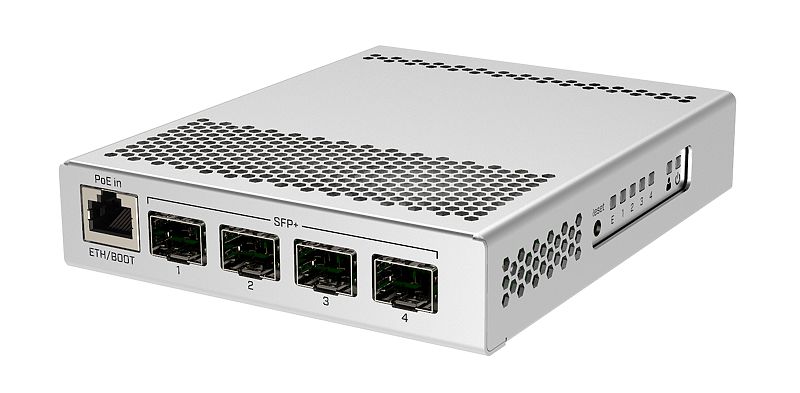
@surreal shore I guess for reference: https://mikrotik.com/product/crs305_1g_4s_in

MikroTik is a Latvian company which was founded in 1996 to develop routers and wireless ISP systems. MikroTik now provides hardware and software for Internet connectivity in most of the countries around the world.
surreal shore
Yup
tame carbon
Yeah, I dropped quite a lot of money on Intel NICs
but then again, they are intel NICs
reliable, and never breaks if you try advanced features
THose cards cost ~80 bucks
@surreal shore good source for fiber patch cables, DACs and AOCs is: http://fs.com

FS
FS is a new brand in Data Center, Enterprise, Telecom Solutions. We make it easy and cost-effective for IT professionals to enable their business solutions.
you can buy straight from manufacturer, they ship worldwide
you can order custom lengths of pre-spliced fiber and such
very handy :)
surreal shore
Yeah I saw this one
tame carbon
custom fibers take a while to ship though
surreal shore
But the pcie was too expensive since I just want to do it for ethernet
tame carbon
they are fabbed in china, and then shipped
@surreal shore yeah but have you seen what 10GbE interfaces cost? :D
you have RJ45 on your PC.. then you need RJ45 on your switch as well
and those SFP+ RJ45 modules cost ~50 bucks each
10GbE capable switches (no SFP+) cost like double of what the SFP+ variant costs
RJ45 is only really sensible for 1G, and 10G up to 25 meters..
at 10G I wouldn't use copper, fiber is just easier
surreal shore
Yeah rj45 10g Is like 100, then you need the SPF adapter for 45 and then the cat7 cable
xD
tame carbon
Lemme share picture of my network rack
https://cdn.discordapp.com/attachments/776722183119699988/777646103775674368/IMG-20200922-WA0001.jpg

The ISP fiber is on the left (only 1G)
The other fiber (on the spool) is my local 10G
that 10G switch is in my office, connected to that fiber
Those fiber modules are like $15 each
And 100 meters of singlemode duplex fiber is like ~40 bucks
@surreal shore but the CRS305 is perfect for someone who wants to get into 10G networking
I have mine paired with this router: https://mikrotik.com/product/rb4011igs_rm
MikroTik is a Latvian company which was founded in 1996 to develop routers and wireless ISP systems. MikroTik now provides hardware and software for Internet connectivity in most of the countries around the world.
surreal shore
I don't need the networking for my house, I just want to take advantage of the 10gb from my ISP
With my main tower
tame carbon
@surreal shore It would make sense though, if you had a NAS or something alike.
My friend at home has 1G fiber optics, and a 1G NAS.
When he's downloading movies and such, he runs into the issue that he can only do one thing at one time.
He is using 10G to be able to do both at the same time.
surreal shore
well with 6000mb download I can stream movies Im pretty sure
😂

after I get the 10gb stuff I should have 6000mbps down
3000 to 6k

Connexion Fibre FREE PON ( 10gbits)
Down : 10gbps ( Réel 8Gbits )
Up : 600 Mbits
Tests effectués sur différents serveurs.
Vous avez un tuto réalisé par Antho Tips , ou comment créer un réseau 10gbps avec la Freebox Delta dispo en vidéo sur le lien suivant : https://www.youtube.com/watch?v=0qQoffTow7o&t=5s ou directement sur son site : https://a...
tame carbon
@surreal shore that.. is a speedy connection, I'm almost jealous.
I have only 250M here, but at least its only 5ms to the Amsterdam exchange. Front row seat to the largest exchange in europe
thick minnow
can i ask for troubleshooting help in here?
tame carbon
network related, then yes
tame carbon
This place is rather quiet now too, but if you post your query people will see it
thick minnow
oki
tame carbon
I'm working right now, and only pay half attention here
tame carbon
Yeah people will ping if they can help you out
thick minnow
i dont have time to wait around either ngl
tame carbon
just post your question :D
thick minnow
okii
thanks!
My ethernet is gigabit, its a realtek chip, it has fully updated drivers, and yet, during speedtest and any other web use, it has lower speeds , and when using wifi, the speeds are good.
download speeds are good, but uploads suck soooo bad i almost was gonna scream at my isp customer service for no reason
its a laptop...and isp is providing proper speeds, i pay for 100, i got near 100 upload on wifi, but on ethernet max was 60s to 70s.
and most of the time ethernet upload was as slow as 3 mbps upload
tame carbon
So.. wireless is a-ok, but wired is messing up??
thick minnow
yes
tame carbon
That is indeed strange
thick minnow
mhm
tame carbon
are you directly plugged into the router?
thick minnow
directly yes
surreal shore
what is the lenght of the cable
thick minnow
abt 2 meters
surreal shore
cat6?
surreal shore
weird
tame carbon
@thick minnow can you go to network and sharing center
look at what the negotiated link speed is
thick minnow
ok
tame carbon
should be under network adapter status (not too familair with windows)
thick minnow
yes i got it
tame carbon
It either negotiates 100M or 1000M (1G)
tame carbon
Okay, so physically there's nothing wrong
It has a gigabit link to your network gear
tame carbon
okay, and if you do a test: http://fast.com/
How fast is your download speed? In seconds, FAST.com's simple Internet speed test will estimate your ISP speed.
This uses netflix' content servers, so usually bit more accurate
lean pebble
IP grabber ?
lean pebble
😂
tame carbon
more reliable than speedtest
thick minnow
im just.....idk
 tame carbon
That's good no?
surreal shore
upload is usually always lower than they advertise
thick minnow
surreal shore
upload is usually always lower than they advertise
but not 70 mbps lower....
surreal shore
mine is 1k up and i get 600
thick minnow
i used to gett 100 all
its just now it started being like this
for like 4-5 months
tame carbon
Contact your service provider.
There's nothing physically wrong with your own side of things
thick minnow
hmm
tame carbon
You can archieve >100M speeds, which means gigabit works
thick minnow
ill try wifi and show you why
tame carbon
Upload being lower, is entirely your ISP's doing, not your own
thick minnow
hmm
thick minnow
other port is fe....maxed out at 80 smthn
tame carbon
roughly 250M
thick minnow
wif doesnt have max speeds for download, or upload, but at least im getting better
speeds
tame carbon
wireless link speed varies anyways
tame carbon
depending on signal strength and such
thick minnow
thing is ethernet.....idk
tame carbon
but it usually is lower than wired
thick minnow
it is
tame carbon
wired being slower, I just cannot picture
thick minnow
but the upload it like 3 times wired
lean pebble
tame carbon
okay, and if you do a test: http://fast.com/
Not reliable as you think.
It shows me 28Mbps down and 11.7Mbps up
While speedtest shows 38Mbps down and 3.43Mbps up
tame carbon
@lean pebble I can just run speedtest and look in winbox
thick minnow
hm
thick minnow
thick minnow
im just.....idk
btw this is my best case scenario
now im going lower
but download is op
tame carbon
 lean pebble
I'm on 4.5 hours of sleep
tame carbon
@thick minnow do you know what kind of internet connection you have??
lean pebble
My country in war again
tame carbon
if it is a coaxial network, speeds can vary
thick minnow
tame carbon
<@456226577798135808> do you know what kind of internet connection you have??
gpon
tame carbon
oh
thick minnow
fibre optic basically
tame carbon
that... I did not expect to behave like that
if your upload is at different speeds throughout the day
thick minnow
exactly!!!!
tame carbon
I think its just your ISP that is overloaded.
thick minnow
not too diff
tame carbon
either way, I would contact them if you believe it is their fault
thick minnow
like i get the same speed each day, except like 3-4 mbps diff
tame carbon
Wired not giving you the full throughput, I have no clear answer for, other than to question the stability of your router/modem
thick minnow
tame carbon
either way, I would contact them if you believe it is their fault
i did ...they tried and for them its showing slightly above my paid speeds....they r giving me extra to get perfect speeds
thick minnow
tame carbon
Wired not giving you the full throughput, I have no clear answer for, other than...
hmmm
starting to question..(did i fry my modem withing just 11 months?)
lean pebble
The problem is the upload speed ?
thick minnow
yes
thick minnow
tame carbon
so I can go back to work 🤣
oh ye u better do
tame carbon
coffee.
lean pebble
All night missile from Gaza
lean pebble
tame carbon
coffee.
I don't like it
thick minnow
lean pebble
I hope I can do this
mate if u cant its fine....I'll just upgrade my plan to get 200 so i get close to 100 upload....
lean pebble
Nah
lean pebble
thick minnow
mate if u cant its fine....I'll just upgrade my plan to get 200 so i get close t...
I can see what I can do
tame carbon
But it is the only reason for me to get out of bed in the morning xD
lean pebble
Well how much devices do you use right now ?
thick minnow
1
thick minnow
lol
tame carbon
if I pay 50 bucks more, I can get 800/800
tame carbon
but 250M is already more than enough for me
thick minnow
dayum
lean pebble
Gimme 400/200
thick minnow
ooh i have to go guys
lean pebble
Hahaha
tame carbon
@thick minnow corporate line, single mode fiber. No GPON :D
thick minnow
my times up
tame carbon
I could contact the ISP
lean pebble
Oh ok cya soon
tame carbon
and get 10G, or 100G
fiber isn't limited, and its a dedicated fiber for each house here
thick minnow
tame carbon
<@456226577798135808> corporate line, single mode fiber. No GPON :D
they dont supply those to us for some reason...cus they say then bandwidth will go lower for corporates..
thick minnow
tame carbon
and get 10G, or 100G
ye idea go searc for isp called bsnl
tame carbon
GPON can do ~2.5G
thick minnow
tame carbon
GPON can do ~2.5G
oog
tame carbon
GPON is 2488mbit downstream and 1244mbit upstream
thick minnow
well gtg
thick minnow
tame carbon
GPON is 2488mbit downstream and 1244mbit upstream
hm
thanks a ton for the help guys
tame carbon
that's what it is physically capable of
thick minnow
hmm
that wud have been good
but thing is im now sure its my isp
my latency is bonkers
and speeds dead
imma call them
tame carbon
@thick minnow latency can be tested
if you do a traceroute
you can see which router is to blame for the latency
thick minnow
oh
oki
ill try
tracert right?
wait help me
idk how to tracerout
how do i find the bad one
oh damn a ton of them just outright failed....
ISP UR IN DEEP TROUBLE
tame carbon
@thick minnow do you have a screenshot?
thick minnow
nop
i dont takes ss (im dumb)
wait this is awkward
this is awkward
just switched to fast ethernet and uploads increased....

but latency ballz
dood like wtf

fast ethernet is giving op uploads mate
idk what to do
isp doing good
 odd panther
Anyone know of a KVM switch that supports two monitors (60 hertz), USB (at least 3 with one 3.0), and can hook up to a PC with a thunderbolt plus the usual connections?
thick minnow
i hab no idea mate
odd panther
This probably isn’t the right channel anyway🤷🏻♂️
thick minnow
odd panther
This probably isn’t the right channel anyway🤷🏻♂️
I mean this is technically an unofficial Linux channel, so...... probably? Butyea #build-a-pc might be the right one
odd panther
I’ll delete my messages and ask there. Thanks!
tame carbon
@thick minnow see if another computer has better results on gigabit
thick minnow
i dont have any other pc with gigabit...
lean pebble
Maybe cable unstable
lean pebble
thick minnow
i dont have any other pc with gigabit...
Cable or wifi?
thick minnow
cable
lean pebble
Can you try replace the cable ?
thick minnow
gigabit ethernet uploads are ballz, but fast ethernet is blazin
thick minnow
lean pebble
Can you try replace the cable ?
no its not cables fault.....
not routers either
cus speeds are really good in fe
lean pebble
I had similar problem and it was the cable
lean pebble
I bought a new cable that never worked 😅
thick minnow
weird thing is u r supposed to get max speeds in gigabit, but im getting them in fe.....
tame carbon
Yeah but if there;s a cable fault..
thick minnow
CONFOOSION 101
tame carbon
then link speed would go down
thick minnow
hm
tame carbon
if it says gigabit, it is gigabit.
thick minnow
ok
tame carbon
you need 8 wires for gigabit
thick minnow
rn its fe and speeds ok
tame carbon
4 wires for 100M
lean pebble
But he pays for 100/100 not giga
thick minnow
tame carbon
4 wires for 100M
hm ok lemme see
tame carbon
But we already established this
thick minnow
ok i habe 8 wires
tame carbon
You can get a gigabit link
waxen saddle
Fast Ethernet uses a smaller subset of physical wires than gigabit Ethernet.
thick minnow
waxen saddle
Fast Ethernet uses a smaller subset of physical wires than gigabit Ethernet.
hmm
tame carbon
2 pairs (4 wires) is enough for 100M
thick minnow
so i shud get cat 7 or smthn?
tame carbon
no
thick minnow
ok
tame carbon
cat5e can do gigabit up to 100 meters
thick minnow
hmm
tame carbon
cat7 is overrated.
thick minnow
lol
lean pebble
I usually use cat6
 clear igloo
Cat7 isn't a TIA/EIA standard anyway
thick minnow
ok so is fe can get 93 mbps, why cant gigabit get it?
tame carbon
standards body
thick minnow
hmmmm oki
lean pebble
I made my own cat6
tame carbon
Telecommunications Industry Association
thick minnow
lean pebble
I made my own cat6
bad or good?
lean pebble
Good
thick minnow
nice
waxen saddle
If the 2 extra wires that gigabit Ethernet uses are damaged, that can cause signal reflections and it has to retransmit packets, causing higher delays
thick minnow
so idk
lean pebble
My cat7 never worked as it should 🤣
thick minnow
waxen saddle
If the 2 extra wires that gigabit Ethernet uses are damaged, that can cause sign...
upload speeds are max of 60 in gigabit, but 95 in fe
help
thick minnow
lean pebble
My cat7 never worked as it should 🤣
lol
waxen saddle
Replace the cable.
thick minnow
oh
waxen saddle
You could try re-crimping the ends, but otherwise, it’s most likely the cable
thick minnow
ok so i set it to fe in my laptop, not in my router...
thick minnow
waxen saddle
You could try re-crimping the ends, but otherwise, it’s most likely the cable
recrimping?
its a dlink cable so....
lean pebble
I'm confused
thick minnow
me too
lean pebble
D-Link cable ? They make network cables ?
thick minnow
apparently there are more like me...but for them its ez fix
thick minnow
lean pebble
D-Link cable ? They make network cables ?
yep they do
lean pebble
Since when
lean pebble
I never saw D-Link network cable
lean pebble
I think you meant that it's came with the router
thick minnow
lean pebble
I think you meant that it's came with the router
nop
bought seperately
i searched for it
waxen saddle
You can actually attach the Ethernet cable plugs yourself. But since you haven’t done it before, might be easier and worthwhile to not bother and just replace the cable
lean pebble
You have different cable ?
thick minnow
ye
lean pebble
If yes connect it instead the used one and speedtest again
lean pebble
What results ?
thick minnow
 lean pebble
Did you try connect it to different port in the router ?
thick minnow
only one ge port
the other is fe....fe gives really good upload
but limited to 95
lean pebble
Did you try restarting your pc
thick minnow
so i get 95
thick minnow
lean pebble
Did you try restarting your pc
for abt 3 months i did
no use
only time waste lol
lean pebble
Upgrading your internet plan will not help
thick minnow
damn
lean pebble
How much ports this router have ?
lean pebble
Directly connected to the router or you're using extender
lean pebble
1 telephone?
Is that ADSL or fiber ?
thick minnow
adsl
lean pebble
Oh
lean pebble
I tough fiber 100/100
thick minnow
telephone-router
thick minnow
lean pebble
I tough fiber 100/100
luky boi
lean pebble
I have 40/3.5Mbps
lean pebble
Lol
thick minnow
lesgo bois we did it
lean pebble
Yeah but this is the plan I pay for because the ISPs here sucks
 lean pebble
Because they're lazy MF and ignoring private houses from fiber even if the fiber behind my house
lean pebble
Where you from
lean pebble
Oh
thick minnow
yep
tis ok
but max speeds in india are 1 gbps
that too only 1 isp gives 1gbps
sedlyf
so any idead?
 weak tinsel
Anyone ever tried Optimum's 1GB network? I currently have a Fios gigabit plan but am switching to optimum cause it cuts my bill in half for the same speeds
lean pebble
India have google fiber
thick minnow
wait will it improve if i use 1pv6?
peak cloak
weak tinsel
Anyone ever tried Optimum's 1GB network? I currently have a Fios gigabit plan bu...
yes it's available here, but for me it would suck. Apparently you HAVE to use their router which a NONO for me
thick minnow
lean pebble
India have google fiber
which?
peak cloak
I used optimum cable
lean pebble
If I remember correctly
thick minnow
huh
peak cloak
so we just used the modem
but now atlice ruined everything
with their all in one ONT, ROUTER
and passthough mode apparently doesn't work
soo
weak tinsel
peak cloak
yes it's available here, but for me it would suck. Apparently you HAVE to use th...
Oh ok, cause we hae our own router that I plan to use
thick minnow
ok gfibre only north american conteinent
peak cloak
weak tinsel
Oh ok, cause we hae our own router that I plan to use
I mean you could... but then you would have double-nat which is a big anoyance and have to deal with issues with their router
weak tinsel
peak cloak
I mean you could... but then you would have double-nat which is a big anoyance a...
This is the router that I have currently https://www.amazon.com/gp/product/B07L56SN8M/ref=ppx_yo_dt_b_asin_title_o07_s00?ie=UTF8&psc=1
weak tinsel
thick minnow
THATS A BIG ROUTER
We need it, my mother is in IT
peak cloak
weak tinsel
We need it, my mother is in IT
not really
weak tinsel
peak cloak
not really
thick minnow
weak tinsel
We need it, my mother is in IT
ooh niceeeee
peak cloak
weak tinsel
<:LUL:667862701560692736>
if you want a pro setup you use a ethernet router, and multiple APs
not that big spiky thing
weak tinsel
peak cloak
if you want a pro setup you use a ethernet router, and multiple APs
Exactly she uses ethernet
thick minnow
ok im tryin ipv6 rn lets see if itll push for me
peak cloak
weak tinsel
Exactly she uses ethernet
yeah... and something like this can handle 1gig just fine

that's what I have
thick minnow
peak cloak
yeah... and something like this can handle 1gig just fine
dont look gamery enuf
but like istg if it fixes my prob ill be damned
thick minnow
I CANT LIVE WITH 9MBPS UPLOAD ALL MY LIFE
weak tinsel
Hopefully the router will work with optimum, I got it from a friend so I don't wanna drop $$ for a new one
peak cloak
weak tinsel
Hopefully the router will work with optimum, I got it from a friend so I don't w...
it will, you will just have double NAT
weak tinsel
It had my IP I just realized 
weak tinsel
peak cloak
?
Of my speed test
peak cloak
oh



 weak tinsel
 weak tinsel
thick minnow
we did it bois
weak tinsel
thick minnow
we did it bois
Noice
peak cloak
weak tinsel
I get 300/300 on fios
thick minnow
how to reduce ping?
weak tinsel
weak tinsel
This is from my computer, I'm probably like 40-50 ft from the router
weak tinsel
peak cloak
no ethernet
Nahh, the router is in my living room
peak cloak
thick minnow
how to reduce ping?
do a traceroute to something like 1.1.1.1
weak tinsel
peak cloak
my whole house is wired up
lucky
peak cloak
weak tinsel
Nahh, the router is in my living room
mines in the basement
peak cloak
and one AP in the middle of the house
peak cloak
thick minnow
and then?
see where the latency is to
weak tinsel
peak cloak
and one AP in the middle of the house
gotcha
peak cloak
thick minnow
after that?
if the latency to the router is low and all the latency is outside you can't do anything
you can post the result here
thick minnow
peak cloak
if the latency to the router is low and all the latency is outside you can't do ...
how do ik latency to router is low?
peak cloak
thick minnow
how do ik latency to router is low?
it will show in traceroute
thick minnow
ok