#networking
1 messages · Page 336 of 1
 peak cloak
peak cloak
peak cloak
well nothing connected to wan interface so it's not there
 tame carbon
@peak cloak usually those letters in front mean how it is configured
D = dynamic
means its the result of a configuration you made elsewhere
 tender hazel
you can use the dhcp setup button, which runs you through a wizard that creates the pool, server, and network in one wizard
I use it all the time as it is faster than making the pool, server and network separately, and less error prone
 waxen scroll
screwed
 hollow marlin
From a customer perspective, nothing. How do you know you are being DDoS'd
 dull mirage
That guy just literally told me..
waxen scroll
i use akamai(R) anti-ddos tunnels(tm)
peak cloak
dull mirage
That guy just literally told me..
how do you know you are actually being ddosed and they are not lying
as long as you aren't running any servers your fine
or have upnp enabled
dull mirage
I'm on my data.. and my WiFi don't even work
waxen scroll
@dull mirage the fact you're talking on here right now means no ddos
dull mirage
Mobile phone . And data
peak cloak
hollow marlin
From a customer perspective, nothing. How do you know you are being DDoS'd
upnp can mess with it tho?
opening services
dull mirage
?
tender hazel
upnp by itself doesn't necessarily make you at risk for DDoS unless upnp is listening for connections on the WAN IP which is very very bad, or unless it opens ports to services that are vulnerable in some way
peak cloak
tender hazel
upnp by itself doesn't necessarily make you at risk for DDoS unless upnp is list...
yeah but when ports are open aren't they subject to attacks like TCP SYN?
dull mirage
So i can't do nothing? :/
peak cloak
dull mirage
So i can't do nothing? :/
unplug router wait, plug it back in
hollow marlin
dull mirage
That guy just literally told me..
Some script kiddy telling you you're being DDoS'd is not an indication. What exactly is not working with wifi?
peak cloak
also that
dull mirage
WiFi is so slow that it not even load a google
hollow marlin
What about device plugged into the router?
tender hazel
we see ddos attacks on our network fairly commonly.. we have about 1500 customers and our system blocks customers for a half hour whenever that customer is DDoS'ed by someone else, and that happens about once a day
hollow marlin
If that PC is plugged in to the router, are you able to test from there
hollow marlin
ping 1.1.1.1 to see if successful and post the latency
dull mirage
Idk how
tender hazel
windws command prompt, ping 1.1.1.1
hollow marlin
peak cloak
yeah but when ports are open aren't they subject to attacks like TCP SYN?
UPnP typically is just dynamic dst. NAT, it would affect internal devices but src./dst. NAT does not involved connection tracking so a SYN flood wouldn't fill up the table. Also many even cheap routers have some screening for it
peak cloak
hollow marlin
UPnP typically is just dynamic dst. NAT, it would affect internal devices but sr...
ah ok
dull mirage
Nothing
hollow marlin
Just reboot the router/modem and test
tender hazel
your ISP may be blackholing you for a period of time, we blackhole our customers for a half hour when they are hit by an attack
most DDoS attacks are only 5 minutes in length because the websites that allow you to DDoS someone only allow a 5 minute attack for free and for longer attacks they have to pay based on the length, and most people don't want to pay
so the fact that you are still down after 5 minutes means that your ISP probably detected the attack and blackholed your address for a time period, and you just have to wait until they remove the blackhole
dull mirage
It's is in 5min intervals
What if it will continue for longer period of time?
Or more people ddos
hollow marlin
tender hazel
so the fact that you are still down after 5 minutes means that your ISP probably...
Thats where flowspec comes in handy
tender hazel
yeah you were telling me before
dull mirage
Idk..
tender hazel
@dull mirage my advice would be try to avoid doing things that make other gamers angry enough to want to DDoS you
dull mirage
I just posted screenshot and after 20min saw my ip
A pak m not even toxic.. people are toxic on me.... Sad
I gtg
 waxen saddle
tender hazel
<@!497807298048163845> my advice would be try to avoid doing things that make ot...
waxen saddle
tender hazel
<@!497807298048163845> my advice would be try to avoid doing things that make ot...
You mean like kick or ban cheaters? ‘Cause that got me DOS’d for 3 days straight.
tender hazel
I avoid playing multiplayer online games for this reason
I'm not saying it is always the fault of the person who gets attacked
gamers can get pissed off for any reason and decide to launch a DDoS attack
waxen saddle
Yep.
tender hazel
and it is of course always the fault of the person who launches the attack and not the person who is being attacked, no matter how the person who is being attacked was behaving
there is never justification for DDoS'ing someone
but if you do play multiplayer online games, keeping a low profile and trying to not gloat or do other things that might piss others off helps to minimize the risks of being a DDoS target
 sweet pawn
Is firewall a network thing or s device thing
I mean like do all devices have separate firewall systems or it's connected to entire network
 copper rover
sweet pawn
Is firewall a network thing or s device thing
copper rover
sweet pawn
Is firewall a network thing or s device thing
It's a function really. Can be a physical box (often it is) or a virtual appliance running as a VM.
Even as an application.
Windows Firewall for example
I've found that the biggest PITA with data storage is data management. So many people collect crap, and never go through it; often piling up for 10+ years. Data management as in getting with end-users sort through it all; delete what is irrelevant, or archive to a folder that later can be moved to cold storage.
Millions of files...it adds up
 thick minnow
Is there no way to set up a server in your own home like a proxy to encrypt your outgoing traffic?
sorry, didnt mean to interrupt
copper rover
thick minnow
Is there no way to set up a server in your own home like a proxy to encrypt your...
From site to site? Like home to another home or office?
Because web traffic over HTTPS is encrypted over port 443. SSL
If site to site as a static configuration, there's always IPSEC VPN
thick minnow
Yeah but im trying to stay away from paying a subscription
thats my goal for this setup, no third party
copper rover
So you want to be outside, but VPN back into your home securely. Correct?
thick minnow
yes
tender hazel
 plain siren
Privacy Address can be rotated
plain siren
Privacy Address can be rotated
even though the privacy address rotates for a device, that doesn't protect you against DDoS
copper rover
thick minnow
yes
So you're looking at OpenVPN

OpenVPN provides flexible VPN solutions for businesses to secure all data communications and extend private network services while maintaining security.
tender hazel
even if your privacy address changes, the attack will still hit your router
or wireguard is more popular now for that than openvpn
thick minnow
Thank you for the pointers
plain siren
tender hazel
even though the privacy address rotates for a device, that doesn't protect you a...
No but most people are too stupid to figure out how to find the other addresses
protects you because of lack of intelligence from skids
tender hazel
but if you are on a regular home service, and you attack a privacy address for the customer, you are basically attacking the entire customer /56 or /48 or whatever it is they are getting
because if you are maxing out the service it will impact the entire prefix
the only thing it might save is if there is a realtime blackhole that is blackholing the individual v6 address only
copper rover
Are DDOS attacks still based on flooding UDP? I know that modern firewalls can drop them, but doesn't really help when the entire route to your CPE gets flooded regardless if the FW can handle it in hardware. No?
As far as I'm aware, the only true mitigation against DDOS attacks is multiple WANs (ISPs) and physical alternate locations for distribution.
plain siren
Skid level ones are. The real impressive ones use something like DNS reflection or service flooding
Your upstream basically has to be larger than the attack and if you want to filter it, you filter it at the IX or ISP
However there is legitimate defensive measures you can take
copper rover
So it's basically a primitive IPS config. Not that I'm complaining, just not sure how effective they are for DDOS. Unless they're all fundamentally the same with the exception of the scope in packets being generated from the botnet?
tender hazel
What we do to mitigate against DDoS attacks is we send our upstream a blackhole route for the customer who is being attacked
meaning our upstream drops them so the attack doesn't use up our internet transit bandwidth
it takes that customer off the internet (at least on IPv4) for a half hour
it is called realtime blackhole (RTBH)
@hollow marlin has brought up flowspec numerous times, and that is a rather recent solution to the problem and looks very promising, but honestly we have a hard enough time finding upstream transit providers that even support RTBH communities and are even less likely to support flowspec if they can't do RTBH
RTBH isn't perfect, but it is a lot better than the alternative - which is, the attack taking down loads more customers than the one who was being targeted
most other providers in our area don't even have any sort of automated DDoS mitigation and just ride out any attacks
and let them cripple their entire network and take down thousands of customers in addition to the targeted customer
a lot of the angry gamers launching the DDoS attacks think that they are only attacking that one person
but usually they are knocking internet offline for several hundred or thousand people, if their ISP doesn't implement any kind of mitigation
copper rover
That's an interesting perspective. Sadly, in effect DDOS is successful either-way in taking their initial target offline.
It's up to the game developers, but I think it should be common practice to require functional AntiVirus before the game is allowed to run. If they want to game, they need to insure their machine isn't part of some botnet. I bet it would reduce the available resources on the darkweb that such DDOS services sell for. If anything, remaining infected clients would go up in price and hopefully out of reach from children being lamers.
tender hazel
copper rover
That's an interesting perspective. Sadly, in effect DDOS is successful either-wa...
Well, if you had to choose between several hundred or thousand customers being taken down by a DDoS attack that is targeting one person, vs only that person being taken down by the attack, which would you prefer?
but also I suspect that most botnets aren't made up of gamers routers, but instead routers belonging to people who are very uncomfortable with technology to begin with
random grandparents or non-tech-savvy older adults who click on a link not realizing what it could mean
it's not exactly fair to the person who is taken down by the DDoS attack
but at least it is more fair to everybody else who are just random users trying to watch netflix and would be taken down by this random attack by a gamer that wasn't even targeted at them
plain siren
The real effort is with the ISPs. Their ability to sniff potentially malicious traffic and filter it at the source before it compiles into a larger problem is a major step in this fight.
I had actually noticed something in the open networking paperwork which makes sense thinking about it now.
The gateways sends diagnostic and telemetry back to the ONT and it's sent to a monitoring station... One of those "standard" SNMP Monitors was "Firewall Alert"
These residential gateways have options to protect against UDP/SYN floods and the likes... I wonder if it's being done upstream by command on these larger carriers...
tender hazel
plain siren
The real effort is with the ISPs. Their ability to sniff potentially malicious t...
The issue is detecting malicious traffic and blocking only it without also blocking traffic that isn't malicious
if you have a DDoS attack going on, each node that is sending packets doesn't necessarily have to send a lot to contribute to the attack
so you'd have to set the threshold pretty low to catch all of the botnet nodes participating in the attack
and if you set it that low, then you risk flagging legitimate traffic as DDoS and blocking the customer
I mean from the ISP side what do you see from the botnet-infected router participating in a DDoS? Just a high bandwidth UDP stream to a single IP
which could be a DDoS attack
but it could also be some other random stream like streaming video or a torrent or even potentially online backup software
I personally wouldn't necessarily trust anything that is going to detect DDoS at the source unless it is smart enough to actually detect specific botnet infections
like if the solution can determine that that host is actually infected with a botnet that is one thing
but if it simply assumes it is a DDoS because it is nearly maxing out upload with a UDP stream to one IP..
that could have a perfectly legitimate reason
plain siren
However if you were to let's say.. compare it to other traffic and you happen to notice the same traffic firing off from different points at the same time..
tender hazel
plain siren
However if you were to let's say.. compare it to other traffic and you happen to...
That can potentially work if it is the same ISP that detects both
plain siren
Oooo there has to be some fun advances by now
tender hazel
but obviously you can't pick up if random nodes on unrelated ISPs are sending UDP to the same IP
unless.. you built a way for the target to notify the attackers ISP directly
the ISP that has an IP under attack knows it, and can detect what IPs are attacking theoretically
obviously they could be spoofed
but I wonder if it might make sense to have a solution to actually notify the source ISP of those events
I mean if we could log into something and see "your customers at these IPs launched DDoS attacks on other customers on this date/time"
and we can corroborate it with traffic, at least we know which of our customers might have botnet infestations in their routers
and prevent them from happening in the future
it would have to be some kind of automated process and not manual notifications because those are too hard to research
tame carbon
@tender hazel nice idea
next up: DOJ wants access to your system
issue is that if you want to effectively snuff DDoS attacks from residential connections, gonna be hard
there's too many ISPs, and half of them don't even know what they are doing
let alone get them to cooperate with one another :P
tender hazel
how much cooperation would it take? You detect a DDoS attack on one of your customers, you update some online registry and show that the attack was launched from this group of IPs at this time
other ISPs could search the registry to see if one of their IPs was involved and double check with live traffic graphs around that time to make sure the IP wasn't being spoofed
 ruby bramble
Depends how good the attack was
tender hazel
ISPs that actually care about fixing the problem might check such a registry
the biggest issue I could see would be preventing it from filling up with gibberish - how do you control who gets to submit a potential attack and what constitutes an attack
you would have to have some kind of registration process to only allow "valid" ISPs to submit data about attacks
actually it might not be the biggest issue, depending on how much IP spoofing is happening
tame carbon
@tender hazel from what I've seen in the past. Smaller attacks <2gbit/s are hard to snuff out from an edge
larger attacks, you can control at a higher level
tender hazel
hmm?
tame carbon
the big internet players won't notice a 2G stream
enough to take out residential internet
but if you are trying to bring down a larger service, generally its going to be harder since they deploy filters on their gateways
most of those effective anti-ddos measures sit at concentrated points between networks
OVH has a VAC on their entire network
and they can only really effectively block anti-ddos, because they have a filter on every ingress point of their network
tender hazel
yeah I'm not necessarily thinking of blocking the attack, but more about detecting and logging it to a registry so that an ISP can see if any of their IPs were attackers so that they can check against the customers traffic and determine if they need to contact the customer to get them to fix a vulnerability in their router
tame carbon
@tender hazel vulnerability in their router? wut
its low hanging fruit
all those DDoS tools are just bots running on poorly secured machines
windows boxes mostly
tender hazel
well router or computer
tame carbon
you need heuristics and passive analysis
C&C servers often have a very specific fingerprint
tender hazel
not sure how many botnet hacks are affecting computers vs routers, I'm not familiar with the stats
tame carbon
@tender hazel no that's what I am saying. Most of the botnet attacks are coming out of laptops and smart home appliances
give or take 5 years
tender hazel
ok
tender hazel
in our case, most of the attacks we have noticed that we had to deal with on our network were taking advantage of vulnerabilities in routers
ex. upnp port open to the internet
tame carbon
@tender hazel correlate with known public IRC servers.
that's how a lot of bots still operate
they connect to undernet or swiftirc
40% of the traffic that undernet and swiftIRC have is botnet activity
something like that
tender hazel
interesting
tame carbon
Its against their ToS (no shit)
But that don't stop them
tender hazel
I used to hang out on undernet throughout most of the 90's
tame carbon
yeah its some obscure channels
I once managed to find my way into such a channel
with 100s of people in a channel
and nobody chatting
bots in the channel notify eachother with /NOTICE
so its not visible, but they can see eachother
tender hazel
right
tame carbon
@tender hazel and I am 100% sure the IRCops are in on it
because I contacted SwiftIRC staff after I identified a bot on one of my linux servers (2 years ago)
dissasembling the binary, yielded a nickname, channel and irc server
and they cared little to not at all. I think they knew
@tender hazel so yes. Known undernet or swift IRC user & unusual amount of outgoing traffic = bot
 ashen escarp
How do you configure these?


 tame carbon
@ashen escarp you need three master's degrees and a cup of coffee
Use a console cable
and a serial modem
plugs into the port in the back that says "Console"
gives you the ability to communicate with it
ashen escarp
tame carbon
plugs into the port in the back that says "Console"
gives you the ability to com...
Ok
plain siren
tame carbon
<@!744697346960523415> you need three master's degrees and a cup of coffee
Ill replace the degrees with extra coffee
tame carbon
always welcomed
plain siren
ashen escarp
How do you configure these?
Hello my lovely
So first thing is, they were nice enough to leave the IOS version on the back
You should totally get the stack cables
https://www.amazon.com/s?k=Console+Cable&ref=nb_sb_noss You basically need any one of these, but you may be lucky with the current configuration allowing you to configure it with telnet/ssh/whatever from the other side
Catalyst 3750 v2 POE-48...
If you wanna run 48*3 PoE cameras go ahead lol
 warm prairie
Can anyone help me set up my server
plain siren
warm prairie
Can anyone help me set up my server
You're going to have to be way more specific.
warm prairie
Super Micro X7DBT-INF server Board
2x Xeon E5420 4c4t CPUs - 16GB DDR2 (8x2GB)
Cant get any OS to load or get a usb os installer to work
plain siren
Ok, what OS?
warm prairie
So far i have tried
Win 10
Win 95
Win XP
Win 2000 Pro
Win Server 2000
plain siren
We should be able to get 2016 on that
warm prairie
I did get Win7 to work but it kept going into "Windows did not start correctly" screen
warm prairie
plain siren
We should be able to get 2016 on that
Win server 2016?
plain siren
Are you setting up some sort of raid?
warm prairie
no
plain siren
And yes
warm prairie
This is the server
 warm prairie
Alright bios is open
plain siren
Go to the boot tab
warm prairie
alright
plain siren
Take a pic
warm prairie
 plain siren
Amazing. This is all SATA drives right.
plain siren
Okay so let's go to advance
warm prairie
Alright
plain siren
Take another
warm prairie
 plain siren
Boot features
warm prairie
 plain siren
Disable quick boot and quiet boot
warm prairie
Now restart?
plain siren
No
warm prairie
What to do next
plain siren
Show me what's under advanced chipset control

 plain siren
. Go to the main tab and tell me what version the BIOS is
warm prairie
 plain siren
I get the feeling that's not the latest
warm prairie
Same and idk if it will do a bios flash at this point
plain siren
I think it can
Because the last time I remember playing with an x7 super micro, it was updated to have UEFI capabilities
warm prairie
Alright so what do I have to do
plain siren
First you have to bring up the super micro website related to your board
I'm on a cell phone right now a bit busy so you're going to have to do this for me
warm prairie
I’m already on it
warm prairie
I already tried to find the x7dtbt and it doesn’t have it in the bios downloads section
plain siren
Link me the product web page
warm prairie
I tried the product page first: https://www.supermicro.com/products/motherboard/archive/Xeon1333/5000P/X7DBT-INF.cfm
The Bios pages second: https://www.supermicro.com/support/resources/bios_ipmi.php?vendor=1
and the archived bios pages: https://www.supermicro.com/en/support/bios/archive
BIOS & IPMI & BMC Download for Intel motherboard type.
warm prairie
Can’t find it anywhere
This be the bios

I tried using the x7dgt and still can’t find it anywhere
tame carbon
@plain siren Please. Save me.
This team aint ever heard of gitflow, nor have they got any proper traceability between issues, stories and code changes
I'm drawing up a plan, to have them ditch their headless git instance in favor of Gitea.
And that we can use gitea for kanban planning, instead of this moronic Teams instance.
plain siren
tame carbon
<@!589542595341058048> Please. Save me.
Gitlab.
tame carbon
@plain siren how so?
Git issue tracking is enough
if we can add those issues to a project board
that would be good enough
we'd ahve one project board for each sprint
add issues to such a board
and then we can manage them from there
plain siren

GitKraken.com
GitKraken Boards are Kanban boards for task & issue tracking. Use it inside the GitKraken Git GUI, VS Code, Atom, a browser or mobile apps. Sync GitHub Issues in real-time & more!
tame carbon
Something simple
Gitea would do what I Need it to
lightweight issue tracking
with kanban overview

This would suffice
plain siren
Well gitea isn't exactly what I would call enterprise grade but I was just giving alternatives. If it works it works.
tame carbon
@plain siren they also use jira... but only for user stories
but that's only for the business end
seems they want to throw a feature request over the fence
and the Dev team has no centralized planning
they started using Teams for this, last week
and I do not like this.
at all.
plain siren
Confluence?
tame carbon
@plain siren money is big factor as of now
so no big fancy toolkits
@plain siren they dont even use pull requests right now
they use git
with ssh.
that's it
plain siren
Oh that explains alot
tame carbon
no frontend
they merge onto master
and fuck shit up
they told me this morning about some things that happened before
they wanted to do this before
but they got nobody with the know-how to set this up
and push it through.
I can
so I will
If I am to work here for the foreseeable future
I might as well make it my own
I dont want to torture myself
and the team agrees that the existing system is... not a good idea
@plain siren shudder I just did apt install texlive-full and immediately regretted it.
5.9GB
plain siren
ROFL
tame carbon
Yeah, Ima keep it at regular texlive
and see if I can manage without
0 to upgrade, 326 to newly install, 0 to remove and 0 not to upgrade.
Need to get 2,972 MB of archives.
After this operation, 5,598 MB of additional disk space will be used.
@plain siren 
warm prairie
so i got win7 recovery environment running
warm prairie
Can even boot it
thick minnow
Linux has LibreWolf if you're interested/s
warm prairie
Could you send the links to me?
At this point this be all I can do

Also I think a memory channel is dead because there are 16GB of ram on this board
plain siren
Impressively unique. I have an idea.
plain siren
warm prairie
Also I think a memory channel is dead because there are 16GB of ram on this boar...
I think this is really dependent on how you format the flash drive
warm prairie
Oh dang I actually never though of that
I can see it reads ntfs but I don’t know what fs the flash drive is
 plain siren
https://github.com/ventoy/Ventoy/releases/download/v1.0.42/ventoy-1.0.42-windows.zip
Extract, run as admin : Ventoy2Disk.exe inside the folder extracted. Select flashdrive and click install.
warm prairie
Alright it’ll take a few min
plain siren
The drive will be named "Ventoy" and all you do is drag and drop the ISO files into it.
Pray that it's bootable.
copper rover
How times have changed. I still remember when UEFI was just rolling out with Legacy boot enabled by default. Now it's the opposite. Boot volumes now in GPT instead of legacy MBR.
warm prairie
So drop any iso in here
warm prairie
Multiple ISOs? or 1 at a time
plain siren
Multiple
warm prairie
Alright time to dump my iso library XD
plain siren
warm prairie
Alright time to dump my iso library XD
Actually, take note that this was formatted in "Legacy" format, so if you wanna use it as a "Universal Drive", I would change the "Partition Layout" under Options in the Ventoy2Disk Popup to GPT
So for anything but (lol) 2008 devices its currently not the best layout.
warm prairie
Ah alright
I’m sure I could have also changed the drive partition table in diskpart aswell
Can’t believe I didn’t think of looking if it was MBR or GPT
plain siren
warm prairie
Alright time to dump my iso library XD
If you want a real tool and have money to spend: iodd Mini
warm prairie
I’ll look into it, don’t have the money currently
plain siren
Sad.jpg
warm prairie
Looks like something I could really use though
plain siren
Omg its awesome
 plain siren
R I P
warm prairie
And it looks like my win 2000 iso is crap
This is the most issues I’ve ever had with a server XD
plain siren
It seems the Dell XPS series has sort of a "hidden" boot menu...

This is super interesting
warm prairie
Dell be doing all sorts of hidden things XD
plain siren
This is actually really weird
Welp I just hit an accidental menu again
Spamming fn + f12 just activated a "Manufacturing Mode"
warm prairie
lmao
copper rover
plain siren
It wiped my service tag
Dell technicians normally carry a utility to program in SvcTags. It's for when they replace MBs
Might be able to find it online uploaded somewhere
plain siren
It actually just lets you set it in the bios
That is the utility now
It won't boot without the tag
copper rover
Intresting. Used to be optional
Can't tell you how many times techs forget to program in the tag to a replaced MB. Usually find out much later when calling support and their Diag utility can't parse it. Go into BIOS and ooff..missing. SOB!
plain siren
The OPAL and RAM DISK is the most interesting
 broken jetty
I am continuing with switching to TrueNAS for my NAS
Is speed important when considering the boot disk for TrueNAS? I know they recommend an SSD, but I already have a 450GB drive that came with the machine (it was secondhand) and it's difficult to slot it into any raid solutions because it's not a round terabyte. Currently what I'm thinking is buy another terabyte drive (I have one already), mirror them in RAID1 and then use the 450GB drive as a boot disk
But then how do you add another drive and still have them all in RAID1?
copper rover
broken jetty
I am continuing with switching to TrueNAS for my NAS
Is speed important when con...
No, speed is not important for boot
SSD recommended because, well, they don't have mechanical failures. So less chance of a crash
broken jetty
Ah
plain siren
SLOG/Cache too
copper rover
The boot drive doesn't get that many writes
broken jetty
So you think my plan would work OK then?
thick minnow
Has anyone ever put their NAS on RAID 10?
copper rover
Not the end of the world if you lose your only boot drive. The pool of your other array will still be intact. Just have to import / adopt them into a new configuration again later.
thick minnow
broken jetty
Why would you need more than RAID1 in a home environment?
Actually iirc RAID 10, is both RAID 0 and 1, together
copper rover
broken jetty
Why would you need more than RAID1 in a home environment?
Depends on your needs and high availability requirements
Up to you
thick minnow
I could be wrong tho
copper rover
RAID 10 is a bunch of drives mirrored, then you stripe those
broken jetty
If I start with a 450GB drive and a terrabyte drive, what would be the most cost effective but still expansion-proof way of RAID1ing all my important data (AKA not necessarily the boot drive)
copper rover
Can lose more than 2 so long as it's not two drives in the same mirror
When choosing RAID type, you're really choosing 2 of the 3 criteria : Cheaper, Better, Faster. Again, can only pick 2
copper rover
Better as in more resilient
RAID0 is Cheaper and Faster, but not better. Lose one drive, lose the entire volume
broken jetty
Speed is not important as my un-upgradable network is capped at Slow
copper rover
RAID10 is Better and Faster, but not cheaper
RAID6 is Better and Cheaper, but not faster (on writes)
broken jetty
So 10 is "One drive fails, we're good"?
copper rover
Yes
2 drives if your lucky, but officially, only 1.
RAID5 can only lose 1. RAID6 can lose 2
 low pond
Exactly
People use stuff like ZFS and all now
I believe it has like consistent perfoamce and stuff
broken jetty
ZFS is a filesystem
With RAID, do you have to take into the consideration the size of the drives that you're buying in relation to the others?
So they really all have to be a certain size to make them scale properly
peak cloak
thick minnow
ZFS is a file system
More than a filesystem
peak cloak
thick minnow
Could you please explain, now I genuinly interested
I'm not an expert, but it basically manages the drives themselves.
Its better than raid because it does integerity checking
copper rover
ZFS is its own animal.
RAID standards that adhere to the Disk Data Format (DDF) can have the volume created, mounted, and managed via a software stack or in hardware ASIC (RAID Controller.
https://www.snia.org/tech_activities/standards/curr_standards/ddf
The Common RAID Disk Data Format specification defines a standard data structure describing how data is formatted across the disks in a RAID group. The Disk Data Format (DDF) structure allows a basic level of interoperability between different suppliers of RAID technology. The Common RAID DDF structure benefits storage users by enabling data-in-...
Long ago, that wasn't the case. Often RAID arrays with SCSI drives had proprietary hardware and thus container standards. Nowadays, you can swap cards and import a foreign volume with relative ease
 bold karma
Really it depends on the usage, but for a home environment I highly recommend Unraid.
peak cloak
Unraid...
I've heard very bad things about it
All the parity is stored on dedicated parity drives
They get more wear
Unlike zfs where parity is stripped onto all the drives
bold karma
I’ve had no trouble with my Unraid
I have two parity drives, so can completely loose one with no problem
bold karma
The many additional features that Unraid offers is worth the price. Freenas was a consideration for me initially, but Unraid offered many additional features and a user friendly GUI. Plus their support and lifetime free upgrades is on par.
peak cloak
Yeah but the filesystem in unraid sucks
thick minnow
You can also just install another GUI interface
copper rover
I agree with @peak cloak . ZFS is rock solid and proven as is BTRFS. But I don't like the idea of dedicated parity drives. It's basically RAID 4.
 tame carbon
@bold karma you know, instead of reading the brochure
unraid uses those exact tools that we are talking about
except, you can just install them on any GNU/Linux system
you dont need unraid
and unraid can give you plenty of headaches if you do end up running into troubles
FreeBSD :/
waxen saddle
tame carbon
and unraid can give you plenty of headaches if you do end up running into troubl...
He did mention having a company support it.
tame carbon
so that's just on premise support, yeah I guess you could do that
but then again its paid
propietary blaeh.
waxen saddle
Some folks are fine with that. ..and that’s perfectly fine.
thick minnow
tame carbon
so that's just on premise support, yeah I guess you could do that
But one could just use RHEL, then right?
 tender hazel
@tame carbon how is teams working at your new job?
tame carbon
@tender hazel I hate it
hollow marlin
Clunky
tender hazel
I haven't used it all that much
our admin hates it because he says it doesn't work on like 80% of computers
and that it breaks itself and becomes impossible to fix
hollow marlin
It always works for me, its just ridiculously slow at times and uses far more resources than it should. Its sad that the best chat program out there is primarily designed around gaming. Discord works and works well
 lean pebble
I guess discord can replace teams.
Everytime my mother using teams her laptop sounds like boing 747 I'm feeling at the airport.
tender hazel
LOL
waxen saddle
Teams somehow uses half a gig of RAM (minimum - it goes up from there) on our systems. Which is absolutely bonkers.
lean pebble
That's how I know she uses teams 😂
waxen scroll
@hollow marlin hi
hollow marlin
waxen scroll
<@!462711605063450628> hi

waxen scroll
teams aint bad bro
i love the meeting integration
its so fast and easy
VOIP too
only problem is they like creating a bunch of team rooms for projects and thats a pain in the ass to pay attention to
people mostly just make group chats instead
hollow marlin
Like I said, it works pretty much all the time for me, just some times it's slow as hell.
We have a problem of too many teams and group chats. But meeting and apps is decent
Recently we setup a SIP trunk to the backend and can make and place calls right from our switch which as a SP means it's not billed
waxen scroll
reported.
tame carbon
@tender hazel its incredibly clunky
navigation is terrible
when you click on your chats
there's a million chats
like the same kind of mess you;d have in skype
except now, you also got a bunch of hastily implemented features like
when you share an image
it uploads it to one drive
and if you send the same file again to someone else
you get a stupid warning: are you sure you want to overwrite this file?
like, wat.
its just
weird
idk why you'd use this
but everyone does now
so its just torture
waxen scroll
It's because WebEx is expensive and MS comes in cheap. It replaced WebEx, VoIP software, and chat
tame carbon
my team is trying to use it for planning now too
they have pure git over ssh
so I am going to set them up with gitea
simple, lightweight
and has a bunch of hooks we can use
and we use that instead
tender hazel
yeah we use gitea
tame carbon
@tender hazel I basically saw the situation that the devs were in. They had like no toolchain, and were basically doing everything by hand
the boss got annoyed that morning with them
because some bug that was "fixed" suddenly came back a 2nd time
because version numbers got mixed up
they basically have 1 linux box for everything
I suggested we should rent a second environment
and use that for the development team
so we can free up resources
tender hazel
you mean the production app runs on the same server as development? tell me they aren't testing their new builds on the live production server?
tender hazel
you mean they are just changing the live production code directly?
tender hazel
oh my god
tame carbon
but this is not documented anywhere
@tender hazel yeah and I'm afraid I am stepping on people's toes :/
its only my third day
and my eyebrows can only go up so far
but
I think they recognized my potential
and I said we could set this up side by side
and move over to the new system in 1-2 weeks time as we get used to it
they have JIRA for the management part
but the dev team has no insight into the source basically
they talk about code through screenshare
we need links
and then documentation with links to issues
and references
@tender hazel currently they are using just windows and run java applications and angular frontend through regular file serving
their linux machine to host
is centos
I think their applications are wired up with.. Springboot
the #1 framework that I absolutely despise
garbage bullshit
with obscure undocumented behavior
but look
1 piece at a time
xD
but its not something that isnt fixable
they have almost no linux experience, and I have a lot.
tender hazel
Never heard of spring boot but I don’t really work with Java
tame carbon
its just a giant framework for business apps
tender hazel
The only framework I work with on a regular basis is laravel for php
tame carbon
it tries to make things like rest, databases and such easier
but it is very complicated
and lots of crap around it
I prefer microframeworks
individual tools
that you wire up yourself
takes a bit more time, but it is far easier to maintain
@tender hazel I've written my own toolkit for doing rest applications in java with minimal dependencies basically
and spring adds
30+ deps
so your tiny binary
which is just a database facade and rest api
turns into 80MB
of crap
tender hazel
Yeah the nice thing with a full framework though is it makes it much easier for someone else to come in and figure out how your code is organized
tame carbon
true.
but the libraries they are using for the invidual bits
those are fine
just old, but fine
I saw not a single lambda
but they are on java 8
so there's lots of refactoring I can do, and flex
35 database entities
which is not too bad
my last big java endevour was 450 tables
my game server has 76 entity types known on the api
just.. frontend, I gotta learn angular xD
at least its typescript and not pure js
tender hazel
I just don’t see a lot of Java anymore to begin with. Things seem to be moving away from it
tame carbon
@tender hazel yes standardized things move away from it
but b2b software
like, purpose built stuff
that is often still just java
generally quite easy to write software on it, and extend it to build modular applications
things that are made up of libraries
@tender hazel javascript is dominating the web
its used for everything now
and its gross
peak cloak
me: writing most of my things in js
tame carbon
yes
peak cloak
well learning ts
tame carbon
feel it
yeah because
javascript is a dead workflow
so you use ts
to patch your broken language
javascript now is all minified
copper rover
Is Discord based off Slack? Too similar
 slow sparrow
tame carbon
and its gross
slow sparrow
tame carbon
and its gross
I cant express how much I agree.
Just use a .net web api or make a c/c++ setup
There are more options, but these 2 I find the best personally
copper rover
tame carbon
FreeBSD :/
Isn't FreeBSD dying? 😈
peak cloak
copper rover
Is Discord based off Slack? Too similar
Maybe inspired by it.
Both made in electron
tender hazel
I like discord way more than slack
copper rover
Use Slack at work for IM. It's ok. Better than Teams
Though I use Teams for some clients due to direct organizational communication between orgs. All of us have O365, so.
It's the year 2021, and I still say ICQ back in 1997 was by far the best IM experience. AIM and MSN, were a close second. But I love the layout of ICQ the best.
Why did such good things die?
Less screen real-estate is a good thing
peak cloak
never heard of icq
tender hazel
I still have my old ICQ number and can log into the account
not that there is any point when none of my contacts in the contact list have been online in like 20 years
 glossy arrow
p
copper rover
tender hazel
not that there is any point when none of my contacts in the contact list have be...
Yup
Now owned my some Russian firm
UI sucks, and lord knows if there's any backdoors in it
ICQ was awesome because you find people based on location, age, and common interests. Also allowed for direct file transfer.
 flat wagon

 thorny vector
Anyone using/who knows people that use exim mail servers

Remote code execution, privilege escalation to root and lateral movement through a victim's environment are all on offer for the unpatched or unaware.
Big drop of vulnerabilities, lots of easy RCE’s
 hollow geyser
just asking, is Intel(R) Ethernet Connection (7) I219-V compatible with wifi 6 or is it dumed down to wifi 4 or something
thorny vector
hollow geyser
just asking, is Intel(R) Ethernet Connection (7) I219-V compatible with wifi 6 o...
That’s a Ethernet device, not WiFi at all
hollow geyser
ok so it won't affect it
thorny vector
Yep
hollow geyser
should i get a new network router for my room or try and get ethernet built into my house connecting to my Xfi router?
thorny vector
I always prefer wires over wireless, for multiple reasons. But if the setup costs are prohibitive, there’s nothing wrong with another wireless access point. Also, I’d recommend an access point, and not a whole other router. That way you keep everything on the same subnet.
hollow geyser
an access point. my computer is in my room which is in the farthest part away from the router in the living room. i also have those xfi pod things meant to expand the wifi. does that work like an access point?
thorny vector
Sort of, those are WiFi extenders.
An access point would be physically wired to your router, and the cable run closer to where WiFi was weaker.
hollow geyser
the wifi in my room is super slow compared to elsewhere in the house. so i was just wondering if ethernet built into the house would be better than getting another wifi router for my room.
the xfi pods max out with download speeds at about 5-10 mbps and without i get about 3mbps
 frozen cobalt
anyone here who would like to teach me what web hosting is
plain siren
frozen cobalt
anyone here who would like to teach me what web hosting is
You have a Webserver which when it gets a request from a webbrowser will give it an html file that it can render....
I want this
 frozen cobalt
ahh
thick minnow
isnt that from like 2015 lol
 pseudo blade
Plus not an LTS instance.
plain siren
yeah it came from some example pic
pseudo blade
If it didn't have a last login date of 5 years after its release and a number of years after it left support maybe it would have been less notable.
tame carbon
Another grievance with MS Teams
The built in document viewer cannot CTRL + Scroll zoom
really annoying
They just keep piling up
thick minnow
Teams 
 civic rock
So i have a nas that i want to use for backups from windows pc's what should i use nfs or iscsi?
thick minnow
tame carbon
The built in document viewer cannot CTRL + Scroll zoom
Yup, that's something I found really annoying when my school started using teams. Even with the options, the 75% zoom is a little too low but the 100% is way too much
tame carbon
@thick minnow when you click to another tab like CHat
and you go back to Teams -> Files
its all back to where you were
thick minnow
Yea, but that wasn't an option when my school started using teams
thorny vector
@civic rock For all things good and holy, use nfs.
thick minnow
They recently added it
civic rock
thorny vector
<@!305317018658275328> For all things good and holy, use nfs.
and why is that exactly?
thorny vector
iscsi is for over the network "Hard Drives". Only one device can use an iscsi share at a time, because its literally the scsi protocol over IP
civic rock
but at the nas you can set multiple targets so each pc has his own network drive?
thorny vector
And also because it's the scsi protocol over ip, it can be real finicky
True, but that defeats the purpose of the network share. Each PC wouldn't be able to see what the other had
civic rock
thorny vector
True, but that defeats the purpose of the network share. Each PC wouldn't be ab...
yeah im only using it to backup the pc's
tame carbon
@civic rock are you pushing or pulling your backups?
civic rock
tame carbon
<@!305317018658275328> are you pushing or pulling your backups?
well now pushing but ofcourse when i need to set the backup back then pulling
thorny vector
Still, don't use it. Windows has an easy nfs client builtin, and iscsi takes a lot of setup, and can just not work
tame carbon
Because if you are pushing, I wouldn't use a mounted storage volume, if you get a randomware attack you are screwed.
civic rock
tame carbon
Because if you are pushing, I wouldn't use a mounted storage volume, if you get ...
yeah ofcourse thats true forgot about that🙃
but wouldnt that be the same with nfs?
tame carbon
You should pull
I'm used to do doing this stuff on linux, where I can just use rsync
You'd have to expose some kind of interface for the backup server to pull from
ssh is my first choice, but we don't have that luxury on windows sadly :(
thorny vector
Yeah you do. It's a standard bin now on windows
civic rock
but is nfs actually supported on windows home?
peak cloak
Isn't open ssh on windows
thorny vector
@civic rock https://sourceforge.net/projects/freenfs/

SourceForge
Download FreeNFS for free. Network File System (NFS Versions 2.0 & 3.0) for Windows. FreeNFS is a NFS 2.0 and 3.0 Compliant Server for Windows. FreeNFSE is a NFS 2.0 and 3.0 Compliant Server for Windows to a Embedded System Client.
civic rock
and what is the best way to backup pc's in the network to a nas (i was thinking about using the standard windows backup function because synology backup software is really slow)
tame carbon
@civic rock okay, so consider SSH.
You install the public key of the backup server on the computer you wish to backup
The backup server can use this key, to connect to the machine, pull files and then disconnect
civic rock
ohh so its way safer
tame carbon
passwords are lame xD
civic rock
but then it will backup every single file right? with that windows backup function it compresses it right?
tame carbon
@civic rock that's up to you to configure.
I usually use rsync to synchronize the remote directory (backup target) with the backup server
so it only pulls the files that were changed
it then compresses this directory, and copies it to the archival storage
civic rock
ohh
tame carbon
You can just use a script to do this
and add the script to cron, so it runs on a schedule
civic rock
but if for example a virus locks it then those files are being synced to the nas?
tame carbon
I am assuming btw, that your backup host is linux :)
civic rock
tame carbon
I am assuming btw, that your backup host is linux :)
its not its a synology nas
tame carbon
@civic rock cryptomalware like wannacry basically encrypts all available storage drives
@civic rock synology can do rsync
civic rock
tame carbon
<@!305317018658275328> synology can do rsync
nice
tame carbon
@civic rock the idea behind pulling instead of pushing is that, the computer that is being backed up, cannot access these backups on its own
@civic rock this is what happened to lot of companies that got hit by wannacry
they have a windows server, and a backup server, on the same domain
so production server gets hacked, crypted, and it then also encrypts all the backups
RIP.
civic rock
yeah
well i know a company that works on a network storage and that backups to a nas which then gets a backup to a drive that is getting changed every day
civic rock
yes
tame carbon
I've seen that before
they replace them each morning
contains the backup from that night
civic rock
yeah so its always safe outside the building
 slow pivot
That used to be "The only way" years ago
tame carbon
@civic rock you can also do off-site with rsync
the benefit of rsync is that it only transfers ALL data the first time you run it
any future executions of the program, will only transfer the changed files
@civic rock I set up off-site backups for this one company, that had a 1.5M upload
So first initial backup, I did by just driving there with my car. and copying the files to external storage
Then I moved them onto my backup server
and then run rsync
takes only seconds, instead of hours/days
civic rock
tame carbon
<@!305317018658275328> I set up off-site backups for this one company, that had ...
1.5m?
tame carbon
1.5mbps
civic rock
lol thats pretty slow
tame carbon
Yes.
but rsync would only transfer those files that were changed
so even if their entire NAS is 250GB, doesn't matter
only minimal amount of data changes every day
so by doing incremental backups, you save a lot on bandwidth
@civic rock if your backup server uses some kind of CoW filesystem like BTRFS. You can store years and years of backups
civic rock
never heard of that
tame carbon
BTRFS stores two copies of the same file, only once
civic rock
ohh
tame carbon
So you don't really compress the directory
you just copy the entire dir
and you have a snapshot
if you have multiple copies of the same file, doesn't use more storage
slow pivot
Yeah, incremental backups have been the norm in enterprise (and consumer services like Backblaze) for years and years now
civic rock
ohh
tame carbon
Technical term for this
Copy-on-write (COW), sometimes referred to as implicit sharing or shadowing, is a resource-management technique used in computer programming to efficiently implement a "duplicate" or "copy" operation on modifiable resources. If a resource is duplicated but not modified, it is not necessary to create a new resource; the resource can be shared bet...
civic rock
but just curious if there is a virus like wannacry that is in the network it would also destroy the nas then right?
tame carbon
@civic rock if the infected machine has write access to the NAS directly, then yes
wannacry would see your N:\ network drive
and wreak havoc
civic rock
but at a lot of companys it was that all the pc's in the network got destroyed right?
civic rock
oof
tame carbon
Means it can spread from one machine to another, without user intervention
Only windows though
civic rock
ohh
tame carbon
EternalBlue was the exploit they used
EternalBlue is a cyberattack exploit developed by the U.S. National Security Agency (NSA). It was leaked by the Shadow Brokers hacker group on April 14, 2017, one month after Microsoft released patches for the vulnerability.
On May 12, 2017, the worldwide WannaCry ransomware used this exploit to attack unpatched computers.:1 On June 27, 2017, th...
civic rock
but what if i backup the pc's to the nas and then once in a will connect a hard drive to it and back up the nas itself so that drive is completely of the network and pretty save right?
civic rock
oof
tame carbon
Gotta love those NSA types. Useless fuckers
civic rock
xD
tame carbon
Instead of coming forth with this bug/exploit
they abuse it themselves
and then are stupid enough to get hacked themselves.
civic rock
hahaha
tame carbon
@civic rock having a synology NAS seperate from your windows domain already helps a lot
lot of these worm-based crypto virusses go after the majority of systems: windows
civic rock
yeah understandable
but one question with rsync it syns the files from the pc to the nas? so you dont have older copies of the pc's right?
civic rock
hmm oke
tame carbon
if you run rsync again, whatever was present back then, will be changed
if you wish to have a copy, you must copy it on the NAS
because the next time you run rsync, it will change
It purely synchronizes between two directories
civic rock
oh oke
tame carbon
NAME
       rsync - a fast, versatile, remote (and local) file-copying tool

SYNOPSIS
       Local:  rsync [OPTION...] SRC... [DEST]

       Access via remote shell:
         Pull: rsync [OPTION...] [USER@]HOST:SRC... [DEST]
         Push: rsync [OPTION...] SRC... [USER@]HOST:DEST

       Access via rsync daemon:
         Pull: rsync [OPTION...] [USER@]HOST::SRC... [DEST]
               rsync [OPTION...] rsync://[USER@]HOST[:PORT]/SRC... [DEST]
         Push: rsync [OPTION...] SRC... [USER@]HOST::DEST
               rsync [OPTION...] SRC... rsync://[USER@]HOST[:PORT]/DEST

       Usages with just one SRC arg and no DEST arg will list the source files
       instead of copying.
so you have something like: rsync user@computer:/path/to/target /home/backups
this copies whatever is in /path/to/target to the local /home/backups
civic rock
and you need to run that from the nas right?
tame carbon
Yeah, so you'd configure this on the NAS
@civic rock you do need an SSH server on the windows machine
not 100% sure how to configure that
never done that before
peak cloak
why not push
civic rock
less safe in the network
tame carbon
@peak cloak security
peak cloak
oh
tame carbon
If your backup target gets pwned
they now have keys to your backup system
probably still safer than mounting the directory as a network share
because I doubt a cryptovirus knows how to use ssh to a specific host
@civic rock You can enable OpenSSH on windows as an Additional Feature
its under windows Software settings (where you add and remove programs)

rsync uses SSH to connect
civic rock
tame carbon
<@!305317018658275328> You can enable OpenSSH on windows as an Additional Featur...
also on home?
tame carbon
Should be
civic rock
thnx for the help
tame carbon
@peak cloak Consumer Authority in the netherlands completed their Fiber survey in netherlands
3.7 million out of 8 million homes now have fiber optics
And surprisingly enough, all ISPs are slowly starting to work together, to invest into an open fiber network
peak cloak
nice
thick minnow
meanwhile ziggo not even offering fiber plans
waxen scroll
who that
tame carbon
@waxen scroll Dutch ISP that owns nationwide coaxial network

Ars Technica
Intel's speculative execution flaws go deeper and are harder to fix than we thought.
ultrasecure
lean pebble
Who can tell me how ppl from US with verzion ISP get hops in traceroute then me to ISPs in Israel and I'm from Israel ? xD
thick minnow
Any vpn recommendations?
tame carbon
wireguard
hollow marlin
lean pebble
Who can tell me how ppl from US with verzion ISP get hops in traceroute then me ...
Hops typically do not matter, what exactly are you looking for?
tame carbon
@lean pebble what, do you mean like a direct hop or something?
someone probably owns a fiber path that goes from Verizon to your ISP
and they peer over some kind of exchange
juan is the right person to ask for this kind of stuff
peak cloak
lean pebble
Who can tell me how ppl from US with verzion ISP get hops in traceroute then me ...
I have fios
lean pebble
tame carbon
<@!109801863771074560> what, do you mean like a direct hop or something?
Yah
tame carbon
@lean pebble internet is not really straight paths
lot of things are kind of like wormholes that go in somewhere, and pop out somewhere completely else
lean pebble
I get 12 hops to my ISP
tame carbon
because of complicated constructions in the routing mechanism
could be MPLS or some kind of transit
lean pebble
😆
lean pebble
Yeah
lean pebble
From my home to my ISP
tame carbon
show me traceroute
lean pebble
K sec
Oh now 5
traceroute to 82.81.246.87 (82.81.246.87), 30 hops max, 60 byte packets
 1  _gateway (10.0.20.1)  0.227 ms  0.208 ms  0.300 ms
 2  bzq-179-37-1.cust.bezeqint.net (212.179.37.1)  71.343 ms  71.377 ms  71.400 ms
 3  10.250.3.70 (10.250.3.70)  8.349 ms  8.301 ms  9.244 ms
 4  bzq-25-77-18.cust.bezeqint.net (212.25.77.18)  9.482 ms  9.587 ms  9.510 ms
 5  bzq-117-236-141.cust.bezeqint.net (192.117.236.141)  9.532 ms  9.981 ms  8.697 ms
 6  * * *
 7  * * *
 8  * * *
 9  * * *
10  * * *
11  * * *
12  * * *
13  * * *
14  * * *
15  * * *
16  * * *
17  * * *
18  * * *
19  * * *
20  * * *
21  * * *
22  * * *
23  * * *
24  * * *
25  * * *
26  * * *
27  * * *
28  * * *
29  * * *
30  * * *
```This is to different ISP here.
traceroute to 199.203.232.29 (199.203.232.29), 30 hops max, 60 byte packets
 1  _gateway (10.0.20.1)  0.312 ms  0.283 ms  0.375 ms
 2  * * *
 3  10.250.3.78 (10.250.3.78)  8.842 ms  9.321 ms  9.354 ms
 4  bzq-25-77-26.cust.bezeqint.net (212.25.77.26)  8.422 ms  8.372 ms  10.055 ms
 5  10.90.99.25 (10.90.99.25)  9.551 ms  10.525 ms  11.025 ms
 6  10.90.99.21 (10.90.99.21)  9.577 ms 10.90.99.26 (10.90.99.26)  8.125 ms  7.416 ms
 7  core2.hfa-0-7-0-2-peering2-hfa.hfa.nv.net.il (212.143.7.254)  10.595 ms bzq-114-65-1.cust.bezeqint.net (192.114.65.1)  9.096 ms  8.583 ms
 8  10.90.99.21 (10.90.99.21)  9.603 ms core2-hu0-0-0-10.rha.nv.net.il (212.143.12.111)  13.411 ms 10.90.99.21 (10.90.99.21)  9.546 ms
 9  srvc-service-leaf1-58-core1.nv.net.il (212.143.201.222)  13.562 ms bzq-114-65-86.cust.bezeqint.net (192.114.65.86)  10.786 ms srvc-service-leaf1-58-core1.nv.net.il (212.143.201.222)  13.342 ms
10  peering2-nta-29-1-core1-nta.nv.net.il (212.143.25.167)  11.785 ms 82-166-142-131.barak-online.net (82.166.142.131)  13.276 ms peering2-nta-29-1-core1-nta.nv.net.il (212.143.25.167)  8.673 ms
11  CBL199-203-232-29.bb.netvision.net.il (199.203.232.29)  9.742 ms * *
what a shitty connection
peak cloak
lean pebble
From my home to my ISP
what's "My ISP"
lean pebble
peak cloak
what's "My ISP"
the first one is My ISP bezeq
lean pebble
nope
lean pebble
I traceroute to another IP in the same range
tame carbon
wat
tame carbon
shitty network
tame carbon
NATs everywhere
peak cloak
let me check what I get
lean pebble
I get 2k ms to another ISP DNS xD
tame carbon
199.203.232.29 ?
lean pebble
tame carbon
`199.203.232.29` ?
This IP from the web hosting company I used to work for
I'm checking to their networks IPs
This is the worst ISP in Israel 199.203.232.29
IP from the worst ISP here
low pond
Cellcom Fixed Line Communication L.P. ? XD
lean pebble
tame carbon
NATs everywhere
Yeah Israel Powered by nats xd
lean pebble
low pond
Cellcom Fixed Line Communication L.P. ? XD
Yeah
They used to be netvision long time ago
Cellcom both them
 tame carbon
 low pond
my iSP preferes zayo bW for the 199.203.
tame carbon
is your packet sniffer running? xD
low pond
 lean pebble
not yet
tame carbon
🤣

 lean pebble
sucks
tame carbon
71ms
lean pebble
Not with the protocol with the company
I get 71ms to Germany to my server and 100ms to my new server in Finland
I used to get 60ms both
This is DNS server from one of the ISPs here
84.95.241.10
I get 2k ms to itxD
peak cloak
2000 ms?
tame carbon
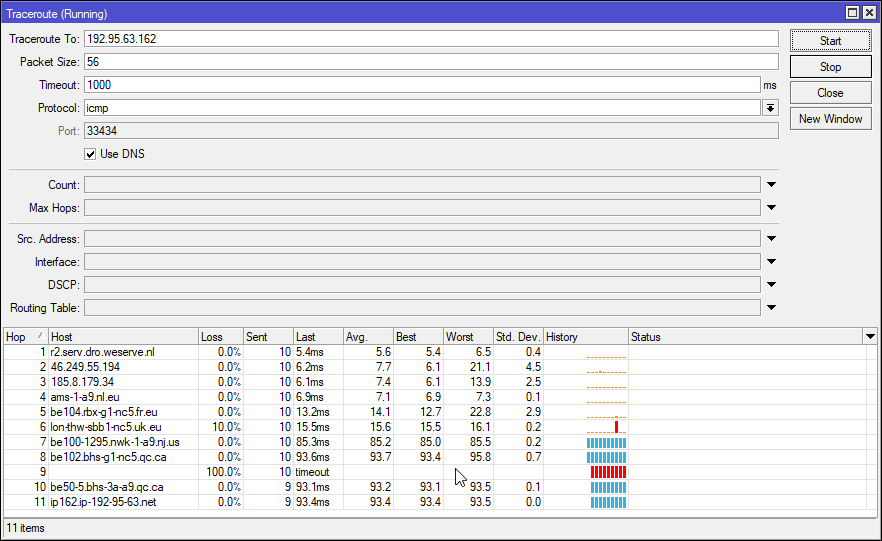 peak cloak
I get 150 rn
lean pebble
now it seems to be fixed
peak cloak
over seas
tame carbon
93ms to canada
lean pebble
7-8ms
tame carbon
from europe
peak cloak
oh
lean pebble
how much ping to you get to this IP 135.181.104.101
lean pebble
tame carbon
I get ~65ms to US east coast
that nice
peak cloak
tame carbon
I get ~65ms to US east coast
I get like 85 to r2.serv.dro.weserve.nl
low pond
lean pebble
how much ping to you get to this IP 135.181.104.101
142ms from AE XD
tame carbon
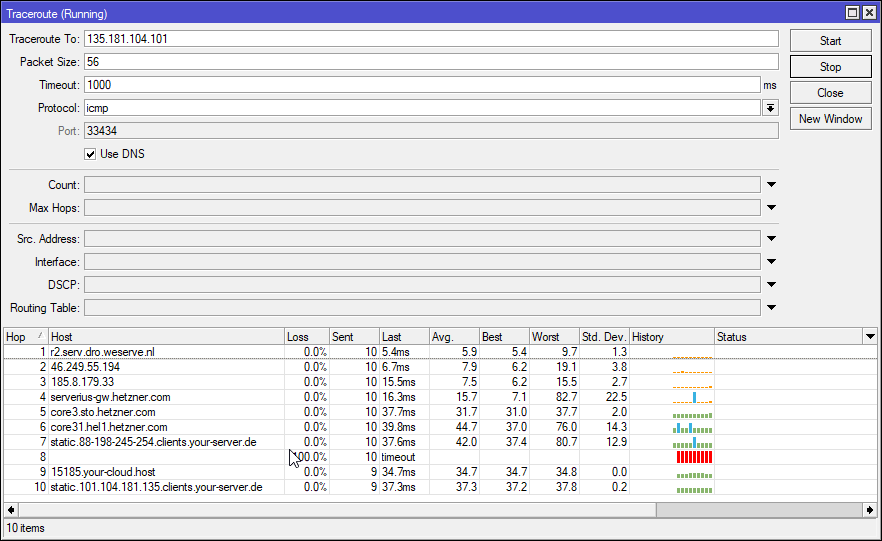 low pond
seems like helsinki hetzner
lean pebble
yeah
tame carbon
serverius is my colo (from isp)
lean pebble
I rented it for testing
tame carbon
and they peer with herzner
lean pebble
64 bytes from hsrp.serv.dro.weserve.nl (5.255.66.206): icmp_seq=23 ttl=247 time=71.6 ms
64 bytes from hsrp.serv.dro.weserve.nl (5.255.66.206): icmp_seq=24 ttl=247 time=71.8 ms
64 bytes from hsrp.serv.dro.weserve.nl (5.255.66.206): icmp_seq=25 ttl=247 time=71.3 ms
64 bytes from hsrp.serv.dro.weserve.nl (5.255.66.206): icmp_seq=26 ttl=247 time=72.1 ms
64 bytes from hsrp.serv.dro.weserve.nl (5.255.66.206): icmp_seq=27 ttl=247 time=72.0 ms
from my home
 4  bzq-25-77-26.cust.bezeqint.net (212.25.77.26)  9.953 ms  9.988 ms  10.420 ms
 5  bzq-179-124-34.cust.bezeqint.net (212.179.124.34)  59.049 ms bzq-114-65-1.cust.bezeqint.net (192.114.65.1)  8.922 ms bzq-219-189-50.dsl.bezeqint.net (62.219.189.50)  62.189 ms
 6  bzq-219-189-17.dsl.bezeqint.net (62.219.189.17)  60.447 ms bzq-179-124-74.cust.bezeqint.net (212.179.124.74)  57.631 ms ae23-0.fra20.core-backbone.com (5.56.18.217)  59.846 ms
 7  ae5-2074.ams10.core-backbone.com (81.95.2.138)  67.061 ms ae23-0.fra20.core-backbone.com (5.56.18.217)  59.851 ms bzq-161-217.pop.bezeqint.net (212.179.161.217)  63.563 ms
 8  ae23-0.fra20.core-backbone.com (5.56.18.217)  58.800 ms ae5-2074.ams10.core-backbone.com (81.95.2.138)  72.290 ms core-backbone.serverius.nl (5.56.20.171)  60.793 ms
 9  ae5-2074.ams10.core-backbone.com (81.95.2.138)  66.283 ms core-backbone.serverius.nl (5.56.20.172)  70.302 ms core-backbone.serverius.nl (5.56.20.171)  60.150 ms
10  core-backbone.serverius.nl (5.56.20.171)  60.182 ms core-backbone.serverius.nl (5.56.20.173)  69.987 ms *
11  185.8.179.38 (185.8.179.38)  72.244 ms 178.21.17.25 (178.21.17.25)  63.494 ms 185.8.179.38 (185.8.179.38)  73.176 ms
12  178.21.17.19 (178.21.17.19)  71.222 ms  62.489 ms *
13  r2.serv.dro.weserve.nl (5.255.66.205)  67.237 ms * *
btw I see that my ISP finally fixed the 200ms to their own server in tracertoute xD
tame carbon
its probably just overloaded
and they have an engineer who doesnt know how queues work
ae5-2074.ams10.core-backbone.com
lean pebble
Ya they have a lot of those "engineers" that don't know how anything works
I used to get 60ms to Frankfurt Amsterdam Paris London and Helsinki
lean pebble
and 100ms to US
low pond
lean pebble
Ya they have a lot of those "engineers" that don't know how anything works
even to this date i scartch my head why my ISP preferes core-bacbone when they can just use DECIX to connect to hetzner. They used to use DECIX but now...
tame carbon
 low pond
tame carbon
they finally figured out how to use Teams
low pond
tame carbon
they finally figured out how to use Teams
Shit Teams too. FFS can't they have cache servers at ISP's? a lot of people use or join calls within the country
lean pebble
My ISP have direct fiber line to Germany and London
lean pebble
low pond
Shit Teams too. FFS can't they have cache servers at ISP's? a lot of people use ...
Well how I gonna say it... Microsoft


 lean pebble
nice
low pond
lean pebble
My ISP have direct fiber line to Germany and London
my ISP brought to this place by spending all money for the subrine cables xD to access much of the europe
lean pebble
Does MPLS works everywhere in every ISP ?
Even if someone use fiber they use this Protocol or only for ADSL lines.
tame carbon
nah its a special kind of routing protocol/switching mechanism that I dont know enough about to explain
@lean pebble but basically it allows one ISP, to directly connect two switches or ports together across different sites
so for example if you are a business, and would like a direct connection to some other business
you can get an MPLS contract with a service provider
and they use MPLS internally, so your packets that go out of your router, go directly to that other site
It labels the packets