#networking
1 messages · Page 335 of 1
 rain arrow
 clear igloo
Depends on what you want, Asus is generally regarded as junk, Netgear is pretty decent, TP-Link is very hit or miss
rain arrow
this one i had for about the same amount of years and its never failed me too
doesn't to complicated i do here with my internet
clear igloo
Yah, then you'll be fine with another netgear 🙂
rain arrow
max 5 connections on wifi when we have cmpany over. otherwise just me and my mom on wifi
 peak cloak
cache?
rain arrow
my desktop is wired, so mainly laptop and 2 phones
@clear igloo ok sounds great then. any particular Netgear model?
clear igloo
rain arrow
<@!291198741862416384> ok sounds great then. any particular Netgear model?
Anything with WiFi 5 (AC) or WiFi 6 (AX) and gigabit ports should be fine
rain arrow
ok thank you, will look into that
can't seem to connect to canadacomputers website 🙂
will try later i guess
clear igloo
rain arrow
ok thank you, will look into that
Something like the R7000 or 6400 would be good for you
 broken jetty
I've decided to switch to TrueNAS Core (formally FreeNAS) on my NAS as Ubuntu Server was causing more trouble than it was worth. I've been reading the installation documentation but I can't quite get my head around it:
It seems that the OS takes up one entire drive for itself, but my question is, would it accept a partition or would it need a bare-metal physical drive all to itself. What information does it store on the drive that it takes for itself, and how large should said drive/partition be?
 twin zealot
I would sugesst to try it in a vm and you know it
 copper rover
broken jetty
I've decided to switch to TrueNAS Core (formally FreeNAS) on my NAS as Ubuntu Se...
copper rover
broken jetty
I've decided to switch to TrueNAS Core (formally FreeNAS) on my NAS as Ubuntu Se...
Generally you're supposed to install TrueNAS on a dedicated drive, or a RAID1 of two drives. All other drives go into a pool that you store data on
Boot device (SSD or HDD): Also known as the boot drive. At least 8 GB of storage capacity is required to serve as the boot device for TrueNAS. An SSD is an ideal choice for longevity; keep in mind that the entire disk will be used for the TrueNAS operating system. USB sticks are no longer recommended, due to the high amount of write tasks on TrueNAS.

In this tutorial, we're going to walk you through the basic requirements to run the TrueNAS storage operating system, from creating the installation media and installing it onto your system.
broken jetty
I’ve only got a 512GB and a 1TB drive and I was hoping to not have to spend more money, so partitions won’t work?
copper rover
nope
Just get a cheap 16GB SSD or something. It doesn't have to be high performance for the OS boot drive
An old SATA 5400 RPM HDD would suffice
If you lose the OS, that's sucks, but the existing pool of drive can always be imported and mounted to a new installation of TrueNAS should the OS crash
Hence why it's best to have two drives in mirror for the OS
Though not required
As previously suggested by another, go ahead and run a VM of TrueNAS to get a feel for it
Create virtual disks and allocate them to the OS and pool. Play around with it. It's not a steep learning curve. But having some basic familiarity will answer questions you have and might have in the future.
Fail a virtual disk, replace it, and rebuild the array. So should it happen in real life, you know with confidence what to do.
broken jetty
Ok
I couldn’t find any 16GB SSDs on Amazon, only cheap laptops with 16GB SSD storage
I’m sure they’re somewhere though
 topaz mirage
broken jetty
I couldn’t find any 16GB SSDs on Amazon, only cheap laptops with 16GB SSD storag...
topaz mirage
broken jetty
I couldn’t find any 16GB SSDs on Amazon, only cheap laptops with 16GB SSD storag...
I doubt that 16GB SSD even exist...
broken jetty
Possibly not
topaz mirage
I found blog posts from eshops in my country saying that they are in-stock...the posts are from 2008
broken jetty
Another question, since the two drives I have aren’t of equal size, how stupid is it to not bother with mirroring or anything like that?
topaz mirage
Just get a 120/128GB SSD...
broken jetty
Probably
topaz mirage
broken jetty
Another question, since the two drives I have aren’t of equal size, how stupid i...
Wait what? Why do you want to mirror?
broken jetty
I may be mixing up the terminology
But you know you have two drives and one is just a backup of the other so that if one fails you’re still good?
topaz mirage
Well, in case that one will die...you will have copy/backup/mirror of that data. If they are like 8TB and 10TB...then mirror 8TB to 10TB, but you'll be wasting 2TB
topaz mirage
broken jetty
But you know you have two drives and one is just a backup of the other so that i...
Yupp
Possibly idk what OS you are running and on what you are running it, but if you have a PC...you could possibly use that 2TB spare space for games for example or other data that you dont care about if it is lost and still mirror 8TB to the 10TB drive
broken jetty
One is 450GB and one is a terabyte.
I’m going small-scale with the parts I have for the moment.
topaz mirage
broken jetty
One is 450GB and one is a terabyte.
I’m going small-scale with the parts I have...
Yeaaah...450GB 😕
Idk if I would trust that with anything 😄 How old could it be?
broken jetty
I have no idea
topaz mirage
Check SMART for every drive before the whole setup.
broken jetty
One drive is for an old PC from work where the motherboard gave out and one is from an old PC at work that we bought for a project that ended up failing
topaz mirage
broken jetty
One drive is for an old PC from work where the motherboard gave out and one is f...
Both fail in some way...and you have faith the HDD wont fail.
I'm being paranoid, but I'm kinda a data hoarder...
broken jetty
I’m definitely not
topaz mirage
What do you want to store on it that you need a mirroring, but you are fine with 450GB?
broken jetty
I don’t need one
topaz mirage
For documents its fine, but like family photos and videos...you will run out of space really quickly.
topaz mirage
broken jetty
I don’t need one
Oh 😄
broken jetty
I was asking if it was an absolute need thing or a peace of mind thing
topaz mirage
Peace of mind thing
broken jetty
Currently I’m storing documents that I want access to on all computers on my network but altogether are too big for the cloud
topaz mirage
However if you look for any guide or tips about NAS and saving stuff...you will always have #1 or #2 point about having a backup.
topaz mirage
broken jetty
Currently I’m storing documents that I want access to on all computers on my net...
That could be usefull...
broken jetty
I would at some point like to spend some money on getting a redundant storage system that’s better than a Time Machine backup
topaz mirage
I have a 10TB and 4TB drives in my NAS. If one of them dies all the data is gone. Scary thing that I should solve.
broken jetty
RAID?
topaz mirage
broken jetty
I would at some point like to spend some money on getting a redundant storage sy...
There are many easy (but somewhat expensive) and cheap (but somewhat complex) solutions.
broken jetty
I prefer cheap and complex
topaz mirage
broken jetty
RAID?
No. I don't do backup from one to another or boost for performance.
topaz mirage
broken jetty
I prefer cheap and complex
I have Odroid HC4...check it out. Really cool thing 😁 Bought it for SATA controller. Things like Raspberry have USB bus controller...so you are suffering in many cases when you want to have NAS with it.
broken jetty
The price tag is… nice 😎
The top Google result store is verrry sketchy though
“Bank transfer only”
topaz mirage
broken jetty
The price tag is… nice 😎
But prepare for a headache. I did the official guide with Ubuntu...and it wouldnt work. Then I found that the kernel has a bug, so I had to go with Armbian OS and disable Petiboot bootloader...and uuuuh...so many things 😄
topaz mirage
broken jetty
The top Google result store is verrry sketchy though
HardKernel?
broken jetty
Well they only accept bank transfers for payment?
topaz mirage
broken jetty
Well they only accept bank transfers for payment?
"Buy more, will be cheaper
Only for Bank transfer"
I think that is only for big quantities
broken jetty
Ah
 tame carbon
my NAS is just a 2U enclosure with a ryzen system
regular sata media, software raid 1 with btrfs
topaz mirage
 tame carbon
@topaz mirage what are you ordering lol
topaz mirage
tame carbon
<@!262451337537519627> what are you ordering lol
Southpaw had question about a site that produces NAS cheap solution.
PS: That site is the official site that produces them. I bought mine however for my local distributor.
I will just leave this here if anyone know anthing...mention me, please ❤️
Hey guys!
What UPS should I choose for a DIY NAS running on OMV?
It has 15V4A powersupply, so even rechargable batteries could work, but I don't know if there is some good solution on connecting it together...
And I heard about unrouuted subnet...which bypasses router and makes transfering between NAS and PC faster and simple. How can I set that up or check if it works like that...?
Thanks a lot! ❤️
tame carbon
@topaz mirage 15V4A is peanuts. 60 watts
smallest UPSses are around 600-700VA
with powerfactor of around ~0.50 to 0.7, you can use maybe 350 watt max
I use the ones from APC
topaz mirage
tame carbon
<@!262451337537519627> 15V4A is peanuts. 60 watts
Not even running 60W for sure. Those drives could eat like 25W at max when I read and write to 'em 😄
peak cloak
topaz mirage
I will just leave this here if anyone know anthing...mention me, please ❤️
---
H...
as for "unrouuted subnet" that's just bridging. Just means instead of routing it will be switched (bridged). Most home routers have a switch chip between the ports, then it goes to the routing chip.
tame carbon
@topaz mirage yeah but its not a bad idea to have a little more. Means more time for battery
@topaz mirage yeah you just need a switch for that. not a router.
Devices on the same IP network do not need to route, they can directly send data across the LAN, never hitting the router
topaz mirage
tame carbon
with powerfactor of around ~0.50 to 0.7, you can use maybe 350 watt max
Oh, wow. Thanks a lot!
tame carbon
@topaz mirage those ports on the back of your router, those 4 ones. Those are actually just a small internal chip, only internet traffic hits the routing part
the router has an invisible connection to that switch internally, and can therefore also talk to devices
topaz mirage
tame carbon
<@!262451337537519627> yeah but its not a bad idea to have a little more. Means ...
For sure. Well last time I had power outtage for over an hour, but that never happened in my life prior. Its just bad cabling in walls that makes protectors turn off power in house for a minute and Im scared of it when transfering stuff
 peak cloak
^ doesn't mean you need a 10 gig router
topaz mirage
tame carbon
<@!262451337537519627> yeah you just need a switch for that. not a router.
Devi...
Oh 😕
I have router and switch just for having more LAN ports...
peak cloak
^ not including pcie sfp+ adapters
topaz mirage
I have D-Link DGS-105...simple switch just for having more ports...I have NAS connected to it, but my PC is in router itself.
If I connected the PC to the switch with the NAS...could I use that feature? Or is this dumb switch not capable of it?
peak cloak
and sfp modules
peak cloak
topaz mirage
I have D-Link DGS-105...simple switch just for having more ports...I have NAS co...
yes
but your still restricted to 1 gig
topaz mirage
tame carbon
$149.00
Oooof 😄
Well the second thing is how big of a deal is it really? My network is gigabit only...
tame carbon
@topaz mirage you could connect the "slow" part (the path to your router) into 1 gigabit interface it has.
and your NAS and computer on those 10G ports
topaz mirage
peak cloak
but your still restricted to 1 gig
And will I see any improvment if I run it in unrouuted subnet
tame carbon
unrouted subnet is not a thing lol
its just, switching.
@topaz mirage when an IP address is within the local range, like 192.168.1.0/24
topaz mirage
tame carbon
and your NAS and computer on those 10G ports
Nah, I wont buy a new switch...just was curious if I could benefit with this feature on my current setup.
peak cloak
topaz mirage
And will I see any improvment if I run it in unrouuted subnet
depends
tame carbon
then it doesn't need to go to the gateway
it just broadcasts locally, asking for the MAC adress of the IP
and the target computer replies
and it just sends it directly
topaz mirage
peak cloak
depends
Well...I have 85-100MB/s on the 10TB drive and 15MB/s on the 4TB...so I cant have better performance...maybe only latency?
The 15MB/s is because the 4TB is a SMR drive...which surprised me as I didnt know it is SMR 😄
And I thought SMR drives suffer in speeds only with overwriting...not an extensive writes.
tame carbon
so on 1gbit if you do bandwidth test, without layer 7 overhead, you get.. 970mbit of actual traffic.
so that's theoretical, 121MB/s
if you run mirrored raid, you can often get higher read speeds than a single drive would allow
and I know from experience that 15K SAS drives stream at around 150-180MB/s
topaz mirage
tame carbon
so that's theoretical, 121MB/s
Oh wow...and I dont need a special setting? Might try out...however idk how the switch will like the traffic from internet to my PC. Its a cheap switch and PC, NAS, TV, Kodi...oof that could be bad.
topaz mirage
tame carbon
if you run mirrored raid, you can often get higher read speeds than a single dri...
I cant now...10 and 4 TB and mainly SMR drives are unRAIDable from what I found.
tame carbon
SMR is garbage
topaz mirage
tame carbon
and I know from experience that 15K SAS drives stream at around 150-180MB/s
Yeah...not an option for me 😄
topaz mirage
tame carbon
SMR is garbage
It is...like I said. I only get 15MB/s sustained speed.
It starts at 80MB/s and drops to 15MB/s after like 200MB of send data. Which is probably the fast speed cache filling up.
tame carbon
that's just SMR being hot garbage
topaz mirage
😄 XD
topaz mirage
I will buy normal 3,5" and bigger drive. Its just a cold storage, so SMR is not that bad in my usecase, but with faster speeds I wouldnt have to have PC turned on when transferring like 250GB
topaz mirage
tame carbon
but 15MB/s is not a lot
It's not...and the whole system feels sluggish, which is weird.
topaz mirage
Nromally browsing with Samba i get instant opening of folders, but when I write to the 4TB drive...it is like 1-2sec for folder to open.
tame carbon
and takes two passes to write data
its constantly rewriting sectors
so its doing a lot more stuff
topaz mirage
But that is even if I try to open folders on the 10TB drive! WEIRD!
tame carbon
which takes time
yeah but thats 10TB
SMR basically stacks the magnetic recordings close together
topaz mirage
But how the fck can the 4TB slow down opening folders on the 10TB drive?
topaz mirage
tame carbon
SMR basically stacks the magnetic recordings close together
I know. It's "overlaying" the layers. Yuck
tame carbon
its great for slow archival access
but not for a NAS that has first user access
I mean, I'd want full gigabit traffic out of that box if possible
120MB/s
/dev/nvme0n1:
 Timing cached reads:   16654 MB in  2.00 seconds = 8335.28 MB/sec
 Timing buffered disk reads: 5268 MB in  3.00 seconds = 1755.26 MB/sec
Yeah as soon as I can get the money I will buy another 10TB or higher HDD.
topaz mirage
tame carbon
```
/dev/nvme0n1:
Timing cached reads: 16654 MB in 2.00 seconds = 8335.28 MB...
Noice
tame carbon
small NVMe drive
magnetic storage..
yeah I dont want to run a stress test on that.
topaz mirage
tame carbon
```
/dev/nvme0n1:
Timing cached reads: 16654 MB in 2.00 seconds = 8335.28 MB...
Can I try with some Linux command? 😄
tame carbon
its busy doing.. things..
topaz mirage
PS: I write to the XXX folder, which is on 4TB drive on my NAS. If I go to NAS folder, which is on the 10TB drive...it is affected too and feels sluggish.
I would understand that the 4TB drive is out of performance to write AND read, but the 10TB drive is not mentained...
As I found...it is a Device Managed SMR drive. So the host (the NAS system) shouldnt be slowed down...or could it be?
 tame carbon
@topaz mirage yeah there's a difference between physical and logical volumes
logical volume is what you access, your network drive
but there's a lot of layers of abstraction present
its networked, usually by Samba to provide a windows share
topaz mirage
So it's "normal" to slow down latency of 10TB drive?
tame carbon
storage itself, is some kind of logical filesystem
topaz mirage
Ok... Catching up 😄
tame carbon
@topaz mirage yeah if both volumes are on the same physical media
then if you start writing to one, ofcourse it will affect the other one
shares are just directory names \\SERVER\MyShare
MyShare points to somewhere on disk
topaz mirage
tame carbon
<@!262451337537519627> yeah if both volumes are on the same physical media
Damn, I thought otherwise, Because I tried to write to the 10TB and it's fine. When I write to 4TB...its awful with the folder opening. And thats 100 vs 15MB/s >D
tame carbon
yeah magnetic storage is not really capable of doing two things at once
topaz mirage
NAS share is on /dev/sdb which is 10TB drive
XXX share is on /dev/sdba which is 4TB drive (SMR)
topaz mirage
tame carbon
yeah magnetic storage is not really capable of doing two things at once
But 10TB drive is not doing anything.
 tame carbon
@topaz mirage wait, so when you are reading from both of them at the same time?? :P
yeah that sluggist one, 132MB/s that is the SMR drive
caching is 1213MB/s which is faster than the sata link, so I think that is just the linux kernel caching for you
topaz mirage
tame carbon
<@!262451337537519627> wait, so when you are reading from both of them at the sa...
Okay...again:
I move VIDEO.mp4 for XXX (4TB SMR drive). It si moving. 80MB/s drops to 15MB/s. Now, when I try to access NAS shared folder (10TB drive)...it is slow too.
tame carbon
@topaz mirage CPU ?%
topaz mirage
tame carbon
<@!262451337537519627> CPU ?%
Will try. I will turn on OBS to record too 😄
topaz mirage
Nothing suspicious with htop
Moving to tehe 4TB drive makes the whole system laggy, but when I move to the 10TB drive...its still fine.
tame carbon
Not entirely sure what is happening there
there's a couple programs to get read values directly from the drives
iotop
and iostat
topaz mirage
I move to the XXX at first and that folder is located on 4TB drive. Then I try to move to the NAS folder located on 10TB.
First copying results in laggy moving between folders...but on the second copying to the 10TB drive instead -> its fine
tame carbon
have you tried it on another machine?
potentially windows is just crapping itself here
broken jetty
Question about TrueNAS
Does it support Docker containers because some articles say it does, some say it doesn’t, some say it did and some say it will
tame carbon
@broken jetty depends on your CPU
broken jetty
Intel something-or-other?
tame carbon
you need virtualization support
broken jetty
I’m pretty sure it’s got that
topaz mirage
tame carbon
have you tried it on another machine?
Didnt...good idea
But oh wait...when I go to the WebUI of the OMV system...it is sluggish too.
I tried moving the file from Windows and accessing the files from my Android phone. Opened folders instantly...huh
WebUI is normal again...weird. So maybe you are right. Windows is just crapping itself when writing to NAS and reading its content in the same time
tame carbon
its always windows 
 hybrid cave
Is it not possible to view open ports in usg anymore?
Feels like ubiquity is just locking more and more features after each update..
udm is what I mean btw
 tame carbon
@low pond what kind of fiber modules are those?
not familair with cisco stuff
but that looks like some kind of switch or router
 low pond
Ye ye wait asking 😛
Ugh be patient may take a bit
Crystallllllllllllllll xD

10km, so is it long range
If anything this setup is very short range
tame carbon
1G
@low pond nah LR is still short range for single mode
LR = 10km
LR is long range
but only in respect to the other fiber standards
low pond
InTeResTiNg O_o
So how do we connect the both ends xD
I think the OM3 cable or something we call it
low pond
Oh so that transiever is SM?
clear igloo
Yah, LR is single mode
clear igloo
Yah, so no routing capabilities, layer 2 only
 clear igloo
yup
low pond
Oh dear
clear igloo
3560 has l3 capabilities
low pond
Anyone interested seeing some other AP he got from yeetco too
low pond
clear igloo
3560 has l3 capabilities
Oh well I think he will use it for switching needs tho XD
Not sure of routing is needed
clear igloo
gig ports only, no 10g on those either 😦
low pond
I know right not as excited it is as we expected it to be
Certainly an upgrade from 5 port gigabit consumer switches
He has a lot of them bridged in congested ways
clear igloo
Yah, if you need help with configs let me know
Make sure you've got a console cable too 🙂
clear igloo
You'll need a way to configure the switch, it's managed after all
clear igloo
You can get a USB to RJ45 console cable for like $10 on amazon
low pond
So that's the only way we can configure it?
clear igloo
Without setting up the management port, yes
low pond
Interesting://
clear igloo
<@&750150305383186585>
clear igloo
low pond
Interesting://
Yah, you can setup the management port with an IP but then you'll need to plug the management port into something too so it's not practical for the compact switch for the most part
low pond
He claims he has a paper with Ssh details to the damn system
not sure if its just "oh plug it it will yeet a v4 from the network and now u can ssh into it"
clear igloo
low pond
not sure if its just "oh plug it it will yeet a v4 from the network and now u ca...
yah, basically
I was digging and the 2960C might be able to do a couple SVIs (l3 interfaces for VLANs), been so long since I've messed with them I forgot
low pond
Ah, hm
clear igloo
So that makes it easier once you've got a basic configuration to SSH to the SVI's IP instead
So if they didn't erase the config and they've got the ssh creds then you could plug it in and it should pull an IP that you could just SSH to
low pond
then pog
I'll see maybe when that thing is put on ill come here
Would you maybei help in dm's when they decide to use it Lurick
clear igloo
low pond
Would you maybei help in dm's when they decide to use it Lurick
Sure thing
 primal ice
Hey everyone, I want to buy 2 L3 switches for my new homelab, though I dont know which brand I should take. I'm hesitating between Arista Cisco and Juniper. No HP/Aruba, I don't like the OS and had a bad experience with them. Thanks a lot!!
 waxen scroll
ubiquiti
i would not, in 2021, spend any money on cisco/arista/juniper/etc
lab them virtually if you need to lab
its a money waste otherwise
primal ice
waxen scroll
ubiquiti
I've heard bad of ubiquiti, that it is like apple and its ecosystem...
 thorny vector
Let’s not immediately recommend ubiquiti, especially with recent history
primal ice
And I'd like to learn about CLI which I think ubiquiti doesn't have. And btw I don't need a brand new switch, a refurbished one is perfectly fine.
waxen scroll
@thorny vector my money is where my mouth is. im all ubnt at home so 
thorny vector
Yeah, so you're invested, which I get. But for what he want's, I'd probably go juniper
primal ice
thorny vector
Yeah, so you're invested, which I get. But for what he want's, I'd probably go j...
alright then, thanks! I'll try to search for a cheap one. Thanks!
peak cloak
waxen scroll
ubiquiti
No..
primal ice
waxen scroll
its all local control
I've heard a story where a guy started to configure his network and implementing VLANs and he lost the link of the controller because the switch and the controller where not in the same VLAN, thus he had to reset everything
I dont want that at all, since it is a lab I want to setup to learn networking and routing
peak cloak
primal ice
I've heard a story where a guy started to configure his network and implementing...
Yeah....
For lab, don't use ubiquiti unifi
waxen scroll
ok but one device is not going to help you do that. thats why im saying skip it, get a cheap switch that supports vlans and do virtual for everything else
🤩
waxen scroll
virtual does everything thats not hardware based
primal ice
peak cloak
Virtual labs just aren't fun
You're right, I think that virtual is just for troobleshooting and 'testing' not really for experimenting
waxen scroll
im constantly in virtual environments with the latest Cisco OS's testing new designs. I find it to work great and you cant really get that in a physical lab unless you have $$$$$$$
thorny vector
But sometimes you need to do something physically.
waxen scroll
like?
peak cloak
You don't have that "motivation" virtually, imo
waxen scroll
the only time I've ever needed physical was to test actual hardware migrations and compatibility, which I hope if you're only learning networking you dont need that.
thorny vector
Physically use a console cable, run cables, etc. Adds some tangibility and ownership. Seen it time and again with my junior marines. Consistent better knowledge retention if they are physically interacting with something that could be easily virtualized.
peak cloak
^
thorny vector
You mess up virtually, you can just reset a snapshot, or roll back. No consequences. Mess up a switch? Guess who's learning how to do password recovery, lol
primal ice
waxen scroll
the only time I've ever needed physical was to test actual hardware migrations a...
I think that the cons of virtual is that it can get really confusing as you cannot really 'see' what you are doing, whereas in a physical environment you see, you can interact with the object, etc.
waxen scroll
@clear igloo imagine learning what a MAC address is and then the boss be like YO i need you to migrate F1 line cards to F3
rip
you know thats happened somewhere too
lowest bid gov contractor
@primal ice i guess i just really hate cables and hardware
its not sexy anymore
😄
but anyways so for a lab to learn networking you should probably have like 3 switches and two routers minimum, so the expenses will add up
primal ice
waxen scroll
<@!263248554368172032> i guess i just really hate cables and hardware
I personnaly find that the led blinking are so satisfying 😅
waxen scroll
Before networking I started out in datacenters running and terminating mass cat6, racking things, etc. I'm tired of it.
 tender hazel
some of mikrotik's switches have L3 capability now with ROS v7
primal ice
waxen scroll
but anyways so for a lab to learn networking you should probably have like 3 swi...
I already found routers on ebay for cheap (cisco C897VA), which apparently supports all modern routing protocol (bgp, etc.) except that they are Small Business line...
waxen scroll
i dont know anything about the small business line but my guess is the CLI isnt the same
might be GUI only
primal ice
waxen scroll
might be GUI only
console port on it, so nope. I've heard that it might vary a bit, and that I cannot expect the same as entreprise routers, which I guess is fine for learning
primal ice
tender hazel
so it would run IOS like everything else
exactly
tender hazel
it is ok for learning - you shouldn't expect too much performance out of it for the money
primal ice
yeah exactly
waxen scroll
thorny vector
Physically use a console cable, run cables, etc. Adds some tangibility and owner...
did they sign up for that or are we talking normies who dont tech?
tender hazel
I'm somewhat so-so on the idea of cisco certification by itself
I could pursue it to pad my own credentials if I needed to, but don't particularly want to
the issue that I have is when hiring for network positions, we get tons of applicants who have CCNA or have CCNP and have all of these acronyms on their resume
waxen scroll
my job is trying to get me to certify again. i stopped renewing cause I was tired of paying out of pocket
tender hazel
but in the interview we ask them "what is a VLAN?"
and I swear like 80% cannot explain it
thorny vector
waxen scroll
did they sign up for that or are we talking normies who dont tech?
Marines that signed up for cyberwarfare
tender hazel
so most times the tech who we end up hiring is the one who answers the "what is a VLAN?" question correctly
waxen scroll
we have other issues. we get people who look great but they dont show up to the interview half the time
and by interview i mean phone screen
tender hazel
that's just unprofessional - if you get another offer and no longer want to interview, email and let the company know
waxen scroll
we're trying to hire seniors and in networking senior level is always in demand. people dont like to hire juniors
tender hazel
people are being short sighted and not thinking of what will happen if they apply at another company later and one of the people there happened to be one of the interviewers who the applicant ditched at the earlier one
waxen scroll
the company as a whole decided seniors only for all jobs recently lol...
way to help the local talent pool grow
when I was junior I had to get lucky to get a networking job and only because it was contract (12 month constantly renewing)
primal ice
then how do juniors gain experience then? I mean if all companies accept only seniors...
waxen scroll
bingo!
the juniors have to go find an MSP, a small business, or if they're lucky a medium business. Even then its hard to just be a networking person
primal ice
Thats just how it should'nt work. I'm 15, and I'm terrified when I keep seeing those kind of rules in the business world...
waxen scroll
my contract job happened to be at this company with 300+ locations globally so the network was complex and massive. That was a lucky event.
Also internships. I almost never see IT internships anywhere I work
its like its not a thing anymore
Everyone says "oh yeah we had interns 4-5 years ago but nothing since"
😄
You cant really do a ton with an intern in networking though. You can let them do paperwork or shadow you, but they're only there for 3 months or less and you cant let someone directly modify the network with no prior experience or training on the enviroment.
 hollow marlin
tender hazel
the issue that I have is when hiring for network positions, we get tons of appli...
hollow marlin
tender hazel
the issue that I have is when hiring for network positions, we get tons of appli...
I'm one of those but they are not the spotlight on my resume, just to get past HR
thorny vector
Just join the military. Free training AND expirience
primal ice
Yeah, it is dumb... Especially in France where I live, intership are the only way to get experience. I'm lucky people in my family are working in IT and thus have contacts, I could probably find work easily but still...
waxen scroll
my complaints are US based. Europe I think the conditions are better
primal ice
there are, but still though
waxen scroll
tender hazel
the issue that I have is when hiring for network positions, we get tons of appli...
also I use that cert stuff as a filter. Like if I see you slammed down 5 certs in a year, i'll normally toss the resume.
ive had that happen a few times
I also look at your cert dates and job dates to make sure you actually gained experience and didnt work 3 months
hollow marlin
primal ice
Thats just how it should'nt work. I'm 15, and I'm terrified when I keep seeing t...
If you are looking at getting into networking, like LZ said, I would look at MSPs or smaller ISP/WISP. Typically you'll get better exposure as less staff means more you'll be required to work on. Typically entry NOC positions are the best shot.
waxen scroll
If you work somewhere under a year and list all this crap, I disqualify that job as experience depending on what it was
tender hazel
we have so many applicants who list MPLS on their resume but don't actually really have any experience with it
waxen scroll
haha lmao
tender hazel
but they maybe know what it stands for and it was mentioned in their textbook at one point so they list it
waxen scroll
you mean CE only or they didnt even do CE?
tender hazel
in some cases they may have worked for a company that bought MPLS L3 VPN from a provider in which case their only experience was with CE, which means nothing
hollow marlin
That's like 90% of the resumes Ive seen that list "MPLS experience"
waxen scroll
CE can mean a little depending how big the company is. you can do more than just send/receive a routing table. especially on networks like ATT where each region of the world is an ASN
tender hazel
experience only at the CE side is not what we are looking for though
waxen scroll
my first networking job had like 3 head ends, multiple internet outlets in multiple regions, so there was engineering there even though we only did CE
tender hazel
yeah but that's not really directly MPLS related
I mean it doesn't really matter what they were using to deliver the circuits, if there was engineering involved that's what you were handling
waxen scroll
true
primal ice
hollow marlin
If you are looking at getting into networking, like LZ said, I would look at MSP...
alright thanks for the tip!!
 slate sonnet
Hey guys, can someone tell me where I can add an ssh key to my vps?
I can't remember the directory
tender hazel
yeah we are a medium sized WISP and our staff get to work with a lot of different things
waxen scroll
@hollow marlin DWDM
"oh I just plugged the optic in"
ciena: "oh I racked and put an IP on it"
primal ice
slate sonnet
Hey guys, can someone tell me where I can add an ssh key to my vps?
~/.ssh ?
waxen scroll
Oh you know Cisco Nexus? What about this VPC stuff? "IDK"
hollow marlin
waxen scroll
ciena: "oh I racked and put an IP on it"
I know plenty that think that's all that's needed sadly
slate sonnet
primal ice
~/.ssh ?
Thank you
primal ice
anyways thank you all for the tips it was nice to talk. Have a good night!
primal ice
slate sonnet
Thank you
welcome!
hollow marlin
waxen scroll
Oh you know Cisco Nexus? What about this VPC stuff? "IDK"
The hard part about my resume is the amount vendor equipment I have exposure too and it specific applications.
waxen scroll
i have a bunch of stuff on my resume like that too and sometimes people will go "so its on here that means I can ask right?" Sure. "OK.... ummmm uhhhhh How do you add a route to IOS?"
i stopped saying what i did on platforms, I only list the platform as a bullet in a skills section
like MPLS (lol)
I only say the projects I worked on and if relevant what the data was... "Saved X amount of time"
thats another problem we have. People are sending us resumes and all they did was copy/paste their actual job description from when they applied at their last job. Sometimes its not even formatted for the resume
hollow marlin
Same. Top section is bulleted with vendors, protocols. Followed by position summaries and now I am just adding a portfolio of my major projects.
waxen scroll
remember that time I tried to hire you?
😇
i think if you're happy in an ISP job you probably wont be at a corporate anyway
two different beasts
hollow marlin
Its just too much I'm involved in to lay out fully in a single resume. Easier for vague bullets and summary and have them ask.
waxen scroll
so far my resume is also unique. I did hand make it. I haven't seen anyone with a design close.
it seems to mostly get me phone screens, so thats good
tables R hard guyez
hollow marlin
waxen scroll
remember that time I tried to hire you?
Around that time I was promoted to tier 3 engineer and next year I qualify for senior engineer. Going to wait it out and see. Plus they agreed to pay for the JNCIE, got that in writing.
waxen scroll
meanwhile we've found nobody with ciena experience
gee who could have saw that coming
I warned them
hollow marlin
Its super niche, especially 6500 chassis.
3xxx/51xx I know well but I rarely touch 6500
waxen scroll
so we talked them down to no ciena, we'll send them to training.... still nothing
6 rounds of resumes from HR and nobody decent is showing up to phone screen
keep in mind, in this area I was able to get offers three times during the pandemic, so its not an us problem, everyones probably hurting for seniors
one company told me that the basic quiz I passed, most people got it half wrong
hollow marlin
I guarantee I know where many of them are going. A monolith that is eating up ISPs on the east coast is poaching many of the Ciena engineers
waxen scroll
not related but do you ever wonder how many of these companies keep getting on best places to X lists? Especially retailers.... Walgreens, CVS, Home Depot, Amazon... all shitty places to work unless you're in the corporate office (amazon still is bad there too).
some lists are paid but others, like the one I saw on linkedin today, arent AFAIK
So 3,000 people are happy. Let's ignore the 200,000 over there
"Oh our stores? Our warehouses? Overseas locations? Yeah we dont have any of those."
 thorny vector
waxen scroll
thorny vector
waxen scroll
Internet, delivered STRAIGHT to you
hollow marlin
waxen scroll
not related but do you ever wonder how many of these companies keep getting on b...
It seems like everyone is on these list. If not, a new list is made to include them
waxen scroll
hollow marlin
It seems like everyone is on these list. If not, a new list is made to include t...
I worked for a company that constantly got awards for europe and asia but never US
lmao
 wanton dagger
My friends and I used to be able to join a minecraft lan world using himachi and or radmin vpn, and it just randomly stopped working on my end, any tips?
 willow canyon
Make a new network on hamachi or radmin
wanton dagger
i already tried that i think it might be a modem thing
i have no idea where to look tho
willow canyon
Have you uninstalled and reinstalled the app?
wanton dagger
yeah
 half bobcat
im thinking of getting some certifications in networking but not exactly sure where to start
peak cloak
half bobcat
im thinking of getting some certifications in networking but not exactly sure wh...
from what I heard here experience > certs
you have experience?
or do you want to learn?
half bobcat
i want to learn mainly not much experience
peak cloak
half bobcat
i want to learn mainly not much experience
imo, making a homelab is a good start. Just really need a spare pc
then virtualize vyos
half bobcat
and then do some home projects i assume?
peak cloak
yeah
that's what I kinda did
although I got myself a good router (I reccomend HEX S), a managed switch, and an Access Point
learning by doing imo is the best
half bobcat
sounds good
hollow marlin
peak cloak
from what I heard here experience > certs
They both go hand in hand
half bobcat
could u elaborate?
hollow marlin
Certs give you a foundation and experience improves your skillset. Just one or the other really makes for poor eningeer. I usually tell people to go down the CCNA path or at least follow the blueprint for a guide on what to learn, else it just leads down multiple rabbit holes. Then lab as you go.
Experience just comes with time as the real world throws you in positions a lab with never be able to recreate
 sweet pawn
any networking masters out here?
i need to know about ip and assigning them and stuff like that
connection type related stuff
hollow marlin
half bobcat
what kind of certs do you think would give me that foundation?
And when you are in those situations, having a foundation is key to not fumbling around and adding frustration in the mix
CCNA is the best path to begin. I recommend looking at the blueprint on Cisco's site and for a good intro series is https://youtube.com/playlist?list=PLDQaRcbiSnqF5U8ffMgZzS7fq1rHUI3Q8 for beginners. Just to give a good feel to make sure it's something that truly interest you

YouTube
Interested in learning about networking? Let Network Direction help you get started. This series is for people that are first starting out in networking. All...
half bobcat
hollow marlin
And when you are in those situations, having a foundation is key to not fumbling...
thanks so much my guy
sweet pawn
my router connection type (i think set by my isp) is PPPOE connection type anyways i can change it to a static network?
hollow marlin
If your ISP requires PPPoE, there is not much you can do on your end. You would have to speak with them on purchasing a static. They will either give you a static or assign the static to your PPPoE account
sweet pawn
i see, reason i wana change that is because iam having NAT type issues in games
apparently there are 3 types of it moderate strict and open mine is strict so because of that i get problems in game, aight i will try and talk to them
thanks
is there no way i can use vpn to get static ip
copper rover
waxen scroll
Guess the house is networked now
 green forge
Here's mine network closet

I just need to make a male ethernet connector to plug it into the garage
tender hazel
sweet pawn
i see, reason i wana change that is because iam having NAT type issues in games
You don't need a static IP per se, as long as you have a public IP it is sufficient
@tame carbon how goes the wifi stuff for the campground?
tame carbon
@tender hazel my dad went ahead and agreed with my plan.
Now its a matter of waiting xD
Once the fiber line becomes active, I'll be installing the core and switches
get their LAN operational indoors
once that is all greenlit, we will start phasing out the old system
the current 'state' of the fiber is a big plastic tube hanging in the basement
 old sleet
Does anyone have an explaination/similar problem with steam downloads? Mine would start off strong then slowly go down to 0mbps after a bit. I'd peak at the start around 200mbps but then itd tank to 10mbps or even lower.

I've tried the obvious and simple stuff like reseting cache and all that checking download region, turning off anti-virus, browsers, etc.

 safe blade
Hey :)
 thick minnow
Pretty sure it's because it's not on the same private network anymore
safe blade
Yeah I have solved it by editing the hosts file in win
 tall pagoda
green forge
Here's mine network closet
tall pagoda
green forge
Here's mine network closet
Are you from the Netherlands?
 raw marten
I've got an ethernet cable from downstairs to my floor, but I have bo idea how to set up a repeater
In the original router the settings is wpa2/psk but the netgear router I'm using doesnt support that
Any idea how to make a repeating connection?
Pls @ me
 vestal sundial
Settings -> "Allow local network discovery" is on?
safe blade
vestal sundial
Settings -> "Allow local network discovery" is on?
There we go. :D Thanks!
vestal sundial
Yeah agree, they changed that recently
safe blade
Does the adblocker work well on android?
vestal sundial
The Cybersec doesn't offer adblocking? Easiest (non root) is to use private dns with like adguard.
safe blade
The page says the app provides adblock, just wanted to know if you have tried it :)
vestal sundial
Haven't tried sorry 😅
safe blade
I used a hosts file based adblock a while ago which was pretty amazing
vestal sundial
I currently use hosts file on phone + pihole. I love it
 dense panther
Anyone good here with ip cameras
old sleet
Does anyone have an explaination/similar problem with steam downloads? Mine would start off strong then slowly go down to 0mbps after a bit. I'd peak at the start around 200mbps but then itd tank to 10mbps or even lower.
vestal sundial
Hmm might be a device specific thing, both options are available for me.
vestal sundial
old sleet
Does anyone have an explaination/similar problem with steam downloads? Mine woul...
You might be hitting disk write/read limit?
Oh damn 😄
old sleet
vestal sundial
You might be hitting disk write/read limit?
would that cause the download speed to tank?
i’ve tried installing on an HDD and a SSD
vestal sundial
Steam downloads and installs sometimes at the same time. So cpu speed and disk speeds affect download speed
thick minnow
old sleet
Does anyone have an explaination/similar problem with steam downloads? Mine woul...
Whats your speed when doing a speedtest?
 main briar
do i need a 10gig router if i want a 10 gig connection to my nas?
or does my switch just need to be 10 gig
clear igloo
Just the switch unless it's on a different subnet
 steep holly
is vpn even worth it network wise etc. i have it on my pc i dont notice any changes besides the region lock avoiding thing. otherwise lag is meh and generally dont exactly see the use beside being extra secure
peak cloak
nah, vpn ads are borderline lying
I don't use a vpn
unless I actually need it
but at home, nah
steep holly
aaaand vpn canceled cuz i was doing monthly which is a bit steep
thick minnow
main briar
do i need a 10gig router if i want a 10 gig connection to my nas?
depends, everything between your pc and nas has to be 10 gig
So if your pc and nas plugs into the same switch, only the switch
 ruby bramble
Or higher
tame carbon
I got my new work laptop :)
Intel(R) Core(TM) i5-1035G1 CPU @ 1.00GHz
Pretty speedy machine, it boots in about 2 seconds
thick minnow
What model
tame carbon
@thick minnow HP 250 G7
my laptop at home is a 6 year old duo-core craptop
First thing I did this morning, was install ubuntu on it
xD
thick minnow
Thats a pretty solid laptop ive used one of those
tame carbon
@thick minnow the nvme boot drive is much welcomed
I only have 250GB storage, I split it halfway, and reserved 120GB for my linux install
old sleet
thick minnow
Whats your speed when doing a speedtest?
idk how accurate speedtests are but it says i got 220 download speed, and 6 upload speed
thick minnow
tame carbon
<@456226577798135808> HP 250 G7
How good is it? I'm thinking of getting one for my dad
tame carbon
Needs more storage
Fine machine, keyboard is alright
Touchpad a bit small for my liking
thick minnow
Thanks
 sterile flame
Hi, I have nextcloud and collabora servers set up. I have 2 servers, one has public ip and it serves as proxy to my more powerfull one that has only private ip (we're talking about raspberry pis).
the problem is that I try to integrate collabora to nextcloud
I have collabora and nextcloud behind apache reverse proxy
And I get this error in browser
The connection to wss://collabora.example.com/lool/https%3A%2F%2Fnextcloud.example.com%2Findex.php%2Fapps%2Frichdocuments%2Fwopi%2Ffiles%2F245150_ocr4v4w2dsut%3Faccess_token%3DWhVAL4ijcKcnPcG3ugOSgmnpmEsJlgbG%26access_token_ttl%3D0%26permission%3Dedit/ws?WOPISrc=https%3A%2F%2Fnextcloud.example.com%2Findex.php%2Fapps%2Frichdocuments%2Fwopi%2Ffiles%2F245150_ocr4v4w2dsut&compat=/ws was interrupted while the page was loading.
Any help, please?
green forge
tame carbon
<@!362089571254665218> get a network clamp
Did the cable today
green forge
tall pagoda
Are you from the Netherlands?
no usa
tame carbon
@sterile flame are you sure you did that right?
sterile flame
tame carbon
<@!517810049360461837> are you sure you did that right?
What thing?
tame carbon
I see websocket, which needs to be proxied differently
and I also see example.com which is not a valid domain name
@sterile flame if you just want a reverse proxy on a pi, do yourself a big favor and use nginx
sterile flame
tame carbon
and I also see example.com which is not a valid domain name
That is so I don't send my domain name
sterile flame
<VirtualHost *:80>
    ServerAdmin xxx
    ServerName  xxx

LogLevel debug
ErrorLog "/var/log/errorSSL_log"
TransferLog "/var/log/access_log"

    ProxyPreserveHost On

    # setup the proxy
    <Proxy *>
        Order allow,deny
        Allow from all
    </Proxy>

    # Encoded slashes need to be allowed
    AllowEncodedSlashes NoDecode

    ProxyPass / https://10.243.12.5:9980/
    ProxyPassReverse / https://10.243.12.5:9980/
    ProxyPassReverseCookiePath / /

    # static html, js, images, etc. served from loolwsd
    # loleaflet is the client part of LibreOffice Online
    ProxyPass /loleaflet https://10.243.12.5:9980/loleaflet retry=0
    ProxyPassReverse /loleaflet https://10.243.12.5:9980/loleaflet

    # WOPI discovery URL
    ProxyPass /hosting/discovery https://10.243.12.5:9980/hosting/discovery retry=0
    ProxyPassReverse /hosting/discovery https://10.243.12.5:9980/hosting/discovery

    # Main websocket
    ProxyPassMatch "/lool/(.*)/ws$" wss://10.243.12.5:9980/lool/$1/ws nocanon

    # Admin Console websocket
    ProxyPass /lool/adminws wss://10.243.12.5:9980/lool/adminws

    # Download as, Fullscreen presentation and Image upload operations
    ProxyPass /lool https://10.243.12.5:9980/lool
    ProxyPassReverse /lool https://10.243.12.5:9980/lool

RewriteEngine on
RewriteCond %{SERVER_NAME} =xxx
RewriteRule ^ https://%{SERVER_NAME}%{REQUEST_URI} [END,NE,R=permanent]
</VirtualHost>
This is straight from collabora tutorial
tame carbon
And THIS is why I dont fuck around with apache
sterile flame
It is not imo
tame carbon
server {
        listen 80;
        listen [::]:80;

        root /var/www/example.com/html;
        index index.html index.htm index.nginx-debian.html;

        server_name example.com www.example.com;

        location / {
                try_files $uri $uri/ =404;
        }
}
It's this ```
ProxyPass /hosting/discovery https://10.243.12.5:9980/hosting/discovery retry=0
ProxyPassReverse /hosting/discovery https://10.243.12.5:9980/hosting/discovery
Nothing more
sterile flame
But I use subdomains
tame carbon
server_name foo.com
sterile flame
Is certbot for nginx?
tame carbon
That exists too
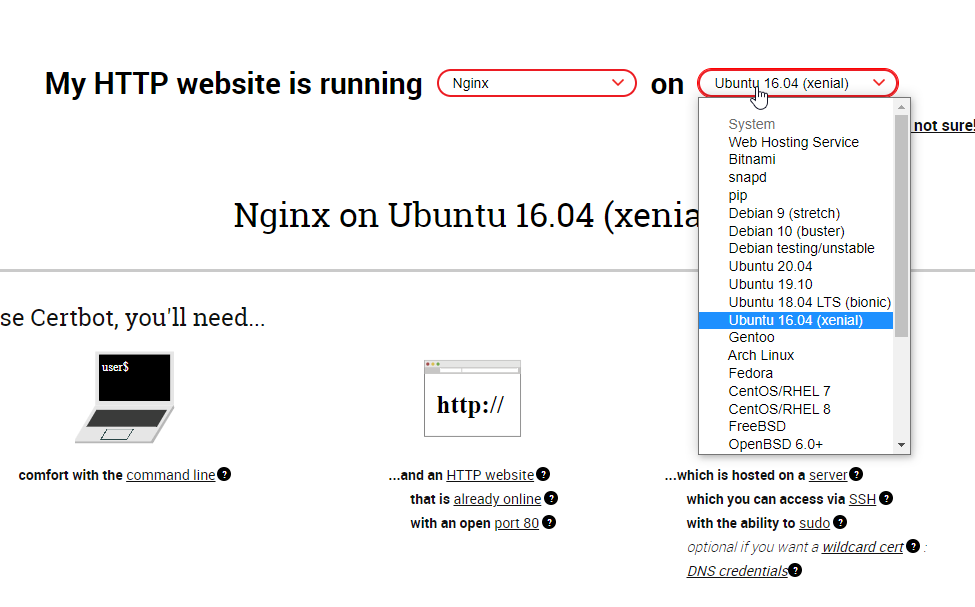
@sterile flame I know moving from one webserver to another may seem dull. But really, nginx is lot more friendly and lightweight
it needs ~2MB ram, and sparingly uses threads
unlike apache, which can handle 200 connections before it refuses to reply
@sterile flame nginx config typically stores each site/domain/subdomain in a seperate configuration file
so you have /etc/nginx/sites-available/website1.foo.com
as a config file for that domain
sterile flame
Yes. I have /etc/apache2/sites-available/subdomain.domain.topdomain.conf
tame carbon
Yeah, so nginx uses similair structure
if you do it in this fashion, then certbot can automatically make them HTTPS for you
sterile flame
And then if I want signed ssl I do just sudo certbot --apache -d sub.domain.com
tame carbon
@sterile flame if you have a large number of sites, I don't want to disturb your quiet nest.
sterile flame
8 sites xd
tame carbon
yeah..
tame carbon
Are all of those proxied then?
tame carbon
Let me dig for a moment, grab one of these configs
sterile flame
Can I dm so the whole server doesn't know my server address?
tame carbon
Sure
tame carbon
@peak cloak Day 1 at work. I thought I was going to be doing java stuff
but first order of business: ok here's a 2 week course for you to learn Angular.
peak cloak
I never even tried angular
tame carbon
Its typescript stuff
single page application crap
@peak cloak but basically. I get paid to follow a course on Udemy xD
tame carbon
Doing this one right now ^
32 sections • 462 lectures • 34h 7m total length
O.o
@peak cloak my first time ever doing an online course lol
green forge
@tame carbon my ethernet keeps cutting out randomly
What do I xo
Do
Wifi works
But my computer just doesn't want to connect back
 toxic chasm
I have never doubted a single handmade network cable that I have built in my life until today. This stuff is pure evil and I only had just enough connectors for what I was doing. It's like 30% thicker overall than normal cable and the individual strands are so thick that you can barely jam them into the connectors.

I was so happy when I threw the tester on it and everything came out clean
peak cloak
toxic chasm
I have never doubted a single handmade network cable that I have built in my lif...
yeah it's direct burial...
toxic chasm
its evil
tender hazel
making outdoor cable is much harder than indoor
toxic chasm
and windows is showing 'network cable unplugged' ugg
tender hazel
we only have like a 70 or 80% success rate even with fairly experienced techs
20-30% of the cables need one end redone
toxic chasm
So with ubiquity nanostations. I should be able to apply POE on port 1 and connect to my computer on port 2 right? Might I need a switch or something in between?
the POE cable fell out. That explains a lot
waxen scroll
clear igloo
QR code all the things for reasons!
 crystal shale
(i know this aint networking, but linux is pretty close to it since servers and all.. i would need a bit of help with fedora 30 in #tech-chat-2 .. thanks in advance
 snow sphinx
i recently purchased a hp proliant server however when it boots up it does not seem to recognise my keyboard because when i have tryed to set it uo it just wont respond and than starts to try to boot from the network interface card do you have any troubleshooting ideas?
waxen scroll
there was a point in time where connecting USB 2 peripherals to USB 3 ports would cause things not to work. perhaps try a USB2 if it has it
snow sphinx
ty
copper rover
snow sphinx
i recently purchased a hp proliant server however when it boots up it does not s...
Be sure it's a wired keyboard. Wireless keyboard dongles are hit or miss
snow sphinx
Got it thanks
 surreal mural
And plug to USB on the back or inside server because there is setting in bios to disable external USB. Had one server like that from ebay. More info ask uncle google:hp proliant external usb disabled 👍
sterile flame
Hi, I have this nginx config
server {
    listen 80;
    server_name onlyoffice.website.com;

    location / {
                proxy_set_header X-Real-IP $remote_addr;
                proxy_set_header X-Forwarded-For $proxy_add_x_forwarded_for;
                proxy_set_header Host $host;
                proxy_set_header X-NginX-Proxy true;
                proxy_pass http://10.243.12.5:88/;
        }

}
but when I go to the site I get 404 (i disabled default config file). Why is nginx ignoring my config?
It is in sites-enabled
Nevermind, fixed it
tame carbon
wat
low pond
 lean pebble
So easy to use
lean pebble
So easy to use
u mean hard
peak cloak
low pond
u mean hard
how
thick minnow
Does anyone know why our google nest hub overloads our tp link router?
 waxen saddle
Nginx-GUI is far easier to use than non-GUI. I have yet to find a configuration that the GUI can’t handle, though, I’m also not doing anything crazy.
tame carbon
@waxen saddle I've never found a configuration, that warranted the need for a gui
even nginx config files are easy to understand
waxen saddle
Like I said, the GUI is even easier to understand for plebs like me.
I can just flip a switch and disable a config - no need to even edit a config file.
tame carbon
@waxen saddle I guess toggling would be easier that way
Config-based toggle with nginx is just symlinks
lean pebble
low pond
u mean hard
The easiest web engine on the planet...
low pond
microsoft IIS is the best
lean pebble
Apache configs more complicated than nginx
lean pebble
Stable until there is new version of ssl/tls and then Microsoft start with there shitty update
lean pebble
Hahaha
low pond
do any cringy kids here run Linux
lean pebble
Learn some linux
 low pond
mmmmmmmmmmmmmmm
lean pebble
Because you can revert if windows update fuck it up
low pond
😂 😂
lean pebble
Well that's how I fixed my windows 10 4 times 😂 until the vm successfully disabled windows updates automatically
It does the updates without the part of fully installing and restart the system

 vale reef
@tame carbon do you not use the discord desktop app because of the awful memory leak bug
tame carbon
@vale reef @ work
tame carbon
Yep
tame carbon
@vale reef I reinstalled the operating system when I started working here lol
windows is for normies
vale reef
good luck if their it gets mad at u
tame carbon
what IT. xD
@vale reef multidisciplined team
everyone has their strengths, and we all make up our own minds on choices
if i want to run linux
that's my prerogative
same goes for those designers using macbooks
xD
vale reef
do you have a backup to reinmage it back to the way it was
if its company owned property
vale reef
lol
low pond
tame carbon
gnome-boyzz
😍 😂
tame carbon
@vale reef I started working here yesterday lol
this is day 2, I had a 4 hour discussion with the dev team this morning
and apparently, I inspired 2 others to use linux O.o
what have I Done
we need to get work done, not nerd out over technology
vale reef
lol
low pond
tame carbon
and apparently, I inspired 2 others to use linux O.o
you also spread linux virus, i try too
actually my whole discord server there does, but eh.
low pond
Ah, ESET, I forgot the Windows antivirus market. was an nerd at that at one point 😛
tame carbon
lol literally
low pond
i wonder when ill get an sweet ransomwhere on this arch sistem c:
tame carbon
you pay a company
so you get a splash screen when you boot up
that tells you that your snake oil is 100% operational
low pond
XDD
 tame carbon
that's where it comes from
tame carbon
@low pond snake oil was one of those "magical cures" that would be sold
same with "Cure-all Elixers"

@low pond accurate depiction ^
low pond
so who thinks nginx is easy again
@lean pebble
if you do then help me
😔

I want to allow port 6070, and also ipv6 and v4
copper rover
tame carbon
<@!760788184237211669> lol my boss: please leave the NOD32 antivirus installed
Brotherhood of NOD

Oh? Wrong NOD
copper rover
lol, I know
Everytime someone mentions NOD32, I can't stop thinking of the other NOD
Just as evil
low pond
xD
copper rover
Can anyone here make the case for Unraid over TrueNAS?
lean pebble
low pond
I want to allow port 6070, and also ipv6 and v4
Does your server support ipv6?
 lean pebble
Nice
low pond
BUT HOW TO EXABLE NGINXIXNX
lean pebble
What are you trying to do with nginx ?
lean pebble
Ipv6 is easy to enable.
listen [::]:443 http2 ssl;
Just change port 80 to 6070.
But you'll have to use website.com:6070 while accessing the website you host on your laptop
Or ip:6070 on your browser
And open port 6070 for your laptop in your router firewall and on your laptop firewall
tame carbon
@copper rover kane lives
@low pond every server {} directive has a listen field
listen 80;
and for ssl:
listen 443 ssl;
ipv6 is [::]:80
tame carbon
if you do not have a port number in your URL, it will use the default one as specified by the protocol scheme
http:// is 80
and
https:// is 443
low pond
ah yea makes more sense
tame carbon
@low pond typical "alternative" http ports are: 8080 and 8443
so you'd have: http://localhost:8080 and https://localhost:8443
but you can use any port you'd like
for unix-like systems, ports below 1024 require root permissions
and ISPs blocking port 80, fuck off.
peak cloak
Is 443 blocked too @low pond
lean pebble
Probably not
Usually port 443 open for everyone to use from what I saw.
Only port 80 sometimes blocked
low pond
peak cloak
Is 443 blocked too <@760788184237211669>
8080 443 80 i believe
lean pebble
Port 80 "blocked" due the ISP use it to remotely telnet the device.
lean pebble
I saw it on my gear
tame carbon
with TR-069

This tutorial explains how to install Samba on Ubuntu 18.04 and configure it as a standalone server to provide file sharing across different operating systems over a network. We will also provide detailed instructions on how to connect to the Samba server from Linux, Windows and macOS clients.
lean pebble
tame carbon
with TR-069
They used it here...
tame carbon
@low kayak samba is pretty much the same across all distros.
You define a share, and a directory for that share.
tame carbon
@lean pebble lol idk what else you'd use to provide SMB
lean pebble
It's annoying because sometimes the transfer speed decreased without a reason
tame carbon
@lean pebble most silly thing I've done with samba is provide proxied printing services from an internal CUPSd instance
"Load balancing"
I had 4 printers, 1 queue
lean pebble
I use samba for my kvm machine on one drive that I can't share like usual.
tender hazel
tr069 doesn't usually use the normal web port, it uses port 7547 for communication
lean pebble
tame carbon
I just use sshfs for my network shares
On windows to?
 tender hazel
there is a second port that is used for file transfers though that is not standardized, but that is on the server side
lean pebble
😂
tame carbon
but you could
lean pebble
Nah I prefer smb on windows the most stable service they could made on windows machines
tame carbon
You can install a net provider for window
so you can do \\sshfs\user@host/path/to/dir
lean pebble
Nah I'm too lazy for make windows use it man
peak cloak
@tame carbon hex s came in
tame carbon

GitHub
SSHFS For Windows. Contribute to billziss-gh/sshfs-win development by creating an account on GitHub.
@peak cloak Ooooh :D
Dis gon be gud
lean pebble
I'm barely playing games right now so my windows kvm machine is off
I'm only on my Linux os right now
tame carbon
@peak cloak you got the routerOS initial setup done?
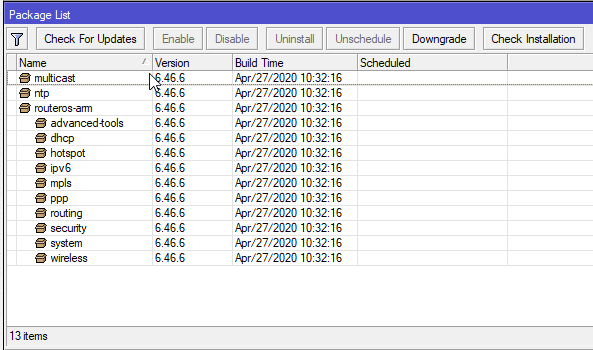
- Upgrade RouterOS
- Reboot
- Upgrade Routerboard firmware
- Reboot
- Factory reset
if you do not have the ipv6 package, install that before you do a factory reset.
peak cloak
tame carbon
<@!222482269829332992> you got the routerOS initial setup done?
nah not yet, plus I want to get everything configured before putting it in "prod"
peak cloak
tame carbon
1. Upgrade RouterOS
2. Reboot
3. Upgrade Routerboard firmware
4. Reboot
5. Facto...
will do
tame carbon
@peak cloak if you install the ipv6 package before doing factory reset. It will install the default firewall for that too.
If you install ipv6 after the fact, you don't have a fw
low pond
i p v 6

 peak cloak
@tame carbon how do I update without internet connection to the router
tame carbon
@peak cloak you don't.
peak cloak
ah
tame carbon
by default it has a DHCP client on ether1
peak cloak
guess I need to run another line from t he switch
tame carbon
plug your machine into ether2-5
peak cloak
yeah ik
tame carbon
and your existing network into ether1 :D
peak cloak
yeah I need to unplug my pc then
peak cloak
yeah
tender hazel
you can update without internet connection to the router
tame carbon
well yes
tender hazel
download the npk, drag and drop it into the root folder of the router, and reboot the router
peak cloak
Its fine, I put it in between switch and pc
tame carbon
I said no for sake of simplicity
@peak cloak but what @tender hazel is useful to know. This is how you manually install additional packages too
you download the file from mikrotik website, drag and drop it into winbox root directory
and reboot
peak cloak
tame carbon
1. Upgrade RouterOS
2. Reboot
3. Upgrade Routerboard firmware
4. Reboot
5. Facto...
where do you upgrade routerboard firmware
peak cloak
ah got it
tame carbon
@tender hazel what does the reset on the mikrotik do?
like, how does it function
is it an OS function? or baked into the bootloader eeprom?
tender hazel
it is part of routerboot
tame carbon
wonder if you somehow manage to corrupt your kernel image
that you can unbrick your machine
tender hazel
there are three functions
one is to do a factory reset
the other is to do a factory reset to CAP mode
tame carbon
routerboot is their propietary routerboard bios I presume?
tender hazel
the third is to put it in netinstall mode
yes
how long you hold the button determines what function is activated
peak cloak
Did not expect it to have a peizo
tame carbon
@tender hazel lol yes
how do you disable the stupid beep on the metal 52ac
it does that on reboot
my rb4011 is entirely mute
tender hazel
yeah most of the newer models don't have speakers in them
tame carbon
at least it still has serial
for the ultimately paranoid engineer
have a 19" unit with a serial multiplexer
and a single 100M management interface
maximum security
tender hazel


 tender hazel
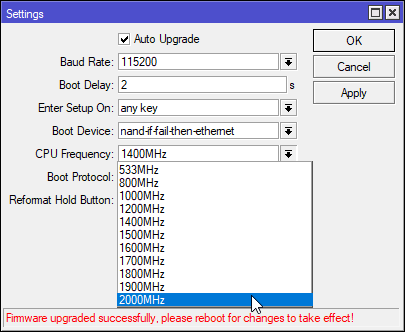
LOL yeah I wouldn't overclock a router
tame carbon
@tender hazel when your already loaded firewall is only barely not making it to max speed
@thick minnow well thing is
I'm sure the operating system is an RT system
and certified/tested devices that have to provide reliable data transmission, probably don't run 100% reliable if you run them out of spec
though then again
it is linux
tender hazel
if you were to overclock it and it makes it unstable booting so that it fails to boot up successfully, you might be unable to remove the setting without resetting the router to factory defaults and then you lose your router config unless you took a backup right before
at least if you are overclocking a computer you wouldn't usually have to wipe the hard drive to remove the overclock
tame carbon
I wouldn't do this in my prod env xD
tame carbon
I cannot find any articles about people overclocking this hardware
last post about anyone talking about mikrotik oc, 2007
going from 750MHz 800MHz
spotify is completely fucked
wtf
peak cloak
first step, getting rid of the default bridge
tame carbon
@peak cloak wat fer
peak cloak
or at least mod it so it's not on the port that will go to the switch
tame carbon
that's your root bridge
tame carbon
well
peak cloak
I may mixing terms with edgeos
tame carbon
you have hw acceleration on that one :P
peak cloak
let me make a diagram of what my setup is like rn
@tame carbon

no bridging really being done
so I got rid of the default switch interface on the ER-X
and just routed directly
peak cloak
tame carbon
<@!222482269829332992> create a bridge
but keep the default one?
tame carbon
yeah that's the management network xD
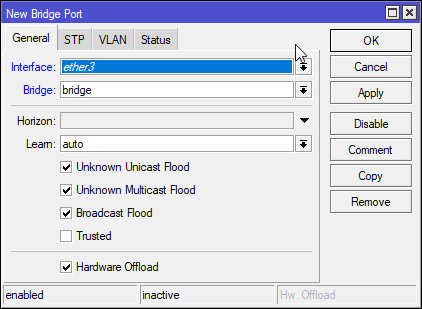
@peak cloak on that bridge you created
add a new port
select ether3
and assign it to that bridge you created
@peak cloak https://i.imgur.com/0xN28BZ.png
 peak cloak
tame carbon
select ether3
peak cloak
tame carbon
select ether3
Couldn't add new bridge port. I assume I need to remove ether3 from the default bridge?
peak cloak
yeah
tender hazel
wait, why are you having him make another bridge?
tame carbon
@tender hazel use the existing one as management
peak cloak
the managment port on that diagram was just to stop me from getting locked out
tender hazel
yeah but given the diagram a bridge isn't necessarily needed
although there is no harm in having it there
peak cloak
peak cloak
the managment port on that diagram was just to stop me from getting locked out
so as long winbox can connect to it over mac or something, it's fine
tender hazel
why don't you just put the three VLANs on the bridge?
then it doesn't matter which ethernet port 2-5 you use to connect to your switch
peak cloak
yeah I see what you mean
tender hazel
did you enable your ipv6 before resetting again to factory defaults? or do you not have ipv6 from your provider?
peak cloak
tender hazel
did you enable your ipv6 before resetting again to factory defaults? or do you n...
- I did
- I do not (verizon fios) although I do want to use a tunnel in the future
tame carbon
@tender hazelever seen this? https://i.imgur.com/HDvCF7y.png
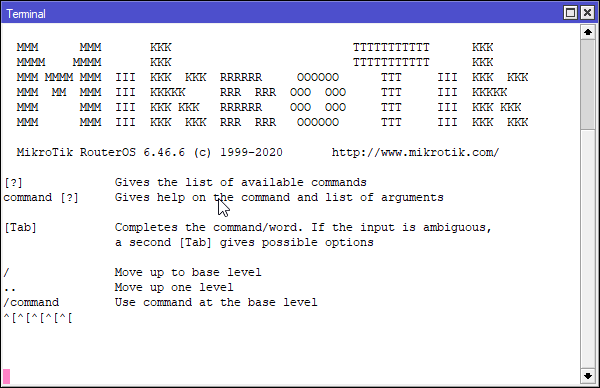


Terminal is fucked
even via ssh
tender hazel
reboot it
tender hazel
that happens if the management stack on the router crashes or gets stuck in a loop
tame carbon
my poor uptime
tender hazel
it is rare.. it has only happened to me twice before
tame carbon
@tender hazel only thing i can think of is that I pressed upgrade firmware when there was already latest
and never rebooted
thats only abnormal thing in the OS right now
@tender hazel so stupid.
I forgot my wifi password
and I need this stupid terminal to work
tender hazel
why do you need the terminal to see it?
tame carbon
there's no way to view the pw in winbox
tender hazel
yes, go into the settings menu in winbox and uncheck "hide passwords"
tame carbon
my hero
peak cloak
@tame carbon how do I handle multiple ip ranges for dhcp. On edgeos I created a new dhcp server for each subnet? Do I do the same here or is there a better way?
tame carbon
@peak cloak IP -> Pool
tame carbon
You set up a pool, and an optional next-pool in case it runs out
and then you create a network configuration
Then you create a DHCP server on a specific interface, with said network configuration, and you give it a pool of addresses
peak cloak
tame carbon
Then you create a DHCP server on a specific interface, with said network configu...
oh so I need multiple servers
tame carbon
Yeah you do