#networking
1 messages · Page 334 of 1
 peak cloak
 thick minnow
How long have you been using it?
thick minnow
How long have you been using it?
like 5 months already
thick minnow
great
peak cloak
@thick minnow https://blog.system76.com/post/648371526931038208/cosmic-to-arrive-in-june-release-of-popos-2104

With April in full swing, it’s time to preview the upcoming version of Pop!_OS! New features are lined up for the release like kids at a candy store. Among them is the tale...the legend...the ultimate...
 slate sonnet
kde is just a DE. you can install kde on pop os, but it's not awesome (in terms of feeling "premium")
Like, the first login screen upon boot will be the one from pop os, then if you lock and try to login, the lock screen will be from kde
In fact, KDE literally means K Desktop Environment
 silk hare
When you guys hear the term "Software Defined Networking" what companies come to mind first?
 clear igloo
Juniper, Cisco, Fortinet, VMWare, Palo Alto
slate sonnet
I have a question, how would I connect my phone to my pc through my vps using wireguard?
Well, what I need is to be able to connect to my jellyfin home server
So can I just copy the existing rules I have set up for minecraft and paste the rules, but with the port for jellyfin?
Here are the rules I have atm

 bold karma
Ubuntu, as steam can be installed on it and many steam games have already been ported
peak cloak
popos is basically ubuntu with more polished gnome
 thorny vector
@lean pebble Go one step further. Do pop_os. It's ubuntu with canonical's telemetry ripped out, better ui, and some nice utilities
bold karma
I had a tough time getting popos to work properly
thorny vector
In terms of the flow loading steam, its the exact same
Literally the same packages
 plain siren
^
The real diff between Linux Distros is Package Management.
The real diff between Distros based on the same "root" distro is their preconfigs
At the end of the day, they really are the same under the hood
thorny vector
Some of them. Also a lot of underlying system stuff, how the kernel is setup, extra modules being loaded in, tuning, etc
plain siren
Well thats the more modern stuff. Only recently have we seen some really interesting and unique shit
SmartOS, Rancher OS, etc
thorny vector
Just all the different system managers is a big divide
plain siren
Indeed.
But the fundamentals remain the same
Thats the beauty of it
Rancher OS really was one of the most intersting to me.
bold karma
If one is based off another it is no longer a distro, it is then a derivative or flavor depending on various factors. Proper terminology matters.
plain siren
A distro is a flavor.
thorny vector
lol, and pop_os is most CERTAINLY distinct enough, even if just by removing telemetry
And they upstream a lot of what they do to ubuntu, and recently, gnome
plain siren
https://bedrocklinux.org/ < This kinda shows by example how they all come together at the same point
bold karma
plain siren
A distro is a flavor.
You are wrong. But then again what do I know.
thorny vector
Distro is literally short for distribution. If I repackage centos and add a few packages and call it something else, it's a new distro

 primal ice
all the forks
thorny vector
Also, if https://distrowatch.com/ is wrong, I don't want to be right
plain siren
 waxen saddle
"When more than one person says, "We are not the Protocol Police," at
least one of them is not telling the truth.
The Protocol Police love company and are never alone."
looool
 wicked tartan
hey networking people how do i explain to someone in layman terms that whatever wifi speed you have will not be used entirely on 1 program
e.g i have 100mbps but chjrome only uses 1mbps
 copper rover
It's a shared resource. WiFi connectivity is the max theoretical with the limitation being the internet speed capability and the hosting server load at the other end.
Also congestion is a factor regarding concurrent activity on the same WiFi network by both the end-user and others.
If someone is asking if a single application is guaranteed 100mbps, the answer is "no".
slate sonnet
That ping doesn’t seem too good

 lean pebble
thorny vector
<@!109801863771074560> Go one step further. Do pop_os. It's ubuntu with canonica...
lean pebble
thorny vector
<@!109801863771074560> Go one step further. Do pop_os. It's ubuntu with canonica...
Thanks :)
I told my friend to test popos
Morning :)
 tame carbon
@wicked tartan best case scenario on 2.4GHz wireless is about ~70mbit/s
on 5GHz you can get much higher speeds
wicked tartan
wait why am i pinged here
tame carbon
Because you asked a question, and I took the time and effort to formulate a response
wicked tartan
oh i asked about how do i explain to somewhat that your entire wifi download upload is not entirely dedicated to 1 program
LOL
 distant wedge
If you need to put effort into your replies to someone, you should probably get off discord for a while, just saying.
wicked tartan
wait let me say at least i am thankful
tame carbon
r/wooosh
lean pebble
Hello
 waxen otter
i need a switch
copper rover
Hello. Welcome to networking anonymous
waxen otter
any better putty alternative
plain siren
waxen otter
any better putty alternative
Windows supports SSH and Telnet natively now

 waxen otter
im not a expert i just need something to connect to my pi 4
plain siren
Command Prompt > ssh works just as well
plain siren
thick minnow
OpenSSH
OpenSSH is native to windows now
peak cloak
waxen otter
any better putty alternative
just use openssh built into windows
ssh <username>@ip
ex
ssh presentmonkey@10.10.10.10
plain siren
https://sysprogs.com/SmarTTY/ < if you really need a "Client" however
copper rover
I'm a fan of Putty myself, nice to keep profiles saved. Versatile
plain siren
copper rover
I'm a fan of Putty myself, nice to keep profiles saved. Versatile
{
    "guid":  "{5064e844-37f9-4c7c-aba5-51fa0795ee1a}", //Random
    "hidden":  false,
    "name":  "DockerHost",
    "commandline":  "ssh user@localhost"
}```
If you have Windows Terminal, you can add profiles to them for SSH now.windows terminal is cool
copper rover
Is Windows Terminal supposed to be included in the next build of Windows rather than remain a separate download? Seems they will just have one apps to run both CMD and PS
plain siren
Yeah, its slated for addition in the next rollout
copper rover
Figures
plain siren
Insider already has it native
And you even have > Right click > Open In Windows Terminal
copper rover
"GPU accelerated text rendering engine" 🤨 But why?
I'm guessing vectored fonts that scale to resolution?
peak cloak
copper rover
"GPU accelerated text rendering engine" 🤨 But why?
effects I guess?

like this crt effect
waxen otter
ey pepl what is the difference between a network switch with external power source and a normal switch
bcs how i see it its just another plug wasted
plain siren
waxen otter
ey pepl what is the difference between a network switch with external power sour...
All switches have external power sources?\
waxen otter
shit they all need power
plain siren
You could POE power some
waxen otter
well can i power the thing trough usb
bcs i rly not want to use up another plug in my power brick
 thats just realtek
clear igloo
The only USB powered ones I see on Amazon are 100Mbps only and 4x as expensive as gigabit ones that need a plug
clear igloo
no, a $15 gigabit switch will come with the power supply needed
waxen otter
wwwwait
clear igloo
They require wall power though, not USB power
waxen otter
no the ones i found have a DC005 connector on back
and 5V 1A above it
that is USB power
clear igloo
If you have a barrel plug to usb adapter then it should work
waxen otter
well i dont have one but i can make one
clear igloo
Then you should be fine
peak cloak
waxen otter
shit they all need power
yes
I poe power one of my distribution switches
switches need to actually process stuff
hubs don't iirc
hubs suck
waxen otter
u misspelled POWER
peak cloak
waxen otter
u misspelled POWER
?
waxen otter
peak cloak
I poe power one of my distribution switches
I *power
peak cloak
poe
waxen otter
xD what that
peak cloak
power over ethernet
waxen otter
wait u can do that?
waxen otter
doesnt rly matter i alrdy ordered a charger
peak cloak
for example powering access points, so you just need to run one wire
but the end device needs to support it
although you can get splitters
waxen otter
good to know
 low pond
peak cloak
for example powering access points, so you just need to run one wire
low pond
peak cloak
for example powering access points, so you just need to run one wire
Especially on given buildings where you need AP's at given postions, but cant run an dedicated AC wire too just for the adapters (maybe by luck if the building has it, but still)
It's used quite a lot
plain siren
(And Cameras)
 craggy aurora
Hello, I'm new to the server so I don't know if asking on the forum or here is better but anyway. I have a question related to the max "real speed" of an TP-Link powerline adapter (TL-WPA4220 Kit). As of right now, I have an internet connection to my main router of 100Mbps, the problem is that my main PC is not in the same room (router in living room and PC in my room) and my house doesn't have ethernet cable, so I have to use some kind of ethernet powerline extender. The problem is that for some reason the max speed I get is 50Mbps in some cases less. I know the distance affects the performance but it is no more than 3-4 meters.
peak cloak
craggy aurora
Hello, I'm new to the server so I don't know if asking on the forum or here is b...
lots of factors influence powerline performance. Even though the "distance" may seem short the outlets may be on completely separate circuits so it needs to go the main box and back. If the direct distance can't you just cut a hole in the wall?
plain siren
craggy aurora
Hello, I'm new to the server so I don't know if asking on the forum or here is b...
Your PC is connected to the Router through Powerline?
Because like @peak cloak If its living room > your room, you are on 2 diff branch circuits.
In that case I am surprised you get 50Mbps
craggy aurora
I already checked the connection speed between the devices and the TP Link software says 150 Mbps. Also, I check the motherboard and network card specs and both support the speed so dose factors are out of the equation. Regarding the circuit, according to the apartment blueprints, it shouldn't be the case. Is my parent's apartment so cutting a hole is unlikely to happen 🙂
 copper rover
I'm using powerline at home
The link limitation comes down to the wiring in the building
If they're all on the same circuit, you'll get a really good connection. In my case, around 650mbps
But if you're having to cross circuit breakers, meaning from one room to another, that will most likely reduce link speed
craggy aurora
In that case is there a better solution? I've been told that a mesh network could improve the speed rather than the powerline but I'm a little sceptical about it plus my network card doesn't connect to 5ghz
copper rover
Sometimes it comes down to noise on the line if grounding is poor. Others is resistance. Replacing or re-terminating electrical outlets might help. But that's only if you're a DYI homeowner and know what your doing. Otherwise call a handyman (bonded and insured) or an electrician .
peak cloak
craggy aurora
In that case is there a better solution? I've been told that a mesh network coul...
mesh is eh
copper rover
craggy aurora
In that case is there a better solution? I've been told that a mesh network coul...
Powerline is probably your better option if you want sustained throughput and low latency. About the other WiFi technology that I could see do better would be WiFi6
But you'd need a WiFi 6 router or AP along with a client adapter that supports the new standard
craggy aurora
copper rover
But you'd need a WiFi 6 router or AP along with a client adapter that supports t...
I don't think that's happening because most of that technology isn't in my country yet or is very hard to find, but thnx anyway I'll see if replacing the network card for a 5Ghz and connecting that way improves something.
copper rover
How far apart is the computer from the router?
Home or appartment?
In other words, are you in a shared building complex?
craggy aurora
It is 3-4 meters with a wall in the middle or 13 meters approx without a wall in the middle. It is an apartment
copper rover
Well, you could ghetto it and just run a patch cable from your computer to the router 😁
craggy aurora
Hahaha, my parents would kill me but maybe I can make a deal to make a hole on the wall. Thanks anyway
copper rover
🤨 I was thinking more of running it along the top of the wall and over the door frame or something. Or if not crossing a walk way, along the floor against the wall.🤔
Safety is important, you don't want to trip over something
craggy aurora
The problem is that my mom is very picky when it comes to the house aesthetic. She even tried to remove the fiber optic because it added another cable where the router is.
Strict as hell
copper rover
The mom factor, yes, that's always an issue for sure
When you get married, it gets worse because now you have two of them. Three if counting the wife. 🤣
lol, sorry, couldn't resist.
craggy aurora
LOL 
plain siren
copper rover
When you get married, it gets worse because now you have two of them. Three if c...

Just wait until he realizes there is 3 of him.
 tawny flint
hey so i want to replace the fans for my Netgear ReadyNas Pro 6
CPU
PSU FAN
Backfan
 ashen escarp
@tawny flint ok
tawny flint
ashen escarp
<@221936582075219969> ok
ok
peak cloak

New: Cloud giant DigitalOcean says customer billing data, including partial payment card numbers, was accessed by an unauthorized person over a two-week window in April. DigitalOcean said it has fixed a security bug as a result.
Likes
107

 Twitter
·
waxen saddle
Twitter
·
waxen saddle
"You can trust us!" - every cloud provider (...to leak your data at some point, randomly)
 ancient osprey
Weird question, anyone know how to create a WiFi Profile for Apple devices.
peak cloak
ancient osprey
Weird question, anyone know how to create a WiFi Profile for Apple devices.
WiFi Profile?
or on the device itself?
 sour minnow
waxen saddle
"You can trust us!" - every cloud provider (...to leak your data at some point, ...
sour minnow
waxen saddle
"You can trust us!" - every cloud provider (...to leak your data at some point, ...
I beg to differ. Companies like google and amazon can build better and more secure networks than 99% of people
 rocky badge
ancient osprey
Weird question, anyone know how to create a WiFi Profile for Apple devices.
ancient osprey
peak cloak
WiFi Profile?
rocky badge
ancient osprey
Weird question, anyone know how to create a WiFi Profile for Apple devices.
ancient osprey
peak cloak
WiFi Profile?
Like a .mobileconfig for Apple Devices, I want to learn how to make them properly to with my some enterprise type gear I have with Radius 801.X Authentication
peak cloak
ancient osprey
Like a .mobileconfig for Apple Devices, I want to learn how to make them properl...
ah
on the device side
peak cloak
no clue about ios
rocky badge
I believe you can make it auto populate with Apple Configurator 2 & MDM
ancient osprey
I have Apple Configurator 2 on my Mac, but there’s no useful guides on how to make the profiles.
Unless I’m missing something.
rocky badge

TechRepublic
Creating 802.1x-enabled wireless network provides additional security for organizations by protecting against unauthorized access.
That's around the same for iOS too
I don't have a mac handy to get screenshots of it but that looks about right
ancient osprey
Okay. Thank you. I was having a hella hard time finding anything on it.
rocky badge
I had a profile one time to automatically request a certificate from ADCS and use it for WiFi & stuff lol
ancient osprey
Lol. I’m working with UniFi equipment and everytime I leave it makes me enter the password in. But I’m done and I’m just creating profiles for RADIUS users.
ancient osprey
I love the security RADIUS provides tbh.
rocky badge
I wish everything at home supported WPA3 lol
I'd just configure my main SSID for WPA3
so "PSK" isn't shared anymore, each device will have their own encryption
ancient osprey
WPA3 would be great but like it’s taking forever to be adopted
rocky badge
yeah
peak cloak
idk really anything of mine supports WPA3
rocky badge
most of our devices support it but not everything
ancient osprey
Yeah.
ancient osprey
That’s why I’m using RADIUS cause it at least provides me everything
ancient osprey
Lmao. WiFi 6 still it’s wide spread yet.
5 is still the most prominent that I’ve seen anyway.
rocky badge
Yeah
But most modern consumer stuff has WiFi 6 anyways
iPads, phones, laptops, etc
provided they're not cheapo
ancient osprey
Yeah. The networking side baffles me. They go oh yeah here’s cool shit. takes a billion days before it’s actually open
rocky badge
yeah lol
ancient osprey
Like murder me.
Oh, that guide you sent me uses macOS server. Should I use that instead of AC2?
ancient osprey
Didn’t Apple basically strip server naked and shove it in the alley somewhere?
rocky badge
macOS server is now just an application on top of macOS
it used to be a different OS
ancient osprey
Yeah, I remember that happening. But now it’s basically so bad everyone wants the server OS back
waxen saddle
It’s really that bad?
ancient osprey
Lmaooooo from what I’ve seen, yes.
tawny flint
question new to this
i have a TP-LINK TL-SF1016D 16-port 10/100M Desktop can only (Output: 5.0VDC / 0.6A)
and i bought new CCTV pack and the CCTV require 12V
So one of them need
1x DC 12.0V⎓1A, <8W RLC-520
3x DC12V & PoE (IEEE 802.3af RLC-410
1x DC12V & PoE (IEEE 802.3at) PTZ (pane tilt and zoom) RLC-423
will a poe injector boost the DC to my switch?
waxen otter
[07:52:34 INFO]: [Residence] Loading world data into memory...
Any idea why that takes a long time?
wc
tame carbon
@tawny flint pretty sure those Reolink cameras accept passive PoE
I have 4 of those here, powered by a cheapo TPLink PoE switch
if you have ones with motors on them, may require more power
negotiated PoE is for higher voltages, 802.3at/af
 vestal sundial
That TP link "TL-SF1016D" is not poe capable huh
 tawny flint
tame carbon
<@!221936582075219969> pretty sure those Reolink cameras accept passive PoE
tawny flint
tame carbon
<@!221936582075219969> pretty sure those Reolink cameras accept passive PoE
so will a POE Injector or something put more power into the TL-SF1016D switch yes/no??
vestal sundial
No
tame carbon
@tawny flint Look at the specsheet/datasheet
If it uses PoE, it should say exactly which standard, and how much watt it needs
Passive PoE, 802.3af or 802.3at
@tawny flint that switch you have isnt PoE capable
either use an injector, or get a switch capable of doing PoE
vestal sundial
Just what I said 😅
 rose sparrow
Hey! Can I use a CAT5 30m cable for 12v 1a PoE
rose sparrow
1A
rose sparrow
Oh ok
tame carbon
@rose sparrow its certified for up to 100 meters then.
if you need higher power, you need higher voltages
12-57V
tawny flint
So Crystal
rose sparrow
Idk, I have to supply power to a CCTV camera and it came with a 12v 1a brick
I already have that cable setup
So I think I need to change the cable
tame carbon
@rose sparrow cables can do it just fine.
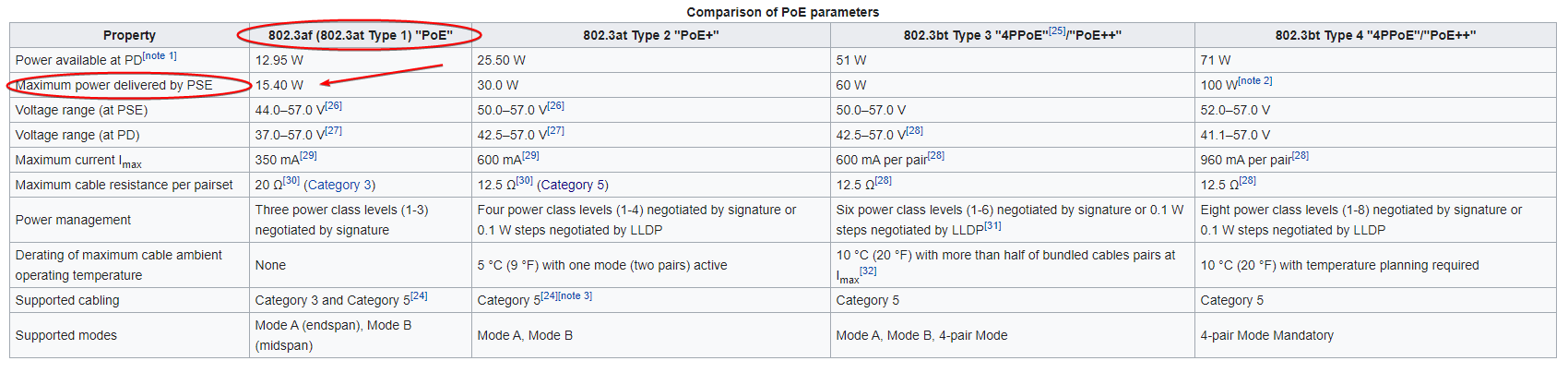
https://i.imgur.com/f9rUKdx.png
 rose sparrow
Oh great
vestal sundial
tame carbon
<@!645836624458022933> cables can do it just fine.
https://i.imgur.com/f9rUKdx....
802.3af uses higer voltage
tame carbon
@vestal sundial voltage is negotiated.
Passive PoE is nonstandard, those are just 24V
tawny flint
so i have 5 Poe Camera but one of them is a heavy boi RLC-423 PTZ so a POE still work without AC/DC power cable?
vestal sundial
Read the instructions/specifications of the product
"DC 12 V & PoE+ (IEEE 802.3at)" So providing at it will work
tawny flint
 tame carbon
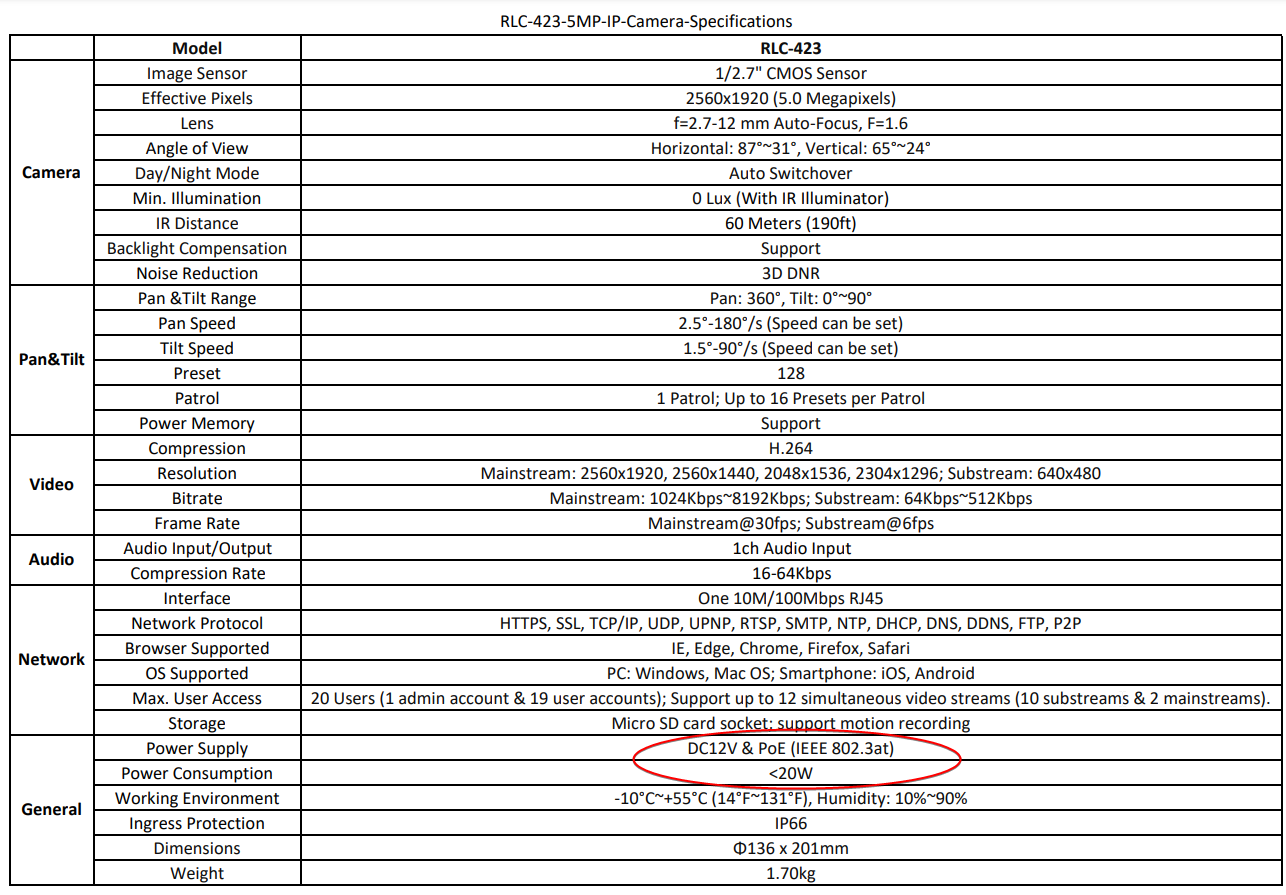
@tawny flint yeah you can either plug in the power brick directly to the camera (it has a 2nd lead for power)
or you can use PoE
tawny flint
what POE switch would you recommend me to get for 5 POE camera AUD (Australia)Price
tame carbon
@tawny flint you need something capable of doing vlans, or a regular unamanged switch would do?
tawny flint
unmanged i guess it only for home i problem set the IP on my Router and the camera setting
using
FTP from my NAS (Storage)
tame carbon
I dont know of any 802.3at capable devices, other than the PowerBox by mikrotik...
the tplink variants are only 802.3af which isnt what you need
tawny flint
yea i dont mind other brand
tame carbon
yeah but its only 4 ports xD
tawny flint
but something that not too pricey
vestal sundial
Or get af poe switch and wire that one big camera with direct power + ethernet. A bit more work but saves you cash
tame carbon
JetStream 10-Port Gigabit Smart Switch with 8-Port PoE+
Though I think you are running into power budget issues with that ^
Its only 61 watts, each of those cams is around ~15 watts
and you want to have a bit of headroom, otherwise it may start power cycling if you overload it
tawny flint
will a 802.3at POE injector will work for the RLC-423 PTZ just on it own will it delivery enough power?
tame carbon
you'll end up with a clusterfuck of injectors
TL-SG2210MP
JetStream 10-Port Gigabit Smart Switch with 8-Port PoE+ (TL-SG2210MP) | 150 W Power Budget | Ideal for Surveillance, Access Point, and IP Phone | Easy to Use | Cloud Centralized Management | Omada App
8× 802.3at/af-compliant PoE+ ports with a total power supply of 150 W*.
@tawny flint this would do ^
tawny flint
 tawny flint
Welcome to AUSTRALIA EVERYTHING IS OVER PRICE
RTX 3000 na not tripe or double it x5 double the price
tame carbon
@tawny flint lol can you check how much the PowerBox Pro costs for you? (Made by Mikrotik)

 tawny flint
yea i thin i go with TP one 😄
tame carbon
they cost 84 euros here which is 101 USD
tawny flint
i just used what it call ZIP pay aka pay weekly or monthly
tame carbon
@tawny flint that tplink has 10 ports, 2 of which are SFP ports
you can get $5 modules you can put in there, to get two more gigabit ports
rose sparrow
Any cable internet expert onboard?
tawny flint
tame carbon
<@!221936582075219969> that tplink has 10 ports, 2 of which are SFP ports
so TL-SG2210MP
is all POE include for the PTZ (IEEE 802.3at)
tame carbon
@tawny flint Yeah, it has 802.3af/at capabilities, so it can power the cameras.
tawny flint
ok i will buy the TL-SG2210MP
then
tame carbon
just need regular network cables between the switch and cameras
tawny flint
yea i will be using CAT5E
i bought 2x 100M CAT5E
tame carbon
@tawny flint you crimping the leads yourself?
tawny flint
yea
tame carbon
you got tools for this ?:P
tawny flint
Yea im a pro (noob) did it to some old cable that is Cat5
tame carbon
@tawny flint I recently upgraded my cable crimp to a passthrough crimp :D
tawny flint
i have 200PCS RJ45 Head
tawny flint
tame carbon
<@!221936582075219969> I recently upgraded my cable crimp to a passthrough crimp...
very nice In Australia our Speed not that fast
tame carbon

This makes life so much easier ^ :D
you push the wires through the keystone
and the tool cuts off excess
tawny flint
yea that does make it easy but i dont have that sadly
bought mine one from aliexpress
tame carbon
Yeah I dropped like 50 bucks on some german branded tool
the keystones themselves cost the same
bag of 500pcs for 80 bucks or something like that
tawny flint
yes please TMR it coming Ya 😄

so anyway i problem sell the useless one on ebay or Fb marketplace or gumtree AU
that alot of them
yea i just bought a Crimping kit from ebay $21AUD xD
tame carbon
@tawny flint I'm currently planning out a big outdoor wireless network, and I have like half a dozen PoE boxes xD
tawny flint
tame carbon
<@!221936582075219969> I'm currently planning out a big outdoor wireless network...
Holy shit that alot xD
tame carbon
each pole has two wireless APs on it, and a point-to-point antenna
the ptp antenna goes back to the main building
all outdoor
tawny flint
btw i dont know what you talking about cause i am a bit of a noob in networking XD but i will agree to everything 😉
tame carbon
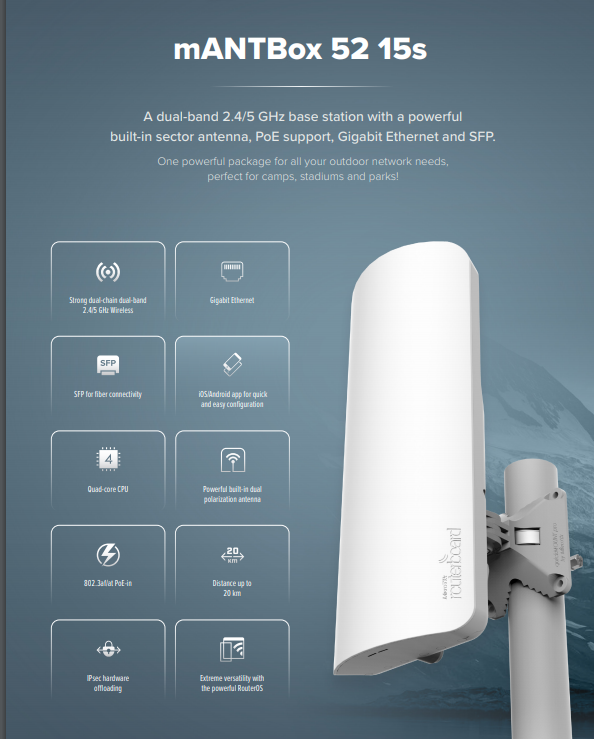
@tawny flint https://i.imgur.com/cpJlYkS.png
 tawny flint
how much is that......
tame carbon
Outdoor 90 degree sector for wireless
@tawny flint like $150 ?
They cover a 90 degree field of view
tawny flint
$285 with Tax AUD https://wisp.net.au/mikrotik-mANTBox-52-15s.html
tame carbon
@tawny flint I'm keen on trying these out: https://mikrotik.com/product/wireless_wire_cube

MikroTik is a Latvian company which was founded in 1996 to develop routers and wireless ISP systems. MikroTik now provides hardware and software for Internet connectivity in most of the countries around the world.
These will be feeding the access points
tawny flint
oOOooOO that one look nice is this a EU/UK brand?
tame carbon
EU
tawny flint
i see that why it cost so much in AUD
thick minnow
tame carbon
I ❤️ mikrotik
It's true, He does
tame carbon
they set up a gigabit link at up to 800 meters
you just point them at eachother
and turn them on
tawny flint
i see you are a Mikrotik fan boi/gurl
tame carbon
Haters be hatin'
tawny flint
yea AUS internet is CAP by NBN and ISP so it like $$$$? you want fast pay more
tame carbon
@thick minnow in almost all scenarios, buying mikrotik is cheaper for me
tawny flint
if it you trust and like i would too
@tame carbon should i just get another UPS for just the POE?
this my Aurora Vista 850 UPS
So what is in it
Netgear ReadyNAS PRO 6 (custom fireware to the OS 6.10.4 for the laters one RN)
6/10x ST33000650NS 4x for backup incase
Archer VR1600v router
 tame carbon
It wont be using that much power now would it ?
not sure what your UPS is rated for
but that switch wont be using that much power
at most ~150 watts
tawny flint
Input
Nominal Input Voltage 220/230/240 Vac
Nominal Input Frequency 50/60 Hz
Output
Capacity 850 VA / 480 W
Output Power Factor 0.56
Nominal Output Voltage 220/230/240 Vac
Nominal Output Frequency 50/60 Hz
tame carbon
0.56 PF 
tame carbon
I wouldn't put more onto that
tawny flint
yea im guess too it will make a lot of beeping saying overloading
@tame carbon https://www.ebay.com.au/itm/274661780355?epid=21034372862&hash=item3ff31e2b83:g:0TQAAOSwltBgEVfj Value600EI i have a spare battery for it 🙂


eBay
CyberPower VALUE600EI Value 600VA / 360W. Condition is "Used". Item is in good working order.only thing that is needed is the power cord.
should be enough?
tawny flint
thanks for helping me alot Crystal
peak cloak
tame carbon
<@!222482269829332992> my favorite meme has died today :(
yesterday
:sadkewk:
 low pond
I know right,
 topaz mirage
Hello
Finally formatted my 2nd HDD to work with my NAS.
But the issue is that I transfered 20GB and it started to slowdown and even error out. When I click Try Again on the error message...it will eventually start again and repeat this slow cycle of B/s -> kB/s -> MB/s -> error...
I just found out that the drive is SMR (shingled)...could that be an issue? The HDD is blank, so it shouldnt be moving anything around. But maybe the SMR is still slower even when writing new data on it and it needs to buffer it/cache it and I reached it's limit (~20GB)
Is my theory correct and I don't have to worry? 😄 Until now I used that drive in an external enclosure and copied files to it like 10GB max in single go... Now I'm doing ~200GB in one go. Keep in mind that the drive was blank.
Thanks a lot
EDIT #1 (error translation): Unexpected network error
EDIT #2: The whole NAS is slower right now as I'm moving to it. Idk if it was like this before, but I dont think so...
Is the respond time of the whole NAS when opened in File Manager slower because the SMR drive is bottlenecking the whole filesystem? And the system is waiting until it responds with info about files stored?

Huh weird...its not erroring on me. 26MB/s is low, but it was like 5MB/s before...
When I copy to primary HDD (10TB IronWolf Pro CMR drive) it will go around 80-95MB/s in comparison.
So this has to be SMR issue....

 copper horizon
topaz mirage
Hello
Finally formatted my 2nd HDD to work with my NAS.
But the issue is that I ...
copper horizon
topaz mirage
Hello
Finally formatted my 2nd HDD to work with my NAS.
But the issue is that I ...
Smart status?
topaz mirage
copper horizon
Smart status?
Any particular ID you need?
copper horizon
Nope, just wondering if you checked it, first thing I check when I zero out a drive previously
couldnt tell you to check an id specifically, I have an enteprise nvme drive question as well hah
topaz mirage
Oh, well I didnt when I wiped it
copper horizon
If any server/home lab people out there know this: I have nvme enteprise native 4096 sector size drives (4096 logical/4096 physical). Need it to emulate 512, (512 logical). Whats the best way to do it? I see some manufacturers have their own tool, but cant find one for WD. I know this is networking, but it's not the crowd that #tech-support/hardware would know
topaz mirage
I have to wait for a second when opening a folder through Samba...didnt wait before installing drive, but again. I wasnt doing a 20MB/s and more copy to it while browsing.
At least I think...
tame carbon
@copper horizon I think @plain siren knows more about this
peak cloak
copper horizon
If any server/home lab people out there know this: I have nvme enteprise native ...
I myself don't know. Maybe someone in the homelab discord would know
I don't know too much about storage
tame carbon
I've seen him ramble about nvme storage before
copper horizon
Ah didn't know there was a discord for that. Cool, will ask there. Silly Virtualizor (to setup VPS's) cant work with 4096
tame carbon
and how to align blocks
copper horizon
topaz mirage
I have to wait for a second when opening a folder through Samba...didnt wait bef...
Could be many things, RPM for that drive, is the drive plugged into a controller, are you running raid etc
topaz mirage
copper horizon
Could be many things, RPM for that drive, is the drive plugged into a controller...
RPM is 5000 something, its connected via SATA. Like the IronWolf Pro which functions/ed fine. No RAID. You cant do RAID with SMR anyway.
copper horizon
thorny vector
<@!665483139505717249> What OS?
ubuntu 20.04 but not tied to it if i need to switch to another
plain siren
copper horizon
If any server/home lab people out there know this: I have nvme enteprise native ...
We call this 512e
hdparm --set-sector-size 512 /dev/sda
copper horizon
plain siren
hdparm --set-sector-size 512 /dev/sda
thanks, doesn't require a reformat? or it does. Thought i read somethign about making sure the offsets make sense
plain siren
Yeah you would reformat

That being said, you may wanna check to see if your particular SSD comes with a tool to set the alignment
Some do
hdparam is a destructive command
 waxen scroll
@hollow marlin whats a service desk ENGINEER?
seeking SERVICE DESK ENGINEER (Tier 2/3 WAN support) - remote
sounds like no engineering involved
 plucky crescent
I have a pretty simple port forwarding question, is there anyone on right now to field this?
plain siren
plucky crescent
I have a pretty simple port forwarding question, is there anyone on right now to...
Sure
plain siren
waxen scroll
sounds like no engineering involved
There isnt. Its basically T2 Helpdesk
waxen scroll
plain siren
There isnt. Its basically T2 Helpdesk
should I troll the recruiter?
plain siren
Totally
plucky crescent
If I want to port forward something for a game on all my computers, rather than making individual rules for each PC, can I port forward to the broadcast IP, or does that not work?
waxen scroll
the last recruiter i trolled was someone from amazon
i asked if I have to supply my own piss jugs or if the company provides them
she ignored me
plucky crescent
lol
plain siren
plucky crescent
If I want to port forward something for a game on all my computers, rather than ...
No you cant haha.
The point of PF is that you have a bunch of machines behind 1 useable address.
So you gotta share
So lets make it easy
plucky crescent
so if I have 5 pcs, and a game has 18 different ports it says it needs, I need to set up all these rules for each individual PC?
plain siren
Your public IP is 1.1.1.1 and its got 1-4096 of useable ports.
PC 1: 10.0.0.1 > Running Mineshit on 1001
PC 2. 10.0.0.2 > Running Mineshit on 1001
Yeah each rule needs to be individually setup
plucky crescent
agh
is there a protocol anywhere to let your OS talk to your router to forward ports, or is that pie-in-the-sky talk?
plain siren
in above example I would forward like.... 1001 to 1001 on PC1 and 1002 to 1001 on PC2
UPnP although Please for the love of god dont use this. Its stupid insecure
 plucky crescent
yeah, I probably should not have purchased a mikrotik with so little networking knowledge
it's not for noobs.
plain siren
Mikrotik basically does almost nothing for you in terms of automatically setting things up, so yeah
its for those who are really detailed tbqh
plucky crescent
I really appreciate that, but its menus get my head spinning, and the TO and FROM pointing is a little hard to get the hang of
 tender hazel
I run upnp at home on my mikrotik for the sake of convenience, but I keep close tabs on my devices
plain siren
FROM IIRC would be if you had multiple public exposed address
plucky crescent
after win 98, I don't know enough about the windows kernel to keep track of what programs are running on my pc anymore 😦
plain siren
Unlike a consumer router which assumes you got 1 public ip
I think you can catchall the FROM with 0.0.0.0 but I dont remember
plucky crescent
ok thank you for the info NWO. I'll get cracking on a bunch of port forwards!
plain siren
I would say have fun but
plucky crescent

 formal lily
I want to build a server pc from spare parts but the thing I’m confused about is how would I keep my internet protection while running the server off my home network I would need to use my home ip for the server wouldn’t I?
peak cloak
formal lily
I want to build a server pc from spare parts but the thing I’m confused about is...
nope
I just segregate my home network from server network
my home trusted network is on 10.0.20.0/24
and server is 10.10.30.0/24
and kubernetes cluster is at 10.10.40.0/24
formal lily
I’m guessing you do that through your router then?
peak cloak
and 10.10.30.0/24 and 10.10.40.0/24 can't access anything else other than the internet
peak cloak
formal lily
I’m guessing you do that through your router then?
it's network design. My router has one cable to the switch with all the vlans. Then the switch does all the vlan untagging/tagging to all the different devices to my network such as servers, APs, and distribution switches
formal lily
Ah
peak cloak
It would be ideal to have at least 2 v4 ips, one for hosting, another for home use, but it's expensive
ipv6 plz come faster
formal lily
So without doing a lot can’t really set up a server on a different network on home.
peak cloak
formal lily
So without doing a lot can’t really set up a server on a different network on ho...
you can see if your router has something like dmz
and stuff like vlans isn't nessacary
plain siren
peak cloak
my home trusted network is on 10.0.20.0/24
R u me?
 peak cloak
it's just a way to get multiple networks over one physical interface
peak cloak
plain siren
R u me?
lol, that's my testing/ipv6 subnet
plain siren
I really need to move my Home Site to 10.10
plain siren
Ye
formal lily
No on this new router I got from my isp it doesn’t have dmz
peak cloak
what router?
plain siren
10.0.X.X would be a "Global Cast" network for something like your root domain AD or something.
And then you would have site.domain.tld + domain.tld
formal lily
Sac2v2s it’s the new spectrum one complete butt
peak cloak
yeah I doubt it would even let you define multiple networks
plain siren
Im a meme and even use 10/20/30 etc for my IPv6
 peak cloak
like I did the same thing before without vlans kinda
formal lily
Yeah it doesn’t has like 2-3 options
peak cloak
like I just did it by port
formal lily
I do plan on picking up a different router soon though
peak cloak
now I do it by vlan interfaces
peak cloak
formal lily
I do plan on picking up a different router soon though
mikrotik if you want to learn networking
plain siren
annnnnd my XPS just decided to literally halt and catch fire
peak cloak
plain siren
*annnnnd* my XPS just decided to literally halt and catch fire
how?
battery?
plain siren
I have no clue, but it rebooted for a windows update. Someone told me the update was bricking installs... but this is not what I was expecting
This is some next level fuckery
 molten dove
now im glad i delayed that update
molten dove
imagine wooden table
plain siren
I wonder if my warranty covers this
plain siren
IIRC, there is a whole level of under the hood security changes/requirements required by MShit (Supposed to be the final "Transitional" stage of hardware level security upgrades provided by Windows 10) in this update and OEMs are slacking despite being formally told months in advanced
sigh what a day this is turning out to be
I should go back to bed
ancient osprey
@rocky badge Hey, sooooo I was trying to create the profile for 802.1X but it is error ring out was wondering if you had any suggestions. Currently using Unbiquiti Dream Machine RADIUS server…
tender hazel
Un-biquiti?
that would be a good term for if you remove ubiquiti gear from your network
ancient osprey
I meant Ubiquiti
Lmao
I’m starting to think there’s a lot better gear out there that’s not Ubiquiti
plain siren
ancient osprey
I’m starting to think there’s a lot better gear out there that’s not Ubiquiti
There is. There very much is
Ubiquiti is what happens when you get a bunch of semi-pro tier hardware engineers that want networking gear and have them do software engineering without training.
Then tell them to cut corners
And hire pretty UI/UX Designers
plain siren
The appeal is def there cuz Cheap, Pretty, EZ
But... holy hell they fall shorter than a fucking cliff off the grand canyon
ancient osprey
Everyone told me it’s good gear. And it’s great for home use. But now I’m a bit frustrated.
I dropped 350 on a UDM…
plain siren
And god help them when IPv6 hits "Critical" rollout stages this year
ancient osprey
What’s a good choice then?
peak cloak
plain siren
And god help them when IPv6 hits "Critical" rollout stages this year
tell that to verizon
peak cloak
ancient osprey
What’s a good choice then?
microtik?
ancient osprey
Never heard of that
peak cloak
ancient osprey
Everyone told me it’s good gear. And it’s great for home use. But now I’m a bit ...
I mean when I was getting into it I didn't know either
plain siren
peak cloak
tell that to verizon
Im to the point I would rather take a fucking baton to the dumbshits heads over at HQ
peak cloak
I just happened to get the er-x which is pretty descent
plain siren
Ubiquiti hit the market at the right point and had the running start needed since they filled a hole in a good demand market
But glass house effect
peak cloak
the er-x is in the Edgerouter ISP line so it's pretty nice tbh
plain siren
Not looking where they were going and BANG
peak cloak
except for ipv6...
it's fine in the cli kinda
but acceleration doesn't work with it
v6 completles breaks with acceleration enabled
plain siren
If it wasnt for all the signed bin bullshit they slapped on it, It would be so nice to replace the software on these Unifi devices
ancient osprey
So, what’s good from Mikrotik?
plain siren
Honestly, almost all of the lineup is good because it does exactly what it says on the datasheets
Just match the specs to your needs
As it should be.
peak cloak
ancient osprey
So, what’s good from Mikrotik?
does what it says, powerful OS
plain siren
My only gripe is the "lack luster" punch they give since you will find things like the Switches only have 1Gbps total throughput capacity or something but I cant fault them for it because they dont lie about it. Its stated right up front
"Does what it says on the tin" never really felt so true before
If only we could have Mikrotik give Ubi some lessons
That would be such a beautiful middle ground
ancient osprey
Any way I can see what the UI looks like?
plain siren
Its not pretty but hold on
ancient osprey
And play with it?
peak cloak
ancient osprey
Any way I can see what the UI looks like?
yeah actually
plain siren
 peak cloak
@ancient osprey http://demo2.mt.lv/webfig/

you can also try sshing
or using winbox
waxen saddle
My biggest problem with implementing mokrotik is the GUI. My wife at least has a hope of understanding the Ubiquiti UI.
ancient osprey
God damn. This is a whole foreign language to me. 😅😅
peak cloak
plain siren
is that ros7?
plain siren
peak cloak
is that ros7?
Not sure, I yoinked it from https://wiki.mikrotik.com/wiki/Manual:Winbox
plain siren
Mikrotik is what I think of if I assumed Cisco IOS had a WebUI
ancient osprey
All I wanted to do is make identity certificates for my UniFi RADIUS server to use with .mobileconfig for Apple Devices
plain siren
You are in control.... but you are in control to the point you define everything
ancient osprey
No I’m like 0.o
plain siren
Dont even try to use Ubi built in Radius server
ancient osprey
What should I do then?
plain siren
Setup a segregated one
does a prayer
Even Microshits RAS Server on an AD Server which is pretty click-n-go-ez is way more reliable
ancient osprey
But that takes Win Server license
ancient osprey
O.O
Ummmm. Okay? I’ll hear you out. I’m just trying to make identity certificates for mobileconfig
plain siren
ancient osprey
Ummmm. Okay? I’ll hear you out. I’m just trying to make identity certificates fo...
 waxen saddle
I’m not familiar with NPS. /me reads
Oh network policy server. Still not familiar, but I have an idea.
plain siren
Its basically a way of saying IF YER IN THIS GROUP > YOU GET ZE ACCESS
tender hazel
yeah we use NPS at work for our wireless auth and for logins to mikrotik routers in the field
my biggest complaint about NPS is that it doesn't support radsec yet
we do want to use radsec for some things so we might have to put a radsec radius proxy in front of NPS
plain siren
tender hazel
we do want to use radsec for some things so we might have to put a radsec radius...
I hold the same complaint. I use this myself: https://github.com/radsecproxy/radsecproxy
It was pretty damn easy
tender hazel
yeah I haven't used radsec myself but our biggest reason for using it is obviously security
I was wondering though if it also provided a means to guarantee delivery of radius packets, since it uses TCP
it's always been a problem that RADIUS uses UDP and if you need for your RADIUS server to have a complete accounting of everything, UDP can be dropped in congestion situations and then you can be missing data
radsec is built on TCP so I wonder if using it will mean more resiliency since it might retransmit in the case of a dropped packet?
plain siren
The support for TCP is "Experimental" but it is following the rules of TCP
Drop = Retry. Ive managed to observe this as operational
But the reliability of the actual protocol and its use of TCP has been called into question.
tender hazel
because that would be handy even for situations where we don't need the security
plain siren
You heard of "TCP Meltdown"?
thorny vector
I've never particularly messed with radius. Never had a use case for it windows AD didn't scratch for me.
tender hazel
no.. but from doing a search it is why things like OpenVPN are worse on TCP, because you are doing TCP on top of TCP then and you get two different layers trying to do congestion control that don't know about the other layer
plain siren
DTLS with Packet Reordering is the "Happy Medium"
tender hazel
but I don't see how that applies to radsec given that radius is traditionally UDP and so tunneling UDP inside TCP shouldn't be as bad
especially since radius packets aren't that big to begin with, usually it would fit in a single packet
plain siren
tender hazel
especially since radius packets aren't that big to begin with, usually it would ...
Thats why I say "Called into question" because I said pretty much exactly this... yet the "network scientists" of the mailing lists keep groaning on.
For me, it works. Itll prob work fine 100% without issue. Just had to throw in the disclaimer
tender hazel
there are other issues when it comes to UDP on IPv6 too, which is going to necessitate most DNS queries moving to TCP
in order to be able to really begin turning off v4 once IPv6 attains critical mass
plain siren
Ever heard the phrase "Protocol Jenga"?
tender hazel
no
plain siren
The continued stacking of layers of protocols and removal of ones underneath causes an administrative mess that could topple. Added complexities make it harder to keep up.
I had a chuckle when I heard someone say it
Jenga with protocols
waxen saddle
Does DTN fall in to protocol Jenga territory?
(Delay Tolerant Networking/Bundle Protocol)
plain siren
Wow thats been a while since I heard someone mention DTN outside papers
But yes that would be a prime example
waxen saddle
I ❤️ DTN
plain siren
Thats the real pro-tier shit tbh
waxen saddle
You are literally the only person I’ve encountered who has heard of it.
tender hazel
I haven't heard of it
plain siren
I was wanting to do some AmSAT cubes as a project when I had the chance to launch something once, this is when I ran into the whole concept and science behind DTN
waxen saddle
Nice
peak cloak
Nasa uses it iirc
peak cloak
yep
waxen saddle
Bundle protocol sits between layer 3 and 4 of the OSI model (...becoming layer 4) and it abstracts away the underlying transmitting type (doesn’t care if it’s Bluetooth, WiFi, printer, radio, etc..) each bundle is transmitted to the next hop and the receiving hop takes custody and keeps the bundle until it can move it along to the next hop
plain siren
This is a cool Earth to Mars Lander concept diagram that gives a good look as to what its like
 waxen saddle
This is great for transmitting more data from say, satellites orbiting Mars and Earth, where transmission opportunities only happen when line of sight isnt blocked by say, a planet or the sun.
plain siren
waxen saddle
This is great for transmitting more data from say, satellites orbiting Mars and ...
Mars and Earth
Bingo baby.
waxen saddle
Ive done my homework. 🙂
plain siren
The people behind this are amazingly smart
waxen saddle
Even tried writing an implementation in powershell. 🙂
There are many parts I don’t understand and/or can’t wrap my head around yet. But I’m slowly trying.
waxen saddle
Hahahah
plain siren
This is a great way to do it
Theres nothing like seeing NASA and AmSAT Communities use legos to do next-level science
Guess we never grow up
waxen saddle
We really don’t. We just get more complicated.
thorny vector
@waxen saddle What did you try to write in powershell?
waxen saddle
An implementation of DTN, according to RFC 5050 I think
I also think there’s an update to it, but I haven’t tackled this project since COVID protocol sent me home
thorny vector
Yeah, pwsh is incapable of it, unfortunately. Unless you do a whole bunch of .net calls, and at that point you're better off writing in in another language
waxen saddle
There’s parts where you interact with raw binary or something like that that’s low-level enough that I wasn’t sure Powershell could handle it
I can’t do any real programming.
thorny vector
I would say at minimum you'd need to do it with python. It has enough flexibility to do the full range of what you'd need to do
But it'd be pretty inefficient.
go or a C language would be the best
waxen saddle
Rust?
plain siren
RFC5050/ISO 21323:201(6?) is Current and still "EXPERIMENTAL"
Prob will be for another year
waxen saddle
It’s been that way for a while. What’s the date on it?
plain siren
of course anything with SPAAAAAAACE in mind is experimental
2007
MITRE Corporation and NASA's Yeet Engine Group still are Administrative lead
thorny vector
I wouldn't do it in rust. Between it's static linking and way it handles memory, I don't think it'd be the best
waxen saddle
What’s my goal in all this? Ad-hoc emergency communications that don’t need any infrastructure. Tightly team up with Ham radio operators because they are the Linux sys admins of the radio world
thorny vector
Already got IP over HF. I've unfortunately had to work with the military's version
plain siren
waxen saddle
What’s my goal in all this? Ad-hoc emergency communications that don’t need any ...
Hell yea! During Hurricane Harvey I switched my relay to the supplementary emergency bands just for local rescuce ops and then dipped to Oklahoma
waxen saddle
I’m talking some kid in a boat can float down the street, end up at a shelter, and his phone is carrying emergency location information of those in trouble. Now the tent can allocate and send resources instead of guessing
plain siren
Thats honestly the hardest thing about S&R is location
"Where is everyone?"
Minutes count
waxen saddle
Yea. It’d need cooperation from phone vendors. Like throw your phone into emergency mode, type a bit about your situation, and leave the phone alone. It’ll silently transmit DTN packets to anything that will pick it up
plain siren
Ayyy cluster duck
thorny vector
Less about beating delay though, and more about a super resilient, self repairing wireless network
waxen saddle
But yea, that was my dream of DTN. For use when all infrastructure is down
thorny vector
Should just teach land navigation and survival skills in school 😄
waxen saddle
Agreed actually
plain siren
https://github.com/Call-for-Code/ClusterDuck-Protocol @waxen saddle
waxen saddle
I just found out about LoRa last week.
plain siren
I have my reservations about LoRa because Proprietary on Public Bands but
Thats a losing fight for me to take
waxen saddle
Looked for clusterduck on iOS app store. It is not what I was expecting
plain siren
Was it clusters of ducks?
 hollow marlin
plain siren
This is a cool Earth to Mars Lander concept diagram that gives a good look as to...
hollow marlin
plain siren
This is a cool Earth to Mars Lander concept diagram that gives a good look as to...
Im seeing a lot of missing v6 addresses
plain siren
2007 was a simpler time
hollow marlin
Ah, I didn't catch it was a reference back in 2007
 restive hawk
working on running cat6a cable for my home. I am trying to figure out a solution to run the drain wire to a ground but the wall covers I have are plastic. The plan is to run 3 lines to different rooms in the house by running cables between wall covers then plug Ethernet cables from the router into the slots by it. Do I really need to worry about ground since I'm really just running essentially a long cable from the router to the other rooms? If that makes sense.
tame carbon
wat
tame carbon
@waxen saddle https://mikrotik.com/products/group/iot-products
MikroTik is a Latvian company which was founded in 1996 to develop routers and wireless ISP systems. MikroTik now provides hardware and software for Internet connectivity in most of the countries around the world.
The LR-X kits are basically radio, antenna, power supply and IP gateway in a box
and it doubles as a router technically

all you really need is their antenna, some wire to connect it
and a box with a https://mikrotik.com/product/r11e_lr9
MikroTik is a Latvian company which was founded in 1996 to develop routers and wireless ISP systems. MikroTik now provides hardware and software for Internet connectivity in most of the countries around the world.

one of these
waxen scroll
@hollow marlin found another one. "Senior Network Tech Engineer"
waxen saddle
restive hawk
working on running cat6a cable for my home. I am trying to figure out a solution...
Cat6a connectors should be metal, and you wrap the grounding wire around it. They are a little different than cat5 connectors. The wall plate is irrelevant to grounding.
hollow marlin
waxen scroll
<@!462711605063450628> found another one. "Senior Network Tech Engineer"
I guess if you are in NOC long enough 🤷♂️
 hot hawk
Anyone knows how to setup a dhcp server on openwrt, because my current dhcp server on open wrt doesn't seem to be working
 quick summit
where can I get asus heatsink plate? DM me please 🙂
waxen scroll
...for network equipment?
waxen scroll
hollow marlin
I guess if you are in NOC long enough 🤷♂️
Cisco uses coolermaster
hot hawk
quick summit
where can I get asus heatsink plate? DM me please 🙂
any heat sink and a zip tie works

 dark crow
@tame carbon I'm on a different network and is now im doing tracery again
How do I know if its cg nat or not
tame carbon
by looking at the address ranges of the routers you are passing along
tame carbon
I need to see the whole trace
 vale reef
should I get meraki, mikrotik, unifi or something else for my new switch (poe, sfp+)
tame carbon
idk then
check your WAN address on your router.
if it corresponds to your public IP, then you have a direct address and no NAT
@vale reef I'd favor mikrotik myself
tame carbon
mostly because I know how to wrangle RouterOS
dark crow
 tame carbon
@dark crow yeah something there is blocking ICMP, I need to know those addresses or I cant tell you
peak cloak
dark crow
I'm trying it again
what's the WAN interface ip on the router
dark crow
How do I find that
tame carbon
peak cloak
dark crow
How do I find that
log into router, should be in main page
or info
look something like WAN IP
dark crow
Got it
tame carbon
wait for it
dark crow
peak cloak
you found it?
Ok wait
I can't find it
The WiFi settings look too user friendly
peak cloak
dark crow
I can't find it
what router
dark crow
It a Huawei 5G router
peak cloak
what model
tame carbon
@peak cloak finished the survey and made a price indication in equipment lol
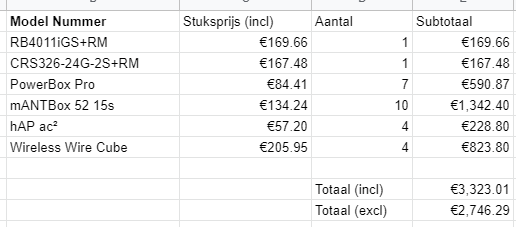
Lots of PoE
@tender hazel I decided to completely avoid PoE injectors
It'll reduce wire-cluttering in the electric box
tender hazel
ok
tame carbon
and less points of failure
tender hazel
yes
peak cloak
tame carbon
https://i.imgur.com/KSwBmqZ.png
nice
tame carbon
@peak cloak supposedly, they only want to start with indoors
so they only really need the router, switch, and a couple hAPs to cover the interior
 worn igloo
is a switch or dock better
tame carbon
@worn igloo wat ?
worn igloo
so.eone once told me to get a dock
I was wanting to use more eathernet in my room than the one I have from my router
peak cloak
no such thing as a dock as a networking device
@worn igloo show link
to what you are getting
 worn igloo
that's what i was told by a friend
peak cloak
worn igloo
that's what i was told by a friend
but what is it
because a dock is what is used to connect a laptop kinda to extend it's capabilites
a switch is a networking device
and a switch is what you want
not a dock
worn igloo
ok what's a good one that has like 6 or more outputs
peak cloak
worn igloo
ok what's a good one that has like 6 or more outputs
usually it goes 5 -> 8
worn igloo
ok what's a good one with 8 lol
peak cloak
worn igloo
ok what's a good one with 8 lol
you don't need it to be managed?
things like VLANs?
worn igloo
idk what that even is. I just know I want all my devices connected to ethernet in my room and I only have one port on my router
peak cloak
it should
boy do I hate netgears naming
it's a switch
but they say hub in the name
clear igloo
got to get those clicks and cover all the ad words
worn igloo
that's should do what I need tho?
clear igloo
yes
peak cloak
yeah
worn igloo
ty:)
clear igloo
Although for $2 more you could get the 8 port version and have some extra ports just to be safe
worn igloo
ok u right
u never know
so I put the input into port 8? and the rest should work as output?
clear igloo
For ethernet? no, you can get them down to 0.5ft
worn igloo
hmm on
worn igloo
was thinking I dont need very long ones if there going to go from the switch to my console if there all right next to eachother
clear igloo
yah
worn igloo
would it be bad if I put my consoles on the switch ?
clear igloo
nope
restive hawk
@waxen saddle then i must be confused because the cable would plug into my keystone metal connector, which I get that part but then at what point is it grounded in the system? My router in the USA only has the 2 prong plug and does not have a ground plug.
waxen saddle
Ideally it would ground to the switch you connect it to.
I'm not sure, but the other end may be grounded ... the device you're plugging in to the network.
restive hawk
I dont have a switch that I am going through, just essentially doing a sup long cable from the router to the computers in the separate rooms but running it through the wall.
waxen saddle
Other than that, I've never actually worried about grounding issues as I've never had them.
restive hawk
cause my next thought was wrapping a wire around the keystone connectors on one plate and just attaching that to a ground.
Ive been debating between going to shielded wiring at regular cat6 instead of the cat6a.
waxen saddle
That could work I guess - as long as in the future, if your equipment became grounded, you undo that.
restive hawk
*unshielded
waxen saddle
cat6a is rated for 10gb.
restive hawk
the whole reason i was looking into shielding is all the electrical and cable internet connections that run along the same area of the wall. but thanks for the advice.
I live in a condo on an end unit lol.
waxen saddle
oh gotchya. Yea, I'll probably want shielded then. I went with regular CAT6a for wiring my house, but I was able to route it away from power line runs for the most part.
worn igloo
I'm going to be safe and get a 2foot cords
restive hawk
do you run it through a switch?
waxen saddle
Yea, I have too many runs to plug directly in to a router.
restive hawk
ah, if there was like a 4 port switch i would probably do that but could find a super small one.
and have limited space.
worn igloo
dose it matter what eathernet cord I get
clear igloo
So long as it's not CCA cable or cheap $0.10 junk not really, Cat5e is good for up to 2.5GbE and Cat6 can do up to 10Gbps (limited to 55m at that speed though but 100m for lower speed)
worn igloo
https://www.amazon.com/dp/B00KWS7O5Y/ref=cm_sw_r_cp_apa_glt_fabc_DC0E3S0X7SFXT9H025VG?_encoding=UTF8&psc=1 so this should be good to use on my 150mb down speeds?
clear igloo
yah, plenty
worn igloo
ty
plucky crescent
Anyone know if it's really a good idea to disable Nagle for gaming, or if it's gonna make life a trash heap without it?
 robust plinth
Why not disable and test it for yourself.
plucky crescent
I prefer to get info from those more knowledgeable before I touch my registry
hot hawk
any help, openwrt dhcp server not giving out any dhcp leases
wait nvm it is
just no internet
robust plinth
plucky crescent
I prefer to get info from those more knowledgeable before I touch my registry
It depend on your internet, hard to recommend or say without testing it. Will it break things?? No, will it maybe stop small packages from being slow down sure. Will it give you 5 ping vs 100ping no.
hot hawk
here are the current settings

openwrt router is connected to a NETGEAR c620 wifi modem combo
router mode is turned on but its dhcp server is turned off (its default gateway is 192.168.0.1)
its lan to lan
peak cloak
hot hawk
router mode is turned on but its dhcp server is turned off (its default gateway ...
no wonder
openwrt is not getting an ip
hot hawk
wdym
also i think i fixed it
had to enable Masquerading in the lan firewall
autho my phone still cant connect to the internet
but at least devices connected over ethernet are fine
hollow marlin
@waxen scroll A thread I think you would have some good input on https://www.reddit.com/r/networking/comments/n236l5/the_purple_elephant_in_the_magic_quandrant_am_i/
reddit
0 votes and 14 comments so far on Reddit
hot hawk
@peak cloak also the router can access the internet just fine
 peak cloak
oh ok
hot hawk
im trying to get openwrt to handle giving ips thru dhcp
it is able to assign ips when i connect to my network
it just doesnt provide an internet connection
not sure if these firewall settings are correct
 plucky crescent
Is it typical for updating network drivers to reset you from static to DHCP?
I didn't used to run static IP, so I'm wondering if that's the cause.
hot hawk
plucky crescent
Is it typical for updating network drivers to reset you from static to DHCP?
for windows, it seems to defualt to dhcp
from my experience
 mental ore
Is there a way to find out an estimated time when starlink is going to be available in my area?
tame carbon
starlink
distant wedge
mental ore
Is there a way to find out an estimated time when starlink is going to be availa...
When you popped your address into the website, if it said mid to late 2021, you'll probably start seeing it around July or August. Otherwise, several other people have been waitlisted due to manufacturing constraints. Musk is trying to build a factory out in Texas to manufacture more starlink hardware. No idea what the ETA is on that, but keep checking back if you haven't already done so
waxen scroll
meanwhile ive been trying to get a 5950X since november and cant
distant wedge
F
waxen scroll
yep
the whole PC is built and I cant even turn it on
all parts are past the return windows
tender hazel
@waxen scroll you should use nowinstock.net
they have this telegram notification that lets you know when things appear and if you click on it and buy it right away you can end up getting it
I was able to get an RTX 3070 early this year, as well as a PS5, both because of the nowinstock notifications
 ornate salmon
hi I'm back at it again with the 66 block
this time with a real punch down tool
and it turns out
I have more data drops in my apartment than are terminated to the block
last time, I thought one outlet was fake, but I just discovered that actually it's not
and that the outlet I was trying to use might actually not be terminated to the block
🤔
the dream may still be alive
also having a real punch down tool makes it less nightmarish to test things
 trim rose
What is better for gaming ipv4 or ipv6?
clear igloo
It makes, in most cases, zero difference
clear igloo
There are very few sites and services that are IPv6 only these days so having both or just IPv4 is fine for now
clear igloo
Definitely sounds like the router is on its way out
trim rose
rip
That sucks
The 2.4ghz band is sooooo slow
What ipv6 wan configuration should I be using?
- None
- Dhcpv6-pd
- Static (auto configure)
- Static (manually configure)
clear igloo
Depends on your provider but generally DHCPv6-pd would be best unless they told you to use static
 clear igloo
That does not seem normal
Unless you've got something downloading elsewhere on your network
clear igloo
Wireless?
trim rose
yes
clear igloo
Ah, could be interference or something during the test
clear igloo
probably it
waxen scroll
clear igloo
Definitely sounds like the router is on its way out
*whispers: LTTstore.com
waxen scroll
clear igloo
There are very few sites and services that are IPv6 only these days so having bo...
bro i cant even get one damn company past some sort of ipv6 POC
clear igloo
waxen scroll
*whispers: LTTstore.com
water bottles!
 thorny viper
trim rose
but is this normal?
thorny viper
trim rose
but is this normal?
😅

 stoic sorrel
I have an Acer USB type c iii docking station I found in my house, so I connected it up and realised it had gigabit ethernet .
I found an ethernet cable and plugged it in, and nothing happened
How do I fix this (yes I checked the docking station was on)
 eternal rivet
so i want to get ethernet but my modem is so far away , i found this little wifi brand plug thing with an ethernet port so i connected it to my pc
and this is happening

 void heart
is this good

 slow sparrow
depends for what you use it
for gaming and streaming, it should be fine, as long as you're not a sweat/pro
peak cloak
eternal rivet
Yeah, those are just status lights. They flash when there is activity
 dreamy pecan
So i cant see if this text on my ethernet cable says cat 5 or cat 6, but it says 250mhz would that guarantee a cat6?
 waxen scroll
it says 6
dreamy pecan
Alright thanks my eyesight is terrible and i second guess it
 dreamy pecan
 Thank you
 ashen needle
can anyone help me understand IP routing tables? Basically I have 2 gateways (1 physical one that is connected by an ethernet cable) and 1 virtual (provided by openvpn)
I want internet traffic to be routed thru enp6s0 (physical ethernet port) by default, and thru tun0 (openVPN) if explicitly requested
so curl google.com would go thru enp6s0, curl ipinfo.io --interface tun0 would go thru tun0
turns out im just not smart and it requires root the second curl command works
but how do i make it not require root
any way I ccan make it not require root?
waxen scroll
Use sudo?
ashen needle
waxen scroll
Use sudo?
i'm trying to route bittorrent thru tun0 is the end goal here. I dont want to run qbittorrent as root as I have the web UI enabled and thats a massive security concern
i need tun0 to be useable by non root users
tender hazel
@ashen needle https://stackoverflow.com/questions/37199695/so-bindtodevice-with-curl-interface-or-curlopt-interface

Stack Overflow
Running this command as non-root user:
curl --interface tun0 http://google.com -v
SO_BINDTODEVICE tun0 failed with errno 1: Operation not permitted;
will do regular bind
setting curl_setopt($ch,
ashen needle
this is a different issue. it works perfectly for anything running as root and not at all for anything not running as root
tender hazel
@ashen needle I think it is the same issue
 normal urchin
im trying out truenas for the first time and am a little confused as to why im getting 10gb speeds when its filling up the ram even though its plugged into a 1gigabit port
 lone sun
normal urchin
im trying out truenas for the first time and am a little confused as to why im g...
lone sun
normal urchin
im trying out truenas for the first time and am a little confused as to why im g...
🤨 Why would network speed fill up your system ram? Odd. 😕
normal urchin
on the truenas system
it fills up the ram then goes down to gigabit speeds
i assume its using it as a write cache
 cedar igloo
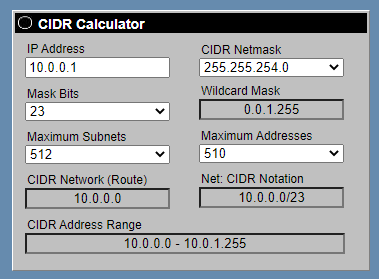
Anyone know of any documentation or videos around using a /23 network (or lower) in pfSense?
I don't want to have tens of interfaces or vlans in pfSense, so would be easier to maintain if I could set a single network to cover 10.0.0.0-10.0.1.0 for example
tame carbon
@cedar igloo how many devices do you have?
because you can just use a /23
@cedar igloo https://i.imgur.com/JWlcUWS.png


@cedar igloo if you have lots of devices, you get more broadcast noise
'background noise'
vlans seperate this broadcast domain
Not sure how exactly, but you could do something like multiple /24's
and each vlan has its own address, so vlan 1 = 192.168.1.0/24
vlan 2 = 192.168.2.0/24
254 devices on a network is a lot
it may reduce full gigabit throughput through the router
cedar igloo
When I tried it on pfSense, the devices on the second net wouldn't communicate to the gateway. Is there a gateway on each? E.g 10.0.0.1 and 10.0.1.1 on a 10.0.0.0/23 network? Or does it all use 10.0.0.1?
clear igloo
Each subnet has its own gateway
cedar igloo
Ok. I'm not too worried about performance or background noise. This is just for convenience in a lab
cedar igloo
tame carbon
Not sure how exactly, but you could do something like multiple /24's
This is what I have at the minute, but I am messing around with very large clustered deployments (300+ nodes) and it's getting a bit more difficult managing all the networks individually
 rain arrow
hi
looking into updating my current cable modem. i read some issues with this "puma" chipsets. does the TC4400 modem have this chipse? how is this modem. thank you.
clear igloo
@rain arrow No, docsis 3.1 modems aren't impacted
rain arrow
ok that is good to know.
i have an ancient modem (more than 10 years old)
my router is the N600
they should work okay together?
clear igloo
Yah, the router is pretty old but it will work fine
rain arrow
i believe it supports up toa max of 300MB/s?
clear igloo
sounds about right (Mb/s)
rain arrow
thank you