#networking
1 messages · Page 333 of 1
 peak cloak
@leaden quail when directly plugged into the router/modem with a short ethernet cable it's still slow?
 vale reef
is the cable cat5e or above and is the port on your laptop gigabit, or only fast ethernet (10/100)
 leaden quail
peak cloak
<@!386990773284896769> when directly plugged into the router/modem with a short ...
leaden quail
peak cloak
<@!386990773284896769> when directly plugged into the router/modem with a short ...
the majority of the time yeah
peak cloak
leaden quail
the majority of the time yeah
sounds like ISP issue
peak cloak
vale reef
is the cable cat5e or above and is the port on your laptop gigabit, or only fast...
even if it was only 100Base-T it would cap out at 100, not 40
sounds like something on the ISP end
leaden quail
I just tested it again and its about 23Mb/s download
peak cloak
see the thing is just plugging in a new router into the modem won't help
leaden quail
vale reef
worth a check
thanks, I will contact them
vale reef
I agree with @peak cloak It is probably an ISP issue
peak cloak
leaden quail
thanks, I will contact them

How to See Network Adapter Speed in Windows 10
just try this
vale reef
but this is worth a shot^^^
leaden quail
peak cloak
see the thing is just plugging in a new router into the modem won't help
I dont know if im right but, from my research, I found that if you connect multiple devices on a modem/router combo at the same time, it stresses the device too much, because its doing the modem and router jobs at the same time, so if I got a dedicated router, I would have the possibility to turn of the routing function on my modem, and let the dedicated router do this job, so neither devices are too stressed, its also worth considering that my modem/router combo was last replaced in 2018. Again I dont know if this information is right.
peak cloak
leaden quail
I dont know if im right but, from my research, I found that if you connect multi...
it kinda is, but it would have to be a REALLY bad router for it to be stressed with multiple devices doing multiple things
if no other devices are doing anything intensive, you should see full speeds
if you really want to test that you could, by turning off routing on the modem (aka passthough mode) and just hooking up one device via ethernet
leaden quail
peak cloak
just try this
its a 1Gbps port
peak cloak
leaden quail
its a 1Gbps port
ah ok, so what that means is that the computer negotiated to 1000Base-T
which means it's not an issue with a cable
leaden quail
peak cloak
if no other devices are doing anything intensive, you should see full speeds
would 4 computers connected to online meetings be considered intensive?
peak cloak
leaden quail
would 4 computers connected to online meetings be considered intensive?
kinda, but again streaming doesn't take up THAT much
I would expect maybe 20mbps less
peak cloak
leaden quail
I will contact my ISP to make sure the problem isnt there
one more thing to check
in your modem look for line status

looks like this
kinda,
like the names
leaden quail
how exactly do I find this panel?
peak cloak
leaden quail
how exactly do I find this panel?
depends on modem
 burnt epoch
My Wake On WAN command in Pulseway doesn't seem to work....are both the port numbers supposed to be 9?
[@ or reply to me so I can the message]
 tame carbon
nah, just use the app if you aren't savvy

MikroTik is a Latvian company which was founded in 1996 to develop routers and wireless ISP systems. MikroTik now provides hardware and software for Internet connectivity in most of the countries around the world.
 grim crow
for some reason my router is saying that port 80 is taken already up for port forwarding but i have not exposed port 80???????? (correction it says that it is used for internal usage but i want to use it with cloudflare and cloudflare does not take ports)
peak cloak
grim crow
for some reason my router is saying that port 80 is taken already up for port fo...
it's not that cloudflare doesn't take ports, dns is over IP not ports
in before the router is exposing it's webpage to wan...
 rocky badge
if they're talking about cloudflare for websites, you need 80 or 443 open lol
since cloudflare needs to talk to your origin
peak cloak
^
rocky badge
I hope your router isn't exposing its admin web ui to the internet though lol
peak cloak
yeah
grim crow
it does not expose the admin panel but i guess the software just makes it unusable so that i can internally use port 80 so i can access the admin gui but i guess its just bad design
 tender hazel
There might be the option to change the port of the admin GUI
 faint bronze
Hey, I just found out that I could ssh to 10.45 to get to my machine that is at 10.0.0.45. Is there a name for this? What is the RFC document that describes this format? Does this work on other systems? I know nothing about this besides it worked in my test environment some how.
peak cloak
faint bronze
Hey, I just found out that I could ssh to 10.45 to get to my machine that is at ...
reddit
27 votes and 11 comments so far on Reddit
found this
basically it came from BSD
I actually was wondering that too
 sharp sigil
I know this might be a bit of a difficult question to answer since it's so specific but.. I was looking at installing DD-WRT on the WRT1900ACS (v2) router I have. It seems every version in recent years are beta versions and they guarantee nothing for stability .. so I was wondering if anyone might know of a known stable build
tender hazel
@sharp sigil isn't that a pretty old router?
if so you aren't going to lose much even if the upgrade bricks the device
sharp sigil
2015-ish I think
tender hazel
yeah, so even if it is wrecked by the upgrade, at least you haven't lost much - you can always replace it with something like a mikrotik hap ac3 which is much better
as long as you have some kind of backup option to get online if you do brick it
ex. using the ISP supplied gateway temporarily
sharp sigil
I guess i'll just try the latest one then
tender hazel
Those of us who frequent the chat don't usually bother with DD-WRT and Open-WRT - if the router itself is not good enough, getting a better one to begin with is usually advisable rather than trying to flash with a third party firmware. However if you are short on cash and trying to extend the life of the device a bit more, I can see the appeal of flashing it with third party firmware.
unfortunately whenever you look at major router vendors they stop releasing upgrades for their routers after a few years, as they want you to buy a new one
that's why a lot of us get mikrotik instead, we can still upgrade routers that are 10+ years old to the current version and get the modern features
sharp sigil
Yeah I guess i'll just look at buying a new one soon and give the upgrade a go for this one
appreciate the reply
 hazy needle
Hello , does anyone know a way i can force a bandwidth on a device on my internet?i can't find the setting in my router website
peak cloak
hazy needle
Hello , does anyone know a way i can force a bandwidth on a device on my interne...
so limiting a device?
bandwidth control
you can defiantly do it, does your router support it, I doubt it
it may be under QOS
hazy needle
yup i want to fully limit one device to give it next to no speed at all if possible
its just hogging all my speed..
i am using the Huawei b535 router
peak cloak
I've never messed with qos
hazy needle
also not familiar with what that is
 bold karma
Does the device need to be running?
tender hazel
^ yes, QoS is what you are trying to do, even though you do not know the name of it
hazy needle
oh i also did try to call them ones to ask them to help me limit a device on my net but they never did anything to help
i just want to like set a cap on one computers internet speed to allow it max of like 14kb's
if that one has low to no speed the person on it will feel less inclined to try watch stuff in hd..
bold karma
So your solution is to set them to dial-up speeds
hazy needle
my whole internet is at that speed at the moment because that pc is getting all the net priority for some reason
its supposed to split the bandwidth in half for each device on it
hazy needle
but that pc is getting alot more speed than me killing my net
how do you mean?
like a virus or something?
bold karma
Yes
hazy needle
i do keep track of most all my programs running all the time checking if i get dips in network as well
for my internet it is normal to have stupid slow speeds
i just can't afford to have even slower than i already do with the second pc
is why i want to try kill its speed fully so only my pc gets internet
bold karma
Then take it off the network completely
hazy needle
a more easy solution would just be to go speak to said person and tell them to turn there stuff down but would make me feel rude even though im the only one paying for it
peak cloak
hazy needle
a more easy solution would just be to go speak to said person and tell them to t...
who's the other person?
roommate?
hazy needle
if i can find a way to kill that speed though i can just say the net is drained you see..
uncle ..
he does not know how internet cap work or understand how much im paying for the stuff
peak cloak
internet cap...
bold karma
At the end of the day, your internet your rules
hazy needle
just spends all day every day watching stuff in 1080p when my net gives out a max speed of 50kb's at a good day
hazy needle
i want to cap it but the only one i see is a data cap that cuts you off at x amount of data used
not a proper cap that sets speed
peak cloak
router prob doesn't have it
hazy needle
or i just may be missing it as i have no idea where to look
bold karma
What ISP is still offering 50kbps service?
hazy needle
my package is a 10mb's but it does not really give that
bold karma
If it’s only giving 50kb though, your ISP needs to investigate that
hazy needle
i will get fiber soon though but till they come install it i still need to be able to use the internet atm i can't even youtube at 160p
my provider really is not going to help
tender hazel
mikrotik qos is very powerful
you can do a lot with it
it is possible to give yourself priority and your uncle will only have what is left over
hazy needle
they took out my internet lines for over a year and kept telling me they are trying to fix why i have no internet and kept charging me each month for over a year
bold karma
Your provider must be AT&T
hazy needle
they really are not the kind of provider that helps
peak cloak
hazy needle
they really are not the kind of provider that helps
are you in the US?
hazy needle
south africa
peak cloak
ah
hazy needle
mikrotic qos is a program that will give me higher priority?
peak cloak
hazy needle
mikrotic qos is a program that will give me higher priority?
no
mikrotik is a company
hazy needle
oh
peak cloak
that makes routers and other network devices
tender hazel
mikrotik is a router vendor, they make routers that give very good QoS controls
hazy needle
if my router does not support capping someones speed do you know if it will be possible if i run something
tender hazel
they can be very helpful for situations where you have less bandwidth than you would like and have to make the most of it
hazy needle
that will like cap my speed a program or something
peak cloak
hazy needle
if my router does not support capping someones speed do you know if it will be p...
no not on your computer
hazy needle
to just fully drain my net to 0 for everyone?
tender hazel
it is up to the router, that's where the issue is
hazy needle
if i can kill the speed for not just me but everyone he will go to sleep too
tender hazel
the router is the single controller for bandwidth for everybody
so you are limited to the options that the router provides
hazy needle
so even if i kill my speed for him he will still get half a good speed that is split for him?
bold karma
the Huawei b535 router is cheap Chinese junk. You definitely want a better router
tender hazel
if your router doesn't allow you to apply speed limits for your uncle then you need a different router
hazy needle
the reason i picked this router was the provider that sold me the internet said it was the best one as it costed if i convert the currency would be like 400$
you don't think a brute force tactic will work either?
like me running some kind of virus or program on my pc
that will hog up all the internet
by doing that it will drain the net for us both?
even if it kills my net as well while i run it just away to temp make sure he has no net speed so he can go sleep as its like 4am already
tender hazel
the b535 is a 4G router - are you actually using cellular internet?
i.e. it isn't DSL or cable or fiber, it is cellular?
hazy needle
the one i upgraded to is a cellular sim in the router yup used to have adsl as they said that was my only better one to get higher speed i got it
the adsl one ran fine for me but the provider just took out the cables and left me without internet for over a year without telling me
so really had to swap to this
tender hazel
if your internet is 4G you would need a router that supports that
hazy needle
they just kept saying they didn't know why no internet there fixing it then after a year they told me no they took out the wires because they no longer support copper
peak cloak
tender hazel
if your internet is 4G you would need a router that supports that
doesn't mtik support usb celluar
hazy needle
i do have another router as well but its a odd looking one
may be older or worse than this one not sure
it has antenna's nd stuff so may be not as good
peak cloak
or you can get a dedicated celluar "modem"
hazy needle
i will get fiber installed before the 1'st as well
then i will fully dissconect this package anyway
tender hazel
 hazy needle
i was just hoping for a way to cap his speed in the meantime so i can have internet
tender hazel
you are going to be looking at one of the four devices I have bracketed
and ignoring the one I crossed out
peak cloak
tender hazel
ah they have those
peak cloak
tender hazel
and ignoring the one I crossed out
that's like a field router?
tender hazel
yeah you can stick the SIM card in there and it will get online through LTE
hazy needle
do you know if fiber when you get it is it also a simcard or something?
bold karma
Probably not
tender hazel
no, it would not, most likely
hazy needle
wonder if they include a router now as well lol never asked
hazy needle
i do have a normal router in closet as well from when i used ADSL
tender hazel
The Huawei B535 is a 4G router
peak cloak
ah
hazy needle
mhmm
tender hazel
I don't think it has an ethernet WAN port
 robust plinth
ADSL most likely won't work. It's dsl
hazy needle
the round socket hole?
oh wan port i know of it now ^^
it does
this router and the old one i used also have the WAN port
 hazy needle
let me check
it has the lan cable socket that says WAN
does have two like those but not sure if there just antenna sockets
DIV and main
tender hazel
1 x LAN/WAN Port (RJ45)
so I guess there is one RJ45 port on the router that you can switch between being a LAN port and being a WAN port
but it is hard to tell how well that actually works
hazy needle
yup mine has 4 lan sockets one lan/wan and a telephone one
tender hazel
that router is certainly geared towards the SIM card LTE uplink
hazy needle
my other router has a few more sockets
DSL WAN lan 1-4 usb and 12vdc
this one does not support sim's though
bold karma
In my experience, for home networks a linksys, netgear, or tp-link router is sufficient for most home users. And they range from $20 on up to several hundreds. Depending on what bells and whistles you need/want
hazy needle
let me look up really fast on the package i told sister to get us if they include routers or not
tender hazel
I wouldn't say those routers are sufficient for most home users - if you like your router to just last a few years before you have to replace it, perhaps
bold karma
I’ve had routers last decades
tender hazel
but I like my routers to last longer so I don't have to waste a lot of money to replace them with the newer version that the vendor came up with
you had linksys, netgear or tp-link last decades?
bold karma
Netgear
tender hazel
do they actually still release new firmware after decades?
robust plinth
netgear was good, until they sold to China.
tender hazel
i.e. in 2021 is netgear still releasing new firmware for devices from 2010?
robust plinth
security updates maybe
bold karma
Absolutely.
robust plinth
I've had tp-link and dlink last for about 5 -8 years
before their mbs where outdated
hazy needle
the fiber im getting also includes a router atleast
bold karma
There you go. Problem solved
tender hazel
can you show me an example of a netgear from 2010 where we still have new firmware upgrades released in the last year or two?
hazy needle
i still don't know if they will actually give me the speed it says on the website
as most of the caps happening is in fine print you get after ordering it only they email you it
robust plinth
@hazy needle Do you know if your house has a fiber lan going into house or apartment?
hazy needle
not yet but they will install it for us
bold karma
It’s sitting disconnected 130 miles away now. I just replaced it because I had a newer one fall into my lap.
peak cloak
bold karma
In my experience, for home networks a linksys, netgear, or tp-link router is su...
Not really, I see people complain all the time
robust plinth
Who the provider ?
hazy needle
VUMA
its a uncapped router included , free install
dont know if it will be good or not but willing to test it
peak cloak
uncapped service, router doesnt have cap
peak cloak
Weird router
robust plinth
yea you shouldn't have problem getting the speeds.
hazy needle
its a 10mb uncapped LTE package i have at the moment *
robust plinth
unless they throttle you
hazy needle
but at first start of month i get 1mb speed for 100 gig data
then 500kb's for 50 gig data
then 50 kb's if lucky for rest of month
robust plinth
dang
hazy needle
they don't tell you that when you order it though
robust plinth
how they get you.
hazy needle
asked 100 times do i get limited to any speed or data cap
they say no
its 10mb up and down whole month no caps no limits just that speed
lol
hazy needle
the package im getting now is let me do a screenshot
tender hazel
the mikrotik routers I linked to before give you lots of capability to do QoS as you want
hazy needle

i wouldn't mind sharing my net with uncle but he does not pay for it
so i don't like if i cant do anything that he can youtube and netflix all day
even at 4am still on the thing and i can't do anything even though i payed over 300$ two days ago for this net
peak cloak
fiber to the home
Only 10/10
tender hazel
with mikrotik you can limit your uncle to certain speeds easily
bold karma
Seems kinda slow for fiber
hazy needle
i never had fiber before but have had alot of providers the last few months
just hoping this ones not capped too
tender hazel
that is very slow for fiber
robust plinth
its mostly dsl to fiber.
bold karma
But then again geography plays a factor
hazy needle
10mb is the lowest package they have for fiber
robust plinth
Fiber hub to dsl to house / apartment
tender hazel
that would be fiber to the node
peak cloak
bold karma
Seems kinda slow for fiber
Fiber as a medium is fast, I bet the isp infa just can't handle it
tender hazel
rather than fiber to the home
hazy needle
i don't want to buy a higher speed than 10mb's up and down before i see if i can actually get that speed or if its another scam
tender hazel
fiber to the node means fiber to some point that is fairly close to you
and DSL or cable or whatever to the node point
hazy needle
also if i really do get 10mb's up and down the whole month i won't need higher speed^^
peak cloak
Everyone does it
robust plinth
they sell you on Fiber connection, but its DSL to the node
bold karma
Don’t get me started on AT&T
robust plinth
lol
hazy needle
i already am able to stream when i get 1mb''s so can only imagine 10 would be op
peak cloak
Me with 300/300...
hazy needle
lol
think of it this way
i used to play rust at 6fps
played that for years
got really used to it even got kills^^
tender hazel
I feel lucky to have 300/100 here, but 300/300 would be nice
peak cloak
Yeah it get it
hazy needle
before i upgraded pc i didn't know better lol
bold karma
I’m on a 200/30 connection and it is sufficient for my household
peak cloak
Like hdd to ssd
hazy needle
so for me 10mb's will be godlike^^
peak cloak
bold karma
I’m on a 200/30 connection and it is sufficient for my household
Yeah, 300/300 is the lowest plan
No need for gigabit
hazy needle
lol
i want to move to a place where 300/300 is a thing
wow the company im ordering from
actually has a package 1000/100
bold karma
I use to have 1000/30 but decided to let the residential line go to the wayside in favor of a a business connection for the sake of static IPs
hazy needle
this 1000/100 package is actually almost same price as my current internet..
my current cost me 899pm
of my money*
the 1000/100 cost 1499
peak cloak
Doesn't africa still have free v4s
hazy needle
v4s?
peak cloak
Ipv4s addresses
hazy needle
not sure what do those do^^
peak cloak
Ip addresses, not really relevant to you
hazy needle
104 usd for the 1000/100 fiber package
tender hazel
AFRINIC is the only RIR that still has IPv4 blocks available I believe
hazy needle
i can change my ip adress in that pv4 thing yup
don't really know much about that stuff other than i used to use it when lan gaming stuffs with friends
peak cloak
tender hazel
AFRINIC is the only RIR that still has IPv4 blocks available I believe
Yeah didn't crystal say his friend in africa had like a whole lot of v4s
tender hazel
yeah
but that will only last a bit longer for the friend
everybody needs to get on IPv6
like, now
or sooner than now, if possible
hazy needle
how much do you guys pay for internet over seas?
curious if 104 is alot for that 1gig download / 100mb upload
tender hazel
I pay $100 canadian dollars per month for 300/100
hazy needle
canadian is close to usd i believe?
bold karma
Gig speed here ran me around $250 a month
hazy needle
so 104 is not alot at all
tender hazel
100 CAD is about 80 USD
hazy needle
i see it even includes a xbox x lol
wonder if people still play on those game consols
tender hazel
so for us it is $80 USD for 300/100
hazy needle
104 a month for 1000 / 100 fiber with free xbox x lol
peak cloak
I think we pay like 50 bucks a month for 300/300
hazy needle
if this 10 up and down package really does give me 10 up and down i will upgrade then as well to this high speed
 obtuse cove
hazy needle
104 usd for the 1000/100 fiber package
obtuse cove
hazy needle
104 usd for the 1000/100 fiber package
that's cheap
hazy needle
just dont want to pay 100$ a month if they only give me like 4mb's real speed
peak cloak
Its 100 here for 1000/1000
 lean pebble
35$ 40/0.4
tender hazel
if it is actual fiber it won't be 4Mbps real speed
peak cloak
I usually get 350 uploads tho
bold karma
Keep in mind you won’t get a full 10 down or up due to overhead
hazy needle
you think fiber is not like the ones i have been using where its secretly low speed?
bold karma
But you should get damn close
peak cloak
tender hazel
if it is actual fiber it won't be 4Mbps real speed
I mean it could be bottlenecked by the isp core infa?
But not by the fiber itself like dsl is
tender hazel
peak cloak
I mean it could be bottlenecked by the isp core infa?
If they are advertising 1000/100 and it is that bottlenecked to get only 4Mbps? I would think other customers would have found that out already and complained
peak cloak
Yeah true
obtuse cove
300/30 with 400$ month
tender hazel
and I mean I can understand ISP core bottlenecks, we suffer those ourselves
obtuse cove
go top that with this ueslees junk isp we have
tender hazel
especially since COVID our network has been struggling with the increased load
hazy needle
i never tried fiber yet true but like with my current ISP people complain but can't do anything about it because they are the only normal provider
bold karma
I’d expect 8 or 9 actual speed on a 10/10 if the equipment is any good.
tender hazel
but we have customers complaining that they can only sometimes get 75% of the speed package they are buying
instead of 100%
peak cloak
tender hazel
but we have customers complaining that they can only sometimes get 75% of the sp...
Wifi issues most of the time?
obtuse cove
its more like 6-7 with the overhead and if its a hard line it will be worse
tender hazel
no, in our case it is due to the upstream, where we are getting 1Gbps to the location and they are maxing that out
obtuse cove
hazy needle
at the moment i get less than 1% of what i bought
test with an ethernet
peak cloak
tender hazel
no, in our case it is due to the upstream, where we are getting 1Gbps to the loc...
Ah
tender hazel
we can't upgrade beyond 1Gbps because in our case the upstream has a stop sell order for past year and a half
lean pebble
I wish I had 100/100 or 300/300 🙄
hazy needle
i don't run my net trough wifi i use the lan cable to my pc from the router at full signal
tender hazel
so even though we have the money and we can say upgrade us to 2Gbps
so that our customers can get faster internet
they can't, because of a stop sell order
super annoying
hazy needle
i just really hope fiber is as good as people say and that it really does get close to the speed advertised
bold karma
I was pulling 960 down back when I had gig
obtuse cove
lean pebble
I wish I had 100/100 or 300/300 🙄
"you don't need more than 50/10 if you are not a business ) that's my ISP saying
hazy needle
i just want atleast 1mb up down whole month so i can stream whenever i want
lean pebble
obtuse cove
"you don't need more than 50/10 if you are not a business ) that's my ISP saying
Lol I'm on ADSL with 40/0.4
obtuse cove
hazy needle
i just really hope fiber is as good as people say and that it really does get cl...
fiber is good but if your ISP sucks so hard that will be a bigger issue
hazy needle
the provider i am moving to now i never tried yet also its fiber not LTE or ADSL like i used in the past
so i am hoping its better
tried all other providers by me other than this one
lean pebble
I have 3 ISPs with fiber behind my house garden but they won't connect us because we're living in private house
hazy needle
i also had lots of trouble with that
staying in flats^^
getting permission is so so hard
obtuse cove
don't go with a contract just test it with one month if its any good go with a 12 month contract that will lower your price for a bit (or that's in my place)
lean pebble
I can put my own fiber but they don't want to let me do it
hazy needle
the only packages that is not month to month with this provider i see is ones that include a free x box
all others is month to month
obtuse cove
if its not on a street i suggest that you run an Ethernet to your house from them
hazy needle
the ones that include the xbox s and xbox x whatever those are is 24 months ones
bold karma
The contract may be also called a service agreement
peak cloak
obtuse cove
if its not on a street i suggest that you run an Ethernet to your house from the...
Nah, a fiber cable
hazy needle
that is also one of the main reasons i am buying the cheapest package they have
obtuse cove
you buy for the internet and idk for electricity and then get your cable to your house
hazy needle
so i can test it first
bold karma
They use many names to try and fool you into thinking there’s no contract
 lean pebble
Here the internet infrastructures sucks they keep saying it's not worth to connect private houses to their fiber crap
hazy needle
ones says 24months in the name others only show month to month payment term
one also says rent other is order now
obtuse cove
lean pebble
Here the internet infrastructures sucks they keep saying it's not worth to conne...
isn't always the isp infrastructures sucks
hazy needle
will see the first month how it runs anyway if its another scam i can just cancel the package
peak cloak
obtuse cove
isn't always the isp infrastructures sucks
No
lean pebble
obtuse cove
isn't always the isp infrastructures sucks
Especially here in Israel.
bold karma
Ok I have to bow out for some shuteye. Gotta work tomorrow
lean pebble
I can declare my house as business but then I'll need to pay 350$ a month for 10/10
bold karma
hazy needle
sweet dreams Hexi
You too
lean pebble
Good night hexi
obtuse cove
peak cloak
No
what do you mean no every time i connect them about a network down or any other shit in the network they say turn it off and then back on they don't say if i have a shard line or anything or there equipment sucks so hard even tho i buy this high prices
bold karma
lean pebble
Good night hexi
Good night
obtuse cove
lean pebble
Especially here in Israel.
man even in saudi arabia
peak cloak
obtuse cove
what do you mean no every time i connect them about a network down or any other ...
Not for me
lean pebble
I'm waiting near to 13 years to 100/5
obtuse cove
some places don't even have dls or even power so nothing to top this off
peak cloak
Internet is reliable
As long as there isn't a storm where trees fall on lines or something or power goes out for the same reason
Haven't had that happen though really like for the past 3 years
lean pebble
They keep say I can upgrade and I need to call to the customer service for upgrading it, then I call the customer service and they say I can't upgrade to 100/5
Every year same crap
obtuse cove
peak cloak
Internet is reliable
LOL that's the biggest lie i get reliable every half an hour internet from 300/30 to 10/1 restart nothing i have to call them every half an hour
peak cloak
obtuse cove
LOL that's the biggest lie i get reliable every half an hour internet from 300/...
I'm talking about my isp...
Ive had no issues
obtuse cove
some isps are good but others are im sorry to say dogcrap
lean pebble
I had to download files over lte because my internet crashed so hard everytime I downloaded something
peak cloak
I have verizon fios
obtuse cove
lean pebble
I had to download files over lte because my internet crashed so hard everytime I...
man even lte is trash
peak cloak
Fiber
obtuse cove
yeah but only in the morning after that thank god if you got faster than 50kb/s
lean pebble
peak cloak
Fiber
I wish I had fiber
obtuse cove
man thank god for 5g other ways i think i will move out
lean pebble
This bastards connect only buildings to fiber
peak cloak
5g isn't even that good for internet, fiber is better
obtuse cove
peak cloak
5g isn't even that good for internet, fiber is better
yeah but different isps different minds
peak cloak
Unless you have that millimeter wave 5g where it's range and penetration sucks
But fast
obtuse cove
the bad thing that they don't have fiber to my house or there 5g is op
lean pebble
I would like to connect to the fiber from the building that next to me but can't
I have 300 meters from house a building that connected to fiber.
obtuse cove
https://prnt.sc/124e6jc that's 5g for you in the house
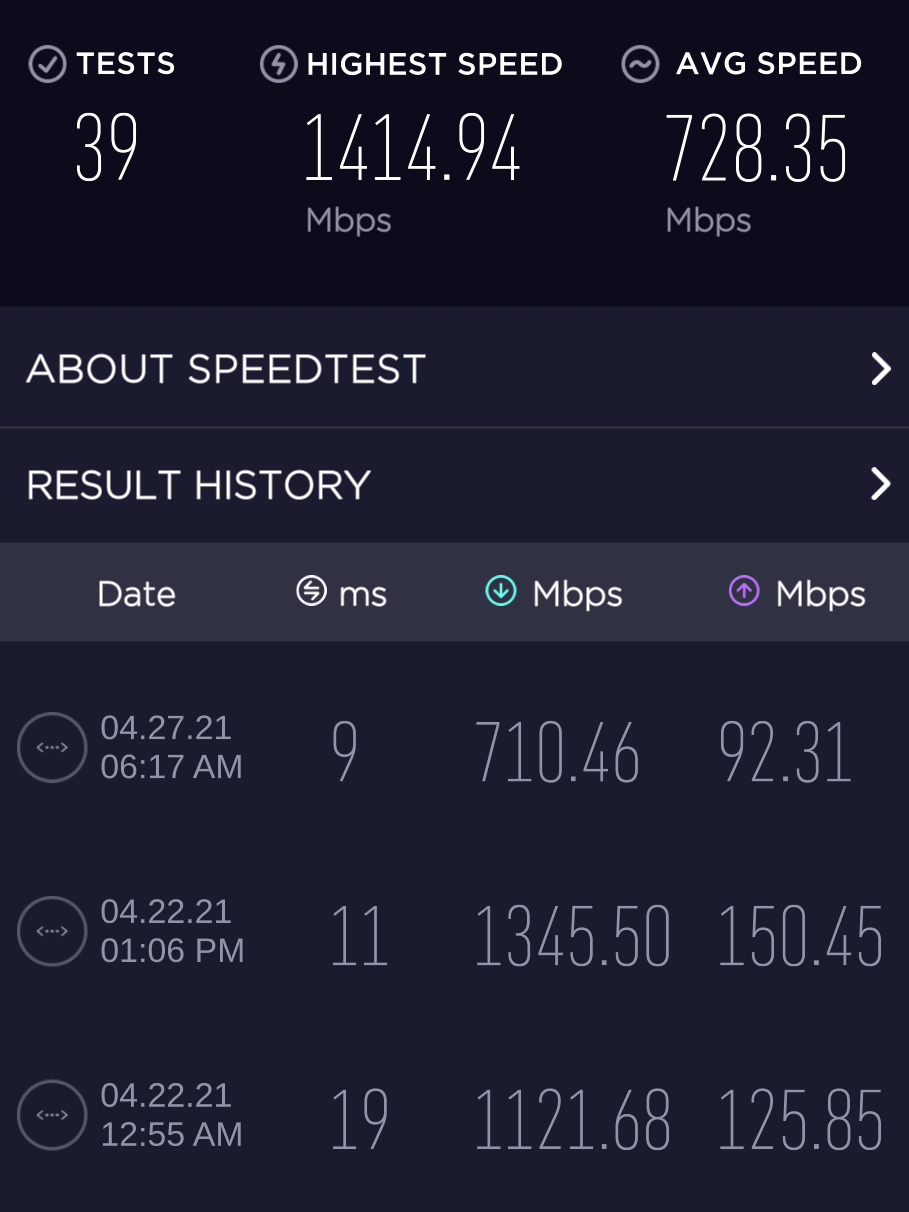
the upload sucks but its what its (i was thinking for 1gb both ways but its wayyy better than what i got)
obtuse cove
lean pebble
I have 300 meters from house a building that connected to fiber.
300 meters that's not far
tender hazel
distance doesn't always matter
you can be close to a building that is connected to fiber but it could be super expensive to get your building connected
obtuse cove
tender hazel
you can be close to a building that is connected to fiber but it could be super ...
lol expensive like i will never pay for the service im paying just like them
 thorny vector
@tender hazel Not for a conniving McGuyver 😄
tender hazel
we have had cases where we were able to get fiber into a building for cheap (like only a few thousand) because we were able to pay at the right time
whereas if we had waited
$20k charge
obtuse cove
you are telling me that isps lose money how what is happening in the world 
man for that 20k charge you can get if everyone got your mid or low plan (lets say 50$) multiply that 50$ with the number of house you can get mannnny more than that each month not like one payment
 hollow marlin
@obtuse cove digging, marking, permits, risk, licensing and labor is why it cost so much. People who complain about cost have not seen what it cost to run an ISP. The return for an entire neighborhood is not seen for 5 years at minimum
thorny vector
@hollow marlin This is why we should all just use sneakernet
 crude scroll
Anyone here have experience with TP-Link mesh routers?
 dark crow
anybody familiar with port forwarding
im trying to port forward my minecraft server but i have a TP-Link router
dark crow
 still karma
I'm using a Asus RT-AC51U+
still karma
I'm using a Asus RT-AC51U+
usually you just type in an ip address in your browser
but that depends
 thick minnow
USually it's 192.168.1.1 or 192.168.0.1
still karma
dark crow
usually you just type in an ip address in your browser
Doesn't work for me
dark crow
thick minnow
USually it's 192.168.1.1 or 192.168.0.1
yeah
thick minnow
Wait, Asus uses a domain
 still karma
thick minnow
Wait, Asus uses a domain
still karma
thick minnow
Wait, Asus uses a domain
I think so too
 worn igloo
whays a good like earhernet hub so I can use more eathernet cords in a different room
still karma
thick minnow
That is your router
But last time when I checked it was a asus logo tho
It wasn't like this
dark crow
dark crow
im trying to port forward my minecraft server but i have a TP-Link router
any help?
i dont have the Port forwarding setting in my router but i have "Virtual servers" and "Port triggering"
 kindred acorn
I know im copying and pasting, but i just want to know if i can speed it up either by control panel or if i have to call my servicd
Sorry if you guys get this a lot. But my download speed should be at 500mbps yet is getting 380mbps while my upload is getting over 500 mbps. Its supposed to be 500mbps both ways, so is it possible to fix that? Im also using ethernet for the connection
worn igloo
should I get a switch or hub ?
robust plinth
dark crow
i dont have the Port forwarding setting in my router but i have "Virtual servers...
TP - Link calls their forwarding Virtual servers
robust plinth
did you apply settings / restart the router?
robust plinth
hmm maybe it auto applys, but yea restart router sometime helps it.
dark crow
can you check my settings
robust plinth
sure 😄
dark crow

i've been trying for about 2 weeks now
i hope i dont have to switch routers to different manufacturers
robust plinth
that right, the way you have it.
Some routers have a pre-made port for minecraft some don't
dark crow
in "Port triggering it has already made settings for battle.net etc
but not minecraft
so just a restart should do?
@robust plinth
but i dont know if it does what port forwarding does
robust plinth
Yeah, sometime a restar of it help router find new settings.
dark crow
ok i'll try it out and update you
dark crow
@robust plinth it didnt work
when i enter minecraft and put my public ip it fails but when i join with my local ip it works
dark crow
so my friends join with my public address
robust plinth
I haven’t setup Minecraft sever in forever, but you can try your IP address plus :25565 “192.168.1.1:25565”
robust plinth
If they can’t, it might be Windows firewall blocking the outbound / port
robust plinth
No, you can add a new rule to it, allowing that port forwarding
dark crow
oh i remember i already did that
robust plinth
Ah, should work then xD
dark crow
thick minnow
Is the ip address satatic?
what does that mean
thick minnow
As in, does the ip address change or not?
dark crow
i've heard once that static ip address change
dark crow
thick minnow
As in, does the ip address change or not?
im not sure
i have a dynamic ip
in cmd it says DHCP Yes
dark crow
robust plinth
Ah, should work then xD
its not working
i tried a Portforward checker
it says that it failed
robust plinth
Did it say not open?
dark crow
it says its closed
robust plinth
Assuming your 192.168.1.100 right?
dark crow
yeah my pc's ipv4
robust plinth
Go back to firewall “Create a rule in Advanced Firewall on Windows to allow any incoming connections through UDP or TCP ports 25564 - 25566.”
Also allow Java through firewall as well
dark crow
is it an inbound or outbound rule
dark crow
its set to private
dark crow
robust plinth
Also do you have antivirus?
no just windows defender
robust plinth
Okay
dark crow
actually it was disabled in properties i just checked and i set it to Allow the connection
robust plinth
Okay, allow it then maybe restart the pc, then see if they can join xD
Or you can check port forwarding site again
robust plinth
Okay
dark crow
yeah its quite wierd
robust plinth
Who the isp?
dark crow
you probably dont know the isp
tame carbon
@dark crow did you apply a port forward?
dark crow
its called STC
dark crow
tame carbon
<@!445576143131770882> did you apply a port forward?
there isnt a apply button
its just save
and it shows up in a list
tame carbon
okay
dark crow
dark crow
its called STC
@robust plinth
tame carbon
so assuming you did that right, are you sure you aren't on a CG-NAT network?
dark crow
whats a CG_nat netowork
tame carbon
means you don't have your own public IP
and its shared with other subscribers of your ISP
You cannot host services behind a CG-NAT
but you can figure this out relatively easy
you can tell by the public IP that your router reports
dark crow
oho ok
thick minnow
dark crow
its called STC
You in the middle east?
dark crow
yeah
dark crow
tame carbon
if its a 172.16.0.0/16
so if my public ip is that
tame carbon
@dark crow you can also do a traceroute
that shows the path your data takes through the ISP network
dark crow
how do i do a traceroute
tame carbon
what OS are you on right now? windows?
dark crow
also sorry im a beginner when it comes to networking so this is all new to me
dark crow
tame carbon
what OS are you on right now? windows?
yeah
tame carbon
open command prompt
and run: tracert 1.1.1.1
first entry in that result is your own router
then the upstream router, and so on
dark crow
ok
tame carbon
@dark crow I would explain NAT to you, but I found this recently: https://www.youtube.com/watch?v=01ajHxPLxAw

IPv4 ran out of space, so how are we still all looking at the internet? - NAT has the answer! - Richard Mortier explains how the IP address space was expanded upon.
Network Stacks: http://youtu.be/PG9oKZdFb7w
IP addresses: http://youtu.be/L6bDA5FK6gs
http://www.facebook.com/computerphile
https://twitter.com/computer_phile
This video was filme...
Does a decent job at explaining what it is
and why it sucks
dark crow
tame carbon
<@!445576143131770882> I would explain NAT to you, but I found this recently: ht...
i see
i'll watch it in a bit
so i cant do anything about it with having NAT
tame carbon
but I'll give you the gist
there's a translator, a NAT, in your ISP network
it basically translates traffic between a public network space, and a private network space
your home router, also uses NAT
so all your phones and laptops share your public IP
the translator makes sure that traffic that comes in, is forwarded to the right device locally
but for port forwarding, you are creating a static rule, that says: all traffic destined to port 25565 goes to this <LAN IP>
But the problem with CG-NAT, is that it is basically the same mechanism, but running on your ISP network
and you have no control over this.
dark crow
i see
tame carbon
so you can only establish connections to the internet
but not listen for incoming connections
dark crow
so bascially CG-Nat shares IP killing the point of having a specifc ip address for port forwarding
tame carbon
listening, would require port forwarding
@dark crow yeah the problem is that the IPv4 address space is too small
we've run out of IP addresses
a long time ago
so by using NAT, we can kind of re-use certain parts of the address space
10.0.0.0/8
192.168.0.0/16
172.16.0.0/16
are those ranges ^ that can be reused, and are not publicly routed on the internet
dark crow
i see
tame carbon
But NAT is 'stateful'
it means, only translator itself, knowns where packets have to go
It just breaks a fundamental principle of the internet
namely: the end to end principle
@dark crow mobile phone networks are often NAT too
But there is a solution..
Its called IPv6.
@dark crow to give you an idea of scale
IPv4 is 32 bit, so you have 2^32 adddresses: 4,294,967,296
dark crow
tame carbon
<@!445576143131770882> mobile phone networks are often NAT too
i see so i cant use my phone either
tame carbon
IPv6 is 128 bits
so 2^128 = 340,282,366,920,938,463,463,374,607,431,768,211,456
that's a lot more :)
@dark crow yeah, the tl;dr is that your ISP is trash.
tame carbon
IPv4 is being phased out, veeeery slowly
IPv6 is what we all should be using
@dark crow perhaps your ISP has ipv6 service
and if not, you could use tunnelbroker
dark crow
but wont that stop me from making the minecraft server after all?
tame carbon
If your friends have ipv6 too, they will be able to connect over that
dark crow
because minecraft server properties take a IPv4 Address
tame carbon
nah, it can do ipv6 too
tame carbon
I dont get IPv6 from my ISP either, because they are lazy fucks
They should be giving me IPv6.
@dark crow another solution would be using some kind of VPN
but that would require your friends to be on that VPN as well
dark crow
damn so we got lazy isps lol
tame carbon
My ISP is actually pretty good, its just that they don't do v6 yet
I have like 8 IPv4 addresses >_>
I'm not complaining 🤣
dark crow
oh ok
thick minnow
Well, seems like cloud hosting is the only way for you
dark crow
i should be getting a better solution later this year
tame carbon
if you rent a server in the cloud, you get a public v4 with it
@dark crow ISPs usually have a /19 or /22 range, with couple thousand addresses
if its a new ISP, they got the short end of the stick
and only got a couple addresses
so they use CG-NAT to share their limited pool of addresses
Some US univerisities sit on /8's xD
those are enormous blocks
dark crow
damn
dark crow
damn 2
tame carbon
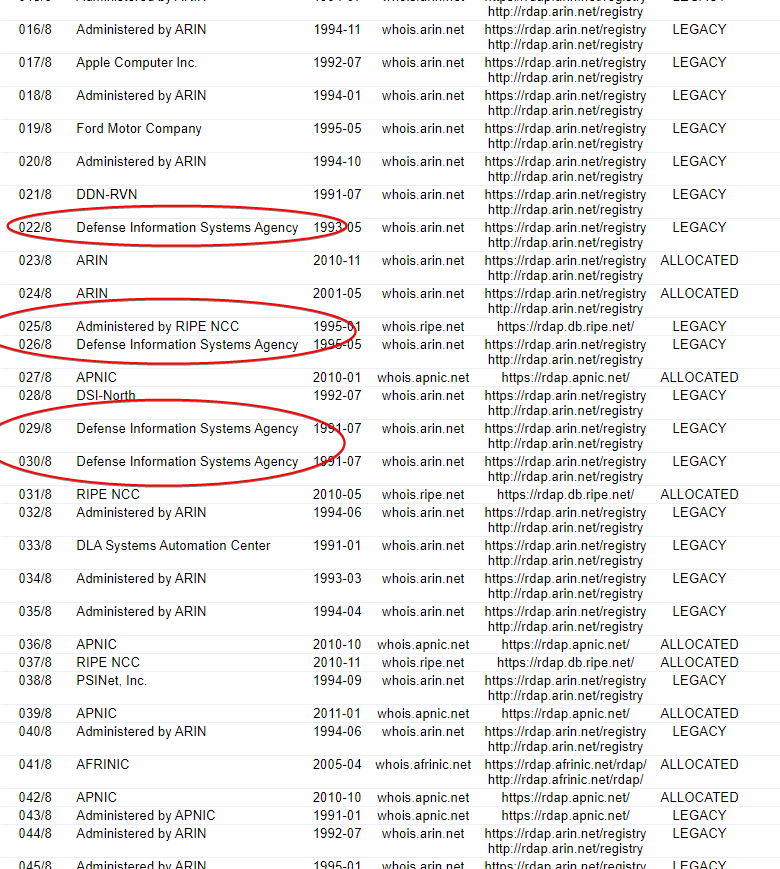
@dark crow big tech also has a lot of addresses
Google, microsoft, facebook, apple, all have big blocks
even US postal service has a /8 xD
dark crow
damn3
lean pebble
tame carbon
even US postal service has a /8 xD
😂
tame carbon
@lean pebble I bet, its so they can send e-mail 
lean pebble
I think that's for this service to
Because they get into spam everytime
I bet They use private mail service not gsuite / office 365 and etc
tame carbon
lot of these allocations are historic
lean pebble
Vpn / static home IP / servers
lean pebble
tame carbon
because v4 is legacy
Ya ipv4 is gone no more blocks
tame carbon
I hope my /29 survives for a while
lean pebble
Tell that to the ISPs and governments
tame carbon
@dark crow https://ipv6bingo.com/
lean pebble
Here they can implement ipv6 in half year but they're lazy af
It's only turn the ipv6 protocol on for everyone.
I don't know why the hell they don't do it
dark crow
tame carbon
<@!445576143131770882> https://ipv6bingo.com/
i'll check it out in bit
lean pebble
2 ISPs here already providing ipv6 here in Israel but the rest just being lazy and giving excuses
We can't give you "static IP address" and enable ipv6 for you.
It's or ipv6 with dynamic ipv4 or static ipv4 without ipv6
The stupidest excuse I have ever heard
Wondering how much it'll cost to buy ipv6 block and use it for my own network
Publish it and use it as external ipv6 to
tame carbon
@lean pebble you can get a /48 from HE pretty easily
lean pebble
Yeah I have but ping like hell
Even that my ISP connected to london / frankfort and now to paris with fiber but it's not helping me at all because I'm not paying as business 😂
I'm talking about getting /48 by myself now from he and advertise it it from a datacenter here in Israel for my private use
dark crow
@tame carbon if i use a vpn how would i configure my settings
because im not sure if other ISP's in my countries can supply non CG-Nat networks
dark crow
@tame carbon i've once tried ngrok with using a single player map and "Open to lan" that worked fine
what does ngrok do
tame carbon
@dark crow cloud proxy service
ngrok connects to the cloud
and exposes a port over there
then tunnels is back to your client
thick minnow
how can I install the ssl certificate from my truenas into my browser so that it stops coming up with the warning? I see options to import certificates, I've tried putting it in the root certificate store and the "personal" tab on windows, closed and reopened edge, but the warning is still coming up
dark crow
tame carbon
then tunnels is back to your client
so can i use it with the server
tame carbon
@dark crow there's multiple ways you can do this, I've never used ngrok
dark crow
for my i have to give it the port
tame carbon
Another way would be using a cheap VPS in the cloud
and setting up a wireguard vpn tunnel
dark crow
but wierdly it just works with minecrafts random port generator in open to lan not the default port
 tall pagoda
😡
 tame carbon
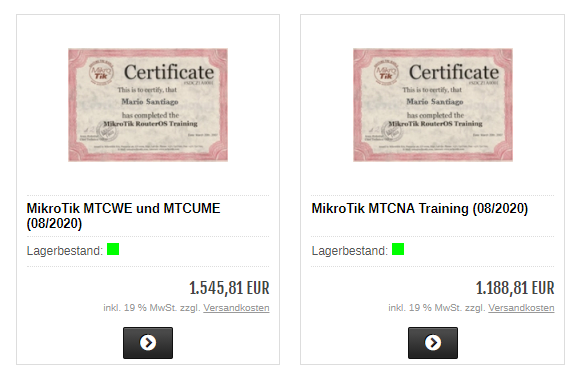
 lean pebble
Cheap certificate 😂
Oh wait it's 1.5454,83 really cheap 😆
It's actually close to 2 euro
lean pebble
For 2 euro? 😱 I'm taking now
peak cloak
yeah, you guys use . for , and , for .
dark crow
they would say 1.5 if its 2 euro
lean pebble
tame carbon
<@!109801863771074560> wat
It's 1.545 not 1,545
peak cloak
so it's 1,545.81?
lean pebble
😂
lean pebble
Well here this is "," thousand separator
tame carbon
Its just german locale
lean pebble
Haha
tame carbon
they use 1.000,10 notation
peak cloak
lean pebble
Well here this is "," thousand separator
same
lean pebble
They need to make it global that's annoying that in every part of the world they use something else for thousand separator
lean pebble
peak cloak
same
Yeah we use the american separators 😅
peak cloak
us
dark crow
tame carbon
americans still use imperial crap
yeah
lean pebble
I hate it.
I feel fat there 132 pounds :joy:
dark crow
same
lean pebble
Well every country have her shit units.
dark crow
120pounds i feel like a discord mod
lean pebble
Lol
peak cloak
tame carbon
americans still use imperial crap
I mean tbh, lots of people here know both, but just have more experience with freedom units
tame carbon
Yeah but there's no good excuse I've heard to use them lol
everyone just says It feels more natural to use, because it is a "human" scale
which makes no sense
dark crow
its just them trying to segregate
peak cloak
tame carbon
Yeah but there's no good excuse I've heard to use them lol
just more natural because everyone knows them
dark crow
dark crow
its just them trying to segregate
dammit i always have a hard time spelling this one
peak cloak
dark crow
its just them trying to segregate
 dark crow
peak cloak
https://tenor.com/view/nick-young-question-marks-what-excuse-me-huh-gif-4486363
dark crow
peak cloak
https://tenor.com/view/nick-young-question-marks-what-excuse-me-huh-gif-4486363
if you think about it yeah
lean pebble
I think I found why all over the world girls feel fat all the time...
They are checking in lbs instead in kg 😂
dark crow
lmao
tame carbon
@peak cloak so cheap lmao https://i.imgur.com/804xexM.png
 dark crow
thats why they say america has an obesity problem
i guess pounds make you insecure lmao
tame carbon
I've been to the US many times
peak cloak
dark crow
thats why they say america has an obesity problem
it's the portions
tame carbon
and all the food they serve is full of grease, and huge portions
lean pebble
It's mcdonald's fault
tame carbon
no, its pretty much every fast food joint there is
dark crow
peak cloak
so big at a resturant
yeah the mcdonalds large juice is my literal week supply for water lmao
lean pebble
I stopped eat in mcdonald's at the age 12
lean pebble
13 years past since I decided stop eating this shit
peak cloak
if you want some good fast-food, chipotle, chick-fil-a
lean pebble
KFC
tame carbon
KFC
dark crow
mcdonalds doesnt even taste nice
dark crow
no no NO NO NO
tame carbon
no
peak cloak
yes
lean pebble
I ate kfc only while traveling out of my country.
Because we don't have it here.
lean pebble
Our regional government part closed them because it's not kosher food...
tame carbon
made with fresh ingredients
lean pebble
They claimed they make it with pork oil
dark crow
tame carbon
Best fast food is still Doner Kebab
i see
tame carbon
@dark crow Kebab stores in netherlands have their own unique specialty
peak cloak
best fast-food is usually local
dark crow
kosher kebab wtf???
tame carbon
offtopic AF.
lean pebble
But dominos pizza it's ok
peak cloak
it's not...
tame carbon
@dark crow https://en.wikipedia.org/wiki/Kapsalon

Kapsalon ([ˈkɑpsɐlɔn]) is a fast food dish created in 2003 in the Dutch city of Rotterdam, consisting of a layer of french fries placed into a disposable metal take-away tray, topped with döner or gyro meat, covered with slices of Gouda cheese, and heated in an oven until the cheese melts. Then a layer of shredded iceberg lettuce is added, dress...
lean pebble
tame carbon
offtopic AF.
It's part of networking
dark crow
tame carbon
<@!445576143131770882> Kebab stores in netherlands have their own unique special...
nah bro come over here imma make you eat the best kebab you've ever eaten
dark crow
peak cloak
it's not...
exactly
lean pebble
Fast food networking
tame carbon
French fries, meat, cheese melted ontop, and then veggies and such
peak cloak
NYC style pizza is the best, here in NJ thre are pizza places everywhere, actually like a block away from my house
dark crow
tame carbon
offtopic AF.
nobody wants support so its bascially just general
 waxen saddle
lean pebble
Our regional government part closed them because it's not kosher food...
waxen saddle
lean pebble
Our regional government part closed them because it's not kosher food...
KFC or Kebab?
lean pebble
waxen saddle
KFC or Kebab?
KFC
waxen saddle
Well bummer
tame carbon
Okay back to netwrking
lean pebble
I think they should close mcdonald's network
tame carbon
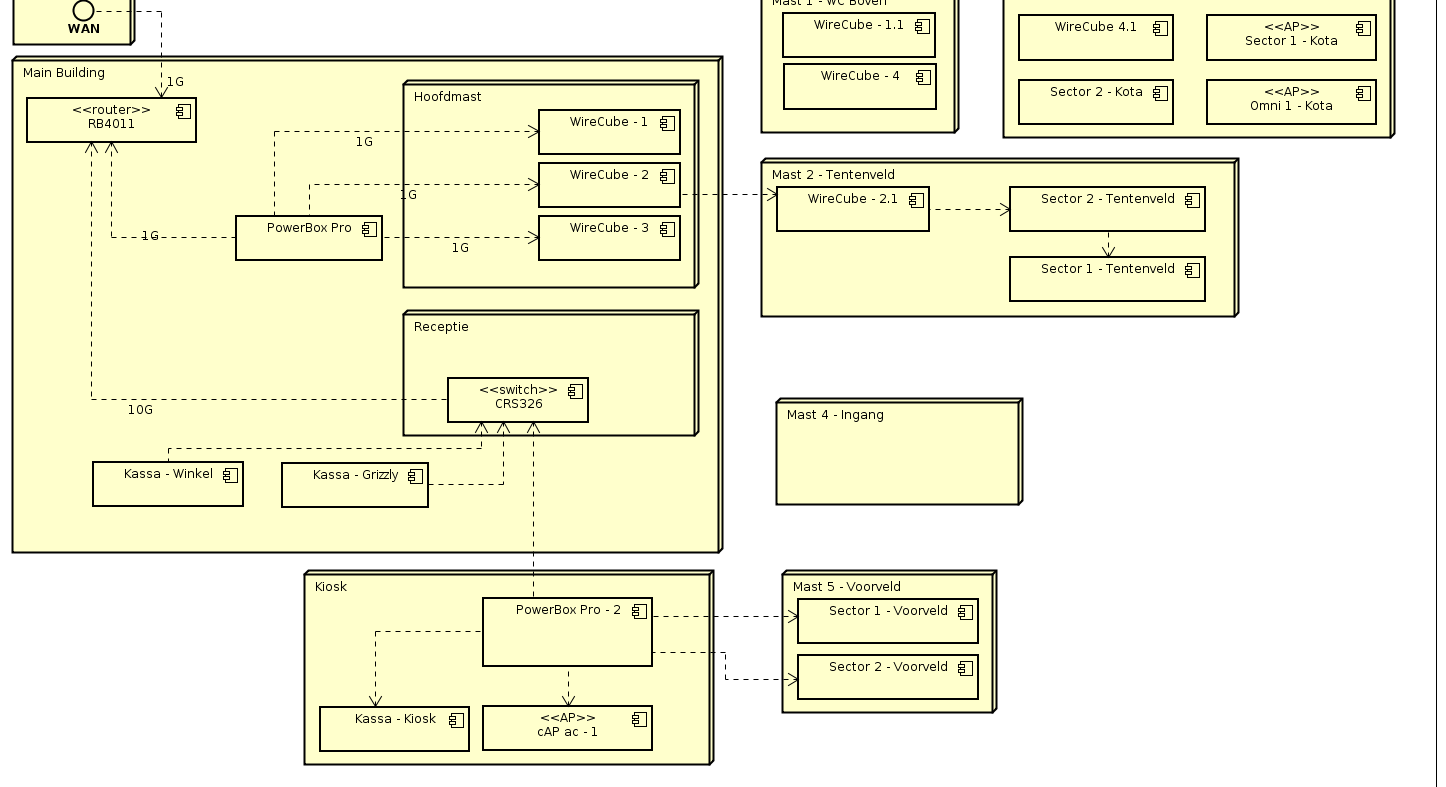
@peak cloak first rough sketch :https://i.imgur.com/jG3a7dp.png
 dark crow
yeahh
lean pebble
Here wee are talking on networking
dark crow
even the owner doesnt eat it
lean pebble
😂
tame carbon
@peak cloak all of it mikrotik xD
lean pebble
I wish I had a good network
waxen saddle
How is yours not great?
thick minnow
lean pebble
I wish I had a good network
Et moi, mon ami, et moi
lean pebble
thick minnow
Et moi, mon ami, et moi
What
lean pebble
waxen saddle
How is yours not great?
Just bad internet infrastructure
thick minnow
lean pebble
What
And me, my friend, and me
dark crow
@thick minnow
thick minnow
Yea?
thick minnow
lean pebble
How are you doing today?
Fine
 slate sonnet
Hey guys, I need help figuring out why I can't ping my pc from my vps using my wireguard tunnel. I used to be able to ping it from the vps, and vice versa, ping the vps from my pc, but now I can only ping my vps, not ping my pc from my vps
Literally the only thing that I changed was I installed zerotier in the process of making a tutorial, deleted it after
And now I'm stuck
Can't ping my pc from vps

Can ping my vps from my pc

Nevermind, a pc restart somehow fixed it
 copper rover
I love VMWare functionality. I hate the plethora of software bugs in their code however.
tame carbon
@copper rover for simple vm stuff I started using https://virt-manager.org/
copper rover
That's just a manager for existing ESXi and vCenter cluster / MS HyperV? or is that also the hypervisor?
tame carbon
That's a frontend for KVM/QEMU
copper rover
Ahh ok
Yeah, I'm having to work in VMWare due to production system for a client
But holy shit does it have bugs
peak cloak
I use proxmox which is basically a whole system built on top of KVM/QEMU
lean pebble
tame carbon
<@!821472301627080766> for simple vm stuff I started using https://virt-manager....
I use it to on my main pc
Easy to use
 eternal sage
Is Wifi mesh help reduce latency if I in rural where internet speed bad?
peak cloak
eternal sage
Is Wifi mesh help reduce latency if I in rural where internet speed bad?
no if your internet is bad via ethernet, wifi won't make it any better
slate sonnet
slate sonnet
Hey guys, I need help figuring out why I can't ping my pc from my vps using my w...
Could someone possibly help me with this?
 low pond
slate sonnet
Can't ping my pc from vps
low pond
slate sonnet
Can't ping my pc from vps
How is the VPS 10.0.02?
it has to be an public IP
slate sonnet
low pond
How is the VPS 10.0.02?
Because it's a wireguard tunnel
That ping is to show that I have a tunnel setup
But I can only ping one way
So from my pc to my vps
Not from my vps to my pc
But I used to be able to ping both ways fine
And idk what to try to fix this
peak cloak
low pond
How is the VPS 10.0.02?
no, it can be 10.0.0.2, the vps can have multiple interfaces
and that's the ip on the wireguard interface
slate sonnet
Goddamn zerotier broke everything lol
peak cloak
slate sonnet
Goddamn zerotier broke everything lol
probobly some route?
slate sonnet
I don't know
I uninstalled it, so technically everything is back to normal
Except I can't ping my pc from my vps now
:/
Idk how it's possible for me to be able to ping my vps, but not the other way around
peak cloak
slate sonnet
Idk how it's possible for me to be able to ping my vps, but not the other way ar...
it is possible
bad routes
slate sonnet
How would I check?
peak cloak
slate sonnet
How would I check?
ip route?
slate sonnet
so ip route 10.0.0.2?
peak cloak
yep
but wait, no because ICMP is 2 way
hmm
try it anyway
route seem fine
firewall prob on windows @slate sonnet
I would also delete that image
shows public ip
slate sonnet
Well the ip is public anyway
slate sonnet
peak cloak
firewall prob on windows <@!289451427011756032>
Inbound rules, right?
Check if wireguard port isn't being blocked?
peak cloak
slate sonnet
Inbound rules, right?
yeah, windows blocks ping by default
slate sonnet
But I never had that issue before, weird
peak cloak
Search for Windows Firewall, and click to open it.
Click Advanced Settings on the left.
From the left pane of the resulting window, click Inbound Rules.
In the right pane, find the rules titled File and Printer Sharing (Echo Request - ICMPv4-In).
Right-click each rule and choose Enable Rule.

How-To Geek
When Windows Firewall is enabled with default settings, you can’t use the ping command from another device to see if your PC is alive. Here’s how to change that.
@slate sonnet also what's the exact message you get when pi ng fails
timed out?


 peak cloak
ah
slate sonnet
When I see that it doesn't get a reply
Woah
That fixed it
Also wtf
My ping halved
peak cloak
slate sonnet
That fixed it
so it was windows firewall?
peak cloak
slate sonnet
Thank you for helping out
np
lean pebble
What Linux distro do you guys suggest for desktop environment for a friend that want to switch from windows 10 to Linux.
peak cloak
lean pebble
What Linux distro do you guys suggest for desktop environment for a friend that ...
popos?
lean pebble
Fedora will be very complicated for him.
peak cloak
lean pebble
This is good ?
yeah
it's ubuntu
but system76 really modded it
the desktop enviroment is gnome, but very polished
lean pebble
Does popos have kde ?
peak cloak
lean pebble
Does popos have kde ?
it's ubuntu
you can install kde
but not reccomended
I did that actually
but all of the benifits of pop are from gnome
lean pebble
Oh
That kinda sucks
So all the other desktop options are not recommended.
Good 2 know
peak cloak
those are good, just not as polished as system76's popos
lean pebble
Oh ok
peak cloak
for a beginner popos makes lots of things ez
lean pebble
Ok good to know
Thanks I'll tell him
I remember I looked on it before I installed my fedora kde
thick minnow
peak cloak
the desktop enviroment is gnome, but very polished
They're switching to COSMIC in the next release right?
peak cloak
thick minnow
They're switching to COSMIC in the next release right?
idk
havn't been paying attention
I use kde neon