#networking
1 messages · Page 332 of 1
 plain siren
I think reliance on proprietary is stupid anyways.
For communication
All the airspace should have transports standardized
and if they want something extra, then add it to the standard
 tame carbon
the allocation chart is work in progress basically
plain siren
Instead of literally showing your ass as static to everythign
tame carbon
and its just difficult to reallocate everything
plain siren
they have the authority to do it
plain siren
I mean... IPv4... Force revoking to push change
tame carbon
Yeah but that' don't work on public broadcasting
plain siren
AT&T is betting on their legacy infra holding out while they deploy their entire new Open Source infra
tame carbon
can't exepect everyone to switch their transmitters over night
plain siren
So... changing everything
plain siren
RTL-SDR
tame carbon
if you want to reallocate everything
plain siren

More like their filters are set to one frequency
but drum filters are expensive
Everything is SDN now on those towers
They can overnight change the transmitter target
and the antennas?
tame carbon
tiny SoCs with built in radios, yeah not gonna happen.
plain siren
They are using drive coils to have a huge wide dynamic range
What do you think is in those antennas on those towers?
THE SAME CHIPS BY TI
LITERALLY
or whatever OEM
Also used in your Wi Fi AP
Making many diff chips expensive
Making one modular one then shaping what its able to hear...
Cheaaaaaaaap
They also run SNMP over VLAN 500 Normally to the Master Plane Control to change their configs
the same VLAN for ONTs.... (not a coincidence)
The same OMCI is used for their entire core to edge broadband in a single control plane on 99.99999% of modern hardware
SEPA, VOLTHA are parts of these projects

To the control plane, the subscribers method of connection was all the same,
tame carbon
vlans is all higher level
it has nothing to do with layer 1
and you cannot expect everyone to change frequencies
its just not gonna happen.
plain siren
Uh... I never said it was layer 1
but the controller on all of these use VLAN 500 and run SNMP to send comands
 tame carbon
???????????
tame carbon
plain siren
Making one modular one then shaping what its able to hear...
and all the old chipsets that are still in use?
forget it.
not gonna happen
plain siren
This is a 1996 protocol
tame carbon
and it has worked well enough thus far.
plain siren
Yeah, but im saying: Yeah they can make that vast that quick of a change on the fly
If they wanted
tame carbon
Nah they can't
because it would make a lot of devices incompatible with eachother
Not gonna happen ^^
plain siren
IPv4 isnt going to be revoked... itll remove compatability!
HAHAHA
AHHAHAAHAH
Here we go
ALL OVER AGAIN
tame carbon
We;re talking about wireless allocation, not logical addressing
plain siren
The industry prefers to make these logistical changes and say fuck the devices cuz they save money
over 7 Million Wireless Mics used for like conventions/theatre/whatever had to be tossed
When the 5G allocations were made
Landfill fodder
Guess whos running FCC right now?
Guess who leads these standardization committies?
Those that are gonna make those changes without a care anyways
Because its the way forward logically
plain siren
It will when they start saying in 6 months, this aint gonna work
I would seriously go look at 2022 Goals set by the joint WGU of the ITU Members (Telecom) and FCC...
Theres alot of this right there on the calendar
OEMs and Providers either keep up.. or die
Heres the whole data model btw. Kinda cool: you can literally make a global change in a second to your entire Data Provider Offerings core configs from the same place

This further reduces the weight of cost change on the providers. So they have even more of a reason if there is some gain to be had to do it
@tame carbon But heres what you didnt want to hear: They dont care, you will fork the cost, they wont listen
tame carbon
Nah
plain siren
They said this in a PR manner in an Open Letter to the Community from the ITU
Its still up
tame carbon
it boils down to: don't change a running a system.
If you start messing with consumer space wireless allocations
you only get anger.
plain siren
They are changing it. In fact, change logs as recent as today are posted
The problem is
The system aint working
Towers are oversubscribed and running at peak broadcast way too long
Means of airspace isolation is getting trickier
The platform isnt working for the growth.
COVID killed it
We saw entire regions die for periods of time
And IPv6 actually CANT Be deployed on many networks currently due to bunk workarounds. Oh and we also ran out of something while we were not prepared... IPV4
These telecoms are not about to get caught with their pants down again
Welcome to the time of change.
However, we know what we need to do so we dont have to do it again like this later on
If the system is designed right, you wont be playing janga with it
now or never
Ill take the future
tame carbon
AGAIN
wtf.
You are talking about airspace allocation
and then talk about ipv6
Those two have nothing to do with eachother.
plain siren
But if you run out of either one, the result was the same
plain siren
If your Airspace is shit, your shit cant talk
If your IP Layer is shit
Your shit cant talk
Right now
ALL THE LAYERS got problems
plain siren
The whole point of the OCI was to merge the logistical problems they all provided into one solution.
The problem is bigger than just antennas
Change a transmitter... change a router..... how you connect doesnt matter
How it talks didnt matter
tame carbon
@tender hazel anything you'd recommend for PoE distribution ?
plain siren
The fact is, it was starting to all fall apart at various points
tame carbon
Looking at mikrotik offerings, and I Am just looking for a rackmountable PoE injector array
and they don't have any of those
Their RB260GS has atheros chipsets, and I don't trust those to do VLAN filtering at gigabit speeds
plain siren
https://opennetworking.org/onf-broadband-projects/ <alright here since you dont understand it from me. Take it from the people who run the thing themselves
The calendar for literal "Damaging" switchovers on all layers and forms of transport is marked. Its all public.
One way or another, theres alot of changes that will break shit.
Prepare to suck it up
because if we dont do this soon, were gonna have some serious problems with every form of capacity limitation and management issue
And then you got nothing
and heres your leaders

https://opennetworking.org/wp-content/uploads/2019/10/ccr.pdf < Here is the plan in writing currently being acted


They addressed your issue, and said "oh well"
@tame carbon https://www.vivit-worldwide.org/blogpost/701724/347717/COVID-19-A-Booster-for-Digital-Transformation And heres a good article by a major provider that basically explains why the immediate changes are a need
With paperwork and all
And how COVID-19 basically threw the old "Dont touch if works" rule out the door
https://www.microfocus.com/en-us/digital-transformation/overview And heres the guys basically running the show as contractors.
Even our public emergency broadcast system is up for change with a reband + entire workover of data arch
 severe wigeon
plain siren
If your Airspace is shit, your shit cant talk
severe wigeon
plain siren
If your Airspace is shit, your shit cant talk
Lol what. That's not at all how radio works
Well, not entirely
Your budget just cant afford getting around it 
 tender hazel
@tame carbon you could use RB260GSP yeah
You would need to figure out how to mount it though
plain siren
tame carbon
<@530075635423510548> found a supplier for wall mounted DIN rails
Which one u using
tender hazel
aren't you going to need switches anyway?
tame carbon
@tender hazel yeah but the location of the wiring going to some APs is very specific, so I was going to use powerbox pros for those
tender hazel
then what are the DIN's for?
tame carbon
@tender hazel yeah there's no other way
plain siren
Which OEM did you go with for the rails @tame carbon ?
tame carbon
@plain siren lol the local hardware store
plain siren
YUS!
tame carbon
germans kinda invented DIN
would be weird if they didnt have them
@tender hazel do you know what is up with those mANT boxes, they come with an injector and a 48V supply
meanwhile, those RB960PGS'es only have a 24V supply
tender hazel
not sure
tame carbon
@tender hazel I made a diagram, of a rough sketch of the network layout
tender hazel
but the specs show that 24V should work
tame carbon
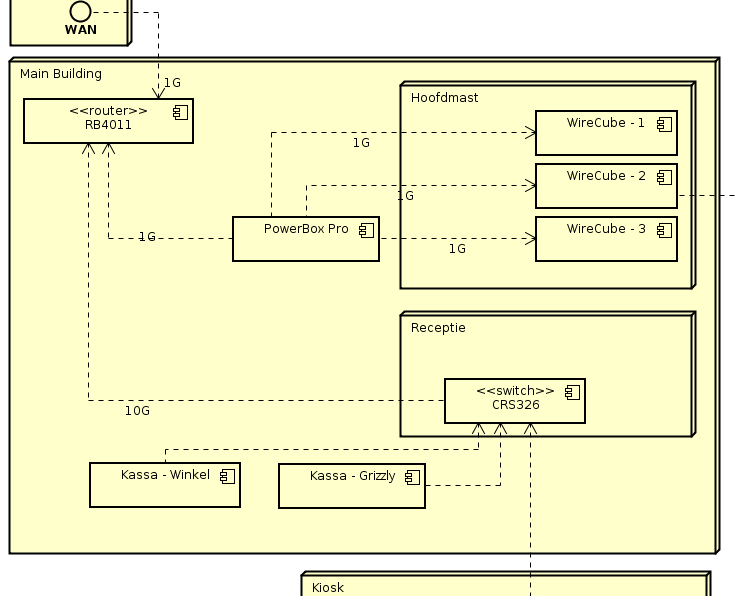
@tender hazel Most of their outgoing lines are actually at the front desk
so I am replacing their two 8-port unmanaged netgear switches
with a CRS326
tender hazel
ahh ok - good
tame carbon
@tender hazel the Kiosk they have outside, has another PowerBox Pro
tender hazel
better to have visibility over everything than to have random unmanaged switches hanging around
tame carbon
thats where another POS system is
I plan on putting a cAP ac inside there
and two outgoing lines
that go up the hill, to two of the Wireless poles (that isnt using ptp)
I wanted to have managed switches throughout
so I can seperate the POS system from the LAN
currently, all of that is on their LAN
The POS 'controller' is a program running on their server (which I installed for them a couple years ago)
@tender hazel am I to be worried about those Atheros switching chips?
someone here said, that if you enable VLAN filtering on those, they shit themselves
tender hazel
with the powerbox pro you mean?
tender hazel
it really depends on the device
enabling bridge vlan filtering disables hardware switching on all devices except CRS3xx models
tame carbon
so what about the PowerBox Pro then?
tender hazel
well the powerbox pro similarly will not have hardware switching with bridge vlan filtering on
tame carbon
okay, but does that mean I cannot use access ports and trunking on it?
or at reduced speed?
tame carbon
I wish to have the full gigabit
tender hazel
whereas hardware switching allows you to go above that
tame carbon
so not a real issue then
tender hazel
no
tame carbon
There's at most only going 1G through that device
@tender hazel is there anything you'd recommend for omni directional antennas?
tender hazel
yup - that's why I said the powerbox pro and not the regular powerbox - the regular powerbox has a much weaker CPU and can only handle like 200Mbps bridging
tame carbon
or should I just put up one of those metal52 ac's ?
@tender hazel powerbox is only fast ethernet too. so that's a given then.
tender hazel
yeah so basically the rule of thumb is when you use a function that cannot be handled by the hardware switch chip and it disables hardware switching, it uses the CPU for bridging and then performance depends entirely on how powerful the device is
and in the case of the RB4011 and powerbox pro the CPU is quite powerful
so you can use bridge vlan filtering without having to worry about the limit with either
tame carbon
Cool
tender hazel
tame carbon
<@!530075635423510548> is there anything you'd recommend for omni directional an...
I don't really particularly know about outdoor omni antennas, we have been getting rid of any omnis that we have left
we have them at some towers but they will be going away the next time we go there to upgrade
tame carbon
I got a couple more questions xD
Those wireless wire cubes, if I was to put more than three on a single pole, transmitting
if I have them facing in opposite directions, can I use the same frequency twice?
or do I need an RF shield inbetween?
tender hazel
yes if you have them facing in diffferent ways you should be able to use the same frequency twice
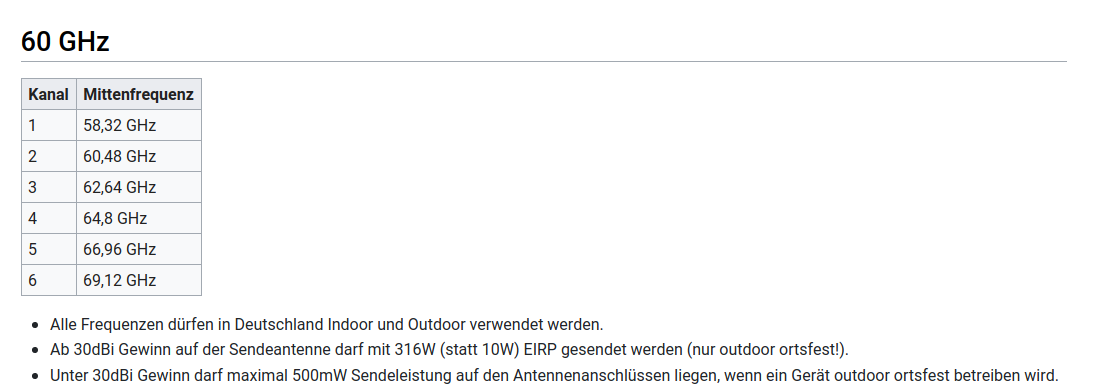
and there are 5 different frequency choices on 60ghz
tender hazel
no, there are 5
unless maybe only 3 in germany
frequency (58320 | 60480 | 62640 | 64800 | 66000 | auto; Default: auto) Frequency used in communication (Only active on master device)
 tender hazel
ahh, there you might have more choices
the higher you go in the 60ghz spectrum the longer the distance it can go, the less impacted by oxygen attenuation
I haven't seen that channel 6 as an option on the mikrotik 60ghz but maybe it is there in the newer ones
tame carbon
those advertised 800meters, is that still full bandwidth?
its not an issue, since we run at most 100 meters
tender hazel
I would prefer to run those at shorter distances than that
tame carbon
one link is only 25 meters lol
tender hazel
yeah at 100 meters you'll get gigabit full duplex no problem
tame carbon
but we have no option to run cables
@tender hazel okay, so one last question. This goes back to the CPU and vlan filtering from earlier
tender hazel
the longer the distance the harder it is to aim them and the more important that the aim is precise
tame carbon
I plan on daisy chaining two sector antennas together
but wish to be able to have a management and data vlan
are those CPU bottlenecked by that?
they have quadcore CPUs
which i think is quite beastly for such an AP
tender hazel
it should be ok - I mean you don't have to use bridge vlan filtering on those either
you can just use vlan interfaces
it keeps things simpler
I would only use bridge vlan filtering on your switches
tame carbon
so a management vlan
tender hazel
yeah
tame carbon
if I register a CAP, and create a datapath, on a specific vlan
do I have to create an interface for that?
or does it tag it silently in bg?
tender hazel
what we do is on the trunk coming into the switch, we have the customer vlan and mangement vlan tagged from/to the router, but then on the port going to the AP, the customer vlan is untagged and only the management vlan is tagged
tame carbon
ahh
tender hazel
tame carbon
or does it tag it silently in bg?
it tags it silently in the background, you don't have to create a vlan interface
tame carbon
but what would you configure as the datapath vlan then?
1 ?
since you are tagging it at the switch
tender hazel
you would leave it unset
like this

except you would turn off client to client forwarding most likely
tame carbon
Yep
Okay, so this would forward that traffic to the switch
and then the switch can tag it afterwards?
tender hazel
yes
the switch will apply the tag on the customer traffic when it arrives from the AP
and everything is tagged on the trunk back to the router
tame carbon
interesting
I may have to do some tagging with those powerboxes too
the line between switch and powerbox would be a trunk
one of the ports on it would be an access port for the single POS system
and the other three lines are going to APs
I figured, a cable can do whatever I want it to, as long as I can plug a tik on it
tender hazel
yeah
tame carbon
excellent.
Cool, so I'm heading back home tomorrow
then I'm going to actually make a plan and list of parts
rough sketch, goes to actual network diagram
with addressing
tender hazel
ok
tame carbon
only annoying thin is, I don't really know what kind of accessories I will need lol
there's lots of little doo dads that I might need
@tender hazel and according to my dad. the existing wireless network they had, had failed on numerous occassions, because the powerbricks feeding the injectors would fail
so I think I might end up putting labels on all them, numbering them, and then having them stock up on some spares.
so they can replace them if need be
so if a powerbrick fails, they look at it "oh its a number 2" and they just grab one of the spares they have
not all will be fed by a powerbox
so I am just worried, that this kind of thing will happen in the future
tender hazel
I don't think the adapters generally have a tendency to fail, but yes you can get extras
most likely the source of any such failure would be from a power surge after a power outage
so as long as you have decent surge protection it ought to minimize those risks
tame carbon
not all of those wireless posts will have that
tender hazel
you'll probably want some kind of surge protecting power bar at minimum
at each post
just so you have something
rather than plugging everything directly into the mains
 tame carbon
Outlets, breakers, and kWh meters
thats what those boxes that exist rn have

@plain siren they didnt even bother with that lol ^
plain siren
Honestly, you should protect the feed on the outside
tame carbon
THere's no way for us to do that
These posts feed off the supply that is used by the camping itself
There's 3 80A phases on the entire area.
plain siren
You cant just cut the cable and add one inline?
tame carbon
@plain siren I will, once the old ISP has removed all this garbage
those posts are on our property
the plan for now, is getting Fiber optics running , getting the main switch up and running
and providing indoor wireless
once that works, they will cancel their existing internet service
and once all the equipment has been taken down, will we start on building out our wireless network
@plain siren also the roof mounted antenna is scary as fuck
I had a look in the attic, how it is wired up
and the pole just goes through the roof
they drilled holes in asbestos plates.

plain siren
So I would use a MARS 83905
and for every ethernet cable that runs PoE and is at any point exposed, will also need one
For any RF Devices like... an Antenna you should use a Gas Discharge tube
tame carbon
@plain siren mikrotik sells those now

MikroTik is a Latvian company which was founded in 1996 to develop routers and wireless ISP systems. MikroTik now provides hardware and software for Internet connectivity in most of the countries around the world.
Would this do?
tame carbon
 plain siren
Yeah if I cant see the protection rating on it, I aint gonna touch it personally
This is really important

Key 1: Thermal MOVs
Key 2: Short Circuit Protection (A diff rating)
And then the L-N dumps
tender hazel
those mikrotik surges are more meant for protecting the equipment from lightning strikes
but I think you are in a situation where the surrounding trees will be taller than those poles
plain siren
Yeah thats MCOV
tame carbon
Its a valley
literally, if lightning strikes
itll strike the windmills on the hill
plain siren
Any antenna within 10 miles will gain 100V from the residual EM
My HAM antenna during storms makes spark noises at the shack connection (I unplug it and stick the connectors in a glass container)
 plain siren
Thats kinda even worse for strikes, Thats mean the "Static" from the strike can travel
plain siren
Yup
tender hazel
with our telecom towers of course surge protection is a must for us because there is a danger of a direct strike
plain siren
Its because the ground becomes a "field carrier" with ground saturated dumps
The striked area could only absorb so much of the strike so it actually starts to kinda "slide" like ice
tender hazel
we did an install back in 2017 or so where we upgraded an entire site and there was one undocumented radio and becuase it wasn't documented it didn't receive lightning protection
tame carbon
and it went boom?
tender hazel
just days after all the new equipment was installed, lightning struck the tower directly, blowing that radio, travelling to the equipment, the mikrotik router exploded etc
all of the radios fried
plain siren
Lucky no one was right next to it holy shit
tame carbon
F
tender hazel
of course we had just started moving to mikrotik recently at that time so I was getting a lot of "if this were a cisco it wouldn't have exploded" which was frustrating
plain siren
no, cisco catches fire
tender hazel
it's like we've never had a direct lightning strike on one of our towers like that before
plain siren
Literally
tame carbon
Fresh kindling
tender hazel
so of course they started getting paranoid about grounding, because they thought the mikrotiks were suspectible to exploding from surges etc
but since then we have had 0 exploded mikrotiks
plain siren
Inb4 they just grounded every point
tender hazel
so they are more calm about that now
tame carbon
@tender hazel do you have pictures of the aftermath?
plain siren
please tell me they dont have multiple ground points for each device in the line
tame carbon
@plain siren ground is ground no?
 tame carbon
should they each be grounded seperately?
tender hazel
I saw a picture before but I'm not sure where it was
 tame carbon
so no daisy chaining?
plain siren
Ground loops will destroy an antennas SWR
You touch the shielded pieces during a Tx and suddenly RF Burn?
And all sorts of other fun shit
This is why ethernet is usually isolated
 tame carbon
Googling RF burn has led me here

Pain Ray
Shoots high intensity beams of 95GHz
intended to be less-than-lethal
plain siren
 tame carbon
against personell
plain siren
I remember a few years ago ground loops caused a massive RF leak into someones HAM Transceiver here locally and it killed them
 ornate salmon
Not sure if this counts as a basic tech support question but I thought I'd ask here if anyone has experience with 66 Blocks. I just moved into an apartment and all the data cabling terminates on a 66 block in the closet, which I find weird because more than half of the cables end with 8P8C/RJ45 outlets (not 6P6C phone outlets). I want to just re-terminate all the cabling to a patch panel but I'm a little concerned about liability in the very slim chances my landlord finds out and cares. So instead, first, I'm thinking about tearing out the voice patching and then attempting to punch down one end of a patch cord to the secondary contacts and just seeing if I can get half-decent speeds through the punchdown block like that.
But before that, I wanted to see if there was anyone I could talk to who's familiar punching down voice jumpers so I can make sure I'm not about to do something catastrophically stupid in tearing them out
It's strangely difficult finding people who've done this stuff before, I would imagine there's tens of thousands of people with residential service technician experience
tame carbon
@ornate salmon you are in the right channel for this
Usually such a termination block is a handover from the service provider to the residence
you only change the leads on the outer terminals
the inner terminals go to a trunk line which goes into the ground
You need an LSA punchdown tool to put those wires in
ornate salmon
I have one actually, I did some time as commercial telecom technician before moving into estimating
I'll send a picture of this block though it's a little weird
tame carbon
And punchdown for twisted pair isnt unheard of
ornate salmon

 hollow marlin
Best to post the block as there are many configurations of them
tame carbon
@ornate salmon what are those blue lines feeding to?
ornate salmon
I'm struggling to figure out how this is supposed to be being used in this context
The blue pairs?
ornate salmon
I believe those are all running to locations around my apartment unit
tame carbon
@ornate salmon yeah so one side is service, the other client
ornate salmon
But I don't know if one of them might be leading back to an IDF
tame carbon
they are just straight through
ornate salmon
I assume/think the blue patching pairs are daisy chained along, that's how voice usually works right?
tame carbon
Not sure how they do that all over the world
ornate salmon
But then you're saying basically that the cat5 cable terminated in the top right is probably incoming voice?
tame carbon
I can't tell
@ornate salmon I think both incoming and outgoing are terminated on those blocks
and the blue-white lines are just to bridge the connections, and close the circuit
ornate salmon
It looks like the blue and orange pairs of every single category cable are all daisy chained together with the blue and white mess of strands
 ornate salmon
This is how I think this is all connected

Yeah I've seen some crazy ones too, usually for like PA/Bell systems in schools
but I've never had to work with one myself
I feel about 53% confident in myself just pulling out the patching wires here, and then I'll probably just tone out the category cables from the outlet end, and then whichever one is left is presumeably the incoming voice line if there is one
hollow marlin
66 blocks terminals a split into a left/right half with the outer/inner punchdown connected. I guarantee the outer pins are incoming voice and inner are to the jacks. If you are going to daisy chain or splice, there are better ways. Coming from someone who's done 1,000s of punch downs
 ornate salmon
I'm pretty sure the outer edges are primarily the cables running to the outlets inside my unit
I see 7 Cables terminated to the 66 block
and I count 7 Jacks in my apartment (although there's a mystery faceplate that could potentially contain 2 more terminations
ornate salmon
I think potentially the way this is set up is for the voice outlets on the back of my modem to be patched into one of the rj45 outlets, and then for any other outlet to be able to patch to a phone
tame carbon
its barely got anything hooked up
I know in oldschool homes here in the netherlands, it wasn't uncommon for all the oulets in the house to be chained together
ornate salmon
I guess I'm lucky then at least that these seem to be homeruns with the daisy chaining being operator choice
actually i guess it's not daisy chaining in that case, it's like, trunk-offshoot
tame carbon
but are those 7 blue utp cables the only thing feeding into it?
ornate salmon
from what I can see, I think so
tame carbon
odd
ornate salmon
very odd
tame carbon
those ISRA points here, have a cable coming in from below which terminates on such a block
and then customer equipment is just patched in through the middle row
ornate salmon
That would seem pretty logical
My service here though comes through coax
So I already sorted out the coax nightmare earlier tofay
My last apartment just had two strands of fiber to an ONT, that was beautiful
hollow marlin
Well the actually way to do it is outer pins are only used for runs and middle pins are connected with a bridge clip
tame carbon
@ornate salmon I just have a single mode fiber directly plugged into my router :)
two lines come into the house
one is in use, the other is backup
ornate salmon
Interesting, two individual strands but using just one at a time?
tame carbon
@ornate salmon they run the fiber in a big circle
Line 1 goes clockwise
line 2 counterclockwise
both ends are terminated at the exchange
ornate salmon
Oh ok so then do you have 4 strands total?
tame carbon
no, two fibers
ornate salmon
maybe I'm confused what you mean by backup
tame carbon
@ornate salmon the fiber path itself is a circle
on both sides of the circle its spliced
ornate salmon
you'd think I would be less confused about all this stuff, my day job is estimating colocation projects
tame carbon
@ornate salmon Its basically just if there's a fiber cut somewhere
they can send the light down the other fiber
which takes a different direction
ornate salmon
ah ok ok I see
tame carbon
its like T connection
ornate salmon
wait so let me rephrase to see if I better understand
tame carbon
fiber goes left, and right
ornate salmon
I've just never seen a single stranded fiber that's what my brain is hung up on
ornate salmon
the minimum I've ever used was 2ST
tame carbon
its all singlemode
ornate salmon
That's a good way to do it
tame carbon
@ornate salmon yeah the subsidies that made this possible made one thing very clear
ornate salmon
One time I worked on a jobsite where we had to pull multiple 2-strand fibers to every desk in an office
tame carbon
the company that runs the fiber, is independent from the actual service provider
so you can get 10G if you wanted to :D
ornate salmon
each desk had 3 cat6A and 3 duplex LC
ornate salmon
Very interesting!
tame carbon
it all depends on the ISP you are connecting to
what kind of gear they have in the exchange
but its basically dark-fiber to the home
ornate salmon
So then I assume all the ISPs come into a demarc point that's like, your community center or something and that's where they patch in to you?
tame carbon
@ornate salmon and this path you spoke of:
 hollow marlin
Telcos are pretty much all single strand with BiDi. Duplex for drops are not common at all outside specific scenarios
ornate salmon
Yes I've estimated a few projects with campus fiber-rings
tame carbon
@hollow marlin Yeah service is BiDi
two lines are spliced in, both are functional just not operational at same time
ornate salmon
That's really interesting
tame carbon
https://cdn.discordapp.com/attachments/776722183119699988/777646103775674368/IMG-20200922-WA0001.jpg

Result is a single fiber that goes to my gear
(the one on the left)
that other spooled up fiber is 10G for LAN
ornate salmon
my job all day long every blueprint is nothing but 12+ strands of fiber going to duplex connectors
is that LC?
ornate salmon
I guess duplex is really just for density
hollow marlin
Drops are still 12 strands at minimum, but usually 2 spliced as its cheaper to just use another fiber than repair a drop
ornate salmon
which is why I see it all the time
tame carbon
@hollow marlin Lol those junction boxes they use for the fibers, are big metal boxes like 2x1 meters
they put about 20 cm of topsoil on them
hollow marlin
Duplex is not for density, bidi is
ornate salmon
What is duplex for
tame carbon
when they do maintenance like splicing a fiber
they just remove the topsoil
open the box
and pull out the big block of spooled up fibers
hollow marlin
Duplex - rx/tx fibers - same frequency
BiDi - rx/tx over single fiber - difference frequency
tame carbon
@ornate salmon BiDi uses two wavelengths on same fiber
you need two different modules
with RX/TX flipped
hollow marlin
Duplex burns 2 fibers each connection. Fine for the CO/DC, not for last mile
ornate salmon
Is duplex faster?
tame carbon
no
has no bearing on speed
You can use WDM with duplex
something you cannot do with simplex
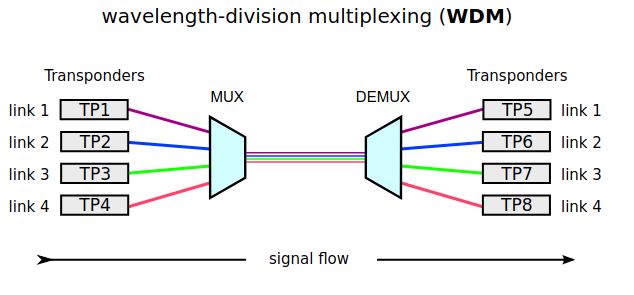 hollow marlin
Duplex is still the only option with higher speeds such as 100g+. At least I have no seen any SFPs for such
ornate salmon
WDM is probably how corning lets you split 1 outlet to 32 ONTs yeah?
tame carbon
@hollow marlin Highest I've seen with BiDi is SFP28
ornate salmon
with a passive splitter
tame carbon
@ornate salmon its just a box with prisms
ornate salmon
 tame carbon
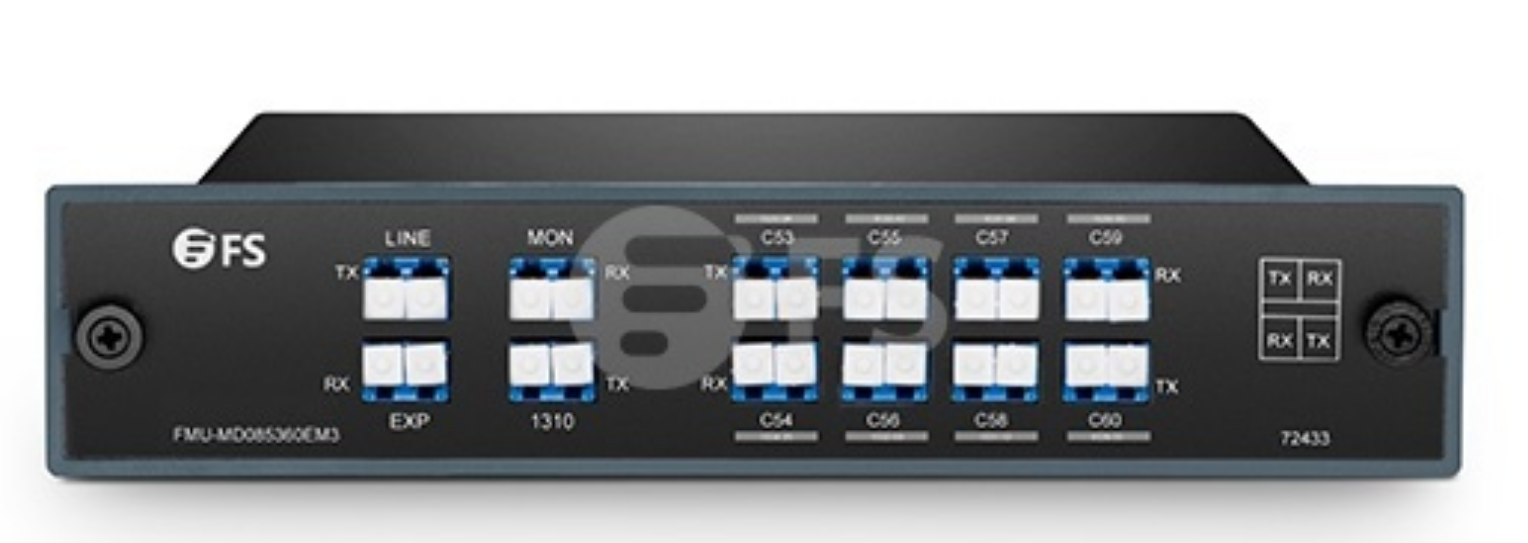 tame carbon
WDM uses much more narrow bands
You need special transceivers for those

FS Deutschland
Kaufen Sie Cisco SFP-10G-BXU-I 10GBASE-BX10-U SFP+ Transceiver-Modul, Singlemode Kabel 1270nm-TX/1330nm-RX LC Stecker beim 10 Gigabit BiDi SFP+ Modul Hersteller bestem Preis.
This is a BiDi transceiver ^
1270nm-TX and 1330nm-RX
the other side, would need to be reversed
They use a simplex fiber
hollow marlin
GPON is not WDM but TDM, same wavelength is used for all ONTs. NGPON is a mix of WDM/TDM
tame carbon
PON is garbage
Its treating fiber like a coaxial network
Its a cost saving measure for residential deployments
hollow marlin
The savings is night and day though
tame carbon
Yeah but its not at all future proof
hollow marlin
GPON is fine in most cases
ornate salmon
I mean, my last apartment was GPON and I always got a solid 1GB connection
which was still an excessive amount for what I actually use as an individual
tame carbon
@ornate salmon sure, you can get like 2.488G down and 1.244G up
hollow marlin
GPON->NGPON->XGPON, same fiber and splitters, different equipment
tame carbon
@ornate salmon but its not as flexible, because everyone in the area shares the same wavelength of fiber
WDM actually multiplexes multiple wavelengths of light
so you can have 96 'colors' on a single fiber
each color, can be whatever speed you want it to be
ornate salmon
interesting
tame carbon
@ornate salmon this is used for long-haul mostly
tame carbon
Wavelength division multiplexing
TDM = Time division multiplexing
with TDM, the ONTs take turn when signalling
with WDM, all can signal indepdendently on different wavelengths
ornate salmon
So is WDM like, way more expensive or something?
tame carbon
More density.
The best that we can do right now, is 96 wavelengths on a single pair of fibers
 clear igloo
hollow marlin
Duplex is still the only option with higher speeds such as 100g+. At least I hav...
clear igloo
hollow marlin
Duplex is still the only option with higher speeds such as 100g+. At least I hav...
There is an MSA for 400G bidis and there are 100g bidi for mm fiber pairs but I haven't seen anything for 400g yet
clear igloo
PAM4 I believe
clear igloo
I think it was NRZ/PAM2
tame carbon
Ye, so on/off
clear igloo
yah
tame carbon
flicking the switch at highspeed
@ornate salmon https://i.imgur.com/M0IBG1Q.png
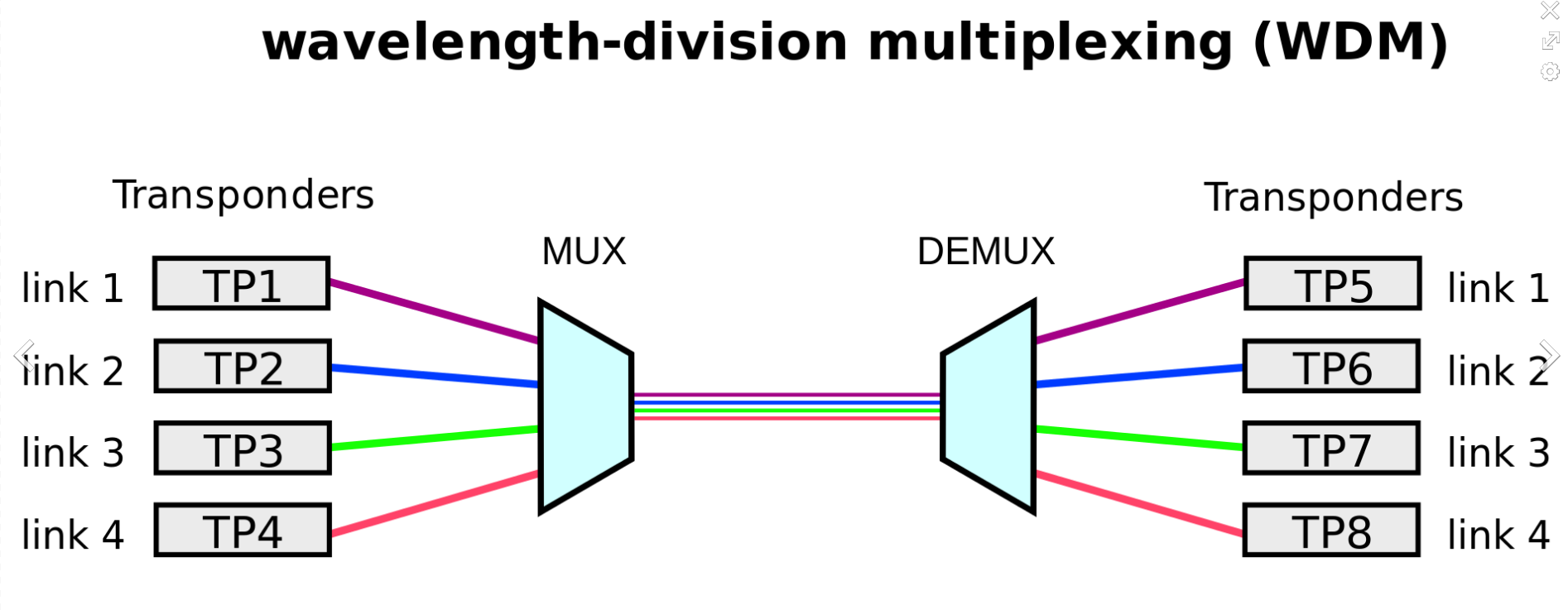
@ornate salmon WDM muxer basically has a line, and a bunch of channels
The Line goes to another muxer
hollow marlin
clear igloo
There is an MSA for 400G bidis and there are 100g bidi for mm fiber pairs but I ...
I would have guessed they existed. Never looked as I don't really look at MM
tame carbon
@ornate salmon it basically allows you to combine multiple fiber links onto a single pair
clear igloo
hollow marlin
I would have guessed they existed. Never looked as I don't really look at MM
Yah, they don't have really long length or anything, mostly for like sub 50 or 30 meters or so
ornate salmon
Pair or strand?
tame carbon
@ornate salmon if you have a very long fiber path, this makes a lot of sense. It would allow a cross-connect between two datacenters, to use a single pair of fiber for multiple services
@ornate salmon Its all duplex
so you have two fibers, RX and TX
ornate salmon
Oh ok I see
tame carbon
Its just a box of prisms
Line goes in, splits it up into however many channels it supports
ornate salmon
that makes sense, also I just tore out all the phone jumpers in my 66 block
tame carbon
imagine, 100G
on a DWDM (Dense WDM)
that's 9.6Tbit/s
96x 100G
on a fiber pair (duplex)
ornate salmon
is MPO WDM or is it some other trickery?
 waxen scroll
Other trickery
ornate salmon
oh MPO is just 12 individual strands but theyre lined up precisely
tame carbon
MPO is just a composite connector
with a bunch of fibers
but this is multimode stuffs I believe
I don't mess with that
MPO very expensive also
waxen scroll
@clear igloo send me samples
ornate salmon
I just bid a 3m$ project with like 600+ pre-terminated MPO fibers going to splitter cassettes
clear igloo
waxen scroll
<@291198741862416384> send me samples
nou!
 waxen scroll
And you can break it up into many 10g
 ornate salmon
I built my bid with some breakout cables and some 48 strand MPO-MPO running to cassettes
I think the 48ST MPOs though had 4 MPO-12 connectors on them
each end
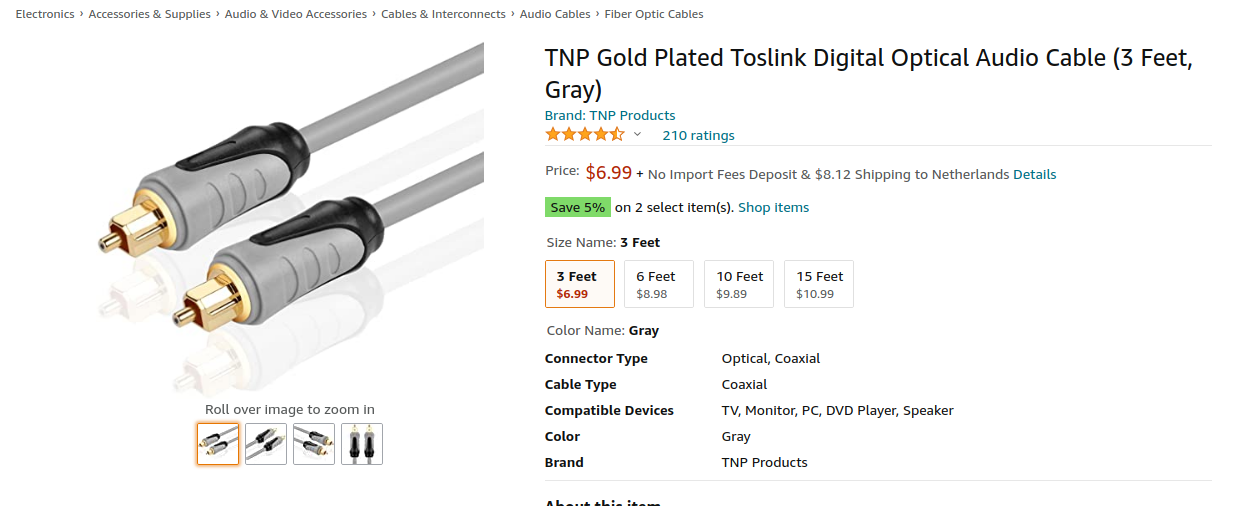 ornate salmon
gold plated fiber cables go in the cable stretcher to be extended
ornate salmon
lmao
tame carbon
Multimode I think
lol, those cores are so big
you point it at the sun, and light comes out the other side
ornate salmon
i think toslink just uses an elf with a flashlight at the transceiver
tame carbon
@ornate salmon I use that for my hifi setup at my desk
its easiest way to get 5.1 going
I think that standard allows for 125mbit/s
which is peanuts
ornate salmon
that's actually better than i expected
tame carbon
Also, those BiDi interfaces are generally more expensive
10G SFP+ BiDi (LR 10km) costs ~ 35 bucks
and the duplex 10G variant is like 20 bucks
ornate salmon
do you think my apartment complex will notice on move-out if I reterminated all my 6P6C to 8P8C
tame carbon
do they still use the phones? 
ornate salmon
I'ma lose internet for a second here but hopefully i will brb quickly with speed test results through a 66 block
😂

Gross
tame carbon

bunch of wildlife in the box
spiders jumping out
and the other box I opened had signs of rodents taking refuge
ornate salmon
Yeah this is the first time I've opened a wall outlet to find spider webs
I've lived a privileged technician life
 lean pebble
ornate salmon
lean pebble
ornate salmon
use Belden cable
tame carbon
@lean pebble this is for wireless service on the area
the ISP does both internet and wireless service
with the new fiber optics we're getting
all of this gear is gonna be removed
and replaced by new 60GHz ptp links and sector antennas
instead of the crappy omni antennas they use now (on 2.4GHz with 40MHz channels xD)
and they use 5Ghz for backhaul right now
ornate salmon
omg swapping out the wallplate f-connector gave me speed test gains of .2 mbps
yeehaw
waxen scroll
 ornate salmon

So um
It looks bad I know
but the tone goes through just fine....
....I don't think it works 😭

so this much
Is good
Does anyone know what the S means
ornate salmon
I wish this little tester could give me any other diagnostics
ugh does anyone make a pre-terminated 66-block patch cable or something dumb like that
Oh I'm an idiot I think
I terminated all the white conductors on the wrong things
maybe not
plain siren
Yes, S is the shielded cable jacket
ornate salmon
wait that order is not TIA 568A or B
the way they punched it down in the 66 block
yeah I did it completely wrong
plain siren
I dont even get why that block is being used
plain siren
Its like.... not even properly being used
plain siren
un-set it up
 plain siren
No I mean... that 66 block > Trash
ornate salmon
basically they were all sharing a voice
yeah I mean I want to replace it with a patch panel
plain siren
ornate salmon
yeah I mean I want to replace it with a patch panel
This
ornate salmon
but I'm in an apartment
plain siren
that never stopped me
plain siren
Then you invoice the apt later
For the "upgrade"
They would prob blindly pay it too
ornate salmon
I need to find my real punchdown tool because right now I'm doing this science with a screwdriver
but I just moved and i packed it somewhere dumb
tender hazel
the 66 block is greater than trash?
ornate salmon
LOL
ornate salmon
whoever decided to standardize punching anything down probably is an agent of satan
everything should be pre-terminated in chinese factories
plain siren
AT&T (Bell) did sooooo yeah they are
tender hazel
ugh - port isolation is broken in SwOS 2.12
and I only discovered because a customer plugged their router in backwards
ornate salmon
well my last apartment had fiber service from AT&T so ill give them a pass
tender hazel
I had to temporarily create a mac acl to block them
ornate salmon
this one, spectrum,
friendship with spectrum ended
They plugged in their router backwards?
tender hazel
yeah
it's a common issue for certain types of ISPs unfortunately
customer plugs in LAN port to the internet uplink
in our case this led us to discover that port isolation wasn't working on the switch
ornate salmon
OOooohhhhh
tender hazel
b/c they were handing out IPs to other customers
who would then not get online b/c they were getting IPs from the backwards plugged in router instead of from us
ornate salmon
that sounds messy
tender hazel
sometimes when the customer has a backwards plugged in router they don't even realize
because what happens is sometimes they have this stupidly long cable
and they have the WAN port on the router plugged into one of the LAN ports with that long cable
because it is not obvious when the cable is that long that it is the same cable
because it runs from their router down to the floor and up again
so they plug in backwards and they still can have service, because the LAN port switching causes them to be bridged properly on the WAN port so even plugged in backwards things still sorta work
ornate salmon
is it worth me plugging in my router backwards to see what happens
actually I doubt it would do anything in my case, not cause chaos
tender hazel
no - any ISP that delivers an ethernet handoff is going to use port isolation to prevent you from handing out IPs to others
we do, but at this one site only, the function isn't working in the switch, it is configured properly but isn't working
I only discovered now b/c this happened
I reported it to the vendor, hopefully they can fix it soon
ornate salmon
makes me wonder how many problems are lurking out there malignant because they haven't caused noticeable issues yet
plain siren
Modern ISP's with the whole "new" infra management systems actually use VLANs per customer now
tender hazel
there's no need for a VLAN per customer if port isolation is working
we do VLANs per customer for enterprise customers only, not for retail
my cable ISP at home here does a single shared subnet for many customers (and so obviously a shared VLAN), but a combination of port isolation and Local Proxy ARP to separate customers
it works as well as separating them into VLANs but it is a lot easier to manage and less wasteful of IP space
assuming the port isolation works, that's a pretty critical feature to be broken
I may have to downgrade the software to try to fix it
 nova nexus
If you're doing VLAN per customer, you're doing networking completely wrong and should pack your bags and try a new hobby.
tender hazel
VLAN per customer makes sense when the customer is buying an enterprise grade service, like DIA or VPLS, but otherwise, no
I remember going onto a Cisco chat and they were trying to tell me that I should be using a VLAN per customer for retail customers
I was incredulous.. sure, that sounds great, I love making tons of extra work for myself for no reason
tender hazel
what are you trying to do with it anyway?
ornate salmon
two ideas
one, if I could just bridge one UTP to the other so I can link something in another part of my unit to my router over LAN
the other, if I just jumped every cable to a 8P8C connector so I could throw a little switch in the closet and give internet access to every outlet in my unit
but alas, the idiots who built this place wired it with a boat-load of cat5e but failed to make it compatible with data
I really should just rip out the 66 block and put a patch panel in there
tender hazel
are you sure it is wired correctly on both ends
like the picture you showed should be working.. maybe not at 1Gbps but you should get something
your cabling has to be pretty terrible not to come up at 10Mbps even
ornate salmon
to be fair my testing methodology sucks
I'm sure the jacks are terminated correctly
tender hazel
how are you testing?
ornate salmon
well
I have two coupled patch cables that run from the little thing punched down to the 66 block all the way back to my computer
so i have like
way too many potential points of failure
the netcat seems useless at everything except telling me how long the cable is
and I don't have any other devices with an rj45 to just plug in in my closet and easily see if they're connected
 leaden minnow
So who here uses pfsense?
tender hazel
pfft pfsense 😉
 thorny vector
pfsense is great, what are you talking about?
Not gonna make it anything that does SERIOUS routing, but for most stuff outside of the ISP space? yup.
tender hazel
I'm somewhat kidding, hence the wink.. but it depends on whether someone really needs a next gen firewall or a router that also has firewall features
thorny vector
Also, TOTALLY not a fan of it being freebsd, and their drama surrounding wireguard
plain siren
OPNSense is a thing too
tender hazel
I can see the use case for pfsense for businesses that want to block their employees from being able to access certain types of content
i.e. as a fortigate substitute if you are on a budget
plain siren
tender hazel
I can see the use case for pfsense for businesses that want to block their emplo...
thorny vector
I've seen it more it use cases where you need people that aren't hugely technical to be able to manage a router/firewall too. That's the reason my team uses it as the wan for our kits
plain siren
https://suricata-ids.org/ Also this
thorny vector
Ugh, suricata
Currently in a protracted war with my team about snort3 being better
Also, HARD no on anything routing packets doing any sniffing
plain siren
Also http://www.squidguard.org/ this too
tender hazel
thorny vector
I've seen it more it use cases where you need people that aren't hugely technica...
I just joke about pfsense because it is frequently denigrated by mikrotik enthusiasts
I haven't used it before myself, other than booting it up to have a quick look at it
thorny vector
Ah. Still haven't gotten around to getting a mikrotik device. Been planning a 10gbe upgrade for my lab, but even doing just the backbone network is cost prohibitive
 thick minnow
if i have to use a vpn do i put I turn it on inside my virtual machine or on the host machine
thorny vector
The server?
thick minnow
no as a client like connecting
tender hazel
I've got mullvad VPN working on my mikrotik now at home
but I have to disable it to get the full netflix library
thick minnow
i want to connect tot he vpn but i only want to use it inside a virtual machine
tender hazel
and it is only working with ipv4 at the moment
thorny vector
@thick minnow Then the VPN just inside the VM
thick minnow
Okay well i've got the vpn working inside the VM but it wont connect 
plain siren
thorny vector
<@456226577798135808> Then the VPN just inside the VM
I was trying to figure out how to say this without being so... blunt
thick minnow
that's why I ask
thorny vector
I've actually disable ipv6 inside my actually lab. I hates it
I also am very triggered by the RFC deciding that the smallest routable subnet is HALF OF THE ADDRESS SPACE
plain siren
mfw I disabled IPv4 in mine
tender hazel
it's not "smallest routable subnet"
thick minnow
how would I troubleshoot why it wont work
tender hazel
but for dynamic addressing (DHCPv6 IA_NA, SLAAC) you can't use anything other than a /64
plain siren
I mean, there is a good reason
 tender hazel
if you use static addressing, you can use any subnet size you want
thorny vector
I know I can make smaller subnets statically, but I don't want to do things static as I build and destroy stuff in my lab
plain siren
Why do you want them smaller?
tender hazel
the idea of using 64 bits for the host was that you could take the mac and use it to build the host address.. and not only that but a 48 bit mac has the potential for exhaustion, so increasing it to 64 bits means room for growth in the future
when you have such a big address space it doesn't matter to be a bit wasteful
thorny vector
Because if the whole point of a new IP standard is so we don't overuse and overallocate, then being so wasteful bothers me
tender hazel
organize the address space in the way that makes the most sense even if it seems to waste a ton of addresses
thorny vector
It's the same reason I go on a warpath whenever I see a 10.0.0.0/8 network without a REEEEEAL good justification
plain siren
thorny vector
Because if the whole point of a new IP standard is so we don't overuse and overa...
It was literally stated "overkill" in the first 4 sentences of the standard
take your OCD and tuck it away this time
tender hazel
it only bothers you from perspective of comparing with IPv4 where you have to be very conservative
plain siren
IPv4 isnt even a comparison at this point.
The fact you YEET NAT alone basically makes it a joke
tender hazel
when we designed our IPv6 space, we actually designed it from the perspective of making our firewall simpler
plain siren
thorny vector
 tender hazel
ex. all monitoring software goes into a /40.. so if we add any new monitoring tools later, we can put them in there and not have to deploy firewall changes to our fleet of devices
thorny vector
lol
I know its coming, it just offends my ipv4 sensabilites
plain siren
IPv4 should offend the IPv6 greatness sense
leaden minnow
I’m trying to determine if I should ditch my UDM and build a router.
thorny vector
define "build a router"
 waxen saddle
If your UDM is working, why ditch it?
leaden minnow
HP ProLiant with pfsense, an AP or two around the house.
plain siren
I think you are going to find that isnt as great as it seems
thorny vector
Cuz ubiquiti hack and pr nightmare
tender hazel
I think "build a router" is from the LTT video where he built a router running pfsense
leaden minnow
Sometimes I am bad at choosing words.
tender hazel
I haven't been following the ubiquiti GPL thing
but people have made the same complaints about mikrotik too
waxen saddle
I didn’t even know about it
plain siren
tender hazel
I haven't been following the ubiquiti GPL thing
They are facing nearly 1M per violation + 10M for each "failure to deliver asks from court"
They are currently at.... 9.5 BILLION
tender hazel
mikrotik only offers access to the source code if you pay like $25 for shipping and they will send you a floppy disk or CD of the source code changes
plain siren
I feel like no one ever reports these GPL violations like they should
thorny vector
Honestly, though, 25 for shipping and source ain't bad
tender hazel
I think the issue is that the GPL was created before it was conceived that you could just download everything
so it has some verbage that says that you can provide access to the source code via fixed physical media but have a suitable charge for shipping
so it is technically not a GPL violation in that regard
at least as I understand it
it is more that people are upset b/c these days there is no reason not to offer the source code changes online for free to everybody
there is no need to restrict it to physical media and charge shipping
plain siren
 tender hazel
so it is more that the "spirit" of the GPL that it violates, rather than the letter
yup - as that says both physical media and distribution via the internet count
so mikrotik distributing only via physical media and not via the internet doesn't technically violate the GPL
although mind you I don't think they've made very many changes to GPL code to begin with
I know with GRE they added keepalives
with PPP they added BCP
They added priority stuff to ebtables and iptables
most of the other features they have developed are part of their own routing engine and are not GPL
so when you buy the GPL code from them it doesn't really include most of the stuff that makes a mikrotik router work
it only includes the features where, instead of developing it themselves, they extended an existing linux feature to add new capabilities to it
waxen saddle
I can’t find anything about a recent Ubiquiti GPL violation court case
plain siren
waxen saddle
I can’t find anything about a recent Ubiquiti GPL violation court case

CourtListener
Docket for Ubiquiti Networks, Inc. v. Cambium Networks, Inc., 1:18-cv-05369 — Brought to you by the RECAP
Initiative and Free Law Project, a non-profit dedicated to creating high
quality open legal information.
Cambium had software the replaced the Ubi firmware to Cambiums on UBI's WISP routers
It was GPL
Well..... Ubi sued Cambium saying COOOOPYYRIGHT
Ehehehehe
No
Cambium turned around and wants payback
Despite the "Settlement" there is 2 tag-ons currently going on by ... Hehehehe Mikrotik and Microsoft
waxen saddle
Aha. I was wondering why your link seemed to be referencing a case back in 2019. But if it’s Cambium going after Ubiquiti this time, that makes sense. Weird how Google does not seem to know about this 2021 case at all...
plain siren

Cambium is straight up in their SEC filings they gonna jack all the other OEM's devices too
 plain siren
Despite the "Settlement" there is 2 tag-ons currently going on by ... Hehehehe M...
plain siren
plain siren
Despite the "Settlement" there is 2 tag-ons currently going on by ... Hehehehe M...
@elfin wraith
 elfin wraith
wait ubnt uses mikrotik software too?
plain siren
no
elfin wraith
is this just generic gpl stuff now
plain siren
Yes
 oblique cargo
dude is there like, any way to tell my internet to stop being an idiot
oblique cargo
dude, like no lie, im too lazy for ethernet
and wifi isnt as bad as is right now normally
like its to the point where spotify is kinda shiz
thorny vector
Wired is the ultimate laziness
 vale reef
Wired is just so much better and you have basically no issues compared to wireless
If the wifi is where the issue is
thorny vector
plug and done. As for the wifi, you can check to see if its your access point or just your ISP connection by seeing if you have any latency issues to your router
A ping test can sometimes indicate
vale reef
That's the thing with wireless
It randomly works and doesn't
especially with a bad all-in-one router/access-point/switch/modem combo
 burnt epoch
My Wake On WAN command in Pulseway doesn't seem to work....are both the port numbers supposed to be 9?
[@ or reply to me so I can the message]
 frigid pine
Hi. Is it possible and ok to use 2 default routes on one router, one of them being a floating route?
frigid pine
frigid pine
Hi. Is it possible and ok to use 2 default routes on one router, one of them bei...
Basically this the network architecture. And I need to use the links to R3 with redundancy. One of the R3 links is acting as the main link always.
 plain siren
frigid pine
Basically this the network architecture. And I need to use the links to R3 with ...
plain siren
frigid pine
Basically this the network architecture. And I need to use the links to R3 with ...
We call this VRRP
 frigid pine
hmm I am still to learn VRRP and HSRP. Will have a look at this.
But is it not possible with floating default routes if that's a thing?
Also to mention, the routers R2, R3 and R4 are all Mikrotiks and I do not have any control over R1.
 limpid lion
Anyone around that can help me sort out hairpin nat on a mikrotik?
frigid pine
limpid lion
Anyone around that can help me sort out hairpin nat on a mikrotik?
Depends on your question. Just put it here some1 will help if they can.
limpid lion
frigid pine
Depends on your question. Just put it here some1 will help if they can.
I have several apps running on a NAS, each in their own container and each with their own local IP. I have a reverse proxy (NPM) to access them from outside of the network but when putting the domain in form inside the network it doesn't route me. Someone told me hairpin nat is a good solution so I would like help setting up one that works with my network layout. Im very new with mikrotik routers and still not comfortable in the interface
limpid lion
would that be more convenient?
thorny vector
Yeah, and easier to setup
limpid lion
thorny vector
Yeah, and easier to setup
Any pointers on how its done? Got a pihole acting as DNS server right now
from what I understand I just go in the UI and under "local DNS record" I can add the domain / IP combo. But I do not understand since I can't add ports to the IP.
thorny vector
Why add ports? Just set the local dns record. If you're trying to do stuff with ports, you need a reverse proxy
limpid lion
ok so for example I want to access pictures.mydomain.com and files.mydomain.com and they both run on the ip 192.168.1.10 for example just on different ports. if I go to set the local dns record to pictures.mydomain.com and files.mydomain.com both pointing at 192.168.1.10 it wont work right?
thorny vector
It'll work. You just append the port at the end
Having multiple dns records point to the same target doesn't cause any conflicts
limpid lion
I cant append anything to either the domain and the IP
thorny vector
Not in the dns record, in the browser when you go to the page
thorny vector
Yes, setting up a reverse proxy for the hosts
Then you point the DNS records at the reverse proxy, and depending on the url that gets requested, it passes the correct site
limpid lion
so if I have npm on .19 I can just add a new DNS record for images.mydomain.com to .19?
thorny vector
Yep
limpid lion
that doesn't seem to work
thorny vector
Why not?
limpid lion
not sure if I did something wrong, let me send screens one moment
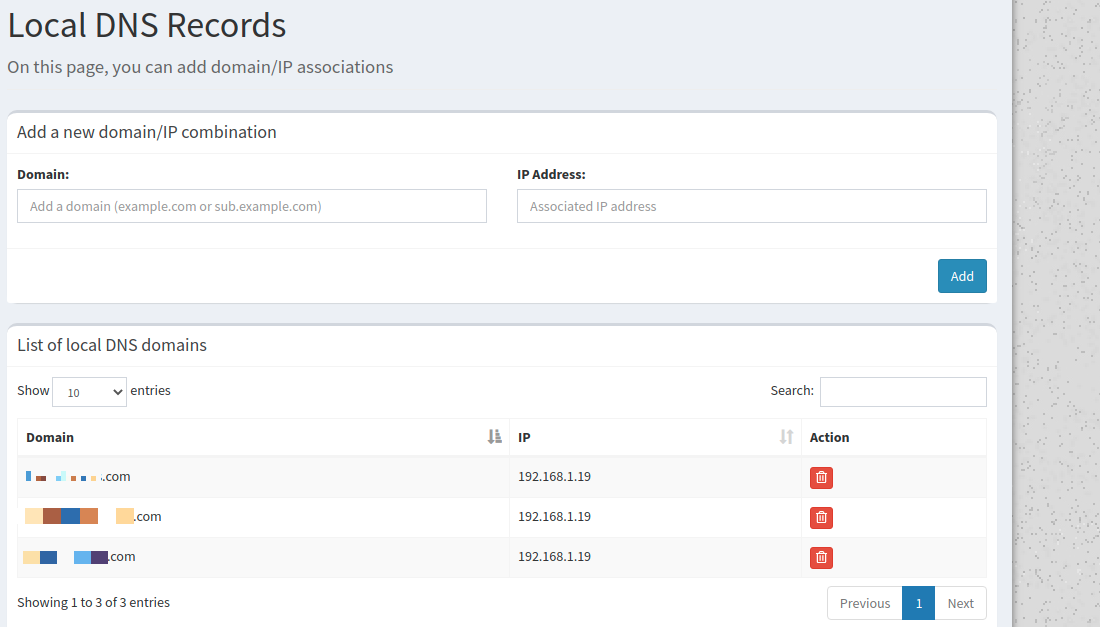

so I have the local record pointing at npm and in npm I have set up for example images.mydomain.com is on 192.168.1.16:8080
thorny vector
when you say npm you mean node package manager?
thorny vector
And what do you get when you try to visit it?
limpid lion
ERR_CONNECTION_REFUSED
thorny vector
is port 443 open?
thorny vector
gimme a docker ps
limpid lion






 thorny vector
Alright, so that's fine. And you can visit the pages directly without being refused?
limpid lion
via the local ip?
Yeah
and via the domain from outside of the network
both are fine
thorny vector
Alright, then just see what the nginx logs say. They'll have a reason why its being refused
limpid lion
know the location of the log files?
thorny vector
/var/log/nginx
Unless the proxy manager dumps to host, you'll probably have to exec into the container
limpid lion
It just randomly started working now
Didn't change anything
maybe it just takes time from when I add the dns record to when it goes live?
limpid lion
thanks for the help
 leaden quail
i don't exactly know if this is the right place to ask but, my house uses about 12 WiFi connected devices basically all the time, 3 of them are connected using an Ethernet cable, and the rest just regular WiFi, the problem is, we don't have a router, just the modem provided by our ISP, we bought the 250Mb/s plan, but im consistently getting less than 40Mb/s on my laptop which is connected with an Ethernet cable, can a router solve this problem? And would a TP link archer ax1500 be enough, because that's the router im currently considering to buy.
 peak cloak
leaden quail
i don't exactly know if this is the right place to ask but, my house uses about ...
peak cloak
leaden quail
i don't exactly know if this is the right place to ask but, my house uses about ...
ok to clear things up, you do have a router, it's just a modem/router combo unit
as for recommendations idk, all I would reccomend is mikrotik
leaden quail
peak cloak
ok to clear things up, you do have a router, it's just a modem/router combo unit
yeah, I have a combo unit sorry
vale reef
peak cloak
as for recommendations idk, all I would reccomend is mikrotik
@leaden quail Mikrotik might be very complicated for someone who doesn't have a lot of experience with networking