#networking
1 messages · Page 330 of 1
 green forge
 copper rover
bada bing!
green forge
i logged in
green forge

 digital wren
Do you know for a fact the 6A Cable is good?
broken cables are uncommon, but absolutely do happen
 peak cloak
don't even need putty
peak cloak
 turbid rover
So 6A should work but it's just broken?
turbid rover
So 6A should work but it's just broken?
6e isn't a standard?
digital wren
what?
green forge
@copper rover do you want to do this in dms
digital wren
got a cable tester?
turbid rover
No
copper rover
green forge
<@!821472301627080766> do you want to do this in dms
I'm not that free at the moment. But yeah, try a few of those commands. Unless there's documentation out there to enable TFTP
green forge
@copper rover so i need to enable tftp in ssh?
copper rover
Kinda stumbling in the dark
peak cloak
turbid rover
The tester, what is it
tests to see if all the pairs work
copper rover
Yeah, see if you can
green forge
alr
peak cloak
for continuity
green forge
ty
digital wren
it's a device that plugs into a network cable, and tests to make sure all the wires inside it work correctly / are crimped in the proper order
turbid rover
Oooh
green forge
@copper rover umm
 copper rover
Very good news
green forge
hehe
copper rover
So, you have a way
green forge
yes
im kinda starting to understand
its like cmd
but your on the chip

Super User
Network device (embedded Linux) connected to local computer (Windows OS). What is tftp command to copy binary file from network device to local computer? Also, what's command to copy file in the op...
copper rover
Yes
green forge
i need to put, right?
copper rover
Basically you need to instruct the router to get the file from your TFTP server hosting the file
copper rover
check tftp server tab
green forge
on tftpd64?
copper rover
Yeah, I think that also can serve files from your PC if I'm not mistaken
copper rover
Be sure your local Windows firewall isn't blocking it though
copper rover
The real question is this. Once the router downloads the file, does it know what to do with it? I'm assuming that's the flash process?
copper rover
Dunno
copper rover
Sure
green forge
i think thats good
copper rover
seems reasonable. It's not like you're going to make the router any worse condition
lol
copper rover
exactly.
 hollow marlin
 tame carbon
DNS is not working properly
tame carbon
DNS is not working properly
Rather be tshooting DNS issues right now instead of SIP
tame carbon
@hollow marlin I managed to connect with l2tp
copper rover
BRB, need to go for awhile
tame carbon
And am now in the router config througj socks proxy with my server
green forge
alr
tame carbon
But I think fw is blocking 53
green forge
ill try to solve it
tame carbon
I enabled dns on my other mikrotik, and I can reach that one
turbid rover
Strange, 6A works on my other computer
But not on my main computer
6E works on both
And my CAT.6 (it doesn't have a letter) works on both too
tame carbon
@hollow marlin test.
green forge
@tame carbon imma go swap it with my main router and see if it get a update
hollow marlin
tame carbon
But I think fw is blocking 53
That'll do it
tame carbon
@hollow marlin ok so I can do dns from commandline now, I accepted input on 53 from all dynamic interfaces
But applications still cant resolve addresses
hollow marlin
If you torch an interface, where do you see the request dying? what does it show for connection in the FW
hollow marlin
on request or reply?
 green forge
@tame carbon well crap
 tame carbon
Src address matches my phone's LAN, and it hits the bridge at 192.168.99.0/24
green forge
so im gonna have to force on a version that was never meant to be on here
tame carbon
@hollow marlin not sure if this is a router issue, something in my client is funny.
Its not even honoring me using 1.1.1.1
hollow marlin
3 rx/tx should mean its successful. Try a PCAP through winbox
tame carbon
Cant do winboz
hollow marlin
GUI works too
 green forge
@tame carbon wait bu do you know the reason why isps lock down routers?
hollow marlin
Remove the 192.168.99.10 from the DNS server, and try again
No MTU issue, packets are still well under in bytes
tame carbon
Wow wait
@hollow marlin if i go to ip addresses
Theres the 192.168.99.10 on network 10.0.0.1
That can't be right.
Its a 32
hollow marlin
wtf, you can have multiple addresses under an interface
 hollow marlin
Under the PCAP, if you click on the packet you can see the header, look at the responses for each to see if its responding with the address or not
hollow marlin
where is the 10.x address originating from?
tame carbon
OH?!
OH?!
Is it working?!
Nope
@hollow marlin i think thats the local address my phone gets
hollow marlin
Oh is this a VPN directly to your phone?
tame carbon
Nah, laptop to home
And all works, except dns
@hollow marlin ugh, I probably will have a look at this when I am back homr
hollow marlin
I guess I cannot picture the layout. That address list is throwing me off lol
tame carbon
@hollow marlin i think my ppp profile is not configured properly
hollow marlin
Possibly but equal request/reply should mean its successful. are you testing DNS with the laptop?
tame carbon

There's a seperate /24 and bridge for all vpn
@hollow marlin yeah nslookup and I put the IP of my mikrotik as dns server
Then it works
But not automatically for all other programs
@hollow marlin when I return home next week, I think I need to relearn how to properly configure l2tp
Because This was hastily put together, and worked at first glance
hollow marlin
It might be because you are using the wrong addresses. You'll want to create separate interfaces for the tunnel interface
tame carbon
@hollow marlin are you willing to help me out with this next week?
If I attempted this now, I'd lock myself out
hollow marlin
Sure thing
hollow marlin
Is this the config on your local side?
green forge
does anyone know how to put a file onto a router using tftp in ssh
 tame carbon
tftp -p file.bin
green forge
o
hollow marlin
tame carbon
If I attempted this now, I'd lock myself out
Click this before making any changes. If you break something and it loses connection, it will revert back to when it was clicked

That way you can try fixing it remotely without screwing yourself over
tame carbon
Yeah, I'm aware. But I think for now, I'll crack open another cold one and watch the sunset
Ill fix the vpn next week
hollow marlin
That works as well lol
green forge
@tame carbon doesnt tftp only work if the firmware is corrupt
tame carbon
@green forge sorry, I'm technically on holiday
Not on pc all day long
Normally 18hours/day
green forge
oh ok
copper rover
green forge
<@!167698274969452544> doesnt tftp only work if the firmware is corrupt
tftp doesn't care about the firmware. tftp is just a method of transferring the file. It doesn't care about the intention as to why you want to do that.
green forge
yay your back!
copper rover
The idea is to send the firmware from your local PC (hosting the file) to the router. Then flashing that firmware to the router.
In some cases, it will flash the firmware as you transfer it. I've seen this before with some printers
green forge
i tried other meathods that people suggested which didntwor
the thing is
how do i makemy pc a tftp server
copper rover

How to install and configure TFTP Server using Tfptd32/Tftpd64 in windows 10, windows8.1 , 8, 7. Best free TFTP Server software
Download link and full tutorial : http://techzain.com/how-to-setup-tftp-server-tftpd64-tfptd32-windows
Problem starting tftpd32/tftpd64
Tftpd64 unable to transfer file to client
how to use tftpd32 by ph. jounin
The magic of YT
copper rover
BTW, I had to leave because of some server issue. It's what happens when someone doesn't do as I recommend such as put the HyperV box on a UPS, and a brownout occurs.
green forge
ono
copper rover
Yeah, dirty shutdowns are never fun
 copper rover
I believe that's the directory that will host your firmware file
peak cloak
copper rover
I believe that's the directory that will host your firmware file
this is why I don't like yt tutorials
copper rover
Create a folder under C:\TFTP and place your firmware file there
green forge
i put it in my storage drive
OOHH
wt
it doesnt save it
or it did
alr
so i put file in folder
now what im supposed to do
copper rover
The point is that the file need to be located in a folder that TFTP will host from. From the perspective of the client (in this case your router because it will pull from your computer) that will be its root directory.
copper rover
So, it doesn't really matter where you physically have that file you want to send to the router, so long as the TFTP server settings are pathed to point to that directory
 tender hazel
tame carbon
That's the address of the l2tp session
tender hazel
tame carbon
That's the address of the l2tp session
what are you trying to do?
green forge
why does the program go back to defalt after restart it
green forge
maybe i need to install the tftpd32 version, not 64?
tender hazel
@tame carbon what exactly are you trying to do and what isn't working?
copper rover
green forge
maybe i need to install the tftpd32 version, not 64?
That doesn't matter
It runs it runs. That's what matters
green forge
But why does all the settings that i just did go back to defalt
copper rover
Is there no save or ok button?
green forge
GOT IT
copper rover
Keep in mind I haven't used that program. But basically it should save whatever changes to you make
green forge
i just need to be admin mode
copper rover
Ahh ok,
green forge
alr
you know what i found funny
while you were gone
i plugged it into the internet
and did a software update check
said that no new updates
so maybe
we might be the first to allow a new version of this firmware to be on a isp locked router
copper rover
Possibly.
They do purchase hardware in bulk and then upload custom firmware. Basically it's tailored to that specific ISP. I'm guessing that was a managed router so they could remote in and assist customers.
copper rover
So, not sold but leased equipment. Maybe someone didn't return the equipment and just dumped it at Goodwill
green forge
but at least they could have included a thing so you could upgrade the router if you dont have cci anymore
copper rover
green forge
thats why they dont want you to update
No, I don't think that was it. I don't think it was sold, but leased monthly as part of the subcription
green forge
it was in a goodwill
copper rover
Meaning, I don't think that router should have ever fell to a 2nd hand market
But whatever, it's yours now
I'm sure the ISP billed the original customer for non-returned equipment in full. lol
copper rover
Kinda, yeah...IF you can get it to work with your own firmware
WWDRT might be an option too you can try later if it's compatible
green forge
yeah lets try this first
copper rover
agreed
copper rover
Sure
green forge
logged in
copper rover
See if you can run the TFTP command from the router via SSH and specify the IP address of your computer hosting the file
copper rover
ssh is just terminal into the OS on the router. Think of it was a remote session to the command prompt INSIDE the router. Nothing is being executed on your PC when you SSH into a remote device.
copper rover
Yeah, CLI (command line interface)
 copper rover
It's like connecting a monitor and keyboard to the router. Command executed inside of it
only terminal text and not GUI
no graphics
hollow marlin
tender hazel
<@!167698274969452544> what exactly are you trying to do and what isn't working?
Pretty sure he is using the wrong tunnel addresses and resulting in asymmetric routing
green forge
do i get first and then put?
copper rover
just a moment
green forge
alr
tender hazel
@hollow marlin crystal specified to use 10.0.0.1 for the client side and 192.168.99.10 for the router side
the use of 192.168.99.10 is not necessary
it uses another address for no reason, might as well be 192.168.99.1
copper rover
tftp -g -r firmwarefile ipaddress.
replace firmwarefile with the name of your actual file you're trying to download.
replace ipaddress with the actual IP address bound to the TFTP service on your PC, probably same IP as your computer
tender hazel
so crystal's laptop will be getting the IP 10.0.0.1
green forge
but dont i have to specify where the file is located?
copper rover
No, I don't think so.
tender hazel
and it looks like it is connected, so I am wondering what is not working?
 copper rover
Example, I host TFTP from my PC using that application and place it under C:\My Stuff\Stuff-n-stuff\firmware.bin
When I connect to it from the router, the root directory is Stuff-in-stuff. So you should only have to specify the file name
green forge
do i have to use the tftp server ip or the routers?
copper rover
server ip.
green forge
hmm
copper rover
You're getting the file from a source. The source is not the router
green forge
still read only file system
copper rover
Hmmm. just a sec
green forge
lemme google it
@copper rover https://superuser.com/questions/328470/how-can-i-make-the-read-only-file-system-writable-on-busybox
Super User
I want to change some files on my router. Firstly I can change everything in /var, but I want to change /etc/fstab. When I try to change it, I get an error message that says the file system is read...
this has alot of info
tender hazel
you shouldn't have to make the read only file system writeable on busybox, that is what /tmp is for
copper rover
it's not a busybox. That's what search came up as
Basically the file system on the router looks to be in read-only mode. At least from what I can see
tender hazel
right but isn't that typical?
tender hazel
usually you would have a /tmp folder that you can write to
copper rover
tender hazel
right but isn't that typical?
Trying up download new firmware to the router. We're not sure if this can be done however
tender hazel
what folder is the firmware supposed to be placed in to apply to the router?
green forge
...
copper rover
No clue
green forge
uhhhh
copper rover
tender hazel
what folder is the firmware supposed to be placed in to apply to the router?
Long story short....
copper rover
He has a netgear router that's been flashed with custom ISP provided firmware. He obtained this equipment from a Goodwill. It's either ewaste, or can be hacked to be reflashed with stock firmware again
Trying to correct it 😉
green forge
but i really need it to work due to all my other routers being 100mgb
this is the only 1gb
one i have
just need to update it for security
tender hazel
did you try this procedure first? https://kb.netgear.com/000059633/How-to-upload-firmware-to-a-NETGEAR-router-using-TFTP-client
green forge
this is kinda fun but challenging in a way
green forge
tender hazel
did you try this procedure first? https://kb.netgear.com/000059633/How-to-upload...
you see, thats if the firmware is corrupted
which i tried to corrupt with no avail
and no documentation on how to make the router go into tftp mode without corrupted firmware
copper rover
I think @tender hazel is on the right track.
See, the custom firmware might still contain common code with the original Netgear. Meaning it's hard-coded to look at 192.168.1.10 when downloading firmware from TFTP.
You'll have to set that static IP to the NIC, and then connect a single patch cable from the router to your PC, then follow those steps
green forge
nic??/
copper rover
NIC = Network Interface Card
green forge
so my pc
copper rover
Yes
green forge
where do i change my static ip
copper rover
Essentially, the router has to request the file upon bootup.
green forge
so we need to trick it to download the file?
tame carbon
@tender hazel i appreciate the help
copper rover

This video will show you how to assign a permanent IP address in Windows 10.
First, right click on your network connection in the bottom right, and then choose the Network and Sharing Center option.
In the window that pops up, choose the interface that you want to set a static IP address for. If you are connected to wireless and to Ethernet th...
green forge
mmm yt
tame carbon
But me being drunk rn, cant really do networking
green forge
ofc
tender hazel
oh ok heh
green forge
tell me a random thought in your head
tame carbon
Beer
green forge
nice.
tender hazel
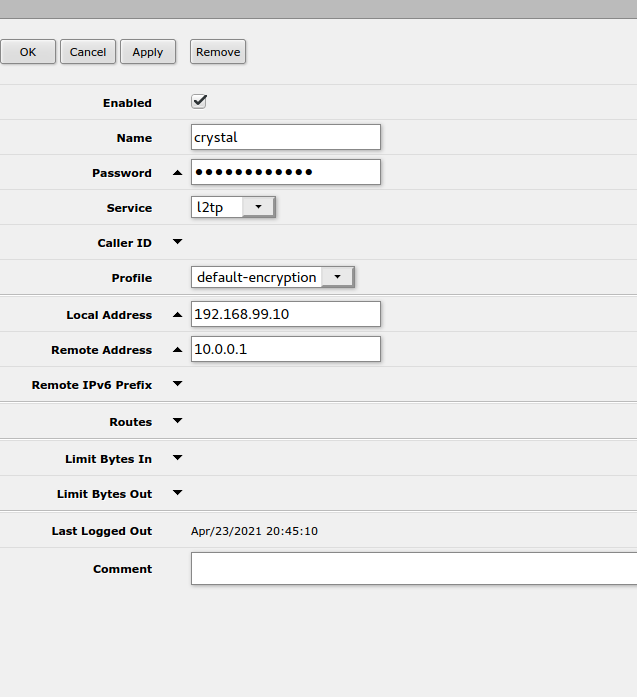
@tame carbon you configured things so that the l2tp client will get the ip 10.0.0.1 and the router will use 192.168.99.10 on the local side.. there is no need to use a separate IP for that, you can just use the same 192.168.99.1 that the router already has
but that isn't anything to do with your problem
tender hazel
no - the "local address" can be set to basically any IP the router already has on any interface - the only IP you would want to avoid using as the "local address" is the one that you are using to remotely connect to the device with L2TP
tame carbon
so leave the local-ip blank
tame carbon
@tender hazel discord breaks when I turn on my vpn, which I need to configure this..
which is kinda why I wanted to fix this next week
@tender hazel and remote-address can be blank then?
or the same?
copper rover
Can't you tell the VPN to not use it as the default GW?
tender hazel
remote address should be the address that you want your computer to get.. if you want to have a pool of addresses instead you can configure that through the profile.. but if it is just you it is easier to specify it in the secret like you are
10.0.0.1 is fine for that
so remote-address can be left as you have it
but the default mikrotik firewall, assuming you are using that or some variation on it, is going to block you from getting online
tame carbon
Quite the contrary.
I can reach any public IP
all works.
except DNS.
even traceroute properly reports it
I made sure to add an accept rule for port 53 input
 sour minnow
copper rover
https://www.youtube.com/watch?v=5iRp1Nug0PU
sour minnow
copper rover
https://www.youtube.com/watch?v=5iRp1Nug0PU
Wouldn't this be easier from router settings lol?
Or am I stupid?
tame carbon
but I think my client is borked.
tender hazel
what dns servers are you trying to use?
tame carbon
192.168.88.1
and I also tried 192.168.99.1
which is the IP of the mikrotik on bridge-vpn
that's the bridge that the l2tp-server binds to
green forge
@copper rover done
copper rover
sour minnow
Wouldn't this be easier from router settings lol?
Or am I stupid?
@green forge needs to host a file from his PC via TFTP via a static IP
tame carbon
@tender hazel if I do nslookup google.com 192.168.88.1 it works.
green forge
@sour minnow its a locked down isp router
sour minnow
oh
copper rover
It's basically junk. Trying to res it to work again
tender hazel
tame carbon
that's the bridge that the l2tp-server binds to
the L2TP server doesn't actually bind to a bridge
tame carbon
its a config field though?
green forge
@copper rover i set the static ip to 192.168.1.4
tender hazel
yeah that field is for something called BCP (bridge control protocol) but >99% of L2TP clients/servers do not have BCP support
tame carbon
@tender hazel mh. that would explain why the accept rule on interface list didnt work. But did work if I selected dynamic
copper rover
green forge
<@!821472301627080766> i set the static ip to 192.168.1.4
Well, the idea is that the same recovery method for the default Netgear firmware (per those instructions on their site) should still be applicable for the custom firmware the ISP loaded. We don't know that for a fact, but it's an educated guess that the did keep it the same
tame carbon
@tender hazel I tried overriding the DNS server on my client, to use 1.1.1.1 instead
but even that didn't work
tender hazel
so that setting won't really do what you want unless you are establishing l2tp from mikrotik to mikrotik
green forge
so much stuff going on
 tender hazel
what you can do is make a special profile for l2tp
green forge
copper rover
Well, the idea is that the same recovery method for the default Netgear firmware...
OOHHHH
tame carbon
 tame carbon
nggh ok, let me try :D
tender hazel
setting interface list to LAN (assuming you are using the default config or something similar) will take care of teh proper firewall stuff
tame carbon
I just poked a hole in my firewall
so I can access webfig without vpn
through a socks proxy on my server
tender hazel
you can start by making a copy of the default-encryption profile
and make the changes to that
since some of the other settings are better
green forge
sorry discord crash
tame carbon
ka-ching https://i.imgur.com/Q7walnN.png
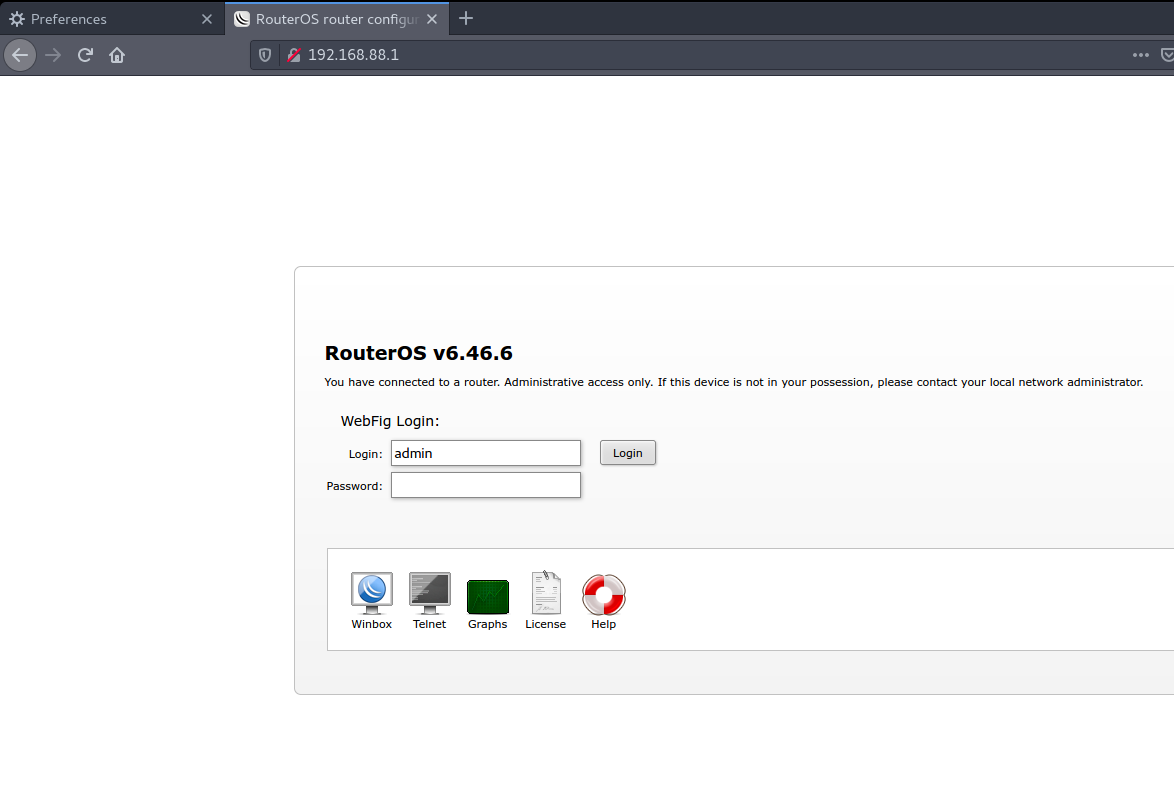
@tender hazel any way I can copy a config from webfig?
theres no button to do so
tender hazel
you can export config to a file and then download the file
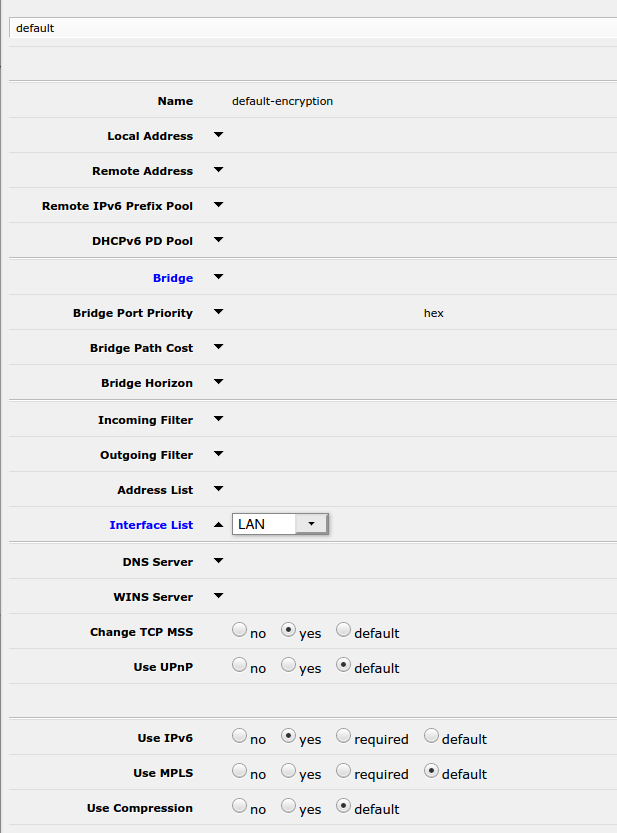 green forge
@copper rover so we need to now find a wayto make the filesystem not read only?
tender hazel
yeah setting interface list to LAN is ok in the default-encryption as long as you aren't using default encryption for something else like a pppoe client
tame carbon
@tender hazel nah its literally not used by anything, other than my VPN.
THere's a 2nd device that uses the VPN, but thats not important right now
tender hazel
ok then yeah that is fine..
green forge
im gonna start the server
copper rover
green forge
<@!821472301627080766> so we need to now find a wayto make the filesystem not re...
No, I think that's a fools errand. We need the router to request the firmware file and flash itself
tame carbon
@tender hazel bridge-learning doesnt exist, is that important?
tender hazel
what will happen once that is done is when you connect to the vpn you will automatically get added to the interface list LAN
no
 plain siren
I dont think Mikrotik lets you export with the Webfig right?
tame carbon
@plain siren I can always connect via ssh if need be
plain siren
Only commandline/Winbox IIRC
tender hazel
@plain siren there is a terminal in webfig
there's a button in the upper right corner of the webfig window that calls up the terminal
plain siren
oh then you can just export from that with literally export file=file.config right?
tender hazel
yup
tame carbon
Ok, so I set both DNS and local address, as well as LAN interface list
tender hazel
ok
green forge
how are you doing this while drunk?.
tender hazel
no, everything else should be just fine
plain siren
How do you do this while sober?
tame carbon
@green forge most of the time when I am in this channel, I'm stoned.
plain siren
^
plain siren
I get both sometimes
green forge
ah makes sense
copper rover
@green forge
6. Turn router OFF for 10 seconds and then turn it back ON.
7. Watch the Power LED. It will start with an orange color and then start flashing.
8. Press PUT button on the Tftpd64 utility to perform the firmware upload.
9. You should see a pop up saying that “0 block retransmitted”. If not, you may need to repeat above.
plain siren
Then I spend like 3 days on #tech-support trying to get a high score
tender hazel
@tame carbon I had looked at your config in the secret and it was fine
 green forge
copper rover
<@!362089571254665218>
6. Turn router OFF for 10 seconds and then turn it back...
green forge
copper rover
<@!362089571254665218>
6. Turn router OFF for 10 seconds and then turn it back...
thats for tftp client, and idk if it will work again
tender hazel
except for the local address
tame carbon
Leave that blank?
green forge
well here goes nothing
tender hazel
you can leave that blank now that you have it set in the default-encryption profile instead
tame carbon
@tender hazel and remote-address is just the local IP that appears on the client itself right?
tender hazel
yes, it is the IP that the client gets
tame carbon
If I have mutiple secrets, do I modify this to 10.0.0.2 ?
tender hazel
yes, if you have a second client you can do that
the other thing you can do is if you want dynamic, you can make a pool called something like VPN-pool, set a range like 10.0.0.1-10.0.0.20, and set VPN-pool as the remote address in the default-encryption PPP profile
that's if you want dynamic VPN IP allocation
tame carbon
I think I had that at one point yes.
tender hazel
but since it is just you, static is fine
tender hazel
great
tame carbon
crystal@watomat ~ ip route
default dev ppp0 proto static scope link metric 50
default via 192.168.1.1 dev wlp3s0 proto static metric 600
umm
tame carbon
✘ crystal@watomat ~ traceroute 1.1.1.1
traceroute to 1.1.1.1 (1.1.1.1), 30 hops max, 60 byte packets
1 192.168.99.1 (192.168.99.1) 30.820 ms 30.797 ms 30.789 ms
2 46.243.152.3 (46.243.152.3) 31.830 ms 31.825 ms 31.819 ms
great
tame carbon
Seems to work
tender hazel
yup
green forge
@copper rover it wont work, i tried doing this before and the block #0 wouldnt move
plain siren
do you have DNS over TLS or whatever enabled in Chrome Settings?
tender hazel
but when you use nslookup it is fine?
you can resolve against the router just fine with nslookup?
copper rover
green forge
<@!821472301627080766> it wont work, i tried doing this before and the block #0 ...
And the firmware file is named what it's expecting, yes?
tame carbon
 green forge
copper rover
And the firmware file is named what it's expecting, yes?
green forge
copper rover
And the firmware file is named what it's expecting, yes?
what should i name it?
it has the .chk at the end
i called it updatedversion.chk
copper rover
green forge
what should i name it?
Leave it the same name as you've downloaded it. Don't rename
green forge
ok
green forge
@copper rover port needs to be 69 right?
copper rover
green forge
<@!821472301627080766> port needs to be 69 right?
Based on those instructions, I'm going to say "yes"
tame carbon
Which one
tame carbon
Yes
green forge
@copper rover never blinks, man this is tough
tender hazel
I think the dns is overridden on the client side so the ppp profile supplied dns server is not being used
it is a client side setting that is wrong
copper rover
green forge
<@!821472301627080766> never blinks, man this is tough
So " It will start with an orange color and then start flashing" never occurs?
green forge
copper rover
So " It will start with an orange color and then start flashing" never occurs?
you see its always orange
tame carbon
 green forge
lemme open it tosee the led color
copper rover
green forge
lemme open it tosee the led color
You have to leave it unplugged for 10 seconds, then plug it in, and then you should get that sequence
The power that is
To the router
It should be part of its boot sequence.
shrug
plain siren
And last stupid question: did we ip dns set allow-remote-requests=yes?
tame carbon
I can do nslookup from shell just fine
tender hazel
@plain siren allow remote requests has to be set, otherwise the resolution wouldn't work from the command line
yeah
plain siren
thats why I said it was a stupid question
tame carbon
Theres an accept rule on all dynamic Interfaces
So it works
Just not on my client
When attempting to use system wide vpn
tender hazel
what if you override the home settings on the client side
the home vpn settings
hard set dns of 192.168.99.1 instead of getting automatically
you shouldn't have to do that, but try it
tame carbon
I tried that earlier, didn't make a difference
green forge
got the cover off
tame carbon
I removed it just now, to make sure it uses the provided ond
That didnt make a difference either
plain siren
Ah yeah
copper rover
green forge
got the cover off
cover off??? 0_o
Why? I don't understand why you need to take that off
plain siren
Crystal, do me a favor just for shits and giggles
tame carbon
I even enabled dns on my 2nd tik
plain siren
I am having a bug that might be related on my shit
tame carbon
And I could reach it, but didn't work either
green forge
copper rover
cover off??? 0_o
Why? I don't understand why you need to take that off
i need to see the true color of the led
plain siren
Add 8.8.8.8 to the DNS Server list if you only have 1 listed
green forge
its orange
plain siren
I know it sounds stupid but this is annoying me
copper rover
green forge
i need to see the true color of the led
Uhh, ok. Umm, if it make that easy for you, sure.
 plain siren
yes
DNS Doesnt work with my S-S VPN on my Mikrotik Endpoint if I use only 1 DNS Entry.
copper rover
Basically, it should light up orange and then flash
copper rover
That's when you're supposed to press the PUT button
tame carbon
Waaaaaaat
plain siren
Omg dont tell me
 tame carbon
Yes...
tender hazel
yes, crystal is able to ping online
plain siren
Couldve been static, i cover all stupid bases
tender hazel
the client is using something else for dns obviously
tame carbon
 tender hazel
what happens when you nslookup without specifying the server name? what server is it using?
green forge
maybe we need v1?
tame carbon
It times out
tender hazel
and when it times out does it tell you what server it is using?
tame carbon
Its normally using 127.0.0.1#53
tender hazel
or what server it is trying to use
yeah so there is your problem.. it is something on the system itself, it is trying to resolve against localhost
tender hazel
it isn't using the provided dns for whatever reason
yeah it is something wrong with the client, it is nothing wrong with the mikrotik config
tender hazel
check your resolv.conf file
tame carbon
✘ crystal@watomat ~ cat /etc/resolv.conf
# Dynamic resolv.conf(5) file for glibc resolver(3) generated by resolvconf(8)
# DO NOT EDIT THIS FILE BY HAND -- YOUR CHANGES WILL BE OVERWRITTEN
nameserver 127.0.0.1
Wait... but why is it using itself as a resolver actually... Shouldnt the router be the DNS resolver?
not localhost?
 green forge
@copper rover i hit a block, i dont know what to do now
tame carbon
Ubuntu 16 yes.
tender hazel
it is using itself as a dnsmasq server
plain siren
ugh ew
tender hazel
perhaps dnsmasq isn't running
tame carbon
● dnsmasq.service - dnsmasq - A lightweight DHCP and caching DNS server
   Loaded: loaded (/lib/systemd/system/dnsmasq.service; enabled; vendor preset: enabled)
  Drop-In: /run/systemd/generator/dnsmasq.service.d
           └─50-dnsmasq-$named.conf, 50-insserv.conf-$named.conf
   Active: active (running) since vr 2021-04-23 23:04:34 CEST; 5min ago
  Process: 1446 ExecStartPost=/etc/init.d/dnsmasq systemd-start-resolvconf (code=exited, status=0/SUCCESS)
  Process: 1324 ExecStart=/etc/init.d/dnsmasq systemd-exec (code=exited, status=0/SUCCESS)
  Process: 1142 ExecStartPre=/usr/sbin/dnsmasq --test (code=exited, status=0/SUCCESS)
 Main PID: 1406 (dnsmasq)
    Tasks: 1
   Memory: 4.4M
      CPU: 93ms
   CGroup: /system.slice/dnsmasq.service
           └─1406 /usr/sbin/dnsmasq -x /var/run/dnsmasq/dnsmasq.pid -u dnsmasq -r /var/run/dnsmasq/resolv.conf -7 /etc/dnsmasq.d,.dpkg-dist,.dpkg-old,.dpkg-new --local-service --trust-anchor=.,19036,8,2,49aac11d7b
what's in /var/run/dnsmasq/resolv.conf?
tame carbon
@tender hazel wait...
apr 23 23:04:24 watomat dnsmasq[1142]: dnsmasq: syntax check OK.
apr 23 23:04:24 watomat dnsmasq[1406]: started, version 2.75 cachesize 150
apr 23 23:04:24 watomat dnsmasq[1406]: compile time options: IPv6 GNU-getopt DBus i18n IDN DHCP DHCPv6 no-Lua TFTP conntrack ipset auth DNSSEC loop-detect inotify
apr 23 23:04:24 watomat dnsmasq[1406]: using nameserver 127.0.0.1#40
apr 23 23:04:24 watomat dnsmasq[1406]: no servers found in /var/run/dnsmasq/resolv.conf, will retry
apr 23 23:04:24 watomat dnsmasq[1406]: read /etc/hosts - 18 addresses
apr 23 23:04:34 watomat systemd[1]: Started dnsmasq - A lightweight DHCP and caching DNS server.
this is... ^ interesting..
nameserver 127.0.1.1
tender hazel

Launchpad
Ubuntu version 12.10
Dnsmasq version 2.63-1ubuntu1
Same as bug #875950
network-manager is not installed.
Dnsmasq generates empty /var/run/dnsmasq/resolv.conf
Error: no servers found in /var/run/dnsmasq/resolv.conf, will retry
/etc/resolv.conf:
nameserver 127.0.0.1
/etc/dnsmasq.conf:
resolv-file=/etc/dnsmasq-resolv.conf
dhcp-option=option:ro...
tender hazel
"In your case /var/run/dnsmasq/resolv.conf is empty or absent. This suggests that you are not using resolvconf in the normal way, or not using it at all."
tame carbon
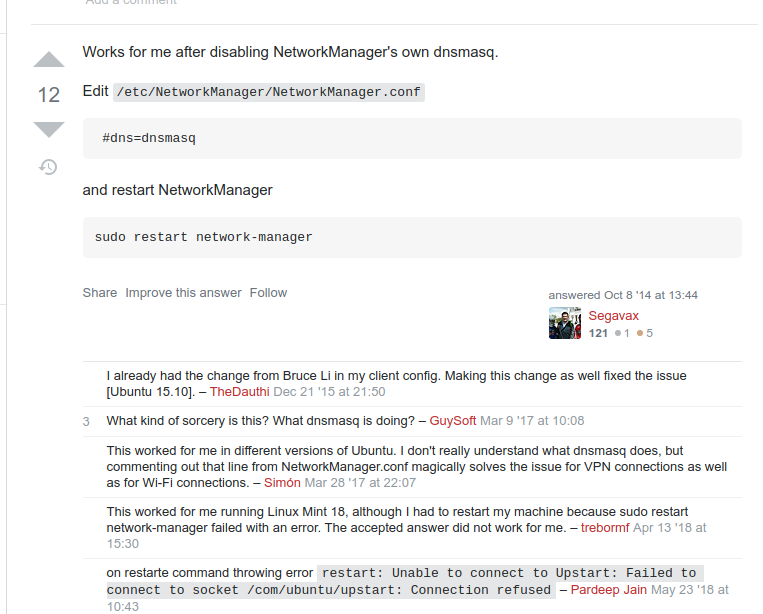
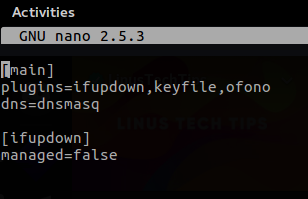
@tender hazel someones suggested this: https://i.imgur.com/1XXaaAD.png
 plain siren
Hah here it is
tender hazel
ahh yes that's it

GitHub
L2TP and L2TP/IPsec support for NetworkManager. Contribute to nm-l2tp/NetworkManager-l2tp development by creating an account on GitHub.
routiing found it
oops
rouing
tame carbon
ok, summarize drunk me can't read pages right now
do I just modify my NetworkManager.conf ?
plain siren
 tame carbon
 copper rover
green forge
we cant trick it
copper rover
green forge
we cant trick it
Yeah, I was hoping there was a way to manually put it in recovery mode
tame carbon
@plain siren that line is already present.
tender hazel
@copper rover there might be a way of manually putting into recovery mode by holding down the reset button for a certain number of seconds, like with mikrotik?
green forge
im stumped
copper rover
^
Wort a shot. I'm still looking online to see
I think the reset button just clears config, but more than likely that's a point of interest to initiate that function...if it exists
green forge
you see
if i reset it
the cciadmin password stays on
so that means
that that is kept somewhere else
copper rover
The password is the default in the custom firmware
green forge
yes
copper rover
You're trying to replace the firmware. That will also clear the old default CCIADMIN account too
tame carbon
@tender hazel I think...
I fixed it..
I commented the line dns=dnsmasq (prefixed with #)
restarted the network daemon
now it seems to work ? :o
copper rover
Once the firmware is replaced with stock from Netgear, that will give it the default netgear admin account as though it's a retail unit
tender hazel
interesting
 green forge
copper rover
Once the firmware is replaced with stock from Netgear, that will give it the def...
green forge
copper rover
Once the firmware is replaced with stock from Netgear, that will give it the def...
mhm

 copper rover
green forge
mhm
copper rover
green forge
mhm
Does the power light always stay amber (orange)?
Or does it turn green after awhile?
tame carbon
@plain siren
✘ crystal@watomat ~ cat /etc/NetworkManager/NetworkManager.conf
[main]
plugins=ifupdown,keyfile,ofono
#dns=dnsmasq
[ifupdown]
managed=false
 tame carbon
I commented that line, and now it works.
plain siren
So if you set managed to true, I wonder if dnsmasq would work
tame carbon
I can try.
green forge
copper rover
Does the power light always stay amber (orange)?
always stays orange
tame carbon
I owe you a drink if it does
copper rover
green forge
always stays orange
Does it ever change status when powered off and then back on? Does it ever flash at any time?
tame carbon
@plain siren nope.
tame carbon
 green forge
copper rover
Does it ever change status when powered off and then back on? Does it ever flash...
green forge
copper rover
Does it ever change status when powered off and then back on? Does it ever flash...
well all the lights go on while booting
tame carbon
@plain siren invalid option
green forge
i can record boot sequence
tender hazel
@tame carbon systemctl status systemd-resolved
plain siren
resolvectl query google.com
copper rover
@green forge Try this . It's where you force recovery mode then push the file to the router. It might work, or might not.
https://kb.netgear.com/000059634/How-to-upload-firmware-to-a-NETGEAR-router-using-Windows-TFTP
Read those steps
green forge
copper rover
<@!362089571254665218> Try this . It's where you force recovery mode then push ...
use windows?
copper rover
green forge
use windows?
Sure. why not?
Turn router OFF for 10 seconds.
Hold down the reset button on the back of router with a paper clip.
Power ON the router while holding down the reset button.
Watch the Power LED. It starts with an orange color, and then start flashing.
 tame carbon
Connected to vpn, lemme see if it works now
copper rover
green forge
UMM
I know. But what else you going to try?
tame carbon
@plain siren service is running, still timing out
green forge
lets see
tame carbon
But it was working momentarily when I commented the dns config line
plain siren
Yeah I would just revert
Waiiiiiiiit I just got a VM running and I noticed something
copper rover
@green forge I think by holding down the reset button WHILE power it up might be what unlocks the router to accept a TFTP connection to upload firmware to it.
plain siren
ln -sf /run/systemd/resolve/resolv.conf /etc/resolv.conf < omegalul
Why isnt this done by default
wtf ubuntu
Fucking stub dns shit
tender hazel
it auto generates the /etc/resolv.conf
green forge
copper rover
<@!362089571254665218> I think by holding down the reset button WHILE power it u...
well
tender hazel
and I think systemd-resolve is actually in ubuntu 18 but crystal is using 16 I think
tame carbon
@plain siren that file in /run/systemd/resolve/resolv.conf doesn't exist.
green forge
 plain siren
 tame carbon
This is 16 LTS.
copper rover
plain siren
Why isnt this done by default
Ubuntu DNS hell. Been there with PiHole. And I forgot all about that
tender hazel
what happens if you run resolvconf
plain siren
Ahhhhhhhhh no wonder
tame carbon
Welp
green forge
@copper rover cannot read from local file, does it require full path again?
green forge
o gg
tame carbon
commenting dns=dnsmasq did the trick.
tame carbon
@tender hazel now I can finally watch netflix without german synchronization 
copper rover
Well, first see if the router can go into recovery mode via the status lights. If it does follow that power up sequence, chances are you can push the firmware through with TFTP
tender hazel
what is german synchronization?
copper rover
tender hazel
what is german synchronization?
Goose stepping?
tender hazel
wow
tame carbon
because you get some generic german voice over
tender hazel
yeah that's.. terrible
tender hazel
I can't stand dubbed movies, I always would rather watch with subtitles if I don't understand the language
tame carbon
in Rammstein.
That's a US military base, and that Cinema plays unsynchronized movies
tender hazel
are those terms synchronized and unsynchronized normal for movies? I have never heard them before
except when I think of audio being unsynchronized with video it means that the audio is early or late compared to video
tame carbon
✘ crystal@watomat ~ systemctl status xl2tpd
● xl2tpd.service - LSB: layer 2 tunelling protocol daemon
Loaded: loaded (/etc/init.d/xl2tpd; bad; vendor preset: enabled)
Active: active (running) since vr 2021-04-23 23:31:10 CEST; 6min ago
Docs: man:systemd-sysv-generator(8)
Process: 3227 ExecStart=/etc/init.d/xl2tpd start (code=exited, status=0/SUCCESS)
Tasks: 1
Memory: 116.0K
CPU: 8ms
CGroup: /system.slice/xl2tpd.service
└─3348 /usr/sbin/xl2tpd
apr 23 23:31:10 watomat systemd[1]: Starting LSB: layer 2 tunelling protocol daemon...
apr 23 23:31:10 watomat xl2tpd[3313]: Not looking for kernel SAref support.
apr 23 23:31:10 watomat xl2tpd[3227]: Starting xl2tpd: xl2tpd.
apr 23 23:31:10 watomat xl2tpd[3348]: xl2tpd version xl2tpd-1.3.6 started on watomat PID:3348
apr 23 23:31:10 watomat xl2tpd[3348]: Written by Mark Spencer, Copyright (C) 1998, Adtran, Inc.
apr 23 23:31:10 watomat xl2tpd[3348]: Forked by Scott Balmos and David Stipp, (C) 2001
apr 23 23:31:10 watomat xl2tpd[3348]: Inherited by Jeff McAdams, (C) 2002
apr 23 23:31:10 watomat xl2tpd[3348]: Forked again by Xelerance (www.xelerance.com) (C) 2006
apr 23 23:31:10 watomat xl2tpd[3348]: Listening on IP address 0.0.0.0, port 1701
apr 23 23:31:10 watomat systemd[1]: Started LSB: layer 2 tunelling protocol daemon.
@plain siren something something , you just figured it out??
plain siren
it was xl2tpd, its interfering with network managers UI config.
green forge
@copper rover you know, if i hold down the reset button after the router booted up, for like 20 secs, it starts blinks, but nothing changes in the tftpd64
tame carbon
@plain siren should I care about this? or is it good as it is right now?
plain siren
I wouldnt touch it unless it becomes an issue
copper rover
green forge
<@!821472301627080766> you know, if i hold down the reset button after the route...
What if you hold down the reset button before plugging in power to the router?
green forge
ok
plain siren
but you could just systemctl disable xl2tpd
tame carbon
are you sure?
plain siren
and "systemctl stop xl2tpd`
I just fixed my own issue with that xD
literally same shit
copper rover
green forge
ok
It says count 10 flashing power LED and release the button. That's when you press enter to start the TFTP transfer
tame carbon
and so does DNS.
green forge
@copper rover the tdtp doesnt even move tho
copper rover
green forge
<@!821472301627080766> the tdtp doesnt even move tho
Try the TFTP client. But those instructions should be self-explanatory on how to do it with the Windows command prompt
Make sure you're running it from the same path the firmware file is in
 copper rover
FYI, Got to leave in 15
tame carbon
copper rover
green forge
Firmware flashing guide for the COX ISP variant of the Netgear R6300v2 AC1750 router. Disassembly, serial TFTP flashing, and initial DD-WRT flash.
copper rover
Right, but look at what he had to do with the Cox provided unit
peak cloak
probobly default ISP
copper rover
Real insightful. Had to use USB to push it with a pinned connector to the board
copper rover
So, it's not entirely a lost cause here. It might be salvageable. Don't give up yet 🙂
tame carbon
@tender hazel @plain siren @hollow marlin thanks again for all the help. Wouldn't have been able to do it without you guys ^^
copper rover
You be looking at a factory reset if the credentials are lost.
Yup, by design
Try look up the default user/pass for it.
plain siren
I bet it uses signed binaries too
green forge
i really want to go to goodwill rn and get a new one
plain siren
Because they want to use your router to do their Diagnostics Work and Telemetry
green forge
i was in one goodwill and i saw one WITH ITS PEEL ON
tame carbon
@green forge do yourself a favor, and buy a mikrotik instead :)
@green forge that's the last router you'll ever own.
plain siren
ISP Routers are basically big ass sensors for them
copper rover
They locked that one up tight.
green forge
like why tf do you lock it in the first place
tame carbon
to prevent exactly what you are trying to do right now
plain siren
Because that would be one big ass whooping security hole otherwise
copper rover
tame carbon
to prevent exactly what you are trying to do right now
Yup.
plain siren
Yeah, imagine hitting one of the side-of-the-road access systems and then just... attacking an entire neighborhoods routers
copper rover
@green forge I thought you have the r6300v2?
green forge
i do
plain siren
Boom, you now have a MITM for an entire local area
green forge
model and specs say it is
copper rover
Firmware flashing guide for the COX ISP variant of the Netgear R6300v2 AC1750 router. Disassembly, serial TFTP flashing, and initial DD-WRT flash.
You're saying those are wrong pictures?
green forge
copper rover
https://wnsnty.xyz/entry/how-to-install-dd-wrt-on-cox-netgear-r6300v2
let me explain.
plain siren
Serial TFTP Flashing
green forge
lemme take a few pics of this thing
green forge
my eee box has a serial port built in
plain siren
Yeah but that serial port and the "DEBUG UART" is prob 2 diff things
green forge
have it alr
 stiff panther
 green forge
nicceeee
copper rover
I see 8 drives in that Dell PowerEdge server. Why are only two active?
Oh, no drives in the caddy
duh
stiff panther
first 4 to the left is the vm pools
the boot drive is inside the chassis
the 2 in the right are truenas drives
green forge
pics are coming
stiff panther
and the last 2 drives to the right are other vms
copper rover
I'm perpexed the drives don't have power LEDs on them though.
stiff panther
at some weird way two of my drives use the led the inverted way
thats why thesse 2 led lights up


 stiff panther
 copper rover
stiff panther
thats why thesse 2 led lights up
copper rover
stiff panther
thats why thesse 2 led lights up
Crazy, ok. Looks to be an R720 unit
stiff panther
its an R720
copper rover
Yeah, I"ve worked on em before. Normally with a PERC
copper rover
green forge
That's the same board in the link
https://wnsnty.xyz/entry/how-to-install-dd-wrt-on-cox-netgear-r6300v2
Firmware flashing guide for the COX ISP variant of the Netgear R6300v2 AC1750 router. Disassembly, serial TFTP flashing, and initial DD-WRT flash.
copper rover
green forge
completely different firmwar
Firmware has nothing to do with it. It's the same board, same PCB. In theory, you should upload other firmware the serial way
 fringe pelican
Ive got an old computer with an i7 and i was wanting to turn it into a home server but i also want to have it be my router. Anyone done this before? not sure if i can have it (or if its even a good idea) be a router and a server at the same time. I seen some os for being a router, possible to do with a vm? i couldnt find any software that i could just install.
copper rover
GTG.
fringe pelican
not yet but when i upgrade my internet. When i get starlink ill probably try to set something up
stiff panther
What my lab used to look like back in 2015
 plain siren
fringe pelican
Ive got an old computer with an i7 and i was wanting to turn it into a home serv...
plain siren
fringe pelican
Ive got an old computer with an i7 and i was wanting to turn it into a home serv...
VyOS
fringe pelican
thank you
peak cloak
fringe pelican
thank you
that's for router
if you want to host vms you would want a hypervisor like proxmox
I wouldn't recommend having your core router being a full x86 machine and instead have a dedicated hardware router
 stiff panther
nice
peak cloak
stiff panther
nice
what are you using for routing?
stiff panther
pfsense
peak cloak
ah
stiff panther
running on a optiplex 7010
peak cloak
I don't like software routers
stiff panther
had for 3 years and had no issue
tame carbon
@stiff panther what kind of throughput do you get on that??
plain siren
peak cloak
I wouldn't recommend having your core router being a full x86 machine and instea...
I guess I shouldve expanded that VyOS would be ran in a VM but this is correct
peak cloak
yep
plain siren
Isnt all routers software routers?
peak cloak
I run vyos as my kubernetes edge router
peak cloak
plain siren
Isnt all routers software routers?
I meant like a dedicated box
not a full x86 machine
stiff panther
tame carbon
<@!494821109745713182> what kind of throughput do you get on that??
quite good actually
plain siren
😛 Im being facetious
peak cloak
peak cloak
I run vyos as my kubernetes edge router
and then instead of nating I setup static routes between that and my core router which is a ER-X (HEX-S is coming soon hopefully)
tame carbon
and with Router OS v7 may well become something we can all use
hardware offloaded routing
plain siren
Can I offload it to AWS instead
tame carbon
AWS Lambda router 
plain siren
- an actual question I got regarding hardware offloading for networking one time *
plain siren
tame carbon
AWS Lambda router <:KEKW:670048864052445204>
this is a thing
tame carbon
wat
plain siren
Yeah
tame carbon
wut xD
plain siren
https://github.com/Nike-Inc/lambda-router < not the router you are thinking tho
tame carbon
@plain siren thats just HTTP request routing.
tender hazel
the bridge mode in this new ISP gateway I upgraded to a few months ago is kinda weird
plain siren
http://optiputer.net/publications/articles/TSUKISHIMA-OFC-NFOEC06-FirstApplicationTrial.pdf But there is also this
tender hazel
the gateway itself still gets public v4 and v6 addresses, and so does my router, but of course they are different ones
green forge
@copper rover well, thank you for helping me out. Ill see if i can do it, but thank you spending 4 hours trying to get this thing to work
plain siren
 tender hazel
it seems a waste of addresses
peak cloak
tame carbon
<@!589542595341058048> thats just HTTP request routing.
I mean that is a router..
tender hazel
why does the gateway still need to get public v4 and v6 when it is bridging to me anyway
tame carbon
@peak cloak nah its a layer 7 mechanism.
peak cloak
tame carbon
<@!222482269829332992> nah its a layer 7 mechanism.
routing http is still, by definition a router...
 peak cloak
traefik uses the term routers
tame carbon
@peak cloak yeah its request routing
But its not the same as 'Routing' in an IP network
There's no end to end connection
plain siren
Sure there is, your browser and a NodeJS/nginx/whatever server
peak cloak
speaking of traefik, trying to get it to get it to get certs from let's encrypt but it's just not working
cannot get ACME client get directory at 'https://acme-staging-v02.api.letsencrypt.org/directory': Get https://acme-staging-v02.api.letsencrypt.org/directory: dial tcp: lookup acme-staging-v02.api.letsencrypt.org on 10.96.0.10:53: server misbehaving"
seems like issue with DNS?
restarted coredns pod
no luck
tame carbon
10.96.0.10:53 ?
plain siren
I encountered the "server misbehaving" error when an internal authoritative DNS server did not resolve the public domain name.
I had this problem once, that fix was in my bookmarks lol
 plain siren
LOL
 tame carbon
'normal' dns?
plain siren
is kubedns crashing
green forge


plain siren
Did you change your public IP from the node?
peak cloak
plain siren
Did you change your public IP from the node?
Wdym?
This is all local
Behind nat
plain siren
Did you change your public facing IP allocation however
like did you change the NAT Public IP
While kube-dns was running
peak cloak
How exactly would I do that
plain siren
So traefik needs to have a hardcoded DNS in its config
peak cloak
Link to docs would be fine
plain siren
version: "2"
services:
  composeservicefortraefik?:
    dns:
      - 1.1.1.1```
would be a compose exampleso set the container dns
I dont know the docs I know this from tho so
But ACME requires Authoritative DNSSEC (internally) Validated Resolves.
tame carbon
wait, if all local services use 1.1.1.1, couldn't you translate destination on the router, to force it to use your own DNS ? :o
dns doesnt do verification checking at all
plain siren
no, you dont have zone delegation so the DNSSEC Signature would fail
ACME Does.
The ACME Client.
No "resolve fail" but "server misbehaving"
Misbehaving cuz invalidated sig
plain siren
I wont be long myself
tame carbon
cya
plain siren
l8r


 green forge
@copper rover i got telnet to work, just that gearguy and geardog dont work
and i dont know what to do next
 thorny vector
telnet into your router? @green forge
green forge
thorny vector
telnet into your router? <@!362089571254665218>
yes
heres a better explanation
does anyone know how to do telnet on a isp locked netgear router?
i got telnet to open up in putty
but i wasnt able to login, i was using gearguy and geardog
thorny vector
so you don't have the creds for it?
thorny vector
what router?
thorny vector
did you try admin:password?
green forge

you see
if i want to log into this thing
its username: admin Password: cciadmin
not admin password
heres a pic
 thorny vector
give admin:password a try
green forge
i did
thorny vector
ah
thorny vector
It's for an older firmware version, but this unauth disclosure exploit may still work

Exploit Database
green forge
i have it on my desk for quick turn off or reconnection

@thorny vector i cant install any new or old version of firmware due to it being locked down
thorny vector
I'm saying the exploit may not be patched out.
peak cloak
green forge
what do i do with it now
to try to use the exploit?
green forge
how do i open it in the first place
peak cloak
it's a python script
peak cloak
it's a cli thing
thorny vector
Another more recent RCE exploit too

In a recently released vulnerability disclosure from d4rkn3ss from VNPT ISC as well as Adam Nichols of GRIMM, we learn of an unpatched vulnerability impacting
green forge
peak cloak
it's a cli thing
hm?
peak cloak
green forge
hm?
command line
thorny vector
This is why I don't use consumer routers, lol