#networking
1 messages · Page 329 of 1

 peak cloak
 thick minnow
and I have my pc connected to that via cable
thick minnow
and I have my pc connected to that via cable
Well then it's over wifi technically
thick minnow
yeah well
 tame carbon
15 seconds cutting out, sounds like a broken AP
I have a netgear here that does the same
thick minnow
how do I fix it?
 copper rover
How old is that AP?
tame carbon
Get a better AP
thick minnow
and is it the fault from my pc?
tame carbon
Probably not
thick minnow
what does ap stand for
tame carbon
Access Point
tame carbon
Wait, wha
I thought you were on wireless
Does the problem persist if you are connected to the router with a cable??
thick minnow
the router is not near me at all
 peak cloak
tame carbon
I thought you were on wireless
peak cloak
tame carbon
I thought you were on wireless
he is, via ethernet to one of those extenders with ethernet
so it's technically over wifi
tame carbon
So wireless backhaul
 hollow marlin
The PPP header includes the session ID to differentiate them
tame carbon
@hollow marlin wish you could be here, and laugh/cry at the poor wireless allocation
hollow marlin
Im more interested in that APC design
tame carbon
Three different SSIDs, 2.4Ghz 40Mhz channels
Yeah the UPS failed apparently
And they just bypassed it LOL
 smoky estuary
well... i need a new power strip, and a few more 10ft runs of cat5e, but soon i'll have hardline networking finished, no more wifi fluctuations
thick minnow
tame carbon
So wireless backhaul
yeah so what should I do?
 frigid pine
Can you show a picture of the amplifier?
frigid pine
peak cloak
he is, via ethernet to one of those extenders with ethernet
I think he is connected with patch panel. Coz who would need 3 wifi extenders.
peak cloak
frigid pine
I think he is connected with patch panel. Coz who would need 3 wifi extenders.
no 3 wireless extenders
"have one box downstairs, which sends to 3 amplifiers, of which 1 in my room"
frigid pine
Hmm I hope they are not wifi extenders as they must be creating interference.
 twin zealot
smoky estuary
twin zealot
smoky estuary
everything is connected but i dont have internet through my switch, only when i directly connect to the MoCA
anyone have experience with these?
tame carbon
@twin zealot nah, this is the internet/wireless for my dad's camping
I'm making plans for them, we'll be rolling out a high density wireless network
Since they are going from 20mbit to 1000mbit
peak cloak
smoky estuary
everything is connected but i dont have internet through my switch, only when i ...
What's your full setup
smoky estuary
smoky estuary
anyone have experience with these?
wait
ok i did nothing but suddenly everything connected
tame carbon

LOOK, THE LATENCY FALLS EVERY TIME YOU CLAP YOUR HANDS AND SAY YOU BELIEVE
smoky estuary
i had been searching around for a solve on my laptop for like 10 minutes with it all sitting saying no connection and it just suddenly decided to work
dont you love it when a tech issue suddenly goes away and you have no idea what was wrong
hollow marlin
peak cloak
Probably something on layer 2
STP most likely. Tries to pull a lease, fails due to learning > forwarding. Then after sometime tries again and is successful. Ive seen some unmanaged switches that run STP for some reason
tame carbon
@hollow marlin is there a known timeout for this?
hollow marlin
For STP?
tame carbon
Yes
frigid pine
STP takes around 30-50sec while rstp takes 2 sec to converge if there is a loop.
hollow marlin
tame carbon
Yes
RSTP uses learning > forwarding for non-edge ports which is 30s. This is why port-fast is used as it bypasses right to forwarding
Only on links that are running RSTP will handshake and converge quickly
 waxen scroll
@hollow marlin i dont understand
copper rover
I really hate UniFi APs sometimes!!! Got three APs of the same type and same subnet at one location. One of them is offline. I can SSH into the AP and validate the AP name so I know I'm actually int he AP I think I'm in. But here's the crazy part. I can issue a reboot, but it won't show back up in my Controller as online. From an SSH session, I can ping Unifi DNS record and the IP of the controller.
I'm so close to issuing a factory reset of this damn thing. Makes ZERO SENSE. Grrrr
Set inform command doesn't help. So yeah, might have to wipe and re-adopt
Factory default fixed the issue. I was able to readopt after the fact. Crazyness. Something in the config must have been corrupted somehow.
 tender hazel
Yes, this exactly - the act of upgrading or whatever makes the problem go away temporarily because it gets a new lease afterwards and the new lease by chance is not flagged as in a "VPN" range
 sour minnow
This channel single handedly proves why you should move everything to the cloud
peak cloak
sour minnow
This channel single handedly proves why you should move everything to the cloud
nope
cloud is eh
thick minnow
sour minnow
This channel single handedly proves why you should move everything to the cloud
Spoken like a man without understanding
(Imma be honest I have a very vague understanding of networking but I do know that moving everything to the cloud is just moving the networking stuff onto someone else's shoulders, who are not always good or helpful and generally care about profits and don't give a single cent about privacy)
Tell me if I'm wrong
tame carbon
sour minnow
This channel single handedly proves why you should move everything to the cloud
you wat. 
And who do you think has to run that cloud ?
Those are people who have a clue, are in here, sharing that knowledge.
 waxen saddle
I host my own “cloud”.
Just replace cloud with “a strangers computer” and you’ll understand what it really is - not yours.
copper rover
The Cloud depends on the cloud that depends on the cloud that depends on......recursive loop
But yeah, going to the cloud just pushes the problem to another location. It doesn't mean it will be managed any better or worse.
 dusky flame
anyone have experience with the HPE Aruba 1930 or Ubiquiti Unifi switch? They're similar price and I wonder if one is vastly better or they're on par
peak cloak
dusky flame
anyone have experience with the HPE Aruba 1930 or Ubiquiti Unifi switch? They're...
I would get arubua tbh
unifi is kinda a joke
copper rover
UniFi implies the need for the Controller for management. If you want web interface direct to the switch, than you want EdgeSwitch line
Aruba's are good though too
dusky flame
the controller is just a simple software you install like their Access Points right?
peak cloak
dusky flame
the controller is just a simple software you install like their Access Points ri...
yeah, but it's not great
especially for enterprise
copper rover
Depending on the controller is a double-edge sword.
copper rover
Yeah, I would agree
dusky flame
oh, this is no where near enterprise setup. just a few cheap 48 poe switches with web management
So I guess the Aruba instant on is more reliable overall then?
copper rover
If the segment is down between the switch and controller, and you need direct access to the switch while inside the same segment, you're having to hit the CLI at that point which is very limiting
dusky flame
if it's easier to navigate, that's a plus too.
peak cloak
dusky flame
oh, this is no where near enterprise setup. just a few cheap 48 poe switches wit...
if you want cheaper you can also look at mikrotik
sour minnow
tame carbon
And who do you think has to run that *cloud* ?
I really just need a network that won't ever fail and can scale as much as I need. The cloud is much better and more powerful for that. Not to mention cheaper
tender hazel
the unifi switches don't even support MSTP just RSTP.. which might be ok I guess for really small companies, but it is a strange limitation
dusky flame
also, I heard Aruba is newer version for the previous 3com hpe procurve switches? what's the equivalent of 1920s, is it the 1930 or the 2930
copper rover
Yeah, newer HP ProCurves are Aruba labeled last I checked. I had a client RMA one and he got an Aruba instead.
tender hazel
peak cloak
the mikrotik 48 port poe though is pretty expensive
the mikrotik 48 port PoE switch is only like $60 more than the Unifi one and the unifi one only has 2 SFP+ and no QSFP+
peak cloak
tender hazel
the mikrotik 48 port PoE switch is only like $60 more than the Unifi one and the...
oh really, I thought it was like 300
tender hazel
no
tender hazel
the unifi one is $835 USD
tender hazel
yeah, the cost comes from the monster power supply you need to handle the 48 port PoE switching in one chassis
that's why you can't really get 48 port PoE switches with redundant PSUs
the one PSU is so big already that they can't fit a second
hollow marlin
tender hazel
the unifi one is $835 USD
Id rather get a used Juniper EX2300-48 than spend $800+ on a Unifi switch
tender hazel
yeah $835 is way too expensive for a switch that is so feature limited
 lone sun
waxen saddle
Just replace cloud with “a strangers computer” and you’ll understand what it rea...
lone sun
waxen saddle
Just replace cloud with “a strangers computer” and you’ll understand what it rea...
🤷♂️ Yep, and that's all it really is. They got the whole world bamboozled with this magical sounding term "cloud" when its really just you putting trust in your own personal data in someone else's hands. 😒
waxen saddle
Well, that was the goal.
 snow lance
good cheap gigabit switch? dont need anything fancy just need 2 ports
 clear igloo
several good 5 port ones on amazon for like $15
 tender hazel
uh I think that is the model that this fiber ISP that we had a tour of a few years ago had bought a ton of
they were going to use them for customer premesis where they needed more ports, but they didn't deploy them becuase they found they would randomly stop passing traffic
so they had a few hundred of those in their warehouse in the original packaging collecting dust
snow lance
oof lmao
tender hazel
you could get a mikrotik RB260GS
snow lance
oof 3 times as expensive
snow lance
clear igloo
https://www.amazon.com/NETGEAR-5-Port-Gigabit-Ethernet-Unmanaged/dp/B07S98YLHM
is this one good?
nowhere to be seen oof lmao
in denmark
copper rover
tender hazel
they were going to use them for customer premesis where they needed more ports, ...
Has that been fixed with a firmware update? Or is that just a flawed chip design?
tender hazel
they were unmanaged devices so I don't think there is any means of updating them
copper rover
What an engineering fiasco. Instant e-waste
clear igloo
I've never heard issues with netgear small switches so i'd try to find one of those in the 5 port option
snow lance
what is poe and poe+
clear igloo
power over ethernet, provides power to devices that can use it
access points, cameras, etc. can use poe so you don't need to use a wall port
snow lance
is this good
 clear igloo
Seems to just be the PoE version of the GS305 and no harm using it with something that doesn't support it so that looks good to me if the price is good
snow lance
poge
i will get when get my dad gets his shit together and buy a router with gigabit ports lmao
tame carbon
snow lance
good cheap gigabit switch? dont need anything fancy just need 2 ports
dont need a switch for two ports :P
snow lance
waht
tame carbon
smallest ones are usually 5 ports
snow lance
my grandma has a 2 port switch
clear igloo
That's a splitter, best case you get 100Mbps on each port
tame carbon
@snow lance if you don't need PoE, TL-SG105
snow lance
the non poe version is not in denmark
tame carbon
Its 16 euros
tender hazel
askejm - this is twice the cost of the netgear? https://tikdis.com/product/rb260gs/
 snow lance
tender hazel
askejm - this is twice the cost of the netgear? https://tikdis.com/product/rb260...
snow lance
tender hazel
askejm - this is twice the cost of the netgear? https://tikdis.com/product/rb260...
ye about
tender hazel
when I convert 40 USD to danish kroener I get 247
snow lance
i use pricerunner.dk
snow lance
ah lmao ya
tame carbon
That SG-105 costs 119 kroners :P
its unmanaged
so no config options
its a plain bridge, with nothing special
snow lance
my friend said tplink bad
tame carbon
@snow lance yeah, thats why it is so cheap :P
snow lance
finrod was just talking about some unmanaged tplink switch that would randomly stop passing traffic
 tender hazel
yeah.. it was a tplink 5 port unmanaged model, we were given a tour of the fiber ISP a few years ago.. I noticed hundreds of them stacked up in some high shelf and asked what they were for.. they said they were going to use them for small switches when they needed more connections into one of their ONTs but they would randomly stop passing traffic so they bought them all and couldn't use them
tame carbon
Most basic-ass switching chip in existence.
copper rover
Realtek, blah
tame carbon
It works
It has snooping capabilities, and leaves VLAN headers intact :P
what more do you want from an unmanaged switch?
its 16 quid xD
snow lance
poge
copper rover
I had a netgear 5 port switch start to flake out on gigabit. Turned out it was a dried out cap. Replaced it and it was full gigabit saturation goodness. In hindsight it makes perfect sense, the throughput will drop on a starved chip
tame carbon
Yeah but you get what you pay for
Those mikrotiks are rated for something liek 150000 hours MTBF
which is 20 years~
Tplink....
snow lance
yes i heard mikrotik is good
tame carbon
Its just quality engineering
But if you just need a cheapo switch for your desk to plug in a 2nd device
snow lance
tplink looks good enough, i dont need it for anything especially fancy or serious
tame carbon
just get that Tplink :P
copper rover
Yeah, not always an issue with a chip, just sub-par components specced out to feed them.
tame carbon
^
copper rover
Noise filtering..etc
snow lance

tame carbon
Power conditioning, noise filtering, surge protection, etc.
Mikrotiks are mostly favored because of the flexibility that they have when you configure them
but there's literally nothing interesting about unmanaged switches.
so who cares :D
copper rover
I never cared for Mikrotiks. I don't like their interface / paradigm
tame carbon
mtik > all else (in consumer space)
copper rover
I don't have an issue with performance or reliability
Fortigate 🙂
Next Gen firewall
Hate Sonicwall now
tame carbon
I love my RB4011 :)
tender hazel
we manage a bunch of fortigates, we have for many years.. I'm not necessarily a huge fan
tame carbon
 tender hazel
but also our guy who manages the fortigates does.. weird things sometimes
he makes his own config in winmerge and then uses the restore feature to restore it to the device
copper rover
It's a religion I guess lol
tender hazel
but the fortigate doesn't parse for invalid configuration when you restore
tender hazel
so in some cases the device would end up with a config that was incorrect and you couldn't remove it because the syntax was wrong
and then bizarre things would happen
tame carbon
@copper rover I like mikrotik because they don't impose limits on you. If you wrangle the config, you can make it do whatever you want
Even if it wasn't made for that purpose
copper rover
@tender hazel The biggest issue I've seen with Fortigate is people not following the recommended upgrade path. That introduces all sorts of issues into the config if not careful.
tender hazel
yes
tame carbon


I can smell the quality from over here
tbh, why not just review the switching chip inside, all the stuff around it is not interesting
not at this pricepoint
tender hazel
I love how the tplink logo is distorted becuase they didn't even bother to hold shift when resizing it
tame carbon
@tender hazel I took some excellent photos last 2 days
from all the networking mess I encountered
tender hazel
yes, i saw the photos
 tender hazel
yes it is an old model
they don't sell them anymore
I don't know why they are using all those poe injectors

 tender hazel
the UPS mounted up side down at the top of the cabinet is just fantastic too
tame carbon
@tender hazel NOT USED :D
Because it failed at some point
so the ISP was like: meh, ill bypass.
and its not the first UPS that failed. the main router has another one of those..

here's another one of those
brilliant.
best part: there's a 12 port PoE switch next to this enclosure
with only 2 devices plugged in
@tender hazel also, I did some testing, and I concluded that putting an AP on the hill is terrible.
copper rover
I bet that UPS battery is more than 5 years, no?
tame carbon
I'll be putting an AP up on a pole, at the base of the hill, pointing at the hill
This way, you can get line of sight to the AP, regardless of where you are
the current AP is on the roof, some 40 meters further away, and signal is just too weak. -75dBm
@copper rover probably yeah. Its been there for a long time now
@copper rover the most stupid thing about this entire network. The home wireless they provide, is the ONLY non-mikrotik device they have.
Its a netgear AP, and it constantly drops connection
I plugged in the AP I brought with me, just so I can have this conversation with you guys
without having to scream at my PC
copper rover
And how much did they charge their subscribers? Someone banked on that cheap-ass solution
tame carbon
@copper rover so it was a uhm.. ( cant translate idioms)..
They signed the contract, or they wouldn't have internet at all
and in return, the ISP was allowed to sell wifi-vouchers to guests
Now that we get fiber soon, all of this is going bye-bye
and we do it ourselves.

This is the tower that provides service to the place ^
its a 1.5km ptp link
copper rover
I bet the connection goes down when bird lands on it
copper rover
Geez, that's pretty insulting
tame carbon
It was either that, or ISDN
copper rover
You mean DSL? I don't think ISDN is even available in the US anymore. If I recall, it was big in Europe
copper rover
128k?
tame carbon
something like that
copper rover
And I though 1.44 T1 was bad
tame carbon
its old telephone wires
@copper rover basically, the goal is to have this ISP take down their equipment
and we'll be replacing the ptp across the campinggrounds with 60GHz backhaul

MikroTik is a Latvian company which was founded in 1996 to develop routers and wireless ISP systems. MikroTik now provides hardware and software for Internet connectivity in most of the countries around the world.
and then using these for public access ^
The WAN will be a 1G fiber optic line
copper rover
So Fiber --> 52 15s --> to AP repeaters?
tame carbon
Nah, those mANTboxes will be the APs
copper rover
So fiber per AP?
tame carbon
@copper rover https://mikrotik.com/product/wireless_wire_cube
MikroTik is a Latvian company which was founded in 1996 to develop routers and wireless ISP systems. MikroTik now provides hardware and software for Internet connectivity in most of the countries around the world.
This will be the backhaul to feed the APs
Going back to the main building, that one has a big pole on the roof
copper rover
Interesting
tame carbon
So 60GHz to distribute the network, and those sector antennas to provide access to users
copper rover
Price ain't bad
tame carbon
Yup
@copper rover core router will be another RB4011
that one can manage all the wireless access points, take care of authentication
and firewall the whole thing up
public access, business use, and private home use.
VLANs ❤️
copper rover
Yeah, I've seen how VLANs are managed in a MicroTik. Pretty easy
copper rover
Well, sure, if you got the fiber to feed it gigabit and above
tame carbon
@copper rover my home network is kinda why I got into mikrotik in the first place :)
https://cdn.discordapp.com/attachments/776722183119699988/777646103775674368/IMG-20200922-WA0001.jpg
 copper rover
If I got with a switch at home, i'll prolly go with an EdgeRouter
tame carbon

Pair it with one of these ^
get a cheap Direct-attach cable
for 10G
The switching chips on the RB4011 are nothing special
copper rover
Right now I've got an Apple AirPort (AC) with a cheap netgear PoE switch. It's cheap, but does the job. The WiFi is surprisingly good! I really hope that lasts. If it dies, I'll be looking into WiFi 6.
tame carbon
but the CRS326 has Maxwell 98DX chips, which are very powerful
@copper rover yeah I can't wait for mtik to embark on the WiFi 6 magic
up until now, its all WiFi 4/5
copper rover
With the chip shortage, there's a lot of networking gear that's 1 to 2 months on backorder. Suckage
Or so I've been informed
tame carbon
There's lot of vendors here you can buy mikrotik from
copper rover
I'm sure that's true of APs, so WiFi 6 equipment I'm sure is slowly rolling out
tame carbon
@copper rover yeah but in this situation I am in, I have no need for wifi 6
its in a valley, we don't even have phone service here
I control the entire RF space here
WiFi 6 only really benefits from high density deployments, with lots of other APs in the area
copper rover
WiFi 6 is awesome. It's basically wireless Ethernet. I don't care about throughput. I DO care about low latency and little to no packet loss compared with AC. It will be perfect for Urban areas such as apartment complexes and office space where RF is crowded. The SNR sucks badly because of it.
tame carbon
yep
copper rover
Could finally have reliable VOIP over WiFi standard
tame carbon
@copper rover have you seen the managed wireless solution that RouterOS has ?
CAPsMAN
copper rover
I have not. I've only touched RouterOS a few time. Specifically, I haven't touched anything managed WiFi related
tame carbon
@copper rover you basically create a template "configuration" https://i.imgur.com/KMKC3lR.png

And then you assign access points to this configuration
copper rover
Yeah I'm familiar with that paradigm.
tame carbon
I think its really neat, and the fact that it works on their cheapest of devices
Starting at $20
Easily roll out a scalable wireless network
copper rover
For the value, yeah, totally. But the feature itself, it's standard to me
tame carbon
with many types of APs
copper rover
Well, ideally should be matching same hardware per profile as a best-practice
tame carbon
@copper rover even then, you can create a profile for those APs
but let them share their datapath
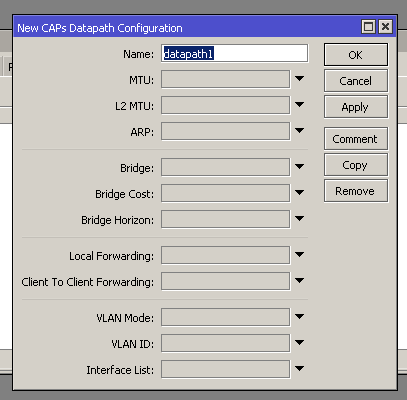 copper rover
But those settings in the GUI looks all standard so, prolly not a bad thing here
tame carbon
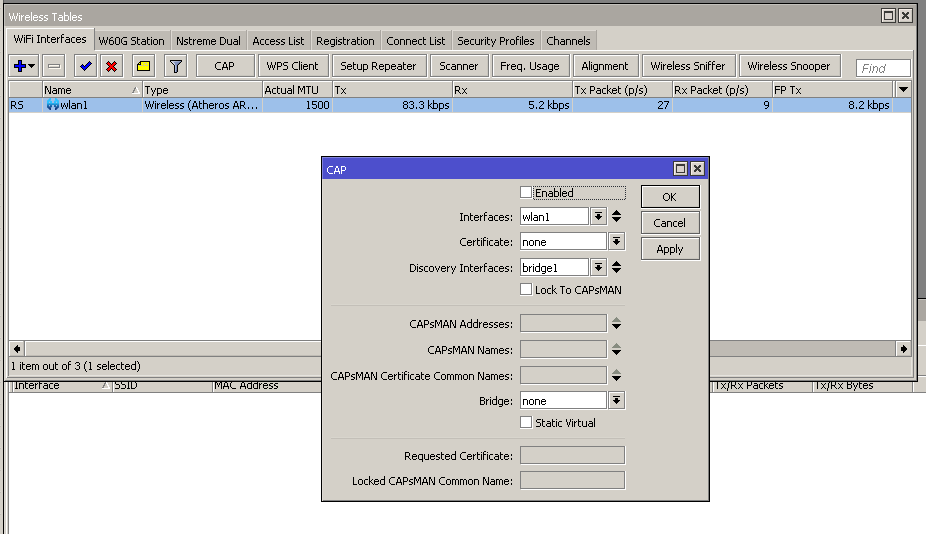
This is on the actual AP ^
You'd enable CAP managing for a specific interface
and then it becomes unavailable, until configured by CAPsMAN
hollow marlin
That metarouter looks like Junipers logical-systems
tame carbon
@hollow marlin yeah but does it actually launch a VM with RouterOS ?
I dont have this option on my RB4011
but strangely enough, this metal52ac does...
hollow marlin
Not a clue. Junos would create new tables for the instances but I don't think it was in a container.
tame carbon
@hollow marlin mikrotik documentation even writes about compiling OpenWRT for use as a metarouter
ment for WISPs who want to give subscribers the option of setting up their own FW rules without having access to the ISP side of things
tender hazel
the reviews I was reading of the unifi 6 APs suggest that they really only perform about 10-20% better than AC
at least at the moment
hollow marlin
@tame carbon Yeah similar to what logical systems are used for. It's handy for some situations but for our use would be very limited. It's nice for low power labs though
tender hazel
mikrotik has more or less abandoned metarouter
tame carbon
yawn off to bed
 mellow knoll
hi um should i get a wifi repeater or a wifi router to get better wifi coverage ?
thick minnow
mellow knoll
hi um should i get a wifi repeater or a wifi router to get better wifi coverage ...
Repeater
mellow knoll
thick minnow
Repeater
but the router also works as a switch and i need 2 ethernet ports
thick minnow
To use router as an extender u have to set it up separately, having repeater save some time and would be cheaper than a whole router
mellow knoll
the router i want is cheaper and has enough ethernet ports that i need
mellow knoll
it has no mesh, but i think that's fine if i have 2 ssid's
thick minnow
Mesh is even costlier than repeaters
 patent trout
you can also just set the SSID to the same on both routers
mellow knoll
thick minnow
Mesh is even costlier than repeaters
the one from my manufacturers router would cost me 60€ and even then i would still need a seperate network switch
mellow knoll
patent trout
you can also just set the SSID to the same on both routers
how does that work?
patent trout
same way a mesh network works. The device will switch between both access points depending on how strong they are
thick minnow
mellow knoll
how does that work?
Tplink has an app to do it automatically
Mentioned if it is that
mellow knoll
my router is from AVM
mellow knoll
thick minnow
Tplink has an app to do it automatically
yeah the one i wanna get for my room is from tp link
even tho i get mostly 50up and 300 down in my room, the signal still makes problems in that distance to my room
thick minnow
Is this the new one or the one you already have
mellow knoll
the one i have
thick minnow
https://play.google.com/store/apps/details?id=com.tplink.tether
Download this app to set it as an extender

TP-Link Tether provides the easiest way to access and manage your devices.
The tplink one
mellow knoll
luckily i have ethernet up to my pc, but the wifi signal is like shitty some times. at the point where stuff doesn't load and i have to reload the app or switch to cellular and back to wifi
mellow knoll
thick minnow
https://play.google.com/store/apps/details?id=com.tplink.tether
Download this ap...
oh ok thanks
i wanna get this one: TP-Link Archer C6
thick minnow
And one more advice, don't just reveal the brand or model number of your router in public forums
mellow knoll
i doubt i will have over a gigabit internet anytime soon
mellow knoll
thick minnow
And one more advice, don't just reveal the brand or model number of your router ...
why exactly?
thick minnow
You never know what vulnerabilities it has, and it's a help for hackers
Saves a lot of time for them
 thorny vector
thick minnow
You never know what vulnerabilities it has, and it's a help for hackers
thorny vector
thick minnow
You never know what vulnerabilities it has, and it's a help for hackers
Doesn't matter. Most SOHO router exploits take fractions of a second to run. Routers are always getting hit with attempts, and any targeted attacker will be able to pull info from scans
mellow knoll
thick minnow
You never know what vulnerabilities it has, and it's a help for hackers
that's true
thorny vector
Best thing to do is keep your router updated and ports closed.
mellow knoll
luckily my router gets automatic updates from my isp
so i just ordered the tp link one, idk if it will make it better, but it's half cheaper than the AVM mesh repeater and built in "ethernet switch"
thorny vector
That will keep you safe from most "hackers". If you're being actually targeted for whatever reason, them know what your edge router is is the least of your concerns
mellow knoll
yeah makes sense
is there anything specific that i have to set up so the router will work as an access point? @thick minnow
thick minnow
Follow the setup instructions for extender configuration in the app
mellow knoll
alright thanks
tame carbon
@thick minnow you buy a tplink.. and worry about security @mellow knoll
You'll be lucky if you get even a single firmware upgrade
Most of my tplinks only got 1-2, and regardless of that, died after 3 years of use. (Constant packet loss)
If you are using NAT, generally, you don't have to worry about 'hackers'.
Change default password on the device, and DISABLE UPnP
UPnP is just asking for trojans
thick minnow
Yeah that's true tplink does provide poor customer service, still it isn't ethical to expose exploitable info publicly
thick minnow
tame carbon
Its unethical not to
Not to what ?
tame carbon
If devices are exploitable, it must be disclosed.
Responsible disclosure to the maintainer, if they don't fix it. You publicly release it.
thick minnow
It's proprietary
tame carbon
So?
thick minnow
Unless and until they have millions of complaints, they won't even bother to have a look
tame carbon
So yes, you disclose it publicly
So everyone can see what a shit company it is
This is normal, and everday business in security research
thick minnow
Doesn't matter as they are already established
tame carbon
So I warn people not to buy TPlink
thick minnow
Normies would say "I don't care"
tame carbon
Because of their poor engineering, and shitty software
It does no effort in protecting against CSRF
thick minnow
tame carbon
Because of their poor engineering, and shitty software
Still better than D-Link
tame carbon
All consumer brands are same garbage
@thick minnow there's actually a router manufacturer worse than dlink
ASUS.
tame carbon
I've come across many a problems with their implementation
Like running out of disk space when giving out dhcp leases
To, improperly handling upstream dns servers
thick minnow
tame carbon
Like running out of disk space when giving out dhcp leases
Lol
tame carbon
Forcing redirects to their hostname router.asus.com if you use an IP addresses
If you use 1.1.1.1 you cannot access router settings
Their web config is bloated with javascript and it's full of bugs
@thick minnow like tplink, they don't really patch them after release.
And they are overpriced
Lack tonns of features
I could go on
But you get the gist
thick minnow
Hmm
tame carbon
Best psrt
Part*
Their new 8 legged router, with 2.5G ports, can't even saturate that speed
Its cpu bottlenecked, and does only 1.7gbit
And it costs $500
For that money, you can buy not one, but two RB4011s
And that router does 10G
thick minnow
Seems that Asus is quite bad on this side
tame carbon
They should stick to gaming gpus and mediocre laptops
Leave the networking to experts
@thick minnow not something I'd buy. I have this one without Wireless. https://mikrotik.com/product/rb4011igs_5hacq2hnd_in
MikroTik is a Latvian company which was founded in 1996 to develop routers and wireless ISP systems. MikroTik now provides hardware and software for Internet connectivity in most of the countries around the world.
But it basically mops the floor
The device has an operating system preinstalled and licensed. No separate purchase is necessary and the product is ready to use. The device includes free software updates for the life of the product or a minimum of 5 years starting from date of purchase..
Some of their oldest gear has had updates for 10 years now
 graceful merlin
hi
does 1 g lan router work on a 2.5g lan motherboard?
my router has 1g lan
but i'm going to build a pc which has 2.5 g
lan
peak cloak
Will it work,yes
 timber imp
yeah just won't run at 2.5g speeds
peak cloak
Will you get 2.5g speeds, no
graceful merlin
peak cloak
Will you get 2.5g speeds, no
my speed is 200mbps
so it will work
right?
graceful merlin
tame carbon
<@456226577798135808> not something I'd buy. I have this one without Wireless. h...
why u guys are always recommending mikrotik???
thorny vector
It's very good quality networking gear at affordable prices
graceful merlin
thorny vector
It's very good quality networking gear at affordable prices
"affordable" ?!?!?!?!?!?!?
u must be joking
thorny vector
Yeah. When talking about "real" networking gear, it is.
thick minnow
graceful merlin
"affordable" ?!?!?!?!?!?!?
Compare it to unifi or something
thorny vector
Or cisco, or juniper, or dell, etc
graceful merlin
in india those are hella pricey
 crystal shale
graceful merlin
in india those are hella pricey
crystal shale
graceful merlin
in india those are hella pricey
They are everywhere.. but you dont need such high tech stuff, that stuff is meant for pros and like manufacturers or some shop or something.
And for what they are build, theyre cheap
tame carbon
@graceful merlin yeah pretty much what @thorny vector said
If you want enterprise features for a good price, look no further
crystal shale
Would i be able to somehow oc my networkchip to be able to pull off 1.1gbits instead of 1?
 radiant shell
no
crystal shale
Or is there like no way even if i would completly rewrite its code?
Like i know for a fact that you can reduce the timing or whatever of basically everything that runs of an clock or something..
Like a memory chip may say 0.1ms to get the signal, but it might do 0.05ms too
radiant shell
but you have to think of the other end of your connection aswell
because its a link speed not an individual device speed
crystal shale
radiant shell
but you have to think of the other end of your connection aswell
Well, that would be an 2.5gbits there, so it would just need to sync up right?
radiant shell
yes they need to be the same
crystal shale
Mhm. So i could technically writa a script that gives like an info to the other side to "overclock" and then they would both go on a stable connection afterwards?
(like if one maybe just does 1.05 but the other can 1.5 they just do 1.05?
(but they talk to each other first over like 100mbits?
radiant shell
Its not just a CPU you can overclock. what your saying is the exact reason for the IEEE 802.3 standard to exist
crystal shale
Yes i know.
radiant shell
if you want faster, you need a faster NIC
crystal shale
But like, it would just be in my circut, so basically im gonna make my "own" standart
peak cloak
crystal shale
But like, it would just be in my circut, so basically im gonna make my "own" sta...
very hard
crystal shale
peak cloak
very hard
?
peak cloak
that's like rewritting drivers and firmware level
you need to reverse engineer it
too
crystal shale
peak cloak
that's like rewritting drivers and firmware level
I would stear it not in windows.
peak cloak
and it actually may not be possible because of hardware acceleration in the NIC
peak cloak
crystal shale
I would stear it not in windows.
?
crystal shale
It would be something like Ben Eaters pc
But better
Like basically one microcontroller sending data to an another, no real pc there
Or well, there is, but i would make it from scratch
peak cloak
crystal shale
Like basically one microcontroller sending data to an another, no real pc there
yeah so you basically want to reinvent 10Base-T
crystal shale
But even in windows, i would "just" need to make it an standart that they oc themselfs and sell that to the industry xD
peak cloak
you won't get it close to gigabit
radiant shell
the "industry" wont want a network adapter they has an overclock function. something called reliability says no
peak cloak
if they want faster, they get a faster NIC
crystal shale
I just want that they like have an protocol to oc them first finding the quickest stable speed and then use it
peak cloak
simple as that
crystal shale
peak cloak
if they want faster, they get a faster NIC
But they could be oced too
peak cloak
crystal shale
I just want that they like have an protocol to oc them first finding the quickes...
that exists...
just there is a max speed
crystal shale
radiant shell
the "industry" wont want a network adapter they has an overclock function. somet...
Well, no, it would need to be an stable oc.
peak cloak
a 1000Base-T nic is limited to gigabit
radiant shell
its called negotiation, every nic performs it when your first connect it
peak cloak
^
crystal shale
peak cloak
just there is a max speed
Yeah but remove that limit-
peak cloak
crystal shale
Yeah but remove that limit-
there is no imposed limit...
radiant shell
if its a stable OC then it doesnt need to be an OC
crystal shale
Brb
radiant shell

FS Australia
Cisco QDD-400G-SR8-S Compatible 400GBASE-SR8 QSFP-DD PAM4 850nm 100m DOM MTP/MPO MMF Optical Transceiver Module,Product Specification,Product Specification:Cisco Compatible:QDD-400G-SR8-S:Vendor Name:FS,Product Specification:Cisco Compatible:QDD-400G-SR8-S:Vendor Name:FS:Form Factor:QSFP-DD:Max Data Rate:400Gbps
that will solve your issue
peak cloak
just get yourself a QSFP-DD switch/router...
radiant shell

FS Australia
FS N9500-32D 32 Port 400G Switch caters for industry leading 400G rate and future development trend. The 400Gb Switch with rich choice of port speed and density including 25G, 40G, 50G, 100G, 200G and 400G enabling consistent network architectures ensures exceptional reliability, serviceability and high availability for data Centre mission-criti...
crystal shale
Im just saying that a 10gig devices hardware limit isnt 10gb, but like 10.1, but software says no-
peak cloak
crystal shale
Im just saying that a 10gig devices hardware limit isnt 10gb, but like 10.1, but...
but why the 0.1 gig
there are standards for a reason
crystal shale
peak cloak
but why the 0.1 gig
Its faster-
peak cloak
so?
crystal shale
I can transfer files faster
Faster but still stable = better
Thats the whole reason of ocing-
radiant shell
fast and stable is called a faster nic
tame carbon
Overclocking a NIC?
crystal shale
Yes but you can "optimise" your slower device...
tame carbon
Spoken like a true ignoramus
crystal shale
I mean like sure that 0.1 wont do much, but its something.
Like i could go ahead and buy the fastest shit, and still "oc" it and get a bit more-
tame carbon
You can't OC a network card. Full stop.
radiant shell
you must think your time is worth so little if you would try and develop that instead of just buying a faster NIC
crystal shale
tame carbon
You can't OC a network card. Full stop.
You can oc about everything-
Even a pregnancy test as example
crystal shale
radiant shell
you must think your time is worth so little if you would try and develop that in...
Uhm, my time isnt worth much.
tame carbon
@crystal shale you can't just "overclock" a network card.
crystal shale
And if im at the fastest thing then i aint able to bux faster thing
tame carbon
Symbol rates on the wire are predetermined, and set in a specification.
You cannot change this.
The answer to faster than gigabit speeds, is a better NIC.
10/100/1000, 2.5G, 5G, 10G, etc.
crystal shale
tame carbon
<@!598481177338445834> you can't just "overclock" a network card.
Yes not "just" but if i code an "standart" myself then i could, like sure i need to make a firmware for it, and sure the cables need to be able to handle it. Also you cant buy a faster thing if youre already at the limit..
peak cloak
@tame carbon he basically wants to create a new protocol
tame carbon
crystal shale
Yes basically. I mean i have nothing to do
Why not spend it on something for the lols?
tame carbon
ID10T 802.69
radiant shell
....
tame carbon
@crystal shale I think... this is the kind of thing you let a standards body decide, They know their shit.
if you want faster networking speed, just get a switch and network interface that can do so.
peak cloak
@tame carbon if he wants, let him try
tame carbon
Reinventing the wheel, is... pointless.
radiant shell
We will just use RFC 1149 for all future communications
crystal shale
tame carbon
if you want faster networking speed, just get a switch and network interface tha...
There is a limit to current tech. Lets say 10gb. I could still get 10.1 out of it.
tame carbon
No you can't.
copper rover
tame carbon
Reinventing the wheel, is... pointless.
I agree. OTOH, that's how people learn by taking the journey of full-circle 😉
tame carbon
Realistically, you'll only get about 9.7gbit~ out of it.
With protocol overhead and all.
crystal shale
tame carbon
Reinventing the wheel, is... pointless.
No not really. Everyone is going the same way, nobody really tryes to get the other ways up and running
radiant shell
Crystal i wouldnt even bother anymore
tame carbon
All of this right now is hot air
peak cloak
tame carbon
All of this *right now* is hot air
let them try
crystal shale
tame carbon
All of this *right now* is hot air
Basically
peak cloak
no need to argue
copper rover
Isn't the fastest, cheapest, option Twinaxial?
crystal shale
peak cloak
let them try
Yes. Exactly. Like people learn out of fails.
tame carbon
@crystal shale You're welcome to try. But as a starting point, you might want to look at BELL 300 modems. Those are the simplest types of modulation over a wire.
300 symbols/second, modern gigabit uses 125 million symbols/second
crystal shale
tame carbon
<@!598481177338445834> You're welcome to try. But as a starting point, you might...
I still have an modem lying around-
And its in use
tame carbon
The old ones had acoustic couplers :P
tame carbon
@copper rover I'm all for exploring old tech to learn firsthand, but attempting to "overclock" existing standards... yeah not gonna happen
crystal shale
tame carbon
<@!821472301627080766> I'm all for exploring old tech to learn firsthand, but at...
Why tho? Whats the main difference exept difficulty
copper rover
tame carbon
<@!821472301627080766> I'm all for exploring old tech to learn firsthand, but at...
lol, I know. I agree. These chips are ASIC, so it's not like they're bottlenecked. The limitation is in frequency bandwidth, not NIC processing cycles
tame carbon
Its not something a mortal with a soldering iron can archieve.
crystal shale
So.. youre telling me that like the wires and stuff cant handle those speed right?
(which makes sense
tame carbon
No the wires isn't the immediate bottleneck
You can do 10G on Cat5e, if you want to. Probably not going to be as stable at longer distances
But the signalling and symbolrates are all handled by the IC
That is your main bottleneck, and you may as well treat it as a black box
Because most of them, have an internal oscillator.
Not something you can tweak
computer processors are inherently designed to have variable clockrates, thus you can overclock them
crystal shale
Well lemme just change time continuum of that chip and were good to go lol-
tame carbon
@crystal shale you need specialized equipment to manufacture those chips. I mean, if you REALLY wanted to attempt this
Your best bet would be using an FPGA.
copper rover
It's counter-productive. Even if you could tweak it, it would have to be per NIC and per segment between NIC and switch. That's because you can actually introduce so many errors that performs drops to the otherside of that bell-curve.
crystal shale
tame carbon
computer processors are inherently designed to have variable clockrates, thus yo...
Yes, but well, some chip have an external osscillator-
copper rover
Oh, and the switch...not going to be modified per port. So at best you're hacking NIC to NIC direct connection with cable
tame carbon
Yeah both sides need to run at same symbolrate and spec.
crystal shale
Yep ik
tame carbon
So you have a special box, to then go back onto... regular ethernet?
This is why reinventing the wheel is kinda pointless..
tame carbon
.... you lost me
crystal shale
Like its an completly custom setup from scratch
tame carbon
First you wanted to overclock a network card
and now you want to make your own CPU ?
crystal shale
Wth no-
peak cloak
he wants to basically make a breadboard computer
crystal shale
But not on a breadbord-
tame carbon
At more than gigabit speeds? :P
peak cloak
crystal shale
But not on a breadbord-
how then?
tame carbon
enthusiasm, go right ahead. but I think your goals aren't exactly realistic.
crystal shale
peak cloak
how then?
Making my own pcb and all-
peak cloak
I thought you wanted to do it like ben eater
copper rover
crystal shale
Like its an completly custom setup from scratch
Before focusing on raw performance, first you need to have something foundational in development. They're expensive, but your best place to start is creating a new protocol and playing around with some FPGAs. If anything, the goal is a learning exercise.
crystal shale
peak cloak
I thought you wanted to do it like ben eater
Well yes, but better
peak cloak
oh, that's like hard
crystal shale
copper rover
Before focusing on raw performance, first you need to have something foundationa...
Yes, but then keeping going to make it a thing if it works out
crystal shale
peak cloak
oh, that's like hard
Yes
Im aware of that
So basically it would be doable, but its hard and im going to need to do alot of custom stuff right?
peak cloak
ALOT
copper rover
- Have you ever developed custom hardware?
crystal shale
copper rover
1. Have you ever developed custom hardware?
Yes i did, well, maybe not to that extend but i wanna learn so-
crystal shale
peak cloak
fpga's are nice
Yeah, but thats kinda cheating..
peak cloak
crystal shale
Yeah, but thats kinda cheating..
no?
copper rover
- I'm thinking your goal might be better achieved in talking with industry veterans that were involved in network hardware engineering; maybe a reddit post?
peak cloak
crystal shale
Yeah, but thats kinda cheating..
you still need to develop your own logic and everything
crystal shale
peak cloak
no?
Just very indirectly i mean
peak cloak
fpga just makes it easier
crystal shale
peak cloak
fpga just makes it easier
And thats the "cheating" lol
Like i dont mind
peak cloak
crystal shale
Just very indirectly i mean
intel uses fpga's to protoype
I don't see where the cheating is
copper rover
FPGAs falls into a price/performance segment roughly between CPU and ASICs.
peak cloak
crystal shale
Like i dont mind
how else would you make a chip
tame carbon
lmfao
copper rover
ASICs cost millions
tame carbon
my brother is shooting the ducks out of the pond
crystal shale
Just nvm that then.
tame carbon
with a bb gun xD
crystal shale
peak cloak
how else would you make a chip
Slapping transistors on a pcb lol
So welp i got my answer to my question. It would be possible.
Thanks for the chat-
copper rover
Non-zero chance of success 😉
crystal shale
Exactly xD
tame carbon
@peak cloak apparently mikrotik now sells this: https://i.imgur.com/M9WsXiS.png
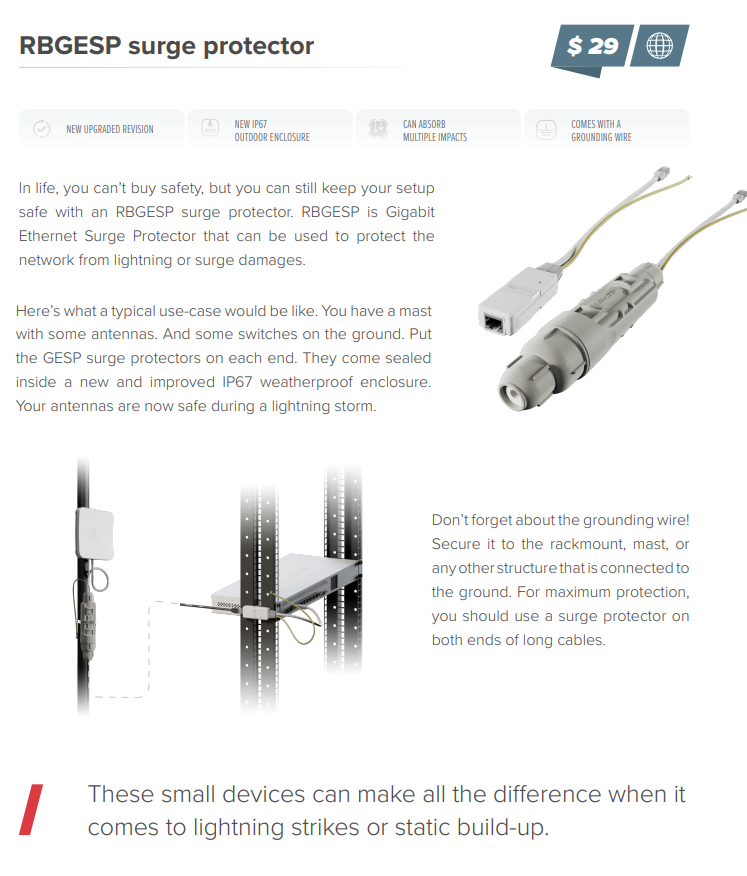
Surge protectors, for wireless systems
peak cloak
nice
thick minnow
That's actually quite usefull
copper rover
I've seen a large enough bolt hit a grounding rod right next to the AP. AP was physically fine, no signs of damage. But the EMP fried something inside (induction).
Not sure how much of a solved issue that is, unless it's common to keep spares on hand for replacement? \
tame carbon
@copper rover its just a very strong electric field
there's always some capacitance that builds up with such fields
causing a very brief current surge to nearby equipment
@copper rover really depends, this kind of equipment probably is ment to protect your core routers
if you are a WISP, you may have dozens of antennas, on the roof
the antennas can be replaced
but the core.. not so easily
copper rover
Yeah, that would make sense. I'd imagine any antenna that picks up RF will also pick up EM from a bolt of lightning. Not sure if the IC could take that.
Granted, it would be extremely rare event, not just with the bolt alone. Or else there would be equipment failing all over the place outside.
tame carbon
If you are the tallest point in a given area
you statistically have a higher change of getting zapped
copper rover
Sure. So, have a ground rod higher above it, and far enough distance from the equipment
tame carbon
If you have a lightning rod on your roof
copper rover
No.
peak cloak
tame carbon
and your neigbor doesn't
 tame carbon
A lightning rod bleeds off charge, so that a strike never happens.
copper rover
The rod is sacrificial. If there's capacitance in the earth, and lightning will build up, it's better to discharge out the ground
peak cloak
tame carbon
A lightning rod bleeds off charge, so that a strike never happens.
bruh, no
copper rover
Lightning actually starts from the ground, not sky 😉
peak cloak
lighting wants to go fastest to ground
grounding rod attracts lightning
because it's the faster path to ground
copper rover
^
peak cloak
and least resistant
tame carbon
I attended a lecture, where they demonstrated what a lightning rod would do, and in their setup, there was a constant arc between the vandegraaf and ground
and the guy holding out a metal rod in his hand, would stop the arcing from happening entirely
not discharge through him.
it bleeds off enough charge, so that it doesn't strike
copper rover
It can't bleed off at those distances though
Large gap between earth and sky
Once enough charge builds up, it's a watershed event that happens in billions of a second. That "spark" is giant, called a bolt
peak cloak
tame carbon
it bleeds off enough charge, so that it doesn't strike
but that's not an analog to real life
lightning scenario
lightning is different
copper rover
Hell, if you could truly bleed off that energy, you have power generation. I mean, there would be an actual product developed to harness that to battery.
That would be awesome. But, yeah, can't happen that way
https://www.youtube.com/watch?v=INbKYq0G9nU
You could NOT pay me enough to do that job

This is video of a technician climbing 1768 feet to the top of a transmissions tower, for repairs.
Update: I started a new YouTube channel, RapidLapse: https://www.youtube.com/rapidlapse
I make time lapse videos there. If anybody is interested check it out. Cheers!
#freeclimbing #radiotower #climbing
waxen saddle
Lightning travels in both directions and a lightning rod’s ENTIRE purpose in life is to attract lightning so that it goes to ground and doesn’t set your building on fire and/or destroy your equipment.
peak cloak
^
copper rover
Anyone have a recommendation for a 16 port switch that's rated for high heat and humidity? Basically outdoors. I want to mount the switch in an attic.
TLDR, I don't have a good place to install a patch panel with electrical in a closet or elsewhere.
gigabit
I thought about buying a normal switch and then coating with with high-temperature conformal coating (SKU 2106-12S), but after shipping, it's about $50 for a 12oz can. So...might as well pay extra for a switch rated for the high temp job.
Also, would rather ensure surface mount components are rated for the heat for a span of at least 8 years
Temps in the attic can get up to 60c in the Summer
Something like this. Never heard of this brand though. Not sure what IC they're using for switching.
https://wiwav.com/collections/frontpage/products/wdh-16gt-dc

WIWAV
Product Overview The WIWAV® WDH-16GT-DC series up to 16 Gigabit Ethernet devices through a rugged, energy-efficient, industrial 10/100/1000Mbps Ethernet switch for critical applications in hazardous environments, such as smart traffic, factory automation, and outdoor access connection for video surveillance / FTTx and
hollow marlin
copper rover
Temps in the attic can get up to 60c in the Summer
I have not heard of that vendor either. Mikrotik's line tends to be pretty consistently rated up to 70c such as the hex s. At those temps I would try moving the equipment if possible
hollow marlin
MTBF means they tested until failure. 40 years, yeah thats BS
copper rover
MikroTik is a Latvian company which was founded in 1996 to develop routers and wireless ISP systems. MikroTik now provides hardware and software for Internet connectivity in most of the countries around the world.
Seems more reasonable. Price nearly 3x compared with the WiWave
I could probably mount the bands around 2x4. hmmm
 green forge
Hello, not to bother, but i have a netgear r6300v2 with a special firmware called: V1.0.3.22_10.1.13SW
Ive been trying to update the firmware but since this is isp custom firmware they have coded something that doesnt allow standard firmware updates. Ive also been trying to use tftpd64 to overwrite the firmware, but i just cant. Do you guys know of any other solution? Thanks!
Ping me if there is a answer
 tame carbon
@green forge can you ditch the ISP router and use your own?
tame carbon
copper rover
At that price, I'm calling BS
Why? :D
green forge
i just want to update the firmware so i could use it for my networking
tame carbon
my old computer from 30 years ago still works :P
@green forge not at all familair with netgear, and firmware for that matter
green forge
some people said that i should contact the isp about this ancient isp router and ask how to get rid of this firmware
tame carbon
most of those consumer-esque routers don't even get updates
peak cloak
tame carbon
most of those consumer-esque routers don't even get updates
he wants to remove the custom fireware on it
green forge
most people use tftp to remove bricked firmware, i was wondering if there was a way to use it to overwrite that custom firmware
tftp -i 192.168.1.1 put C:\Users\yulia\OneDrive\Desktop\R6300v2-V1.0.4.52_10.0.93.chk
this too
 tame carbon
yeah its a fileserver
green forge
so im the client
tame carbon
your router is the client
tame carbon
nah, this is trivial file transfer protocol
very crude and simple file transfer mechanism
tame carbon
yeah, and then you tell your netgear to fetch a binary from that tftp server
green forge
can you help me with that? I dont really understand tdtp fully yet and would be glad
 tame carbon
yeah so the router can just connect to that IP, and pull a file with that
green forge
 green forge
pull it?
tame carbon
Yeah so you provide a tftp:// path to the router
green forge
how am i supposed to access it
tame carbon
a very old one, at that
tame carbon
well, I'd assume that your server has a list of files it is serving
or at least a directory it serves from
green forge
 tame carbon
so you have something like: tftp://192.168.1.10/my_file.bin
green forge
in cmd?
tame carbon
no.
green forge
or in that log
copper rover
Are you sure the custom firmware on that unit even has TFTP to PULL from another source?
tame carbon
Perhaps figure out how to patch the device with firmware first
green forge
Hardware Version R6300v2
Firmware Version V1.0.3.22_10.1.13SW
GUI Language Version V1.0.3.22_2.1.33.8
LAN Port
MAC Address 9C:3D:CF:0E:08:40
IP Address 192.168.1.1
DHCP On
tame carbon
I only speak mikrotik so Idk how netgear does this stuff :P
have a look at manual, see how you do firmware upgrades
green forge
you see
this firmware
blocks other newer firmware
and older too
since its custom
tame carbon
then its a garbage device/software
copper rover
Sounds like that custom firmware update was a one trick pony. No going back then?
green forge
it doesnt allow standard firmware if this was a router that i bought from amazon, not from isp
well goodwill
copper rover
Any factory reset button that might restore firmware from a backup ROM? Doubtful as it only clears config...but....
green forge
wait
so even though the firmware says V1.0.3.22_10.1.13SW
when i need to log into it
it gives me this
username: admin password: cciadmin
cci is completely different from south west
at least thats what sw stands for
tame carbon
Propietary software at its finest
green forge
Which version did you retrieve. V1.0.3.22_10.1.13SW is pretty old. Did you try something between that and the most recent?
A clearer description of "or something to that effect" might help.
got it from a forum on netgear
Yes I did Unzip it, and when doing a little google-fu I saw someone mention that 1.0.3.28 was a decent middle ground to try first, but that gave me the same error. Its acting as though that is not the correct firmware for the device.
copper rover
" Please try re-flashing the current firmware on the router (1.0.3.22) the reset the router. If that is successful, try flashing the latest version then do another reset."
green forge
ive been working on this thing for 10 hours and its still not getting through
lets hope we can reflash it
green forge
nope.
ill try one more thing when people get off the internet
ill take out my current router and put this one in
wait
do isps offer support pages for isp routers?
tame carbon
most ISP routers are total garbage, and the documentation they have is written for an infant.
green forge
this i think was the comp that made this firmware
due to the pass being cci
yess they have chat
tame carbon
Lol good luck
I have my doubts that a support person knows even the first thing about firmware upgrades
green forge
sure i am

you are now chatting with kendra
ohhh
Kendra: Hello my name is Kendra I see you need help with a router?
i love how shes asking for my acc number even though i dont have them
@tame carbon she keeps on asking me to give me my acc numb even though i dont have one
goodness lady
green forge
she stopped rn
tame carbon
And that this is tech support 101. and if they dont answer with a solution, you will tweet
and they will be cancelled.
green forge
WOW
tame carbon
tame carbon
@green forge I warned you ahead of time
green forge
oh well
tame carbon
tame carbon
I have my doubts that a support person knows even the first thing about firmware...
^
green forge
wait
tame carbon
most customer support people are very dense.
green forge
but what is dhcp
tame carbon
Dynamic Host configuration protocol
green forge
would that work
tame carbon
Its for automatically assigning IP addresses to devices on a local network
like when you connect to wifi
tame carbon
@green forge the thing that makes a server a "server"
is that it listens for requests.
clients initiate a request
the server fulfills this request
tame carbon
nah, speed limitations are usually a bottleneck from the copper networks they use
or some kind of bandwidth queue on the ISP side, in case of fiber optics
 tame carbon
See
I hate ISP documentation
they butcher the jargon
Also, is this official netgear ?
They are linking to cnet
malware central
green forge
this is negear
tame carbon
@green forge do you need this router for something specific?
tame carbon
because I never bother with ISP gear tbh
green forge
@tame carbon this router will be my main router for my network in my house
i need it to wkr
and be 1gb
peak cloak
green forge
<@!167698274969452544> this router will be my main router for my network in my h...
why?
green forge
connection
peak cloak
does the current one not work
green forge
no no you dont get it
my main one rn
ok
i live in apt
i bought a house
and it has ethernet in the walls
i need this router
to control all the private/public stuff
and use my main router rn as access point
because it wouldnt be good to put main router in closet with clothes
peak cloak
green forge
to control all the private/public stuff
wdym by control...
green forge
i was watching ayoutube video about a dude that said its best to put a router that filters public/private connections instead of the switch being connected directly to modem
copper rover
Yes
Never switch to modem unless the modem is also a router doing NAT
Many ISP "modems" are just routers too. Rarely will a dumb modem be offered. Stupid, but there you go
green forge
so i just need a 1gb router
that does this
and then use the good router
for access point
copper rover
Yeah, you can reconfigure a router as an AP. Nothing wrong with that per se.
Just don't plug anything to the WAN port if using it as just an AP
green forge
ik
i did it before
@copper rover but do you know how to get a netgear router into tdtp mode?
copper rover
No, I don't know how to force it
peak cloak
green forge
i was watching ayoutube video about a dude that said its best to put a router th...
switch directly connected to modem won't work either way
green forge

Hardware Version R6300v2
Firmware Version V1.0.3.22_10.1.13SW
GUI Language Version V1.0.3.22_2.1.33.8
heres some technical specs about it
also
copper rover
Even with ISP custom firmware, they (the ISP) must have had a backdoor to update it in the future for maintenance. But HOW they did that beyond standard Netgear way is unknown.
green forge
i remember i read on a forum that the sw stands for south west
but i dont think thats true
because
copper rover
Can you SSH into it?
copper rover
Putty
green forge
???
green forge
so change it to port 22
copper rover
Putty already defaults SSH to 22
green forge
oh
the only reason im holding on to this thing
is becuase all my other routers
are 100mgb
i need 1gb
copper rover
Just plug the IP of the router into Putty for SSH. Then click on Open (connect). If prompted to accept the connection, yes.
Again, assuming SSH is even available to connect to on that router. It may not have a shell interface. It's a crap shoot


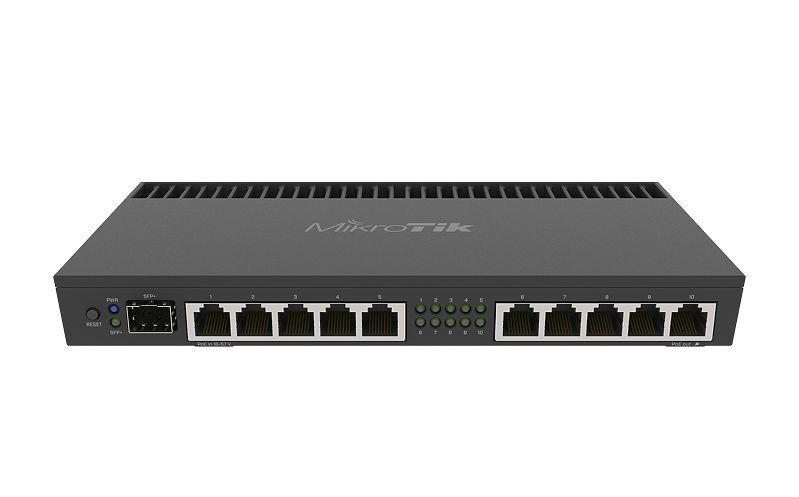


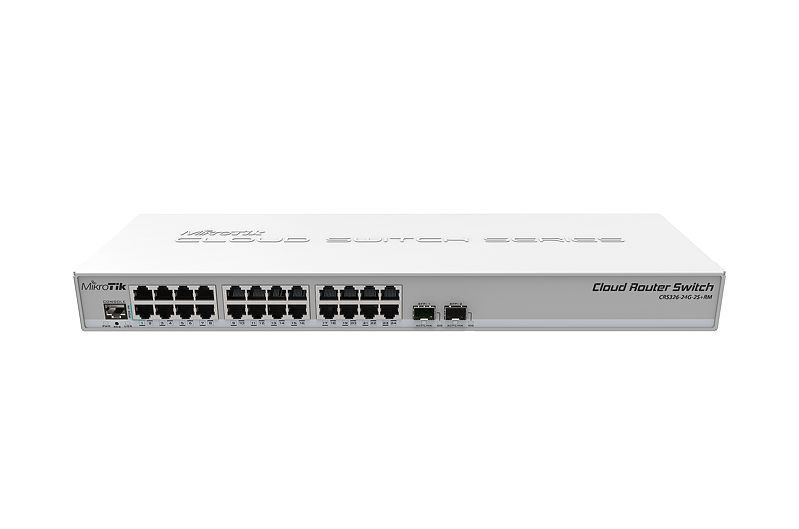


 copper rover
YES
green forge
UMM
 copper rover
haha
green forge
IT WORKS
copper rover
try with credentiasl
green forge
woooooo
copper rover
nice
 turbid rover
Hi guys, so I plugged my CAT6A cable to my computer, it doesn't work, then I used my 6E and it works, so what's wrong