#networking
1 messages · Page 328 of 1
 waxen saddle
lawl.
 plain siren
If I can't power it with USB C, I better be able to with PoE
waxen saddle
Just add a radon sensor on the top of the stack and tie it in with Home Assistant.
I discovered an absolutely useless, but interesting thing the other day. I set up an automation task with Home Assistant... every time someone plays anything on my Apple TV, I get notified.
plain siren
Woah there Nelson
waxen saddle
Great for instilling hatred for their dad in my kids when I tell them to not watch anything. lol.
plain siren
Nielsen*
waxen saddle
I also disabled it because I'm the only one that watches. 😛 But it was an interesting experiment on what could be done with HomeAssistant.
plain siren
All it really is a visual interface to APIs of varied types.
And a central "scripting" architecture
For logic
waxen saddle
Yep. Pretty much the glue.
plain siren
So it's really flexible.. to almost everything.. if not everything
plain siren
Honestly, If it's gonna unlock my doors and turn off my alarm, fuck anyone but my own 2 hands
The only hands that should be able to access said systems.
Ubiquiti gave us a pretty good insight into what can happen
waxen saddle
Are you the kind that air-gaps or has no digital access to physical security and HVAC systems?
plain siren
Air Gap
waxen saddle
I have no digital access to those.
plain siren
You have to go through hell and back to get into mine, better off breaking in. I got really in-depth surrounding those matters of access privileges.
I wanted the comfort features offered by such solutions but I was not about to skimp on execution
The problem is: do you have the free time?
waxen saddle
Yea, takes some free time to do.
Speaking of free time, I should dockerize MeshCentral. I think I finally figured out why all the other docker containers are broken... they use "tlsoffload", which, for some reason, if it is configured at all, completely breaks meshcentral.
plain siren
Isn't that the thing that uses Intel v-pro
waxen saddle
I think it can.
waxen saddle
Their host agent is very basic, non-intrusive, and completely devoid of any useful indication that it is working or not unless you're looking at the MeshCentral web interface.
plain siren
KEWL
https://rackn.com/rebar/ this is what it reminds me of

RackN Digital Rebar creates a single control API for bare metal, virtual, & cloud infrastructure, bringing cloud-like flexibility to your entire IT estate.
 waxen saddle
I stumbled across it while looking for a replacement to Teamviewer.
 tame carbon
So two SSID's it is?
 tender hazel
it depends on the device - one SSID allows the device to make its own roaming decisions
but some devices won't make the best roaming decision
plain siren
waxen saddle
I stumbled across it while looking for a replacement to Teamviewer.
GitHub
Zero Trust Service Access. Contribute to seknox/trasa development by creating an account on GitHub.
tender hazel
what you can do is have one SSID that is both 2.4 and 5ghz
and a second SSID that is 5ghz only
for the devices that tend to hang out on the 2.4ghz band for too long you can force them to the 5ghz only ssid
waxen saddle
@plain siren I like the visualization on that.
plain siren
@waxen saddle I spent all this time searching a forgotten memory for you. https://wh1te909.github.io/tacticalrmm/
A remote monitoring and management tool
It integrates with Meshcentral
waxen saddle
Nice. Thanks!
plain siren
@waxen saddle https://rmm.tacticalrmm.io/
waxen saddle
Reminds me of SCCM
plain siren
File > Upload MeshAgent is the integration point
It basically is in some ways
Its flexible at least

Mmmm chcoclatey
 peak cloak
I've heard winget is now good
plain siren
Winget, Scoop, Nuget, and Chcoclatey are the 4 big ones basically
Winget is stolen and yeah it was better than Chcoclatey framework wise from the start, now it's actually worth using.
plain siren
Oh you don't know this story?
peak cloak
No?
plain siren

Last week, Microsoft released its new Windows Package Manager, called WinGet. But as it turns out, they stole it.
It was pretty much a straight up clone
They ghosted the dude after 1 interview for "employment" too
Then Microsoft had the balls to dump a blatant admission and give a middle finger
Basically saying fuck you I got better lawyers
And yes they do
Later on we ended up getting: https://itsfoss.com/microsoft-maui-kde-row/
 thorny vector
As soon as he started getting wooed by microsoft, he should have changed the project's license from Apache
plain siren
^^^^^^^^^^^^^^^
We literally saw this exact response to many projects when that drama took off
thorny vector
Like don't get me wrong, I feel bad, but 6 months is a long time to think about possibilities
plain siren
Well I didn't give the article to show this dude's level of foresight. But you are very much correct
plain siren
thorny vector
Like don't get me wrong, I feel bad, but 6 months is a long time to think about ...
He forgot to yell "Swiper no swiping"
plain siren
I liked how it used nupkg's but winget is just so much cleaner
plain siren
@idle flame login to yer router
peak cloak
@plain siren ISP can matter tho
 idle flame
just to confirm, port forwarding wont affect my internet in any way?
plain siren
peak cloak
<@!589542595341058048> ISP can matter tho
Ye ye cgnat
peak cloak
I mean, it's complicated
peak cloak
idle flame
just to confirm, port forwarding wont affect my internet in any way?
but generally no
idle flame
im trying to run a minecraft server on my roided dell optiplex
plain siren
I knew it was gonna be MC.
idle flame
probably the biggest reason why people ask
plain siren
Lots of reasons but this community has a leaning tendency..
idle flame
well I know absolutely nothing about networking, and id rather not mess it up 😅
peak cloak
plain siren
I knew it was gonna be MC.
I mean it was the first thing I ran
tame carbon
its always mc
plain siren
GMod iirc for me, what a mess that was.
tame carbon
yeah the many ports that valve has you open
its annoying af
I tried hosting a tf2 server
tame carbon
dst-nat everything that isnt already dst-nat'ed, to one host
plain siren
Demilitarized zone
tame carbon
it basically makes sure it doesnt collide with the existing srcnat rules
plain siren
Basically all your Public Access machines go there. Everything that needs to be protected is behind it on normal networks. Your Public Access machine should be the way you get to the protected machines cuz auth.
Or so was the intention
tame carbon
its just the push here to start button when port forwarding is too difficult
wait no
peak cloak
so like a no firewall from WAN type of thing
tame carbon
that would be UPnP
peak cloak
everything port forwarded
plain siren
 peak cloak
well yes
tame carbon
on home routers
tame carbon
those trusted networks and dmz are basically the same
peak cloak
what does it do
tame carbon
wat
@peak cloak its just fancy firewall talk
means that public traffic can reach that portion of the network
plain siren
It's where you would technically put another
tame carbon
but not the rest
plain siren
Firewall
Or access device
Router maintains routing... Firewall is disabled only.
And firewall only device can takeover
peak cloak
but NAT still exists
tame carbon
yes because it has grossed out everything
home routers have a DMZ feature
which for them just means
DST-NAT everything
my 'DMZ' here, is just an accept rule for all my traffic to /29
plain siren
Port forwards take priority
tame carbon
but then, my /29 cannot reach my LAN
plain siren
DMZ is everything else
tame carbon
but with NAT, it just.. port forwards yeah
plain siren
The truth is it just happened to come with the Motorola package that every single one of these isp aios use and they add it anyways.
tame carbon
@plain siren can you do L4 routing? xD
plain siren
It has no actual use in residential networks.
tame carbon
feels like NAT is some kind of gross layer4 routing mechanism
 hollow marlin
tame carbon
feels like NAT is some kind of gross layer4 routing mechanism
hollow marlin
tame carbon
feels like NAT is some kind of gross layer4 routing mechanism
Not routing, just translation. You can routing with L4 headers in PBR (policy based routing) but typically its avoided nowadays
 glad copper
NAT is primarily a way for you to use private addressing on a local network while giving all those devices on the local network access to a public network. NAT (and PAT) can be used for many other things that can be useful, so it has persisted despite calls from the ipv6 crowd to kill it. In many ways NAT is a kludge, but it is so useful in so many different ways that it continues to exist. You can translate to different devices by tcp port. You can obsfucate private IPs. You have flexibility.
peak cloak
NAT server side fine
but ipv6 all the way
for consumers
there is no excuse for no ipv6 anymore
glad copper
There is very little appetite for ipv6 in the corporate space. They'll convert to ipv6 at the point of a financial gun but otherwise no.
glad copper
Oh, ISPs sure. The only thing holding them back is their corporate customers; but they'll offer dual stack to satisfy everyone.
tender hazel
I think the thing that is going to start driving more corporate adoption of IPv6 will be the move of cellular networks to IPv6-only
it's already starting to happen
if you have a corporate VPN and you are IPv4 only, but you have users with cell phones on IPv6 only networks, they cannot connect to the corporate VPN
more and more of that will start happening going forward
so corporations are going to start having to move when IT people start having to tell their CEO "sorry, we can't give you VPN access on your cell phone because all cell phones are IPv6 only and we are still only on IPv4"
cell providers were the first ones to roll out 464XLAT but you're probably going to start to see more internet service providers deploying that as time goes on
and then even home users won't be able to VPN into their office networks anymore from their home internet
you're starting to see this with meraki - they dropped the ball on IPv6 and were taken by surprise when T-Mobile moved to IPv6 only
so suddenly all sorts of remote workers lost remote VPN capability to meraki routers if they had T-Mobile cell phones
plain siren
tender hazel
and then even home users won't be able to VPN into their office networks anymore...
AT&T had this exact problem. A couple emails later they didn't even realize IPv6 was non-functional in majority of the Houston area. They also never put two and two together regarding the IPv6 and ipv4 exhaustion combined with corporate VPN networks.
They were losing customers left right and Center
Even now they only got it mostly working
And usually not in the way it should be
However as the regional agencies for IP numbers have stated: if you haven't prepared by now be prepared to be left behind.
To drive it home even harder they have started to revoke ipv4 address space in large chunks
tender hazel
AT&T was rolling out 464XLAT in houston for home internet?
or are you talking cellular
plain siren
No I'm talking their fiber Network
I've had to go to a bunch of customers homes just to repair PCS, it's a goddamn mess with how spotty AT&T is
They've been too focused on their whole open network model for carrier grade systems management, their architecture has become... Insufficient
So long as they own the majority of the pots switching infrastructure across North America, it'll always be a second priority. They charge MILLIONS for simple PTI access, or even Transit. Monthly...
Best part is is that they get to charge it to our taxes because they're charging the state for access to the lines.
Thanks for coming to my TED talk. /Angre_rant
tender hazel
I don't know exactly what you mean by PTI, but telcos here also typically charge a small fortune for BGP transit
plain siren
tender hazel
I don't know exactly what you mean by PTI, but telcos here also typically charge...
Its the switching hookup to the pots > VoIP gateway
In this case the telcos are not the major bill holder.
 waxen scroll
@hollow marlin did you know if you asked for IPv6 dual stack on your circuit AT&T actually physically installs a new one instead?
plain siren
waxen scroll
<@!462711605063450628> did you know if you asked for IPv6 dual stack on your cir...
Wait what
Now this is news to me and hilarious
tender hazel
that seems a bit nuts
we just give all of our customers dual stack whether they ask for it or not
waxen scroll
I don't know the technical reason. The ipv6 stuff must have been on some other infrastructure so it was easier to make a new circuit and connect it to the proper place
hollow marlin
tender hazel
I don't know exactly what you mean by PTI, but telcos here also typically charge...
For someone who job also involves call routing, I've never heard of PTI. But I can confirm that is where the money is at
hollow marlin
waxen scroll
<@!462711605063450628> did you know if you asked for IPv6 dual stack on your cir...
🤮
tender hazel
what does PTI even stand for? personal telephony interface?
hollow marlin
Honestly not sure
As class 4/5 switches have grown exponentially (think T3 providers), there is less and less reliance on the class1/2 switches such as AT&T and Verizon. They no longer have absolute control on call routing anymore
They still own a big chunk for int. calls, but 3/4/5s handle most the volume now. Even then, SIP trunks and some magic sprinkles and its easy to get around it
 formal lily
Any clue how or why I can’t access /root on a aws EC2 server? I can’t even change the permissions
plain siren
formal lily
Any clue how or why I can’t access /root on a aws EC2 server? I can’t even chang...
Its designed that way
Security Reasons. Dont run your applications as root
plain siren
hollow marlin
They still own a big chunk for int. calls, but 3/4/5s handle most the volume now...
ENUM Would kill AT&T if it was adopted in the US.
formal lily
is there no way to get around it trying to get openvpn config files but the installer i use puts them into /root
 thick minnow
plain siren
It should put them in `/etc/openvpn/server/*.conf`?
thick minnow
plain siren
It should put them in `/etc/openvpn/server/*.conf`?
N o this script puts in the root
chown, sudo
yea
on;y way to access the filw
thick minnow
formal lily
https://github.com/Nyr/openvpn-install
You should probably use the Wireguard script
plain siren
thick minnow
N o this script puts in the root
Yikes
thick minnow
yea ik
You actually have to chown it and then mv it to get access, unless you open up a webserver to download it
formal lily
im not a fan of wiregaurd is there a video or something i can use to help me get it done?
main thing with ovpn is if im playing and i connect I dont get disconnected from game server
or would it be possible to change where the script downloads the configs?
https://github.com/angristan/openvpn-install
maybe this script or is it also in root?
thick minnow
formal lily
im not a fan of wiregaurd is there a video or something i can use to help me get...
Yea there was one by Wolfgang
Here ya go
Tho he uses Linode not AWS
formal lily
I already have it setup on linode been using it for a few months but want to try the aws free alternative and ebcause of the keypair thing cant get the configs out of root
plain siren
https://aws.amazon.com/marketplace/**/prodview-y3m73u6jd5srk?ref_=beagle&applicationId=AWSMPContessa
replace each * with p since LMG Warship kills it
There is an AMI for this
No additional cost to deploy
1 click run
formal lily
i tried that earlier today but had an issue cant remember what i can try it again
plain siren
Quick Launched one and seems to be working for me
 formal lily
i had it set up but something i didnt like so i dropped it im setting up again atm
formal lily
yeah the reason this doesnt work is i can only have 2 concurrent connections
I guess I can use it as a vpn for 12 months when I stop using linode but unfortunate I might give vultr a try later
formal lily
not a student yet unfortunately...
tame carbon

Linode
Deploy more with Linux virtual machines, global infrastructure, and simple pricing. No surprise bills, no lock-in, and the same price for every data center.
thick minnow
@formal lily Oracle also has a free tier, I just remembered that
thick minnow
tame carbon
<@!162765514806919168> https://www.linode.com/lp/affiliate-referral/?irclickid=X...
Crystal, he already has Linode
formal lily
Yeah I have been using that credit for a bit going to run out the 1st of may
tame carbon
@formal lily I eventually quit relying on free service :P
Linode isnt that expensive
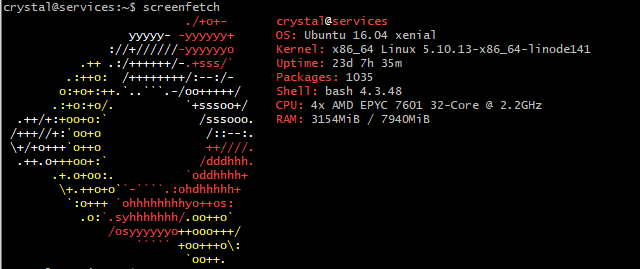
EPYC :)
formal lily
well thats what i want to do but for my needs dont want to pay $5 for a server as i wont use it to the $5😂
formal lily
i dont know ill figure it out but ill use aws for now once the linode credit is out
im using that right now just due to there security I cant go into /root to get the ovpn config files so i need to use there marketplace thing but then I can only have 2 concurrent connections
but i guess itll work for now
and the free credit is for 12 months so not an issue
tame carbon
ovpn :/
formal lily
I know but it works best for me out of the options ive tried
tame carbon
 formal lily
I know you showed me this before
formal lily
I just like how with it when I connect if im playing a game i dont get disconnected from the game server basically connects instantly
thick minnow
with 2 free VMs
1vCPU 2 gigs of RAM iirc
Tho I have no idea how good or easy it is
formal lily
by the way I was wondering when using openvpn or wiregaurd is there anyway to track the network traffic and how do these free vps options work for free dont they have to track some data dotn really understand that
plain siren
formal lily
by the way I was wondering when using openvpn or wiregaurd is there anyway to tr...
They have an X Amount of "Free Use" or "unused" space they give for "Free" in order to demo their product
formal lily
ah what about the network traffic thing I never really understood how a vpn hides that like what it actually does
kinda just know it does😅
 plain siren
Better than everyone else currently sadly
thick minnow
People use windows server?
 plain siren
AD DS, WSUS, AD CA, AD DNS, IPAM, and WinRM
peak cloak
thick minnow
People use windows server?
it's good for somethings
tame carbon
Things that only run on windows yeah 🤪
peak cloak
well AD is better than anything else apparently
 radiant shell
platforms are getting there, we are definitely finding small gaps as my company moves away from AD
 little schooner
my environment isn't leaving AD anytime soon
plain siren
little schooner
my environment isn't leaving AD anytime soon
Its a hard migration
 balmy pond
hi so my friend cant play roblox unless its 11 at night because he gets thousands of ping on daytime but every program seems fine. any ways to solve this?
plain siren
He needs to phone his ISP and tell them they got dirty lines
 fallen cedar
my ethernet is capped at 100mbps while my laptop gets more with the same cable
balmy pond
plain siren
He needs to phone his ISP and tell them they got dirty lines
is that really the only thing?
 tropic galleon
tame carbon
<@589542595341058048>
tropic galleon
tame carbon
<@589542595341058048>
burn it down!
plain siren
This hotspot...router...travel router....VPN Gateway..whatever
has proven to be the most interesting mobile networking device ive toyed with in a long while
 hollow marlin
Battery bank is a nice touch, but for a travel router Id stick with Mikrotik
plain siren
hollow marlin
Battery bank is a nice touch, but for a travel router Id stick with Mikrotik
DD-WRT Based was really nice too
The switch on the side can be setup to Turn on/off Tor or a VPN or Wireguard
hollow marlin
Oh, if its running DD-WRT thats good. I thought it might have been running some other OS
plain siren
it even has working IGMP Snooping..... While a certain U company cant even get that
Sorry OpenWRT*
My bad
 hollow marlin
What, Ubi does even support snooping?
 crystal shale
Hey a little question here, i wanna have my own pc running as a server, but not in my house, ive seen server hoster giving you the option to let them host your pc, tho i cant find it anymore and uh what would prices look like?
 uncut zinc
If I don't have a nas and I'm not trying to do any kind of daisy chain internet sharing shenanigans, is there any reason why someone would use the 1GB port instead of the 2.5GB lan port if their mobo has both? Not sure if theres anything to consider beyond bigger number=better (although I suspect it wouldn't actually makea difference in practice with out 1GB+ internet).
crystal shale
(germany if important)
plain siren
uncut zinc
If I don't have a nas and I'm not trying to do any kind of daisy chain internet ...
Is the 2.5G interface Intel or AQC?
If the 1GBit was Intel and the 2.5 Realtek/AQC... id use the intel one
crystal shale
uncut zinc
If I don't have a nas and I'm not trying to do any kind of daisy chain internet ...
To connect to 2 networks maybe, or using both to get 3.5gb (if thats possible xD)
uncut zinc
The ROG dark hero, says the first lan chipset is Realtek RTL8125-CG, and the second is Intel I211-AT, with the former being the 2.5G one
whats the sell of the intel one if it's theoretically slower?
tender hazel
if your switch or router only has 1Gbps ethernet ports it will only negotiate 1Gbps anyway
waxen saddle
Ubiquiti supports IGMP snooping.
 limpid lion
Trying to access my services via a reverse proxy but it's not possible on my local network just outside of it. My reverse proxy is nginx proxy manager and Im running on a mikrotik router. Pi hole serving as a DNS server. What am I doing wrong?
peak cloak
limpid lion
Trying to access my services via a reverse proxy but it's not possible on my loc...
ah
you neither need hairpin nat
or split dns
thick minnow
tame carbon
<@589542595341058048>
Whats wrong with t moble
limpid lion
peak cloak
you neither need hairpin nat
Thanks, will look in to these options
peak cloak
limpid lion
Thanks, will look in to these options
how split dns works is that inside your network your dns server gives a different answer than the one used for your normal A records that point to your wan IP
and hairpin nat: https://wiki.mikrotik.com/wiki/Hairpin_NAT
tame carbon
@tender hazel on location. and oh boy, the existing wifi is hot garbage
It literally drops the connection every 10-15 seconds
I just plugged my own AP into the wall, and am now using that
Its a weird netgear AP they have
 copper ginkgo
so ever since my household upgraded to a new modem, my old wii has been unable to connect to it despite there being nothing that would cause obvious compatibility problems
this wasn't really an issue until i decided i wanted to investigate doing a system transfer to my wii u...
tame carbon
@copper ginkgo is the SSID and password the same?
copper ginkgo
yep
it even failed when i grabbed my OEM LAN adapter and tried to give it a wired connection
nintendo's website suggests manually assigning it an IP and the like
tame carbon
@copper ginkgo that's very strange
assuming you are using other devices on that network as well
those get their address with DHCP
only if DHCP is not available do you manually set an IP
but that's never the case, home networks always run DHCP
copper ginkgo
yeah, so i guess something about the DHCP of this new modem the wii doesn't like somehow
tame carbon
yeah but DHCP is standardized
if it works with your laptop, itll work with your Wii
Your router provides this service
copper ginkgo
well, it ain't working
tender hazel
I have seen some weird dhcp bugs in poor implementations
copper ginkgo
hm... should i contact nintendo support or my ISP over this? this modem is their stock
tame carbon
@tender hazel I know for a fact that the DHCP server on ASUS is not up to spec
copper ginkgo
lol this modem was apparently manufactured by technicolor of all companies
tame carbon
@copper ginkgo have you tried setting an IP manually then?
copper ginkgo
nope, i'll try to figure out how to do it
it's managed through an app so it's not as cut-and-dry
i can't find any easy help articles so i'll just go through support channels to find out
 fossil plaza
Anyone know a good WiFi extender or something similar that doesn't create a new network to connect to and just use an existing one?
peak cloak
don't use WiFi extenders
fossil plaza
That's not what I asked about lol
peak cloak
xy problem
fossil plaza
Are there just no extenders whatsoever that don't create an extra network?
peak cloak
fossil plaza
Are there just no extenders whatsoever that don't create an extra network?
there probobly are but all extenders suck
fossil plaza
Well what could I use instead?
peak cloak
fossil plaza
Well what could I use instead?
another access po int
copper ginkgo
if you can get another router and plug it in through ethernet to the same modem
peak cloak
copper ginkgo
if you can get another router and plug it in through ethernet to the same modem
access point
not router
copper ginkgo
a router is an access point though, no?
peak cloak
copper ginkgo
a router is an access point though, no?
nope
a router doesn't need wifi
it just routes between subnets
I have a wired router
no wifi
fossil plaza
Looking for something that doesn't need to be plugged in via ethernet though
peak cloak
wifi is done by a seperate Access point
copper ginkgo
so wait, with the wii thing... do i get the router an IP to manually assign to it, or do i get the wii to connect to the router with a specified IP address?
peak cloak
copper ginkgo
so wait, with the wii thing... do i get the router an IP to manually assign to i...
specified ip address
copper ginkgo
alright
fossil plaza
So yeah what should I get that doesn't require a cabled connection to the router to extend my WiFi signal if not an extender?
peak cloak
fossil plaza
So yeah what should I get that doesn't require a cabled connection to the router...
some sort of wire is the best
coax
ethernet
fossil plaza
Again, want something without one
peak cloak
no clue then
fossil plaza
Anyone know what I should get then? Preferably some WiFi extender or something that doesn't create another network?
tender hazel
you could get two mikrotik audience units
 sacred ocean
Anybody have PVE experience? I'm trying to migrate VMs from another server that I've had to decomission. I have the disk in PVE, but I don't know how to go about mounting it. It shows in the disks menu under LVM. The disks are under a PERC 6/I, if that complicates things.
tender hazel
there are similar products made by dlink and tplink as well, D-Link COVR-2202 or the TP-Link Deco M9 Plus
sacred ocean
fossil plaza
Anyone know what I should get then? Preferably some WiFi extender or something t...
I wouldn't really recommend any sort of repeater if you want a good experience. You could use @tender hazel's suggestions or the something like the UBNT beaconHD. If you can't run a cable becausee of the logistics of running a cable, I would try using something like powerline networking.
It's up to you if you want to go UBNT post-breach.
fossil plaza
Doesn't have to be a great connection, just a decent one that doesn't require a cable or create a new network
sacred ocean
What are you going to be doing on the extended bit?
fossil plaza
Again really doesn't matter here as I'm not one of those people who won't settle on anything less than a maximum speed connection from this extender
sacred ocean
It'll probably be fine for IoT, other stuff might be pretty unreliable.
sacred ocean
fossil plaza
Again really doesn't matter here as I'm not one of those people who won't settle...
Nor am I, but from what I've seen (and had to replace) many of these solutions are dramatically slower. The worst of them are borderline unusable.
fossil plaza
Ok cool whatever, I just need to find one that does those two things, doesn't require a cable and doesn't create a new network
tender hazel
the ones that I suggested have a third radio to form the backhaul network
that way you don't get the decreased bandwidth normally associated with wifi extenders
sacred ocean
Yeah, just go with one of those or a separate AP over powerline.
fossil plaza
tender hazel
the ones that I suggested have a third radio to form the backhaul network
so that means they don't make a new network right?
sacred ocean
...Just don't make sure they're too spread apart.
tender hazel
they don't make a new network, but you need two of them - one to plug into your router, the other to go in the seocnd location
sacred ocean
Yeah, think of them as a bridge.
fossil plaza
tender hazel
they don't make a new network, but you need two of them - one to plug into your ...
Anything that doesn't require a solution like that though?
fossil plaza
Yeah, just plug it into a socket and it's done
sacred ocean
Anything that's a single device that's completely plug and play is unusable.
fossil plaza
Again, doesn't have to be super high speed
tender hazel
what would you consider to be "ok" speed?
sacred ocean
What's going to be done on the extended region?
It's probably okay for something like a Ring doorbell or other IoT devices, but not video streaming.
fossil plaza
Again none of that matters lol. Doesn't have to be super fast just work and have those two characteristics
tender hazel
ok well
sacred ocean
Well, the issue is that some things probably won't work.
But, I'll look for something like that.
tender hazel
any extender is going to reduce your wireless speed by 60%
sacred ocean
at least.
fossil plaza
tender hazel
any extender is going to reduce your wireless speed by 60%
Again, don't mind, just need something like that
tender hazel
the issue with keeping the same SSID is that there are no inter-vendor standards for wireless bridging
so basically the only extender that might work would be one made by the same vendor that makes your router
fossil plaza
So basically that's not an option for ISP routers then?
sacred ocean
Depends on the ISP router.
tender hazel
your ISP would have to offer such a thing
tame carbon
why people use those in the first place, is a mystery
sacred ocean
tame carbon
why people use those in the first place, is a mystery
^^^
tame carbon
ISP router is the first thing I try to get rid of in a setup
sacred ocean
Yeah. Even one of the worst aftermarket routers is an improvement.
tame carbon
I disagree
ASUS is total garbage, regardless of what model you buy
TPLink is hot potato, breaks after a couple years
fossil plaza
I mean our ISP router is completely fine as we pretty much only use ethernet...
Yikes is this one of those places where anything short of a $1000+ network solution is considered awful?
tame carbon
@fossil plaza nah not at all
sacred ocean
fossil plaza
I mean our ISP router is completely fine as we pretty much only use ethernet...
It depends! The stock router that came with my fios deployment capped out at 100mbps when I was paying for gigabit.
tame carbon
My entire stack runs on mikrotik, those Home wifi routers cost $60
sacred ocean
No, if you don't use Cisco, you don't deserve food
fossil plaza
sacred ocean
It depends! The stock router that came with my fios deployment capped out at 100...
Ours supports at least up to our contract if not more so that's not an issue thankfully
tame carbon
most consumer hardware either lacks in hardware, software or both
I've seen ASUS routers run out of disk space when trying to store DHCP leases.
sacred ocean
tame carbon
most consumer hardware either lacks in hardware, software or both
And being able to turn of uPnP..
sacred ocean
tame carbon
I've seen ASUS routers run out of disk space when trying to store DHCP leases.
wtf
sacred ocean
That is horrible.
tame carbon
@sacred ocean ASUS DHCP Server also doesn't honor DNS settings received from upstream DHCP client
It inserts its own IP into DNS 1, and the upstream into DNS 2
sacred ocean
Oh boy. Thankfully I've literally never come across one. Yet.
tame carbon
if you enter the IP address of the ASUS router, it forces a redirect to router.asus.com
if you are using a different DNS server
you cant configure the router.
sacred ocean
iirc, netgear was doing that at one point.
tender hazel
@fossil plaza nobody is saying you have to replace your ISP router, but basically what you are asking for is a wireless bridge
and wireless bridging really only works when both devices are the same vendor
the only cross vendor solution is WDS but that only works across vendors if wifi security is completely disabled so that the APs are open authentication
and open authentication is not desirable
sacred ocean
tender hazel
and open authentication is not desirable
Not desirable is an understatement.
fossil plaza
So are there really no extenders that just plug into the wall and don't need a cable or create a new network???
sacred ocean
The one's @tender hazel recomended earlier.
tame carbon
Extenders themselves are a poor solution already :3
sacred ocean
tame carbon
Extenders themselves are a poor solution already :3
yup.
tender hazel
the reason the device I recommended earlier work is because they are two devices made by the same company so they work for bridging
one device plugged into your router, another device where you want it
sacred ocean
And have a spare backhaul channel.
tender hazel
yup, a spare backhaul channel for better performance so they don't reduce your wireless speeds by over 60%
sacred ocean
60% at best from what I've seen.
tame carbon
@tender hazel ooh, I actually snapped loads of pictures today. Got a good look at those APs and orientation.
Lemme send you the most striking one of all
 fossil plaza
Yeah again speed isn't really an issue so if there are solutions that reduce speed but don't require buying two separate devices I'd rather go for that, but I'll guess I'll look into that solution instead
tame carbon
Look at those cables lol. they just dangling off the AP
sacred ocean
oh god
 tender hazel
fossil plaza
Yeah again speed isn't really an issue so if there are solutions that reduce spe...
tender hazel
fossil plaza
Yeah again speed isn't really an issue so if there are solutions that reduce spe...
As I said, every solution that would just be one device would require a separate SSID for the extended network unless it is made by the same vendor that makes your router
sacred ocean
And that's why this is a preset incident in windows server: https://i.imgur.com/Nueq0KR.png
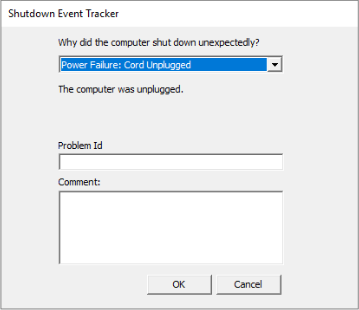 tame carbon
@sacred ocean is there an option: windows crashed ?
sacred ocean
I actually don't think so.
tame carbon
so what do you pick if that happens?
sacred ocean
... I don't remember. Let me check
tender hazel
@fossil plaza unless you don't really care about whether the extender has a separate SSID or not, and in that case many different extenders will work if you are OK with the extender being on a separate SSID
assuming your ISP router vendor doesn't make extenders, your choices are either a two device solution with everything on one SSID, or a single device solution with two SSID's
sacred ocean
tame carbon
<@!198488873972662273> is there an option: windows crashed ?
Nevermind, there's two whole different options for that! https://i.imgur.com/7DRjdMa.png
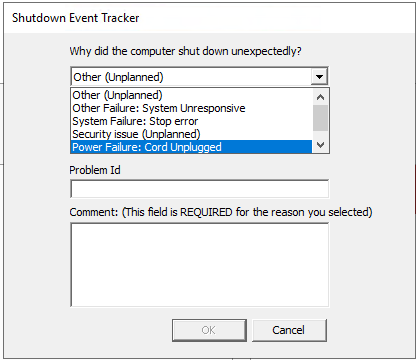
Also, security issue is concerning..
tame carbon
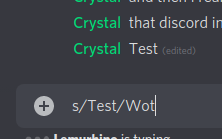
tried to pull a sed joke
and then I realized
that discord interprets s/replace/with
Wot
 sacred ocean
This really show's Windows Server's average use.
tame carbon
Shutdown event tracker
what for
crystal@main:~$ uptime
 20:53:23 up 639 days,  3:35,  8 users,  load average: 0.17, 0.14, 0.16
yeah. I have no clue who thought windows server is a good idea.
tame carbon
Gates.
sacred ocean
That's the only question I have for him. "Why Windows server"
It's windows 10 with crappy server components hot glued scotch taped on.
copper ginkgo
weird thing: just moved my wii u into the same room as the wii, plugged its ethernet cable into the network switch in that room, and now it also can't connect to the modem
it worked just fine in the room it came from
fossil plaza
So I checked and my ISP does make boosters, but I just can't find any info on if they create a new network or extend an existing one... great
copper ginkgo
it connects to wifi fine but it can't use ethernet through that network switch it's plugged into
thick minnow
fossil plaza
So I checked and my ISP does make boosters, but I just can't find any info on if...
Your isp doesn’t make them, send an email and ask what model they are, probably some cheap tp link shits
fossil plaza
doubt they'd answer honestly to that, besides they have a super weird way of getting those boosters. You don't just buy them from the website, instead you have to get an app, run a WiFi scan in your house, then pay a monthly fee for one
tame carbon
what.
tender hazel
meaning they rent the boosters instead of sell them
sacred ocean
I wonder how much of your range issues is caused by the crappy ISP provided routers.
fossil plaza
Doubt even good aftermarket routers would be able to sustain a good signal all the way to the other side of the property out in the garden
peak cloak
fossil plaza
Doubt even good aftermarket routers would be able to sustain a good signal all t...
oh yeah no, that's why any good wifi deployment has multiple wired wifi access points
fossil plaza
Literally all I need is a single one to cover that area, as everywhere else we use wireless devices it's fine
tender hazel
well you can try renting the ISP one and see how it works
if it doesn't work very well, hopefully you can just return it and the rental is month to month
 copper rover
Anyone familiar with UniFi AP 'Fast Roaming' feature? Does it work well when someone is walking in the building with a phone or laptop while having a webinar (like Zoom)? I know WiFi isn't cellular in that regard, but I'm curious to know if it's good enough to do the job of client/AP hand-off as seamless as possible.
peak cloak
copper rover
Anyone familiar with UniFi AP 'Fast Roaming' feature? Does it work well when som...
That's probably 802.11r/k I think or some other standard maybe
copper rover
peak cloak
That's probably 802.11r/k I think or some other standard maybe

Ubiquiti Support and Help Center
Overview
This article describes UniFi Fast Roaming, how it improves network performance, as well as recounting the advantages it has over previous roaming protocols such as Zero-Handoff.
Table of...
So yeah R from what I can gather
peak cloak
Yep
copper rover
I'm not familiar with 802.11r
peak cloak
copper rover
I'm not familiar with 802.11r
But yeah, it's supposed to be seamless
As long as client device supports it
 rocky badge

Apple Support
Learn about how devices running iOS and iPadOS roam in an enterprise Wi-Fi environment.
copper rover
This is a good article.
https://www.networkcomputing.com/wireless-infrastructure/wifi-fast-roaming-simplified
Network Computing
A primer on the 802.11 wireless protocol and when to implement it.
"to ensure maximum client compatibility, the common recommendation is to disable fast roaming when using WPA2 Personal, and only use it for WPA2 Enterprise networks."
So basically, I'll just crate a new SSID and assign Fast Roaming to it for testing purposes.
 jovial radish
Guys, hear me out, I'm back with real classes but the University Wifi is just plain bad AF, it's too much students and not enough access points
I'm thinking of getting one of this or something similar (Will be changing the antenas, i have a couple lying around), and putting it in the middle of the Library computers and it's Ethernet connection, like bridging it
Cuz the library computers work hella fine even when the wifi is bad
Will it work? I will be running another wifi and SSID but with the Internet coming from the University Server

Here a diagram of it

 tawny flint
hey so i have a question.....
so i think my Readynas been leak or the no-ip has been something but i was wondering this person from another country going throw my data and what it call it on Read online some i have to fix later but they some files //(numbers) i probably turn of FTP but i don't know if that help he/she has been login with db, test , user123 , admin, user, web , and but they have random gen password between 10-25
not my ip xD

😐

i have no account call user123 or test
 vale reef
jovial radish
Guys, hear me out, I'm back with real classes but the University Wifi is just pl...
vale reef
jovial radish
Guys, hear me out, I'm back with real classes but the University Wifi is just pl...
the IT people might not be happy if you do this
waxen saddle
@jovial radish Not a good idea. Universities generally don’t like that and if they have even basic security, they’ll automatically shut down whatever port that plugs in to.
You are essentially placing a man-in-the-middle and I guarantee it’s against university policy
jovial radish
vale reef
the IT people might not be happy if you do this
The university IT is a joke, like for real
There was one competent guy there and he was fired from it
vale reef
The access point in the picture isn't a good one anyway
waxen saddle
@tawny flint Get that device off the network now and remove the accounts they are using.
tawny flint
waxen saddle
<@221936582075219969> Get that device off the network now and remove the account...
i did but how do i remove the IP?
jovial radish
waxen saddle
You are essentially placing a man-in-the-middle and I guarantee it’s against uni...
I see, i see
I may read it once again and look for a clause about that
 jovial radish
vale reef
The access point in the picture isn't a good one anyway
jovial radish
vale reef
The access point in the picture isn't a good one anyway
why tho? too weak?
vale reef
How many devices do you plan on connecting to it?
It is a cheap travel access point. not meant for lots of devices
waxen saddle
@jovial radish The competent guy got fired. Don’t try to fix it with competence then. Just let the system rot or cooperate with the IT.
@tawny flint Remove the IP? I’m not sure what you mean.
 light sentinel
hey guys do you happen to know how to access a network drive on an asus router?
tawny flint
waxen saddle
<@221936582075219969> Remove the IP? I’m not sure what you mean.
so i remove all the account that has been compromise and now currently changing all the password to 30 length
light sentinel
like i tried to type my ip address in file explorer but it just takes me to asus' router settings
waxen saddle
tawny flint
so i remove all the account that has been compromise and now currently changing...
Be sure to update everything as well. Might want to limit or turn off access from the Internet as well.
jovial radish
waxen saddle
<@690268207768141835> The competent guy got fired. Don’t try to fix it with comp...
It's for at most 6 months then I'm out of this, I'm just fixing it for me
Like I can connect a laptop to it router to my phone but it's short ranged
and that's a trick the old IT guy taught me
waxen saddle
light sentinel
like i tried to type my ip address in file explorer but it just takes me to asus...
Is the network drive on the router? Or is it a device attached to your router?
light sentinel
waxen saddle
Is the network drive on the router? Or is it a device attached to your router?
its an external drive attached to the router
vale reef
jovial radish
It's for at most 6 months then I'm out of this, I'm just fixing it for me
Like I...
if you put a router between the computer and the switch it is connecting to that could cause issues with the computer accessing internal resources and servers
not mentioning anything that could be in place to shut down rouge APs or routers
waxen saddle
light sentinel
its an external drive attached to the router
Is the device shared through the router? Usually it will tell you the connection info or the url to use to access it.
light sentinel
sharing is enabled for it
waxen saddle
Does it tell you how to access it?
light sentinel
it doesnt
tawny flint
waxen saddle
Be sure to update everything as well. Might want to limit or turn off access fro...
yea they only have access to FTP (disabled FTP) but it werid they have folders that are Numbers..... that i cant see
 light sentinel
waxen saddle
\\\routerip\sharename
light sentinel
waxen saddle
\\\routerip\sharename
i dont think my pc can find the drive through the network
jovial radish
vale reef
if you put a router between the computer and the switch it is connecting to that...
I see, like bridging it and accessing the switch configurations and not the one on my router
I see, thanks tho
I will look out for another answer, maybe buy some of those router with sim for data and put it on a corner (My carrier does not work in my uni, just a really bad one works there)
waxen saddle
tawny flint
yea they only have access to FTP (disabled FTP) but it werid they have folders t...
I don’t know what those are. Are those folders?
tawny flint
waxen saddle
I don’t know what those are. Are those folders?
i dont know too but it seen like it but i cant find it anyway or something
waxen saddle
light sentinel
i dont think my pc can find the drive through the network
If it can reach the router, it can reach the share. I’m just surprised it doesn’t tell you how to access it when you enable the share. I’m on mobile and digging up the info is very difficult. Unless someone else here can, you may want to look in to a tutorial
waxen saddle
tawny flint
i dont know too but it seen like it but i cant find it anyway or something
What’s the column name for those numbers?
light sentinel
waxen saddle
If it can reach the router, it can reach the share. I’m just surprised it doesn’...
thanks for trying! ill see if i can find a tutorial, i found one but typing my ip into file explorer sends me to asus' login page rather than the network folder like it shows in the tutorial
waxen saddle
Did you type the up like \ip ?
light sentinel
i did \ip
tawny flint
waxen saddle
What’s the column name for those numbers?
it doesn't have data but i dont know it just //numbers then the other folder just have /data/stuff
 light sentinel
my bad, i did double slash
that didn't work, do you think it has something to do with the work group?
waxen saddle
Probably not. Though MS ruins everything by trying to make it easier. I use windows 10 pro because I can’t be bothered to use a fundamentally broken file sharing craptacular BS completely unworkable file sharing and permissions crapfest that is on Home edition
light sentinel
i'm on education edition, i wonder if thats causing issues
waxen saddle
I don’t believe I’ve heard of that edition. 😦
tawny flint
oh windows 10 education yea it shit it horrible https://www.microsoft.com/en-au/education/products/windows

Microsoft Education
Discover how Windows 10 for Education enables personalized learning and improved classroom management. Find devices, educational apps and more with Windows 10.
light sentinel
ohh
waxen saddle
If it’s anything like home edition, all bets are off for how well it works with basic file sharing
light sentinel
i never thought the edition made any difference
would the edition of windows effect gaming?
waxen saddle
I still say try a couple of different tutorials
Naw. Gaming shouldn’t be affected in any noticeable way
light sentinel
ohh ok
ohhh i think its saying smb1 protocol is obsolete and that my router is trying to use it
rippp
waxen saddle
Oh. Just install SMB 1.0 in add remove programs > windows features. Don’t know how secure it is overall. But that’s the answer.
 sturdy ledge
any idea how to fix windows, saying no network access but internet works fine

i tried setting dns to 1.1.1.1 but didn't fix anything
copper rover
Don't use SMB 1.0. It's deprecated because it's a security risk due to remote execution vulnerability
https://msrc.microsoft.com/update-guide/vulnerability/CVE-2020-1301
The Microsoft Security Response Center (MSRC) investigates all reports of security vulnerabilities affecting Microsoft products and services, and provides the information here as part of the ongoing effort to help you manage security risks and help keep your systems protected.
copper rover
sturdy ledge
any idea how to fix windows, saying no network access but internet works fine
That's normal using 1.1.1.1. It will function, but for whatever reason it's can't parse that IP as being a valid DNS server. I've seen this with both 1.1.1.1 and 1.0.0.1 when set as DNS forwarders within server running as a Domain Controller (Active Directory).
Just ignore the notification. If it bugs you that much, just use 8.8.8.8 and 8.8.4.4 (google).
sturdy ledge
could i set set to 192.168.1.1 router ip?
copper rover
Sure, if your router is also forwarding DNS too. It will either work or it won't. Chances are that if it works, it's only because it's getting DNS from your ISP via DHCP.
From a command prompt, you should run "ipconfig /flushdns" (without quotes) before testing with new DNS IPs to your adapter's IPv4 settings
sturdy ledge
do lan cables degrade i was getting 1000mbps before on my pc now only 100mbps, tried forcing 1000mbps but doesn't work
copper rover
Ethernet cables (CAT5, CAT6, etc) have 4 twisted pair; so 8 wires total terminate to the RJ45 jack. If one of those wires has a bad connection, then the physical link will fall back to 100mbps.
Often the cable has a bad termination somewhere in the chain; either at either end of the patch cable, or in the wall outlet if the home or office is networked with wiring
You will need a cable tester to validate. Or test manually by trial and error with a known new cable
sturdy ledge
copper rover
You will need a cable tester to validate. Or test manually by trial and error wi...
rip that's a big hassle i use to be able to fix it by unplugging and plugging back in, gonna be hard to test the wiring as it passes through the wall from living room to bedroom
copper rover
sturdy ledge
rip that's a big hassle i use to be able to fix it by unplugging and plugging ba...
No, that's easy. Network troubleshooting is a "divide and conquer" approach. Before you can solve the problem, you must first isolate the scope of where it begins and ends. That's true of PC hardware troubleshooting too. But specifically with networking
A cable tester can make troubleshooting easier. But if you have a known good patch cable, you can start swapping them out to find the bad one.
It's possible you have a bad termination in network jack at either end. If that turns out to be true, then it will have to be re-terminated.
 humble cloak
Some network pic from my school, 10gig fibre comes in, many 1gig copper comes out

(The 10 gig is only to other Dutch educational institutions, outside is 1 gig)
 slate sonnet
Hey guys, a couple times when I wanted to download something from somewhere I was redirected to a site, on which I could browse directories and download stuff
Anyone know what that’s called?
Want to do something like that on my vps and dunno what to look for
 paper valve
Ftp?
slate sonnet
Oh, that simple?
paper valve
Sounds like what you're describing yea
slate sonnet
Didn’t know that it’s that simple
So if I connect to an ip (my vps), I’ll just be able to dl stuff, etc?
That I’ve allowed to get browsed
I’m primarily gonna be using this to just share photos
Well, transfer
And using a cloud service isn’t really useful for me since I’ll fill up the storage really fast
tawny flint
so i dsiabled FTP but somehow they still get in
 paper valve
slate sonnet
And using a cloud service isn’t really useful for me since I’ll fill up the stor...
paper valve
slate sonnet
And using a cloud service isn’t really useful for me since I’ll fill up the stor...
im not sure how to do ftp over the internet with a vps. But regarding the storage thing with cloud services, backblaze apparently offers unlimited storage for 6 bucks a month
thats what ive heard though, haven't tried their service
slate sonnet
It’s easier for me to just use my vps
I can just google, I didn’t know what the thing was called
That allows to browse a file system in a browser
 timber imp
education edition is good, u get more features than home, and it gets rid of bloatware like cortana
thick minnow
timber imp
education edition is good, u get more features than home, and it gets rid of blo...
It's basically the enterprise version of windows
copper rover
thick minnow
It's basically the enterprise version of windows
With the exception of lacking ReFS (as of build 1709) NVDIMM and Remote DMA support. Other then that, yeah, pretty much Enterprise as that's what it was initially based off of.
copper rover
tawny flint
so i think my Readynas been leak or the no-ip has been something but i was wonde...
Those look like FTP bot access attempts, not an actual session that's been successfully established to gain access. Is there anyway to read the access logs in a more verbose raw state? It usually will report if the access was successful or not (as in, denied).
waxen scroll
If no file from the DirectoryIndex directive can be located in the directory, then mod_autoindex can generate a listing of the directory contents. This is turned on and off using the Options directive.

thats an example of what that does
thick minnow
There is difference between public ip and static ip huh ?
thick minnow
thick minnow
There is difference between public ip and static ip huh ?
plz tell me your joking ?
anyone recommend a cheap monitor i can jut on its side to read long nmap scripts and code
thick minnow
jovial radish
Guys, hear me out, I'm back with real classes but the University Wifi is just pl...
make sure you make that AP look like a computer from their side
otherwise you will loose it
peak cloak
thick minnow
There is difference between public ip and static ip huh ?
No
You can have a static global ip
And dynamic global ip
thick minnow
thick minnow
There is difference between public ip and static ip huh ?
oh sorry i thought you said local and public
jovial radish
thick minnow
make sure you make that AP look like a computer from their side
I will hipoticaly will
Thanks
tame carbon

what a mess
there's a 12 port PoE switch outside of the closet.
Yet inside the closet there's like 5 PoE injectors
copper rover
tame carbon
there's a 12 port PoE switch outside of the closet.
Yet inside the closet there'...
I've seen something similar before. Turned out there was too much of a load on the PoE switch to power all the devices connected to it. So the original network admin shifted that over to PoE injectors. It wasn't elegant, but did solve the issue.
tame carbon
@copper rover nah, the original admin here was lazy as fuck
all the APs have different SSIDs, a couple of the APs disconnect clients randomly
and there's packet loss of around 3%
They are using mikrotik for their core. But some of the APs (especially the indoor ones) are total crap
copper rover
tame carbon
They are using mikrotik for their core. But some of the APs (especially the indo...
lol, into the garbage it goes. Yeah, that's pretty bad
tame carbon
@copper rover this place is getting fiber soon
and we're having the old ISP take down all their gear
since they do also do public wifi offerings here
we want them to get rid of that. So we can do it ourselves.
copper rover
Right, full management. Understandable.
tame carbon
@copper rover it wasn't much of a choice until now
the current provider struck a deal. they would provide internet and in exchange they would be allowed to sell wifi-passes to visitors
but they are a total ripoff, and half the time it doesn't work
so we get guests complaining, and we can't do a thing about it
@copper rover lol I even plugged my own AP into their LAN currently
its more stable, and doesn't randomly die
thick minnow
peak cloak
You can have a static global ip
then i have this uder NAT 😄
peak cloak
thick minnow
then i have this uder NAT 😄

thick minnow
iam under NAT by my ISP and i have their static ip
peak cloak
thick minnow
iam under NAT by my ISP and i have their static ip
I don't get it
oh
cgnat
not a global ip
thick minnow
yees
that CGNAT is pissing me off
stupid ipv4
ISP can give me global ip for 20bucks 😄 aditionnaly
now i pay 22bucks for my internet like this but i saw it for like 2bucks 6months ago
tame carbon
peak cloak
tame carbon
<@!222482269829332992> https://www.phoronix.com/scan.php?page=news_item&px=Unive...
yeah saw that
copper rover
tame carbon
<@!821472301627080766> lol I even plugged my own AP into their LAN currently
The difficult part will be logistics in ensuring a smooth transition away from the vendor without causing too much of a disruption for guests. I'm assuming you'll be installing a new managed switch and APs. Then transition APs over at the patch panel?
tame carbon
@copper rover nah, entire network will be redone
copper rover
So, a hard disconnect with extended downtime? Or installing new equipment in parallel with the old followed by quick migration?
I could see the former being preferred if all guests have to communicate on the same network. But if just direct internet access, you could probably get away with a parallel install of new equipment.
copper rover
Maybe. Kinda sorta. Feeling lucky?
 winter bane
My pc wifi has a very bad signal
All my other devices wifi is working great with excellent signal
But when im using wifi on my desktop its really disaster as it has only 1 signal line
Pretty low
But when using ethernet the internet is perfectly fine on my desktop
Im just bothered that my wifi is not working
I remember doing speedtest using wifi and the speed was 300-560kb whiile using ethernet 14-15 mega and thats the same as my laptop and phone wifis gives same 14-15
Just my desktop
And its been like that since day 1 i got it
peak cloak
copper rover
So, a hard disconnect with extended downtime? Or installing new equipment in par...
I think just offseason so no guests?
copper rover
Is the antenna directly attached to the back to the motherboard? Or is it connected via able where you can place the antenna within 3ft of the PC?
peak cloak
winter bane
But when using ethernet the internet is perfectly fine on my desktop
why not just use ethernet?
winter bane
peak cloak
why not just use ethernet?
Im using ethernet but bothered that wifi is not working perfect as it supposed to be
peak cloak
ah
winter bane
copper rover
Is the antenna directly attached to the back to the motherboard? Or is it connec...
The bored itself has wifi
Do u want to know what is the mb ?
peak cloak
winter bane
The bored itself has wifi
does your board have wifi antanae connectors
mine do
winter bane
peak cloak
does your board have wifi antanae connectors
No idea tbh
peak cloak
but I don't have the antannae attached
peak cloak
winter bane
No idea tbh
show motherboard back
winter bane
I dont have knowledge about wifi
Its x570 aorus elite wifi
Lemme send u a pic of it from google
peak cloak
winter bane
Its x570 aorus elite wifi
yep just what I suspected
copper rover
winter bane
The bored itself has wifi
So the PC case is metal. That can shield against WiFi signal and drop its signal strength; specifically if it's between your antenna and the WiFi router
 winter bane
 copper rover
- you need the antenna attached to the motherboard. If you don't have one screwed in, that's 100% the problem.
peak cloak
peak cloak
@winter bane
 winter bane
How to do it
copper rover
- Move the antenna to the top of the case and/or rotate the base 90 degrees. WiFi signal isn't spherical. Being dipole, it does have a dead zone.
peak cloak
winter bane
How to do it
screw antane that came with motherboard
onto connectors

sometimes reading the manual helps
winter bane
I didnt find anything related in manual
Where is the antenna supposed to be
Came into the mb box ?
copper rover
In the box -_-
copper rover
Find it
winter bane
Lemme grab the box
copper rover
It's probably folded down flat
peak cloak
winter bane
I didnt find anything related in manual

you literally just screw the connectors on
copper rover
Yeah, it's easy
peak cloak
and place the antenna on top or somewhere else
 copper rover
Yup. Scary easy
winter bane
Man sometimes things are much easier
copper rover
It's "Doh!!!" lvl easy
Nothing else to configure. Signal strength will boost immediately when connected.
 copper rover
That all said, once you're satisfied with WiFi working (and it will), you should still use Ethernet 😉
MB header quick connect adapter and SATA cables
winter bane
copper rover
That all said, once you're satisfied with WiFi working (and it will), you should...
Ethernet is what im using but u know i paid for wifi so i need it to be wifi even if im not going to use it
copper rover
Your PC is working, so it's not needed. Just leave in box and store away safe for future use
peak cloak
winter bane
the cables on the right are sata
winter bane
Ahh its clear thanks guy !
peak cloak
winter bane
Ahh its clear thanks guy !
and the thing on the right is supposed to help you plug in case connectors into motherboard
things like power button
power light
etc
reset button
winter bane
@peak cloak idk what should i do say but really really thanks
Stay helpful my friend 🙂
 gloomy saffron
ok so my internet isn't usually doing this i mean its shit but not like this it will not go under 400 ping how do i do this
how do i fix this*
tender hazel
the first thing is to check to see if the latency is happening when you ping your router itself
a lot of the time wireless interference can cause local latency between wireless clients and the router
gloomy saffron
i dont think it is im the only one in my house experiencing this. my brother says ethernet port on my mobo is that a possibility
peak cloak
 plush raft
can someone help me setup pi hole
plush raft
can someone help me setup pi hole
What do you need help with?
tender hazel
gloomy saffron
i dont think it is im the only one in my house experiencing this. my brother say...
If you are wired into the router, high latency is very unlikely to be an issue between you and the router, and is much more likely to be an issue between the router and the internet
gloomy saffron
is there any way to fix it i cant play any games. also one thing to mention its on a specific set of servers but friends that live close dont experience the issue. The amount of servers that give me 160 are growing its really weird
160 ping/
tender hazel
high latency between your router and your ISP is either caused by congestion (ex. something unknown is using up your connection, maxing it out, leading to higher latency), or a cable issue where the cable you are running across has been damaged and your signal has deteriorated, and so the SNR is worse and error rate is higher which leads to increased latency
gloomy saffron
i have no idea what that means
its been getting worse over the years aswell and my isp wont do anything about it and we even upgraded and its even worse
peak cloak
@gloomy saffron ping your router
gloomy saffron
ive done that before it wasnt to bad like went to 160 every 5 minutes. in game i literally am not able to go below 160 i was in a game for 3 1/2 hours
plush raft
peak cloak
What do you need help with?
I need help setting it up cuz the instructions are for windows not for Mac 🥲
peak cloak
plush raft
I need help setting it up cuz the instructions are for windows not for Mac 🥲
For setting up the server?
Or the client dns settings
plush raft
peak cloak
For setting up the server?
Yep
tender hazel
gloomy saffron
ive done that before it wasnt to bad like went to 160 every 5 minutes. in game i...
Pinging the router over ethernet shouldn't go to 160ms at all
plush raft
peak cloak
For setting up the server?
I am trying to do as blocker
gloomy saffron
it was. i mean i have 45 down and 5 up idk why its doing this
tender hazel
going to 160ms even once every 5 minutes is problematic
peak cloak
plush raft
I am trying to do as blocker
The instructions aren't for windows they are all for linux
gloomy saffron
is there a way to fix it. literally no one else in the house has this. i have tried other ports and cables
peak cloak
gloomy saffron
is there a way to fix it. literally no one else in the house has this. i have tr...
Like I said, try ping your router
gloomy saffron
i have
peak cloak
It will be sub 10 ms I guarantee
gloomy saffron
oh no no no no no
peak cloak
gloomy saffron
i have
Show
tender hazel
yes, show the results
peak cloak
So it now and screenshot
gloomy saffron
i can again how do i do it
peak cloak
ping <router ip>
tender hazel
from the command line, ipconfig to see what your router IP is, then what @peak cloak said
oops
PresentMonkey
gloomy saffron
which one is my router ip there is like 20 of them
tender hazel
it is the IP that will be displayed as default gateway
it is probably the .1 IP on the subnet that your computer has an IP on
it doesn't have to be, but it most commonly is
 tender hazel
yes
gloomy saffron
what does it mean
tender hazel
ping it for a long period by adding -t
-t means ping until you hit ctrl+c to cancel
gloomy saffron
-t where like ping -t ... or -t ping ...
tender hazel
ping -t <ip address> or ping <ip address> -t
the -t has to go after the ping but I don't think it matters whether it goes before or after the ip address
tender hazel
anything that starts with 192.168 is a private IP so telling us the IP you see isn't going to identify you in any way
if it starts with that
 peak cloak
Nope
tender hazel
no, it says ping time is lower than 1 millisecond
peak cloak
See ping to your router is perfectly fine
gloomy saffron
so why is there super high ping during gaming
tender hazel
it is between the router and the internet
meaning everybody else going through the router will be having this issue
gloomy saffron
it was fine like 5 hours ago and this night it was like horrible
tender hazel
if they aren't gaming, they may have not noticed it, but they are having the issue too
peak cloak
gloomy saffron
it was fine like 5 hours ago and this night it was like horrible
Isp
Congestion
gloomy saffron
at@t
peak cloak
Not even isp, it can be game server
tender hazel
yeah it could be the game server, it depends on what you are pinging though
peak cloak
The specific peering between att and let's say epic
gloomy saffron
thats so weird it was fine literally all week and today was horrible
peak cloak
Lots of factors
gloomy saffron
and my friends have 40 ping constantly
tender hazel
if you are finding a few hundred ms pinging google or 1.1.1.1 the congestion is unlikely to have anything to do with the game server
gloomy saffron
 tender hazel
timed out? how much of that are you getting?
gloomy saffron
what
tender hazel
like over a longer time
the first ping replied, the second one timed out
how many timeouts over a longer period are you getting
 tender hazel
but the interesting thing is that your latency is completely stable
try the same thing but with 8.8.8.8 instead of 1.1.1.1
gloomy saffron
 tender hazel
ok.. so just as an explanation
when you see loss that is real loss caused by an actual problem, the latency will also go up around it
pinging 1.1.1.1 you didn't see any latency increases, loss only
gloomy saffron
ok
tender hazel
which indicates that the reason for the loss is that 1.1.1.1 is rate limiting ping replies
in that case you can get "loss" that doesn't indicate a problem
the fact that 8.8.8.8 is not showing that same loss is telling
leave it pinging 8.8.8.8 for a few minutes and see what the time shows
tender hazel
and no loss.. so that suggests that your internet connection to the ISP itself is fine, and that the source of the latency is upstream, and out of your control
gloomy saffron
like the server of the game?
tender hazel
it could be that the ISP is taking some screwy boomerang route to the server of the game
but it isn't anything to do with your computer, or the router, or the connection to the ISP itself
gloomy saffron
ok. thats weird this is like the 5th server i cant play and its really annoying. should i just contact them? if so what do i say do i say.
copper rover
I've used Ping Plotter before. There's a 14 day trial. Useful to all the way up the trace route.
https://pingplotter.com/products/standard.html
tender hazel
unless the moment you are doing this test the game is fine
gloomy saffron
ok so if it continues i call?
tender hazel
yeah I've heard of others using ping plotter, it isn't bad
you'll need to be able to give your ISP more information
gloomy saffron
ok
tender hazel
at the time you are experiencing high pings to the server, are you also experiencing high pings to 8.8.8.8 etc
because I can speak from experience, the first thing we look at as an ISP is local wifi interference causing latency in the home, having the user ping the router.. you have done that, but it will be more convincing if you can show a comparative ping to the router and to 8.8.8.8 at the same time you are having latency issues to the game servers
gloomy saffron
so.um. idk
tender hazel
that ping plotter tool might allow you to capture ping reply data to multiple sources at once
so that when you start seeing high pings you can show where they were occuring to and where they were not occuring to at that point in time
gloomy saffron
ok i gtg in like 5 minutes but i will figure out to use this. can u just say what to do and ill screenshot it like besides of ping plotter.
also estimated ping it says before joining a server says 19

i gtg but thx for the help i do appreciate it
thorny vector
Ping plotter looks like traceroute with extra steps
waxen saddle
Yea, you’d want to ping your router, the next hop, and 8.8.8.8 to help narrow down where the issue is.
tawny flint
copper rover
Those look like FTP bot access *attempts*, not an actual session that's been suc...
uh so my accounts i made a backup admin account they try to login to the admin account but it got locked so i think they tried cant do much anymore i have to wait and do it later
 cold nimbus
Hey all,
Wondering if I can get some serious advice with my home network setup.
I'm based in Australia, and I currently have a Fibre to the Premises, 500Mbps - 1000Mbps downstream/50Mbps upstream connection.
The network modem is based in the garage, with CAT5e internal wiring running to the bedroom and the living room.
The problem I'm having is my PC isn't able to get any faster than 100Mbps, while I regularly see my Samsung Galaxy S20 FE get anywhere in the range of 400Mbps - 500Mbps downstream via Wi-Fi.
I have a Google Nest Wi-Fi router, and 2 access points to provide an even mesh network across the house. The router is setup in the bedroom, and on the other side of the house, I have an access point placed in my office, and another in the living room. There's no accessibility to allow for ethernet into my office unless I look at a Powerline Ethernet solution, which I've attempted before with little success.
My PC doesn't have built-in Wi-Fi, so I'm using a TP-Link AC1300 Dual Antennas High-Gain Wireless USB Adapter, which supports 400Mbps on 2.4GHz, and 867Mbps on 5GHz (https://www.amazon.com.au/gp/product/B07T3687DF/ref=ppx_yo_dt_b_asin_title_o03_s00?ie=UTF8&psc=1)
My Google Nest router is reporting a solid 850-900Mbps downstream connection via ethernet to the network modem, so I know it's not the network or the internal wiring between the garage and the bedroom. I see this being a problem with either the mesh network, or more likely, the kind of Wi-Fi adapter I'm using on my PC.
I would sincerely appreciate any assistance you guys can provide, because I'm pulling my hair out trying to achieve a better connection than what I'm getting.
thick minnow
cold nimbus
Hey all,
Wondering if I can get some serious advice with my home network setup....
Do you know why the powerline adapter didnt work?
cold nimbus
thick minnow
Do you know why the powerline adapter didnt work?
maybe it was the copper cabling, but it's a new house so I doubt it. Might be the run of copper cabling, which is likely because it's off the plan and a bit dodgy.
otherwise i might imagine it was a cheaper brand, so that could've affected it as well
tame carbon
@cold nimbus wired and wireless cannot be compared in that sense.
Wired ethernet will do either, 100M or 1G if available
If one of the 8 wires is damaged, it will fall back to 100M
My suggestion: try a different cable.
Cat5e is capable of doing gigabit speeds
but it requires all 4 pairs of wires to be functional
cold nimbus
I'm not expecting gigabit, but I'm expecting at least 250Mbps on Wi-Fi
Considering my mobile can do 500Mbps
tame carbon
@cold nimbus yeah, because its using 80MHz bands on 5GHz.
with 2.4GHz you only get to around ~80-100mbit
If your device isnt able to connect to the 5GHz AP, or prefers 2.4GHz, then you wont get those speeds
cold nimbus
My Wi-Fi dongle is capable of 5GHz AP speeds
slate sonnet
Hey guys, in order to access my vps on my iphone through files app, I have to set up ftp and that’s it, right?
 frigid pine
Question to Mikrotik Pros:
We have a PPPoE service for our customers. Randomly we get complaints from them that their Netflix and Amazon tells them that they are connected through a VPN though they are not. And this issue is resolved sometimes by upgrading the ROS or if we bridge the CPE and dial PPPoE from their home router.
Has anyone experienced such issue and have you found the root cause?
frigid pine
frigid pine
Question to Mikrotik Pros:
We have a PPPoE service for our customers. Randomly ...
@tame carbon have you heard of something like this?
slate sonnet
Also can I use smb over a non local network?
tame carbon
@frigid pine Contact Netflix. Its their geofence that is misbehaving. My guess is..... IPv6.
@frigid pine I don't see how mikrotik can at all be to blame. All that is transmitted is IP packets.
frigid pine
But how does upgrading the rOS resolves the issue in most cases 😫
tame carbon
Makes no sense
frigid pine
That's why I am confused.
tame carbon
@frigid pine are you using dual stack?
tame carbon
NAT?
frigid pine
yes NAT is there but not CGNAT.
tame carbon
@frigid pine internet says: DNS
tame carbon
Netflix also detects VPNs by looking at whether the location of your IP address and your DNS server matches.
frigid pine
We use google and cloudflare DNS
tame carbon
@frigid pine I think this is less your problem
and more Netflix' problem
IP service works
if Netflix doesn't work because of some Layer 8 fault, there's nothing you can do about that.
frigid pine
What is layer 8? 😮
tame carbon
@frigid pine OSI Layer 8 is People in press suits and ties
that work at netflix HQ, and made the decision to block "VPN"
frigid pine
oh! lol.
tame carbon
Basically, layer 7 is the application
and layer 8 is the idiots who make decisions about things they know little to nothing about
Management, HR, etc.
frigid pine
We have so many people in layer 8. xD
So just a random ques, do organizations there give NMS access (read-only) in general to non-technical regional managers who are responsible for restoring the faults at the field level?
waxen saddle
SMB 1.0 at least can work over non local networks. I believe both devices need to be directly exposed to the Internet and would probably be compromised in a matter of minutes if you do so. The better route would be to place both devices in some kind of LAN scenario such as VPN. And both devices can be on different LAN networks.
copper rover
tame carbon
<@!230037398392799233> Contact Netflix. Its their geofence that is misbehaving. ...
@frigid pine I agree with this, Netflix looks at the incoming requestors public IP to determine how the traffic is handled via geofencing.
Your public IP is issued from your ISP within a block range. Depending on how your modem is setup (doing PPPoE or just bridging to your own equipment doing PPPoE), that block range will differ; specifically if you're behind CGNAT (double-NAT from behind an ISP provided private IP.
copper rover
frigid pine
Question to Mikrotik Pros:
We have a PPPoE service for our customers. Randomly ...
Also keep in mind that some browsers (such as Brave) have the option of privacy using Tor. It's basically P2P VPN, so absolutely Netflix will see incoming IP being requested by some other IP and not your own. It's that IP that would qualify as being geofenced. Also if anyone uses their laptop for work and trying to watch Netflix on the side, that too will change if they left a corporate VPN up and running; specifically if it's configured to terminate ALL traffic out the corporate gateway.
tame carbon
@copper rover he is the isp
And layers are abstract, if you run an IP tunnel, application running ontop is not aware of tunnels
copper rover
Sure, but Netflix doesn't care from the client side API insomuchas what IP is behind the streaming request. As you said, it's geofencing to prevent people from other nations accessing content that's specifically in a regional lockout. It's a contractual thing with the license holder basically, and geofencing is the technical method to enforce that obligation to the rights holder. It is what it is.
 flat wagon
guys, if you got a custom built NAS and wish to upload pictures/videos to it from your phone, what app would you use for such a task?
hollow marlin
frigid pine
Question to Mikrotik Pros:
We have a PPPoE service for our customers. Randomly ...
How close are these customers to a border?
I don't think this has anything to do with Mikrotik, instead upgrading or moving PPPoE to the customer router is handing out a new lease hence the problem goes away temporarily. Our customers near the Canadian border have this issue frequently just due to the mess that is geolocation.
copper rover
flat wagon
someone said freenas but i don't see it in the App Store
So FreeNAS / TrueNAS is the OS. You install that onto a computer that will be the NAS
copper rover
If there's an App, it's for your phone to communicate with a server side application running on the NAS
A few questions first
Do you have a NAS?
If no, do you plan on building one, or buying one?
flat wagon
yes, i just want a name of an app that would work with NAS OS.
and i got one from Synology but
plan on getting an AMD custom nas with their APU
copper rover
In your case, I would recommend buying a Synology NAS. Building or administrating something like FreeNAS or TrueNAS isn't hard, but there's a much larger learning curve to administrating it
flat wagon
eh, i want to build one because if you look at the current market, all the nas use outdated 3-4 yr old hardware when it comes to the cpu and charging $3,000+ for it
copper rover
If buying one PC based, I would recommend TrueNAS. But it won't host applications like a Synology will until TrueNAS SCALE 21.04 is released.
https://www.reddit.com/r/freenas/comments/ms6r8y/preview_of_application_catalog_coming_in_truenas/

reddit
98 votes and 21 comments so far on Reddit
flat wagon
when you can build one for $1,300ish
peak cloak
flat wagon
someone said freenas but i don't see it in the App Store
freenas is a server os (well now named truenas). To connect to it there are protcols such as samba, sftp, etc.
peak cloak
copper rover
If buying one PC based, I would recommend TrueNAS. But it won't host application...
I really don't like actually hosting things on the same machine as the NAS
seperate storage and compute
copper rover
It's a service, light weight. Not an issue; specifically in security because the underlying OS is Linux.
peak cloak
copper rover
It's a service, light weight. Not an issue; specifically in security because the...
plex and like next cloud is still fine, but like people who put minecraft....
flat wagon
i can probably get @tame carbon to help me setting up the NAS but I just want to know how do I transfer all my stuff to that truenas if I decide to build my own
copper rover
Unless it's being beatin on like drum with 100+ users, the hardware is more than powerful enough to host files and run apps. The only thing that will really tax the CPU is if resilvering in the background or video streaming or gathering via DRV for security camera
flat wagon
do you know any app names that support freenas rn
i can figure out the config
just need the name
copper rover
No, I don't know of any apps for a phone. I usually just upload my photos from my PC via and SMB share hosted on the NAS
peak cloak
flat wagon
do you know any app names that support freenas rn
freenas is just an OS, not a protocol
copper rover
Synology has cloud apps where the cloud is really just your NAS unit
peak cloak
freenas can use mutliple protcols to upload/download
you can put nextcloud on it
which is like google drive
but selfhosted
flat wagon
THANK YOU
ok
just doing a lot of research into creating my own nas but couldnt figure out which app i can put on my phone for my upcoming nas
ok thanks :D
copper rover
You're going to want an SSL cert if sync to the NAS from the outside
TrueNAS Community
First off, apologies I don't explain everything perfectly, I will try my best.
Constructive criticism is always welcome.
Prerequisites:
Must have a FQDN that points to your outside IP address, duckdns.org is a good place to start.
Test this by pinging your FQDN ("ping example.duckdns.org")...
peak cloak
^
hollow marlin
@tame carbon this is the first time I am hearing this protocol, just ran into with Juniper. TWAMP is basically echo request with two way round trip info https://www.juniper.net/documentation/us/en/software/junos/flow-monitoring/topics/concept/twamp-overview.html
The Two-Way Active Management Protocol (TWAMP), described in RFC 5357, is an extension of the One-Way Active Management Protocol (OWAMP) that supplies two-way or round-trip measurements instead of unidirectional capabilities. Two-way measurements are helpful because round-trip delays do not require host clock synchronization and remote support m...
Still surprised the amount of random things I run into
frigid pine
copper rover
<@!230037398392799233> I agree with this, Netflix looks at the incoming request...
No CGNAT. Just single NAT at customer end.
frigid pine
hollow marlin
How close are these customers to a border?
I don't think this has anything to d...
I am in India and these customers are not nearby any country border. Also the IPs are located in India and owned by an Indian ISP. Isn't the lease held by the PPPoE session for some time? It's not like bridging the Mikrtotik and configuring PPPoE on customer router takes a whole lot of time.
copper rover
Not sure what the max time limit is for a single PPPoE session is, but there is a keepalive heartbeat until the client doesn't respond, and the session proactively dropped
hollow marlin
frigid pine
I am in India and these customers are not nearby any country border. Also the IP...
Yes but if you are using PPPoE on the customer router, its going to get another lease as its another session
frigid pine
sessions are created per PPPoE username or anything else is also involved?
like MAC?
copper rover
If I recall, PPPoE is just account/password initiated. It just so happens to be autosaved within the network equipment establishing the session.
thick minnow
my internet keeps cutting out for like 15 seconds and then it comes back again
I only have this problem on my pc, and not on any of my other devices connected to the same network
peak cloak
running only one router?


 thick minnow
peak cloak
running only one router?
thick minnow
peak cloak
running only one router?
yep
tame carbon
RB450G lol
thick minnow
I have one box downstairs, which sends to 3 amplifiers, of which 1 in my room @peak cloak