#networking
1 messages · Page 327 of 1
 hollow marlin
 thorny vector
Doesn't help if no one reads em. Wrote documentation for our entire golden image network, from login creds, to network maps, and update instructions, etc. I leave for a month on leave, and they didn't bother to look on the main management desktop for the docs, or see the multiple paper copies I left lying around. So they reimaged EVERYTHING.
Then asked me why stuff wasn't working
 thick minnow
Hi
Can anyone suggest me a good wifi router
Under 70$
For 300mbps plan
Ok, seems like no one is online
 unreal vale
under $70 you will never realize the full speed of your internet plan. I consider that price a throw away, just grab a tp-link or something they are all pretty much the same at that price.

 snow lance
 tame carbon
@thick minnow
The only reason why you would use raid with NVMe is if you wanted to have some kind of crazy fileserver like LTT does
but they do use ZFS for storage pools, that use software to share a bunch of drives
thick minnow
Oh ok
tame carbon
@thick minnow it could also be used to speed up magnetic storage
two HDD's in RAID-1 would make reading lot faster
because the data is stored twice
the system can read off both devices at same time in paralell
thick minnow
Yea ok thx
 limpid lion
@tame carbon what was the software you were using for screenshots where you could draw those arrows and stuff? Looks pretty handy
tame carbon

ShareX is a free and open source program that lets you capture or record any area of your screen and share it with a single press of a key. It also allows uploading images, text or other types of files to many supported destinations you can choose from.
tame carbon
@limpid lion sharex can do quite a lot
its completely pluggable
so input, type, source, then processing steps
and then finally a destinatioin
you hook these up to a shortcut
and you can do screenshot, add some arrows in like 10 seconds
and have a link in clipboard to share
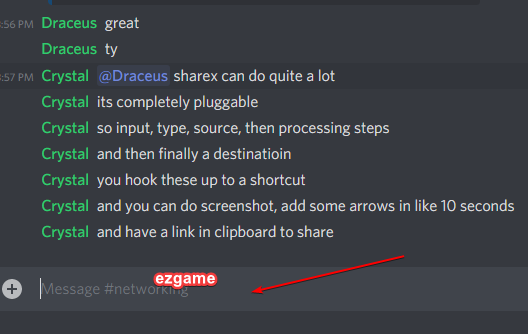
I use it mostly to blank out sensitive information from screenshots
limpid lion
 a lot more useful than my current screenshot program
tame carbon
on my linux system I just have a plain old screenshot tool
 waxen saddle
I’ve used greenshot as my capture tool. I’ll investigate sharex, but I’m pretty happy with greenshot at the moment
tame carbon
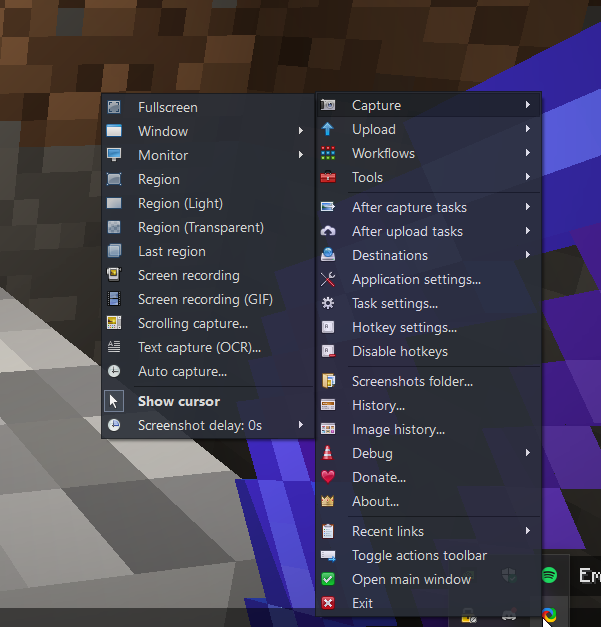
@waxen saddle https://i.imgur.com/yBQznXR.png
 waxen saddle
Screen/area recording to gif is a definite task I’ve been wanting to do.
Could help a lot with email tutorials.
thick minnow
tame carbon
<@!137786885761269760> https://i.imgur.com/yBQznXR.png
Is that KDE?
Or wait
tame carbon
windows lol
thick minnow
It's windows
tame carbon
@thick minnow shit. https://i.imgur.com/8knUCGA.png

wtf, I had 1 nugget of uranium-235 in my inventory, that's hardly dangerous
 peak cloak
tame carbon
on my linux system I just have a plain old screenshot tool
peak cloak
tame carbon
on my linux system I just have a plain old screenshot tool
I use flameshot
peak cloak
waxen saddle
Screen/area recording to gif is a definite task I’ve been wanting to do.
screen2gif on windows, peek on linux
waxen saddle
So many things to do! Check out sharex and screen2gif and peek. Dockerize mashcentral. Mow the lawn, paint some trim, peel up carpet padding.
 rocky badge

I want to move my sharex image hosting service to the cloud
It wouldn’t be hard, just deploy it to aws or something using docker
And the storage backend is S3
Each folder in S3 is a user, then each image ID is a folder within that, then the actual file

So the entire service is scalable 😄
Since the docker container doesn’t contain states, the database can be scaled, and S3 storage
But it’s just running on my R620 at home right now lol
tame carbon
Is there any benefit to using blade systems instead of regular 1U machines?
tame carbon
but but does the blade enclosure provide other kind of connectivity as well?
 dusty osprey
Yea sometimes some flexible ones have like flexible "cards" or so you can attach for fabric based networking and stuff
It depends, sometimes depending on the models your flexiblity can go up or down
dusty osprey
the cheaper ones or the older ones don't have much flexiblity. but say a HP Synergy has quite a lot of stuff you can do, really interesting ones
rocky badge
For Dell they have idrac on each blade and the chassis controller
Then you can throw in Cisco or Dell switches in the chassis
dusty osprey
for HP i think they have "image streamer" that allows you to like i guess remotly mount installion stuff in each blades, and then they have a centeralmonitor which checks each blade and their statu's and stuff
rocky badge

Dell has one that does 4 blades in a convention 2U

Dell
View the Dell PowerEdge C6420 Modular Server and shop all of our Servers at Dell.com. Dense, performance-optimized compute node. The bedrock of the data center.
dusty osprey
rocky badge
Dell has one that does 4 blades in a convention 2U
Yea I think one of them even does dual EPYC
per blade, on an 2U 😛
rocky badge
Yea

Dell
View the Dell PowerEdge C6525 rack server and shop all of our servers at Dell.com. Design to boost data center performance. The Bedrock of the Modern Data Center.

Two epycs per node
2TB per node
dusty osprey
isn't that just amazing 😛
rocky badge
 tame carbon
wait so one blade with that many cores? :P
 thick minnow
From an aquaintance:
anybody well versed in networking sorcery? I wanted to have my local Nextcloud server available to me on the go, but without having to go through setting up dyndns and hardening and such.. TLDR I set up ZeroTier, created a private invite-only network and added the server, but I can't get to it via the zerotier IP... any idea how I can get it to "bind" to that IP instead of the normal LAN one?
 waxen scroll
does netstat say its bound to an IP?
could just be a firewall issue for all you know
 candid field
nmap is pogerrs
thick minnow
quick flex
waxen scroll
 peak cloak
but eqivalent uploads
peak cloak
waxen scroll
oh yeah lol
waxen scroll
delete or ban
waxen scroll
<@&750150305383186585> when you got a second @tame carbon and @thick minnow are breaking channel rules with low effort speed test screenshots
tame carbon
no sense of humor this man
 stable iceBOT
 waxen scroll
@tame carbon lets keep the posts here high quality, please
@tame carbon have you seen r/sysadmin lately? lets not do that
makes me sick
lol
waxen scroll

 verbal charm
I came to see ban
waxen scroll
What if I told you this was a big brain only thing where I knew you were joking, so as a joke i reported you at the same time
tame carbon
tame carbon
no sense of humor this man
^
thick minnow
waxen scroll
What if I told you this was a big brain only thing where I knew you were joking,...
You got the whole squad laughing
😐
stable iceBOT
Unless you're all looking to be null-routed, I suggest returning to the topic of networking tech 👀

 distant wedge
null route me
 ancient osprey
So, I am using wire guard to connect to a friends network in another country to watch Netflix shows with her, but for some reason I can’t get into her Netflix Location so we can watch together. Was wondering why that is.
waxen scroll
I don't know anything about wireguard but networking 101, to use her internet you need a default route from your computer to the tunnel going to her and she needs a route to you from her router so that the traffic comes back to you
ancient osprey
We have one setup.
We followed the wire guard guides, as that is what everyone told us to do. We wanted a free way to do it. But it’s still being quite stubborn.
 tender hazel
@ancient osprey you obviously still have something wrong with your wireguard setup
waxen scroll
mhm
if its not working now and you can browse the internet fine somethings horribly wrong
if it was half working your internet wouldnt work
 gusty dove
I have a router with DD-WRT and it let me set the 2.4Ghz channel to 13 even though I am in the US lol
tender hazel
uh you can't use channel 13 in the US
ancient osprey
tender hazel
<@!261349467356135425> you obviously still have something wrong with your wiregu...
Should we reinstall and try again?
gusty dove
I don't think WRT has region settings, at least my version from 2018.
tender hazel
ancient osprey
Should we reinstall and try again?
it isn't necessarily that you missed a step somewhere. There are so many different ways you can set up wireguard and so many different scenarios.
the procedure you followed you might have followed correctly, but you are wanting to do something very specific that may not be exactly what the guide you are using is meant for
you should share your config on both sides, hide the keys and public IPs etc.
ancient osprey
Okay. One sec.
waxen scroll
last time i did this with openvpn I had to define the VPN subnet, which was different than any of the networks on the local or remote sides, then if that VPN network was 192.168.3.0/24 I had to install a static route on the remote side router (where I want to use the internet) to point to the server hosting the openvpn as the next hop. Next, openvpn had to be told to use the DNS servers from the remote side as well.
tender hazel
wireguard is not openvpn
ancient osprey
[Interface]
Address = 10.0.0.1/24
SaveConfig = true
PostUp = iptables -A FORWARD -i %i -j ACCEPT; iptables -t nat -A POSTROUTING -o eth0 -j MASQUERADE; iptables -A FORWARD -o %i -j ACCEPT
PostDown = iptables -D FORWARD -i %i -j ACCEPT; iptables -t nat -D POSTROUTING -o eth0 -j MASQUERADE; iptables -D FORWARD -o %i -j ACCEPT
ListenPort = 51820
PrivateKey = <Key>
[Peer]
PublicKey = <key>
AllowedIPs = 10.0.0.0/24
Endpoint = <My public ip>
waxen scroll
it gets even harder too if that computer hosting the VPN at the remote side has a firewall. you have to not only allow the VPN connection from the internet but you also need all sorts of rules for a tunnel (or allow all). Next the computer hosting the VPN needs the ability to forward traffic which is not on by default in linux if i recall
ancient osprey
[Interface]
PrivateKey = <key>
Address = 10.0.0.2/24
DNS = 1.1.1.1, 1.0.0.1
[Peer]
PublicKey = <key>
AllowedIPs = 0.0.0.0/0
Endpoint = <her address>
first one is the "server" side the second is my client side.
i didn't have my client interface selected, but now i'm in a loading hell. it wont load any websites
peak cloak
ancient osprey
i didn't have my client interface selected, but now i'm in a loading hell. it wo...
ok, can you ping an internet address
in cmd
try
ping 1.1.1.1
ancient osprey
that is a no go, I just get timeouts
peak cloak
ok so you have no internet at all
try to ping 10.0.0.1
I assume that's the wg server internal IP
rocky badge
ancient osprey
[Interface]
PrivateKey = <key>
Address = 10.0.0.2/24
DNS = 1.1.1.1, 1.0.0.1
[Pe...
I’m not sure if this is the issue, but I’ve always done a /32 on the “client” interface address
peak cloak
rocky badge
I’m not sure if this is the issue, but I’ve always done a /32 on the “client” in...
it shouldn't
rocky badge
ancient osprey
[Interface]
Address = 10.0.0.1/24
SaveConfig = true
PostUp = iptables -A FORWARD...
And also here, are you using the correct interface, dumb question but making sure
tender hazel
The AllowedIP's on the server side should probably be 10.0.0.2/32
instead of 10.0.0.0/24
rocky badge
^
ancient osprey
I thought that was a wildcard. but I should fix
tender hazel
it uses it to tell the peers apart.. if you have another peer it would have a different IP in the same /24, and so that's why you use the /32 so that that peer relationship only applies to that specific IP
rocky badge
Also, you don’t need to define endpoint on the server side, you can leave that alone. Again you can do that, but just trying to see if a working config like mine would work for you
ancient osprey
okay. one sec
tender hazel
@ancient osprey can you run ipconfig and check to see if you have an IPv6 address other than ones that start with fe80:: ?
rocky badge
This is all of my wg conf with some private stuff redacted for a peer
 ancient osprey
tender hazel
<@!261349467356135425> can you run ipconfig and check to see if you have an IPv6...
ancient osprey
tender hazel
<@!261349467356135425> can you run ipconfig and check to see if you have an IPv6...
no ipv6
rocky badge
You wouldn’t have ipv6 on the wg interface if you didn’t define one?
tender hazel
I mean he might have ipv6 on his computer
tender hazel
in which case the netflix traffic would go over his local internet instead of through the wireguard tunnel
because netflix is all on ipv6
ancient osprey
so I'm connects viz the tunnel
but it still takes me to us netflix not her netflix
but I have her ip address
tender hazel
IP address lookup, location, proxy detection, email tracing, IP hiding tips, blacklist check, speed test, and forums. Find, get, and show my IP address.
verify that you only have an ipv4 and not an ipv6 address, and that it shows up as hers
ancient osprey
I only have her ip and my location shows her country
tender hazel
are you using like a netflix app or the website
ancient osprey
the website
tender hazel
what happens if you try starting a web browser you don't normally use and use that to log into netflix
ancient osprey
it works now
tender hazel
ok
try tracert 1.1.1.1
make sure the traceroute output shows it is going over the wireguard tunnel instead of your local internet
it should be
ancient osprey
it shows its going to going thru her country steps
tender hazel
and if you ping ipv6.google.com you get no response, correct?
ancient osprey
i get unknown host for ipv6.google.com
tender hazel
ok good, so you certainly don't have ipv6
but then I have no idea what is going on
you are running windows, correct?
ancient osprey
I'm on mac unfortunately
ancient osprey
yeah, uni. I'm studying networking. First year... not doing so hot
peak cloak
mac is more similar to linux than windows to linux
tender hazel
instead of ping
ancient osprey
I get No route to host
peak cloak
ok, so no ipv6
tender hazel
but then it should be working
peak cloak
what's the issue exactly right now?
tender hazel
it is working, and everything shows he is coming from the other country but when he logs into netflix he gets US netflix
tender hazel
are you sure you are getting US netflix? how are you checking.. are you trying to search for a show that is only in the other netflix?
peak cloak
so your internet works just fine, can watch youtube and stuff?
ancient osprey
yes
ancient osprey
internet works just fine. I try searching for a show only on her countries netflix
tender hazel
run "netstat -rn" to print the routing table on your computer
do you see any.. weird routes that you wouldn't expect?
i.e. things besides your local network, wireguard network, and default gateway?
rocky badge
I believe Netflix's fast uses the same server selection as Netflix itself
So you could probably see what it's connecting using that
 rocky badge
Wow that sucks
ancient osprey
i just tracerouted and it shows a hangup before reaching netflix what connected to my vpn
tender hazel
so if your friend is in europe, according to european law, you have to be shown US netflix when connecting via europe
ancient osprey
luckily shes in canada
ancient osprey
traceroute is just spewing * * *
rocky badge
ancient osprey
i just tracerouted and it shows a hangup before reaching netflix what connected ...
When you say "hangup", do you mean just a long series of hops timing out?
ancient osprey
all i get is * * * now
rocky badge
Those are just that hop's firewall blocking icmp usually if you can still access the site
tender hazel
yeah, traceroute results can be misleading and make you think there are problems that are not there
your VPN is fine
everything is set up correctly
the issue is that netflix assumes you are travelling to the country temporarily
and is still showing you the US netflix library as a result
rocky badge
Which I guess its something with Netflix blocking ICMP https://blob.rocks/YzPboBKS6W.png

because I'm getting the same thing, but I can still access netflix
ancient osprey
weird. we tried this, because we know some vpns do it but everybody told us using wiregaurd is just fine
rocky badge
some vpns aka VPN services or protocols?
ancient osprey
both
tender hazel
this isn't to do with VPN blocking
they would have no clue you are connecting via a VPN
peak cloak
^ especially now that it's via your friends IP
if it was some actual VPN service they may block it
rocky badge
Yup, they just see its a res IP
ancient osprey
I have a linode vps setup in canada for a remote desktop experience to learn more without tearing down my machine 24/7 and tried with the same config still nothing
rocky badge
So Netflix probably upped their anti VPN
tender hazel
they would just see it as if you were travelling to your friend's home and going on netflix there
if you were to fly to canada
go to your friend's home
and log into netflix
you still would not get the shows
you would still just be getting US netflix
rocky badge
Help Center
Planning a trip or a move soon? Here’s how to take Netflix with you.
tender hazel
I'm guessing that netflix just took their EU rules and made them apply to everybody
rocky badge
hmm, nvm that's not really helpful on this
tender hazel
it was probably easier for them
and cut down on use of VPNs to access other countries libraries
if you were to log into her netflix account while on the VPN, you would get canadian netflix instead
rocky badge
I guess some of the copyright holders got mad lol
ancient osprey
it's weird though, I was testing privatevpn and it worked just fine, but we thought this diy approach being no cost would work just fine
guess paid vpns are. the standard why to go now... 😦
peak cloak
ancient osprey
it's weird though, I was testing privatevpn and it worked just fine, but we thou...
huh
weird that another vpn would work
tender hazel
how long ago did you try privatevpn?
rocky badge
Were they around the same time?
peak cloak
^
ancient osprey
literally lastnight while working on this\
peak cloak
huh
ancient osprey
we were up until like 5 working on this dumb stuff
peak cloak
in my mind there is no reason that that should work, but not a your own vpn to a canadian IP
ancient osprey
weird eh
ancient osprey
I tried this morning and it works fine
rocky badge
And you're sure you were able to access geo locked content?
ancient osprey
I have like 24 hours left on the trial period
rocky badge
Because netflix will work on a known VPN (to netflix), but only international content
ancient osprey
it showed me canadian netflix. We just finished ride along and from what I saw was only on canadian netflix not us
ancient osprey
Connected me instantly to CA Netflix
tender hazel
yeah, that doesn't make any sense
but your wireguard setup is correct, you don't have anything set wrong
and netflix has no way of knowing that you are connecting via wireguard through your friends house
rocky badge
Maybe if you were using the Netflix app, but not in browser.
But I don't think Netflix does that
tender hazel
is the VPN connection in the same province as your friend?
tender hazel
anyway, your wireguard VPN is working correctly, but when you log in from her home, for whatever reason, netflix doesn't allow you to connect to canadian content and forces you to US content instead
it is something netflix is doing
how the VPN provider gets around it, I have no idea
the only explanation is that netflix is somehow now also tracking residential ranges to try to prevent this kind of VPN-to-a-friend means of getting around country restrictions
or that the VPN provider is doing some crazy stuff to force netflix to display canadian content that otherwise would not show up
ancient osprey
i tried from a vps of mine and to seems to do the same thing my friends connect does
peak cloak
ancient osprey
i tried from a vps of mine and to seems to do the same thing my friends connect ...
yeah I think the vpn service is doing something funky to make it work
idk
tender hazel
it isn't anything we can help with though
you might just have to break down and pay for the account with them to watch it
unless you log in with your friend's credentials when connected to the VPN
that would work
tender hazel
peak cloak
yeah I think the vpn service is doing something funky to make it work
yeah I think the same thing
ancient osprey
yeah... ugh, she knows I hate those because "paided" ones because their log policies are garbo
it seems some people use unbound to help with these kinds of things>
peak cloak
ancient osprey
it seems some people use unbound to help with these kinds of things>
unbound is a dns server
how would that help?
ancient osprey
peak cloak
unbound is a dns server
no idea
tender hazel
I used to subscribe to this DNS service that let me watch US netflix
at least at the time, the country choice had something to do with the dns records used
ancient osprey
yeah, some people are saying use dns proxies
peak cloak
huh
peak cloak
ancient osprey
yeah, some people are saying use dns proxies
maybe find your friend's ISP dns server and use that?
but I doubt it would work
tender hazel
yeah you can try that, and I also doubt it will work
I'm pretty sure that the dns service that I used actualy rewrote some of the netflix dns records
ancient osprey
yeah, big no go.
tender hazel
so that they returned a different server IP/name than they normally would have
basically these DNS services figured out a way to systematically override certain DNS records from what netflix wanted to resolve them to
in order to get the content of a different country to appear
probably the reason privateVPN works is because they are probably doing something regarding DNS
ancient osprey
that's my thoughts at this point is dns indexing and the swapping for known good entiies.
if you had to go with.a vpn that is trusted and works well with user privacy who woukd you choose?
I've tried PIA and liked it in the past but since the Kape change i am not so lovin it
peak cloak
I've heard good things about mullvad

Mullvad VPN
Mullvad is a VPN service that helps keep your online activity, identity, and location private. Only €5/month - We accept Bitcoin, cash, bank wire, credit card, PayPal, and Swish.
you can even pay with cash
peak cloak
ancient osprey
does it work with geo restrictions?
no clue
peak cloak
ancient osprey
does it work with geo restrictions?
apparently looking online it doesn't work well with streaming
tender hazel
yeah I read that mullvad is not a good choice if you are looking for a VPN to bypass country specific streaming restrictions
ex. netflix
thick minnow
waxen scroll
<@&750150305383186585> when you got a second <@!167698274969452544> and <@456226...
mf cant handle my gigabit ethernet
peak cloak
thick minnow
mf cant handle my gigabit ethernet
works with 10 gig on a daily basis
thick minnow
peak cloak
*works with 10 gig on a daily basis*
my dad has 10 gig, never tried it tho cause theres a bs slow vpn on it and some antivirus which scans every packet sent or received
tender hazel
I don't have 10 gig at home
tender hazel
I don't really know what I would do with it even if I had it
my internet is fast enough for me - 300 down, 100 up
tender hazel
if you actually look at traffic graphs for people with these super fast connections, most of the time they are using less than 10Mbps
thick minnow
some people have gigabit cause they have like 7 people on their network and theyre all watching 1440p video on netflix or some shit
rocky badge
50 up 🥴
thick minnow
rocky badge
50 up 🥴
idc about upload tbh
rocky badge
I think I have like 22 devices on WiFi and 50 something wired 
hollow marlin
tender hazel
if you actually look at traffic graphs for people with these super fast connecti...
Average use everytime I review for upgrades is around 20-30mbps during peak hours for residential outside raw downloads
tender hazel
ok - might be different here
rocky badge
That seems like a normal number ya
Realistically Netflix/streaming doesn’t use a lot per client
thorny vector
hollow marlin
Average use everytime I review for upgrades is around 20-30mbps during peak hour...
I'd be interested in seeing what the outliers look like for that data
hollow marlin
thorny vector
I'd be interested in seeing what the outliers look like for that data
I can run some reports. Most outliers are ~120mbps peaks and the rest being large downloads. I only run it on connections 500 and up to get a better picture
hollow marlin
tender hazel
ok - might be different here
I was just pointing out that it's similar to what I see. Many think that they need a gig and make use of it more often then not
thorny vector
Not trying to add to your work load for some random reporting. Just curious, and that ball park estimate scratches that itch
hollow marlin
Oh yeah it only takes a second but I can get it over
rocky badge
We just have gigabit because it was cheap and it’s nice for larger downloads lol
tender hazel
hollow marlin
I was just pointing out that it's similar to what I see. Many think that they ne...
ahh ok, yes, I agree
rocky badge
But I could probably totally live off of half of that or even a quarter
thorny vector
With my packet inspection, my gigabit is more like 750mb/s
rocky badge
I get line speed with DPI but then again my router is an overkill dual Xeon server lol
thorny vector
What rules are you inspecting with?
rocky badge
2620v2s
it’s just DPI, it’s not IPS/IDS
Although when i was testing IPS/IDS I got line speed
thorny vector
How many cores?
Right now I'm running my Emerging Threats, Snort GPLv2, and Snort VRT rulesets along with OpenAppID, off of 2 cores (e5-2407) and 8GB of ram
 obtuse oxide
thick minnow
obtuse oxide
thick minnow
Do you think I should buy a Nvidia Shield TV Pro, or a HTPC (Mini PC, Windows 10) to run my Plex server, and for streaming Netflix, Youtube?
thick minnow
Hi, Anyone Online?
 dusk oasis
thick minnow
Hi, Anyone Online?
dusk oasis
thick minnow
Hi, Anyone Online?
Me
 plain siren
Maybe
limpid lion
thick minnow
Do you think I should buy a Nvidia Shield TV Pro, or a HTPC (Mini PC, Windows 10...
Depends on your needs, shield tv is a really good purchase regardless imo. Not really networking related however ^^
thick minnow
thick minnow
Hi, Anyone Online?
Yes
 warped storm
So, I thought my ethernet cable was broken BC I was only getting 100mbps instead of 1 gbps
Then Windows got an update, and know I'm getting the full 1gbps, thanks Microsoft
 burnt wharf
Is their a way to hide vpn server ip?
thick minnow
burnt wharf
Is their a way to hide vpn server ip?
I don't think so, and I remember someone asking about it on Fiverr
Unless
You use a proxy
But I'm not sure
burnt wharf
O I forgot about proxies
tame carbon
@tender hazel damn. someone threw a cable into the TV box enclosure without thinking.
When the TV was lowered by the motor into the enclosure, it got caught on the cable
ripping the entire PCB of my AP from the enclosure
poor hAP ac2
USB port is fucked, but the rest of the board is still functionally ok
thick minnow

 silent mist
are wifi mesh any good?
 sick pecan
not sure this is exactly the place to ask but i figured ill give it a shot.
my verizon fios internet, which has for the most part worked flawlessly for years has started to intermittently cut out for a few seconds. for about ~10 seconds- 1 min several times an hour for the entire day. it will cut out. its already frustrating enough having games get cut off but now my roomates are trying to get me to get cheaper DSL because whats the point in having fast internet if its down 40 times throughout the day. I love my fios speeds, and dont want to get rid of them. can anyone point me to some possible solutions. verizon is no help because im not using their router
 graceful merlin
hi
i'm going to buy a wifi router for 200mbps
i have choosen this one
i was in thought of going with asus rt ac59u, but it was having bad reviews , so i choosed this one!
peak cloak
sick pecan
not sure this is exactly the place to ask but i figured ill give it a shot.
my...
Router prob
Wait dsl?
Verizon is phasing out dsl
Its all fiber now
I have fios
Cheapest plan is 300/300
Dsl is known to be not that stable and is very suseptible to interference
sick pecan
peak cloak
Router prob
Yeah i know, i dont want to go to DSL i want to keep fios, but if it cuts out 40 times a day then my roomates no longer want to pay for it. i want to fix it
peak cloak
sick pecan
Yeah i know, i dont want to go to DSL i want to keep fios, but if it cuts out 40...
wait
so verizon dsl or fiber?
if fiber
router probobly the problem
to test, try hooking up some sort of computer directly into the ONT
using ethernet
and see how stable it is
peak cloak
sick pecan
Yeah i know, i dont want to go to DSL i want to keep fios, but if it cuts out 40...
also
wifi or ethernet
tame carbon
graceful merlin
i was in thought of going with asus rt ac59u, but it was having bad reviews , so...
Ahhhhhhhhhh
ASUS :/
sick pecan
i am directly connected to ethernet through a synology rt2600ac router
ill try the basement and connect directly through the ONT, but it may be a bit its not very predictible when it goes out
peak cloak
@sick pecan when it "goes out", does it actually go out? Next time when it "goes out" try in cmd ping 1.1.1.1
it could be a problem with DNS
sick pecan
ill test it. thanks for the tips
tame carbon
@sick pecan what does Fios tell you when you call the customer support?
plain siren
peak cloak
Verizon is phasing out dsl
Basically everyone is heh. Its more costly than Fiber to maintain
sick pecan
They tell me that they don't offer troubleshooting without their supplied router.
tame carbon
@plain siren tmobile is still rolling out fiber to the curb lol, in germany
They do the last mile still with VDSL
plain siren
Germany got some fetish with their DSL infra..
sick pecan
their router is trash however. And i replaced it years ago with a synology rt2600ac
tame carbon
@plain siren well its just a once publicly owned, now privatized company.
https://i.imgur.com/rLIWpkg.png
 peak cloak
sick pecan
their router is trash however. And i replaced it years ago with a synology rt260...
peak cloak
sick pecan
their router is trash however. And i replaced it years ago with a synology rt260...
understandable
I have my own setup
tame carbon
but ... asus though 
peak cloak
in a rack
sick pecan
yup
peak cloak
tame carbon
Synology makes routers?
yes
plain siren
Yea
sick pecan
and mesh network APs
 tame carbon
 peak cloak
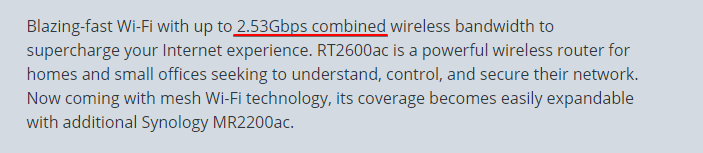
visually
tame carbon
At least their marketing is only 50% bullshit
plain siren
Grandstream, the VoIP company makes some pretty dank APs for the price as another fun one
 plain siren
any savy user reading cnet
tame carbon
🤣
plain siren
they ain't savy
tame carbon
Dual core 1.7 GHz
mh. probably enough for gigabit
dont like the no test results thing
plain siren
Hmmm do I put the AdBlocking DNS behind or in front of the AD DNS l
tame carbon
 peak cloak
plain siren
Hmmm do I put the AdBlocking DNS behind or in front of the AD DNS l
peak cloak
plain siren
Hmmm do I put the AdBlocking DNS behind or in front of the AD DNS l
I put it in front
tame carbon
wat
peak cloak
tame carbon
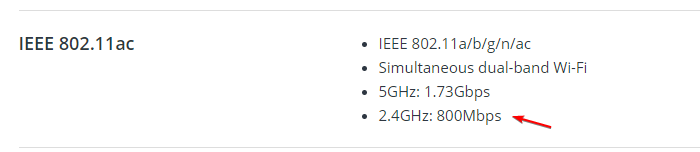
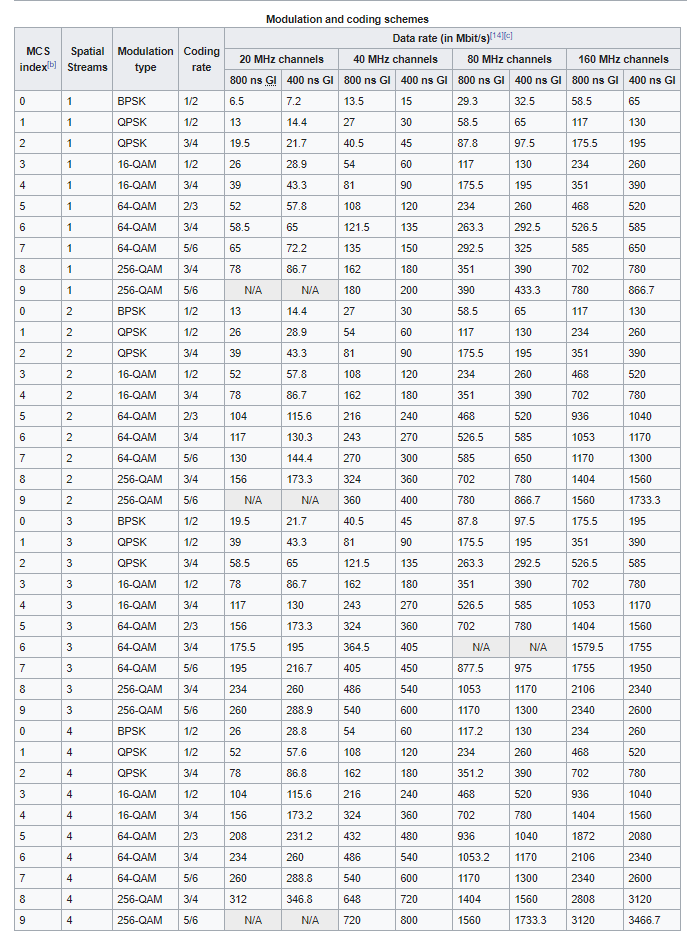
https://i.imgur.com/S08aTEp.png
that's the theoredical max of 2.4ghz
 plain siren
peak cloak
I put it in front
plain siren
peak cloak
I put it in front
A shitty graph in 15 seconds I made that I might do.
 tame carbon
for 20MHz channels, there isnt much bandwidth
@plain siren do you have to take channel gaps into account for 5GHz ?
or can you just stack frequencieschannels up against eachother?
plain siren
Ardoin.me being root domain (and placeholder for forest root)
Child AD Domains are site based
As long as you don't overlap them, even on the edge, you good. Keep it simple.
tame carbon
Those APs I have have two chains
what does that mean?
more chains = more extensions right?
plain siren
Oh boy
plain siren
chains relates to the radio transceiver
If you have 2, you can Rx and Tx at same time
If you have one, you can't hear while you Tx
tame carbon
but does it at all correlate to channel widths?
plain siren
No, channel widths are just bigger...... MTU's as an analogy
tame carbon
so what about 160MHz for 5GHz ?
Does that require client capabilities?
more extensions means more clients at same time
plain siren
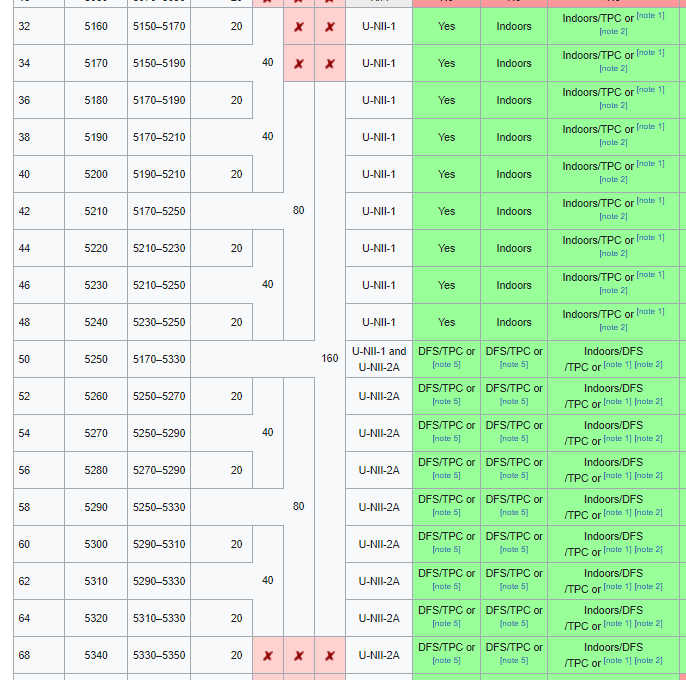
Ok take a look here

What happens when you go 160MHz?
You suddenly only have 2 channels available
tame carbon
not much left
plain siren
If you have a ton of 160Mhz radios... They all gonna be on top of each other
There's a balance
plain siren
Many Streams/Connections/Radios, might wanna tighten them bandwidth numbers to make room
 plain siren
There's another way of going about it
tame carbon
@plain siren I can get away with sectorizing 2.4GHz
plain siren
If you drop the broadcast power of a radio you can shrink the overlap physically
plain siren
Your radio needs to talk louder than the noise behind it, but not so loud that they can talk over each other
plain siren
If you can overcome the deficit of the background noise, you can maintain full control of your local RF environment
That is the key to a well designed distributed radio communication system.
tame carbon
okay, but what is acceptable noise levels then?
plain siren
Shit, you could foil line your outside fence for all I care
tame carbon
I don't know how to read the dBm scale
plain siren
plain siren
Shit, you could foil line your outside fence for all I care
This works and it's as stupid in looks as it sounds.
plain siren
tame carbon
I don't know how to read the dBm scale
dBm is EXPONENTIAL hehe
plain siren
 tame carbon
but idk what is "good signal" and "bad signal" when looking at the numbers
@plain siren the stronger the signal, the better modulation techniques can be used, right?
plain siren
Okay run a channel scan and freq scan and give me the result
Fuck it, we will do it live
So what we want to look at first is any background noise and it's intensity
That will be our "noise floor"
tame carbon
@plain siren well the setup I will be deploying will have 0 local noise
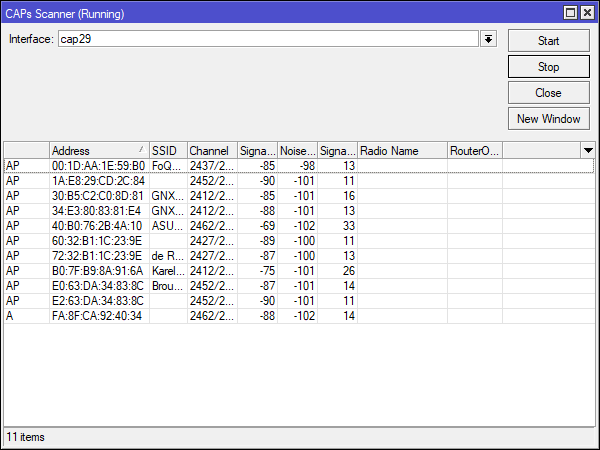
but this is @ home right now
plain siren
Our "gain" is our APs signal minus the noise floor
tame carbon
I can see the SNR
plain siren
Yeah that's nice tbh. Which column is which lol I hate this UI
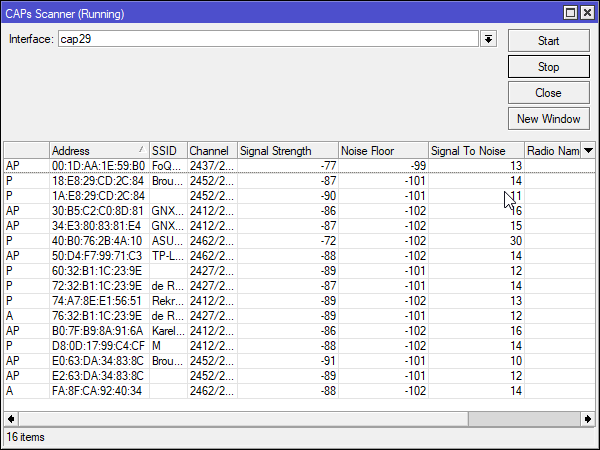 plain siren
If your signal to noise ratio is high, that means your signal is coming clear
tame carbon
yeah but what is high
plain siren
We can get a good idea of that by looking at your AP
tame carbon
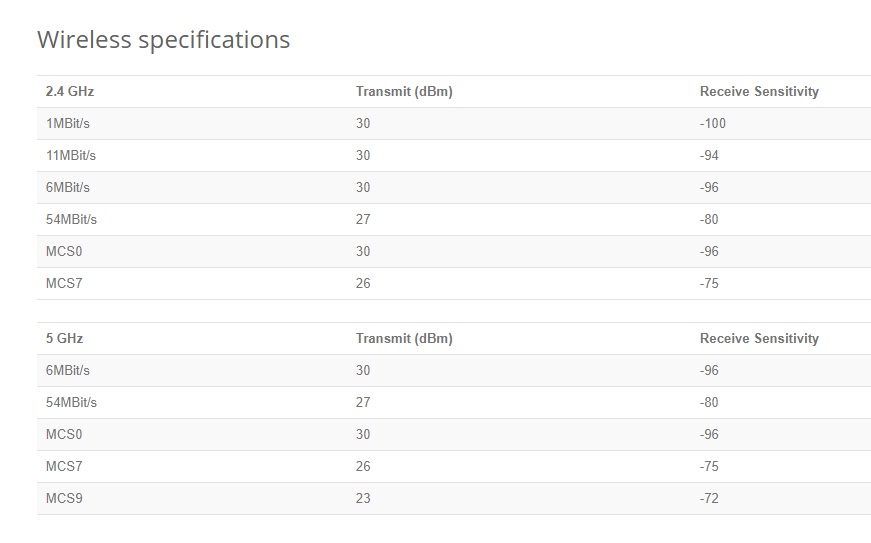 plain siren
Can we get your APs printout
I know what the specification says but that's best case
I like to take a more realistic approach
plain siren
So ideally, if you have 2 WiFi radios on top of each other, they will take turns talking.
Which is why we say keep to those 3 channels on 2.4
But your phone most likely does not broadcast at the same power as a stationary AP
That being said
If you are close enough, you can get what's called "Front End Overload"
tame carbon
@plain siren so what do I do if I have 2 sector antennas on the same pole broadcasting
do I put them each on a seperate channel
?
plain siren
I presume both of these antennas are attached to the same transceiver?
tame carbon

MikroTik is a Latvian company which was founded in 1996 to develop routers and wireless ISP systems. MikroTik now provides hardware and software for Internet connectivity in most of the countries around the world.
plain siren
Or are we talking about two different broadcast units
tame carbon
No, I am theorizing about this right now ^
I will have multiple locations with 2 or 3 of those
they only do 90 degrees on 2.4 and 60 degrees on 5Ghz
plain siren
Considering these are directional
If there is no overlap in the physical RF topology
You could use the same Channel
If they can't hear each other, they can't interfere with each other
tame carbon
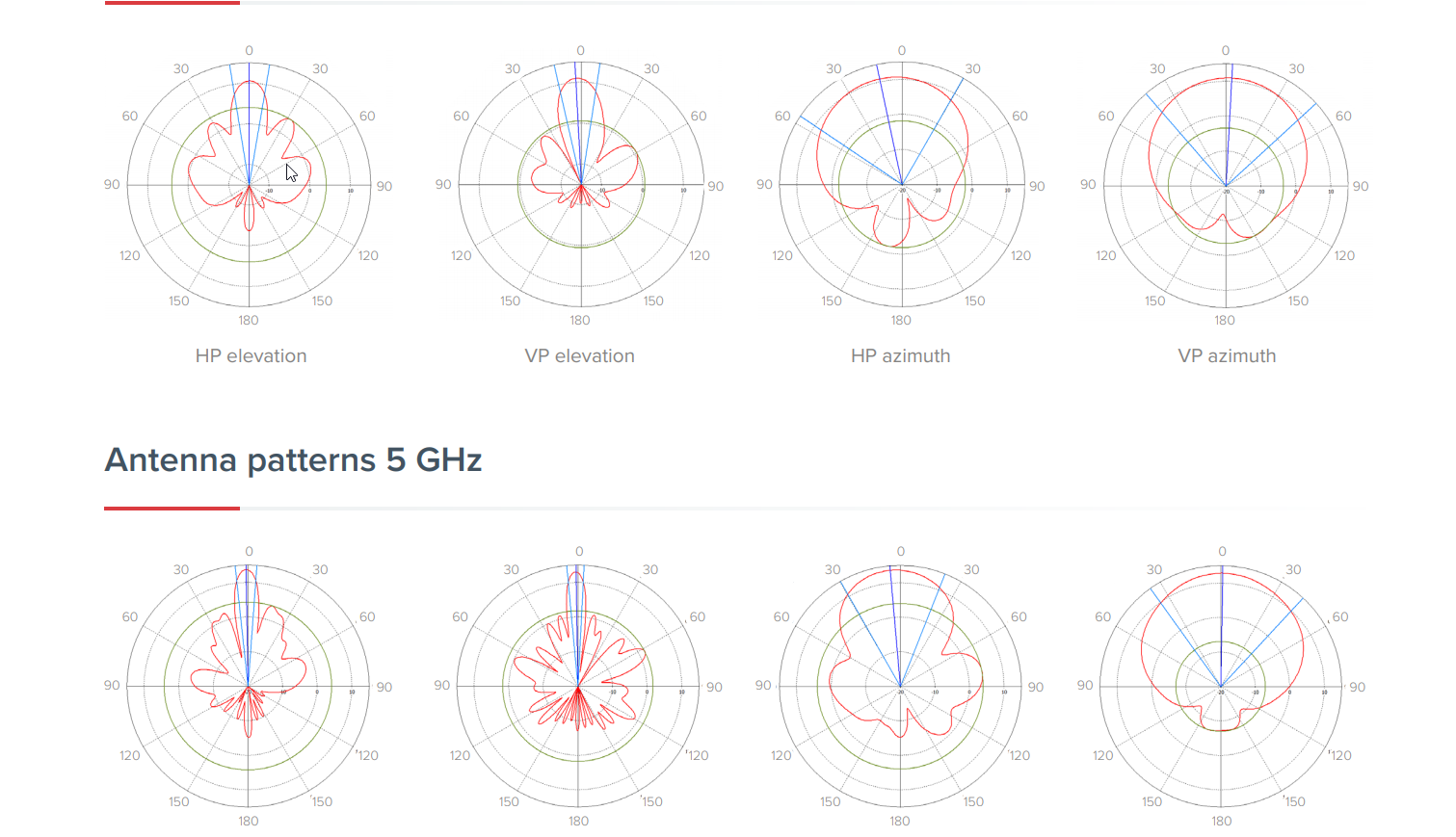 plain siren
This is along the same line as reducing power
Yeah, I would put some shielding between the 2 devices but that would open the RF Environment back up for additional channels on your full coverage
tame carbon
mh
plain siren
You only want to use different channels (if you're being this picky about it), if the radios can hear each other
tame carbon
@plain siren yeah but the question is
how many 80MHz blocks are there
that I can use
plain siren
 tame carbon
I want to create this CAPsMAN configuration ahead of time
and label them
so I can draw this all on a map
plain siren
6
tame carbon
@plain siren outdoor only
tender hazel
there aren't 6, that's including the weather radar
plain siren
tender hazel
there aren't 6, that's including the weather radar
Yeah I noticed that and wasn't thinking it's 4 in that spec
tame carbon
That's so garbage.
plain siren
tame carbon
wtf
Honestly you're going to have to check local regulation
tender hazel
you might have four 80mhz channels if regulations allow you to do use that first one outdoors
tame carbon
What do they want me to do?! https://i.imgur.com/K3VugGa.png
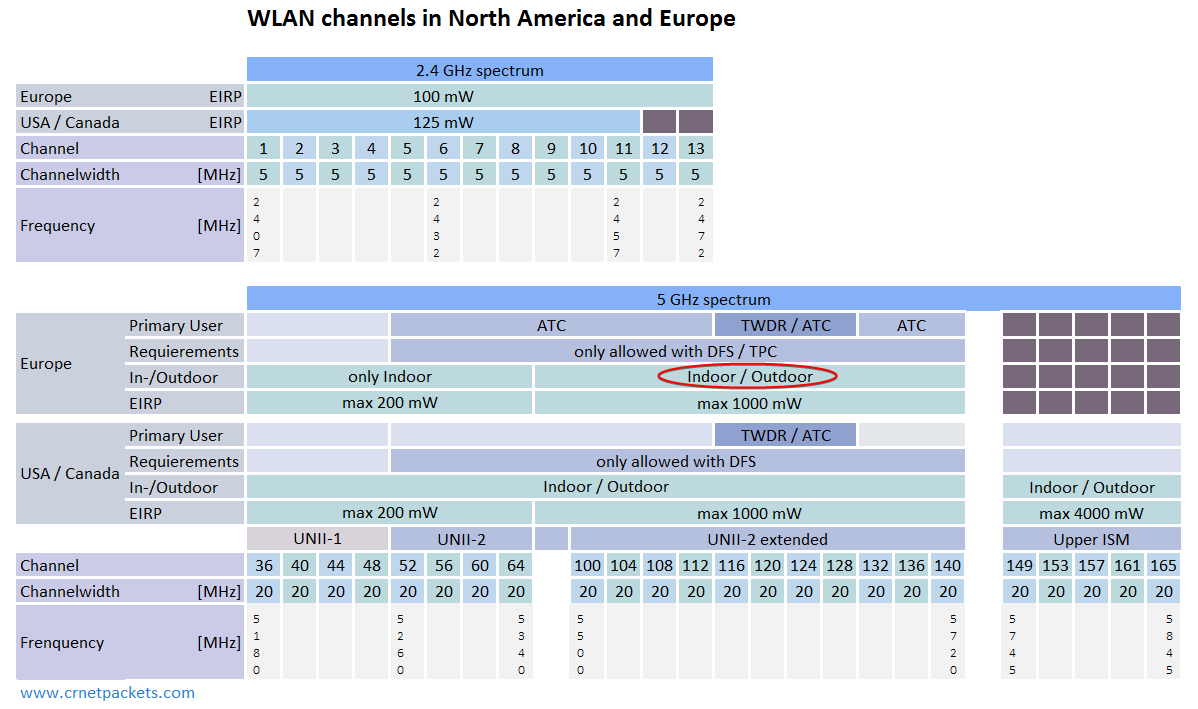 plain siren
So... 3..
plain siren
Wait no 144 listed so 2?
tame carbon
two and a half
plain siren
Btw TPC is 802.11h
plain siren
TPC is a dynamic broadcast power that literally fixes the whole "too loud APs" thing
It sets the broadcast to what's needed, not to absolute max
plain siren
tame carbon
does this concern me?
Short range shit
Damn reply sucks on mobile
SRD is like... A pacemaker
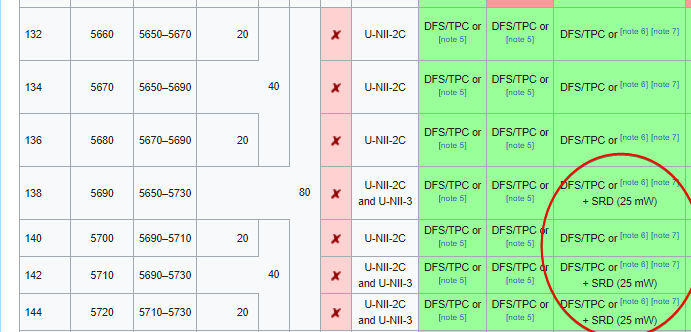 plain siren
Yeah 25mw is tiny compared to 200mw/1000mw
So they have little concern of interference
tame carbon
well
I dont want to accidentally stop someones heart
can I broadcast on these frequencies or not?
tender hazel
when you set the country and set regulatory domain, it won't let you go above what the country specs allow
tame carbon
 plain siren
According to that block chart, you can between 100-144 with DFS/TPC enabled. (1000mw)
tame carbon
This is what germany's info portal gives me ^
plain siren
So that right block. Wether radar will set off DFS alot if you have one close.
tender hazel
that is not including UNII-3 though
and we had established that the chances of having a weather radar close to that location were slim
tame carbon
yeah
tender hazel
they are going into a remote area, no airport nearby, only an old military base that has been abandoned for decades
plain siren
Lovely
tame carbon
@tender hazel I'm bringing that big omni antenna with me to do some testing on site
@tender hazel that military base is a 30 minute hike up the mountain away lol
nearest town is 2km away
plain siren
Those military bases may actually be deregulated test sites too.
tame carbon
@plain siren North Point
plain siren
Allowing for adjusted gains
tame carbon
former US Nuclear depot
The barracks and office complex was built 40 years ago, never put to use
its surreal going onto the place
plain siren
That wasted place? Ugh
plain siren
tame carbon
The barracks and office complex was built 40 years ago, never put to use
Yeah this
tame carbon
@plain siren there's tunnels underneath it
really cool
xD
its all still fenced off, but if you just go to the entrance
tender hazel
Amateurfunk, Eisenbahnen, Modellbahnen, Röhrenradios, Bilder, Militär
plain siren
Yeah, avoid those unless you got a personal gas ppm monitor
tame carbon
you can see how often people have used sidecutters
and how often it was patched up again
xD
plain siren
I wonder if it's up for negotiable-sale
tame carbon
Its still US soil, just completely abandoned I believe
still warning signs everywhere
but its mainly used for storage of logging activities in the area
plain siren
Yeah, I bet Germany would sponsor a Back Purchase if it let them reclaim the national ownership status too.
tame carbon
@tender hazel that's it!
plain siren
tame carbon
<@!530075635423510548> that's it!
What's your goal out there btw?
tame carbon
@plain siren helping my dad distribute 1000/500mbit fiber over a very large camping area
tender hazel
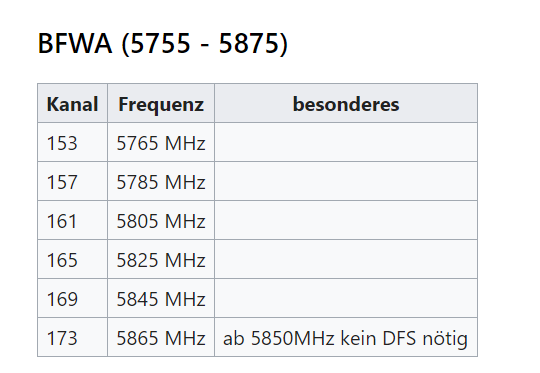
if you have 3 80mhz channels with sufficient power that will actually be ok
with the planned layout
if you only have two, I would use 40MHz channels instead
tame carbon
@tender hazel aren't those APs on the same pole going to interfere with eachother?
ohhhh
plain siren
tame carbon
ohhhh
Ay now u get it
tender hazel
it would be like this: A B ---------- C A ------------ B C ---------- A B etc
two ap's per pole along the perimeter to cover inwards from there
 tender hazel
you're only reusing the A frequency on the next pole over on that AP and that is going to be facing in the opposite direction of the A frequency on the first pole
tame carbon
This requires a permit ^
UNII-1 I cannot use, perhaps only for the indoor office and restaurant seated area
same is for UNII-2

 tame carbon
@plain siren the rough areas that I want to cover are these: https://i.imgur.com/4VnL1nP.png
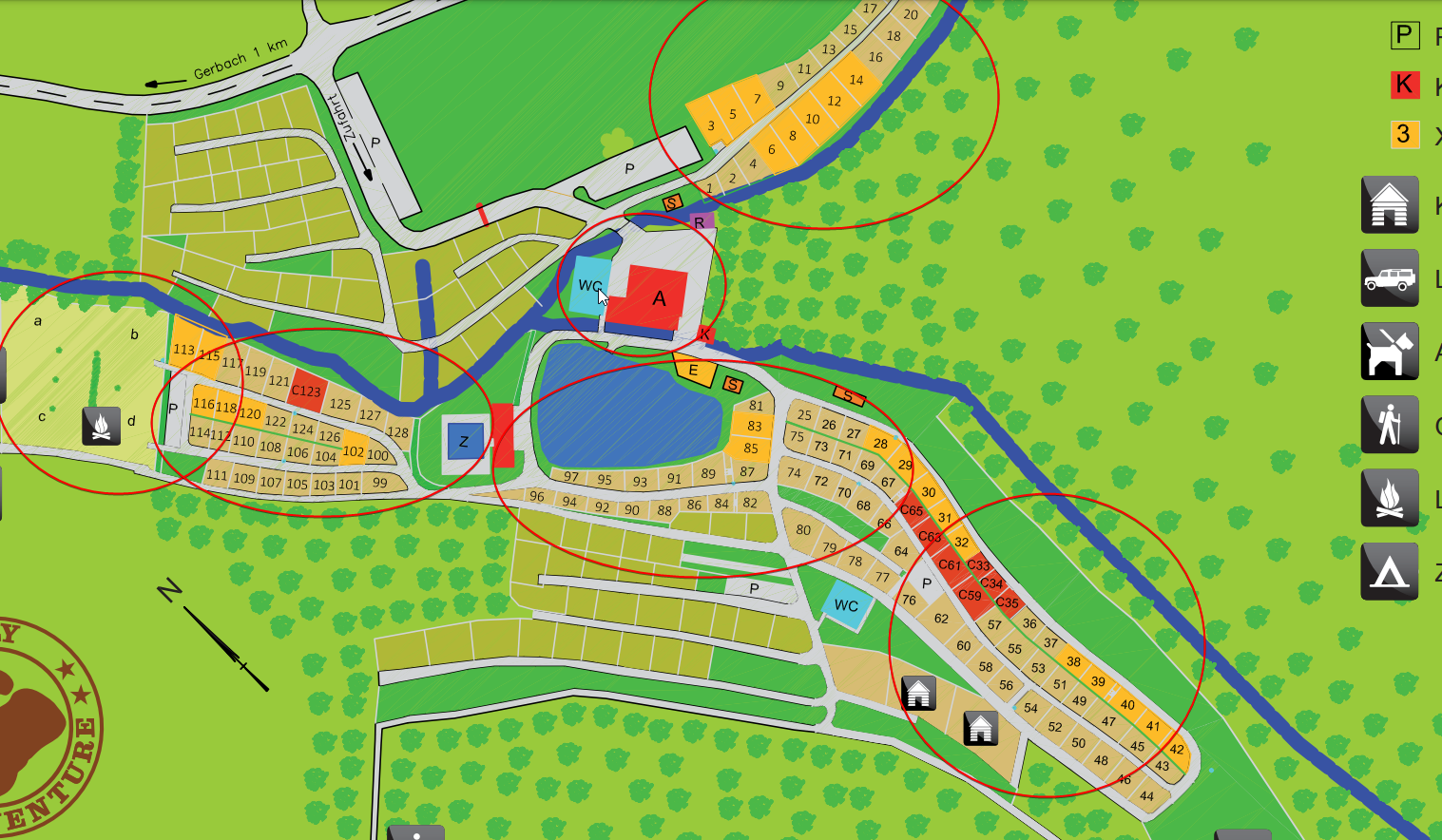
the A is where the central building is located
plain siren
tame carbon
on the roof we'll be putting 60GHz backhaul
plain siren
You are trying to basically WiMAX/WISP a LAN
tame carbon
@plain siren well, its just a vlan
and EAP in the future
all masqueraded over a reserved public IP
plain siren
So you are doing WISP with CG-NAT but deployed as a LAN
tame carbon
Yes
plain siren
Might as well call the users subscribers.
tame carbon
at full capacity
tender hazel
the main difference is in this case the CPE devices are not fixed wireless radios but instead the customer devices themselves (cell phones etc)
tame carbon
there's 1200-1500 people at most (during high season)
tender hazel
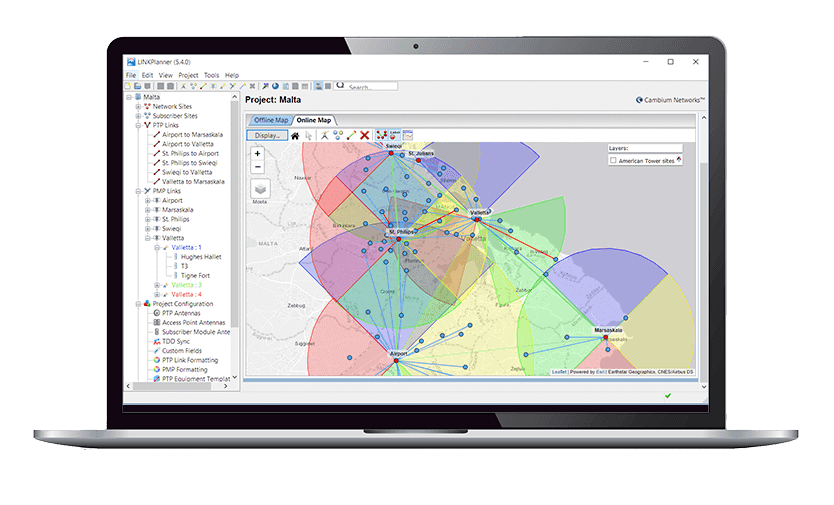
@tame carbon what I would suggest is you use link.ui.com to plan it out
you can share your plan map
plain siren
tender hazel
the main difference is in this case the CPE devices are not fixed wireless radio...
So... A router with a screen and sms capabilities + battery instead of a router.
tender hazel
you will have to pick some random ubiquiti 5ghz ap
plain siren
On both sides of the NAT pond, it's all the same in high level architecture views.
tender hazel
but it won't really matter
it is mostly to get an idea of where you will be putting everything
plain siren
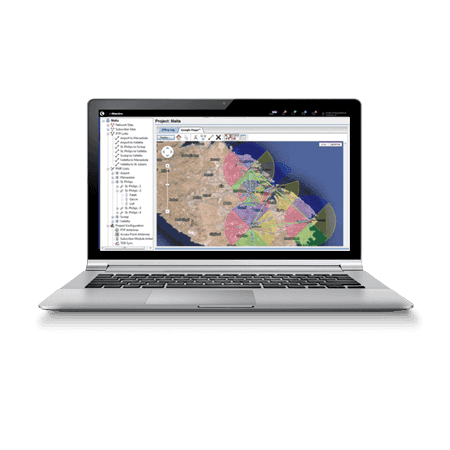
Cambium Networks
LINKPlanner - RF Link Planning Tool. Design networks with Path Profile Web Service. Microsoft compatible wireless manager & Mac compatible wireless manager.
plain siren
 tame carbon
@tender hazel how much dBi ?
tender hazel
link.ui.com is easier, I've tried using the cambium link planner before
plain siren
Cambium, the one suing Ubiquiti, does this way better than Ubiquiti. No wonder they offered firmware takover.
tame carbon
@tender hazel also beam width isnt right, this is 120 degrees
plain siren
I can't get the details I want out of the ui tool but yeah it's "Ez"
tender hazel
@tame carbon click the pen icon to change
plain siren
tender hazel
link.ui.com is easier, I've tried using the cambium link planner before
Have you tried their latest updated release? It's gotten a nice polish.
tender hazel
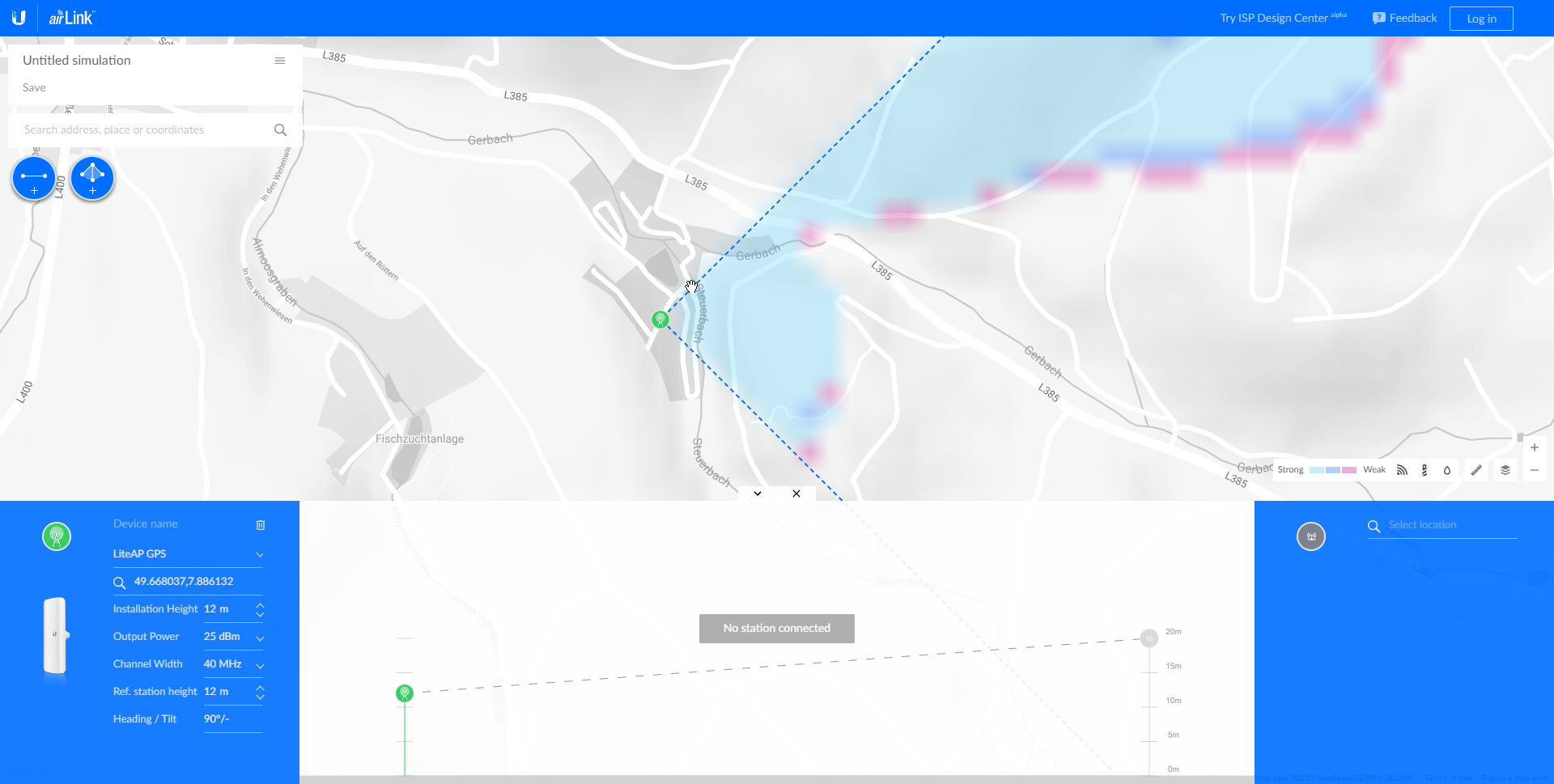
ok yes the liteap gps is ok
 tender hazel
plain siren
Have you tried their latest updated release? It's gotten a nice polish.
tender hazel
plain siren
Have you tried their latest updated release? It's gotten a nice polish.
the pen icon will only show up when you have rocket prism 5ac selected

you can specify custom antenna then set the gain and angle
plain siren
This is the coolest thing that I've seen in a tool like this that is "niche" and actually turns out to work in bench comparisons.

Science is awesome
tame carbon
@tender hazel do you think I can get away accounting only for 90 degrees, and hoping the 60 degree 5GHz is fine?
tender hazel
yes, people will roam to 2.4ghz if they are out of the 5ghz band.. I would treat the antennas as 90 degree antennas
it is not 100% accurate but it is good enough
tame carbon
okay what about the gain?
tender hazel
for the antenna gain check the specs for the mikrotik antenna built into the AP, it will list the gain there
plain siren
(The "overlap" is hardly ever too noisy to cause issues if you stand in it)
tame carbon
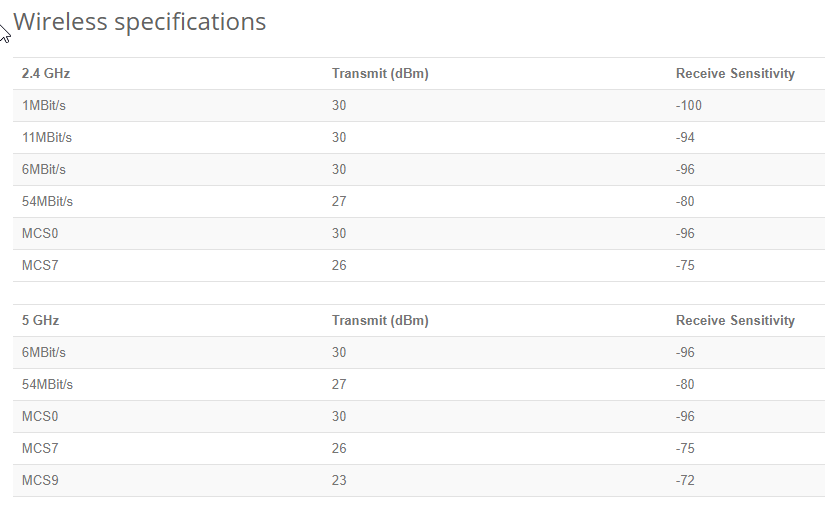 plain siren
Something something RF Density ... Science shit.
tender hazel
you're looking in the wrong spot
plain siren
 tender hazel
 tender hazel
you can plan where you are putting the APs and what they will cover
you can add all of your APs there and see the coverage zone for each
plain siren
Screw it, throw a 100W amp in the midpoint and use 1AP, f the regulatory agencies,
tender hazel
you can add multiple APs onto the map
tame carbon
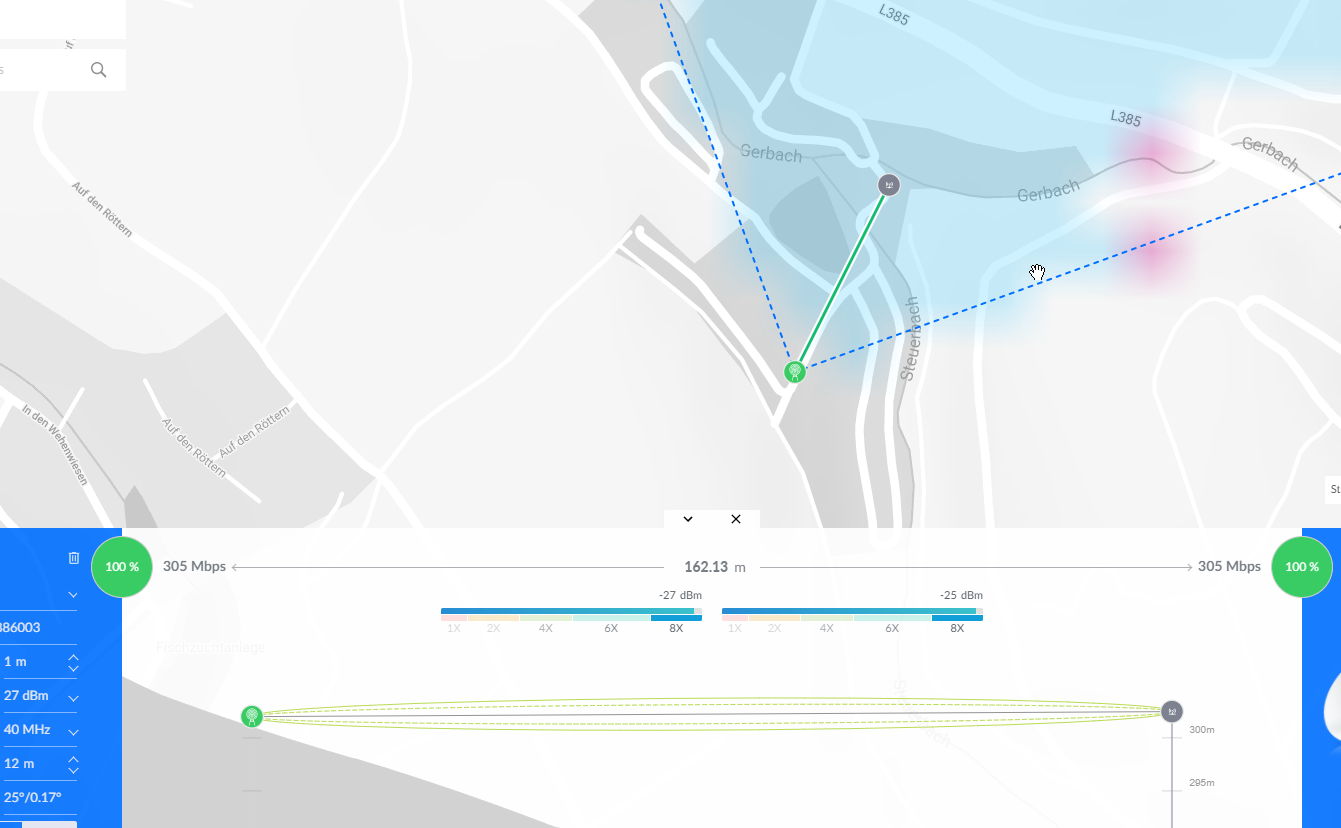 tender hazel
you will want to adjust the height of course, the default is 12 meters and you will not be installing them that high
tame carbon
yeah but this is far too big wtf
@tender hazel yeah but it is a valley lol
so there is about a 20 meter difference
on the side where the AP is compared to that client
I dont understand
150 meters away
nobody is going to get signal.
tender hazel
but it looks like you have set the AP height at 1 meter and the station at 12 meters
the AP is presumably going to be more than 1 meter off the ground
tame carbon
about 2

but it already accounts for the difference in height
Like, I just want a set amount of output power for range of like 50-60 meters
tender hazel
people will get signal further away with 2.4ghz if you want to check that.. you can do that by adding a second Ap in the same spot, one that is 2.4ghz
tame carbon
that's it
yeah but this makes no sense
this thing suggests that I can get signal
from all the way across the camping area
with 1AP
I plan on just using paper and pen for this
and drawing the 90 degree angles myself
this tool is far too complicated and unwieldy to use
tender hazel
you can adjust the far device, the default is like a powerbeam or something
it is assuming fixed wireless, where the stations are fixed, rather than mobile
tame carbon
but if I just allocate the channels in such a way that beams dont overlap
does the tik automatically manage output power ?
wow
so I added a second station
and now I have to sell my soul before I can continue
 tender hazel
you can reduce the area that it shows the coverage on
tame carbon
@tender hazel sorry :( thanks for the suggestion, but I think I'll do it the old fashioned way with pen and A3 paper
tender hazel
 tame carbon
I can get a big printout of this map
tender hazel
that handle lets you make it smaller
tender hazel
they are free to sign up
tender hazel
you can give the cambium one a shot but I find it harder to work with
tame carbon
if I was to point two of these APs directly at eachother
how far would they need to be appart before they stop interfering?
just trying to get a vague sense of what scale I am dealing with here
tender hazel
if they are on the same frequency they would have to be far away unless you reduce the power
so you will be reducing the power most likely
that's if they are pointed dead at each other on the same frequency
tame carbon
@tender hazel I'm going to visit them tomorrow
I'll mostly just have a look around see where we have poles we can use
and take pictures
tender hazel
ok
tame carbon
Ill be bringing that metal ac52
and doing some DFS checks
its big omni directional antenna
tender hazel
it is lower gain than the sectors but that will actually simulate what the actual situation will be since you are most likely going to have the power turned down
also a lot depends on line of sight
you can have two antennas pointing at each other using the same frequency but if there is a hill in the way blocking most of the signal it might not be a big deal
tame carbon
the area is like this \___________
the other hill of the valley is a road
we cannot use that
so the APs will either be on the hill side
or in the center
which is flat
so I think there's a benefit to having those APs mounted up high
they have wider line of sight that is not obstructed
mh. so clients right to my hAP ac2 have -46 on 5GHz
and I am behind 2 walls, with -70 on 2.4
still enough for 72mbit/s
I assume -70 would be an acceptable signal strength?
tender hazel
yes -70 is acceptable
plain siren
That's a decent outcome.
tender hazel
for our fixed wireless customers our absolute cutoff is somewhere around -73 I think
tame carbon
@tender hazel so what if I can receive another AP at like -85
do I have to reduce its power?
what's "too loud" for seeing another AP on same frequency
tender hazel
you will ideally want the noise floor for the same frequency to be around -90 or so if possible
tame carbon
@tender hazel basically this: https://youtu.be/oY6tCnu-1Do?t=4

Muffin Time: the asdfmovie card game! Out now! http://MuffinTimeGame.com
ass-duff-moo-vee-three - More asdfmovie! https://www.youtube.com/playlist?list=PL3A5849BDE0581B19
asdfmovie t-shirts (https://tomskashop.com/)
Animated by Jamie ‘RageNineteen’ Spicer-Lewis (http://youtube.com/ragenineteen)
Written and Directed by Thomas Ridgewell (http://y...
those 5 seconds ^
tender hazel
heh
tame carbon
sorry, that just popped into my head :P
any way I can see what my AP is current transmitting with?
This is 0 https://i.imgur.com/ZjELYRK.png
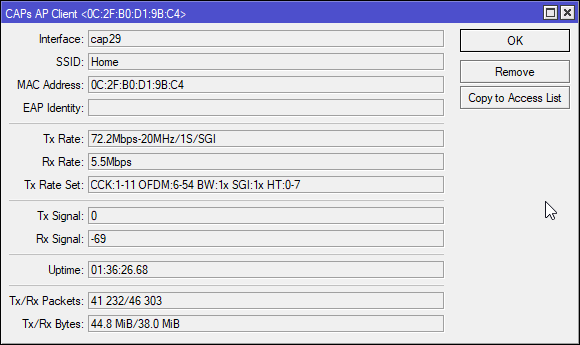
lol if I put it up against my body
it drops to 1M
meatsack
lol it just disconnected xD
tender hazel
the Tx signal says 0 because for most devices they don't support reporting the signal they receive from the AP back to the AP
tame carbon
lemme see my phone
wow
such garbage
OneUI doesnt report signal strength
my old nexus 5x did
tender hazel
you can probably install some third party tool that will show it
tame carbon
Wifi Analyzer yes
@tender hazel ok
so my layout is garbage here
xD
1 is free
lemme put it on there
@tender hazel LOL, so I move channel
and there's a pesky asus router one of my tenants uses
and it just skipped to the same channel
@tender hazel ah so interesting https://i.imgur.com/JeJXejA.png
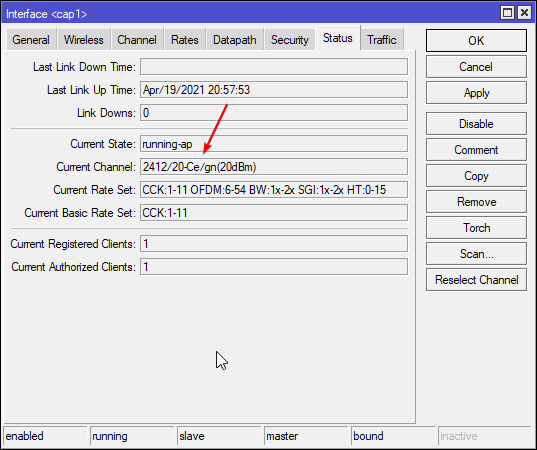 tame carbon
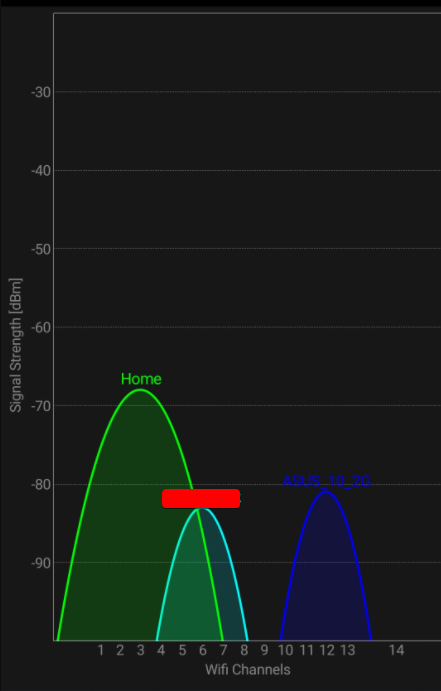
@tender hazel I can see why
but does it matter?
ok so I disabled extensions
much better.
https://i.imgur.com/FlTIgYG.png
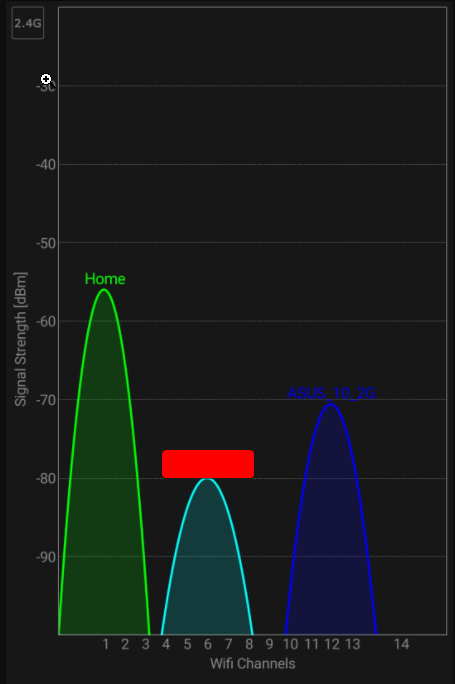 tender hazel
yeah that's much better now
tame carbon
what about bandwidth though
oh
@tender hazel I was getting around 25 before
now its like 40mbit
what about poor 5GHz..
lol/
@tender hazel WHAT
This is nonsense!
@tender hazel such bs

I disabled my 2.4 AP
and
why is it not using that in the first place
that's 5GHz
through 2 walls
plain siren
I only have 2.4 enabled in my Center most AP and my Outdoor AP.
tame carbon
mh.
so
just put 5GHz up
and a couple 2.4GHz omnis
for the tards that run ancient gear
tame carbon
@tender hazel what would you do in this situation?
plain siren
So more of those for me, but in small tx power
plain siren
Go outside and put grounded foil on your fence lol
plain siren
You laugh but
If you could find their AP location, you could basically patch a small area to block it
tame carbon
lmfao
wat
there's no interference here
its just that 2.4GHz signal is so much stronger than 5GHz, but 5GHz is still much faster
plain siren
I was making a joke not being serious. But yes that's how it works
Lower frequencies have better material penetration
plain siren
Higher frequencies have larger data rates.
tame carbon
I have to worry about my mom running after me with a broom
telling me I am out of my mind
plain siren
Don't put it on your side of the fence.
plain siren
Put one. Lol
tame carbon
We dont have a fence. we have a sloot
plain siren
What's a sloot. I don't speak nowhere
tame carbon





 plain siren
Oh
plain siren
Looks like a great place for a fence.
plain siren
Every time I go to put mine back up, I start doing something else that would require me to take it back down
My neighbors are not particularly happy.
tame carbon
lol they have a madman as a neighbor who's a conspiracy theorist
putting up foil around his house
tame carbon
(╯°□°)╯︵ ┻━┻
plain siren
I didn't put my foil on my fence. I put it in the wall on the insulation... Well I didn't. The insulation has fucking foil on it for better thermal shielding
And it basically put a fat F for any Cell signal lol

I would LOVE to have 1 AP cover this fucking house.
tame carbon
So the shit solution would be
two SSIDs
2.4 and 5
but it would also yield best results
peak cloak
I have one ssid
plain siren
Never works.
peak cloak
it works well enough
waxen saddle
I didn't have any roaming issues on a small handfull of Cisco AP's I put up back in 2012 or so.
plain siren
Bleh
On a high radio density site, there can be issues where handoff doesn't happen then the front end gets overloaded by the actually closest AP.
"Sticky" APs
waxen saddle
Nope. It was actual roaming. No dropped packets.
plain siren
On EDU sites this is a huge PITA
I'm not saying you had particular issues, I'm just biased.
tame carbon
@plain siren someone here suggests to change the beacon interval
 vale reef
plain siren
vale reef
plain siren
?
 vale reef
Makes sense
plain siren
I had put the insulation on my inner walls and thinking I could hold local temperatures inside the house better.
And for soundproofing
waxen saddle
Did it work?
plain siren
Yeah, these newer houses are very well sealed to their fire zones, it shows.
But
My wifi....
Omg my wifi
waxen saddle
I bought a heavy rubber material to help soundproof a noisy pipe. It worked very well, but the material is kind of expensive..
plain siren
Its like it sucks the signal out, not just block it.
vale reef
😩 signal
plain siren
APPLY GND TO ANTENNA
plain siren
waxen saddle
I bought a heavy rubber material to help soundproof a noisy pipe. It worked very...
Was it for the water hammer noises? Or just the expansion
I have a noisy pipe I can't find yet but I need ideas
peak cloak
plain siren
I have a noisy pipe I can't find yet but I need ideas
what type of pipe?
plain siren
Its my hot water feed
peak cloak
ah
waxen saddle
Neither, it's a radon pipe. There's a fan in the attic that runs 24/7 creating negative air pressure in pipes surrounding the basement of the house to remove radon gas so it doesn't permeate and sit in the basement.
plain siren
PEX I presume.
When I lived in Oklahoma, I specifically avoided houses with radon fans
peak cloak
all pipes in my house are copper
waxen saddle
It's basically impossible to avoid here. That's just the type of ground we have.
plain siren
Yeah it's copper coming off the heater, I think the sound is pipes rubbing on the wood
plain siren
waxen saddle
It's basically impossible to avoid here. That's just the type of ground we have.
Radon is kinda scary in the way it works
waxen saddle
yep
For something like $5/year or less, I don't mind it as much as I thought I would.
But anyway, back to networking. We used to have random wireless issues with 12 Linksys routers we had placed around the school. Honestly, the fact that it worked as well as it did is a testament to how well we managed them, and how much wifi signal was lost due to building design. (AP's were fairly isolated and not interfering with each other due to building design and channel separation).
plain siren
Building Design
Mmph so much on this
waxen saddle
As soon as we moved to Cisco AP's, we went from 12 to 7 AP's, better coverage, roaming, and we could now get wifi out to the end of the playground area. I had plans to beam wifi to a lower parking lot as well, but I left before I could get that project off the ground.
Wireless N helped a lot here. The Linksys were Wireless G. 🙂
peak cloak
I wish we could play around with stuff like that at school
plain siren
waxen saddle
As soon as we moved to Cisco AP's, we went from 12 to 7 AP's, better coverage, r...
Honestly, in my house Roaming is fucking fantastic, so it proves the whole isolation case in practice, I believe it 100%
waxen saddle
Radon is basically radiation gas.
peak cloak
tame carbon
why you guys worried about Radon lol
can cause cancer apparently
radioactive
plain siren
I'm still gonna roast on it anyways.
tame carbon
@peak cloak its a noble gas with a half life of like 3.8 days
but its a decay product of natural background radiation
by uranium in the soil
plain siren
Its also capable of seeping up through any material (Concrete included) so it can get caught in your house.
tame carbon
no
that's where it comes from
the uranium particles are in teh concrete that the building is made out of
waxen saddle
It's enough of a problem to be CODE around here, and it's generally heavier than air, so it collects in basements. The Radon gas is from the ground the house is on - whatever is coming from the concrete is of no concern - it's the surrounding material.
tame carbon
so does co2
plain siren
Its more the ground deposits
 tame carbon
problem is just if you inhale a large quantity of it
decay chain is still rather long, and the materials it produces are not gasses
plain siren
Poe powered radon fan