#networking
1 messages · Page 323 of 1
 tame carbon
I challenged myself, and went with single mode fiber optics between my highspeed devices
learned about all the different types, and standards
@limpid lion currently, I am still learning how to use the advanced wireless features of mikrotik
Setting up a big outdoor network soon, and challenged myself to yet another big undertaking
never done a setup with more than 3 APs... and this one will be 10+ (with wireless backhaul)
 little schooner
definitely me when I first implemented the edgeswitch and Edgerouter at my mom's home. it's true though, learn a lot and it's better the next times
tame carbon
@little schooner illegal peering ring in mom's basement
 azure lion
I currently have 2 routers at home with 2 different internet connections. How do I set them up them so that the internet connection isn’t shared but the local computers can connect to each other?
 waxen saddle
How many local computers? 2?
 peak cloak
azure lion
I currently have 2 routers at home with 2 different internet connections. How do...
peak cloak
azure lion
I currently have 2 routers at home with 2 different internet connections. How do...
wdym by internet connection isn't shared
seperate subnets?
if you have 1 public IP they will share the connection regardless
waxen saddle
DHCP would interfere.
peak cloak
and even if you have 2 public IPs they would still share the same connection
peak cloak
waxen saddle
DHCP would interfere.
wdym?
azure lion
peak cloak
wdym by internet connection isn't shared
I meant that i have 2 routers at home with 2 different isps. lets name them A and B. i want it so that when i connect to router A i want to access the devices connected to both A and B but my device will use the Internet connection of A. same goes with B.
azure lion
peak cloak
if you have 1 public IP they will share the connection regardless
i have 2
peak cloak
azure lion
I meant that i have 2 routers at home with 2 different isps. lets name them A an...
ah so you want dual wan
azure lion
yes ig
peak cloak
you can't really do what you want with consumer hardware
waxen saddle
If you set the LAN on both routers to different subnets, with dhcp enabled on both, any computer could randomly be assigned to either router
azure lion
😂
waxen saddle
You totally can. Just need to disable dhcp on one of the routers
peak cloak
waxen saddle
You totally can. Just need to disable dhcp on one of the routers
you can't
at least not to my knowledge
consumer gear is weird,
azure lion
hmm
tame carbon
 dusk oasis
Tp link archer a9 ac1900 or archer c80 ac1900
dusk oasis
Tp link archer a9 ac1900 or archer c80 ac1900
none of the above
tame carbon
@thick minnow network gods spoke from the heavens, designating me as mikrotik shill
 thick minnow
xD
tame carbon
and I will crucify all ubnt.
waxen saddle
Lol. Well, to be honest, you do recommend it even to complete networking noobs.
tame carbon
@waxen saddle I recommended they change the channel topic: here be dragons
Noobdom can be cured
needs a 10cc shot of common sense
and I kid ofcourse
@waxen saddle thing is. I'm crazy enough to help them configure it if they so wish
and silently, I hope they learn something.
thick minnow
tame carbon
and silently, I hope they learn something.
Well it's kinda working on me
 limpid lion
tame carbon
<@!137786885761269760> thing is. I'm crazy enough to help them configure it if t...
limpid lion
tame carbon
<@!137786885761269760> thing is. I'm crazy enough to help them configure it if t...
Much appreciated !
Feels good to be able to come here and get expert help
limpid lion
tame carbon
and silently, I hope they learn something.
And Im sure anyone who pays attention to what you say will learn something
tame carbon
@limpid lion though I am not one of those "experts"
there's other people in here, that are far more qualified than I am
I am just a software developer/system admin
peak cloak
Networking at an isp level gets advanced
tame carbon
but stuff that ISPs do, is way beyond me
I know the core of the internet uses BGP, and roughly how it works
but I am sure I'd get instablocked by a bunch of grumpy SysOps from the exchange
if I do something wrong
limpid lion
Either way its great to have someone to ask
tame carbon
BGP is its own protocol, not sure how it itself works (on the byte level)
I think its an IP protocol
Border Gateway Protocol (BGP) is a standardized exterior gateway protocol designed to exchange routing and reachability information among autonomous systems (AS) on the Internet. BGP is classified as a path-vector routing protocol, and it makes routing decisions based on paths, network policies, or rule-sets configured by a network administrator...
There's iBGP and eBGP
This is used to connect two larger networks together.
Like, Google connecting to your internet provider
this is called 'peering'
peak cloak
Yeah ik, I dipped my toes trying to figure out bgp to get metallb for kuberetes to use it
Instead of just l2 and using a preestablished ip range
But didn't get anywhere
tame carbon
@limpid lion fun things to try out: Set up a guest wireless network, with seperate subnet that is firewalled off, with limited network speed
@limpid lion or set up a second vlan, and use that to isolate your network services
dusk oasis
tame carbon
none of the above
Then which router can I buy?
limpid lion
tame carbon
<@!108502561731952640> or set up a second vlan, and use that to isolate your net...
Might try this one out
tame carbon
@dusk oasis how experienced are you with networking?
dusk oasis
tame carbon
<@!792319567673425961> how experienced are you with networking?
Idk
Just tell me a good router?
@tame carbon
tame carbon
@peak cloak halp
dusk oasis
Or am In wrong channel to ask these questions?
dusk oasis
Gaming , browsing stuff
peak cloak
that doesn't really matter
tame carbon
@dusk oasis that is not relevant.
peak cloak
like features wise
tame carbon
@dusk oasis most consumer hardware in my opinion, is total garbage.
dusk oasis
peak cloak
if you want no bs, mikrotik I guess
BS = Bullsh*t ??
peak cloak
yes
tame carbon
but the thing is, if I was to recommend you something, you need at least some technical experience to use
peak cloak
yeah that's the thing
tame carbon
doesnt come with easy web config
peak cloak
it's not necessarily easy for a noob in networking
peak cloak
it will allow you to break your whole network config
tame carbon
@dusk oasis just saying, its hard to setup
peak cloak

MikroTik is a Latvian company which was founded in 1996 to develop routers and wireless ISP systems. MikroTik now provides hardware and software for Internet connectivity in most of the countries around the world.
dusk oasis
tame carbon
<@!792319567673425961> just saying, its hard to setup
There is my ISP's guys
tame carbon
^ this is a very good device, and it supports literally every single feature you'd want
peak cloak
dusk oasis
There is my ISP's guys
ISP shouldn't need to configure your router
that is your problem
peak cloak
tame carbon
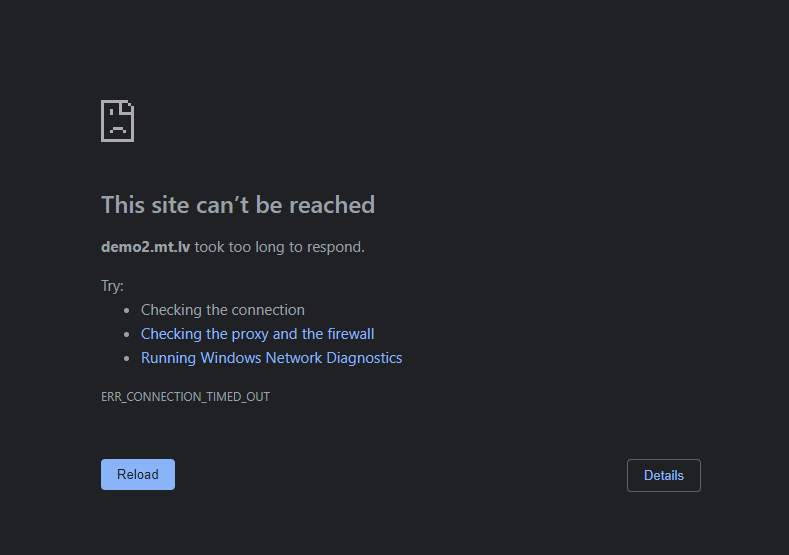
<@!222482269829332992> that one has been down for me
works for me
tame carbon
 peak cloak
http://demo2.mt.lv/webfig/
peak cloak
peak cloak
http://demo2.mt.lv/webfig/
this is the webui of it
there is no such thing as best router
tame carbon
lolwat.
dusk oasis
Under 70$
tame carbon
@peak cloak OMG xD
tame carbon
@peak cloak mikrotik literally blocks packets going to its own demo page.
on my phone through LTE, it works
dusk oasis
I'm asking for a good router , and u guys are talking about something else
dusk oasis
Then I'm leaving
peak cloak
just not easy for a newbie
tame carbon
@dusk oasis https://mikrotik.com/product/hap_ac3
MikroTik is a Latvian company which was founded in 1996 to develop routers and wireless ISP systems. MikroTik now provides hardware and software for Internet connectivity in most of the countries around the world.
The software on all of these devices from this company, is the same
the link he posted then, was an demo of the software that runs on them.
join the frey
vvv
 hollow marlin
tame carbon
BGP is its own protocol, not sure how it itself works (on the byte level)
hollow marlin
tame carbon
BGP is its own protocol, not sure how it itself works (on the byte level)
@tame carbon @peak cloak Im thinking a BGP lab for you guys might be on the horizon
peak cloak
if you just want plug and play
tame carbon
@hollow marlin lol we should all do a little project, set up a VPN site 2 site with wireguard, and then we emulate our own BGP network
dusk oasis
Ok, if I don't know abt something , why are you telling it again and again , that makes no sense
tame carbon
@dusk oasis because we don't know what to recommend otherwise lol.
tame carbon
bye 💩
dusk oasis
Never gonna be here again!
tame carbon
@dusk oasis https://i.imgur.com/MTkvxJi.png
 peak cloak
networking
tame carbon
fiber optics, wireless networks, servers
everything that has to do with the internet and a network plug.
peak cloak
@hollow marlin like I get the overall idea of bgp but just not exactly how to do it per-say. Like I tried looking at the vyos bgp page and I had no clue what to do
peak cloak
we don't know
tame carbon
¯_(ツ)_/¯
dusk oasis
Then What?
peak cloak
but like actual networking
tame carbon
peak cloak
but like actual networking
not the cutesy crap from walmart? 🤣
dusk oasis
tame carbon
none of the above
Then how'd you know this?
tame carbon
@dusk oasis what kind of network speed do you have ?
dusk oasis
300mbps
tame carbon
MikroTik is a Latvian company which was founded in 1996 to develop routers and wireless ISP systems. MikroTik now provides hardware and software for Internet connectivity in most of the countries around the world.
dusk oasis
Down and up
tame carbon
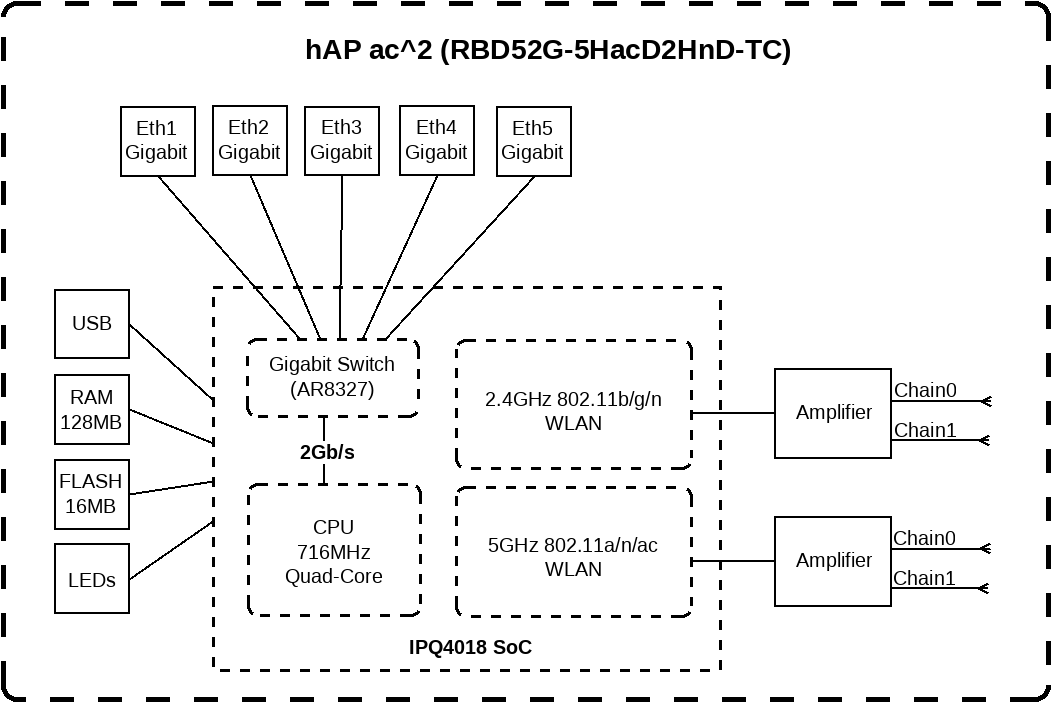
this can do 2gbit/s
it has 5x 1G on the back
its handsdown the most bang for your buck right now
tame carbon
MikroTik is a Latvian company which was founded in 1996 to develop routers and wireless ISP systems. MikroTik now provides hardware and software for Internet connectivity in most of the countries around the world.
If you require less range
there's the model with enclosed antennas, has same hardware inside.
 tame carbon
yes.
hollow marlin
peak cloak
<@!462711605063450628> like I get the overall idea of bgp but just not exactly h...
I have VyOS on my EVE server, we could lab it up and get Crystal to join and ill show you how it works
tame carbon
@dusk oasis it is a router, switch and wireless accesspoint all in one.
dusk oasis
tame carbon
<@!792319567673425961> it is a router, switch and wireless accesspoint all in on...
Oh
tame carbon
Like, the consumer market has ruined the word "Router"
what we consider a router
doesnt even have wifi
consumer devices usually are all in one
dusk oasis
But it's expensive in our currency
 dusk oasis
Any other option
tame carbon
no, anything cheaper would step down to fast ethernet, which is limited to 100mbit/s
beyond that, there's only tp-link hell
tame carbon
idk, I've had 3 three of them in my life
and every single one of em died
after 3-4 years
dusk oasis
So should go with mikrotik?
tame carbon
those mikrotiks have a mean-time-between-failure of around 200,000 hours
15-20 years
if not longer
the engineering is just much better
dusk oasis
So does it worth the money?
tame carbon
Yeah
tame carbon
@dusk oasis you are guaranteed 5 years of updates after purchase, but in reality it can be longer
some of their equipment has been for sale for 5 years, and they still update it with new features and security patches
you'd be lucky to get even 1 or 2 updates on those tplinks :P
peak cloak
dusk oasis
Does it have good performance
 tame carbon
@dusk oasis its capable of routing 2gbit/s
dusk oasis
tame carbon
<@!792319567673425961> its capable of routing 2gbit/s
Wow!
tame carbon
@dusk oasis so in theory, you could handle two fiber optic internet connections at the same time
if you had a switch plugged into two ports
it can do full 2gbit/s
peak cloak
with port aggregation?
peak cloak
wdym
tame carbon
@dusk oasis routing is done in software on the CPU
@dusk oasis that thing has a quadcore
 peak cloak
and so is this
 tame carbon
this one also has no wireless ^
dusk oasis
tame carbon
<@!792319567673425961> that thing has a quadcore
Quad core in a router 😱
 dusk oasis
tame carbon
I have this one at home, does 10gbit/s
dusk oasis
tame carbon
I have this one at home, does 10gbit/s
10 gigs?
tame carbon
https://cdn.discordapp.com/attachments/776722183119699988/777646103775674368/IMG-20200922-WA0001.jpg

^ there
my setup
wireless access is somewhere else
thats in living room
dusk oasis
Why is other tp link routers are in different shape
tame carbon
because joe average doesnt know anybetter, and goes oh shiny
peak cloak
dusk oasis
Why is other tp link routers are in different shape
because they have wifi probobly
tame carbon
idk
tame carbon
@peak cloak the ultimate abomination of SPEED and consumerism
 dusk oasis
Can I use lan cable for my pc ?
tame carbon
this router is so wrong xD
dusk oasis
Ohk
 dusk oasis
Hmmm
tame carbon

This is a fun one
cheap, but 4x 10G
@dusk oasis the hAP ac2 or ac3 is easiest

you plug internet into port 1
and your other devices into port 2-5
port 5 can also supply power optionally
dusk oasis
But why these indians are always buying tp link , tenda or d link one's
Never heard of mikrotik
tame carbon
@dusk oasis european
tame carbon
and mikrotik doesnt advertise
they arent really in the consumer space much
they have a small lineup of wireless APs/routers/combo-whatevers for the home wifi segment
tplink is planned obsolescence
in 4 years
your router is broken
and they have a new one you buy, that promises to be better
and then same over
tame carbon
No it doesn't
dusk oasis
Can I have any other cheaper with a gigabit support
tame carbon
Mikrotik doesn't sell any WiFi 6 APs currently.
dusk oasis
Hmm, I saw the reviews , the reviews were all 5 stars
And I don't see any fake reviewers
tame carbon
like, the hardware they sell is quality.
but the crux is that it is a bit hard for a noob to use if you want to say, port forward
or set up wireless
it can be easy with quickset
dusk oasis
tame carbon
like, the hardware they sell is quality.
It seems like THE BEST router , network switch and access point AIO
dusk oasis
But can I have any other cheaper
tame carbon
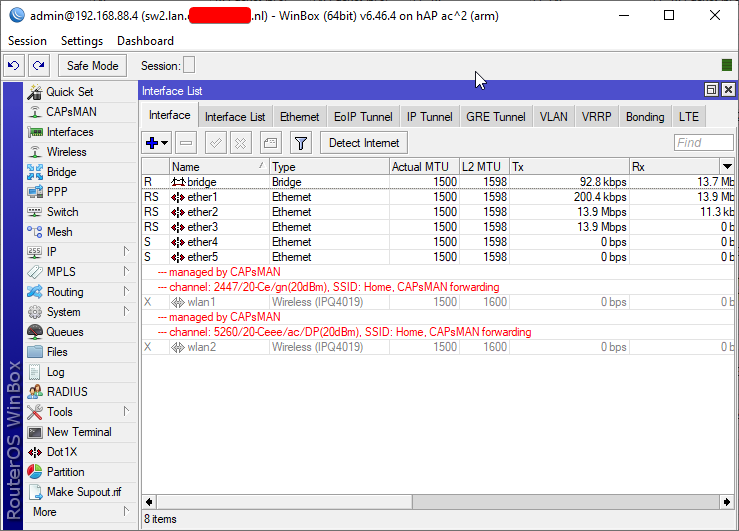 dusk oasis
Yo , it's so small, I really like it!
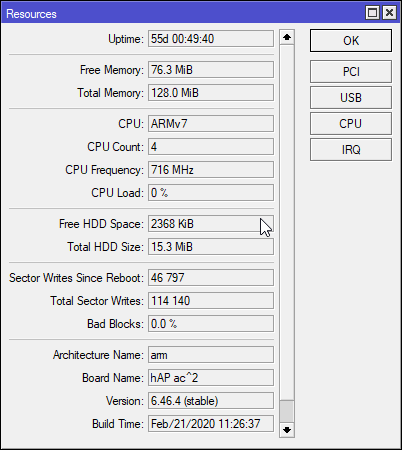 dusk oasis
tame carbon
<@!792319567673425961> https://i.imgur.com/Nljdlr6.png <:KEKW:670048864052445204...
dusk oasis
tame carbon
<@!792319567673425961> https://i.imgur.com/Nljdlr6.png <:KEKW:670048864052445204...
128 mb ram
tame carbon
@dusk oasis the thing is
those big $3000 routers used in datacenter
run same software as that tiny $60 wifi router
so thats why its not so easy to configure
dusk oasis
I thought you guys are doing some clown things
tame carbon
its made for network engineers :P
tame carbon
if you get stuck configuring
you can just ask here
the default config on them is WAN on port 1, and 2-5 LAN
but I recommend you change the password on the device
and set up the wifi password
dusk oasis
tame carbon
you can just ask here
Ofc I will!
tame carbon
@dusk oasis btw: this is the big 10G router: https://i.imgur.com/eqViOpg.png
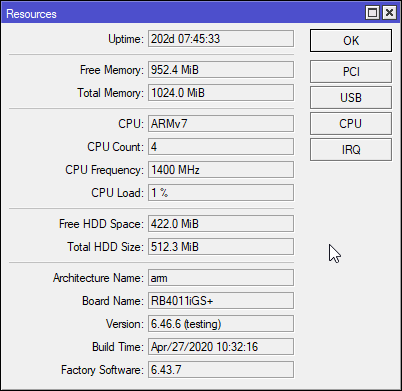
and the way it is setup, even if the power goes out. we still have internet for another hour or so
wifi works too ^^
peak cloak
well a ups right?
tame carbon
I googled, I found, I bought
some
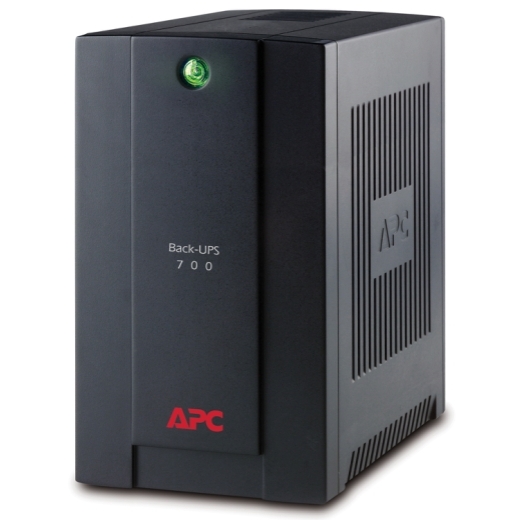
I think its an APC 700VA supply
small one

one of these ^
@peak cloak server powers down after 5 mins of powercut
and network keeps going till she dies
there's no WoL yet.
but there's almost never a powercut, so w/e
I pull at most like 300 watts from that supply
server is only 250 watt bronze
dusk oasis
U guys should make a yt channel !
dusk oasis
Like you can grow up yt!
tame carbon
and wear socks and sandals while doing so?
xD
@dusk oasis I am a software developer
networking is just something I started dabbling in
dusk oasis
tame carbon
<@!792319567673425961> I am a software developer
Nice
Why is mikrotik so underrated in india
tame carbon
@dusk oasis probably import fees
but you are maybe looking in the wrong place
India you said/
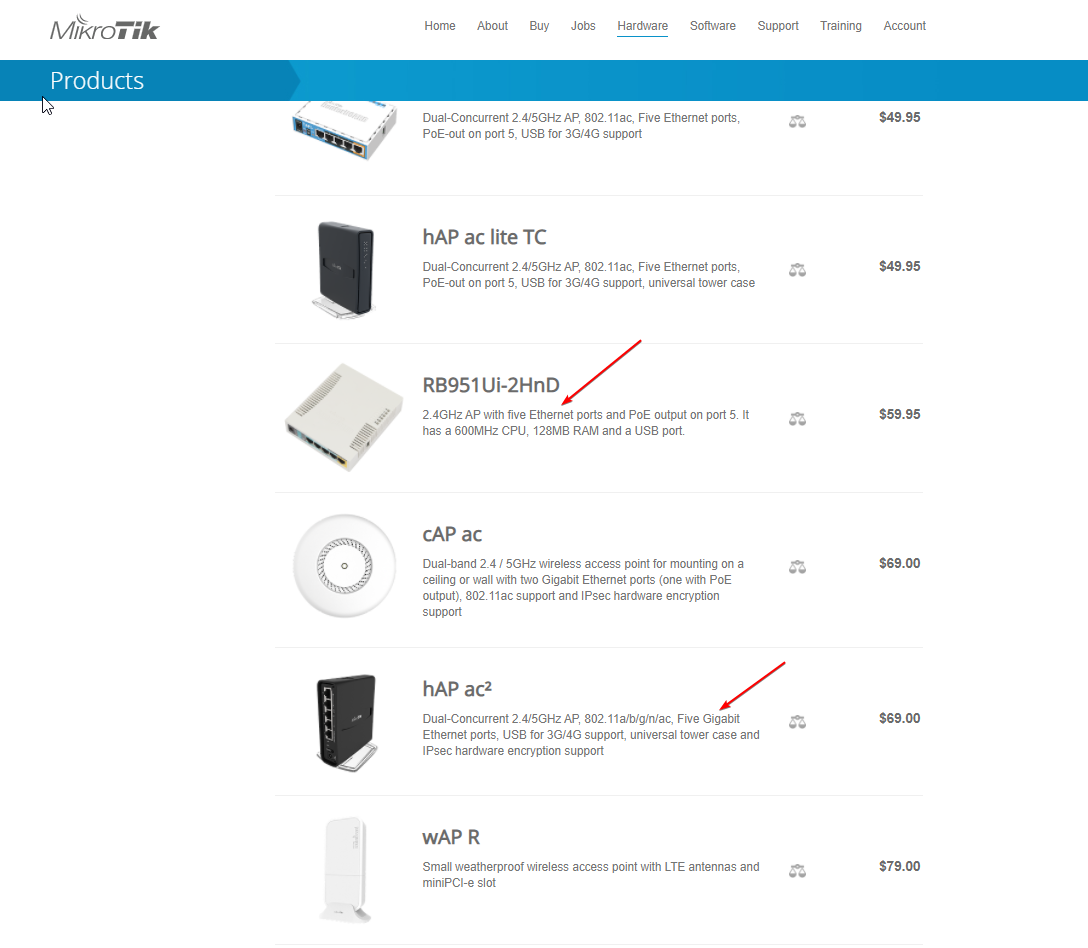
@dusk oasis how much was that hAP ac2 for you?
@dusk oasis https://mikrotik.com/buy/asia/india
MikroTik is a Latvian company which was founded in 1996 to develop routers and wireless ISP systems. MikroTik now provides hardware and software for Internet connectivity in most of the countries around the world.
thick minnow
An interjection: I think India also charges a 100% import fee on most electronics, I don't know if this comes under that tho
tame carbon
@dusk oasis yes that recomended customer price from mikrotik.
but local laws still apply
so there's taxes and whatnot that may be different
 dusk oasis
tame carbon
https://i.imgur.com/TcqF2qi.png
dusk oasis
tame carbon
https://i.imgur.com/TcqF2qi.png
If I tell anyone it's a wifi router , no one will believe lol
Mainly the RB951Ui
2hnd
I don't know the names lol

 dusk oasis
I see the quality in the box packaging!
peak cloak
@tame carbon don't you love routeros being more expensive than the hAP mini
dusk oasis
peak cloak
<@!167698274969452544> don't you love routeros being more expensive than the hAP...
Lol
tame carbon
@peak cloak lol yes. $20 router with $30 OS
dusk oasis
I get it now!
 dusk oasis
tame carbon
<@!222482269829332992> lol yes. $20 router with $30 OS
dusk oasis
tame carbon
<@!222482269829332992> lol yes. $20 router with $30 OS
Mikrotek is my way to go!
dusk oasis
tame carbon
Wait a min , is it a router
dusk oasis
That's so small and cute
peak cloak
dusk oasis
Wait a min , is it a router
yes
tame carbon
@dusk oasis routing is just routing packets between different networks
packets of data
all of these can do it, but at different speeds
dusk oasis
I smell quality
tame carbon
like that high speed switch I showed earlier
it can switch at full 40gbit/s (4x 10G)
but technically, you can configure it to do routing as well
it just bottlenecks hard on the CPU and caps out around ~1200mbit/s
peak cloak
well isn't speed in megabytes based on MTU?
tame carbon
shhhh
we dont talk about 64byte packets
a full frame is 1500 bytes.
but this is details
not important
peak cloak
true, true
tame carbon
that stuff works as is, no need to modify
dusk oasis
How to configure a mikrotik switch?
dusk oasis
tame carbon
they all run RouterOS
Why is that OS so appreciated
Does it have any good features?
peak cloak
dusk oasis
Why is that OS so appreciated
can do a lot
dusk oasis
What's this?
peak cloak
routeros
tame carbon
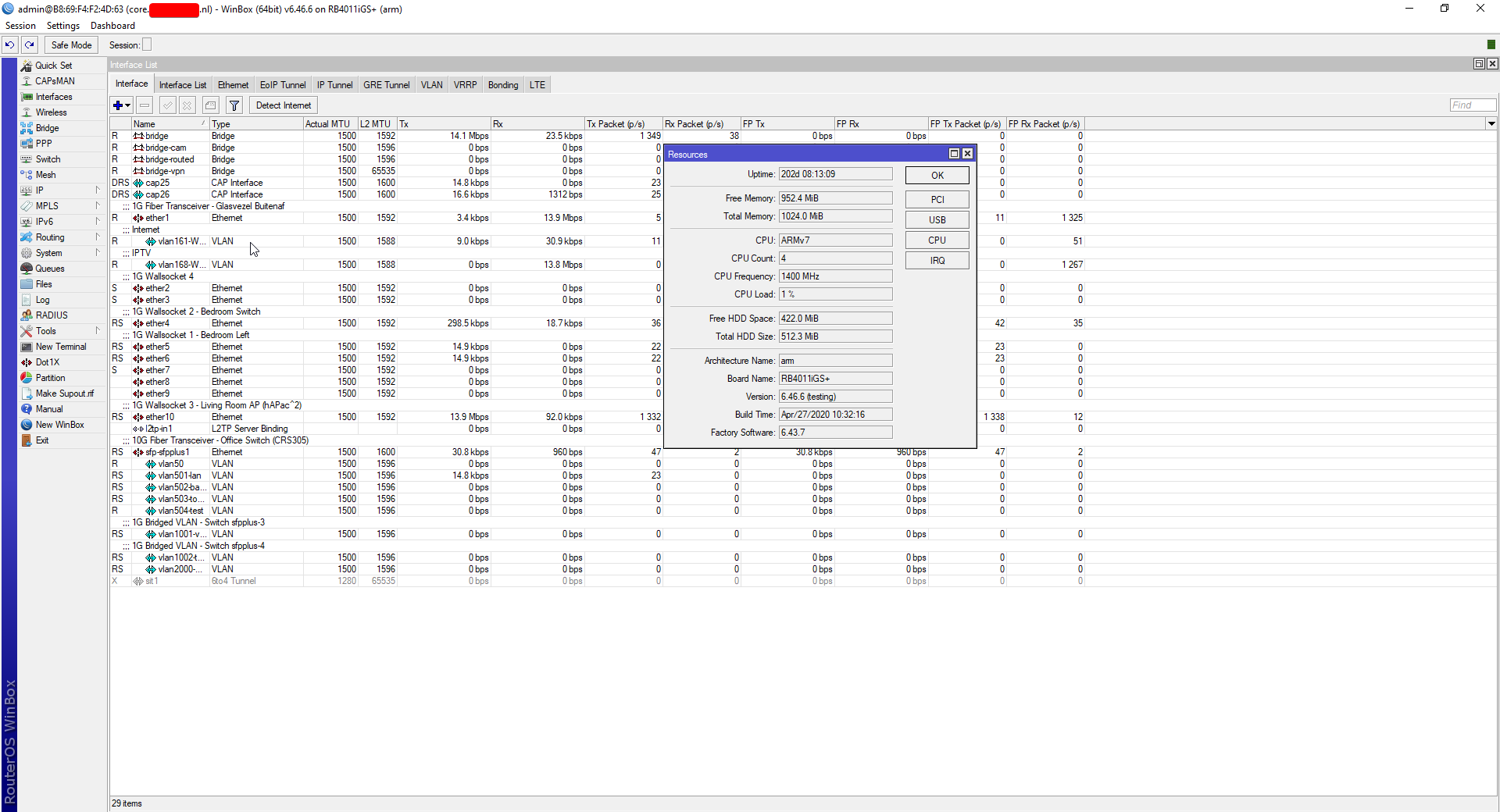
@dusk oasis thats the webconfig. They also have a desktop program to manage these devices:
https://i.imgur.com/eUe85If.png
 dusk oasis
@tame carbon
Can I use 5 mobile device on wifi , 1 laptop on wifi and a pc on ethernet? In hAP ac2
@tame carbon
tame carbon
@dusk oasis its rated for 802.11ac wireless.
which means, in ideal scenarios, it can do ~800mbit/s
over 5GHz with 80Mhz channels
dusk oasis

 tender hazel
and the only routers really vulnerable to that were ones where users removed the firewall
tender hazel
you can use 5 mobile devices on wifi a laptop on wifi and a pc on ethernet yes
if you want a nice simple interface for mikrotik, there is the iphone and android app
it is designed for end users who don't know anything/much about router config
tame carbon
oh I totally forgot that thing exists
tame carbon
@dusk oasis marketing is 99% lies 1% specsheet, and even that is usually flawed.
those new tplink routers with spider legs on them
they sell for $500
they have 4x 2.5G
but when you put them to the test, with basic firewall. It completely chokes on itself at ~1.7gbit
switching at 2.5G it does, no problem
but routing?  nah
nah
even that tiny hAP ac2 is more capable than the $500 tplink in terms of raw routing performance
@peak cloak lol https://i.imgur.com/q9Yf10N.png
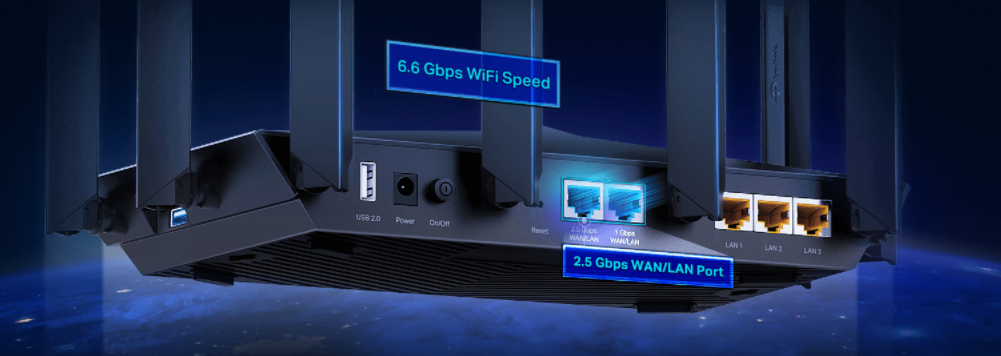
so wait
it has a single 2.5G port?
what good is that

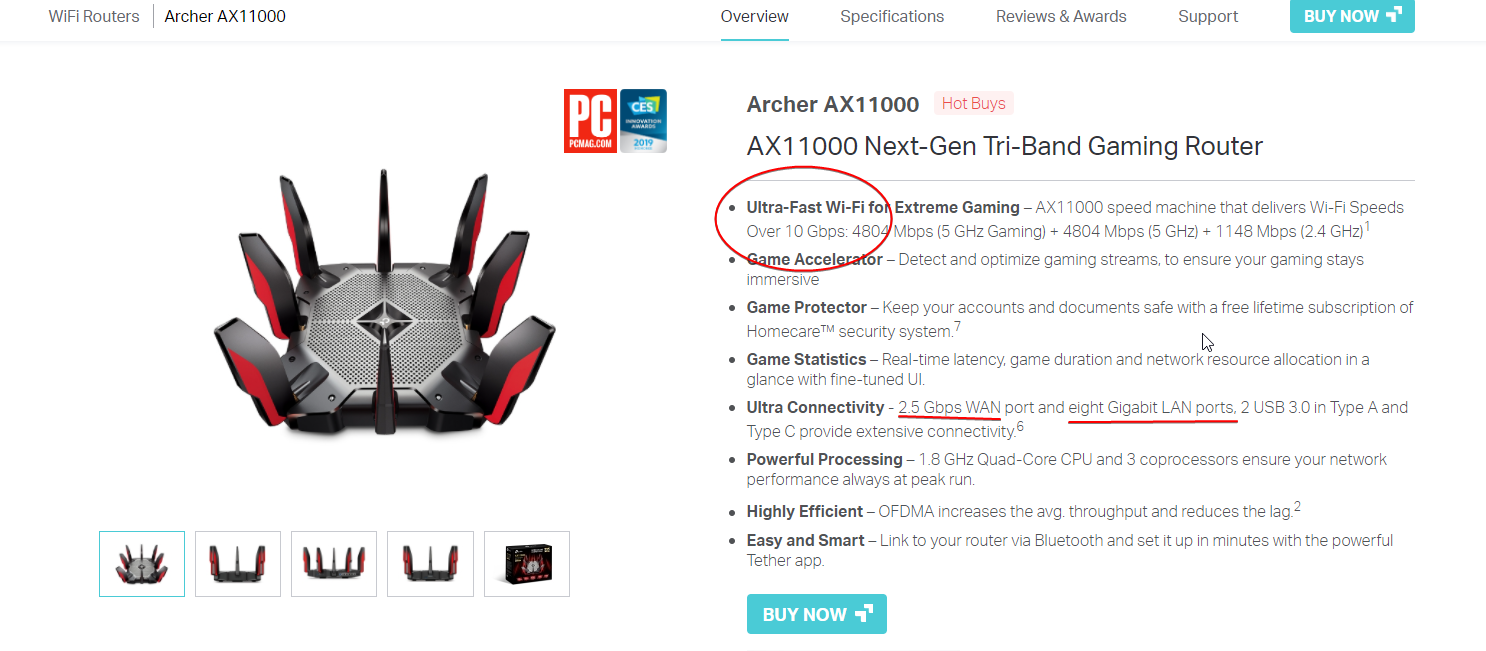 dusk oasis
tame carbon
^ 10Gbps <:KEKW:670048864052445204>
dusk oasis
tame carbon
^ 10Gbps <:KEKW:670048864052445204>
Now 10 Gbps seems too low lol
tame carbon
no but
they just add all the different wireless interfaces
that's not how it works.
dusk oasis
tame carbon
that's not how it works.
I get it
tame carbon
if I look for reviews
people do speedtest, and not an actual synthetic bandwidth test.
waxen saddle
How easy is it to set up multicast on Mokrotik?
tame carbon
@waxen saddle you install the multicast package
and then its there
if by multicast
you mean an IGMP proxy
then yes.
waxen saddle
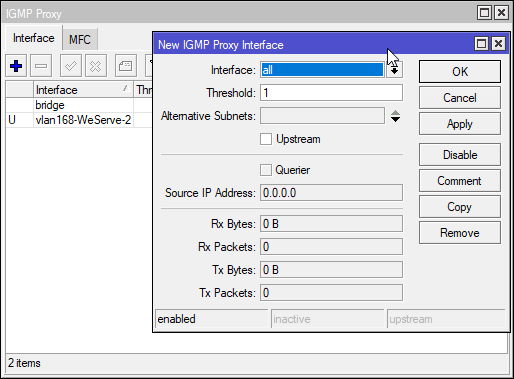
Just a checkbox to enable it? Or do I need to set up multicast groups and specify source routers and such?
Yea, IGMP proxy
tame carbon
@waxen saddle you just create two IGMP interfaces, one upstream and one downstream
waxen saddle
On Ubiquiti, just check a box for IGMP proxy
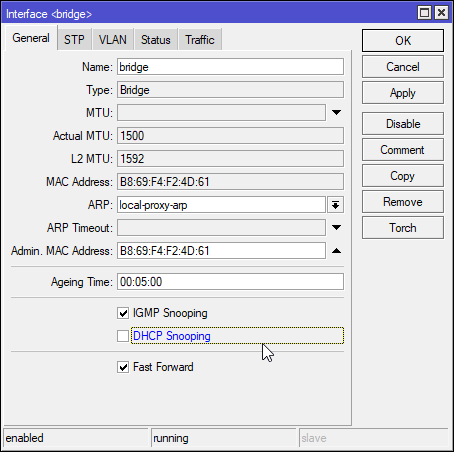 waxen saddle
Don’t care for upstream or downstream at this point. I’m simple home setup
tame carbon
@waxen saddle oh, I use that for my IPTV here
upstream is a vlan on a 10.0.0.0/24 subnet
and the downstream is my LAN
waxen saddle
My source and destination are on the same VLAN
 hollow marlin
Why would IGMP proxy be needed within a VLAN?
tame carbon
yeah isnt multicast L3?
hollow marlin
Yes, but IGMP is L2
waxen saddle
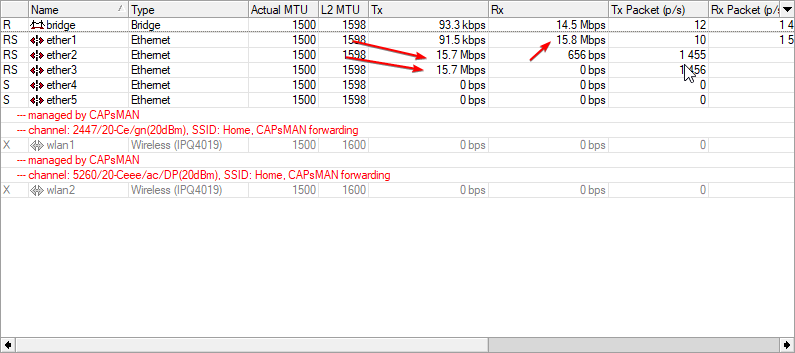
With it off, ports get flooded with useless traffic
tame carbon
@waxen saddle snooping
hollow marlin
Not proxy then, snooping
tame carbon
you dont even need the multicast package for this
without snooping: https://i.imgur.com/T7ThqpS.png
 waxen saddle
Gotchya. I might’ve confused terms. I’m not able to check my config on Ubiquiti at the moment. I do t think they e exposed it in the mobile app yet
tame carbon
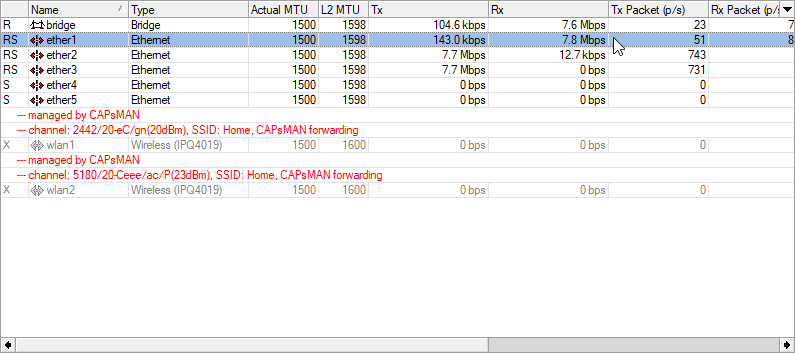
enabling:
 waxen saddle
Perfect
tame carbon
LOL
dusk oasis
?
tame carbon
@hollow marlin so it was off.
I think I just killed my parents' tv stream
entire bridge reset
waxen saddle
Lloll
 dusk oasis
Should I go with Mikrotik hAP ac2 for normal use ?
Like streaming yt videos , and browsing stuff
But I will do some heavy gaming
In my pc
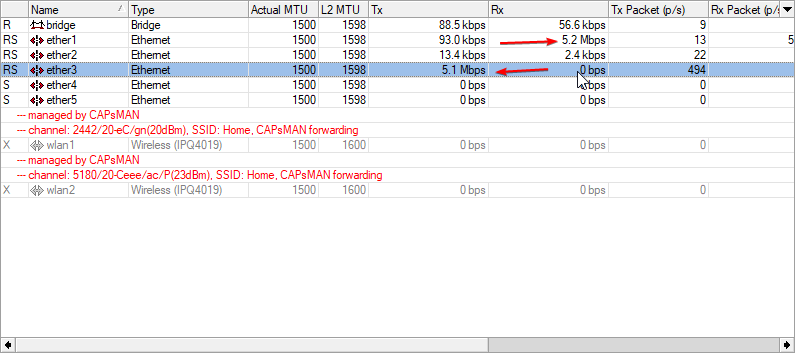 dusk oasis
@tame carbon
waxen saddle
Heh.
tame carbon
@dusk oasis yes. the hAP ac2 is an excellent home wifi router
dusk oasis
I'm extending my budget and buying it!
Why do auto correction sucks??
It makes me look like an idiot
:(
tame carbon
@dusk oasis btw, if you ever consider buying wifi repeaters or extenders/boosters. DONT
just buy either another hAP ac2, or a cAP ac (for ceiling mounting)
dusk oasis
tame carbon
<@!792319567673425961> btw, if you ever consider buying wifi repeaters or extend...
No, I'm not going to buy extenders
dusk oasis
Mesh system?
tame carbon
not quite
dusk oasis
But I don't want it
tame carbon
though it can do that too
@dusk oasis nah just thought I'd show you, cus I think its cool

^ main router, controlling multiple ^ wireless access points
dusk oasis
I'm not going to use an extender
dusk oasis
Hmm
tame carbon
it just has this capability
dusk oasis
tame carbon
it just has this capability
Ohk
tame carbon
@dusk oasis its used by companies and enterprise networks
like in schools, or libraries where there's a large public wifi network
you just have APs all over the building
one in each room
dusk oasis
Can I use a AP with hAP ac2 router?
dusk oasis
peak cloak
you can use the hAP ac2 as an AP
No, as a router
tame carbon
@dusk oasis it can do all of these things
peak cloak
dusk oasis
No, as a router
yeah, it can be configured to do what you want
tame carbon
at the same time.
It doesnt impose any limits on you
you can configure whatever you want
thats why it is so popular ^^
dusk oasis
tame carbon
thats why it is so popular ^^
Not really :(
tame carbon
Popular within the network community
if you dont deal with routers
@dusk oasis you probably never heard of Juniper
dusk oasis
tame carbon
<@!792319567673425961> you probably never heard of Juniper
Juniper?
peak cloak
dusk oasis
Juniper?
it's a networking company
tame carbon
 peak cloak
very common apparently
tame carbon
 dusk oasis
I don't want these badasses
 tame carbon
discord doesnt know the difference between a game and program

Synergy software shares one mouse & one keyboard between multiple computers & monitors. Easy download, install & configuration. A Symless product.
tame carbon
@peak cloak lol when I see the connectivity on one of those edge routers
I have had trouble getting even 1 company to run fiber to my place.
hollow marlin
Wait, I thought you already have fiber?
tame carbon
@hollow marlin I do
hollow marlin
ah
hollow marlin
Oh definitely no. All L3
tame carbon
@hollow marlin so I said this earlier, didnt see if you cought it
instead of doing a virtualized environment to try out BGP
wouldnt it be a fun experiment, if we set up site to site with the mtiks we have, with wireguard
and then we just set up our own 'testing' subnet using private ranges
and we can peer with eachother that way
hollow marlin
Sure can do. Im honestly looking at pricing for a /29 with Fios for some projects
peak cloak
hollow marlin
Sure can do. Im honestly looking at pricing for a /29 with Fios for some project...
you need business right?
tame carbon
I have a /29 here, 16 bucks/month
hollow marlin
Not sure, ill find out though
tame carbon
I still have two addresses unused
hollow marlin
RIP, yeah its for business only. Gosh darn it
tame carbon
@hollow marlin cant you just register one? xD
peak cloak
yeah it's contact us for pricing too
tame carbon
I just registered a company :P
its so much easier
to get things done
cus you get preferential treatment everywhere.
when you dial support
when you want more things
hollow marlin
I could just get fiber ran to my place, perks of working for an ISP
tame carbon
@hollow marlin say you need it to work from home
and because you are a DC employee
regular gigabit fiber wont cut it
hollow marlin
They would do it but I know they still charge monthly because "accounting says so". But when you access to the equipment that handles speeds....
tame carbon
@hollow marlin accounting also doesnt know what FIFO and Queing is
peak cloak
I think someone I kinda know works for verizon but more on the mobile side
hollow marlin
Oh I can easy peasy
tame carbon
@hollow marlin stupid catalonian govt
keep getting emails
because I have a domain name
that they dont like
I use eris.the.sexiest.cat as reverse DNS for one of my IRC bots lol
hollow marlin
haha
tame carbon
@hollow marlin its from one of the very few animes that I've watched, tl;dr sexy alien cat women come to earth and all hell breaks loose
and I also like it because its the name of the goddess of chaos

Eris (; Greek: Ἔρις Éris, "Strife") is the Greek goddess of strife and discord. Her Roman equivalent is Discordia, which means the same. Eris's Greek opposite is Harmonia, whose Roman counterpart is Concordia. Homer equated her with the war-goddess Enyo, whose Roman counterpart is Bellona. The dwarf planet Eris is named after the goddess.
She ha...
limpid lion
would you say nginx is enough security to expose a couple of services
limpid lion
Someone sent me https://gist.github.com/quietsy/58590a640dd4f7a89696c68b0e6a8691
 tame carbon
wat
limpid lion
But from the research I've done people do use nginx
limpid lion
So I was confused when they said maybe to use something else
peak cloak
limpid lion
But from the research I've done people do use nginx
it's just nginx, with fail2ban and let's encrypt basically
tame carbon
good luck setting up fail2ban on your web app
its hard to finetune
geoblocking doesnt work.
so why bother.
limpid lion
I've already got lets encrypt
tame carbon
so you're good.
limpid lion
Alright
tame carbon
@limpid lion does your server request a redirect if you try port 80?
peak cloak

LinuxServer.io
SWAG is a rebirth of our letsencrypt docker image, a full fledged web server and reverse proxy that includes Nginx, Php7, Certbot (Let's Encrypt client) and Fail2ban.
tame carbon
like does http:// force a redirect to https:// ?
limpid lion
tame carbon
<@!108502561731952640> does your server request a redirect if you try port 80?
Didnt open any ports yet
lemme see
tame carbon
uh oh
I think I have to kick someone

this is why you never give access to servers for people who suck at linux ^
peak cloak
tame carbon
this is why you never give access to servers for people who suck at linux ^
chmod 777?
tame carbon
@peak cloak no you're supposed to symlink this shit
there's like half a dozen domains more like this
didnt want all of them in screenshot
peak cloak
ohh
peak cloak
yeah idk all that
tame carbon
this is how you enable and disable sites.
you just delete the symlink
each website has its own config file
its super simple lol
you have dir with all your sites
and then a directory where the server looks when you start it
you just create symbolic links with ln -s
and then the server can load the config
tame carbon
because then you have to move it back and forth
if you want to enable and disable the site
tame carbon
its a very primitive but effective system
I just think its elegant
simple as possible.
@peak cloak symlinks can point to other files and directories
limpid lion
Just to make sure I've got it right. I have to open port 80 and 443 to the VM running nginx, correct? Or does it have to be open to the docker container IP
tame carbon
@limpid lion yeah it just needs to reach nginx
but you should already have this
if you have letsencrypt setup
limpid lion
I have not set it up yet all I did was install npm but I can see let's encrypt is available when requesting an SSL cert. Just have to do the configuration
IP > Cloud on the router is a good feature I assume, any downsides using this?
as opposed to if I have a static IP from my ISP
limpid lion
yupyup
tame carbon
you can use interface lists to forward
so even if your WAN changes the forward rule will work
the cloud thing, is just there to update your DNS
limpid lion
hmm
tame carbon
DDNS is Dynamic DNS
tame carbon
yeah so when the WAN address changes
peak cloak
limpid lion
Don't I need the cloud thing when creating my A record on my domain provider
wdym by cloud thing?
tame carbon
@limpid lion yeah if your ISP provides you with a reverse DNS
limpid lion
IP > Cloud on the mikrotik @peak cloak
peak cloak
oh idk what that is
limpid lion
DDNS
tame carbon
@peak cloak DDNS https://i.imgur.com/3KMvWEe.png
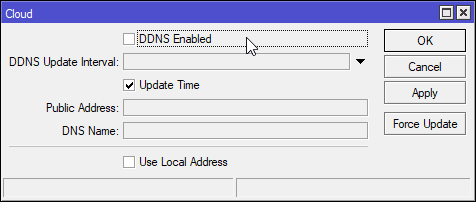 limpid lion
If I understood correctly
tame carbon
DDNS or Dynamic DNS is a service that updates the IPv4 address for A records and the IPv6 address for AAAA records periodically.
peak cloak
weird naming
tame carbon
@peak cloak I think this is mikrotiks own implementation
according to the docs
mikrotik provides nameservers
this is their cloud
peak cloak
ohhh
waxen saddle
Can you interface with other ddns providers?
tame carbon
yes
if you can send a one of HTTP request
then you can
you can script this in
if the address changes, do the following: make http request
@limpid lion https://i.imgur.com/yxUBc9w.png
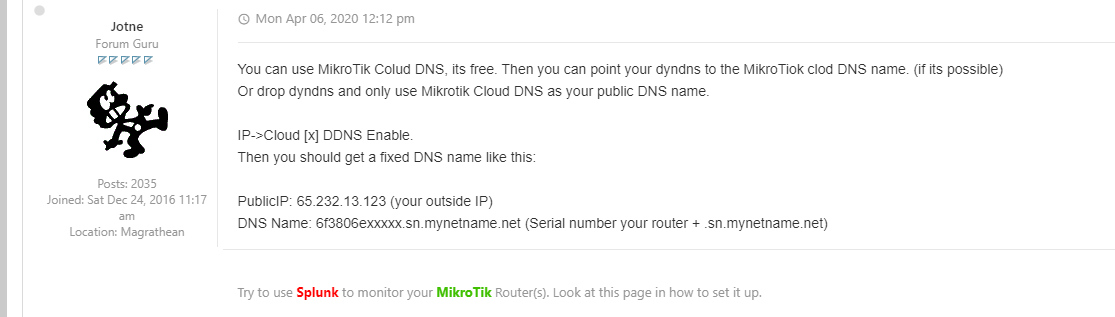
so your own domain becomes a CNAME that points to the name that is provided by the mikrotik cloud
waxen saddle
Oh that’ll work too
tame carbon
so you dont need a thirdparty
and EU has strong privacy regulations
so no worries
and its just DNS
all public info anyways
waxen saddle
Yea. But changing all my clients to point to a different ddns name is a multi-month challenge.
tame carbon
yeah but
I mean
1 click enabled.
kinda nice
no stupid no-ip fuckery
as opposed to: https://i.imgur.com/4VnQ7xN.png
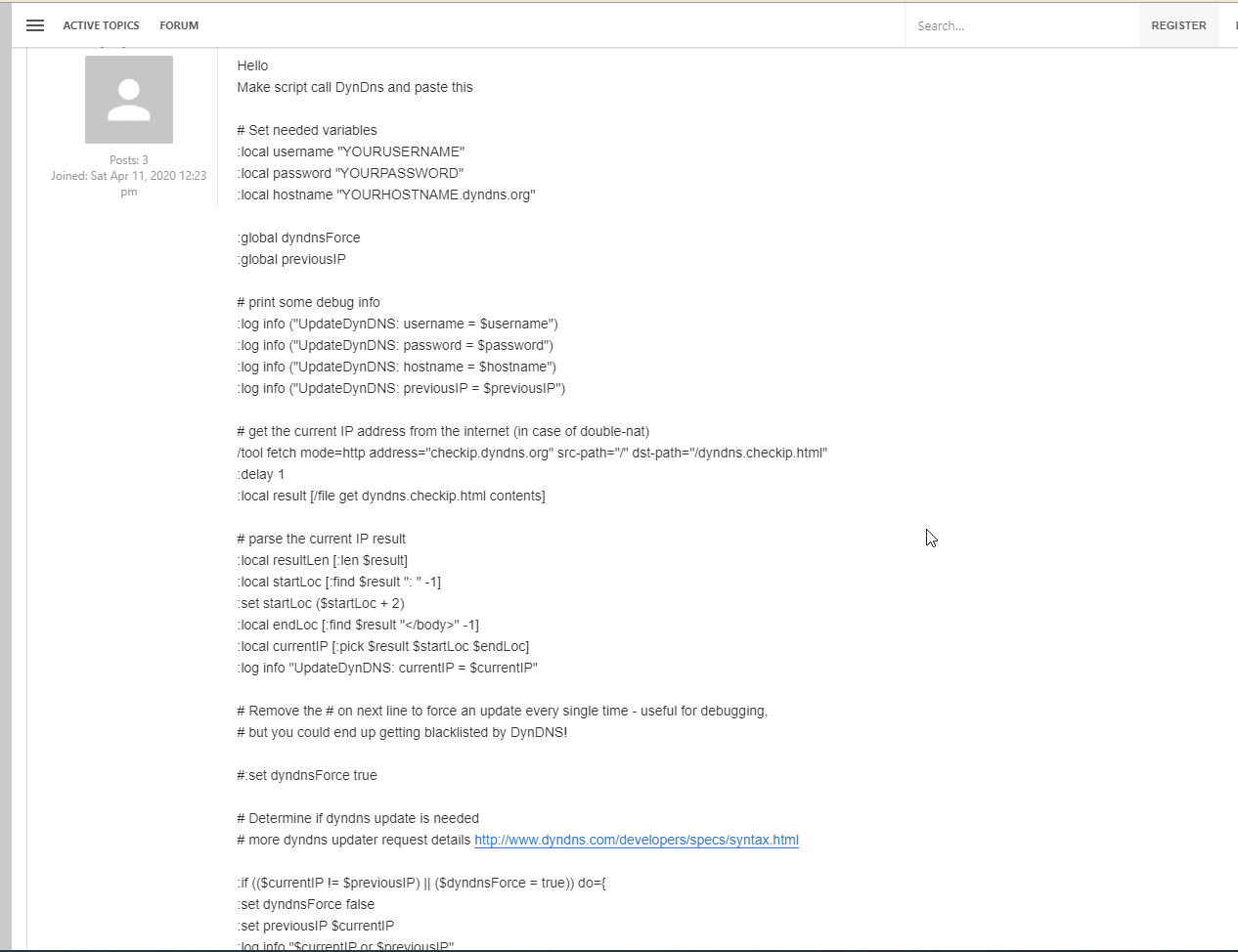
mikrotik forum is terrible
never use anything they recommend
I'll just write my own ok? xD
waxen saddle
Lol
limpid lion
tame carbon
<@!108502561731952640> https://i.imgur.com/yxUBc9w.png
I dont really understand but thanks. It's just so much info to take in >_<
tame carbon
@limpid lion its actually quite simple
@limpid lion IP -> Cloud (DDNS) is a service by mikrotik
when your WAN address changes, it sends a packet to the mikrotik cloud
which (owned by the company that sold you the device)
@limpid lion just enable it
and click apply
limpid lion
Yeah I kinda got that part what I didnt understand was the part about cname but maybe I've figured it out now although not sure
tame carbon
see what happens
 limpid pond
I have this switch which is constantly dropping connection and throttling my devices to 100mbps instead of the gigabit it's meant to be, can anyone suggest a better switch to use for my network? https://www.amazon.co.uk/gp/product/B07HP6ZLSM/ref=ppx_yo_dt_b_search_asin_title?ie=UTF8&psc=1
tame carbon
@limpid pond have you tried a different cable?
often the cable is at fault when that happens
you need all 8 wires for gigabit
limpid pond
Yep, tried new cables bought from amazon pre terminated
limpid pond
and made my own cables numerous times, all have the same problem
peak cloak
limpid pond
Yep, tried new cables bought from amazon pre terminated
windows?
tame carbon
@limpid pond I mean, 22 bucks, I guess you get what you paid for :P
limpid lion
tame carbon
yeah, and then your own domain
so for example https://gyazo.com/3e621b4d6efc82b89409cdbe66e73d2d I would here put blabla.blabla.com under hostname and under is an alias of I would put my mikrotik ddns address thingy?
 peak cloak
limpid lion
so for example https://gyazo.com/3e621b4d6efc82b89409cdbe66e73d2d I would here p...
peak cloak
limpid lion
so for example https://gyazo.com/3e621b4d6efc82b89409cdbe66e73d2d I would here p...
basically
limpid lion
peak cloak
basically
Okay then I understand, it's simple enough. What had me confused was me thinking I had to create an A record for some reason
limpid pond
Only problems I ever have are from the network switch onwards
tame carbon
@limpid lion https://i.imgur.com/xbhDWOX.png
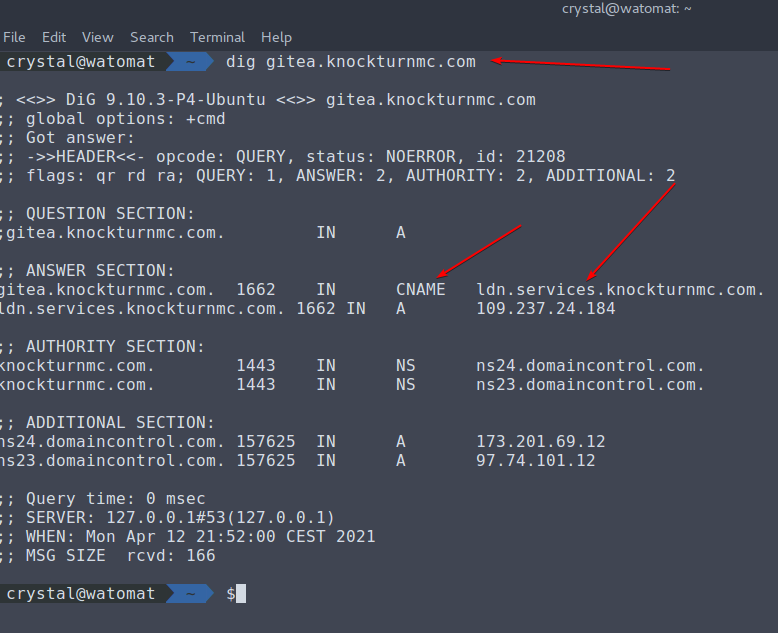
it resolves a CNAME (Canonical Name)
and then an A record (Points to IP)
AAAA is for IPv6
tame carbon
@peak cloak faster and doesnt hog the memory as much
gitlab is bloat af
I stepped away from that
limpid pond
I was wondering where my message went, part of my ISP's name is a banned word lol
peak cloak
limpid pond
I was wondering where my message went, part of my ISP's name is a banned word lo...
oh yeah it's stupid
tame carbon
what isp is that?
peak cloak
*irgin media
limpid pond
v1rgin media
limpid pond
I wrote out my network setup only for the message to be deleted lol
peak cloak
@limpid pond could be something downstream?
 tawny hemlock
you need a router modem and acess point
limpid pond
So I have a vrgn media superhub in modem mode --> ubiquiti amplifi hd router connected to devices both wires and by wifi --> tp link network switch connected to a few devices wired --> tp link access point which is connected to devices over wifi obviously
The problems are only ever at the switch/access point level of the network and nothing ever has an effect on the network up to the amplifi hd router
Re-terminated wires again today to make sure the cables/connections are the problem
peak cloak
limpid pond
The problems are only ever at the switch/access point level of the network and n...
Wait so the switch is connected technically over wifi?
limpid pond
The ethernet from ubiquiti to the switch has been plugged directly into devices to test the internet connection and they work fine
limpid pond
peak cloak
Wait so the switch is connected technically over wifi?
switch is connected by an ethernet cable
tame carbon
how else xD
limpid pond
All hardware is connected by ethernet lol
peak cloak
Yeah but idk if the unifi amp thing is like the thing where you have multiple of the and you can get eth out
The mesh
So it's technically a wireless bridge
 peak cloak
Ah ok
limpid pond
Why did the picture show up like that lol
tame carbon
does it have that speedometer on at all times??
limpid pond
Yep
tame carbon
lol and how much is this? xD
peak cloak
Connect a computer to the ethernet cable the switch is plugged into @limpid pond
See what speeds you get
 outer nebula
@acoustic horizon Thanks you so much! Its actually a job offer based on cloud. Which im intrigued to get in and they seem to have a good support system even with people with small knowledge in their basis. quote on quote "gotta study a lot"
limpid lion
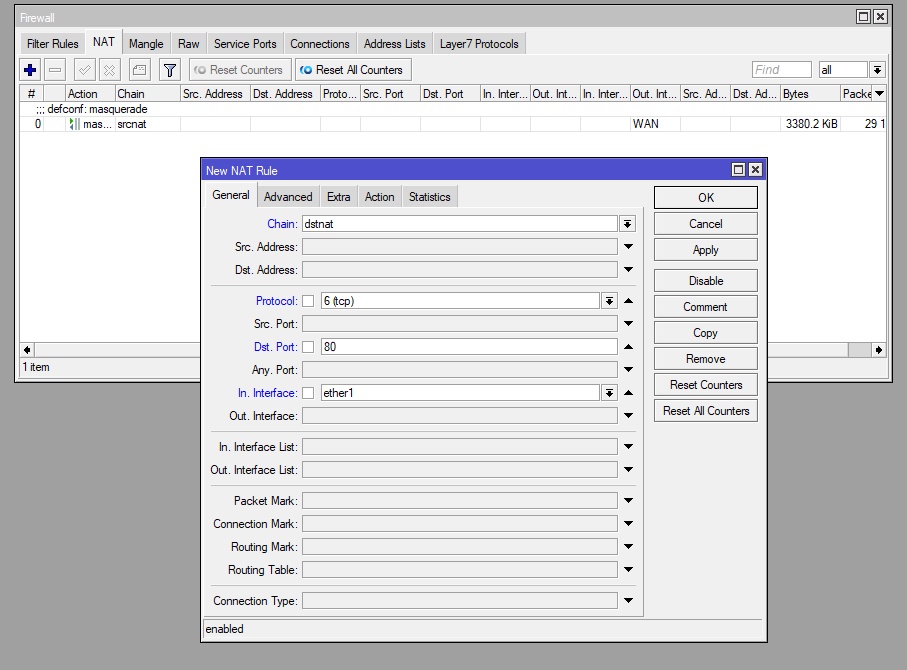
@tame carbon https://gyazo.com/91da56bfc54d3b4d1b1bd07c0c438b63 https://gyazo.com/3dccfbe27cc295428b98db75a6ed54e8
This correct if I want to open port 80 ? 192.168.1.19 is the IP of my npm
 limpid lion
👍
limpid pond
peak cloak
Connect a computer to the ethernet cable the switch is plugged into <@3369037308...
1000/1000 (Mbps)
limpid pond
It's a 60m cable, has run fine the past 5+ years
tame carbon
@limpid lion instead of port 80 do 80, 443
@limpid lion and then the same in the action tab
limpid pond
Might have given up now though, probably time to replace the cable
hollow marlin
limpid pond
This alone
Is this running speedtest constantly or just showing active throughput
limpid pond
hollow marlin
Is this running speedtest constantly or just showing active throughput
Showing network traffic
tame carbon
1000/1000 is gigabit.
limpid lion
tame carbon
<@!108502561731952640> and then the same in the action tab

red in actions tab trying to put both ports
works in general though
limpid pond
Yep, so I'm getting gigabit from the amplifi hd but somewhere at the network switch point it's dropping connection constantly and when it's not dropped it'll get 100mbps max
tame carbon
@limpid lion I think you can just leave that blank
limpid lion
tame carbon
<@!108502561731952640> I think you can just leave that blank
hmm alright
limpid lion
tame carbon
<@!108502561731952640> I think you can just leave that blank
how do I know what to put on in interface? Is 1 the wan port?
ether1 *
tame carbon
@limpid lion go to `Interface -> Interface List
limpid lion
👍 I see it
tame carbon
@limpid lion the interface list is used by the firewall
limpid lion
ah
tame carbon
@limpid lion if you look at IP -> Firewall
thick minnow
if i use a cat8 ethernet cable will that effect the electricity usage
dumb question i know lol
thick minnow
a
tame carbon
cat6a is good enough
 empty hill
My internet suddenly stopped working and my ISP has no clue why as all things work fine on his end. The internet status light on my WiFi router is constantly blinking idk what that means. Any help please? I have tried restarting the router.
I can show a video of my router if you need to see which light
tame carbon
@thick minnow 10gbit is up to 25 meters on copper
limpid lion
@tame carbon
https://cdn.discordapp.com/attachments/565188767074353153/831265371989475379/temp.jpg
From the outside. Seems to work!
 tame carbon
higher speeds and longer distances require fiber
limpid lion
with SSL
tame carbon
@thick minnow instead of electricity flowing over a wire, its lasers over a strand of optical fiber

Its basically this ^ but over a fiber thats 9micrometers wide, thinner than a human hair
and its infrared light
limpid lion
I'm very paranoid since I'm a novice I hope I did it correctly with the port forwarding and that it's somewhat secured.
tame carbon
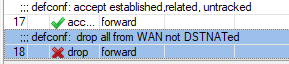
@limpid lion nah ur good
firewall is well thought out
as long as you dont muck around with that

 limpid lion
Yeah
tame carbon
that acceps all forwards for established and existing connections
and the other rule, drops all traffic from wan, that hasn't been forwarded
so it basically drops the packet
@limpid lion and then ther'es another rule
I think that's drop all not coming from LAN

This is input though
so thats for things that go onto the mikrotik's own IP
this for example prevents people from accessing the web config from outside
the mikrotik default firewall is very safe
but only if you keep it that way
 peak cloak
I was just on the mtik routeros manual
tame carbon
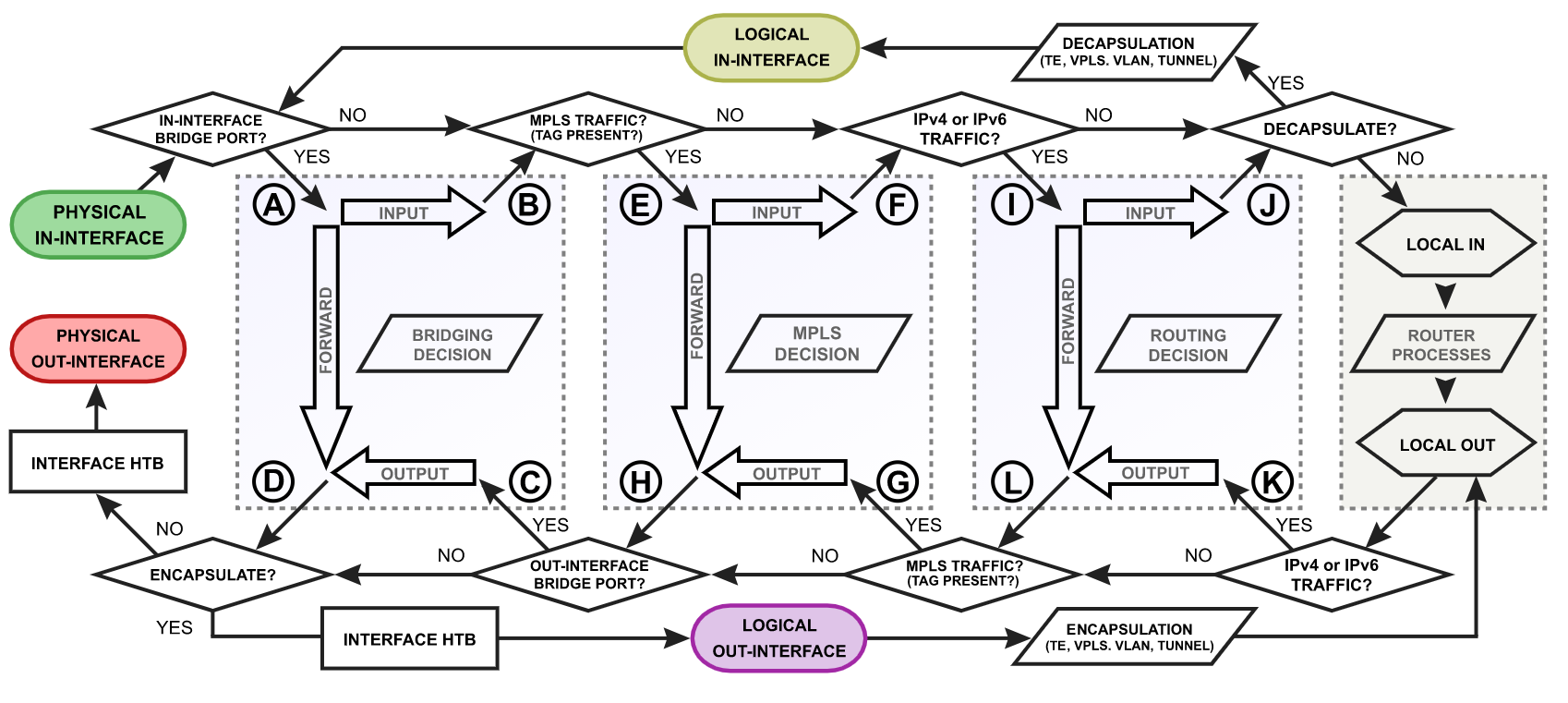
@limpid lion this is more relevant:
 limpid lion
tame carbon
<@!108502561731952640> this is more relevant:
limpid lion
tame carbon
<@!108502561731952640> this is more relevant:
Ok this one is easier to look at
 peak cloak
limpid lion
Ok this one is easier to look at
peak cloak
limpid lion
Ok this one is easier to look at
well that's one part of the whole system which is the top image
tame carbon
@limpid lion yeah that big picture, has three of those smaller ones

that's the last one, for MPLS
tame carbon
that has nothing to do with it
peak cloak
thick minnow
How do I do a traceroute
well first show output of ipconfig /all
peak cloak
thick minnow
what do i look for
what's the default gateway
tame carbon
just
thick minnow
default gateway?
peak cloak
just show it here
thick minnow
<1 ms
peak cloak
the whole thing
peak cloak
no it doesn't
it shows internal ips
and the ips of isps routers
but not your router
thick minnow
thats not an ip address?
peak cloak
see ping to your router is <1 ms
peak cloak
thick minnow
thats not an ip address?
192.168.0.1 is a private IP
thick minnow
is thaat a bad thing
peak cloak
no
thick minnow
peak cloak
see ping to your router is <1 ms
this
peak cloak
it's a reserved IP that can't be used for global routing
thick minnow
peak cloak
see ping to your router is <1 ms
is that a bad thing
peak cloak
no
thick minnow
does it interfere with the data coming through
peak cloak
ethernet's rated max is 100m
thick minnow
the cable
peak cloak
no
look
the latency to your router is less then a milisecond
all the latency is on anything between your router and the server
thick minnow
yes
like a nordvpn
tap
i forgot i still had the nordvpn tap enabled
long after i dropped nordvpn
peak cloak
like I said, the latency to your router is fine. It's not an issue between the router, the cable or your pc






 snow sable
Could be anything between your ISPs connection and the server.