#networking
1 messages · Page 322 of 1
 thick minnow
Ok th u all I will look on to it
 tame carbon
@thick minnow nginx is simplest thing you can use for this
setting up a reverse proxy with that, is only couple lines of config

those website 1 and 2 could be on the same server as nginx, this is just an example
@peak cloak are you still using apache then?
 peak cloak
No
tame carbon
server {
    listen 80;
    server_name my.domain.com;

    location / {
        proxy_set_header X-Real-IP $remote_addr;
        proxy_set_header Host $host;
        proxy_set_header X-Forwarded-For $proxy_add_x_forwarded_for;
        proxy_pass http://192.168.1.100:3000/;
    }
}
@peak cloak entire config for reverse proxy ^
@thick minnow ^
peak cloak
Never used apache really
tame carbon
@thick minnow this is a proxy config. This makes the address: http://my.domain.com:80/ -> your internal webserver
tame carbon
I really like nginx because its easy to setup reverse proxy
as well as add SSL offloading
so you don't have to figure out how 2 letsencrypt every webserver
you can just use nginx
thick minnow
Th u, I’m trying it right now hope to get working
peak cloak
don't you love places where there is still dsl
and it takes 30 min to download 80 megabytes
soon the copper is going to be shut down lol
 waxen scroll
Oof
My telco wants $60/m for 25mbit dsl which probably won't even go the full speed. Comcast wants $35/m for 100mb
peak cloak
and I have to use cloud docs or word because local word doesn't want to active
peak cloak
boy is this bad
all their important documents seem to be on one computer
a whole school's payment info and everything
and it's full of bloat
still on Win 7 which I guess is ok
but not really
and office from like 2003
all managed by people who barely know how to use a pc
tame carbon
lol isnt that preinstalled on every single computer?
peak cloak
Yeah...
It is so stupidly hard to explain anything to people
That are tech illiterate
tame carbon
@peak cloak https://farm.bot/

FarmBot
Farming and gardening robots for home, educational, and commercial use. Premium Hardware · Worldwide Shipping · Drag and Drop Farm Designer · Step-by-Step Assembly Instructions · Own Your Food
peak cloak
tame carbon
<@!222482269829332992> https://farm.bot/
you know what that reminds me of
scrap mechanic survival
tame carbon
except with AI vision and automatic tool changing heads?
 crystal shale
peak cloak
scrap mechanic survival
crystal shale
peak cloak
scrap mechanic survival
Dont forget that theyre in creative now too
 magic rivet
If i see these ones in my firewall router, is that okay?
[DoS Attack: RST Scan] from source: 34.203.133.66, port 8883, Saturday, April 10, 2021 16:32:53

[DoS Attack: ACK Scan] from source: 156.146.43.146, port 443, Saturday, April 10, 2021 16:32:30

[DoS Attack: RST Scan] from source: 34.203.133.66, port 8883, Saturday, April 10, 2021 16:31:26```internet gets scanned all the time
magic rivet
peak cloak
internet gets scanned all the time
So is nothing to worry then?
peak cloak
magic rivet
So is nothing to worry then?
you can lookup the ips and who it is
let me do it rn
first one is microsoft
second is amazon
magic rivet
Ahh, thank you. Then nothing 😄
peak cloak
not really
magic rivet
Looks like my router does the job anyway.
peak cloak
it should block any new incoming connections anyway
magic rivet
Appreciate your help!
 slate sonnet
Hey guys, I have a server related question. What would be the easiest way to transfer my wireguard config, etc do a different server? I've found out that my vps provider has a data-center closer to me, meaning less ping and I want to switch to that, but I need to transfer my wireguard config, etc
peak cloak
slate sonnet
Hey guys, I have a server related question. What would be the easiest way to tra...
a file transfer over ssh
scp is my go to
slate sonnet
Scp is what?
tame carbon
@slate sonnet you know how to use ssh right?
peak cloak
slate sonnet
Scp is what?
secure copy protocol
tame carbon
have you used just ftp from the commandline before?
peak cloak
slate sonnet
Scp is what?

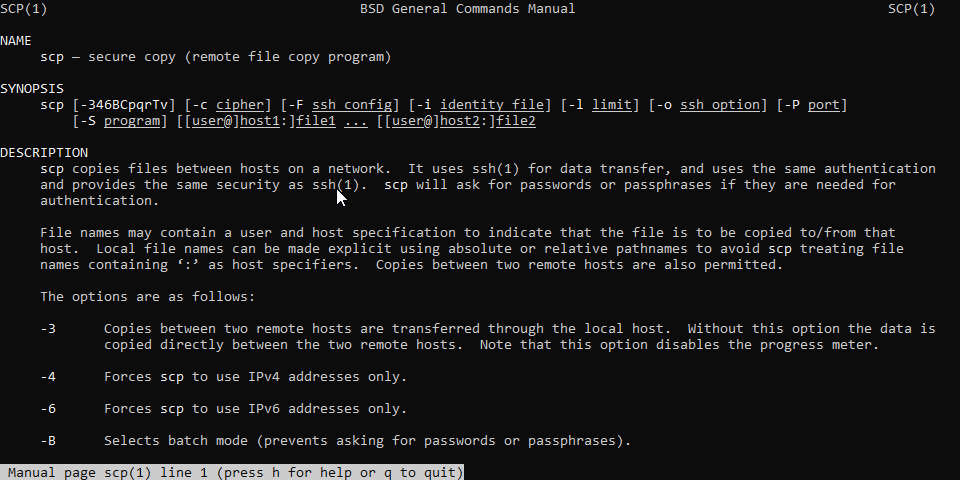
In this tutorial, we will show you how to use the scp command through practical examples and detailed explanations of the most common scp options.
peak cloak
example
tame carbon
 peak cloak
scp file.txt remote_username@10.10.0.2:/remote/directory
tame carbon
or you put them the other way around
peak cloak
transfers file.txt locally to a remote server
tame carbon
to fetch.
peak cloak
you can also copy between 2 remote
tame carbon
yep
peak cloak
scp user1@host1.com:/files/file.txt user2@host2.com:/files
tame carbon
general format is scp <from> <to>
if its a local file you can just use the path
if its a remote, you use: user@host:/path/to/dir
this uses SSH to set up a secure tunnel
slate sonnet
Ugh, this all sounds like I'm gonna screw it up first time I try it lol
tame carbon
@peak cloak they should change the topic, and add Here be Dragons
@slate sonnet if you do it wrong it will tell you
peak cloak
slate sonnet
Ugh, this all sounds like I'm gonna screw it up first time I try it lol
what do you use to remote into the server
slate sonnet
ssh
tame carbon
inb4 rdp
peak cloak
slate sonnet
ssh
ah, so just use your ssh logins
tame carbon
@slate sonnet ssh can do filetransfers as well, you just use the scp command
peak cloak
scp goes over ssh
slate sonnet
Okay
tame carbon
so if you wanted to copy your wireguard.conf
idk where it is located
but you do
scp /etc/wireguard/wireguard.conf user@remote:/hom/user/wireguard.conf
I wouldnt copy it straight to etc, since you need root for that
so you copy it to your home dir first
and then on the remote server, you can copy it to the right dir
or.
you log in with root directly
slate sonnet
So to summarize, to setup wireguard and add the conf to the new server, I would need to install wireguard, and just copy the conf?
waxen scroll
@rocky badge that feel when linus gives up and uses home assistant
peak cloak
oh yeah I skimmed though the vid
tame carbon
@peak cloak same lol
slate sonnet
slate sonnet
So to summarize, to setup wireguard and add the conf to the new server, I would ...
Guys?
tame carbon
@slate sonnet you need to move your keyfiles from wireguard as well
slate sonnet
Ugh, this feels like a daunting task
tame carbon
@slate sonnet I think you just need to recreate what you did before
but the steps where you create your keys
you can skip
because you've already got keys
slate sonnet
Guess if I screw it up, I can always start fresh lmao
tame carbon
you got your config
slate sonnet
I could just follow the guide that I followed earlier
And just copy the config
Well part of it
tame carbon
@slate sonnet you know that private and public key you have on your client right?
slate sonnet
Like the postup and postdown rules
slate sonnet
tame carbon
<@!289451427011756032> you know that private and public key you have on your cli...
Yes
tame carbon
your client has the public key of the server
you can either, copy the existing ID of the server
or
generate a new one
slate sonnet
So basically kinda what I said
tame carbon
but then you have to change the public key of the server of the client config.
yeah
pick your poison.
but I'd keep the config
slate sonnet
That feels easier
tame carbon
that is the most important part
tame carbon
@slate sonnet when I migrate server
/etc/ , /var and /home are usually the most important ones
/etc holds configs
/var has all the application data
slate sonnet
Got it
tame carbon
but the best solution for running applications that you can move between servers is still containers
 slate sonnet
Ooooh, so containers are quite literally containers?
"Folders" that all the app data is stored into and stuff?
Okay, I got it
Just googled it
That makes it more interesting
waxen scroll
@tame carbon i had the same issue as linus. I didn't buy into MyQ because of the fee. Then my garage door opener broke and if I wanted chamberlain all I could do was buy smart openers.
Turns out its free using home assistant anyway
tame carbon
@waxen scroll I'm just generally against this move to poorly secured smart home devices
with no common software or open framework
that could be used to patch or maintain far into the future
Smart home should be like a kitchen table top
last as long as the house lasts.
waxen scroll
yeaaaahhhh
tame carbon
at least with industrial use-cases of smart appliances
its all with PLCs
wires and shit
you can open a manual
and fix it
waxen scroll
when/if i move i'm removing all the smart devices. I kept the dummy ones I replaced
tame carbon
@waxen scroll currently its just better DIYing this
because in you DIYing this, you learn how it works
and this means, you can fix it if it breaks
this would be the same for other smart home appliances
if only we had source code and tools to build firmware packages
waxen scroll
i hate how inflexible things are too
thats why i like HA
extremely complex logic can be done
like linus said, i have many unrelated devices controlling eachother and it works great
the status of manufacturer A and B can stop an automation from triggering on C
it sucks that its come to that but ehh
products like zwave came close but the reliability is not there if you get any device that malfunctions
 sturdy ledge
any idea how i can fix this? i have internet access in all my apps but windows says no internet access

 ebon stump
anyone here run pfsense? 🤔
 sonic notch
Is there any way I can use my Windows 10 PC to connect to 2 networks on my Unifi simultaneously?
waxen scroll
nope. I run ASR9912 tho
peak cloak
sonic notch
Is there any way I can use my Windows 10 PC to connect to 2 networks on my Unifi...
so have 2 network interfaces?
sonic notch
peak cloak
so have 2 network interfaces?
I can only have one ethernet cable running to my Dream Machine
peak cloak
sonic notch
I can only have one ethernet cable running to my Dream Machine
also why?
can you not access the other network?
sonic notch
Why I need both networks?
peak cloak
yes
sonic notch
I believe I have 2 VLANs setup in Unifi already
I just need my PC to connect to both at once
 tender hazel
running windows there is no easy way to get a PC to connect to both VLANs at once
crystal shale
Isnt it possible to connect to one over wifi and one over ethernet? Thats the super silly way for sure xD
peak cloak
tender hazel
running windows there is no easy way to get a PC to connect to both VLANs at onc...
that's what I thought
tender hazel
unless you have a network card that allows VLAN configuration
realtek for instance makes a specific tool that allows you to configure VLANs for their cards on windows
intel does too but I found it doesn't work on all of their cards
crystal shale
tender hazel
running windows there is no easy way to get a PC to connect to both VLANs at onc...
Cant you like just plob in 2 network cards?
tender hazel
ideally you would want to avoid having to buy a second network card to solve that issue
I mean obviously yes you could but it probably isn't the ideal solution for most people
crystal shale
Yeah, true but it would work i guess..
sonic notch
tender hazel
realtek for instance makes a specific tool that allows you to configure VLANs fo...
My ethernet port is listed as "Realtek PCIe Family Controller," so can it work?
sonic notch
crystal shale
Isnt it possible to connect to one over wifi and one over ethernet? Thats the su...
I only have a 2.4 GHz adapter ; (
peak cloak
sonic notch
I only have a 2.4 GHz adapter ; (
even worse
no vlans
I mean technically you can
but like I doubt it supports it
tender hazel
crystal shale
sonic notch
I only have a 2.4 GHz adapter ; (
Hm, isnt that enough for iot? Like sure its slow, but to control things?
tender hazel
@sonic notch I think what you need to use is this "realtek diagnostic program" in the list
crystal shale
But you have that ethernet adapter either ways
crystal shale
peak cloak
even worse
If he has ethernet and wifi(any sort) then he can just connect to the wifi and plug in an ethernet cable from the ither network and done, tho it still aint optimal (this is the super silly way)
peak cloak
crystal shale
If he has ethernet and wifi(any sort) then he can just connect to the wifi and p...
or just vlans
tender hazel
I'm pretty sure the realtek tool works with all of the realtek cards, so the fact that he has realtek means it should probably work with any card
crystal shale
peak cloak
or just vlans
But didnt you say that vlans are crap to use with windows?
peak cloak
crystal shale
But didnt you say that vlans are crap to use with windows?
yes
but on linux
great
crystal shale
tender hazel
I'm pretty sure the realtek tool works with all of the realtek cards, so the fac...
Ye this is the best option
Here atleast i think
peak cloak
or
just connect to one
and have access to the other though firewall rules
@sonic notch
crystal shale
peak cloak
but on linux
Welp he doesn't have linux tho i think
peak cloak
yes ik
that's what I do
I have one network that I am connected to
and I whitelist my mac
tender hazel
but I agree in most cases you don't really need to have a computer connected to two vlans at once
tender hazel
I suspect that perhaps there are devices involved that won't work outside of the VLAN they are on
for instance my dad has this TV tuner box and it will only allow connections from the local subnet
if you are on a different subnet from it you can't connect to it
and you can't change that through the settings
crystal shale
Btw, ya all are (atleast PresentMonkey, since ive sawn him multiple times now) some sort of pro in networking right? I might have an another question here..
sonic notch
tender hazel
<@!145961511318192128> I think what you need to use is this "realtek diagnostic ...
Woooo the tool worked
peak cloak
crystal shale
Btw, ya all are (atleast PresentMonkey, since ive sawn him multiple times now) s...
kinda I guess
tender hazel
@sonic notch great
sonic notch
crystal shale
If he has ethernet and wifi(any sort) then he can just connect to the wifi and p...
I need to do file transfers on the other subnet for now + I've mostly got rid of 2.4 GHz
crystal shale
Okay hear me out, i wanna host an website(on one of my pcs). There is a catch tho..
crystal shale
sonic notch
I need to do file transfers on the other subnet for now + I've mostly got rid of...
Oh, welp nvm then
My plan is to use an i386 processor..
Aka Windows98 because nothing else works on those things
peak cloak
linux...
crystal shale
Nope
peak cloak
it does
crystal shale
Wont boot
tender hazel
it will have to be a 32-bit version
peak cloak
^
crystal shale
Yeah no really?
tender hazel
so you may have to go with something a lot older as a result
crystal shale
I tryed an debian like version 5 or something
Nothing
It just would be easyer to use win98
Atleast on the os side
peak cloak
imo no
crystal shale
Because its.. uh.. a 400mhz celeron p2
crystal shale
So.. pentium 2 architecture
crystal shale
peak cloak
and linux > windows
Just trust me on this one, this machine hates linux
peak cloak
I think your problem is just your bootloader
 tawny flint
Hey so I was wondering if normal Ethernet cable or outdoor for attic also when it get summer it become toast in Australia?
crystal shale
peak cloak
because cli > gui
And uhm.. cli is only able to run one command at the same time right?
peak cloak
no
crystal shale
Or is there some sort of tool that allows multitasking
peak cloak
you can have multiple sessions
crystal shale
And how?
crystal shale
On the cli?
peak cloak
yes
well it's linux
you make system service
and on distros that have systemd you just do
crystal shale
How am i opening a window, on the cli?
peak cloak
well you don't
you can use screen but why
best thing is just use services
then you just do systemctl start nginx for example
systemctl stop nginx
systemctl status nginx
tender hazel
400mhz celeron, you probably would almost get better performance from a raspberry pi
crystal shale
tender hazel
400mhz celeron, you probably would almost get better performance from a raspberr...
Yes
I know
crystal shale
But fir multitasking gui is just better
crystal shale
peak cloak
yes
and i need multitasking
crystal shale
No, i need visual multitasking
I need to see and access what every process is doing-
peak cloak
bruh
crystal shale
Or well, the processes that i started
peak cloak
what do you want to run?
crystal shale
Uhm. Webserver with live stats, ngrok for portforwarding, an TS3 Server and uh.. from times to times an super simplistic minecraft server
Oh an ftp server too.
peak cloak
that's a lot
crystal shale
Yes.
peak cloak
do you not have a public IP?
crystal shale
No?
crystal shale
You mean like 192.168 the intern stuff? Or extern?
peak cloak
so you are cgnated?
crystal shale
I have no idea what that is, but i guess yes? Idk?
peak cloak
 tender hazel
100.64 is the normal cgnat range
peak cloak
Idk how ngork works, there is no way it gives you a public v4 to yourself. You will need to use non standard ports I think
tender hazel
if you are on CGNAT your WAN IP should start with that
tender hazel
that's usually the case with ISPs that don't know what they are doing
crystal shale
peak cloak
Idk how ngork works, there is no way it gives you a public v4 to yourself. You ...
It does this: you specify which port it should forward. Then it talkes over http with ngroks servers and they give the infos over their ports free
tender hazel
 crystal shale
And that for free, but you have different ips again and again, thats why i need live access to it
peak cloak
Yeah so you need to use non standard ports
tender hazel
oh, ngrok
peak cloak
Why ftp?
crystal shale
peak cloak
Why ftp?
Because what are the free alternatives that are easy to run?
 zealous dust
so it seems like this place is right... i just had 18 ip addresses added to my router and now the whole network is borked, everything says its not got internet but does in a browser yet can not connect to git or any thing through a terminal on linux... pls halp
peak cloak
Ftp is notoriously I secure
peak cloak
zealous dust
so it seems like this place is right... i just had 18 ip addresses added to my r...
Wdym by 18 ip addresses? You paid for an ipv4 range?
zealous dust
yeah
zealous dust
ehhhh
peak cloak
Ideally you would still want to nat your normal lan devices
zealous dust
 zealous dust
almost everything is virtualized
peak cloak
What router?
zealous dust
yeah :/
zealous dust
ohhhh
peak cloak
Makes no sense
peak cloak
Cisco?
tawny flint
So questions
peak cloak
Ah I'm on my phone
zealous dust
yeah thats one
peak cloak
That little router for that whole setup
tender hazel
if you're running a homelab like that you probably want a better router than the ISP provided Arris
peak cloak
Yeah I don't think that will do it
peak cloak
Let use introduce you to
crystal shale
peak cloak
Yeah I don't think that will do it
Can openwrt help?
peak cloak
Microtik
zealous dust
i ran out of ports and thought more ips would help
tender hazel
yeah mikrotik
crystal shale
peak cloak
Openwrt is kids play
Yes but it makes old weak routers quite good again
tender hazel
openwrt won't help here because that device probably can't be flashed with anything else
 elfin plank
is it worth to upgrade your modem when you only have 9ms of ping to servers?
tawny flint
Attic Normal or outdoor Ethernet
Also Australia get too hot and the attic become over 40c degrees
Basically CCTV stuff and should I get a unmanaged 12-16 port switch?
crystal shale
tender hazel
openwrt won't help here because that device probably can't be flashed with anyth...
Its just an update?
peak cloak
crystal shale
Its just an update?
No it's a custom flash
crystal shale
peak cloak
No it's a custom flash
Uh yeah but its handled like an update
peak cloak
Yeah but the router needs to be supported
tender hazel
when you use something like dd-wrt or openwrt it has to specifically support that device, or it won't work
elfin plank
tawny flint
Attic Normal or outdoor Ethernet
Also Australia get too hot and the attic becom...
in australia best place to do it is in the garage, usually the most coolest place
crystal shale
I did that to my DLink-615 quite powerful now again
peak cloak
Someone else needs to reverse engineer it
tender hazel
you'll just end up bricking it if it isn't compatible
peak cloak
Also router != Wifi
tawny flint
elfin plank
in australia best place to do it is in the garage, usually the most coolest plac...
Don't have one:3
tender hazel
and most people wouldn't even care about making an arris modem compatible with something like openwrt
elfin plank
next best place is the kitchen then
crystal shale
tender hazel
you'll just end up bricking it if it isn't compatible
Yes ofc, but its most likely that people already did
peak cloak
At this point you want to get a router that will last you
tawny flint
elfin plank
next best place is the kitchen then
This for CCTV cable need to be in the attic don't want cable stick out everywhere in the house
 peak cloak
@zealous dust you could setup a vyos router for internet if you have a spare machine
crystal shale
tender hazel
<@!598481177338445834> no
Unlikely but not impossible
And people love putting their own stuff on devices lol xD
peak cloak
crystal shale
Unlikely but not impossible
Ok, go reverse engineer it
Pretty hard for closed source things
crystal shale
peak cloak
Ok, go reverse engineer it
Did i say that i can do that, or that i want to? I doubt that.
tender hazel
I never said it wasn't impossible, but it is just that most people would not want to go through the effort to do that
tawny flint
elfin plank
or in the wall
Ok so like normal Ethernet cable or the outdoor one that has like waterproof and uv and I'm pretty sure it thicc cable also I don't know if they rat or mouse in the attic but I know sometime roof leak when it heavy af rain normal like 200M $60 then the outdoor is like 100M $100+
tender hazel
when you can buy an off the shelf device that you can flash with openwrt pretty cheap
why would you try to reverse engineer some cable or DSL modem
crystal shale
peak cloak
Pretty hard for closed source things
Yes hard, but not impossible. So there is a chance that there is an "update" out, so it could be worth it to quickly look it up-
tender hazel
look it up if you want, I doubt you'll find anything
peak cloak
Its not worth it to reverse engineer a box like this
crystal shale
peak cloak
Its not worth it to reverse engineer a box like this
But a dlink615? Huh.
Ofc it might be "open"
But still, you would need to trough all the trouble.
crystal shale
tender hazel
look it up if you want, I doubt you'll find anything
I cant, im on used up mobile data rn.
tender hazel
everything in a dlink615 is already supported by open source drivers
elfin plank
tawny flint
Ok so like normal Ethernet cable or the outdoor one that has like waterproof an...
mainly its possums my man, i have a couple up there, and also with the wiring its best to sheath in pvc tubing, as itll give it more longevity, i had to do that with my nbn connection du to it being routed to two parts of the house and also being far from the switchboxes location in the garage
tender hazel
you don't have to reverse engineer stuff and try to make your own drivers
tender hazel
with something like a dlink 615 you just take a linux kernel and install the drivers that other people have already written for every single chip in the thing
elfin plank
yes we have two networks, and yes we have two providers in this house coz we have seperate systems
crystal shale
tender hazel
with something like a dlink 615 you just take a linux kernel and install the dri...
Yeah i guess, but there have to be drivers already..
tender hazel
there are
you have to realize that for all of these home router vendors, they use chips that are used by all of the other home router vendors and have standardized drivers available
crystal shale
tender hazel
there are
So then "we" "dont" need to reserve engineer "much"
tawny flint
elfin plank
mainly its possums my man, i have a couple up there, and also with the wiring it...
I have a flat house so I don't have possums maybe wasp lul or rat but should be ok I just throw poison balls everywhere lol
It just what cable to get btw it cat5e for the POE CCTV
tender hazel
you don't really have to reverse engineer anything for openwrt or ddwrt on a home router, except figuring out how to load the firmware in the first place
tawny flint

 crystal shale
tender hazel
you don't really have to reverse engineer anything for openwrt or ddwrt on a hom...
crystal shale
tender hazel
you don't really have to reverse engineer anything for openwrt or ddwrt on a hom...
Yeah and on that box? Is that any different?
tender hazel
yes, it is very different
crystal shale
How? You just said that drivers are aviable
crystal shale
tender hazel
that's a DSL modem using a custom chip
Like an fritzbox? Or do they use non custom chips?
tender hazel
whenever you have something that has DOCSIS cable support or DSL, they use custom chips that are different from your average off the shelf router
tawny flint
I seee
peak cloak
elfin plank
i dont really deal with cables
Cables are just nice and reliable
No wifi issues
Everything is wired now in the house
crystal shale
tender hazel
whenever you have something that has DOCSIS cable support or DSL, they use custo...
Lul then fritzboxes use custom chips, and there are already custom os to flash aviable
crystal shale
peak cloak
How custom
Completly own os (nvm
elfin plank
peak cloak
Cables are just nice and reliable
i know but i have easy connections to my modem and well, i have nothing blocking my connection
but im like 8 metres away
peak cloak
Os != Hardware similarities/differences
crystal shale
peak cloak
Os != Hardware similarities/differences
Yes i thought you mean the custom os, how custom that is xD
But could i theoretically put my website onto my dlink which runs open wrt?
I mean it is linux, right?
peak cloak
How complex is the website?
Routers don't tend to have much memory
But technically it can be possible
Like is it static
Is there a backend
Is it server side rendered
crystal shale
peak cloak
How complex is the website?
Basic ish.. But its hand coded and shows like pictures, some gifs, and some jokes. And my whole website is 1,35 mb fat if thats important.
peak cloak
So just basic static website
crystal shale
Static?
Well, no new data gets added automatically, yeah
But it has multiple sites ofc.
peak cloak
crystal shale
Static?
Just files being sent over the web
That's what static means
The server doesn't need to do any processing really
crystal shale
Uh yeah i guess
peak cloak
There also sever side rendered sites
And sites that are rendered on the clients end, like react or vue
But those are also technically static
crystal shale
I just have those basic htm files which would need to be displayed on the browser..
peak cloak
Since all the server does is send the js files
crystal shale
So.. Basically send htm to browser and let browser open it
That what it needs to do
peak cloak
Yeah static site, really ez to do
crystal shale
Hm.. i mean.. i could also use my rpi.. which would be 5billion times better...
crystal shale
Huh
peak cloak
Allows multiple sessions
crystal shale
Ye something like that would be neat.. no 5 ssh sessions anymore..
peak cloak
You can also use screen
peak cloak
crystal shale
Ye something like that would be neat.. no 5 ssh sessions anymore..
Keep in mind they will close if you close the ssh session I think, but I may be wrong. I know though 100 percent that with screen it doesn't close
If you use it correctly that is
crystal shale
peak cloak
Keep in mind they will close if you close the ssh session I think, but I may be ...
They dont thats the worst thing..
My rpi overloaded because of that so often..
Like, hey lets type something into this session!
peak cloak
If you have something running in bash, if you close ssh it will exit as well
crystal shale
peak cloak
If you have something running in bash, if you close ssh it will exit as well
No-
peak cloak
Idk what weird thing you are doing
crystal shale
I was like, lets run my script!
It ran
I checked in an another session htop
And uhm...
Yeah.. noticed the load increasing, near 100%
So i wanted to stop the command but the connection died .. and the command still ran..
So i wasnt able to connect back to it
peak cloak
I gtg
tame carbon
@crystal shale if you hang up on an ssh session, the program you were running gets terminated with a HUP signal (hangup).
You can use a terminal multiplexer like tmux or screen to leave a session running in detached mode
programs running within say, tmux, will keep running even if you terminate the ssh session
you can reconnect to it by doing tmux attach <session>
I use this for minecraft servers and such

 thick minnow
im getting it for the security features mainly and eays of use
tame carbon
@thick minnow heh?
my RB4011 costs half that
and can do 2gbit/s VPN
and route @ 10gbit/s
with 25 firewall rules
thick minnow
i only have 1gb down and 80mb up
tame carbon
how much power does this thing even consume
12V 3.33A
40 watts?!
are they insane
 clear igloo
Probably far less than an old computer most people throw pfsense on
tame carbon
@thick minnow https://mikrotik.com/product/rb4011igs_rm

MikroTik is a Latvian company which was founded in 1996 to develop routers and wireless ISP systems. MikroTik now provides hardware and software for Internet connectivity in most of the countries around the world.
@thick minnow stomps on whatever else exists in that market segment ^
and uses only 18 watts while doing so
clear igloo
You do realize all that is max wattage right? It pulls 5 watts idle and probably 15 watts under normal load
clear igloo
I've seen people on the LTT forums throwing pfsense on FX CPUs 😛
tame carbon
crime against nature
peak cloak
It's just... Pfsense
 peak cloak
Not super great I heard
tame carbon
@clear igloo I guess pfsense is nice if you just have an old PC lying around and you need something with slightly more advanced configs
but as a permanent router, I'd use something that is specialized
tame carbon
saves on power bill
and probably is more reliable
than that old compaq you frankenstein'd
tame carbon
@clear igloo did you see that article that was posted the other day, with those CRS317's ?
clear igloo
tame carbon
<@!291198741862416384> did you see that article that was posted the other day, w...
I did not
tame carbon

StubArea51.net
RouterOS v7 has hardware offloading for routing
and you can use this $399 switch
to do full 10G routing
clear igloo
Nice!
tame carbon

The initial results are very promising. Getting close to 10G sustained L3 throughput using an ASIC on a device that lists for $399 USD is unheard of.
@clear igloo if they release this for their other devices, soon, I might be able to just do this on a CRS305 :D
it has same series of switching chips
$120 4x 10G
clear igloo
Now if only I had 100Gbps internet to use this kind of performance 

Yah, 10Gbps routing under $400 is amazing though but at $120 that's epic
tame carbon
@clear igloo currently this only works for the CRS317
but it has same kind of marvel 98DX**** chips
clear igloo
tame carbon
<@!291198741862416384> currently this only works for the CRS317
Yah, but if it does come down to the lower stuff that would be really nice
tame carbon
its just the variant in the CRS317 that has more memory
clear igloo
ah
tame carbon
@clear igloo but its pretty neat seeing mikrotik join the 21st century
clear igloo
haha, yah
tame carbon
might actually make them competative again
clear igloo
competition good 🙂
tame carbon
until a week ago, I didnt even know those edge routers from juniper used routing tables in the switching logic
clear igloo
yah
 hollow marlin
tame carbon
until a week ago, I didnt even know those edge routers from juniper used routing...
hollow marlin
tame carbon
until a week ago, I didnt even know those edge routers from juniper used routing...
Trio switchchips ❤️
tame carbon
@hollow marlin lets make our own router, with an FPGA and a bag of weed
hollow marlin
New Cisco chips can do even more in hardware
clear igloo
The silicon one stuff?
tame carbon
@hollow marlin pretty cool though, if you look at the security aspect of JunOS
clear igloo
Still waiting to get my hands on those 
tame carbon
the forwarding plane (the danger zone) cannot access the routing engine
@hollow marlin would it surprise you if you find Cogent deploying a bunch of switches soon? instead of routers? xD
clear igloo
@hollow marlin You seen the new q200 and G100 stuff?
hollow marlin
tame carbon
<@!462711605063450628> would it surprise you if you find Cogent deploying a bunc...
Unfortunately no, even with the chips, switches are usually knee capped with memory and a lot of L3 like NAT, proper FW filters/ACLs, etc. For distribution level I can see it though
clear igloo
Yah, NAT is a big hit for most switching stuff
hollow marlin
clear igloo
<@!462711605063450628> You seen the new q200 and G100 stuff?
q200, thats the name of the chipset. Packetpushers had a podcast a few months back on it and I want to see what people can pull off
clear igloo
hollow marlin
q200, thats the name of the chipset. Packetpushers had a podcast a few months ba...
Check out the G100, 25.6Tbps of 256x112G serdes 🤤
there was a new 14Tbps routing chip announced I thought recently
hollow marlin
Hot damn. If I remember they are focusing on API too grab the whitebox market also too right?
clear igloo
yah
hollow marlin
clear igloo
there was a new 14Tbps routing chip announced I thought recently
Thats not the Tomahak 3 is it?
clear igloo
hollow marlin
Thats not the Tomahak 3 is it?
that might be it
tame carbon
@hollow marlin do you think there's a market, for a common network configuration language, that you could compile and then deploy on a wide range of vendors and hardware?
idk if something exists
clear igloo
There definitely is
hollow marlin
Yep thats the goal
clear igloo
Sonic is a big one
hollow marlin
Whitebox is a growing market, while I prefer dedicated equipment, Cisco made a smart move opening it up
clear igloo
There's another one, not SoNIC that I can't think of, beings with an A though, not Apstra
Dent is another one
tame carbon
@clear igloo was just thinking, if I would be crazy enough to even try to make something like that xD
hollow marlin
@tame carbon If you are a bit curious what goes down at the chip level, Juniper has a decent doc on it. https://www.juniper.net/documentation/en_US/day-one-books/TW_MX3D_PacketWalkthrough.pdf
tame carbon
I've got the coding skills to do it
just not the knowledge of network engineering to make it
@hollow marlin thanks. I'll skim through all 138 pages
clear igloo
ArcOS that's what it is! (arrcus makes it)
hollow marlin
tame carbon
<@!462711605063450628> thanks. I'll skim through all 138 pages
That's their smaller docs. Most run~1500 pages.
tame carbon
@hollow marlin what is an LU?
hollow marlin
In what context? Routes?
tame carbon
In these diagrams, they talk about routing to and from an LU
hollow marlin
Let me check again. As a heads up I got maybe a 1/4 the way through before my eyes crossed with many of the terms.
tame carbon
xD
clear igloo
lookup unit
tame carbon
@hollow marlin so strange lol. Telus delivering 1.5G service
to consumers
with only 1G gear
 waxen saddle
Lol. Full 7z compression on each packet? 😛
hollow marlin
Mostly for utilizing the LAN ports on the ONT
RIP if you want 1.5 with your own router though
tame carbon
@hollow marlin yeah, so I suggested he'd get himself a switch with some 10G gear
but he doesnt want to replace the ISP router...
wouldn't be a problem... except.. it is because VLANs
his ONT would be on one of those 10G ports on the switch, and that would only work if they can use VLANs to setup a router-on-a-stick config
hollow marlin
As long as they allow 3rd part ONTs/routers. Many Telco gear uses MAC for ONT configuration and sometimes at the port level which mean its not possible to use your own equipment. It does seem like more are willing to hand out the VLAN information
tame carbon
@hollow marlin I am also unsure about the PON modules
idk if mikrotik can even use those properly.
@hollow marlin telus sells their "Home HUB"
which has SFP+ in the back
and Rouing said that telus just uses DHCP over a VLAN
but the module is nonsymetric
its a 2.5G down and 1.25G upstream module
hollow marlin
GPON optics handle the negotiations for timeslots. The Mikrotik GPON SFP should work no problem
 graceful merlin
hey what is mesh system in routers?
peak cloak
In home wifi solutions you mean?
peak cloak
graceful merlin
hey what is mesh system in routers?
Basically the access points connect to each other over wifi and then transmit wifi to your client devices
Its a wireless backhaul basically
tame carbon
@graceful merlin its a janky solution to people's problems
its when you dont want to run cables.
You use an unused wireless frequency to connect two wireless access points together
graceful merlin
peak cloak
Basically the access points connect to each other over wifi and then transmit wi...
i don't want it , i'm not too far from the router 😄
i thought it's something else
tame carbon
superior solution is to just use a 2nd access point and connect by wire
graceful merlin
tame carbon
superior solution is to just use a 2nd access point and connect by wire
wdym
tame carbon
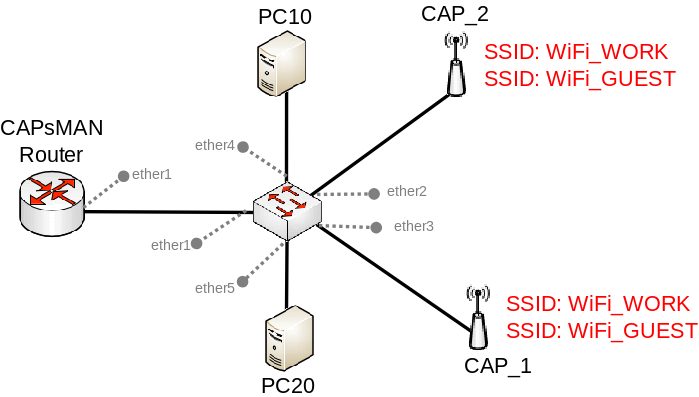
@graceful merlin something like this: https://wiki.mikrotik.com/images/0/0a/CAPsMAN_VLANs_local.png

you use multiple access points connected to the wired network
@graceful merlin perhaps a simplified view: https://i0.wp.com/systemzone.net/wp-content/uploads/2020/03/MikroTik-CAPsMAN-Channel-Configuration.png?fit=1200%2C594&ssl=1

you use multiple radios broadcasting the same network, but on different channels
and you put these around the house
meshing, would use one of those channels, instead of a cable.
graceful merlin
should i use lan cable all around from my walls?
tame carbon
@graceful merlin yeah having an accesspoint for each area, is best way to get a fast and reliable network
but also depends on local noise
2.4GHz only has 3 channels that don't overlap eachother
so its very noisy usually with neighbors and such
graceful merlin
but i dont need these mesh system , my devices can connect to one router
and my router and devices have mu mimo
tame carbon
that's for ac wireless yeah
802.11ax
only brand that I know of that has such a controlled wireless system for WiFi 6 is Unifi
mikrotik is still limited to Wifi5 right now
graceful merlin
tame carbon
only brand that I know of that has such a controlled wireless system for WiFi 6 ...
why are u talking some techy things , i dont know these lol 😛
tame carbon
Look at the topic.
@graceful merlin unifi and mikrotik are brands lol
MikroTik is a Latvian company which was founded in 1996 to develop routers and wireless ISP systems. MikroTik now provides hardware and software for Internet connectivity in most of the countries around the world.

The global leader in managed Wi-Fi systems.
graceful merlin
ok, so if i have router connect to other routers for each room and use a router for each device , right?
peak cloak
tame carbon
only brand that I know of that has such a controlled wireless system for WiFi 6 ...
Tpkink Omada too
tame carbon
@graceful merlin I think you are misunderstanding. a router routes. We're talking about wireless access points.
You normally only have 1 router on a home network
peak cloak
Router does not mean wifi
tame carbon
Its common mistake, and you can thank mainstream marketing for that
Quite a lot of home routers have wifi onboard
Thats why the mistake is made

This is what an access point is
either in a corner under the couch
or on the wall or ceiling (pref)
cheap too, $60
graceful merlin
should i do some ooga booga things for this lol
tame carbon
@graceful merlin first time in this channel? :P
graceful merlin
yup
tame carbon
if you have questions for things like building a home network if you have fiber optics.
or other kinds of network issues, you can ask us here ^^
we got people here that work with ISP systems every day
ISP = Internet Service Provider
the average home wifi router is frowned upon here xD
they usually lack lot of features
@peak cloak did you actually end up buying that hex S ?
graceful merlin
can i use a router as an access point? @tame carbon
tame carbon
@graceful merlin if you want to use a regular home wifi router as just an access point, you must do a few configurations on it
graceful merlin
oh
tame carbon
You have to disable the DHCP server on it. and make sure that it has an IP on the same network as your main router
you then connect it using one of its LAN ports
instead of WAN
this way it just acts as a switch basically
with a wireless radio
graceful merlin
Hmmmm
tame carbon
CAPsMAN https://i0.wp.com/systemzone.net/wp-content/uploads/2020/03/MikroTik-CAPsMAN-Channel-Configuration.png?fit=1200%2C594&ssl=1
is just a more elegant solution
you just have 1 router that controls them all remotely
more seamless configuration
but if you have a spare wireless router lying around, you could use it
waxen saddle
Uh. Mikrotik is not user friendly.
 granite trench
Guys does anyone have experience with Untangle and if so what is your thoughts?
Edit: looking into it as a firewall implementation for the company I work for. I did look at Sophos and Fortigate but I am looking for a solution whom's VPN works well.
hollow marlin
granite trench
Guys does anyone have experience with Untangle and if so what is your thoughts?
...
Fortinet hands down if its an option
thick minnow
Hey so does anyone know how to mask a VPN from site that one visits? I am using wireguard set up on an azure instance
peak cloak
tame carbon
<@!222482269829332992> did you actually end up buying that hex S ?
Yeah, waiting on it
tender hazel
thick minnow
Hey so does anyone know how to mask a VPN from site that one visits? I am using ...
What?
thick minnow
tender hazel
What?
Some sites are able to detect that I use a VPN, I want to make those sites think that I am not using a VPN
peak cloak
thick minnow
Some sites are able to detect that I use a VPN, I want to make those sites think...
you kinda can't
you need to use a vps provider that isn't known
because you need a different ip
thick minnow
peak cloak
you need to use a vps provider that isn't known
Huh, really? Because I saw an article claiming that a proxy could do that? So I was kinda curious
peak cloak
thick minnow
Huh, really? Because I saw an article claiming that a proxy could do that? So I ...
proxy gives a different endpoint ip
so basically the same as using a vpn on a vpn
tender hazel
@thick minnow you could pay something like $75 a month for this: https://www.spider.com/pricing

Join the fastest growing network of stable Residential IPs in the industry. The best pricing and newest network of proxies in the industry. Pricing | Spider.com
that only gives 5 gigs of usage of course
thick minnow
tender hazel
<@456226577798135808> you could pay something like $75 a month for this: https:/...
I am only using azure because I get student credits, let alone 75 a month. But thanks I'll keep it in mind
tender hazel
40G of usage is $480 a month
I think it is too expensive
I'm not recommending it b/c of the cost - I wouldn't pay that
tender hazel
thick minnow
Huh, really? Because I saw an article claiming that a proxy could do that? So I ...
it is a case of where the answer is yes you can do this if you want to spend crazy huge amounts of money
if you are like super rich and have money to burn you can do this
for most people the practical answer is no
tender hazel
peak cloak
you need to use a vps provider that isn't known
The solution presentmonkey suggested is a far cheaper idea - finding a VPS provider that won't be detected as a VPN service
thick minnow
Thank you
 slender shale
Anyone have any experience with HDBaseT / HDMI over Eth?
Kitting out the new house and since I’m running Cat7 throughout I thought it’d be lower latency for game streaming than a steam link/nvidia shield solution
tame carbon
ethernet is best effort
@slender shale you can get active hdmi cables that use fiber optics
 lean pebble
Squid proxy server can mask your IP and netflix would work perfectly with it.
I used it for a long time for testing things and it worked perfectly with it.
tender hazel
lean pebble
Squid proxy server can mask your IP and netflix would work perfectly with it.
I ...
Squid proxy is not magic.. it still needs to get an IP somewhere
if he runs it on his existing VPN server, it won't change the IP for the VPN server and therefore if it is already detected as a VPN it will still be detected as a VPN
he would need to get a VPS somewhere else to run squid on, and if he is going to do that he might as well VPN into that and not bother with squid
 outer nebula
Hi everyone so i've been trying to work on this small project/challenge. I've been getting stuck on it and overwhelmed multiple times. Im very new with Ansible plus little to no knowledge of programming and so it leads to doubts and questions how i should proceed with the installation and configuration of Wordpress and MySQL database in each VMs. I was wondering if anyone could give me an advice/help with it.
 acoustic horizon
outer nebula
Hi everyone so i've been trying to work on this small project/challenge. I've be...
acoustic horizon
outer nebula
Hi everyone so i've been trying to work on this small project/challenge. I've be...
Jump start your automation project with great content from the Ansible community
Jump start your automation project with great content from the Ansible community
there are multiple ansible galaxy modules that do these things. there might even be one that sets its all up for you in one go
@outer nebula are you trying to get into devops by any chance?
 flint venture
This seems good

 formal harness
any thoughts on m2 wifi6 adapter selection ... any know good or problem cards?
 vestal surge
what are people's thoughts on aruba instantOn? I'm a bit frustrated with Unifi's direction and have concerns about TP-Link Omada...
 dark hemlock
Hi community. Does anyone have any tips for improving internet connection and stability? I’m currently connected via Ethernet, with 50 Mbps download (Australian internet sucks). I’m considering changing ISP’s, but thinking if it would be worth getting a different router as I know the ones provided by ISP’s aren’t always the best.
vestal surge
dark hemlock
Hi community. Does anyone have any tips for improving internet connection and st...
whos your isp? what type of NBN connection do you have? what router do you have? We have fttp/b with aussieBB and I'm super happy
what do you think is wrong with your current connection?
 silent zenith
Hello
So my router has USB inputs, and so, recently I connected a HDD laying around to it so that I get a local server in my network, however, I'm getting 1MB/s at max for transfer speed, what can I do?
The network setup:
My PC ==> Mesh System ==> Router ==> Hard Drive connected to router
dark hemlock
I’m with belong, and have fttn. The router is “Belong 4353 modem”
I get the expected speeds, however have disconnection/stability issues almost every day. Even when connected with Ethernet
vestal surge
ahh yeah probs your isp I guess
superloop and aussiebroadband are the generally recommended ones on Whirlpool
unfortunately that belong piece of~~ #@%!~~ kit seems to be locked down
dark hemlock
I did read that someone got a net gear router to work with belong nbn by selecting telstra as the network in the router settings
vestal surge
i guess if you could flash generic firmware for it?
dark hemlock
I’ll research it some more and probably try a different router before switching ISP’s
vestal surge
whirlpool is your best friend for stuff like this - https://whirlpool.net.au/wiki/fttn_registered_modem_router#vdsl2_modem_routers_isp_settings -
dark hemlock
My download will be limited to about 74Mbps due to fttn, so I probably won’t upgrade speed
Thanks
vestal surge
I think the problem is your ISP as opposed to your hardware.
have you dug around in that modem/router combo's settings?
dark hemlock
Yeah, but not sure about all the settings. Need to do a lot of research
vestal surge
change the dns to 1.1.1.1 or 9.9.9.9 if you've not already
not sure that will do anything though - the modem/router if connected via ethernet should route at linespeed
dark hemlock
It generally does, the stability is the problem
dark hemlock
I was thinking it’s likely the fttn
vestal surge
probs
dark hemlock
A friend of mine has Nbn50 with fttp (Optus) and they don’t have an my issues
vestal surge
ultimately belong is telstra so general incompetence and poor service is hardly surprising
dark hemlock
Thanks for the suggestions
vestal surge
if you're set on upgrading hardware i'd buy a new gateway/router from one of the SOHO/enterprise hardware providers and put your belong/sagemcom 4353 into bridge mode (see the whirlpool link)
you'll need to keep the modem or upgrade to something like a fritzbox; but honestly I don't think that will improve stability 😦
thick minnow
If a ethernet cable is really long as in scaling from one room to another is the internet speed effected
 fading geode
0.0
thick minnow

 tame carbon
wat
 desert briar
Hey,
I have a virtual NATed environment with PfSense in my vSphere7 lab. PfSense has 2 uplinks, WAN and LAN. WAN is just an uplink to my local network, LAN is just based off of a virtual NIC in vSphere. When it comes to the LAN, it's on a virtual distributed switch, which is assigned to my 2 ESXi hosts (with proper uplinks and all).
I am however encountering a problem where if the PfSense machine (the gateway) is on another host than my other machines (e.g. a test DNS server), the machines which don't share the host with PfSense have no internet connection and can't even ping it. Any idea why?
flint venture
why not
tame carbon
@flint venture buying a router without wifi is even easier
and this RF-scare is just a bad meme at this point
 limpid lion
@tame carbon https://gyazo.com/55f0e1d277d6cd88f7533d7f18af5645
Thanks for the recomendation

Got my hapac3 today
tame carbon
@limpid lion ahhhh nice :D
You're one of the very few with an ac3
they are hard to come by right now
limpid lion

tame carbon
I have the 'ol hAP ac2 over here
but its pr much same hardware
@limpid lion need any pointers to configuring it?
limpid lion
Yeah
Have a question
Trying to add some static IP addresses to my devics. Is it done on IP > DHCP Server > and clicking make static?
and then just changing the address it got by DHCP to the one I want
tame carbon
@limpid lion IP -> DHCP Server -> Leases
limpid lion
Yeah
tame carbon
@limpid lion click on the lease of the device that you want to make fixed.
double click it
and then click on the button "Make Static"
limpid lion
Done that
tame carbon
You can then modify it
tame carbon
@limpid lion you can enable/disable the interface, to force the device to renew
or just wait till it counts down
the device just has to renew its lease
before it updates
limpid lion
Great
tame carbon
@limpid lion btw, did you upgrade to latest version ?
first thing I always do on my devices
limpid lion
Ill poke around a bit, Im sure I will have to come back and ask some more questions at some point lol
Yeah I did
limpid lion
That I did not
tame carbon
System -> Routerboard
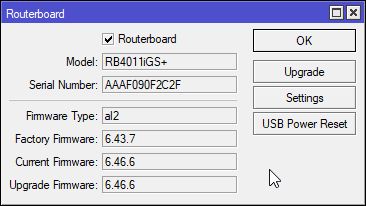
and then upgrade
firmware upgrades are supplied by OS update, but are applied manually
tame carbon
@limpid lion I take it you did the initial config with quickset ?
tame carbon
If you use it after you made changes, itll break your setup
limpid lion
oh
limpid lion
Okay, but its fine if I used it during the initial setup and not after that?
tame carbon
That's cool
limpid lion
perfect
tame carbon
@limpid lion if you for example modified the LAN subnet
itll break all your DHCP settings and such
limpid lion
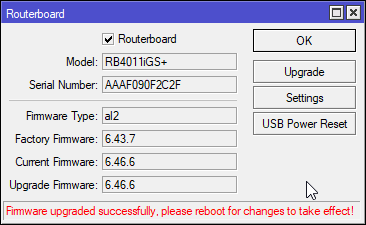
clicking "upgrade" and I got promted to upgrade, clicked yes and there is no progress shown
 tame carbon
@limpid lion go back to the login screen of your router.
and click on "Winbox"
browser config tool is a bit limited
tame carbon
@limpid lion winbox can also connect to the device by MAC-address
useful if you borked the IP settings and locked yourself out
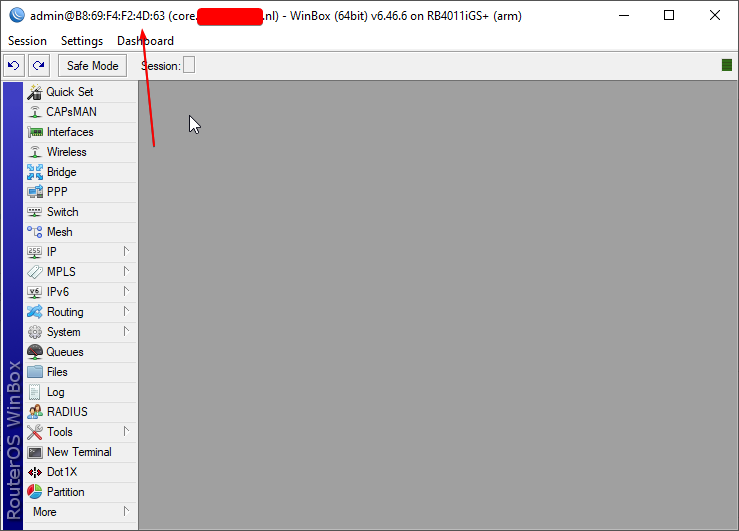
and winbox runs perfectly fine under WINE (on linux and macOS)
 tame carbon
@limpid lion I think as a home user, another important thing to know is how to port forward.
Go to IP -> Firewall
and then select NAT
limpid lion
Yeah
tame carbon
@limpid lion with firewall, and NAT, the ordering of the rules is important, so don't move items around
under NAT, you create a new rule
@limpid lion so for say, minecraft:
https://i.imgur.com/gYnKacm.png
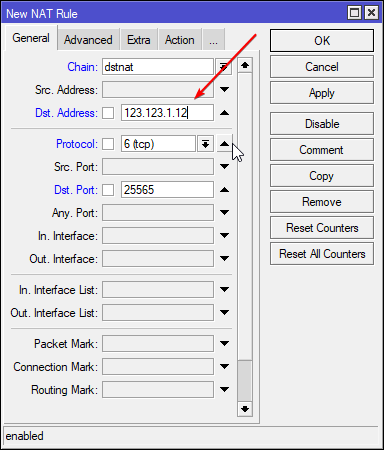
you put your WAN IP in there
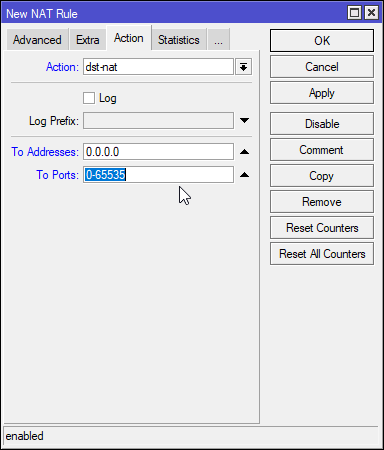
DST-NAT is port forwarding
limpid lion
Yeah so it forward 25565 to x.x.1.12?
 limpid lion
oh
tame carbon
@limpid lion DST-NAT translates from your public IP to some local IP
There should already be a NAT rule in there
with srcnat
limpid lion
Yeah there is
tame carbon
thats for outgoing traffic.
So all your local IPs when talking to a server on the internet, get NAT'ed
so it appears as though it comes from your router
limpid lion
Yeah
tame carbon
then you have to use interface-lists
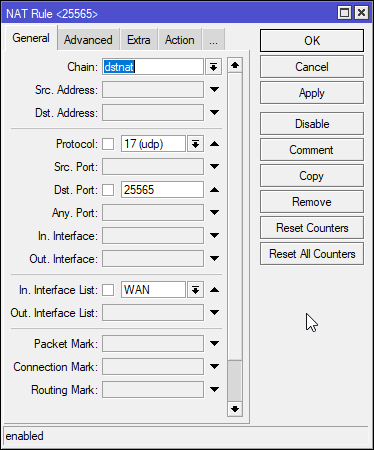
@limpid lion if you go to Interface -> Interface List
there's two lists configured, LAN and WAN
Those are default
@limpid lion https://i.imgur.com/DNd2Mky.png
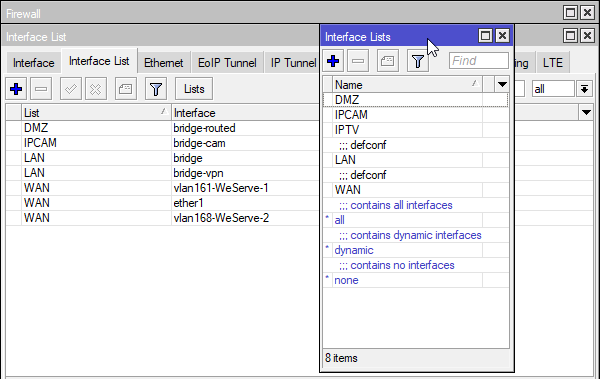
You have a set of lists, and then interfaces that are part of that list
interface lists are used by the firewall
but you can also use them in NAT configurations
@limpid lion your bridge should be LAN, and all interfaces associated with that bridge, are also part of that interface-list LAN
You can look at port assignment, under Bridge -> Ports
By default, ether1 is WAN, and all the other interfaces are LAN
I know its a bit confusing at first, but it makes a lot of sense when you use it
tame carbon
@limpid lion benefit: once you know how to do this on the ac3, you can apply the same knowledge to all other mtiks
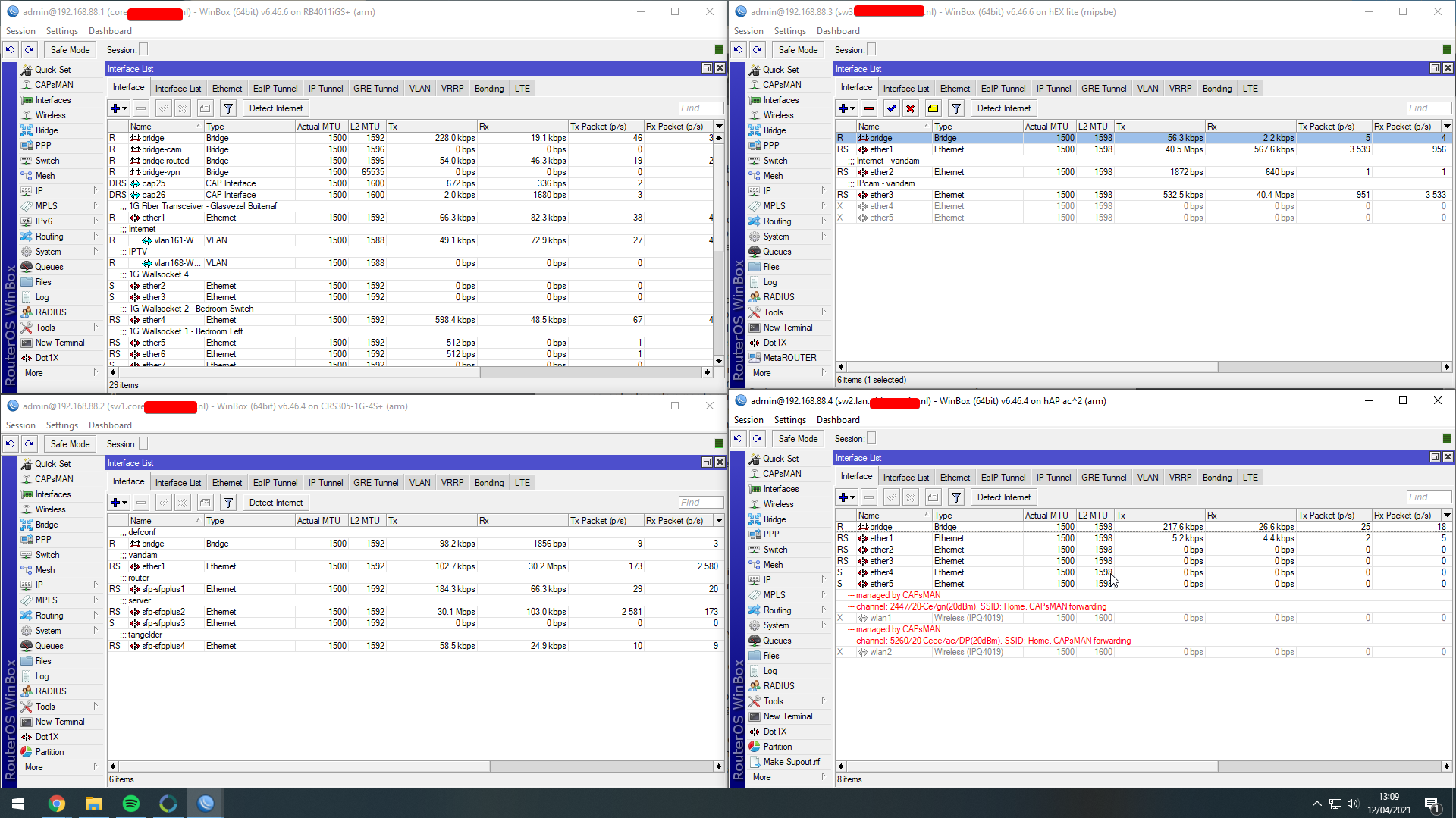
@limpid lion xD https://i.imgur.com/TXFz7fk.png
 limpid lion
Ill just mess around for a bit and see how it goes
just gotta learn
@tame carbon If I run a bunch of services on for example a truenas server would you say its better to give them DHCP and then manage the static IP from the mikrotik or should I assign them a static IP when creating the service?
tame carbon
use DHCP leases.
Just make them static
I wouldnt manually configure such things
@limpid lion my virtual machines sit on another VLAN, and ask for their public IP with DHCP
limpid lion
aight
tame carbon
@thick minnow I just whipped that up real quick :P
thick minnow
haha nice
tame carbon
shareX ftw
thick minnow
It would take me like 15 mins for me to do that for each individual pic
 thick minnow
I meant like the arrows and stuff
thick minnow
Ah nice
tame carbon
Useful if you want to point at things and such
@vestal surge it is utilitarian lol
thats their whole company motto
giving you hardware without artificial limitations in software
limpid lion
Trying to add my pihole as my DNS server. went and unticked peer DNS and put my DNS IP in under DNS settings but its not changing.

 tame carbon
@limpid lion you'll probably want to keep that the same.
vestal surge
tame carbon
<@!108098640794382336> it is utilitarian lol
One day I'll learn how to use it
tame carbon
And set your DHCP Server to use another DNS server
vestal surge
But not with WFH
tame carbon
@limpid lion Mikrotik shouldnt be using the pihole itself.
limpid lion
I see
tame carbon
@limpid lion you can provide the tik with 1.1.1.1 as primary, and let it keep the dynamic servers from the ISP
as backup
 tame carbon
yeah
@limpid lion in your DHCP server settings, go to Networks
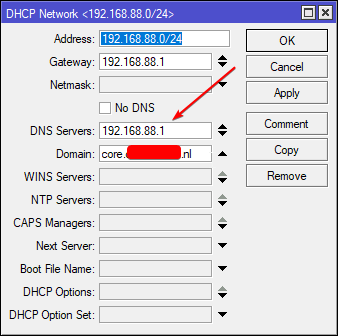
you can have multiple entries
but here you provide the DNS server that will be handed out to clients
 tame carbon
@limpid lion if you set the tik to use your pihole as DNS, you get into all kinds of shennanigans when your pihole is down.
@limpid lion what you can do, is set the upstream DNS server on the pihole, to be your mikrotik
this way you can still make use of the static DNS feature of routerOS
@limpid lion https://i.imgur.com/09iBjiz.png
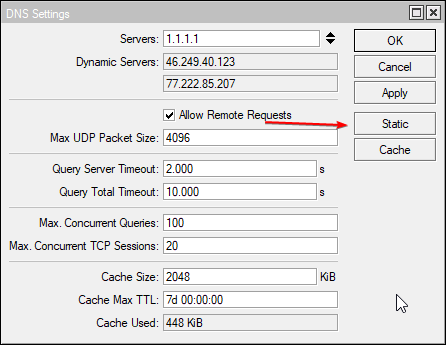


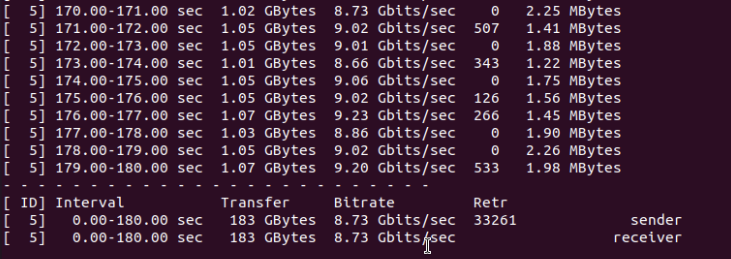


but pihole probably also has support for static DNS.
I mostly use static dns for like my laptop, desktop and server
so I can use watomat as shorthand, for my laptop xD
thats the name of my PC :P
limpid lion
Just put the DNS server in my DCHP
works fine
thanks
Everything I want to try and figure out is like a little adventure
lol
unlike my last router "DNS server 1 DNS Server 2". Simple but limited ^^
Wish I was half as knowledgeable as you were
peak cloak
limpid lion
Wish I was half as knowledgeable as you were
don't worry I was in your place too
you learn over time
the amount of times I made the internet go out
at home
limpid lion
_<
tame carbon
@limpid lion 3 years ago, I was where you were at now