#networking
1 messages · Page 319 of 1
 tame carbon
 peak cloak
you don't even need a controller do you?
 marble nacelle
whats a controller and whats a acces point
 tender hazel
and will go over wireless
tame carbon

MikroTik is a Latvian company which was founded in 1996 to develop routers and wireless ISP systems. MikroTik now provides hardware and software for Internet connectivity in most of the countries around the world.
peak cloak
audience could work for someone who just wants something "simple"
tender hazel
it has a dedicated 5ghz radio for backhaul to the other audiences
 gritty valley
I mean hAP AC2 would work too
tender hazel
you'll want one hardwired in to your router, the other audience units can connect to the 5ghz backhaul radio
gritty valley
or multiple wAPs
tender hazel
if you want the high speeds though and can't run cable
 lean pebble
When I'll get better internet I'm gonna upgrade my mesh system to one that Support 1/2gbps
tame carbon
@marble nacelle https://mikrotik.com/product/hap_ac2
MikroTik is a Latvian company which was founded in 1996 to develop routers and wireless ISP systems. MikroTik now provides hardware and software for Internet connectivity in most of the countries around the world.
tender hazel
the audience has two 5ghz radios for that reason
tame carbon
@marble nacelle these can do 2.4GHz and 5GHz. But would require you to run a cable.
marble nacelle
tame carbon
<@!345050182896975874> these can do 2.4GHz and 5GHz. But would require you to ru...
i live in the middle east
tame carbon
The audience has two 5GHz radios, and can use one of them two talk to ther Audiences.
marble nacelle
we dont have this here
tender hazel
one runs on a different frequency and is used for connection to the other audiences
yeah
tame carbon
@marble nacelle which country exactly?
marble nacelle
tame carbon
<@!345050182896975874> which country exactly?
bahrain
lean pebble
My mesh have 5ghz but his rj45 connectors limited to 100mbps
tame carbon
@marble nacelle you're one of the lucky few with internet access then?
marble nacelle
tame carbon
<@!345050182896975874> you're one of the lucky few with internet access then?
hahah no
tame carbon
last I heard, you guys have quite some bad things going on
tame carbon
Yeah. let me look if there's a vendor in Bahrain
marble nacelle
tame carbon
last I heard, you guys have quite some bad things going on
nah thats western media
were good
lean pebble
I wish I could have 100mbps
tender hazel
tame carbon
@marble nacelle its worth it, this is ISP tier quality
marble nacelle
tame carbon
<@!345050182896975874> its worth it, this is ISP tier quality
aight ill look into it
lean pebble
marble nacelle
you dont have that in isreal >
The ISPs here sucks ignoring the ppls that lives in private houses only connecting buildings
peak cloak
tame carbon
<@!530075635423510548> their webserver is having me wait./..
fine for me..
marble nacelle
lean pebble
The ISPs here sucks ignoring the ppls that lives in private houses only connecti...
welcome to the middle east
tender hazel
yeah it loads fast for me too
tame carbon
now its snappy.
marble nacelle
most isp companies in the middle east are govermenaised
lean pebble
Load good for me to
lean pebble
marble nacelle
most isp companies in the middle east are govermenaised
Nah we just have one that rule all the internet infrastructures and making the other ISPs suffer
peak cloak
oh no wonder
tame carbon
mh
peak cloak
I'm in NJ
tame carbon
@marble nacelle that store only sells ethernet routers, no wireless
marble nacelle
tame carbon
<@!345050182896975874> that store only sells ethernet routers, no wireless
that store is closed
tender hazel
they don't even have a web store, they just have links to the products on the mikrotik products page
tame carbon
@marble nacelle are there only online retailers you can buy thing sfrom?
marble nacelle
tame carbon
<@!345050182896975874> are there only online retailers you can buy thing sfrom?
shipping is exspensive
so theres no way i can find the right ip addreas for the extender ?
tender hazel
it may not have a management IP once it is set up
you could check your dhcp for a mac that matches the first 6 hex digits of the extender wlan mac
tame carbon
or when it cannot find a dhcp server, it sets itself to a static ip
tender hazel
yes, if the extender is getting an IP from the huawei it will be in the dhcp info page on the huawei
tame carbon
but he said there was no lease.
lean pebble
I decided to leave the gre tunnel alone and try different protocols, any ideas ?
tender hazel
there's no lease with the name tplink
I'm saying check the leases list for the tplink mac
tender hazel
ok
but in your dhcp info page with the leases do you see any lease that matches the beginning of the wlan mac on the extender?
the huawei dhcp info page
XX:XX:XX:YY:YY:YY, the X's would match the wlan mac of the extender, the Y's may not
tender hazel
ok
marble nacelle
i have another question
so my router has two SSID
based on a 2.4GHZ and 5GHZ configuration
they have different names
the problem is
i cant connect my tp link to the 5GHZ SSD
because i cant open the tp link web
peak cloak
marble nacelle
i cant connect my tp link to the 5GHZ SSD
doesn't it not support 5ghz
tender hazel
no you can't connect your tplink to the 5ghz ssid because it doesn't have a 5ghz radio
marble nacelle
oh
is there a tp link or perhaps a dlink device that does
TP-Link RE305 AC1200 Dual Band Wifi Range Extender
is this good?
tender hazel
that ought to work, that'll have 5ghz
 tender hazel
be warned that you aren't going to get 450Mbps from 5ghz with an extender though
tender hazel
the extender takes up half the capacity because it uses the same radio to connect back, so you will get 200 or less
marble nacelle
o
tender hazel
because the ac does like 450 so half of it is used to connect to you and the other half is used to connect back to the main wifi router
whenever you use an extender that uses the same 5ghz radio to extend as well as connect back to the main router it will slice the bandwidth in half
tender hazel
or you run a cable
tender hazel
there is a similar solution to the mikrotik audience made by dlink
the COVR-2200
I don't know if tplink has something similar
tender hazel
if you run a wire you still need a 5ghz capable AP
marble nacelle
yeh but how will i pick that configuration
tender hazel
and no tplink doesn't have something similar to the COVR-2200 with the tri band solution
so a good solution might be the D-Link COVR-2200
(if you can get that)
then you don't have to run a cable
tender hazel
you might be able to use powerline adapters
if you can get those, and if they are fast enough
 sly wadi
Any ideas for exposing an SSH server (or whatever else) to the world while hiding your home ip? (looking for something cheap or free, idk if something like cloudflare exists for non-http)
 waxen saddle
Why wouldn’t a VPN work for you? Exposing SSH is generally considered a bad idea no matter how much security you have.
peak cloak
Why is exposing ssh bad?
If you have key auth and a non standard port it's fine
Although I would still prefer vpn
sly wadi
VPNs would probably be too expensive for a simple homelab type thing (also, I used SSH as an example... I would probably be hosting Minecraft and/or Plex/Nextcloud)
peak cloak
sly wadi
VPNs would probably be too expensive for a simple homelab type thing (also, I us...
Host your own vpn
That's what I meant
sly wadi
peak cloak
Why is exposing ssh bad?
^ If you have a good enough security configuration (MAC and proper auth) you should be fine
sly wadi
peak cloak
Host your own vpn
My goal is to hide my homelab ip address for public kinds of things like file hosting, not try to administrate it remotely
Sorry If I was being unclear
waxen saddle
No worries. I know LMG uses a masking service to hide the real IP of their Minecraft server, though I don’t recall what it is called.
sly wadi
Okie, thanks... Ping me if you do find an answer
peak cloak
waxen saddle
No worries. I know LMG uses a masking service to hide the real IP of their Minec...
probobly cloudflare?
but it's paid
actually I can check
tender hazel
SSH isn't always expected to be exposed, so for that reason I would say it would have a greater chance of vulnerabilities than VPNs
peak cloak
sly wadi
Okie, thanks... Ping me if you do find an answer
huh
they have a free option
I never knew that
I would use it myself then
sly wadi
peak cloak
tcpshield.com
Isn't it only for game servers though?
peak cloak
sly wadi
Isn't it only for game servers though?
I don't think so, I haven't tried though
they advertize it just for games
sly wadi
Huh, ok... Might check it out
peak cloak
won't hurt to try
tender hazel
I wouldn't say so - at least I wouldn't want to expose SSH on most of my devices to the world
we have many servers and don't expose ssh to the internet on them, no reason to
that may be so, but with a VPN there is little point in having a VPN if you don't expose it to the entire internet to be able to connect.. that isn't the case with SSH due to the different use case
no, but daemons that are not expected to be exposed to the entire internet would not be as inspected for vulnerabilities as thoroughly as those that are, as a generality
tender hazel
well how often would you set up a VPN that is not exposed to the internet, vs SSH that is not exposed to the internet? I would expect that there are a lot more SSH servers not exposed to the internet than there are VPN servers
I'm also not saying there is something wrong with something really standard like openssh in that way
but ssh on some random device
 obtuse cove
help gig speed making my cpu0 at 100%
bonding gig with 5g (not even getting gig speed)
 peak cloak
obtuse cove
bonding gig with 5g (not even getting gig speed)
peak cloak
obtuse cove
bonding gig with 5g (not even getting gig speed)
you can't combine speeds
that's not how it works
plus are you on ethernet
obtuse cove
peak cloak
you can't combine speeds
yes i can
obtuse cove
peak cloak
plus are you on ethernet
yes
peak cloak
obtuse cove
yes i can
not on a single tcp stream, you can't
you can have more overall bandwidth, yes but will it be worth it enough for you to see, no
obtuse cove
peak cloak
not on a single tcp stream, you can't
yes but if you are using multi stream you can (different ip going 1:1)
peak cloak
obtuse cove
yes but if you are using multi stream you can (different ip going 1:1)
no multistream is to different desination servers
plus
speedtest.net probobly doesn't go over multiple interfaces
just your main one
obtuse cove
idk about that when i start the test i can see it using the different networks
peak cloak
obtuse cove
idk about that when i start the test i can see it using the different networks
whatever, it's not really applicable to real world scenarios
obtuse cove
peak cloak
whatever, it's not really applicable to real world scenarios
i will not argue about that its so true but why do i not see even one gig my main speed?
peak cloak
cpu could be pinned, but I doubt that. Probobly just router
what's your router?
@obtuse cove
obtuse cove
HG8245Q
from my ISP
but i turned off WIFI and switching and got Cisco networking on house with cat 7 between the router and the switch
and the rest cat 6A
peak cloak
obtuse cove
but i turned off WIFI and switching and got Cisco networking on house with cat 7...
ok but you will still be limited by the router
I can't find anything online for routing speed
obtuse cove
i can get the one gig speed but in the start of the test but then it will hover down to500mb and then start working up to that 700-800 mb/s
peak cloak
obtuse cove
i can get the one gig speed but in the start of the test but then it will hover ...
sounds like ISP issue then
ISP rate limiting
that too
obtuse cove
i don't think so i think its CPU bound
peak cloak
me neither
obtuse cove
i got 3700x
 thorny vector
-_-
For consumer use, and even most commercial/enterprise use, amd has no more issues than intel.
ummm, epyc?
peak cloak
epyc?
thorny vector
It's super taking over the datacenter
epyc is destroying intel in the datacenter. Most of the refreshes I've seen in the past 5 years (government/ISP space) that don't rely on any intel specific features, migrate over.
Especially those that are virtualization heavy, which is everyone nowadays
 severe pollen
Can't...say I've ever had issues with AMD and networking
and I've got a virtual switch on my machine
thorny vector
They've increased market share I think by 5% in the enterprise world in the past year
That's crazy growth.
Intel have a higher market share indisputably, but I'd argue straight market share in the enterprise space is misleading, considering how many servers are just stood up and forgotten about.
 hollow marlin
5% over a year is huge. Enterprise life cycles are 5-10+ years
severe pollen
It's hard to measure in general
obtuse cove
so what i hear is that this issue cant be fixed?
thorny vector
@obtuse cove What are you using to speed test with?
hollow marlin
How are you bonding the connections?
obtuse cove
thorny vector
<@!317014466854256640> What are you using to speed test with?
what do you mean? i got the website and then the app switching between both
thorny vector
Ahhhhh, I would bet its the website doing the throttling then
hollow marlin
Remove the bonded connection, retest on you main connection. I guarantee you're pushing the stack to software
obtuse cove
peak cloak
Why so you need to do that?
my home has a lot of people on it and a lot more of devices that if they work or play games i cant get 20-30mb/s from my 1000mb/s
but i got a NAS and home media server on my 5g so that even if I'm outside the house i can remote into my house and take some stuff
 obtuse cove
no with the 5g move i have seen every device with 5G networking has its Own ipv6
the stupide thing is i can open ports on my 5G but not my 1gig router
peak cloak
obtuse cove
no with the 5g move i have seen every device with 5G networking has its Own ipv6
Its not 5g specifically. Carriers in the us are the ones with the most v6 rolled out
peak cloak
obtuse cove
the stupide thing is i can open ports on my 5G but not my 1gig router
No v6? And cgnat v4 I assume?
obtuse cove
peak cloak
No v6? And cgnat v4 I assume?
yeah
peak cloak
Bruh
If an isp has cgnat but gives you /56 v6, whatever it's fine. But cgnat and not v6 that's just ...
obtuse cove
if you got download large games from steam or epic games if that even a thing anymore you can get instead of 1000mb/s i can theoretically get 3gig/s (if 5G got that sweat 2gig speed)
no the max i got before my system crash with blue screen 2.5g/s
peak cloak
That's the standard, is it not? Fios here doesn't yet
Same
But no v6
Use tunnel for that
Why..
obtuse cove
btw will Linux handle high speed better or will it be the same?
lol even with iperf its still 100% with
 thorny vector
Windows bonding is pretty resource intensive, since its all software
obtuse cove
turned off bounding and tested with http https://prnt.sc/1165y9t

still 4-5 sec of downloading and the system freeze
yes
i was thinking to boot into safe mode to remove the idea if its software that is getting my CPU cycles
idk i was thinking of malware or viruses but if its really malware or viruses it will take all 16 not only 1
and i was thinking it was cryptomining malware but the same why stop with one why not all
waxen saddle
Do you have tcp offload enabled?
obtuse cove
waxen saddle
Do you have tcp offload enabled?
i don't have it
waxen saddle
So the CPU is handling all the packets
obtuse cove
waxen saddle
So the CPU is handling all the packets
ok if its handling all the packets why not using more than one core
waxen saddle
Not sure how it would. In my head, it has to glue the data from the packets together. I’m not sure how you would multi-thread that.
How bad of a freeze is it? Does the mouse move? Can you toggle the caps lock light on your keyboard? Does the entire screen freeze?
obtuse cove
waxen saddle
How bad of a freeze is it? Does the mouse move? Can you toggle the caps lock lig...
it freeze even the mouse
tender hazel
I wouldn't expect a simple 1Gbps of traffic to cause a single CPU core to max out like that
tender hazel
I would look at task manager and try to figure out what is happening
 thick minnow
So I'm conneecting to a network hard drive and streaming a film on vlc
On my phone oneplus 7t pro it works fine
But on my ipad it keeps buffering
tame carbon
gigabit ethernet go brrrr
thick minnow
Both very close to the router and computer is wired
Nah I like paused anyrhibf using bandwidth
It's not a bandwidth issue afaik
It's just on my ipad it's buffering was working fine yesterday
My phone is super fast
I click on it it plays
Yea I'm watching on my ipad now plays for a few seconds then pauses
tame carbon
obtuse cove
no with the 5g move i have seen every device with 5G networking has its Own ipv6
5G mobile technology has nothing to do with ipv6.
It is just common practice that new networks are v6
Because v4 is legacy.
 frigid pine
In a VPDN tunnel there are multiple sessions. How do I control the session timeout from LAC side?
frigid pine
tame carbon
isnt that just cisco jargon for layer 2 tunnels?
yep. Uses L2TP.
tame carbon
@frigid pine not entirely sure. https://i.imgur.com/OXjEvRW.png
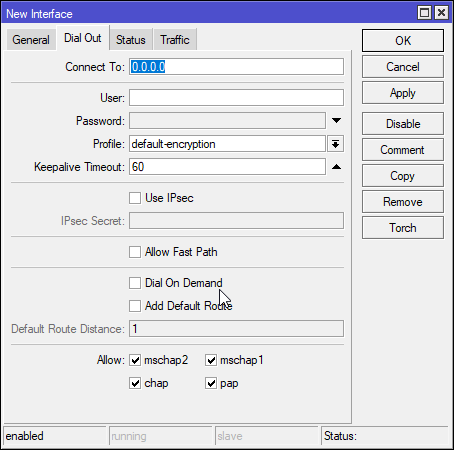
But on my router, I can just set timeout for a client
oh, LAC, that's the concentrator
frigid pine
tame carbon
oh, LAC, that's the concentrator
Yeah.
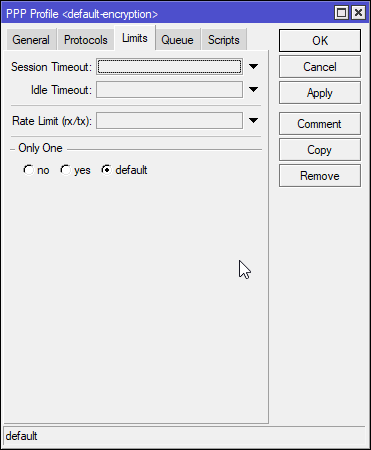 frigid pine
tame carbon
<@!230037398392799233> not entirely sure. https://i.imgur.com/OXjEvRW.png
frigid pine
tame carbon
<@!230037398392799233> not entirely sure. https://i.imgur.com/OXjEvRW.png
Ah Mikrotik. xD
This is client interface. LAC is middleman.
frigid pine
tame carbon
https://i.imgur.com/dJVbjhg.png
This is server side xD
frigid pine
The problem here is I am in the middle. Don't have accesss to the server or client. The server admin says timeout is configured properly at their end. But doesnt seems like working and they wont accept that it isn't working. So I am just shooting in the dark to find something to clear the session from my end.
tame carbon
@frigid pine you sure it is a keepalive issue?
and not just some other problem that breaks l2tp?
I've had my myriad of issues across a network that didnt have 1500 byte ethernet
frigid pine
I have single tunnel thru which multiple pppoe sessions are going. The sessions are stuck at the concentrator only if the client end dies abruptly eg. with a power outage. So I don't think it have anything to do with L2TP breaking coz other sessions work fine.
frigid pine
Yeah. Thanks for trying anyways. 🙂
tame carbon
@frigid pine what would interest me is a log-dump of the concentrator
like, that admin of yours says all is well
but is it?
frigid pine
I am the concentrator admin. You must mean the server log?
tame carbon
yea
frigid pine
unfortunately server logs arent available as I don't have access to it. And the admin is a jack-ass.
tame carbon
@frigid pine sounds like my old ISP
"The line is fine, we see the full speed you can receive"
Yes but the latency is 400ms and I have 5% packet loss
"The line is fine"
frigid pine
yeah. lol. These people think that since they have configured it, it MUST work.
If it doesn't work 200% other party's fault.
tame carbon
tech support diddnt even know what latency or packet loss was
or for that matter: what even is a packet? xD
"have you tried restarting your router?"
frigid pine
packet I can understand them not knowing. But yeah ping is something even a non-tech guy knows these days.
tame carbon
@frigid pine the problem ultimately was, three poor splices on the DSL line, and a big 2 meter loop under the driveway, right across a city power line
frigid pine
since everybody is nowadays playing pubg or minecraft and whatnot
tame carbon
and the neighbor had an old NAS with a broken power brick
whose interference was bleeding into my DSL line through that loop and splice
8 technicians couldn't figure it out
until the 9th came, in press suit and tie, with a little DIY FM radio
he walked around the house with his headphones on
and found the problem within 5 minutes
I bet thats why he could afford a suit & tie
cus all the other guys are hopeless.
thick minnow
xD, this is kinda hilarious
tame carbon
@thick minnow I asked him why he wore different attire. And he said he primarily services business customers
frigid pine
Once there was an instance where all customers running from one BNG gets DC for few seconds and then reconnects. This kept happening atleast 5 times a day. I found there is some random packet loss (around 5 ping drops in a row) at the core and raised the issue with MPLS. They said "everything is fine at our end, And even if there is such kind of loss it is acceptable". LMAO.
frigid pine
YEAH!
tame carbon
perhaps public ICMP can be dropped if excess
but internal? sounds like a problem to me
frigid pine
I even got in a fight with them since my customers were troubling me and in the end they said "YOU DON'T KNOW ANYTHING SINCE YOU ARE NOT SITTING AT THE CORE". I was like OK! I reported the issue and kept quite.
tame carbon
core operator from hell
frigid pine
Knew nothing would happen for the report but atleast I am sorted at my end when someone comes asking why this issue wan't taken care of.
tame carbon
@frigid pine my current ISP, when I have a problem I dial a number that connects me to their NOC directly :)
they are very skilled and speak jargon :)
frigid pine
I am so unlucky with work that I always end up at ridiculous places. Sometimes I convince myself it's like this everywhere.
hollow marlin
frigid pine
I have single tunnel thru which multiple pppoe sessions are going. The sessions ...
Sessions will stay alive until timeout or if you allow multiple instances per account when dealing with client loss. Do you have keepalives enable on the concentrator?
 dense sierra
Anyone familar with next Cloud?
 waxen scroll
i'm familiar with how ubnt > mikrotik
tame carbon
@waxen scroll where did you hear that?
 clear igloo
@waxen scroll I think you mean D-Link > all
tame carbon
all > asus
clear igloo
Assus + RGB = king speed
tame carbon
@clear igloo https://i.imgur.com/qGHXz43.png
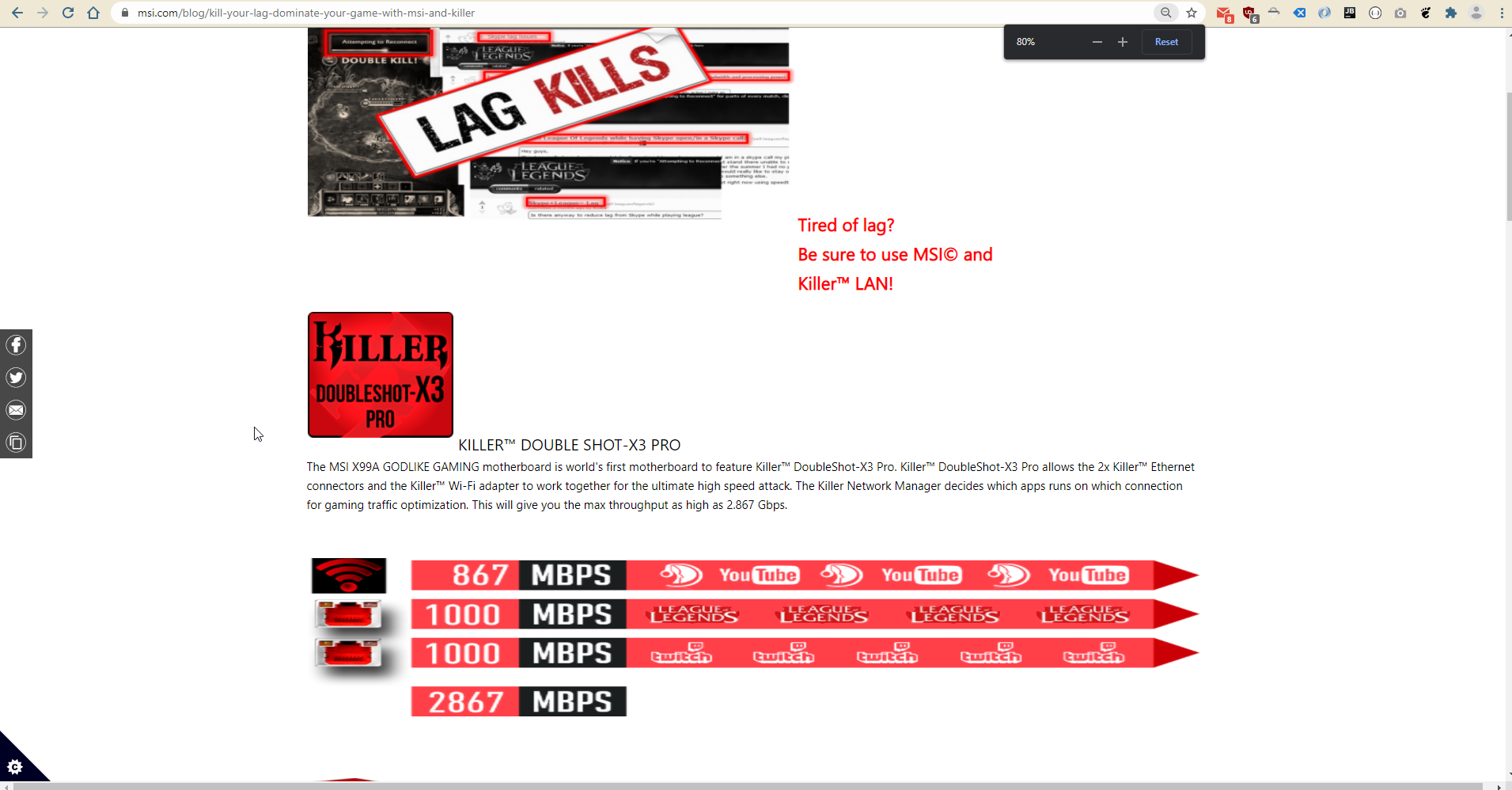
Motherboard marketing ^ rofl
T-BaseNOSCOPE
waxen scroll
so i want to bring up... most connections 1GB<, Kay? When does QoS need to kick in? What happens when QoS kicks in? Queueing? Whats queuing do? Oh fuk it adds latency
killer lied packets died
@hollow marlin boom
fifo so fast at processing
does killer even know your ISP speed
Does this stuff actually work tho? Seems like complete BS
Maybe if you had DSL?
muh 5mbit
tame carbon
@waxen scroll maybe it works if you added more ™️'s
waxen scroll
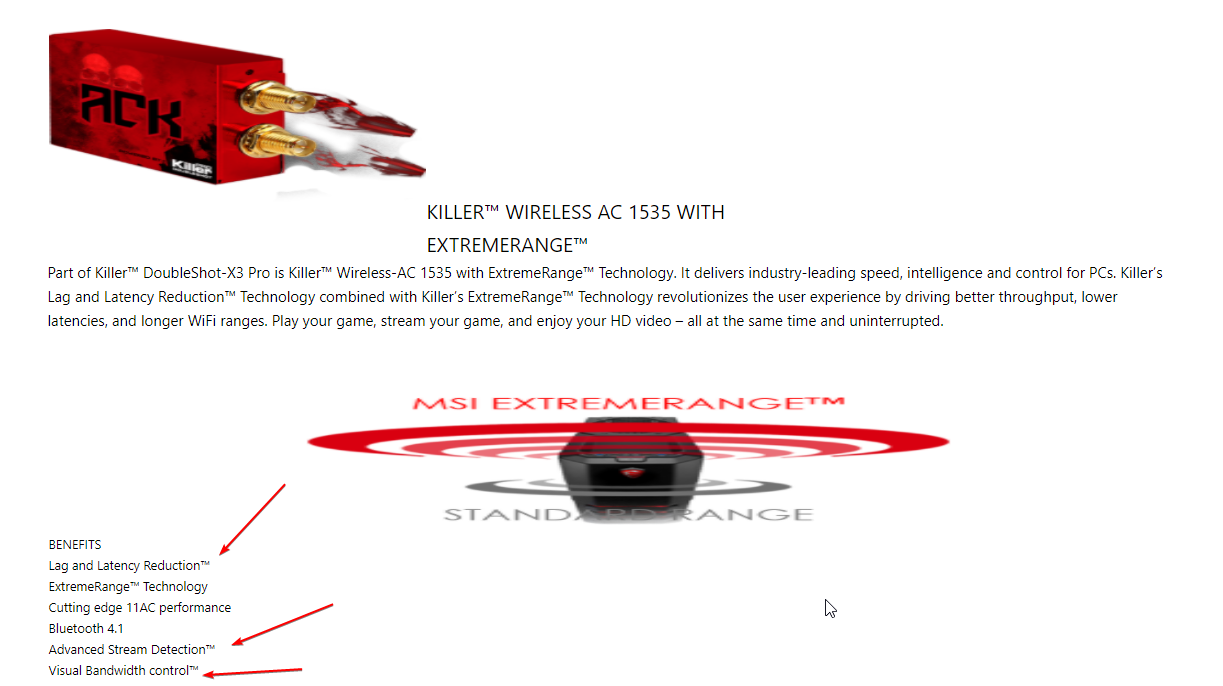
is that marketing implying you connect two interfaces to one switch and use wifi too?
like ....
tame carbon
no no
There's
KILLER™️ Ethernet
and
KILLER™️ WIRELESS AC 1535 WITH EXTREMERANGE™
waxen scroll
the caps make it better
waxen scroll
SUNDAY SUNDAY SUNDAY.....
tame carbon
@waxen scroll I think KILLER™️ 360-NOSCOPE PRO sounds better
like is there a SINGLE SHOT-X2 HOME too ?
I'm just imagining rn that this is how the marketing dpt talks on daily basis

EXTREME
@waxen scroll 🤣 https://i.imgur.com/ib3XoXM.png
 waxen scroll
oof
 timber imp
wait what is this
tame carbon
Welcome to the MSI Global official site. We are the top Gaming gear provider.
timber imp
msi usually have decent web pages
thick minnow
MSI is trash their laptops suck
 timber imp
their mobos are good
thick minnow
tame carbon
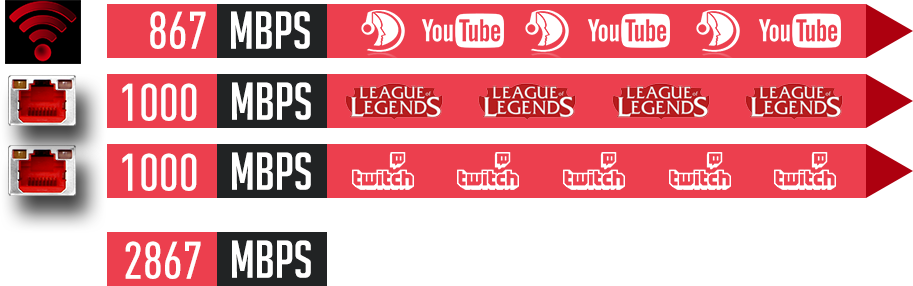
https://asset.msi.com/global/picture/article/article_147485967257e89298b357c0.pn...
1gbit voor twitch
BRUH
tame carbon
no but
Its..
Simply adding the max rated speeds for all the interfaces
that's cheating
@clear igloo yeah its basically what you said https://i.imgur.com/PABxGqL.png
 waxen scroll
MSI laptops I feel arent bad, BUT they can overheat
tame carbon
@waxen scroll yeah but the BS marketing is consistent across all of their products
Like, companies hire those people to make adverts for the non-savvy
 surreal finch
Andybody here use Fortinet?
lean pebble
I don't like MSI
frigid pine
hollow marlin
Sessions will stay alive until timeout or if you allow multiple instances per ac...
That's my config.

I don't see any keepalive setting under vpdn or l2tp.
 flat wagon
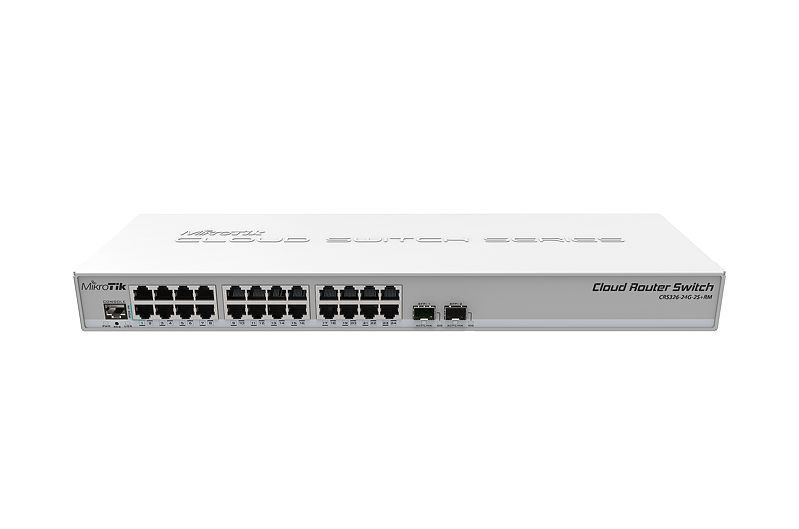
https://www.amazon.ca/dp/B07PHVBQVS/ref=cm_sw_r_cp_api_glc_i_KG2QRNMQ3S432DRASK8K?_encoding=UTF8&psc=1
Can anyone tell me if this supports 10G or if it's just restricted to 1G.
We're upgrading our 900mbps internet to 1.5Gbps so considering to buy that switch.
tame carbon
@flat wagon That's a big waste of money
oh wait
PoE
@flat wagon no.
@flat wagon https://mikrotik.com/product/CRS326-24G-2SplusRM
MikroTik is a Latvian company which was founded in 1996 to develop routers and wireless ISP systems. MikroTik now provides hardware and software for Internet connectivity in most of the countries around the world.
surreal finch
@flat wagon from what I can see no 10G support
tame carbon
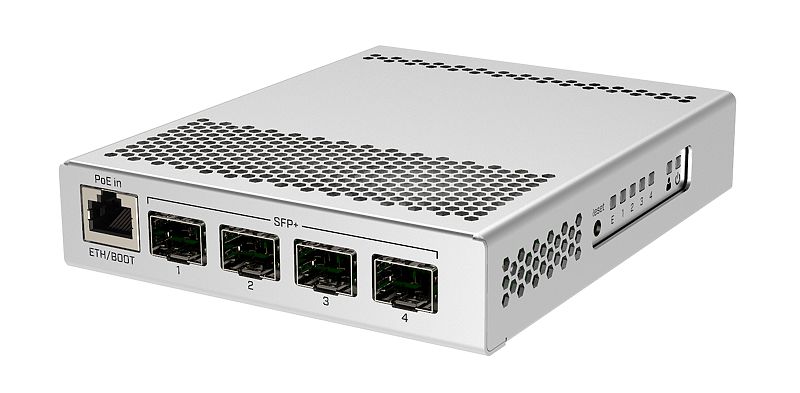
Something like this, has 2x 10G
surreal finch
Even the SFP ports are restricted to 1G
flat wagon
can you link me a managed switch with up to 12+ ports that is also 10G from Netgear on Amazon?
tame carbon
@flat wagon that one is managed ^
flat wagon
one sec
tame carbon
and honestly, far more versatile than a netgear equivalent
flat wagon
is it on amazon tho
tame carbon
that switch has bunch of L3 features too
flat wagon
prefer to get it on Amazon
tame carbon
CRS326
@flat wagon those SFP+ cages fit a module than can be used for 10gbit networking
either via a fiber optic, or another type of SFP+ module
10GbE (on copper) is very expensive and not really worth it
flat wagon
oooo ok. thank u so much. i'll order it rn
tame carbon
@flat wagon though wait
you get 1.5G?
do you know what kind of interface they will provide ?
tame carbon
@flat wagon have you got a fitting router?
surreal finch
walks away as he needs more coffee before he types
flat wagon
I'll link i what I currently got hold on
https://www.amazon.ca/dp/B01MYTIPG2/ref=cm_sw_r_cp_api_glc_i_HZ99PAJBC3WF15XFXQVS
it was fine for the needs we had when we bought it but our needs have grown since then plus it's not 10G compatible
so we going to replace it
tame carbon
@flat wagon yeah when you have gigabit network speeds, having a fast backbone is important
@flat wagon https://mikrotik.com/product/rb4011igs_rm
MikroTik is a Latvian company which was founded in 1996 to develop routers and wireless ISP systems. MikroTik now provides hardware and software for Internet connectivity in most of the countries around the world.
@flat wagon I have that one at home for my fiber optic connection
it has a 10G port, you can use to expand connectivity with like a switch
You can get short distance SFP+ cables for $20
flat wagon
I'll just spend a lot this one time and get the white switch u suggested
tame carbon
@flat wagon I invite you to have a look https://mikrotik.com/products
MikroTik is a Latvian company which was founded in 1996 to develop routers and wireless ISP systems. MikroTik now provides hardware and software for Internet connectivity in most of the countries around the world.
They sell many many products
and the software is the same on all of them, which is very nice
hollow marlin
frigid pine
That's my config.
Is there a config section for specifying PPP? While im familiar with BNG, VPDN not so much. L2TP is just carrying the PPP control packets but there should also be configuration for the PPP side which is where the keepalives need to be setup
 reef gazelle
Just a huge disclaimer re: Mikrotik L3 it's ass-tier speed and feature wise
It'll do L2 all day everyday
reef gazelle
Don't expect near line speed L3
tame carbon
nope
thick minnow
What's L2 and L3?
tame carbon
@reef gazelle The CRS305 I have, caps out around ~1200mbit/s
but it switches at full 40G
hollow marlin
waxen scroll
so i want to bring up... most connections 1GB<, Kay? When does QoS need to kick ...
As most QoS setups, most the times its complete garbage, especially when you have no control of specifics
tame carbon
@thick minnow switching/routing
thick minnow
tame carbon
<@456226577798135808> switching/routing
Ah okay
reef gazelle
L3 is where VLAN communicate to each other
tame carbon
inter vlan routing yes
@reef gazelle though some of the switches are actually capable of high throughput inter-vlan routing
flat wagon
for the switch u linked
 tame carbon
depends on the switching chips they use
flat wagon
yes
tame carbon
@flat wagon err
I don't read amazong reviews. I just know mikrotik's products are reliable and affordable
reef gazelle
VLAN capabilities is where L3 gets most of its use, but not all.
tame carbon
and the interface yeah its a bit more complicated but nothing you couldn't do
reef gazelle
Inter-VLAN and ACL's
reef gazelle
The latter being "hey, iot devices can't talk to printers, but computers can" in layman's terms
I plan on upgrading my network stack but not until I move.
tame carbon
@flat wagon This is what RouterOS looks like: https://i.imgur.com/2EaPFzE.png
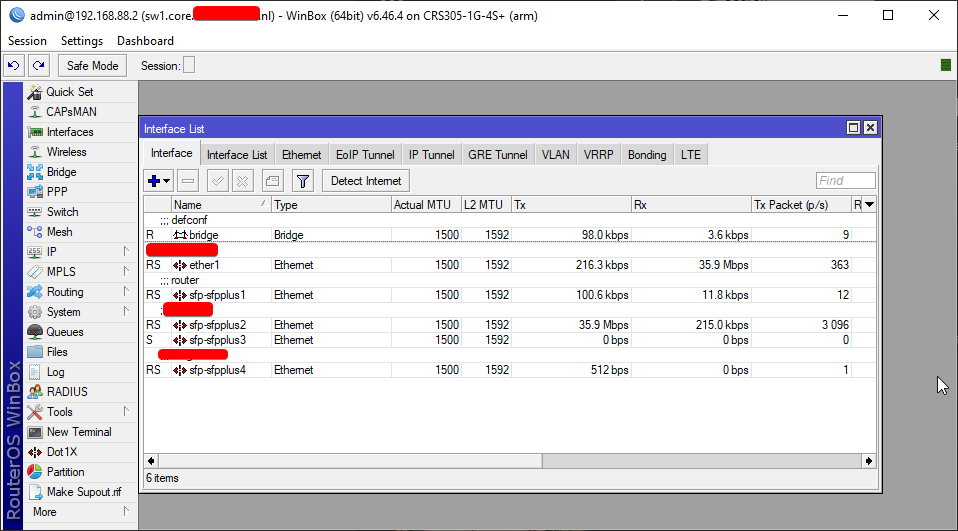
@flat wagon same screen is also available as web configuration.
reef gazelle
I'm on Unifi currently but only to have central control at a sensible price
USG is on wan failover because Eth0 oofed
CloudKey needs to be migrated to VM
tame carbon
@reef gazelle lol I got my IoT devices and LAN seperated
LAN masquarades to reach IoT
Easiest way to allow one way communication
reef gazelle
I have little IoT but it's locked down a fair bit
tame carbon
my IPcams are completely isolated
they get NTP from the router, and the surveilance VM has a vlan port to talk to the cams
no route to 0.0.0.0/0
reef gazelle
I have one camera, no expansion until moving
tame carbon
@flat wagon that screenshot btw, is on this device:
https://i.mt.lv/cdn/rb_images/1659_l.jpg

CRS305
flat wagon
tame carbon
<@!151100377331138560> This is what RouterOS looks like: https://i.imgur.com/2Ea...
does it have like anti-ddos mitigation because the $100netgear one I have right now does, not sure if the one you linked has it or not, I couldnt find it on its page
flat wagon
like idk dos
tame carbon

flat wagon
or ddos
tame carbon
@flat wagon its called having a faster internet connection than the person flooding you
flat wagon
wait
tame carbon
@flat wagon its marketing jazz
doesnt matter
by the time the traffic you wish to filter has reached your device
it has already come over your fiber line
thus, has no effect.
reef gazelle
Youd have to have two things in effect for "anti-ddos"
Full tunnel vpn tunnel to AWS or somethere (not to mention the money to pay for it)
 tame carbon
@flat wagon that's marketing jazz.
reef gazelle
And a firewall there to mitigate traffic to your internal network
@tame carbon that sounds like STP actually
tame carbon
Okay even if it does
Mikrotik supports all of that xD

@flat wagon Its not something you'll need or have to care about. trust me ^^
 reef gazelle
Pile of cables is annoying given there's an empty rack right there
Ziptie the devices down or something

 reef gazelle
Also, don't piggy back power strips
tame carbon
YOu dont have a lot of equipment anyways
 cosmic steeple
Where my modem
tame carbon
@cosmic steeple https://cdn.discordapp.com/attachments/776722183119699988/777646103775674368/IMG-20200922-WA0001.jpg

other half of the network is on that fiber
goes to my office
reef gazelle
The 2U wall vertical mounts are only useful for oob mountable equipment usually
tame carbon
@reef gazelle or a CPE switch for multiple fiber customers or something
reef gazelle
You could use 3m tape or hook and strap strips
tame carbon
I've seen this before, where they had a highspeed 25G switch
and bunch of access ports going to each tenant
bunch of vlans
reef gazelle
But a US-8 and mini router don't justify a wall mount for me
Most of that CPE has ears though
cosmic steeple
Amazon link please
reef gazelle
And if not there's usually a wall mounting frame that comes with them
 reef gazelle
I hinted at that with the 3m tape but it'd be a pain imo
It'd be cleaner and less deep with target branded pegboard
tame carbon
@reef gazelle Im doing a big outdoor installation soon
gonna be using one of those RB4011's as centerpiece
I still can't think of an excuse to not use it
reef gazelle
Looks like a DIN panel router
tame carbon
@reef gazelle I got one of those at home
and whatever I can throw at it, it chomps through with ease
MikroTik is a Latvian company which was founded in 1996 to develop routers and wireless ISP systems. MikroTik now provides hardware and software for Internet connectivity in most of the countries around the world.
i'll be using around 10 of those
and a couple 60GHz backhaul antennas
got a total of 1 gigabit to distribute
 peak cloak
cosmic steeple
Any guides to cable networking a house or a company in USA ct
peak cloak
cosmic steeple
Any guides to cable networking a house or a company in USA ct
for one, that router...
get a patch panel to terminate all the runs at
beware of electrical lines, know where they are
cosmic steeple
Planing to move this need out and move pc in here

 peak cloak
get fish tape
cosmic steeple
Only 2 wall power by the door and need
peak cloak
plan it out
know where your beams are
which direction they run
easiest would be get into the basement (if you have one) and back up
cosmic steeple
Want like a modern power cable plates
cosmic steeple
I have like 8k to spend lol
cosmic steeple
Taxes
peak cloak
 cosmic steeple
I planing to wire the electric and networking to the house
peak cloak
 peak cloak
cosmic steeple
I planing to wire the electric and networking to the house
peak cloak
cosmic steeple
I planing to wire the electric and networking to the house
if you are doing electricity get someone who knows their stuff
don't do it yourself
unless you know the codes
and how to do it
cosmic steeple
How much would it be for someone to do it for me
peak cloak
no clue
cosmic steeple
What about my ax11000
cosmic steeple


The like 3 power in this whole house
My friend have the next up model
Do you need a permit /contractor
cosmic steeple
I can put the server room in the gym
 tender hazel
@flat wagon that auto DoS feature is potentially dangerous - I am reading that what it does is it turns off the switch port if it receives more than 3 malformed packets from that port
a malformed packet doesn't necessarily constitute an attack
I'm seeing message from people about it blocking their printer because their printer software has some kind of bug where it sends certain packet types malformed, or blocking their uplink port for the same reason and then the entire switch goes down
waxen scroll
@peak cloak i'd get in trouble just for using romex
my area is conduit only.
if you do whips its gotta be like less than 2 foot
peak cloak
waxen scroll
my area is conduit only.
there are places like that?
never knew
My basement is just romex everywhere
waxen scroll
yep
infact there are places that go a step further and want all low voltage in conduits
peak cloak
waxen scroll
infact there are places that go a step further and want all low voltage in condu...
why...
waxen scroll
keep the union workers employeed
tame carbon
@tender hazel the L3 hw offloading to the switching chips for routing on those CRS317 is crazy
juan showed me some of the stuff they did on rOS v7
if they bring this to the CRS305, that would be so nice
its same series of switching chip
marble nacelle
sup guys
i got me something
TP-Link Range Extender RE450
and it gives me good speed
 tender hazel
tame carbon
<@!530075635423510548> the L3 hw offloading to the switching chips for routing o...
tender hazel
tame carbon
<@!530075635423510548> the L3 hw offloading to the switching chips for routing o...
yes, it is a nice feature being able to do routing, it can sustain really high throughput
that's quite good for an extender, arvine
it's triple chain, your router must be triple chain too
that's the only way you could get that rate
marble nacelle
whats a triple chain
tender hazel
it's the number of antennas/polarizations
more chains mean more bandwidth per device if the connecting device has that number of chains
an AP with three chains will be faster than an AP with two chains as long as the device also has three chains, otherwise it won't be any faster
most devices are dual chain so you are limited to around 500-600Mbps in best scenarios
triple chain devices can give more theoretically
your extender is knocking the bandwidth in half, which means that the huawei by itself is capable of giving at least 700Mbps which is really only possible if it has three chains
unless of course you are plugged into the range extender with a cable from your computer
frigid pine
hollow marlin
Is there a config section for specifying PPP? While im familiar with BNG, VPDN n...
That's all the ppp settings that are available. Non have like keepalive or timeout there.
 tender hazel
are you doing LAC/LNS stuff?
@frigid pine I don't work with Cisco very often anymore but MikroTik has an example config here using Cisco as a LAC that may help
I'm sure you don't care about the mikrotik parts of that example config but perhaps the Cisco part will be helpful
frigid pine
tender hazel
https://help.mikrotik.com/docs/display/ROS/LAC+and+LNS+setup+with+Cisco+as+LAC
Let me check.
frigid pine
tender hazel
I'm sure you don't care about the mikrotik parts of that example config but perh...
Unfortunately it does not contain the information I need. The link contains very basic configuration just to make it work.
I keep wondering if it is even possible from LAC side.
anyways I never noticed Mikrotik have a subdomain named help. This looks better than their Wiki pages. xD
tender hazel
@frigid pine it is the replacement for the wiki
the wiki is going to be shut down after they finish moving their pages over to the new help domain
frigid pine
Nice.
tender hazel
actually something I've figured out is that they have moved some pages over but haven't linked the old wiki pages to the new help pages yet, so the help pages are more up to date
@frigid pine https://www.cisco.com/c/en/us/td/docs/ios-xml/ios/vpdn/configuration/15-mt/vpdn-15-mt-book/vpd-tunnel-mgmt.html

Cisco
VPDN Configuration Guide, Cisco IOS Release 15M&T-VPDN Tunnel Management

@frigid pine that might be the command you need?
frigid pine
No this command is only used for tunnel. I need something which may affect the sessions inside that tunnel.
My tunnel hello is configured as default 60secs.
tender hazel
ok
 fringe crow
Hey yall real quick question... I host a server on zap hosting for one of my games but I'm looking to move over to a vps. I saw contabo was cheap but offers good packages... have any of you guys ever dealt with that company for a vps?
 plain siren
fringe crow
Hey yall real quick question... I host a server on zap hosting for one of my gam...
plain siren
fringe crow
Hey yall real quick question... I host a server on zap hosting for one of my gam...
Contabo
No. Dont.
Reliable Site does good Dedis if you can consider that
So You Start/OVH ... well they are cheap sure but
Datacenter Fire, Bad Support, Bad Hardware Reliability
Hetzner, idk thats not in the States so I didnt ever used them.
fringe crow
Okay thanks, I appriciate that for sure!
plain siren
https://lowendbox.com/ @fringe crow Heres a good place to look

LowEndBox
Cheap VPS Hosting, Dedicated Servers & Web Hosting Providers Listing & Reviews. Discussions on how to host websites on bare minimum VPS.
fringe crow
Thanks I appriciate that!
fringe crow
Sweet, thank you
tame carbon
@fringe crow linode is also great for hosting

Linode
Our mission is to accelerate innovation by making cloud computing simple, affordable, and accessible to all.
frigid pine
What tools do you guys use to draw network diagrams?
tame carbon
@frigid pine draw-io is quite nice

GitHub
Official electron build of diagrams.net. Contribute to jgraph/drawio-desktop development by creating an account on GitHub.
frigid pine
I use that too but don't like it's interface for some reason :3
ohkay so there's a desktop app too. lemme check.
tame carbon
I havent really done that much diagramming for networks
most of my work entails software design
so I am more into the UML-design of things
I use a combination of Visual Paradigm for certain diagrams
and Astah UML for domain and use-case
 grizzled cove
I have an RDS Farm in Microsoft Azure and bossman now wants to create a whitelist only for accessing websites. Does anyone have any experience with this?
tame carbon
@grizzled cove run everything through an HTTP Proxy
thats what schools do to make sure people only use the internet for surfing
all traffic is blocked, except HTTP and a few other exceptions
grizzled cove
I did look at proxies but to me its a dead technology and easy to get around.. if you want to bypass a proxy, you can. I was thinking of using OpenDNS and configuring my forwarders on our DNS servers to point to OpenDNS servers
tame carbon
@grizzled cove and then someone uses 1.1.1.1
you could block outgoing DNS server requests, but that will just upset people
grizzled cove
It's an RDS server, so users don't have access to change network properties
plain siren
grizzled cove
I have an RDS Farm in Microsoft Azure and bossman now wants to create a whitelis...
So, any RD Sessions should only access XYZ Websites Listed in Said Whitelist right?
grizzled cove
Yeah that's the idea
plain siren
grizzled cove
Yeah that's the idea
So your best bet is prob Proxies. Squid is a good choice. You would use Group Policy to set the Proxy config
Microsoft ISA Server is another option
Its a Proxy server
Sorry ... Forefront TMG as its known as now
Too bad its basically old and dead lol
(squid)
grizzled cove
I settled for the middle ground
Had my DNS servers use OpenDNS IP's as the forwarders and used the Moderate preset in OpenDNS control panel
Strict preset caused some issues with Outlook as it blocks access to office365.com
Doing some research having a whitelist in a production environment is a recipe for disaster
 vestal patrol
 tame carbon
@vestal patrol nice DSL line you have there
I paid about the same a couple years ago
but for 4 down and 0.6mbit up

 tame carbon
@tawny flint you got permissions?
 tawny flint
 marble nacelle
 tawny flint
the group is under is USERS
marble nacelle
i pay 105 dollars for this
tame carbon
@tawny flint yeah that's network, but what about file permissions?
tawny flint
same
tame carbon
clearly not
 tame carbon
because you dont have read rights on the directory you are trying to list
owner is admin
are you logged in as admin/
tawny flint
nope
tawny flint
for the Filezilla im using the FTP_USER account
tame carbon
and idk what this GUI is doing
tawny flint
netgear Readynas OS 6.x.x
tame carbon
because I've always configured this stuff directly from config files
unless you have some kind of access log
gonna be hard to debug
tawny flint
i havent play with it alot
i know a few people in this server who has a Netgear Readynas

 tame carbon
There's user and group permissions
tame carbon
tame carbon
There's user and group permissions
^
tawny flint

work with web
but why isn't working with FileZilla 😦
working with local IP but not with my public IP/ no-ip.com

ok so the issues is my Public IP i want to connect while im outside or at uni/college just dumping files in there
i dont know what sensitivity info but show this but im not from the US
 tame carbon
@plain siren I was hoping so badly that this tool would have a T568B pinout on the side
I might just print out my own, and use some masking plastic and stick it on the tool
plain siren
tame carbon
<@!589542595341058048> I was hoping so badly that this tool would have a T568B p...
oof
plain siren
tame carbon
<@!589542595341058048> I was hoping so badly that this tool would have a T568B p...
Fingernail Polish/Sharpie
tame carbon
@plain siren im still fucking around with wires.
I thought this pushthrough would be much easier
fucking orange wire keeps going in the wrong hole

lets see if this tool was worth it.
peak cloak
never had an issue with passthough
peak cloak
tame carbon
make sure to straighten your wires first
tame carbon
I did
tame carbon
 peak cloak
I like wiggle the wires in my hand
tame carbon
perfect.
time to test the wire tester
@peak cloak I remove insulation, untwist the ends
and then pull orange appart
and group green blue and brown
and put the orange inbetween
slide it onto the keystone
and pull it close
its always striped/solid/striped/solid etc
and Im an idiot
@peak cloak LOL
the cable I cut in half
was terminated with T568A
I just made a crossover cable O.o
wait no, I did the T568A and the cable was B
either way. I now have a crossover cable

take 2.
booyah. it works
perfect

@peak cloak $10 cable tester :D
I'm a big fan of this passthrough
makes life so much easier getting the insulation inside the keystone
plain siren
tame carbon
I got this same one from microcenter
tame carbon
@plain siren they are just simple continuity testers
I opened up the back, electronics are actually quite simple
plain siren
yeah mines in pieces too
 flat wagon
Guys I just upgraded my internet to 1.5GBPS (from 940MBS) and I'm so conflicted on which speed test to trust.
My Ethernet cable is temporarily on Cat5 which is limited to 1gbps but idk which speed test to trust


 peak cloak
flat wagon
Guys I just upgraded my internet to 1.5GBPS (from 940MBS) and I'm so conflicted ...
peak cloak
flat wagon
Guys I just upgraded my internet to 1.5GBPS (from 940MBS) and I'm so conflicted ...
fast.com is the fastest because it uses netflix
your isp probobly has a netflix cache server right on their network
and your cable is not the limiting factor
it's your computer and router ethernet ports
flat wagon
Okay because I ran 4 other website tests and they also coming up with 930MBPS-ish
peak cloak
you would need to upgrade both to have at least 2.5G connectivity
which is expensive
that's why imo 1.5G just isn't worth it
1G is perfectly fine
flat wagon
our home networking is revamped with expensive switches and the ISP just gave us their new 10G router
tame carbon
Overhead.
930mbit sounds about right
Theres protocol overhead which it doesnt measure.
peak cloak
flat wagon
our home networking is revamped with expensive switches and the ISP just gave us...
ah your computer needs a 2.5G card
and are the switches 2.5G?
tame carbon
@flat wagon I recently linked you to some 10G capable gear
Gigabit wont cut it at those speeds. or at least not at full throttle.
flat wagon
yes I know and my switch is 10G atm but it's 8 ports
I'll link to my motherboard hold on
tame carbon
@flat wagon 10GbE (10G ethernet over copper) is NOT worth it.
The interfaces are far more expensive
You're better off using SFP+
and getting a fiber
flat wagon
https://www.gigabyte.com/ca/Motherboard/GA-AX370-Gaming-K7-rev-10 I think this motherboard does support speeds such as 1.5G out of the box
GIGABYTE
Lasting Quality from GIGABYTE.GIGABYTE Ultra Durable™ motherboards bring together a unique blend of features and technologies that offer users the absolute ...
not sure though
tame carbon
That's gigabit.
tame carbon
@flat wagon Skip 2.5G
its relatively new, poorly supported.
and expensive
just go with SFP+ (10G)
You need one of these cards

They have SFP+ cages, like the switch I linked you
flat wagon
okay hold on
tame carbon
(The card in the image is an Intel X520-DA1)
Intel® Ethernet Converged Network Adapter X520-DA1 quick reference guide including specifications, features, pricing, compatibility, design documentation, ordering codes, spec codes and more.
You dont have to get 1.5G on every computer
flat wagon
i got the basic knowledge in networking but not super extensive, so what ethernet cable do I need to plug it into that? it seems like a different connector
tame carbon
1G is still fine for a laptop and such
@flat wagon ah ok. normally with copper ethernet, we all use RJ45
but once you go to higher speeds, the connector becomes a module
those SFP+ cages are holes for such modules

FS Germany
FS offers 10GBase-CU SFP+ direct attach copper cable assemblies in passive DAC and active DAC from 0.5m to 10m, which are most cost-effective choices for 10G Ethernet short links between SFP+ ports of switches.
This is a copper cable, that you can directly plug into those cages
The same is possible with fiber optics.
its all SFP+
tame carbon
@flat wagon now, such a Direct-Attach cable is only cost-effective within 3 meters.
flat wagon
ok i need like
tame carbon
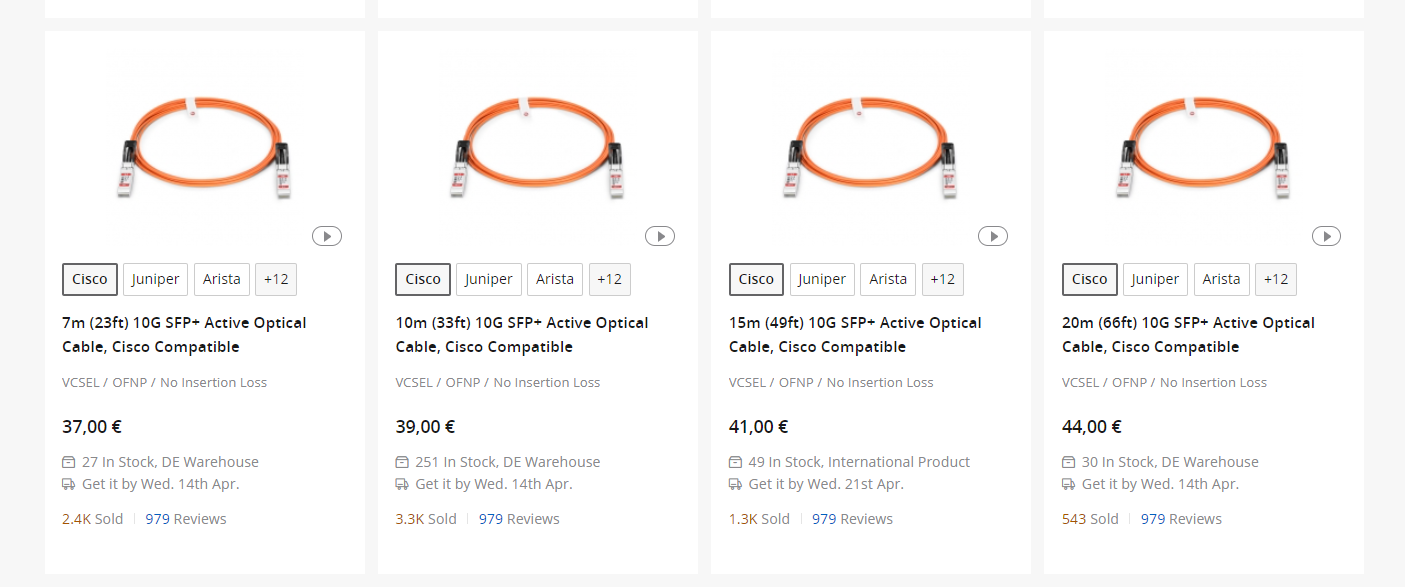
Once you need longer runs, you can either get active optical cables.
flat wagon
50 feet
tame carbon

FS Germany
FS offers SFP+ active optical cable (AOC) for 10G Ethernet applications to connect equipment located within the same data rack where transmission distances are from 1 to 30m.
@flat wagon these are the same as copper
but they have fiber inbetween
also plugs into SFP+
flat wagon
will that support the full 1.5g?
tame carbon
@flat wagon it does 10G.
@flat wagon You use these kinds of cables between your Switch & Router
if you want to have full speed networking on your computer, you'll need one of those 10G interfaces
tame carbon
@flat wagon no just buy off FS.com directly.
they ship worldwide.
And they are the cheapest
@flat wagon network card leaves some options open. You don't have to get an intel card.
but it has to be SFP+
flat wagon
so where's something like a 50ft?
tame carbon
 tame carbon
@flat wagon active optical is the easiest
because you can also get SFP+ modules with seperate patch fibers
That's what i have here
flat wagon
how are they the easiest
tame carbon
Because if you get dust in the fiber patch
then you have no signal
those active optical cables cannot be removed, they are spliced onto the connector
tame carbon
@flat wagon for 10G its very good :D
2.5G is about the same price, but you can barely find gear for it.
Thats why I suggested use 10G instead.
its futureproof, and not a gimmick :D
@flat wagon have a look at this: https://www.fs.com/de-en/products/11555.html

FS Germany
FS for Cisco SFP-10G-LR compatible SFP+ optical transceiver provides 10GBase-LR links up to 10km over singlemode fiber (SMF) at a wavelength of 1310nm using a LC connector.
These are pure fiber modules
you remove the rubber plug, and plug your fiber in there
flat wagon
are they using the same image across all the cable products on their webpage
tame carbon
Yea..
because they all look the same, its just the length that is different
there's 1000s of different SFP+ modules
for different types of fibers, different wavelengths for the lasers
simplex, duplex
Active optical is therefor a bit "easier"
because you cant make a wrong purchase.
They just come as-is
and you plug them in, and boop. it works
flat wagon
so the switch u linked also supports SFP but my router itself doesnt have a SFP connector support, just regular ethernet
tame carbon
@flat wagon SFP or SFP+ ?
tame carbon
@flat wagon that could be 10GbE
10G on copper. which works.. up to 25 meters

FS Germany
Check Generic 10gbe SFP+ transceiver module datasheet (10GBASE-T SFP+ Module, 30m, RJ45 connector) and price list. 100% Compatible, Order Now!
You'd want something like this ^
This plugs into SFP+
and has RJ45 on the other side
But these things are very expensive.
$55
RJ45 10G costs a lot more
flat wagon
ok accept fr cuz i'll probs be asking a lotof questions in the coming days when i order stuff
it's a lot to take in
all at once
tame carbon
@flat wagon ye it is :D
I went on this journey 3 years ago
took me about a month or so to do research
but I went into fiber specifically
@flat wagon those individual modules I linked earlier https://i.imgur.com/Px0MRJC.png
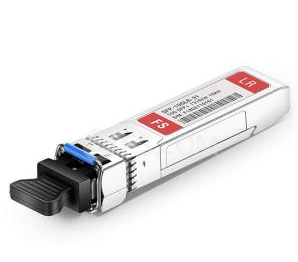
These are good for 10 kilometers of fiber
xD
flat wagon
but if i wanted to, i can just get a 25 meter cat 6 cable and a sfp+ pci card and the generic ethernet adapter and plug it into the card?
tame carbon
@flat wagon I would only do that if the network card in your computer is 10G RJ45
if you have to choose, I would get something with SFP+
its more flexible, as you can do fiber or copper
@flat wagon if you wanted to run copper, you have to get cat6a (make sure all sides are shielded)
high speed ethernet on copper is subject to interference.
so you need shielded cables

Shielded ethernet means that there's a grounding jacket around the core
@flat wagon the interference, and the price of RJ45 interfaces, and extra costs in cabling make it not really attractive


If you go back to that switch of yours (CRS326), if you really wanted 10G for every computer.. this wouldnt be ideal
CRS317 is an all-SFP+ switch:

MikroTik is a Latvian company which was founded in 1996 to develop routers and wireless ISP systems. MikroTik now provides hardware and software for Internet connectivity in most of the countries around the world.
But that CRS317 is for really heavy switching (and soon maybe routing)
tame carbon
@flat wagon no questions are stupid questions. esp if everything is new to you
so ask away
flat wagon
ok so just back up a little bit, so my router which is a ISP provided router (they also provided a small UPS battery backup for some reason for the router)
but ok so my isp provided router.... it doesnt have SFP+ so I would need an adaptor between that router and the switch?
for the active optical cable or do I just keep the CAT8 I have running between my switch and my router
im so confused
tame carbon
@flat wagon okay, so such an active optical cable is for directly connecting two SFP+ cages to eachother
And @flat wagon as for the ISP equipment, you'd have to look at the datasheet or manual
If they use 10GbE then you can use a module to adapt it to SFP+
@flat wagon if you had some more information on the ISP equipment, I could have a look
flat wagon
Yes one second
https://www.telus.com/en/internet/wifi
Honestly it's super limited information on it idk where the specs on it are


TELUS
Extend the reach of your Wi-Fi network with the TELUS Advanced Wi-Fi modem and experience a faster, more reliable speed with less dropped connections.
they also gave us
ugh
tame carbon
@flat wagon if you are in luck, you may not need that device at all
the ISP I have here, doesnt even ship a modem :)
I just have a fiber with SFP that plugs directly into my gear
tame carbon
@flat wagon yaasss. it makes life so much easier not having to deal with shitty ISP gear
flat wagon
Normally I would agree
but this router seems to be pretty high end and it's a mesh network with 4 boosters around the house
since it's a 3 story house
flat wagon
o?
tame carbon
because they are an internet provider, not a hardware manufacturer.
If you want a reliable wireless setup, you buy specialized gear
those mikrotiks have a very nice way to do managed wireless
@flat wagon errr, can't find specifics on telus' website
tame carbon
gimme another 30 mins. I just got called for dinner, I'll be back soon ^^









 waxen scroll
why have telus when you could have ubiquiti
flat wagon
waxen scroll
why have telus when you could have ubiquiti
because since we been with TELUS for 10 years they gave us all the equipment for free and u can't argue with free stuff :D
waxen scroll
you sure? check your bill for fees
flat wagon
our internet for 1.5G is 70/month because it's a loyalty plan
that's CAD too it's lower in USD
flat wagon
they got a loyalty department and they are responsible for ensuring to keep make sure their long-time customers (minimum 4 years) dont end up switching so that's when they start offering special rates.
We have TELUS mobile phone (so 3 iPhones on their plan), TELUS landline phone, TELUS cable tv (I never watch tv but got it in the bundle abyway) and finally TELUS internet at 1.5G.
All this costed $200/month