#networking
1 messages · Page 311 of 1
 spice gust
 tame carbon
and access points you can just add
spice gust
Okay I will save and buy that one
tame carbon
@spice gust that one is very much overkill
I have a 10gbit switch connected to that port
that goes to my NAS/server and workstation

 tame carbon
@peak cloak help me 😢
tame carbon
@peak cloak yeah but this router is
@peak cloak even crazier
it doesnt even allow any port forward
DMZ doesnt work
or perhaps it works, but he still can't play CoD warzone or join any game
lol
maybe ISP blocking things, or some other issue at play
 peak cloak
you checked for cgnat?
tame carbon
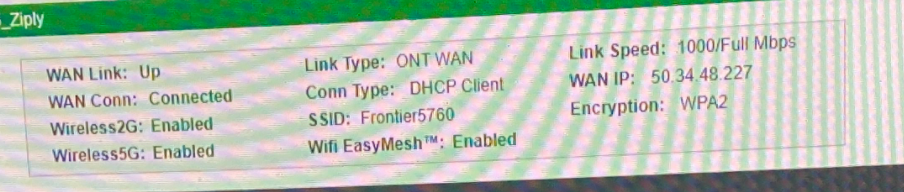
@peak cloak ONT showed a WAN IP
 spice gust
What do you mean
tame carbon
what's plugged into the WAN
spice gust
iDk
tame carbon
take a picture
spice gust
I have Ethernet
spice gust
And re add
tame carbon
no, just a router xD
spice gust
I can’t
tame carbon
I want to know how it gets its internet
tame carbon
@peak cloak see how it says ONT WAN > DHCP client
@peak cloak I think the ONT is just a seperate box with a bridge
in which case you can just ditch the ISP device
and use your own
 spice gust
Yah I have one
tame carbon
yeah but if its just an ethernet bridge
tame carbon
then you can completely replace the ISP router
and plug your own directly into that ONT
tame carbon
@spice gust like, I am speculating
It says here
Conn type
DHCP Client
which means, it just asks the ONT for your Public IP
(I have the same basically)
spice gust
 peak cloak
@spice gust show pic of your router
tame carbon
@peak cloak that thing is on crack
spice gust
@peak cloak one sec

Buyyourownmodem.com
Buy a Windstream approved modem with free fast shipping & warranty. Compatible modem for Windstream on sale now! The best modem for Windstream
This is my router
I can’t take pic
I am in class
@peak cloak
peak cloak
ok
peak cloak
so it's just a router
spice gust
Yeah
peak cloak
are you using moca or ethernet
 spice gust
Ethernet
peak cloak
tame carbon
<@!222482269829332992> its fiber optic
yeah but verizon/frionter uses moca sometimes to connect ONT to router
to use existing coax
 tame carbon
@spice gust the ethernet you get to your router. Where does that come from
thats the box we are interested in
spice gust
I actully have no clue
tame carbon
well figure that one out :)
@peak cloak does frontier do any funny business on their devices?
peak cloak
tame carbon
<@!222482269829332992> does frontier do any funny business on their devices?
frontier is owned by fios I think now
peak cloak
tame carbon
like voip and such?
no? there is a phone port on the ONT
peak cloak
the ONT does all the vlan stuff with IPTV, VOIP, etc.
tame carbon
do they do any vendor locks?
peak cloak
you can't change the ONT
peak cloak
but other than that, no
peak cloak
no
tame carbon
so you can ditch it
peak cloak
the thing he sent?
tame carbon
@peak cloak ye
peak cloak
no that's just the router
tame carbon
I tried to port forward on that piece of junk
and its broken
@spice gust what was that other router you said you bought?
is it a tplink?
tame carbon
mh

 spice gust
Linksys WRT32X AC3200 Dual-Band WiFi Gaming Router with Killer Prioritization Engine https://www.amazon.com/dp/B072LQZFHM/ref=cm_sw_r_cp_api_glt_fabc_P3APV677HR4S44C0A3M2
This is my router
peak cloak
Killer Prioritization Engine
tame carbon

peak cloak
spice gust
Linksys WRT32X AC3200 Dual-Band WiFi Gaming Router with Killer Prioritization En...
wait so you are using that?
spice gust
No
peak cloak
or the ISP?
tame carbon
@peak cloak no he has this
peak cloak
oh ok
spice gust
ISP
tame carbon
it says its dhcp
peak cloak
and not moca
tame carbon
over ethernet
tame carbon
wat
peak cloak
cable?
tame carbon
not advertising properly?
peak cloak
100mbps is the verge between 100Base-T and 1000Base-T
spice gust
I have 1000
tame carbon
here it says 1000/Full
spice gust
It’s says
spice gust
But on the other router I get 100
tame carbon
return it
spice gust
What if I disconnected ether and connected to wifi
tame carbon
if you still can
tame carbon
k
@spice gust is the router where you also want wifi?
or do you want to have it elsewhere, or perhaps even multiple APs
tame carbon
@spice gust yeah but I am about to recommend you something
spice gust
Okay
I don’t care about the speed I jsut wanna be able to play my game on my computer
 onyx hawk
Yo , i have different router , one ISP router other synology. i did setup synology into wirelessly mode (like WDS or repeater mode) , connected to ISP Router. But that comes problem is DCHP . tried using same ip as ISP router address . 192.168.1.x Dont work (no internet) so changed like 192.168.2.x and internet up . wtf is that 😄
spice gust
Because I can play on PS4
tame carbon
@spice gust https://mikrotik.com/product/hap_ac3

MikroTik is a Latvian company which was founded in 1996 to develop routers and wireless ISP systems. MikroTik now provides hardware and software for Internet connectivity in most of the countries around the world.
spice gust
But I can’t on Pc
 tame carbon
alternatively
MikroTik is a Latvian company which was founded in 1996 to develop routers and wireless ISP systems. MikroTik now provides hardware and software for Internet connectivity in most of the countries around the world.
peak cloak
onyx hawk
Yo , i have different router , one ISP router other synology. i did setup syno...
of course it wouldn't work like that, each device needs a seperate IP
tame carbon
this one is cheaper, same performance
spice gust
Okay
tame carbon
it just has less coverage
tame carbon
@spice gust yeah you replace that ISP thing with this
and then you can forward properly.
tame carbon
wait
spice gust
Like after cod patch on Tuesday
onyx hawk
@peak cloak well i watched youtube. they can do same ip but i cant 😄
spice gust
It stopped working
tame carbon
@spice gust you should have mentioned that before
peak cloak
onyx hawk
<@!222482269829332992> well i watched youtube. they can do same ip but i cant ...
wut, no. Whatever video you watched is wrong
tame carbon
before I went through all this trouble
spice gust
Yup,
I am very instrested in tech
So what might be the issue
It’s been like this since the patch on tuesdays
tame carbon
https://cdn.discordapp.com/attachments/776722183119699988/777646103775674368/IMG-20200922-WA0001.jpg

my network rig ^
tame carbon
switch is in the office connected through that one spooled up fiber
the ISP fiber is on the left
spice gust
Nice
tame carbon
goes into an SFP to ethernet media converter
spice gust
So is there a fix to this game
tame carbon
@spice gust I dont know
spice gust
It only is like it on this game
tame carbon
even though I have it my name, I don't have a Crystal ball that can fix an issue by pure insight
@spice gust you could try resetting the ISP router, and see what happens
tame carbon
@onyx hawk what is the issue
tame carbon
I've never seen a wifi ap with snooping xD
tame carbon
@peak cloak the router runs an IGMP proxy
and has LAN bridge configured as downstream
peak cloak
yeah but it should still work on wifi, no?
tame carbon
switches can use IGMP snooping
to see if a device has joined a multicast group
it basically keeps a tiny switching list
so instead of broadcasting
the switch only casts to devices in that multicast group
@peak cloak https://i.imgur.com/wnCznqc.png
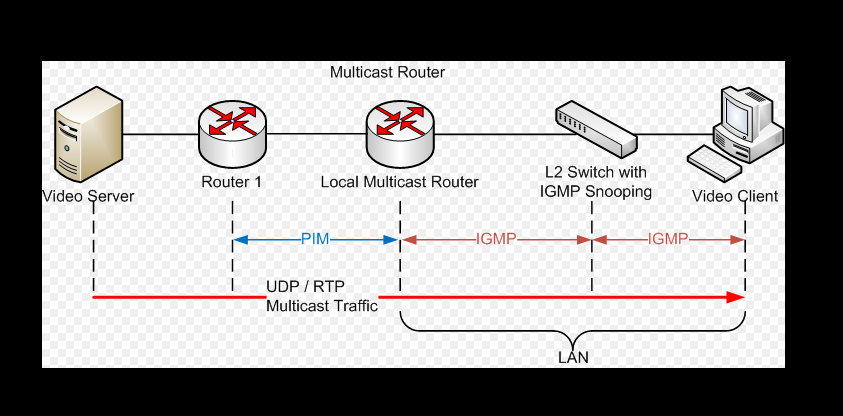
the local multicast router is just an IGMP proxy on your router
@peak cloak his wireless AP probably isnt doing snooping
peak cloak
yeah
 gloomy saffron
ok so about earlier i cant even do anything with me internet. i mean i kind of get it its at&t but i really need help. i cant load yt games or anything
gloomy saffron
does anyone know how to fix really slow internet im paying for 45mbps download and like 6 upload and im getting 0.08
peak cloak
ethernet?
gloomy saffron
yes
peak cloak
dsl?
 stray plover
peak cloak
type of internet
stray plover
peak cloak
type of internet
sorry to barge in, gotta show some appreciation for the pfp. iconic.
peak cloak
stray plover
sorry to barge in, gotta show some appreciation for the pfp. iconic.
oh yeah it was a joke with friends
I just kept it
peak cloak
gloomy saffron
how do i check
look at the modem
gloomy saffron
i mean it is def not dialup but kinda feels like it xD but umm how do i check
where
peak cloak
what's going into it
gloomy saffron
cable
peak cloak
take a pic
tame carbon
Yeah, but that is local.
I am interested in what your ISP is using to provide your internet service
tame carbon
dial up is faster than 0.08
tame carbon
@gloomy saffron yeah but what is it feeding from
gloomy saffron
but when i play games i get like 500000 ping every 10 seconds
tame carbon
show us a picture of the back of your modem
tame carbon

We're trying to figure out what the physical layer is
all else, is irrelevant for now
if its a DSL line you could be having line errors
if its Coaxial, it could be limited bandwidth in the area
like
we need to know
or else its just wild guesses.
 tame carbon
how many pins does that have?
gloomy saffron
idk
tame carbon
Like I cant tell either
gloomy saffron
how do i even know
im not like a wizard with this
im just tired of really laggy internet
tame carbon

if it was this ^
then its DSL
8 wires is ethernet
4 (smaller connector but looks similar) is old telephone or DSL
peak cloak
he's on the same connection?
gloomy saffron
yeah
peak cloak
like connected to the same router
gloomy saffron
same router on ethernet
tame carbon
@gloomy saffron https://sourceforge.net/projects/winmtr/
SourceForge
Download WinMTR for free. WinMTR is a free MS Windows visual application that combines the functionality of the traceroute and ping in a single network diagnostic tool.
download this
peak cloak
gloomy saffron
same router on ethernet
but on the same connection as yours or just same router model?
tame carbon
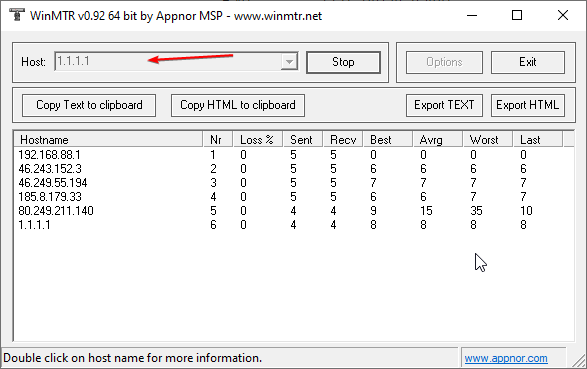
@gloomy saffron download that program. enter this: and press start
https://i.imgur.com/XUxDJ4B.png
 gloomy saffron
what does it do
tame carbon
its a traceroute
but its continous
so we can see packet loss over time
and 1.1.1.1 is cloudflare DNS
usually the best ping
gloomy saffron
will it disconnect anybody i know it sounds dumb but ill get into trouble
tame carbon
nah
peak cloak
no
tame carbon
its just pinging
gloomy saffron
ok
tame carbon
but it first uses traceroute to figure out the route to 1.1.1.1
and then it pings each router in the chain
if you have packet loss or latency spikes
we can figure out where its coming from
gloomy saffron
yeah
tame carbon
leave it running for like a bit
if your issues are intermittened
might need to run for a couple minutes
gloomy saffron
ok its running
tame carbon
@peak cloak btw, mikrotik traceroute is super fancy https://i.imgur.com/F6haUVL.png
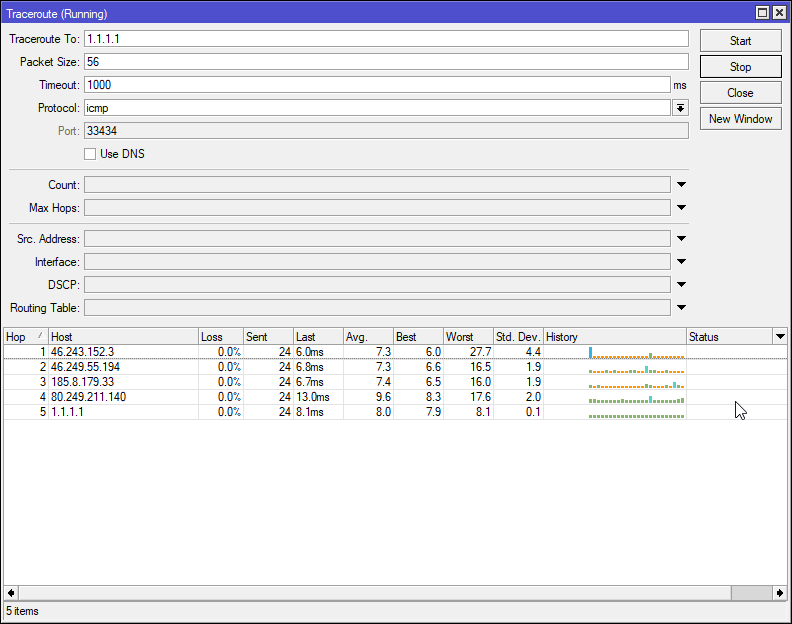
it has a little histogram built it in :D
tame carbon
screenshot
gloomy saffron
some of them have ip's
gloomy saffron
what is that
tame carbon
@gloomy saffron your router talks to your ISPs router
the first entry in that traceroute
is your own router
but its starting with 192.168
which is a private LAN
not publicly routed.
peak cloak
gloomy saffron
some of them have ip's
yeah it's fine, none of them are your WAN ip
gloomy saffron
this?
 tame carbon
bad route.
peak cloak
oh boy
gloomy saffron
huh
peak cloak
that one worst
tame carbon
you cant do shit.
peak cloak
this is all ISP side
tame carbon
this is your ISP who is at fault
gloomy saffron
who is ISP
tame carbon
Internet Service Provider
tame carbon
@peak cloak not entirely convinced
like this looks like either a line issue
consistent 260ms latency
gloomy saffron
yay att internet!
tame carbon
@gloomy saffron if its a DSL line (basically old telephone wires just for broadband internet)
then it needs maintenance xD
this cant be just you
your brothers have to feel this too
gloomy saffron
my friend had it and it was horrible like he couldn't do anything and he switched to xfinity and he doesn go higher than 20 ping
i mean i see them maybe they just got use to it
peak cloak
well yeah xfinity is cable
gloomy saffron
im more hot headed
peak cloak
better than dsl
gloomy saffron
so i get angry
tame carbon
@peak cloak oh so it is cable
gloomy saffron
at bad internet
peak cloak
tame carbon
<@!222482269829332992> oh so it is cable
xfinity is cable
gloomy saffron
i see them with around 100 ping
peak cloak
for the most part
peak cloak
tame carbon
<@!222482269829332992> what is this though, line failure?
no he has att, this is prob dsl
tame carbon
because this behavior
gloomy saffron
btw thx for help it is much appreciated 🙂
peak cloak
he's talking about his friend which has better latency
tame carbon
@gloomy saffron wait
@gloomy saffron can you copy text to clipboard in winmtr
paste it into notepad, and then copy the hostname https://i.imgur.com/RTLVqoF.png
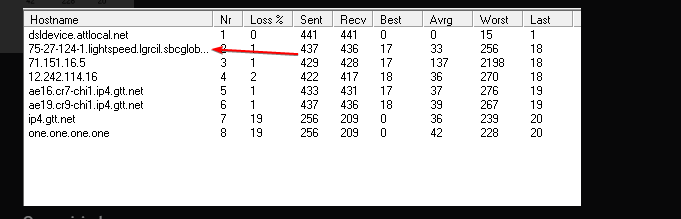
and then ping -t it directly
should give us a clearer picture of the jittering on the line
because if it is doing what I am suspecting it is doing
this is probably DSL transmissions on a bad line
tame carbon
yes
tame carbon
@gloomy saffron open commandline
gloomy saffron
whats that
gloomy saffron
ok
tame carbon
once that finished
gloomy saffron
yeah
tame carbon
do you see the 2nd entry?

like this ^
that IP at the end there
do ping <ip> -t
where <ip> is that address on the 2nd line
tame carbon
thats just a placeholder
since Idk what that number is
for me it would be ping 46.243.152.3 -t
but that is my ISP router
gloomy saffron
its doing something
tame carbon
you have to use your own, its the 2nd entry in that traceroute you did
@gloomy saffron yeah it should now continously be pinging the router from your ISP
gloomy saffron
yup
tame carbon
so its averaging around 25~
gloomy saffron
jumping a lot
tame carbon
a bit of jitter is expected
gloomy saffron
yeah but jumps to hundres
tame carbon
make the terminal a bit longer
gloomy saffron
what
 tame carbon
then wait
gloomy saffron
every time a new one comes
tame carbon
well
gloomy saffron
is doing little jumps
tame carbon
in perfect world it does this: https://i.imgur.com/tcfT3Oh.png
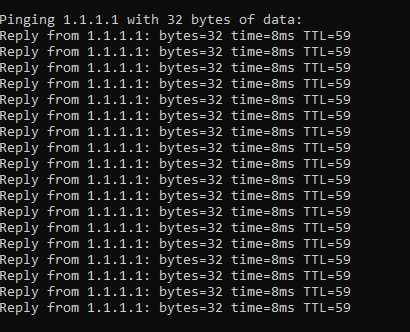
that's on fiber optics.
gloomy saffron
 tame carbon
yeah up to 15ms up and down is acceptable on DSL
gloomy saffron
but there was like 200
tame carbon
yeah 200 indicates a problem
that means there was a transmission failure
and it retransmits the data
which takes a bit longer
gloomy saffron
 gloomy saffron
yeah but ingames its goes like 20 ping 200 ping in like 10 seconds every30 seconds
tame carbon
I was on DSL a long time ago
and I had spikes of 800ms sometimes
and some packet loss too
gloomy saffron
on att internet
tame carbon
DSL
gloomy saffron
whats that
tame carbon
Digital subscriber line (DSL; originally digital subscriber loop) is a family of technologies that are used to transmit digital data over telephone lines. In telecommunications marketing, the term DSL is widely understood to mean asymmetric digital subscriber line (ADSL), the most commonly installed DSL technology, for Internet access.
DSL servi...
@gloomy saffron the ethernet that your ISP provides uses some long distance signal technique
you probably have a DSL line
which is 4 copper wires
but the problem is that if they arent replaced after 20-30 years
gloomy saffron
is that bad
tame carbon
or not maintained properly
gloomy saffron
oh ok
tame carbon
then you can have signal issues
 gloomy saffron
and my friend changed his ISP to xfinity and he has no problem
tame carbon
DSL is that 4 wire connector
tame carbon
yeah, if you can log into the modem
you can check DSL line status
and see if its spewing errors
gloomy saffron
how
tame carbon
in commandline run ipconfig /all
tame carbon
nah we need to figure out the IP address of your modem/router first xD
gloomy saffron
how
tame carbon
you ran that command yeah?
peak cloak
gloomy saffron
what are they doing!
probobly upgrading lines
gloomy saffron
yeah
peak cloak
dsl is already deprecated on verizon
tame carbon
@gloomy saffron the field you are looking for is Default Gateway
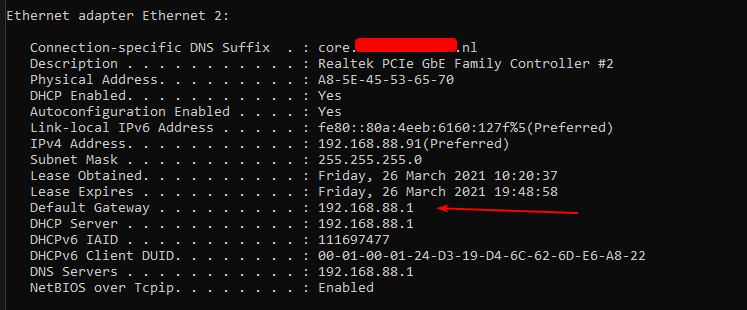
thats the IP of your own router
just put that in your webbrowser with http:// in front of it
@peak cloak I actually bought a console cable to give these old 3com switches a new life xD
rs-232 ftw
it uses an RJ45 jack
peak cloak
I found a good deal on a used edgerouter lite 3
gloomy saffron
mine... looks different
peak cloak
gloomy saffron
mine... looks different
show
gloomy saffron
 tame carbon
no you got the wrong one, that's link local 
tame carbon
cool
now to login
if this hasnt been configured before
just google the model name of the device and add the words default password
gloomy saffron
i dont know the login
tame carbon
you'd be surprised how many people dont change their router password xD
gloomy saffron
wiat hold on
gloomy saffron
tame carbon
just google the model name of the device and add the words `default password`
model name of what
tame carbon
@gloomy saffron screenshot the login screen
gloomy saffron
im already logged in i think
tame carbon
almost all of these things are easily found on google
gloomy saffron
like i see everything
tame carbon
kk\
tame carbon
well, can you see DSL status?
send me a full screenshot of the page in DM
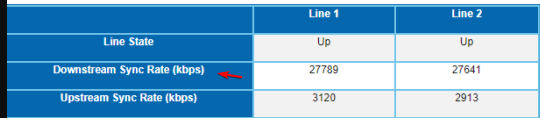
@peak cloak he has bonded VDSL2
gloomy saffron
ok
tame carbon
and it pretty much explains what we are seeing
its stable, with minor glitches
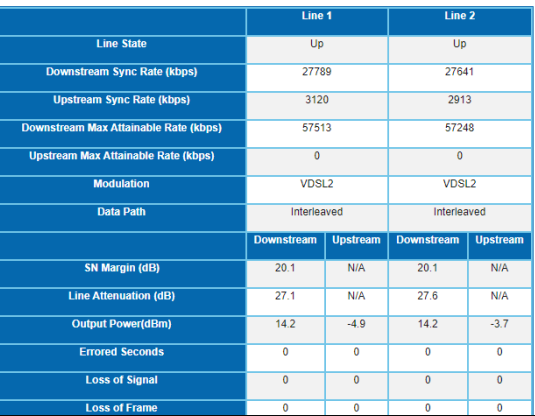
but its within limits https://cdn.discordapp.com/attachments/825078785942618192/825079865979961395/unknown.png
 gloomy saffron
so what do i do
tame carbon
nothing
gloomy saffron
so what is causing my bad internet
tame carbon
but VDSL2 is already pushing bandwidth on copper
gloomy saffron
should i try switching my ISP
peak cloak
gloomy saffron
should i try switching my ISP
sure why not
depends what the other's offer
peak cloak
I switched from optimum to fios
tame carbon
@peak cloak yeah but odd thing is
tame carbon
@peak cloak line checks out fine.
Like, there's no errors reported at all.
@gloomy saffron that is your max speed yes
gloomy saffron
how do i know if it is fiber or dsl
peak cloak
tame carbon
<@!222482269829332992> line checks out fine.
it looked like the most worst latency on the mtr was on another hop
tame carbon
 peak cloak
gloomy saffron
how do i know if it is fiber or dsl
peak cloak
gloomy saffron
how do i know if it is fiber or dsl
fiber can do much high speed for one
gloomy saffron
yeah
peak cloak
and is usually symetrical
gloomy saffron
like 200?
peak cloak
like gigabit
tame carbon
200Gbit/s per wavelength yes.
tame carbon
fiber has no real speed limit
peak cloak
tame carbon
fiber has no real speed limit
it does though
tame carbon
yeah but 1 fiber can carry terrabits/s
peak cloak
because of refraction and stuff
gloomy saffron
 peak cloak
well yeah
peak cloak
gloomy saffron
what ISP
tame carbon
@gloomy saffron yeah but that is a lie.
@gloomy saffron DSL never reaches advertised speeds.
gloomy saffron
how do u know its dsl
tame carbon
I was on ADSL2+ which is max 24mbit at less than 100meter copper.
my house was 4.5 km from the exchange
and I got only 4mbit download
Your connection is using VDSL
tame carbon
which is a newer version of DSL, which only works at shorter distances
and it is more prone to errors because it uses a broader range of frequencies
gloomy saffron
@peak cloak so should i go with that speed i showed u
tame carbon
@peak cloak sometimes if you have poor connection, the DSLAM will disconnect the line and lower the max data rate.
peak cloak
gloomy saffron
well i mean i need to know its my parents desicion
I'm a kid too, I convinced my parents
tame carbon
I think that this is whats happening here.,
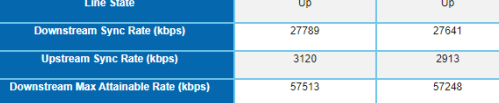
See how a single line can do 57mbit/s theoretically
peak cloak
mainly it was the cost
gloomy saffron
i mean it is mostly cuz our email is with att if me switch we need to switch oujt emails with everything
@tame carbon my parents said no because there are other peple on the internet
peak cloak
why I don't use ISP emails
tame carbon
rip.
gloomy saffron
its so annoying
tame carbon
@gloomy saffron if the signal was having issues, or errors in the past, then the DSLAM (the other side of your modem) might negotiate a lower speed with your modem
this reduces max speed but makes the line more stable
gloomy saffron
i feel like its not stable though
gloomy saffron
i go from 20 ping to like 500 with 10 seconds for like 2 weeks
tame carbon
can be influenced by the elements
like if its pole mounted cables
then hot weather makes the cables sag
temperature changes the characteristics of the copper, and this changes how the signals go through this
gloomy saffron
then why does my friend not experience this
tame carbon
because each house has its own wire
tame carbon
yeah could be a bad splice in the ground
or some electronic interference from city power grid
this is why copper networks are old
peak cloak
gloomy saffron
he lives like 2 blocks from me and never esperiences issues
same ISP?
peak cloak
wut?
tame carbon
@gloomy saffron how much bandwidth did oyu have before you upgraded the speed?
peak cloak
gloomy saffron
whats coax and DOCISS
coax is a type of cable, DOCISS is a protocol used to deliver internet over that cable
gloomy saffron
so xfinity is better
peak cloak
other standards that go over coax are CATV, and MOCA
tame carbon
coax can handle much higher speeds
peak cloak
MOCA is used for networking locally within the same house
tame carbon
but coax also has its problems
like
good internet on copper is like winning the lottery
and the fact that most networks these days are pretty old
its slowly showing its cracks
gloomy saffron
so what do i do
gloomy saffron
what if i switch to fiber
tame carbon
you saw the screenshot earlier?
fiber optics: https://i.imgur.com/8wKehMJ.png
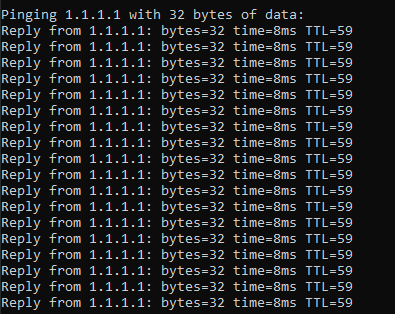
stable 8ms ping.
gloomy saffron
so how do i tell if it is fiber again
peak cloak
I mean GPON exists
tame carbon
allow for much higher bandwidth
peak cloak
gloomy saffron
so how do i tell if it is fiber again
ask ISP
tame carbon
@peak cloak sssshhh
gloomy saffron
what
peak cloak
tame carbon
<@!222482269829332992> sssshhh
most fiber deployments are GPON lol
tame carbon
@gloomy saffron you have bright colored wires and usually a warning label somewhere xD
peak cloak
some sort of PON
peak cloak
tame carbon
<@!477557944284872724> you have bright colored wires and usually a warning labe...
thin wires lol
coax vs fiber lol
so thin
tame carbon
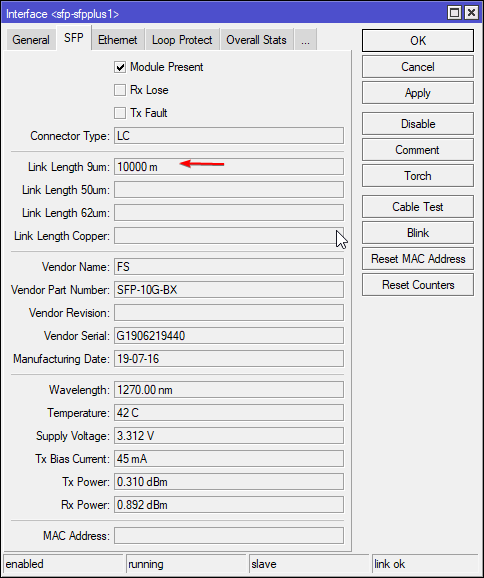
I use 2mm sleeving around my fibers
but the actual core is 9 micrometers
thinner than a human hair
distance: 10km https://i.imgur.com/PSQixu9.png
 tame carbon
thats coaxial yeah
gloomy saffron
ok well thx for the help and everytinh i will def consider switching to fiber have a great day!
tame carbon
@gloomy saffron https://cdn.discordapp.com/attachments/776722183119699988/777646103775674368/IMG-20200922-WA0001.jpg
fiber optics ^
usually yellow or orange
for long distance

wow.
like 10% of web requests is crap that gets blocked lol
 jolly sable
so i've got a computer downstairs and i've had powerline for it for a while but powerline has a quite inconsistent and rough connection. about 5% the rate my upstairs computers are getting with the ethernet. So my main question here is how can i like get hardwired connections downstairs without some people going in my walls and getting wires in there LOL
 hollow marlin
tame carbon
usually yellow or orange
hollow marlin
tame carbon
usually yellow or orange
Just yellow. aqua/orange/violet is MM
tame carbon
@hollow marlin some older singlemode fibers were using orange sleeves too
different dimensions
I've seen this before
hollow marlin
It could have been in the past, I have not seen it or it predates me
tame carbon
@jolly sable I think you answered your own question
jolly sable
what
Im talking about how can i get it without people wiring stuff through my walls
and 30ft long cable
lmao
damn that was underestimated. like 200ft?
tame carbon
@hollow marlin actually yeah I think you are right. I think it was 62.5um
which is multimode
@jolly sable you could use cable ducts
jolly sable
Whats that?

 jolly sable
another question. i've got a empty like wall port thingy with no cables coming through it. Is it possible to get like a ethernet thing there and just use that as the connection?
Oh
But then cable ducts would be just sitting on my floors...
tame carbon
some of them use glue, but I recommend screwing them to the wall
jolly sable
tripping hazard
tame carbon
@jolly sable nah you do these along the wall
usually in corners either at ceiling or near the ground
you can get an angle saw for couple bucks
cut them into 45 degree corners
the plastic top you can just snap on
jolly sable
the room downstairs isn't on the same wall as the one my router is
peak cloak
jolly sable
another question. i've got a empty like wall port thingy with no cables coming t...
yeah of course
that's what I do
jolly sable
How could i do that then?
 tender hazel
if you have an existing phone jack in the area you might be able to unscrew the phone jack and run cat5 up the tube inside the wall
jolly sable
what would i be looking for?
peak cloak
let me grab a pic
tame carbon
@jolly sable do you have a stairwell?
jolly sable
yes
tame carbon
that's where you could begin
jolly sable
wait wym stairwell sorry do you mean stairs or something else XD
tame carbon
yes
well you need a place along the edges of the wall
to hide one of those cable ducts
its not as nice as in the walls
but at least its out of the way/sight
tender hazel
I would see if there is a way to run it in the walls, you would have to run it through an existing duct either for coax or for phone line
jolly sable
I feel like i'll just get the ethernet port thing set up on that empty wall outlet thingy
seems cheaper and a lot less complicated for my smol brain
peak cloak
 jolly sable
brb
peak cloak
This wires to this
 tame carbon
@peak cloak yeah except the contractors here put them on the wrong side of the room
peak cloak
Which goes to the basement
tame carbon
so there's a long cable from the wall behind my bed to my desk
and then a switch on the end
peak cloak
I did it myself
tame carbon
I only did the outdoor installation and fiber optics
 peak cloak
It was easy because it's all accessible because of the ac
jolly sable
Been like that since we moved here
peak cloak
jolly sable
Looks like this
Yeah you would need to fish wires and stuff
tame carbon
@jolly sable yeah there's usually a plastic tube to it
but feeding a wire through that isnt as easy
peak cloak
tame carbon
<@!150369570769731584> yeah there's usually a plastic tube to it
Usually? I've never seen a tube
peak cloak
In american homes its not too hard to fish wires, except going between floors
tender hazel
it's not too hard to remove the front cover and see what is there
that looks like an old coax outlet
tame carbon
@peak cloak

you can put a bendable metal ring in here
you heat it up with your hands
peak cloak
tame carbon
<@!222482269829332992>
never seen that
jolly sable
so should i go removed it and take pic of that?
tender hazel
we don't have pvc running in walls here, they use metal conduit for vertical runs
gloomy saffron
yay my wifi just went out!
jolly sable
dope
jolly sable
so, should i remove the plate thing and take a picture of the wires and stuff?
tame carbon
@tender hazel this is what oldschool dutch switchboards look like

made out of bakelite
but its got a smartmeter on the front
modern ones are made out of plastic
peak cloak
meters are outside here
jolly sable
:P
 rocky badge
@peak cloak @clear igloo I hate FedEx 😩
tame carbon
I really need to take a picture of the switchboard we have here
rocky badge
the APs were rescheduled for tomorrow
tame carbon
we have 100kV on site :D
peak cloak
rocky badge
<@!222482269829332992> <@!291198741862416384> I hate FedEx 😩
don't we all
peak cloak
tame carbon
we have 100kV on site :D
idk the voltage of the street lines here, but it's high
tame carbon
@peak cloak we have a tiny transformer house on our property
rocky badge
@peak cloak 
 peak cloak
tame carbon
<@!222482269829332992> we have a tiny transformer house on our property
peak cloak
tame carbon
<@!222482269829332992> we have a tiny transformer house on our property
that's on the street
on a pole
tame carbon
it outputs 6x 80A phases 240V
peak cloak
or pad mounted if it's underground
rocky badge
Would've been nice if we got them today...I'm busy tomorrow morning but I should be able to set them up tomorrow....
if not there's always Sunday lol
hollow marlin
tame carbon
<@!530075635423510548> I always wondered why metal xD
Safety. The conduit should always be grounded so if there is a break no one will get hurt accessing it and if there is a short, sparks can light the PVC on fire rather than contain it until a breaker blows. This is the electrical side, but its used for both electrical and data runs
I was curious why at first too
tame carbon
@hollow marlin our system looks like this:

but its behind 3 doors
it has a very fat cable coming from the transformer outside
and then feeds onto 3 giant bus bars
and there's like half a dozen slots for 80A fuses
and on the leftmost door, there's like a bunch of 25A fuses (like total of 50 of them)
like the oldschool ceramic fuses
 peak cloak
and then it goes to the house
tame carbon
only HV lines are on poles
no wonder that after every hurricane, you guys struggle with power grid issues xD
peak cloak
underground has it's issues too
tame carbon
its not significant
peak cloak
ease of maintenance
peak cloak
netherlands is a small country, much easier to do it at a small scale
peak cloak
it's not worth putting things underground everywhere
tame carbon
avg density
peak cloak
area wise
tame carbon
well
considering
@peak cloak btw ease of maintenance
the local junction box
is a tiny conrete box
like 2x1.5x1 meter
peak cloak
yes
tame carbon
@peak cloak LOL
peak cloak
ik
tame carbon
Trying to google for an example

half of them are burning

we have this exact one on site ^
@peak cloak we also dont use split phase power.
most houses here have 3 phase power
hollow marlin
Yeah underground in the US is really only limited to cities. Its around $80-90/m to trench. That adds up quick here
tame carbon
having 400V is just a matter of modifying your switchboard
@hollow marlin here its about 60euros/meter
converted
its about teh same
peak cloak
hollow marlin
Yeah underground in the US is really only limited to cities. Its around $80-90/m...
I've seen underground in some suburbs
tame carbon
@hollow marlin the moment you start putting it on poles here, you get people that complain at the government
because its ugly
and ruins the view
people even complain about the new power poles they recently build
I actually really l ike them
they like futuristic
hollow marlin
peak cloak
I've seen underground in some suburbs
It exist but its still pretty rare in the scope of things. Typically this is seen where municipal are used as when they trench for water/sewer, lines are ran as well
tame carbon
@hollow marlin these look pretty nice eh? https://i.imgur.com/wbQi9zG.jpeg
 peak cloak
yeah
 peak cloak
I was just passing by some roads yesterday and just realized the wires I thought was telecom was actually medium voltage
tender hazel
jolly sable
so, should i remove the plate thing and take a picture of the wires and stuff?
yes, are there wires inside?
peak cloak
it's like twisted up and in a net kinda, let me find a pic
tame carbon
@hollow marlin 🤣
https://i.imgur.com/L7r93zE.png
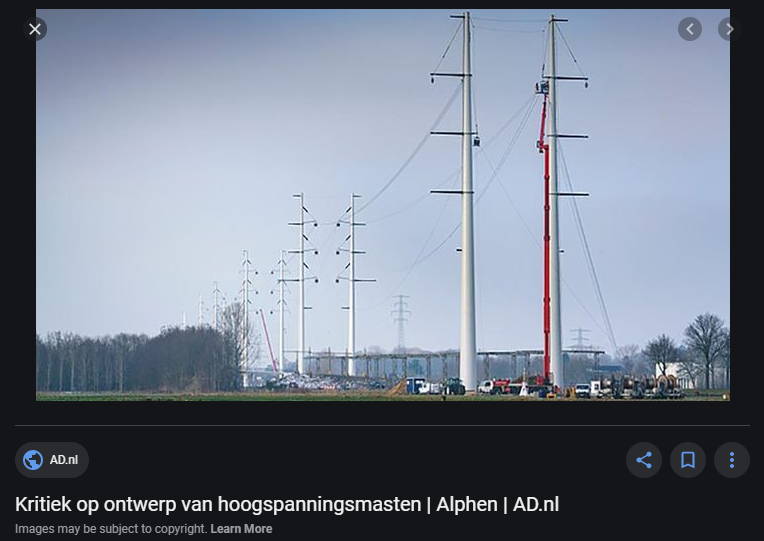
Critique on design HV transmission lines
writes a local news paper
jolly sable
I was waiting for a response hold up ill go do that @tender hazel
tender hazel
yeah I think people missed that you said that and I was away
tame carbon
yeah


 peak cloak
looks like coax?
tender hazel
yeah it looks like it has been partially painted over
jolly sable
 tender hazel
the good thing is that if there is a cable in there you can possibly use it as a pull cable to pull another cable through
jolly sable
Wym?
tender hazel
you'll need to use a screwdriver to remove that metal faceplate
there will be one screw on the top that has been painted over
you can see it if you look closely
peak cloak
tender hazel
the good thing is that if there is a cable in there you can possibly use it as a...
or it may be stapled, that's the thing
jolly sable
Just one screw?
tender hazel
there's a matching one on the bottom
jolly sable
Ah
tender hazel
but you'll have to find it under all that paint or plaster or whatever hte heck it is
tender hazel
yeah that's a robertson screwdriver
the square shape.. you'll need a aorbertson screwdriver to remove that
tame carbon
@jolly sable can you pull the wire out?
if theres exposed leads, dont touch them until we know what it is
tender hazel
that's not a power cable of any kind I don't think
jolly sable
I got the 2 screws off
K
Wont touch cable but how do I get the plate thing off lol

The cable has an end btw just saw that
 tender hazel
the plate thing should just come off now but it is probably stuck due to the plaster or paint or whatever that is on it
the top part of the plate should just pull off now but you may have to work it a bit back and forth to get it unstuck
the bottom you'll want to be more careful with so that you don't remove too much plaster from the wall
jolly sable
Uhhh got it off is this bad lmao
 tender hazel
there you go
tame carbon
the plate should cover that all just fine
jolly sable
 tame carbon
thats coaxial
jolly sable
Is this an f moment
tender hazel
can you see how the cable runs - does it go into a pipe?
or is it just run loosely up the wall?
looks like there is a bit of extra cable that you can probably pull out
jolly sable
 tame carbon
HD
tender hazel
that looks like it is just going up the wall and not through a conduit yeah
the question is - is it just loose in the wall or is it stapled
jolly sable
I couldnt tell you XD
tender hazel
if it is loose or the staples are very large, you could potentially use this as a pull cable
jolly sable
I'm confused what you mean by a pull cable
jolly sable
?
tame carbon
@jolly sable if the cable goes through a plastic tube or duct, then you cna attach another type of cable on it
peak cloak
jolly sable
I'm confused what you mean by a pull cable
use this cable to pull another cable though the wall