#networking
1 messages · Page 309 of 1
 loud escarp
alright
I got nothing to test it from another pc my brother wont let me use his
is there a way to test it from my own pc
 thick minnow
hi, it turns out I have a very bad Network adapter: Realtek RTL8822CE 802.11ac PCIe Adapter.
Are there any recommendations with what i should replace it?
and should i wait till my Warranty is over? Or would Hp replace it for me?
 tender hazel
how do you know it is bad?
 half holly
thick minnow
and should i wait till my Warranty is over? Or would Hp replace it for me?
half holly
thick minnow
and should i wait till my Warranty is over? Or would Hp replace it for me?
realtek cards are flakey at best from my experience, an Intel card to replace isn't too expensive and will probably be more stable than the realtek. something like ax200 will do nicely
Replacing garbage with garbage doesn't make it good
and replacing a wifi card shouldn't void warranty
thick minnow
half holly
and replacing a wifi card shouldn't void warranty
I thought let alone opening the lid would void the warranty
tender hazel
you can try upgrading the driver first for the nic
thick minnow
its up to date
tender hazel
the other thing you should do as a troubleshooting step is do a continuous ping to your router to monitor the latency
any issues should show up in the ping
as either loss or latency increases
that will allow you to verify whether the problem is between your wireless card and your router, or between the router and the internet
thick minnow
but on other devices in my house the internet works fine
tender hazel
that's all well and good, and there is a fairly good chance it is the NIC, but if it was me, I would want to verify that before spending the money on a new one
especially since it is relatively easy to do
thick minnow
yeah ok, which program should i use
tender hazel
how far is the laptop from the router
you can go to the windows command prompt and ping the router with ping 192.168.1.1 -t
or whatever the ip of the router is
thick minnow
tender hazel
how far is the laptop from the router
about 5-7 meters
tender hazel
it will ping it over and over again until you hit ctrl-c to stop
you will see big latency fluctuations or loss if something is wrong like interference or a fault in the card
if you do see latency fluctuations, try bringing the laptop closer to router and see if they go away
thick minnow
should i do 3 mins?
tender hazel
yeah.. if the issue happens as often as you say you should see something within that time frame
thick minnow
alright ima try that
tender hazel
and again if you see latency or loss, try moving the laptop closer to see if it goes away when it gets closer to the router.. if it does, the problem is most likely caused by interference and not a faulty card
the card is dual band so it will be able to choose 5ghz or 2.4ghz and the interference may only be on one or the other
thick minnow
average: 31ms Max: 254ms min: 1ms

 hollow marlin
@clear igloo Looks like CCIE-SP is on hold. Mini JNCIE-SP bootcamp tomorrow and then work is paying for the self study bundle. We'll see how this goes as through the JNCIP-SP, all study material is Cisco because Juniper love its paywalls
 clear igloo
lol, nice
hollow marlin
Its all also remote for the lab which sketches me out
clear igloo
Yah, that's generally how the CCIE is now too, the only exception is part of the collab I think, or do you mean the training lab?
tender hazel
thick minnow
average: 31ms Max: 254ms min: 1ms
yeah you have some bad latency spikes in there, see what happens when you go closer to the router
hollow marlin
clear igloo
Yah, that's generally how the CCIE is now too, the only exception is part of the...
I mean the actually test lab. I didn't think Cisco was doing remote lab for the IE is it?
clear igloo
hollow marlin
I mean the actually test lab. I didn't think Cisco was doing remote lab for the ...
Yah, even when it was out of SJC and RTP you didn't get hands on 😦 and the REALLY crap part is they nixed RTP and SJC for in person too so I'd have to fly to Richardson to take it, or at least that's what it was a couple years ago, not sure how the global issues have changed that
tender hazel
@thick minnow if the latency becomes stable when you go closer to the router the problem is most likely caused by interference
hollow marlin
clear igloo
Yah, even when it was out of SJC and RTP you didn't get hands on 😦 and the REAL...
Honestly for any IE lab I prefer to travel, less chance of something happening remote during testing for them to call out cheating or just general outages. I know it was up until a few months ago the new IE was only taken by one person in house as testing centers were all shutdown.
clear igloo
hollow marlin
Honestly for any IE lab I prefer to travel, less chance of something happening r...
Yah, remote as in home remote is really sketch
I thought you were at first just saying like in a proctored/locked down room kind of remote
thick minnow
tender hazel
<@456226577798135808> if the latency becomes stable when you go closer to the ro...
Average: 14ms Max:162 min:2ms

i guess it is somewhat better
clear igloo
thick minnow
i guess it is somewhat better
How many other devices on the wireless network?
thick minnow
but there still spikes above 150ms
tender hazel
you're still getting some spikes when it is close but they are smaller
is it connected via 2.4ghz or via 5ghz right now
thick minnow
clear igloo
How many other devices on the wireless network?
a tv, and 3 more laptops at max usage
right now only a tv though
clear igloo
is the TV streaming or just sitting idle?
thick minnow
tender hazel
is it connected via 2.4ghz or via 5ghz right now
streaming
half holly
thick minnow
I thought let alone opening the lid would void the warranty
if there are no warranty stickers, it's allowed, you only void your warranty if you break something because you opened it up
thick minnow
lol wrong reply
clear igloo
Ah, if its pulling data that explains it a bit
half holly
and breaking something while replacing a wifi card is rather difficult actually
thick minnow
i tried changing one before on another laptop, it aint hard
thick minnow
tender hazel
is it connected via 2.4ghz or via 5ghz right now
how do i check that?
tender hazel
first, does your router have a single SSID for both 2.4ghz and 5ghz or is it a single SSID?
clear igloo
since wireless is shared medium the router/AP has to go between clients and there could be interference from other devices off your network if you're in a apartment or townhome. Streaming is generally more download and buffer than constant stream data so it would explain the intermittent spikes if it's buffering more data
tender hazel
if it has a separate SSID for 5ghz you will see another SSID like your main one but with something like -5G or -5GHz somewhere in the name
 tame carbon
usually has two different MAC addresses written on the back
if it has two wireless bands
thick minnow
clear igloo
since wireless is shared medium the router/AP has to go between clients and ther...
i woudnt expect it to be that much better without the tv, cuz it happens also when im home alone
clear igloo
thick minnow
i woudnt expect it to be that much better without the tv, cuz it happens also wh...
Are you in a area with a lot of other wireless networks? like an apartment building?
tender hazel
if you are connectng via 2.4ghz, that sort of latency deviation is actually quite normal due to how much 2.4ghz interference there is
it would be unusual for 5ghz
 rocky badge
@clear igloo Getting those two APs 
clear igloo
Yah, I could see some of it on a 5ghz network where the ap isn't changing bands and defaults to one and stays
thick minnow
clear igloo
Are you in a area with a lot of other wireless networks? like an apartment build...
nope at a house
clear igloo
Click on the wifi icon on the bottom right, click properties for the network name and then find Network band
tender hazel
@thick minnow as I asked before, does your router have separate SSID's (network names) for 2.4ghz and 5ghz or are they the same
clear igloo
me or finrod?
tender hazel
well when you are choosing a wifi network to connect to, do you see it once in the list or twice?
thick minnow
tender hazel
well when you are choosing a wifi network to connect to, do you see it once in t...
twice because i have a vpn
tender hazel
if you see it twice, once with like a -5G or -5GHz in the name and one without, then you have separate SSID's for 2.4ghz and 5ghz
thick minnow
clear igloo
me or finrod?
i meant finrod
half holly
is there like "TELUS-4200-2.4G" and "TELUS-4200-5G" or something similar with your wifi provider name?
thick minnow
no
rocky badge
@clear igloo We're getting the uap-ac-m-pro and uap-ac-lite
thick minnow
its a 2.4 GHZ only
half holly
on your phone?
rocky badge
~$280 from B&H
clear igloo
rocky badge
~$280 from B&H
very nice 😄
rocky badge
With free 2 day shipping
thick minnow
half holly
on your phone?
neither
rocky badge
clear igloo
very nice 😄
Now I'm gonna have to jerry rig an AP onto a tripod
half holly
mk, now can you check on your phone are you connected 5g or 2.4
thick minnow
tender hazel
if you see it twice, once with like a -5G or -5GHz in the name and one without, ...
 rocky badge
Nothing gaff tape & zip ties can't solve
clear igloo
Ah, that explains it @thick minnow
tender hazel
that fritzbox model is 2.4ghz only
you're not going to get great latency and loss results without dual band ac wireless
rocky badge
@clear igloo I'm trying to get my grandmother's church to upgrade their network before/when they upgrade their live streaming and such equipment.
thick minnow
half holly
mk, now can you check on your phone are you connected 5g or 2.4
to 2.4GHZ
clear igloo
rocky badge
<@!291198741862416384> I'm trying to get my grandmother's church to upgrade thei...
Very cool, get them some super powerful stuff 😛
half holly
read above finrod's message
rocky badge
They have a Netgear router with 10/100 ports...
tame carbon

rocky badge
And idk what model Seano networks APs
half holly
rocky badge
They have a Netgear router with 10/100 ports...
dw it's still fast ethernet
rocky badge

This is what I'm planning on to upgrade them to...
Its a hell of an upgrade for them 🤣
tame carbon
that switch is a bit overkill no?
clear igloo
Ummm, excuse you, I see no WiFi6E APs in there 😛
rocky badge
Switch is not really overkill
clear igloo
and no RGB either?!?! tsk tsk tsk
thick minnow
tender hazel
you're not going to get great latency and loss results without dual band ac wire...
what does that mean for my card upgrade?
clear igloo
Not worth it
rocky badge
10.5W * 2 for nanoHD
6.5 * 6 for LR
21+39=51W
USW-24-PoE only has 95W of PoE, which is getting too close imo for future upgradability
tame carbon
@thick minnow if your AP dont support ac wireless, then it doesnt matter what card you have
tender hazel
thick minnow
what does that mean for my card upgrade?
it means it probably wouldn't help much.. my guess is that you have a 2.4ghz interference source, possibly close to where you are using your laptop normally.. and if you are normally using that device for zoom, zoom is more demanding on the network and you will generally see more issues from latency and loss than you would from, say, streaming netflix
rocky badge
Plus, it would also give us 802.3bt 😛
tender hazel
you'd be a lot better off with ac wireless and see how it works when you connect up via 5ghz
the loss and latency you are seeing is normal for 2.4ghz and that's why most people get dual band these days
rocky badge
so if I wanted to add some beefy PoE devices I could lol
thick minnow
tender hazel
you'd be a lot better off with ac wireless and see how it works when you connect...
so basically i would have to replace my router to an ac wireless support router
rocky badge
Plus who doesn't want 10 gig 😄 @clear igloo
tender hazel
yes, that would be the best approach, since there is a good chance replacing the wireless card in the laptop would not make any difference and you would be out that money
better to spend the money on a dual band router
rocky badge
Also, Lurick, I could spec WiFi 6 APs but the U6 Lite is sold out lol
thick minnow
tender hazel
better to spend the money on a dual band router
i have feared this, because we just renewed our internet subscription for 2 years last june
tender hazel
the ISP I am with rents the router and it can be upgraded mid contract by paying like a $20 fee or something
so you might ask them to see what is possible
thick minnow
i dont think German providers like 1&1 (a very poor provider in compare to Telekom and vodaphone) would have that option
but i will inform myself more about that
tender hazel
call them and ask, it doesn't hurt to ask them
thick minnow
i will do that
tame carbon
fiber optics are superior
tender hazel
and if they can't do it, you always have the option of buying a dual band ac access point, connecting it to your router, and turning off the wifi in the router
thick minnow
wait you can do that?
tame carbon
yeah with most equipment you can configure it in such a way that you can use your own equipment
tender hazel
yes you can
tame carbon
for example with mikrotik, you could buy a small router without wireless
and then a seperate AP
and if you need more coverage
you can just buy another antenna and hook it up to your network with a cable
 peak cloak
I hate ISPs like optimum here that force you to use their fiber gateway
and passthough mode doesn't work
thick minnow
tame carbon
for example with mikrotik, you could buy a small router without wireless
im liking what im seeing, im seeing what im liking😅
tame carbon
@thick minnow what kind of net speed do you have?
thick minnow
50 mbits
tame carbon
do you want to go future proof of or cheap? xD
rocky badge
peak cloak
I hate ISPs like optimum here that force you to use their fiber gateway
I'd actually be ok with AT&T now
tender hazel
almost all of the home router vendors also sell wireless access points (which are not routers).. you can use a router as a wireless access point too but it would take some extra config since you would have to disable the dhcp server etc.
rocky badge
Their new router uses a GPON SFP
So you can that sucker out and run WPA supplicant on your router and have SFP directly into the router
tame carbon
@rocky badge those dont work on mikrotik stupidly enough
rocky badge
¯_(ツ)_/¯
tender hazel
so it is easier to buy something that is designed to be an access point
thick minnow
tame carbon
do you want to go future proof of or cheap? xD
it would be hard to convince my parents for future proof
tame carbon
@thick minnow if you ever get fiber optics, its useful to have a router that is capable of such speeds
peak cloak
rocky badge
Their new router uses a GPON SFP
but even with sfp that still requires the router to decode the GPON right?
thick minnow
tame carbon
<@456226577798135808> if you ever get fiber optics, its useful to have a router ...
yes true
rocky badge
peak cloak
but even with sfp that still requires the router to decode the GPON right?
GPON SFP module
peak cloak
yeah ik
tender hazel
@peak cloak no.. a GPON SFP module does GPON entirely by itself
peak cloak
really?
rocky badge

DSL Reports
Forum discussion: Long time lurker, first time poster... I did follow the guides and the gateway bypass has worked wonderfully for about 6 months. However, my USG alerted me that the link was down Saturday (11:38 am PST, 2020-08-09) and it hasn't worked since. I rebo
peak cloak
I heard it doesn't
tender hazel
the router just sees it as an SFP interface so you can use any router
peak cloak
nice
rocky badge
Some people say they're having issues but my friend is doing it just fine
thick minnow
tame carbon
<@456226577798135808> if you ever get fiber optics, its useful to have a router ...
i do need to check if i could change the subs from the provider for just a fee
rocky badge
 tender hazel
the only thing that might be a concern is that some of the GPON SFP modules can run quite hot
tame carbon
@thick minnow https://mikrotik.com/product/hex_s either this one without wireless

MikroTik is a Latvian company which was founded in 1996 to develop routers and wireless ISP systems. MikroTik now provides hardware and software for Internet connectivity in most of the countries around the world.
tender hazel
if your device has passive cooling instead of fans, and the module runs hot, the module could overheat and fail or be unreliable due to overheating
tame carbon
@thick minnow https://mikrotik.com/product/hap_ac2 this one is also quite decent for cheap price
MikroTik is a Latvian company which was founded in 1996 to develop routers and wireless ISP systems. MikroTik now provides hardware and software for Internet connectivity in most of the countries around the world.
tender hazel
GPON SFP modules consume more power and run hotter because they are so complicated, they are basically taking an entire GPON ONT and shoving it into a few centimetres space
tame carbon
the ac3 is a more expensive model, but it has better coverage
but its difficult to get your hands on them right now
thick minnow
tame carbon
<@456226577798135808> https://mikrotik.com/product/hex_s either this one without...
maybe a dumb question but i live in Germany, would these things still work?
rocky badge
tender hazel
GPON SFP modules consume more power and run hotter because they are so complicat...
yup
tame carbon
yeah
rocky badge
its crazy lol
tame carbon
@thick minnow this thing is basically just a router, with 5 ports that you can configure however you like. The markings on the box are just the default
@thick minnow it can also provide power over one of its ports, to an AP
tame carbon
it is
if your router is in a place where you don't want your AP, then you can use that
thick minnow
so what is my speed gonna be limited by?
rocky badge
if my ISP used UFiber in my area, I'm in an Adtran area, I would so totally ask to use https://store.ui.com/collections/operator-isp-infrastructure/products/uf-instant @tender hazel

Ubiquiti Inc.
Gigabit Passive Optical Network CPEFeatures:
High-Performance GPON CPE
Up to 2.4 Gbps Downstream and 1.2 Gbps Upstream GPON structure
Supports up to 20 km GPON Links
Powerful Layer 2/3 Management Features
(1) GPON WAN Port, SC/APC
(1) 1Gbps SFP interface
tame carbon
@thick minnow routing wise, these things push about 2gbit/s.
They have gigabit ethernet, so max throughput per port is 1G
rocky badge
I guess Adtran has a GPON SFP but idk if they would provide one for me lol
tame carbon
@thick minnow wireless, depends on the frequency configurations you use on your AP
and also how good the signal is
thick minnow
so lets say i would have dual ac connection
tender hazel
yes adtran does have a GPON SFP module of some kind, it isn't listed on their main website for some reason, only the support site.. we were looking at buying them and putting them into hex s units as a do-it-yourself GPON ONT
rocky badge
Or just upgrade to business and get them to gimme that AE
tame carbon
@thick minnow the idea of dual band is that you just have two radios on the AP, one for 2.4GHz and the other 5GHz
tame carbon
when you are close to the AP the device uses 5GHz if it can
hollow marlin
tender hazel
GPON SFP modules consume more power and run hotter because they are so complicat...
Not entirely, ONTs still have an internal SFP that handle the signal. Like with Calix/Adtran, you can open the ONTs and replace the SFPs. ONTs/routers do not handle the signaling
tame carbon
when you have poor reception, it switches to 2.4GHz
tender hazel
but close doesn't necessarily mean right next to it
rocky badge
hollow marlin
Not entirely, ONTs still have an internal SFP that handle the signal. Like with ...
👀
thick minnow
ok, i understand
tender hazel
hollow marlin
Not entirely, ONTs still have an internal SFP that handle the signal. Like with ...
oh interesting, I've never cracked one open so I didn't know
tame carbon
but yeah, if you have multiple rooms you want 5GHz, you need multiple APs
rocky badge
I wish I could crack my ONT open lol
tame carbon
@rocky badge have you inspected the board for any UART ports?
sometimes they remove the pins
and you can solder your own on there
thick minnow
what are good bang for buck APs out there?
rocky badge
I'm too lazy to find a head that can open the telco access screw
To remove the plastic shroud covering the main board
tame carbon
@thick minnow well, if you want to stay with a single vendor for ease of use
you can either pick mikrotik, which is a bit more involved
or go with unifi, which I know little to nothing a bout
you nag @rocky badge for that
mikrotik doesnt offer wifi 6 yet
rocky badge
I also want to see if I could power the stupid ONT with PoE
tame carbon
@thick minnow the hAP ac2 I linked https://mikrotik.com/product/hap_ac2
MikroTik is a Latvian company which was founded in 1996 to develop routers and wireless ISP systems. MikroTik now provides hardware and software for Internet connectivity in most of the countries around the world.
@thick minnow this one has dual band wireless
its a router/AP combo
thick minnow
is one AP for a 100m^2 floor enough from mikrotik?
tame carbon
only if the AP was in the exact middle
if its in one area of the house
you might want to run a cable
and hook up one of these: https://mikrotik.com/product/cap_ac
MikroTik is a Latvian company which was founded in 1996 to develop routers and wireless ISP systems. MikroTik now provides hardware and software for Internet connectivity in most of the countries around the world.
perhaps mount it on the wall or ceiling, that gives excellent coverage
 humble cloak
Someone who knows if this https://tweakers.net/pricewatch/1110903/avm-fritz-powerline-1260e-wlan-set-international-20002819.html works together with this https://tweakers.net/pricewatch/1256647/devolo-magic-1-lan-single-eu-stekker.html ?
rocky badge
its stepping up from 13.5V to at least 75V for POTS ringing lol
I just want to get rid of the stupidly huge wall wart
hollow marlin
POTs ring is upwards of 90v over copper. Trust me that you feel DC much more than AC 💩
rocky badge
Yeah....

its so fucking big like why
All its doing is 120v -> 13.5v at like 2.6A
peak cloak
my ont has this big external thing
I think it's battery backup
but when I unplugged it, it still turned off immediately
rocky badge
lol
tender hazel
the mikrotik cap ac doesn't have the antenna gain like the higher end unifi ap's do, but their receive sensitivity is good
 tender hazel
thick minnow
what are good bang for buck APs out there?
tender hazel
thick minnow
what are good bang for buck APs out there?
there are lots of choices, you can do some research online.. mikrotik is more for hobbyists who like to tinker with things because it gives you access to a lot more settings than most routers make available, but it can be used as a home option too. If you prefer something simpler there are many many options. Ubiquiti UniFi is great but is on the more expensive side
tender hazel
the ubiquiti interface is very idiot proof
rocky badge
And adding more APs to it is a breeze....
The controller auto discovers the devices and I just click "adopt"...all of the side wide settings are copied to the device
So glad all of my neighbors have routers that can't use DFS
So much free 5GHz
tender hazel
in my apartment here I have this sonos speaker behind my TV.. at first I tried connecting it via wifi but it is 2.4ghz only so the connection wasn't very good.. I had to take a spare mikrotik router I had laying around and plug it into the sonos speaker and wireless bridge it back to my main router via 5ghz
tender hazel
I was really surprised that the sonos speaker didn't have 5ghz in this day and age
rocky badge
hollow marlin
https://www.amazon.com/Jonard-SK-51632-Security-Key-Insert/dp/B006962IN6/ref=sr_...
Yeah I could get one but I'm just lazy lmao
Sonos over WiFi ew
Sonos doesn't even have proper stp
tender hazel
hmm?
hollow marlin
RSTP by design is backward compatible
tender hazel
I might get two smaller speakers for surround later on but I'll be able to wire those in without the wire being in an obnoxious location
rocky badge
hollow marlin
RSTP by design is backward compatible
it still doesn't play nicely with it
hollow marlin
But also, why is Sonos using STP?
tender hazel
Sonos builds a network of its own between the various sonos devices I believe, over 2.4ghz
so they can communicate even if they aren't on the same wifi network or whatever
hollow marlin
Gotcha
rocky badge

Have a Sonos Connect AMP, and I love the quality of sound it generates with my own speakers, and now thinking of expanding system. I recently purchased it, and now Sonos AMP is out, so I feel a bit unhappy about that, and I would likely have waited a little to purchase new unit. But that is not my...
Some people just end up putting sonos on their main network instead lmao
hollow marlin
Im guessing related to most IOT using mDNS or SSDP. TTL=1 means no worky
clear igloo
yup
loud escarp
guys my port forwarding is not working and I feel like I've tried everything, does someone wanna hop on a call with me and maybe try to figure it out?
peak cloak
loud escarp
guys my port forwarding is not working and I feel like I've tried everything, do...
did you try locally?
tender hazel
what happens when you type your router's public IP address and that port from inside your network?
as long as your router supports hairpin NAT for the port forwards (most do), you should be able to check it locally
tender hazel
it works as long as the router supports hairpin NAT.. I think with most home routers they do that by default.. for mikrotik or things like that you have to make an extra rule
@loud escarp what are the first two octets of your public IP? i.e. the first half
tender hazel
yes, check on the router itself, for what it is getting as a WAN IP
in case your ISP has started doing CG-NAT or something
CG-NAT is an especially attractive option to ISPs where most of their users have IPv6 as well
and it looks like you have IPv6
when most of our users have IPv6 we are going to consider moving to CG-NAT ourselves
peak cloak
once I get a new router I need to experiment with minecraft java ipv6
some people say it works
other's say it doesn't
but it's not officially supported
peak cloak
tender hazel
when most of our users have IPv6 we are going to consider moving to CG-NAT ourse...
less costs right?
tender hazel
yes, would save us $25k a month
peak cloak
if I had proper v6 I wouldn't mind cgnat
best would be of course both
just so other people who don't have v6 can access
tender hazel
currently we pay a lot of money to rent IPv4 space from our partner in ontario, but they have stuff set up weird
peak cloak
just everyone move to v6 already
tender hazel
we have our own block of ipv4 from ARIN but it is only a /24 so not nearly enough for our customers unless we CG-NAT
our partner in ontario is still advertising the larger supernet and we advertise a more specific route, but we don't have a direct peering with them
instead they funnel our traffic through hurricane electric through Torix (the toronto internet exchange) so that it ends up getting to us, by accepting our more specific route that way
the issue is that if torix does maintenance, a bunch of services at torix can no longer reach us because we are cut off from our partner who is still advertising the supernets
so random traffic like akamai over Ipv4 will stop working until torix comes back up
it's really stupid
we asked them to cut holes in their advertisements so that they were no longer advertising the supernet, but they claimed (and I don't believe this personally) that some of their peers at torix would not accept advertisements smaller than a /19
it's like really? in this day and age can anybody get away with not being able to accept advertisements smaller than a /19? it is pretty much /24 everywhere I know of as the smallest possible size
so I mean I don't know for sure, but I don't buy it
also, they won't swip the blocks to us. We asked them to, but they said they would maybe in 3 or 4 years once they have their automated IP address management with automated SWIP functionality set up
peak cloak
I know nothing about all this, all this public internet routing is foreign to me
tender hazel
and the problem is that they are horribly unresponsive.. since they don't SWIP the blocks to us, they handle our reverse DNS.. we had a small customer set up a local on premesis exchange server and wanted us to change their PTR, which is a standard request for a customer doing such a thing to make of the ISP
the problem is that we can't change the PTR record, we have to ask our partner to do it
we followed up with our partner for like 10 months before they finally did it
our customer was furious at us but we couldn't do anything
if they just SWIP'ed the blocks to us and cut holes in their BGP advertisements for our /21's, everything would be just fine, and we would be operating like a normal provider
probably only a few people like @hollow marlin could understand how messed up our setup is
hollow marlin

hollow marlin
tender hazel
we asked them to cut holes in their advertisements so that they were no longer a...
I suspect they are using underpowered equipment that cannot handle full tables or running too many VPN NLRIs in combination with not enough memory
This was common a decade ago where only the creme of the crop could handle full tables
tender hazel
you mean our partner's peers?
hollow marlin
Yeah, which ever one was stating they couldn't accept less than a /19
tender hazel
they didn't really say which one wouldn't accept less than a /19
I'm not sure they even knew for sure
I think that was based on some peering policy thing from many years ago and they just never bothered to check to see if it had changed
@hollow marlin I think the bigger problem with our partner is that their Cisco BGP edge routers don't run IOS.. they run something else that is more service provider focused, but all of their other routers just run regular IOS so they aren't really comfortable managing them
I think they are afraid to make changes as a result
hollow marlin
Most the internet backbone is Juniper as are we. If you do a trace route what host names do you get back? Sometimes they have the psudo standard naming convention which has the interface in the response
hollow marlin
Oh I read that wrong, yeah it's XR
But Juniper is still most the backbone and edge
tender hazel
anyway those are their only two routers running XR so they are kindof afraid of them as a result
hollow marlin
XR is more similar to Junos than it is to IOS XE/NXOS
loud escarp
peak cloak
did you try locally?
idk my brother is a dingus and wont let me do anything on his pc can I try doing the same thing from my own pc
tender hazel
hollow marlin
XR is more similar to Junos than it is to IOS XE/NXOS
yeah they shared a snippet of the config with us
peak cloak
loud escarp
idk my brother is a dingus and wont let me do anything on his pc can I try doing...
so to try what finrod said we need to get the WAN IP of the router
on the main router page look for something like WAN IP
or Public IP
maybe even PPPoE IP?
tender hazel
it looked quite different from IOS, IOS I am familiar with
hollow marlin
tender hazel
yeah they shared a snippet of the config with us
How much did they share? I love critiquing others config
tender hazel
I'm not cisco certified but our network used to be entirely cisco routers running IOS, and I would ask our cisco guys "why is this config line in these routers but not in these? why does this one router have this extra config line? what does it do?" and they would be like "umm. I don't know why it is on the one and not the others, or what it does" so I started going through the docs and finding out what each command did and why it was there
tender hazel
hollow marlin
How much did they share? I love critiquing others config
they just shared their BGP peering config
hollow marlin
tender hazel
I'm not cisco certified but our network used to be entirely cisco routers runnin...
"Why is this there and what does it do?"
"I don't know, it was in the whitepage"
- ex-employee
tender hazel
yeah like I thought it was really stupid to have all of our routers being almost the same but a few config lines different for no known reason and people were afraid to change it.. so I made an annotated config that explained what each line did with a comment
I learned IOS that way
hollow marlin
If you know IOS, XR you can figure out but you need to look at it from a global perspective rather than a interface perspective.
tender hazel
it's a bit of a strange way to learn it, most people learn it by going through the certification track
but I didn't really feel the need to get cisco certified in general, I just wanted to get our configs more standardized
 waxen scroll
@hollow marlin nerd
@tender hazel time to audit your devices for compliance
it should be done by computer
hollow marlin
I went down the CCNP R/S track which is IOS, then went down the JNCIP-SP track. Now I'm in some ASRs so it was an easy pickup from the combination of both. I'd say most pick it up from the SP track as it's not common place to learn as you go on
hollow marlin
waxen scroll
<@!462711605063450628> nerd
💩
waxen scroll
you need some sort of system to scan your devices daily and look for config violations
like, you except "bgp log-neighbor-changes" to be on all routers, so why are 2 missing it
@hollow marlin lets see, whose gonna be up your ass
FDA, PCI
imagine having a college kid show up at your business and go "AUDIT TIME DITCHES!"
no IT experience
he asks to see network configs
hollow marlin
Dont forget to have HIPAA in the mix
waxen scroll
hes gonna ding you and ask WHY? WHY? WHY? if your configs arent standard
@hollow marlin one of my companies had mandatory how to handle an auditor training
"NEVER talk to them. NEVER confirm anything. Find a manager ASAP."
etc
xD
loud escarp
peak cloak
so to try what finrod said we need to get the WAN IP of the router
I have no clue how to do this
tender hazel
our mikrotik configs are a bit messy because we've made some changes over time, but at least I know what every line does in those, and whether something is supposed to be there or not supposed to be
peak cloak
loud escarp
I have no clue how to do this
so go into the router, on the main page look for WAN IP
tender hazel
what is the first half of it
don't share the entire thing because it would give your address
just the first half, the first two octets
loud escarp
wait let me go down stairs real quick to double check
tender hazel
downstairs? is it one of those routers that only allows admin page login from the wired network and not from wireless?
loud escarp
I am not sure I’ve never tried wireless but I had to log in
I just have a cable form my router to my pc
I thought I had it but I didnt, and I can’t find it either
Omg i thought you guys ment like actual router I’m too sleep deprived mb
peak cloak
yes
peak cloak
loud escarp
Omg i thought you guys ment like actual router I’m too sleep deprived mb
the one connected to the ISP connection
oh wait
you have double-NAT?
loud escarp
how could I tell
peak cloak
you have 2 routers?
loud escarp
we have a optic fibre cable that goes to a router that is connected to my pc
tender hazel
whatever device you are trying to create the port forward on
like you are logging into something to create the port forward
you showed a screenshot of that device earlier
loud escarp
this?
 tender hazel
no
earlier you showed a screenshot of some web interface where you created a port forward
loud escarp
yea
peak cloak
that's a private IP
tender hazel
what device is that??
peak cloak
internal
tender hazel
what device had the web interface that you shared the port forward screenshot earlier
loud escarp
my pc
tender hazel
your PC.. is doing a port forward to itself?
loud escarp
wait im confused rn
peak cloak
loud escarp
wait im confused rn
just go onto the router web interface
and look for WAN or public IP
tender hazel
earlier you were logged into something
you shared a screenshot showing the port forward configuration
loud escarp
yea
tender hazel
and that port forwarding configuration you get to how?

 peak cloak
that's a screenshot of yours?
tender hazel
ok you just shared your public IP
loud escarp
yea
peak cloak
yep
peak cloak
well
not CGNAT
so on your pc load up minecraft and try to join using that public IP
tender hazel
yeah not CGNAT, that is what we were wondering
loud escarp
I can only join using my private
peak cloak
I think it's windows firewall
tender hazel
yeah it is probably windows firewall
peak cloak
I'm on linux rn so idk the exact steps
loud escarp
I allowed the port is there anything else I need to whitelist on there
tender hazel
try disabling your windows firewall and see if it starts working.. your router will act as a firewall so it shouldn't be a big deal
loud escarp
I'll completely turn it off for like a minute and see if it allowes to port forward
tender hazel
I have it turned off all the time at home personally because my router handles my firewall stuff, and the windows firewall just gets in the way
loud escarp
I live in the netherlands (which you may know by now lmao) and have kpn, does this also handle the firewall?
loud escarp
its my provider
loud escarp
its their newest one I think so it probably should right
peak cloak
so did you disable windows firewall?
tender hazel
the device that you are creating the port forwards on is handling the firewall for your network
so you can fairly safely disable windows firewall if it is a fixed PC at your home
 buoyant sandal
I have a 500Mbs plan but my router only gives me 60Mbs on 2.4ghz any idea?
tender hazel
@buoyant sandal that's normal
you can't get much more than 60Mbps from 2.4GHz even in the best scenarios
if you have a dual band router and you are connected via 5GHz you might get anywhere from 200Mbps-500Mbps download, but you still might not get your full rate
buoyant sandal
@tender hazel thanks, but i remember on my old house i could get 90-100 mps.
tender hazel
@buoyant sandal it depends on how much interference there is from the area
my personal experience is that unless you are far away from any 2.4GHz interference sources you can only expect between 50-75Mbps maximum from 2.4GHz
if you are in an area of heavy interference you may only get 10-20Mbps
your old house may have had fewer 2.4GHz interference sources nearby and therefore you could get more
If you have 500Mbps internet service you will want dual band ac or ax wireless, otherwise you will never come close to really utilizing it
@buoyant sandal 90-100Mbps is what you can get out of 2.4GHz wireless only in the most ideal conditions
so your old house must have had very little 2.4GHz interference in the area
the issue is that wifi is about 60%-75% signaling overhead and only what is not used for signaling can be used for data transfer
2.4GHz is theoretically "300Mbps" wireless but with 60-75% used for overhead that means less than 100Mbps actual transfer rates
tender hazel
obviously a large variation in rate between 10Mbps (with a lot of interference) and 100Mbps (with basically clear channels)
but you largely can't do anything about 2.4GHz interference near you because other people are allowed to use wifi as well and are therefore allowed to interfere with your equipment which reduces your speeds
 late geyser
how do you reset a motorola ap 650?
fing reports it as connected to 192.168.1.33 but i can't get into the web UI
most i've seen is a 4 pin JP1 connector with a 1 on one side
tame carbon
@tender hazel even with 40Mhz channels? I know its gross
but you can be one of those guys
 lapis narwhal
late geyser
how do you reset a motorola ap 650?
lapis narwhal
late geyser
how do you reset a motorola ap 650?
press the reset button with a needle for 5-10 seconds?
That shouldve been the standard.
late geyser
lapis narwhal
press the reset button with a needle for 5-10 seconds?
ok then. where's that? since there is no reset switch visibly on it
like i said, all i can see is a header named JP1
lapis narwhal
hit me with a picture of the back of it

 lapis narwhal
the back near the LAN cable?
tame carbon
that 4 pin header you have there ^ isnt something you use
late geyser
 tame carbon
that's for the manufacturer to flash the firmware onto the device
late geyser
wouldn't flashing a new firmware also reset the whole thing?
late geyser
indeed
lapis narwhal
tame carbon
<@!328548777205956620> that thing comes with a manual
6 Speed? /s
late geyser
but i'm not sure if this manual will apply to it, since i'm not sure which version of wing is on it
all i know is that the orange LED blinks every second
or 2 idk
yeah once every 2 seconds
tame carbon
I can't find any instructions for resetting the device
late geyser
same here
 still zephyr
i cant connect to any network including ethernet on my pc, anyone know whats going on?
late geyser
is this thing just cooked, like the one i tried yesterday?
hm wait
i think i need a Motorola wireless controller
which i don't have
well then
thick minnow
still zephyr
i cant connect to any network including ethernet on my pc, anyone know whats goi...
well, for people to help, we're probably gonna need more info than that
still zephyr
well i cant connect to any network connection on my pc ive tried reinstalling network drivers, resseting my wifi hub but nothings worked
its only my pc nothing else in my house
still zephyr
if it is that how do i fix it
still zephyr
this router lets me connect to it on other devices tho
late geyser
still zephyr
well i cant connect to any network connection on my pc ive tried reinstalling ne...
do you mean network or internet? those 2 have entirely different meanings
late geyser
in command prompt, type ipconfig /all
still zephyr
done, what am i looking for
still zephyr
sorry for bad quality cant screen shot because im using phone
 late geyser
the default gateway is ipv6 only though
peak cloak
Well do ipconfig on devices that don't work @still zephyr
late geyser
oh wait i'm blind
still zephyr
peak cloak
Well do ipconfig on devices that don't work <@620723437798948864>
its everything that doesnt work
peak cloak
still zephyr
its everything that doesnt work
Try, ping 1.1.1.1
If that doesn't work try, ping 192.168.0.1
still zephyr
 still zephyr
should i delete all network drivers then restart pc?
peak cloak
But it's a windows issue
still zephyr
any idea how to fix it?
when i troubleshoot windows says that it could be to do with firewall but i doubt that
i tried a network reset but thar didn't do anything
still zephyr
i may have found the issue
late geyser
what do you think it is
still zephyr
well i thought it was a certaint program but i was wrong
when i restart my pc it connects for like 10 seconds then disconnects
still zephyr
@late geyser
now its telling me the default gateway isnt available
late geyser
no clue then
still zephyr
 tame carbon
@still zephyr is it just this one machine that is having these issues?
@peak cloak its been multiple times now, that users have come in here with strange network behavior on windows
where it just stops working alltogether.
still zephyr
tame carbon
<@!620723437798948864> is it just this one machine that is having these issues?
yes it is, my pc is the only device in my house that wont connect the other 2 windows devices in my house are working like normal
still zephyr
yep
tame carbon
unfortunately, there isnt an easy fix to this, or at least not one that I can think of
I don't know a lot about windows' network stack, all I know is that its total crap
and breaks randomly
tame carbon
@peak cloak did they restart their system?
because that would do the same
my problem with these windows "fixing" guides, is that none of them pinpoint the problem
they are just vague "lets see if this helps"-attempts
still zephyr
yeah ive found that with a lot of them
tame carbon
windows is shit, because it doesnt do error reporting in a sane way
'it just spits out an error code that is useless
@still zephyr did your system install updates recently ?
or something else that you did, because all of this suggests a driver issue
still zephyr
yeah last night
tame carbon
@still zephyr was that a feature update or something?
@peak cloak another case of windows broke itself ^
still zephyr
no i have a pending featyre update it was just a small one i believe
in case this means anything i get around 10 seconds of internet connectiv after a boot and then it diconnects
tame carbon
do you have any other network software installed on your system?
perhaps some kind of VPN service that is not properly configured
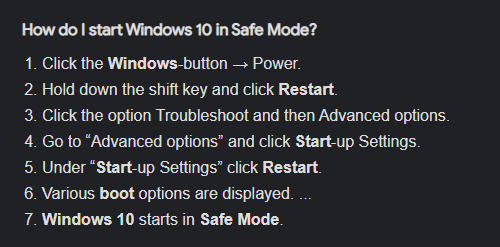
@still zephyr try to boot the system in safe mode with networking
still zephyr
i have a vpn and a network driver made by virtualbox
tame carbon
okay, well, those are all drivers
if they are faulty... could explain what we see
boot into safe mode with networking.
still zephyr
is safe mode f9 on boot?
tame carbon
this will load only the critical drivers
I am sure I don't know.. all I know is that if windows crashes often enough it boots into safe mode on its own
 still zephyr
thanks
 waxen saddle
Did we already check that there isn’t a proxy server configured? Also, what does device manager say about the NIC? Is it set to auto configure the wire speed? What is the packet size?
still zephyr
ive never used a proxy server
waxen saddle
Malware can configure it for you. No need for it to tell you. 🙂
still zephyr
true i have recently got rid of some malware
should i enable safemode eith networking?
or just safe mode
waxen saddle
With networking
One of the big clues you provided is that it works for the first 10 seconds after the computer is on. Which tells me a configuration or a program/service is started that is interfering with your connection.
tame carbon
@waxen saddle some driver being loaded by a runtime application
hopefully safemode will only load the windows IP stack
still zephyr
ok im in safe mode
tame carbon
@still zephyr do the same ping test again
waxen saddle
...or something. Windows doesn't just load a driver, then reload a driver after boot. It only loads 1 driver at boot.
and another question I have is, did you run the winsock reset command yet?
tame carbon
 still zephyr
dont u just love windows
waxen saddle
Run CMD as an administrator, then netsh winsock reset
still zephyr
in safe mode?
waxen saddle
Yup
tame carbon
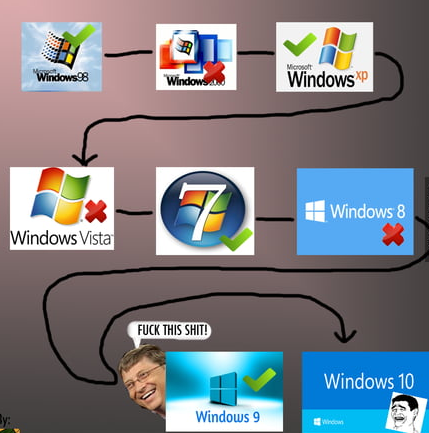
@waxen saddle https://i.imgur.com/2KN99qM.png
 waxen saddle
lllolll
waxen saddle
According to MS, we'll never get to a usable version. 😛
tame carbon
windows has some idiotic behavior, like when you plug in a thumbdrive with ext4 on it
first thing windows asks you: do you want to format?
still zephyr
still can't connect after running command
waxen saddle
What does Device manager have to say about your NIC?
still zephyr
I don't see anything unusual
waxen saddle
Can you uninstall the NIC, then re-install it?
Note: Worst case, you'll need to figure out what driver you need and download the driver on another device and move it to the broken computer via USB drive or something.
still zephyr
i have done this a few times today but ig ill try again
waxen saddle
oh. I didn't know that. probably won't get you anywhere then.
still zephyr
its so weird ive tried so many things and none of its working
waxen saddle
Let's look elsewhere...
Let's look elsewhere... run CMD as admin: sfc /scannow This will run "System File Checker". It will take a while to complete, but it should fix random core system files, if there are problems with them.
Be sure to reboot after running that.
still zephyr
ok thanks, ill come back when its done
thick minnow
Ya know, If Windows ever transitioned to BASH or ZSH or any of their derivatives, That would make it a lot more easier for a lot of people
tame carbon
windows needs to ditch windows
and start using the linux kernel
Im cool if microsoft makes their own Desktop environment
as long as they ditch their excuse for a kernel: NT
thick minnow
But the chance of that happening is pretty close to 0
still zephyr
@waxen saddle it finished and hasnt fixed, although it did find a corrupted file
waxen saddle
Well, not all was wasted then.
still zephyr
yeah
still zephyr
im getting worried im not gonna be able to fix this which is worrying because i don't wanna losr everything i have on my pc
waxen saddle
Do you have a way of backing up your files and re-installing Windows?
still zephyr
when re installing windows doesnt it give you a choice to keep files?
i cant really remember
waxen saddle
uhhh... I don't recall that, and honestly, I wouldn't rely on that either.
still zephyr
well i don't have a way to back them up
waxen saddle
Are they items that could be synced with dropbox? or Google drive?
wait. bad idea.
Do you have any kind of usb wired/wireless dongle you could try?
still zephyr
wdym
tame carbon
@waxen saddle soon:
 thick minnow
I hope not
thick minnow
tame carbon
<@!137786885761269760> https://i.imgur.com/2KN99qM.png
windows xp ❤️
tame carbon
 waxen saddle
Yea, no. I saw that news today and thought, “Microsoft's EEE program is still alive and well.”
tame carbon
exceptionally well
waxen saddle
@still zephyr In elevated CMD, try: netsh int ipv4 reset
 strange path
tame carbon
<@!137786885761269760> https://i.imgur.com/2KN99qM.png
strange path
tame carbon
<@!137786885761269760> https://i.imgur.com/2KN99qM.png
Last I checked ME was bad 2000 was what XP was built off of....
strange path
fine
strange path
yeah NT was pretty slow
tame carbon
its still using the same kernel today
heavily modified ofc
Microsoft really has to start cutting their losses.
and reinvent the desktop with linux
still zephyr
waxen saddle
<@!620723437798948864> In elevated CMD, try: ```netsh int ipv4 reset```
sadly it didnt work, but i have found that windows seems yo think its a problem with a security setting or firewall
tame carbon
instead of a subsystem for linux, they need to make a windows 32 subsystem for linux
and then build their own Desktop environment
strange path
I remember my Athlon 1333 chugging away whenever I started it up, 2000 takes it's sweet time like 95 does.
tame carbon
No more driver BS on windows. kernel takes care of it.
and they can keep their UI the same on linux.
still zephyr
i could maybe try allowing some stuff through firewall
tame carbon
@still zephyr I doubt firewall has anything to do with this
@still zephyr you're still dealing with the same issue you were on this morning?
still zephyr
yeah
tame carbon
at this point, I would just back up all my files and reinstall windows completely.
windows is notoriously terrible to debug and fix problems on
fresh install is usually the fix-all
still zephyr
idk how to go about backing everything up like will game saves and stuff also be backdd up
tame carbon
@still zephyr savegames are usually located in your home folder somewhere
you just copy your entire user directory to another drive
I usually don't even bother with that. I take a full a image from the drive and then format it :P
still zephyr
wait will my d drive be fine bc my windwos is on c
tame carbon
I can pull files I want from the backup image on the fresh install
@still zephyr C would be wiped completely
your files are located in C:\Users
application settings are more difficult to keep. those are also stored in the user directory, a hidden directory called AppData
still zephyr
so if i just move the important stuff like program files and tge users folder i can wipe c drive and keep it all on the d drive
tame carbon
program files isnt important
you reinstall all your software
@still zephyr really helps if you have an external drive
lot safer to copy your files to an external device
rather than risking you accidentally formatting the entire device during reinstall
still zephyr
i have a second drive that windows isnt installed on
tame carbon
that's fair. you can just copy all your files you wish to keep to that thing
make sure you disconnect it from the motherboard when you go to install windows .
windows shouldnt have the 2nd drive available during install.
still zephyr
right ok
tame carbon
after installation, you can reconnect your 2nd drive
and it should appear again
then you can copy back whatever you want
and reinstall all your software
still zephyr
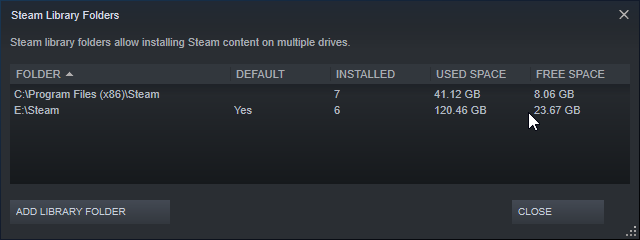
say i have steam games on d drive and i have steam on c, when i reinstall windows and get steam on c drive again will it recognise the d drive games
tame carbon
possibly.
you can have multiple locations for steam libraries
pretty sure you can just add the library to steam again after installation
still zephyr
ok that's handy
tame carbon
@still zephyr your personal files are most important
programs and such, you can always download again
still zephyr
yeah true
ive never had to this before so its kinda stress thats why im trying so many ways to avoid a re install
tame carbon
I stopped bothering with windows' bullshit
I use linux on my daily driver laptop
and my desktop, last time I did a fresh install was... yeah last year
when feature update completely broke my install
windows is so unstable, you have but to utter a few rude words and it crashes
still zephyr
i would use linux but it isnt practucle for what i do but i do love using it kn vms
a feature update made my old laptop forget it had a hardrive lmao
tame carbon
my laptop is still running ubuntu 16
5 years since installation, still running strong
hasn't crashed a single time in all those years
still zephyr
if i had a laptop rn id definitely use linux on it

 cosmic cove
I need router recommendations
tame carbon
then you are in the right place
cosmic cove
For around 65 usd
tame carbon
what kind of requirements do you have?
cosmic cove
I would prefer WiFi 6 and it needs to have at least two Lan ports but I’m not that caught up on routers so 🤷♂️🤷♂️
My price cap is 85
tame carbon
uhh
router.
you're talking about a wireless access point now
@cosmic cove https://mikrotik.com/product/hap_ac2
MikroTik is a Latvian company which was founded in 1996 to develop routers and wireless ISP systems. MikroTik now provides hardware and software for Internet connectivity in most of the countries around the world.
I'm a big fan of mikrotik personally. Cheap, reliable, lots of features
only downside to them, they don't offer wifi 6 yet
@cosmic cove I use this as wireless in the living room
cosmic cove
Aight thanks
Most of the recommended you find online are really gamery and overpriced
tame carbon
@cosmic cove the issue is that marketing for consumer routers is completely messed up
mikrotik doesnt really do advertising
they are used by ISPs and small time installation on customer premises
cosmic cove
All their equipment looks very enterprise 😂😂
tame carbon
that's cus it is
@cosmic cove that hAP ac2 can do the same things their 3000 buck router can do
just a bit slower, ofcourse
they all run the same OS
cosmic cove
Cool
tame carbon
@cosmic cove if in the future, you want better coverage in your home. You can always buy a 2nd access point
those mikrotiks can have a wireless controller
cosmic cove
Yea this isn’t for me
tame carbon
control many access points.
cosmic cove
It’s for a friend that lives in an apartment complex
tame carbon
@cosmic cove if you just buy it and plug it in
it is configured as a standard home wifi router
as default.
tame carbon
Minor
you have to configure the WAN interface, and change the password on the router
that's it.
perhaps change wireless pass
cosmic cove
Well that’s pretty standard for an installation anyway
tame carbon
@cosmic cove their settings system have a "Quickset" feature.
which only shows the things a home wifi router would do
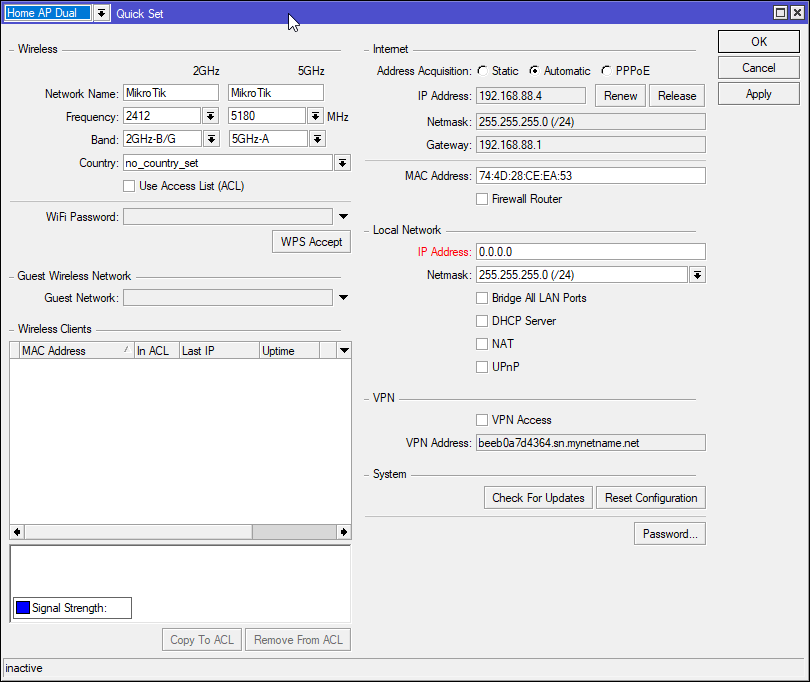


looks like that ^
tame carbon
@cosmic cove perhaps might just be easier on your part to buy a consumer wifi router and call it a day
if it was for your own network, and you are interested in setting up your home lab/network
Mikrotik is a good tool to help you learn
they are much easier to configure than other enterprise devices are
cosmic cove
Im pretty tech savvy and so is my friend
tame carbon
well then might as well give it a try? :D
the fact that you can add more wireless APs to your liking, makes it very attractive for futureproofing
cosmic cove
I just haven’t dived into networking
tame carbon
that hAP ac2 can route a total traffic of around 2gbit/s
which is pretty sweet for such a small router
most consumer routers don't even get up to their rated port speed of 1G
cosmic cove
I know
tame carbon
like those ripoff TP-link routers with 2.5G ports on them
cosmic cove
It’s crazy
tame carbon
they cap out around 1700mbit
 honest wind
Can someone help me with a IoT issue? I have a phillips hue bulb / bridge, and I have it working on my phone. The bridge can't update nor can it see the internet even though other devices on the IoT network are able to see the internet. I also can't get it to discover / be added through apple homekit
autodiscover fails but I can add the IP directly in the hue app
tame carbon
@honest wind can you give us some more information on the layout of the network?
what address do you use on your hue
what what the router address is on
idk anything about phillips hue
honest wind
IDIoT network -> 192.168.15.0/29
Main network / wifi -> 192.168.5.0/24
SharedLan -> 192.168.2.0/24
Pihole / DNS -> 192.168.2.208
iPhone -> 192.168.5.84
Hue bridge -> 192.168.15.2
Raspberry pi -> 192.168.15.3 (Used for testing internet access from iot network)
Other networks -> doesn't matter
All outgoing dns is blocked unless pihole through dns over https
I allowed IDIoT network to access dns in case hue had a hardcoded dns address
Iot can't talk to other networks and vice versa unless there's an exception (e.g. pihole and my iphone)
The phone can pair with the hue bridge and change lights just fine but the hue bridge can't see the internet or update. I also can't add the hue bridge to homekit
The raspberry pi has internet / dns access everything on there works as intended
rocky badge
honest wind
Can someone help me with a IoT issue? I have a phillips hue bulb / bridge, and I...
Do you have mDNS forwarding/proxy
honest wind
no, right now for the iot network all dns is allowed anyway
honest wind
oh multicast dns
yes tried enabling that
also tried rebooting
and repairing the bridge
I don't know if multicast works between the 2 networks though
rocky badge
That's the purpose of a mDNS proxy
rocky badge
Settings -> Services -> mDNS
on classic settings
New UI: Settings -> Advanced Features -> Advanced Gateway Settings -> Multicast DNS
rocky badge
Yeah
rocky badge
No
 gritty valley
tame carbon
<@!562027870529257506> their settings system have a "Quickset" feature.
gritty valley
tame carbon
<@!562027870529257506> their settings system have a "Quickset" feature.
QuickSet is fine if You dont touch anything else, otherwise sometimes it can bork up previous/future configurations
rocky badge
Usually when that happens for me, I just have to unplug the Hue bridge power
honest wind
yeah I was thinking I had bad FW rules for the longest time
but I put an rpi on the same network
tame carbon
@gritty valley yeah its for the initial setup, thats it
honest wind
and it works as intended
rocky badge
So its been happening to you as well? lol
gritty valley
tame carbon
<@!94421999442464768> yeah its for the initial setup, thats it
I still prefer to dig trought the wiki and do the configs on my own.
rocky badge
idk for me its weird lol
The Hue bridge doesn't connect to Internet after unplugging Ethernet or over time
And the only fix is to unplug the power
honest wind
I may have to factory reset it then
or... just not update it and disable internet on purpose for that network 😄
rocky badge
lol
still zephyr
@tame carbon this says i might be able to keep files?
 honest wind
I'd uhh backup your files anyway to an external hard drive if you can
generally yes but if you click wrong or if something goes wrong on the OS side you can lose your files
still zephyr
ok thanks for the clarity
im just backing up the users folder is that the most important?
honest wind
wherever your files are
I don't do a ton of windows stuff so i'm not sure
but I think there are some external locations like appdata you'd care about
still zephyr
oh shit yeah that had a lot of saves in thanks
honest wind
yep. There may be other locations on windows stuff is saved so look / ask around here.
still zephyr
i think a lot of my game saves are on my secondary drive so that should be fine
honest wind
I hope so. if windows sees those as windows files, same thing as with any other file though
maybe just unplug that hdd while you restore?
idk how that'd affect windows though
still zephyr
yeah i probably will do that
tame carbon
@still zephyr yeah remove that before, as I told you
you need a usb stick
and windows 10 install media on it
dont use that internal restart thing
just boot from usb
and install that way
that way you really get a clean installation
honest wind
yeah make sure you've got all your files then iriamu
gritty valley
insert a segway to LTT sponsor - Synology and their NAS enclosures 😄
honest wind
gritty valley
Im sorry, I had to
But reasons like these are why I really like all the data to be stored off-drive and on a NAS
If You need to nuke Windows - dont have to worry about data migration and/or loss
tame carbon
I just assembled a small ryzen system on a mini itx board
it has 10G fiber optic
and bunch of storage
those all in one units are meh
I can configure the software myself
gritty valley
Yeah, currently looking at an reeealllyy old decom server to turn into a nas for giggles
honest wind
I'm using a 2010 mac pro that I got for free ^
gritty valley
tame carbon
those all in one units are meh
For basic people who just want RAID1 storage - the 2 bay are fine
honest wind
put ubuntu on it
tame carbon
debian
gritty valley
FreeBSD
tame carbon
get out of here
rocky badge
Tempting to just tell my teacher I'm managing shit for to just buy this https://www.amazon.com/Synology-Bay-Rackstation-RS819-Diskless/dp/B07QRCG5GC/
honest wind
I can get behind debian
rocky badge
its only $600
and super easy to configure so he doesn't have to rely on me to manage storage
tame carbon
ew 1G
rocky badge
¯_(ツ)_/¯
still zephyr
tame carbon
<@!620723437798948864> you copied your `C:\Users` right?
yeah its doing it rn taking a while tho
rocky badge
The switch on the other end is only gigabit
rocky badge
There's no purpose in going 10 gig when its only a gigabit access switch
honest wind
sounds like you have a bit of a bottleneck
honest wind
tame carbon
can you do LAG?
bottleneck would still be the outgoing port on the switch, no?
tame carbon
you can serve multiple clients on the same switch though
gritty valley
That is - if switch can handle the traffic and doesnt crumble when multi-users hit it with load
rocky badge
plus, gigabit is fine tbh for infrequent access
tame carbon
if all they do is put documents on them
rocky badge
gritty valley
That is - if switch can handle the traffic and doesnt crumble when multi-users h...
its a 3 switch stack
with 24 gbps stacking
and 40 gig back to the core lol
gritty valley
Oh sure, Im just talking theoreticals 😄
honest wind
I got a whole 0.19mbps down at my works' office yesterday 😄
gigabit would sure be nice
honest wind
yasss finally someone who recommends WD. Every seagate drive i've had fails
rocky badge
So around ~1.3k for 24TB of RAW storage
gritty valley
But - after the shingle shaninigans they did before - can WD be trusted?
rocky badge
We'd have 18TB usable
honest wind
gritty valley
But - after the shingle shaninigans they did before - can WD be trusted?
trust no one
rocky badge
with SHR
tame carbon
they only do that on their budget lineup
rocky badge
gritty valley
But - after the shingle shaninigans they did before - can WD be trusted?
so with that logic
would you not trust Seagate
with the 1.5TB & 3TB drive failures
tame carbon
you're just using it the wrong way
rocky badge

The ST3000DM001 is a hard disk drive released by Seagate Technology in 2011 as part of the Seagate Barracuda series. It has a capacity of 3 terabytes (TB) and a spindle speed of 7200 rpm. This particular drive model was reported to have unusually high failure rates, approximately 5.7 times higher fail rates in comparison to other 3 TB drives.
tame carbon
drivegate
tame carbon
I've had a seagate nas go boom before
like, drives just failing
another where the OS completely broke itself
since then I swore off those all in one units
companies can only be good at 1 thing
if you make harddrives, you suck at writing your own operating system
tame carbon
equally slow
 tame carbon
I have a btrfs raid1 running here
honest wind
jbod anyone?
rocky badge
@clear igloo I hope this place has at least a 5U rack lol
tame carbon
I had one of those a long time ago
for couchpotato
who cares if couple movies go missing
you can just download em again
rocky badge
UDM-Pro, USW-24-POE, PDU, UPS, patch panel...5 needed lol
tame carbon

Download movies automatically, easily and in the best quality as soon as they are released, via usenet or torrents
valhalla of illegal netflix
honest wind
does it download via vpn?
tame carbon
no
honest wind
I'd hate for an ISP to snoop on that sorta traffic
tame carbon
its just a fancy torrent client
honest wind
I see
honest wind
i'm ok with just doing that myself
tame carbon
I set one of these up a long time ago in a student home
honest wind
if I did that sort of thing anyway
tame carbon
they had raspberry pi's in every room
and a central server with like a pile of 20 or so old laptop drives
gritty valley
tame carbon
they had raspberry pi's in every room
Why?
tame carbon
to stream
gritty valley
Ah, You put them
tame carbon
couchpotato is a server application
it runs in background and automatically downloads new releases
gritty valley
yeah, at first thought there were already rb pi in every room
tame carbon
no
we put one behind each tv
with KODI on it
back then it was called XBMC
Kodi | Open Source Home Theater Software
just hook that up to the couchpotato nas
and you're good to go
honest wind
if I set something up i'd use plex probably
tame carbon
yeah this was long time ago