#networking
1 messages · Page 305 of 1
 honest wind
 peak cloak
oh
honest wind
good practice to do tbh
peak cloak
yeah so I assume you would want to NAT that IP?
honest wind
so yes you should be able to route via interface then instead of IP
 late geyser
how would i do that then?
peak cloak
idk myself
honest wind
cisco specific I have no idea I've only touched a cisco switch once. But generally you can build routes saying any traffic coming from "X Lan" or vlan tagged with "Y" can be routed to wan0
where wan0 is the interface
peak cloak
wait do you want to just route a subnet or NAT?
late geyser
i think this switch has no "wan" or "lan", just ethernet that you have to configure to inside and outside
late geyser
peak cloak
wait do you want to just route a subnet or NAT?
i think NAT
peak cloak
late geyser
i think this switch has no "wan" or "lan", just ethernet that you have to config...
yeah no switch has wan or lan
peak cloak
late geyser
i think NAT
Cisco
IP Addressing: NAT Configuration Guide, Cisco IOS Release 15M&T
-Configuring NAT for IP Address Conservation
honest wind
peak cloak
yeah no switch has wan or lan
I thought he said it was a firewall
late geyser
this has to be a separate lan network with access to internet
peak cloak
yeah so NAT, that article I think has the info you need
late geyser
honest wind
I thought he said it was a firewall
correct
it's not the IOS firmware though
it's the ASA firmware
it might still be the same but i'm not sure
honest wind
probably similar but yeah not the same
peak cloak
ah
honest wind
tbh I thought all cisco stuff ran ios
peak cloak
@late geyser https://www.cisco.com/c/en/us/td/docs/security/asa/asa90/configuration/guide/asa_90_cli_config/nat_objects.html
Cisco
Configuring Network Object NAT
found this
late geyser
hm
i think this firewall uses ASA 7.2 though
this is what i found myself
no wait i'm on 8.2
so do i use static nat for this?
peak cloak
late geyser
so do i use static nat for this?
I'm not 100% sure but I think dynamic with NAT overloading?
late geyser
peak cloak
<@!224256327944241152> https://www.cisco.com/c/en/us/td/docs/security/asa/asa90/...
i can't make heads or tails of this document
peak cloak
this is a better page https://www.cisco.com/c/en/us/td/docs/security/asa/asa90/configuration/guide/asa_90_cli_config/nat_overview.html
late geyser
what do i input in my screen to make it so that everything on port 1-7 gets routed to port 0
keep in mind i do not know the IP that i will be given, nor the range of it
peak cloak
late geyser
keep in mind i do not know the IP that i will be given, nor the range of it
you make your own IP range on your LAN
 tame carbon
what did they teach you in that school?
late geyser
i will be relying entirely on DHCP of the company's DHCP server
peak cloak
well you will also need DHCP on your own LAN end
late geyser
tame carbon
what did they teach you in that school?
not Cisco or other networking stuff
late geyser
peak cloak
well you will also need DHCP on your own LAN end
i already set up my DHCP range, lease and DNS
peak cloak
ah cool
late geyser
so, what now then
tame carbon
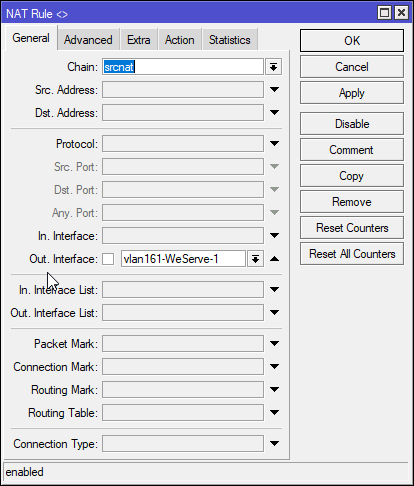
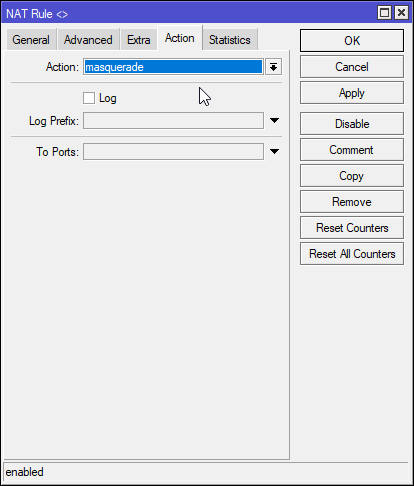
all I know is mikrotik, and there, you just use NAT for all traffic outgoing of the WAN interface
late geyser
tame carbon
what did they teach you in that school?
technically this isn't even what i'm supposed to learn
tame carbon
linux iptables is the same way
@late geyser you can just tell your co-worker you can't figure it out?
I mean, thats what coworkers are for
peak cloak
late geyser
technically this isn't even what i'm supposed to learn
ok so I think you need Dynamic Port Address Translation
aka PAT
A group of real IP addresses are mapped to a single IP address using a unique source port of that IP addres
idk
tame carbon
lol that's quite the meme though
peak cloak
but then again idk
tame carbon
tell an intern to configure a Cisco router
tame carbon
@late geyser source-nat
late geyser
again, all i need is an internet connection
late geyser
tame carbon
tell an intern to configure a Cisco router
I AM THE INTERN
tame carbon
@late geyser thats why its such a meme
because for someone with little experience on cisco, this is a nightmare.
late geyser
ah
honest wind
I know people who work with cisco for a living. They also say it's a nightmare 😆
 honest wind
that on mikrotik routers?
tame carbon
 honest wind
routeros has a gui?? thought it was cli only
honest wind
ah ok
late geyser
tame carbon
https://www.practicalnetworking.net/stand-alone/cisco-asa-nat/
this doesn't look like DHCP ngl
 late geyser
i think i have only 2 layers to work with physically
tame carbon
DHCP assigns addresses on an ethernet network
NAT translates addresses between two IP networks
If you want clients on a LAN to use a shared public IP
the router will use source-nat with masquerade to translate outgoing traffic
port forwarding would be the exact opposite, that's dst-nat
late geyser
hmm
tame carbon
@late geyser you basically want source-nat for all traffic from LAN -> WAN
this is before the router makes a routing decision
traffic is still destined for 0.0.0.0/0 for outgoing
late geyser
so far i've made a network object in that case
tame carbon
which is whatever gateway you get through DHCP from your ISP or upstream router
late geyser
called Routing
late geyser
routers and such in general are that to me
i mean i know how to configure my ISP's router, as well as my TP link router
but both have a GUI
TP link even has an app
 hollow marlin
tame carbon
its black magic for me
hollow marlin
tame carbon
its black magic for me
If you can grasp RouterOS, IOS is easy peasy
hollow marlin
Nah nah nah. I love RouterOS but it definitely over complicates some things.
hollow marlin
late geyser
this is ASA
RIP, one of the few OS I refuse to touch
tame carbon
@hollow marlin like manually dialing in 2.4GHz frequencies xD
it doesn't know 1 6 and 11
I had to look them up xD
hollow marlin
VLANs is all I need to say, especially between switchips
late geyser
so should i do this?
 peak cloak
late geyser
i mean i know how to configure my ISP's router, as well as my TP link router
peak cloak
late geyser
i mean i know how to configure my ISP's router, as well as my TP link router
Thats super basic, what did they teach at school
hollow marlin
late geyser
so should i do this?
I assume this is for NAT then?
late geyser
peak cloak
Thats super basic, what did they teach at school
how to configure a basic ass router
late geyser
hollow marlin
I assume this is for NAT then?
yes
tame carbon
@hollow marlin he wants to set it up for SOHO
single public IP, LAN with DHCP and SRC-NAT
hollow marlin
Yeah you are going to want to specify the inside and outside interfaces/subnets
late geyser
late geyser
how to configure a basic ass router
aka some shitty 2.4 ghz only wireless router
late geyser
hollow marlin
Yeah you are going to want to specify the inside and outside interfaces/subnets
i already assigned the interfaces, or rather, Cisco did it by default
tame carbon
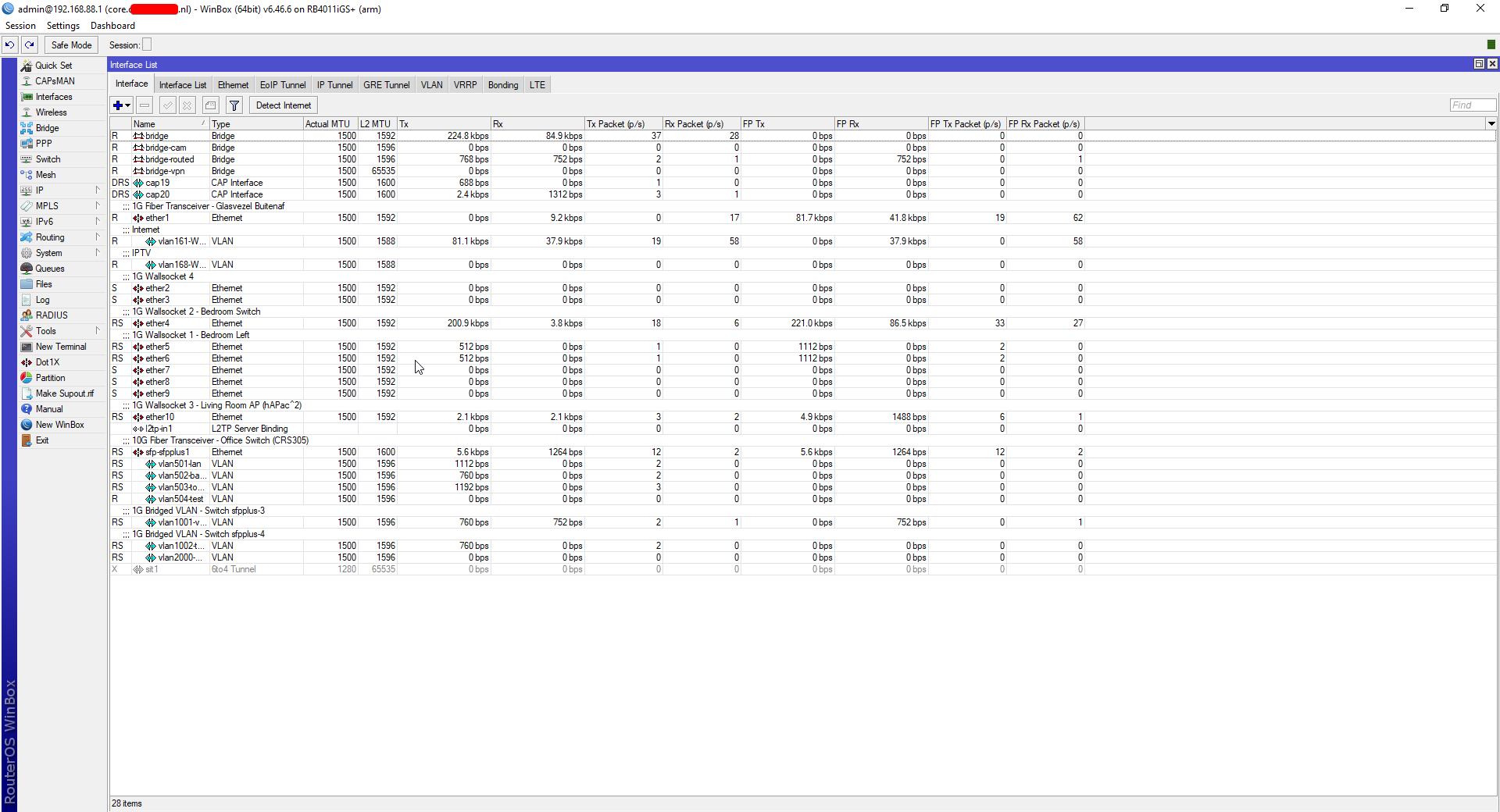
@honest wind you asked about the GUI: https://i.imgur.com/r3tIYfP.png
 late geyser
tame carbon
<@!224256327944241152> consumer routers suck.
late geyser
tame carbon
<@!224256327944241152> consumer routers suck.
my TP link router is fine
tame carbon
@honest wind that's the equivalent of /interface print
honest wind
tplink isn't bad for a consumer router
hollow marlin
tame carbon
<@!353782408421834754> you asked about the GUI: https://i.imgur.com/r3tIYfP.png
GUI for realtime info, CLI for all else. Don't be barbarian
hollow marlin
late geyser
i already assigned the interfaces, or rather, Cisco did it by default
What issues are you running into at the moment?
late geyser
anyways i have set the DHCP range to 192.168.1.100-192.168.1.227
tame carbon
@hollow marlin I basically use the GUI to look over configs that are present. CLI the moment I need things to be reproducible or mass-deployable.
But you can always export your config :D
late geyser
hollow marlin
What issues are you running into at the moment?
i just don't know what to do
peak cloak
hollow marlin
What issues are you running into at the moment?
He basically needs to NAT one ip on the "WAN" inferface to the rest
tame carbon
@honest wind those 400 buck 8-legged routers they released on the market recently. They claim them as being capable of 2.5G, They even put a couple 2.5G ports on them.
@honest wind but benchmarks suggest a completely different story. They bottleneck at around 1.7G
hollow marlin
late geyser
i just don't know what to do
So LAN is set, DHCP is setup, NAT inside/outside is setup, now is just the firewall policies
honest wind
late geyser
i just don't know what to do
meme answer: pay cisco for a certification course 😆
honest wind
thoughts on edgeos?
tame carbon
too edgy
hollow marlin
peak cloak
He basically needs to NAT one ip on the "WAN" inferface to the rest
So I am not sure if this applies to ASA but with IOSXE/XR/NXOS, they need the overload flag. Essentially sets it to PAT
honest wind
nice
hollow marlin
honest wind
meme answer: pay cisco for a certification course 😆
Nah just do what I did and have work pay for the certs
peak cloak
hollow marlin
So I am not sure if this applies to ASA but with IOSXE/XR/NXOS, they need the `o...
Yeah I was looking at that and I thought overload was needed
honest wind
hollow marlin
Nah just do what I did and have work pay for the certs
true 😄
late geyser
i know one of my teachers also teaches Cisco and has multiple certs
should i just straight up ask him how the hell to do this?
tame carbon
thats the point of an internship no?
to learn something from people who have experience
honest wind
imagine making a product so confusing and undocumented that you need courses to learn how to use your product
late geyser
i'd expect him to just say "nah that counts as cheating go figure it out lmao"
hollow marlin
late geyser
should i just straight up ask him how the hell to do this?
Let me do a google, they promptly forget ASA syntax
tame carbon
why would he?
 rocky badge
honest wind
imagine making a product so confusing and undocumented that you need courses to ...
rocky badge
honest wind
imagine making a product so confusing and undocumented that you need courses to ...
That's true for a lot of stuff?...
A lot of programs, hardware, etc....
honest wind
aws is another big one
rocky badge
You train to learn how to use them
honest wind
they at least have a lot of docs
late geyser
rocky badge
A lot of programs, hardware, etc....
microwave clocks
honest wind
actually with microwave clocks its cause no one reads the manual
but that's usually well documented 🙂
late geyser
meme answer buddy
tame carbon
nah
rocky badge
there's a lot of stuff that has certifications ¯\_(ツ)_/¯
tame carbon
people need to RTFM more often
honest wind
shhhh I take this one personally because I spent 30 mins updating mine last weekend until I read the manual
rocky badge
Cisco, HPE, Aruba, AWS, Azure, GCP, Microsoft, etc
late geyser
it's just that every time i did it, the power was lost not that long after
so i just stopped bothering
rocky badge
There's so many parts, you can specialize in specific parts of their products
honest wind
I got a weight driven pendulum clock. That thing is great
late geyser
what do i put in at this point
honest wind
we do NAT know how (sorry pun)
tame carbon
@honest wind Newton was wrong
late geyser
i'm running on coffee fumes rn
i have no focus to keep reading a manual that looks all alien to me
late geyser
honest wind
who uses soap though
go wash your hands right now
tame carbon
Worked for a company that did telemetry for public infrastructure
honest wind
hahaha nice
tame carbon
traffic lights, street lights, sewer systems
rocky badge
xml 🥴
peak cloak
I need to find a senior internship for next year
honest wind
json ❤️
peak cloak
rocky badge
xml 🥴
ikr
rocky badge
json ♥️ yes
tame carbon
@rocky badge it was such BS. You used a library to normalize the XML, so you can create a digest and signature.
rocky badge
RESTful ♥️
honest wind
raw sockets and data streams ❤️
tame carbon
The entire SOAP document was a body and a header that contained the signature and certificate
and everything had to be audited
because governments.
hollow marlin
@late geyser
(config-network-object)# subnet 192.168.1.0 255.255.255.0
(config-network-object)# nat (inside,outside) dynamic interface```so i type out those things in the router like that?
hollow marlin
Try that and see. Not seeing that the outside interface is to be defined
Yes, just everything after the #
late geyser
i do get that part yeah
tame carbon
@rocky badge yeah. thats what I did lol. the program would fetch data from the central access server using SOAP.
Data it retrieved was stored in OracleDB.
Internal applications would then use a REST API to query this data.
rocky badge
🥴
honest wind
Oracle also yikes
honest wind
unpopular opinion here on LTT..... but MS also yikes
tame carbon
not in here
tame carbon
linux is king ❤️
late geyser
hollow marlin
<@!224256327944241152>
```(config)# object network nat-inside-lan
(config-netwo...
this gave me an error
rocky badge
depends on who you ask tbh ¯\_(ツ)_/¯
late geyser
hm
honest wind
❤️ yes
 south blade
Do you guys know the process of updating PFSense, have 2.4.4 and newest is 2.5.0?
peak cloak
late geyser
this gave me an error
what error
late geyser
i seem to be doing something wrong
honest wind
I have a 2010 mac pro running ubuntu xD
late geyser
peak cloak
what error
invalid input at the b of subnet
honest wind
brb
rocky badge
Does everything I'd need Linux for on my desktop
tame carbon
I use my desktop for gaming. I have MINGW64 to use GNU tools
WSL is completely broken for me
rocky badge
Sounds like a you problem then
peak cloak
@hollow marlin that's the subnet of the internal IP range, right?
tame carbon
I got my laptop on my desk, I can just ssh into there
 sharp creek
late geyser
NAT
sharp creek
late geyser
NAT
Did you setup the Route in Route list?
hollow marlin
peak cloak
<@!462711605063450628> that's the subnet of the internal IP range, right?
Yeah, you want to specify the internal
rocky badge
WSL2 is so much better than just SSHing into a host
late geyser
i'm in Router(config-network)# btw
honest wind
no no wsl2 is so slow for me
honest wind
not for me 🙃
late geyser
not sure why it isn't Router(config-network-object)# though
tame carbon
I have worse IO on WSL2 than on WSL
late geyser
eh whatever i'll ask again tomorrow
rocky badge
fast for me on am 8700K ¯\_(ツ)_/¯
late geyser
time for leave
tame carbon
but I refuse to use that buggy excuse for a virtual machine
honest wind
3700x and nvme drive for me
rocky badge
And nvme ssds
rocky badge
I can have multiple visual studio code workspaces open via WSL2 at once and don't feel a thing
its literally just a vm, so not much performance impact ¯\_(ツ)_/¯
honest wind
the performance inside the vm itself is slow
peak cloak
honest wind
the performance inside the vm itself is slow
you sure you have virtualization enabled?
honest wind
yes
wsl / wsl2 wont' even work w/o it
it's ok I don't do anything important on this desktop anyway, just games and discord
 lunar spade
Yellow: Internet coming into my house
Blue: network switch
Green: router
White: my computer

Would this work, or would my internet have to go through the router 1st?
And would this bypass the APP my parents use to track internet usage (from my IP)
peak cloak
lunar spade
Would this work, or would my internet have to go through the router 1st?
no
needs to go through router
to route from the one IP you get
unless your ISP is really badly configured
 thick minnow
lunar spade
And would this bypass the APP my parents use to track internet usage (from my IP...
thick minnow
lunar spade
And would this bypass the APP my parents use to track internet usage (from my IP...
For this, couldn't you just use a VPN?
lunar spade
thick minnow
For this, couldn't you just use a VPN?
Internet still goes through the router regardless if im doing nothing or Using Tor + Tails + VPN
Internet useage as in: When my computer requests internet access
thick minnow
Well, I don't think there's anyway to bypass that without tinkering with the software itself
lunar spade
Yeah, only way to bypass it is by breaking AES 256
honest wind
why would you put your computer right on the internet too.... put that behind the router xD
should be
internet
-> router
-> switch
-> device
-> device
honest wind
thick minnow
For this, couldn't you just use a VPN?
oh wait in terms of tracking usage. No, they count the bytes, a VPN you just send encrypted bytes, which is still traffic. They won't be able to see the contents though
thick minnow
Yea, I got that, thnx anyway
honest wind
I had an isp once accidentally give me a gigabit instead of the 30 mbps 😆
or basically the entire building got a shared gigabit connection
instead of each apartment having a throttled connection to whatever they paid for
thick minnow
That must be nice
tame carbon
@honest wind I can actually see the bandwidth shaping that my ISP does
if i do a speedtest
honest wind
it was for 3 months until they fixed it lol
honest wind
i've got google fiber now, so I get around 980 down and 900ish up
on a bad day I can drop to 700 up
peak cloak
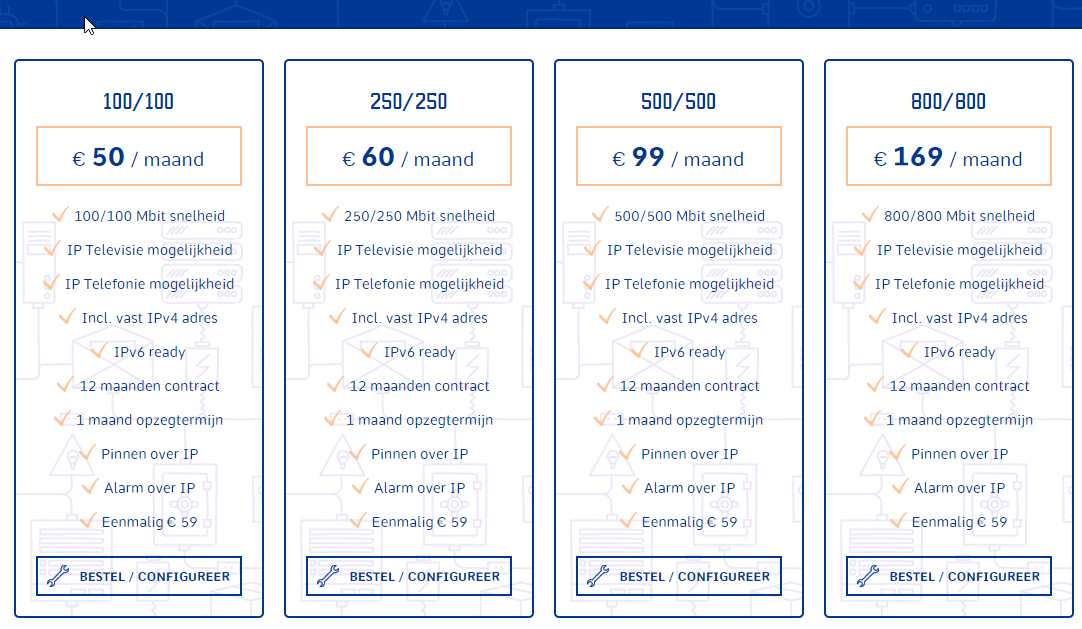
dedicated internet is expensive
honest wind
70/mo
 peak cloak
 honest wind
geezus
tame carbon
 honest wind
I'll take my 100ish mbps fluctuations for 70/mo xD
honest wind
if I move I'll want to try out starlink
tame carbon
I just get my service over a VLAN
peak cloak
tame carbon
<@!222482269829332992> then what is it that i Have?
well I think it's a bit different too
idk specifics
tame carbon
This is an FttH connection, but they don't use PON
peak cloak
Also in their internal network
hollow marlin
Then its AE (active ethernet)
peak cloak
and ddos protection, etc.
tame carbon
@hollow marlin but isnt this even done in transit?
DHCP service on a vlan
Very common way to connect two networks
hollow marlin
AE is almost identical to just using a switch with per-port fiber runs to homes. There is just included provisioning and management involved
tame carbon
@hollow marlin pretty sure my fiber terminates in a small exchange hub
honest wind
google fiber is offering 2gbps to my place now but only 1gbps up
tame carbon
because this fiber network is used by 5 different ISPs
honest wind
but I'd need to get a new router and swtiches and move everything to be better than gigabit
so I can wait
hollow marlin
tame carbon
<@!462711605063450628> pretty sure my fiber terminates in a small exchange hub
Yeah its still the same. Without further details, its most likely AE
There is really only 3 ways to effectively provide FTTH, any flavor of PON, AE or MEF
tame carbon
MEF?
hollow marlin
Metro-e
rocky badge
hollow marlin
AE is almost identical to just using a switch with per-port fiber runs to homes....
I wish my ISP did AE lol
hollow marlin
I have been noticing many ISP are slowly testing the waters pulling AE out and replacing it with MEF. You lose the automation at the access device and move it further in the network
We have a pretty even split between AE/GPON
rocky badge
But tbh GPON has been fine
tame carbon
@hollow marlin so what is Metro E? a technique to multiplex a single high speed fiber into many smaller ones?
And then delivering ethernet over that?
hollow marlin
No thats PON. Metro-e is just easier manipulation of VLAN tagging such as QinQ, normalization, isolation, etc.
tame carbon
so each Client <--> ISP is its own ethernet domain?
rocky badge
Yeah PON is using time division to split the signal for ONTs iirc
hollow marlin
AE/MEF protocol wise really are not much different technically
rocky badge
AE and Metro E it's basically like plugging into a port on a switch but with different management, iirc lol idk
hollow marlin
Exactly
rocky badge
With PON you only need a port for X number of customers, because it's then split using a splitter
tame carbon
@rocky badge really? I thought PON used some kind of wavelength multiplexing
rocky badge
But AE/Metro E you need port/customer(connection)
tame carbon
didnt think they would do time slicing
hollow marlin
WDM is wave multiplexing. DWDM/CWDM. PON is TDM. Each ONT gets a timeslot to transmit/received based on their configuration
tame carbon
@hollow marlin wikipedia says that Metro E is often deployed as an MPLS network
rocky badge
hollow marlin
WDM is wave multiplexing. DWDM/CWDM. PON is TDM. Each ONT gets a timeslot to tra...
WDM is typically used with backhaul right? And not to end customers
tame carbon
You can rent a wavelength
rocky badge
Since you likely don't need that kind of bandwidth and price in consideration
hollow marlin
tame carbon
<@!462711605063450628> wikipedia says that Metro E is often deployed as an MPLS ...
Kinda sorta, but that statement is mostly incorrect as metro-e was focused around non-mpls networks
tame carbon
Capsuling protocols, such as Multiprotocol Label Switching (MPLS), were also deployed to address the drawbacks of operating L2 metro Ethernet rings.
ah yes
hollow marlin
rocky badge
WDM is typically used with backhaul right? And not to end customers
Mostly. Some larger customers can request a dedicated wave but mainly just for transport
tame carbon
X-connects and such
two datacenters may already have a fiber. I'd assume they would allocate a wavelength instead
rocky badge
hollow marlin
Mostly. Some larger customers can request a dedicated wave but mainly just for t...
Yeah
hollow marlin
DWDM is getting relatively inexpensive so its becoming more common between sites.
rocky badge
I know my school has some from Spectrum
tame carbon
:D you can buy 16 channel muxers from FS for only like 500 bucks
rocky badge
For site to site
tame carbon
those WDM fiber modules are expensive though
rocky badge
hub and spoke but with actual fiber lol
hollow marlin
Those are probably passive MUX at that cost. Active DWDM is quite expensive but mostly not needed
rocky badge
And not VPN
hollow marlin
rocky badge
hub and spoke but with actual fiber lol
Thats exactly how is used in a lot of cases. The MUX is the hub
tame carbon
@hollow marlin they are passive. They dont have a power plug
they have a Line & monitor port
and then a bunch of channels
hollow marlin
Yep, pretty much is just a prism in a box
rocky badge
Yeah lol
although the school doesn't pay Spectrum directly nor do they use spectrum services directly
ENA provides the IP transit and Spectrum is just who they use in the area for fiber
hollow marlin
Our transport is all DWDM between to geographic paths with another backup-backup path through dark fiber which they are also using DWDM
rocky badge
Then they all connect back to a switch & asa for routing between sites
tame carbon
 hollow marlin
The biggest benefit is the throughput but also the range of the optics can easily go 80km+
tame carbon
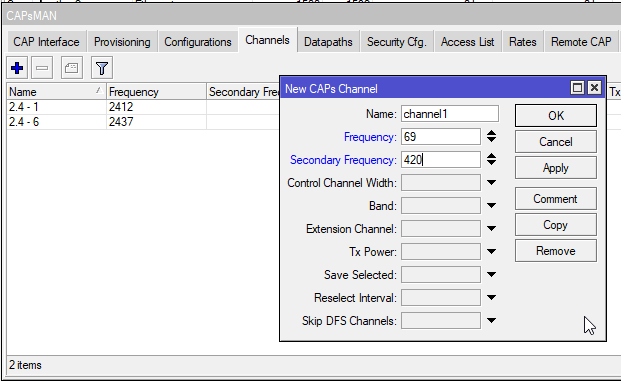
So stupid. I don't understand why routerOS doesnt have a list of frequencies
rocky badge
That's on spectrum to handle
tame carbon
but they expect you to dial it in by hand..
 tender hazel
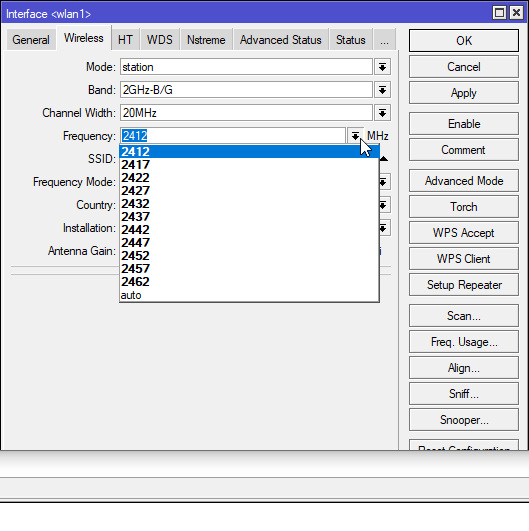
they have the list of frequencies only when you are not using capsman
frequency is a drop down when you aren't using capsman
rocky badge
@hollow marlin I wonder what the school will do for the new school they're building behind an existing school
Are they gonna get another 10 gig line directly to the hub or just piggy back off of the existing school 🤣
tame carbon
@tender hazel curious. https://i.imgur.com/NNdVUQL.png
 hollow marlin
tame carbon
but they expect you to dial it in by hand..
hollow marlin
tame carbon
but they expect you to dial it in by hand..
Reason is CAPsman does not know what the client CAP will be. Could be US/International with different freq. Think of CAPsman as a template
tender hazel
yup
tame carbon
isnt 2.4GHz - ch1 same ?
tender hazel
what I usually do is log into a device that isn't set up as a CAP to look at the wireless list
hollow marlin
rocky badge
Are they gonna get another 10 gig line directly to the hub or just piggy back of...
That cost adds up so fast, especially with Spectrum
hollow marlin
Yeah thats about right
tame carbon
@tender hazel Naming seems to be a very important feat. The moment you have a bunch of CAPs in the list
rocky badge
E rate pricing tho 😂 $60k of equipment for like $7k
tame carbon
would be cool if those APs had some kind of GPS receiver
hollow marlin
rocky badge
So it doesn't hit too bad
Its OK, your taxes are taking care of the cost 
tame carbon
so you could generate a map
rocky badge
😂 yeah
hollow marlin
tame carbon
would be cool if those APs had some kind of GPS receiver
All the LTAPs have it, im sure some some of the wireless stations do
Does the Metal 52 have a mini PCI slot?
honest wind
my favorite is 2 cups and a string
tame carbon
@hollow marlin I don't know. Its entirely sealed
and I dont want to remove the bolts from the enclosure
it has only a single port
ethernet/poe-in
and a reset button
at 5GHz, its very fast
at 2.4 I squeezed around 80mbit/s per client
but that was at 20Mhz
hollow marlin
Quick google says it doesn't have one. If it did you could slap the GPS module in it
rocky badge
anything above 20mhz 2.4
tame carbon
@rocky badge not gonna do that no
the area I am deploying wireless in, will mostly be sector antennas
and as @tender hazel said if you dont want overlapping channels, you shouldnt use 40Mhz
those mANT AP's I am most likely going to end up buying
have dual band
and with a 90 degree angle, we an just put a pole every 60-70 or so meters with two sectors
rocky badge
Tell that to my neighbors
 tame carbon
@rocky badge 
I have no overlapping channels here
there's three APs here in total on 2.4
 tame carbon
there's at most like 5 clients here
not very dense
but the place I will be deploying wireless in, is gonna be busy
 tame carbon
Nest
honest wind
I wanna set up a thermostat where instead of a heater, it spins up a few bitcoin mining rigs xD
tame carbon
ez
one taketh 1 stm32 microcontroller and an spi ethernet adapter, an NTC and a resistor and hook them up to the adc
and like less than 50 lines of C code
to make a little web api
webserver with a temperature sensor.
honest wind
or use a raspberry pi that I already have sitting around
then hook into a web api to trigger the miner
honest wind
they make thermometer attachments though
 umbral ruin
I broke my Raspberry pi
tame carbon
@honest wind all that is, is an NTC or rather, a resistor with a resistance that changes due to temperature
and an ADC turns analog voltage into a digital value
rocky badge
I sent 12v through the 5v gpio and that's how I broke my pi 
honest wind
isn't that all I need? end goal is to know the general temperature
rocky badge
It started smoking
tame carbon
@honest wind another easy way would be
umbral ruin
Mine melted
honest wind
yikes good job. My cat broke my pi once
rocky badge
Tasty warm pie
tame carbon
@honest wind buying one of those breakout boards with one of those integrated circuits
honest wind
I got it on video too
tame carbon
they measure humidity temperature and atmospheric pressure
honest wind
I do want to build a weather station w/ an rpi and have it update live stats to a website
tame carbon
usually they have an i2c interface
4 wires
@honest wind I've done this on an arduino lol
with ethernet
wrote a minimalist HTTP webserver
with like less than 40 lines of code
it was basically was just a tcp socket
tame carbon
this was from a school project lol
but sure lemme dig
its quite messy in some places :P
limited program memory
makes you pull some strange tricks
honest wind
lol yeah
might be worth revisiting and making cleaner
also work on solar + 4G to report back to a main website
tame carbon
@honest wind have you done microcontroller programming before?
electronics aside, its all very simple
honest wind
very little but i'm familiar
tame carbon
and most of the time you can find examples for how to wire something up
I suck at designing my own circuits
honest wind
I've actually wanted to play with freertos a bit, but haven't had a use case to play with
the most experience i've had is doing stuff like neopixels on an rpi
but that's not really microcontroller
I have an arduino, i've done some neopixels w/ that but super basic stuff
honest wind
why would I need one?
tame carbon
@honest wind its your own smart home device
it can do ethernet
and do hardware stuff like read sensors
with an arduino
these use SPI
honest wind
ah I see ok. Could play around with that
tame carbon
that's an interface on the arduino
Open-source electronic prototyping platform enabling users to create interactive electronic objects.
honest wind
I'd hvae to learn the code to interface w/ ethernet on arduino though
tame carbon
@honest wind you can use the arduino library for that
that's what I did xD
you just import Ethernet.h
honest wind
my biggest want is a weather station for a model airplane field
that can upload the weather stats to their website
peak cloak
I got arduino to do HTTP post requests
tame carbon
ok laptop is up
honest wind
all the graphs / analytics can be done on that
tame carbon
hold on
//Establishes a TCP connection to the gateway, and makes a POST request with the data contained.
void send_data() {
  EthernetClient client;
  if (!client.connect(gateway, gateway_port)) {
    Serial.println("Failed to connect to gateway");
    return;
  }
  Serial.println("Connected to gateway");

  client.println(F("POST /api/weather HTTP/1.0"));
  client.println(F("Content-Type: application/json"));
  client.println(F("Connection: Close"));
  String temp = String(weather_temperature());
  String lux = String(weather_lux());
  String device = F(DEVICE_NAME);
  client.print(s_content_length);
  client.print(": ");
  client.println(String(39 + temp.length() + lux.length() + device.length()));
  client.println();

  client.print("{\"Celcius\":");
  client.print(temp);
  client.print(",\"Illuminance\":");
  client.print(lux);
  client.print(",\"Device\":\"");
  client.print(device);
  client.println("\"}");

  //Wait until response is incoming, then close connection, rest of the bytes don't matter.
  while (client.connected()) {
    if (client.available()) {
      client.read();
      client.stop();
    }
  }
}
its just TCP ?
not that complicated
honest wind
ethernetclient is super easy then nice
honest wind
how would you swap between listening and sending? Does this have a concept of threading?
honest wind
but no concurrency
honest wind
which brings me to wanting to play with freeRTOS 😄
tame carbon
you use interrupts
honest wind
still interrupts but it can do concurrency
tame carbon
@honest wind core loop:
//Timeout handler for sending data
void handleSend() {
  if ((millis() - time_send) > SEND_TIMEOUT) {
    time_send = millis();
    send_data();
  }
}

//Core loop function.
void loop() {
  handleWebservice();
  handleLights();
  handleSend();
}
back then I sucked at documenting and overdid it
now I only document complicated methods and functions
but teachers like seeing documentation
so why not xD
honest wind
there's some complexities when it comes to building windspeed and direction though especially when it can freeze
tame carbon
^
parsing the entire http request
its basically just a decision tree with only a happy flow in mind
honest wind
the webserver / REST server is easy I can do that in python
honest wind
yep
tame carbon
if you only need a couple GET's
you just write your code to be "functional" with a simple GET /temp HTTP/1.1\r\nHost: 192.168.88.100\r\n\r\n
honest wind
so what hardware did you have? the arduino obviously but what for the sensors?
tame carbon
^ that's literally it ^
honest wind
i'm not too worried about the code part 😛
honest wind
that's to get internet I thought
but what about temperature / windspeed / wind direction
tame carbon
/*
 * HTTP Definitions. This header defines the absolute base for interpreting HTTP requests.
 */
#ifndef HTTP_H
#define HTTP_H

#include <Arduino.h>
#include <Ethernet.h>

#define SP " "
#define CRLF "\r\n"
//Arduino device constraints. We don't need more than 128 characters per line, as our requests are mostly tiny.
#define BUFFER_SIZE 128
#define MAX_HEADER_LINES 15

//GET and POST, no other methds are needed for a minimal implementation.
typedef enum {GET, POST} Method;

//Support both HTTP 1.1 and 1.0, however server itself will always reply using 1.0, hostnames are not important in this context.
typedef enum { HTTP_1, HTTP_1_1 } HttpVersion;

//Base structure for an incoming request. Holds method, version and uri.
//If the request is of type Method::POST, then content_length will encapsulate the value of the request-header 'Content-Length'
typedef struct Request {
  Method method;
  HttpVersion version;
  String uri;
  int content_length;
} Request;

/**
 * Fetches a single line from a connected client.
 * The fetched bytes are placed in the result parameter.
 * The size specifies the limit of the length of a single line.
 */
int fetchLine(EthernetClient client, char * result, int size);

/**
 * Parses an HTTP request from a connected client and sets the members in the request parameter.
 * Method returns the ammount of bytes that have been read, or if buffer was exceeded it will return -1.
 */
int parseRequest(EthernetClient client, Request & request);

#endif
@honest wind oh uhhhh
analog.
//Gets the current temperature.
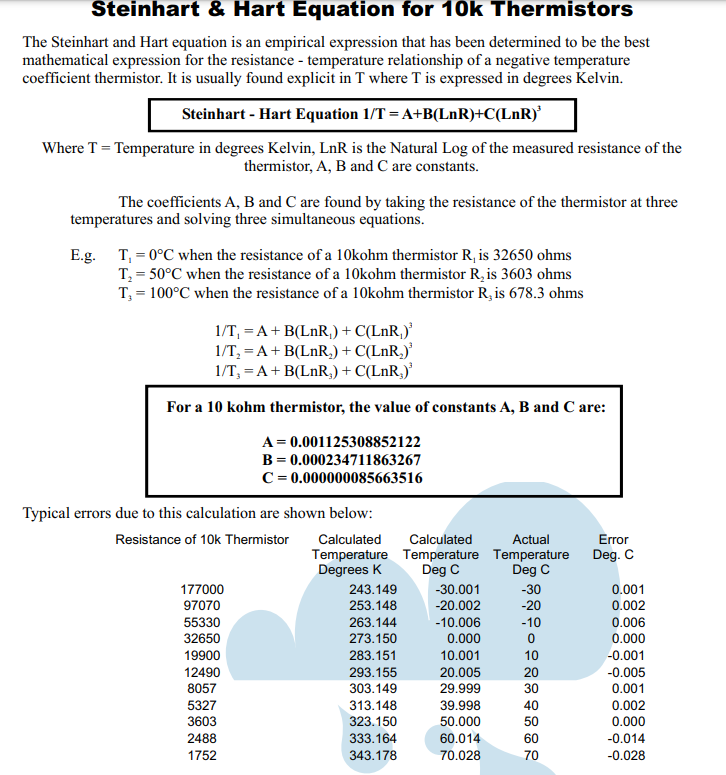
float weather_temperature() {
  float average = sample_average(PIN_THERMISTOR);

  // convert the value to resistance
  average = 1023 / average - 1;
  average = SERIES_RESISTOR / average;

  float steinhart;
  steinhart = average / THERMISTOR_NOMINAL;     // (R/Ro)
  steinhart = log(steinhart);                  // ln(R/Ro)
  steinhart /= BETA_COEFFICIENT;                   // 1/B * ln(R/Ro)
  steinhart += 1.0 / (TEMPERATURE_NOMINAL + 273.15); // + (1/To)
  steinhart = 1.0 / steinhart;                 // Invert
  steinhart -= 273.15;
  return steinhart;
}

//Gets the current illuminance
float weather_lux() {
  float average = sample_average(PIN_PHOTORESISTOR);
  average = 1023 / average - 1;
  average = SERIES_RESISTOR / average;
  return average;
}
bunch of constants depending on the sensor type you have
and the math behind this
I just found online xD
I don't have any sources to this, as these were given to us
I did write the code, they just had the algorithm on paper
 honest wind

The Arduino platform is a great product for producing a custom data collection system or controller. Programming is easy via a high-level language and a simple USB connection to the Arduino board.…
pssh who needs solar panels
xDD
tame carbon
@honest wind if you use an stm32
you can squeeze 3-5 years out of a single 18650
those things use microamps when on
and nanoamps when idle
tender hazel
@tame carbon you misspelled Celsius
tender hazel
rocky badge
Tell that to my neighbors
Your neighbors are probably using the router defaults.. a lot of routers default to 40MHz on 2.4GHz, which makes very little sense because if there any more APs in the area you will start to interfere and get lower performance.. same with use of channels other than 1, 6 and 11.. Someone sitting on one of the channels in between just ends up causing interference on two of the three usable bands.. 2.4ghz would work a lot better if the devices would play nice and use 20MHz channels by default and not use channels besides 1, 6 and 11
rocky badge
probably ¯_(ツ)_/¯
tender hazel
using 2.4ghz channels other than 1, 6 and 11 makes me think of people who drive in the middle of two lanes on a highway
rocky badge
Most of the 2.4ghz clients are IoT so idgaf https://blob.rocks/G1dCiegN2R.png
 tender hazel
holy crap that's a lot
tender hazel
I guess it is only three APs
but downstairs core switch #50? you have 49 other switches at home?
rocky badge
Port 50
tender hazel
oh ok
that makes more sense
routeros 7.1 beta 5: added new "iot" package with initial Bluetooth (KNOT only) and MQTT publisher support;
tender hazel
can anybody explain what that means? I don't know much about IoT
rocky badge
MQTT is a messaging protocol, usually used by IoT
tender hazel
like I have a few managed wifi light switches that I guess are IoT but I don't know what bluetooth and MQTT have to do with that
rocky badge

clients can subscribe to topics
pub/sub messaging
you can do MQTT over Bluetooth ig, since MQTT is just over tcp/ip
I hate IoT over bluetooth though
tender hazel
in my case I have these tp-link kasa smart plugs
rocky badge
ZWave or IP based pls
tender hazel
they connect over wifi and are managed by my google home
I can turn the lights on and off with voice commands
rocky badge
IP based preferred tho 😂
tender hazel
so I am wondering in that case what the new RouterOS IoT package would do for me
rocky badge
I just control IoT from Home Assistant
tame carbon
tender hazel
Your neighbors are probably using the router defaults.. a lot of routers default...
with enough juice on the transmitter you can use all the channels.
tender hazel
that's only true if you have enough on both sides
and if you are linking mobile devices you usually cannot do anything with the device's transmitter

 untold elbow
starlings are the worst
tame carbon
beautiful birds
untold elbow
the flocks are cool to watch, but they're an invasive species here in the states and wreak havoc on farmland
 untold elbow
ugh censored
starlings are non-native to the US, they were released in central park in the 1800s by someone who wanted to introduce all bird species mentioned in shakespeare's works into the US
tame carbon
lawl
untold elbow
so now we have billions of starlings pushing out native bird species
source for the above-- http://nyis.info/invasive_species/european-starling/
tender hazel
Eugene Schieffelin (January 29, 1827 – August 15, 1906) was an American amateur ornithologist who belonged to the New York Genealogical and Biographical Society and the New York Zoological Society. He was responsible for introducing the European starling (Sturnus vulgaris) to North America.
tame carbon
americans are an invasive species too
untold elbow
yeah but we get to define "invasive species"
honest wind
so are europeans. or humans in general
tame carbon
who brought them over?
@honest wind we migrated from the plains to the wetlands
and for generations we all fought eachother
over things
tame carbon
we is humanity
most of human history is hunter & gatherer societies
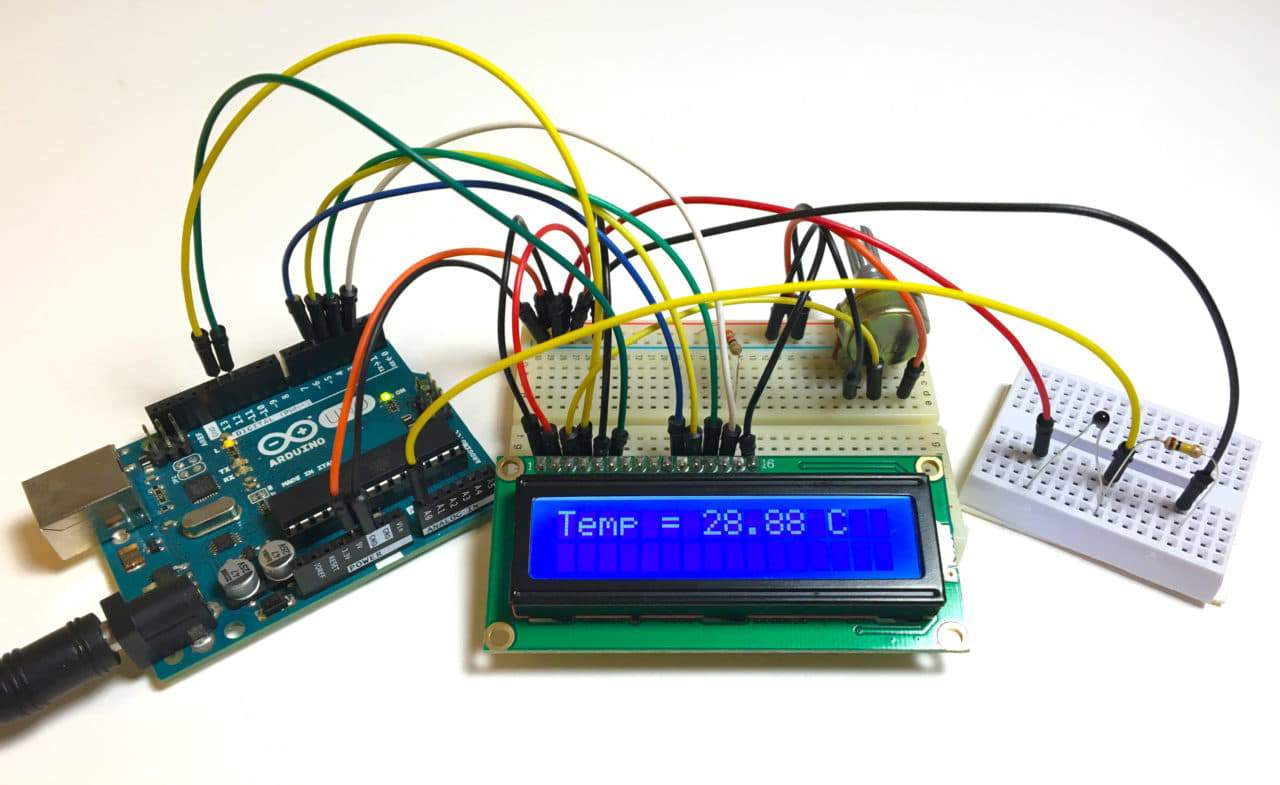
Learn how to use an analog thermistor to measure temperature on the Arduino. Output readings to an LCD or the serial monitor in Celsius or Fahrenheit.
there's loads of tutorials for this
but reading a sensor and doing some maths is trivial
the ethernet stuff is more involved
honest wind
Temp i'm not worried about, hardest one I think is wind speed / direction
- dealing with rain / ice / snow
tame carbon
wind speed isnt that hard
honest wind
finding a cheap reliable anenometer
tame carbon
wind speed sensors are just a shaft with a magnet on them that spins
the case around the shaft has a reed relay
reed relays switch when you apply a magnetic field
honest wind
i'm familiar with how they work
i'd rather not build one though, I just wanna buy one that's cheap but won't freeze up
tame carbon
they cost around 50-60 bucks
 tall pagoda
tame carbon
thousands of starlings
tall pagoda
tame carbon
thousands of starlings
Staring. Is a school in Lochem
 tall pagoda
So not this 🤔
 tame carbon
not even spelled the same
tall pagoda
tame carbon
not even spelled the same
is misses a L
 waxen scroll
@rocky badge i need shelly advice :3
rocky badge
lol
waxen scroll
have you used it in web mode? no MQTT.
for some stupid reason the dev of the HA shelly integration coded it so that it uses UDP for polling and the sensitivity of the device going offline is one packet lost. it goes offline until next polling which can be 30sec or so
they like to drop packets at random. sometimes its fine all day, another day it might do it 7 times
@hollow marlin UDP. One Packet Lost. 👏
it gets better... so to send commands to the shelly it does TCP
like wtf
just use tcp for polling idiots
so anyway should i flash 3rd party firmware on it just incase its a firmware issue, or should i switch to mqtt?
i'd rather not add more complexity so heh

how weird is it that theres even a pattern formed
I have many other shellys being stable during this, so its not like my whole network is dying
hollow marlin
waxen scroll
<@!462711605063450628> UDP. One Packet Lost. 👏
One UDP lost = outage.... I cannot see how that would ever be a problem
waxen scroll
i have a ticket open with them asking why it doesnt respond. they been quiet after asking me to remove the DNS server and not fixing it
i see it go out the AP but I have no visibility after that
hollow marlin
Whats the pattern between all the devices, curious to see what might be the issue
waxen scroll

this is 8hr and look for grey lines
i can tell you the ones that look stable do go unstable
just didnt happen today
16983 2021-03-15 15:08:15.005624 192.168.10.9 192.168.11.42 CoAP 53 NON, MID:10, GET, /cit/s

(reply, correctly marked off)
17037 2021-03-15 15:09:06.004471 192.168.10.9 192.168.11.42 CoAP 53 NON, MID:10, GET, /cit/s
17038 2021-03-15 15:09:06.011582 192.168.11.42 192.168.10.9 CoAP 260 NON, MID:10, 2.05 Content, /cit/s```example of the issue
10.9 is my controller
rocky badge
Is that HA
waxen scroll
yes
 rocky badge
My HA history won't load 🤣
waxen scroll
if it becomes unavailable HA drops it as an entity and you cant control it
rocky badge
It might be that I have so much shit
waxen scroll
this thing is basically 100% automated, i dont need to login for any reason. but that all the more reason this is an issue
if it goes unavailable the automation isnt going to keep trying
i think MQTT isnt a poller and the shelly reports if a change occurs right? so maybe thats what I need to switch to
rocky badge
yeah mqtt isn't polling
waxen scroll
i dont wanna make a github just to complain about it

GitHub
The problem Issue #43432 is not being solved for me. The Shelly devices becomes unavailable for a few seconds, even after the latest changes that should have fixed the issue. My setup: Home Assista...
someone did but they're looking in the wrong place
nobody packet captured in this thread
hollow marlin
waxen scroll
Sorry I had to go pick up the little one, whats the time between that cluster of 8 grey bars? Looks similar to 2 of the bars on the top graph.
 tender hazel
what the hell is that
peak cloak
tender hazel
what the hell is that
plutonium
used on rtg's
powers voyager's, curiosity class rovers (which includes perseverence) and more
 tame carbon
They are also used as backup power for communication systems
tame carbon
military and government emergency systems
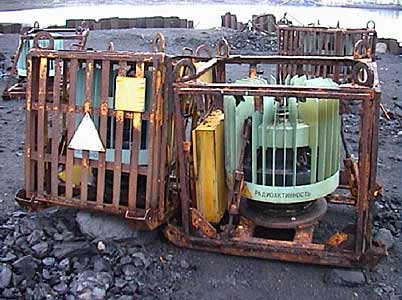
Bellona.org
Russia has almost entirely rid itself of more than 1,000 small radioactive power sources that have for nearly half a century powered …
It doesnt explicitly say communication systems
but you can be sure they use them for that purpose too
problem is that lot of these things were in lighthouses from long time ago
people started removing these
and they ended up at junkyards
nobody knew what they were
and took them appart
and if there's one thing you never do..
hollow marlin
Also speaking of MQTT and Shelly and power, I think its time I ordered the Shelly EM for mains data collection. I set up node red and influx a few weeks ago to test with Grafana, and just need to setup the broker.
waxen scroll
hollow marlin
Sorry I had to go pick up the little one, whats the time between that cluster of...
~60sec
waxen scroll
@hollow marlin other than this issue this is way better than zwave stuff
the response time is pretty good
LED controllers are half the cost of zwave
rocky badge
how da fuck do i have 20gb of snmp traffic
tender hazel
you have SNMP listening to the outside world by mistake?
waxen scroll
@rocky badge what wires did you use to put into the shelly serial
i dont have any that size on hand
rocky badge
uh
waxen scroll
its stupid they used a tiny socket instead of standard pins like everyone else
 twin laurel
Can I install 2 routers on same modem?
thick minnow
What's a good ISP in the us
late geyser
they all suck lol
anyways i'm still stuck on configuring this cisco ASA 5505 firewall
late geyser
hollow marlin
<@!224256327944241152>
```(config)# object network nat-inside-lan
(config-netwo...
how would i get to configure the network object again?
i'm afraid juan is in another timezone and therefore asleep
can anyone else help? i know that most people would prefer to never touch cisco ever but well, i gotta for my internship
tame carbon
@late geyser most people go through weeks of training before using them
late geyser
i just need it to work is all, then i can hopefully move onto the next task
tender hazel
you should be able to either ssh or telnet into the thing to get to the command line based configuration
late geyser
i mean yeah i'm connecting to it via serial
i have configured a few things already
but i need to know how to configure NAT
that's afaik what i'm stuck on now
 static knoll
late geyser
but i need to know how to configure NAT
static knoll
late geyser
but i need to know how to configure NAT
NAT sucks butt
late geyser
i know
but how else would i get it to work as a separate router from the company's
again, internship
 tame carbon
@late geyser can;t you ask your coworker how to set up NAT on this?
I mean, I used my internship to learn from others
late geyser
technically not, but i'll see
tame carbon
@late geyser from a company's perspective
you wasting 2 days on this, is a loss of money
thats why co-workers help eachother out.
late geyser
i mean this is for my own "domain" so to say
i have a laptop, workstation, 2 switches and a router that need access to the internet, as well as communicate with each other
tender hazel

Cisco ASA 5505 configuration for connecting a small network to the Internet. Learn the six basic configuration steps needed to set up the firewall.
late geyser
i don't know the default gateway
tame carbon
@tender hazel I forgot to ask you the other day, but are there any license requirements for certain wireless products?
I saw on the mikrotik website some requirement for 60GHz gear
tender hazel
there is no license requirement for 60GHz
late geyser
the router has to acquire all the necessary data through the "isp's" DHCP server
tender hazel
but yes some wireless products have license requirements
tame carbon
I assume LTE basestations and such?
tender hazel
@late geyser this includes a DHCP example: http://www.firewall.cx/forums/10-firewall-filtering-idsips-a-security/32041-howto-basic-asa-5505-configuration.html

Basic ASA (5505) configuration NOTE From The Administrator: Basic and Advanced ASA5505, 5510, 5520, 5540 Setup and configuration is covered in great depth in...
google is your friend
@tame carbon yes you need licenses for LTE
that's one example
tame carbon
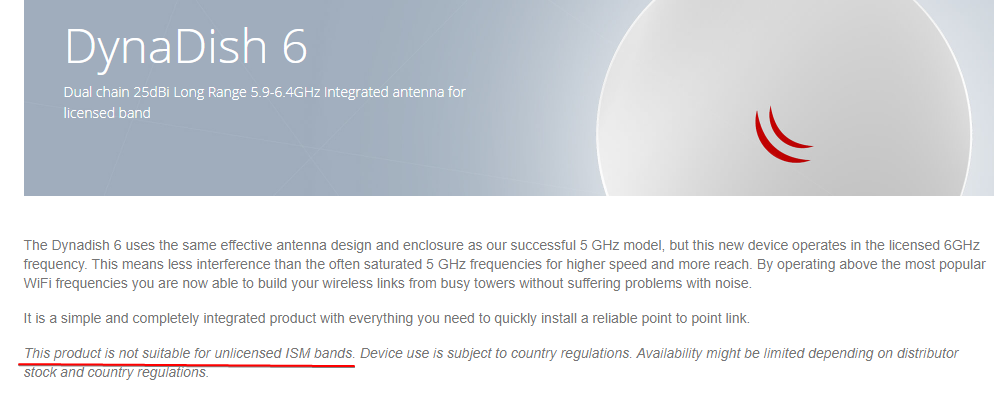 tender hazel
the other frequency that mikrotik uses is the 6ghz
tame carbon
Backhaul?
6GHz would be nice, cus it doesnt interfere with other devices
but as mere mortal I cannot purchase this ?
tender hazel
you would need to license the spectrum
tame carbon
well its germany
so I know that's not gonna happen
paper pushing costs on that alone are not worth the effort
bureaucrats
tender hazel
60GHz is the way to go for backhaul if the distance isn't too long
tame carbon
Reading... https://i.imgur.com/sZsjcW5.png
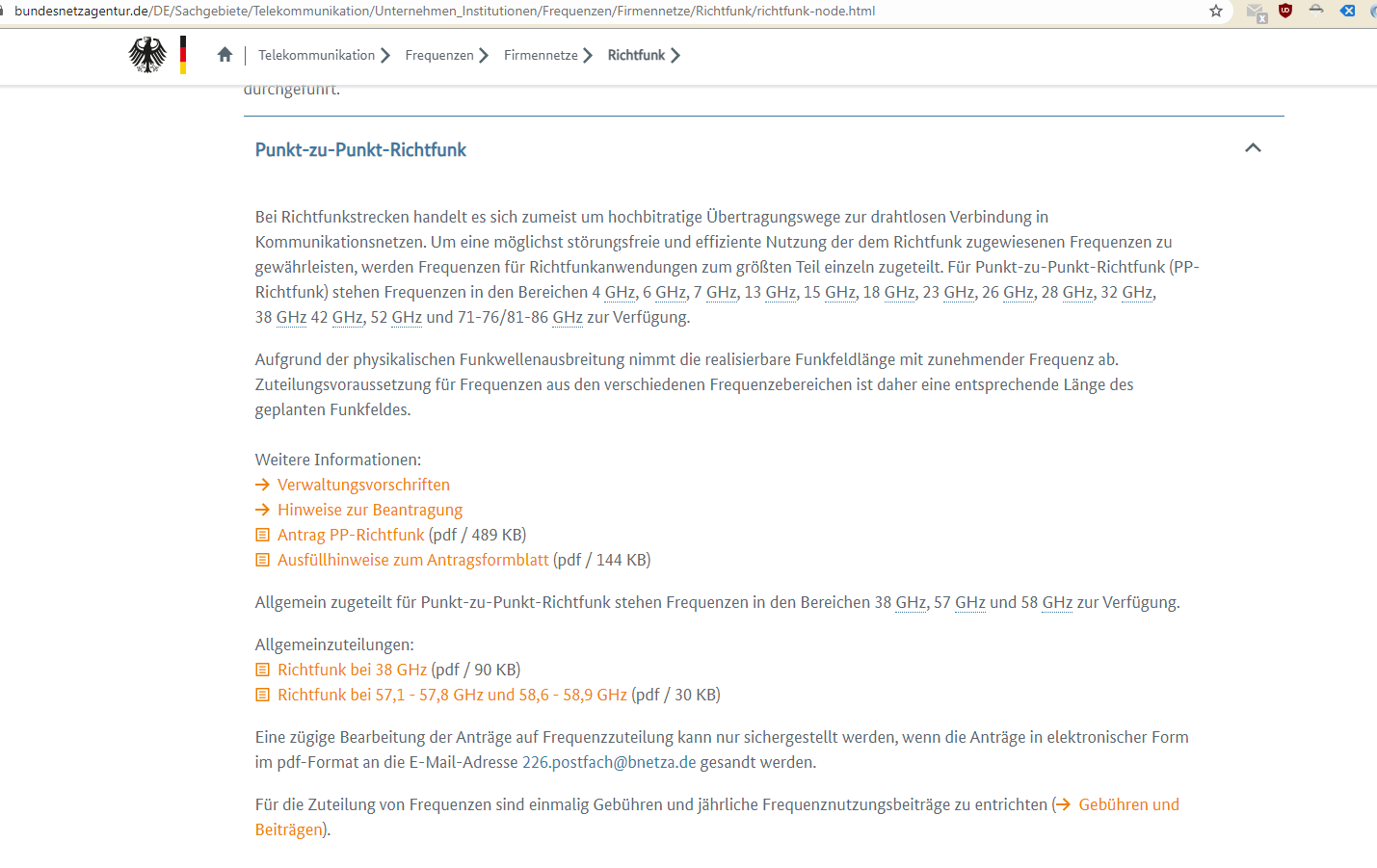
6Ghz is only permitted for point to point
and you need to file a permit
@tender hazel do I have to do channel allocation on 5GHz like with 2.4GHz ?
or is 5GHz wide enough, to not warrant manual channel config?
tender hazel
yes you should do channel allocation on 5GHz
the problem with auto channel is that the algorithm to select the best channel is not very good
 clear igloo
late geyser
sadly i have to do it on the ASA
clear igloo
late geyser
sadly i have to do it on the ASA
What do you need to do on the ASA?
tender hazel
it counts the quantity of APs on a given frequency and only takes into account the quantity
and not the signal
clear igloo
And what model? 5505?
peak cloak
clear igloo
What do you need to do on the ASA?
Setup a typical home router config, one ip by dhcp and nat it to multiple private ips on lan
late geyser
clear igloo
What do you need to do on the ASA?
it needs to function as a router. it need s an internet connection without fucking with the company's network
late geyser
peak cloak
Setup a typical home router config, one ip by dhcp and nat it to multiple privat...
aka this yeah
late geyser
clear igloo
And what model? 5505?
yes
clear igloo
Ah, 5505 sucks since it's "different" than the other models
Let me get you a config 🙂
late geyser
oh my god why is cisco like that
tender hazel
you can have situations where you have a frequency that only has one AP on it but it is very close and strong, and another frequency that has three APs and they are all far away, almost outside of the range of detection, and the auto frequency will choose the channel that has the one AP on it that has more interference
clear igloo
The 5505 was supposed to be a soho device so it supports VLANs differently
clear igloo
and dhcp on the outside?
clear igloo
late geyser
i have already set up DHCP on the inside network
What version of code? 9.x?
late geyser
that has to be figured out by the DHCP server of the company right?
late geyser
clear igloo
What version of code? 9.x?
8.2
clear igloo
OOOF, that's an old boy, ok I'll make sure I tailor it for that 🙂
late geyser
thanks
peak cloak
late geyser
that has to be figured out by the DHCP server of the company right?
well you need to set it up so the router acts as a dhcp client on that interface
late geyser
peak cloak
well you need to set it up so the router acts as a dhcp client on that interface
ah, and how do i do that?
clear igloo
interface (blah)
ip address dhcp
peak cloak
makes sense
clear igloo
but 8.2 to 9.x changed a lot of stuff so I could be off on that
late geyser
i think they changed a bunch on 8.3
clear igloo
Yah, that sounds about right and then that carried into the 9.x code probably
late geyser
i read up on how global has been made obsolete or something
clear igloo
Yah, now it's simpler
object network obj_any
 subnet 0.0.0.0 0.0.0.0
 nat (inside,outside) dynamic interface
Yah, that's for 8.3 and up
late geyser
so i just need the commands
clear igloo
Still making sure 8.2 works
clear igloo
conf t
 nat (inside) 1 0 0
 global (outside) 1 interface
That should be it for any any to interface outside nat
I don't have a 5505 to test with though to make sure the commands take
tame carbon
@tender hazel but since I have more channels on 5GHz, I can use wider channels right?
tender hazel
yes you can use wider channels
late geyser
enable config t dhcpd address 192.168.1.100-192.168.1.227 dhcpd dns 1.1.1.1 1.0.0.1 dhcpd lease 5400 dhcpd enable inside hostname Router write object network nat-inside
uh, no clue how to do the full box
tender hazel
 late geyser
but yeah those are the commands i've used so far
clear igloo
'show run' should dump the full config
tender hazel
depending on your region you may have 5 choices for 80mhz channel
the 80mhz band that is channel 122 is used for weather radar and is not usable
it is good to look at the table here
WLAN (wireless local area network) channels are frequently accessed using IEEE 802.11 protocols, and equipment that does so is sold mostly under the trademark Wi-Fi. Other equipment also accesses the same channels, such as Bluetooth. The radio frequency (RF) spectrum is vital for wireless communications infrastructure.
The 802.11 standard provid...
tame carbon
give a raccoon some cotton candy
tender hazel
germany will have different rules than canada and the US when it comes to the channels
tame carbon

The raccoon tries to wash his cotton candy, but finds it dissolves in water instantly. He learns, and finally eats the candy.
late geyser
clear igloo
'show run' should dump the full config
i'm not using the laptop i'm typing on rn as the one with access to the terminal
clear igloo
late geyser
Cool, that all looks good
late geyser
hence the .txt
clear igloo
Whatever is connected to Eth0/0 should have vlan 2 configured as well and you should be good
late geyser
eth0/0 is not connected yet
tame carbon
@tender hazel so ch42 for 80Mhz would cover 36-48 ?
late geyser
have to configure before connecting
tender hazel
"Germany requires DFS and TPC capabilities on 5.250–5.350 GHz and 5.470–5.725 GHz as well; in addition, the frequency range 5.150–5.350 GHz is allowed only for indoor use, leaving only 5.470–5.725 GHz for outdoor and indoor use."
clear igloo
late geyser
have to configure before connecting
Fair enough, so long as the end device is configured for VLAN 2 then you should be fine to receive a DHCP address there from the ISP
late geyser
clear igloo
Whatever is connected to Eth0/0 should have vlan 2 configured as well and you sh...
also i'm just connecting it to a wall outlet
ethernet wall outlet i mean
of the company
tame carbon
@tender hazel what does that DFS and TPC do again?
clear igloo
late geyser
ethernet wall outlet i mean
Doh, I forgot, access vlan 2 is fine, no need for anything on the other side. I was thinking trunk for a moment
clear igloo
Yes
late geyser
i haven't done the commands for NAT yet though
should i do those first or was it fine from default?
tender hazel
tame carbon
<@!530075635423510548> what does that DFS and TPC do again?
DFS is short for dynamic frequency selection.. it is a standard that certain frequencies that may interfere with doppler weather radar should change their frequency to another (or stop transmitting) when they detect a weather radar on that frequency
when you are on a DFS frequency it is typically decreased power to lower the chances of causing interference with weather radar
tame carbon
okay but you can still use those channels then?
or is it better to find another, where you can use more gain?
tender hazel
it depends on the application
if you have devices far away that need the gain you'll want to avoid DFS
tame carbon
that doesnt leave a lot of channels open
tender hazel
no, if you need high gain outdoor 5ghz you are back to not having a lot of available channels
tame carbon
why dont these weather people use a diff frequency
tender hazel
it is only 5ghz in general that has a lot more channels than 2.4ghz
tender hazel
I'm sure the weather people ask why the wifi people don't use a different frequency 🙂
tame carbon
where the fuck do these weather people put these antennas?
or is it overhead sattelites?
late geyser
@clear igloo tbh, i'm not even sure if these things are the default value or not
because i have to document what i've done so far
clear igloo
late geyser
<@!291198741862416384> tbh, i'm not even sure if these things are the default va...
Ah, I don't believe those are default
late geyser
hm
tame carbon
@tender hazel these SRD channels, is that the one I would need for high gain?
late geyser
how would one set these with commands then?
clear igloo
Just like what I pasted earlier under config mode
tame carbon
only thing I remember from working with cisco devices
tender hazel
tame carbon
<@!530075635423510548> these `SRD` channels, is that the one I would need for hi...
yes
tame carbon
copy running-config startup-config
tender hazel
the term SRD I was unfamiliar with, it is a european term but yes those are the high gain channels
tender hazel
tame carbon
where the fuck do these weather people put these antennas?
they are at weather stations.. most airports have weather stations, and there are other places that often have them.. hydroelectric dams and other power plants, etc.
tame carbon
@tender hazel I'd assume I would use: https://i.imgur.com/Ckyw267.png

- 1 more channel
@tender hazel if no DFS was detected? does that mean it can just use the channel with full gain?
tender hazel
no, even if no DFS is detected it is limited to about 70 or 80% of maximum power
late geyser
@clear igloo what about the vlan interface settings?
like vlan 1 and 2 have a nameif config name
clear igloo
late geyser
<@!291198741862416384> what about the vlan interface settings?
VLAN 1 is default so that should be fine, if you do "show int ip bri" make sure they don't say admin down
late geyser
and vlan 1 has an IP
tame carbon
@tender hazel but would picking three channels like I did in that screenshot, be enough?
clear igloo
late geyser
and vlan 1 has an IP
That's not default, I think someone started to configure things BUT it might have been default long ago and I just don't remember
late geyser
i did the configs
tender hazel
yes, three channels would probably be enough
late geyser
i factory reset it when i started
tame carbon
Ican always grab a 4th if needed
tender hazel
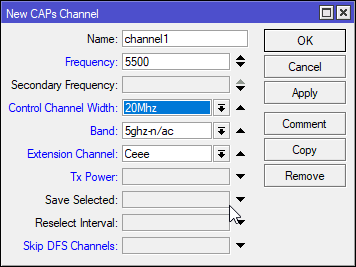
you have to be careful about your choices, I have seen some devices not like anything other than Ceee
with the control channel at the bottom
tame carbon
@tender hazel wait. that Ceee
means
C = 20Mhz and three 'extension' channels each 20Mhz ?
tender hazel
yes
tame carbon
and eCee would mean, 20MHz to the left and 40MHz to the right?
tender hazel
yes, that's correct
tender hazel
and typically when you enter the frequency you are entering the frequency in the middle of the control channel (C)
tame carbon
but I count 7x 20Mhz here https://i.imgur.com/8tyIaon.png
 tender hazel
so you wouldn't enter 5530 Ceee for instance, you would enter 5500 Ceee
XXXX means it can choose Ceee, eCee, eeCe or eeeC depending on what seems best
tender hazel
the issue is that I have found that the mikrotik capsman on XXXX will sometimes choose something that most devices do not like
had a device go on 5530 eCee which means the 80mhz channel is not where it shows on wikipedia
macbooks could connect to the wifi without a problem but android devices could not connect
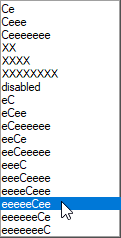 tender hazel
yes, 160MHz
I tried configuring that once and I couldn't get anything to connect to it
tame carbon
@tender hazel good to finally understand this.
I hadnt the slightest clue about the Ceee stuff
 zinc ember
Allo some one knows what kind of gpu i should get for transcoding i got a small home server
I would like to be able to stream about 6 people same time
tame carbon
@tender hazel https://i.imgur.com/IEvxaqZ.png Cool
 tender hazel
tame carbon
I hadnt the slightest clue about the Ceee stuff
tender hazel
tame carbon
I hadnt the slightest clue about the Ceee stuff
yes it isn't really explained clearly anywhere
tame carbon
@zinc ember depending on your storage format, you may not need transcoding at all
certain media formats can be streamed directly
zinc ember
Ok i got 3t off storage
tame carbon
if you crank the quality to maximum and use a streamable media format
a server such as Plex can directly stream it to a client
tender hazel
I have found the XXXX is only safe to use on MikroTik when you are not hard setting the frequency, which is OK for the average person's home router
zinc ember
Ok but the load on cpu is full
tame carbon
@zinc ember a raspberry pi can stream 4k footage
doesnt need a lot of cpu
decoding is done by the client
zinc ember
Ok
tame carbon
the issue comes when your client doesnt support a given format
then the server has to transcode it
and that is a very expensive operation
if you use h264 you can be safe for 1080p
4k I would use h265
zinc ember
Ya it does transcode but i got no sound
tame carbon
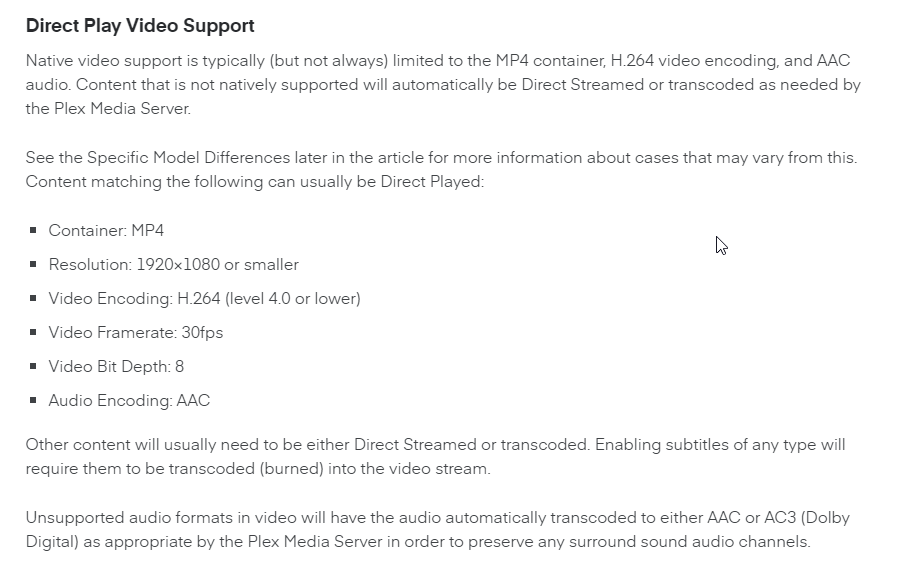
MP4 container with H264/H265 encoding. And AAC for audio
should be a way to have as little transcoding as possible
From the plex site: https://i.imgur.com/32itP9N.png


 zinc ember
Ok mp4 would be the best way?