#networking
1 messages · Page 304 of 1
 thick minnow
 tender hazel
you don't need much in performance but you'll want to get rid of the wifi extender
 tame carbon
@tender hazel lol
I'm seriously about to recommend https://mikrotik.com/product/RB931-2nD

MikroTik is a Latvian company which was founded in 1996 to develop routers and wireless ISP systems. MikroTik now provides hardware and software for Internet connectivity in most of the countries around the world.
tender hazel
the hap mini won't let him get rid of the extender
tame carbon
and a small additional 2.4GHz ap
tender hazel
this might allow doing everything with one unit: https://mikrotik.com/product/hap_ac3
MikroTik is a Latvian company which was founded in 1996 to develop routers and wireless ISP systems. MikroTik now provides hardware and software for Internet connectivity in most of the countries around the world.
it is more powerful than is needed when it comes to CPU etc
tame carbon
that thing can do 2gbit/s lol
thick minnow
sooo those two ?
tame carbon
but it has very good coverage
tender hazel
the hap ac3 can replace your router and extender most likely
get through the walls all by itself
thick minnow
i cannot wire it there ....
the extender is there to get me and ethernet cable there
tame carbon
oh god
tame carbon
@tender hazel btw spoke with my dad on the wireless thing
showed him the brochure of the dual band sector antennas
tender hazel
@thick minnow do you have your own internet account or are you sharing someone else's
tame carbon
he was sold lol
tender hazel
so are you sharing their service off of their router?
thick minnow
its personal family house XDD
tender hazel
yes but are you paying the telco or cable company yourself for your own connection
tame carbon
oh you're the only guy in the house who knows how to work this in even the slightest?
oh am I misinterpreting that xD
tender hazel
I'm just wanting to make sure that you aren't trying to set up a router in the house behind another router in the house
it will be very difficult to get IPv6 working in that scenario (one router behind another)
thick minnow
iam in CGNAT
tame carbon
so all these fine protocols stop working
thick minnow
this is reason why i want ipv6
tender hazel
the issue is that in order for the outer router to provide addressing to the inner router, the outer one would need to be running DHCPv6 prefix delegation server on the LAN side
tame carbon
@thick minnow same thing just means your ISP is total garbage.
 peak cloak
tender hazel
I'm just wanting to make sure that you aren't trying to set up a router in the h...
peak cloak
tender hazel
I'm just wanting to make sure that you aren't trying to set up a router in the h...
He has a 100.65.x.x address on his router's WAN interface so it's directly to ISP, and it's PPPoE
thick minnow
i dont have wan
peak cloak
yes you do
thick minnow
okay i have wan xD
tame carbon
@thick minnow do it
thick minnow

wait
my connection here wait :::
--------------O - ISP ROUTER
/
modem
/
router PC1
/ \
Extender PC2
|
PC3
 slate sonnet
Thank you
tame carbon
 thick minnow
--------------O - ISP ROUTER
/
m...
thick minnow
thick minnow
--------------O - ISP ROUTER
/
m...
i mean is here anything bad ? internet is working
tame carbon
^ that quote 🤣
thick minnow
xD
peak cloak
thick minnow
i mean is here anything bad ? internet is working
your behind multiple NAT's by the looks of it
thick minnow
yep iam
peak cloak
unless those router's aren't NATing
 tame carbon
rofl
tender hazel
your router is configured for pppoe though right?
thick minnow
xD tf that means
tame carbon
well at least your diagram was accurate
thick minnow
tender hazel
your router is configured for pppoe though right?
exactly
tame carbon
get rid of All of this, and replace it with a mikrotik.
tender hazel
ok so then you should be able to get things going if you replace the tplink
tame carbon
problem solved.
thick minnow
tame carbon
get rid of *All* of this, and replace it with a mikrotik.
woooah woooah wait wait whym, slowly
tame carbon
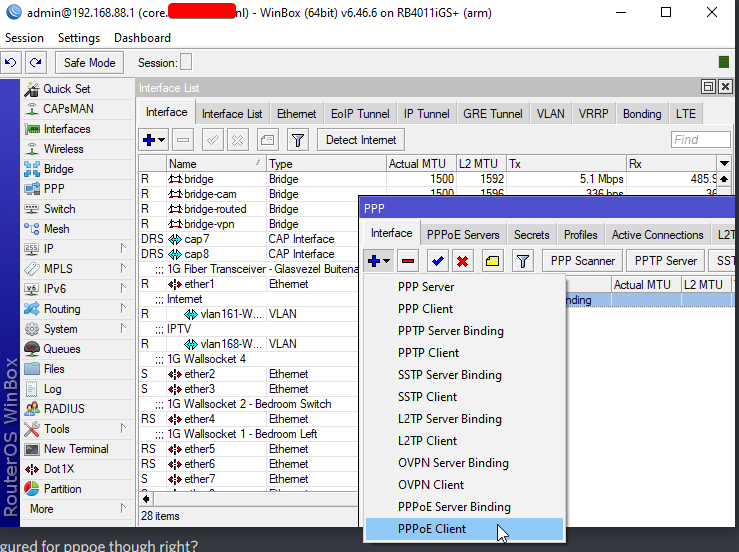
@thick minnow basically. https://i.imgur.com/LGZ93PM.png
 peak cloak
tender hazel
your router is configured for pppoe though right?
peak cloak
tender hazel
your router is configured for pppoe though right?
it is
I helped him before diagnose that it's CGNAT
@thick minnow is it okay if I share the pics?
peak cloak
 tender hazel
ok so yes a standard CG-NAT setup.. if that screenshot is from the tplink all you should have to do is replace the tplink
thick minnow
uh so tp-link is under CG-NAT ?
thick minnow
tender hazel
ok so yes a standard CG-NAT setup.. if that screenshot is from the tplink all yo...
is thay replacement illegal ?
peak cloak
of course lol
tender hazel
illegal?
peak cloak
just save the pppoe login
tender hazel
did you buy the TP-Link?
replacing something you bought and installed yourself wouldn't be considered illegal under any definition
tame carbon
Breaking: Man goes to jail for replacing ISPs router with a better one
tender hazel
if/when you get a mikrotik router, the first thing you should do is upgrade routerOS on it, then enable the ipv6 package, then reset it back to factory defaults
only after doing all that, then you start configuring it, changing settings etc
tame carbon
yeah then you get default fw and all
thick minnow
i mean
tender hazel
so it will be a few reboots -- upgrade routeros, reboot, enable ipv6 package, reboot, reset it to factory defaults, it will prompt to reboot
thick minnow
ïts my router
i bought it
they have nothing to do with
my friend said me that my wan is local network for ISP that are NAT ing me
tender hazel
so then why would you think it would be illegal to replace it
thick minnow
because its getting rid of NAT which is coverign my ip isn't it ? or it just makes ipv6 accesible ?
tender hazel
you're not going to be getting rid of NAT on IPv4, it is just that the newer router would do it instead of the TP-Link
but your IPv6 will work
peak cloak
your ISP is also CG-NATing v4 no matter what
tender hazel
public (global) v6
not private
you'll be running both IPv4 and IPv6.. IPv4 will still be CG-NAT but IPv6 would be global
global is basically the new name for public on IPv6
peak cloak
no such thing as port forwarding in v6
 velvet umbra
can someone provide some insight into a product comparison?
Nighthawk RAX78 vs MK63S
Nighthawk RAX78: https://www.netgear.com/home/wifi/routers/rax78/
Nighthawk MK63S: https://www.netgear.com/home/wifi/mesh/mk63s/

NETGEAR
Discover the RAX78 8-Stream, Tri-Band AX6200 WiFi 6 Router with WiFi speeds up to 6.2Gbps. Includes NETGEAR Armor™ Advanced cyber threat protection, MU-MIMO and USB 3.0 Port. Buy now.

NETGEAR
Enjoy advanced whole home WiFi designed to deliver smooth video streaming and fast online gaming to more devices at the same time. Using the latest WiFi 6 technology, it’s ideal for medium to large homes up to 4,500 sq.ft. and internet speeds over 100Mbps. Comes with a 90-day free NETGEAR Armor subscription**
peak cloak
(well there is if you are nating v6 but eh)
tender hazel
@thick minnow your hosts behind the router will be on global IPv6 themselves
peak cloak
you will just open the firewall
velvet umbra
Is wifi 6 or triband important?
thick minnow
tender hazel
<@456226577798135808> your hosts behind the router will be on global IPv6 themse...
wdym
like ppl ?
thick minnow
OOH
tender hazel
all of your lan hosts will all have their own public IPs
tame carbon
on v6 you dont need NAT at all
peak cloak
you should get a /64 block of addresses
tame carbon
v6 is 128 bit
thick minnow
yes
tender hazel
ISP's generally give you a /56, so that you have 256 /64's
peak cloak
^
tender hazel
the smallest subnet size you can use practically is a /64
thick minnow
if i have ipv6 i can have public ip and host again ?
peak cloak
and each /64 is 18,446,744,073,709,551,616 addresses
tender hazel
a /64 has 18 quintillion addresses
peak cloak
thick minnow
if i have ipv6 i can have public ip and host again ?
yes should have at least 18,446,744,073,709,551,616public ips
thick minnow
so i can host with em ? lets say emm a minecraft server ? to frineds ?
tender hazel
yes, at least becuase if they give a /56 like the recommendation you should have 256 times that
peak cloak
thick minnow
so i can host with em ? lets say emm a minecraft server ? to frineds ?
only if they have ipv6 as well, but java minecraft doesn't support v6 offically
thick minnow
is ipv6 in price iam paying of ipv4 ?
peak cloak
I haven't heard of an ISP charging extra for v6
tender hazel
yes you shouldn't have to pay extra for ipv6, that would be strange
the reason your ISP does CG-NAT is partially due to costs
thick minnow
hmmmm
tender hazel
we give all of our customers public IPv4 but we pay $25,000 a month to rent the blocks
our IPv6 space is much much larger and we pay just $1000 a year for it
peak cloak
tell fios to roll out v6 already
tame carbon
meanwhile
peak cloak
lol
tame carbon
I have my own ipv4 block
peak cloak
currently using a tunnel
thick minnow
how to make any server with ip looking 123.123.123.123 on ipv6 is that impossible ? so old games such as minecraft wont support my public ip so no hosting at all ? no point at is
tame carbon
@thick minnow you got the short end of the stick
thick minnow
XD
tame carbon
you need some kind of reverse tunnel
tender hazel
newer games that support IPv6 will work
thick minnow
tf that means
peak cloak
thick minnow
how to make any server with ip looking 123.123.123.123 on ipv6 is that impossibl...
it'll be an IP like [2001:0db8:85a3:0000:0000:8a2e:0370:7334]
you can get a free domain
tame carbon
@tender hazel wouldnt wireguard on routerOS be easier?
thick minnow
uh
tame carbon
@tender hazel and then using a vps endpoint
peak cloak
so you don't have to write that whole thing
thick minnow
sooooo
tame carbon
like we did before, but this time with a mikrotik?
thick minnow
no more minecraft server hosting unless using hamachi etc .?
tame carbon
that's VPN
tame carbon
lol, I have a new mikrotik to play with
gonna load the beta version on it
see how the wireguard stuff fares
thick minnow
so how can i host ipv6 minecraft server
tender hazel
yeah I'm running 7.1beta4 at home on my 4011
and have wireguard running
it works
it is stable
at first I had lots of reboots at random times, but remembered that I forgot to upgrade the routerboot firmware to beta4
after I did that, everything became stable
tame carbon
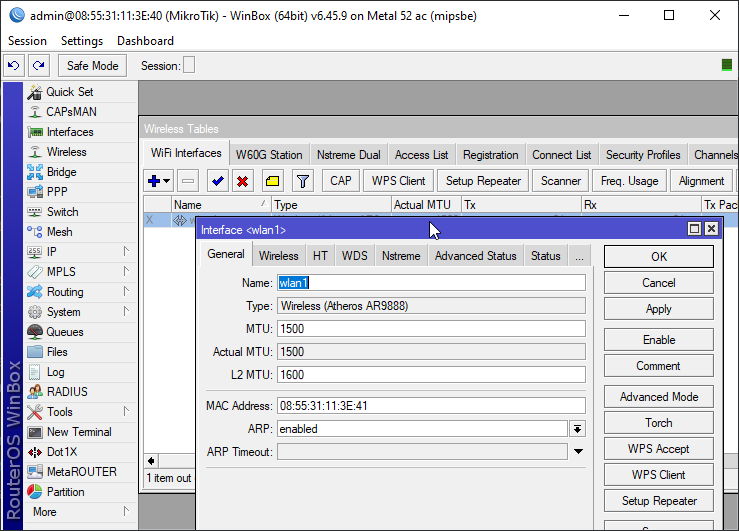
@tender hazel is it normal that these APs beep?
peak cloak
thick minnow
so how can i host ipv6 minecraft server
Bedrock, or mess with minecraft modifications
tame carbon
 tender hazel
oh
you probably have the alignment beeper turned on
it has a buzzer that gets quicker when the alignment gets better
it is intended for aligning point to point links
or subscriber units
you wouldn't have it turned on on the AP side
and you would also turn it off after a radio is aligned so that people don't have to hear the beeping forever for no reason
tame carbon
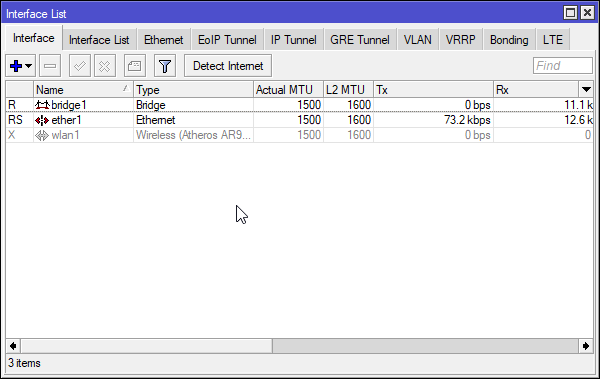
@tender hazel I just connected with winbox
and deleted configuration
now I can upgrade firmware :P https://i.imgur.com/N7G2B5K.png
 peak cloak
thick minnow
so can i host like other servers do ?
peak cloak
thick minnow
so can i host like other servers do ?
On bedrock yes
thick minnow
hmmm
peak cloak
Bedrock supports v6
thick minnow
no more minecraft java ?
peak cloak
Maybe in the future
Java itself supports v6
Only good thing about bedrock, v6 support
slate sonnet
thick minnow
no more minecraft server hosting unless using hamachi etc .?
as @peak cloak said, zerotier is a much better alternative than hamachi. Upto 100 users for free. Only downside is that it makes it so that its like lan (so basically people can maybe see your files depending on how you set it up)
Well compared to hamachi there is no downside
thick minnow
hmmmm
peak cloak
You could probably set it up so it's isolated to that one computer
slate sonnet
That's actually what I did initially
peak cloak
With firewall rules
slate sonnet
To host minecraft
slate sonnet
slate sonnet
That's actually what I did initially
Then I switched to routing traffic through a VPS
And while it's a headache at first to setup, it's fine once you set everything up
tame carbon
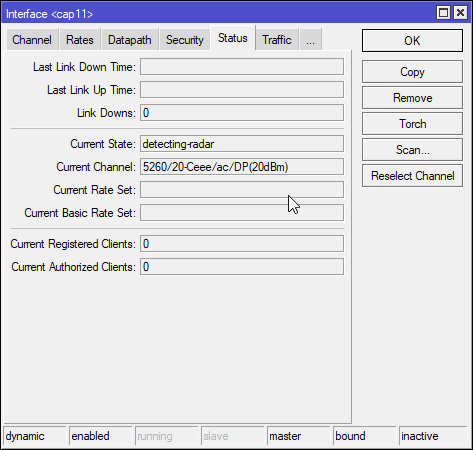
@tender hazel so what does this mean? https://i.imgur.com/Tn0IYxp.png
 tender hazel
no
tender hazel
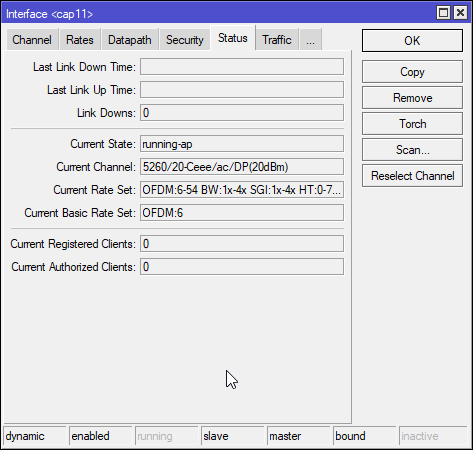
yes.. whenever you use a DFS channel the device has to do radar detection
no, it is making supre it will not interfere with doppler weather radar
thick minnow
Could minecraft newer versions come with ipv6 adress update ?
tender hazel
the dfs channels share frequencies with doppler weather radar
tame carbon
 tender hazel
if there is a radar on the same channel, and the AP does not detect it, it would make it look like a giant thunderstorm around you
slate sonnet
thick minnow
Could minecraft newer versions come with ipv6 adress update ?
If java supports it, then I don't see why not
The main question IF they will update it
tame carbon
my phone just connected to it
thick minnow
ill request it xD
tame carbon
lets see.
slate sonnet
So far it looks like most of the attention is on bedrock
Since that makes the most money
tame carbon
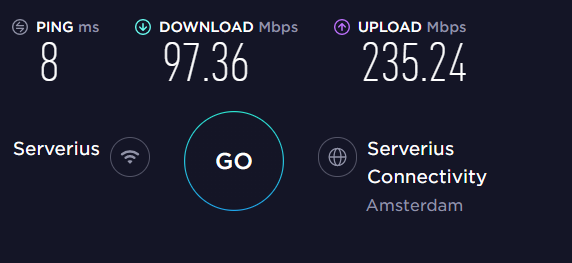
Downstream went to 100 and stayed there.
5GHz is pretty sweet
but there is some downstream limiting going on..
tender hazel
that's very unbalanced
tame carbon
@tender hazel 3 meters away from the AP
it jumped to 100 and pinned.
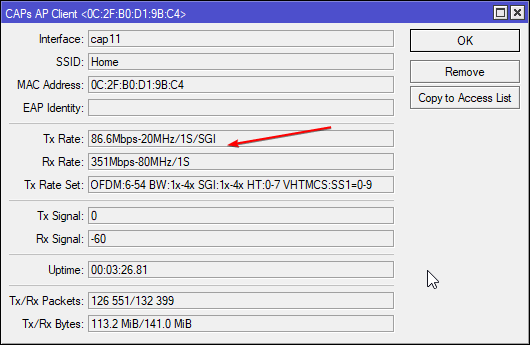
is this just my phone being garbage?
oh its very direction sensitive
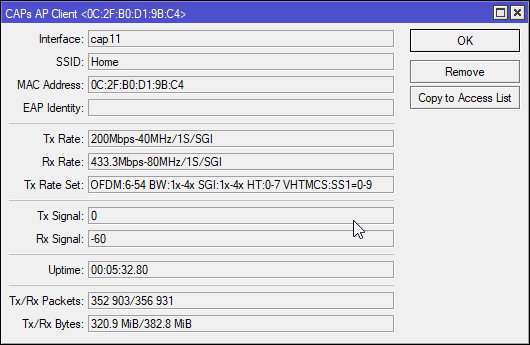
400mbit datapath. the phone can barely transmit 80
tender hazel
those values look ok
it is not unusual for the TX rate to drop, what happens is the phone goes into power saving and negotiates a lower rate for when it is not as busy
it will only negotiate a higher rate for a brief time if it is doing heavy uploading
tame carbon
okay, and any way I can tell this CAP to use 2.4 now?
tender hazel
the AP side should keep the same power all the time in most cases, it doesn't have to ramp down for power saving in the same way a phone would so the rx rate should be more stable
tame carbon
oh it was smooth as butter
it jumped to max rate
and has like 1ms jitter
Its just downstream that is slow..
tender hazel
I'm not sure how it is done in the metal 52 - you can't use both 5ghz and 2ghz at the same time, there is probably some kind of setting in the software that lets you change the radio between 5ghz and 2ghz mode
@peak cloak is this reddit response wrong? https://www.reddit.com/r/Minecraft/comments/d51hlr/how_can_i_make_minecraft_server_on_ipv6/
tame carbon
@tender hazel looking at the configuration
my guess would be
to create multiple caps configurations with the same SSID and datapath
but with different frequency bands
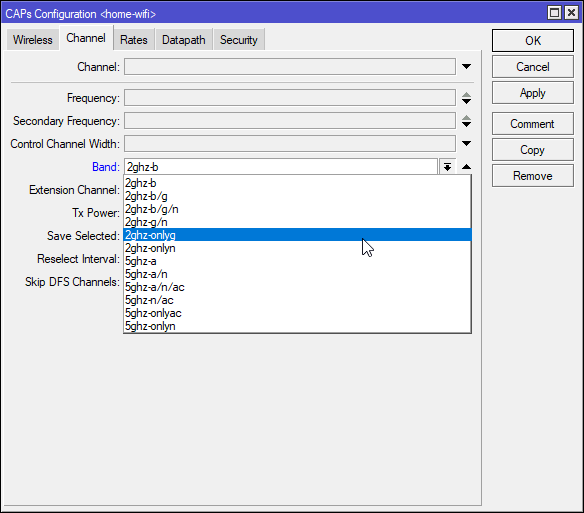
you can only select a single band here
tender hazel
but the metal 52 can't do 5ghz and 2.4ghz at the same time
tender hazel
yes, but there must be a way of telling it which one to operate in
peak cloak
tender hazel
<@!222482269829332992> is this reddit response wrong? https://www.reddit.com/r/M...
maybe, offically it's not supported
interesting

I'll try it out once I get a new router
tender hazel
the thing that is pushing the uptake of IPv6 the most is cellular/mobile
peak cloak
tender hazel
the thing that is pushing the uptake of IPv6 the most is cellular/mobile
yep, on AT&T and I get a v6
tender hazel
peak cloak
yep, on AT&T and I get a v6
and I'm guessing you probably don't get v4, they are doing some kind of 464XLAT
peak cloak
tender hazel
and I'm guessing you probably don't get v4, they are doing some kind of 464XLAT
idk, I think I get a NATed v4
let me check
tender hazel
a lot of them aren't doing NATed v4 and are doing 464XLAT to "proxy" ipv4 only sites
peak cloak
huh, interesting
tender hazel
the issue is that that doesn't work with VPNS
peak cloak
never heard of that
tender hazel
unless your VPN is IPv6
it is a problem for meraki right now
they were slow to build IPv6 support
tame carbon
@tender hazel I think I figured it out
tender hazel
then one day tmobile switched all customers to IPv6 only with 464XLAT
and it broke the corporate VPNs for hundreds of companies
with no way to fix it
tame carbon
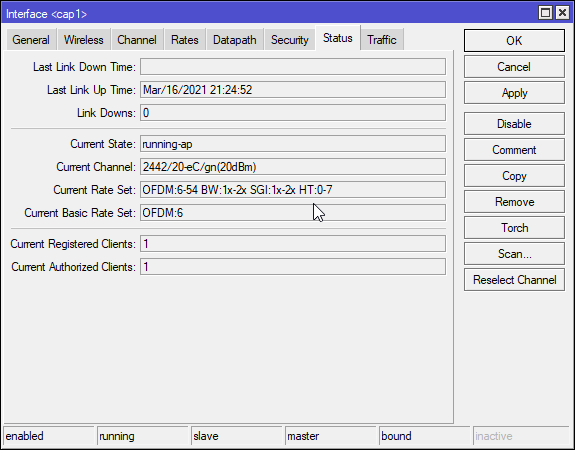
@tender hazel you go to Remote CAP, and select provision, this creates a new dynamic interface in the interfacelist.
You then copy this configuration, remove the old one
tender hazel
so meraki had to rush and start implementing v6 becuase of that
tame carbon
YOu can adjust the band and frequency
once you save that. You go back to the radio config and reprovision
then it works
peak cloak
what's the data interface on android?
tame carbon
 peak cloak
I have like 22 network interfaces
tame carbon
I did blow up the home wifi
tender hazel
don't run 40mhz channel with 2.4ghz
tame carbon
why not?
tender hazel
unless you are in the middle of nowhere
tame carbon
and is it?
tender hazel
yes
tame carbon
@tender hazel the target will be the middle of nowhere
well. its a valley with no phone service lol
no radio or any interference
tender hazel
in 2.4ghz there are only three choices for 20mhz channel that do not overlap
tender hazel
1 6 and 11
peak cloak
@tender hazel looks like I get a v4 as well

 tender hazel
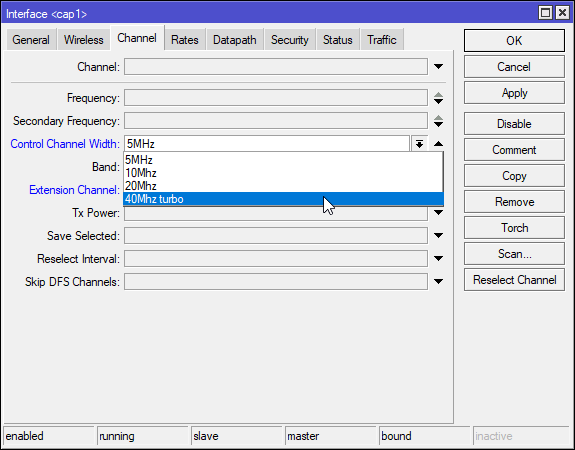
I think 40mhz turbo is different
it is the extension channel you use to restrict the channel size
any channel that is a multiple of 20mhz will have control channel width of 20mhz
so 40mhz and 80mhz will all have control channel width of 20mhz
but the extension channel determines the overall size
tame carbon
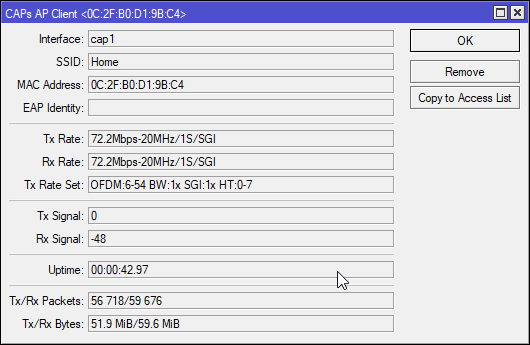
So what is this? https://i.imgur.com/0YbATcD.png
 tender hazel
Extension channel Ce, eC, or XX means 40Mhz, extension channel of four characters (ex. XXXX, Ceee, eCee, eeCe, eeeC) is 80mhz
extension channel none means 20mhz only
tender hazel
not using one at all for 2.4ghz.. for 5ghz you have many more channel choices
tender hazel
in production you will want all three 2.4ghz channels available
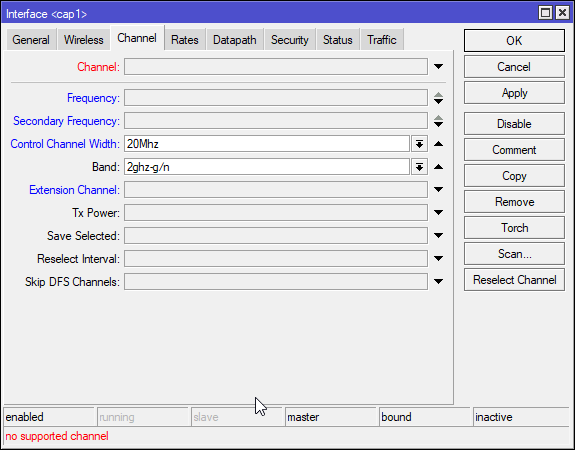 tender hazel
yes, with mikrotik you specify the frequency instead of the channel number but I don't know why it says no supported channel
what I usually do to get a list is I look on a device without capsman and see what 2.4ghz frequencies are available
tame carbon
I just googled
dialed in a number for channel 1
now trying to set up a 2nd 2.4gHz device on another channel
and then testing with app on phone ^^
they do make it quite easy
you can just break the config up into smaller units
and then assign them to each AP to what you want exactly
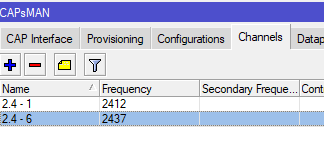 tender hazel
yup
I usually use dynamic capsman interfaces instead of static ones, but there is no right or wrong way
tame carbon
well, I least to know what buttons and dials to press if I set out to doing this
I've done plenty of the other mikrotik stuff, first time doing a network with more than 4 antennas
@tender hazel you think an RB4011 would be powerful enough as a centerpiece?
its got enough horsepowers to do bandwidth queueing as well
tender hazel
you mean a central router? a centerpiece is an ormanent that goes in the middle of a dining table
tame carbon
I need a couple vlans, sip
tender hazel
I don't think you mean to put your 4011 in the middle of a dinner table as an ornament
tender hazel
yes it is certainly powerful enough
you will want to use local forwarding for the APs and not capsman forwarding, for the best throughput
tame carbon
@tender hazel I want to prevent client-client communication.
all clients are behind a NAT, but no client-client communications
tender hazel
yes, that's fine, that's a separate setting
local forwarding is a separate setting from client to client forwarding
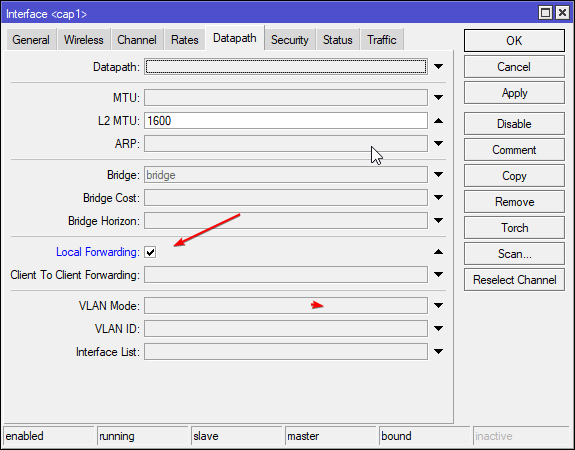 tender hazel
when you aren't using local forwarding, it tunnels all packets from the customer all the way back to the capsman and the capsman decapsulates them
when you are using local forwarding, the packet is handed directly to the AP's ethernet interface and it gets delivered from there, no tunneling involved
tame carbon
but you can still assign them a vlan, and it just comes into the router as normal?
tender hazel
the tunneling increases the cpu usage on the APs and capsman and makes the wifi performance slower
yes
tame carbon
okay, but wouldn't this allow for two clients to communicate with eachother, across two wireless stations?
tender hazel
client to client forwarding controls whether two clients on the same AP can talk to each other, by default it is disabled
tame carbon
I guess to prevent talk between various AP's I'd have to use either multiple VLANs, or some kind of bridge filter?
not sure..
tender hazel
multiple VLANs is not a good idea
tender hazel
well it isn't only tedious it will cause problems
devices like phones and laptops assume when they are on an SSID that everything on the same SSID is on the same subnet
so they can roam from one AP to another if the SSID is the same and they won't request a new IP address
because they assume their lease is still valid from the previous AP they were connected to
if you start setting up different VLANs but the same SSID then the devices will lose their IPs and not realize it
so when they roam they will just stop working
tame carbon
okay, so don't change the broadcast domain.
tender hazel
correct
tame carbon
got it
but what about preventing chatter between two ports then?
if you have a switch that has the two APs connected
and the router
tame carbon
Well, none has been selected
I have a CRS305 here
wouldnt be any different though?
tender hazel
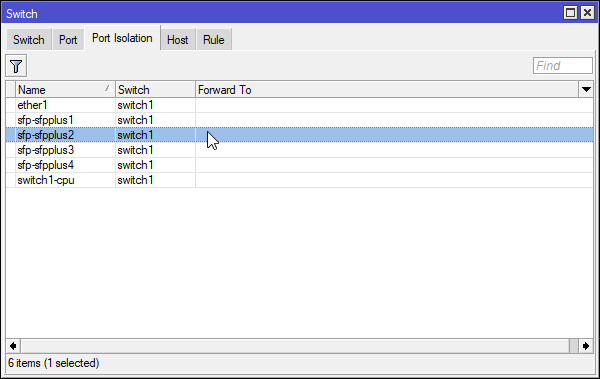 tender hazel
that explains how to do it for CRS3xx versions
it will be different for different devices with different switch chips
tame carbon
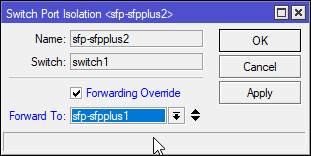 tender hazel
yes that looks correct.. that's assuming sfp-sfpplus1 is your uplink port
tame carbon
I'm not gonna change it, right now
tender hazel
what that is doing is it is forcing sfp-sfpplus2 to only be able to talk to sfp-sfpplus1 and no other ports
tender hazel
the problem is then you can't have a single subnet
tame carbon
the AP itself will use a different vlan (1)
but the network from caps
will be on its own
in that case, the switch cannot just isolate them?
only the vlan that is used by the caps
@tender hazel ahh I found it..
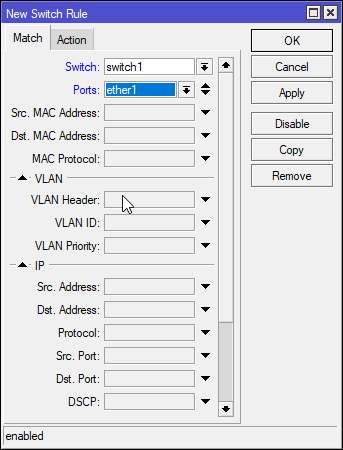
switching rules
tender hazel
port isolation is easier
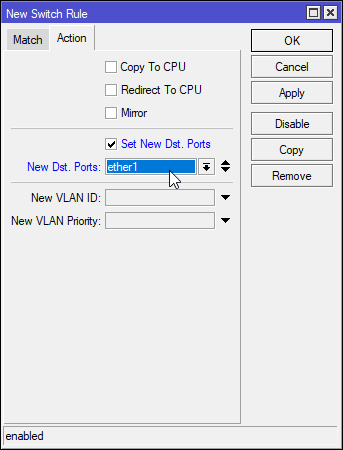 tender hazel
but where is the difference between what you are doing in those screenshots and what you were doing in the simpler isolation option before?
tame carbon
this is a Switching Rule
not port isolation
@tender hazel I guess, in this context there wouldnt be one
but if you wanted to redirect only certain VLANs
tender hazel
for what purpose?
tame carbon
well, wouldn't this prevent the devices from being cable to communicate directly with eachother?
while not breaking the broadcast domain
tender hazel
yes, but the port isolation option would do that too
tame carbon
but it would flag all traffic
tender hazel
the reason I suggest port isolation is all switches have a similar feature and it is also called port isolation
yes, and?
what other traffic is coming from the AP?
tender hazel
it is more flexible yes, but do you need that flexibility? if not it is better to keep things simple
tame carbon
@tender hazel interesting though. it would also prevent someone from spoofing the router IP
and trying to redirect traffic
wont work xD
tender hazel
how do you mean?
when you are doing port isolation yes they won't be able to ARP each other
if someone does spoof the router IP and MAC, other customers would not be able to resolve the spoofing via ARP, they would just get the original router
so yes it wouldn't work
tender hazel
there is something else you can optionally do as well
you can do local-proxy-arp on your main bridge
once everything is isolated
that is if you want to allow traffic between customers while still keeping them isolated on a layer 2 level
tame carbon
that's cool
I use that on my vpn bridge here
so I can reach clients on my LAN from my phone through l2tp
I use same subnet
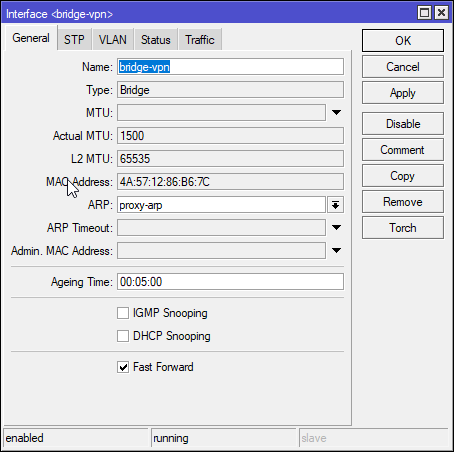 tender hazel
proxy-arp is for doing arp proxy to different interfaces - in this case, proxy arp between the bridge-vpn and the other interfaces
local-proxy-arp is for doing arp proxy to the same interface
thick minnow
thx everybody so much today 🙂
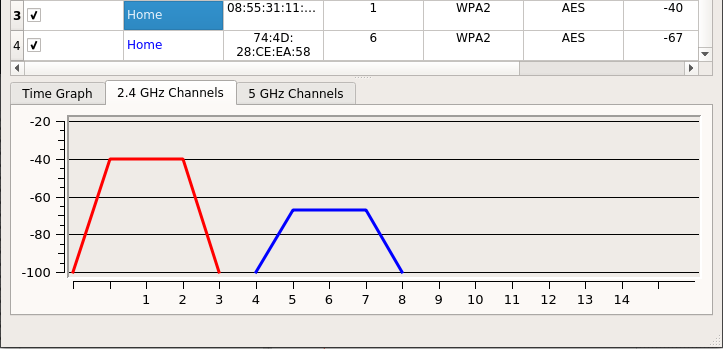 tender hazel
yup
 lean pebble
Anyone have any good software to run jnlp file on fedora ?
tender hazel
does this help? https://openwebstart.com/
lean pebble
I don't see here download for fedora 😔
peak cloak
lean pebble
I don't see here download for fedora 😔
IcedTea-Web?
peak cloak
oh ok
lean pebble
And I can't find where to download load it from relaible source
tender hazel
what do you need jnlp support for
 plain siren
Both yes and no
tender hazel
it is if you are using the default ports
plain siren
^
tender hazel
if you are using non standard ports it has to do deep packet inspection to identify that it is wireguard traffic and that is costly
most ISPs aren't going to do deep packet inspection because it puts too much of a load on their core devices and they would need to buy much more powerful core routers to attain the same speeds
do you get more than that outside of wireguard?
tender hazel
they would more likely be rate thottling all UDP traffic instead of just wireguard
but that's the sort of thing that net neutrality is supposed to avoid
if your country has net neutrality laws
it may not have anything to do with their changes
plain siren
What did they change exactly? Just relay the link?
tender hazel
any bad cable connections etc should show up for all traffic, not just wireguard
 tribal ferry
Would the Nexus 5020 be a good choice for a 10G switch for my homelab server VLAN traffic?
Cisco
Product bulletin - Cisco Nexus 5000 Series Data Center Class Switches and Cisco Nexus 2000 Series Fabric Extenders
Looking to give my homelab servers 10G between them and also to expose myself to the Cisco ecosystem without buying new or spending a fortune.
tender hazel
looks inexpensive enough
newegg price is super cheap
those devices are super old though
the documentation I am seeing is from 2008
tender hazel
if you really want cisco you could go with that I guess.. the main thing I would worry about actually with that device is the fans
those old high end switches have a tendency to sound like jets taking off
tender hazel
I would probably lean more towards the mikrotik CRS312 for a home lab
tribal ferry
Yes, if I wasn't caring for the manufacturer then probably.
I already have a MicroTik switch in my lab
 hollow marlin
Why NXOS in particular? Work related or just curious?
tribal ferry
Curious
More trying to get myself, as I said, exposed to Cisco software
Never used any of their things before and it may help me down the line to not be clueless at this sort of software/CLI
hollow marlin
Just purchase a CML license and lab it that way. $200 and you will have access to IOS-XE, NXOS and IOS-XR
No point in buying hardware to learn, when it can be emulated at a much greater scale for cheap
 waxen scroll
tribal ferry
waxen scroll
tribal ferry
alright, but along with that i do just need a switch for my lab
I’ll look into CML, haven’t heard of that before
hollow marlin
I haven't touched CML yet. Had VIRL in 2019 and still using those images. Expired right before the vXR/vXR9k was updated to support L2vpn...limited anyhow
hollow marlin
tribal ferry
I’ll look into CML, haven’t heard of that before
Its Cisco's version of GNS3/EVE-NG. You can just download the images and use them in GNS3/EVE. I prefer EVE, but it does allow you to use many more images depending on what you would like to lab. CML is Cisco images only
hollow marlin
Its yearly but just download the images from CML's dashboard and use them in the above mentioned. AKA you do not need to keep renewing unless you want the most up to date images
tribal ferry
Alright
Would you recommend any Cisco switch for <$400 with 10G that could be reasonably used in a homelab?
Or should I just not even look there and look at a different manufacturer?
hollow marlin
Depends on the number of 10g ports you need
tribal ferry
20-40
If I have 2 connections per server for redundancy and two connections to my L3 distribution switch.
hollow marlin
Thats going to be a Lurick or LZ question as at that density you're going to need to go the used nexus line and I am not at all familiar with it
tribal ferry
Paging @clear igloo for your Nexus knowledge
tender hazel
yeah that's a lot of 10G ports
tender hazel
MikroTik's SFP+ switch has 24 ports, $500 USD MSRP
and they are always cheaper than the MSRP
hollow marlin
4-40 is quite the swing. Talking <$100 to a few k in the Cisco range
plain siren
tribal ferry
PSU hot-swappable?
plain siren
I can go dig mine out
but no
However its dual PSU so I dont really care
and its sub 500
tribal ferry
Ah alright
plain siren
Its capable of being a L2 or L3 switch
tender hazel
The true L3 switch functions are only enabled if you upgrade it to routeros 7 beta
plain siren
If you run SwOS on it, it runs a lite version of its OS that is L2 only
If you run RouterOS its L3
^ and that
tender hazel
the switch has a chip in it that allows hardware offloading of routing, but it requires some functionality that is only available in the newer linux kernel and is therefore only available in routeros 7, so I would probably not use it as a Layer 3 switch in ROS 6 because you will find the L3 routing performance disappointing without the hardware offload
plain siren
And tbh ROS 7 is quite... stable
tribal ferry
I’m looking for two switches
tender hazel
the most buggy parts are things like OSPF and BGP
tribal ferry
L3 aggregation switch and a switch for 10G connections between my homelab servers
plain siren
thats really why I dont run them
I use BGP for my S-S VPN Route Propagation, MetalLB and other ingress LB Controller shit, and to announce my ips obv
it really kinda fell apart
hollow marlin
S-S?
plain siren
Site to Site
I use AWS as my Edge Router with their "Transit Gateways" since I also use AWS as my cloud offload.
Their Transit gateways act as a router on top of all the typically public facing endpoints. Its the edge router piece. It attaches to VPC's (AWS' name for a Network, Subnets are their name for VLAN's....), AWS' S-S VPN Links (IPSec with BGP for Dynamic Route Prop), and some other shenanigans. AWS ends up being the central connection piece to all my clouds and physical sites.
hollow marlin
Im aware of AWS's design, just curious what S-S meant as when BGP VPN routes are mentioned it's typically not in that context.
tender hazel
I have basic BGP working in RouterOS v7 beta4 but filters are broken
they were working in the last version but broken in this one
OSPFv2 works but OSPFv3 is broken
plain siren
"Old MAC Donald had a Farm"... EIGRP
tender hazel
the bigger issue is they change the config syntax each release of RouterOS v7 beta
and it doesn't convert properly so you end up with an unstable router
tender hazel
each time I upgrade I've been exporting an RSC
and basically clearing my config and pasting in the RSC again
plain siren
Honestly, Im just sad at the lack of consumer priced decent equipment still
Ubiquiti was everyones circle jerk until they dropped the ball because Hardware engineers are not good software engineers or networking plc developers.
In reality, the Unifi equipment was Vyatta with a fancy webUI built into it, It would be nice to be able to kick the secure firmware req and flash straight vyatta.
hollow marlin
EIGRP gets the job done. Im just waiting for RouterOS to finally support intermediate-system to intermediate-system (blame the bot for blocking the acronym). They want to keep pushing into the SP space but why they are not including it in v7 is beyond me
plain siren
Heh
You know its almost turning into a better off option to DIY your switches and routers
tender hazel
ugh.. I tried to just message with a protocol I would rather see before EIGRP
but instead because the name happens to match something else, it blocked the message
hollow marlin
lol, told you
For SP, in the core its already being done, at the edge will still be HW. Cisco knows whiteboxes are pushing hard and why they opened up their API with the new Broadcom switchips.
tender hazel
I guess I'll have to call it the routing protocol that shall not be named
hollow marlin
Inter-S-Inter-S for short. But agreed, its something that would be of huge benefit. EIGRP is solid but the RFC'd is missing too much of the stub support to use on non-Cisco gear
OSPFv2/3 is fine but until you get to a certain scale its just a pain to design around.
tender hazel
we used to run EIGRP and moved to OSPF
only becuase we started deploying all the mikrotiks and the other network guy was just setting up a bunch of static routes
and redistributing them
and I was like why don't we just move to OSPF, and he was like too much work
and I was like "it's less work maintaining all these crazy static routes?"
in the end I moved our entire network to OSPF in one night
50 routers or so
plain siren
sounds like someone who is used to hardcoding and cant figure out automation
hollow marlin
I run into that too often when pulled into customer deployments. Statics are for defaults, summaries, and nulls. Past that its IGP/BGP or nothing
plain siren
Designing cloud solutions is fun in the scope of all this
Having to mix the SDN/API/Tenant piece of networking with the Host Layer Networking with the globalized deployments on top.
tender hazel
everybody was like "it's gonna take weeks", and I knew it wouldn't be too hard to blitz through
plain siren
tender hazel
everybody was like "it's gonna take weeks", and I knew it wouldn't be too hard t...
Ive found basically every "Big IT Task" or "Big Admin Task" can be sprinted in a days sitting if focused on
tender hazel
yup
tender hazel
and I really wanted to get this migrated quickly.. it was really stupid what they were doing.. they were putting a cisco router and a mikrotik router at each site, the mikrotik router had all customers connected as a stub and the cisco was just there for EIGRP
so like $4000 extra per site to put a cisco router in as a glorified EIGRP translator
plain siren
tender hazel
and I really wanted to get this migrated quickly.. it was really stupid what the...
lolwtf
this is the amazing nature of networking... the fact you can do shit like this
hollow marlin
What was the site design?
plain siren
EIGRP... on a stiiiiiiiiiiiiiik
tender hazel
the mikrotik was acting as a pppoe concentrator, that all customers connected to
it had static routes to and from the cisco, and the cisco redistributed those to EIGRP to the upstream
that's all the cisco was doing
huge, huge huge waste of money
plain siren
what.jpg
hollow marlin
What was upstream? Hub/spoke, mesh, etc
plain siren
Talk about paying money for the lack of balls to make a change..
tender hazel
our network is very spread out, so we don't really have redundant connections
it's pretty much hub and spoke
except we have a spoke going to the next spoke going to the next spoke
(WISP network)
our core has layer 2 to a tower, which has a wireless backhaul to the next tower (which maybe has customers) and wireless backhaul to the next tower
 tender hazel
yes
plain siren
Basically how Mwave backhaul cell towers are working
hollow marlin
EIGRP is simpler in hub/spoke but not at that cost
plain siren
I really only said EIGRP as a joke for the macdonald shit srry
 plain siren
Tbh without RFC Backing or vendor-agnostic use, I wouldnt back it
tender hazel
you can see there isn't a lot in terms of redundant links
b/c that is spread out over an area almost as big as texas
hollow marlin
Its RFC backed, just missing the most important bits. SIA for days....
Yeah that wouldn't fly for us. Nothing is implemented without solid availability. WISP do not have many options however
tender hazel
yeah we just don't.. a lot of those lines are 30-40km links that are basically in the middle of nowhere from one small settlement to another
in a few extreme cases we have two towers to service two retail customers
hollow marlin
We have something around 5-6 WISP peering off us, majority in the mountains. Same situation. I know 2 of them have gone under over the past 2 years just due to upkeep cost
 autumn ether
How do I backup emails on my server (postfix+dovecot)?
Is it as simple as copying the maildir folder somewhere, and copying it back to restore?
plain siren
you can tarball the mail domain dir of dovecot ye
Postfix is just an SMTP Server, Dovecot handles the Mailboxes.
autumn ether
So do I tarball the whole maildir, or just the cur folder that has the emails?
tender hazel
we have a different network architecture now.. we use VPLS tunnels to bring people back to the core to a couple PPPoE concentrators there
maintaining 40 pppoe concentrators was too much work and it was too easy to miss a line of config somewhere
especially when most of them just had a small number of customers
plain siren
autumn ether
So do I tarball the whole maildir, or just the cur folder that has the emails?
however you opt to manage the backup and restore
A bit off topic but @tender hazel ever heard of the Open Networking Foundation?
tender hazel
yes, and I've heard of OpenFlow
plain siren
You ever dig through their workgroup files and documents?
tender hazel
mikrotik has basic support for openflow but I've never tried it.. I'm guessing it is pretty incomplete
no
hollow marlin
tender hazel
we have a different network architecture now.. we use VPLS tunnels to bring peop...
Thats the way to go. Some of our less populated counties have the same design. At least you're using VPLS instead of trunking it back
tender hazel
the problem with trunking it back is that then you get to deal with all sorts of STP fun.. at least with VPLS it flattens the architecture so you aren't left wondering where the problem is if things start getting blocked due to STP finding loops
one of our techs left for another WISP in the area and they have a giant layer 2 trunked, so he would get woken up in the middle of the night every second night because something would be down because spanning tree was blocking something for some reason
he was trying to convince them to build an MPLS network like ours because it was so much more reliable, but they were afraid of what they didn't know.. he left there after just over a month
hollow marlin
MPLS is the boogie man for a lot of people. BGP+MPLS+OSPF/inter-s-inter-s is pretty much standard in any flavor of SP. L2 is not sustainable
tender hazel
yeah layer 2 is really not sustainable.. and I guess now there are things like carrier ethernet and EVC's that try to make ethernet better in that way, but I don't know enough about how they get rid of spanning tree related issues and simplify layer 2 troubleshooting
hollow marlin
Nothing special with EVCs. Its metro-e which in most instances just means QinQ with some bridge domains and VLAN translations
tender hazel
we have an upstream that uses carrier ethernet and gives us EVC's, and they keep screwing up the configuration and I end up having to help them with their cisco configuration.. and given that I know almost squat about EVC's it's funny that I'm able to figure out the configuration issues faster than they are
hollow marlin
Yeah don't let it throw you, still L2 but many of the acronyms are swapped but its pretty straight forward outside vendor quirks
tender hazel
at one point last year the guy there wanted to give us a Q in Q to one site because he couldn't figure out how to give us just a single VLAN tag to get to a site, he wanted to do a 802.1q inside 802.1q for no other reason that he knew how to get that working
but I said no because it was stupid.. I'm not about to set things up in some stupid way b/c the guy doesn't know how to do anything else
hollow marlin
Some of it is related to limitations, manly due to their design because they span L2 everywhere, they backed themselves into a corner overtime
Our NNIs are mostly QinQ. Only a few are BGP-LU which is the way to go if you can get a peer to agree. Typically its a headache for our NOC as we will put an order in for NNI to a customer site and since I pushed the standard that we'll handle QinQ on our CPE, the peers just cannot handle it.
tender hazel
in our case we were moving the sites from the old colo to the new one, so we wanted to keep the sites configuration the same if possible.. for the mikrotiks it isn't a big deal because we could mac telnet in, but for the places that we still have a few cisco routers in place and haven't replaced them yet, it is more dangerous to change the uplink VLAN configuration remotely
we had things configured in the way that they used to provide things at the old colo and I didn't really want to have to change that and move the site at the same time to the new colo
hollow marlin
commit confirmed changes your life. Its rough going back to IOS making those types of changes
tender hazel
mac telnet and romon are great for that kind of stuff in mikrotik
hollow marlin
Agreed, safe mode also
tender hazel
we had a tech one day accidentally reset a remote router to no-default-configuration and we were able to remotely reprogram the entire thing to get it up with no site visit
if that was anything else we would have needed a trip, and it was so far away it would have meant a $1000 flight
it would have been an expensive mistake
we also deal with managing internal networks for some remote schools and health centres and romon really helps us there with the switch infrastructure
b/c unfortunately when things go down, some people have a tendency to just unplug everything from all the switches and plug everything back in to random ports
and at least with romon we can still get into all the switches and figure out what the hell they did
hollow marlin
Truck rolls kill ISPs. We're pretty much all Juniper core/edge with Ciena for our CPE. While its no MAC telnet, Ciena does have default tagging for mgmt which we can utilize as a failsafe. But I have yet to see them fail and luckily their reset process is beyond what a customer would attempt
tender hazel
and can remotely walk them through reconnecting things properly
hollow marlin
tender hazel
b/c unfortunately when things go down, some people have a tendency to just unplu...
Juniper's don't tolerate sudden power loss. ~10 mins boot results in a customer rebooting when they think there is an issue and rebooting because it doesn't comeback within a min. Only takes 2 pulls to brick them, 3 if you are lucky
tender hazel
some people just seem to lose their marbles the minute they are having an outage.. when we have power outages or something like that, the only thing we usually have to deal with is when power comes back, people have reset their routers or plugged things in funny to try to "fix" things, which really just ends up meaning they are still down when everybody else comes back online
tender hazel
hollow marlin
Juniper's don't tolerate sudden power loss. ~10 mins boot results in a customer ...
Good thing we don't use Juniper then
although I wouldn't be afraid to use it at our core
in the datacenter where we don't typically have power interruptions like that
hollow marlin
No Juniper is where its at. Thats really their only achilles heel which they admit to due to FreeBSD. For our managed deployments its typically SRX/EX switches which during install the techs inform the IT and staff about pulling power along with labels and thankfully have AC locks on them.
tender hazel
we are moving more to mikrotik CHR at our core for now, for our BGP edge
later we might move back to hardware devices, when the CCR2016 comes out
hollow marlin
Its a good idea until v7 is in stable. CHR is really the only option until multi core convergence is ready for production
tender hazel
yeah we have been running default route only but we have to move to full tables soon, and I don't want to have to do that on our CCR1072's
hollow marlin
Isn't it like 15 mins for even the 1072 to converge with full tables?
tender hazel
yup
hollow marlin
ewwww
tender hazel
way too slow if there is a major route flap
you're better off just killing the BGP session and reinitializing
hollow marlin
Killing it will still restart convergence. Im not sure if Mikrotik support multipath but if so would be an option for a slight faster convergence at the cost of doubling your tables
tender hazel
killing it is actually much faster, because when there is a route flap, it processes each route change one at a time
if you disable and re-enable the peer, it deletes all the routes at once and reloads them in a batch
hollow marlin
Oh you are just talking about individual flaps.
tender hazel
I'm talking about like a major flap that makes you lose many routes at once, they are processed one route at a time
so for each route it has to remove, it has to search through the routing table, find it, remove that one route, rinse and repeat for all the ones that went down
and then add the new ones
which is much slower than the initial load
that's been completely redone in ROS 7 too
so all of that is supposed to be much more efficient
hollow marlin
Mikrotik must converge different. Juniper and Cisco use update-groups where routes are organized per-peer/next-hop. Major flaps of due to a peer/next-hop loss is easily purged from memory.
tender hazel
yeah mikrotik wasn't doing that
they do that now in ROS 7, but they aren't in ROS 6
so it purges them one at a time
painfully slowly
hollow marlin
God, why would they think to design it that way
tender hazel
I don't know.. a bunch of their routing protocols are designed in a screwy way.. the biggest issue is they tied everything to route caching
they used route caching like an overall FIB
they tied all of their protocols in to use route caching as a major component
when it was removed from the linux kernel, they were stuck and unable to upgrade beyond that kernel version until they rewrote all the routing protocols from scratch to no longer use the route cache
hollow marlin
Juniper/Cisco do the same. PFE/CEF handle all that. Many time there are route issues its usually related to it
tender hazel
that's why ROS 7 has taken so long to come out.. they put all of their eggs in the one basket, route caching
it was yanked and everything was back to the drawing board
 waxen saddle
The question is.. why did Linux pull it
tender hazel
it was pulled from the linux kernel because it didn't improve performance substantially and caused too many secondary issues
hollow marlin
Im fine with that type of mindset as long as they are ready to catch up and stabilize decades of work
tender hazel
we've had route caching related bugs on our network
we had a subnet on a router, it was divided up into a series of /29's
we moved things around and eventually it became one big /24
we added it to our PPPoE range and we started getting calls from random customers
that their service wasn't working
saw a pattern to their IPs: .7 .8 .15 .16 .23 .24 .31 .32
etc.
the route caching somehow "remembered" the old /29's that used to exist and was basically blackholing any packets to the broadcast or network addresses for the /29's that used to be there
we wound up having to reboot the device to clear the route cache
hollow marlin
Route caching is where a good chuck of the performance comes in but without hardened housekeeping can lead to said issues. It probably still exist in v7 but have just a better implementation. Without it, routing is being pulled away from the ASIC. If they did pull it completely, id be interested in what vodoo is being done which hopefully they'll have a MUM detailing how things were changes
Nothing worse though than PFE/CEF doing the same in the core/edge. Juniper has a more graceful way to flush the tables, but CEF is a bit more of a pain
tender hazel
Well maybe they are doing some kind of caching but they are no longer relying on the version in the Linux kernel
But I also no longer see a route caching check box to enable or disable it. You could disable it before but it broke almost everything in dynamic routing.
They’ve somehow really optimized their routing engine when it comes to the storage. In routeros 7 you can supposedly do full tables with an RB750
Not that you would want to but they have optimized the memory usage so greatly that ipv4 full table can fit in ram on an rb750
hollow marlin
I did see that in one of their spotlights a few months ago which leads me to believe they are going the update-groups route like all the others. routes with the same NLRI are all held in chunks like mentioned. Less memory and faster convergence!
tender hazel
Yes they are doing the update groups. And for multi core, they have a core per peer
The core for that peer does the preprocessing and it is only the final main FIB update that is single core
hollow marlin
Yeah its going to be a game changer for some that designed around not being able to use BGP and limiting themselves
 balmy pond
hey can anyone help me port forward to host a minecraft server****
tame carbon
its more quiet in here
and folks here know a bit more ;)
@balmy pond do you know how to get into your router's settings?
balmy pond
yes
tame carbon
ok
balmy pond
theres no port forwarding option
tame carbon
can you find port forwarding or NAT somewhere?
balmy pond
there is an option for virtual servers
tame carbon
that might be it
consumer routers are very confusing sometimes
they all think they can do it better
but end up making it worse/more confusing
balmy pond
yea all the videos in youtube has an option for port forwarding
tame carbon
in my router, I Just create dst-nat rules for this
destination-network address translation
aka: port forwarding
balmy pond
ah ok
balmy pond
 tame carbon
@balmy pond did you click on 'new' or something and this come up?
or is this the entire view
balmy pond
i clicked new
tame carbon
oh ok
balmy pond
before this it says no virtual server
balmy pond
which is?
tame carbon
is it the machine you are using currently?
balmy pond
yep
balmy pond
im here
tame carbon
there should be an IPv4 Address
balmy pond
yep
tame carbon
which is?
balmy pond
192.168.0.198
tame carbon
starts with 192.168
okay, first before we continue close out of this.
Find DHCP server settings
usually under LAN configuration
should be somewhere in the router config
balmy pond
i found dhcp
tame carbon
ok, is there a way you can do MAC binding or address reservation?
we need to make sure your PC always gets the same local IP
DHCP is dynamic, so device addresses can potentially change
balmy pond
i see mac filter
balmy pond
and the dhcp is just showing me devices thats connected
tame carbon
okay but is there a settings for this somewhere?
 balmy pond
oh got it
tame carbon
with a predefined mac
balmy pond
dhcp options?
balmy pond
 tame carbon
lol
so they call it static ip addresses
fair
but DHCP leases is more acurate.
idiots building these routers, I tell you.
add a new static IP
 tame carbon
ok go back to that ipconfig output you did in commandline
look for your ethernet interface
balmy pond
got it
tame carbon
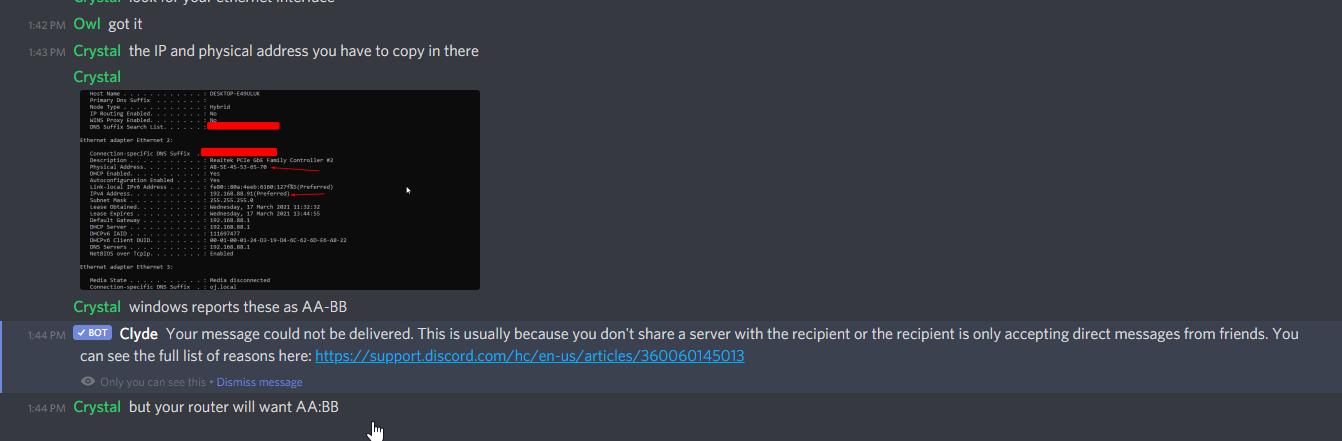
the IP and physical address you have to copy in there

windows reports these as AA-BB
but your router will want AA:BB
 tame carbon
@balmy pond basically, the Phsyical address is the MAC address. its hardcoded into the network card
when you configure a static ip on your router like this. Whenever your computer turns on and asks for an IP from the router
the router will recognize the MAC address, and always give out the same IP
so that our port forward rule will never break.
balmy pond
ah ok
tame carbon
lower is frequent updates
on big networks this produces a lot noise on the network
so you increase lease times
wireless networks usually have short leases
tame carbon
I have mine set to 20 minutes :3
but thats general dhcp settings
not sure what that has to do with static ip
@balmy pond lol wat
no
leave both host and lease blank
those are not required.
 tame carbon
yes.
balmy pond
ok and then
tame carbon
go back to the virtual servers thing
balmy pond
ok
tame carbon

Give it a name so you can find it later on
enter the private IP of your PC
and private port (start) should be 25565
protocol is tcp, so that is already fine
and then at the bottom
public port: 25565
balmy pond
yep
tame carbon
IP = internet protocol
balmy pond
ok got it
tame carbon
@balmy pond if you enable NAT Loopback, you'll be able to test it
balmy pond
what does test it mean
tame carbon
see if it works
balmy pond
im sorry im so dumb with these types of stuff
tame carbon
usually only people from outside your network would be able to use this port foward
if you enable loopback, you can enter your own public IP in minecraft and it will work too

its called hairpinning
balmy pond
ohhh ok got it
tame carbon
port forwards only forward your public traffic, not local
Loopback NAT as they call it, is a workaround for this
balmy pond
is it recommended to turn it off or on?
tame carbon
its just convenience to turn it on
tame carbon
yeah
so your router should now forward traffic from your public IP to your private IP
balmy pond
ok thanks! i'll test it in a sec
tame carbon
now lets just hope you have your own public IP
because I totally forgot to ask for a network trace


 tame carbon
can you do a network trace
open command line
and run tracert 1.1.1.1
@balmy pond do a network trace
might be another reason why it doesnt work
 honest wind
if you can get them to connect externally you can setup something like a pihole and get a local DNS server then override the local dns with that
so both internal and external users can use the same domain
tame carbon
or use a NAT hairpin
 ivory egret
Anyone know much about Access Control List?
honest wind
i'm familiar on aws
 noble solar
My network card is supposed to be only able to handle 8mb
 peak cloak
noble solar
My network card is supposed to be only able to handle 8mb
peak cloak
noble solar
My network card is supposed to be only able to handle 8mb
no network card only supports 8mb lol
noble solar
Well then steams dead then
thick minnow
Anyone know what to do with an old pc? Other than a plex/emby/jellyfin server ofc
Which has Ubuntu server installed btw
thick minnow
what's unbound?
balmy pond
tame carbon
might be another reason why it doesnt work
it worked sorry i didnt respond. Thanks for the help!
peak cloak
but more private
thick minnow
ah okay
peak cloak
basically it goes to the root servers and then goes down the list to request dns requests
instead of using a server that does that already like google or cf or your ISP
tame carbon
I used bind9 in the past
peak cloak
yeah bind9 is also a good one
honest wind
I use pihole and have no issues with it. Performance is great, uses cloudflare as the upstream dns, I can add my own local dns records as well
and pihole has a docker image available too
I've never used the other ones but i'm sure they work fine too
peak cloak
I use my router as my dns server
honest wind
can configure them to force dns over https too
peak cloak
automatically adds dhcp hostnames to hosts list
I have pihole deployed I just don't use it
well no one is pointed to use it
honest wind
point the router to it 😄
peak cloak
nope, that would kinda a mess
honest wind
on my network you can't get DNS unless you go through the pihole or use dns over https
you don't need to set it up, the router tells the clients what to use. If the client tries to use any other outgoing dns, it routes it through the pihole
peak cloak
yeah using NAT rules I saw
I know I can, just don't want to cause more headaches in the future
parents complaining things don't work, etc.
honest wind
well that's your main problem xD
 late geyser
okay so i need to know how to set up a cisco 5505 ASA firewall as a router. this is for an assignment at my internship but i have no idea how to do this at all. so far i've set the DHCP range, as well as the DNS and the lease time, but what do i do to make it so that i have internet access on the local network i'm creating?
late geyser
i suppose so
honest wind
so that's the thing. Router. You'll need to build the routes
tame carbon
@late geyser if its a shared environment with a single public IP. you need sourcenat.
honest wind
idk anything cisco specific but yes you need your wan, and you need to route your lan to the wan
late geyser
i have 2 clients hooked up to 2 different switches, which in turn are connected to the 5505 firewall
peak cloak
because router can also mean routing one subnet to another without NAT
late geyser
he told me i just need internet access, not company resources and whatnot
honest wind
are all the clients / switches on the same lan or other lans / vlans?
late geyser
honest wind
are all the clients / switches on the same lan or other lans / vlans?
same lan yeah
port 1, since port 0 is for the WAN as i've read it
thick minnow
noble solar
My network card is supposed to be only able to handle 8mb
is that network card from 1970
honest wind
I think you just need to setup a route then
I think that was your original question actually... 🙃 idk any cisco cmds
late geyser
honest wind
I think that was your original question actually... 🙃 idk any cisco cmds
it might've been, no clue
noble solar
thick minnow
is that network card from 1970
It’s called pre installed laptop network card
thick minnow
noble solar
It’s called pre installed laptop network card
is your laptop from 1970
honest wind
peak cloak
even laptop network card can can do like at least 300mbps
noble solar
thick minnow
is your laptop from 1970
Nope just a very funny system integrator
late geyser
also my supervisor told me that i don't need the default gateway of the company network for some reason
honest wind
nope because that's upstream
you just need your own wan IP
as long as that IP has internet
late geyser
oh hm
honest wind
that's like needing to know your ISP's default gateway
late geyser
so all i need is to assign an ip to port 0?
honest wind
since technically your home router is connected probably to an ISP switch or ISP router
peak cloak
honest wind
nope because that's upstream
wouldn't the router need to still know it, DHCP provides that info
to know what IP to route packets to
late geyser
or actually, he said just use dhcp
peak cloak
yeah just use DHCP
honest wind
peak cloak
wouldn't the router need to still know it, DHCP provides that info
you're right actually. You'd need it if DHCP wasn't available
late geyser
so, should i be able to just hook it up after providing the internal DHCP range?
honest wind
so the router itself may already have internet if wan0 has an IP
so first establish that, then the issue is getting the rest of the traffic to route to that
honest wind
does the cisco cli have ping?
late geyser
honest wind
does the cisco cli have ping?
it does yeah