#networking
1 messages · Page 303 of 1
 clear igloo
 tame carbon
@hollow marlin who are you to tell me that i am that guy
maybe i like dhcp
maximum control
LOL and it broke again.
I had this guy remove all his devices, plug in just his router, and PC into the switch
all good
and then his wireless broke, the moment he plugged other devices back into the switch
 hollow marlin
tame carbon
<@!462711605063450628> who are you to tell me that i am *that guy*
hollow marlin
tame carbon
<@!462711605063450628> who are you to tell me that i am *that guy*
You're a monster. Let SLAAC do its thing at home
hollow marlin
Also hes not looping anything up is he or dup IP? What devices is he plugging into the switch after the router and PC is plugged in?
 waxen scroll
hollow marlin
Also hes not looping anything up is he or dup IP? What devices is he plugging in...
waxen scroll
hollow marlin
Also hes not looping anything up is he or dup IP? What devices is he plugging in...
none your
 rocky badge
hollow marlin
You're a monster. Let SLAAC do its thing at home
rocky badge
hollow marlin
You're a monster. Let SLAAC do its thing at home
SLAAC yeet
SLAAC good enough for me
clear igloo
Do you at least do nd ra advertisement for dns?
waxen scroll
clear igloo
Do you at least do nd ra advertisement for dns?
sometimes it dont be like that
rocky badge
clear igloo
Do you at least do nd ra advertisement for dns?
Me?
Yea, I advertise my dns server for SLAAC
clear igloo
Nice
clear igloo
yup
rocky badge
Since my VMs VLAN actually uses dhcpv6
So I can give them statics
Fun playing around with a /48 😛
 peak cloak
rocky badge
Fun playing around with a /48 😛
peak cloak
rocky badge
Fun playing around with a /48 😛
ISP or tunnel?
peak cloak
my ipv6 is borked
I need a new router
can't use Hardware acceleration and ipv6 at the same time
filed a bug report
never got back
tame carbon
puts a mikrotik on a silver platter
 tribal ferry
How do I check if a Cisco product is still under licensing requirements?
clear igloo
tribal ferry
How do I check if a Cisco product is still under licensing requirements?
which product btw?
tribal ferry
clear igloo
which product btw?
Nexus 3048
I mean if the product still requires a license for most of its functionality
clear igloo
honor based
It doesn't
it will spit out a command at boot but all nexus are honor based licenses 🙂
tribal ferry
how do I check that for other products?
ah alright
all, even new, nexus products do that?
clear igloo
yup
tribal ferry
ah
clear igloo
you can enable it but probably won't get support if you open a tac case for it
tribal ferry
rma too i assume?
clear igloo
RMA needs a support contract, that I know
since you can have different speed levels up to 2 hour replacement
tribal ferry
how does 2 hour replacement work?
clear igloo
with speed 😛
clear igloo
Depends on the customer but most have a depot nearby their data centers and other big locations
tribal ferry
ah alright
i heard for nexus switches, it's basically cli only and the standalone gui is extremely expensive unless if you use dcnm
clear igloo
For general license stuff show license status or sh license summary is what I use
no real gui for nxos
all api driven or dcnm
tribal ferry
dcnm for 2 or more switches or is that truly for actual full dc's with hundreds
clear igloo
There is a gui but it's more for api calls and testing on the nexus boxes via https
I wouldn't use DCNM unless I had hundreds of switches 🙂
DCNM is mostly SAN or VxLAN targeted
but you can do standard non-vxlan stuff too
I use it on the regular
I've got a couple customers who are using a single instance with API calls to roll out updates to their legacy nexus boxes. Bring in like 200, update, drop them out of DCNM, and repeat
Then they have dedicated instances for fabric devices
tribal ferry
what sort of nexus switch would be best to use if you have a half rack or 4u+ colo rental?
don't need this atm but i might in the future
clear igloo
10g, 40g, 100g?
tribal ferry
10g
clear igloo
I'd just stick with a nexus 3k or 5548 depending on the 10g density you need
just make sure you have an l3 daughter card for the 5548 if you need L3 capability
 clear igloo
yah
tribal ferry
better to use the 5548 or a 3k lineup switch?
clear igloo
I'd say about the same, just depends on what you can get for the better price used
clear igloo
5k uses cisco asic and 3k uses merchant asics iirc
clear igloo
tribal ferry
what are the license options, what is restricted in the honor system?
everything is honor based 🙂
tribal ferry
well yeah, but I'm saying what would I be missing out on with the baseline license
clear igloo
Nothing, it's all there from the get go
tribal ferry
then what are the licenses for, just support?
clear igloo
audit purposes and support for the most part
tribal ferry
i'm saying, is it like "you're not supposed to use x feature unless if you buy x license"
clear igloo
yes
tribal ferry
like what features are you supposed to buy licenses for
clear igloo
bgp, vxlan, and other higher tier stuff
clear igloo
Yah, and even if you do you'll get a log message about it and that's it
tribal ferry
hm alright, that's good to know
they don't seem extremely expensive on ebay either
their campus-level switches do have the actual smart licenses though, right?
clear igloo
the catalyst 9000 stuff does, yah
older stuff like 3750s and whatnot were just enable the license level and go
tribal ferry
the oldies, yeah
well ty for the information
i don't need any of that yet but it's good to know about the licenses as that was my primary concern about purchasing cisco hardware
clear igloo
yah, feel free to tag or DM me if you have any questions too
tribal ferry
one last thing
do you know of any nxos online demos?
the cli
they didn't seem to have anything in their demo zone
clear igloo
There is dcloud but I can't remember if you need a account only or a contract too
I think it's open, just need to log in
tribal ferry
Yeah, I just saw the link to that
resource does not exist x2
hm
been looking on ebay and I've seen a lot of these nexus switches labeled as "fabric extenders"
clear igloo
Ah, those are "headless"
tribal ferry
some older architecture?
tribal ferry
so it's basically a modular switch but just not in one chassis
clear igloo
Yah
tribal ferry
do they work standalone?
clear igloo
Nope
tribal ferry
ah alright
was wondering why they were listed for so cheap lol
what do they need to be connected to for them to work?
clear igloo
yah, the 2300 series can do a little switching but beyond that everything is forwarded to the parent 3k/5k/7k/9k switch for processing
any parent switch will work, so a 3k/5k/7k/9k series switch will work
tribal ferry
the switches just connected with normal sfp+?
clear igloo
yes
tribal ferry
damn everything on ebay for nexus switches seems to be a fabric extender lol
tame carbon
found 1 network loop
and a wifi extender, which was poorly configured, which also loops
hollow marlin
ooooo people are so made that Azure is down right now
tame carbon
azure is down?
tribal ferry
Check the current Azure health status and view past incidents.
ad is down
globally
tame carbon

hollow marlin
tribal ferry
ad is down
More than that, the system isn't able to update the extent of the outage lol
tribal ferry
hollow marlin
More than that, the system isn't able to update the extent of the outage lol

clear igloo
It's down so hard it can't even tell you how down the data center is
tribal ferry
I'm getting flashbacks to that Workspace outage a few months ago
hollow marlin
Its OK, people on twitter are letting them know how many thousands of dollars they are losing. Its so important they forgot to account for putting all their eggs in the Azure basket 
clear igloo

tribal ferry
high 👏 availability 👏
clear igloo
No, it's highly available, it's even 5 9's
(if you expand the timeline view) 😛
tribal ferry
realistically if you want 100% uptime you should have ha and failover across multiple cloud providers in multiple regions
if you can afford that
lol
clear igloo
At least it's not as bad as telling OVH it's unprofessional to be down due to a fire
hollow marlin
Too expensive for these people saying they lost 100,000s in and hour
tribal ferry
clear igloo
At least it's not as bad as telling OVH it's unprofessional to be down due to a ...
Have you seen the photos of the wooden datacenter floors?
clear igloo
tribal ferry
Have you seen the photos of the wooden datacenter floors?
I have not
tribal ferry
Let me go find it
tribal ferry
clear igloo
I have not
Found it originally elsewhere that was posted in 2013, but here's a repost of it

RBX4 (Roubaix 4) le datacenter en bois (plancher et structure) de @OVHcloud. 👩🚒👨🚒🚒🔥🧯#OVH #OVHcloud
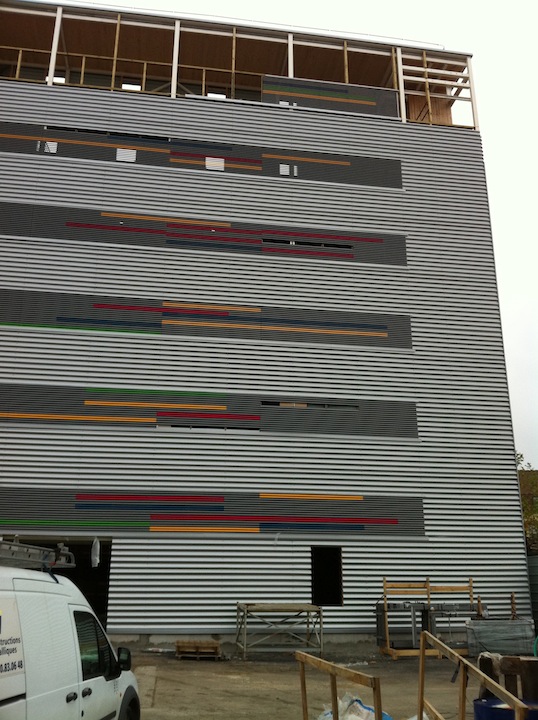
 Twitter
·
Twitter
·


 clear igloo
yikes!
tribal ferry
 hollow marlin
tame carbon
and a wifi extender, which was poorly configured, which also loops
hollow marlin
tame carbon
and a wifi extender, which was poorly configured, which also loops
called it. First sign of everything going poof the moment a device is plugged in is a clear sign loopty loops

 untold elbow
what should i do with my intel nuc
hollow marlin
Install EVE and start labbing. More networking!
untold elbow
The MMO?
tame carbon
@untold elbow mine dogecoin 
 thick minnow
untold elbow
what should i do with my intel nuc
thick minnow
untold elbow
what should i do with my intel nuc
Turn it on
tame carbon
@hollow marlin I have a metal 52ac in the mail
gonna test it out soon :)
see how much range it can do
hollow marlin
tame carbon
see how much range it can do
Yes let me know. Depending on performance, might look at one for camp
tame carbon
@hollow marlin I primarily want them for long range base coverage for outdoors
2.4GHz
was thinking about using one of those mAnt sector antennas in 5GHz for high density locations
 cedar igloo
bit of a long shot, but does anyone know if there's a way to use tls passthrough with haproxy to services using the consul resolver?
I currently have the following configuration:
frontend http
    bind *:80
    acl demo path_beg /demo
    use_backend DEMO if demo
backend DEMO
  balance roundrobin
  server-template demo-webapp 3 _demo-webapp._tcp.service.consul resolvers consul resolve-opts allow-dup-ip resolve-prefer ipv4 check
but an wanting to bind it to port 443 and let the service handle tls
tame carbon
you need a tcp socket
hollow marlin
tame carbon
<@!462711605063450628> I primarily want them for long range base coverage for ou...
I'm looking for range as well. I need to get signal back about 1-1.5kft. haven't looked into it and avoided Ubi.
tame carbon
Supposedly, I expect 40-50 meters range
hollow marlin
We used to peer with a WISP that was all Mikrotik, but never saw what APs he used
 tender hazel
mikrotik wireless AC doesn't perform as well as the competitors, for PtMP fixed wireless outdoors anyway
their 60ghz equipment is great
tame carbon
 tender hazel
yes, we have the (discontinued) 900mhz version of that in operation at some sites
they look like lightsabers when the omni antenna is attached
tame carbon
I think on the metal ac
if you crank TX power up
it does something like 1.4w
which is a crazy amount of output for a wireless station
tender hazel
that's probably going above regulations
tame carbon
@tender hazel ultimate hack on the mikrotik
you set your country to DRC
Congo aint got no wifi regulations
tender hazel
can't do that with the US model
that would only work with international
and if someone complains you could be hit by a fine, depending on what country you are in
hollow marlin
I'm not looking at P2MP. Just P2P.
If I can decide on a decent AP, I'll do the splice to the site to shoot back from the road.
tender hazel
how far of a P2P link?
tame carbon
@tender hazel I'm deploying these in a valley in a mountainous/forested area
4km from the nearby town
but then again
its bunch of germans
hollow marlin
It has to be in the realm of 1-1.5k ft
tame carbon
they be paper pushers
tender hazel
hollow marlin
It has to be in the realm of 1-1.5k ft
Yes you can use 60GHz for that link as long as there is line of sight
hollow marlin
Yeah LoS is not a problem, nor is anything over 100mbps
tender hazel
60ghz will give you 1000Mbps
(full duplex)
mikrotik sells the radios in pairs, already preconfigured to link with the other side
tame carbon
@tender hazel how many users can a typical 2.4GHz AP even handle?
the benefit I have is that I am in an environment with no external radio sources or interference
we only have overhead powerlines
tender hazel
"how many users" is a tricky question
how much bandwidth do you want to give them?
overhead powerlines should not matter at all
tame carbon
@tender hazel its a very very large area
@tender hazel about 250 camping spots
and we have a 1000/500 line
tender hazel
you're not going to cover that all with one antenna
tame carbon
@tender hazel I was planning on setting up a network with capsman
tender hazel
are you using CPE devices on the client side?
hollow marlin
Yeah I know 60ghz would handle gig at that distance but its just a bonus. Its one of our 2 camp, its just a get away and need it for the times when working remote. Its in the mountains just outside of LTE. Luckily we have fiber on that road and I already talked the higher ups and they provide it, free if they make me do the splice.
tame carbon
@tender hazel yeah, well I'm going over there soon
and we can run cables to some parts of the camping
some things have to be done point to point
tender hazel
you can't use capsman if you are going to use mikrotik cpe devices
capsman is intended for wifi deployments only
tender hazel
with cell phones and laptops etc as direct clients
tame carbon
we just need a single wireless network across the entire area
and every client gets a small amount of bandwidth
tender hazel
you will need to put up a bunch of antennas
tame carbon
Yes
I bought one of those metal 52 ac's to test and see what its capabilities are
but I cannot test it with many devices
roughly
10-15 antennas maybe?
high estimate
tender hazel
I'm not sure the metal 52 is going to be the best choice for a dense deployment like that
the issue is that the radios are single chain
tame carbon
what do you recommend instead?
tender hazel
quite a few devices are dual chain and you can get more bandwidth out of it
tame carbon
@tender hazel yeah but a single ap
will not really have more than 10-20 people at most
and its ok if they only get 8-10 mbit
tender hazel

MikroTik is a Latvian company which was founded in 1996 to develop routers and wireless ISP systems. MikroTik now provides hardware and software for Internet connectivity in most of the countries around the world.
and you would need a dual chain omni to go with it
the alternative is you could go with sectors
MikroTik is a Latvian company which was founded in 1996 to develop routers and wireless ISP systems. MikroTik now provides hardware and software for Internet connectivity in most of the countries around the world.
the only problem with the sectors is they aren't shielded, you'll want to add rf shields behind if you use those
tender hazel
no
hang on I will send a link, in the meantime, here is another good option: https://mikrotik.com/product/mantbox_52_15s
MikroTik is a Latvian company which was founded in 1996 to develop routers and wireless ISP systems. MikroTik now provides hardware and software for Internet connectivity in most of the countries around the world.
it is dual band so you get 2ghz and 5ghz at the same time
cedar igloo
tame carbon
you need a tcp socket
Thank you. this works great 🙂
tender hazel
Here is the shielding
it is basically a metal box missing the front part
it attenuates transmissions going out the rear and back sides of the antenna
that way you can have multiple sectors on a tower and it limits interference between them
tame carbon
100 bucks for a shield?
wtf
no ty
@tender hazel well, let me put it this way, I think omni directional is still better then
we don't need that high speed really
tender hazel
I'm not saying you need the shield, but it improves things
tame carbon
don't you think a couple of those omnitiks is better?
tender hazel
they don't make the 2ghz omnitiks anymore
the 5ghz ac omnitiks would be ok, as long as everybody has 5ghz radios
but some people may only have 2.4ghz
my dad bought a new laptop just four years ago and it only had 2.4ghz
in the future you will be able to get away with just providing 5ghz but I do not think that is the case yet
tame carbon
@tender hazel I'll probably end up putting a bunch of those regular omni directional antennas on there with 2.4GHz
range is more important
in areas with a lot of people, I can just add one of those 5Ghz omni tiks to the pole
tender hazel
keep in mind that omnis decrease your range a bit vs sectors, but that may not matter so much when your devices are mobile with lower power transmitters
tame carbon
yeah but unimpeded
look
we only need 5GHz in seated areas
like the pool, tent area and the terace
everything else should just be wide range 2.4GHz coverage
tender hazel
the mantbox 15s doesn't have 120 degree sectors so it isn't a good choice, looking at it
the mantbox 2 12s could be an option:
MikroTik is a Latvian company which was founded in 1996 to develop routers and wireless ISP systems. MikroTik now provides hardware and software for Internet connectivity in most of the countries around the world.
they cover 120 degrees.. you could have three on a tower or pole covering 360 degrees
tame carbon
yeah but we only need like 180 degrees at most
tender hazel
there are three non overlapping 20mhz channels in the 2.4ghz band
tame carbon
my idea was to just have APs in a trapezoid config
tender hazel
if you don't need 360 degrees of coverage I probably wouldn't go with an omni, because you are firing RF energy to where you don't need it instead of focusing it towards the users
tame carbon
moar gain
tender hazel
if you only need 180 degrees of coverage you could have just two sectors
tame carbon
microwave on a pole
tender hazel
since the sectors are built into the radios you don't have to worry about water getting in the connector and other things like that
tame carbon
@tender hazel two sounds reasonable
so we could just have then along the entire length of the area
tender hazel
it is annoying when you have to climb a pole because the weather seal broke and it rained and water is in the connector and so signals drop 30dB
tame carbon
every 60 or so meters
two sector antennas facing away from each other
and then alternate the channels
tender hazel
yes
tame carbon
can you bind a specific channel to an AP within a caps group?
tender hazel
yes
tame carbon
I've only done minor configurations with, have to look it up
tender hazel
it isn't obvious how to do so, I had to futz around a bit to figure it out
but we do that
tame carbon
@tender hazel there are also potentially a couple APs that we cannot feed by cable
what about that?
I've seen those circular APs they ahve
but I am unsure on what to look out for
setting up a point to point link
MikroTik is a Latvian company which was founded in 1996 to develop routers and wireless ISP systems. MikroTik now provides hardware and software for Internet connectivity in most of the countries around the world.
tender hazel
there might be an easier way vs setting up an additional device
you could potentially use a few of the mantbox dual chain ones
tame carbon
we have power all across the area
tender hazel
MikroTik is a Latvian company which was founded in 1996 to develop routers and wireless ISP systems. MikroTik now provides hardware and software for Internet connectivity in most of the countries around the world.
tame carbon
so that is not an issue
tender hazel
you could use the 5ghz radio not for customers but as a backhaul
to one of the other sites that is wired
tender hazel
within the beam width: 90° (2.4 GHz), 60° (5 GHz)
the mantbox 52 15s sector is only 60 degrees wide
tender hazel
I've been working with wireguard on my mikrotik
I've never really been too interested in pfsense
peak cloak
pfsense kinda sucks because you are running a whole big x86 computer with like no dedicated hardware acceleration
Large power consumption and cost compared to a dedicated router
and you need a reallly powerful box for high speed routing
tender hazel
are you just using it for ad blocking?
peak cloak
while you can get something much cheaper with a dedicated router
tender hazel
personally, ads don't bother me that much that I would set up a dedicated system for that
peak cloak
for anything above 1 gig
tender hazel
there are browser plugins that can block them too
I'm not too bothered by the information that is collected in the cookies
the only annoying thing is that if you want to shop for something like a toaster, you get recommendations for great toasters until the end of time
way after you actually purchased the toaster and you no longer need a toaster
thick minnow
most isps use transparent dns anyway so if you are really concerned about ads and privacy you should take a layered approach
peak cloak
yeah that's not the main issue, noise and power usage is the main one for me
peak cloak
thick minnow
most isps use transparent dns anyway so if you are really concerned about ads an...
wdym by transparent dns
thick minnow
best i can do is an example ...
peak cloak
oh looked it up
so interecepting dns
just use DNS over TLS or HTTPS
if you want ultimate dns privacy use unbound lol
goes to root servers directly
and caches
tender hazel
I work for an ISP, and we run our own DNS servers.. we don't snoop on our customers DNS requests
we have the ability to, sure, but we don't
rocky badge
peak cloak
just use DNS over TLS or HTTPS
Comcast being in the Mozilla trusted resolvers 
peak cloak
don't have comcast
rocky badge
Even if you don't have them, doesn't matter
Firefox has the ability to use Comcast DoH servers in the TRR program
peak cloak
huh
 peak cloak
can't you just use DNS over TLS directly to cf
tender hazel
one of the issues with DNS over HTTPS is VPN's
when you are on an internal corporate network there is probably a split DNS
peak cloak
well yeah
DNS over HTTPS on your router
I wouldn't bother on my end device
I have a dns server at home as well
rocky badge
I don't do DoH on individual devices yeah
I just have my DNS servers doing it
Firefox doesn't do DoH in specific scenarios
Chrome doesn't do DoH on managed browsers

 tender hazel
we can enable DoH on our customers routers and we can probably set up our powerdns dnsdist servers to respond to DoH, but we can still log into our customers routers and look at the DNS cache
so I'm not sure what the point of doing that would be for us, since I don't think it would give our customers any more privacy
even if we enabled DoH on their router, we could still log into their router and view the cache
tender hazel
however we give our customers full access to their routers, so they could block our access if they wanted to
 zinc ember
Some knows how to setup FreeNas to work with jellyfin
And how to should i install jellyfin
One
 granite elm

 tall pagoda
Cat5e cable wired as phone cable 🧐🤔

That is why I get no data from it
Installation is from 2004
tender hazel
I don't think that cat5e is wired into a cat5e socket
there is too much space between the punch down wire connections
you have to untwist too much cable and that will introduce more crosstalk and reduce the overall rate
proper cat5e jacks will use a more dense punchdown so that you do not need to untwist so much cable
 slate sonnet
How would I see what ips wireguard is routing to my pc?
I’ve setup wireguard on a vps to bypass cgnat
So that I could host my minecraft server
But I can’t ip ban anyone since when people connect, it shows the vps internal ip, so I would ban pretty much everyone
Also, how would I block certain connections on my vps since I would have to block the connections instead of banning the ip in my minecraft server
tender hazel
does your ISP provide IPv6?
slate sonnet
Me?
My router probably does
My router doesn’t though
Wait
My isp probably does *
My router doesn’t support ipv6
Since it’s pretty old
tender hazel
If your ISP gives you IPv6 you probably don't need to jump through those crazy hoops to bypass CGNAT and run your own server
because you will have a public IPv6 address
the only question is whether minecraft supports that and whether there is some apparatus for users who don't have IPv6 to connect to such a server
I've never played minecraft so I have no idea about either of those things
slate sonnet
tender hazel
the only question is whether minecraft supports that and whether there is some a...
Minecraft bedrock apparently supports ipv6, java does not however
I run a minecraft java server with mods
tender hazel
java does not? where do you see that?
slate sonnet
Well, that’s what I think
I mean every server has an ipv4 address
If people could use ipv6, why wouldn’t they?
tender hazel
not everybody has an ISP that provides IPv6 addresses yet, but in the modern day most are starting to
thick minnow
slate sonnet
If people could use ipv6, why wouldn’t they?
Too much trouble
tender hazel
too much trouble?
the only trouble I could foresee is some people may not have IPv6 addresses
thick minnow
Not everyone has it and existing servers work with ipv4
so why change
only more work
slate sonnet
Well the other plus of doing it my way is if someone wants to ddos me, I could just disconnect from my vps and that’s it
tender hazel
it is stupid to have to jump through hoops to bypass CG-NAT like that
slate sonnet
Its a route I chose
I used to use zerotier to host my server for my friends
Still doesn’t answer my question though
How I would see what traffic my vps is passing to my server and how to block that traffic if I choose
tender hazel
if it shows the VPS internal IP then you are doing NAT twice
you're not only doing a port forward (destination NAT) but you're also doing source NAT on the traffic
what that does is makes the traffic appear as though it were coming from your VPS instead of from the original source
instead of doing the NAT twice just do it once
slate sonnet
I understand that
tender hazel
just do the destination NAT and not the source NAT
tender hazel
how did you set up the NAT in the first place? if you set it up in iptables you would have had to have created both the destination NAT and the source NAT rules and all you have to do is delete the source NAT rule
it's not a wireguard thing
slate sonnet
I didn’t do anything other than wireguard setup
thick minnow
why my minecraft server refuses connections with error "Authentication servers are down. Please try again later, sorry!" ??
tender hazel
your wireguard isn't doing the NAT, your VPS must be
NAT is something outside of what wireguard handles, at least in my experience
so you need to reconfigure the NAT in your VPS which is totally separate from your wireguard config
slate sonnet

Followed this guide https://github.com/mochman/Bypass_CGNAT

GitHub
Wireguard setup to bypass CGNAT with a VPS. Contribute to mochman/Bypass_CGNAT development by creating an account on GitHub.
The last rule I added with some help from another user on this server
tender hazel
Yeah the masquerade rule is telling it you want to hide the sender’s ip and show the vps ip instead
If you don’t want that, don’t masquerade
tender hazel
Yes
slate sonnet
The last lines, right?
tender hazel
Yes
slate sonnet
Okay
After that, I need to restart the service?
Probably a dumb question but just making sure
tender hazel
I would imagine so
 ivory egret
is ACL only something that appears only on Cisco routers?
slate sonnet
@tender hazel

Okay, nvm
Fixed it
Srry for the ping
Still shows up as internal ip

this is me logging in localhost
 slate sonnet
Fixed it
slate sonnet
slate sonnet
Fixed it
So no, haven't fixed it
tame carbon
@tender hazel that masquerade rule we added, was there for returning traffic
there might be a better way of doing it
but I couldnt think of one
slate sonnet
tame carbon
<@!530075635423510548> that masquerade rule we added, was there for returning tr...
But since I deleted it, it didn't change any behaviour
Unless that's what was supposed to happen
tame carbon
if you restarted wg, and it kept working then its fine
slate sonnet
Yeah
I restarted it
@tame carbon is there a way for me to see what ips are connected and if I need to blacklist them, how would I do that?
tame carbon
sudo netstat -tulpn | grep <port>
you enter the port of a client that connects to your mc server
and netstat should show you where its coming from
slate sonnet
okay
tame carbon
wait, actually
that's the command for finding listening ports
try sudo netstat -a | grep <port>
I forget what the parameters mean. Been using these so often that you forget what each flag is xD
peak cloak
tender hazel
If your ISP gives you IPv6 you probably don't need to jump through those crazy h...
Minecraft java does support v6 fyi
It a shame
slate sonnet
huh
slate sonnet
tame carbon
try `sudo netstat -a | grep <port>`
Nothing
tame carbon
✘ crystal@watomat ~ sudo netstat -a | grep 80
tcp 0 8 watomat:41002 192.168.88.91:24800 ESTABLISHED
tcp 0 0 watomat:41602 192.168.88.83:8008 ESTABLISHED
tcp 0 0 watomat:56926 192.168.88.83:8009 ESTABLISHED
tcp6 0 0 [::]:8086 [::]:* LISTEN
My ISP support ipv6 yes
tame carbon
my bad
tame carbon
odd
@slate sonnet alternatively
you could write an iptables rule with action LOG
it would then print its output to the kernel log
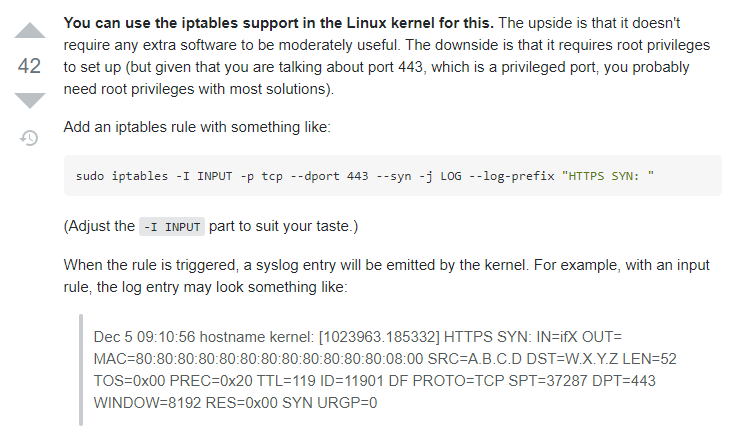
I think because it is routing, that it doesnt show up in netstat
slate sonnet
Possible
 slow pivot
tame carbon
I think because it is routing, that it doesnt show up in netstat
slow pivot
tame carbon
I think because it is routing, that it doesnt show up in netstat
100% this; netstat only shows connections to/from the local machine, not layer 3 traffic through the kernel
 plain siren
His MC server is on a Windows server. IP Forwarding is much more tricky yet hasnt been mentioned here.

I think the problem is much more baaaaaaaaaaaasic here.
tame carbon
@plain siren It was a hell to configure this at all
He's got a VPS -> WG -> MC Server host (behind CGNAT)
The forwarding is being done on his VPS
@hollow marlin guess what just came in the mail :D
 mellow cloak
Hello, need help to add a domain i just bought to my windows server tho i have no clue how to do it >.< (noob in all this still) anyone can give me some pointers or even something to read to learn how to do it?
slate sonnet
@tame carbon could I use ip monitor to somehow monitor the connections?
(also how do you do the format of text where its easier to select?)
tame carbon
you mean the monospaced ?
slate sonnet
tame carbon
```
✘ crystal@watomat ~ sudo netstat -a | grep 80
tcp 0 8 wa...
Like here
Yes
tame carbon
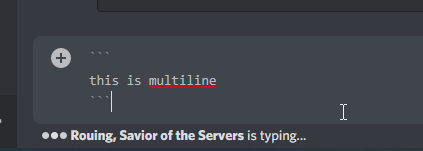
you put ` around the message
if you do triple ``` you can do multiline
this is multiline
 slate sonnet
I'll forget it later, but I'll try and remember lmao
tame carbon
@slate sonnet its markdown
same thing github uses, but a limited subset
it supports code highlight too
public void test() {

}
@plain siren did any UPS maintenance recently?
:jab:
 tame carbon

BleepingComputer
OVH founder and chairman Octave Klaba has provided a plausible explanation for the fire that burned down OVH data centers in Strasbourg, France.
plain siren
PostUp = iptables -A FORWARD -i eth0 -o wg0 -p tcp --syn --dport 25565 -m conntrack --ctstate NEW -j ACCEPT
PostUp = iptables -A FORWARD -i eth0 -o wg0 -p tcp --dport 25565 -m conntrack --ctstate ESTABLISHED -j ACCEPT
PostUp = iptables -A FORWARD -i wg0 -o eth0 -p tcp --sport 25565  -m conntrack --ctstate ESTABLISHED -j ACCEPT
PostUp = iptables -t nat -A POSTROUTING -o wg0 -p tcp --dport 25565 -d 10.0.0.2 -j SNAT --to-source YOURPUBLICIP```@slate sonnet ^
peak cloak
mellow cloak
Hello, need help to add a domain i just bought to my windows server tho i have n...
One, I would highly recommend linux.
Two, you would want to setup a webserver (nginx or apache).
Three, you would want to add a A record for your domain pointing to your IP address
And lastly you would port forward port 80 an 443 if your ISP allows it. Then you can get SSL certs using let's enrypt
slate sonnet
plain siren
```PostUp = iptables -t nat -A PREROUTING -i eth0 -p tcp --dport 25565 -j DNAT -...
Add that to vps config?
peak cloak
tall pagoda
yeah it's 100M
plain siren
wait
tall pagoda
It is strange actually
peak cloak
tall pagoda
It is strange actually
not really, it's kinda common
plain siren
Yeah ther we go @slate sonnet there
tame carbon
lazy installation
slate sonnet
Okay
tall pagoda
Because in the meterkast the cable splices into a RJ45 with 6 cables attached and into a RJ11 with 2 cables attached.
slate sonnet
Do I delete all the other postup and postdown rules?
slate sonnet
tame carbon
Don't forget to add postdown rules as well
Yep
slate sonnet
tame carbon
shut down the tunnel before modifying it
On client side?
tame carbon
unsure how WG reads those postdown rules
if you modify it, before shutting it down, it may leave stale entries in the kernel iptable
slate sonnet
Idk how I would shut down the tunnel on my vps
tame carbon
systemctl
slate sonnet
just like, stop the service?
tame carbon
yes
@slate sonnet stopping the service disables that interface and runs those PostDown commands
slate sonnet
Got it
tame carbon
if you do somehow manage to bork the running config in the iptables
plain siren
PostDown = iptables -D FORWARD -i %i -j ACCEPT; iptables -t nat -D POSTROUTING -o eth0 -j MASQUERADE
plain siren
PostUp = iptables -A FORWARD -i %i -j ACCEPT; iptables -t nat -A POSTROUTING -o eth0 -j MASQUERADE This shouldve also been there by default at the top line make sure it still is
tame carbon
@plain siren that original config we were using off github didnt work at all
so we came up with the best I we could do
plain siren
https://github.com/necsay/Wireguard-Forward/blob/main/forward.sh heres a script that does it all for you.

GitHub
Contribute to necsay/Wireguard-Forward development by creating an account on GitHub.
tall pagoda
tame carbon
its only wired for 100M ethernet
Is it possible to use existing cable to upgrade to 1000 mbit? And how? Because the cable is actually ‘Cloned’ into a other outlet.
tame carbon
@tall pagoda not without getting rid of that 2nd port
plain siren
Heres a proper explanation and proper SNAT/DNAT Setup:
https://github.com/necsay/Wireguard-Forward/blob/main/explanation.txt
GitHub
Contribute to necsay/Wireguard-Forward development by creating an account on GitHub.
peak cloak
tall pagoda
Is it possible to use existing cable to upgrade to 1000 mbit? And how? Because t...
you need all 4 pairs, you can get rid of the second port
tame carbon
@tall pagoda 2 pairs = 100M
4 pairs = 1G
@tall pagoda you're off better if you splice the 2nd outlet into the first one. And then using a small switch.
looking at that image you sent
you just need a punchdown tool to install

one of these ^

those things are like 5-10 bucks
 tame carbon
@peak cloak the one I linked automatically cuts off excess wires
it has a knife on the tip
peak cloak
tame carbon
<@!222482269829332992> the one I linked automatically cuts off excess wires
yeah ik
tall pagoda
I have that tool in my 2nd house which are 1400 km’s away
tame carbon
@tall pagoda just buy another. They wear out eventually anyways
plain siren
You can actually prob use the brown colored wires as the 2 telephone wires and the others as normal and itll prob be 1000mbit
peak cloak
I have this one as well
 peak cloak
plain siren
You can actually prob use the brown colored wires as the 2 telephone wires and t...
peak cloak
plain siren
You can actually prob use the brown colored wires as the 2 telephone wires and t...
wut no? You need all 8 wires for 1000Base-T
slate sonnet
 plain siren
some stupid shit like this
 peak cloak
plain siren
some stupid shit like this
peak cloak
plain siren
some stupid shit like this
yeah but it's not gigabit then?
plain siren
and thinking about it yeah nvm 😦
peak cloak
who needs phone jacks anymore anyway
tame carbon
phone lines are good for 100M, that's it
plain siren
Not using VoIP
slate sonnet
My ping time like doubled
Also now I can't connect to my mc server
With the new rules
plain siren
Show full config rn
mellow cloak
peak cloak
One, I would highly recommend linux.
Two, you would want to setup a webserver (...
Thanks for the answer, tho i can not control the type of server and it will have to be a windows server as a AP was already purchase from Microsoft
slate sonnet
 tall pagoda


 peak cloak
mellow cloak
Thanks for the answer, tho i can not control the type of server and it will have...
peak cloak
mellow cloak
Thanks for the answer, tho i can not control the type of server and it will have...
AP?
plain siren
slate sonnet
PostUp = iptables -A FORWARD -i %i -j ACCEPT; iptables -t nat -A POSTROUTING -o eth0 -j MASQUERADE
put this at the top of all PostUps
its the default and required for it to work, dont remove it
tall pagoda
 slate sonnet
 tame carbon
I am about to bash my head against my desk. How much I hate this...
IF EXISTS(SELECT 1
          FROM sys.views
          WHERE name = 'VIEW_5'
            AND type = 'v')
    DROP VIEW VIEW_5;
GO;
CREATE VIEW VIEW_5 AS
SELECT ORIG_CORP_NAME, ORIG_COUNTRY_NAME, DEST_CORP_NAME, DEST_COUNTRY_NAME
FROM VIEW_4
         JOIN ACCOUNT A ON VIEW_4.COUNTRY_NAME = A.BANK_COUNTRY_NAME AND VIEW_4.CORP_NAME = A.BANK_CORP_NAME
         JOIN TRANSFER T ON (A.COUNTRY_NAME = T.ORIG_COUNTRY_NAME AND A.CORP_NAME = T.ORIG_CORP_NAME) OR
                            (A.COUNTRY_NAME = T.DEST_COUNTRY_NAME AND A.CORP_NAME = T.DEST_CORP_NAME)
xD
tall pagoda
I have actually no internet through that strange outlet
slate sonnet
@plain siren so now it's like this
 plain siren
PostDown should only be PostDown = iptables -D FORWARD -i %i -j ACCEPT; iptables -t nat -D POSTROUTING -o eth0 -j MASQUERADE
plain siren
change all wg0's to %i too
slate sonnet
Okay
What does that do?
Just curious
Still can't connect using my vps
Ping time from my vps to my server is over 200ms
plain siren
Doing some looking up
slate sonnet
At this point I think it's better to revert all the changes and just set it to whitelisted mode
So that I can ban by name
plain siren
Well the real issue here is you need to use netsh to tellwindows to route your vps public ip by default gateway not the wireguard
then you gotta do the loopback
but im not seeing a way tbh
thats the 50% drop in packets and lag
slate sonnet
Okay, how would I check if I have ipv6 support?
Since I remember someone said minecraft java supports ipv6
peak cloak
slate sonnet
Since I remember someone said minecraft java supports ipv6
it doesn't
slate sonnet
Oh
slate sonnet
Welp, never mind
But still, just do ipconfig and see if I get an ipv6 address?
On windows
peak cloak
slate sonnet
But still, just do `ipconfig` and see if I get an ipv6 address?
yeah it would be there
peak cloak
slate sonnet
Oh, I DO have ipv6
does it start with fe80?
slate sonnet
Yea
peak cloak
every pc has that unless it's disabled
peak cloak
slate sonnet
Welp
public address start with 2000 - 3FFF
slate sonnet
Now I know
Well something got screwed up
I can't connect to my minecraft server
Even after reverting the rules back to what they were (i think)
I can ping my server from my local network that I created with wireguard
And vice-versa
Omg
I'm dumb
plain siren
lol wot
slate sonnet
In the "allowed ips" section on the client I set it to 10.0.0.2/24
That was at /32 I think
Oh wait
nvm
Idk
plain siren
restart vps

 slow pivot
@tame carbon tcpdump will absolutely work for incoming and outgoing packets
slate sonnet
I have a question, on my server config in the allowed ips I have 10.0.0.2/32
But on my client I have 10.0.0.2/24 in the interface section
Is that supposed to be like that?
slow pivot
Technically 10.0.0.2/24 is giving both an IP address and a network
untold elbow
slate sonnet
I have a question, on my server config in the allowed ips I have 10.0.0.2/32
yeah it's supposed to be like that
you can set them both to /32
slate sonnet
Well either way, doesn't fix the thing that I broke
And I don't know what I broke, which is fun
untold elbow
the /## part is the subnet mask (in CIDR notation), it indicates the size of the network you're talking about
a /32 means just a single address
a /24 means 255 addresses, so 10.0.0.X
but you're only ever connecting on 10.0.0.2, a single address, so the /32 is correct
but either should work
what broke?
slate sonnet
I don't know
untold elbow
whats it doing?
slate sonnet
Basically I tried to find a way to see which ips are connecting to my vps
Because I can't ipban someone on my minecraft server since it gives me my vps ip
In the process of editing the vps wireguard config I broke something
I can't connect to my minecraft server through the vps
untold elbow
can you connect to the wireguard tunnel and pass traffic through it? like browse the web?
untold elbow
via 10.0.0.1 and .2?
slate sonnet
Yup
untold elbow
if you connect to the tunnel and go to https://www.whatismyip.com/, does it give you your VPS' IP?
What Is My IP shows your public IP address details for IPv4 and IPv6. Learn how to hide your IP location and protect your online privacy.
tame carbon
@untold elbow what's your hourly rate?
untold elbow
@tame carbon lol it depends
tame carbon
;)
my metal 52ac arrived
I'm always suprised when it looks smaller than on the website
untold elbow
@slate sonnet if you do sudo wg on the vps while connected to the tunnel, whats it say
tame carbon

Provided to YouTube by Universal Music Group
Digital World · Amaranthe
MASSIVE ADDICTIVE
℗ 2014 Spin-Farm Oy
Released on: 2014-10-17
Associated Performer, Vocalist: Elise Ryd
Associated Performer, Vocalist: Joacim Lundberg
Associated Performer, Vocalist: Henrik Englund
Associated Performer, Guitar, Producer: Olof Mörck
Associated Perfo...
🎵
untold elbow
if it's connected, you'll see something like this:
[sudo] password for jfr:
interface: wg0
  public key: ZwVKWP0zpqpGNQRNm4Yj7VXaiL320YbU3yLUVRC9JxY=
  private key: (hidden)
  listening port: 58610

peer: BTtKlQ7OEBS5sOjJ1aNjvo018N0Fe4RAA0G6YXzFJl4=
  endpoint: XXX:16417
  allowed ips: 172.24.158.5/32
  latest handshake: 1 minute, 15 seconds ago
transfer: 13.91 MiB received, 22.16 MiB sent```the peer will be listed with handshake and transfer stats
slate sonnet
root@ruvds-2xerj:~# wg
interface: wg0
  public key: (vps public key)
  private key: (hidden)
  listening port: 55107

peer: (my client key)
  endpoint: (my client ip):54147
  allowed ips: 10.0.0.2/32
  latest handshake: 1 minute, 54 seconds ago
  transfer: 86.04 KiB received, 1.30 KiB sent
ok cool thats good
do you have the minecraft server started on your pc?
i dont see anything on 25565
slate sonnet
Just started it
untold elbow
hmm i dont see it
i think iptables rules must be broke again
so ask @tame carbon what his hourly rate is 😄
tame carbon
Idk
@untold elbow he modified his iptable rules with something that @plain siren recommended
my hands are tied
slate sonnet
Then I returned it to what it was before
tame carbon
reboot your vps
slate sonnet
Tried that
tame carbon
We had it working ;-;
slate sonnet
Tried resetting the tunnel
tame carbon
You just sent a bull into the china shop
untold elbow
it's weird that it's not passing http traffic
untold elbow
@tame carbon you didnt make the iptable rules so it would exclude http/https ports, right?
slate sonnet
PostUp = iptables -t nat -A PREROUTING -p tcp -i eth0 --dport 25565 -j DNAT --to-destination 10.0.0.2:25565;
PostUp = iptables -A FORWARD -p tcp -d 10.0.0.2 --dport 25565 -m state --state NEW,ESTABLISHED,RELATED -j ACCEPT
PostUp = iptables -A POSTROUTING -t nat -p tcp -d 10.0.0.2 --dport 25565
PostDown = iptables -t nat -D PREROUTING -p tcp -i eth0 --dport 25565 -j DNAT --to-destination 10.0.0.2:25565;
PostDown = iptables -D FORWARD -p tcp -d 10.0.0.2 --dport 25565 -m state --state NEW,ESTABLISHED,RELATED -j ACCEPT
PostDown = iptables -D POSTROUTING -t nat -p tcp -d 10.0.0.2 --dport 25565
These are the rules that I have right now
untold elbow
oh no it's only forwading 25565
tame carbon
@untold elbow pretty sure those rules applied to 25565 only
untold elbow
any chance the port on the MC server has changed?
tame carbon
without purposefully changing it ? no
slate sonnet
untold elbow
any chance the port on the MC server has changed?
No
[14:04:12] [Server thread/INFO] [minecraft/DedicatedServer]: Starting Minecraft server on *:25565
Had it like that all this time
I swear, once I fix this, I will never touch anything again xd
untold elbow
dont worry it will break on its own 😄
untold elbow
yeah im at a loss, those rules look correct
untold elbow
slate sonnet
if you put it back to the rules here, does that change anything?
untold elbow
from an outside system telnet <vps ip> <minecraft port>
if the port is open, telnet will connect to it
it won't be able to do anything, but it'll connect
it's a basic way to check if there's a service on a given port
for example:
Trying 45.79.196.241...
Connected to li1295-241.members.linode.com.
Escape character is '^]'.
^CConnection closed by foreign host.
[jfr@london ~]$ ^C
^C
[jfr@london ~]$ telnet 45.79.196.241 81
Trying 45.79.196.241...
^C```45.79.196.241 is my vps, it sees a service on port 80 but not port 81
tame carbon
@untold elbow using lish I see.
crystal@watomat ~ ssh ldn.services.local.knockturnmc.com
Welcome to Ubuntu 16.04 LTS (GNU/Linux 5.1.11-x86_64-linode127 x86_64)
:D
untold elbow
not directly, just hosting vps on linode
 slate sonnet
I guess I could always try and resetting the vps and start fresh?
untold elbow
i dunno.... that'd be a lot of work
and wireguard is working, it's just not passing the MC traffic
tame carbon
@untold elbow I used to torrent in the cloud. then downloading those packages via ssh over my crappy 4mbit line
untold elbow
oh fun
tame carbon
breaking up the archive into smaller files
and then download those over night
getting a 50GB file through a 4mbit gateway is a chore
untold elbow
for real
tame carbon
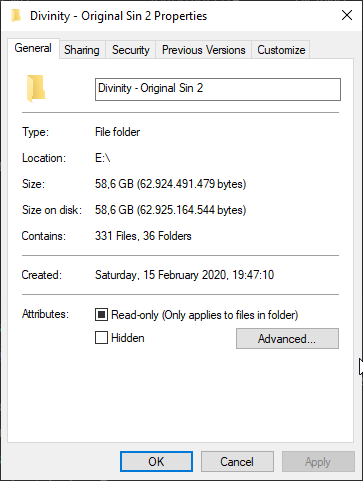
@untold elbow lol when I got Divinity Original Sin 2 from GOG.com, I had my friend download it for me
it was a 65GB package. He just send me a letter with an sd card inside
postal service has higher bandwidth than DSL
just very bad ping
untold elbow
lol
tame carbon
and not duplex xD
untold elbow
@slate sonnet i'd try reverting back to a more basic set of wg iptable rules and going from there
tame carbon

 untold elbow
@tame carbon guessing you're on a faster link now
tame carbon
@untold elbow yeah... though I got really lucky
they announced fiber optics. we had it installed, and moved to a new house 2 months later.
slate sonnet
untold elbow
<@!289451427011756032> i'd try reverting back to a more basic set of wg iptable ...
Guess I should probably read some stuff
Because idk what I should remove, what I should keep
Etc
tame carbon
@untold elbow but the new house we moved to. was behind on schedule, allowing us to sign up for a 2nd fiber link
that was installed in December 2019
I got into networking with mikrotik earlier that year
in the old place we didnt even have ethernet sockets
untold elbow
slate sonnet
Guess I should probably read some stuff
i'd start by going back to the set of rules suggested by the github article you originally found and then make the modifications crystal gave
tame carbon
there was a cable running up the stairs to my bedroom xD
@untold elbow those rules were trash.
untold elbow
next house i buy needs to have cat6a in all the walls
slate sonnet
tame carbon
there was a cable running up the stairs to my bedroom xD
That's kinda what I have rn lmao
Router is in my room
And the main ethernet cable runs to the router
tame carbon
RouterOS v7 has wireguard built in
so much better :)
@slate sonnet I'm at a loss. those rules we had were functional before..
untold elbow
did you install any other packages?
slate sonnet
tame carbon
<@!289451427011756032> I'm at a loss. those rules we had were functional before....
Exactly
slate sonnet
tame carbon
you running ufw ?
No
untold elbow
did he maybe have you add iptables rules outside of the wireguard config?
dont know how to check the rules
tame carbon
man iptables
iptables -L
should list all the rules
man is an underrated command ;)
slate sonnet
 tame carbon
tunnel is disabled?
slate sonnet
No
tame carbon
then why is there only a single rule in there?
slate sonnet
 tame carbon
unboxing ftw
 untold elbow
no because you want them to come on when the tunnel is on and go off when it goes off
slate sonnet
tame carbon
I consider that clean
tame carbon
Dowsing rod in hand.
Ready to bust some ghosts.
slate sonnet
At least now we know why I'm having issues
tame carbon
@slate sonnet only half my desk is in that image :P
slate sonnet
iptables arent being added
tame carbon
the other half is a lot more messy
slate sonnet
tame carbon
the other half is a lot more messy
My desk is full, apart from the mousemat
untold elbow
@slate sonnet i'm not sure tbh, i don't know what your iptables stuff should look like with those rules you have set
tame carbon
oof.
slate sonnet
That's the only area where there arent stuff xd
untold elbow
emailing drugtips@fbi.gov
tame carbon
@untold elbow well its legal here so :p
untold elbow
still emailing
untold elbow
us law applies everywhere
tame carbon
you can grab a baton for self-sodomizing by the door when you leave.
if that reference even hits home..
untold elbow
nope
tame carbon
Anakata of the pirate bay used to tell Lawyers that who sent pesky emails with DMCA's
telling to sodomize themselves and whatnot xD
"US law does not apply here, go sodomize yourself"
untold elbow
lol
untold elbow
yeah ive read a few
tame carbon
but they took them down
@untold elbow my favorite is still the quarrel they had with linotype
where their reply or 'counter claim' was an invoice for the hosting on tpb.org/legal
using 50 different fonts in a single document
all owned by linotype
untold elbow
i dont think helvetica is open
untold elbow
opensans?
 jaunty talon
I have finally identified the last bug we have with our QFX5120-48T :D 1G nics on windows wont link up without disable / enable after reboot of the switch \o/
untold elbow

FontShop
Helvetica is a typeface designed by Max Miedinger and Linotype Design Studio, and is available for Desktop, Web, DigitalAds, App, ePub, and Server. Try, buy and download these fonts now!
helvetica is expensive af
untold elbow
FontShop
Try, buy and download professional fonts for desktop, web and apps. Classics such as FF DIN and Proxima Nova, or try out new typefaces like Neue Haas Unica.
tame carbon
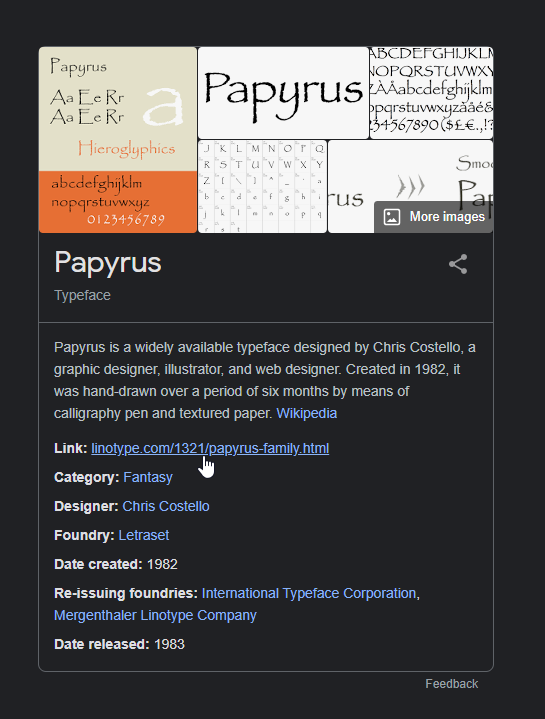
I'll just go back to using papyrus
 untold elbow
ooof


 untold elbow
lmao yeah ive seen that
 waxen saddle
Honestly, whoever sent that notice to TPB needed that kind of slap in the face.
tame carbon
@waxen saddle tell that to Linotype
and all the other people that took them to court
mostly the MPAA and Warner
waxen saddle
I wish I could tell them. 🙂
hollow marlin
jaunty talon
I have finally identified the last bug we have with our QFX5120-48T :D 1G nics o...
I recently got pulled into a deployment where an SRX320 LTE mPIM was stuck in admin down/link up state. Required similar steps of set disable > reboot > set enable (hidden cmd) > reboot > delete enable > power down > re-seat SIM > power up. Drove me insane as admin down/link up should not be possible but it was. Opened a ticket with JTAC to look into it and it was the 3rd time they have seen an down/up state and the dumps contained nothing to guide them on a cause or bug.
 little bridge
Hello,
Is it possible to stream my games to laptop persay if they are not on the same network, and to control my pc from that laptop that includes turning the PC on off, i heard you can do that with WoL but thats only for LAN.
I would appreciate any feedback, Thank you
peak cloak
little bridge
Hello,
Is it possible to stream my games to laptop persay if they are not on the...
vpn
tame carbon
@little bridge wake on lan only works on the local broadcast domain
so it must be another device on the local network that sends those packets
peak cloak
yep
tame carbon
remotely shutting a system down is trivial
peak cloak
I have a little VM that does it
tame carbon
you just log into the machine remotely and tell it to shut down
peak cloak
and it's on the same vlan as my pc
tame carbon
@peak cloak with mikrotik you can either do it via a script, or API call
 tender cliff
Can you have two computers connected as a network wirelessly?
tame carbon
yes
slate sonnet
I've just watched some youtube videos regarding iptables and how they are setup, how the work, what commands do what.
Technically everything is correct when I do iptables -L, which is weird since I still don't get traffic routed
thick minnow
hello could i get some public ip if i switch to ipv6 ?
peak cloak
thick minnow
hello could i get some public ip if i switch to ipv6 ?
depends on your ISP, you SHOULD get at least a /64 block which is 18,446,744,073,709,551,616 public IPs
most give a /56 block I think
which is like 64,565 /64's I think
thick minnow
my isp supprts ipv6 so i contacted them and they have to unlock it for me ?
peak cloak
no clue
peak cloak
thick minnow
my isp supprts ipv6 so i contacted them and they have to unlock it for me ?
your router may not support v6
peak cloak
thick minnow
so it prob. does
nice
thick minnow
this is worrying
 thick minnow
mine ?
thick minnow
its from
Tp-link
it cointains stuff around ipv6 i think my provider ist just giving me acces to it at 1st place iam under CGNAT
tame carbon
yeah probably just a bad router
lol stupid tplink even dares to upsell people
rediculous
tender hazel
slate sonnet
```
PostUp = iptables -t nat -A PREROUTING -p tcp -i eth0 --dport 25565 -j DNAT ...
you've deleted the word "MASQUERADE" instead of deleting the entire rule
 dense wolf
can some one tell me why my open media vault system tells" The repository jessie-backports Release does no longer have a Release file ." when I try to update
tender hazel
oh TP-Link IPv6 doesn't work
it is broken
even on their latest devices
if you have a tp-link router you won't be able to get IPv6 working
slate sonnet
tender hazel
you've deleted the word "MASQUERADE" instead of deleting the entire rule
I was supposed to delete the entire rule?
tender hazel
yes
tender hazel
removing the MASQUERADE from the end just deletes the action
you may have to do some additional stuff on your home system to get the return traffic handled correctly
because otherwise the return traffic may be sent out your main ISP instead of back through the VPS, which is not what you want
the MASQUERADE was forcing the return traffic back through the VPS by hiding the true IP address of the user connecting
so you'll need a different means of doing that without the MASQUERADE rule
some kind of policy routing on your home system or router running wireguard
it'll have to track the connection from the VPS and send responses out the same interface
tender hazel
thick minnow
it cointains stuff around ipv6 i think my provider ist just giving me acces to i...
You'll need to replace the TP-Link with something else.. preferably a MikroTik, but I've seen IPv6 work with ASUS and it also has started to work with newer model of D-Link routers
thick minnow
tender hazel
You'll need to replace the TP-Link with something else.. preferably a MikroTik, ...
why ?
slate sonnet
What router brands are good? By good I mean reliable with a good-ish feature set
tame carbon
mikrotik
slate sonnet
From what I’ve seen in this channel mikrotik can do a lot of stuff
tame carbon
they are just very versatile
and their routers are very good
they can do managed wireless too
but if you need high density, other brands might be superior
most expensive device mikrotik sells is only $3000, they cater to lower and middle market
slate sonnet
I definitely don’t need high density
tame carbon
but its a very obscure brand
tender hazel
thick minnow
why ?
Because IPv6 is broken with all TP-Link. I work for an ISP and we have about 450 customers with TP-Link routers and provide IPv6 to all of them. None of them have it working due to TP-Link IPv6 issues
tame carbon
they dont do a lot of marketing
they are mostly used by service providers to do installations for private homes
slate sonnet
Well the most taxing thing that I might do is hosting a minecraft server and having maybe 100 connections
slate sonnet
tame carbon
they dont do a lot of marketing
I’ve noticed
thick minnow
soooo what are good types ?
tame carbon
depends on what you need :P
they have bunch of models with different configurations
but the software on all of them is the same
thick minnow
i dont need speed and i dont need overpowered wifi just a reaallly basic one
tame carbon
their cheapest router is $20 xD
like I said, depends on what you need
what kind of network speed do you have? do you want wifi on the device itself?
thick minnow
i have wifi extender and i have 1*router + 1* modem from TP-link all i need is to get one without wifi and second with wifi at least 10meters with 2wall penetrating on 2.4GIGAhertz at least
 muted pawn
you can get 40gb for less than 200
just make sure its mellanox and everything can be wired :p
thick minnow
my int connection is 20Mbit down 2Mbit up
tame carbon
ew wifi extenders
thick minnow
i have i tcuz of ethernet cable
tame carbon
you dont need much though in perf with that