#networking
1 messages · Page 298 of 1
 slate sonnet
slate sonnet
slate sonnet
Tracing route to one.one.one.one [1.1.1.1]
over a maximum of 30 hops:
1 64 ms 64 ms 63 ms 10.0.0.1
2 69 ms 64 ms 65 ms 45.8.229.1
3 69 ms 67 ms 66 ms GW-CloudFlare.retn.net [87.245.255.223]
4 66 ms 66 ms 66 ms one.one.one.one [1.1.1.1]
Trace complete.
 untold elbow
that looks good
 tame carbon
its using the tunnel.
@untold elbow what if one was to set AllowedIPs to 10.0.0.0/24
?
untold elbow
try to ssh from putty to 10.0.0.1 with the tunnel up
@tame carbon he'd only get to 10.0.0.1
tame carbon
that's the point, no?
untold elbow
and a bunch of unused IPs
tame carbon
all other traffic should go over another if
untold elbow
oh if that's the point then yeah
tame carbon
He only wants a NAT around his CG-NAT
slate sonnet
untold elbow
try to `ssh` from putty to 10.0.0.1 with the tunnel up
sshed
tame carbon
through a public VPS
so he can host minecraft
His VPS host masquerades traffic from WAN through wireguard
WG is merely a LAN network to the client, it shouldnt be used as a gateway
untold elbow
i think i missed the first part of this where you were talking about what the purpose of all this was lol
slate sonnet
Well basically I want to only route minecraft server traffic through the vps
That's it
If possible
tame carbon
@slate sonnet change AllowedIPs in the client config
to say 10.0.0.0/24 instead of 0.0.0.0/0
then restart tunnel
slate sonnet
Done
tame carbon
see if you have internet, if yes: run another traceroute
that should now be using your regular network
instead of WG
slate sonnet
First one is router gateway
tame carbon
so its going through 192.168.foo.bar?
slate sonnet
yeah
tame carbon
Nice.
slate sonnet
That's the first route
tame carbon
ok then: ping 10.0.0.1
slate sonnet
64ms
tame carbon
Ok. we're set.
tame carbon
You now have a tunnel endpoint from your VPS to your windows machine
slate sonnet
Okay
 tame carbon
@slate sonnet no, leave the mincraft config ip= empty
untold elbow
with qrencode you can generate that qr code and scan it with your phone client to add the config
slate sonnet
Okay
tame carbon
@slate sonnet if you leave it empty, the minecraft server will be active on all interfaces
slate sonnet
And people can connect to my server with my vps ip
tame carbon
including the 10.0.0.1 interface
then, other users can use your public IP from the VPS
to connect
slate sonnet
Okay
tame carbon
🤞
untold elbow
he said a friend
tame carbon
to test
untold elbow
lol
slate sonnet
tame carbon
what version?
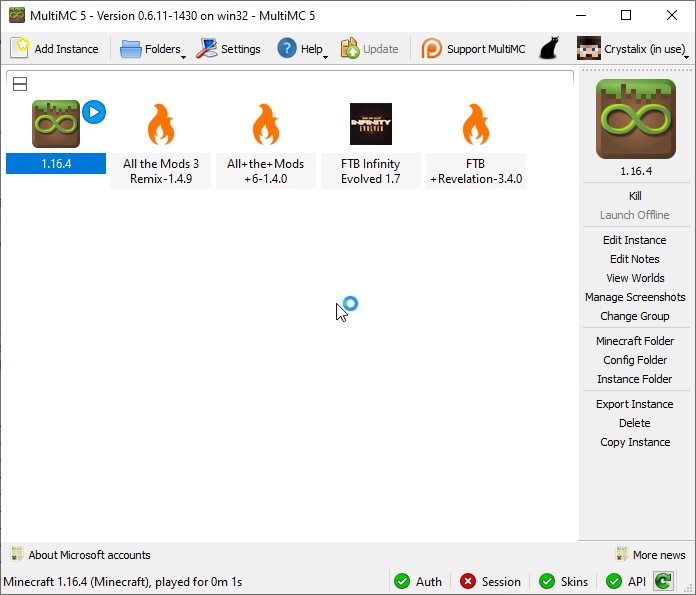
1.16.4
 slate sonnet
Starting
tame carbon
I hope this doesnt conflict with my network lol. I have bunch of russian IP prefixes nullrouted on my network
slate sonnet
1 sec
slate sonnet
tame carbon
I hope this doesnt conflict with my network lol. I have bunch of russian IP pref...
what does that mean?
Server up
untold elbow
he doesnt like russians
tame carbon
^
tame carbon
its mostly hackers and such
bunch of ssh flooding I dont need
same with china
its not connecting...
mhh
slate sonnet
starting again
untold elbow
you have stuff in the wg config to forward the minecraft ports to your windows system?
i wasnt here for that part
tame carbon
@untold elbow it shouldnt need to?
slate sonnet
Try connecting
tame carbon
@untold elbow those configs on that tutorial reference to other computers on his /24 LAN
Mh. not responding no
tame carbon
mh. still nothing
slate sonnet
Hmm
tame carbon
@untold elbow does wireguard installation require a reboot of the host at all?
untold elbow
nope
tame carbon
I'm trying telnet on his 25565 port
untold elbow
i think you might need another iptables statement to forward minecraft port traffic
tame carbon
not even establishing a connection
untold elbow
iptables -t nat -A PREROUTING -p udp -i eth0 '!' --dport 25565 -j DNAT --to-destination 10.0.0.2;
if i had to guess
untold elbow
oh i dont know iptables either apparently lol
tame carbon
it was ! 22 meaning all ports except 22
untold elbow
oh hm
untold elbow
if i had to guess, it's looking at the VPS for a tcp 25565 service and not finding one
and that request has to somehow be forwarded through the tunnel
tame carbon
@slate sonnet go back to the config file on your wg host.
double check the iptable rules
 lean pebble
tame carbon
and minecraft is tcp
lean pebble
tame carbon
and minecraft is tcp
True, but bedrock version is udp
tame carbon
@slate sonnet on your wg host you can verify the currently running iptable config with: iptables -S
slate sonnet
 tame carbon
that doesnt seem right
there's no NAT entry at all
@slate sonnet iptables -t nat -L
@untold elbow only reason I know a little about iptables, has to do with mikrotik, since their configurations are using iptables internally
untold elbow
ahh
untold elbow
im not really a network guy so i know very little about it
know only slightly more than this guy https://www.youtube.com/watch?v=SXmv8quf_xM

Have fun with this you guys!!!
"tracert "website"
slate sonnet
 tame carbon
@untold elbow https://i.imgur.com/zTYYJVR.png
 untold elbow
fancy
i run pfsense... need to get some mikrotik gear
unifi switches are getting kind of crappy
tame carbon
@slate sonnet okay.. so far that looks to be alright
wait no
source is not even set.
@slate sonnet can you open your wg config once more. on the server
slate sonnet
command? I really need to write it on my forehead lmao
untold elbow
nano /etc/wireguard/wg0.conf
slate sonnet
tame carbon
<@!289451427011756032> can you open your wg config once more. on the server
And send it here?
untold elbow
leave out your private key
slate sonnet
untold elbow
leave out your private key
Yes
untold elbow
mostly i think crystal wants the postup and postdown lines
untold elbow
just as a cross-reference, here are the post-up and post-down lines from my wg server:
PostUp = iptables -A FORWARD -i wg0 -j ACCEPT; iptables -t nat -A POSTROUTING -o ens18 -j MASQUERADE; ip6tables -A FORWARD -i wg0 -j ACCEPT; ip6tables -t nat -A POSTROUTING -o ens18 -j MASQUERADE
PostDown = iptables -D FORWARD -i wg0 -j ACCEPT; iptables -t nat -D POSTROUTING -o ens18 -j MASQUERADE; ip6tables -D FORWARD -i wg0 -j ACCEPT; ip6tables -t nat -D POSTROUTING -o ens18 -j MASQUERADE
or at least, push a kernel config to /proc/sys
untold elbow
it's worth a shot
slate sonnet
 tame carbon
because by default linux distros dont do v4 forwarding..
untold elbow
i think if it's passing traffic from his windows client out to the internet, forwarding is working though
but i've never set it up going the other way
tame carbon
@untold elbow see the snat rule at the end on the first postup ?
that's for client -> server -> internet
source-nat
but we're port forwarding here, so we use DNAT
untold elbow
ahh ok
slate sonnet
So what should I do?
tame carbon
I'm thinking
slate sonnet
Oh, okay
untold elbow
reboot can't hurt in the meantime
tame carbon
yeah, reboot your server
slate sonnet
I guess
tame carbon
might be worth a shot
slate sonnet
rebooting
tame carbon
@untold elbow I'm looking at the sources provided by the tutorial
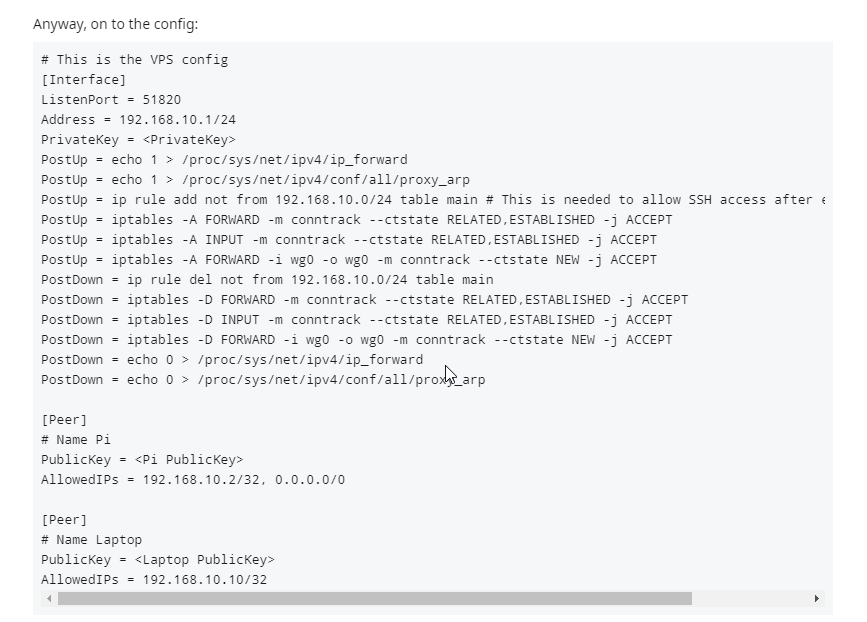
which points to some information on reddit
these guys write some additional settings to the kernel
untold elbow
if you didn't run sysctl enable on the wg service, you'll need to manually start it again
tame carbon
note the first two postup
untold elbow
i believe ipv4 forward should already be 1, but not the arp proxy
but this is way over my head
tame carbon
that proxy arp is not nessesary
that's only if you wish to know about the hosts on the other side of the tunnel
slate sonnet
untold elbow
if you didn't run `sysctl enable` on the wg service, you'll need to manually sta...
Did that
tame carbon
@untold elbow I have proxy-arp running on my VPN bridge on my mikrotik
so that my VPN clients can interact with other devices on the LAN
but its tricky
and can lead to arppoisoning
if poorly configured
untold elbow
from here: https://github.com/mochman/Bypass_CGNAT isn't step 1b the same as that first postup rule?

GitHub
Wireguard setup to bypass CGNAT with a VPS. Contribute to mochman/Bypass_CGNAT development by creating an account on GitHub.
tame carbon
/etc/sysctl.conf is read on startup
tame carbon
reconnect your tunnel
slate sonnet
So like disconnect and reconnect it?
tame carbon
Just connect.
untold elbow
yeah
tame carbon
the only difference in the setup we have, and the tutorial
is that the tutorial uses NAT a 2nd time
on the client, to then pass traffic to local devices
slate sonnet
Well in the tutorial on the github page, there are postup and postdown lines
untold elbow
what's the server hostname and MC port?
slate sonnet
And in them I'm assuming that some of them port forward
Why can't I do that with port 25565?
tame carbon
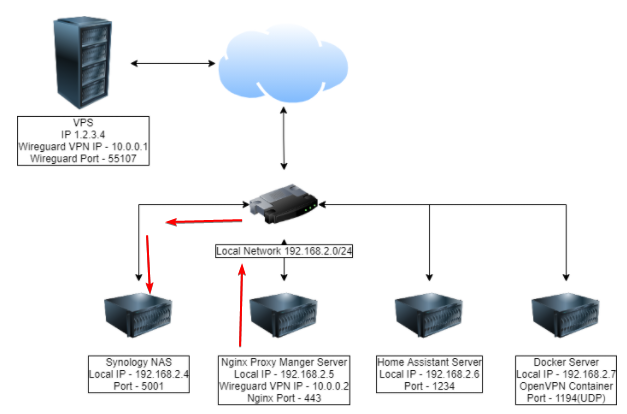
@slate sonnet currently, traffic would arrive at 10.0.0.2:25565
slate sonnet
untold elbow
what's the server hostname and MC port?
Dm
 untold elbow
do you have the MC server up and the tunnel running?
slate sonnet
Starting server
tame carbon

LOOK, THE LATENCY FALLS EVERY TIME YOU CLAP YOUR HANDS AND SAY YOU BELIEVE
slate sonnet
Started
slate sonnet
tame carbon
https://xkcd.com/2259/
Lmao
untold elbow
Trying 194.87.80.92...
^C
root@wireguard:/etc/wireguard# telnet 194.87.80.92 22
Trying 194.87.80.92...
Connected to 194.87.80.92.
Escape character is '^]'.
SSH-2.0-OpenSSH_8.2p1 Ubuntu-4ubuntu0.2
^C
Connection closed by foreign host.```it doesn't see a service on 25565
tame carbon
@untold elbow it would interest me
untold elbow
but i guess we knew that
untold elbow
yeah
tame carbon
see if windows even properly exposes it
untold elbow
telnet 10.0.0.2 25565
slate sonnet
Trying for a long time
untold elbow
doesn't see the service on that side either
slate sonnet
Did 10.0.0.2
untold elbow
so that's a clue
slate sonnet
Without 25565
slate sonnet
Oh
tame carbon
and if there's a server on other side, we'll know
slate sonnet
Said connected
untold elbow
wait telnet 10.0.0.2 25565 says connected?
 untold elbow
that's basically checking if it can see any service running on that port
ok cool
thats a good thing, it sees the MC service
tame carbon
The VPS can see the minecraft server.
untold elbow
your server just isn't forwarding it to the windows system
slate sonnet
Huh
tame carbon
We're triangulating the problem right now
VPS -> Minecraft works
its just Public IP -> VPS that is finecky
untold elbow
def something with those cryptic postup iptables commands
tame carbon
iptables -t nat -A PREROUTING -p tcp -i eth0 '!' --dport 22 -j DNAT --to-destination 10.0.0.2;
iptables -t nat -A POSTROUTING -o eth0 -j SNAT --to-source 1.2.3.4
those are the two commands on the first line
and it basically just says, for any traffic incoming on -i eth0
and any destination port that isnt 22
we port forward to destination <ip>
untold elbow
hm yeah that should work
slate sonnet
I have it the other way around
untold elbow
how do you mean
slate sonnet
iptables -t nat -A POSTROUTING -o eth0 -j SNAT --to-source 1.2.3.4
iptables -t nat -A PREROUTING -p tcp -i eth0 '!' --dport 22 -j DNAT --to-destination 10.0.0.2;
untold elbow
oh thats fine i think
slate sonnet
Or does it matter?
tame carbon
@slate sonnet does your config say 1.2.3.4 ????
slate sonnet
No
untold elbow
yeah that's correct
slate sonnet
Everywhere
tame carbon
that's correct.
slate sonnet
Okay
tame carbon
@untold elbow you think it might be worth removing the eth0 filter, and doing it by IP instead?
--dst 194.87.80.92 --dport 25565
instead of -i eth0
and we write our own iptable rule
untold elbow
hmmm not sure, might be worth a try. or adding -j LOG and checking kern.log while people are connecting
slate sonnet
Okay
tame carbon
Hold on, writing a oneliner for iptables
tame carbon
nah, lets not add any more barriers
slate sonnet
Okay
untold elbow
iptables -t nat -A PREROUTING -j LOG && iptables -t nat -A POSTROUTING -j LOG
and then tail -f /var/log/kern.log
@tame carbon think that's worth looking at?
tame carbon
tcpdump lol
Perhaps
@untold elbow I came up with: iptables -t nat -A PREROUTING -p tcp --dst 194.87.80.92 --dport 25565 -j DNAT --to-destination 10.0.0.2;
as a custom rule, which only port forwards what we want
untold elbow
hmmmm would that work for the MC client's return traffic?
untold elbow
ok, that might work then
tame carbon
SNAT is only for outgoing connections
slate sonnet
Don't I have to have both tcp and udp?
untold elbow
nah just tcp
tame carbon
nah minecraft is just TCP
slate sonnet
Got it
tame carbon
in essence, that's all you need
 hollow marlin
Better take your IP out of there lol
tame carbon
@hollow marlin its a publicly routed one
doesnt trace back to my WAN
so you can DoS me
wont have an effect
@hollow marlin perhaps you can smarten us up
we've set up a WG tunnel
trying to NAT traffic through it
hollow marlin
Ewww
tame carbon
@hollow marlin he's behind a CG-NAT
untold elbow
its prob not working because you leaked your ip in discord
slate sonnet
Me
tame carbon
And we're using this as a workaround
slate sonnet
untold elbow
its prob not working because you leaked your ip in discord
Me?
hollow marlin
I assume using a VPS for WG?
untold elbow
no im joking
tame carbon
Ye
slate sonnet
hollow marlin
I assume using a VPS for WG?
Yes
untold elbow
ok so do we want to try my think or crystal's thing first
my thing*
do crystal's thing
tame carbon
friggen network debugging. love it 🔫
hollow marlin
What point are you guys at? I assume WG tunnel is up and connected so far?
untold elbow
if this doesn't end up working, dynamic dns might be an easier route
tame carbon
WG works
WG host can see a tcp service on WG client
its just the public ip NAT that is not functional
untold elbow
wg host passes wg client traffic too
 hollow marlin
So basically Home --> WG --> VPS --x--> NAT --> internet?
tame carbon
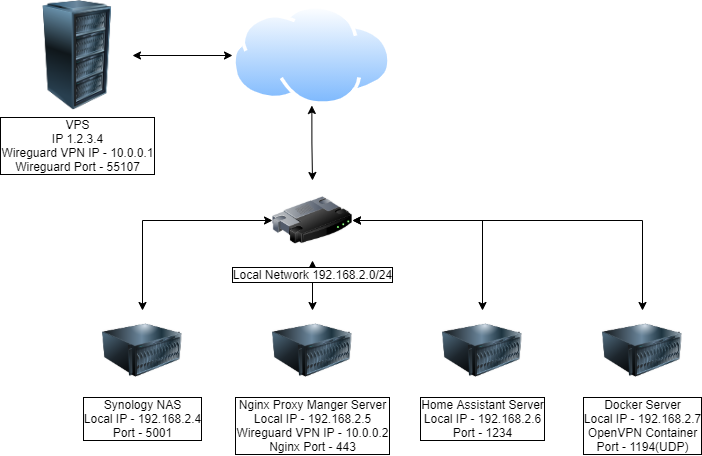
GitHub
Wireguard setup to bypass CGNAT with a VPS. Contribute to mochman/Bypass_CGNAT development by creating an account on GitHub.
@hollow marlin his outgoing traffic should still be through his default gateway.
untold elbow
forward tcp port 25565 traffic from internet to VPS through wg tunnel to home system
tame carbon
incoming traffic on his VPS should be NATed through WG
[Interface]
PrivateKey = SHOULD_ALREADY_BE_FILLED_OUT
ListenPort = 55107
Address = 10.0.0.1/24

PostUp = iptables -t nat -A PREROUTING -p tcp -i eth0 '!' --dport 22 -j DNAT --to-destination 10.0.0.2; iptables -t nat -A POSTROUTING -o eth0 -j SNAT --to-source 1.2.3.4
PostUp = iptables -t nat -A PREROUTING -p udp -i eth0 '!' --dport 55107 -j DNAT --to-destination 10.0.0.2;

PostDown = iptables -t nat -D PREROUTING -p tcp -i eth0 '!' --dport 22 -j DNAT --to-destination 10.0.0.2; iptables -t nat -D POSTROUTING -o eth0 -j SNAT --to-source 1.2.3.4
PostDown = iptables -t nat -D PREROUTING -p udp -i eth0 '!' --dport 55107 -j DNAT --to-destination 10.0.0.2;

[Peer]
PublicKey =
AllowedIPs = 10.0.0.2/32
this is the server config, as it stands
And I'm suspecting there's something wrong with those iptable rules
hollow marlin
Oh boy, getting into IPtables
 dense wolf
I have a question do you need any kind of portforwarding for nginx server setup??
hollow marlin
So first thing is WG is L2 to the VPS, is there another subnet that was created to use that VPS? You are going to need routing here
tame carbon
10.0.0.0/24
untold elbow
dense wolf
I have a question do you need any kind of portforwarding for nginx server setup?...
yes, you'll need to forward http/https ports if you don't have them exposed to the internet on your web server
hollow marlin
I thought it was L2, yeah looks to be L3. Even better. Never personally worked with it
dense wolf
untold elbow
yes, you'll need to forward http/https ports if you don't have them exposed to t...
does it need to be specifically http or any open port that I can configure
hollow marlin
@tame carbon where is the sticking point at the moment? Just dying at the src NAT rules?
untold elbow
dense wolf
does it need to be specifically http or any open port that I can configure
if you don't want to manually specify the port after your server address, yes. if you're okay doing <server address>:<non-standard port>, you can use any free port
dense wolf
untold elbow
if you don't want to manually specify the port after your server address, yes. i...
ok thanks
tame carbon
@hollow marlin He has a minecraft server listening on his windows machine (port 25565)
On his VPS, he can use telnet to establish a connection to this windows machine
But the iptable rules that are ment to DNAT the traffic through wg from his public interface, do not work.
dense wolf
tame carbon
<@!462711605063450628> He has a minecraft server listening on his windows machin...
are you guys trying to host a minecraft server
dense wolf
you don't need to host a full vps for palying minecraft
untold elbow
oh boy
dense wolf
you can simply use ngrok.exe
untold elbow
that isn't the issue @dense wolf
dense wolf
oo
tame carbon
@hollow marlin the rules set out by the tutorial (and the block of text I posted above) is what he's currently using.
It basically is ment to DNAT all traffic except ssh and wireguard
@dense wolf he's behind a CG-NAT, a shared public IP, and thus cannot port forward.
using a cheap ass VPS to route his traffic around
untold elbow
looking at iptables docs more, i'd try that dnat rule crystal made
and maybe even make it more general
well, maybe not more general
tame carbon
@untold elbow I am unsure if that input on eth0 is gonna work like that
might be better to do it on IP layer
untold elbow
which input? the one from the github? or the one you made?
slate sonnet
We'll definitely need it
untold elbow
if you hit a wall... look into dynamic dns instead
tame carbon
at this point, I am at a loss. Those are the last suggestions I have that we could try
I could try consult the 420-gods, but that doesnt always work
slate sonnet
@tame carbon so what should I try?
dense wolf
tame carbon
using a cheap ass VPS to route his traffic around
ngrok does the same think but its simpliar
tame carbon
so I am hoping @hollow marlin has some enlightening perspective on this
hollow marlin
Just looking through some of the IPtables syntax
slate sonnet
@tame carbon so can you explain what the postup and postdown lines do in the github page?
tame carbon
@slate sonnet those are commands it will run when it connects and disconnects
PostUp is Post (after) it goes up
iptables controls the network stack on linux
we basically add a rule, to port forward all your traffic
but there's something awry.. not working properly..
slate sonnet
Okay, but the lines pretty much say something along the lines of
"when connected, route this port to this ip, etc etc"?
hollow marlin
Everything looks good, but I would assume you need a forwarding chain as well right?
tame carbon
that's what it is ment to do
@hollow marlin elaborate?
GitHub
Wireguard setup to bypass CGNAT with a VPS. Contribute to mochman/Bypass_CGNAT development by creating an account on GitHub.
Really, this is what we're doing
slate sonnet
Well if that works, can't I just copy and paste with port 25565?
tame carbon
and either this doc is wrong
@slate sonnet might try to remove the existing postup rules in there, and replace it with the one I suggested.
iptables -t nat -A PREROUTING -p tcp --dst 194.87.80.92 --dport 25565 -j DNAT --to-destination 10.0.0.2;
make sure you add the same rule to the PostDown as well
replacing the -A with -D
-D = delete
slate sonnet
Just add that to the bottom of the postup and postdown lists?
tame carbon
remove the existing ones, and put a new one in
 peak cloak
dense wolf
ngrok does the same think but its simpliar
peak cloak
dense wolf
ngrok does the same think but its simpliar
that's centerlized
tame carbon
@slate sonnet remove the postup and postdown rules
lean pebble
I guess you can just host mc server on vps instead tunneling
slate sonnet
Will I still have ssh?
tame carbon
@slate sonnet that rule doesnt forward all ports, only 25565.
lean pebble
tame carbon
<@!109801863771074560> its a $2 vps
So openvpn
tame carbon
@lean pebble wireguard.
slate sonnet
lean pebble
I guess you can just host mc server on vps instead tunneling
I can host on my pc, literally no reason to get a vps just for that
tame carbon
But the VPN isnt the issue
peak cloak
dense wolf
ngrok does the same think but its simpliar
also a good learning experience
tame carbon
the VPN works. its not the issue
its just the iptable settings that are applied by the VPN, that are incorrect
lean pebble
tame carbon
its just the iptable settings that are applied by the VPN, that are incorrect
He can use wiregaurd on his network while having cgnat ? 🤔
slate sonnet
Like this?
 tame carbon
and we use his VPS IP as a public endpoint
lean pebble
He don't need dedicated IP on his side ?
peak cloak
lean pebble
He don't need dedicated IP on his side ?
no
tame carbon
@slate sonnet yuh.
peak cloak
lean pebble
Never used wg
it's a vpn just need a public IP on one side
slate sonnet
How to restart wg?
tame carbon
@slate sonnet systemctl
@slate sonnet press arrow key up
until you find the command
lean pebble
peak cloak
it's a vpn just need a public IP on one side
Openvpn is vpn to and he can use it to connect to his server to I think.
tame carbon
wireguard is easier to setup :P
lean pebble
That's for sure
slate sonnet
done
tame carbon
@slate sonnet reconnect with your windows client
peak cloak
lean pebble
Openvpn is vpn to and he can use it to connect to his server to I think.
wireguard is more resource efficent
lean pebble
My openvpn working on my pfsense in cloud
slate sonnet
tame carbon
<@!289451427011756032> reconnect with your windows client
Done
tame carbon
@slate sonnet ok, as a sanity check. Can you do the telnet again on your server
I want to make sure we didnt just break something else
slate sonnet
just telnet?
lean pebble
peak cloak
wireguard is more resource efficent
Never had resource issues with it
tame carbon
the whole command
@slate sonnet just arrow key up, its still in your history :)
telnet 10.0.0.2 25565
If we can figure out what we did wrong, I will fork this tutorial and write my own :)
lean pebble
I was bored so I made my openvpn work with tls / ssl on TCP
slate sonnet
Rip
tame carbon
@hollow marlin anything?
lean pebble
Make sure your server cfg pointing to the vpn internal IP
slate sonnet
It is
lean pebble
And you enabled Eula
tame carbon
@lean pebble shhhh
lean pebble
Ok
tame carbon
@lean pebble He can connect to his port 25565 from his wg host.
slate sonnet
I used to play with my friends with zerotier
lean pebble
Ok but not from outside ?
tame carbon
@lean pebble instead of minecraft, we're using telnet to see if there's a server listening
tame carbon
@lean pebble his VPS has two interfaces
lean pebble
Ok
lean pebble
Ok
tame carbon
but I can't for the life of me figure out how to NAT this
its trivial.
this shouldnt be difficult.
lean pebble
He should nat on his port to the internal IP
slate sonnet
No problem
lean pebble
He uses iptables or firewalld / ufw
tame carbon
@lean pebble ufw is off
we've been at this since early afternoon
its evening now.
We've only got 1 hitch left.
90% is working
tame carbon
@slate sonnet ok remove the iptable rule
and replace it with
iptables -t nat -A PREROUTING -p tcp -i eth0 --dport 25565 -j DNAT --to-destination 10.0.0.2:25565; iptables -A FORWARD -p tcp -d 10.0.0.2 --dport 25565 -m state --state NEW,ESTABLISHED,RELATED -j ACCEPT
hollow marlin
tame carbon
<@!462711605063450628> anything?
Looks to follow the page you linked. I still think or would assume a forward chain is needed which is not in the guide. Just like Mikrotik, PREROUTING -> FORWARD -> POSTROUTING. Without a forward the packet matches the PREROUTING, makes the changes, then drops. My assumption anyway
tame carbon
@hollow marlin read above ^
hollow marlin
lol yeah typed at the same time
slate sonnet
Both postup and postdown? @tame carbon
tame carbon
@slate sonnet Yes. Please pay attention, there's a ; in the middle, these are two commands on a single line
You have to modify both -A's
slate sonnet
Okay
lean pebble
I had the same issue 2 months ago
tame carbon
@hollow marlin so NAT is two components
PREROUTING does the translation
and then you still need to accept the packet when it comes to the moment to decide on forward
hollow marlin
Depends on when and where you want to make the chain, and yeah you need a FORWARD chain in the middle to actually accept and route the traffic
 tame carbon
@hollow marlin still doesn't work
wait, don't we need SNAT as well?
in POSTROUTING
hollow marlin
Yes, else its not going to go back out the WG tunnel
tame carbon
@slate sonnet add another PostUp and PostDown, put this in: iptables -A POSTROUTING -t nat -p tcp -d 10.0.0.2 --dport 25565 -j MASQUERADE
 slate sonnet
That means that you can technically connect?
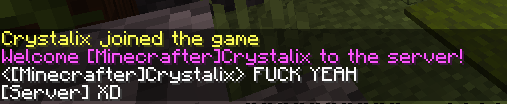 slate sonnet
Only little sad thing is that I can't ipban
But I think I can just do that on the vps
tame carbon
you can use ufw for that
slate sonnet
I'll read into that later then
tame carbon
@slate sonnet do you know how to set up ssh key authorization?
might be a good time now to lock down your vps a bit
slate sonnet
No?
tame carbon
ok
slate sonnet
tame carbon
might be a good time now to lock down your vps a bit
Yeah
tame carbon
okay, but we're setting up an ssh key on your windows machine first
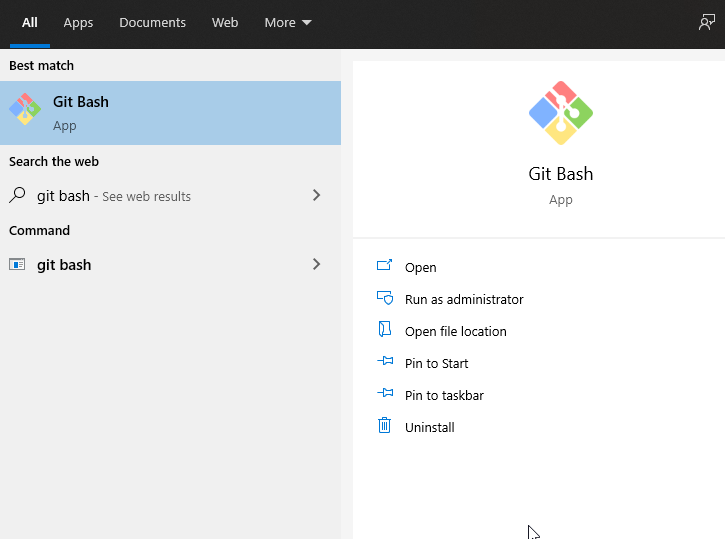
tame carbon
do you have git installed perhaps?
slate sonnet
Lemme check
tame carbon
well
you need ssh-keygen
which I usually install with git-scm
it has a little windows bash interpreter
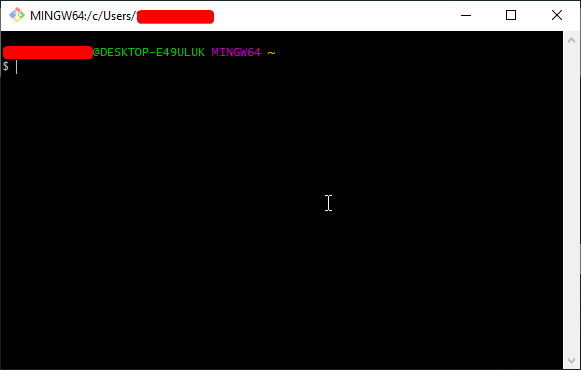 slate sonnet
git clone https://github.com/git/git

GitHub
Git Source Code Mirror - This is a publish-only repository and all pull requests are ignored. Please follow Documentation/SubmittingPatches procedure for any of your improvements. - git/git
Did that
tame carbon
It has nothing to do with git :(((
slate sonnet
Oh
 tame carbon
@hollow marlin I'm using POSTROUTE masquerade now, this however changes the source address...
is there a way to not overwrite source IP?
@hollow marlin iptables -A POSTROUTING -t nat -p tcp -d 10.0.0.2 --dport 25565 -j MASQUERADE
slate sonnet
What git editor should I use?
slate sonnet
Use openssl library?
tame carbon
ye. just hit next next next
slate sonnet
Okay
hollow marlin
tame carbon
is there a way to not overwrite source IP?
No POSTROUTING rule will do that after a forward, or to make sure PREROUTING is not translating also
tame carbon
@slate sonnet yes
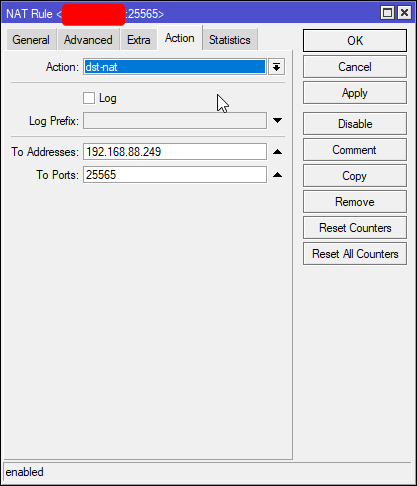
@hollow marlin how come in SOHO when you port forward, you can still see the source IP ?
even I can do that here
hollow marlin
Thats dst. NAT, MASQUERADE is source NAT
tame carbon
https://i.imgur.com/qSO2Dr0.png DST NAT
 hollow marlin
Basically "change source IP of the exiting interface"
tame carbon
@hollow marlin so I'm doing something wrong
so what should POSTROUTING do?
just -j ACCEPT ?
instead of masquerade?
because we added that
and it started working
I'm confused with the pre and post now
 hollow marlin
It started working because when traffic was routed and leaving 10.0.0.1, the SRC was changed. Now on return, 10.0.0.0/24 points to the WG tunnel and its routed back out. Without this, traffic will come in the VPS, be routed without src. NAT, and return traffic will be sent out his WAN then will be dropped by the remote FW
Asymmetrical routing
slate sonnet
@tame carbon what do I do in git?
tame carbon
@slate sonnet run ssh-keygen -t rsa -b 4096 -C "your_email@example.com" replace that with whatever email
@hollow marlin I'm at a loss, what would you change?
slate sonnet
"enter file in which to save the key"
hollow marlin
tame carbon
I'm confused with the pre and post now
Prerouting is used to alter a packet prior to routing, say for firewall filter as you go down the rules. Postrouting is the same but after routing has been done. Really a case by case.
tame carbon
iptables -A POSTROUTING -t nat -p tcp -d 10.0.0.2 --dport 25565 -j MASQUERADE
iptables -t nat -A PREROUTING -p tcp -i eth0 --dport 25565 -j DNAT --to-destination 10.0.0.2:25565
iptables -A FORWARD -p tcp -d 10.0.0.2 --dport 25565 -m state --state NEW,ESTABLISHED,RELATED -j ACCEPT
this is what we have running rn
slate sonnet
slate sonnet
"enter file in which to save the key"
.ssh?
hollow marlin
That is correct, you will want src. NAT in this situation
slate sonnet
passphrase
tame carbon
you can put one on there, if you want to encrypt your key
tame carbon
otherwise anyone can use your private key
tame carbon
@hollow marlin yes, but can the host not translate packets from WG -> WAN to be masqueraded
while packets from WAN -> WG are not translated?
or does that not follow through, because this is L3 and not L2 ?
slate sonnet
Yup :D
tame carbon
This is networking at its finest
slate sonnet
Want to thank everyone who helped out
slate sonnet
Router doesn't have ipv6 lmao
tame carbon
garbage ISP
tame carbon
@slate sonnet did you create the key?
slate sonnet
Can't wait till I move out from my mom's house
slate sonnet
tame carbon
<@!289451427011756032> did you create the key?
Yes
tame carbon
in git bash
slate sonnet
Okay
tame carbon
you'll have to enter your password for your VPS
slate sonnet
"are you sure you want to continue?"
tame carbon
yes
slate sonnet
Just enter
slate sonnet
Logged into the vps
tame carbon
@dense furnace it works now
 dense furnace
wow :o
tame carbon
just hardening the vps now
dense furnace
congratz
tame carbon
yeah took a while
dense furnace
probably
tame carbon
iptables -A POSTROUTING -t nat -p tcp -d 10.0.0.2 --dport 25565 -j MASQUERADE
iptables -t nat -A PREROUTING -p tcp -i eth0 --dport 25565 -j DNAT --to-destination 10.0.0.2:25565
iptables -A FORWARD -p tcp -d 10.0.0.2 --dport 25565 -m state --state NEW,ESTABLISHED,RELATED -j ACCEPT
the solution ^
dense furnace
oh god
slate sonnet
@tame carbon so now try connecting on putty?
tame carbon
@slate sonnet nah, you can just run ssh root@ip now
in git bash
you dont need putty per-se
you could. make a preset for it
you just have to tell putty to use that private key
but git bash just has ssh
slate sonnet
logged in
tame carbon
nice
dense furnace
oh you even secured the server?
tame carbon
@slate sonnet now modify /etc/ssh/sshd_config
@dense furnace well, the wireguard stuff @untold elbow helped out with, while I was eating dinner
slate sonnet
What do I modify?
tame carbon
then it was a matter of modifying the kernel's IP table configuration to properly port forward the minecraft packets over the VPN
which took the longest
dense furnace
oof
better write that down for the future @slate sonnet :D
that = everything you did today
slate sonnet
I wanted to learn networking and stuff
tame carbon
@slate sonnet search (CTRL + W) for PasswordAuthentication
slate sonnet
Now I'm not so sure lmao
tame carbon
@slate sonnet on a router like mikrotik this is much easier
dense furnace
PasswordAuthentication no and PubkeyAuth yes?
slate sonnet
tame carbon
<@!289451427011756032> search (CTRL + W) for PasswordAuthentication
Found it
tame carbon
@slate sonnet that commandline crap on linux looks like this on here: https://i.imgur.com/XSrkwZN.png

@slate sonnet ok set it to no
if its commented, uncomment it
slate sonnet
Still confusing, but at least don't have to keep going through the history lol
So uncomment it and set it to no
Done
tame carbon
@slate sonnet this is NAT on mikrotik: https://i.imgur.com/atyYpTl.png
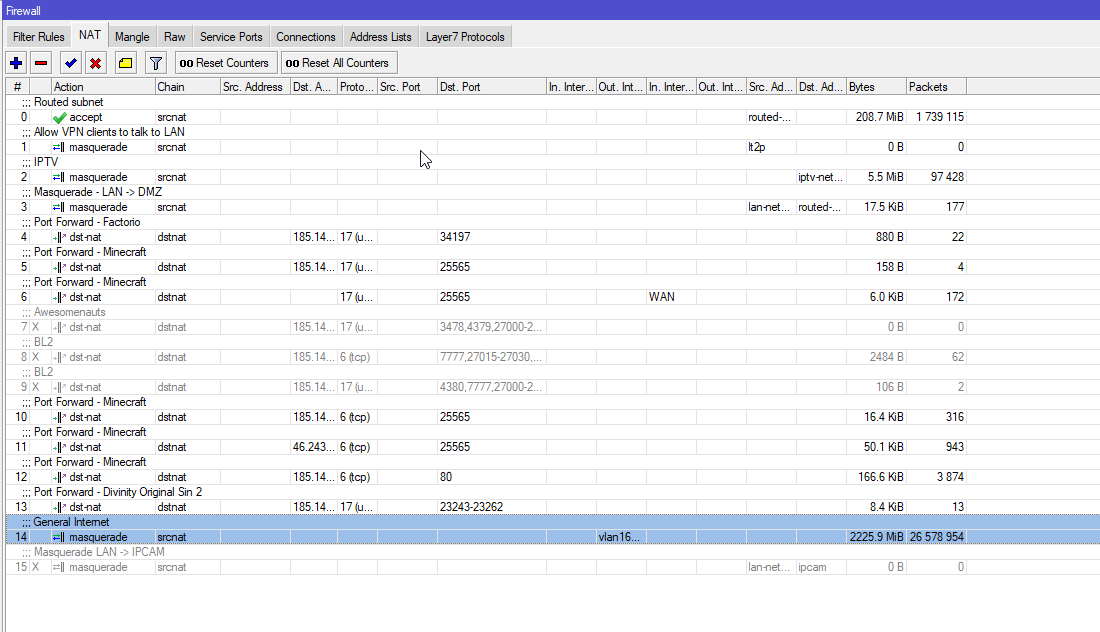
you just dont need to memorize IPs
everything uses aliases
slate sonnet
Save and exit out of the config file?
tame carbon
make sure PubkeyAuthentication is set to yes
and then save and exit
then run: systemctl restart ssh
slate sonnet
Okay
hollow marlin
tame carbon
<@!462711605063450628> yes, but can the host not translate packets from WG -> WA...
I guess I don't understand, PRE/POST rules will automatically apply the same in reverse with connection tracking
tame carbon
Yeah that's why I was confused too lol
because usually if you apply a NAT rule
it just tracks immediately
slate sonnet
tame carbon
then run: `systemctl restart ssh`
Done
tame carbon
@slate sonnet ok now, you can only log in on ssh with that keyfile
password is now blocked
you can try it from your phone, and test
that key is 4096 bits
which takes longer than the age of the universe to compute
so its safe
unless someone steals that key ofcourse and brute forces the passphrase xD
slate sonnet
That's a whole 4kbits
dense furnace
tame carbon
which takes longer than the age of the universe to compute
nowadays
tame carbon
@slate sonnet on your linux system you can do the same ssh-key-gen
and then you just cat ~/.ssh/id_rsa.pub
dense furnace
dense furnace
nowadays
we don't know about the future O:
lean pebble
tame carbon
which takes longer than the age of the universe to compute
😆
So all good now ?
slate sonnet
I think so
tame carbon
@slate sonnet public keys on the server are stored in: ~/.ssh/authorized_keys one key per line
for root this is /root/.ssh/authorized_keys
slate sonnet
Got it
tame carbon
@slate sonnet ofcourse you can use that vps for all sorts of stuff
like even hosting a small website
it has 20GB storage
which is not bad
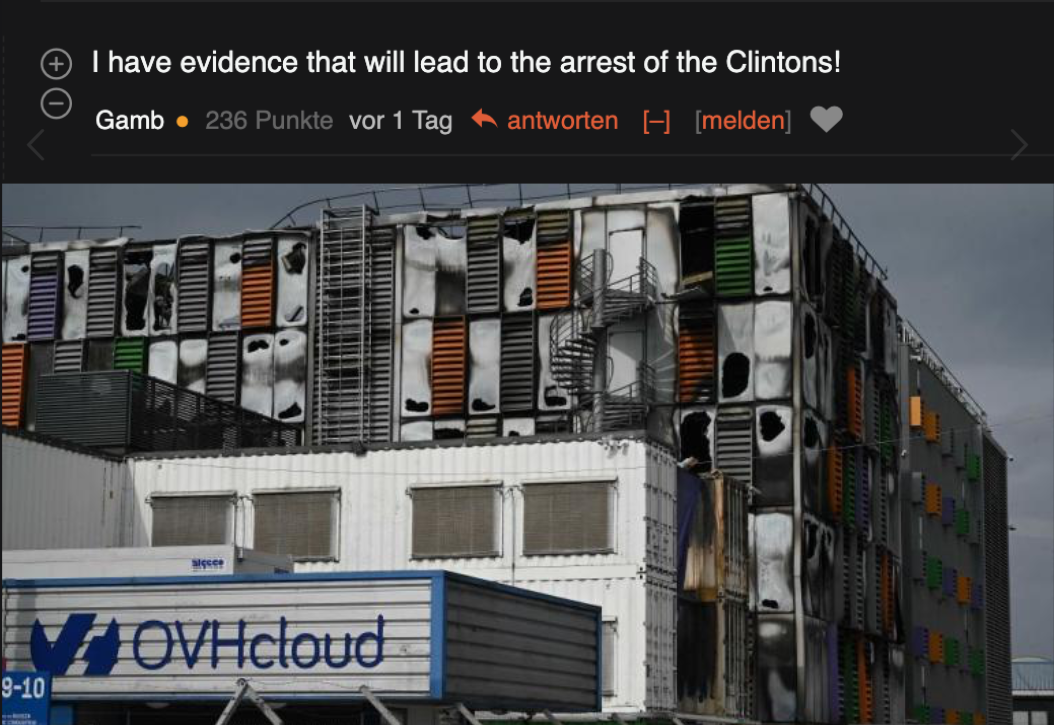
@dense furnace https://i.imgur.com/644bS5p.png
 dense furnace
tame carbon
like even hosting a small website
dense furnace
tame carbon
like even hosting a small website
with nginx e.g.
wait
you're on pr0 too?
tame carbon
_>
tame carbon
@dense furnace this is my bad habbit of rehosting
and this was like 30 mins after they came back on
service was still laggy
dense furnace
where r you from crystal?
tame carbon
@slate sonnet as @dense furnace said, nginx is perfect for this
its small footprint, like 5MB memory
@dense furnace Netherlands
Though I have dual citizenship
and speak three languages xD
German, Dutch, English
dense furnace
nice
dense furnace
tame carbon
<@!223850412317474826> https://i.imgur.com/644bS5p.png
laughed hard about this
I like all the memes
tame carbon
these datacenter memes are extra spicy
slate sonnet
Well anyway, thank you @tame carbon @untold elbow @hollow marlin @peak cloak
dense furnace
so much good oc
untold elbow
🙂
slate sonnet
It was fun learning a little bit about all of this
tame carbon
@slate sonnet if you ever want to learn more, you can always get a small router
and run your wireguard client on there
I do something opposite of what you did today. I run a VPN server on my router
so my phone always has a LAN ip when I am outside using LTE
dense furnace
I also use this
tame carbon
but I guess this wont be of any use to ya with the ISP you have right now
but you have a tunnel now, which is a start
dense furnace
and a raspberry pi with pi-hole
peak cloak
tame carbon
so my phone always has a LAN ip when I am outside using LTE
did the same thing
except on a VM
tame carbon
backdoor with a very strong lock :)
slate sonnet
I'm gonna experiment more once I move into my own place where I don't have a crappy isp
dense furnace
I bet crystal is working in IT
tame carbon
beta version of RouterOS has wireguard in this list too: https://i.imgur.com/fxxWwnL.png
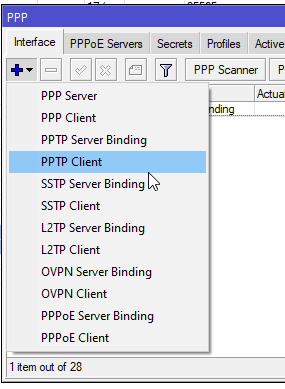
sadly this is still v6
@dense furnace developer
Written a lot of server applications
and that comes with its share of linux & networking
and this is the only LTT channel where we can talk about Linux and dis on windows without starting an OS 🔥 war
tame carbon
because
dense furnace
no there is no because here
tame carbon
you know what we just did with that iptable stuff right?
you need windows server for that to work
which costs $$$
routing doesnt work on normal windows
you can only do a LAN bridge with connection sharing
that's it.
Like, I can go on and on
windows is just garbage in every single way
package distribution, updates, system layout
driver stack
network stack
and it costs money
dense furnace
currently I use win10 for gaming only
dense furnace
I know there is stuff like wine, but meh
tame carbon
native games work just fine on linux
dense furnace
tame carbon
and my servers debian
Oh I see you're a man of culture aswell
peak cloak
currently playing ksp
dense furnace
peak cloak
currently playing ksp
that's an horrible good game
peak cloak
native linux support
dense furnace
y
tame carbon
@dense furnace my laptop is the place, where i need to quickly be able to get something to work
dense furnace
many steam games have native linux support now
tame carbon
hence ubuntu, easier to find stuff for online
debian is slightly different, sudo for example is not a thing
dense furnace
true
tame carbon
and its also less bloated
I run debian as a host OS
my vm with my own mc server, that's a broken install with ubuntu 18
that i managed to repair to the point of running java
dense furnace
ubuntu has a great community but I also like to use debian for my servers
dense furnace
my company currently uses centos but will switch soon
maybe to ubuntu
because of update policie
 last solstice
but centos is so nice
untold elbow
was so nice*
tame carbon
the thing is
last solstice
If they want support but currently have centos why not just go to redhat
peak cloak
rocky linux will replace it
tame carbon
software support for linux is slowly improving
dense furnace
centos is dying
tame carbon
and those who first start adding support, often add fedora and ubuntu first
everything else comes after
so if you just use a debian based system
you get the largest market share of compatible packets
unless ofcourse you run ARCH
last solstice
Arch best
dense furnace
 dense furnace
last solstice
Arch best
dense furnace
last solstice
Arch best
^
tame carbon
but I've used arch for 3 months, until it updated itself and broke, the day I had important meetings
never again.
I rather run an outdated LTS kernel
dense furnace
you don't use arch because you want an easy life
tame carbon
than to run arch
dense furnace
you use arch to flex
last solstice
Im on mint on my laptop, but wanna switch to kali lol
untold elbow
lol why
slate sonnet
I've noticed that there's some like lag on my mc server. That can only be fixed by using a better quality vps provider?
last solstice
because csec major
tame carbon
kali is leak af
dense furnace
slate sonnet
I've noticed that there's some like lag on my mc server. That can only be fixed ...
huh?
slate sonnet
As if there's a lot of latency between me and my server
untold elbow
@slate sonnet yeah probably
dense furnace
no way
tame carbon
no fw, no default security in place, everything is root.
dense furnace
slate sonnet
As if there's a lot of latency between me and my server
connect locally
from your machine
does it lag too?
slate sonnet
Well I know I can connect locally
dense furnace
slate sonnet
Well I know I can connect locally
do it to test it
slate sonnet
But my friends will lag which is worse than zerotier lol
untold elbow
you're adding an extra network hop, that's gonna add latency
slate sonnet
dense furnace
do it to test it
It's fine if I do it locally
slate sonnet
So basically no real way around it huh
untold elbow
not without a different VPS, no
dense furnace
that's weird tbh
slate sonnet
By different vps you mean different vps location?
tame carbon
@slate sonnet try pinging 46.243.190.1 how much latency do you get?
slate sonnet
From my pc?
untold elbow
dynamic dns would let you have a hostname that doesn't change mapped to your CGNAT IP address and doesn't require an extra network hop
dense furnace
do YOU also lag if you connect trough the vps?
tame carbon
@untold elbow he's connecting to his own VPS endpoint, that's gonna have an RTT of 4x
no wonder it will lag.
untold elbow
yeah but it'll be roughly the same experience as his friends connecting
slate sonnet
tame carbon
<@!289451427011756032> try pinging `46.243.190.1` how much latency do you get?
avg ping is 89ms
untold elbow
oof
tame carbon
82 ms then
dense furnace
tame carbon
<@!289451427011756032> try pinging `46.243.190.1` how much latency do you get?
this ip? i got 25ms
tame carbon
@untold elbow he's not that far away
slate sonnet
I can say I live in krasnodar krai
tame carbon
@slate sonnet your internet has bad ping, and the route to your VPS is suboptimal.
slate sonnet
So kinda near europe
tame carbon
he has 60ms to his gateway
slate sonnet
What?
tame carbon
but that's 60ms to a host in a datacenter, which is pretty close for everyone else
@slate sonnet ping your vps
or do a traceroute to your vps
untold elbow
was that ip not his vps?
tame carbon
that was mine xD
untold elbow
o
slate sonnet
69ms ping (nice)
tame carbon
just wanted to see how bad it is
tame carbon
that's a router of mine yes
untold elbow
hackin u now
dense furnace
it's ok for me
dense furnace
untold elbow
hackin u now
rofl
tame carbon
@untold elbow that's my public /29
its routed through my WAN, but doesnt show in traces
dense furnace
slate sonnet
69ms ping (nice)
it's definitely you scratch
tame carbon
and the rDNS is not set
dense furnace
perform a speedtest @slate sonnet
tame carbon
@dense furnace basically:
traceroute to 1.1.1.1 (1.1.1.1), 64 hops max
  1   46.243.190.1  0.004ms  0.006ms  0.225ms
  2   46.243.152.3  6.025ms  6.253ms  6.098ms
  3   46.249.55.194  6.899ms  6.713ms  6.969ms
  4   185.8.179.33  7.108ms  6.993ms  7.105ms
  5   80.249.211.140  8.683ms  8.864ms  9.322ms
  6   1.1.1.1  8.186ms  8.354ms  8.103ms
nice
tame carbon
its quite nice, when you have your own Public IPs
especially for local use >_>
and firewall it off
slate sonnet
15ms ping @dense furnace
dense furnace
huh
tame carbon
@slate sonnet from experience, anything below 150ms on minecraft, you don't really feel/notice
dense furnace
but to your vps you get 69ms??
tame carbon
minecraft runs at 20tps, so it has a change in gamestate every 50ms
so at most, you lag 3 ticks behind
dense furnace
tame carbon
minecraft runs at 20tps, so it has a change in gamestate every 50ms
but that's for the game logic, not the players position?
or am I missing something
slate sonnet
dense furnace
but that's for the game logic, not the players position?
Yes
That's only for game logic
tame carbon
@dense furnace network thread is asynchronous from the gamethread
dense furnace
so you definetly feel a ping of 70~
slate sonnet
I can send a vid
dense furnace
may I ask for the server ip to join the minecraft server? I want to see if there's any lag for me. You can dm me
tame carbon
Oh I didnt even test that lol
@slate sonnet its really not that bad
you had.. 89ms
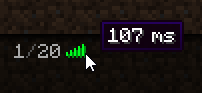


 tame carbon
18ms added by the tunnel
dense furnace
is it the vps?
dense furnace
because speedtest told him 15ms