#networking
1 messages · Page 297 of 1
 dense furnace
 tame carbon
this maps a port on the remote, to a local port
dense furnace
y
tame carbon
but you can do it the other way around too
 peak cloak
tame carbon
but you can do it the other way around too
peak cloak
tame carbon
but you can do it the other way around too
not really
dense furnace
peak cloak
not really
e.g. you know you can use ssh to login to linux right?
peak cloak
dense furnace
e.g. you know you can use ssh to login to linux right?
yes, I'm very familiar with it
I know how this works
dense furnace
OK
peak cloak
never used tunneling though
dense furnace
:D
tame carbon
ssh -R 25565:localhost:25565 user@server
peak cloak
actually just setup remote access to my home network via wireguard 2 days ago
tame carbon
this exposes your local 25565 to the remote server
dense furnace
mostly used by ppl who have dynip but want their network to go
peak cloak
so I can turn on my pc and remote into it
peak cloak
dense furnace
mostly used by ppl who have dynip but want their network to go
wdym by network to go?
tame carbon
 dense furnace
peak cloak
wdym by `network to go`?
dense furnace
peak cloak
wdym by `network to go`?
expose network to public (yet it isn't recommended lol)
peak cloak
I have a dynamic IP myself, although it basically never changes
tame carbon
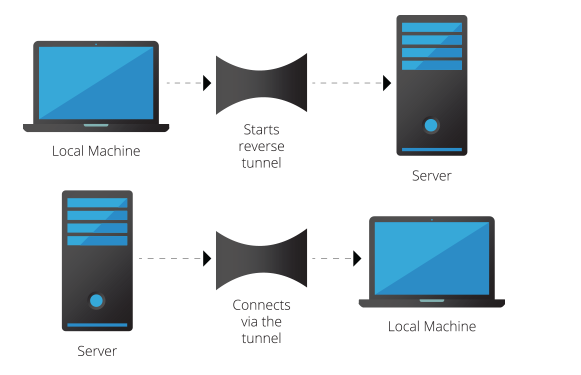
@slate sonnet This is what we're suggesting. Your gameserver initiates a tunnel to your VPS
peak cloak
dense furnace
expose network to public (yet it isn't recommended lol)
I don't get what you are trying to say
port forward?
tame carbon
@slate sonnet the 'local machine' in this context, is your minecraft server host
 slate sonnet
tame carbon
https://i.imgur.com/1vv89ir.png
slate sonnet
tame carbon
https://i.imgur.com/1vv89ir.png
Can my friends connect using the ip of the vps?
dense furnace
yes
peak cloak
yep
tame carbon
Yeah, all you then have to do is configure your host, to tunnel data from its public IP on port 25565, through the tunnel that was established
I think that is done with iptables
slate sonnet
But how would I do that since I have a cgnat?
dense furnace
You don't need a local ip
slate sonnet
Oh, okay
peak cloak
slate sonnet
But how would I do that since I have a cgnat?
start the tunnel from your end to the vps
tame carbon
@slate sonnet your gameserver host (local) establishes a tunnel to the server. After this the server can directly reach your gameserver
dense furnace
You connect to your vps
tame carbon
@slate sonnet then you just have to make sure your VPS routes traffic through the tunnel
dense furnace
and the vps is able to redirect traffic trough this connection of yours
tame carbon
for the tunnel, you can either use VPN, or use ssh (hackiest and simplest way)
@slate sonnet CG-NAT prevents connections from being established from the WAN side (listening on a port on your IP)
but we can still establish a tunnel in the reverse direction
dense furnace
You know how to do it?
tame carbon
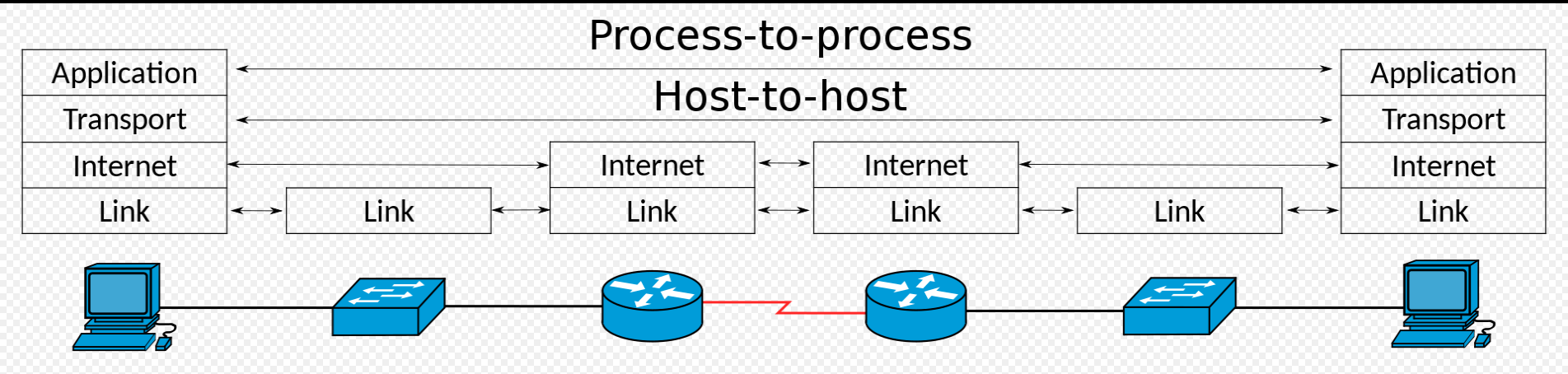
NAT breaks the end-to-end principle
The end-to-end principle is a design framework in computer networking. In networks designed according to this principle, application-specific features reside in the communicating end nodes of the network, rather than in intermediary nodes, such as gateways and routers, that exist to establish the network.
The essence of what would later be calle...
 slate sonnet
dense furnace
You know how to do it?
slate sonnet
dense furnace
You know how to do it?
Connect to the vps?
tame carbon
NAT breaks this ^
slate sonnet
I know the general idea I think
dense furnace
slate sonnet
Connect to the vps?
y basically everything we talked about
slate sonnet
Not really😅
dense furnace
your first step is to get a cheap vps
tame carbon
no
dense furnace
No
tame carbon
you dont need lot of CPU for this
tame carbon
as a tip
tame carbon
@slate sonnet get a VPS that is close to you
slate sonnet
tame carbon
otherwise you get a lot of latency
xD
dense furnace
dense furnace
but not ovh france
burned down yesterday
tame carbon
 dense furnace
for those who don't know
tame carbon
 tame carbon
I laughed at the poor fucks who didnt have an emergency plan
and were looking on the OVH web panel for the button to activate their emergency plan

 slate sonnet
1gb of ram is alright?
tame carbon
more than enough for your purposes yes
tame carbon
ubuntu
thats the easiest one you'll find lots of support for
Debian would be the 2nd choice, if you prefer a cleaner system
Ubuntu is based on debian
@slate sonnet the article that @peak cloak posted: https://github.com/mochman/Bypass_CGNAT
Assumes ubuntu as well

GitHub
Wireguard setup to bypass CGNAT with a VPS. Contribute to mochman/Bypass_CGNAT development by creating an account on GitHub.
We can just try to do it with Wireguard, that's the cleanest solution
and probably more reliable than any ssh-equivalent
slate sonnet
Okay
That's what I'm gonna do then
All the stuff that I need to do is on the github page?
tame carbon
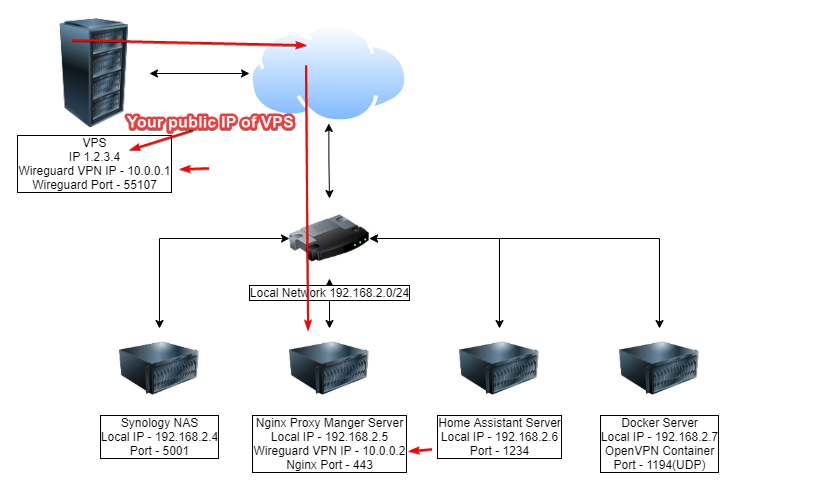
this is in essence what we need to set up
The big red arrow points to the machine on your LAN with the gameserver on it
as you can see, the VPS has two IP addresses
a public one, and a private tunnel IP
The gameserver host (the nginx proxy in the image) also has an IP on that tunnel network
this is how the VPS and gameserver can then directly talk to eachother
slate sonnet
tame carbon
a public one, and a private tunnel IP
So do I keep the private one to myself and give my friends the public one?
tame carbon
@slate sonnet yeah the idea is that the public IP of your VPS will route its traffic to your gameserver behind your CG-NAT
 lean pebble
Someone can help me understand how to make my integrated graphics work again ?
Asus sabertooth z87 mboard with i7 4770 no Nvidia / amd gpu only the the cpu gpu that not giving any output
slate sonnet
lean pebble
Someone can help me understand how to make my integrated graphics work again ?
...
tame carbon
@slate sonnet so Internet -> VPS -> Wireguard -> Game Server
Wireguard is also over the internet
slate sonnet
tame carbon
<@!289451427011756032> so Internet -> VPS -> Wireguard -> Game Server
Got it
dense furnace
so you want use wireguard or ssh-tunnel?
tame carbon
I'd use wireguard
dense furnace
kk
slate sonnet
I think I should use wireguard
tame carbon
Wireguard would automatically keep the tunnel up, ssh is a bit hacky :P
dense furnace
then I'm out :D no idea of wireguard honestly
dense furnace
lol
tame carbon
but we have a tutorial
tame carbon
GitHub
Wireguard setup to bypass CGNAT with a VPS. Contribute to mochman/Bypass_CGNAT development by creating an account on GitHub.
This assumes wireguard on a VPS
@dense furnace I'm still using layer 2 tunnels over here :3
lean pebble
Cgnat block port forwarding right ?
lean pebble
Ya I hate it
tame carbon
CG-NATs are the bane of ipv4
@dense furnace thanks to my ISP, I have a public /29 xD
tame carbon
I have 9 in total, if you count the /32 WAN
dense furnace
tame carbon
<@!223850412317474826> thanks to my ISP, I have a public /29 xD
oof
lean pebble
Well IPs are pretty cheap in europe
tame carbon
My ISP routes the /29 through their internal network
So I can even share this publicly, without you guys doxing me ;P
dense furnace
kek
tame carbon
lol
slate sonnet
That interface looked like windows xp lmao
tame carbon
@slate sonnet winbox
@slate sonnet https://i.imgur.com/ejvPGen.png
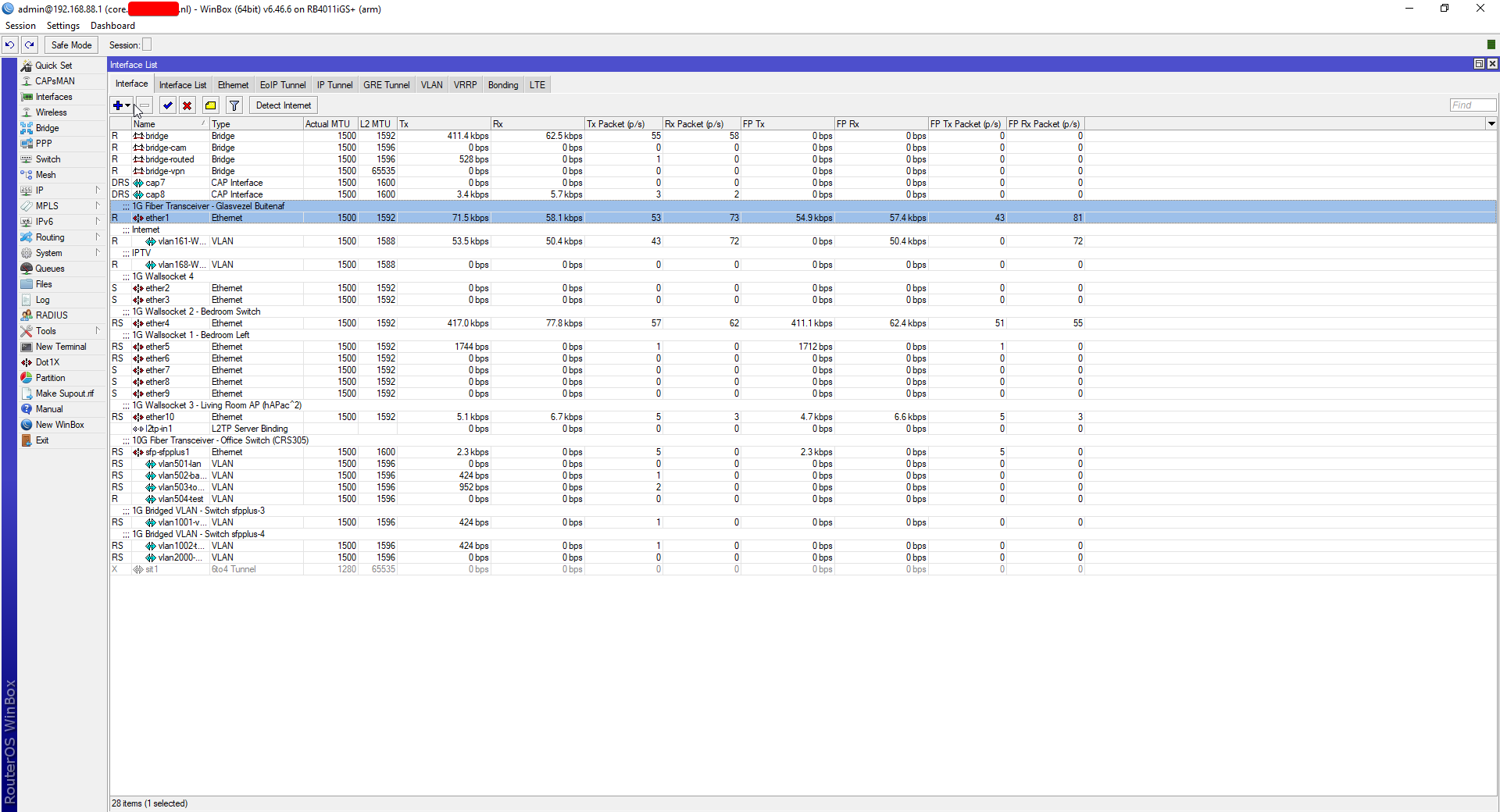
management tool for RouterOS
slate sonnet
Dunno what routeros is but okay
slate sonnet
You must have a whole networking setup
dense furnace
slate sonnet
Dunno what routeros is but okay
unknown software is the best protection
lol
tame carbon
@slate sonnet thats my core router in the attic https://cdn.discordapp.com/attachments/776722183119699988/777646103775674368/IMG-20200922-WA0001.jpg
 slate sonnet
Yeah
dense furnace
nice one
slate sonnet
tame carbon
<@!289451427011756032> thats my core router in the attic https://cdn.discordapp...
Damn
dense furnace
living the dream
tame carbon
@dense furnace RouterOS v7 (in beta right now) will add Wireguard support
dense furnace
teamspeak for you and your frien.. oh wait
dense furnace
tame carbon
That's a Ryzen 2600
damn
slate sonnet
But atm I'm stuck on a network where I can't even port forward lmao
dense furnace
what specs exactly?
tame carbon
@dense furnace R2600, 16GB ECC (2400Mhz), 2x 10G SFP+ network
dense furnace
slate sonnet
But atm I'm stuck on a network where I can't even port forward lmao
ayy you don't need to honestly. Just route everything trough external servers lol
dense furnace
internally you can do whatever you want
slate sonnet
dense furnace
ayy you don't need to honestly. Just route everything trough external servers lo...
Well yes, but my goal is to be able to host everything myself
dense furnace
tame carbon
NVMe boot drive, and 4x 4TB storage
oof
tame carbon
@dense furnace the whole thing cost me around 800 bucks
dense furnace
slate sonnet
Well yes, but my goal is to be able to host everything myself
you still can. 3€/m vps is nothing? It's just for the ip honestly
it's totally legit
slate sonnet
Well yeah
dense furnace
tame carbon
<@!223850412317474826> the whole thing cost me around 800 bucks
oof
wait what
tame carbon
@slate sonnet I pay my ISP 16euros/month for extra IP addresses ;P
dense furnace
Everything? switch etc.?
tame carbon
@dense furnace nah just the server
dense furnace
oof
tame carbon
that router is 190 bucks

MikroTik is a Latvian company which was founded in 1996 to develop routers and wireless ISP systems. MikroTik now provides hardware and software for Internet connectivity in most of the countries around the world.
tame carbon
@dense furnace network card alone was 200 bucks
dense furnace
like the old new
slate sonnet
I pay the equivalent of 5.65 euros per month for 35mbit up and down
tame carbon
I built this machine 2 years ago
dense furnace
slate sonnet
I pay the equivalent of 5.65 euros per month for 35mbit up and down
I pay 35€ for 100down 40 up
dense furnace
tame carbon
I built this machine 2 years ago
ok it's legit then
tame carbon
@slate sonnet I have 250/250mbit, extra /29 subnet and IPTV for a grand total of 140/month
slate sonnet
Damn
tame carbon
I resell two IP addresses
dense furnace
slate sonnet
I pay the equivalent of 5.65 euros per month for 35mbit up and down
thats hell cheap
tame carbon
two companies get their internet from me
slate sonnet
Russia has really cheap internet
dense furnace
In my opinion
tame carbon
each get 50/50 internet, for 50 bucks
slate sonnet
I get 0ms ping in speedtest lmao
tame carbon
so I only pay around 40bucks/month
dense furnace
slate sonnet
I get 0ms ping in speedtest lmao
rofl
tame carbon
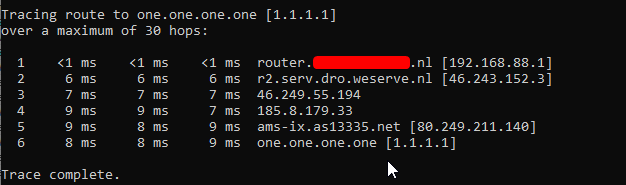
5ms
dense furnace
18ms
._.
germany
¯_(ツ)_/¯
the most shitty and expensive internet you can think of
tame carbon
 dense furnace
damn
tame carbon
entire network here is FQDN
and my lastname is in the host xD
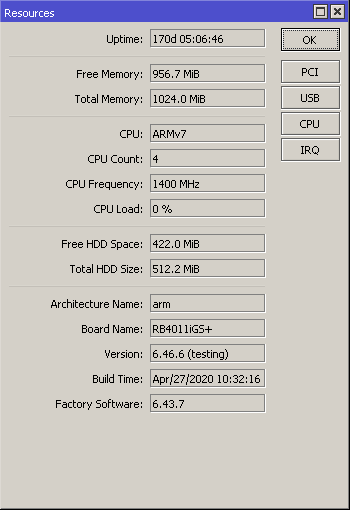
@dense furnace the RB4011 is pretty sweet as a router
it has so much headroom in terms of performance
if I fully saturate my NAS and internet
CPU usage is like 15% at most
 tame carbon
ew
dense furnace
:D
tame carbon
unifi overpriced
slate sonnet
Also, when I setup the vps and setup wireguard and stuff, the only data that's gonna be coming and going between my pc and the vps is minecraft server stuff? (since I want to host a minecraft server)
tame carbon
@slate sonnet yeah wireguard creates a virtual network on both machines
in that screenshot on the github
that's the 10.0.0.0/24
but those are only reachable on the machines themselves
slate sonnet
Well what I mean is that if I just use my pc and search stuff on google for example, that data is gonna go through my main network
But the minecraft stuff will go through the vps
Or will everything on my pc go through the vps?
Or can I configure it
dense furnace
good question, you have to logoff the vpn i guess
tame carbon
@slate sonnet think of wireguard as a network cable plugged directly between your gameserver and VPS
that's all it is
dense furnace
idk, can you link only the executionable with wireguard?
tame carbon
@slate sonnet this config rule: https://i.imgur.com/VussQl0.png
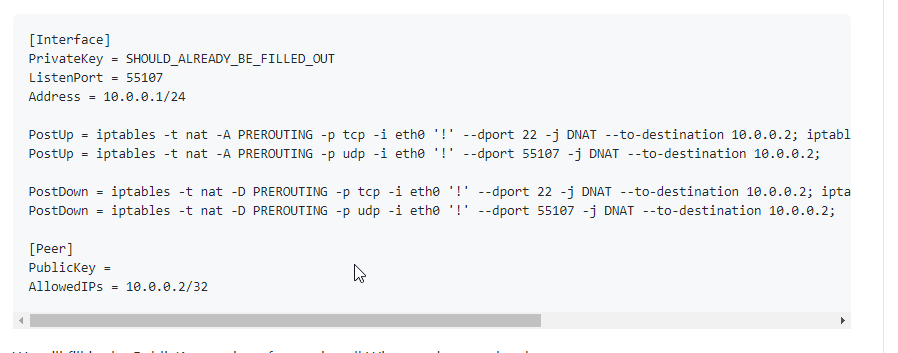
iptables -t nat -A PREROUTING -p tcp -i eth0 '!' --dport 22 -j DNAT --to-destination 10.0.0.2; iptables -t nat -A POSTROUTING -o eth0 -j SNAT --to-source 1.2.3.4
this ^
is a config rule for the VPS internal network stack
It basically transports traffic on a specific port, through that internal network
slate sonnet
Oh okay
dense furnace
oh i get it
slate sonnet
So with that pretty much the only data is gonna be minecraft server data (since its only on 1 port 25565 udp/tcp)
tame carbon
@slate sonnet specifically
@slate sonnet that rule forwards all ports
except port 22
dense furnace
iptables -t nat -A PREROUTING -p tcp -i eth0 --dport 25565 -j DNAT --to-destination 10.0.0.2
slate sonnet
Well I'm gonna do all this later when I buy the vps
dense furnace
*corrected
tame carbon
@dense furnace https://i.imgur.com/2bhTrWn.png

@dense furnace only needs two exceptions
dense furnace
y I need to learn to read the damn documentation
dense furnace
but he doesn't want that
tame carbon
@dense furnace he does.
He can then augment this, with a regular firewall
and then only permit 25565 incoming
 thick minnow
Does anyone here know a VPS provider that has a student plan and does not ask for a flipping credit card from a student who is below the age of 18 (other than microsoft azure)?
dense furnace
he only want to route 25565 trough the vpn
dense furnace
thick minnow
Does anyone here know a VPS provider that has a student plan and does not ask fo...
do you have paypal?
tame carbon
@dense furnace yeah, but this tutorial would forward all ports
But we can use a firewall to only permit incoming on 25565
so even if all traffic is forwarded, only 25565 will be allowed in
dense furnace
dense furnace
```iptables -t nat -A PREROUTING -p tcp -i eth0 --dport 25565 -j DNAT --to-desti...
that's why I did this :o
thick minnow
dense furnace
do you have paypal?
Would someone below 18 and without a bank account be able to get a paypal account?
slate sonnet
thick minnow
Would someone below 18 and without a bank account be able to get a paypal accoun...
Depends on where you live?
slate sonnet
dense furnace
other countrys other laws
Yes
slate sonnet
For example I know that in Russia you can't make a paypal account under the age of 18
tame carbon
paypal requires you to set up a bank account or credit card
slate sonnet
Yet you can get a debit card
dense furnace
maybe prepaid
but there is no legal host I know about offering this
since you HAVE TO identify yourself
tame carbon
paypal has my mugshot
thick minnow
dense furnace
without a bank account?
Well, AWS and DigitalOcean offer a student plan with credit and then there's oracle which gives basically anyone 2 free VMs
tame carbon
or rather, a photograph of my ID
AWS VMs you can get for free even without a student plan
you can get a micro vm for 1 year for free, as long as you create a new account with a credit card
dense furnace
no bank account = no credit card
tame carbon
git gud.
thick minnow
tame carbon
AWS VMs you can get for free even without a student plan
I know but again the whole credit card thing, they need it for "Verification"
dense furnace
No he needs a vps host
tame carbon
F
thick minnow
Azure was gracious enough
tame carbon
time to ask mommy for her creditcard I guess
dense furnace
google for a hoster which accepts paysafecard or something like this
tame carbon
only reason I even own a credit card to begin with, was because of my travels to the United states a couple years ago
you NEED a creditcard in the US, especially as tourist
slate sonnet
tame carbon
you *NEED* a creditcard in the US, especially as tourist
No debit?
slate sonnet
Mine is mastercard
dense furnace
mine visa
tame carbon

Maestro (stylized as maestro) is a brand of debit cards and prepaid cards owned by Mastercard that was introduced in 1991. Maestro debit cards are obtained from associate banks and are linked to the cardholder's current account while prepaid cards do not require a bank account to operate. Maestro cards can be used at point of sale (POS) and ATMs...
dense furnace
got 2 debit cards from maestro and 1 credit card from mastercard
slate sonnet
Maestro doesn't exist in russia afaik
dense furnace
but guys
slate sonnet
Only mastercard and visa
tame carbon
My creditcard is Mastercard/Visa
slate sonnet
dense furnace
this is obviously the wrong channel for plastic payment cards
Yes lmao
dense furnace
ping us again later when you bought the vps
slate sonnet
Me?
tame carbon
@slate sonnet what host are you planning on using?
slate sonnet
tame carbon
<@!289451427011756032> what host are you planning on using?
Some russian one
1 sec
tame carbon
russian internet 
slate sonnet
tame carbon
russian internet <:KEKW:670048864052445204>
I live in russia so its the best for me lmao
thick minnow
dense furnace
ping us again later when you bought the vps
okay
tame carbon
@slate sonnet you want as close as possible
slate sonnet
London
tame carbon
as little latency between your internet and the VPS
tame carbon
crystal@watomat ~ ping ldn.services.local.knockturnmc.com
PING ldn.services.local.knockturnmc.com (10.244.174.53) 56(84) bytes of data.
64 bytes from 10.244.174.53: icmp_seq=1 ttl=64 time=45.3 ms
64 bytes from 10.244.174.53: icmp_seq=2 ttl=64 time=15.2 ms
64 bytes from 10.244.174.53: icmp_seq=3 ttl=64 time=15.2 ms
My vps is like 15ms...
slate sonnet
That's good?
tame carbon
Its in London
slate sonnet
Well I mean, I don't think it matters too much
tame carbon
and I'm connected via amsterdam
so this is about as good as I can get
I get 7ms to the exchange, and 15ms to the VPS
dense furnace
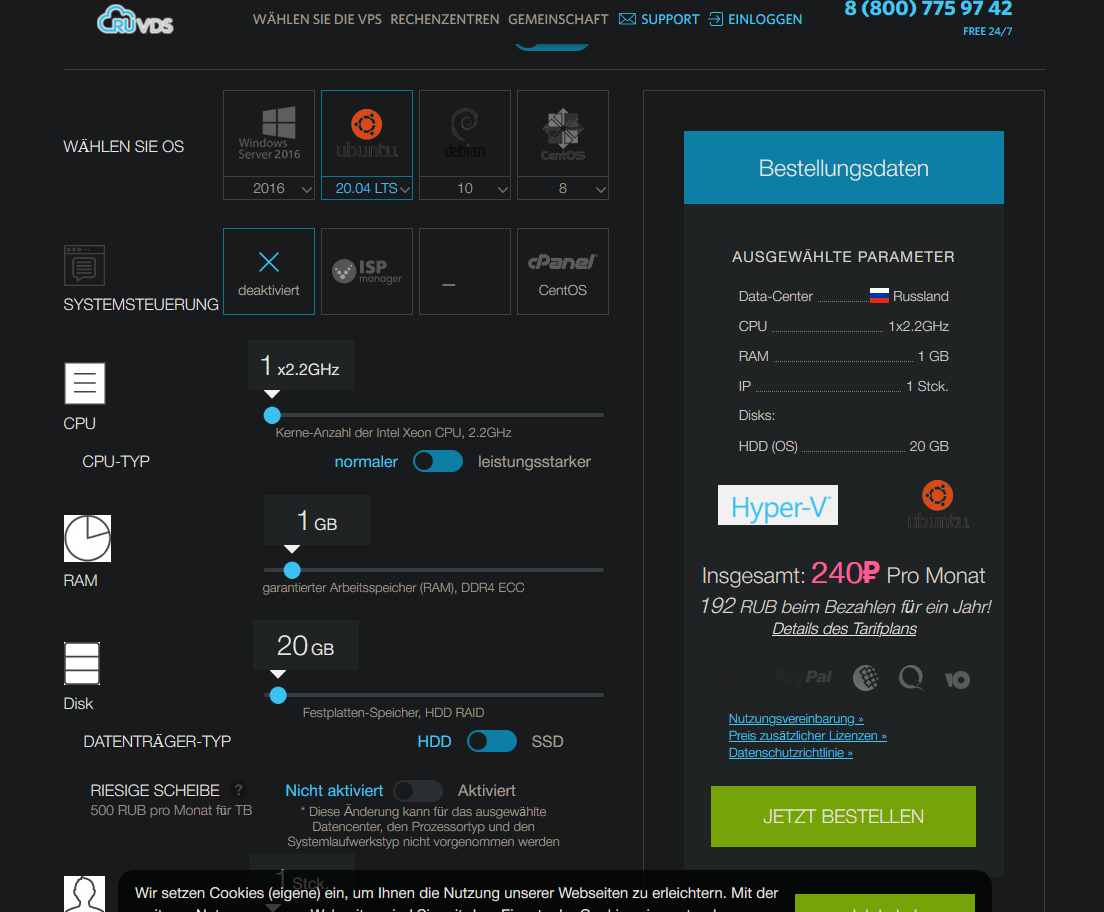
oh there is a vps for 240₽
slate sonnet
Well I think I got like 10ms ping while connected to moscow when I was using parsec
dense furnace
1x2.2GHz
1gb RAM
20gb HDD
ubuntu
slate sonnet
dense furnace
oh there is a vps for 240₽
Yes
tame carbon
@dense furnace those specs are good nuf
dense furnace
 dense furnace
2,73€
tame carbon
OVH's cloud VPSes are around 2,50 euro/month
same specs
but OVH also burns down ocassionally
slate sonnet
dense furnace
https://prnt.sc/10ixaa4
Pretty much the same spec as I did
dense furnace
y but they also burn down
tame carbon
@slate sonnet I had a dedicated server in BHS (canada) with OVH
and they had a tunnel collapse on their fiber backbone
entire datacenter offline for 2 days
and they reimbursed me with $5
slate sonnet
I have a question though, on ruvds there is an option for 1 ip
dense furnace
tame carbon
and they reimbursed me with $5
kek
dense furnace
slate sonnet
I have a question though, on ruvds there is an option for 1 ip
yes
slate sonnet
That means I'll have 1 private and 1 public, right?
dense furnace
eh
tame carbon
You need only a single IP
dense furnace
you can basically create as much private IP's as you want lol
slate sonnet
Huh, apparently kaspersky use their services
I'm buying the vps
Okay, so I have to connect to it via ssh, right?
@dense furnace @tame carbon
slate sonnet
Yes
tame carbon
slate sonnet
I can ssh on my phone though
slate sonnet
How do I ssh?
tame carbon
you type root as the username, and the password they provided to you
Don't be confused by the ssh-tunnel stuff we spoke of earlier
SSH can be used for a multitude of things
but its primarily used for remote login on servers
slate sonnet
Okay, logged in
tame carbon
@slate sonnet change the password
slate sonnet
So now I just basically follow the github guide right?
tame carbon
run passwd
slate sonnet
tame carbon
<@!289451427011756032> change the password
I can do that from the hosting site

 untold elbow
worth looking into setting up certificate-based login for ssh if you're leaving port 22 open to the world
tame carbon
yeah
untold elbow
at some point
tame carbon
yep. first I think setting up the wireguard stuff
once that works
you can harden security
password auth is good enough for now
slate sonnet
No copy paste in putty? :(
untold elbow
right click
dense furnace
yep
dense furnace
^
untold elbow
ctrl+c sends an important program termination signal in unix systems, so you can't have that conflicting with copy/paste
not sure if ctrl+v sends a signal
slate sonnet
untold elbow
ctrl+c sends an important program termination signal in unix systems, so you can...
I thought ctrl+shift+v would work
untold elbow
it will in some programs
tame carbon
you can even have mouseclicks on SSH xD
slate sonnet
btw
untold elbow
you can probably bind it to paste in the putty config
tame carbon
@slate sonnet that first command uses nano which is a text editor
slate sonnet
 untold elbow
but once you get used to it, select to copy and right-click to paste is super fast and way easier
tame carbon
wat.
untold elbow
wtf is that host
dense furnace
ruvds is the hosters name
slate sonnet
slate sonnet
Did sudo sysctl -p
slate sonnet
tame carbon
VODKA
lmao
dense furnace
the rest ist dynamic generated i guess
untold elbow
o
tame carbon
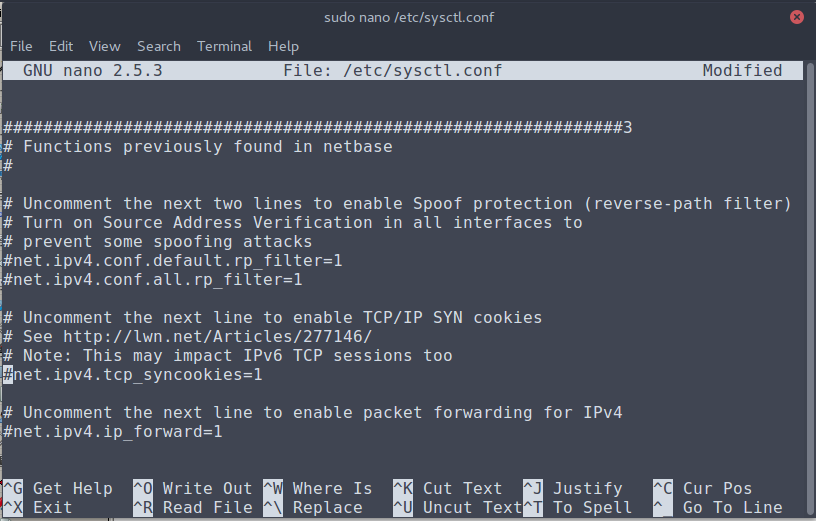
@slate sonnet did you uncomment the config rule as per that guide?
slate sonnet
tame carbon
<@!289451427011756032> did you uncomment the config rule as per that guide?
yes
 slate sonnet
 tame carbon
cool
slate sonnet
Uncommented and saved
tame carbon
sudo sysctl -p fails?
slate sonnet
yes
tame carbon
@slate sonnet run it without sudo
slate sonnet
 tame carbon
you're logged in as root
so you dont need sudo
sudo = super user do
or: run as admin
tame carbon
kk
slate sonnet
I'm just so used to writing sudo for installing stuff
tame carbon
now run
apt install wireguard
@slate sonnet wait
before oyu do that
update existing packages
apt update && apt upgrade -y
run that
and then apt install wireguard
slate sonnet
updating rn
tame carbon
apt update downloads latest definitions from the server
apt upgrade downloads the software and installs it
slate sonnet
I run kde neon as an only os on my laptop, so I know my way around linux a little bit
slate sonnet
Just sometimes I get stuck because of a dumb thing lol
tame carbon
because you didnt know how to ssh
slate sonnet
tame carbon
because you didnt know how to ssh
Never used it
tame carbon
so I assumed knowledge: 0
slate sonnet
OOoooooofff
tame carbon
older versions of minecraft ran off 1.5
slate sonnet
That must have sucked
tame carbon
which is what jamvm ran
iphone 4 only has 512M ram, so... xD
started mc with 256M ram
and took like 15 mins for the spawn to generate
slate sonnet
I have 3gb of ram
Pretty much worked okay-ish for 1 person
It was actually better than my laptop lmao
Laptop has an amd a8-3500m
Main pc has a ryzen 3 3100
tame carbon
@slate sonnet you'll have to start paying attention once you get to step 1c
slate sonnet
One of my core is like the same performance of my laptop I think lol
slate sonnet
tame carbon
<@!289451427011756032> you'll have to start paying attention once you get to ste...
Okay
Still updating
 untold elbow
is wireguard on the main debian/ubuntu repos now? or do you still need to get it from the ppa
tame carbon
err
slate sonnet
According to the guide it is
tame carbon
should be in there
slate sonnet
Since it doesn't tell you to add the ppas
untold elbow
neato, glad to see it's getting more mainstream
slate sonnet
yeah, don't need to add anything
 slate sonnet
wait, how do I paste in putty again?
untold elbow
nice
tame carbon
right click
untold elbow
right click
 tame carbon
copy them line by line
slate sonnet
Since I'm in root I don't need sudo
tame carbon
just remove the sudo in front of it
slate sonnet
But the second line is a bracket
tame carbon
and run it
doesnt matter, just copy the whole line
and run it
sudo is cucked for some reason
slate sonnet
unable to resolve host
tame carbon
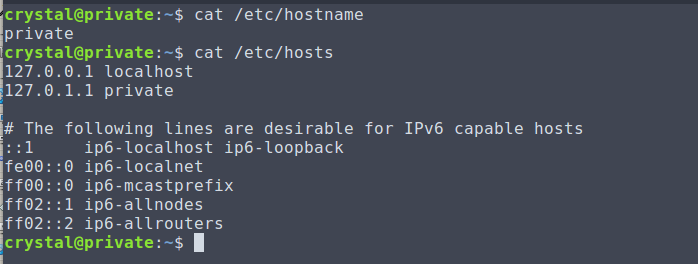
@slate sonnet do cat /etc/hostname
and then verify that you have this in /etc/hosts
/etc/hosts should contain: 127.0.0.1 localhost
put a space at the end, and add the hostname its failing to find
slate sonnet
tame carbon
and then verify that you have this in `/etc/hosts`
How would I do that
tame carbon
so it has: 127.0.0.1 localhost ruvds-whatever
@slate sonnet use nano
nano /etc/hosts
that's your static DNS file
and sudo is looking for the hostname, but its not set
so we can just add it
 slate sonnet
so add the ruvds whatever
tame carbon
this is how I have it ^
slate sonnet
Right?
tame carbon
@slate sonnet yeah that ruvds is what you have in /etc/hostname
slate sonnet
tame carbon
`/etc/hosts` should contain: `127.0.0.1 localhost`
It does
slate sonnet
No
tame carbon
my hostname is private
so yours would have to be ruvds-whatever
you can just add it
tame carbon
@slate sonnet just put it at the end of the localhost line
slate sonnet
okay
tame carbon
you can have multiple names for a single IP
odd. I'd expect your host to do this for you
they just ship a broken sudo install xD
tame carbon
Cool
tame carbon
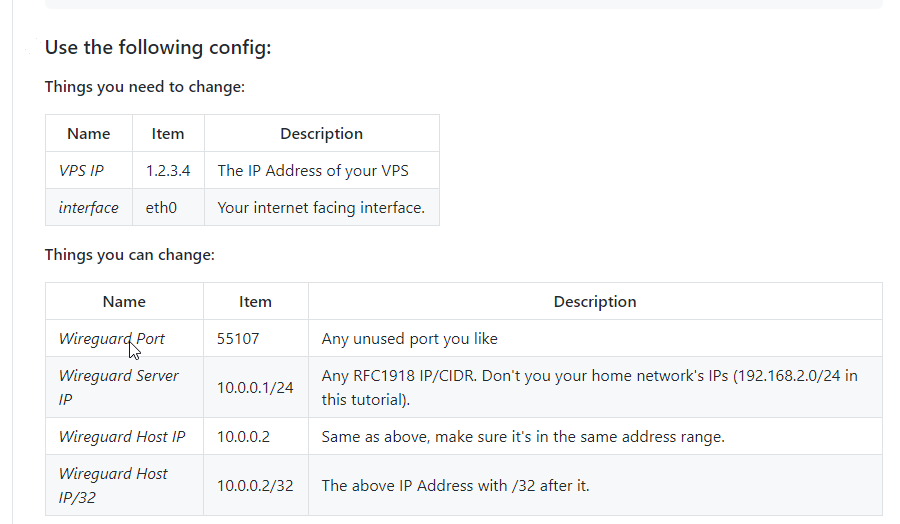
@slate sonnet do you see the block of text underneath the table?
slate sonnet
Yes
tame carbon
@slate sonnet starts with [Interface]
values in there, referr to the table above
and in your case, these have to be set specifically to your environment
your public IP is not 1.2.3.4
thick minnow
Hi, I have a Cisco air-cap2602i-e-k9 which I want to introduce into my house network, can you assist me ?
1: need to talk to the unit, configure the unit and have it working.
2: have a Netgear RAX120 router, 3rd unit as they are useless quality, what the best Wi-fi router with lan support to buy?
tame carbon
@slate sonnet I recommend opening a textfile, and noting these things down
Before you continue
slate sonnet
So are these commands or do I have to change a configuration file?
tame carbon
@slate sonnet the config file below is for wireguard
https://i.imgur.com/jxpmFSf.png
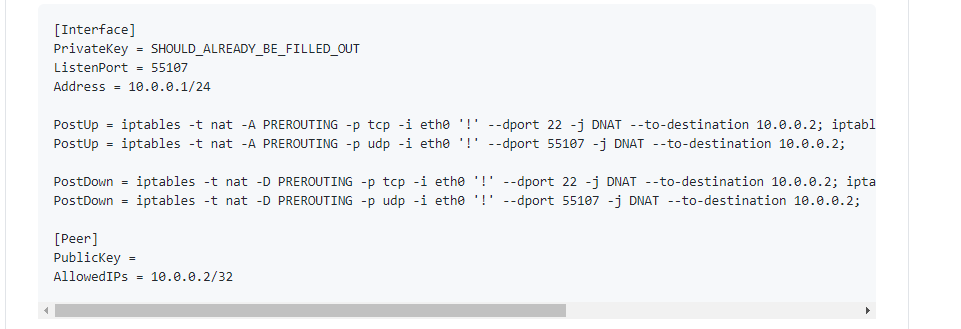
but the information is incorrect, you have to adjust it
untold elbow
gotta nano into the config file and paste all that
tame carbon
the table above explains what each bit does
slate sonnet
How do I access it?
tame carbon
@slate sonnet start with the first thing
VPS IP
you have that already.
so you copy the config file, and modify 1.2.3.4 to your IP
untold elbow
nano /etc/wireguard/wg0.conf
slate sonnet
No like, how do I access the config file in nano
slate sonnet
untold elbow
`nano /etc/wireguard/wg0.conf`
Thanks
tame carbon
sudo nano /etc/wireguard/wg0.conf
untold elbow
assuming wg0 is your interface
you can copy/paste the whole block of text into nano and edit as needed
tame carbon
to find your ethernet devices run ip link show
that tutorial expects your primary interface to be named eth0
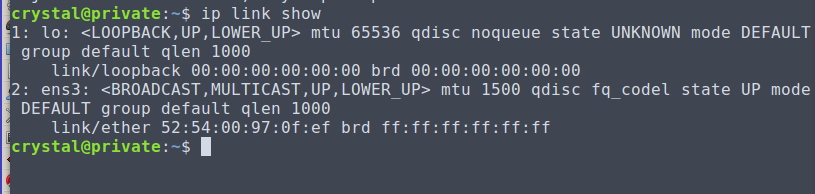
my system has ens3
as default
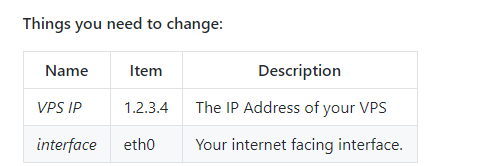
This tutorial is pretty well written.
untold elbow
can you link to the tutorial? im curious to read it
tame carbon
GitHub
Wireguard setup to bypass CGNAT with a VPS. Contribute to mochman/Bypass_CGNAT development by creating an account on GitHub.
slate sonnet
Mine is eth0 too
tame carbon
@untold elbow https://i.imgur.com/yZ2cmSb.png
untold elbow
neat
tame carbon
@slate sonnet just use what they have in there
slate sonnet
Okay
tame carbon
you dont have to change those
@untold elbow this tutorial forwards all ports except 22 and wireguard
slate sonnet
So how do I find an RFC1918 IP/CIDR
slate sonnet
untold elbow
hope your VPS allows a good amount of traffic through it
Don't really need much
untold elbow
thats good
tame carbon
@slate sonnet just use 10.0.0.1/24
as long as your home network uses a different subnet
you should be fine
slate sonnet
untold elbow
hope your VPS allows a good amount of traffic through it
Hosting a minecraft server for my friends and I want to use this because i have a cgnat
untold elbow
ahhh
tame carbon
Classic.
slate sonnet
tame carbon
as long as your home network uses a different subnet
How can I check that?
tame carbon
@slate sonnet on your local computer, run ipconfig
slate sonnet
Okay
tame carbon
@slate sonnet look at the ip address and subnet mask
untold elbow
too late now, but dynamic dns might have been easier 😮
tame carbon
255.255.255.0 is equivalent to /24
untold elbow
but wireguard is fun
tame carbon
/24 is CIDR notation, its shorthand for a subnet mask
Classless Inter Domain Routing
slate sonnet
tame carbon
`255.255.255.0` is equivalent to /24
Mine is this
tame carbon
Ye, most home networks are /24
untold elbow
prob on 192.168.something too
tame carbon
I have 192.168.88.0/24 here :)
untold elbow
yeah so you can use that 10. address
slate sonnet
tame carbon
as long as your home network uses a different subnet
So what should I do since its /24?
untold elbow
you can also use /24
tame carbon
@slate sonnet nah you're cool.
slate sonnet
Oh okay
untold elbow
that's just the size of the network
tame carbon
just had to make sure your LAN is on a different subnet than wireguard
the /24 is just network size
untold elbow
10.0.0.1/24 just means 10.0.0.0 to 10.0.0.255
tame carbon
^ yeppers
untold elbow
as long as that doesn't overlap with your home network, you're good
which is 192.168.88.0 - 192.168.88.255
tame carbon
someone roasted me in #public-chat for talking about networking and routers
dismissing it as: who cares about what their router config panel looks like
xD
slate sonnet
untold elbow
which is 192.168.88.0 - 192.168.88.255
Well I can change that in my router so I shouldn't really care TOO much
Right?
tame carbon
@slate sonnet you can keep the IP stuff for wireguard as is.
untold elbow
@slate sonnet yeah but that's kind of a pain and you dont really need to
tame carbon
@slate sonnet https://i.imgur.com/xsxZ7ZE.png
 slate sonnet
Also, how do I find out my vps ip?
tame carbon
@slate sonnet it says you can change those wireguard IP settings
but for sake of simplicity, leave them as is.
thick minnow
'cause if you were, there was a one click installation script (well, not one click per se)
slate sonnet
tame carbon
but for sake of simplicity, leave them as is.
That's what I'm doing
tame carbon
@slate sonnet your wireguard server will sit on 10.0.0.1 and your minecraft server will have a wireguard client on 10.0.0.2
We'll get to that, once server is configured
I'll be out for 20 mins, gotta make some food
I can help you once I return, or nag @untold elbow ;)
untold elbow
i just had to hop on a call so im unavailable for a minute too 😮
slate sonnet
Because I copy pasted
untold elbow
i think alt+u does undo in nano
slate sonnet
So I've done the start of the guide, but the second half is written for linux. Is there any way I can do it on windows?
Or am I just dumb and missing something
@untold elbow
untold elbow
sorry, give me a minute, wrapping up on a call
slate sonnet
Np
untold elbow
slate sonnet
Np
windows side is easy, install the windows wireguard client and add a new empty config
then just copy the client-side config into that
in the wireguard window there will be an "add tunnel" button, you do "add empty tunnel"
it'll generate the client key pair for you when you do that
slate sonnet
untold elbow
windows side is easy, install the windows wireguard client and add a new empty c...
Doesn't give me an option to add a new empty config?
untold elbow
under the add tunnel menu? what's it say?
slate sonnet
 untold elbow
add empty tunnel
untold elbow
cool
tame carbon
wat
untold elbow
it's almost certainly going to not work the first time you connect. it'll say "connected" but it won't pass traffic and you'll have to fix something
i never get wireguard to work on the first go-round
lots of tiny tiny things you can screw up along the way
untold elbow
no
your config is not tunneling port 22
you don't want that blocked
if you want to tunnel port 22, you'll have to make sure ssh is listening on your wireguard interface
slate sonnet
Sooooooo
untold elbow
oh on the client side i don't think you need all the PostUp and PostDown stuff
those are all linux commands anyway
untold elbow
client side, yes
that may prevent you from connecting to your VPS via SSH while the tunnel is connected (or it might just work, not sure)
if it does prevent it, you can either disconnect from the tunnel to SSH or you can reconfigure the SSH service in the VPS to work
endpoint won't work, you need your VPS' IP address there
untold elbow
other than that, looks good
untold elbow
connect and go to like whatismyip.com
slate sonnet
When I activate the tunnel I pretty much get no internet
untold elbow
yep
slate sonnet
On my main pc
untold elbow
ok so now we troubleshoot
untold elbow
can you ping your wireguard server through the tunnel? in cmd do ping 10.0.0.1
run that on your local system
 untold elbow
that'll do it 🙂
you don't need to do that on the client
wireguard should auto-start with your windows computer (i believe)
slate sonnet
 untold elbow
whats systemctl status wg-quick@wg0.service say?


 slate sonnet
Did I post my private key?
untold elbow
i dont think so
tame carbon
no
slate sonnet
Oh okay
tame carbon
its just a psa/headsup
untold elbow
public key is fine to post
public key on my vps' wireguard server is BTtKlQ7OEBS5sOjJ1aNjvo018N0Fe4RAA0G6YXzFJl4=
tame carbon
┬─┬ ノ( ゜-゜ノ)
slate sonnet
untold elbow
did the service start?
Already exists
untold elbow
no peers listed below that?
slate sonnet
untold elbow
wg0.conf
Yes
Btw when I'm tunneled and ping 10.0.0.1 request timed out
untold elbow
when you're tunneled, does wg on the server show any peers?
untold elbow
ssh user@ip
while you're in the server, ping 10.0.0.2 to see if the server can see your local system
tame carbon
@slate sonnet ssh root@<server ip>
untold elbow
hm ok. do you have ufw installed on the server or any other firewall like that?
tame carbon
ufw status
slate sonnet
status inactive
tame carbon
ufw is not enabled by default on ubuntu
untold elbow
welp that isn't it
tame carbon
go over the server config once more
slate sonnet
Hmm
tame carbon
is the instance running?
slate sonnet
1 sec
untold elbow
oh wonder if you forgot to restart it after adding the key
slate sonnet
 untold elbow
wg-quick down wg0 && wg-quick up wg0
untold elbow
thats fine too
i was gonna suggest systemd service config after the tunnel is all working
slate sonnet
says its active
untold elbow
lol and you posted it in the error messages way up above
no one is going to do anything with your hostname alone
tame carbon
its public for a reason ;)
slate sonnet
Still
untold elbow
i closed the screenshot no fair 😦
tame carbon
@slate sonnet on the server, for sake of sanity
run ping 10.0.0.1
that should reply with <1ms
slate sonnet
Yes
slate sonnet
correct
tame carbon
okay, server is configured correctly.
So lets take a look at the client now
@untold elbow how is auth handled by wg?
is it just pubkey auth?
untold elbow
yes
tame carbon
has he copied his client key to the server already?
untold elbow
yes
tame carbon
each peer generates a public/private key
you copy the public key of your client to the server
but you've done this
slate sonnet
Into the config?
untold elbow
yep
tame carbon
@untold elbow that screenshot above from the windows tunnel
slate sonnet
If so, then I've copied the wrong thing
tame carbon
I am missing masquerade rules
slate sonnet
Whats the command for changing the config for wg?
untold elbow
you just edit the config file
slate sonnet
Directory
tame carbon
edit config, restart
untold elbow
the public key of the windows system, right?
slate sonnet
No
untold elbow
oh no, that should be your windows system's public key
untold elbow
wireguard takes like 15 minutes to set up and then like 90 minutes to fix
untold elbow
but once you get wireguard running, it's really solid... i made some basic bash scripts to add/remove clients quickly
slate sonnet
systemctl...
untold elbow
yeah
tame carbon
systemctl yeah
slate sonnet
what next?
tame carbon
Try connect again
slate sonnet
Idk the command
untold elbow
systemctl restart wg-quick@wg0.service
systemctl status wg-quick@wg0.service
second one isn't strictly needed but it's good to check that the service is actually running
untold elbow
you might have to reconnect
slate sonnet
Or at least ping 10.0.0.2 from my phone
tame carbon
10.0.0.2 is your windows client
so if you can ping it from the server, then you have success.
untold elbow
ping 10.0.0.1 from your desktop
tame carbon
or that
slate sonnet
That seems good
 untold elbow
thats a good sign
tame carbon
thats very promising
untold elbow
try to get to google
untold elbow
you dont have DNS configured in the tunnel
tame carbon
@untold elbow he doesn't want his default route through wireguard
untold elbow
i think it's routing everything
tame carbon
It shouldn't..
slate sonnet
Ping is 60
untold elbow
allowedips 0.0.0.0/0
slate sonnet
Pinged from my server to my pc
peak cloak
don't you need to edit IP tables for it to NAT?
tame carbon
chances are that wireguard is forwarding all system traffic through the tunnel
but we don't want this
slate sonnet
untold elbow
`ping 45.79.196.241` from your pc
Ping 132
slate sonnet
Looks like it
tame carbon
wait...
untold elbow
bring the tunnel down, add DNS = 8.8.8.8 under [Interface] and restart it
just to test
on the client side
tame carbon
@untold elbow is there a way to prevent the client from default routing over the tunnel?
instead using it merely as a resource subnet
slate sonnet
YEs
untold elbow
the AllowedIPs section does that
slate sonnet
I have internet
slate sonnet
on vps?
untold elbow
if you want to do it by port, i believe you have to use windows' equivalent to iptables
tame carbon
on your windows machine, with the tunnel enabled
untold elbow
which i know nothing about
tame carbon
@untold elbow its route-metric
the tunnel just has to be a higher value than the default if
untold elbow
so you can add some PostUp = route-metric commands to the client side
and undo them with PostDown commands
slate sonnet
Is it supposed to take a little while?
untold elbow
to tracert? it could