#networking
1 messages · Page 296 of 1
 tawny hemlock
that is tiny version of mine
 peak cloak
I mean that's router stuff not AP
 tame carbon
@peak cloak does it matter?
Tplink routers dont have their ratings on them either
they have gigabit ports
I doubt they can even route at that rate
peak cloak
tame carbon
Tplink routers dont have their ratings on them either
yes their business omada do
 tame carbon
called it
800mbit xD
Its same story on their 2.5G lineup
they cap out around 1.7gbit
and thats with minimal firewall configurations mind you
once you add some more rules, that speed crashes.
tawny hemlock
@tame carbon it is plenty to aces the intrnet wierlesly an transfer medium files to a nas wierlesly and the gibit loocal can do the rest
tame carbon
sure if you have a decent switch
then its a nonissue
but I have multiple subnets here
tawny hemlock
tawny hemlock
cable or router
tame carbon
if you plan on doing VLANs, I wouldn't get that switch...
tawny hemlock
what is a v lan
tawny hemlock
loll it is 16 port that is plenty
tame carbon
managed switches are capable of handling this
@tawny hemlock nah, for network segregation and security reasons
Like, my guest network here
is on a vlan
completely isolated from my local network
but its using the same APs
but really, my setup is not really applicable to the situation you have
tawny hemlock
there is one network if i let pepole on the wifi i know that they wont hack the network
tame carbon
https://cdn.discordapp.com/attachments/776722183119699988/777646103775674368/IMG-20200922-WA0001.jpg

see that one fiber optic in the middle ?
that carries like 6 different networks
the switch on the other side, splits this up into multiple ports
this functionality is part of ethernet
its an extension, that switches can use to 'trunk' connections
peak cloak
@thorny vector new breach, of course it's cloud connected security cameras and a super admin account https://www.bloomberg.com/news/articles/2021-03-09/hackers-expose-tesla-jails-in-breach-of-150-000-security-cams
tame carbon
lol
someone about to get fired
if you properly isolate your networks
this doesnt happen
@peak cloak the rise of ipv6 with unsecured firewalls
most home users are safe because they are behind a NAT
tame carbon
can't wait to start portscanning v6 and find a camera in your mom's bathtub
peak cloak
deny all new connections
tame carbon
sure
peak cloak
allow established related
tame carbon
but clearly these guys at Tesla
peak cloak
simple
peak cloak
tame carbon
but clearly these guys at Tesla
it's not tesla
tame carbon
Are these cloud connected cams?
peak cloak
tame carbon
Are these cloud connected cams?
yes
tame carbon
F
tawny hemlock
tame carbon
can't wait to start portscanning v6 and find a camera in your mom's bathtub
it is called glass wire
tame carbon
@tawny hemlock that's just linus shilling
tame carbon
glasswire is 
tame carbon
^
tawny hemlock
goodby
tame carbon
@peak cloak in my spare time
might write a small document
we can reference, for like example setups
and what to get
generic questions we get everyday
 thorny vector
@peak cloak interesting, but still small potatoes compared to the OWA hack
tame carbon
SolarWinds wasnt too long ago
thorny vector
The exchange hack makes Solarwinds look like small potatoes
It’s been the year of the exploit so far. Even sudo had a major CVE so far this year
tame carbon
russia and china going on the offensive
peak cloak
tame carbon
russia and china going on the offensive
this one seems to be just some group https://twitter.com/nyancrimew/status/1369373713121083395

hey @equinox i dont think your first floor emergency exit at your plano location is fire code compliant, you might wanna store those office chairs somewhere else
APT-69420 Arson Cats #OperationPanopticon
Likes
256

 Twitter
·
Twitter
·
 hollow marlin
tame carbon
<@!222482269829332992> the rise of ipv6 with unsecured firewalls
hollow marlin
tame carbon
<@!222482269829332992> the rise of ipv6 with unsecured firewalls
NAT isn't security but provides a security like mechanism. But for v6, even just using 2000::/3 it has been proven that even with a substantial botnet, scanners are pretty much useless. Even if you know the /64 it still is a challenge.
People though that do not have a FW or just any/any pretty much deserve whats coming
 thick minnow
tame carbon
might write a small document
thick minnow
tame carbon
might write a small document
This would be really useful
tame carbon
@hollow marlin security through obscurity is no security
and yeah, NAT behaving like a security mechanism was exactly my point
but I think UPnP and phone-home-backdoors are the main offender
tame carbon
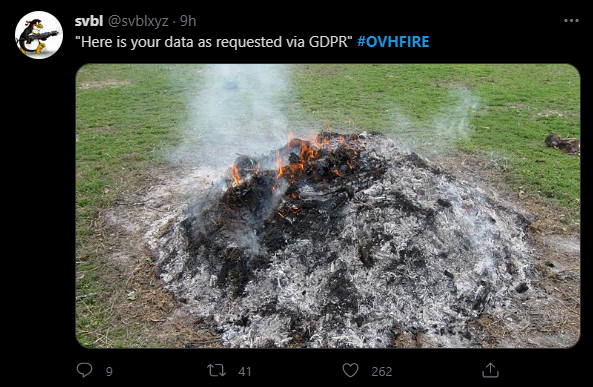
@plain siren https://www.datacenterknowledge.com/uptime/ceo-says-fire-has-destroyed-ovh-s-strasbourg-data-center-sbg2

Data Center Knowledge
People on site are safe, according to him. Another data center on the campus, SBG1, was partially burned down.
what a disaster

 lean pebble
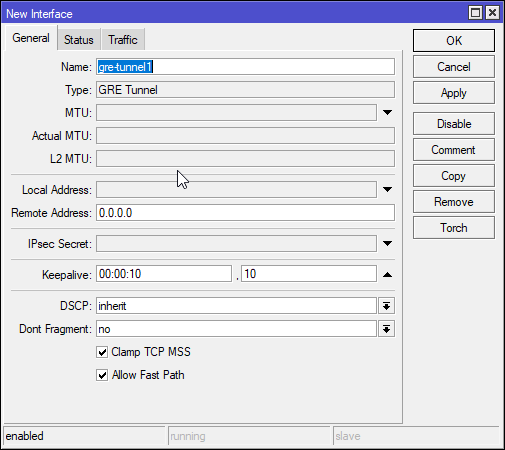
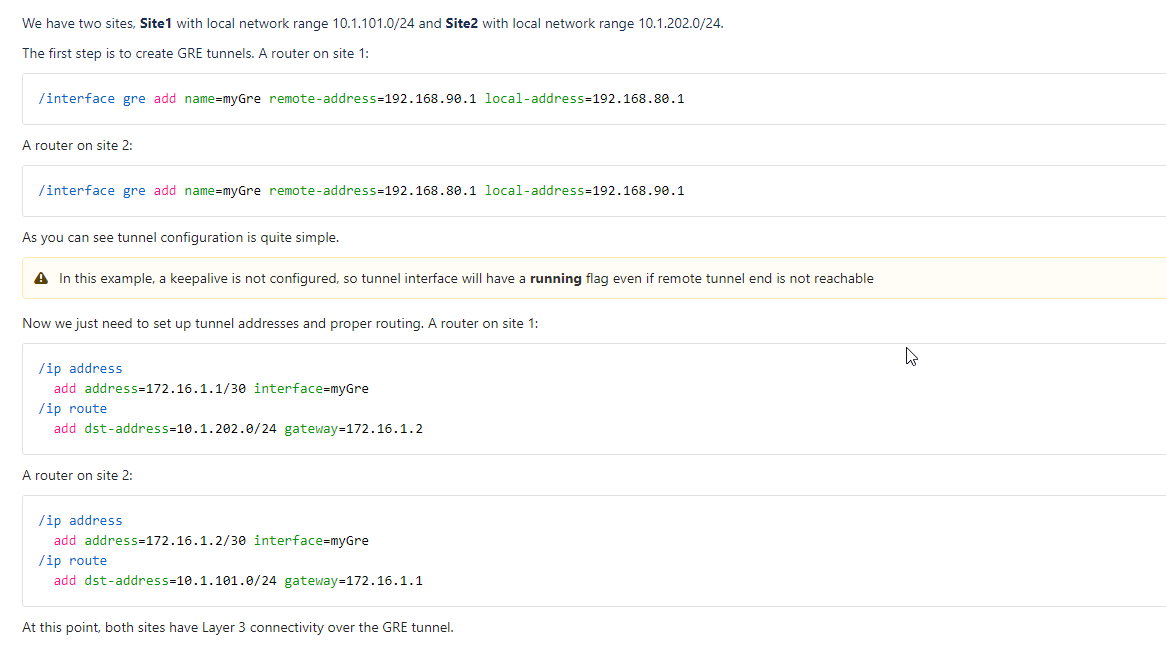
How can I connect my gre tunnel to mtik ?
My gre tunnel is centos server.
thick minnow
Shouldn't you move off of CentOS soon?
 lone sun
tame carbon
lone sun
tame carbon
🤷♂️ Well, at least he gets to claim that insurance check. 😃 👍 👍
 lean pebble
Ya but I can't make it connect to my tunnel
Only the mtik side not working properly with my tunnel.
I can't ping from each side to internal IPs like 10.70.1.1 to 10.70.1.2 I can't do ping.
Route unreachable
tame carbon
is the tunnel active ?
might want to assign the interface to a list
fw might be blocking things
thick minnow
peak cloak
<@!292850466671427584> new breach, of course it's cloud connected security camer...
Security company's first sentence on their website: "By approaching safety with a software-first approach, we’re making security as seamless and modern as the organizations we protect."


 lone sun
thick minnow
Security company's first sentence on their website: "By approaching safety with ...
lone sun
thick minnow
Security company's first sentence on their website: "By approaching safety with ...
😉 This is why I will never buy security cameras, not even one for my computer really. The camera on my cell phone is as far as I'll go. If it has a chip in it, it can, and likely will be hacked. 🤷♂️
lone sun
And these companies can blow me with this IOT trash as well.
Are we really talking that word "secure"? Come on. 😐
 thick minnow
If really want to be safe
just dont connect them to the internet
litteraly no way of hacking them
thick minnow
No because they need remote security and their software is probably garbage
that combination = getting hacked
lol
lean pebble
tame carbon
is the tunnel active ?
Ya I used to use it when I was with my fortigate
tame carbon
@lone sun I have my ipcams on their own isolated subnet, with no route to the wider internet
lean pebble
I think it's firewall issue
lone sun
@thick minnow But these guys are still in business despite being complete shit heads at their job. 😆
lean pebble
In mtik
thick minnow
lone sun
<@456226577798135808> But these guys are still in business despite being complet...
not for long lol
tame carbon
@lean pebble go to bridge -> ports, make sure it is assigned
otherwise, add the interface itself to an address list
thick minnow
If i had security systems from their company id get other cameras
tame carbon
if you make the tunnel part of your LAN, it should automatically pass through
@thick minnow those cloud connected cams are 0-setup effort
lean pebble
tame carbon
<@!109801863771074560> go to bridge -> ports, make sure it is assigned
otherwise...
Assigned but I lost connection 😆
tame carbon
but they also phone home
lean pebble
At least I'm testing it on specific internal ip and not on all the network
tame carbon
I planted two trees today ^^
gonna plant two more after this break
digging hole is effort
lone sun
tame carbon
<@!386039649996505089> I have my ipcams on their own isolated subnet, with no ro...
🤔 Yeah, my school has theirs set up like that. So they were the only thing that still worked when they got hit with a DOS attack. Don't think the perps ever got caught either. Probably old students that did it since they actually show you how to do it. 🤣
tame carbon
my uni was using Eduroam
its an american educational network
and their take copyright serious xD
some students got expelled before for torrenting
I've delt with DMCA before on my content hosted in EU
I love it when stuck up asses in the US come begging for copyright claims xD
I reply: US law does not apply here
and thats usually the end of it
thick minnow
tame carbon
and their take copyright serious xD
wow
my school just downloads mp3's of exams and shit they really dont care lol
they also just give digital schoolboks
books
tame carbon
my school handed out pirated version of Power Designer
a legit license costs 15k
like
lean pebble
The issue is mtik firewall
tame carbon
@lean pebble it most likely is
@lean pebble did you add the gre tunnel to an interface list???
lean pebble
Trying to understand how to add the rule
lean pebble
tame carbon
<@!109801863771074560> did you add the gre tunnel to an interface list???
Yap
tame carbon
you shouldnt have to add a rule to mikrotik fw
as long as you assign them to the right lists
lean pebble
I did by the guide but I didn't saw anything that say about rule
tame carbon
@lean pebble go to the GRE tunnel settings
make sure keep-alive is enabled, and that allow-fast-path is set to no
coffee break is over, I'm afk for a little while
lean pebble
tame carbon
coffee break is over, I'm afk for a little while
The server can ping now but I can't surf from my pc
lean pebble
Yah
tame carbon
if server can ping the router, and vice versa
but your LAN cannot reach the server
then it is indeed a routing issue
lean pebble
Both side reachable, are you that can be route issue ?
I think mtik blocks the connection from surfing
tame carbon
@lean pebble assuming GRE is similair to other tunnels
might be useful if you assign a 2nd bridge
and then route between those
I use a 2nd bridge for my VPN endpoint
lean pebble
Do external to internal and internal to internal ?
lean pebble
Gosh sounds like alot of latency
lean pebble
Well now I'm on 61ms
It should work nothing changed on this server since 2019
It's just the mtik firewall that block me
tame carbon
@lean pebble if you look at the fw counters
when you make a connection, see which one is counting up
assign logging to that rule
so we can see what is happening
lean pebble
tame carbon
assign logging to that rule
Well you correct it's something related to the route
tame carbon
might want to add a firewall rule to accept forwarding traffic
lean pebble
I had the same issue with fortigate but it was the fortigate firewall back then
tame carbon
and assign the filter to your GRE tunnel
@lean pebble the thing is, I don't know anything about GRE specifically
I've only set up PPPoE and L2TP tunnels so far
lean pebble
Well gre gateway came from cisco I think if I'm not wrong.
It's nice but I just want to practice it on mtik to in fortigate it was hell
At least I learned not to check on all the network subnet 😆 like I did the first 10 times
lean pebble
tame carbon
might want to add a firewall rule to accept forwarding traffic
I have one that so forward to everything some default rule
Oh my bad the default one is passthrough
hollow marlin
Whats the config on the tik? GRE is pretty straight forward and usually a 1) missing route 2) wrong tunnel src./dst. IPs 3) firewall policies
tame carbon
@lean pebble poke
@hollow marlin he was able to get ping capabilities between tik and host, and vice versa
just the routing which is jacked up
hollow marlin
Yeah he will need to add statics to get across the tunnel. Id do OSPF
tame carbon
tik website suggests just adding the routes by hand
hollow marlin
Statics are easiest which is why
lean pebble
hollow marlin
Whats the config on the tik? GRE is pretty straight forward and usually a 1) mis...
All is configured correctly I guess it's firewall or something like this.
I got ping from the server to the mtik and from mtik to the internal gre ip but can't surf.
I didn't touched the gre server since 2019 so it's should work correctly.
I have 2 routes that configured for the gre tunnel they're reachable
hollow marlin
What are the routes pointing to?
lean pebble

I'm testing the tunnel only on specific IP
70.1.1 is my server
20.11 is my vm
my vm gets the ip from the dhcp but can't access the internet while gre tunnel on
tame carbon
@lean pebble do you want your VM to use the GRE tunnel for internet?
because if you don't. Then its a route-metric problem
lean pebble
just for testing for now
tame carbon
otherwise, you might need to setup a NAT rule for your GRE traffic
since GRE -> WAN, would need to be NAT'ed
lean pebble
Testing on one machine instead making my whole network go down
lean pebble
tame carbon
since GRE -> WAN, would need to be NAT'ed
how and where do I do that in mtik?
tame carbon
@lean pebble in NAT, you have a masquerade rule for your LAN -> WAN
might be, that this does not apply to traffic originating from your tunnel
though.. this is odd
lean pebble
this rule goes directly to wan
lean pebble
ya and gre is not wan
tame carbon
no but when you want to browse the internet from the other side of the tunnel
the tik still needs to masquerade the addresses
lean pebble
ya I know
the mtik configuration need to be fixed
Can I add another masquerade rule?
tame carbon
Yeah
lean pebble
found it
tame carbon
@hollow marlin thoughts?
hollow marlin
NAT is not needed for GRE, when the source interface is specified its going to use that when sending/receiving and the GRE header is how it determines what tunnel it belongs to
lean pebble
so what should I do ? those routes are ok?
hollow marlin
Without a view of the topology, I cant answer that. It sounds like its
VM-->(GRE)-->Tik-->internet?
hollow marlin
What is the local interface the host that the VM is on connected to?
lean pebble
the vm have dedicated network card
hollow marlin
Whats it's IP
lean pebble
10.0.20.11
tame carbon
 hollow marlin
post your gre config on the mikrotik
lean pebble
 hollow marlin
Local address needs to be your public if you are trying to connect over WAN
Local and Remote addresses are the interface on which the traffic with be sent and received. The GRE header has a new IP header of these addresses which encapsulate the original packet
lean pebble
for some reason gre tunnel not working at all on mtilk while using the external ip of my netowrk there
hollow marlin
Where is the VM located? In the cloud?
lean pebble
what vm? the gre tunnel?
gre vps ya in cloud on my dedicated server
the other vm in my home network on my pc
hollow marlin
Its should not be working unless you have another tunnel somewhere in your network. Return traffic will try to send to 10.70.1.2 which the VPS cannot route to
On Mikrotik you will need to add a filter to permit GRE on the WAN interface
tame carbon
oof. the documentation does not say anything about this
hollow marlin
Their docs do not take FW into account most the time for simplicity
lean pebble
hollow marlin
On Mikrotik you will need to add a filter to permit GRE on the WAN interface
where?
hollow marlin
firewall -> forward chain -> src. IP (public of VPS), protocol GRE, permit. Move that to the top of the list
Wait it might be input chain, as the Tik needs to process it, try input chain instead
lean pebble
ok
I guess still needs to do more things
the rule gets traffic but still not working
hollow marlin
Ok so if its getting traffic, is the GRE in the LAN interface list?
or whatever list you setup if the default is not used
hollow marlin
Well you have a default route right?
lean pebble
ya
hollow marlin
so the route table is showing unreachable now? if so paste whats its showing
 hollow marlin
Thats because the tunnel is down
Let me toss up a diagram on what it should look like
hollow marlin
Its now showing up?
 hollow marlin
Its going to show up always unless there are keepalives, its a hard state protocol by default
On the VPS, what is the config?
hollow marlin
Its still worth looking at to make sure
lean pebble
BOOTPROTO=none
ONBOOT=yes
TYPE=GRE
PEER_INNER_IPADDR=10.70.1.2
PEER_OUTER_IPADDR=82.81.0.0
MY_INNER_IPADDR=10.70.1.1
ZONE=public
btw they both opened in all ports to each other
I think the firewall rule is useless
hollow marlin
Well you need to change the peer_inner to your public
hollow marlin
Think of these config statements as maps, "if a packet with the source of 82.81.0.0 and destination of (Public interface) is received with the protocol type of GRE, then logically it matches GRE tunnel 1, forward the packet"
Also with that config, your dst. interface is in the same subnet as your tunnel subnet, that is called recursive routing and will fail. Honestly am not sure how that was working at all
lean pebble
I have the fortigate config and I see there that I had internal port that was configured for both external ips and static route to the internal ip of the router and the gre
thats why I asked where is static routes
hollow marlin
Only static routes that should exist are defaults and routes of the **remote **destination subnet
hollow marlin
Well progress. Now are both tunnels using src/dst public IPs for the GRE?
lean pebble
ya
nice can ping from both sides but not from my vm
my vm don't get the tunnel ip while surfing the net
hollow marlin
So if tunnel interfaces, 10.70.1.0/24 can ping, tunnel is up. Now check the routes on both the Tik and VPS, each should have a single route to the remote subnet with a next hop of the remote side of the tunnel
lean pebble
mtik have 2 routes
hollow marlin
It will, a connected route and a static route
lean pebble
ya the static route not working
no more ping
mtik so weird with this gre
the static route not working good

@hollow marlin can you take a look ?
hollow marlin
is 10.70.1.1 the mikrotiks GRE tunnel IP?
hollow marlin
That route looks good then
hollow marlin
Its going to use it, especially being a /32
lean pebble
        set srcintf "internal"
        set dstintf "dyson2"
        set srcaddr "all"
        set dstaddr "all"
        set action accept
        set schedule "always"
        set service "ALL"
        set nat enable
    next```
This is my old fortigate firewall rule for the gre tunnelwithout this I had no way to get connection
hollow marlin
If you go in cli and run ip route check 10.0.20.11 it will show the route and what path it will take
tame carbon
GRE sounds like an amazing protocol 
tame carbon

A song from Machinae Supremacy's original soundtrack for Rake in grass' 2004 side-scrolling Shoot’em up extravaganza Jets’n’Guns.
Jets’n’Guns on Steam — http://store.steampowered.com/app/262260/JetsnGuns_Gold/
Rake in Grass (the developers) — http://www.rakeingrass.com
MACHINAE SUPREMACY SOCIAL MEDIA
http://bit.ly/machinae_FACEBOOK
http://bit...
hollow marlin
tame carbon
GRE sounds like an amazing protocol <:kappa:230373864859762688>
It is, its really simple. You just have to have an understanding of routing and how its processed
tame carbon
l2tp was boop and it ran
hollow marlin
No L2
tame carbon
yeah its layer 3 tunnel
tame carbon
how so?
I have nothing to compare against..
I chose L2TP because its what android can run with "always online VPN"
hollow marlin
For P2P its not as bad but now you have BUM traffic chewing up bandwidth, caps and CPU
Add a few sites and now you need proper design with STP
tame carbon
i have a seperate bridge for my VPN
and just route between those
no broadcast from my LAN hits the VPN clients
hollow marlin
Yeah thats fine
 hollow marlin
Not inefficient, just unnecessary for a majority of cases
@lean pebble You find which FW rule is catching it?
thick minnow
Yes
everything is bad
@thick minnow
Could somebody help me?
I was blacklisted
https://spfbl.net/firewall/ Can somebody give me instructions how to install it?
Descreve as características do serviço de filtragem de MX oferecido pela SPFBL.net
block smtp ports on your network
hollow marlin
contact the site about the blacklist. Typically will give a reason and offer a form to fill out to be removed from the list
thick minnow
hollow marlin
contact the site about the blacklist. Typically will give a reason and offer a f...
I cant speak Portuguese
From the error it sounds like your ISP hasn't configured DNS correctly
who knows, I'm not a networking guy
So it was my ISP fault?
peak cloak
thick minnow
So it was my ISP fault?
I don't even understand the problem right now
thick minnow
possibly, typically IPs get blacklisted for sending spam mail
peak cloak
are you running a mail server
thick minnow
peak cloak
are you running a mail server
no apparently his IP was just randomly blacklisted, he posted it publicly in LTT even though I told him not to
hollow marlin
Its not random, plenty of service gather IPs from malicious activity and are reported and exchanged between each other. Includes bot net, DDoS, mail spam, etc.
 thick remnant
I am being ddosd and need help, when i change my router ip can i change it to anything or does it need to be a specific way??
Help
thick minnow
hollow marlin
Its not random, plenty of service gather IPs from malicious activity and are rep...
Yeah, I mean spontaneous. I know they won't blacklist his IP without a reason
peak cloak
thick remnant
I am being ddosd and need help, when i change my router ip can i change it to an...
how do you know you are being ddosed
just change your IP
thick remnant
peak cloak
how do you know you are being ddosed
My down traffic is off the charts
peak cloak
are you running any services
thick remnant
peak cloak
just change your IP
To what tho, any series of numbers
peak cloak
unplug your router
thick remnant
peak cloak
are you running any services
No everything is disconnected
thick minnow
block all inbound traffic and use your mates wifi that's what I'd do
thick minnow
Umm how do i acces my router i dont remember if it 192.168.1.1 or 192.168.68 or
what is it?
peak cloak
thick remnant
What can i change the ip to
what I mean by IP is release the DHCP lease and get a new IP, although idk if it would work on PPPoE
thick remnant
English pls
hollow marlin
You cannot change your IP unless you have a static block
peak cloak
^
thick remnant
What does that mean
thick minnow
It means your ISP determines your IP
hollow marlin
Releasing the lease or leaving it off for a period of time is hit and miss depending on lease time
hollow marlin
Our leases are for a week, PPPoE pulls its addresses in the same fashion
lean pebble
still looking for the rule that block it
hollow marlin
lean pebble
still looking for the rule that block it
Send me the FW in the CLI output in a DM. ip firewall print
lean pebble
bad command name print (line 1 column 13)
thick minnow
why router is nor responsing?
bruh
So i need block stmp ports yes?
@thick minnow
hollow marlin
lean pebble
bad command name print (line 1 column 13)
sorry ip firewall export
tame carbon
@peak cloak rofl
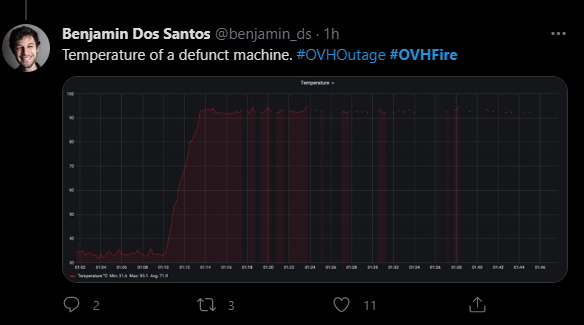
the datacenter memes have started
a german meme site went offline, and they literally just came up minutes ago


you think anything is still intact?

 lavish fog
2 of their 3 "nodes" were pretty damaged as I've read on the newspapers. It's kinda strange that it ignited that easily
thick minnow
Hello i need help
With technic color router
Technicolor TG589VAC v2 ADSL/VDSL router
@thick minnow shoudl i disable dhcp?
 peak cloak
thick minnow
<@456226577798135808> shoudl i disable dhcp?
peak cloak
thick minnow
<@456226577798135808> shoudl i disable dhcp?
no
thick minnow
no to prevent spam email server?
peak cloak
thick minnow
no to prevent spam email server?
wdym
thick minnow
you have no control over your public IP @thick minnow
You might've been hacked, and your computers might be part of a botnet. Lithuania is close enough to Russia that it recieves/gives a high amount of cyber attacks
thick minnow
thick minnow
You might've been hacked, and your computers might be part of a botnet. Lithuan...
i can
i have router
i can block it
i just need to check it
thick minnow
Seems its out of date
Can some find Technicolor TG589VAC v2 router update file?
I would apreaciate it
Is there anything suspicous?


do i have to have DHCP server option enbaled?
tame carbon
@lavish fog Internals made of wood
@thick minnow @peak cloak that's a troll dont pay any attention to him
hollow marlin
@tame carbon From r/networking on the fire and a tweet, like actual serious tweet, of a customer to the DC plant
Any news? In a Professional datacenter putting everything down for a fire is quite unprofessional. How much hours or days we should expect from this? At least we can organize.
peak cloak
hollow marlin
<@!167698274969452544> From r/networking on the fire and a tweet, like actual se...
looks to be a fivem server admin
hollow marlin
They mentioned it was a GTA RP server admin, you know, the critical services to be worried about 
peak cloak
hollow marlin
They mentioned it was a GTA RP server admin, you know, the critical services to ...
yeah fivem is a GTA mod
tame carbon
@hollow marlin bunch of people mad that their VPSses are gone
tame carbon
 untold elbow
is that pile of ash FIPS compliant?
tame carbon
@untold elbow


Data Center Knowledge
No OVH, firefighting, or local government services staff members were injured, the company said. Restart of surviving data centers on campus not anticipated until Monday.
tame carbon
estimated 3.6 million sites are down
yeah, people were on twitter crying about their GTA:V RP servers being offline
while the stack was still burning
untold elbow
i mean, to be fair, gta:v online is super fun
 dense furnace
no backup - no mercy
tame carbon
exactly
tame carbon
 untold elbow
they dont have any data backup anywhere? or is it just not spun up yet?
dense furnace
untold elbow
they dont have any data backup anywhere? or is it just not spun up yet?
nah, virtual rented machines, no actual cloud afaik
untold elbow
bummer
 rocky badge
something something "you get what you pay for"
 rocky badge
A "disaster recovery plan" on OVH is "find a new host"
dense furnace
tame carbon
https://cdn.discordapp.com/attachments/765292850219843645/819272935558610944/unk...
oh god
untold elbow
yeah i guess i'd kind of expect a DR plan to be included with any hosting provider's SLA
unless you were getting super-saver hosting
tame carbon
exactly
untold elbow
never heard of them until now, i'm in the states
dense furnace
lol
untold elbow
our servers are made with 100% grade-a american asbestos
 dense furnace
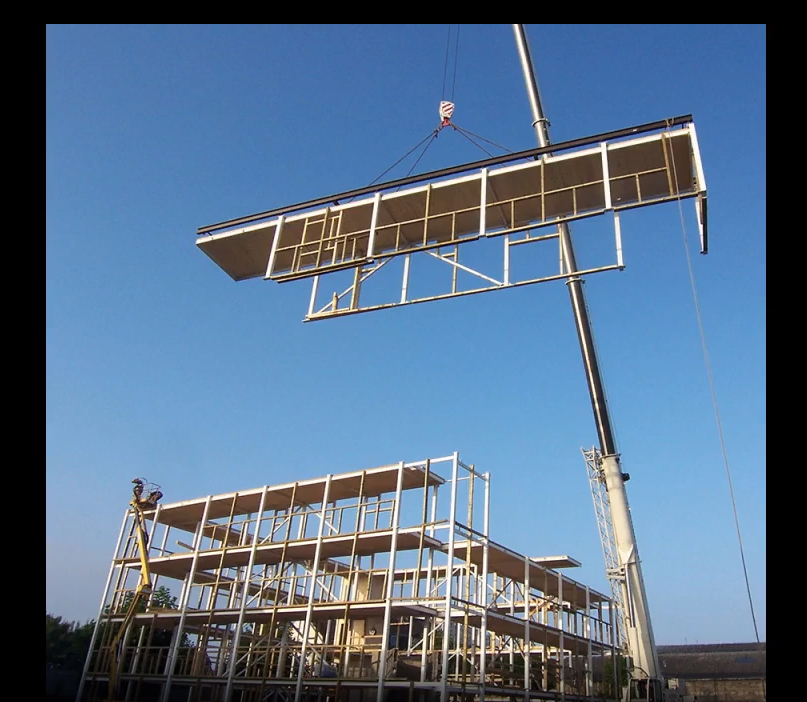
is that the datacenter in strasbourg?
untold elbow
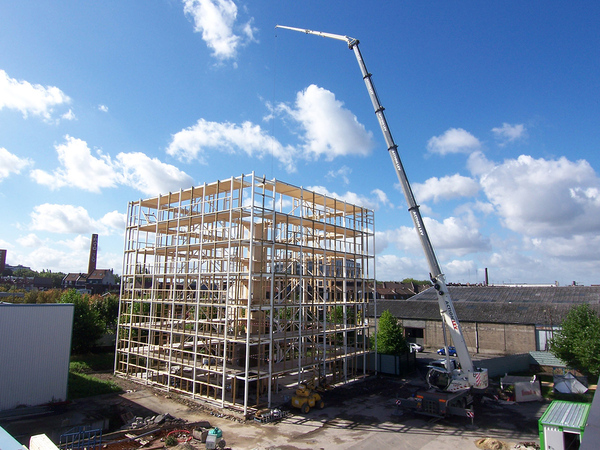
no it's wood

 dense furnace
no suprise then
tame carbon
metal plates are faraday cage against EM
untold elbow
ok but there are lots of wood buildings that don't burn
i don't think we can just say wood buildings = bad
untold elbow
wait what really?
tame carbon
yes
untold elbow
wooooooow okay
tame carbon
^
untold elbow
how is that even legal?
rocky badge
Its probably different than US laws idk
tame carbon

they have very dense racks
basically bare boards on some kind of plastic rack system
water cooled

but its all quite jerry rigged
rocky badge
And this is what Floatplane runs on /s
untold elbow
sinkplane 😦
tame carbon
they also don't do much redundant routing and network
so sometimes you'd have hours of downtime if you were unlucky
rocky badge
no surprise there either
tame carbon
on their lower end gear on SYS and KS harddrive repairs can take multiple days if you are unlucky
they just run this hardware into the ground before they replace it
rocky badge
oh god
tame carbon
I used to use KS back in the day, until I had one drive failure
and no support.
SYS is slightly better. offering SSD storage primarily
though still no backup facilities
and their enterprise lineup, looks well.. the same xD
only difference is some software magic around it
@rocky badge but they are one of the rare few that rent out overclocked desktop processors xD
rocky badge
🥴
tame carbon
those are very popular for minecraft
rocky badge
Yeah....
tame carbon
you dont care about it crashing, you have a plan for that
rocky badge
but oh god
tame carbon
and you run a ramdisk off a 4.5GHz i7
and have blazing fast gamespeed
no latency at all
can run you up to 500 players easily with that hardware
rocky badge
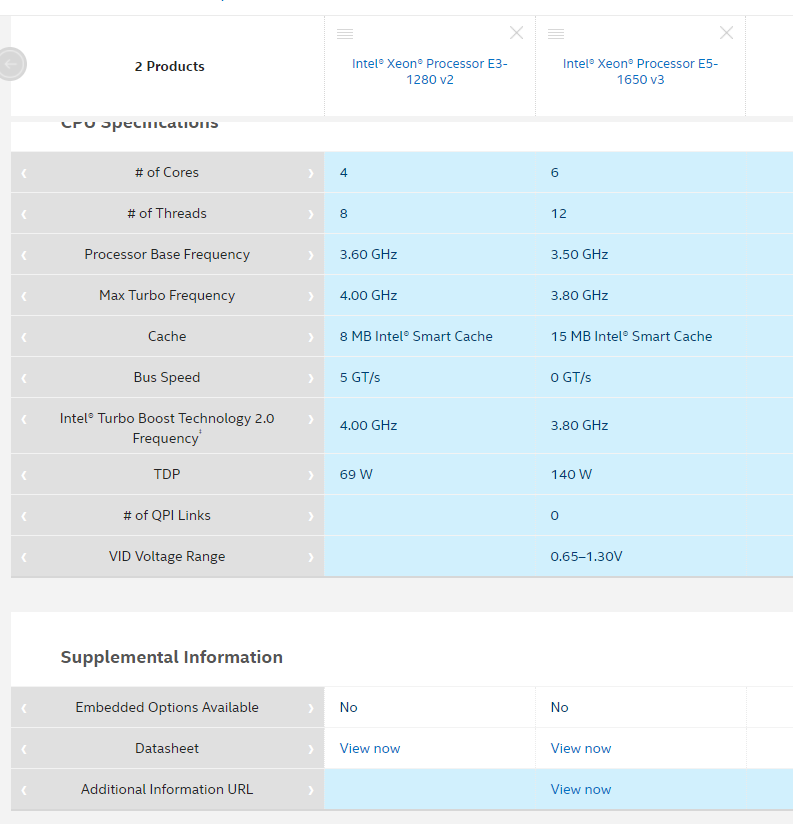
My MC server is running on a Xeon E3 1280v2 😂
tame carbon
but yeah, its a tricky path. And I wouldn't use this without some kind of cluster hosted elsehwere xD
mh. let me see what mine is on. it is SYS...
rocky badge
Running in a friend's basement
tame carbon
model name : Intel(R) Xeon(R) CPU E5-1650 v3 @ 3.50GHz
rocky badge
Intel® Xeon® Processor E3-1280 v2 (8M Cache, 3.60 GHz) quick reference guide including specifications, features, pricing, compatibility, design documentation, ordering codes, spec codes and more.
Yeah, 3.6ghz/4ghz boost
tame carbon
Intel® product specifications, features and compatibility quick reference guide and code name decoder. Compare products including processors, desktop boards, server products and networking products.
rocky badge
in a PowerEdge R210 ii
tame carbon
woops

 rocky badge
Micron RealSSD P320h
tame carbon
but I'd assume mine is fast??
rocky badge
nice
 rocky badge
😂
tame carbon
what other bare metal hosters are out there besides OVH?
rocky badge
Inmotion, vultur?
 rocky badge
yea
lean pebble
hey
 mighty wind
Yeah I saw that and was hoping it wasn't where my servers were. That would have been fun to fix. It will be interesting to find out the cause.
 waxen scroll
not even the cause, why wasnt it put out before it got anywhere
the places i worked in would have alerted before flame started
building looks modern so idk thats a big miss

 wise sedge
my phone and laptop in the same location
wise sedge
both at 5g
wise sedge
oh wait, might be location
dense furnace
is it behind a wall or something?
wise sedge
if I have my phone on top of my laptop speed goes down
dense furnace
in a corner?
dense furnace
try 2.4GHz then. It MAY go faster
since 2.4GHz has a higher range then 5GHz
and is less sensitive to walls
or move the laptop
if that's an option
wise sedge
It is as high as I can get it on the first floor
I am on the second floor
so the router is basically touching the ceiling on the first floor and I am on the second floor 5 steps away
5 steps away from direction on top of the router
@dense furnace thanks I dont use 2.4 cause of the interference from microwaves. how do you think I can get better signals with 5g
I dont know why my 2.4 maxes out at 70mb/s then
dense furnace
the ceiling might be the problem
too good isolated I guess
you can do nothing about it then. Install a second router/accesspoint on the 2nd floor
wise sedge
I guess it being a combo box does not help
dense furnace
combo box?
wise sedge
the ISP provided one
the coax terminates in the garage with no way of getting it somewhere else without a key to the switch
dense furnace
combo box does not help unfortunately
you need another accesspoint for your seconds floor
thats the problem with bigger houses
wise sedge
It is not a big house
dense furnace
In a house with multiple floors, you WANT accesspoints for each floor
in order to sustain a good wifi network
dense furnace
wise sedge
It is not a big house
obviously big enough to drop your wifi connection to 60mbp/s
what's the RSSI?
wise sedge
RSSI?
dense furnace

In telecommunications, received signal strength indicator (RSSI) is a measurement of the power present in a received radio signal.RSSI is usually invisible to a user of a receiving device. However, because signal strength can vary greatly and affect functionality in wireless networking, IEEE 802.11 devices often make the measurement available to...
 dense furnace
it's a value measured in dBm
wise sedge
my phone shows -70db with my phone
wise sedge
-65db 2 steps over to the door way
dense furnace
the closer the value goes to 0 the better
wise sedge
standing ontop of the ap gives me ~45db
dense furnace
that's good
wise sedge
through the floor
wise sedge
yeah
dense furnace
trough the floor/ceiling?
wise sedge
yesh, ~2m on top of the router
dense furnace
that's awesome! is your laptop standing there?
wise sedge
I cant place it there unfortunately, I do not live in that room
and it is like in a door way
I am just using my phone to measure things
if I place my phone on the floor right on top of the ap I can get it to -30db, but the drop off is quite fast
I mean my laptop is getting -62db at the exact location of my phone which gets -73
better antenna on the laptop?
still getting the slower speed though
dense furnace
nah I don't think a better antenna would change anything
-62dBm is OKAY
noise is not calculated but that's ok I guess
install an accesspoint or use a repeater at staircase
wise sedge
Yeah, will do, probalby the best option
dense furnace
yes and even "bad" wifi devices will benefit from that
wise sedge
I might be able to get a wired connection to my room
dense furnace
even better!
dense furnace
you could use lan for your laptop or lan to another wifi router
dense furnace
That's how I configured my network since I live in a different unit from where the router is installed.
Eh. IDK for sure, but FT4 is about fire resistance
wise sedge
oh
wise sedge
I dont see CAT anywhere on the cable
dense furnace
wise sedge
I dont see CAT anywhere on the cable
lol
but the endpoint is RJ45 (LAN)?
wise sedge
yes
dense furnace
maybe it's a cheap one then
is it connected to the router?
well if it's dead, then it's dead
wise sedge
no idea, the ISP came here long ago and had some time so he terminated it
with a jack on both side
it did not have a jack before
I think like 10 years ago
dense furnace
oof
dense furnace
Hmm
Well, yes. Connect the one to the router and the other one to your laptop.
An unconventional way would be to test it with a voltage tester.
But I doubt any voltage tester is long enough
wise sedge
they are just wires right? I can send a voltage down one end and read it on the other
dense furnace
yes
wise sedge
maybe I will replace them with cat6, I should be able to tie the new line on one end and pull the old one out?
wise sedge
the current one has a date of 1996, no idea if it is the manufacture date or what
dense furnace
wise sedge
the current one has a date of 1996, no idea if it is the manufacture date or wha...
oof
that's older then me actually
wise sedge
superior cable w 1996 iwc-4pr 24 csa/acnor ft4/cmg 2322 meters
that is the whole thing on the cable
is it even a network cable?
wise sedge
ah...
dense furnace
maybe cat1?
wise sedge
I see ok, maybe that guy just got some time to waste 10 years ago and wanted to try something out
dense furnace
dense furnace
maybe cat1?
which is exclusively for telephone :D
y probably
anyway, even if it works, your wifi would still be better lol
idk what your usecase is, but go with cat6 (cat 7 even better for the future)
and install another router
dense furnace
wise sedge
why do I need cat7?
just now you don't
thick minnow
i port forwarded minecraft java but i am unable to port forward minecraft bedrock server can someone help me
dense furnace
thick minnow
i port forwarded minecraft java but i am unable to port forward minecraft bedroc...
firewall settings
dense furnace
where is it running? Windows? Linux?
thick minnow
win
dense furnace
can you connect locally?
thick minnow
wise sedge
how are you testing the connection?
port checker
dense furnace
on the same machine?
thick minnow
dense furnace
how do you try to connect to the bedrock server?
from minecraft from another device and another network
dense furnace
dyn or static ip?
thick minnow
static
dense furnace
so you enabled the port in your firewall AND forwared the port to your router?
thick minnow
yes
thick minnow
both i use
thick minnow
its not u want see tht
dense furnace
can you show me with screenshots?
thick minnow
ok
dense furnace
forwared port in you router and firewall settings
wise sedge
you have UDP/TCP?
thick minnow
ok
dense furnace
both he said
 dense furnace
and windows firewall?
thick minnow
wait
dense furnace
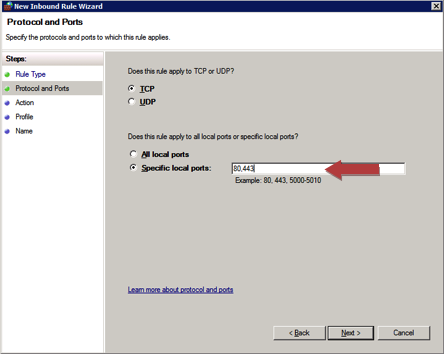
inbound rules






 thick minnow
yes i did
dense furnace
"Remote Port: All ports" is wrong I guess
thick minnow
tht only i showed u
dense furnace
point it to 19132
thick minnow
ok i will try
dense furnace
and remove the tcp 19132 rule since you don't need it
dense furnace
thick minnow
I'm not familiar with windows but where did you get this window?
thick minnow
after creating inbound rule
thick minnow
no
thick minnow
yes
dense furnace
then it's a problem with the router
🤔
since it should say open even without the server running
thick minnow
no its fine it worked with port 25565
the server is running
should i stream and show u
dense furnace
nah I'm at work, gimme a second
I'll test it right now
weird
doesn't work for me either
o.o
no wait
it's open
@thick minnow
The problem with the portchecker is, that it uses tcp
but the bedrock server uses udp
Check port of your server or website with UDP connect: website monitoring with useful tools, Check IP, Check website
use this and click UDP-Port after inserting ur ip
if ALL shows "open or filtered" then your port is open.
lean pebble
Any mtik user online ?
I killed my internet by mistake how can I connect to my mtik ? And now I lost access to my mtik
Fixed
thick minnow
lean pebble
Fixed
Well, that was quick
lean pebble
Ya
Well it's not complicated like it was with my old fortigate
Still trying to understand the gre tunnel in mtik
tame carbon
@lean pebble L2 login
 karmic willow
Could somebody please help me out with something?
What is PON?
I want to get a new router since the one I’m using rn is slow but the Router I have is connected to Fiber Optic Stuff.
Some PON thing.
The routers on Amazon don’t have that. They just have WAN and LAN.
 frozen cobalt
hey, so i have NAS at home which stores videos and pictures, but i don't know how to access these from my tv. Could anyone help me, pls?
tame carbon
@karmic willow passive optical network
@karmic willow you'll need an ONT from your ISP, most routers cannot interface with PON directly

You should check if the ONT you have, is capable of bridging
if it is, you can just hook up your own router to it
and configure it accordingly
peak cloak
@karmic willow you could ask your isp if they have a dedicated Ont you can get
@tame carbon wifi router/ont combos are the worst
tame carbon
@peak cloak what, even with just an ethernet bridge?
peak cloak
I've heard stories of not everything bridging
tame carbon
yeah because they "bridge"
they just NAT all traffic
those are awful.
Ziggo does that here with their coaxial networks
lean pebble
tame carbon
<@!109801863771074560> L2 login
What
tame carbon
@lean pebble you don't need IP stuff to configure tiks
lean pebble
Ya now I know it
tame carbon
I killed my internet by mistake how can I connect to my mtik ? And now I lost access to my mtik
lean pebble
Found it
frozen cobalt
dense furnace
<@!704697593271418940>
yes to both the questions
i found a solution and am going to try it out
btw is there anyway to host a minecraft server on my TrueNAS server? Or would it be better to run them on different systems?
peak cloak
frozen cobalt
btw is there anyway to host a minecraft server on my TrueNAS server? Or would it...
Better on separate
dense furnace
frozen cobalt
btw is there anyway to host a minecraft server on my TrueNAS server? Or would it...
specs?
peak cloak
tame carbon
You'd probably use some kind of jail for that
I've heard lots of people hate jails
tame carbon
FreeBSD
 hasty canyon
hi guys is this is the right place to ask about openmediavault?
peak cloak
hasty canyon
hi guys is this is the right place to ask about openmediavault?
No clue what that is but yes this is the right place
hasty canyon
ah ok thanks
So I am trying to secure the connection for my openmediavault but I am not sure how. It says I need a certificate but I have no idea how to create it, would anyone know?
dense furnace
you mean a ssl certificate?
tame carbon

Let's Encrypt is a free, automated, and open certificate authority brought to you by the nonprofit Internet Security Research Group (ISRG).
dense furnace
tame carbon
https://letsencrypt.org/
+1
tame carbon
You need a public/static IP for this to work
hasty canyon
dense furnace
you mean a ssl certificate?
I believe so.
peak cloak
tame carbon
You need a public/static IP for this to work
no
if you have a domain then no
there's the DNS-01 challenge
tame carbon
@peak cloak SSL Certificates are signed on an IP address.
If that IP changes, the certificate is no longer valid
peak cloak
tame carbon
<@!222482269829332992> SSL Certificates are signed on an IP address.
no
they can be signed on a domain
hasty canyon
tame carbon
https://letsencrypt.org/
does that website work with ssl certificates?
peak cloak
hasty canyon
does that website work with ssl certificates?
it gives you SSL certs
if you use the DNS-01 challenge you can get a wildcard cert which covers your whole domain, ex: *.example.com
karmic willow
peak cloak
<@263983925637021696> you could ask your isp if they have a dedicated Ont you ca...
The ONT thing is in my room. They set it up here.
It works as a Router, has two antennae.
tame carbon
I gotta go for now, I have meeting
karmic willow
Has one PON, one Landline and two LAN Ports.
So, if I get a New Router, I have to connect it here?
Through LAN?
tame carbon
@peak cloak and as for dynamic DNS and letsencrypt. it works but its suboptimal at best
if your IP changes, you depend on the DNS TTL
peak cloak
karmic willow
So, if I get a New Router, I have to connect it here?
kinda
karmic willow
But this doesn't have a 'WAN'.
peak cloak
tame carbon
if your IP changes, you depend on the DNS TTL
yeah
karmic willow
Just two LAN Ports, one PON and one FXS.
peak cloak
karmic willow
Just two LAN Ports, one PON and one FXS.
you will have double nat
karmic willow
peak cloak
you will have double nat
Double NAT?
peak cloak
unless you somehow put it in passthough mode
karmic willow
Is NAT the Gaming Thing?
peak cloak
tame carbon
if your IP changes, you depend on the DNS TTL
yeah I have one A record that changes and has a low TTL, all my other's are cnames with a 48 hour TTL
karmic willow
The Modem has Firewall Settings and I set it to Low.
But no NAT Settings.
My Old 4G Router had those settings but this is for Fiber, so, idk.
 slate sonnet
Hey all, if I buy and setup a vps, would I be able to reroute traffic from it to my pc?
I can't port forward because CGNAT but I want to host a minecraft server for my friends
Atm I'm using zerotier to host my server but it's not ideal since I have to get my friends to download an app and stuff
 waxen saddle
VPS=?
peak cloak
slate sonnet
Hey all, if I buy and setup a vps, would I be able to reroute traffic from it to...
yes
tame carbon
@slate sonnet with site to site vpn yes
waxen saddle
Virtual Private Server?
peak cloak
you can setup a vpn between the vps and your server
and then route the traffic over that vps
peak cloak
waxen saddle
Virtual Private Server?
yes
peak cloak
peak cloak
you can setup a vpn between the vps and your server
wireguard is nice for this
tame carbon
he has to set up a host on his server
peak cloak
yeah
tame carbon
and needs a router that supports wireguard
peak cloak
tame carbon
and needs a router that supports wireguard
no
tame carbon
or do it on the target computer directly
tame carbon
either would work
slate sonnet
Are there any cheap vps services that would fit my need?
dense furnace
slate sonnet
Are there any cheap vps services that would fit my need?
sure
google "cheap vps" for your location
slate sonnet
Oh, okay
slate sonnet
dense furnace
starts at 2 to 3 € (in europe) per month
That's fine
dense furnace
you don't need much power since you only want to route traffic, right?
peak cloak
slate sonnet
That's fine
you would want to get one that's the closest to you
slate sonnet
dense furnace
you don't need much power since you only want to route traffic, right?
Yes
dense furnace
US, Europe or Asia?
slate sonnet
So, how would I go about routing traffic from my pc to a vps? Is there a guide that's like that?
slate sonnet
dense furnace
US, Europe or Asia?
Technically Europe
peak cloak
slate sonnet
So, how would I go about routing traffic from my pc to a vps? Is there a guide t...
basically setup a wireguard server on the vps
dense furnace
slate sonnet
So, how would I go about routing traffic from my pc to a vps? Is there a guide t...
you familiar with linux?
peak cloak
then connect to it on the pc
slate sonnet
dense furnace
you familiar with linux?
Yes
dense furnace
there are many approaches tho
you could reverse ssh your minecraft port to your vps
and your friends can connect via vps ip
slate sonnet
dense furnace
and your friends can connect via vps ip
That's what I want
My friend connect to the vps ip
And the vps forwards traffic from my pc to them
And vice versa
dense furnace
that would be the easiest setup I guess
but wireguard vps is saver i guess
never used it before tho
peak cloak
slate sonnet
Is there a guide to setup wireguard on my pc and a vps?
let me look it up
give me a sec
slate sonnet
I'm a real noob in networking
tame carbon
you need a wireguard server on your VPS
dense furnace
or get a dyndns service and port forward to your router
tame carbon
and a regular client on your PC
dense furnace
dense furnace
or get a dyndns service and port forward to your router
this is the free alternative
tame carbon
on your VPS you then configure a NAT rule to forward all traffic through the VPN tunnel
peak cloak
slate sonnet
Is there a guide to setup wireguard on my pc and a vps?

First, let me ask you a question.
Did you spend the last couple of hours trying to figure out why port forwarding isn’t working?
Why is your public ip dif
peak cloak
dense furnace
or get a dyndns service and port forward to your router
he has cgnat
he can't
tame carbon
@peak cloak that article seems reasonable
peak cloak
@slate sonnet also found this https://github.com/mochman/Bypass_CGNAT

GitHub
Wireguard setup to bypass CGNAT with a VPS. Contribute to mochman/Bypass_CGNAT development by creating an account on GitHub.
dense furnace
peak cloak
he has cgnat
outch
peak cloak
dense furnace
outch
yeah that's the whole reason for all of this
dense furnace
can you buy a static IP?
tame carbon
@slate sonnet is it just a small server with your friends?
dense furnace
in some countrys it's just 3-4€/month
tame carbon
@slate sonnet or do you wish for it to be publicly available?
because if its just with a group of friends, you could get away with Zerotier perhaps
slate sonnet
Kinda both probably
peak cloak
tame carbon
because if its just with a group of friends, you could get away with Zerotier pe...
he's using that right now
slate sonnet
tame carbon
because if its just with a group of friends, you could get away with Zerotier pe...
That's what I'm doing right now
dense furnace
then vps or reverse-ssh tunneling is your way
dense furnace
y but then everyone without vps can join
peak cloak
dense furnace
y but then everyone without vps can join
wdym?
tame carbon
nah, you set up an ssh tunnel between your VPS and your game host
dense furnace
it's public then
tame carbon
you can select specific ports
slate sonnet
dense furnace
it's public then
I don't mind that too much
dense furnace
tame carbon
you can select specific ports
true
peak cloak
dense furnace
it's public then
what? ssh?
slate sonnet
I mean, it's not gonna be advertised and stuff
dense furnace
Secure Shell @peak cloak
slate sonnet
Just going to be between me and my friends
peak cloak
dense furnace
Secure Shell <@!222482269829332992>
?
I don't get it
I know what ssh is
dense furnace
Oh sorry
peak cloak
If ssh is open just use keys
tame carbon
ssh -L 6379:127.0.0.1:6379 crystal@main
peak cloak
secure
tame carbon
You can map tunnels like so ^