#networking
1 messages · Page 293 of 1
 hollow marlin
Absolute limits seen to be 30m at 10g, wouldn't recommend for production, but it works
 lone sun
Well if it works, it works. 🤷♂️
hollow marlin
Yeah its rated for 1gig to account for overhead with interference, it can work at higher speeds but its just not certified.
hollow marlin
 tame carbon
it wont be a reliable experience though
tame carbon
it wont be a reliable experience though
AFAIK the "temporary" run at like 20-25m at my last workplace that was made has been rock solid. But as usual temporary actually mean permanent
tame carbon
no failed transmits?
lone sun
😅 Guess I've giving been people trying to use long Ethernet cables the right advice then to just go with cat 6.
hollow marlin
tame carbon
no failed transmits?
Nope, was active for like 5 months before I left and not errors or flaps
tame carbon
must be some high grade copper wire
though within rating, expected to run just fine
I got fiber optics internally here, cheaper :P
lone sun
Lots of nerd jerkoffs on Linus website telling people ca5e is fine for long distance when its not even certified for it.
 peak cloak
that's what I use
lone sun
But cat 6/6a is relatively cheap too. 🤷♂️ ...why not get one. 🙂 👍 👍
peak cloak
although I kinda regret it
tame carbon
cable runs beyond 100 meters, I would use something else
peak cloak
not getting 6
lone sun
But six 6 is an even number...has to be a good omen. 🤔
tame carbon
wat
 little schooner
tame carbon
5e is cheap, its fine for 1G
little schooner
tame carbon
5e is cheap, its fine for 1G
I'd like 2.5G to be the new normal
tame carbon
none of my gear has support for it
little schooner
Could 5e still handle that you think
tame carbon
I think 2.5G is a gimmick
lone sun
I have a 2.5 gig port on my mobo. I already have a cat 6a cable, so all I'd need is that 2.5 gig modem from Comcast and I'd be all set. Its just a matter of the speeds I'd be willing to pay for. 😃 👍 👍
 rustic quarry
tame carbon
I think 2.5G is a gimmick
rustic quarry
tame carbon
I think 2.5G is a gimmick
2.5G would be pretty handy to anyone with a NAS
tame carbon
@rustic quarry yeah but the price difference with 10G is so small, that you might as well use it instead
little schooner
Make a 2.5G, 5G, and 7.5G all in one NIC
tame carbon
those are even more expensive xD
little schooner
Awe
tame carbon
combo ports are quite pricy
peak cloak
2.5G is new, sfp+ has been around for a while so it's easier to get used gear
tame carbon
2.5G for RJ45 is new
rustic quarry
little schooner
Make a 2.5G, 5G, and 7.5G all in one NIC
QNAP came out with a really inexpensive 2.5g switch somewhat recently
 little schooner
But what's the speed with an sfp+ copper module
Is it anywhere near 10gbps
On that switch
 tame carbon
its SFP+
little schooner
hm
tame carbon
though fiber modules are cheaper than RJ45 10G ones
they cost like 15 bucks instead of 50
 little schooner
Ultimately I want to move my whole net setup to the basement
Right now it's in a 2nd floor bedroom
Will be some work.
tame carbon
@little schooner https://i.imgur.com/boRfd8f.png
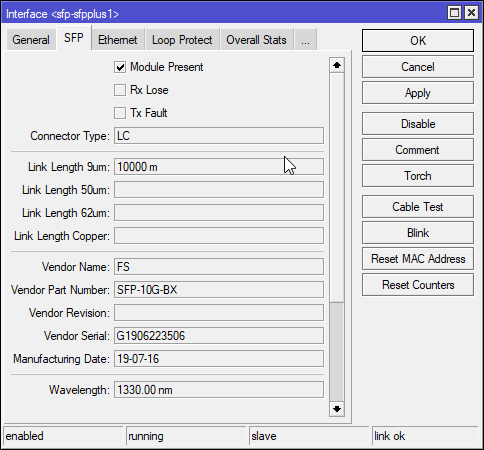
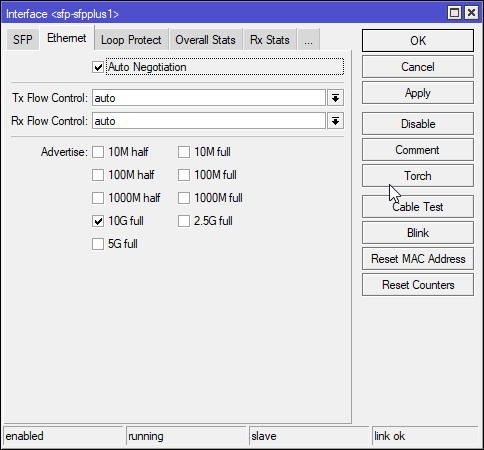
would be same if you plugged in a 10G RJ45 module
lone sun
🤔 So how is the latency virtually the same between IPV6 and Ipv4 to the same destination even though Ipv6 has less hops. Its weird..🙃
tame carbon
v6 networks are generally simpler than v4
they run the same gear
possibly same links even
but the software ontop, the routing and peering structure
is different
but that really depends on what ISP you have
lone sun
Well, I have comcast. Ipv6 will have three hops max while version 4 will have nine.
I can imagine troubleshooting becoming a pain once they migrate totally over to ipv6 though with all the different types of addresses it uses. 😬
peak cloak
lone sun
I can imagine troubleshooting becoming a pain once they migrate totally over to ...
you really don't like ipv6?
ipv6 is great
lone sun
As long as I can still troubleshoot using ipv4. 😬
peak cloak
wdym?
tame carbon
wat
peak cloak
lone sun
As long as I can still troubleshoot using ipv4. 😬
what's the big difference between 4 and 6 that makes you so angry?
ping works the same
just a lot more copy, paste
lone sun
peak cloak
just a lot more copy, paste
😬 Well, that right there. I had to read about the different addresses used in it. Its two different types just to route from within an organization and out towards the internet, what is called a "global" address. That on top of the already long ass essay you gotta type out would make it a pain. 🙃
tame carbon
there's no central point on the internet
there's no 'global' highway
ISPs peer with eachother
lone sun
So I can just use the "organizational" address to ping?
tame carbon
routers always have multiple addresses
since they route between different networks
@lone sun the way it currently works on the internet
routers announce a prefix with BGP
announcing to other routers, that they provide a route to a specific set of IP addresses
Border Gateway Protocol (BGP) is a standardized exterior gateway protocol designed to exchange routing and reachability information among autonomous systems (AS) on the Internet. BGP is classified as a path-vector routing protocol, and it makes routing decisions based on paths, network policies, or rule-sets configured by a network administrator...
peak cloak
lone sun
😬 Well, that right there. I had to read about the different addresses used in i...
ipv6 is different, you just gotta learn
tame carbon
BGP is on both v4 and v6
peak cloak
because every device gets a public ip (should)
so there are is link-local for local communication
lone sun
🤔 Yeah, I remember BPG. They glossed over a lot of this stuff In the net+ course and only discussed ipv6 for like two pages.
peak cloak
every home should get at least a /64 block
smallest routable subnet is /64
usually ISPs give you a /56 from what I heard
tame carbon
or a /48
tame carbon
*subnets
tame carbon
a /48 can hold 65535 /64's
peak cloak
each /64 has 18,446,744,073,709,551,616 addresses
tame carbon

tame carbon
@peak cloak they said they are preparing for it
peak cloak
good
tame carbon
they are currently busy building out FttH further
lone sun
So basically there would be no internet without bpg. 🤔
peak cloak
so is fios apparently
tame carbon
@lone sun exactly
peak cloak
well internet existed before bgp?
right?
there were other protocols for route advertising?

 fresh copper
They probably started with just static routes
tame carbon
 peak cloak
fresh copper
They probably started with just static routes
peak cloak
fresh copper
They probably started with just static routes
yeah
tame carbon
881 BGP ASN's
so that's an internet exchange, with a bunch of high density links
AMS-IX has multiple locations throughout the country
They peer with most of the world
and a bunch of companies in europe
fresh copper
AMS-IX is really huge
tame carbon
But internet exchanges don't just peer themselves, they also provide cross-connects for other peers
@fresh copper yeah they are at the densest point of the internet in europe
and I'm 2 hops away from AMS-IX :)
Home -> ISP -> Serverius Internet Services -> AMS-IX
peak cloak
so many in NY
tame carbon

https://www.submarinecablemap.com/
A comprehensive and regularly updated interactive map of the world's major submarine cable systems and landing stations.
@peak cloak some of these networks are very specific lol https://i.imgur.com/LCUDNe4.png
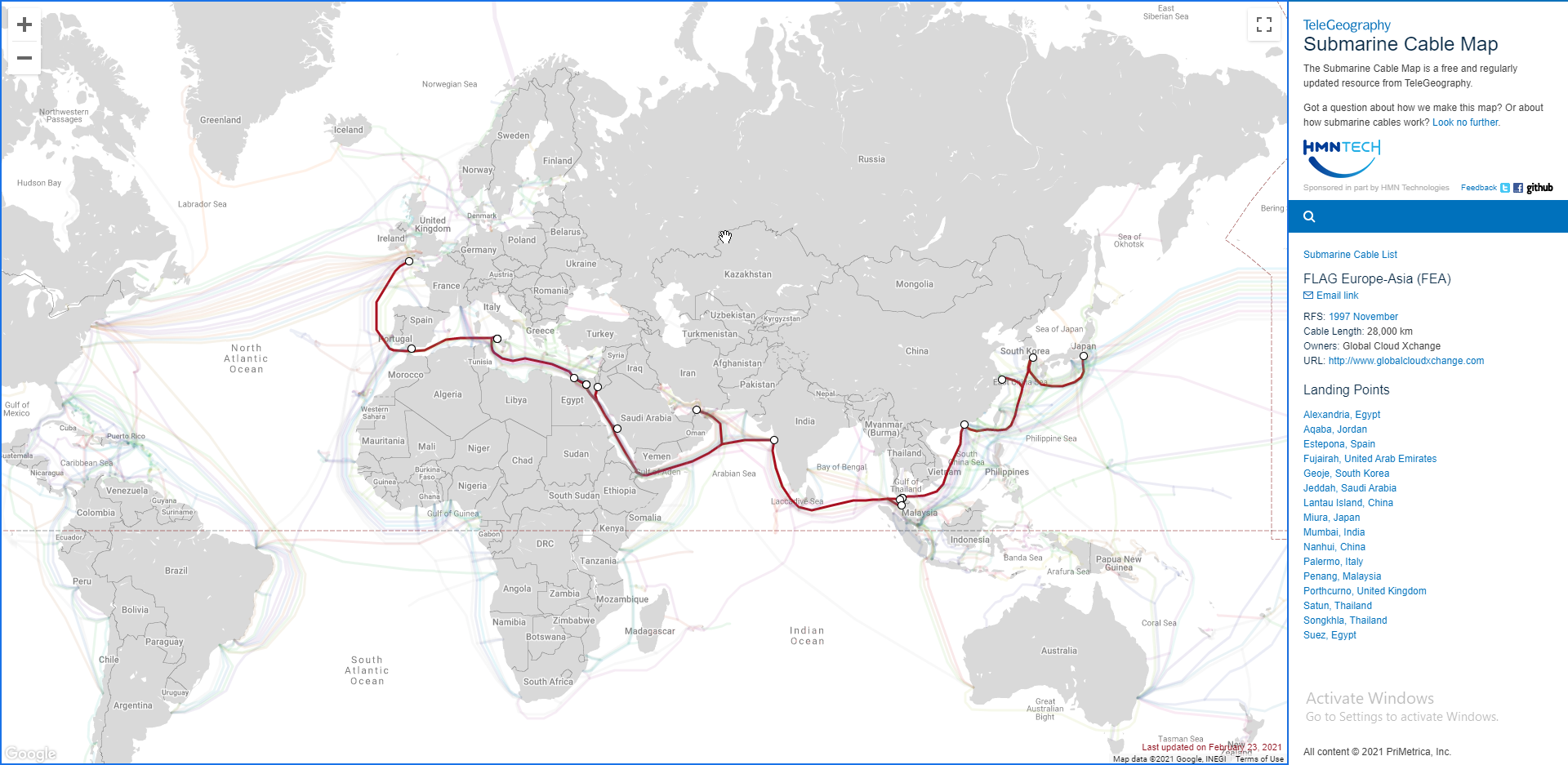
this one operated by GlobalCloud
these guys do real backbone stuff ye https://i.imgur.com/CNGOqfL.png
 fresh copper
I really like Herricane Electric myself
peak cloak
fresh copper
I really like Herricane Electric myself
I use their v6 tunnel
hollow marlin
peak cloak
there were other protocols for route advertising?
There was until it reached a tipping point where no routing protocol can scale as much as BGP can
 humble cloak
hey is there a way to force my laptop to use the ac network vs the n network? Connection strength is quite bad in my room for it but its still faster than the n network im on currently
peak cloak
humble cloak
hey is there a way to force my laptop to use the ac network vs the n network? Co...
you could lower the 2.4ghz tx power or you could also create seperate SSID's for 2.4ghz and 5ghz
humble cloak
preferably without me having access to the router
cuz i dont lol otherwise id use a cable
humble cloak
thats what i thought lol
 weak tinsel
I recently just upgraded to a Gigabyte Connection and using the standard router that fios gave me. I am looking to upgrade the router, I have a rather largehome and my budget is $150. I intend to spend less then that however. Please ping me or DM me suggestions.
 tribal ferry
Is it safe to purchase MicroTik hardware through amazon?
 grand rock
I've never had a good times with MicroTik hardware
tribal ferry
I've been discussing it over with many people here, everyone has had differing opinions and I'm fine to purchase it.
Just looking for whether it's all good to buy it on amazon or not.
grand rock
I had a MicroTik router 2 days ago and started to have DNS issues until today replacing my router, and I'm pretty sure it's safe
tribal ferry
Alright
 thick minnow
What’s the WiFi box called
 hardy python
Router
 peak cloak
thick minnow
What’s the WiFi box called
peak cloak
thick minnow
What’s the WiFi box called
Access point
A Router in itself doesn't have a wifi radio
grand rock
Are you sure about that
peak cloak
No, a router routes
Between subnets
And does nat
Among other services like dns and dhcp
hardy python
A router standardized by what your ISP gives you has WAP on the router.
peak cloak
hardy python
A router standardized by what your ISP gives you has WAP on the router.
Yes Your generic home router is a router, access point, and switch in one
grand rock
So it's not a access point
hollow marlin
wireless AP =/= router as Present mentioned
thick minnow
WiFi? More like HiLo
grand rock
Then that's a switch isn't it?
hollow marlin
router, switch, firewall, AP perform different functions
peak cloak
grand rock
Then that's a switch isn't it?
A switch operates on a l2 level, a router operates a l3 level
grand rock
So a router with a modem in it is a modter
peak cloak
Ok your trolling
hardy python
So its a layer 3 switch then
grand rock
I would neverrrr
peak cloak
hardy python
So its a layer 3 switch then
Yeah
grand rock
@hardy python <-- mad boi
peak cloak
Yeah your generic switch is l2
hardy python
lol
peak cloak
L3 switch allows for routing between subnets like vlans without having the traffic go all the way back to the router
And firewall rules
tribal ferry
Present, while you're here, it's all good to buy MicroTik hardware on Amazon?
grand rock
Routers operate on OSI layers right?
peak cloak
tribal ferry
Present, while you're here, it's all good to buy MicroTik hardware on Amazon?
No clue, bought my erx on amazon
tribal ferry
Good enough for me, the reviews seem fine.
Time to go pick me up a CRS326-24G-2S+RM!
peak cloak
grand rock
Routers operate on OSI layers right?
Osi just describes the whole internet stack
peak cloak
Routers work on l3 although firewall can be l4 or maybe even l5
grand rock
My router uses layer69
 waxen saddle
Do you know how many layers are in the OSI model?
hardy python
7
grand rock
I WAS GONN SAY THAT
hardy python
oof I got confused between a Layer 3 switch and a router lol
grand rock
Layer 7 Routing Firewalls
hardy python
Now I know
waxen saddle
A layer 7 firewall would probably be the web page management interface you use to configure it. Lol
grand rock
I totally knew that
waxen saddle
Reddit is a terrible place to learn this stuff. Recommend trial and error.
hardy python
Yes
peak cloak
A l7 router is basically a reverse proxy
hardy python
I am teaching myself shit so trial and error has been the best way to learn for me, honestly.
or learning from someone experienced.
grand rock
I just know
#include <iostream>
int main() {
    cout << "Turn Off Internet";
}
breaks my interwebs
waxen saddle
That would be an additional function to the router, like the integrated switch and AP. It’s not inherent to the IP routing function
hardy python
yes
waxen saddle
I remember a time when I changed the static IP for a home server. Went to bed, woke up and completely forgot my new IP schema that I moved the server to. Had to manually check the whole subnet twice before I realized it wasn’t even on the same network. I learned to document as I go after that.
hardy python
Yeah
I love networking and do want to pursue in that field.
I am creating and using a server for our school
It is in our IT department.
peak cloak
Your in HS?
hardy python
Yeah
peak cloak
Same
hardy python
I am the only one working on it.
peak cloak
Learn linux and cli if you don't know it already
hardy python
I know Linux but not cli
 thorny vector
Learn powershell, be familiar with command prompt
hardy python
I know Command Prompt very well
peak cloak
Yeah, powershell
hardy python
I need to learn Powershell
 rocky badge
PowerShell scripting is nice
hardy python
yessir!
peak cloak
I only know basic windows commands
rocky badge
Currently writing a REST API for my school....
thorny vector
Python?
rocky badge
Node 
hardy python
I have created a bot on Python but that is about it.
thorny vector
Eww, get that Java outa here.
rocky badge
Node != Java
thorny vector
It’s a JavaScript runtime environment, is it not?
hardy python
Would you recommend me to learn programming languages too?
rocky badge
Java != JavaScript
hardy python
I know Python and C++ but not mastered it.
peak cloak
hardy python
Would you recommend me to learn programming languages too?
You should know some
peak cloak
I know js, some python, some c and cpp
hardy python
Yeah Python has been easy for me so far.
rocky badge
I'm mainly using Node for this project because I can copy and paste a lot of stuff from other stuff I've done
Since this project is being rushed
Same for the frontend too
Vue with Auth0 authentication for JWTs
thorny vector
Fair. I just have violent reactions to anything Java adjacent because I have to deal with its memory BS
It’s easy for me to forget the two aren’t the same.
rocky badge
JavaScript is nowhere near Java
peak cloak
Java isn't anything like js
Just the name
Thats all that's similar
It was supposed to be named mocha script I think
But java was popular so it was called javascript
thorny vector
I should know better. I literally just contributed to a node.js GitHub project.
Granted, I just de-dockerized the application.
grand rock
I know python, a bit of java, and I'm learning C & C++
I'm also gonna get into basic networking, etc
peak cloak
grand rock
I'm also gonna get into basic networking, etc
Get yourself a good router, you can learn alot
grand rock
I'm gonna get a good router since the one I'm using rn is just a backup because my old router is trash lol
peak cloak
grand rock
I'm gonna get a good router since the one I'm using rn is just a backup because ...
I have the er-x, the hex is also a good router
 grand rock
I'll check both out lol
peak cloak
Here is actually my network setup
grand rock
Looks pretty pog
peak cloak
It's a lot more clean now
grand rock
even tho its messy 😂 but i mean messy comes with the setup ;)
Noice
Messy = +100mb/s down tho 😳
grand rock
Damn
peak cloak
I could get up to gigabit but it's really not worth the extra price
Fiber latency is great though
grand rock
me living slightly out of town not able to get Cable, DSL or FIber
thorny vector
Before spending money on networking hardware, just virtualize it.
grand rock
I'm clearly the one with better ineternet here :)
 thorny vector
You can straight up emulate Cisco hardware with GN3 and to a lesser extent packet tracer, and you can do full virtualization with a vyos or pfsense vm
thorny vector
Nope. Especially with packet tracer, it’s literally drag an drop, then configure the emulated devices
grand rock
Seems easy enough
thorny vector
Can do the same thing as a full ccna lab, but for free
And you can slow down the moving of packets to step by step, so you can visualize the traffic at each hop
 peak cloak
grand rock
I'm clearly the one with better ineternet here :)
peak cloak
grand rock
I'm clearly the one with better ineternet here :)
Sat?
thorny vector
How much memory do you have?
grand rock
peak cloak
Sat?
Yeah it's sat
@thorny vector only 4gb I'm using an old laptop
I have been for awhile now
thorny vector
You can run some light Linux VM’s on it.
Don’t need thick VMs to practice basic concepts
hollow marlin
thorny vector
You can straight up emulate Cisco hardware with GN3 and to a lesser extent packe...
PT is simulated instead of emulated, that said anyone who ask about getting into networking, PT is the first I point to with Network Direction's YT playlist. Only if it still interest them I suggest EVE/GNS3 and material
thorny vector
@hollow marlin thank you. Simulated is a much better word
hollow marlin
I also slapped vyos in my EVE recently to get a feel for it, not a fan so far. Just feels so stripped down compared to Junos
thorny vector
Yeah. I think it exists for the people that want a foss router OS, but are too good for doing things in a gui with pfsense.
hollow marlin
Well GUIs are 🤮
Lol
It's used heavily in enterprises and some ISPs but mainly as basic FWs or BGP RR, which seems so far like it would suffice
thorny vector
For big boy enterprise stuff, yeah. But my team uses pfsense on all of our gateways because it’s just so damn simple to keep mobile and accessible in our on-the-go kits.
Also, speaking of which, I just got side-moted to being the network and network sensor architect
hollow marlin
Oh hell yeah 👍
thorny vector
I was joking around with people about making decisions about implementing new systems “man I’m glad I’m just an analyst “
I hadn’t been in the office for a while. Got a blank stare, and a someone saying “no you’re not, not anymore”
Wut
 hollow marlin
So the situations where you speak up on said topic and now you are now in charge of it lol
How large is the network?
thorny vector
Nothing like you’re thinking. For us, it mostly means being in charge of our kit networks. Our at home office networks are owned by our parent command. What it really means is now I have to be the SME on all of our sensors, splunk, optimizing builds for whatever customer environment we run into, figuring out data transmission from wherever our sensors are in the customer network to our kit....
Oh, and still be able to do analysis to find evidence of “bad” up to and including novel malware and zero days
hollow marlin
What sensors are within the customers network?
thorny vector
It’s a mixed bag, we never know until we show up.
Sometimes we can pull data from full appliances, like Palo Altos, for firewall events and netflow. We always deploy our own security onion sensors, which is up in the air now with the cluster F that is security onion 2.
We always pull whatever host logs we can (obviously on the network side we care about stuff like web server logs)
And then the always fun “we don’t monitor anything, we just know something bad happened because this screen is asking me for Bitcoin now”
hollow marlin
Ah, gotcha. When it comes to the inspection/IDS/analysis side, I know little about it. We have basic monitoring when it comes to internal but once I get an answer on budget and time we are planning on locking it down and more visibility within our internal network. There are a few ingress points a some spots where customer traffic would have the potential to leak or attack our internal. While it would be difficult, the hole exist and it makes me uneasy thinking about it. Currently we have IDS only but the sysadmins have some monitoring on the server and domain side but I am not sure what it comprises of
The problem is how much of a redesign, particularly our voice network, it requires. But its something that I pushed up the list
 mighty wind
I have been thinking about designing a throwable network for my company. While I was on assignment one of the guys got a USG and some WAPs to go with it. Unfortunately they didn't know how annoying they are and how much of a pain they can be. Probbably will swap it for a Netgate or something home made. The problem is we usually need a 10g switch and those take up a bit of space. But if 5 ports is enough that little mikrotik may work
tame carbon
@mighty wind the CRS305 only has 4 10G ports
though, they do sell switches and routers with more connectivity
@mighty wind https://mikrotik.com/product/crs309_1g_8s_in

MikroTik is a Latvian company which was founded in 1996 to develop routers and wireless ISP systems. MikroTik now provides hardware and software for Internet connectivity in most of the countries around the world.
mikrotik wireless APs are also relatively easy to setup
tame carbon
Fixed a network printer earlier
some weird bug in the driver, it was set to Raw mode
causing the printer to turn a single Excel sheet into 400 pages of raw postscript 1 line per page
I'm just wondering, what could have set this to 'Raw' ?
I set it to LPR which fixed the issue
 untold elbow
any rumors about mikrotik developing a switch with SFP28?
i figure it's only a matter of time
tame carbon
@untold elbow they have one
MikroTik is a Latvian company which was founded in 1996 to develop routers and wireless ISP systems. MikroTik now provides hardware and software for Internet connectivity in most of the countries around the world.
2x SFP28 and 12x 10G
this is a router though, not a switch
thick minnow
tame carbon
this is a router though, not a switch
What's the diff? Sounds pretty similar
tame carbon
the difference is that there's no switching chip onboard
thick minnow
Okay, so ummm, baseline assume I know nothing about networking and explain it again please
tame carbon
routing is on the IP layer
switching is on the physical layer
switches can switch ethernet frames
all devices on a switch, are on the same layer 2 network
untold elbow
@teal wave yeah i'd be looking for a switch, i don't need to route 25G
tame carbon
@untold elbow wrong ping but ok. yeah they don't have any 25G beyond that CCR2004
thick minnow
Ah okay, Thanks
tame carbon
I got all 10G gear here :P
@thick minnow If you look at the OSI model, these things make a lot more sense
untold elbow
40G is nice because you can get used QSFP+ gear cheap
tame carbon
@thick minnow ethernet, and switches therefor, allow data exchange on a local network
like, devices on your local network, on a network such as 192.168.1.0/24
they use ARP to ask local devices for the MAC address of the owner of that IP
so when the packet is transmitted, it has a MAC address for destination
switches just take a packet that comes in, look at the destination
and then send it out the port, where that MAC is connected to
routing, is when you introduce multiple ethernet networks
and have an IP network on both
and wish to exchange packets between different networks
thick minnow
Huh, okay thanks @tame carbon
tame carbon
such as your router at home
routing traffic between your LAN /24 and your ISPs network
devices on your local network communicating with eachother, do not use routing
that's purely packet switching
and in the context of @untold elbow 's question
a switch would be desireable
since a router would be limited by however fast the CPU can process the data
switches generally have a hardware chip for this, so its much much faster
@thick minnow most consumer 'router/wifi/modem' comb boxes, have a switch internally as well
comparable to say, my router:

You can see two switching chips, each with 5 ports associated
 thick minnow
okay
tame carbon
exchange between ports on the same switching chip, is not in any way limited usually
like, the CRS305 I have, a 4x 10G switch, has a total throughput of 40gbit/s
but it can only route about 1.2gbit xD
untold elbow
well to clarify, those port extenders do have switching hardware in them too
thick minnow
Also, Whenever I move, remind me to hire you to design my home networking @tame carbon
tame carbon
@untold elbow in the CCR2004? yeah, probably
untold elbow
so they can and will act as a switch when talking on the same subnet, but it's a waste of money if that's all it's doing
 untold elbow
you're paying for the CPU and RAM and extra hardware
tame carbon
@untold elbow then again, its not that outrageous
untold elbow
yeah, it's not, $600 isn't bad
waxen saddle
Looks like Multiple WAN IP addresses is coming to Ubiquiti Unifi.
peak cloak
waxen saddle
Looks like Multiple WAN IP addresses is coming to Ubiquiti Unifi.
they didn't have that beforehand?
waxen saddle
Nope
peak cloak

hollow marlin
Its not surprising, it was only a few months ago when they figured out dynamic routing
thick minnow
What do you think is the best router I can get for under 150$ (used for live streaming and gaming)
 south blade
Router going to shit, DD-WRT installed and restarting it isn't giving me the WebGUI anymore, what has good range and under $75 used?
peak cloak
under 75 you can get a good ethernet router, but not really a good wifi one
@south blade
south blade
Not even used? :/
peak cloak
south blade
Not even used? :/
used, probobly
thick minnow
ASUS RT-AC1200 V2 AC1200 Dual Band WiFi Router, Easy 3-Step Setup, 4 LAN Ports, VPN, Gaming & Streaming
peak cloak
have not heard good things about asus
 peak cloak
 raw timber
is this unraid issue
raw timber
is this unraid issue
probobly
raw timber
so what do i od
raw timber
do since i need the data off why is unrai have so many isuse i was told it was so good in linus vidoe start to woner why i even becamon a part of this grup
group if he going to recomadn stuff that have issue
raw timber
i was more tak aobut why be part of this group if he would talk so much about how good unraid is with out tell it issue
peak cloak
raw timber
i was more tak aobut why be part of this group if he would talk so much about ho...
marketing?
probably doesn't know the issues himself
raw timber
becaer he did not spend enout time on it
i think we shuld ask him to look at this link i bet he talk to unraid team who say it all lie lie and he bleive them for mony it why i feee stuck like there a bucn of program that only avable if you buy them or game who only suport window
peak cloak
that being said idk much about unraid so maybe go somewhere that does or post on the forum @raw timber ?
raw timber
i am sure i just get told what you conasiedr a https://h.en0.io/raw/xtreks-unraid-rant a rant is a think they consdier great about it
and need to just ajust how to do
or wait
 rare matrix
raw timber
how do people speed this up
rare matrix
raw timber
how do people speed this up
try the tech support channel, i dont think that the issue you are seeing means there is anything wrong with unraid, and i certainly would make sure to try anything new in a test environment, even if it comes recommended in a video
thorny vector
Unraid is a good platform for file storage. I’d investigate hardware issues, like disk I/O bottlenecks, and if it’s over the network, you’re likely not going to transfer faster than 100 MB/s, depending on if you’re on gigabit or not.
peak cloak
proxmox really isn't a storage platform
thorny vector
Another potential issue is RAM, if you don’t have enough to support caching the data before it is sent.
peak cloak
peak cloak
proxmox really isn't a storage platform
it can be used but it's not easy to use like that
rare matrix
id suggest that going forward you move your data to a stable storage platform while you test new ones, so you dont have to rescue your data from a test system if it doesnt work out
raw timber
i dont have the sever to do that my family was cheap
we only have 1 sever
there 8 gig ram free
rare matrix
you can use something as simple as a USB hard drive, and again, relying on something for a critical role, that one hasnt fully tested and learned, is a recipe for disaster
as for getting your data now, id just suggest patience
rare matrix
well, wherever it is that you are copying your data to right now, from the unraid box, keep the data there
dont move it onto something new until youre sure it will work the way you want
peak cloak
^
raw timber
if there room for other stuff there it my main pc
rare matrix
its also wise to sign up for a cloud backup service like backblaze, so your worst-case scenario becomes having to download your stuff from the internet when you lose it
peak cloak
if you value your data you don't want everything on one box as well
rare matrix
yeah the final line of defense is the cloud backup, you start there and as you are able to, you add closer and closer and faster and faster backups
rare matrix
im not going to instruct you to buy anything, i dont know what kind of funds you have available to you, but its important for you to know that for $50-100 you can get several terabytes of storage
its extremely inexpensive to get just a bit of disk to keep stuff on
peak cloak
yeah cloud storage isn't terribly expensive
thorny vector
Watch r/homelabsales. I often get 2TB drives for 20 bucks.
rare matrix
you can buy a brand new, warranteed hard disk with several terabytes of storage for 50-75 bucks
raw timber
rember my famil is dirt cheap my dad have free phone from tracphone
and pay like 120 a year some reason some taugh him mobile data is too pricy
rare matrix
at some point, we have to accept that technology isnt magic and we have to actually be physically in possession of equipment that will do the thing we want
and you may be asking for more than what your current equipment can do
so we can tell you what your current hardware can do, we can tell you what additional hardware can do
but we cant make your existing hardware grow, and we cant find the magic button to make dad buy you a shiny new disk
raw timber
rember we talk about a dad who was perect happy watch dev from red box on a 2013 tv 720p small and use vierizon old rotuer that barle made it up the stars his resonce is wait for it
lol
rare matrix
not our issue
raw timber
alway wait for wifi you dont need to look on discord on a car ride
rare matrix
cant fix cheap here
 plucky cargo
true though
raw timber
ype there saving mony and there cheap cheap cheap while spend mony on base ball ticket
or donating to chursch
thorny vector
Yeah you can. Before I got the cash to build out my homelab, most was just enterprise cast offs.
raw timber
or going on vaction all he see is worther more
then some fancy phone and unlimt dat a plan
thorny vector
It just takes work, searching, and reaching out to people.
plucky cargo
okay so what is the point
raw timber
just say my dad is funny he think people wth all that fancy stuff have stress at work are crazy
he was say some bad world i think when a tmobile add show up talk about a plan that cost 70 a month he say it was worther less uinmless you need it for a job
rare matrix
reddit
raw timber
lol
 uncut plume
1 Gbps is not possible over CAT 5 correct?
peak cloak
uncut plume
1 Gbps is not possible over CAT 5 correct?
Officially no, but over short enough distances it could. 5e can do gigabit officially
uncut plume
I was afraid of that
lone sun
Its definitely possible, saw it for myself when I had one. But I'm sitting right next to the modem so. 🙂
thick minnow
umm help pls im only using a wlan how do i change it into wireless
cus i wanna move my setup
uncut plume
I have a hypothetical networking question
 worldly sundial
Is it okay to use Wi-Fi 6 with 1Gbps eternet(Real speed: About 600Mbps)?
uncut plume
Hypothetically if your entire home network is only CAT5 Ethernet would there be any point to get higher than 100 Mbps download speeds from your ISP or would it just be a waste because CAT5 only supports up to 100 Mbps?
tame carbon
@uncut plume I have 250M internet, yet have 10gbit/s local network
There's no benefit, unless you have a lot of local traffic
such as a NAS, or when you do in-home streaming with many devices
uncut plume
10gbit/s? You mean 10 Mbps?
tame carbon
10gbit/s
uncut plume
Isnt that 10 times faster than Gigabit ethernet?
tame carbon
yes
uncut plume
Okay so your home network is faster then your internet connection
tame carbon
Well, isnt this the case in most home environments?
most people have <1G internet, yet their gear is gigabit capable
uncut plume
Well I was wondering if my home network is only 100mbps if there is any positives to having more then 100mbps from your ISP
tame carbon
faster downloads :P
@uncut plume the way it generally works, your speed is limited by the most congested link
uncut plume
right
tame carbon
and the reason I have 10G here, has to do with my NAS being capable of pushing about 3.5gbit/s
like my workstation also is 10G capable, mainly because if I saturate the NAS on 1G, I wouldnt be able to use the internet
since link would be congested
uncut plume
But how would it be faster downloads if the traffic is going to bottleneck as soon as it hits the LAN?
tame carbon
well, a NAS at home can easily exceed 1G
@uncut plume well, you said having more than 100mbit
more bandwidth = faster internet, obviously
Its just that 1G isn't that fast..
a sata SSD can read data faster than a 1G network card can transmit
uncut plume
Isnt 1G = 1000Mbps?
uncut plume
I only have 100mbps download at my house. I couldnt imaging having Gigabit internet. That would be awesome.
tame carbon
most sata SSDs cap out at a read speed of ~500MB/s
converted to bits, that is 4000mbit/s
@uncut plume gigabit net is expensive
I pay 72/month for 250/250
167 euros/month for 800/800
uncut plume
yeah it is
 oak night
That much?
oak night
Yeah right
tame carbon
And 2 hops from amsterdam exchange
uncut plume
fiber?
tame carbon
There's like 4 different ISPs that deliver services on this fiber network
I went with the one that offers symetric dataplans
and its also the only ISP out of the 4, that expects you to get your own routing gear
oak night
oak night
here we have only asymetric lines
However they are 28 euros for 1000/300
tame carbon
@oak night basically, they have 6 hours of maximum downtime, before its gonna cost them
Its a service agreement, if they don't hold up their end of the contract, they pay me in damages
oak night
Ok
tame carbon
That's probably another reason why its a little more expensive than consumer internet
tame carbon
uncut plume
fiber?
and yes, any high speed internet with symetric lines is most likely fiber optics
uncut plume
I wish I could get fiber internet where i live
tame carbon
https://cdn.discordapp.com/attachments/776722183119699988/777646103775674368/IMG-20200922-WA0001.jpg

^ my little network rack
fiber on the left is the one from the ISP, the other one is locally
tame carbon
the highspeed stuff here is all SFP+
uncut plume
The United States needs to get their shit together when it comes to improving infrastructure
tame carbon
@uncut plume rightly so, but not gonna happen
@uncut plume US carriers have formed a cartel around residential connections
they each drew on a map to what their service area is, and promised not to step on eachothers foot
thats why in the US, you often don't have a choice in service provider
oak night
though i want to get my local speed to 10 Gbits
uncut plume
monopoly
tame carbon
This is a curse not only in the US
Netherlands has a similar problem with DSL networks
Dutch copper network was privatized
and after that, innovation stopped
meanwhile, a 50mbit/s DSL dataplan costs ~45/month
and its a gamble if you actually get the 50M
I paid 45/month for 4.5mbit service for many years
until fiber optics got installed by another organization
@oak night best part: my previous ISP called me up, asking me what it would take for them to get me to switch providers
I told them: not gonna happen, since they don't do fiber optics, or innovate
and they rent out stupid dynamic IPs
uncut plume
I think I pay at $70/month for 100mbps
tame carbon
the current ISP I have, gives out static addresses, as well as a public /29 routed to my WAN
oak night
tame carbon
<@!320107893557035008> best part: my previous ISP called me up, asking me what i...
Ah Here it also happens
tame carbon
@oak night 2nd time they called me, I asked to be removed from the caller list
but the guy on the phone was at least self aware
cus he started his question by saying: it might be a bit of a rude question: but what ISP do you have?
tame carbon
@oak night lol DSL internet here is such a ripoff
they deliver IPTV service over DSL as well
cutting into the bandwidth.
oak night
LOL
tame carbon
@oak night I get IPTV via fiber optics now, and guess what
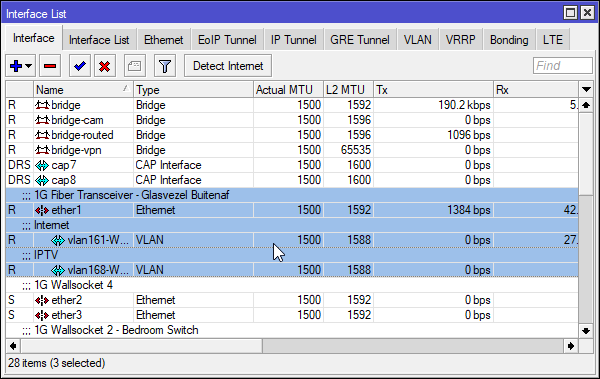
these guys went about it in a smart way ^
two VLANs, each their own bandwidth
oak night
Here they say it is 100 mbit but when you call them to say "hey i'm not getting 100 i'm getting 30" they say you it is not their problem and it's normal even if you are like 30 meters from the cabinet
oak night
tame carbon
https://i.imgur.com/5AutgoD.png
Cool
oak night
Yep
tame carbon
and instead of fixing it they say: this is the best we can do: GOOD LUCKKK mofo
oak night
Yeah same
When getting fiber they told me that i could barrow from them the router
Well i'll use the router from my previous ISP
tame carbon
xD
@oak night initial setup of the gear over here was quite simple
all they had me do, was hook up my router to their network
and over the phone, they marked my MAC address
oak night
Well is is a modem/router/AP/switch
tame carbon
so I would always get the same address
they sent me an email, with subnet information and router configuration for a draytek router
oak night
So i would love to get a proper router and proper AP
oak night
xD
tame carbon
for internet this was quite easy
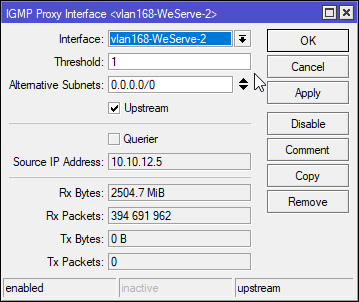
for IPTV... slightly less so
I had to install multicast for rOS before I could do that
 oak night
Are you using VLAN ID for internet?
tame carbon
on mikrotik? https://i.imgur.com/ozT4McA.png

just click New VLAN
assign it to a physical interface
tame carbon
all the mikrotiks use the same software
tame carbon
Ye
MikroTik is a Latvian company which was founded in 1996 to develop routers and wireless ISP systems. MikroTik now provides hardware and software for Internet connectivity in most of the countries around the world.
oak night
Can i install it on a server?
tame carbon
I have this one
@oak night rOS does support x86, and you can download it and install it
however
you need a license for it
oak night
How much for a license?
oak night
Easier to get a Mikrotik
tame carbon
@oak night if you don't have a need for high bandwidth ports, something like a hAP ac2 or hEX S might be enough
MikroTik is a Latvian company which was founded in 1996 to develop routers and wireless ISP systems. MikroTik now provides hardware and software for Internet connectivity in most of the countries around the world.
MikroTik is a Latvian company which was founded in 1996 to develop routers and wireless ISP systems. MikroTik now provides hardware and software for Internet connectivity in most of the countries around the world.
oak night
If i'll ever get one i would get one with 10Gig
tame carbon
RB4011 is their 10G capable router, though it only has a single 10G port
oak night
The SFP+ one
tame carbon

This one yeah
this one is so powerful, you can disable fastpath and still get 10gbit xD
quadcore 1.4GHz CPU
@oak night either way, it dont really matter what kind of hardware you have
rOS works the same across all their gear
oak night
Ok
tame carbon
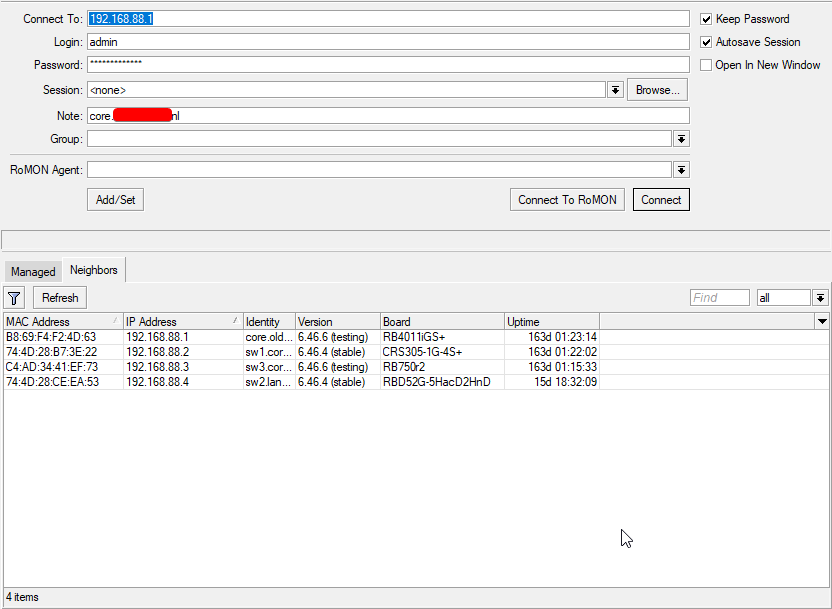 oak night
Ok
tame carbon
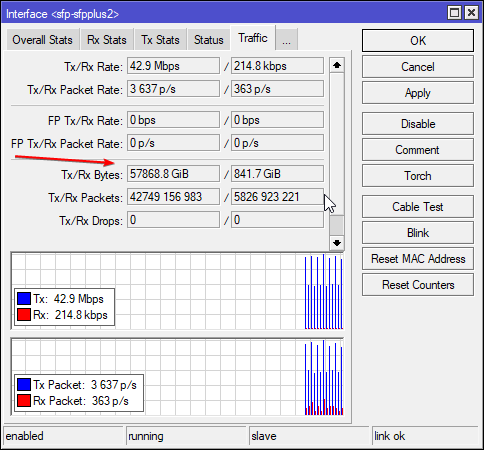
@oak night https://i.imgur.com/YkmVild.png
 oak night
Just a question if i want to get windows on a VM in ESXi Should i put windows server or windows 10
tame carbon
57TB traffic total xD
oak night
I'll be using it for IIS
oak night
tame carbon
57TB traffic total xD
WUaooo
oak night
Ahh
tame carbon
@oak night I mean, you can use any windows install to run IIS
I don't even bother with IIS anymore
I just use Kestrel

Learn about Kestrel, the cross-platform web server for ASP.NET Core.
ASP.NET webserver for .NET Core
oak night
Ok
tame carbon
depends on what kind of view engine you use
oak night
So i can but how?
tame carbon
by writing apps with .NET Core instead of .NET Framework
Its been a while since i wrote .NET apps
I dont bother with .NET for webapps anymore. too much shit
oak night
Ok
oak night
So you think it doesn't suit me? It is better HTML?
plucky cargo
I have question about NAS, would it be suitable here?
I'm considering TrueNas and Xpenology... and I'm currently using Xpenology, but not sure what OS would be better.
Unraid is just way too expensive just for home nas
thick minnow
Hey guys, would it be possible to put a WiFi router (the cheap ISP ones) under WDS with a mobile hotspot?
tame carbon
@icy comet this is more the place for networking talk
 icy comet
Oh okay
I have question
Is it possible to use my iMac's internet for my windows machine
Like via USB or whatever
tame carbon
@icy comet how are you even receiving internet?
Because we never went over the physical side of things
thick minnow
icy comet
Is it possible to use my iMac's internet for my windows machine
Over ethernet, yea probably,
tame carbon
only software
tame carbon
@icy comet okay, and the cable, is it directly from the PC to the router?
tame carbon
Does your mac have an ethernet port?
icy comet
Yes
tame carbon
Can you disable wifi on the macbook for the moment, and plug in the lan cable?
icy comet
It works fine
tame carbon
and see if your macbook obtains an IP address
icy comet
Oh but that's gonna be a work, gotta move it downstairs since cable is short
Why
I mean the cable works fine
100%
 woeful haven
Do switches need cleaning?
tame carbon
@icy comet That may be, but I am trying to figure out the issue by ruling out what isnt an issue
icy comet
I am thinking of using USB tethering but most of the tutorials I find are PC as host and a phone as target
thick minnow
icy comet
I am thinking of using USB tethering but most of the tutorials I find are PC as ...
For macs, you ned to install the HoRNDIS kext
to tether from a phone
specifically android
icy comet
But I want pc
tame carbon
we're getting sidetracked though.
tame carbon
@icy comet only way to do that would be with a bridge over ethernet
thick minnow
Yea
icy comet
Oh
tame carbon
phone tethering just exposes the phone's internet connectivity as a LAN interface on the PC
icy comet
Ohh
thick minnow
thick minnow
Hey guys, would it be possible to put a WiFi router (the cheap ISP ones) under W...
Also, can I do this ?
tame carbon
no idea, never used WDS
but you can just try it? pretty sure its just acting as a regular client
icy comet
Oh
I tried to install the driver
But I don't get 'operation complete' dialog popped out
Like I saw on tutorial
Same driver is used
tame carbon
@icy comet as a bit of a joke, can you try and ping 127.0.0.1 ?
if that fails as well, you can torch the windows install
 tame carbon
lol ok at least it can communicate with itself
icy comet
Yea
tame carbon
I'd really like to see what happens if you put a network sniffer on there
really wondering what windows is even doing
tame carbon
Its a packet analyzer
allows you to see the raw data being transmitted/received by the network card
icy comet
Oh
tame carbon
This is like, last resort for when shit hits the fan and I can't figure it out. xD
because if you are using DHCP, you should see the windows machine requesting an address
and should be able to see what the reply is, if there is any at all
icy comet
Ohh
tame carbon
@peak cloak didnt we have someone in here the other day, with issues on the windows IP stack?
because the issue @icy comet has, seems something we've had in here before
peak cloak
tame carbon
<@!222482269829332992> didnt we have someone in here the other day, with issues ...
no clue
icy comet
On my other pc, ethernet works fine, but USB WIFI Dongle doesn't, it got same issue
Invalid IP condigurarion
tame carbon
Does it detect the dongle, and scans networks?
tame carbon
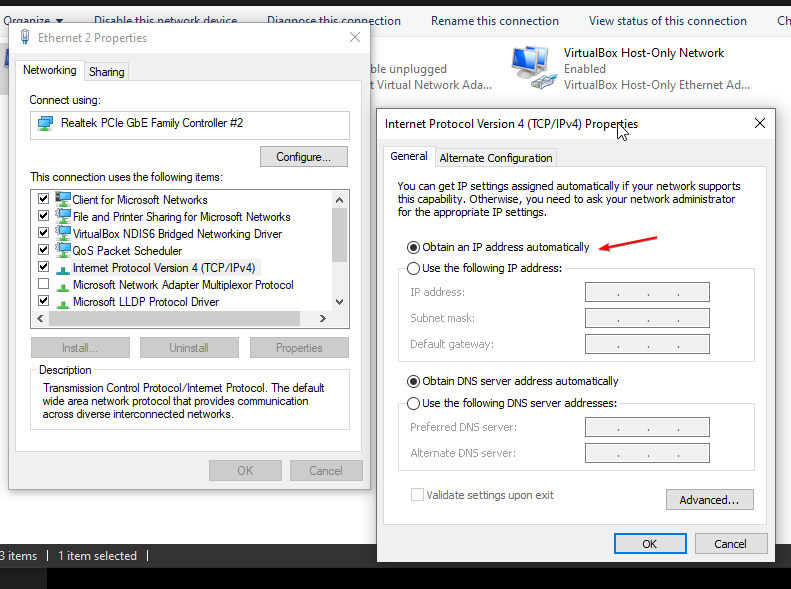
@icy comet okay, though on the wifi settings, you can set it to 'obtain addresses automatically'
what happens if you do that?
 icy comet
Ohh okay
thick minnow
Well, is there anyone here who has experience with WDS?
thick minnow
thick minnow
Well, is there anyone here who has experience with WDS?
Well, no access to that
tame carbon
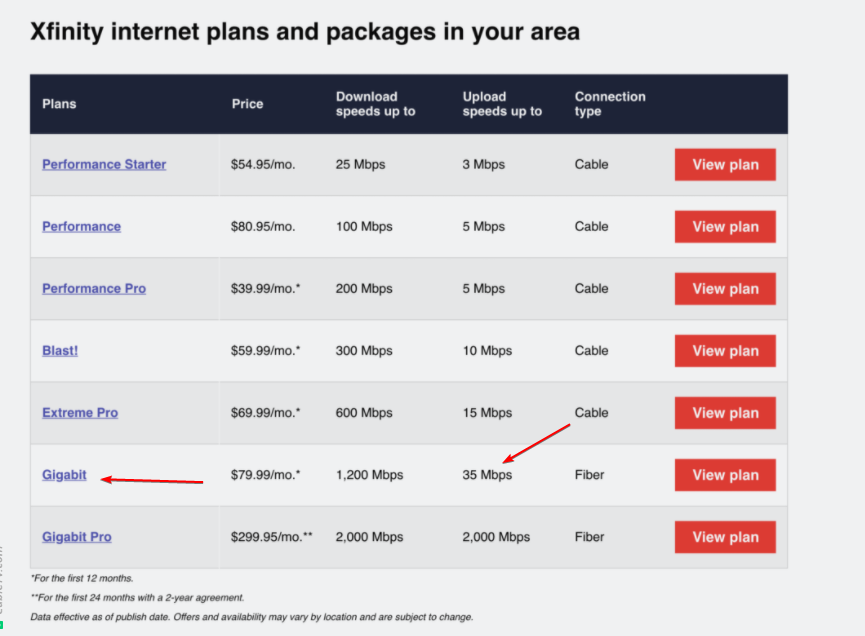
The naming on this
If you start with "Performance"
You really have to be creative
"Blast!"
"Super duper performance pro"
gigabit isnt even gigabit
its 1200mbit, which... hah. good luck lol
35 mbit
thick minnow
Can I boycott them?
tame carbon
in US, most of the time you can't
since there's usually only a single service provider in a given area
peak cloak
I have 2 in my area
Fios and optimum
that's why I think optimum has fiber here first
because fios competition
tame carbon
Fios is Verizon
peak cloak
yes
peak cloak
yeah it's stupid
tame carbon
but only give 35M xD
and its not even gigabit
The pricing on it is so misleading
69 bucks for 600M
10 bucks extra for "DOUBLE" the speed
@peak cloak lol even their own R&D dpt. is sipping the kool aid
Our network report shows that, despite the growth in upstream traffic in 2020, patterns remain highly asymmetrical as downstream volumes were 14x higher than upstream throughout 2020. Our website reflects the way customers use the Internet with downstream overwhelmingly dominating usage, but upstream speeds are included in your cart and are visible upon check out when you submit your order.
Our network report shows that, despite the growth in upstream traffic in 2020, patterns remain highly asymmetrical as downstream volumes were 14x higher than upstream throughout 2020.
"Our network"
Your network is asymmetric you fucking sherlock
if people had gigabit upstream
just maybe they would use it.
but they make it impossible for anyone to begin an internet setup on their own network
because they clamp down hard on upload for some reason
thick minnow
Also, presentmonkey, do you have any experience with WDS?
tame carbon
@thick minnow I have
and I concluded it is total shit
its basically what mesh wifi is
one AP connecting to another AP
as long as your wifi controller can do multichannel
you should be able to do WDS
peak cloak
thick minnow
Also, presentmonkey, do you have any experience with WDS?
what's that?
tame carbon
@peak cloak its Where one AP connects to another, and resends the same SSID
aka: mesh
thick minnow
Well, that's kinda what I need, I just wanna know if I connect use a router and bridge it with a mobile hotspot
peak cloak
ahhh
tame carbon
Wireless Distribution System
@thick minnow if that router supports wds.
then yes
doesnt matter what the hotspot does
it just thinks its another client
thick minnow
Ah okay, Thanks
tame carbon
but still
its jank at best.
@thick minnow you're better off tethering over usb
and using a computer to create the hotspot
tame carbon
if you can bridge your tethered internet to your LAN
you can set up a route, and just use your computer as a router
or a raspberry pi for that matter
or do what I did, call up your ISP and ask for a 2nd sim card
and plug that in an LTE dongle that has a LAN port
thick minnow
Uh huh, Thnks again
tame carbon
I have two sims on the same dataplan, useful so my phone and laptop both have a sim card in them :)
only the phone can receive calls and texts
 verbal gale
hey one question, if I cant accses to the configuration of my router because the company block that option and I buy a new router I will be able to access to the config?? (im using the "default" rout that they give me in the installation)
peak cloak
verbal gale
hey one question, if I cant accses to the configuration of my router because the...
do they give you a router or a modem/router
or seperate modems and routers
 dusky flame
if the ISP and/or equipment blocked port, say 25 and 999, will a VPN allow devices to access those ports?
peak cloak
verbal gale
im using that
is it all in one or seperate
verbal gale
all in one
peak cloak
dusky flame
if the ISP and/or equipment blocked port, say 25 and 999, will a VPN allow devic...
depends what you mean by vpn
dusky flame
@peak cloak either a 3rd party vpn service or a site-to-site to another office
peak cloak
verbal gale
all in one
the thing is that you will be under double-NAT if you cannot put the modem/router into passthough mode which means you won't be able to port forward
peak cloak
dusky flame
<@!222482269829332992> either a 3rd party vpn service or a site-to-site to anoth...
yeah, a vpn will allow you to bypass that, what matters though is how the vpn is configured
dusky flame
@peak cloak so basically, everything that could be blocked by them on their end can be passed through with a vpn setup?
peak cloak
dusky flame
<@!222482269829332992> so basically, everything that could be blocked by them on...
yea, as long as they don't block the vpn
vpn just tunnels traffic
ISP doesn't know what's going though the tunnel
as long as the vpn port is open it'll work
dusky flame
ok, I'll check that then. thanks
peak cloak
dusky flame
ok, I'll check that then. thanks
as long as you control the vpn on both ends then you can change what port you want the vpn to go over
an ISP can't block all ports because then you won't have internet lol
they just usually block 25
maybe sometimes inbound 80
dusky flame
gotcha
 crystal sail
ive got networking homework for tomorrow
can someone help me understand what a switch does
hollow marlin
Well that is part of homework. What is your understanding of what a switch does?
crystal sail
it connects computers to each other i think
peak cloak
crystal sail
it connects computers to each other i think
it connects devices together on a L2 level, aka packet switching
a regular switch doesn't route
 stiff panther
index index.php;
server {
    listen 80;
    server_name adminer.site.net;

    root /var/www/adminer/;

    location / {
        try_files $uri $uri/ =404;
    }

    # pass PHP scripts to FastCGI server
    location ~ \.php$ {
        include snippets/fastcgi-php.conf;

        # With php-fpm (or other unix sockets):
        fastcgi_pass unix:/run/php/php7.3-fpm.sock;
    }

    # deny access to .htaccess files, if Apache's document root
    # concurs with nginx's one

    location ~ /\.ht {
        deny all;
    }
}
idk whats wroing with my config
it wont render the php but starts downlaod it instead
i got php-fpm installed and running
lone sun
hollow marlin
Well that is part of homework. What is your understanding of what a switch does?
🤷♂️ Just tell them it's a means by which you connect various nodes to a network without being on the same collision domain, that also saves the IP/MAC addresses in a cache. They may be Layer 2 Switches, or they might be Layer 3 switches meaning one that can analyze and transfer packets like a typical router.
hollow marlin
lone sun
🤷♂️ Just tell them it's a means by which you connect various nodes to a networ...
I didn't tell them because its an assignment, if you are looking for help of HW its best to explain your understanding then others can correct it. Also since it seems like its a intro class so I would not bring L3 into the mix. A switches core job is to break up collision domains and MAC learning/flooding.
 clear igloo
Why you no Corsair 5000D?!
 clear igloo
Nice, fingers crossed 🙂
 severe wigeon
Now to spend hours getting it all setup just right
 ashen cypress
What’s the best way to prevent WiFi dropping? I get one drop per hour, lose connection to my games sooo annoying.
severe wigeon
Whelp, was worth a shot
Guy is just a lazy pos and wont submit a ticket so ill have to call fortinet
Doubt thatll go well
 waxen scroll
@clear igloo i dont homework
waxen scroll
hollow marlin
I didn't tell them because its an assignment, if you are looking for help of HW ...
what? I'd bring VRFs into the mix
hollow marlin
Why stop at VRF and keep going to VPLS
waxen scroll
When I went to school for this we had a senior project thing and I did an online class at this point so I was mixed with randos
People in my group were like MPLS! And other stuff and I'm like wtf? They didn't teach me any of this
My guess is there were experienced neteng using corporate money to get a new degree lol
I don't recall if we were taught bgp
I think not
It was a ccna course and I'm pretty sure it didn't teach that at the time
lone sun
I was taught bgp in my net+ course, but it didn't go too indepth. It taught a little bit of everything actually. I don't remember half that shit. 🙃
 kindred warren
Hey maybe this is the wrong place to ask but when I first boot my pc it connects to the internet then loses connection after about 30s. I have tried different ports on my router and different cables. The WiFi and Ethernet work on my phone and other PCs. Any ideas?
lone sun
Run a pathping to Google or something in command prompt to see if packets are being dropped past your modem/router. 🤷♂️
I'd also run a continuous ping to your default gateway just to help rule out the issue being on your end.
kindred warren
When I run troubleshooting it says “Ethernet doesn’t have a valid ip configuration”
Sorry if I’m dumb bum
raw timber
Did you ser pc to get ip by dhcp
little schooner
lone sun
I was taught bgp in my net+ course, but it didn't go too indepth. It taught a li...
I dont remember a lot of the stuff either. OSPF, for example
I am not interfacing with networking equip everyday that would of otherwise help me maintain the information at a very comfortable level
kindred warren
As with most things it appears unplugging the router and mixer for 30s worked
raw timber
@kindred warren you did not answer questions
kindred warren
I did not. It is my wife’s computer and she was complains about no internet
kindred warren
I got it to work by unplugging and replugging the router
raw timber
Oh
lone sun
little schooner
I dont remember a lot of the stuff either. OSPF, for example
Yeah I remember it having to do with how routers keep track of each others routing paths through a network. Thats as much as I remember. 🤷♂️
hollow marlin
OSPF is a link-state protocol, it has a full view of a links in the area when running SPF for determining the best path. BGP on the other hand is vector based where at a high level uses next hops and really has no accurate view of the path taken
BGP+OSPF are pretty much the go to
lone sun
@hollow marlin I read RIP was the old standard and went the way of the dodo bird relatively quickly for various reasons. 🤔
Whatever the case may be, its not stuff I'll likely have to deal with as a level one engineer. 🤷♂️
hollow marlin
Yeah it's vector based too but it's chatty and cannot scale for crap. BGP was not a replacement but it quickly took over some of it's uses and OSPF came in and killed it off.
If you are to every try to push your career further, you will need to know at least OSPF. Not too deep but have a decent grasp.
EIGRP is still popular but I've never seen it in the wild but exist in enterprises, and intermediate-system to intermediate-system (cannot type it or the bot slams the hammer) and BGP more so if you go the telecom path
lone sun
🤔 Right, so basically Ospf is like the airport ATC, while BGP is more akin to an enroute air traffic controller. Is that a good analogy?
hollow marlin
I'd say so. OSPF is the maps to each of the terminals in the airport and BGP is peered between the airports. You can see the entire airport and all the paths, but the traffic controller only knows to get to Florida I need to direct traffic to the Omaha airport
lone sun
🙂 Right, got it. Makes all that shit they shoved down my throat easier to retain when you can use proper analogies. 👍 👍
I used to be a flight dispatcher, so that's why I'm using airports.
hollow marlin
The more I think about it the more I like the airport analogy, a surprisingly good amount translate incredibly well.
lone sun
Certainly
waxen saddle
Inb4 ATC starts secretly using OSPF for flight traffic
hollow marlin
OSPF uses shortest path first (SPF) which is actually used all over the place, that said OSPF/MPLS-TE would not be out of the realm of possibility to be a decent traffic control system
 heady iron
Any programs for linux or windows that I can use to throttle the internet speed of certain devices? Just discovered my router doesn't support the feature.
 heavy vapor
I would like to network with people who are into CCNA, Network Engineering
curently studying to become network engineer
just applied for a job at facebook
humble cloak
ashen cypress
What’s the best way to prevent WiFi dropping? I get one drop per hour, lose conn...
try having your router assign static ip's to devices instead of having it dynamically allocate em
icy comet
How do I USB Tether MacOS(HOST) to Windows(Target)
tame carbon
@icy comet You can't
There's no usb tethering capabilities on either OSX or windows
only way to share an ethernet connection between two devices would be with a bridge.
tame carbon
and a bridge is ethernet.
 ruby bramble
icy comet
i guess the only way is buy a new network card
ruby bramble
icy comet
i guess the only way is buy a new network card
Do you need one?
icy comet
integrated one is kinda broken
tame carbon
@icy comet the only reason your phone can tether to a PC, is because the phone can emulate a network card on the usb connection
ruby bramble
Do you want me to send you one?
tame carbon
but PC to PC, wont be possible
icy comet
ohh
tame carbon
it uses NDIS for this
icy comet
ruby bramble
Do you want me to send you one?
eh, thanks but I don't feel comfortable sharing my location
tame carbon
The Network Driver Interface Specification (NDIS) is an application programming interface (API) for network interface controllers (NICs).
icy comet
ohh
tame carbon
@icy comet just get yourself one of those 15 buck USB to ethernet dongles
icy comet
what about PCI-e ones?


