#networking
1 messages · Page 291 of 1
 peak cloak
 spiral anchor
So I wanna be in AP mode?
peak cloak
yes, to avoid double - NAT
spiral anchor
But I'm still confused why it's limited to 100/100
peak cloak
yeah I'm looking it up right now
spiral anchor
It should be something around 1000/600. I tested it
spiral anchor
peak cloak
yeah I'm looking it up right now
Thanks, I'll try and figure it out as well in the meantime
peak cloak
spiral anchor
Thanks, I'll try and figure it out as well in the meantime
Go to Basic->Network Map->click on the Icon for TP-Link router.
should see something like this
 spiral anchor
It is saying 100Mbps Full Duplex. What
spiral anchor
The same cable gave me 1000/600 when I tested it from isp router > laptop though
Same exact cable
 peak cloak
it could be possible that the port on the router is damaged
maybe look into it and make sure there are no obvious damages?
spiral anchor
I remembered getting like 300/something before my plan change
peak cloak
yeah but that has nothing to do with it
you tested a computer on ethernet on the same port on the ISP router?
spiral anchor
So I switched cable and it now detects it as 1000 Mbps Full Duplex. Getting the speed I should be getting now
spiral anchor
peak cloak
you tested a computer on ethernet on the same port on the ISP router?
And yes
peak cloak
spiral anchor
So I switched cable and it now detects it as 1000 Mbps Full Duplex. Getting the ...
nice
spiral anchor
This is very weird
peak cloak
could have not been plugged in all the way
spiral anchor
But hey thanks for helping
peak cloak
np
spiral anchor
peak cloak
could have not been plugged in all the way
Maybe. Was operating with one hand. The other arm was holding my laptop
Btw @peak cloak is it okay to leave it as wireless router mode? I don't know how to access its default gateway with AP mode. Seemed to be the same ip as isp's
peak cloak
spiral anchor
Btw <@222482269829332992> is it okay to leave it as wireless router mode? I don'...
it should be fine but it's good to avoid it as it can cause issue
to find the IP just go into your ISP's router dhcp page or they may be called something like clients
and the AP should come up
spiral anchor
peak cloak
to find the IP just go into your ISP's router dhcp page or they may be called so...
ah I see. Thanks
another question. Should I enable OFDMA?
peak cloak
sure why not, it's a new thing in wifi 6 that helps with congestion
spiral anchor
 spiral anchor
peak cloak
sure why not, it's a new thing in wifi 6 that helps with congestion
spiral anchor
peak cloak
sure why not, it's a new thing in wifi 6 that helps with congestion
I read some articles/forums and some said it can create some issues with older devices and such. Don't really know
spiral anchor
Also, I've been quite curious for a while. Does it hurt to leave both Channel Width and Channel on Auto?
or should I specify them?
spiral anchor
the channels I can pick and the ones in the area are all collided pretty much
but the fewer networks in the same channel, the better, right?
peak cloak
yes
spiral anchor
I see. Also, if I wanna improve the wifi speed on my second floor, will powerline adapters work? I've been looking for something that can maybe improve my experience on the second floor
peak cloak
spiral anchor
I see. Also, if I wanna improve the wifi speed on my second floor, will powerlin...
sometimes
powerline is iffy
ethernet is the best
spiral anchor
1 gigabit on lan, 600-ish on wifi near the router, dropped to around 30Mbps in my room (from what I tested so far)
spiral anchor
peak cloak
ethernet is the best
parents don't wanna drill any holes in the wall/floor so ethernet is probably impossible at this point
spiral anchor
it's a bit hard to route the cable as well. The router is on top of the shelf, in the middle of the living room so yeah
 broken jetty
I know people at LTT love their networking so I thought I'd ask here, is this a good way or a bad way to get a NAS going https://github.com/davestephens/ansible-nas
Content: I bought a pretty low-power workstation to do something with, that didn't work out and I couldn't return it so I thought I'd turn it into a home server sort of thing. I set it up with Ubuntu server. The NAS part is running with samba but it always feels like it's only just hanging on, and sometimes (like just now, which is prompting this investigation), it just stops working, so I'm looking for other solutions. I don't really want a dedicated NAS OS like FreeNAS because I run non-NAS things on the server as well from time to time, but NAS is the primary purpose. I would also prefer not to change OS as I already have a lot of files already transferred on there.

GitHub
Build a full-featured home server or NAS replacement with an Ubuntu box and this playbook. - davestephens/ansible-nas
spiral anchor
from 600/600 speed (on wifi) on the first floor 
 peak cloak
broken jetty
I know people at LTT love their networking so I thought I'd ask here, is this a ...
peak cloak
broken jetty
I know people at LTT love their networking so I thought I'd ask here, is this a ...
that's just an ansible playbook to get a nas started
peak cloak
it helps to actually understand what it's installing and stuff
peak cloak
depends
broken jetty
Right...
spiral anchor
spiral anchor
from 600/600 speed (on wifi) on the first floor <:FeelsBadMan:694913654524739625...
it seems to be quite faster than what I tested though. Is this normal? or am I out of my mind
peak cloak
peak cloak
what file system do you want to use
how many drives
broken jetty
peak cloak
ZFS is the best imo
My only requirement is it works with all OSes because I have Windows Macs and Linux computers to use it with
broken jetty
peak cloak
how many drives
I think it has space for two or three drives
peak cloak
broken jetty
My only requirement is it works with all OSes because I have Windows Macs and Li...
filesystem is what it's actually stored on, the actual share is seperate
peak cloak
ZFS for 2-3 drives though is kinda useless though
peak cloak
you need at least 5 drives for radiz2
broken jetty
I don't think RAID is really good for the scale that I'm doing
peak cloak
yeah
broken jetty
I probably don't even have 3TB of stuff to store in there
peak cloak
just keep in mind that if a drive fails, that it
spiral anchor
sheesh it's actually averaging at 50/50 wth
peak cloak
on ubuntu you could setup an LVM
broken jetty
peak cloak
just keep in mind that if a drive fails, that it
I'll be sure to make regular backups to somewhere or other. I think you get warned if drives are starting to go, though?
peak cloak
broken jetty
I'll be sure to make regular backups to somewhere or other. I think you get warn...
yeah kinda, smart should start giving warnings, although not all the time
broken jetty
Yeah
Could always get two drives and mirror and then if one drive fails then you can recover the other
But moving on
peak cloak
yeah but you loose 50% of capactiy
broken jetty
Once again, true
peak cloak
ZFS has that option, but it's not great to loose 50% of capacity
broken jetty
Most of the stuff is backed up elsewhere (in the cloud etc.) and the NAS is just there for convenience so I don't think redundancy is too much of an issue at the moment at least
I mean is just going with good ol' Exfat a terrible idea?
 tame carbon
if you have a single drive, and not using raid, any journalling filesystem will work
if you have two drives, and want a simple raid volume, just use btrfs raid1
ZFS is for scaling into large systems
 rare matrix
broken jetty
Most of the stuff is backed up elsewhere (in the cloud etc.) and the NAS is just...
rare matrix
broken jetty
Most of the stuff is backed up elsewhere (in the cloud etc.) and the NAS is just...
if youre fully comfortable with the prospect of rebuilding a failed local array from a backup, then you can basically do whatever you want
like raid 0 go for it
rare matrix
splitting the data across multiple disks, with no parity
meaning that if one disk fails or becomes corrupted, the entire array is gone
if you are like "cool ill just make an empty array again and restore my data from backup" then thats fine
broken jetty
I'd probably do that
Although given how little data I have, the drive mirroring thing might be good at this stage too
rare matrix
raid 0 is referred to as striping, or a stripe set
 ocean pivot
raid 0 is also a lot faster
rare matrix
mirroring means all the data exists on two disks, so one disk can die and your array remains intact
rare matrix
yeah raid 0/striping gives the best performance, mirroring cuts capacity in half and gives good read performance but no boost to write performance
so if youre good with rebuilding and this is pure convenience then striping is probably the best
broken jetty
What if you had one RAID0 drive and one drive that was mirroring the RAID one?
broken jetty
RAID 10 sounds like it would be a good idea if I can find the drives to support it
rare matrix
its a raid 0 stripe array, except the elements of the array arent disks, they are pairs of disks
so while its still a stripe, its very hard for that stripe set to fail, because each element is a mirrored disk
you get 50% usable capacity with that configuration, same as raid 1
broken jetty
That sounds ideal
rare matrix
four disks that are 4tb each, will give you 8tb total out of the 16 raw
broken jetty
I probably have 4TB absolute maximum of stuff I could put on there
rare matrix
im just picking numbers to illustrate
broken jetty
Yes
rare matrix
a raid 0 using those disks would give you all 16tb
broken jetty
OK
Is there anywhere where I can read up on all the different RAID types?
rare matrix
yeah im not gonna be that asshole that says just google it, but you can
ill pick a few links for you to make it easy
broken jetty
Thank you
I know I could probably Google it, but I find that people usually have special recommendations which are better than the first Google result
rare matrix
i dont have any on hand but ill look through the google results i get to see which are better
broken jetty
Thank you
Next question is, what software does one use?
FreeNAS would probably be the easiest but it wouldn't be ideal because I'd like to use it for non-NAS tasks as well from time to time. Ideally I'd have something that runs on top of Ubuntu server because I already have that installed and mostly configured
rare matrix
honestly i dont love any of these lol
broken jetty
What's your recommendation?
rare matrix
basically all you need to understand is a few basic concepts: mirroring, striping, distributed and non-distributed parity, and nesting
mirroring just means everything that is written to one disk, is written another, no matter what, this allows double-speed reads and normal-speed writes
striping is splitting each individual chunk of data in parts, and distributing those among multiple disks, which allows for faster reads and writes
broken jetty
Read speed is good for me because I'd mostly do reading, but I think I'm currently bottlenecked by my network setup which I can't really change
rare matrix
parity is a calculation done on the data that allows its verification and reconstruction, parity data is either distributed amongst the storage disks, or located on a dedicated parity disk
parity allows any one disk to be rebuilt if lost, double and triple parity allow 2 or 3 disks in a group to be lost
a distributed parity array with 4 disks will use 1/4 of each disk for parity data, and 3/4 for storage
a non-distributed parity array with 4 disks will use one entire disk for parity data, and 3 disks for storage
nesting is the combination of any of these methods, and is seen with the two-digit raid designations, such as 0+1, 10, 50, and 60
they should be read as "a in b", so raid 10 is "raid 1 in 0", meaning it is a set of raid 1 mirrored elements, that are arranged in a stripe set together
same for 50 and 60, which are single- and double-distributed parity elements, arranged in a stripe set
the raid designations you will see in use, in total, without the little fringe exceptions, is: 0, 1, 0+1, 10, 5, 6, 50, 60
so thats a stripe set, a mirror set, stripe-in-mirror, mirror-in-stripe, single distributed parity, double distributed parity, single distributed parity in stripe, and double distributed parity in stripe, respectively
parity calculations take a lot of cpu, and thats where performance hits come in, and where hardware raid controllers become relevant
broken jetty
Interesting
rare matrix
yeah thats basically raid in a nutshell
broken jetty
But unless I missed something, this still doesn't answer the original question of "what's the best software to use in terms of broadcasting the contents of the drive to computers on the network"
rare matrix
you can go as simple as windows file share
you can set up a bare metal or virtual truenas machine
broken jetty
Currently I tried using Samba but it hasn't been very reliable, probably my bad on that one
If I switched, I'd want something that was a little more intuitive to configure
rare matrix
truenas is pretty dead simple but like, installing windows and creating a file share is also pretty simple
in terms of managing the storage hardware thats another story
peak cloak
broken jetty
Thank you
Next question is, what software does one use?
FreeNAS would probably b...
freenas is ZFS
and has samba
broken jetty
Ah, but if it had Samba it would have a way to configure it that I would understand better
rare matrix
we should stop saying freenas and start saying truenas
otherwise people will be confused
rare matrix
there is no longer a product called freenas
rare matrix
its the same thing, theyre just rebranding and repositioning their product lines
truenas core is the product that was previously freenas
broken jetty
I think the best thing would be something to go on top of Ubuntu Server though, as I already have Ubuntu Server setup, am somewhat familiar with the Unix terminal (as opposed to Windows cmd) and it would also mean not having to erase the files I've already transferred and start again
rare matrix
you can install truenas core as a virtual machine inside a KVM virtual guest
broken jetty
That might be an option
And if it was in a VM, could it access the files already on the current Ubuntu server setup?
rare matrix
the vm would be have as an IP network peer, except the medium that the IP network is running over is virtual and internal
if you pulled the files into the vm storage over the virtual network connection it would be at hardware speeds basically
broken jetty
So I would have to transfer the files, but it would be quick?
rare matrix
you'll want to talk to people with stronger opinions about how to set up truenas than me for more specific direction on that
yes
it would be quick
idk if you have to
peak cloak
broken jetty
And if it was in a VM, could it access the files already on the current Ubuntu s...
it's complicated
broken jetty
I would've thought I could just point the VM and say "Hey, this is your filesystem now" and TrueNAS would pick that up
rare matrix
you may be able to separate out your storage disks, feed them directly to the vm
peak cloak
is ubuntu on one drive?
rare matrix
@peak cloak can help you with the best way to use truenas
peak cloak
idk much about truenas tbh
used it once
just for experimenting
now I have a bunch of extra drives so I may set one up
rare matrix
broken jetty
I would've thought I could just point the VM and say "Hey, this is your filesyst...
if you pass entire storage disks to the truenas virtual machine in KVM that is probably the cleanest way to do it
the hardware devices
then just dump all the data into that, over the internal virtual lan
broken jetty
OK
tame carbon
@rare matrix that's what I do, except I run LUKS on the host
and then I just mount that filesystem into the virtual machine
rare matrix
solid
 tribal ferry
I've been reading about Ubiquiti's UFiber equipment and I'm confused as hell.

Build Passive Optical Network Deployments with Minimal Effort and Cost.
I know no multi-ten million dollar fiber company who owns their own lines would use this sort of equipment for their services.
If it's not intended to be sold to them, then who is this product marketed toward?
It's listed under UI's "ISP" section, but from what I know few companies have access to fiber besides the big players.
 rocky badge
tribal ferry
It's listed under UI's "ISP" section, but from what I know few companies have ac...
rocky badge
tribal ferry
It's listed under UI's "ISP" section, but from what I know few companies have ac...
My local ISP uses UFiber
peak cloak
tribal ferry
It's listed under UI's "ISP" section, but from what I know few companies have ac...
Dark Fiber
rocky badge
and Adtran Total Access
peak cloak
they don't have to lay fiber to use it
tribal ferry
peak cloak
they don't have to lay fiber to use it
what about last mile fiber?
you still have to pay thousands for each home for that
tribal ferry
rocky badge
My local ISP uses UFiber
Are they a large company?
rocky badge
No
peak cloak
I wouldn't call it thousands for each home
tribal ferry
How are they able to afford fiber lines then?
Dark fiber exists, yeah, but what about to each home? Not every home is right next to a fiber line.
rocky badge
tribal ferry
what about last mile fiber?
The electric coop here runs the fiber and maintains the fiber. They then contract out with this company to provide Internet
The company they contract out to is local, they handle equipment, FCC, FTC, legal, licensing, support, etc
tribal ferry
Alright, so the electric company builds out fiber to homes and then licensed it to them?
rocky badge
Yes
tribal ferry
What about in situations where that's not the case?
rocky badge
Since the electric company already owns the poles/space
tribal ferry
How do you get from dark fiber to home?
rocky badge
They don't offer services there then
They only partnered to provide Internet to their service area
tribal ferry
So this is sort of a niche product for areas that fall into that category?
rocky badge
This coop is the only electric provider in the area
tribal ferry
No, I meant that it seems the UFiber product line is really only applicable in situations like your area.
rocky badge
Yeah, small ISPs
tribal ferry
I don't imagine some large multi-coast provider using it.
peak cloak
yeah no, they have their own custom solutions
tribal ferry
yeah
rocky badge
No, those are using alcatel lucent, Huawei, Nokia, Calix, Adtran
peak cloak
rocky badge
No, those are using alcatel lucent, Huawei, Nokia, Calix, Adtran
well yeah
tribal ferry
, cisco
rocky badge
Rarely seen Cisco GPON
tribal ferry
Not good?
tribal ferry
Your fiber situation isn't the same as mine, is the way your electric company does it common?
rocky badge
idk
peak cloak
there is also municpal fiber
tribal ferry
Only real fiber in my area is this fiber that goes along my cable lines but doesn't terminate to any houses
rocky badge
I don't know what Xfinity is using for their fiber only
Xfinity is doing fiber for brand new areas
With no cable in place already
tribal ferry
Yeah, I have Gigabit Pro 2gbps down/up available in my area and Gigabit cable already.
We just have to pay a thousand or two upfront then hundreds each month.
Not worth it
peak cloak
optimum now offers fiber in my area
apparently the router they give is also the ONT and there is no way to bridge it
rocky badge
Verizon FiOS is Alcatel Lucent iirc
peak cloak
rocky badge
Verizon FiOS is Alcatel Lucent iirc
yeah
rocky badge
Frontier's looks similar
tribal ferry
FiOS isn't that good from what I've heard.
peak cloak
better than optimum
wonder if you could reverse engineer the fios GPON auth to use something like this https://mikrotik.com/product/SFPONU#fndtn-downloads

MikroTik is a Latvian company which was founded in 1996 to develop routers and wireless ISP systems. MikroTik now provides hardware and software for Internet connectivity in most of the countries around the world.
but for me it's not needed
with optimum I would really try to bypass their gateway
tribal ferry
gigabit pro atm is metro fiber
they just give you the whole thing and don't segment it because there's not enough customers for it lol
peak cloak
tribal ferry
they just give you the whole thing and don't segment it because there's not enou...
wdym by whole thing?
tribal ferry
idrk
watched a youtube video on it
they rent to you a whole juniper $10k switch
 rocky badge
@peak cloak the sfp module wouldn't control it
peak cloak
yeah ik
tribal ferry

Medium
I will add a background to this story when I get a chance. This article is part of the Internet WFH Series I started here:
rocky badge
tribal ferry
gigabit pro atm is metro fiber
Yeah, gig pro is their business service provided to home
tribal ferry
Essentially, yeah
rocky badge
2gig/2gig via fiber, gig/gig over RJ45 ethernet handoff
peak cloak
you would have to reverse engineer it and configure it on the router itself somehow
tribal ferry
this is what it is

A metropolitan-area Ethernet, Ethernet MAN, or metro Ethernet network is a metropolitan area network (MAN) that is based on Ethernet standards. It is commonly used to connect subscribers to a larger service network or the Internet. Businesses can also use metropolitan-area Ethernet to connect their own offices to each other.An Ethernet interface...
basically you're not sharing the fiber with anyone else from what i've read in the articles
 hollow marlin
Metro-e is for L2VPNs, Active-e (AE) is for direct fiber. We have 50/50 GPON/AE
tribal ferry
Ah, yeah, read up on it.
It's like metro-e, but it's actually not.
They just supposedly give gigabit pro providers priority in the network.
hollow marlin
GPON -> 1-to-many via splices
AE -> 1-to-1 direct
Metro-e is using QinQ and VLAN translations, typically no internet services provided
hollow marlin
direct L2 circuits between sites
hollow marlin
Depends as there is many ways, we use QinQ/translations (metro-e), VPLS and VPWS depending on the setup
tribal ferry
What's your field?
hollow marlin
Engineer for an ISP
L2VPNs are still sadly very common with metro-e being the worst of the bunch but pretty much required for all L2VPNs in an ISPs network
rare matrix
hollow marlin
Engineer for an ISP
maybe you can help me figure out how practical something is, then
hollow marlin
Sure, ask away
rare matrix
friend lives in the middle of nowhere in georgia, small town with like shitty dsl
right up against where the houses stop, theres a large industrial complex, where southern fibernet has a facility
how practical is it to get them to consider trying out carrier-grade fixed-point wireless
covering the entire tiny town could be achieved from that single facility without much equipment
hollow marlin
WISPs are common and growing in many places. It really depends on the size of the town but Mikrotik's line of AP connected via a wireless link can easily reach a few miles to the stations. Mikrotik is pretty much standard in WISP. Not enough experience with stability though
hollow marlin
Not really. They do have an entire line but almost all WISP in my state is all tik
rare matrix
the equipment isn't really the issue though
like we know it's practical, WISP is a working model
I just want to know how to approach it with them
hollow marlin
If its something you want to try you will need to reach out to the city for permits, once approved then you can contact the owner of the facility on peerings and cost.
rare matrix
so this is a process driven by the municipality
like I'm asking southern fibernet to try out a new business basically, in this tiny market
I'm not trying to start an ISP
hollow marlin
Partially. You cannot go flinging RF around even if its approved wavelengths. If you are providing service at all you will fall under an ISP and its regulations
rare matrix
ok so regulations aside
I want this company to invest in this setup, and to sell service to these potential customers, none of whom are me
this is a friend asking me to be his IT executive for his own business he runs from home
so I'm calling this ISP as a tech executive for a local business that wants to buy fixed point wireless access from them
what's my in, what's my selling point, who do I ask to speak to
hollow marlin
Ah gotcha
You can just reach out to them and talk about the cost of setup for a business customer. There is not much of an "in", but lead with "how much would it cost for a wireless P2P" not "can you provide a wireless P2P". Tends to always be the best way to approach sales.
rare matrix
yeah, i definitely priced out the equipment ahead of time so i know vaguely what im asking them to invest
and i counted the households who are potential customers
id be trying to sell this as an exploratory/alpha test service
hollow marlin
Make sure you bring it up to them about multiple customers being fed off this and a peering.
If the ISP gets hit with a DMCA or the FBI reaches out about a customer behind that AP, you are now responsible
rare matrix
i mean, theyre already an ISP
this is just a different style of last-mile
theyve got residential customers elsewhere
hollow marlin
Its still a connection you are in charge of. I will guarantee they will not handover the last mile services, your peering would be the same as a customer's.
rare matrix
i dont want any of that
i want this ISP to offer new service
"hey we sell fixed point wireless now"
"lucky we had a site right next to this town"
i dont want to run a facility or a network or anything
i want to get this company to buy radios and sell my friend internet as an end-user
hollow marlin
If you are just trying to get them to start selling wireless, you are going to be hung up on. Typically if you approach request like to any ISP you need to go in with cost, customers, businesses, contracts, etc.
hollow marlin
I get that, but this is a cost to them as well
rare matrix
"please service this customer base, here are estimates"
obviously there are costs
this isnt a charitable request
its a business case
"you guys should sell this here, look who is willing to buy, this is what it will cost in equipment"
hollow marlin
It is but we get these scale of request all the time, its not worth it unless there is clear profits and estimates for min of 5 years
rare matrix
so show 5 years of estimates and show profitability?
hollow marlin
That would be your best bet
They have to take in training on new equipment, support, hardware licenses, contracts, SLAs, provisioning, redundancy, E911... If it fails they are now at a loss, damaged reputation, possible fines. ISPs are far from cheap and a little risk can turn out to be disastrous
 waxen scroll
😷
rare matrix
so not selling crap is important, check
who needs to be the one on the other end of the phone to hear this request
im familiar with all these concepts already, i dont work in ISP systems but ive been in SMB and enterprise tech for over 25 years so we dont need to cover all that
getting an ISP to service a new area is something i happen to not have had to do before, despite being around the tech block many times by now
hollow marlin
Im just bringing up theres more than what enterprises have to take into account. If you want to really try then reach out to marketing first, then sales. If its a smaller or regional ISP then you can even try the VP
 lean pebble
Gn
rare matrix
roger
 lone sun
🤔 So are we still using flash at all, or did it all migrate over to HTML5?
The flash player I meant
 thorny vector
Flash is dead. Long live the king.
lone sun
thorny vector
Flash is dead. Long live the king.
🤔 Ok, well, I asked because I'm having a minor issue with my connection, quite silly actually. When I try and post an emoji on certain websites like YouTube or Linus Tech Tips, literally my entire internet connection grinds to a halt for almost five minutes. It goes back to normal afterward and then I can post as many as I want. I can't figure that shit out. 😆...It seems to work fine in Microsoft Edge. Its very specific to Chrome.
thorny vector
Is chrome up to date?
lone sun
I think, let me check.
@thorny vector 🤔 Well, I don't see a button for an update, so I'm assuming its current.
thorny vector
Weird edge works, but chrome is buggy, considering edge is basically chrome on the backend.
lone sun
Yeah, it says its up to date I see, so I have no idea what the issue could be. I guess I'll just report the issue through the settings and see what happens. 🤷♂️
peak cloak
Is it your whole internet at home or just that computer?
lone sun
Just mines, and only through Chrome it seems. 🤣 Emoji fucking the entire internet up. I'm betting someone makes a movie out of it.
peak cloak
I bet it's not internet but just computer
lone sun
Like, I can post emoji's just fine on Discord, its mainly sites like Youtube and the Linus website where this occurs. 🙃
peak cloak
You could check what's actually happening in your network interface with something like wireshark. Although try uninstalling and reinstalling chrome?
lone sun
I'm actually looking at Wireshark now, but I have no idea what I should be looking for though. I guess I can try reinstalling Chrome.
There is this protocol that keeps popping up called "STUN". It apparently has to do with VOIP. I have a headset connected, but I'm not actually using it right now.🤔
Disabled Googles experimental "QUIC" protocol to see if it works and went back to TCP. It didn't fix it.
waxen scroll
unreal dev kit
lone sun
oh
waxen scroll
@little schooner hi
lone sun
@thorny vector 🤔 Well, in Wireshark I noticed a constant duplicate TCP retransmission to this certain IP address. Nslookup claims its a non-existent domain, yet it has no problem pinging it. 🙃 WTF.
tribal ferry
Is DOCSIS proprietary to Comcast?
waxen scroll
No
peak cloak
It's a standard
tribal ferry
peak cloak
It's a standard
How come I don’t see too many companies offering cable service compared to the amount offering fiber?
Not sure if I brought this up already, but the lines are leased to specific companies only, if I’m not mistaken?
 little schooner
@waxen scroll hello
lone sun
 pallid compass
How to see if my IP is real or not?
pallid compass
How to see if my IP is real or not?
What do you mean real? Is there a reason why you believe its not? 🙃
pallid compass
lone sun
What do you mean real? Is there a reason why you believe its not? 🙃
is it real IP or shared IP ?
lone sun
😆 Well, is what a shared IP? I have no idea what you are referring to. Just type 'IPconfig' in the command prompt window and see what it says.
 vague plank
Maybe he's referring to a single assigned IP or one behind a doubleNAT or CG NAT or something

 tame carbon
ew
@tall pagoda lol mikrotik cAP ac's cost 60 bucks each
and you can group them together into a single network
tplink is 
tame carbon

Ars Technica
Thousands of servers running vCenter server could be in for a nasty surprise.
 mighty wind
big oof
peak cloak
 tall pagoda
I have those, they are nice
 hardy sandal
peak cloak
hardy sandal
peak cloak
ubiquitu....
 dusty osprey
😂
 thick minnow
tame carbon
PSA: https://arstechnica.com/information-technology/2021/02/armed-with-exploits-...
thick minnow
tame carbon
PSA: https://arstechnica.com/information-technology/2021/02/armed-with-exploits-...
ouch
 waxen saddle
The biggest failure is exposing the VMware administration to the Internet. 15,000 sys admins made this mistake?? That’s scary.
tame carbon
@waxen saddle its not that surprising
when you rent a dedicated server with vmware
you just get a public esx endpoint
waxen saddle
You're probably right.
tall pagoda
peak cloak
I have those, they are nice
I have bought for 56 euros a piece, now it is 69 euros
 desert briar
That vmware thing has been pestering me for 3 days in a row, my vcsa refuses to properly update, it always gets stuck 
tame carbon
@desert briar do you know the scope of affected systems?
I have a singular ESXi instance running
I'm not using vCenter
just vSphere
tame carbon
@desert briar I actually don't know
I no longer administer the instance myself
but someone else with less experience does... so I have to inform them xD
desert briar
Well, here is the official advisory - https://www.vmware.com/security/advisories/VMSA-2021-0002.html

VMware
VMware ESXi and vCenter Server updates address multiple security vulnerabilities (CVE-2021-21972, CVE-2021-21973, CVE-2021-21974)
desert briar
 tame carbon
its an ancient instance in their dedicated cloud
desert briar
u can see fixed versions on the right
tame carbon
@desert briar the OS comes as preinstalled by the hosting provider
so idk how to even push OS updates for this
rocky badge
desert briar
esxi is affected too, i believe its 6.5 onwards
its not ESXi
its vCenter
vCenter != ESXi
 rocky badge
the ESXi is OpenSLP heap-overflow
not RCE
but you shouldn't have your instances facing the web anyways
 rocky badge
VMware recommends that

For improved security, avoid putting the vCenter Server system on any network other than a management network, and ensure that vSphere management traffic is on a restricted network. By limiting network connectivity, you limit certain types of attack.
ESXi hosts don't even need much connectivity
https://docs.vmware.com/en/VMware-vSphere/7.0/com.vmware.vsphere.security.doc/GUID-084B74BD-40A5-4A4B-A82C-0C9912D580DC.html
https://docs.vmware.com/en/VMware-vSphere/7.0/com.vmware.vsphere.security.doc/GUID-603AF714-ABD7-429D-8B93-1701F5A80F64.html
You can add ESXi hosts to an Active Directory domain by using vSphere Authentication Proxy instead of adding the hosts explicitly to the Active Directory domain.
Isolation of network traffic is essential to a secure ESXi environment. Different networks require a different access and level of isolation.
desert briar
rocky badge
the ESXi is OpenSLP heap-overflow
Theoretically it is an RCE. If enough time and manpower is put into making an exploit, lol
rocky badge
lol
desert briar
wouldnt be surprised if it already got weaponized by some APT or something
but yeah well, common sense applies. Keep the dashboard access limited, ip whitelisted and what not
desert briar
In all honesty, no clue. Isnt on the website... At the same time
tame carbon
there's no CVE advisory for that one
desert briar
is esxi 6.0 still supported?
tame carbon
idk xD
rocky badge
tame carbon
the whole stack was due for reinstallation in april
desert briar
vendors tend to provide security patches sometimes, if the flaw is really bad. Like Microsoft did with windows XP, ages after it ended its support
tame carbon
so I'll just plug those optional ports, and we good
desert briar
so it might be worth checking out their release page
tame carbon
@desert briar with an uptime of 700 days?
nah, I dont think this was ever patched
it was switched on, installed, and has run ever since
desert briar
tame carbon
<@!252070801476419584> with an uptime of 700 days?
time to say goodbye
I really wish I had another server with a proper CPU. I have an issue where I cant vmotion between my hosts as the CPUs are very different and lack each other's features
so vcenter keeps on crying that I cant vmotion a live machine from gen9 to gen8.
At the same time, how am I supposed to update the host if it requires maintenance mode, therefore shutting down vcenter and all other VMs
im too lazy to do it by hand at this point 
waxen saddle
First time trying to set up Mikrotik RouterOS in a VM. How do I display the list of adapters? It mentions something about "interface" and "interface-list".
"/interface list print" dumps what appears to be a list... sadly, "/interface bridge port add interface=ether1 bridge=local" is the only command that works to add a bridge and apparently, it contains no interfaces. This explains why the command works and I still can't reach RouterOS from another station. hmmmm...
 boreal dove
Anyone around to answer a question?
peak cloak
boreal dove
Anyone around to answer a question?
Don't ask to ask just ask
boreal dove
No, I have a serious question...just didn't want to waste time by submitting it to the universe...so here it goes:
So I have this device and between moving and other chaos, I have managed to lose both the power supply and manual. Now the manual I got from the website, no problem but I'm having issues tracking down a power supply. Sorry if this is the wrong space for this but it is technically networking for the intended purpose
 peak cloak
oof, I don't know anything about cable networking
tame carbon
that looks like a filter
boreal dove
It's a lossless splitter
peak cloak
seems like something @hollow marlin would know about
boreal dove
8 port, in this case, a bit much for my needs but I wasn't going to scoff at free $200 worth of free equipment, lol
waxen saddle
found my mistake in understanding. "/interface ethernet print" shows ethernet devices.
tame carbon
@waxen saddle rOS?
all the various menus, ppp, wireless and vlans, are all just /interface
waxen saddle
Yup. First time installation in a VM.
waxen saddle
First time touching it at all. I have the ISO image I'm installing on a VM to get familiar with it.
tame carbon
ahh
waxen saddle
I set up 2 ethernet interfaces for the VM, but only 1 is showing in /interface ethernet print
tame carbon
what about /interface print
waxen saddle
Nothing. I just have table headers #, NAME, Type, ACTUAL-MTU, etc..
waxen saddle
I just did a full shutdown and start and now it's showing both interfaces. weird. Must be a quirk of my VM host.
No, I haven't gotten to the point of using WinBox yet. RouterOS is on a different VLAN than my main machine at the moment.
tame carbon
@waxen saddle it runs a mactelnet server
you can just punch in the MAC address
and connect
uses only layer 2
waxen saddle
Actually, the 2nd interface was the interface connected to my main machine network. So now that that's up, I can see it in WinBox. Sorry for the confusion. I've been rapidly making changes and moving stuff around. 😛
tame carbon
@waxen saddle most interesting things to observe in rOS
are the way you set your firewall up using the configurations of the rest of the system
default configuration sets up some address and interface lists
and it attaches all the hardware ports on your device (except ether1) on your bridge
this bridge is then added to an interface list called LAN
so all ports inherit from this
same way you can move different ports or vlans onto different bridges, and then by setting up interface lists, you can use the firewall to greater effect
and same goes for address lists, which are configured in the fw settings
[admin@core.****.nl] /interface list> print
Flags: * - builtin, D - dynamic
 #   NAME                                 INCLUDE                               EXCLUDE
 0 * ;;; contains all interfaces
     all
 1 * ;;; contains no interfaces
     none
 2 * ;;; contains dynamic interfaces
     dynamic
 3   ;;; defconf
     WAN
 4   ;;; defconf
     LAN
 5   DMZ
 6   IPTV
 7   IPCAM
All playtime is on hold now. Wife is serving as a remote judge for a competition. Can't have any weird IP stuff going on. 🙂
hollow marlin
peak cloak
seems like something <@!462711605063450628> would know about
I know copper/fiber, I know absolutely nothing about COAX
peak cloak
ah ok
@boreal dove there is someone in the homelab discord that works for an ISP, pretty sure they work with coax
boreal dove
hollow marlin
I know copper/fiber, I know absolutely nothing about COAX
What about MoCa networks?
peak cloak
moca is coax
boreal dove
See the idea was to use the lossless splitter for MoCa streaming to the upstairs areas of the house
boreal dove
peak cloak
moca is coax
I know, but after the coax it's just normal ethernet, yeah?
boreal dove
Hmmm
 slate sonnet
Hey all, so I'm trying to connect to a linux laptop from a windows pc using zerotier (specifically trying to connect to a minecraft server). On my windows pc I keep getting a connection error, but if I host on my windows pc and connect on my linux laptop its fine
So basically I can connect to a minecraft server hosted on windows (using zerotier) but not vice versa
slate sonnet
Fixed it
slate sonnet
I was a dumb dumb and didn’t type sudo ./zerotier-one -d
lean pebble
Lol
slate sonnet
That basically launches the app
lean pebble
Happens to the best ppls
slate sonnet
That’s why I joined the network, but couldn’t do anything
slate sonnet
lean pebble
Happens to the best ppls
Couldn’t be any truer
lean pebble
I did this mistake too much times 😆
While I worked on more than 3 servers at the time
slate sonnet
Linux can be a pain sometimes
lean pebble
Most of them I was root and only 1 server I wasn't connected as root
slate sonnet
But once you figure everything out, works much better than windows imo
peak cloak
Anything can be a pain
peak cloak
linux desktop also kinda sucks in certain ways
lean pebble
peak cloak
linux desktop also kinda sucks in certain ways
Depends os the distro and the desktop environment you choose
Kde is much better and smoother
peak cloak
lean pebble
Depends os the distro and the desktop environment you choose
everyone kinda sucks a way or another
X server
lean pebble
Gnome is crap
slate sonnet
I’m using linux as a main os on my laptop, not yet on my main pc because I want to get a second gpu and more ram (so I can virtualize and game on windows and use linux for everything else)
lean pebble
Gdm
lean pebble
slate sonnet
I’m using linux as a main os on my laptop, not yet on my main pc because I want ...
That's what I did
peak cloak
slate sonnet
I’m using linux as a main os on my laptop, not yet on my main pc because I want ...
why 2 gpu's?
lean pebble
I have 64gb ram and 2gpus
slate sonnet
Erina, can you help me in #tech-support ?
lean pebble
peak cloak
why 2 gpu's?
Full passthrough
slate sonnet
peak cloak
why 2 gpu's?
For gpu passthrough
peak cloak
can't you use sr-iov?
lean pebble
You use it but for passing the immou
Full GPU passthrough is much better than share it regularly
peak cloak
 weary tusk
Hey could any help me with my server, I got it from a family member for frwe
weary tusk
Hey could any help me with my server, I got it from a family member for frwe
what model?
weary tusk
HP proliant ML350p gen8 server
peak cloak
for a server you want linux
waxen saddle
When they say "Mikrotik is powerful, but you have to know what you're doing" - I think that's incorrect. I think it's "Mikrotik is powerful, but you have to know what you're doing on Mikrotik".
peak cloak
if it has multiple cores, idk if regular windows even works for that
peak cloak
waxen saddle
When they say "Mikrotik is powerful, but you have to know what you're doing" - I...
yeah, I'm used to vyos/vyetta/junos/edgecli
mikrotik seems completly different
weary tusk
And there was windows 8 on it but all storage was removed
peak cloak
weary tusk
And there was windows 8 on it but all storage was removed
did you install new storage?
waxen saddle
I mean. I'm able to set up a DNS server on almost anything. I'm having some major brain farts trying to figure it out on Mikrotik.
weary tusk
But when boot up nothing happens
peak cloak
I'm not familiar myself with servers, so I really wouldn't know how HP's server bios works like. I want one though. Go though the bios and look for any obvious settings. I would highly reccomend linux
Proxmox is great for virtualization
weary tusk
When boot up screen stays black
peak cloak
like I said look though bios
lean pebble
Why windows so fucking crap?
weary tusk
How could I enter a bios when there is a black screen
peak cloak
oh so it doesn't even POST?
weary tusk
Yes
weary tusk
Ummh there are a lot of lights
weary tusk
Oke
weary tusk
Ty
I know I'm super happy
But it kinda huge
Like two atx pc case combinat and the fans tho
There loud
peak cloak
page 13 -14 is what you want to look at
weary tusk
Nope
peak cloak
basically it's a mini computer on the computer that is completely seperate but connected so if the server is shutdown that mini computer stays on and you can connect to the web interface
and you can do all sorts of stuff like turning the server on/off
or accessing the screen
lean pebble
Downloading on 5.1mb/s and now I can't load web pages 😆
 weary tusk
Yeah could upgrade later but for no just try to get it work
peak cloak
those servers have lower clock chips than we are used to today
weary tusk
I have a 1060 laying around
weary tusk
Mc is for even a potato good
peak cloak
for like 5 players it'll probobly work
peak cloak
@weary tuskI'm using an optiplex as my server rn https://cdn.discordapp.com/attachments/387022787480387605/789118646718562314/20201217_081457.jpg
 weary tusk
Cool
 coarse storm
can and cannot dues of 150Mbps down and 50 up? we’re getting a new isp and going from 2 down 1 up to that what is some stuff that 150 down and 50 up can’t do
 peak cloak
on the front?
peak cloak
show a pic of the front?
 deft jewel
Back?
lean pebble
I'm on 40/3Mbps , 5.1/0.3MB/s
weary tusk
Btw when start up fans are bit loud bit some times they go crazy en supperrrr loud
peak cloak
weary tusk
Btw when start up fans are bit loud bit some times they go crazy en supperrrr lo...
yep
HP is like that
especially with drives that are not HP
lean pebble
You can switch the heat sinks to active fans instead those
weary tusk
 peak cloak
@weary tusk Apprently it's something that can pull out? Let me look into it more
lean pebble
14.36gb download on 5.0/5.1Mb/s how much time will take it finish downloading the update ?
weary tusk

 peak cloak
you have ethernet right?
weary tusk
Yes
peak cloak
on the back there should be a port labeled iLO or something like that
hook ethernet up to there and in your router look for a new device
peak cloak
yeah, and then you can try connecting to that IP
try both http:// and https://
if it gives a security warning click advanced and continue
lean pebble
I bought my old pc 16gb ram for trying to bring it back to life
coarse storm
can and cannot dues of 150Mbps down and 50 up? we’re getting a new isp and going from 2 down 1 up to that what is some stuff that 150 down and 50 up can’t do if you guys know like how many devices could be watching netflix or youtube at the same time
peak cloak
150 down should be enough
at that point it's a matter of wifi congestion
1080p yt takes 5 Mbps
lean pebble
Should I make my old pc as backup / plex server or the old af g6 server I have here ?
peak cloak
coarse storm
can and cannot dues of 150Mbps down and 50 up? we’re getting a new isp and going...
so theoretically 30 devices can watch yt at the same time
lean pebble
I7 4770 or intel xeon e5520 on my g6?
coarse storm
peak cloak
so theoretically 30 devices can watch yt at the same time
jesus
coarse storm
i just can’t wait to update cod in a few hours not a few days
waxen saddle
I remember setting up HTTP caching on a T1 line. The Internet was Smokin' after I set that up.
Then everything started going HTTPS, which screwed over a lot of low-bandwidth sites.
tribal ferry
Present, are you aware of any edge routers/modems/gateways/whatever the manufacturer calls it with coax docsis that are rackmount?
I've been looking for a way to spice up my rack besides just a white xfi sitting on the floor.
 clear igloo
Nothing that's DOCSIS 3.0 or up 😦
clear igloo
No demand from the consumer market for such a config
tribal ferry
Guessing anyone willing to pay that much for one is just using fiber?
clear igloo
Or is an enterprise with $$$$
but I don't really see enterprises deploying that to the edge for remote sites either
tribal ferry
Not that I would use it, but what's around that has docsis 2.0?
clear igloo
I know Cisco and Juniper had docsis 2.0 cards for their older 1RU routers
tribal ferry
Ah, line cards.
clear igloo
Like a cisco 1800 with a HWIC card
hollow marlin
I think the SRX has a PIM for it, I know at least DSL/LTE which we use all the time
DOCSIS Mini-PIM Interface Overview, Software Features Supported on DOCSIS Mini-PIMs, Example: Configuring the DOCSIS Mini-PIM Interfaces
Looks like it
clear igloo
Yah, I see a mini-pim that's docsis 3.0
tribal ferry
Link?
clear igloo
SRX Series. The Data over Cable System Interface Specifications Mini-Physical Interface Module (1-Port DOCSIS Mini-PIM) has the following features:
tribal ferry
Wasn't aware that their SRX has docsis 3.0 support
hollow marlin
Its a module for expansion, essentially modems within a slot. LTE, DSL, T1, COAX, etc
tribal ferry
Not really practical for my lab but still interesting that they support it
hollow marlin
Also you need at least an SRX320 which is what we deploy and start at ~$1200 I think
clear igloo
Yah, the card itself seems to be around $900 if you can find a seller
tribal ferry
Yeah, that's quite a bit over the edge for me lol
unless if you buy it off of ebay
with no guarantees it even works with my connection
hollow marlin
careful, all the cheap SRXs on ebay typically are unlicensed, like not even a base license
Same with Amazon and some resellers
tribal ferry
aren't the base licenses always on there?
hollow marlin
Nope, without it its just a brick
tribal ferry
And the licenses are a few thousand I would imagine.
lean pebble
I have 900 ping in a game yay
hollow marlin
Base for a 300 is only like $100 or so
tribal ferry
300 does not have the PIM support
hollow marlin
Nope, its what I got at home but mainly for labs
tribal ferry
Know the pricing on the licenses?
hollow marlin
I could look through some quotes
tribal ferry
If you want
hollow marlin
300/320 is around $270 for the base
tribal ferry
hollow marlin
300/320 is around $270 for the base
How long does the license last?
A year, or is it perpetual?
hollow marlin
Base is forever and even hardware has lifetime warranty
tribal ferry
@hollow marlin Does the base include IPS?
hollow marlin
@tribal ferry No, thats a separate license/year
tribal ferry
Guessing that it costs quite a bit?
hollow marlin
There of a ton of licenses that cover random features but I would not doubt its $2-300/year
tribal ferry
Hm alright.
dusty osprey
hmm
I am trying to compile kerenle

but
ah shit i think package bc wasnt there now it works
tame carbon
@dusty osprey apt build-dep <package>
installs any libraries needed for compilation
oh
ur on arch
dusty osprey
yea it had issues compiling sadly
lean pebble
tame carbon
ur on arch <:KEKW:670048864052445204>
lean pebble
pacman -S pahole
 barren nymph
Hey guys , I was just wondering if anyone has a solution to my problem, whenever i connect my desktop through ethernet it crashes my wifi and doesnt work. I just updated my wifi. If anyone has any ideas , many thanks
weary tusk
so i have a HP proliant ML350 Gen8 but with no OS, would it show the Bios if no OS yet?
tame carbon
@weary tusk bios would most likely say: INSERT BOOTABLE MEDIUM
or go into a PXE bootloader loop
weary tusk
oke cuse on start up screen stay black and some times a beep
tame carbon
@weary tusk if you want to know what behavior of the motherboard means, the manual is usually the best source of information
weary tusk
😐
weary tusk
want a photo?
tame carbon
@weary tusk page 13
weary tusk
i have some green yellow ish and some more green yellow
btw i heard one beep on start up
tame carbon

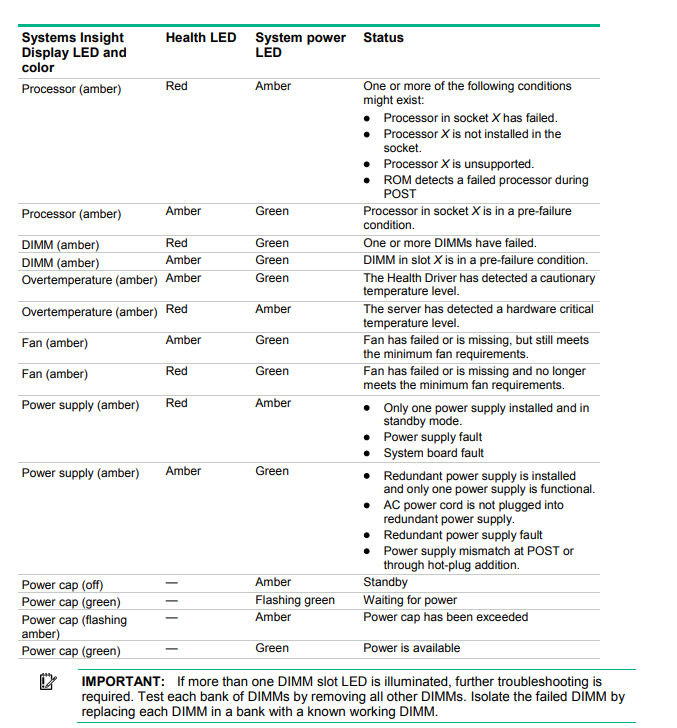
@weary tusk manual is the guide on this sort of stuff
its how anyone here would go about debugging this
 tame carbon
@weary tusk that image above
weary tusk
yeah
weary tusk
 tame carbon
thats an HBA
weary tusk
BIG BRain moment*
tame carbon
more like a brainfart moment
 lean pebble

 thick minnow
lean pebble
thick minnow
lean pebble
Mother: You are no longer my child
tame carbon
@weary tusk idk what I am looking at
weary tusk
those leds
tame carbon
yeah idk what they mean
have a look at the motherboard manual, and make up your own mind on this
i'll be heading out shortly
weary tusk
oke, non of dimm leds are on so that oke
tame carbon
 lean pebble
thick minnow
Mother: *You are no longer my child*
lean pebble
thick minnow
Mother: *You are no longer my child*
😆
barren nymph
Hey guys , I was just wondering if anyone has a solution to my problem, whenever i connect my desktop through ethernet it crashes my wifi and doesnt work. I just updated my wifi. If anyone has any ideas , many thanks
 topaz ridge
update wifi?
barren nymph
yeh i got faster speeds , 70mb rather than 35
but whenever i connect my desktop it cashes
barren nymph
i have done all the basic stuff like that
its just that specific device that does it
topaz ridge
ok then
run the troubloeshooter
update the network adapter
do above steps in your pc
barren nymph
yeh i tried that but i can give it another go.
topaz ridge
where did u get those troubleshooters tho
barren nymph
just the windows troubleshooter

 topaz ridge
wc
barren nymph
they all seem to be fine
topaz ridge
hmm
then restart your router
then your pc
check the ethernet cable
the port
then run sfc /scannow in cmd admin
barren nymph
ok
topaz ridge
k
 topaz ridge
lol
tame carbon
reboot your machine
topaz ridge
restart
 dire flare
Got a hypothetical question for ya'll
Say you're troubleshooting a network you're not familiar with & want to locate the DHCP server, how do you go about that?
I've installed "dhcping" on my Debian system & it does contact the DHCP server successfully, but it requires a specific address pointing at the server.
Should I just do a host discovery pass with nmap & write a script that passes the results to dhcping or is there a tool that sweeps the network automatically already available?
tame carbon
ifconfig
dire flare
I figured I'd find dhcp server info in /var/lib/dhcp but it's an empty directory
barren nymph
I restarted and it killed itself @topaz ridge
topaz ridge
u mean 192.169.0.1 @waxen scroll
waxen scroll
if im troubleshooting a network im certainly not logged into the DHCP server to do so.. lol
topaz ridge
barren nymph
I restarted and it killed itself <@627538511280603157>
what do u mean
dire flare
Nah just hypothetically
waxen scroll

barren nymph
Like it crashed again abd keeps crashing
topaz ridge
barren nymph
Like it crashed again abd keeps crashing
then run dism /online /cleanup-image /restorehealth run this now in cmd admin\
tame carbon
@dire flare I think wireshark would be the tool you are looking for
it a packet analyzer
so if you just set it to filter only DHCP
you can see the request and response
dire flare
I'd still have to initiate the request somehow
I mean; aside from just yanking the cable/reconnecting wifi
tame carbon
and what MAC addresses are involved
@dire flare your OS does that
so if you set wireshark to listen
dire flare
But surely not all the time
tame carbon
and then renew your IP address
it should send out a DISCOVER packet
@dire flare im starting my laptop up
gonna run this so I can show you
barren nymph
topaz ridge
then run dism /online /cleanup-image /restorehealth run this now in cmd...
do i need to be connect to internet
barren nymph
It says its unknown , error 87
topaz ridge
what
tame carbon
@dire flare https://i.imgur.com/Rm8ahzv.png
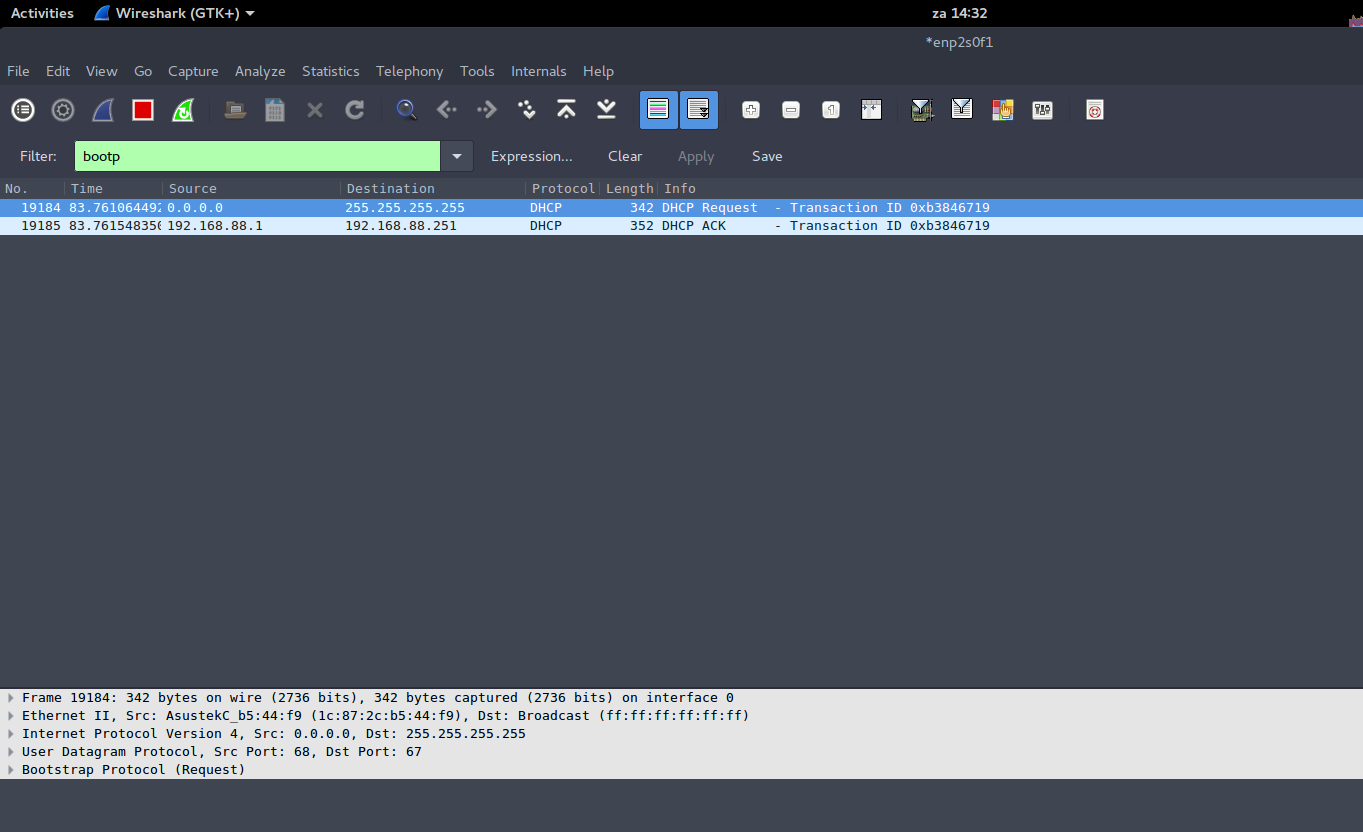
you can see the first packet, that's the dhcp request
with destination IP broadcast (255.255.255.255)
after which, the DHCP server replies
and you can see the source address

 dire flare
@waxen scroll Empty if I have a static IP set, but remains empty even if I switch to DHCP. Though my system is configured through networkmanager, I'm assuming if I used dhclient it'd give me a file in there
tame carbon
@dire flare network configuration on debian is in /etc/network/interfaces
same is with dhcp client config
dire flare
If I just run sudo dhclient to send out a DHCP renewal request the file does appear in /var/lib/dhcp and packet capturing with tcpdump does also show the same packet you see in Wireshark.
It just seems NetworkManager sticks stuff elsewhere I guess?
Anyways, I can accomplish what I wanted by using tcpdump, looking at /var/lib/dhcp and using dhclient to ask for a renewal
Thanks
barren nymph
topaz ridge
what
i thinnk that fixed it so thanks
topaz ridge
oh nice
dire flare
Ah it seems networkmanager holds DHCP lease info in /var/lib/NetworkManager/
That's why the other filesystem location wasnt populated on my system
weary tusk
So I got a server for free but I think I need a gpu cuse there is no display it stays black and cpu doesn't have intergrade gpu
topaz ridge
what are the specs tho
weary tusk
Xeon e5 2609
I thought 32gb ram ddr3
En motherboard idk
HP proliant ml350p gen8
But i think the problem is no gpu
Cpu doesn't have intergrade gpu
thick minnow
I don't think any server vhip comes with an integrated GPU
but should still output some text UI
weary tusk
Well that doesn't show up than
tame carbon
@weary tusk do you have a serial cable?
weary tusk
why
tame carbon
because that is a way you can interface with a computer if you have no graphics output
rocky badge
@weary tusk Use the VGA or iLO 4 iKVM
weary tusk
dvi and ilo won't work for me
rocky badge
its not DVI
This VGA should be off the Matrox gpu

or go to iLO web GUI and use the KVM there, with the iLO port

Most servers don't use the iGPU if the CPU has one, they usually use something embedded so they can redirect video output to the IPMI
little schooner
@rocky badge On my supermicro server, when i upgrade the driver for the aspeed embedded igpu, my windows installation constantly bluescreens and freezes up at various times during the day.
rocky badge
rip
little schooner
I have to leave it outdated in order for my server to function correctly
I think i have a defective supermicro board
its the same board that killed my intel xeon 1245 v4 cpu
And the same board I accidently plugged a gpu power connector into the cpu eps port
its been through a lot at this point lol
 fallen wind
I'm looking for a small rack mountable x86 based machine to use as a router. I've seen the Portwell CAR-3030 chassis which looks good. Anyone seen anything similar (that can be picked up on ebay for reasonable money)
waxen scroll
@little schooner time for a dell
little schooner
@waxen scroll and a new network cabinet, new 10G or better switch, and a new job
waxen scroll
yesssss new job pls
rocky badge
@waxen scroll @clear igloo https://blob.rocks/UxSJLfQkWg.png
 rocky badge
Yup....
waxen scroll
it'll take a mansion to use a /24

 clear igloo
UhM I'll have you know my carpet is full IoT
waxen scroll
i just started doing wifi IoTs too, excluding washer/dryer and thermostats
waxen scroll
ive grown angry with zwave so im switching to wifi


 waxen scroll
zwave products cost are double that of wifi and if any of those products misbehaves the whole network is in for a bad time
i started with some shelly rgbw wifi controllers and was pretty impressed with the response time. i was assuming it would suffer and that zwave was faster
rocky badge
Yeah shelly is nice
waxen scroll
you'd need to build a TCP connection with wifi and zwave i dont think it does that
but moving knobs or having a sensor report that the LED needs to turn on is super quick
feels the same
rocky badge
I don't care ¯_(ツ)_/¯
lean pebble
Haha
 autumn bay
Anyone here used the asus ax56u router ?? I need some help choosing one thanks
Or do i get a Ubiqiti one ?
tame carbon
or a mikrotik duck
something like a hEX S
or hAP ac2/3
@autumn bay asus sucks, their UI is total garbage
and software is buggy
autumn bay
So which one do you recommend under 150 gbp
tame carbon
what do you need?
autumn bay
I want wifi 6
autumn bay
I want a router than can handle like 10 plus devices
tame carbon
add a switch
tame carbon
you can get 24 or even 48 port switches
but smaller sizes exist too
you only need a single router, capable of routing at least as fast as your internet is
autumn bay
Im living in a flat for a while
peak cloak
@tame carbon he wants something that can handle 10 devices on wifi
autumn bay
Yeah sorry
peak cloak
and in an apartment wifi spectrum is pretty congested so wifi 6 would really help in this scenario
autumn bay
Something not too expensive but will work for the time being
tame carbon
@peak cloak idunno, lol. I've been able to get plenty of bandwidth on these mikrotik APs
with 1-2ms latency
autumn bay
I got the asus ax56u for the time being
peak cloak
tame carbon
<@!222482269829332992> idunno, lol. I've been able to get plenty of bandwidth on...
well you live in a rural area you said?
asus...
I've not heard good things about asus