#networking
1 messages · Page 282 of 1
 peak cloak
oof, you are portforwarding rdp right now?
 drowsy sand
So they take two 5.25" but can take six drives?
 tame carbon
there's various models
but they mount in the front of the case
usually they have a backplate with a bunch of sata or SAS connectors
supermicro ^
peak cloak
they are expensive though
tame carbon
@peak cloak yeah buy you can salvage them from old server fulltowers
 mossy badge
peak cloak
oof, you are portforwarding rdp right now?
mossy badge
peak cloak
oof, you are portforwarding rdp right now?
Yup, RDP works fine and so the VPN to my office the problem is using both of them 😦
tame carbon
they may have like 2 rows of them
drowsy sand
peak cloak
they are expensive though
Which will not be a problem as I don't need the space right now but it helps finding a case.
peak cloak
mossy badge
Yup, RDP works fine and so the VPN to my office the problem is using both of the...
fyi that's kinda bad to portforward rdp
tame carbon
@drowsy sand
mossy badge
peak cloak
fyi that's kinda bad to portforward rdp
What should I do instead, use a RD software such Teamviewer, Google Chrome, etc?
drowsy sand

Midi Tower ohne NT von Inter-Tech | Inter-Tech IT-8833 Velvet II Midi Tower ohne Netzteil schwarz :: Lagernd :: über 220 verkauft :: 24 Jahre Kompetenz | Hier bestellen
Leaves me with two DVD bays left to fill up with HDD's.
peak cloak
mossy badge
What should I do instead, use a RD software such Teamviewer, Google Chrome, etc?
use it over a vpn
tame carbon
@drowsy sand that case is bad
@drowsy sand it favors style over functionality
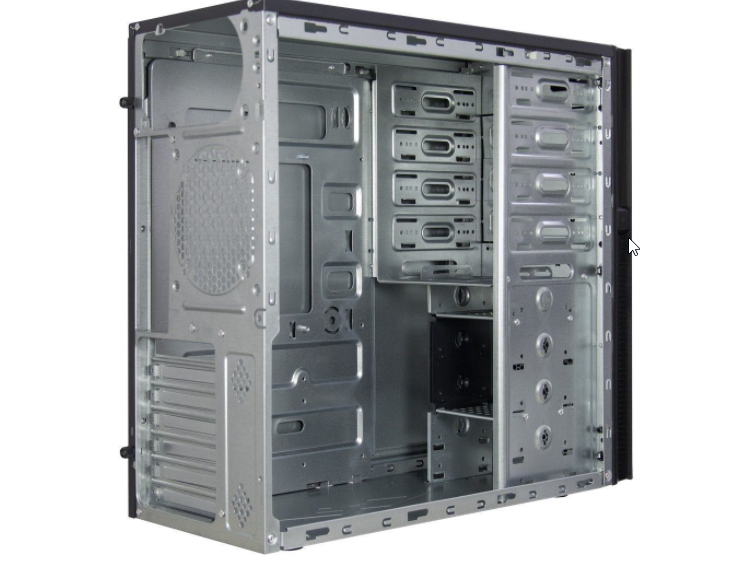
this is the inside of the case, they only use 3/4 potential slots
that small 2.5" tray underneath for a floppy or cardreader, nobody uses.
you'd be able to mount 8 3.5" drives in that though, if you account for 3 in the 5.25" bay
drowsy sand
I do
tame carbon
not all would be hotswap
drowsy sand
using some old 2.5" notebook HDD for my main drive
and i dont really care about hot-swap
tame carbon
@drowsy sand you know how my first nas operated?
drowsy sand
i do
tame carbon
cool
drowsy sand
im a magician
tame carbon
xD
its just a small desk pc, sidepanel off, and next to it: a stack of drives
mounting is overrated
 primal ice
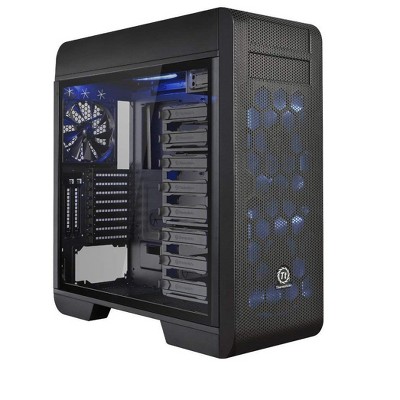
Read reviews and buy Thermaltake Core V71 E-ATX Full Tower Computer Case at Target. Choose from contactless Same Day Delivery, Drive Up and more.
drowsy sand
obviously
drowsy sand
primal ice
https://www.target.com/p/thermaltake-core-v71-e-atx-full-tower-computer-case/-/A...
A fine case but I don't exacly have 170$ to spare.
primal ice
have 2 of em, one for my NAS system and one for my gaming system 🤷 though I only paid like 100 each on sale.
primal ice
my pfsense box sits in a meshify C full metal case.
tame carbon
i bought a cheap 2U enclosure for my server
low profile, so it fits in a network cabinet
 little schooner
I'd like to move everything into a network cabinet
little schooner
rn my server tower is sitting on a metal wire rack
the one ppl use for shelf storage and things
i want to get rid of it
maybe something like this https://www.amazon.com/NavePoint-Consumer-Cabinet-Network-Enclosure/dp/B072BXSTY8/
@tame carbon the depth is really the thing that is gonna change for cabinets right?
Some switches and routers are longer or shorter
but that means they arent really following the rack mountable standard?
tame carbon
@little schooner yeah that was tricky when I was selecting the case and the rails for the case
since the width and height are standard units
primal ice
more like servers, switches and routers shouldn't really matter.
tame carbon
the depth isnt.
little schooner
scares me a little bit
tame carbon
network closets differ from 19" racks in only 1 regard
you can't remove the backplate.
with 19" racks you can just ditch the back and extend however far you want
peak cloak
I just have an open rack, I think I posted it here
and it's 2 posts only
It works for networking gear
little schooner
yeah, because then i can just hide everything inside
mount it in the basement or something
that is my end goal
little schooner
hmm
yeah i dont need anything big
maybe just have two rack mountable network gear
the rest are small
little schooner
whoa
tame carbon
@little schooner I refer to the technical drawings of the enclosure
little schooner
yes thats pretty nice
tame carbon
you can usually see, where the wall starts
and what clearance there is between the rack itself inside and the outer case
little schooner
yeah.
is that supposed to mount onto columns or something
the rack
im assuming so for weight distribution?
and uhh
tame carbon
little schooner
those covers you have over the copper cables. cable organizers?
tame carbon
I dont have covers
@little schooner that's an ITX board
look at the clearance
this is like 550mm
little schooner
yeah i see it
tame carbon
2U
little schooner
wait so that 2u is on rails as well?
tame carbon
yeah
and a 250 watt flex atx supply lol
with electrical tape
where I soldered some more sata leads on
xD
tame carbon
cooling?
little schooner
the tray above the 2u, you had to buy that seperate?
tame carbon
oh
little schooner
to have a surface to place things down
tame carbon
no, that 19" tray is a tray I bought for like 20 bucks
little schooner
oh ok
tame carbon
it has slats in it, to mount equipment
little schooner
really neat.
tame carbon
@little schooner 2U cases are ubiquitus
and I kinda made a poor decision
hard to find empty cases
with those dimensions
@little schooner https://www.inter-tech.de/en/products/ipc/storage-cases/2u-2404s
Inter-Tech Elektronik Handels GmbH - Gehäuse, Netzteile und vieles mehr aus der Hardwarewelt
this for example, would fit in a network enclosure
tame carbon
thats the one I have, or at least, a newer model
my model has internal storage mounts, nonhotswap
little schooner
hmm I'd think I'd want mine to hotswap but only if im sticking with hard drives this time around
considering to do all flash but im not sure yet
tame carbon
@little schooner choice in motherboard is paired with the case. I'm afraid.
little schooner
:(
tame carbon
since, ideally, you'd put flexatx boards in them
I couldn't find any AM4 flex atx boards
so I went with mini ITX
and only have a single PCIe slot..
wait
can't you just, take that m.2 NVM interface
and add multiple devices?
isnt that an 8x link?
idk much about bifurcation
little schooner
Im not too sure
tame carbon

Big 250kw diesel generator starting up in the cold. 6 cyl Allis Chalmers connected to an Onan generator in about 15F with no heater.
little schooner
I'd at least want 2 slots. a GPU and network card and i can use nvme for storage
tame carbon
I can do this trick with my vape as well ^ xD
smoke rings
@little schooner oh
@little schooner  my system doesnt even have a graphics card
not even onboard
little schooner
rn mine has its video from the BMC supermicro ipmi thing
but if i install updated drivers for it, it bricks the cpu
or at least thats what happened last time
a xeon failed in my system
tame carbon
@little schooner lol when my system fails to respond on ssh
I am screwed
I have to take the server out of the rack
remove the network card
put in a cheapo gt710
and hook up a monitor and keyboard
primal ice
r5 3400g ftw.
tame carbon
@lean pebble yeah but not every board supports that
 lean pebble
Your board support it ?
primal ice
alibaba just don't source where nzxt sourced.
tame carbon
you think this asus gaming motherboard can do that?
tame carbon
no
@lean pebble literally, the cheapest computer parts are consumer parts
its a 65 euro motherboard with rgb
xD
lean pebble
That you probably can't see 😂
primal ice
asus b450m tuf gaming plus heh
tame carbon
yeah I got B450 too
lean pebble
I have asus motherboard too crossair hero viii
primal ice
you got the better cpu I just wanted video out over 2 more cores.
lean pebble
X570
tame carbon
my desktop is a B450 board with a 3600
my server is like a little brother to my desktop
tame carbon
the 2600 was the reason I went with a 3600 for my desktop
lean pebble
This is my desktop
tame carbon
like, I was blown away by the perf
lean pebble
Lol
lean pebble
Basically my desktop is a server
tame carbon
that I used for 9 years
lean pebble
I used my i74770 for 10 years
tame carbon
its not even that old
lean pebble
Is it
peak cloak
@tame carbon I got the mail
tame carbon
that statement evalues as true.
lean pebble
9>10
tame carbon
@peak cloak sick, can I send you my prefix so you can do it for me too? xD
lean pebble
Hahaha
peak cloak
tame carbon
<@!222482269829332992> sick, can I send you my prefix so you can do it for me to...
lol
postfix is pretty easy tbh
not complicated
lean pebble
@tame carbon can I host my server in your house ?
tame carbon
no
tame carbon
no
lean pebble
😆
peak cloak
most of the time was just waiting for my initial wrong MX records to get updated with the new ones
tame carbon
cus he a monkey
peak cloak
lean pebble
Why wrong?
I put my old expired domain instead of my current one
tame carbon
🍌
lean pebble
🐒
primal ice
well now that he has the email probably not anymore heh
tame carbon
@peak cloak I've set postfix up before for local applications to send mail with
but mailinabox is like a full solution, with anti spam engine and all
lean pebble
Like all the spam and all the shit
peak cloak
now, I need to do rDNS
lean pebble
Did you install postfix ?
peak cloak
me, yeah
peak cloak
tame carbon
didnt you already do that?
no, isn't it on the DNS level?
outside my local network
lean pebble
Only postfix or iredmail?
peak cloak
lean pebble
Only postfix or iredmail?
only postfix
lean pebble
Oh
peak cloak
tunnelbroker block 25
tame carbon
@peak cloak rDNS is announced by the router I think
peak cloak
from outside of their ipv6 cert program
lean pebble
I use it with anti spam protection and all this by iredmail
peak cloak
tame carbon
<@!222482269829332992> rDNS is announced by the router I think
probobly the HE router already did for me then
lean pebble
Sometimes you need to do rdns manually
tame carbon
@peak cloak yeah thats what they are talking about
I have that here as well
like watomat.irl.***.nl
for my laptop
lean pebble
Depends on the engine you use and if you're using CDN like cloudflare or something like that
tame carbon
all discrete devices, like computers, phones and laptops here
get the irl prefix
@peak cloak with HE, you have control over what your IPv6 rDNS is
lean pebble
I have he ipv6 to can I set it up on my mtik even if I'm out of US and europe?
tame carbon
idk what part of yt I am at now

This Lanz Bulldog tractor can run both ways! Here is my dads antique Lanz Bulldog 45hp in action. Quite a unique design! This is a two stroke hot bulb engine and it is capable of running at very low rpm and even firing at zero/ 0 rpm. Let me know what you think in the comments below and don't forget to like and subscribe!
Song: Jarico - Retrov...
lean pebble
Idk it doesn't depends on my ISP right?
tame carbon
but this is a marvel of engineering, but totally hillarious at the same time
its like a mickey mouse cartoon
peak cloak
lean pebble
Idk it doesn't depends on my ISP right?
it doesn't, but you can't be under NAT
lean pebble
Ok
peak cloak
lol I'm a Sage now
lean pebble
Those ipv6 addresses are external right ?
peak cloak
wdym
lean pebble
Like my external ipv4 I mean
peak cloak
oh
lean pebble
Ik
lean pebble
Oh ok
lean pebble
Ok
tame carbon
@lean pebble this is how the idea of the internet was ment to be
peak cloak
I get a 2001:470:*:*::/64
tame carbon
and you use firewalls to protect your network
peak cloak
so the b0f1:1bb3:155c:d2ba part is just used to locally assign addresses
tame carbon
@lean pebble HE assigns a /64, v6 is 128 bits
a /64 is the largest publicly routed block
so anyone can set up their own routers on a local network with smaller blocks than /64
I forget what the number was
18,446,744,073,709,551,616
lean pebble
Ya I have it for a long time
tame carbon
in a single /64
 hollow marlin
/64 is the largest for local networks as well, /128s reserved for loopbacks
less than /64 and you break a lot of v6
tame carbon
@hollow marlin you can't go smaller on the local network?
peak cloak
if you want multiple subnets you need a block larger than /64
lean pebble
tame carbon
18,446,744,073,709,551,616
Gosh that's alot
hollow marlin
tame carbon
<@!462711605063450628> you can't go smaller on the local network?
You can, you will just break some of v6's functions
lean pebble
I think I have /48
peak cloak
a /48 has 65536 /64's in it
tame carbon
@hollow marlin so what, you make IP pools, and then allocate from there?
peak cloak
lean pebble
I think I have /48
stop wasting IPs /s
tame carbon
@hollow marlin a /64 is way too big for a small network
@hollow marlin you just announce your prefix as a /64 and can still do routing internally on more specific prefixes though, can't you?
 cedar igloo
anyone have a good solution for PfSense which automatically assigns IPs, but never reassigns them to other machines? basically, DHCP but static. I know in PfSense that you can create static mappings but I am needing the static mappings as soon as the machine connects
peak cloak
cedar igloo
anyone have a good solution for PfSense which automatically assigns IPs, but nev...
static DHCP leases
 magic sluice
how do i connect my linux laptop ( networkmanager on xfce4 ) with my pi-hole?
peak cloak
@cedar igloo let me find a great quote
cedar igloo
peak cloak
static DHCP leases
are they the same as static mappings? I thought they connected to a normal ip first, then you manually assign a new ip to them
hollow marlin
tame carbon
<@!462711605063450628> a /64 is way too big for a small network
It is, but less than a /64 and you break all of EUI-64 and some multicast functions.
v6 was designed to be so large it would not be an issue
peak cloak
cedar igloo
are they the same as static mappings? I thought they connected to a normal ip f...
well it just makes it so that one device never gets reassigned a new IP
wydm by normal IP
magic sluice
magic sluice
how do i connect my linux laptop ( networkmanager on xfce4 ) with my pi-hole?
i've tried to look it up but all of that is practically useless
peak cloak
the DHCP server gives it an address in it's range, and then you can make that a static lease
peak cloak
magic sluice
i've tried to look it up but all of that is practically useless
wdym by connect
to control the pi?
ssh
peak cloak
so desktop?
cedar igloo
sorry, say you have a DHCP range of 10.0.10.100 to 10.0.10.200, i thought the machine would be assigned an ip from this range first, then you manually change it to an ip outside of the range
peak cloak
you can use X11 forwarding over ssh
magic sluice
like the way you should, set is as dns and forget about it
peak cloak
magic sluice
like the way you should, set is as dns and forget about it
umm just set the ip of your pi as your dns server
peak cloak
cedar igloo
sorry, say you have a DHCP range of 10.0.10.100 to 10.0.10.200, i thought the ma...
no the static leases can be in the DHCP range, static leases are nice because the DHCP server will make sure not to assign an address that is already in use staticly
magic sluice
on LINUX
magic sluice
it's an linux laptop
peak cloak
ubuntu?
magic sluice
kali
cedar igloo
how would you configure this? is there a better way of doing this sort of thing than the following?
magic sluice
ubuntu too xD
peak cloak
@magic sluice https://wiki.debian.org/resolv.conf
edit resolve.conf
you can also edit /etc/network/interfaces
    address 192.168.1.3
    netmask 255.255.255.0
    gateway 192.168.1.1
    dns-nameserver 192.168.1.254
dns-search foo.org bar.com```example
set dns-nameserver to your pi's ip
or you can do it on a network level @magic sluice
set the DNS option of dhcp settings
magic sluice
the interfaces thing is trash, just an list of the ones build into the laptop
peak cloak
magic sluice
the interfaces thing is trash, just an list of the ones build into the laptop
no it's not
find the network interface you are using
and edit that
magic sluice
join the call imma show you
magic sluice
i'm not talking, just want to show you
cedar igloo
@peak cloak how do i configure static DHCP leases? looking online, all i can see are static DHCP mappings
peak cloak
cedar igloo
<@!222482269829332992> how do i configure static DHCP leases? looking online, a...
same thing
cedar igloo
oh
cedar igloo
yeah, there's that on pfsense, but last time i tried doing this sort of thing, it said it cant be in the DHCP range. This was months ago, so i may be remembering this wrong
peak cloak
cedar igloo
yeah, there's that on pfsense, but last time i tried doing this sort of thing, i...
huh, weird
cedar igloo
the image i sent earlier should be fine, right? just increase the default lease time to like 10 years
it's not a good solution, but i wont need the machine for over 10 years
primal ice
or you change the pool x.x.x.127 to x.x.x.253 and assign all your static devices x.x.x.9 to x.x.x.126
cedar igloo
I'm starting to use Canonical Juju to deploy machines now, and that works best with DHCP. Stuff breaks though when the ips change, so i'm looking to avoid having to change the IP at all and just use the first one it was assigned
primal ice
honestly unless you turn the devices off for years at a time and roll through 100's of devices in that time - my pfsense box always assigns the same device the same address if its been shut off for days.
peak cloak
well that's based on the lease time
primal ice
nah my lease times are 3 hours max.
cedar igloo
had a bad experience with that last year. was about to show management a POC for Kubernetes, powered it on in the morning ready to demo in the afternoon, and an ip changed, which messed stuff up
peak cloak
bruh, I messed up my ipv6 config
I wanted to change the tunnel back to NY, but now it's just not working anymore
idk what I broke
everything looks perfectly fine
primal ice
your endpoint on tunnelbroker
peak cloak
primal ice
your endpoint on tunnelbroker
nah, that's correct
I even deleted the tunnel and recreated it
primal ice
did it give a new server for the ping
 thick minnow
Best consumer router 2021?
peak cloak
hap ac3
primal ice
^^
peak cloak
primal ice
did it give a new server for the ping
wdym? When I ping the server ipv6 address I get address unreachable
primal ice
the tunnel ping server what it uses to identify you. when I've changed my tunnel endpoint before its given me a different server that pings my public IP.
peak cloak
peak cloak
primal ice
the tunnel ping server what it uses to identify you. when I've changed my tunnel...
yeah the server ipv4 endpoint address
primal ice
ehh my endpoint is different than the server that pings me.
primal ice
it does so you can allow it through your firewall / port forward.
peak cloak
oh
I know what are you talking about now
it would show an error though on the website if it couldn't ping me
so that's not the problem
primal ice
oh you made a new tunnel did you update your dhcpv6 server or radvd with the new the new addresses
peak cloak
well that doesn't matter right? I'm testing on the router itself
I'm using ping6 on the router, not from another device
primal ice
if the router doesn't have the new ipv6 routed address it would not know where to send stuff.
peak cloak
it does though
the radvd is for another interface, not local
it already has an ip
I'm so stumped
hollow marlin
@peak cloak Can you ping the tunnel gateway?
peak cloak
hollow marlin
<@!222482269829332992> Can you ping the tunnel gateway?
the ipv4? yep
not the ipv6 though
hollow marlin
No there should be a v6 gateway within the tunnel
primal ice
peak cloak
yeah I can't ping the v6 tunnel endpoint
which makes me think it's a problem with the tunnel
hollow marlin
What are the addresses of the tunnel v6 endpoint and the interface on your router you are pinging from?
peak cloak
hollow marlin
What are the addresses of the tunnel v6 endpoint and the interface on your route...
ICMPv6 2001:470:a:111::2 > 2001:470:a:111::1:
trimmed section of tcpdump
hollow marlin
What router are you using again?
peak cloak
Edgerouter X
hollow marlin
Look up if there are show commands for v6 neighbors. Make sure you are receiving the RAs (router advertisements)
Also I would look at the v6 routing table
hollow marlin
peak cloak
anything I should look for?
Yeah, what is the v6 routing table
drowsy sand

Midi Tower ohne NT von Chieftec | Chieftec Elox Midi Tower ohne Netzteil schwarz :: Verfügbar :: über 90 verkauft :: 24 Jahre Kompetenz | Hier bestellen
That case looks rather neat for my needs.
two 5.25" bays for those HDD cages you guys have sent me and a lot of space for HDD's
little schooner
 waxen scroll
<@!366313443810082820> u find a new job yet?
waxen scroll
<@!366313443810082820> u find a new job yet?
It hasn't been a full year yet
In october will be
little schooner
waxen scroll
dont let uni abuse you
Right. things are peaceful again rn. trying to keep it that way
waxen scroll

little schooner
@waxen scroll we're starting to get complaints about copy of windows expiring. It's because many of the staff have been off campus for like 6-8 months
cant fix it remotely because policy so all of them have to come into the bldg to fix it
glad its problems that are easy to fix
waxen scroll
get a vpn?
little schooner
they dont trust vpn ig
waxen scroll
............
little schooner
instead they use rdp gateway
waxen scroll
morons
little schooner
i guess they calculated risk of involving home network on the work network was too high
waxen scroll
its not home network fam
they're work laptops
the VPN takes over completely
theres no mix
waxen scroll
F
little schooner
lots of friction
to get a firewall rule change, we have to submit ticket to a central office and wait days
this one case, tazer system needed to have ntp and a domain allowed to communicate to a cloud service
couldnt do anything right then and there until they opened outbound rule.
peak cloak
hollow marlin
Yeah, what is the v6 routing table
2001:470:8:5c2:789f:61cb:f9f1:175f dev eth4.10 lladdr 10:7b:44:15:ad:4a STALE
2001:470:8:5c2:c990:c6b3:dce9:2ff2 dev eth4.10  FAILED
2001:470:8:5c2:2e54:67bd:6567:51fd dev eth4.10 lladdr 10:7b:44:15:ad:4a STALE
2001:470:8:5c2:14a6:6dba:c1f0:ed48 dev eth4.10 lladdr 10:7b:44:15:ad:4a STALE
2001:470:8:5c2:68f4:b57c:9a9:2441 dev eth4.10  FAILED
2001:470:8:5c2:483b:4324:51d4:6802 dev eth4.10  FAILED
2001:470:___:111:d9bb:244c:844d:ce34 dev eth4.10 lladdr b8:27:eb:ca:93:c3 router STALE
2001:470:8:5c2:1cc1:ed05:f65c:5ca0 dev eth4.10 lladdr 10:7b:44:15:ad:4a STALE
2001:470:8:5c2:5d:e5e4:4c6a:430a dev eth4.10 lladdr 10:7b:44:15:ad:4a STALE
2001:470:8:5c2:b0f1:1bb3:155c:d2ba dev eth4.10 lladdr b8:27:eb:ca:93:c3 router STALE
2001:470:8:5c2:b979:116b:469b:1319 dev eth4.10  FAILED
2001:470:8:5c2:b067:6a4d:233d:2b56 dev eth4.10 lladdr 10:7b:44:15:ad:4a STALE
excluding link-local
only 1 IP is my current one which is the one that has the ___
little schooner
@waxen scroll Just what I want to see in my inbox. More false positives
peak cloak
And this is the routing ```
$ show ipv6 route
IPv6 Routing Table
Codes: K - kernel route, C - connected, S - static, R - RIP, O - OSPF,
IA - OSPF inter area, E1 - OSPF external type 1,
E2 - OSPF external type 2, N1 - OSPF NSSA external type 1,
N2 - OSPF NSSA external type 2, B - BGP
Timers: Uptime
IP Route Table for VRF "default"
S ::/0 [1/0] via ::, tun0, 01:31:58
C ::1/128 via ::, lo, 06w3d15h
C 2001:470::111::/64 via ::, tun0, 01:33:00
C 2001:470::111::/64 via ::, eth4.10, 02:03:32
C fe80::/64 via ::, tun0, 01:33:00```
hollow marlin
peak cloak
And this is the routing ```
$ show ipv6 route
IPv6 Routing Table
Codes: K - kern...
I take it eth4 is facing your LAN? You have two connected routes to the same subnet so its going to break a lot. I havent looked how HE sets up the tunnel
do a show ipv6 route [address of google.com]
peak cloak
Yeah eth4 is trunk to switch
peak cloak
hollow marlin
do a `show ipv6 route [address of google.com]`
Routing entry for ::/0
  Known via "static", distance 1, metric 0, best
  Last update 01:39:28 ago
* directly connected, tun0```Nothing is showing up on traceroute, all time outs
Not going to bother you anymore, I'll try a different day, it's not that important. Thanks
primal ice
peak cloak
Not going to bother you anymore, I'll try a different day, it's not that importa...
have you turned the router off and then back on 🤷 😛
little schooner
primal ice
have you turned the router off and then back on 🤷 😛
that fixed our cloud-connected printer at work. Issue being that it loses its IP address if printer goes to sleep. a reboot always fixed it and jobs worked again
its a work around imo
primal ice
yes its also the standard IT fixall
little schooner
haha true
i remember my netgear switch froze up and all of its port LEDs were solid green and bright
never had a switch crash on me like that before
primal ice
Asic div/0
peak cloak
primal ice
have you turned the router off and then back on 🤷 😛
Tbh that would probably work
Couldn't do it before because people were online
 dawn palm
Okay so I wanna move the router into my room. The current place where the router is connected is not a good spot. The AT&T guy had a tester to see which cable led where, the blue cables lead to the ports throughout the house, I wanna figure out that same thing for my room, how would I go about doing that?
thick minnow
well whjy didnt you ask him to find the same thing
dawn palm
Because I thought it would be fine where it’s at. And I really don’t wanna get a guy to come here if I can just do it myself
peak cloak
dawn palm
Okay so I wanna move the router into my room. The current place where the router...
there are cable probes you can get
something like this
 waxen saddle
Or you know, plug a device in on one end and see what lights up on the other end
lean pebble
Nice ipv6 working perfect with my pfsense in the cloud ☁️
Pretty easy to configure
 static knoll
Nice
lean pebble
I'm happy my kali rdp working soo smooth I don't remember when it worked like this since I first installed it 😆
static knoll
@thick minnow server on?
static knoll
Hm
lean pebble
Behind nat
static knoll
Maybe kali bad
lean pebble
And pfsense
Nah I did long time ago disable to ipv6
Because I had problems
I just found it and re enabled it
static knoll
Ah
static knoll
Oof
lean pebble
Ya
You want a minecraft server?
I can re run mine
Someone knows what managing the kali network except networking and Network manager?
static knoll
lean pebble
You want a minecraft server?
No, I'm going to pay for one soon
$10 SGD for 3GB monthly
Gonna use that sweet sweet crypto
static knoll
No, I'm going to exchange my crypto for fiat and rent a server
Dunno what modpack tho
static knoll
I would manage it
lean pebble
Do you want ?
static knoll
I mean, why not? How much ram would it have tho
lean pebble
I think 8
lean pebble
It'll be on centos
static knoll
Centos?
lean pebble
Ya Linux
static knoll
Oh CentOS
lean pebble
Ya
lean pebble
Ssh
static knoll

Stack Overflow
I want to access my home computer from work through SSH, but the problem is my home computer is behind a NAT router (which I don't have access to). Because my work computer has a CentOS installed a...
lean pebble
Oh maybe I could install some Minecraft panel for it
static knoll
?
lean pebble
Some open source panel
lean pebble
For managing the machine
And the gaming server
There is only 1 big problem with windows
static knoll
Ah
Idk just get jrdesktop or something
I can probably do linux
Actually wait
Firnass
static knoll
lean pebble
What is firnass?
Some remote desktop software
lean pebble
Oh
static knoll
How else would I manage it lol
lean pebble
I found a nice panel to manage it with
Trough the browser
I'll install it tomorrow
peak cloak
static knoll
Still need teamviewer to managee it
why teamview, just do ssh
peak cloak
lean pebble
I found a nice panel to manage it with
crafty controller
I used that for a bit
static knoll
The faster it gets running the better
lean pebble
Pufferpanel
@peak cloak do you know how can I make my kali get ipv6?
I cant find who managing the network card
peak cloak
lean pebble
<@222482269829332992> do you know how can I make my kali get ipv6?
dunno
why kali?
lean pebble
Network manager disabled
I already have it installed old machine
I used it for studies
peak cloak
you are using RA or dhcp6?
peak cloak
is ipv6 enabled
lean pebble
Yap
lean pebble
I always hated ubuntu based networking mechanizem
peak cloak
wonder if they will ship a t shirt
lean pebble
I just installed my he ipv6
peak cloak
pfsense handled all routing and Router-advert?
peak cloak
no clue
lean pebble
I'm used to centos that ifcfg-eth0 and etc located in etc/sysconfig/network-scripts
Can't find it on ububtu because it used in different way here
lean pebble
Still
peak cloak
so I'm not stressed of it being broken for everyone
lean pebble
Does your pi get it by dhcp?
peak cloak
no
lean pebble
peak cloak
it's debian based
Debian based on ubuntu
peak cloak
# Please note that this file is written to be used with dhcpcd
# For static IP, consult /etc/dhcpcd.conf and 'man dhcpcd.conf'

# Include files from /etc/network/interfaces.d:
source-directory /etc/network/interfaces.d
tbh I want a HEX now
lean pebble
Lol
peak cloak
get rid of all this edgemax bs
lean pebble
He is a really good router
peak cloak
idk honestly if it's on my end or HE's
peak cloak
lean pebble
What ?
some people on the forum suggested it may be on HE's end
I emailed them
lean pebble
Finally ipv6 working on my kali
peak cloak
what was the issue
hollow marlin
@peak cloak whats the config look like for the tunnel?
peak cloak
hollow marlin
<@!222482269829332992> whats the config look like for the tunnel?
        address 2001:470:____:111::2/64
        description "HE.NET IPv6 Tunnel"
        encapsulation sit
        local-ip 173.63.___.___
        remote-ip 209.51.161.14
    }
 opaque mesa
planing on getting a new router soon since my other ones are still acting dumb so i'm thinking about buying TP-Link AX6000 WiFi 6 Router. pricey but i hope it gets the job done. look at reviews too it sounds very good but a handful of 1 stars which is a bit concerning
peak cloak
tp-link
tp-link consumer aren't very good I heard
tp-link Omada series I have though
opaque mesa
well i just need a good router for both zooms and gaming (which is all routers) but the ones i bought recently have been crap. work fine for a month then boom its garbage
im currently using an eero for about a month and a half now and one eero turned off so it doesn't want to turn on anymore making my zooms and school/work complicated. It still works but i cant play any games even with an ethernet cable connected to my PC
peak cloak
if you want a bit of a more advanced router that won't shit itself look at the hap ac3
not the most easy to use, but not as much bs
hollow marlin
peak cloak
``` tunnel tun0 {
address 2001:470:____:111::2/64
description...
what does show interface tunnel tun0 say?
peak cloak
hollow marlin
what does `show interface tunnel tun0` say?
that's an invalid command, but I would expect the same output
I just copied from show configuration
hollow marlin
No this is an operation command, not configuration
peak cloak
yeah ik
i'm in operation mode
ah
found what you were looking for
Codes: S - State, L - Link, u - Up, D - Down, A - Admin Down
Interface    IP Address                        S/L  Description
---------    ----------                        ---  -----------
tun0 2001:470:___:111::2/64 u/u HE.NET IPv6 Tunnel ```If you ? after the command is there a detail or extensive flag?
peak cloak
yep
tun0@NONE: <POINTOPOINT,NOARP,UP,LOWER_UP> mtu 1480 qdisc noqueue state UNKNOWN group default qlen 1000
    link/sit 173.63.205.___ peer 209.51.161.14
    inet6 2001:470:___:111::2/64 scope global
       valid_lft forever preferred_lft forever
    inet6 fe80::ad3f:cd89/64 scope link
       valid_lft forever preferred_lft forever
    Description: HE.NET IPv6 Tunnel

    RX:  bytes    packets     errors    dropped    overrun      mcast
             0          0          0          0          0          0
    TX:  bytes    packets     errors    dropped    carrier collisions
         17712        285          0          0          0          0
If this is anything like Junos/VyOS, try shutting down the tunnel for a min and bringing it back up with set interface tunnel tun0 disable
hollow marlin
Oh sweet so it is the same syntax
peak cloak
kinda, just for some reason it's interfaces
edgemax is based on vyos I thought
or vyetta
hollow marlin
Which stole much of the syntax from Junos
hollow marlin
Oh, didn't know you restarted it
hollow marlin
Yeah let me know what they say, see ya dude
 dense wolf
how can i create a free vpn server to connect in my home network in windows 10
every solution i see includes linux
dense wolf
no but then i have to install it inside windows 10
 unborn sluice
oh, you are trying to create a home vpn server?
dense wolf
yes
unborn sluice
what for
dense wolf
accessing home network while in other connection
 paper valve
Get an old laptop and run a VM on it
unborn sluice
Did you check if your router can do that
static knoll
Wouldn't you be able to use Hamachi for that anyways?
dense wolf
static knoll
Wouldn't you be able to use Hamachi for that anyways?
i will use it besides gaming
unborn sluice
dense wolf
i will use it besides gaming
What does that have to ?
static knoll
no, you can use hamachi for more than gaming
dense wolf
unborn sluice
Did you check if your **router** can do that
it can but it is not working
unborn sluice
dense wolf
it can but it is not working
What VPN server can your router provide
dense wolf
openvpn and pptp
unborn sluice
can you actually port forward and not behind cgnat
dense wolf
i actually dont know what cgnat is and will port 2000 work in that case
it is the only port i can open
for some reason other ports dont work
unborn sluice
so your VPN must work with 2000
dense wolf
yes
 dense wolf
jellyfin server,smb server and minecraft server
unborn sluice
p2p vpn instead of server/client
static knoll
opening 1 port for all of those would be more efficient
dense wolf
yea but jellyfin causes problem while portforwarding
and i dont know if smb server can be forwarded or not
unborn sluice
i mean
why would you port forward smb
also, you imply that your jellyfin,smb, and minecraft run on windows machine(s) ?
dense wolf
yes
unborn sluice
madlad
static knoll
madlad indeed
dense wolf
its actually my main pc as i can not afford another device
unborn sluice
so your main pc is everything and the vpn server?
dense wolf
yes thats the plan at least
dense wolf
can you also tell me why minecraft shows this when i forward port
static knoll
vpn bad
dense wolf
static knoll
vpn laggy
static knoll
dense wolf
I think this is just your client
sometimes it spits out errors like that
dense wolf
how to fix this
unborn sluice
pray
static knoll
dense wolf
how to fix this
restart client or the server menu
dense wolf
did both nothing🙃
static knoll
You don't have an IP for the server
dense wolf
if i paste the public ip the server shuts down
dense wolf
it closes as soon as the window pops
unborn sluice

dense wolf
it happens cause there is no network interface with this ip
static knoll
dense wolf
it happens cause there is no network interface with this ip
make an interface with the IP then
like
bruh
dense wolf
how ???
static knoll
post the error code
unborn sluice
static knoll
make an interface with the IP then

dense wolf
w8
i have changed the ip in the log for security
the server works fine with no or local ip
static knoll
[13:26:34] [Server thread/INFO]: Starting Minecraft server on PublicIp:2000
2000 is not an IP
static knoll
yeah

 dense wolf
no i replaced the ip with "PublicIp"
static knoll
error is:
[13:26:35] [Server thread/ERROR]: Exception stopping the server java.lang.NullPointerException: null at net.minecraft.server.MinecraftServer.a(SourceFile:572) ~[minecraft_server.1.16.4.jar:?] at net.minecraft.server.MinecraftServer.t(SourceFile:599) ~[minecraft_server.1.16.4.jar:?] at zg.t(SourceFile:567) ~[minecraft_server.1.16.4.jar:?] at net.minecraft.server.MinecraftServer.w(SourceFile:707) ~[minecraft_server.1.16.4.jar:?] at net.minecraft.server.MinecraftServer.a(SourceFile:257) ~[minecraft_server.1.16.4.jar:?] at java.lang.Thread.run(Unknown Source) [?:1.8.0_281]
static knoll
dense wolf
no i replaced the ip with "PublicIp"
ip should only be the IP no ports
syntax only asks for the IP not a port to my memory
unborn sluice
I reckon it should show the ip and port of the server
dense wolf
ok let me try with default port
same shit
[13:33:09] [Server thread/WARN]: **** FAILED TO BIND TO PORT!
[13:33:09] [Server thread/WARN]: The exception was: java.net.BindException: Cannot assign requested address: bind
[13:33:09] [Server thread/WARN]: Perhaps a server is already running on that port?
[13:33:09] [Server thread/INFO]: Stopping server
[13:33:09] [Server thread/INFO]: Saving worlds
[13:33:09] [Server thread/ERROR]: Exception stopping the server
java.lang.NullPointerException: null
at net.minecraft.server.MinecraftServer.a(SourceFile:572) ~[minecraft_server.1.16.4.jar:?]
at net.minecraft.server.MinecraftServer.t(SourceFile:599) ~[minecraft_server.1.16.4.jar:?]
at zg.t(SourceFile:567) ~[minecraft_server.1.16.4.jar:?]
at net.minecraft.server.MinecraftServer.w(SourceFile:707) ~[minecraft_server.1.16.4.jar:?]
at net.minecraft.server.MinecraftServer.a(SourceFile:257) ~[minecraft_server.1.16.4.jar:?]
at java.lang.Thread.run(Unknown Source) [?:1.8.0_281]
static knoll
did you open the port?
you need to open the port
if you're using port 25565 you need to open it
static knoll
dense wolf
the isp connection is double nat
Can't you fix that?
Not too hard to fix
static knoll
well
how are your routers connected
if you have a modem, correct directly to it instead of the router
static knoll
dense wolf
no modem
if there is no modem then there shouldn't be double NAT
have you opened port 25565?
dense wolf
have tried but not worked
static knoll
... what
 rare echo
i know how it interacts along the way and how routing works but i could tell you fuck all of security, software and firmware
dense wolf
static knoll
have you opened port 25565?
only port 2000 is open
dense wolf
it does not work
lean pebble
Hello
unborn sluice
Hello to you too
hollow marlin
No, time for bed after this PITA maintenance 
lean pebble
unborn sluice
Networking?
Networking in minecraft?
 near moss
hey, could someone recommend some websites for an pi-hole blacklist?
thick minnow
D:
Hi, could someone pls recommend on a modern and router from mikrotik? I need fast hardware (i don’t really know about this stuff)
It's @tame carbon his time to shine!
thick minnow
i wonted to buy this [hAP ac³] but i dont know if i need modem or not
tame carbon
@thick minnow depends on your internet connection
like, the mikrotik itself doesnt have any modem functionality
if you have DSL or coaxial, you'll need a modem from your ISP
fiber optics, depends on the type
thick minnow
ok th
static knoll
@thick minnow I lost that minecraft IP lol
 vale storm
Hey y'all! I have a problem with my Raspberry Pi: I had an install of NextCloud OS on it and it worked headless-ly (I installed it, put an empty file with the name "ssh" on it and added a wpa_supplicant.conf file). I connected it to an ethernet cable but used it via WiFi. Then I remoted into it and was curious if my access speed changed if I disabled WiFi. Now, since I disabled WiFi I can't remote into it via ssh and I don't have a Micro HDMI cable. I then thought reinstalling the OS would work but neither Raspbian nor NextCloud OS seem to connect to WiFi after a complete wipe and reinstallation of the SD card. Any ideas?
Referred to this channel from #tech-support by @tame carbon
peak cloak
@vale storm confused by this I connected it to an ethernet cable but used it via WiFi.
just connect it to a router/switch via ethernet
tame carbon
I urgently need a haircut lol. this corona hair is all over the place
vale storm
Okay, so my situation is: I am in a student dorm and have no access to the router or switch. I only have access to one ethernet outlet, and it is on a different sub-network (192.168.10.x vs 192.168.11.x) so I can only access it via ssh when it uses wifi. I only found that out afterwards though, otherwise I wouldn't have tried it in the first place. So I can't use it with ethernet.
tame carbon
get your own router
vale storm
tame carbon
<@!256542142107746315> do you have a UTP cable?
If you mean an ethernet cat5 cable, yes.
vale storm
tame carbon
get your own router
Not possible, I don't have the outlet in my room.
tame carbon
@vale storm you don't have any wired access?
vale storm
Correct.
tame carbon
well, shucks.
static knoll
vale storm
Okay, so my situation is: I am in a student dorm and have no access to the route...
Don't you have 1 ethernet outlet though
vale storm
Yes, in the common room.
vale storm
My only issue right now is that I want to get access to the Pi again without having to buy a micro hdmi cable or adapter.
vale storm
I tried that, but my Arch system refused to act as a host.
tame carbon
@vale storm configure a static IP on your host, with the same subnet, on a different address.
vale storm
I tried through the built-in KDE utility, didn't work.
tame carbon
"didnt work"
vale storm
Yes, it said it couldn't configure the IP address.
tame carbon
Then you didnt do it right.
vale storm
Probably.
vale storm
How, without access to the pi?
tame carbon
You can modify the commandline.txt
@vale storm in the /boot/cmdline.txt
you can add a field ip=10.0.0.2
next time your PI connects to wired ethernet, it will use that address.
peak cloak
also, mostly any linux computer can act like a router, irrc
tame carbon
iptables yeah
you can set up bridges and route rules
though, don't ask me how.
idk shit about manual iptable config
vale storm
Problem is, now my Arch system is stuck in some kind of boot error.
And I don't have my rescue flash drive handy.
tame carbon
boot an older kernel.
tame carbon
 what did you do lol
peak cloak
arch
vale storm
tame carbon
<:kek:653621766945636373> what did you do lol
Reboot.
peak cloak
never used arch
vale storm
thick minnow
Maybe you should've installed the hardened kernel as well
vale storm
Would've, should've... Maybe. Doesn't help right now though.
tame carbon
when linux noobs use arch as their first OS, and then can't fix it
There's a good reason I use debian :)
vale storm
tame carbon
when linux noobs use arch as their first OS, and then can't fix it
I've been using Linux for about six years.
thick minnow
Can you create a rescue drive rn?
vale storm
thick minnow
Can you create a rescue drive rn?
I could but if I have to do that, I'll probably do it tomorrow.
I haven't slept at all last night, I'm pretty tired.
tame carbon
you came in here, asking for ssh access to a pi
but you have bigger problems to take care of first
vale storm
tame carbon
but you have bigger problems to take care of first
Sure, but it's my secondary system, it's on a laptop with a broken keyboard and a locked BIOS, I couldn't care less if that thing dies.
tame carbon
@vale storm yeah, but its not very useful right now, since we were attempting to aid with a pi
and now get shoveled another problem
vale storm
My initial point still stands. I'm wondering why the pi refuses to connect to wifi even after a completely fresh install of Raspbian.
tame carbon
Oh, you reinstalled it? I thought you were trying to rescue the existing pi installation
vale storm
And the only thing I did was to manually disable wifi in the previous install.
tame carbon
using raspi-config?
vale storm
tame carbon
Oh, you reinstalled it? I thought you were trying to rescue the existing pi inst...
Well, I reflashed the OS about four times.
vale storm
tame carbon
using raspi-config?
No, the GUI via RDP.
tame carbon
wireless adapter settings are handled by the OS
so if you flashed the sd card, those settings are gone.
vale storm
Yes, that's what I thought.
But since I disabled WiFi in that previous install, it just doesn't connect to wifi even with the correct wpa_supplicant.conf.
tame carbon
plug the sd card back into your PC and do a filesystem check
you may have busted the SD card, flashing it multiple times
vale storm
I overwrote it with /dev/zero inbetween flashes.
tame carbon
@vale storm you say it doesnt connect to wifi
but we can't even verify if the OS boots properly.
vale storm
Indeed.
What I could do is flash Raspbian Lite so it doesn't automatically boot into a GUI and then try to blindly use the CLI.
tame carbon
@vale storm there's one thing you could do.. if you have the right gear
you can do enable_uart=1 in the boot config
vale storm
Which is?
vale storm
Nope, I don't have the right gear.
tame carbon
I have one of those 7 dollar FTDI chips for that
vale storm
Never heard of that.
tame carbon
:/