#networking
1 messages · Page 267 of 1

 drowsy sand
I got my networking knowledge by LTT videos and some research on the internet. No formal education so I may ask stupid questions or don't know terms. 😄
 unborn sluice
Basically why won't you let the NAS access the internet
 peak cloak
vlans are basically kinda virtual switches inside a switch
drowsy sand
idk maybe im a little too scared of the internet xd
peak cloak
or router
unborn sluice
drowsy sand
idk maybe im a little too scared of the internet xd
i mean you're behind a nat sooo
drowsy sand
peak cloak
vlans are basically kinda virtual switches inside a switch
so I can create a virtual network or some sort
peak cloak
kinda
unborn sluice
it's not like people can access the nat directly unless you port forwad
peak cloak
yeah
peak cloak
NAT + firewall
Network address translation, allows 1 public IP to serve many other devices
breaks the end-to-end principal of the internet though
In the Internet addressing architecture, the Internet Engineering Task Force (IETF) and the Internet Assigned Numbers Authority (IANA) have reserved various Internet Protocol (IP) addresses for special purposes.
you have reserved IP ranges for private networks
10.0.0.0/8
172.16.0.0/12
192.168.0.0/16
those are not routable over the internet
so I can 80% positive your local ip is 192.168.x.x
that's the most common
peak cloak
let me make a diagram
peak cloak
@drowsy sand
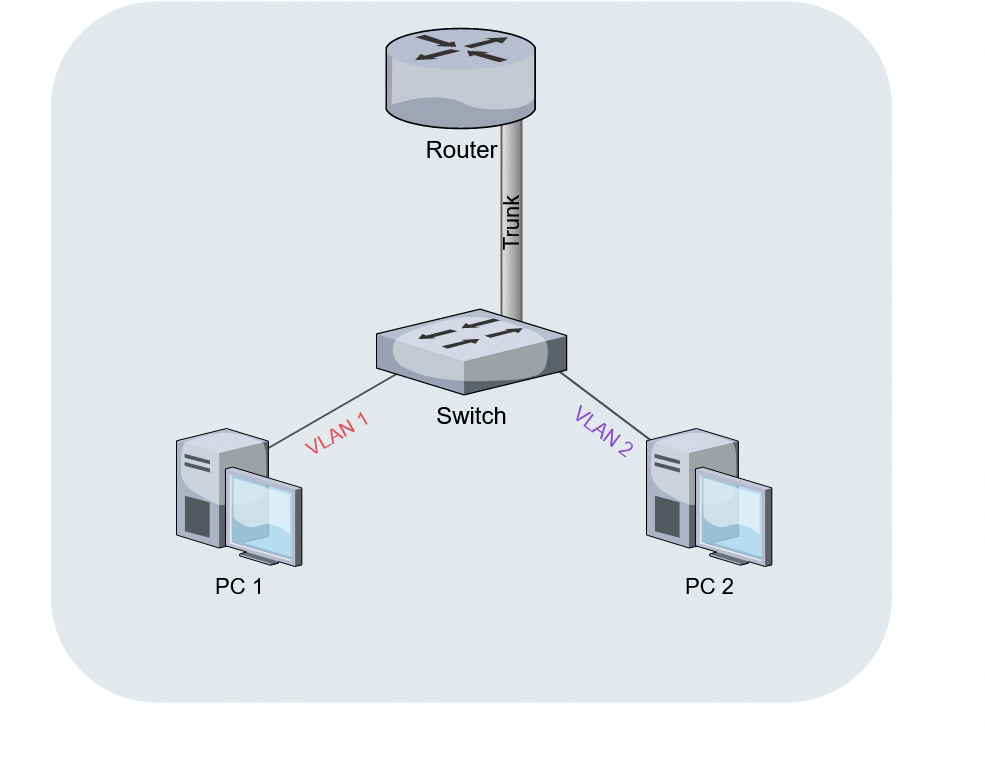
vlans are basically just tags that the router and switch put on packets
drowsy sand
imma wait till its loaded xd
peak cloak
to say this packet belongs to vlan 1 for example
drowsy sand
discord having a stroke again
drowsy sand
i did
 drowsy sand
lel
 hollow marlin
@peak cloak scratch paint and use https://app.diagrams.net/
peak cloak
vlans by themselves don't provide security, it's the adding of firewall rules between them
k
drowsy sand
I set up the VLAN in my routers software via the browser or does it have its own browser address?
peak cloak
wdym?
drowsy sand
so in order to use it, I need a compatible switch/nics and a router?
peak cloak
well switch and router, technically you don't even need vlans, you can just subnet the ports on the router
I'll remake the diagram in diagrams.net
hollow marlin
peak cloak
I'll remake the diagram in diagrams.net
There is also an offline version too at the top. I use it almost exclusively for all my diagrams and only Visio for corporate meetings.
peak cloak
I hope this makes sense
notice how the NAS isn't even using vlans
it's just connected to a port on the router with a different IP
what I"m not showing is inside the router you would have a DHCP server for every interface so devices automatically get an IP
and then the firewall rules inbetween to actually secure it
drowsy sand
yeah i wouldve installed one on my nas for the seperate network but that turned out to be a bad idea
That's great. Gonna save that and do some research on the stuff I learned about today. Thank you guys very much!
peak cloak
one thing that is important to learn is the difference between Layer 2 and Layer 3
Layer 2 is MAC addresses
Layer 3 is IP
most consumer switches operate at Layer 2
drowsy sand
Yeah I have heard about layers.
peak cloak
so in that diagram vlan 10 is on a different L2 network than vlan 20
and iirc all broadcast packets are restricted within a L2 network
so all packets have to stay within their vlan, unless they go to the router, which will route it to a different vlan
drowsy sand
man, i forgot most of this layer stuff again but wasnt it that managed switches had to do with layers and are way more expensive?
peak cloak
so packets form 192.168.10.3 can go directly to 192.168.10.4 without going to the router, however packets from 192.168.10.3 to 192.168.20.3 have to be routed through the router first. L3 switches iirc can allow "jumping" vlans directly on the swich
 waxen scroll
why the nas on the router? isnt that more load and delay?
peak cloak
waxen scroll
why the nas on the router? isnt that more load and delay?
I was just giving an example of subnetting vs vlans
drowsy sand
so i should put the nas on the switch instead?
peak cloak
yeah, but if it was on different vlans the traffic has to go through the router anyway
drowsy sand
oh okay
how about building my own router with pfsense? 😄
would that make any sense/have benefits or is it not worth the hassle?
waxen scroll
the basic explanation is a router can only handle so much inside it... you might have 8 1GB ports on the router but you wont get a full gig with all of them going at once. With a switch it gets around that problem
peak cloak
drowsy sand
how about building my own router with pfsense? 😄
imo, it's not worth it
drowsy sand
waxen scroll
the basic explanation is a router can only handle so much inside it... you might...
the more you know
drowsy sand
peak cloak
imo, it's not worth it
kk
waxen scroll
like on many Cisco's they're full of 1GB ports but actually cant do more than 200mbit
drowsy sand
yeah that wouldnt strictly speaking be my goal
So ill just get a switch that supports VLAN's, throw all my devices at it and call it a day?
 tame carbon
@drowsy sand pfsense routers get expensive real quick
and performance/$ is poor compared to pre-built devices
drowsy sand
kk
tame carbon
@drowsy sand 802.1q is generally supported by managed switches
with routers, depends on what brand you have
drowsy sand
The one my ISP has.
peak cloak
then 99.9% sure it doesn't
drowsy sand
big sadge

 hollow marlin
tame carbon
doubt an ISP modem/router will have support for vlans
hollow marlin
tame carbon
doubt an ISP modem/router will have support for vlans
Past job we deployed our ONTs with hAP ac2 
tame carbon
@hollow marlin you get 100 internet points
@drowsy sand https://i.imgur.com/KqzZL2k.png
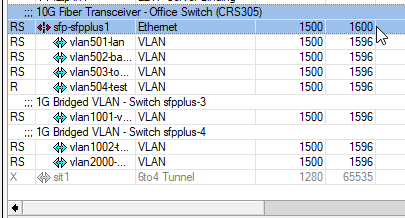
VLANs are quite easy with RouterOS
they present themselves as regular interfaces
tame carbon
Not sure why you need a VLAN, but ok xD
I use it to route two isolated subnets over the same fiber
because one subnet is public internet, the other my LAN
drowsy sand
thats kinda the same that I plan to do
tame carbon
@drowsy sand the image above is vlan interfaces on a router
if you have a switch, you just need to configure tag/untagging
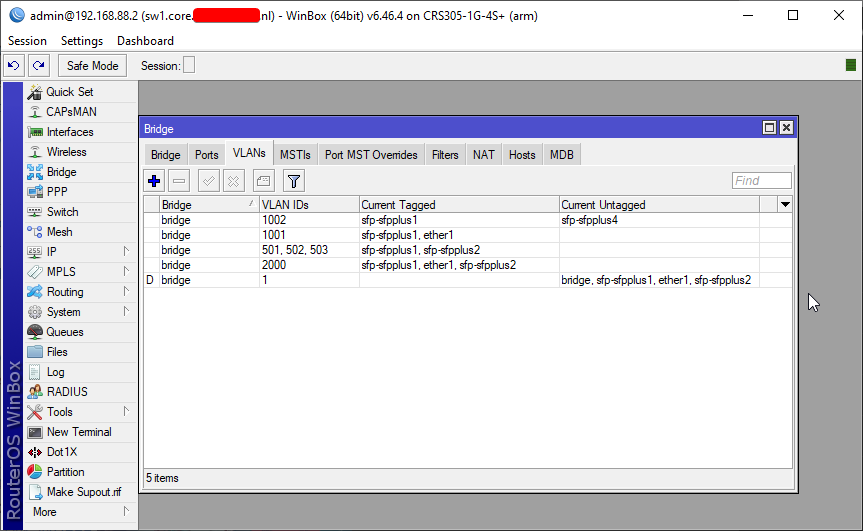 drowsy sand
ah ok
tame carbon
switches can handle tagging for you
so if you plug a device into that port, it doesn't see a vlan
the switch automatically tags traffic that goes in and out of that port
drowsy sand
so bridge 1 and 1002 are in one network without internet
and birdge 1, 1001, 501/502/503, 200 are in the public internet stuff?
tame carbon
vlan 1 is the default
traffic that doesn't use 802.1q has vlan id 1
so this is regular everyday ethernet
@drowsy sand there's bunch of internal ones
like vlan 1001 and 1002, are two seperate buildings here
that each have a router connected to it

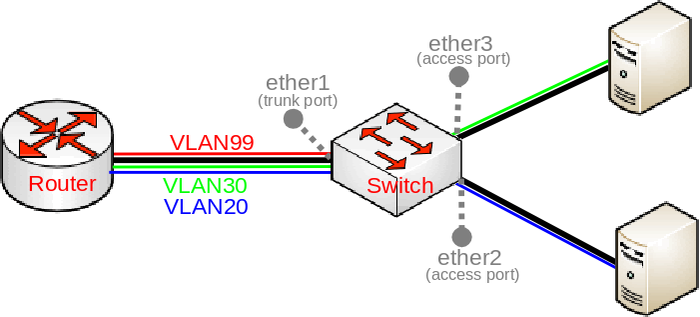
But I think this image explains it better ^
so ether2 and ether3 are 'access ports'
these ports tag/untag any traffic
so if ether3 sends data to the router, the switch tags the traffic, and sends it to the trunk port ether1
give this a read, it has a lot of diagrams
and explains how it is ment to work
tame carbon
But the trunk/access port ^ as in that image
that is pretty typical
the router <--> switch link uses a trunk with multiple VLANs
and the switch handles tagging/untagging
Consider the diagram above^
look at vlan 30 (green)
its connected on the switch
but on the router
it'd present itself like one of these interfaces ^
drowsy sand
so its like in a company with supervisors and stuff
tame carbon
nah, its a virtual ethernet network
drowsy sand
boss says to supervisor to do X and then the supervisor tells the person that is in charge of doing X to do X
tame carbon
basically allows you to stuff 4096 different ethernet networks down a single physical pipe
@drowsy sand the reason you'd want vlan interfaces on a router, is so that you can route packets over them
peak cloak
yeah, so the router knows what to tag them
tame carbon
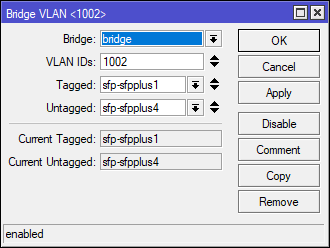
Like this is for a switch
this configuration says, whatever comes in on port 4 is untagged
but has to be tagged, before it gets sent to port 1
and vice versa
if data comes in from port 1, it is untagged before sent out of port 4
if you don't set up vlan ports then you'll have to configure vlans on the computer itself
and not every device can do this
so thats why you let the switch do it
drowsy sand
kk
tame carbon
@drowsy sand another benefit: https://i.imgur.com/MUSiDVg.png
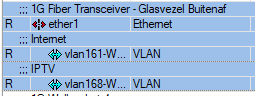
my ISP has internet & IPTV over two different vlans
so even if internet is maxed out @ 250mbit/s
iptv is unaffected
you can set up different services with different bandwidth policies
@drowsy sand lol just in passing reference, as it has come up before. This kind of structure with a single router behind a switch
is called 'a router on a stick'
 drowsy sand
lol
tame carbon
Networks that utilise router on a stick benefit from only requiring one LAN connection to be used for multiple VLANs, i.e. the number of VLANs are not limited by the number of LAN ports available. Separation of network connections do not respond to the physical location of the ports on the router. Thus, this removes the need for multiple cable and wiring management.
but it has downsides
Compared to the alternative of using L3 (Layer 3 switching), the trunk may become a source of congestion as traffic from all VLANs must flow through the trunk link.
this is the 'jumping' that @peak cloak mentioned
Modern networks utilise L3 switch which provides greater bandwidth output and functionality.
drowsy sand
tame carbon
@drowsy sand do you even have a router with vlan capabilities?
drowsy sand
im not sure if i can get my hands on one when I actually make the network
drowsy sand
for an l3 switch?
tame carbon
this is a router
drowsy sand
lol
tame carbon
but its vlan capable
@drowsy sand just having vlans on a switch itself, wont be of much use
unless you have something to route with
tame carbon
define, isolate lol
because if you just plug it into a seperate port on the router, and configure it properly
its already isolated
drowsy sand
well, i dont want it to be connected to the internet
tame carbon
@drowsy sand a simple firewall rule is enough for that
vlans are for layer 2
not layer 3
drowsy sand
kk
tame carbon
but you are behind a NAT aren't you?
in that case, you can just hook up the NAS to your local network
it wont be accessible from outside your house
tame carbon
@drowsy sand your public IP points to your ISP's router
unless you configured port forwarding
noone will be able to access any service you have internally
a NAT is in effect, a firewall
peak cloak
NAT + most default firewall block NEW connections from the WAN interface
Nat by design just doesnt allow it
tame carbon
unless configured to do so
tame carbon
@peak cloak though some NASes decide to UPnP
peak cloak
yeah
drowsy sand
PC connected via WiFi to the router, Nas connected to a switch that also is connected to the pc
tame carbon
@drowsy sand NAT, by default, on consumer routers is one-way-only
means that the firewall permits outgoing traffic, by translating addresses
but incoming traffic, cannot go into your local network
unless you configured specific ports to be forwarded
tame carbon
like, imagine hosting a minecraft server on your laptop
peak cloak
be wary of upnp though
tame carbon
it'd be on port 25565, on a local IP like 192.168.1.10
if you wanted to make this public
you'd configure port 25565 to be forwarded to 192.168.1.10:25565
so when they browse to your public ip, (for example:) 51.23.20.2:25565
the NAT (or network address translator) just translates the IP addresses back and forth
anyone from outside, doesn't see this happening
because all they see, is the IP of the router
they don;t know that its forwarded to an internal IP
tame carbon
if you didnt use NAT, your PC would have a public IP
tame carbon
but you need NAT if you want more than 1 device behind 1 public IP
because all the devices on your home network use the same public IP from your router
NAT makes sure that traffic ends up at the right computer
drowsy sand
tame carbon
because all the devices on your home network use the same public IP from your ro...
now that clears a LOT
drowsy sand
multiple phones connected via WiFi so its 100% under NAT
tame carbon
IPv4 only has some 4 billion addresses
not enough for every device on the planet
ipv6 has enough for a million earth's worth of devices, and then some
tame carbon
@drowsy sand to further increase your understanding, consider this: there's two types of NAT
src-nat or, source network address translation
this is what is used when you have outgoing traffic
and then there's dst-nat, or destination NAT
this is port forwarding
and the reason its called 'dst' is because the NAT modifes the destination IP address of the packet
because the IP is destined for your public IP and some port
the translator merely modifies the IP addresses on the packets

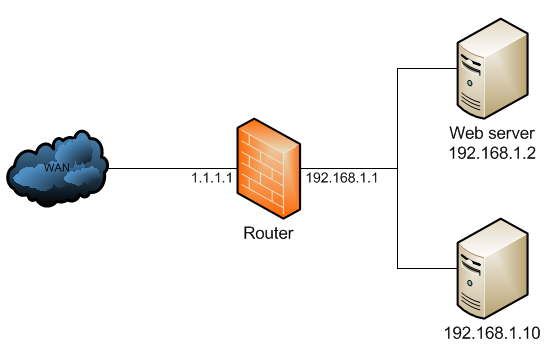
so consider a public IP of 1.1.1.1
if we want to access a webserver on port 80 on host 192.168.1.2
the router has to translate the addresses
the outside (or WAN) doesn't know this
it only sees the router
drowsy sand
so the web server uses the dst-nat so that people can access my website, whereas it uses the src-nat to communicate with WAN
or am i getting it wrong?
tame carbon
no the router uses dst-nat to forward traffic for specific ports to an internal host
so it has a list of rules
any traffic to port x gets forwarded to host y
host y is on a LAN, not accessible directly from the public internet
@drowsy sand src-nat is the other way around. When you go to a website, the router marks the connection
and any packets the website sends back to you
get translated automatically
this is better known as 'masquerade'
where the router masquerades on your behalf

my router irl ^
drowsy sand
so src-nat for every day pron googling and if i got a server that needs a port opened for other people to access my mc server, its dst?
tame carbon
yeah, src-nat is for outgoing traffic over a single address
and dst-nat is for incoming traffic to that single address
drowsy sand
that makes sense
tame carbon
@drowsy sand if you go to google and search for 'what is my ip'
itll show your public IP
and not your local IP
drowsy sand
if i am selling refurbished computers and host my own website, people go through dst?
tame carbon
yeah so if you hosted a webserver on your laptop/computer
and wanted to make it visible from your public IP
you have to forward port 80 to your laptop's local IP
port forwarding = dst nat
drowsy sand
same with my plex server then
tame carbon
Yeah
though think twice before you do end up hosting services
things like encryption are important
if you set up access to a web interface that doesn't use HTTPS
you'll end up transmitting cleartext passwords
drowsy sand
im pretty sure Plex uses HTTPS
tame carbon
this is why VPN is nice :)
@drowsy sand even if it didn't
you can always set up your own webserver proxy inbetween to handle SSL
drowsy sand
gotta look up how to use a vpn then 😄
tame carbon
@drowsy sand https://i.imgur.com/0hbQ3jD.png

lol check this ^
so these are the NAT rules I have in my router's fw
you can see a dstnat rule to a public IP & port
peak cloak
drowsy sand
gotta look up how to use a vpn then 😄
I have wireguard setup on my pi via pivpn
tame carbon
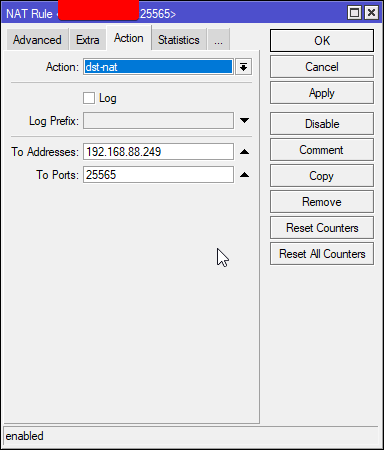 drowsy sand
peak cloak
I have wireguard setup on my pi via pivpn
drowsy sand
peak cloak
I have wireguard setup on my pi via pivpn
u wot?
tame carbon
This is the 'action' of that rule ^
peak cloak
drowsy sand
u wot?
wireguard is a vpn protocol
drowsy sand
on a raspberry
tame carbon
@drowsy sand that router I linked earlier supports l2tp/ipsec
drowsy sand
via a vpn service from raspberry?
tame carbon
setting up a vpn server on that is trivial
In computer networking, Layer 2 Tunneling Protocol (L2TP) is a tunneling protocol used to support virtual private networks (VPNs) or as part of the delivery of services by ISPs. It uses encryption ('hiding') only for its own control messages (using an optional pre-shared secret), and does not provide any encryption or confidentiality of content...
l2tp ^
nice thing about l2tp/ipsec is that it works on every operating system without modifications
iOS, android, windows, GNU/Linux all do this easily
peak cloak
drowsy sand
via a vpn service from raspberry?
pivpn is a nice installer that makes it easy
it's not only for pi
tame carbon
@peak cloak VPN behind a nat = hell
peak cloak
I portforwarded waireguard
drowsy sand
have a good one
and ty
both of u
Ive come to love the networking community
Its so
normal
and so non-toxic
 little schooner
@waxen scroll I love the policy here at work where all employees and students are told not to save anything local to the PC because we need to be able to patch and re-image at anytime. I don't have to worry about data loss and outlook profiles , etc.
Just straight start imaging and begin anew
waxen scroll
yep. i save my stuff to one drive
i use desktop as a scratch pad for data I dont care about
quick notes, etc
little schooner
Yeah. They are all told to use onedrive here.
little schooner
A few years ago that wasn't the case so I got the job at the right time
To not deal with profiles
tame carbon
Prophiles
tame carbon
@little schooner thats like linus torvalds, never ever had to make a single backup of his project
Others do it for him ^^
 fair grove
What’s the best way to get connection on my new pc besides Ethernet because I don’t have a long enough Ethernet cable
tame carbon
ethernet
fair grove
Besides Ethernet...
tame carbon
there's no choice
ethernet, one way or another
be it wireless, or over a fiber or copper cable
fair grove
So what’s the best wireless way
tame carbon
probably not going to be more effective than a cable
and limited in range/signal quality
and very unreliable
fair grove
Yeah ik wired would be better but I don’t have a long enough cable and I think? I have to plug it into my router and my router is on a different floor
tame carbon
@fair grove you can lay your own ethernet ^^
fair grove
What does that mean?
peak cloak
fair grove
What does that mean?
put ethernet in the walls
tame carbon
buy a cable
stuff it in a cable gutter, drill a hole or wahtever else you need to do
then put RJ45 jacks on the end, and bob's your uncle
peak cloak
tame carbon
then put RJ45 jacks on the end, and bob's your uncle
well best practice is to keystone it
little schooner
@peak cloak I ruined one wall already doing that. I cut the hole too big and now it lost its original strength
It's patched up but if you push against the plate, it will cave in
Next time I'm measuring three times then cutting once
peak cloak
oh yeah I did that
kinda
I created a small hole in the wrong place
too low
the hole is still there
 cedar igloo
@fair grove I may not have read the whole chat, but have you looked into Powerline Ethernet? It uses your existing power cables in the walls rather than creating ethernet runs. All you do is plug an ethernet cable into an adaptor at the router and an adaptor near your PC
waxen scroll
@clear igloo i see linus with an OM3, i click
@clear igloo optics EXPENSIVE
shows $30 FS.com
 clear igloo
lol, yah
waxen scroll
if ya'll think thats expensive I've got a VAR salesman to introduce you to
i saw a quote for 100G optics today for $60k
tame carbon
OH WAT

Visit https://www.squarespace.com/LTT and use offer code LTT for 10% off
Check out 3DEXPERIENCE World 2021 and use promo code 3DX21LINUS at http://solidworks.com/TW-Linus-21 for FREE VIP access!
Over the years we've upgraded our networking many times, but we've always neglected one upgrade - fibre optics. Today that changes.
Buy 25G Fibre Tra...
lol shit
hollow marlin
If hes complaining about FS prices, boy hes in for a treat
hollow marlin
peak cloak
kinda cringe
Like running a single run directly to a PC instead of a to a bulk head so when they inevitably pinch/kink it, they need to run a whole new cable
tame carbon
oh, he's glossing over the cable signalling
because its too nerdy
now I am curious
site 2 site tunnel?
@faint bronze do you just need it for shell access to a vps?
you can either set up a VPN server on either side and then make a tunnel
or use some kind of SD-WAN
@faint bronze if you just need quick access for a one time purpose
you can also just use ssh to make a tunnel
thats a oneliner command
to tunnel ports
I use ssh to access sql databases on a remote machine over the internet
easiest way to do it
lol they got upsold?
fiber tester?
what.
@peak cloak lmao I got bored
when they started laying cable
peak cloak
yeah, why do they need a fiber tester for such a simple thing?
tame carbon
@peak cloak cleaning tool is enough
I never bothered with that either
I just left the covers on
put the fiber in the module once the fiber was in place
and then just never remove it xD
@peak cloak Though I guess for long haul, and multimode, could be wanted
idk who it was, I think @hollow marlin said that MMF has some issues if the gap on either side is improper
causing reflections
hollow marlin
tame carbon
fiber tester?
Complains about a $30 SFP being expensive but spends $6-8k on a fiber tester for a premade fiber.
tame carbon
yeah 🤣
hollow marlin
tame carbon
idk who it was, I think <@!462711605063450628> said that MMF has some issues if ...
Any fiber will have issues if there is any gap. MM more so just due to the larger area to cause reflections
 lean pebble
hollow marlin
Complains about a $30 SFP being expensive but spends $6-8k on a fiber tester for...
lean pebble
hollow marlin
Complains about a $30 SFP being expensive but spends $6-8k on a fiber tester for...
Well sounds reasonable spent 6-8k $ and say that 30$ sfp is expensive. That's where all the money for his sfp lines that he could get went.
I'll test my network again now
 prime cradle
i dont really know where to post/ask
so i'm trying to use port forwording, but it doesn't work. I tried different ports, port ranges, check if my local ip is correct over 100 times, and still not working, I'm scanning the ports with nmap btw
lean pebble
Let's see if there is any change.
I don't think the digital department will call me back as they said twice already
You're in the right place
prime cradle
oh
lean pebble
What router do you use ?
lean pebble
Networking / server related things are here
prime cradle
oh ok, will know where to come the next time
lean pebble
Open source router ?
lean pebble
I did first thing I got was github
prime cradle
yea same
lean pebble
That's what wrote on your router ?
peak cloak
prime cradle
i dont really know where to post/ask
so i'm trying to use port forwording, but i...
ask your ISP if you are under CGNAT
lean pebble
Or in your router panel ?
prime cradle
in both
peak cloak
you can check yourself if you can check the IP on the WAN interface
prime cradle
on*
lean pebble
Weird
prime cradle
i dont know why but it seems like it's only in my country
lean pebble
Where you from
peak cloak
no that's a router OS
that's what came up for me too
@lean pebble oh
it's not a networking router
on the github page
lean pebble
Ya only panel
peak cloak
it's like a "reverse-proxy" router, kinda like traefik I think
prime cradle
would you mind speaking in words that a human like me could understand
peak cloak
that doesn't matter
prime cradle
,_,
peak cloak
I was just discussing what this was

GitHub
Small and fast router. Contribute to alexdodonov/mezon-router development by creating an account on GitHub.
which is what is the first google result
prime cradle
yea i know
peak cloak
oh
Mezon is your ISP
@prime cradle ?
MEZON greitesnis neribotų GB internetas ir išmanioji televizija. Paprasta naudotis – ĮJUNGI IR VEIKIA!
prime cradle
yea
peak cloak
yeah, that's your ISP not a router
peak cloak
yeah it's a php router
lean pebble
Php router, I don't think php would be good for router 😅
peak cloak
no
lean pebble
Fortigate is javascript
lean pebble
Hell no
peak cloak
not a literal php router
lean pebble
Haha
peak cloak
it's a 5g router?
prime cradle
why tf would you put a big a** sign mezon and then on the corner zte
its 4G
and i gotta get the model
brb again
peak cloak
so you get your internet via 4g mobile?
prime cradle
most likely
lean pebble
I hope his country have a good 4g not like here in my country
lean pebble
It was good at the beginning
peak cloak
so internet comes in not by a cable?
lean pebble
Now it's sucks
peak cloak
because here in the US, mobile data providers CGNAT
if you can check somehow, check the IP on your WAN interface
prime cradle
what ip ?
peak cloak
if not, ask your ISP if you are under CGNAT
peak cloak
lean pebble
Internal one ?
yeah
but not your typical local ones like 10.x.x.x or 192.168.x.x
peak cloak
no
lean pebble
So?
hollow marlin
100.64 /10
lean pebble
Oh
peak cloak
@lean pebble 100.64.0.0/10
lean pebble
Gosh
peak cloak
yeah I just learned that
like last week
In the Internet addressing architecture, the Internet Engineering Task Force (IETF) and the Internet Assigned Numbers Authority (IANA) have reserved various Internet Protocol (IP) addresses for special purposes.
prime cradle
oh yea i was wondering for a while, what can someone do with an ip other when ddos ? like imagine typical person that didnt do anything
peak cloak
prime cradle
what ip ?
eth1 is what I plug into my ISP box
and that's the IP it gives me
lean pebble
188.64.200.0/21
peak cloak
prime cradle
oh yea i was wondering for a while, what can someone do with an ip other when dd...
can't even ddos really if there are no services running
can try to hack into the router if there are exploits or badly configured firewall
lean pebble
I don't think it's cgnat here
prime cradle
cant find the ip you where asking for
lean pebble
Due I never tried to port forwarding on it because I don't have access but..
peak cloak
prime cradle
cant find the ip you where asking for
look for WAN IP or something like that
peak cloak
oh, well for one your ISP has poorly configured CGNAT and yeah your under CGNAT so you can't port forward
prime cradle
aww
peak cloak
lean pebble
Why your wan is 10.20? 🤔
yeah weird
lean pebble
Are you sure you have internet?
peak cloak
it's weird, my older ISP's first hop was to a 10.x.x.x address (but I had a public IP)
you could try running a trace route
prime cradle
peak cloak
you could try running a trace route
on what ?
lean pebble
My bad
peak cloak
windows?
lean pebble
Haha
prime cradle
wat
lean pebble
My ISPs internal IPs is 10.0.0.0
prime cradle
oh like that
peak cloak
I'm on linux so I like mtr
lean pebble
peak cloak
I'm on linux so I like `mtr`
Me to
peak cloak
prime cradle
i was asking for ip
1.1.1.1 is cloudflare dns, 8.8.8.8 is google dns
prime cradle
and what is it supposed to do ?
lean pebble
Trace your route
peak cloak
it won't really do much, just help you understand how your ISP's infastructure looks like
prime cradle
well its done
peak cloak
this is what mtr to 1.1.1.1 looks like for me
lean pebble
prime cradle
this ?
I see here 132.100.0.1 ip above the wan is this the dns ip?
lean pebble
🤔
prime cradle
and i got this
peak cloak
wow
prime cradle
?
peak cloak
multiple hops over 10.x.x.x
peak cloak
for context, 10.x.x.x is a local reserved IP, not routable over the internet. It's probobly because your on 4g
prime cradle
oh
peak cloak
10.0.0.0 - 10.255.255.255 is the whole IP range
lean pebble
lean pebble
I pinged my phone provider lte gateway
peak cloak
at all
prime cradle
peak cloak
no way to port forward
oh
lean pebble
😂
lean pebble
This ping is high af
peak cloak
lean pebble
I pinged my phone provider lte gateway
install termux
linux shell on android
can do all the commands like ping, mtr, etc
lean pebble
peak cloak
install termux
It's from my phone
lean pebble
Haha I don't need it just wondered how much ping I get
peak cloak
I understand completely nothing on how 4g or mobile networks work
peak cloak
np
lean pebble
peak cloak
I understand completely nothing on how 4g or mobile networks work
It doesn't 😆
It's funny because my ISP and internet infrastructure are the same company as my cellular provider
The 4G actually connected to my home ISP
Just worst
In ping but speed better
peak cloak
@prime cradle if you need help with linux, this is the place to ask, all the linux people like me just look at networking and development, nothing else
lean pebble
Nice me to
peak cloak
not that good at it
lean pebble
It's ok me to 😅
I'm using js and Java for now
Next semester / year I'll start c language
peak cloak
I tried to make some simple plugins for xplane
it was all cpp
rn slowly working on a multiplayer game using js
peak cloak
my school forced me to take python, it's an easy class, so boring
lean pebble
It's boring because you don't really learn in school
I love it
I found js frustrating
peak cloak

GitHub
Animation engine for explanatory math videos. Contribute to 3b1b/manim development by creating an account on GitHub.
I self taught myself python just enough to be able to make an animation
lean pebble
I made packet capture in python and golang
I thought myself c at least tried
Annoying
lean pebble
I'm learning trough doing projects now
tame carbon
Most of my code was written in java :3
Out of all the vm languages, still the finest one to use
tame carbon
@peak cloak most of the knowledge they teach you java for is not for java per-say
most of the time its the easiest language to teach OO concepts with
since it is a very strict language
you have to explicitly declare all members, their visibility and namespace
only things where the language infers types is with generics, and diamond-typed interface overriding
where one object implements two different interfaces with the same signature
lean pebble
Ya I agree but if you come from python it's making you crazy to declare basics things everytime
tame carbon
@lean pebble shorthands lol
I have bunch of fragments in my IDE
to just type 3 characters to get the prefixes for a variable declaration
classic one is psfs
hit space
expands that to; public static final String
for constants
its kinda rediculous compared to just const
but everything is an object
tame carbon
@lean pebble just embrace it
lean pebble
Teacher is kinda crap
tame carbon
java is gr8
lean pebble
So learning trough making bots in js
Java is for my studies to
Soon c will be there to
lean pebble
tame carbon
java is gr8
I agree used it alot for maplestory private servers before minecraft was out
lean pebble
This discord framework is annoying
peak cloak
what's annoying about it?
lean pebble
It's annoying because discord api blocks you from see your own custom status in my avatar command
😑
Need to put the bot in 76 servers for being verified to get this option.
lean pebble
This is dumb
peak cloak
also, just found out about mattermost
lean pebble
It's not even private
peak cloak
it's kinda like slack or discord but self hosted
tame carbon
are selfbots allowed with discord?
lean pebble
Yap
tame carbon
might want to get one
lean pebble
But discord kinda fucked it up
Things that is not private they made accessible only by their gateway
peak cloak
tame carbon
are selfbots allowed with discord?
aren't they banned
tame carbon
sad :(
tame carbon
they just respond to your own messages and change them
@lean pebble no selfbots sit ontop of the regular client
peak cloak
lean pebble
Discord bots are allowed
discord bots are, not self bots
tame carbon
and modify whatever you say
so I could say:
~time
and it would replace that with the output from the command
lean pebble
Well it gives me the avatar
But without my custom status
It looks like they even block getting the user status of streaming or listening by bots
That are not verified
But I'm not sure 100% because I made it work
peak cloak
lean pebble
But without my custom status
wdym
 lean pebble
peak cloak
wdym
lean pebble
peak cloak
wdym
🤷
But I think I saw that people made all works using the python module
So considering go back to python
peak cloak
are you trying to set a bots avatar or status?
peak cloak
oh of a certain user?
lean pebble
Instead dnd for example
Ya
Wanna see what I mean ?
I have bot testing channel
Look I have custom status
tame carbon
music through discord is so awful lol
lean pebble
I just want it to show while I use -avatar for example
peak cloak
sure dm it
 nocturne harness
tame carbon
are selfbots allowed with discord?
nocturne harness
tame carbon
are selfbots allowed with discord?
Against TOS
lean pebble
I fixed it
peak cloak
lean pebble
I fixed it
nice, what was the issue
 topaz smelt
Is there any benefit to using 2.4Ghz Wi-Fi band over 5Ghz? The other day I asked for a Modem/Router combo and someone said "just use your ISP provided modem since you'll only be using 2.4Ghz" when I provided no info on the devices or anything using the connection
 umbral bobcat
topaz smelt
Is there any benefit to using 2.4Ghz Wi-Fi band over 5Ghz? The other day I asked...
umbral bobcat
topaz smelt
Is there any benefit to using 2.4Ghz Wi-Fi band over 5Ghz? The other day I asked...
2.4 GHz is slower but more range.
5 GHz is faster but less range
topaz smelt
Word. My router is right under my desk so I think I'll be fine with the 5Ghz lmao
umbral bobcat
Ye
topaz smelt
Is there a decent Modem/Router combo for under $150?
unborn sluice
topaz smelt
Word. My router is right under my desk so I think I'll be fine with the 5Ghz lma...
Word
topaz smelt
unborn sluice
Word
Word
 waxen saddle
The word is WiFi
I didn’t add anything of value... I’ll see myself out. 🙂 Goodnight all.
 dusk marlin
would there be any issues with me connecting an cat6 ethernet with a cat5e cable? I accidentally ordered a cat6 port plate
tame carbon
@waxen scroll nice bait. selfbots are incredibly easy to detect.
tame carbon
@topaz smelt hAP ac2 or hAP ac3
@topaz smelt under $150, might also be able to get a router & AP combo
like a hEX (or hEX S) + cAP ac

MikroTik is a Latvian company which was founded in 1996 to develop routers and wireless ISP systems. MikroTik now provides hardware and software for Internet connectivity in most of the countries around the world.
MikroTik is a Latvian company which was founded in 1996 to develop routers and wireless ISP systems. MikroTik now provides hardware and software for Internet connectivity in most of the countries around the world.
MikroTik is a Latvian company which was founded in 1996 to develop routers and wireless ISP systems. MikroTik now provides hardware and software for Internet connectivity in most of the countries around the world.
MikroTik is a Latvian company which was founded in 1996 to develop routers and wireless ISP systems. MikroTik now provides hardware and software for Internet connectivity in most of the countries around the world.
lean pebble
so much mtiks
tame carbon
@lean pebble at least I can recommend someone this product, and help them set it up for their purposes
 keen bridge
Can anyone recommend an unmanaged 10GbE switch? 8-10 ports
when you search for them, too many are like 8 gigabit with 2x 10GbE ports
tame carbon
yeah most of them do not have that many high speed links
@keen bridge I know of a 4 port 10G switch
that is affordable
keen bridge
that'd do me for now!
tame carbon
MikroTik is a Latvian company which was founded in 1996 to develop routers and wireless ISP systems. MikroTik now provides hardware and software for Internet connectivity in most of the countries around the world.
I have this one at home
Its a managed switch, runs RouterOS
keen bridge
ah MicroTik rings a bell, didn't LTT feature it at some point?
tame carbon
@keen bridge LTT's coverage on networking gear is ill-informed and poorly explained
keen bridge
oh I know, but it is occasionally good to just learn about what tech exists
tame carbon
@keen bridge I have that switch above, as a 10G backbone in my home
lean pebble
tame carbon
<@!109801863771074560> at least I can recommend someone this product, and help t...
ya I like my mtik
tame carbon
its connected to my 10G router and server
lean pebble
hex-s
keen bridge
question then being where to buy it in the UK
tame carbon
@keen bridge you should be able to get it from most places
mikrotik is not that uncommon
you just never see it in everyday stores
@keen bridge as a note on that switch I linked
it uses SFP+
keen bridge
aye that's fine, Imma be buying new NICs too
keen bridge
none of the main 3 parts retailers in the UK have it, Amazon does tho
tame carbon
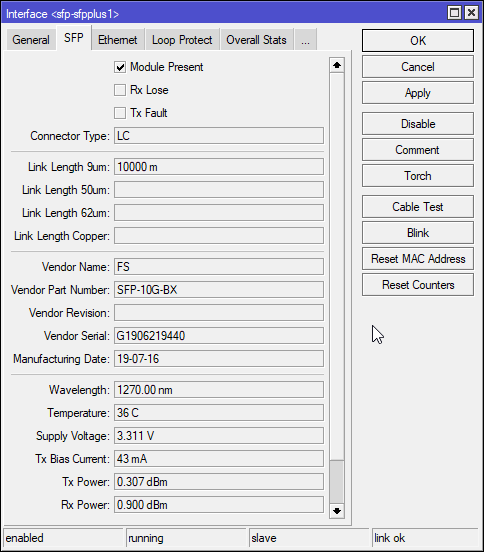
and single mode fiber optics
keen bridge
they want £110 + £17 delivery :\
tame carbon
I think MSRP for the CRS305 is $149
keen bridge
so that's not too bad then
tame carbon
@keen bridge just as a point of interest: this is the router I have connected to that CRS305
MikroTik is a Latvian company which was founded in 1996 to develop routers and wireless ISP systems. MikroTik now provides hardware and software for Internet connectivity in most of the countries around the world.
And mikrotik also has a special switch, with a lot of highspeed ports
lemme find it
MikroTik is a Latvian company which was founded in 1996 to develop routers and wireless ISP systems. MikroTik now provides hardware and software for Internet connectivity in most of the countries around the world.
@keen bridge this might actually be superior
1x 1G and 8x 10G
this switch, like the CRS305 is capable of dual booting SwOS and RouterOS
I always prefer the mtiks that run RouterOS over SwitchOS, since SwOS is rather limited
RouterOS can do what SwOS can do, and more
keen bridge
availability for their products in the UK doesn't seem too hot annoyingly
tame carbon
@keen bridge they are a european company
maybe brexit is showing itself here
not sure
tame carbon
@keen bridge go the other way around, look on the mtik site and find the product through their vendor listing
amazon is overpriced

Gigabit Ethernet port, 8x SFP+ ports, PoE-in, 800MHz CPU, 512MB RAM, 16MB Flash, License level 5, RouterOS / SwitchOS
@keen bridge ^ ?
you linked the 209, older variant
keen bridge
gotcha
tame carbon
Sinetic is a reseller from london
keen bridge
ah the 209 isn't 10G
tame carbon
sells mtiks
keen bridge
god their menus are a pain in the ass xD
tame carbon
@keen bridge there may be alternative vendors, But I'm 100% mikrotik here
and for the lower segment their pricing is just excellent
and the features you get are unparalelled with many other equally priced devices
@keen bridge lol if you wanted to, that CRS can also act as a router
keen bridge
do they sell the NICs as well or just the routers/switches?
tame carbon
not a very fast one, but it can route
@keen bridge they sell tranceivers, and thats about it
keen bridge
I literally just need something to get my server and workstation talking to eachother faster than gigabit
tame carbon
PCIe NICs you may have to buy from another brand
I went way over budget there
with a $250 dual 10G card from intel
keen bridge
that's probably what I'd be looking at actually for both machines
especially if I can do bonding for 20GBit xD
tame carbon
But you can get single 10G NICs for less than 60 bucks
@keen bridge there's no bonding on this
only a step up in link speed
10G, 25G, 40G, 100G, 200G etc
once you get to 25G and up, it gets expensive really quickly
we're no longer talking about 100s of dollars or pounds
but thousands
keen bridge
ah so there's not much point getting a twin head card then?
tame carbon
@keen bridge yeah I only use a single 10G link on the card lol
but I wanted more than one interface for futureproofing xD
keen bridge
shame you can't do link aggregation
well, I could do OS-level aggregation though...
since its Windows Server talking to Windows 10 Workstation 😉
tame carbon
You can do load balancing
but not on a CRS
they are hopelessly underpowered in terms of CPU
keen bridge
I'm wondering if I'm not just better off skipping the switch and just wiring the two machines together
they're the only ones that are gonna be equipped for it
tame carbon
they can archieve 80gbit/s switching, because they have hardware switching chips
keen bridge
gotcha
tame carbon
@keen bridge if its just two devices
the CRS305 is perfect
you plug the slower part of your 1G network into the ethernet port it has
and all your highspeed devices on SFP+
keen bridge
well right now it's just two, my QNAPs are up for replacement next year
and that's gonna be 10GBe
tame carbon
@keen bridge the setup here for 10G is just for multiplexing
so I have many 1G clients hitting the 10G nas
keen bridge
yeah I'm doing a small number of endpoints hitting max throughput
tame carbon
the 100G crap that LTT has set up with MMF
cost them probably around 5000-10000 bucks
keen bridge
Does make me think they have money to burn sometimes if they're doing that xD
tame carbon
Its just that expensive
keen bridge
my company did a pre-roll sponsor one time, cost a bomb
tame carbon
@keen bridge and in terms of cabling? have you made up your mind about that?
Copper on 10G is expensive
keen bridge
Doesn't make too much odds given the short distance, although £22 for a 2M cable is nutty
but that's with the transceivers attached
tame carbon
Directattach yeah
Thats reasonable though
@keen bridge I have bi-di transceivers here on singlemode fiber
keen bridge
if I was going more than a few meters I'd use fibre
tame carbon
they cost around 32 euros each
keen bridge
but I could go fibre just for ballin
keen bridge
makes sense, less logic for them to do
tame carbon
nah, bi-di is complicated because they use the same medium for transmit and receive
keen bridge
Over that kind of distance am I going to be leaving any performance on the table using direct copper?
tame carbon
so there's some prism magic going on
keen bridge
gotcha
keen bridge
lol
tame carbon
I have 30 meters of fiber here
_>

FS Germany
Check Generic 10gbe SFP+ transceiver module datasheet (10GBASE-LR SFP+ Module, 1310nm 10km DOM) and price list. 100% Compatible, Order Now!
@keen bridge like this would be a transceiver for duplex SMF
generic FS modules work fine in mikrotiks






 twin zealot
its cheaper to buy a cable with the tranciever modules already on there, but your then facked if you want a longer or shorter cable
tame carbon
Direct Attach is cheaper yeah
but the moment you need more distance
you can either go for an active optical cable
keen bridge
£200 for the switch is pretty decent
tame carbon
which is cheaper for 25G and 40G
keen bridge
then another £200 for a pair of NICs
tame carbon
or go the manual way with tranceivers + patch fibers
patch fibers are a joke, I paid 10 bucks for 30 meters of prefabbed cables
100 meters would be like 25 bucks
keen bridge
I wonder if there are any PCIe 4 1x NICs
tame carbon
@keen bridge jokes on you
keen bridge
since the 4 1x would be the same as the 3 2x
keen bridge
the machine to my right only has 8x and 1x slots xD
no 2x
I suppose they've made them 8x cards so that even at 2.0 speeds they have enough bandwidth
twin zealot
yep
keen bridge
since at 3.0 a 1x slot wouldn't have enough bandwidth i suspect
twin zealot
not 4.0
keen bridge
someone like me cares, who has no 2x slots but has PCIE 4 xD
got the bandwidth, but not the slots
twin zealot
sluts? (this is an very inappropriate message, please dont mind)
tame carbon
@keen bridge pretty much all the cards I can find are at least 8x
keen bridge
aye, I do have a spare 8x but I don't want to use it if I can avoid it
since that limits what GPUs I can stick in this thing once I can get hold of one
a triple slot card would leave zero airflow if I then used the other 8x slot
tame carbon
@keen bridge or use a riser
keen bridge
or use a riser
twin zealot
https://mikrotik.com/product/RB260GS#fndtn-gallery
why has this switch its sfp port on the back
MikroTik is a Latvian company which was founded in 1996 to develop routers and wireless ISP systems. MikroTik now provides hardware and software for Internet connectivity in most of the countries around the world.
keen bridge
that wouldn't work in this case, the riser would foul the other slots
and this case has no slots that don't line up with a board slot
tame carbon
@twin zealot probably because the front was out of space? :D
twin zealot
yeah, but rear is weird too
tame carbon
RB206
twin zealot
then make it wider
tame carbon
what a cute router
twin zealot
can i just replace my modem at home, or will i get some problems with tv and thelephonie
or do i need to change the modem router to bridged
tame carbon
@twin zealot can't say without knowing details on how your ISP implemented their service
in theory, yes
in practice: depends
twin zealot
its ziggo
tame carbon
no xD
tame carbon
@twin zealot KPN sucks because they don't upgrade their DSL lines to fiber
and their support is awful
Vodafone's giganet has issues with their hardware
but this is been a running gag with ziggo & UPC
cable network has always been less reliable than DSL
but at least it carries more bandwidth
twin zealot
so what doesnt suck here in the netherlands then
twin zealot
lets start our own than
tame carbon
That's the service provider I have ^
twin zealot
twin zealot
lets start our own than
we will just cut some cabel in the north sea and put our own in
tame carbon
@twin zealot idk if deltafiber is in your area
you could check

Snel internet voor iedereen in Nederland. Dát is de ambitie van DELTA Fiber Netwerk. Niet alleen in de stad, maar ook in het buitengebied of in kleine kernen.
"Doe de postcode check"
twin zealot
frick