#networking
1 messages · Page 265 of 1
 twin zealot
 tame carbon
hehe
Oh. not bad
@jaunty talon so the people at cisco did have half a brain
it has a 5G wan port
 jaunty talon
why is that better?
tame carbon
beats 2.5G
jaunty talon
lol
tame carbon
at a lower pricepoint
jaunty talon
but not a 10G SFP+
twin zealot
so you need either an cat 7 or cat 6a for that
tame carbon
yeah, its still F-tier
jaunty talon
no ISP uses CPE's with anything but 10G or 1G anyway
 jaunty talon
tplink sure
twin zealot
jaunty talon
Have you even tried their products? :D
yes, i have an 5 port 1gig switch under my desk from action
tame carbon
its a switch
twin zealot
only good product because it was 10 euros
tame carbon
there's not much you can mess up with those
twin zealot
tame carbon
its a switch
still a product
tame carbon
@jaunty talon I had a netgear router too, like 6 years ago
twin zealot
no, rather have an netgear draytek or unifi / ubiquity
tame carbon
but I had lot of connectivity issues with them
specifically, something I've noticed with a lot of home wifi routers
when the wifi, just dies.
and you need to restart the device
jaunty talon
I have had asus and netgear routers many times and they have served me well
fulfills the NAT spec etc
jaunty talon
well who does at home??
twin zealot
draytek is great because it has an on or of button so for a restart you dont even need to replug the adapter
tame carbon
draytek at least has some more advanced config options
@jaunty talon You're right, nobody. But I also think that someone who has 1G fiber, does not need a $500 router
jaunty talon
It's not like you can compare a ASR901 with MX204 even tho they're routers they have completely different usecases
twin zealot
tame carbon
<@!153620646398656512> You're right, nobody. But I also think that someone who h...
true
jaunty talon
hello no
i have that netgate
i pasted
super happy
does 4x openvpn tunnels and nat's very well my 1G linerate
tame carbon
@jaunty talon I was done with ASUS the moment I realized they can't even implement a DHCP client xD
It ignored the DNS servers provided by the DHCP server
And then, the downstream DHCP server it provides for LAN, inserts itself as primary DNS server
with no way to override
twin zealot
just let asus build cases but nothing more
tame carbon
and if you browse to 192.168.172.1, it forces a redirect to router.asus.com which resolves to that same IP
but if you manually override your DNS server
you can no longer manage your router
twin zealot
wtf
twin zealot
tame carbon
you can no longer manage your router
factory reset
tame carbon
@twin zealot yeah
this is up there with r/assholedesign
@twin zealot no the fix was uhh
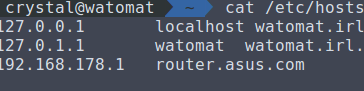
@twin zealot right here ^

 twin zealot
oh my gosh
tame carbon
Still gets updates :)
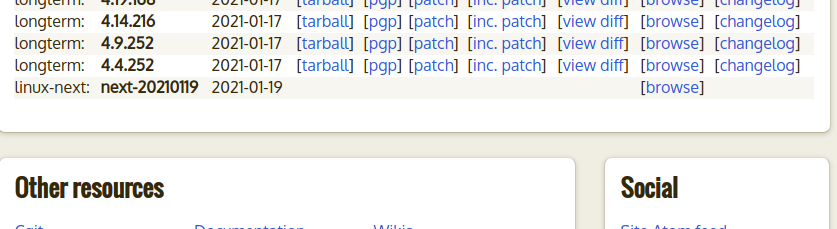
@twin zealot using the oldest kernel that is still maintained
4.4.0
 twin zealot
currently on windows because school applications you have to have
tame carbon
Linux watomat 4.4.233 #1 SMP PREEMPT Wed Sep 23 16:25:48 CEST 2020 x86_64 x86_64 x86_64 GNU/Linux
@twin zealot I modified the crap out of this system
not really keen on having to reinstall everything
so I've been putting off this upgrade for years now
manually patching my system if something breaks
twin zealot
tame carbon
<@!416865558944940033> I modified the crap out of this system
i have an arch (arco) vm
and that one is modified as hell
tame carbon
@twin zealot I just downloaded the ubuntu distro kernel sources
and tossed out all the shit I don't need
also set the kernel to be preemptible, so it doesn't freeze if a background process hogs the CPU
Gnome is very picky. and has a tendency to lock up under heavy load
twin zealot
yea aim thinking to buy https://www.coolblue.nl/product/860856/asus-l210ma-gj034ts.html this one as an coding machin with linux on it
Bestel de L210MA-GJ034TS bij Coolblue. Voor 23.59u? Gratis bezorging & retour. Coolblue: alles voor een glimlach.
tame carbon
low power machine eh?
twin zealot
i know there better options but look at the lid
twin zealot
tame carbon
low power machine eh?
yea
tame carbon
64G storage
twin zealot
there better deals out there, but look at the lid
tame carbon
better be upgradeable
tame carbon
still
twin zealot
iam now on my main notebook, 256 m.2 + 500 gb m.2 + 1tb hdd
tame carbon
Disk /dev/sda: 465,8 GiB, 500107862016 bytes, 976773168 sectors
Units: sectors of 1 * 512 = 512 bytes
Sector size (logical/physical): 512 bytes / 512 bytes
I/O size (minimum/optimal): 512 bytes / 512 bytes
Disklabel type: gpt
Disk identifier: B61A5F03-6CE2-468F-ACB8-4319E5E765AC

Device         Start       End   Sectors   Size Type
/dev/sda1       2048    923647    921600   450M Windows recovery environment
/dev/sda2     923648   1126399    202752    99M EFI System
/dev/sda3    1126400   1159167     32768    16M Microsoft reserved
/dev/sda4    1159168 381900799 380741632 181,6G Microsoft basic data
/dev/sda5  381900800 967204863 585304064 279,1G Linux filesystem
/dev/sda6  967204864 976771071   9566208   4,6G Linux swap
Oh, so thats where all my storage space went
twin zealot
what kind of swap do you have?
tame carbon
there's different kinds?
@twin zealot pretty sure this is just a swap filesystem, nothing special
twin zealot
in windows you can also make an partition you dedicate to swap
tame carbon
oh, that must be new
tame carbon
probably a registry hack
twin zealot
just do nothing with the partition and select it as swap
twin zealot

Tom's Hardware
Follow these simple steps to manually manage the Virtual Memory (Pagefile) size in Windows 10.
twin zealot
oh fuck, it can only be on the partition of where win is installed
twin zealot
yes and no
twin zealot
tame carbon
<@!416865558944940033> did you just once again confirm that windows is ass?

Winaero
Here is how you can move the page file in Windows 10 and why you might want to do it.
ha
 twin zealot
yes
tame carbon
understandable
twin zealot
by not putting anything on the partition
tame carbon
because windows only speaks NTFS natively
and that was sarcasm
I know it does other filesystems
but not by default
 tribal ferry
I’m trying to get Apple AirPrint to work over two VLANs, a secure internal and a segregated IoT. I’ve been unsuccessful so far.
Is there a certain port that needs to be whitelisted?
I have the mDNS repeater turned on.
 unborn sluice
tame carbon
Lovely.
unborn sluice
tame carbon
Lovely.
What nitri
tribal ferry
Rebooted it and it started working again, hm.
I’ve rebooted it before and it still didn’t work.
tame carbon
wat
unborn sluice
tame carbon
wat
Omat
unborn sluice
guess you aren't linked with them
 waxen scroll
@tame carbon thats why I give up
I changed to using unique passwords for every site
I must have 100 passwords now
 foggy pike
Does anybody know how to configure a voice vlan on a HP 5130 core switch? I can’t find any good documentation on it from HP
waxen scroll
have you tried finding out what they call their OS and then search that way? if you only search the switch model it wont help
 distant radish
What do you need out of a voice VLAN, is it just traffic segregation, if so its the same as any other VLAN unless you are really hammering your LAN traffic wise, or are you using it in addition to classify and mark the traffic for transport over a bandwidth constrained WAN link? If so a search for "hp 5130 qos configuration guide" top hit from page 16 onwards goes thru QoS. An alternate over all the manual QoS setup would be to do a search on "HP 5130 Auto QoS" which comes up with some examples and gotchas on the subject mainly to do with LLDP.
tame carbon
@distant radish pretty sure they mean a VLAN for voice services
its not uncommon for ISPs to deliver different services using VLANs
 hollow marlin
voice VLAN is a thing
tame carbon
isnt that just SIP over a VLAN ?
hollow marlin
Its used with LLDP-MED to advertise a specific VLAN for voice devices to use for voice and will allow access ports to use untagged for data and will tag voice traffic
The voice VLAN its mapped to is just a normal VLAN, just "voice VLAN" is typically referred to the port level configuration
tame carbon
@hollow marlin is that what those IP phones use for flex-work ?
Not sure how to explain this, since Idk the terminology
I've seen these before
a desk, with a phone, that has an ethernet out
you log into the phone, and then get internet through that
so that if you are connected, you are also reachable by phone
hollow marlin
Typically yes, the pass through LAN is just untagged unless the phone is configured to tag it and the phone will tag it's voice traffic
tame carbon
neat
tame carbon
@peak cloak cisco sells phones like these
 peak cloak
yeah they were all cisco
hollow marlin
Cisco, Polycom, Mitel, etc. Almost all IP phones support LLDP-MED and should be configured to do so
distant radish
@tame carbon Oh I agree, it depends on the transport service provided by the SP and on how they require that the network based traffic is to be presented to them. Are they providing a L2 based service for example E-Line or E-LAN or a L3 based service for example MPLS, Internet etc.. Is it wires-only or with some sort of SP provided CPE. An NTU for L2, router for L3. Then how is the segregated traffic presented on the CPE, separate LAN ports or VLAN trunk. Lots of options.. I agree go for the easy straight forward option 90+% of Enterprise networks I've worked on have either used Auto QOS + LLDP or nothing on their LAN's
tame carbon
@distant radish I got into enterprise networking from the consumer market
bunch of the standards they use are still new to me
ever since I got a 0-bs internet plan, and a proper router, I have been enlightened
 distant radish
@tame carbon All I've ever done is Enterprise, been working on Cisco since '94. Consumer is constrained to my home network, even thou I've git Cisco and Meraki test networks hanging off it 😕
tame carbon
@distant radish oof
basics of TCP and such I learned through coding
implementing networked applications
at some point, you just teach yourself how 2 networking
moving away from consumer routers, and getting mikrotik was the best idea I ever had
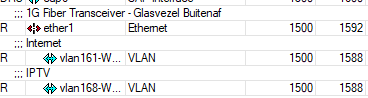
and I had to, since my ISP forwards a /29 to my WAN
and consumer routers cannot deal with this
@distant radish https://cdn.discordapp.com/attachments/776722183119699988/777646103775674368/IMG-20200922-WA0001.jpg

best I could do xD
I think it looks pretty good, for someone who's never dressed a rack before
 surreal finch
Yeah one of the best things i did was move away from consumer network gear. Whole network is ran by Fortinet here at my home.
tame carbon
Ars Technica
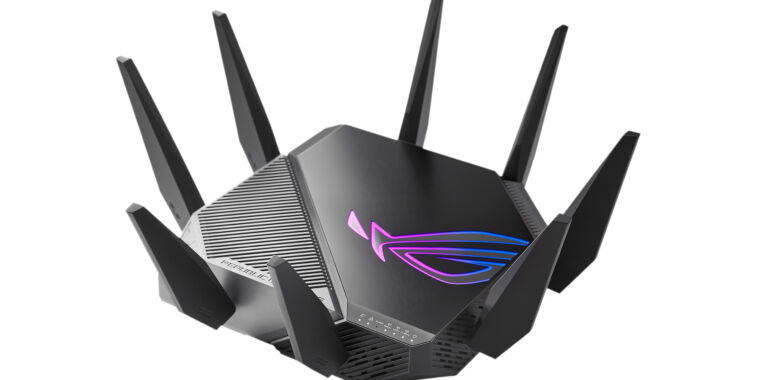
We round up the Wi-FI 6E routers, with Asus' model launching as soon as this month.
I posted this earlier today
for the memes
distant radish
@tame carbon one of the main reasons SP's split traffic across VLAN's as you have shown, is that so they can apply different contracted service policies on them. For example internet best effort, TV with X always guaranteed bandwidth, with Y latency and so on. Not bad! things to consider are, if you have to replace a device in the future, 1: can I install next to it and swing cables across, 2: radius of any bends on optical fibre
tame carbon
@distant radish yeah, that's one of the major benefits. internet is 250 mbit guaranteed, regardless of TV or not
distant radish
I've a right mix here, Huawei, Netgear, Cisco, Draytek & Meraki
tame carbon
on ADSL, IPTV takes away from the internet bandwidth
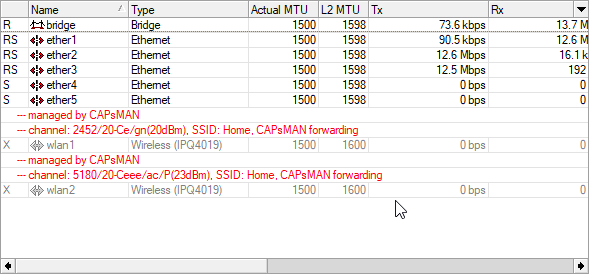
@distant radish https://i.imgur.com/GHlrOW9.png

all mikrotik xD
 surreal finch
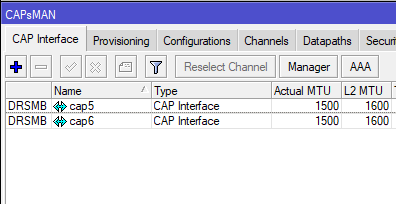
@tame carbon pardon the ignorance here, but what is this feature
tame carbon
so you can just hook up any kind of mikrotik board
and one device can assume the role of 'controller'
if I go onto the actual mtik with the antenna
you see this:
 distant radish
I've only seen Mikrotik on networks, where I've been looking at doing a WITO (Walk In Take Over) of their LAN estate, usually its then been transformed out to Cisco or Meraki as that way the toolsets exist for the high level automation involved to make the books balance. Did one network last year where we replaced 2000+ Nokia switches for a Cisco SD-LAN for the heavy automation we could do on it
tame carbon
@distant radish what's WITO?
surreal finch
Yeah having the router/firewall as the wireless controller at the same time is super nice. One of the features I love about my fortigate.
surreal finch
heck yeah!
tame carbon
have a guest network, with a queue to do rate limitng and such
surreal finch
love commercial grade gear
tame carbon
enterprise*
surreal finch
haha
tame carbon
its all commercial grade
surreal finch
true that
tame carbon
in that, it makes money
surreal finch
enterprise is a better way putting it
distant radish
Walk in and take Over the customers existing LAN/WAN estate, where you manage it on their behalf. Usually Enterprises sweat their LAN estates and its common to see a lot of end of life switches/APs in the network with no support beyond whatever hardware still exists in the supply chain or EBay. Business case is based on doing it cheaper/better than they or their existing supplier can. Only really works well if you can leverage existing tools and skills within you org. For example its no good taking on X vendor switches if you are a Y house.
peak cloak
urghhh why does unifi have to be so annoying. I bought the Unifi switch flex mini because it was the cheapest active poe powered "managed" switch and now adoption is failing
I needed to be able to use vlans
surreal finch
I have heard a lot of complaints when it comes to ubiquiti. Mainly when it comes to techincal needs like that.
tame carbon
@distant radish I guess I do some of that too. I have two companies in the area that ring me up when they need someone to look at their network
and I also provide IP services for two entities
peak cloak
surreal finch
I have heard a lot of complaints when it comes to ubiquiti. Mainly when it come...
yeah it's very prosumer, sometimes simple things are complex
tame carbon
its the apple of networking
peak cloak
yep
surreal finch
Yeah that is what I heard as well. I was looking at going with them awhile back. But I was fortunate enough to have my companies Fortinet sales engineer hook us up with some pretty sweet gear from them, fortigates, switches, AP's. As well as Fortimanager and Fortianalyzer which I run in a VM.
distant radish
I've used the Apple vs Android for Meraki vs Cisco. Mainly as there's no real cost difference to be had in them, until you try and factor in the operations costs for either
tame carbon
@distant radish it suddenly makes sense when you compare mikrotik to unifi
surreal finch
😛
tame carbon
then its like pc vs apple
surreal finch
speaking of pc just added 32gigs more of ram to my workstation
tame carbon
so thats why the ram prices hiked
my first PC had 16MB ram
ran windows 95
and I could play age of empires on it
surreal finch
OMG, I can't remember what my first PC had. I was lucky and paid under $150 for 32 GB 3200Mhz 16CL ram
haha
tame carbon
I dont remember the specs
it was a hand me down
I wasnt tech savvy back then
just into computers
tame carbon
well, now its like 10-15 years later
surreal finch
right!
tame carbon
and am still using 'mostly' the same PC I bought 10 years ago
over the years, its received three graphics cards upgrades
surreal finch
haha that is awesome.
tame carbon
and just recently, I swapped out the board after 9 years
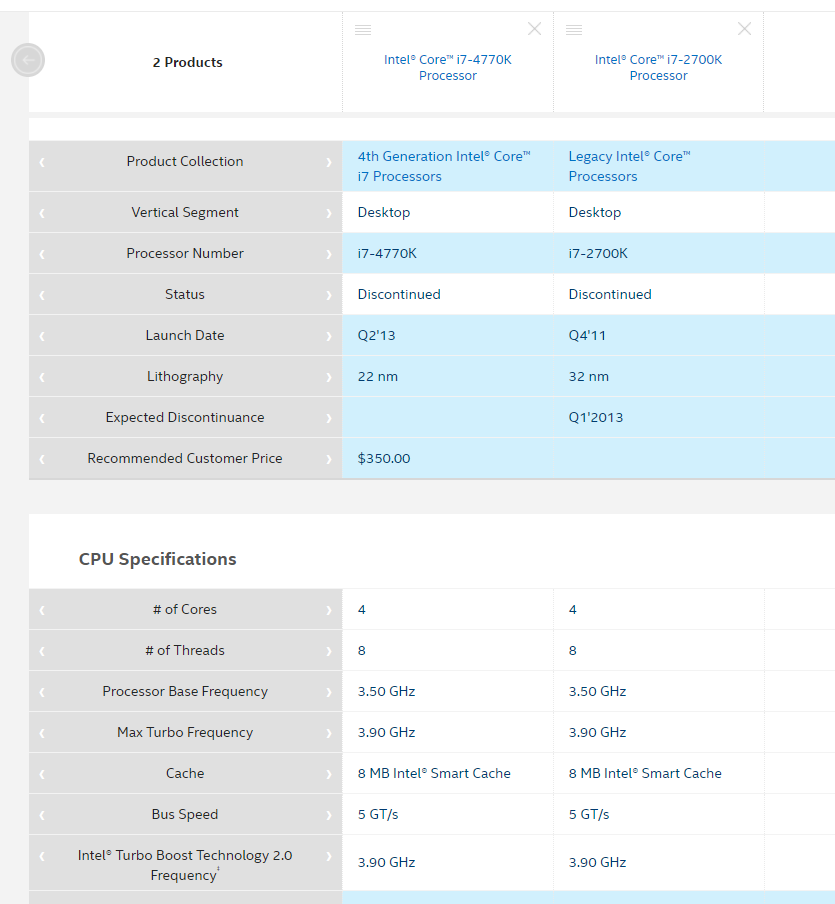
the i7 2700k ran at like 4.5GHz for 7 years
only its last two years it ran at stock speeds
before daily crashes happened regularly
distant radish
Early 90's RAM raiders was a term used for thieves breaking into businesses and just stealing the RAM out of PC's it was silly
tame carbon
and I got a replacement board, ram, and PSU for good measure
surreal finch
Yeah I just had to completely upgrade the PC early 2020. Need a good workstation/gaming rig. Didn't think I would be working from home as much when I built it or I would have put 64GB ram into it. I now run my fortianalyzer fortimanager, cisco virl stuff on there. plus other VM's not essential to networking
surreal finch
yeah I have a i7 4790k that has been running for over 10 years now.
its my sons pc now lol
surreal finch
uhhh
tame carbon
4790k is like 7 years at most
distant radish
I retired my 4770K last year I'd got it in 2013
surreal finch
yeah it just feels that old
it launched in 2014
so yeah 7 years
yes @cold geode
tame carbon
@surreal finch https://i.imgur.com/YXwB2TF.png
 tame carbon
people be wining that intel is slow on the 8nm
I was using 32nm in 2019
no 'slow' as in, 'slow to deliver to market'
distant radish
Only if you are looking at some limited 10G on your LAN
surreal finch
cat 6 will provide up to 10Gb, cat 5e 1gig
peak cloak
I built my first pc like 5 years ago I think with a i5-7600K and still use it to this day. Just upgraded the GPU to 1070ti
tame carbon
don't do 10G on copper
surreal finch
yeah that is the biggest difference between them, that and cost probably
tame carbon
the level of shielding required
distant radish
Depending on your SFP costs of course
tame carbon
ultimately the kicker for the i7 2700k, was when I put in my GTX980
peak cloak
kinda
surreal finch
haha right!
peak cloak
the biggest cost of fiber is the SFP or SFP+ pcie cards
surreal finch
^^^
surreal finch
yeah I just ditched intel and went back to AMD
tame carbon
I had never used amd
except a really old xp laptop with athlon
that thing was garbage
surreal finch
the 4790k was the most recent intel chip I had used. Before that was using AMD
now running the 3900x
distant radish
Mind you Cat6 will prob work better on 2.5G or 5G.
tame carbon
@surreal finch the laptop I run linux on, is one of those pathetic i7 chips that intel came out with
surreal finch
lol
tame carbon
i7 5500U, duo core with HT @ 3GHz boost
surreal finch
oh yeah!!
surreal finch
3GHz BOOOOOOoooossttt
tame carbon
so doing hardware operations
and writing and reading from memory
was still very fast
like, my quadcore i7 2700k did maybe 32GB/s memory bandwidth
I use that as a 'rough' estimate of how fast the system is
nevermind those stupid cinebench thingies
surreal finch
haha
tame carbon
memory bandwidth is usually a good indicator of raw speed
if you have all cores doing a memory copy operation
and you just see how fast it goes
@surreal finch lol this laptop is so trash though, the moment it needs any form of number crunching
it just turns into an oven
surreal finch
ahh yeah
tame carbon
depends on size of project and language ofcourse, compilation can be very heavy
my largest projects take about 20 seconds to compile
on the desktop maybe 5 secs
partial compilation when debugging is nice, takes half a second
@surreal finch but when new kernel version comes out, I need to rebuild it
and that takes over an hour
surreal finch
Good times
 cedar igloo
Hi all, sorry to interrupt. I can access my CCTV system from outside my network (without a VPN) and I am wondering how this works. I did not configure any port forwarding and I'm pretty sure it doesn't sync to external servers.
peak cloak
upnp @cedar igloo
tame carbon
@cedar igloo disable UPnP, make sure the fw is enabled
@peak cloak this is such bs lol
why would a camera upnp by default
its so stupid
peak cloak
yeah, upnp is basically automatic port forwarding, pretty insecure
cedar igloo
I'm not complaining that it does this. I'm just wondering if i can configure my own web servers and stuff to use this
peak cloak
you don't want to, it's a security risk
tame carbon

Watch Axis live CCTV online cam located in United States, region , Hattiesburg.
peak cloak
you want to be able to know what's being opened to the internet what's not
cedar igloo
luckily mine has authentication
surreal finch
Yeah @cedar igloo, personally I would lock the firewall down, and set it so it is only accessable via VPN
tame carbon
Thousands of cameras and security systems available to view for - .
surreal finch
having it exposed like that, just opens you up to potential security risks...
surreal finch
even with authentication
tame carbon
lost most of these ip cams have 'security'
90%+ of them are easily rootable over the network
and most have backdoors
or easily exploitable software
surreal finch
yep
tame carbon
Good luck
There's a database of devices, software versions and hardware that can be exploited
if a device is on this list, I would think real good and hard before you actually turn it on
I have mine on a completely isolated subnet and vlan, only accessible by one virtual machine on my network
cedar igloo
I've always thought the CCTV wasnt very secure as it uses HTTP and both the username and password is present in the URL
cedar igloo
tbf, I dont "own" the CCTV. It's my parents but I set it up for them, and do everything when it goes wrong. Now it is working, i cant do anything to it as their thinking is "if it ain't broke, don't fix it"
tame carbon

Jumpstreet - Cueless @ Nanodroppin ~ Looney Moon Records
Buy: https://looneymoonrecords1.bandcamp.com/album/nanodroppin
still have to fix my other amplifier
headphones just not as good as real bass :/
and I miss being able to party ;(
cedar igloo
does that site you sent - insecam.org bypass auth? i've clicked a random camera and it's showing a login prompt, but the site has the live feed...
tame carbon
@cedar igloo yeah these are all exploited cameras
this is why you never connect the camera directly to the public internet
tame carbon
at this point
it could well be automated
I've seen oneliner scripts that can exploit the device
and drop you into a root shell
or change password and give you details in your terminal
just watch some DEF CON talks
peak cloak
I should buy some random camera and try to exploit it for fun
tame carbon
you'll never feel the same after that
peak cloak
could be a nice learning experience
surreal finch
would be a great learning experience
surreal finch
I am all about doing things like that
 peak cloak
ay, I just switched back to linux, time to setup KVM again
tame carbon
Black Hat 2013 - Exploiting Network Surveillance Cameras Like a Hollywood Hacker
xD
he basically shows that after you pwned the device
that you can manipulate the video feed
like in movies
@peak cloak https://youtu.be/B8DjTcANBx0?t=146
lol how he disses on dlink
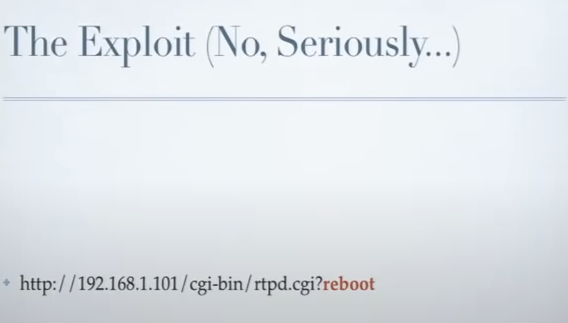
I mean, rightly so
that program there, was unprotected, and ran a shellscript as root
And it goes both ways xD
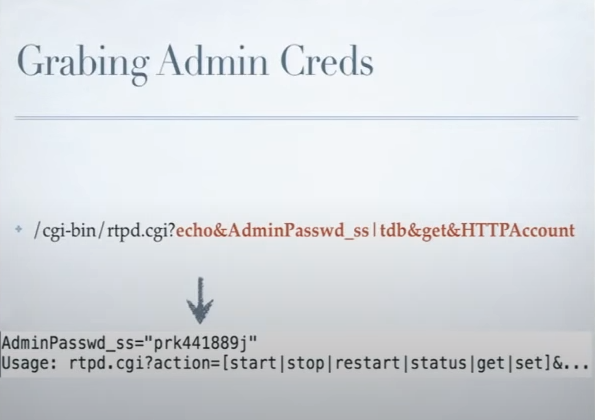 tame carbon
@peak cloak yeah and consider this
all smart home devices
could have these bugs
this is why I am quite weary with smart items
I don't trust a company who makes toasters or TVs to know anything about cyber security
and what he stated
'I am in your network, and I am root'
is still a great place to be in as an attacker
I can see you, is just a meme
waxen scroll
then you should see what APC's parent company is doing... lol

Combining scalability, durability, and connectivity, MasterPact MTZ high current air circuit breakers feature the latest technologies to improve efficiency.
be very afraid
 deft fog
hi, im looking for help on my powerEdge r710 server im runing proxmox and its not geting accses to the internet can any one help me out?
distant radish
I agree IoT (Internet of Things) has been quite the buzzword for some while, I refer to it as the IoS (swear filter for the S) Which will only get worse with 5G deployment and low power, low cost devices spread far and wide. Yes there will be stellar devices with some really good RTOS setups, but they'll be swamped by the devices with zero or minimal patching, built to a cost with hard coded passwords. It will add more credence to zero trust networks which will be a right PITA to setup and manage. More so when the PHB demands that you allow unfettered network access to her/his network connected coffee mat, with an allow any-any rule as there's naff all documentation for it, and it has to be on the network yesterday.
tame carbon
@waxen scroll https://i.imgur.com/sEMdkP2.png

I wonder how fast those can switch on and off
could be a lot of fun
need to make sure I have pwned the power grid control room's IP cam
so I can see their faces
when their grid starts modulating the word 'rekt'
in morse
I guess you could call it very low frequency FM
aww yis https://i.imgur.com/cAtFI2S.png
new minecraft sucks. 1.7.10 is king
distant radish
A proper power control network (SCADA) will have a genuine air gap between anything on any other network. Most utilities operate under some quite tight regulatory overwatch. So they are prepared to pay for network availability and full separation from their corporate network. If any I'd say that water is prob at bottom of the list, mainly due to the locations pumps and sensors can be (up in the mountains etc..) as getting cost effective connectivity for a hell of a lot more sensors/controls than gas or elec in the back of beyond is a real challenge. Smart meters will connect back via a multitude of methods (2G, 3G, 4G, 5G, LoRA etc ..) to basically a billing platform, that should HOPEFULLY have zero inter-working with the SCADA networks.
tame carbon
@distant radish i dunno, I've heard from employees that worked on solar inverters for 10MW stations
that said that the control interface for those PLCs are sometimes still hooked up to public internet
happens from time to time
and even the systems that i'ev worked on with IoT, sometimes were merely dialup lines
with a plaintext password
distant radish
@tame carbon madness, and see my comment about regulatory. I'm in Europe, where most likely the Operator would never even think of such a thing. As it stands war-dialling is a thing of the past, so dial up is prob more secure than the internet, unless its a targeted attack.
tame carbon
@distant radish Germany as it happens
that this story came from
and its not the operator
rather the equipment manufacturer
and service installer
 orchid shell
whats the difference between a router and a modem
distant radish
Ah, that makes sense, bet the operator wouldn't be happy with that approach.
tame carbon
@orchid shell router routes packets between different IP packets over ethernet networks
a modem translates ethernet to some other type of signal
though a modem doesn't have to be ethernet per say

this is also a modem
distant radish
A router breaks a broadcast domain, a modem as Crystal states translates a binary signal into another signal
tame carbon
very old one xD
@distant radish but do they know what a broadcast domain is ?
I was trying to use as little technical terms
distant radish
Hopefully! if they want to understand what Ethernet is
tame carbon
yeah thats kinda the fundamental thing we rely on
peak cloak
I didn't understand until recently
tame carbon
nvm fiberchannel cough
peak cloak
like 2 years ago, if you asked me what was ethernet that's what I would have said
tame carbon
wifi standard is between the L2 ISO IEEC-whatever, MAC specification
it basically adds an additional HW address
the regular ethernet implementation is stacked ontop
@peak cloak I didnt know about LLC
only about MAC
peak cloak
what's LLC?
distant radish
WiFi until WiFi6 (802.11ax) was how Ethernet was before switches, when everything was on a hub or co-ax. only one device could transmit at a time. Then Ethernet switches allowed multiple devices to transmit at once (breaking the collision domain) WiFi6 allows in an ideal world for multiple devices to transmit at once
 peak cloak
ah ok
distant radish
LLC takes me back to ISDN and X.25
distant radish
Perfect!
tame carbon
this is all 802.2 at the end of the day
these protocols are very near the hardware
unlike the network layer
if you can shove bytes in both directions, TCP/IP can be implemented
so bluetooth tethering, follows much the same structure
distant radish
Bluetooth out of all the training I've ever done, is the only one that sent me to sleep
tame carbon
@distant radish I've implemented some smart watch apps before
and I remember writing the netcode as being infuriatingly awful
deft fog
hay what is a dns2 for setting up a static ip for a server?
 timid flume
deft fog
hay what is a dns2 for setting up a static ip for a server?
timid flume
deft fog
hay what is a dns2 for setting up a static ip for a server?
fallback dns ?
tame carbon
unless you go into an encoding mode for audio or tethering
pure serial data exchange is horrible
distant radish
Whatever your second DNS server is. For example if you are using Cloudflare 1.1.1.1 for DNS1 and 1.0.0.1 for DNS2
tame carbon
google would be 8.8.8.8 and 8.8.4.4
@distant radish can you also enumerate the IP addresses of your local network? xD
There's like a list of over 20 addresses in my head now
public and local
deft fog
ok thanks i been doing every thing wong this intier time:/\
tame carbon
@deft fog DNS has two servers, incase one is unavailable
its basically a phone book
DNS issues are really annoying
timid flume
yup
distant radish
OR you have your default gateway as DNS1 with nothing in DNS2 has hopefully your default gateway is resilient and the IP for that is a VRRP/HSRP address. With the default gateway then being configured with various upstream DNS servers
peak cloak
yeah that's what I do
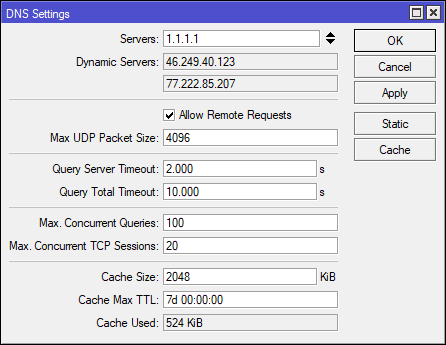
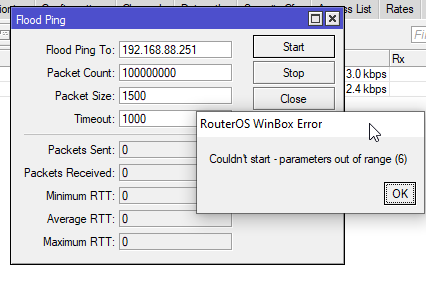
 lean pebble
Gosh the number of packets
distant radish
Local DNS running in Docker on my NAS for me
lean pebble
Hey guys, what do you think about this product QNAP TS-230 2-bay NAS? Is it good for home use ?
deft fog
so if im running proxmox with a ip of 192.168.1.105 should the server be running the same ip address as proxmox or diffrent
peak cloak
deft fog
so if im running proxmox with a ip of 192.168.1.105 should the server be running...
so a VM of inside proxmox?
deft fog
no it the server it self to set up vms
peak cloak
proxmox by default does mac-"spoofing" I think it's called where it fakes the mac address of packets depending on the VM it's coming from so each VM looks like a sepereate machine
peak cloak
deft fog
no it the server it self to set up vms
I don't understand
tame carbon
@peak cloak macvtap
deft fog
on sec
peak cloak
tame carbon
<@!222482269829332992> macvtap
ah that's the name
lean pebble
You mean virtual mac
deft fog
ok to explian better if the server that proxmox is running should or should not be running the same ip adress
lean pebble
You mean same subnet ?
tame carbon
@deft fog you can use macvtap to give the VM its own IP address on the local network
@deft fog only issue is guest-host communication, that won't work
lean pebble
For example 192.168.101.0/24 of real network and 192.168.101.0/24 for vms to ?
distant radish
Depends how the Proxmox host has been setup. Is it bridging or routing
peak cloak
by default it bridges I think
deft fog
im unshure ive been playing with it all day
lean pebble
I found that VMware esxi is much easier to configure than promox
tame carbon
@peak cloak it bridges between an internal network, and uses nat-traversal
peak cloak
proxmox is pretty easy
deft fog
but i do notice that the subnet on my computer is say 255.255.252.0 is that even posible?
lean pebble
Not like esxi
tame carbon
thats a subnet mask
distant radish
So the VM's in bridging mode would be in the same subnet as the vmbr0 interface if its default
tame carbon
@deft fog 255.255.255.0 is equivalent to /24
lean pebble
/22
tame carbon
255.255.252 is I believe /22
lean pebble
255.255.252.0 right ?
tame carbon
ye
lean pebble
Ya
tame carbon
ur right
lean pebble
Finally 😂
tame carbon
value of three is 2 bits
lean pebble
After along time I got it
tame carbon
so a /22 yes
lean pebble
I want external subnet of /22
tame carbon
my public IP is on a /22 range apparently
lean pebble
Too expensive
timid flume
22 one's = 255.255.252.0
lean pebble
I want the subnet
tame carbon
and I have a /29 routed as well, with my own public IPs
lean pebble
My external IP address is a part of /16
lean pebble
But I get only one
Here to
I had once before I moved to a dedicated (static) IP
Now I got ugly IP
But easy to remember
peak cloak
I don't even remember my ip
deft fog
ok im still not geting any acsses to my internet thro proxmox any sugestions to fix the isue
lean pebble
I'm paying for 5 IPs 1.5€ in germany for my server
Here I'm paying 10$ for one IP for my home ...
distant radish
If you have done some network config changes to the proxmox host, have you rebooted or reloaded the new config?
 deft fog
distant radish
If you have done some network config changes to the proxmox host, have you reboo...
deft fog
distant radish
If you have done some network config changes to the proxmox host, have you reboo...
@distant radish how would i do that
peak cloak
can you access the web ui?
deft fog
nope
peak cloak
I think you just ip like in debian
to show current ip it's ip addr show
I forgot how to configure the ip exactly
lean pebble
tame carbon
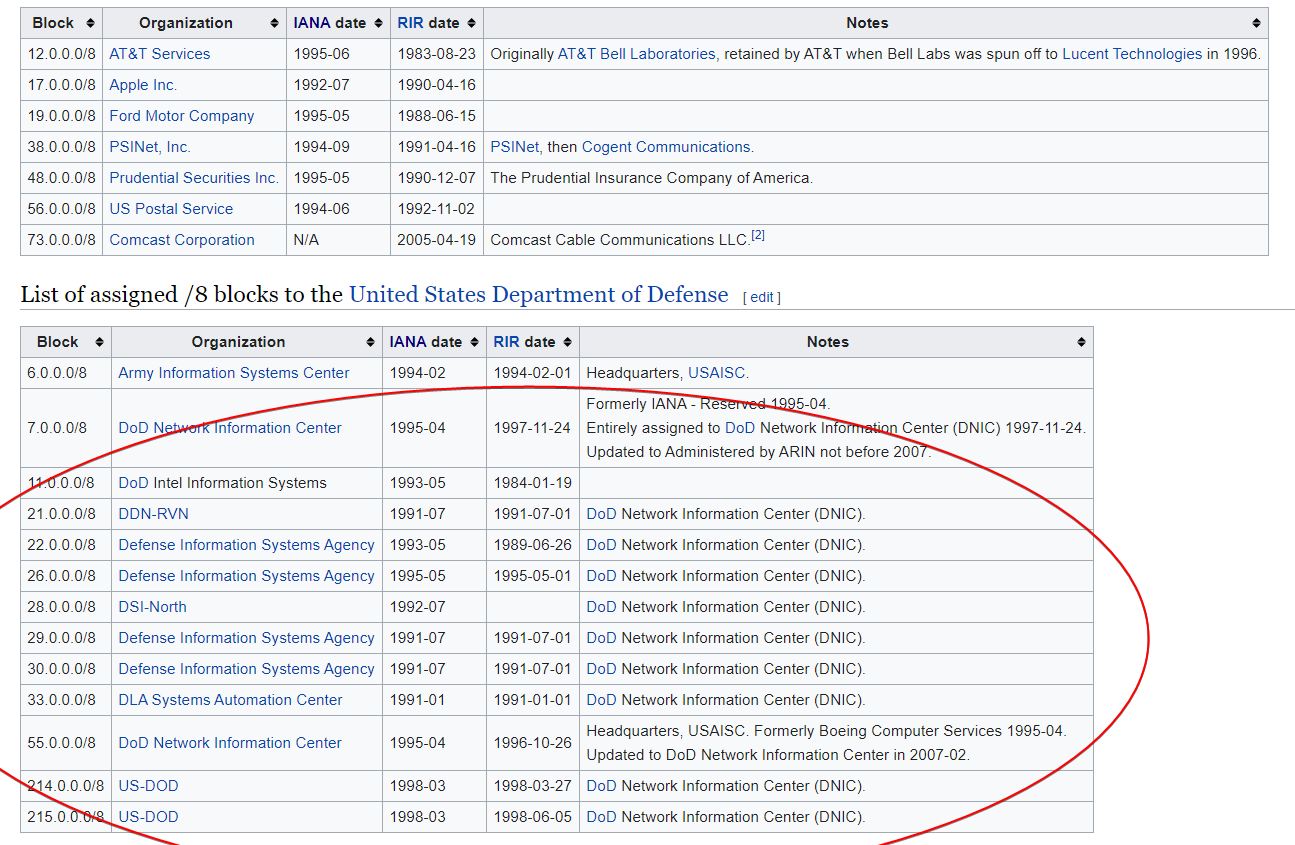
this is IANA
I want to see all ISP subnets
 nocturne harness
tame carbon
a bunch of /8's
nocturne harness
tame carbon
a bunch of /8's
My ISP sometimes assigns me a DoD address Lolol
deft fog
peak cloak
I think you just `ip` like in debian
so what is brd
distant radish
All ISP subnets there's 800,000+ of them
nocturne harness
They use a portion of th DoD IP space for inter-ISP routing
Not publicly routable of course
lean pebble
Lol now it's here in Israel too in some ISPs and Germany all over the world
I want to get 1.0.0.0/8 😆
nocturne harness
It’s ok with IPv6 we can assign every person on earth their own IPv4 space
peak cloak
lean pebble
My ISP can't provide ipv6 alongside ipv4
why? old eqipment not capable of dual-stack?
lean pebble
They making me decide if stay with static ipv4 or dynamic ipv6
lean pebble
peak cloak
why? old eqipment not capable of dual-stack?
Because they are lazy MF
distant radish
Most likely it isn't the routers in the ISP network, it will their OSS stack (Operational Support Systems) that have the trouble
lean pebble
They already have the equipment for along time
lean pebble
They just don't care what the customer asks
distant radish
Every system that has something to do with IP addresses needs to work with IPv6 that includes all the processes and staff too. Mucho cost
lean pebble
I have their fiber here for 11/12 years disconnected from both sides
They said from 2008 that they're providing ipv6 but never did it
peak cloak
verizon supports ipv6 only in certain areas
lean pebble
At 2012 they said they're starting providing ipv6 for everyone but nothing changed
Than they said the same thing again at 2015
Or 2014
distant radish
If your internet router is capable, then do a 6to4 tunnel from that to someone that does. I use a Draytek router and run 6to4 to Hurricane electric problem sorted 🙂
peak cloak
distant radish
If your internet router is capable, then do a 6to4 tunnel from that to someone t...
yep that's why I do
lean pebble
Nah no tunnels please 😆
My internet is not that stable so adding tunnel on it ...
peak cloak
problem is, my speeds are terrible. Idk if it's my switch or something. When I do a speedtest on the router directly it's like 30mbps which is usable unlike the 30kbps I get on my pc if I connect via ipv6
lean pebble
For downloading from ubisoft / steam / epic games or just downloading files that 1gb and more I need to use my vpn for not making my network crash
peak cloak
I need to do some troubleshooting later
lean pebble
Or just cap everything to 3.0Mb download speed instead 4.5Mb
I'm literally paying for air
distant radish
Ahhh but thats the same as using a VPN. Your ISP is probably routing your speedtest direct different to your tunnel. Depends on the destination IP. run a trace route and see where the dest IP goes. Chances are its exiting your ISP via a different transit/inter-connect
lean pebble
I'm connecting directly to my server in Germany via TCP + ssl + tls vpn
😅
While downloading files and games
Traffic encrypted everything on TCP
distant radish
Doesn't matter your ISP wil route the dest IP address a certain way across its network as will all onwards AS's along the path.
distant radish
So trace route your dest IP for the end server. Then traceroute the IP address of the end of your VPN and most likely the route will be differenet
lean pebble
Usually the same
I already tested it
Because my servers are in the same place and my ISP connected directly to Germany with fiber
So all the time I get the same trace
distant radish
In that case you have a pretty naughty ISP who's doing some horrid stuff with their traffic management. usual case of speed issues is the peering/transit your ISP has, everything down a congested route.
lean pebble
Nah no pearing this time just bad management from the ISP side
I hate ADSL/vdsl2/vds/xdsl/dsl
I have adsl/vdsl2/xdsl
Worst configuration ever
They say vdsl2 the modem says xdsl
 dusty osprey
Fiber when????
lean pebble
Gimme yours
distant radish
I worked for 19 years for a worldwide top 10 internet provider. Network design so I understand the challenges really well. xDSL is usually limited by the QUALITY of the copper pair (aka phone line) a bit less so by the ISP's config of the line quality mechanisms they use. my primary low latency link is VDSL2 39Mb down/6Mb up low ping and very stable. My topup link is 4G with 100Mb down 50Mb up but high ping. I run QoS/App rules to direct my traffic onto the best link for the traffic type
hollow marlin
Finally another SP engineer in chat
distant radish
1: have you got a clear phone line, no crackles on phone line? 2: whats the sync rate up and down on your router? 3: have you got access to the xDSL line starts showing FECS CRCS etc?
lean pebble
distant radish
4: have you tried the router/modem in the first line socket in your home where the line comes in with all the wiring disconnected?
hollow marlin
Wait, what plan are you paying for?
lean pebble
It was ok until 5 months
lean pebble
hollow marlin
Wait, what plan are you paying for?
40/3
But gets less then 3Mbps/up and less then 40 down
distant radish
Ok how long since those stats were reset? they look really decent, unless they were reset a few hours ago. If router hasn't been reset in ages. then it isn't the xDSL line that the problem, its something elsewhere in the network
peak cloak
@lean pebble you have a pretty nice router now right?
lean pebble
Not long time ago
lean pebble
peak cloak
<@!109801863771074560> you have a pretty nice router now right?
Ya it's good fixed the main issue
Now new / old problem
Since 1.1.21
That's when I took the picture
hollow marlin
lean pebble
40/3
Are the OH/RS stats incrementing on path 1 if you refresh the page?
lean pebble
I had this problem in 2018 that got fixed by switching the card in their rack outdoors
They switched it again this time but no change
lean pebble
hollow marlin
Are the OH/RS stats incrementing on path 1 if you refresh the page?
I think
I'll be able to check it later now it's almost 00:00am here
Need to take a long sleep after last night
distant radish
Okay starting at the top. SNR looks fine, anything less than 6db and you'll start seeing line drops. Interleave depth at 16 on downstream is a bit high, but not silly high so still ok. Correctable errors as it suggests means there's been some errors but they were spotted and were tiny so fine, no uncorrectable errors great. No HEC OCD or LCD. Total ES is errored seconds so 63 so how long since last reboot? SES is Serverely Errored Seconds which is 18 and UAS is unavailable seconds which is 643 seconds but when you reboot a router you expect a few mins for it to sync up which will be those.
Keep an eye on ES and SES and see how they go
hollow marlin
lean pebble
I'll be able to check it later now it's almost 00:00am here
Well check and if yes then check setup/advance and see if bonding is enabled. You shouldn't be sending/receiving OH/RS words on the second path. Since traffic is going over that port that means some sort of syncing is happening which will indeed cause issues.
lean pebble
distant radish
Okay starting at the top. SNR looks fine, anything less than 6db and you'll star...
Last reboot was at 7.1 I think when the technician was here
Well 24.12.2020
I had a technician here
lean pebble
hollow marlin
Well check and if yes then check setup/advance and see if bonding is enabled. Yo...
The ISP router is a bridge to my router only transmit the adsl line
Connected via lan port in their gear to my router
With different modem my internet is not loaded at all
Or immediately crashing
hollow marlin
lean pebble
The ISP router is a bridge to my router only transmit the adsl line
Im just talking about the modem. Bonding is when two DSL pairs are interleaved to achieve higher bandwidth. That is the path 1/2 which is DSL pair 1/2. You are sending/receiving traffic on the second pair which if bonding is configured will cause issues if you are not setup for it on the ISP's end
lean pebble
ISP end
Let me correct you internet infrastructure - the ISP and the internet infrastructure are separated here 2 different companies
The ISP did good job by checking everything from 0 to 100 no problem there.
The only company that does 0% checking is the internet infrastructure
Sent a technician that was here for 2 minutes and walked away
Does absolutely nothing
hollow marlin
I get that, but you still need to check some of the settings in the modem. The lines are clean but if the modem is setup for bonding or a second active pair is in the RJ11 then you are going to have issues
lean pebble
Only 3,4 I think
They gave the cable with their modem / router / whatever it should be
If I remember correctly it's blue and green
Cable in rj11
hollow marlin
Red+green and yellow+black is pair 1 and 2. Still going with a configuration on the modem being the issue
lean pebble
Modem used default settings just runs as bridge
hollow marlin
DSL configuration in the modem
hollow marlin
ugh, yes, what I am saying is default does not mean correct. If D-link enables bonding by default it could keep causing re-syncing as there is an active pair and the modem is occasionally rx/tx traffic over it
lean pebble
hollow marlin
ugh, yes, what I am saying is default does not mean correct. If D-link enables b...
.
tribal ferry
Going to crosspost this here to see if anyone has any ideas
Linus Tech Tips
Looking for some advice here, as it may just be easier for me to purchase another low-spec PC. I have a location upstairs in my home where Id like to place an additional location of my main computer. My main work space is down stairs, but I also like to be able to have a computer upstairs. Its ho...
tribal ferry
👋
 fading mesa
Can you use cat5e plugs on a cat6a cable
waxen scroll
not that I know of
peak cloak
maybe, but now you have a cat5e cable
cat5e isn't shielded
plus isn't the guage different, so it wouldn't fit
 thick minnow
If I care about privacy tplink is a good company?
thick minnow
tame carbon
<@456226577798135808> I'd be more worried about security with tplink
What about Edimax?
thick minnow
I have some routers can u tell me if they are good?
tame carbon
so unless you have an inquiry specifically about mikrotik, I won't be of much help ;)
thick minnow
tame carbon
so unless you have an inquiry specifically about mikrotik, I won't be of much he...
Can u recommend on some models?
tame carbon
@thick minnow really depends on your needs

MikroTik is a Latvian company which was founded in 1996 to develop routers and wireless ISP systems. MikroTik now provides hardware and software for Internet connectivity in most of the countries around the world.
jaunty talon
@tame carbon do you have commission on mikrotik? :D
tame carbon
@jaunty talon they should give me one
tame carbon
@jaunty talon and you're not the first one to make this remark lmao
friends of mine said I should become a rep
jaunty talon
haha
tame carbon
@jaunty talon heck. I don't know all the enterprise thingies it can do. But I have enough experience with them to know its a liberation to use them
thick minnow
tame carbon
<@456226577798135808> really depends on your needs
I need it for: Vlan, vpn for content my home net from any place and security
tame carbon
@thick minnow what kind of network speed we looking at?
thick minnow
Fastest
tame carbon
all the mikrotik routers run same operating system, and support the features you just mentioned
jaunty talon
@tame carbon hehe, not saying theyre not good =) I think theyre in many cases a perfect match for need vs price
tame carbon
@thick minnow what about wireless? built in? or you want seperate access points?
@jaunty talon yeah exactly. You get what you pay for
thick minnow
tame carbon
<@456226577798135808> what about wireless? built in? or you want seperate access...
Built in
tame carbon
@thick minnow if its just a simple home wifi router you need
either hAP ac3 or ac2
MikroTik is a Latvian company which was founded in 1996 to develop routers and wireless ISP systems. MikroTik now provides hardware and software for Internet connectivity in most of the countries around the world.
thick minnow
Ac3 is the newest?
tame carbon
yeah its the upgraded variant of the ac2
it sports the same hardware, but has external antenna's
I have a hAP ac2 at home here behind the TV
for wireless and as a tiny switch to hook up the TV and IPTV box
thick minnow
Ok th u so match
tame carbon
the hAP ac2/3 also has an IPsec accelerator chip onboard
for ~400mbit/s IPsec VPN encryption
and naturally, it has support for 802.1q VLANs
thick minnow
Agin th so much
tame carbon
@thick minnow if you need faster VPN handling than that...
there's not much of a choice, you'll end up with an RB4011
like I did xD
MikroTik is a Latvian company which was founded in 1996 to develop routers and wireless ISP systems. MikroTik now provides hardware and software for Internet connectivity in most of the countries around the world.
This thing is a beast
@jaunty talon sleasy fuckers. I am using Umbraco Heartcore. Hosted, headless CMS solution
and every day, they just shutdown my development instance
jaunty talon
:(
tame carbon
and when I start my dev environment up
takes about 1 min before my app starts working
I get that its a dev environment
but this is a $900 monthly plan
kinda unacceptable behavior.
jaunty talon
agreed!
lean pebble
hello
twin zealot
hello
 rich ivy
Suomi
lean pebble
how are we today?
twin zealot
fine, and you?
lean pebble
good
trying my best with not crashing my network while downloading files xD
because there is a problem here for more than 2 years...
I'm capping myself to 3Mb/s sad
twin zealot
on wifi or an cable?
lean pebble
all stable just no connection to the internet
connection lost , modem and router are up with no change in their lights
twin zealot
so its between your pc and router i guess
lean pebble
but no internet all over the house
twin zealot
otherwise a light will go down if no connection
lean pebble
it goes down to 10 seconds
twin zealot
thats almost imposible, if your router or modem doesnt have an connection the connection light will go out
lean pebble
I think
I know that is why its weird
All the devices and wifi going down at the same time thats happens but ADSl is up and everything is running
twin zealot
mayby contact your provider for an solution
lean pebble
they can't do anything
They don't know how to do their job
for 10 years I had connection issues that every evening the network crashing with no reason
twin zealot
i dont know if they can know what is going on
lean pebble
until I decided to get my own gear
twin zealot
@tame carbon help
lean pebble
he already tried xD
peak cloak
everyone tried
lean pebble
I asked for help is so much places xD
lean pebble
oh thanks for remind me lets check it
lets seee what this modem have there
where this should be?
@peak cloak do you know ?
lean pebble
so much unicast errors on the lan ports and broadcast drops to
lean pebble
hollow marlin
ugh, yes, what I am saying is default does not mean correct. If D-link enables b...
.
This is what you meant?
 fierce ravine
can people banned from the internet still use the internet wonder if possible
peak cloak
you kinda can't get banned from the internet
lean pebble
lol
fierce ravine
has happened from what ive seen
but not sure how its possible
https://www.techdirt.com/articles/20121109/16132820999/teen-hacker-banned-internet-six-years.shtml stuff like this i dont get

Techdirt.
A teenaged hacker known as Cosmo the God, who was involved in a number of big site takedowns earlier this year, and who is considered a "social engineering mastermind" has been sentenced to probation. The terms include a ban on internet...
peak cloak
oh, by the gov yeah
 clear igloo
Your ISP can cut you off or a court can order you not to use the internet but there is nothing stopping you aside risk of jail time
peak cloak
but from the internet, internet itself no
fierce ravine
yeah use public wifi, vpn and a phone
hollow marlin
lean pebble
This is what you meant?
No there should/might be a section that specifically contains bonding
lean pebble
Nope nothing that say bonding or something like that
this is the only place that talk about the adsl connection
twin zealot
nothing anymore
tame carbon

lean pebble
tame carbon
<@!416865558944940033> wat
He wanted you to help me with this weird Network issue that I have.
But already told him that everyone tried 😆
hollow marlin
lean pebble
He wanted you to help me with this weird Network issue that I have.
But already...
Well at this point it seems all over the place now you mentioned wifi dropping but the DSL staying up. Have you just tried pulling your router and putting a PC in its place and running speed test to see if it still drops since you only notice it during a load?
lean pebble
Dsl is stable but no internet on all the devices
Thats why its so weird
all seems up but no connection
 fossil yew
tame carbon
fossil yew
tame carbon
wat wat
peak cloak
lean pebble
Dsl is stable but no internet on all the devices
maybe try to connect a laptop directly to the modem just to make sure the router isn't the issue
tame carbon
@lean pebble does the DSLAM assign you an IP ?
like, DSL can have an active link, with no data path
where the modem on the other side is functional, but nobody is responding
lean pebble
I'm pretty sure that I don't have external IP when it happens
Because I'm losing connectivity all over the house
Sometimes losing access to my router to
Like the DHCP is going down or something
lean pebble
Working as usual
lean pebble
The photo I sent earlier today is the only page I have in this router that indicates the ADSL stuff
 tardy elbow
@peak cloak Not sure if you were the one helping me, but I got a dns load balancer to work
tame carbon
@lean pebble those are just the settings
tardy elbow
well, "load balancer"
tame carbon
not the actual running configuration/status
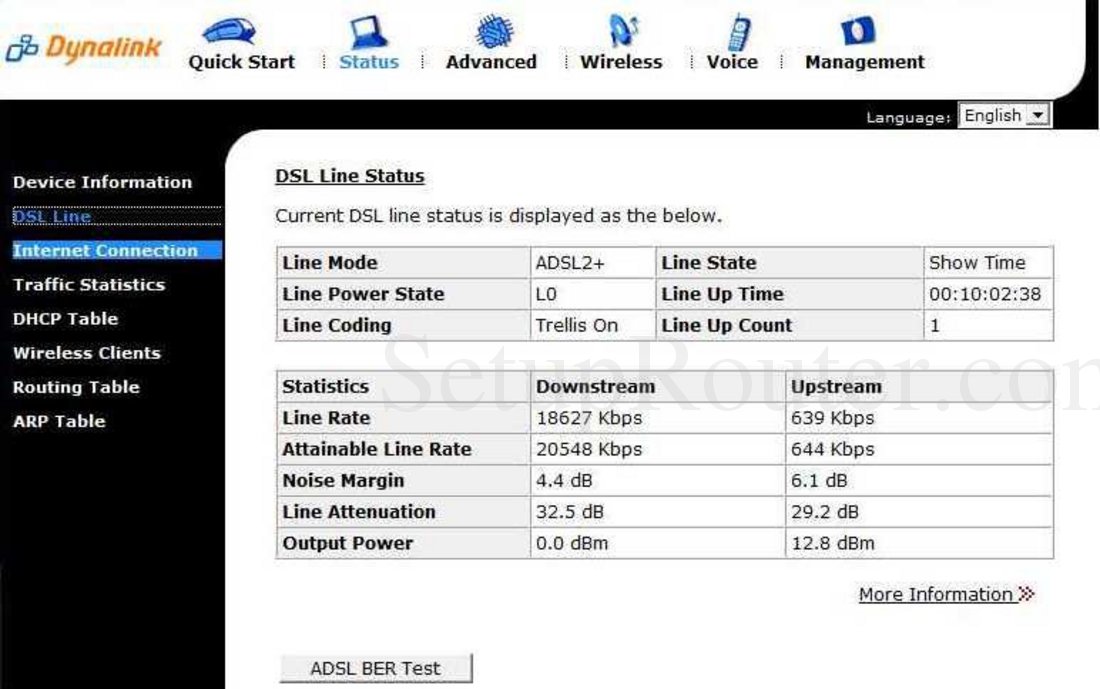
there should be a DSL line status somewhere
with information on link quality and speed
tame carbon
yeah thats not interesting
get me the DSL line status
should have a bunch of information
lean pebble
Don't have it here in this modem this sucks
tame carbon
call support
lean pebble
They do nothing except telling me that my gear is broken
tame carbon
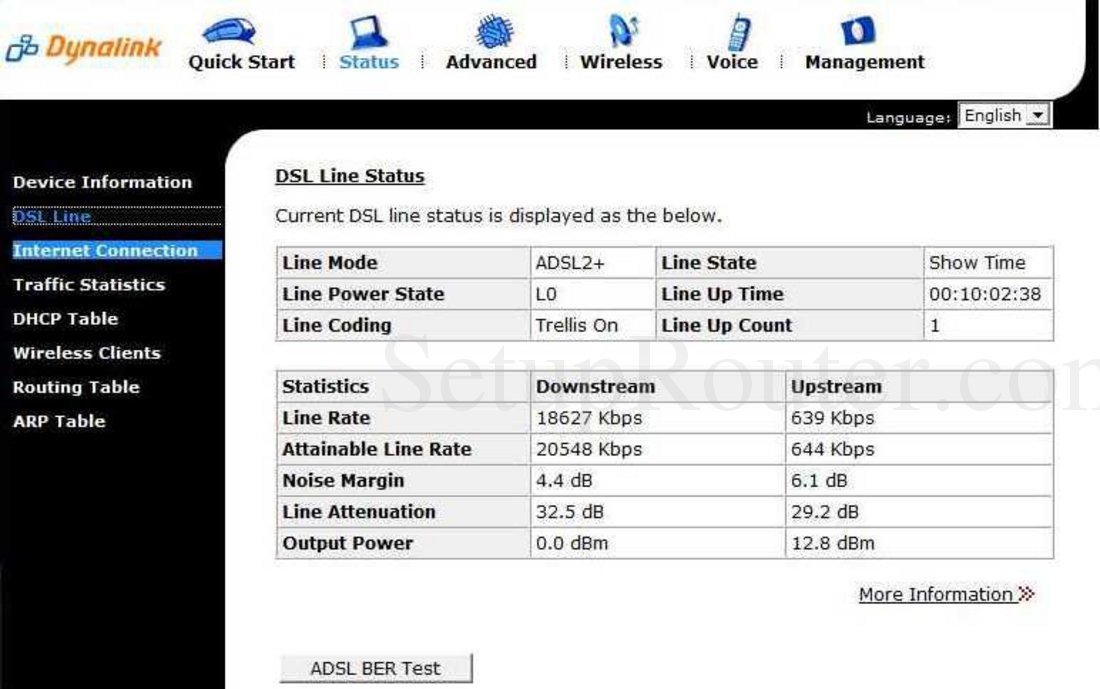
This is a random modem
but you're looking for this kind of info ^
if a modem doesnt support this, then its tits up trash
hollow marlin
lean pebble
Don't have it here in this modem this sucks
Again, I would plug in and see if you get an address. If not its PPP and the modem is handling the routing. What WAN address is your router getting?
tame carbon
and this is PTM
tame carbon
@lean pebble so where is your PPP config?
lean pebble
Mikrotik
hollow marlin
So now, plug a PC in to the modem and use those credentials
lean pebble
All pppoe connection handled by mikrotik
tame carbon
wat
lean pebble
Yes
tame carbon
@hollow marlin does this behave like an ethernet bridge?
hollow marlin
Yeah
lean pebble
Yes
tame carbon
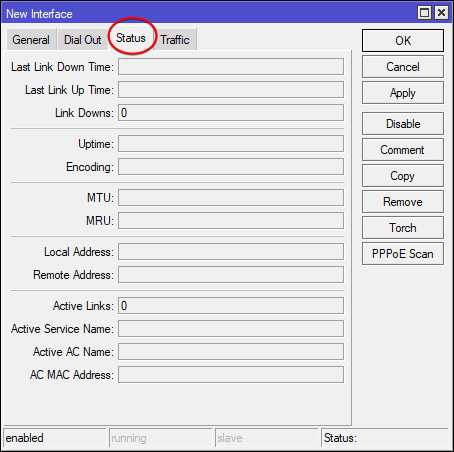
@lean pebble can you look at the PPPoE client status in your mtik ?
@lean pebble also, I asked for the statistics of the DSL line
that screenshot isnt the full story
hollow marlin
That and should turn on logging for PPPoE and see if its dropping
tame carbon
if you have CRC errors on your line
your internet will behave very strangely
spikes in latency
and packet loss
lean pebble
Where do I see it
tame carbon
show menu
lean pebble
Mikrotik is new to me
lean pebble
K
lean pebble
Yap
tame carbon
hold on, my clipboard sharing between two PCs is fucked
keep copy pasting the wrong thing
[2021-01-20T18:31:54] INFO: got ipc shutdown message
[2021-01-20T18:31:54] NOTE: disconnecting client "watomat"
[2021-01-20T18:31:54] NOTE: client "watomat" has disconnected
[2021-01-20T18:31:54] NOTE: stopped server
cool
it works now
ok

click on that
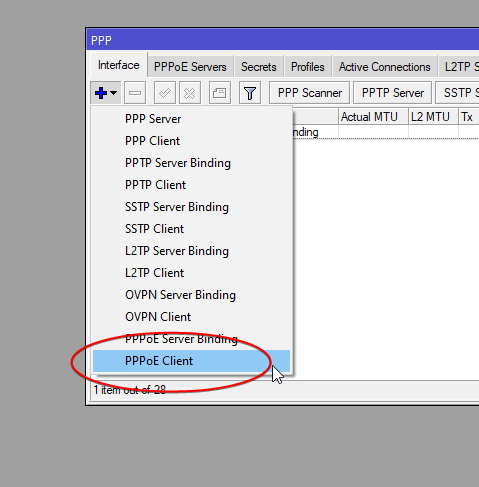 lean pebble
Add a new one ?
lean pebble
Oe
tame carbon
but you have a PTM line, which is 'Packet Transfer Mode'
which I assume would be ethernet then
lean pebble
I'll show you
lean pebble
tame carbon
download winbox
dont use webfig.
if you go to the login screen of the router
there's an option called 'winbox'
click on that
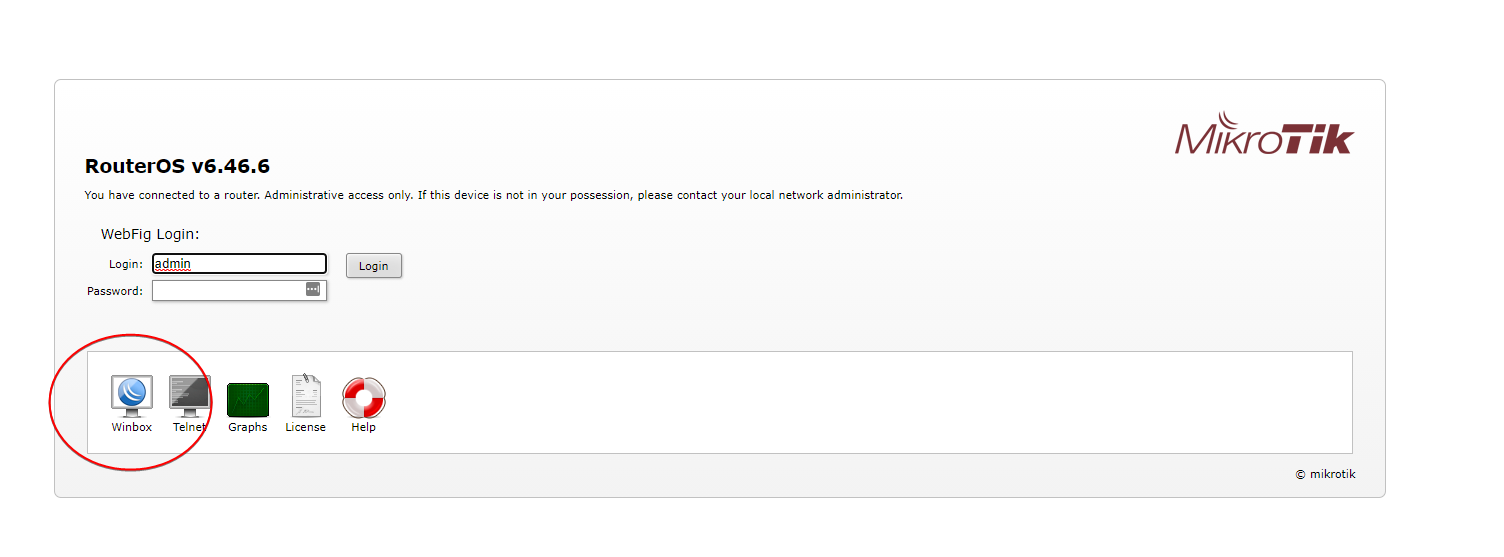 tame carbon
it doesnt need installation
if you click on that link
the router just gives you a client
this works even if you dont have internet
lean pebble
Yap