#networking
1 messages · Page 264 of 1
 peak cloak
 tame carbon
@cold geode you'll want the hAP ac2
not the hAP lite, that one is limited by 100M
I actually have a hAP ac2 here
@cold geode which one did ya get?
@cold geode well, maybe
What network speed have you got?
@cold geode have you paid already?
because you should have gotten a hAP mini

MikroTik is a Latvian company which was founded in 1996 to develop routers and wireless ISP systems. MikroTik now provides hardware and software for Internet connectivity in most of the countries around the world.
Its 100M, yes
but
its also very cheap
like $20
Runs full version of RouterOS, has 3x 100M
and 2.4GHz wifi
@cold geode that tplink router looks overpriced
its listed here for $150
I wouldnt spend that kind of money on tplink hardware, knowing it will most likely die in 3-4 years
every single tplink wifi router I've owned, is dead
They dont even need to be that long
@cold geode why spend money on that
if you can invest into something that will last you longer
Mikrotik is magic, just saying :)
@cold geode where you from then?
Thats what, South America ?
MikroTik is a Latvian company which was founded in 1996 to develop routers and wireless ISP systems. MikroTik now provides hardware and software for Internet connectivity in most of the countries around the world.
There are many vendors
maybe see if you recognize any of them
lol and you want a shitty tplink router to handle full gigabit routing??

MikroTik is a Latvian company which was founded in 1996 to develop routers and wireless ISP systems. MikroTik now provides hardware and software for Internet connectivity in most of the countries around the world.
Paired with
MikroTik is a Latvian company which was founded in 1996 to develop routers and wireless ISP systems. MikroTik now provides hardware and software for Internet connectivity in most of the countries around the world.
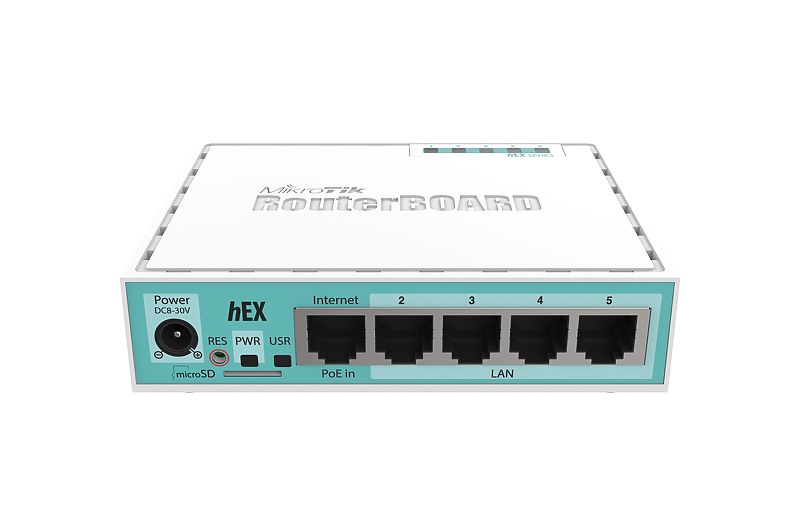
the hEX S can act as router, and controller for one or more access points ^
hEX S is a very solid router for when wireless is not required
peak cloak
MikroTik is a Latvian company which was founded in 1996 to develop routers and wireless ISP systems. MikroTik now provides hardware and software for Internet connectivity in most of the countries around the world.
tame carbon
 peak cloak
hex is gigabit
tame carbon
thats full Gigabit yeah
oh
nice
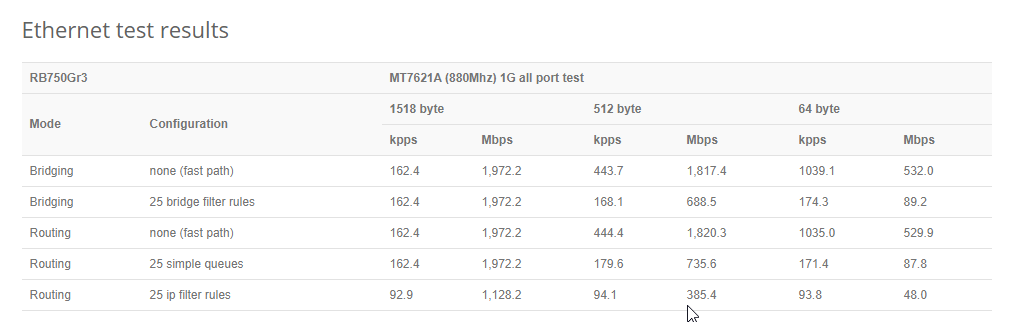
@peak cloak idk man
$10 difference
@cold geode its 0 bs marketing
and configuration is not that bad
tame carbon
@peak cloak yeah same routing speed
@cold geode some APs have seperate antennas
like the Metal 52ac series
for outdoor wireless, come with a big omni antenna
its like a long white tube
@cold geode you'll want to stay away from the lite variants
they all are limited to 100mbit/s on the interfaces
you mentioned, you needed 1G
well, you said your ISP does 1000 down, and 50 up
thats 1G
I have 250mbit internet, and my router can do 10G >_>
peak cloak
you think it's just there, it's like that everywhere
tame carbon
@cold geode question is, do you want to cheap out or not? :D
you need wifi ?
how large is the area you need to cover?
single room?
what about other devices
@cold geode you could get a hAP lite yeah
or
get two hAP minis xD
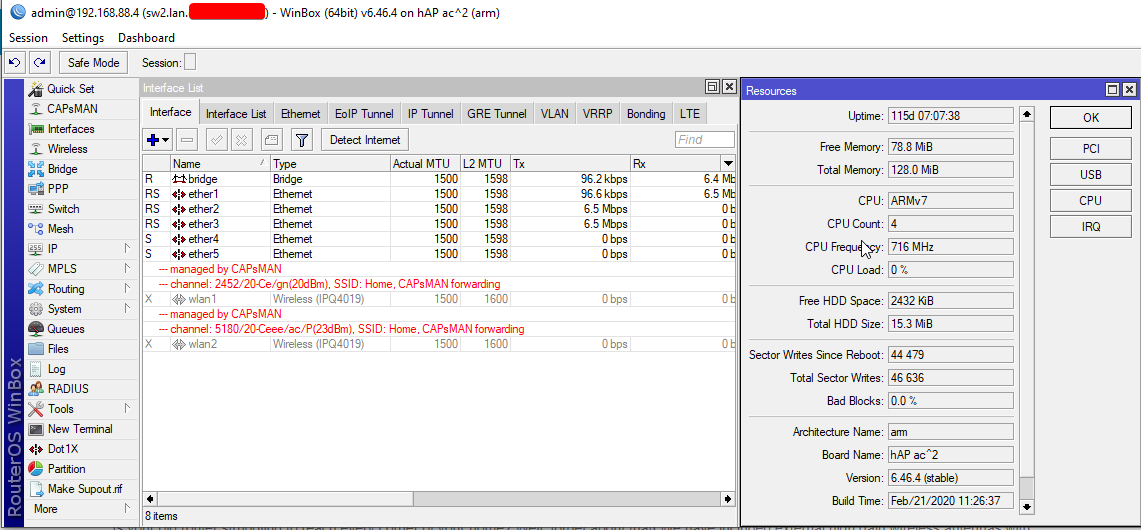
@cold geode even the cheapest APs they have, support CAPsMAN
remotely managed wireless APs
so if you have two hAP minis
one can control the other
so they both send out the same network
and your phone or laptop connects to the nearest one
@cold geode mesh would mean they connect to eachother
but with CAPsMAN you connect them with a cable
@cold geode like I have a router in the attic, that controlls the wifi in the house
I have a hAP ac2 in the living room, and an mAP in my bedroom
both controlled by the big RB4011 in the attic :D
https://cdn.discordapp.com/attachments/776722183119699988/777646103775674368/IMG-20200922-WA0001.jpg

my little network rack
underneath yeah
its a virtual machine host
but one of the VMs is a NAS
it has like 4x 4TB inside, and nvme to boot
private :)
but the server is connected to the router at 10G
so I have high speed access to it
thats what the yellow fibers are for
internet itself is only 250M
yeh
you have eyeballs ?
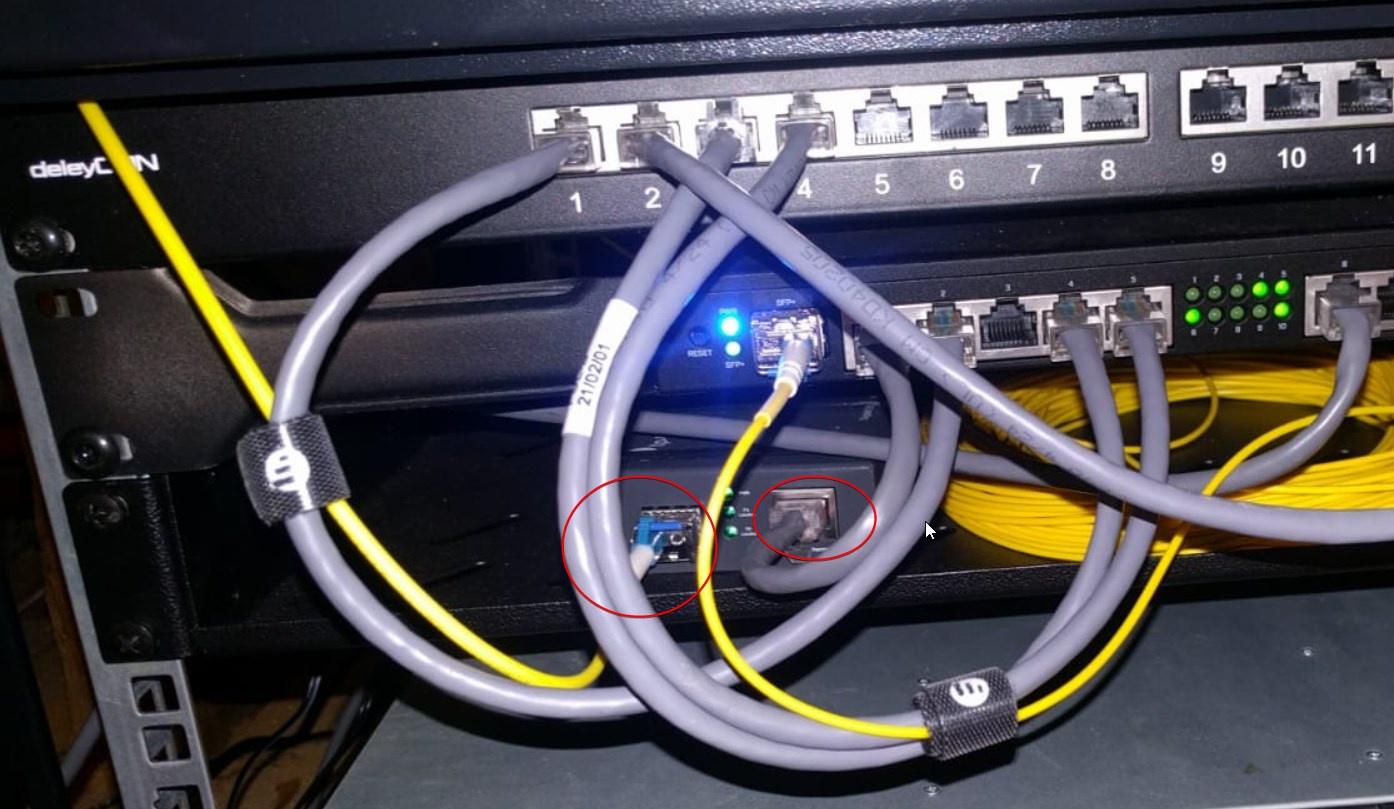
ISP fiber comes in over here
goes onto a media converter, 1G copper
that other fiber you see is local
goes to my switch, which is on other side of building
somewhat yeah, it has a plastic sleeve, the fiber itself is tiny, like 9 micrometer
thinner than a hair
yeah fibers have a minimum bend radius
if you exceed that, either the fiber attenuates a lot of light
or it breaks
tame carbon
In physics, attenuation or, in some contexts, extinction is the gradual loss of flux intensity through a medium. For instance, dark glasses attenuate sunlight, lead attenuates X-rays, and water and air attenuate both light and sound at variable attenuation rates.
Hearing protectors help reduce acoustic flux from flowing into the ears. This pheno...
it just means loss of signal strength
tame carbon
well fibers don't slow down if they have poor signal
they just stop working entirely
since the signalling is just rapid on/off
if the receiving end can't tell the difference between on and off (signal to noise ratio), the link dies
laz0rs
 outer hearth
Lots of words I don't know and lots more abbreviations I also don't know
tame carbon
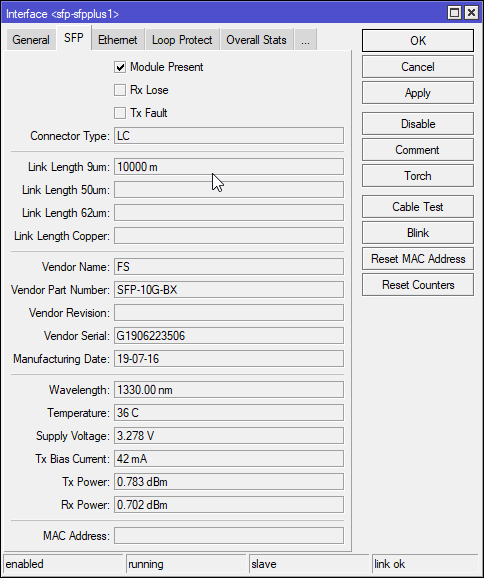
1330nm is infrared
never stare down a fiber !
its invisible, but can still damage your retinas
its still a very focussed laser
even if not very powerful
42mA is enough to ruin your vision

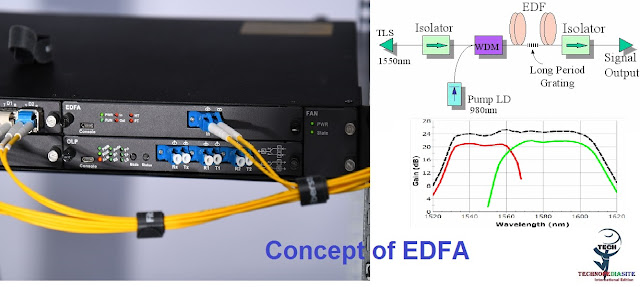
lol once you get into fiber amplifiers
there's warning labels everywhere

You mean these ?
 clear igloo
They exist but are expensive and bulky and are generally limited to 100Mb or gigabit support only
tame carbon
@clear igloo ?
clear igloo
It seems some 10G converters exist too but I'm sure they are $$$
tame carbon
two media converts, two fiber modules and a fiber
you can do that for 1G, less than 100 bucks
1G media converters cost, $20
tame carbon
SMF modules cost $8 each, so two of those
and then a length of fiber, which is like $10 for 50 meters
like $68 euros maybe
@clear igloo yeah but that seems like a waste of money
Its not even a kit
clear igloo
Definitely, I see very limited uses for them
clear igloo
haha, yup
tame carbon
some modules..
hold on

FS Germany
Generic Compatible 1000BASE-LX/LH SFP 1310nm 10km DOM LC MMF/SMF Transceiver Module and customize fiber optical products from FS.COM!
6 bucks
@clear igloo and get this
its same 10km that the $220 device offers
except we did it for $26
tame carbon
hehe
@clear igloo these kinds of products is probably why you don't see a lot of fiber in consumer setups
cus they google, and find these poor deals
clear igloo
Yah, or they are scared of fiber in general because it's "not common" to them
clear igloo
yah
clear igloo
Yah, for short distances especially
tame carbon
costs like $80
once you need long distance 40G
be prepared to dish out like 200+ per module
clear igloo
Definitely, and at 100G+ it goes up up up 😄
clear igloo
Just be glad you're not paying for traffic generators 😛
The box + license for 4 of the 8 400G ports was like $150k at least if I remember right. We'll probably license the other 4 ports sometime later this year as this lab grows.
clear igloo
lol, I'll blast all the bits 😄
I think last I checked we've got something like 5 or 6 Tbps of total traffic capability in the lab
tame carbon
wat
@clear igloo you are putting these guys to shame: https://www.ams-ix.net/ams

this is one of the largest exchanges in europe
clear igloo
Haha, that's just traffic generation capability. I don't even want to know how many ports of 100G and 400G we've got just sitting idle right now in the lab
 burnt epoch
anyone utilize ProtonVPN and split tunneling and successfully keep AD and SCCM on the domain network?
clear igloo
But it's GAMING, that means + to my FPS!!
peak cloak
outer hearth
I wonder if RGB routers are a thing lmao
yes they are
sadly
guess the brand
Asus
outer hearth
OH MY GOD SO MUCH FPS
 outer lance
Can someone help me with networking stuff
peak cloak
outer lance
Can someone help me with networking stuff
just ask, what's your issue?
 ruby bramble
outer lance
Can someone help me with networking stuff
ruby bramble
outer lance
Can someone help me with networking stuff
Wachu need
outer lance
Present
Remember when I said my internet keeps disconnecting from my pc
And I have to reconnect it
I checked the drivers
And it says that they are up to date
ruby bramble
Are you on WiFi or Ethernet
outer lance
WiFi
ruby bramble
Open the WiFi tab and disconnect then tick the box that said auto join then click connect
If not let me know
outer lance
It took a minute to show up on my desktop
So
It’s connected
Im going to try to watch a YouTube video in 1080p
ruby bramble
Although I need sleep so hope that helps
outer lance
And there legit isn’t load
ruby bramble
Bye
ruby bramble
Sorry it’s 23:13 I’m tired
outer lance
It’s fine
burnt epoch
@outer lance is it just your one device dealing with the wifi issue or multiple devices?
outer lance
burnt epoch
<@!459177243613069312> is it just your one device dealing with the wifi issue or...
Sorry for a late response
Well I’m not entirely sure
Because so far I can tell only my pc has this issue
But it is that fathest away from that router
And the closest thing is my grandpas iPad
Which he uses for reading the news and stuff
burnt epoch
has he noticed drop outs?
burnt epoch
okay. Are you on laptop or desktop?
burnt epoch
click on your wifi in the taskbar. select properties under your network. are you connected to the 5ghz band or 2.4ghz?
burnt epoch
right click the windows button and open device manager
burnt epoch
no
burnt epoch
open your wireless network adapter properties
outer lance
It’s open
burnt epoch
open the advanced tab. on the right side you'll see "value" change that to 2.4ghz b/g
burnt epoch
cool. click ok to confirm. then check your network and see if you're connected to the 2.4ghz band. if not, restart then check
outer lance
I’m waiting for the 2.4 network to show up
burnt epoch
ah, didn't realize you had your network set up on two different bands
outer lance
Yeah
burnt epoch
could've just selected the 2.4ghz option in your network. smh I'm sorry
outer lance
It’s fine lmao
burnt epoch
you can update the bands back to dual band then select the 2.4 network in your networks
outer lance
Which dual band
A/g?
Or a/b/g
I went ahead and connected it to a/g
The second I did that
Jt connected to my 5g
burnt epoch
Cool. Now select the other one
Then test your connection stability.
It’ll be slower but should stay connected. If not lmk
burnt epoch
Easiest way is like you did before. YouTube video
outer lance
Alright
burnt epoch
If the buffer keeps going you’ll be good
 thick minnow
Need some help.. On my Pc ( Windows 10 ) i have 2 profiles. On 1 profile i get no package and less ping ( 27 and below ) But when i switch to the other profile i get about 3-7 packet loss and higher ping sometimes ( 30-70 ) with of course the packet loss also which makes the game unplayable sometimes. Any ideas on how to fix this. ( Fiber Internet 1GIG Up and Down )
If u know a solution @ me
Thanks
tame carbon
are you using wifi?
 rugged swallow
Quick question guys. Can someone catch me downloading copyrighted content over google drive? I know that you can be caught if you use torrents but I dont know about drive.
 waxen scroll
If google gets into a lawsuit that demands ip logs then yes. Otherwise no
rugged swallow
yeah I know that. Im from south america and a friend of mine moved to the US
waxen scroll
Waifu
 dusk marlin
is ebay ethernet cables any good or is there stuffs in the cable I should look for/ be wary of?
 unborn sluice
be wary of broken cables
dusk marlin
when buying or when installing it?
because I plan to install an ethernet port with my uncle in couple weeks time
tame carbon
@dusk marlin just get some cat6
if its indoor wiring, in walls next to electricals as well, get cat6a and make sure you get shielded RJ45 jacks
 desert briar
if you buy used cables just get a cheapo 10-15$ cable tester and verify the cables 😄
that being said for those 10-15$ you can just get cables instead 
peak cloak
my cable tester broke somehow
the led's burnt out on one end
planning on buying some led's to replace it
waxen scroll
not worth your time. buy a new one
peak cloak
waxen scroll
not worth your time. buy a new one
true, but I kinda like electronics so might as well try
practice soldering
 arctic hedge
anyone know how to access a spectrum's router settings on pc. I have to disable my 5 ghz wifi and i am having lo luck
outer lance
Anoyne here?
arctic hedge
i hope so
outer lance
How can i convince my parents to upgrade from our isp router
my desktop keeps disconnecting from the internet during google meets for school
its so annoying
There isnt wired ehtternet
And It can't be run
I can’t use 2g
outer lance
Because it’s too slow. Like it can take multiple minutes to load
arctic hedge
what isp do you have?
arctic hedge
what is your speed?
outer lance
On 5ghz
arctic hedge
yes
outer lance
About 30 down 6 up
arctic hedge
i had this issue. you need to get a technician out bc your cables are messed up
i had the same thing happen to me
outer lance
Presumably
arctic hedge
do you know what speed you are paying for?
outer lance
Where might they be messed up?
It’s about 400 mbps
But it’s throttled like hell at night
arctic hedge
how far away from the router?
outer lance
Like at night it can go down to 200 mbps
About 100-150 feet across
One floor up
I mean given
It’s an isp provided router
peak cloak
outer lance
About 30 down 6 up
on wired or ethernet
outer lance
That’s part of the problem
arctic hedge
you might want to give spectrum a call saying you have slow internet. they will probably swap out your router and modem for new ones if you dont already have the newest ones
outer lance
Wireless
peak cloak
yeah, you don't benchpark ISP speed using wifi
outer lance
It should be new, we just moved to spectrum about a year ago
I don’t have anything that has an Ethernet port
That I can move close to my router
peak cloak
If I was an ISP tech I would be so pissed about people complaining about wifi issues
arctic hedge
hey, i legitemently got screwed by spectrum messing up the cables over and over
peak cloak
an ISP just guarantees speeds to your router, not wifi
peak cloak
true, copper like cable and dsl can be messed up
outer lance
But I don’t think it allows them to just shut my connection on and off
peak cloak
outer lance
Residential fiber is unnecessary
disagree
very nice
I wouldn't say it's good for the speed, but good for the reliability
nah, fiber isn't expensive
at least 1G fiber isn't
DOCISS modem = 100 bucks
fiber SFP module = like 10 bucks
arctic hedge
i get my modem through my isp so im chilling
peak cloak
simple router with an SFP port is liike 70 bucks
ISP's often give modem/router combos which sucks
if I ever have to go back to cable, I'm getting my own modem
arctic hedge
i know, but i dont know what to get. i have spectrum and they say "dont do that, your speeds will suffer"
peak cloak
arctic hedge
i know, but i dont know what to get. i have spectrum and they say "dont do that,...
typical low level tech answer
I myself don't know much about how DOCISS works
arctic hedge
what router do you suggest that is not super expensive?
outer lance
Should I do a mesh?
peak cloak
mikrotik has good cheap routers that are powerful
peak cloak
outer lance
Should I do a mesh?
nah, the best solution would be just more access points
outer lance
So a mesh?
outer lance
Because anything that requires running Ethernet is undoable
peak cloak
arctic hedge
what router do you suggest that is not super expensive?
MikroTik is a Latvian company which was founded in 1996 to develop routers and wireless ISP systems. MikroTik now provides hardware and software for Internet connectivity in most of the countries around the world.
peak cloak
mine either @outer lance
mine was built in like 1960s
renovated in like 2008
didn't have ethernet
I added ethernet myself
outer lance
Another thing
arctic hedge
peak cloak
https://mikrotik.com/product/hap_ac3
how much is it?
arctic hedge
i dont see it
peak cloak
arctic hedge
how much is it?
100 US bucks
outer lance
But height off the room is too small to get in there
So yeah you could run Ethernet
But
It’s not easy
outer lance
I can’t get in the attic to run the Ethernet
arctic hedge
i use a poweline Ethernet. i know its a bit slower but its ok for me
peak cloak
outer lance
I can’t get in the attic to run the Ethernet
I did it through the basement
if you have coax you could moca adapters
they are a bit pricy though
outer lance
peak cloak
I did it through the basement
I need to run it up a floor and a half and over like 100-200 feet
arctic hedge
i know, bit i dont
outer lance
I have coax
outer lance
Yes
peak cloak
I don't have gigabit
outer lance
By which I mean fiber
peak cloak
I just aim for a LAN gigabit
I have 300/300 over fiber
I used to have 250/30 over coax
Fiber latency is much better
peak cloak
5ms vs 15 ms
arctic hedge
do you have any suggestion for a slightly cheeper router?
peak cloak
arctic hedge
do you have any suggestion for a slightly cheeper router?
if you just need a router, then the HEX
peak cloak
that doesn't have wifi
peak cloak
outer lance
It does
idk
you would need to test
with ethernet
hooked up to the router
outer lance
Again
peak cloak
there is no other way to test
outer lance
That’s undoable
outer lance
I mean it’s fine near the router
Heck
My parents bedroom is like a floor almost directly above
And it’s perfectly fine over wireless
Can I just get a modem and hook it into coax with a router
Like it is so bad
in a vc
my ping just goes south when i stream my screen
like normally
its about 100-150 ish
peak cloak
outer lance
I mean it’s fine near the router
then it's wifi
outer lance
peak cloak
then it's wifi
Thought so\
Do i need to upgrade my router?
and can you elaborate on what you mean by access points
peak cloak
not really, getting yourself another AP would be a better solution
AP just gives off wifi
 ornate jungle
I noticed up higher in the chat you mentioned you're on 5GHz instead of 2.4GHz - have you at least tried using 2.4GHz?
Asking because although 5GHz offers faster theoretical speeds and isn't susceptible to as much interference, 2.4GHz networks work better at longer distances, and better penetrates through walls/floors in your home.
outer lance
Yes i have
peak cloak
so instead of this
outer lance
The main problem is that it is insanely slow, it can take like 5 minutes for a web page to load
it is therein unusable
peak cloak
outer lance
The main problem is that it is insanely slow, it can take like 5 minutes for a w...
yeah it's just a slow connection, probobly with a bunch of packet loss?
try pinging your router?
and check the packet loss on that
ornate jungle
outer lance
The main problem is that it is insanely slow, it can take like 5 minutes for a w...
Gotcha. That definitely sounds like you've got interference on the 2.4GHz band from other devices in the home, such as BlueTooth, smartlights, microwave, etc. Interference can cause all sorts of things from packet loss as PresentMonkey noted to slow speeds to connection drops.
outer lance
Can i use an ookla speed test
peak cloak
for pinging? no
outer lance
ornate jungle
Gotcha. That definitely sounds like you've got interference on the 2.4GHz band f...
Could it be cause by one ring door bell
outer lance
peak cloak
for pinging? no
then how
peak cloak
in cmd ping <ip of router> so for example ping 192.168.1.1
peak cloak
ipconfig /all it should be the ip of the default gateway
peak cloak
it's a private reserved ip, so no need to keep it secret
ornate jungle
outer lance
Could it be cause by one ring door bell
Interference can be caused by literally any other devices that share the same frequencies. Turn off power to the ring doorbell and re-test to find out.
If ethernet is not an option, and you can't move the modem/router, you're limited to:
-- powerline AV (assuming your home's electrical wiring works with such a solution)
-- installing another Access Point where you can run ethernet in your home (such as a Ubiquiti Networks AP)
-- replacing the existing WiFi broadcasting device you have now (replacing the modem/router combo unit you have, or bridging it and buying a 3rd party router)
outer lance
ornate jungle
Interference can be caused by literally any other devices that share the same fr...
Ive wanted to move to a non isp router
i have spent weeks campaining to my parents about it
@peak cloak what numbers do you need out of the ping test
peak cloak
packet loss
peak cloak
although ping isn't the best indicator of packet loss, it's the easiest
peak cloak
nah
outer lance
Then what is next
peak cloak
I just want to compare what the TX power is
 slow pivot
Why are we talking about interference with a 5GHz AP? At 100-150ft on different floors, it is highly likely it is a propagation issue inherent to the 5GHz Wifi band
outer lance
hmm?
peak cloak
I thought @outer lance was on 2.5ghz
outer lance
Im on 5 ghz
peak cloak
then get on 2.5
slow pivot
^
slow pivot
@outer lance You also said you are 100-150ft away on a different floor, right?
outer lance
Yeah
outer lance
peak cloak
2.5 has better penetration
But it is insanley slower
like so slow that i cant get a speed test to load in 5 minutes
slow pivot
So there might also be massive interference on the 2.4GHz bands as well. Or perhaps your Wifi router is on a channel that is crowded with other Wifi networks
outer lance
Probably
 stone pilot
I have 500mbps upload and download so what type of ethernet cable would I need?
peak cloak
stone pilot
I have 500mbps upload and download so what type of ethernet cable would I need?
anything above or at cat5e will work
stone pilot
thx
stone pilot
@peak cloak sick pfp btw
stone pilot
outer lance
Ill try through bluestacks
the emulator?
outer lance
yep
stone pilot
just why
peak cloak
outer lance
sec
there is defiantly something on ios
outer lance
I have returned with an android
The ones on ios cost moneyu
@peak cloak What app do you use on android
outer lance
stone pilot
why do you wanna play like cod mobile on pc?
'It was when i played among us
stone pilot
outer lance
'It was when i played among us
k
peak cloak
outer lance
The ones on ios cost moneyu

Optimize your WiFi network using WiFi Analyzer (open-source) by examining surrounding WiFi networks, measuring their signal strength as well as identifying crowded channels.
Beware of WiFi Analyzer (open-source) clones in Play Store, they may contain malicious code.
Users' privacy and security is a huge concern these days and WiFi Analyzer (op...
well I actually get it from f-droid
© 2010-2020 F-Droid Limited and Contributors
because it's open source
peak cloak
cool
thick minnow
tame carbon
are you using wifi?
ethernet
peak cloak
doesn't windows have a bad tcp/ip stack
like windows can't handle full 10G apparently?
 ebon wasp
IIRC on the tcp/ip stack it handles it nicely
it's the storage side that is the bottleneck
 winter panther
peak cloak
doesn't windows have a bad tcp/ip stack
winter panther
peak cloak
doesn't windows have a bad tcp/ip stack
i mean its windows
nothing works like it should
 nimble sable
ebon wasp
it's the storage side that is the bottleneck
nimble sable
ebon wasp
it's the storage side that is the bottleneck
how do you mean?
tame carbon
@peak cloak windows TCP/IP drivers are fine. The moment it has to integrate with another low level component like filesystems such as SMB, it becomes total ass
linux' driver stack is specifically laid out for these kinds of shennanigans
RDMA on windows is a meme
 lean pebble
@tame carbon do you remember I said I can't download files that bigger than 1gb without crashing my all network?
I fixed it with using private vpn that I run on my server in Germany.
Now I can download whatever I want.
 hazy sandal
Is there any big no-nos with using a Synology NAS (DS411J) as LDAP Server, and then connect the NAS to that LDAP Server? I'd been thinking about running openLDAP on my rpi, but I susspect my rpi might be broken, it seems to boot but doesnt get any picture whatsoever :/
 waxen saddle
I don’t recommend running LDAP/AD without having at least 3 servers hosting it. The last thing you need is to hose yourself when your authentication servers go down.. with that said, have you tried rebuilding your RPi?
 thorny vector
2 should be enough for ldap/AD, for a SOHO setup
hazy sandal
@waxen saddle I've tried booting it with a fresh install on both sdcard and usb, using the rpi imager tool. If I get it to boot properly and stable I could set it up to act as the master and the NAS as secondary
hazy sandal
Doh... Seems like the issue was one of my old monitors... Never managed to get a picture on it with the pi, but using another monitor now instantly displayed the boot screen -_-
 charred meadow
Does anyone have a good source of rj45s? The last batch I bought keep falling apart.
charred meadow
I'm in Canada
 merry raft
should still be able to purchase from there although i dunno about international shipping rates, might be a bit pricey @charred meadow
charred meadow
They don't seem to ship outside of UK/Ireland.
merry raft
D:
thick minnow
if i update the firmware on my belkin ac750 to a basic linksys firmware, will it royally mess up my router?
im assuming the answer is yes, however i figured id ask anyway
 tough lagoon
Finally I am able to reach the internet after troubleshooting for almost an hour in AT&T help center
 obsidian token
Can I plug this directly into my PC's ethernet port? With a poe adapter inbetween of course
 formal matrix
I have a question regarding bluetooth/wifi and adapters
Could you put a bluetooth driver on a usb wifi dongle without the dongle already having bluetooth before doing so?
peak cloak
obsidian token
Can I plug this directly into my PC's ethernet port? With a poe adapter inbetwee...
yeah I don't see why not, you mean on the "receiving" end
 west vortex
Anyone have experience with using these powerline units when trying to ad an ethernet mesh backbone? https://www.amazon.com/TP-LINK-Powerline-Pass-Through-TL-PA9020P-KIT/dp/B01H74VKZU
Looking to see if they work well to maintain pretty much the same speeds as the primary router will have
obsidian token
peak cloak
yeah I don't see why not, you mean on the "receiving" end
Yes, on the receiving end, it would connect to an 5ghz access point. Its actually only twice as expensive as buying an wifi card with a tiny omnidirectional antenna so why not buy this, right
 lucid mauve
Some one buy me a Yagi so i can snipe some Wifi from a few miles away
tame carbon
argh
crystal@watomat ~ sudo ufw allow from any to port 22
[sudo] password for crystal:
ERROR: Wrong number of arguments
✘ crystal@watomat ~ sudo ufw allow port 22
ERROR: Need 'to' or 'from' clause
✘ crystal@watomat ~ sudo ufw allow to port 22 from 192.168.88.0/24
ERROR: Wrong number of arguments
✘ crystal@watomat ~ sudo ufw allow to 22 from 192.168.88.0/24
ERROR: Bad destination address
✘ crystal@watomat ~
I really need to make a cheatsheet for this crap
sudo ufw allow from 192.168.88.0/24 to any port 22
here we go
unborn sluice
Uncomplicated Firewall
tame carbon
Yeah..
@unborn sluice I started calling it the ubuntu firewall
because its not uncomplicated at all
ruby bramble
Can you do 40gb over cat 6a over 10cm?
tame carbon
@ruby bramble get an active optical cable
clear igloo
There aren't any RJ45 25 or 40Gb ports to start with
clear igloo
Yah, AOC or even a DAC cable would do fine
ruby bramble
I was testin y’all lol good work I diddnt trust y’all but now I do
tame carbon
@ruby bramble https://www.fs.com/de-en/products/40432.html

FS Germany
FS for Cisco compatible QSFP-H40G-CU50CM 40G QSFP+ to QSFP+ direct attach cable operates over passive copper with a maximum reach of 0.5m, which is a cost-effective solution for high bandwidth and high-speed interconnection.
Those are QSFP+ 40G direct attach
clear igloo
If such ports did exist though, yes. Cat8 is needed for 25 or 40Gb up to 30m but I would imagine Cat6a of good quality could do a couple meters at least
ruby bramble
I got a 40gb connection going to my naz
tame carbon
fiber just more reliable
clear igloo
Fiber for life 😄
ruby bramble
Yes my house doesn’t have rj45 out of the server room we just have finer runs cuz it was all we had
How many amps can I run over a cat 6a cable with Poe?
clear igloo
600mA per pair
ruby bramble
Darn and over a whole cable?
clear igloo
4x that
tame carbon
duh
ruby bramble
Damn I wanted to just run 2 cables I need 3a
ruby bramble
Rgb fence lighting
clear igloo
802.3bt Type 4 technically can do 960mA per pair but I wouldn't trust that over any distance
ruby bramble
Deal with it
tame carbon
@ruby bramble get an artnet controller
clear igloo
There are 4 pairs of wire in each cable so technically BT could possibly do it
 ruby bramble
Imma just run a power cable and a separate Ethernet cable for ring doorbell
tame carbon
Artnet is the way to make lights and RGB stuff networked
its a UDP protocol, that is the successor to the DMX512 serial protocol
ruby bramble
I’m aiming for an rgb house
tame carbon
@ruby bramble lol, then you need this xD
ruby bramble
Aiming for this lol
tame carbon
I've written DMX control software before, with a DIY hardware controller made from a DMX chip + an arduino
The desktop program was a little color wheel and sliders
ruby bramble
Nah imma just run a power cable then the Ethernet cable will do Poe for doorbell then the signal for that too and signal for the rgb
Ight imma head out
tame carbon
¯_(ツ)_/¯
peak cloak
obsidian token
Yes, on the receiving end, it would connect to an 5ghz access point. Its actuall...
Umm, I don't think it works like you think. It's point to point not to connect to a normal wifi AP
Maybe it would but I never used of those
waxen scroll
@tame carbon not me. i use Hog or GrandMA
obsidian token
but can y'all do this
tame carbon
@obsidian token sure, if I ssh into the right machine
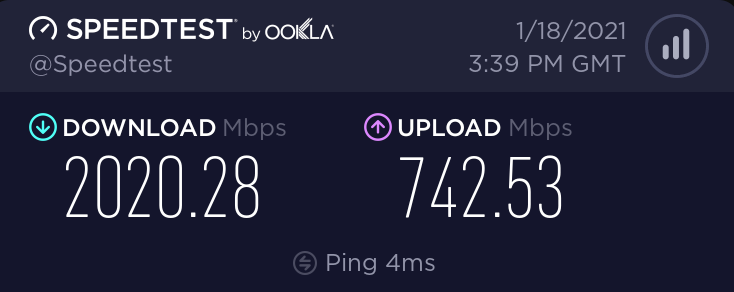
awful testserver, its symetric 2G
tame carbon
unlike you, I don't cheat
obsidian token
:(
tame carbon
@obsidian token I've never seen more than 3000mbit/s on speedtest.net
it kinda struggles for high speed links
obsidian token
Depends on your location
tame carbon
That too
obsidian token
My real speed is 50/1,8 👎
obsidian token
If I moved 3km away I could get 1000/500 FTTH
But that aint happening unfortunately
tame carbon
I got the opportunity to get FttH
glad I did
only downside is I have a monthly fee for fiber upkeep
seperate from the internet plan
totals out at around 127euros/month
obsidian token
Cable monopole sucks
tame carbon
Its not a monopoly
The company that provides the fiber is not the same as the internet service provider
obsidian token
tame carbon
totals out at around 127euros/month
Dang thats way too much
tame carbon
@obsidian token yeah, on a symetric line with 6 hour SLA as well as extra IP ranges
obsidian token
tame carbon
Its not a monopoly
In my case
tame carbon
@obsidian token just data, is 72/month for 250/250
ontop of that, comes the fiber fee, TV plan and additional /29 subnet
that /29 is nice, because I don't need NAT
obsidian token
No clue what that is
tame carbon
I have more than 1 public IP
obsidian token
But i wouldnt pay more than 50/month for internet
tame carbon
See this ^
its a public IP, but it has 0.5ms ping
I have like 8 public addresses on my router
obsidian token
Do you host stuff or whats it good for
tame carbon
Yeah
@obsidian token two addresses are for subtenants in the building behind the house
office spaces
and the rest I use for my private server at home
to host some services and multiplayer games
obsidian token
Ok
tame carbon
@obsidian token major benefit of having more than one IP is that you don't need port forwarding :D
you can just assign a public IP to a device, and not care about the forwarding
obsidian token
Doesnt ipv6 do the same
tame carbon
I have a /48 configured as well (for ipv6)
IPv6 renders NAT obsolete
only reason we need NAT in the first place, is because ipv4 doesnt have enough addresses for every connected device
obsidian token
So for example if i host a minecraft server, do I just give my friends my ipv6 address?
tame carbon
does minecraft even do ipv6??
obsidian token
Oh apparently not
tame carbon
@obsidian token there's probably a way
but I have not seen a v6 address for minecraft, ever
obsidian token
I dont need it anyways, my friend has a dedicated pc where he hosts all kinds of games
My upload is too bad for hosting aswell
tame carbon
well, if your friend doesn't have a v4 address, you kinda have to use v6
or set up a tunnel
my ISP doesnt have v6 either, I use tunnelbroker for v6
obsidian token
Hes got some kind of thingy going on, i just type a domain and join the server that way
tame carbon
hostname yeah
thats normal
crystal@watomat ~ nslookup
> play.knockturnmc.com
Server: 127.0.0.1
Address: 127.0.0.1#53
Non-authoritative answer:
play.knockturnmc.com canonical name = main.knockturnmc.com.
Name: main.knockturnmc.com
Address: 192.95.63.162
>
same for my mc server
 tardy elbow
I'm looking at setting up a proxy/DDoS protection service.
Is it possible to have NGINX TCP reverse proxies to proxy to a host depending on hostname? If this is possible I have another two questions.
Is it possible to have a NGINX TCP load balancer forward a connection to the above proxy with included hostname for the proxy to proxy the connection to the correct server?
tame carbon
@tardy elbow sure
@tardy elbow you can set up a server { } block, with a specific hostname
Though I only have done this with HTTP, using the HTTP/1.1 Host: header
unsure about TCP
 nocturne harness

NGINX Documentation
Load balance TCP and UDP traffic across groups of application servers, with a choice of algorithms including Least Connections and Hash.
tardy elbow
Ahh thank you guys
I have found my own thinys though

GitHub
An ultra lightweight minecraft reverse proxy and idle placeholder - haveachin/infrared

GitHub
God is a high performance TCP/UDP reverse proxy server with load balancing capabilities - marvinerkes/God
tardy elbow
Yeah I've also looked at HAProxy aswell
I'm trying to make something similar to TCPshield
just for one location and on a much smaller scale
peak cloak
maybe you could protect against SYN flood
but generally for large DDOS attacks you can't really protect against it locally @tardy elbow
tardy elbow
It's not locally, I'm going to be putting these on DDoS protected VPS's/dedis
peak cloak
ah ok
tardy elbow
But yeah, I'm looking forward to getting this started
It's mostly going to be for home-hosters etc
 vale marsh
hey guys, i think im driving mad over here. i have no wifi in my room so im trying to use a tplink tl-wa850re extender, which is capable of 300mbps, to transmit a wifi signal via ethernet to my phone. im using a cat4 cable, but its showing me like..10mbps??? my ISP provides me with 350mbps............ please help!!
clear igloo
It's only got a 10/100Mbps port, it will NEVER provide over 100Mbps. If the cable is crap quality or the port is damaged on either side then it can possibly drop down from 100Mbps on the ethernet port to 10Mbps due to issues with the cable or port on either end. Your ISP doesn't doesn't determine your internal network speeds, they provide you up to X to their box and that's it
peak cloak
cat4??? that's like only 100Base-T
also if you are using an extender in a room which doesn't have good wifi then don't expect better wifi with the extender
clear igloo
Yah, I hope they meant Cat5 but if it's really Cat4 (which is an old and odd standard anyway) then it's going to be worse
peak cloak
if you use extenders you also want to put it where there is still descent wifi, not where there is like no coverage, an extender can't "create" wifi out of nothing
@vale marsh
clear igloo
Yah, I think I read that wrong. I assumed they were saying "I'm getting 10Mbps but I should get X because of my ISP" instead of "I'm only getting 10Mbps but could get up to X" but if the repeater is in a spot with minimal signal then it can't do any magic to make it better, it will still repeat and transmit on a weak and degraded signal making speed much lower
vale marsh
am i banned??? i cant post//
 uncut pendant
vale marsh
uncut pendant
vale marsh
im using a router as an access point, through a cat 6 cable.... but still getting like 10mbps??
clear igloo
Yah, and when you say cable is it connected to a device and the router/repeater acting as a bridge or is the ap/repeater connected to the main router via a cable
vale marsh
in addition to the speed, its bugging out...like its saying theres no internet, dont know what the problem is. its also not showing a default gateway
im using different things, at present im using a router
the router is connected to the ethernet box (dont know what its called). through a cat6, and that is an access point.
peak cloak
make a diagram of what you are doing right now
easiest for all people involved to understand
because I'm still kinda confused
 fossil yew
vale marsh
hey guys, i think im driving mad over here. i have no wifi in my room so im tryi...
fossil yew
vale marsh
hey guys, i think im driving mad over here. i have no wifi in my room so im tryi...
cat 4 is garbo especially longer distances
vale marsh
ETHERNET BOX ------------> CONNECTED TO ROUTER VIA CAT 6 ---------> ATTEMPTING TO CONNECT TO PHONE ---------> SHOWING NO CONNECTION (INTERMITTENT)
BUT WHEN CONNECTION SHOWS --------------> AROUND 30MBPS
clear igloo
fossil yew
cat 4 is garbo especially longer distances
Cat4 hasn't been a thing since the mid 90s as it was quickly replaced by cat5 and used basically in voice networks only
clear igloo
peak cloak
what's ETHERNET BOX? that's the modem?
Yah, I'm assuming they mean the ISP's box coming into the home?
vale marsh
i think the router is interfering with my main router, im dropping out on my main ethernet now....
clear igloo
Make and model of the repeater/AP/router you're using? Aside the TP-Link one you mentioned earlier
clear igloo
That's my suspicion too
peak cloak
that's an AP that you want
vale marsh
Been stressing me for the last year...from wireless boosters, to power lines, now trying to use the old router...I'm ruined
Photos are coming
vale marsh
How do I check?
peak cloak
what I would do is unscrew the outlet and look at the cable
if not possible you could run a speedtest over the cable as long as you have 2 ethernet connectable devices
using iperf
west vortex
Photos not working.
 primal ice
open the links. for what ever reason discord isn't showing them.
west vortex
Yeah that’s not working for me either on my phone. Oh well.
So the basic gist i’m getting is poor wifi in a specific room. Ran ethernet to the room to connect to an extender which is connected back to the original router. Getting poor throughput.
Is that correct?
Why not just replace the router with something higher quality?
peak cloak
it's not that, I'm really confused on why the speeds are so low on the AP
west vortex
AP could be faulty? Misconfigured?
I avoid cheap APs like the plague. I’m going powerline adapter and a second Alien for ethernet mesh
peak cloak
eh, unifi is eh
I avoid it
unifi that is
makes simple things really hard
well ethernet mesh would technically be something that can failover from a broken link
what you are talking about it just two APs
west vortex
Really? I found the Alien great in it’s setup and config. Absolutely no issues for me.
peak cloak
not for anything advanced
does it even have firewall rules?
also the price
unifi for example makes networks so confusing
I wouldn't
it's only 10/100
vale marsh
Ugh. I don't know but for some reason, when I'm connected to the main router's WiFi, i still am getting rubbish speeds, but haven't tried hard wire from the main router to my laptop. I think there's something up with it, normally on WiFi I used to get 370+. I will have a word with my ISP and see what happens
peak cloak
vale marsh
Ugh. I don't know but for some reason, when I'm connected to the main router's W...
try ethernet
100 max per port
vale marsh
@peak cloak yeah probably something up with the whole main router in general. Will speak to my ISP
peak cloak
vale marsh
<@222482269829332992> yeah probably something up with the whole main router in g...
try ethernet first, then you can check if it's on the ISP end or just wifi
I guess it would work, but still I would get a gigabit one if you could
vale marsh
@peak cloak yeah yeah, good point. I'll have a look at some point tomorrow, 12am right now. Thanks for the advice, even though I missed it out, should have a final look before contacting the ISP
west vortex
peak cloak
does it even have firewall rules?
By firewall rules you mean port forwarding and such?
peak cloak
west vortex
By firewall rules you mean port forwarding and such?
no like inter-vlan and inter-interface firewall rules
like from eth4.20 to eth4.10
west vortex
It has vLAN options. But i’m not sure about all that to be honest. This is a general consumer device with a touch of enthusiast built in. Nothing crazy.
It’s meant to be more of a higher end “it just works” type of network device. And for the most part, it’s held up to that.
west vortex
Yeah but all Wifi 6 capable routers are overpriced right now
peak cloak
can just get one HEX and get some APs
wifi6 iirc isn't that big of an improvement
just better in congested areas
because of better timing
west vortex
I mean, it was for me. I can get 5Ghz 2x farther away that I could before now. And I have new devices that make use of Wifi6 which helps.
peak cloak
wifi 6 just isn't worth it for me
if I have bad range I just get another AP
that's it
wifi 5 works just fine
aka ac
west vortex
I am using ethernet over powerline for backbone mesh so I can push a strong Wifi signal into my yard. I wont get nearly as fast speeds where I want to put the mesh point using the wireless mesh
 little schooner
wifi 6 was so worth it for me
everything is so much more stable
wifi 6 made me ditch the cable completely
west vortex
Yeah wifi was a nice upgrade for me as well
west vortex
peak cloak
powerline kinda sucks
yeah, i’ve heard mixed reviews. I want to at least try it. Else I may be trying MOCA
 gritty hare
Hi guys, I have a problem with my Internet browsing, I can play online games without disconnecting but, my Internet browser(Chrome) randomly stops from time to time, any ideas?
unborn sluice
Chromed
gritty hare
i tried a different browser (edge) but still didnt work
peak cloak
packet loss? idk
gritty hare
but online gaming is stable as Mount Tai
gritty hare
win10 latest update
west vortex
Games don’t typically use URLs to connect to their services, so maybe the issue is your DNS resolution?
Try flushing your DNS and see what happens
unborn sluice
west vortex
Games don’t typically use URLs to connect to their services, so maybe the issue ...
Games don't use URLs? so you need DNS?
gritty hare
ty
 drowsy sand
Incredibly fast.
ruby bramble
Ok
drowsy sand
I live in germany and oh boi am I lucky if I get 2mb
ruby bramble
Oof I’m in Southern Africa
west vortex
unborn sluice
Games don't use URLs? so you need DNS?
Some but not all games typically use their services IP addresses directly. DNS stands for Domain Name System. Which means it takes google.com and makes it to a string of numbers (the IP address) that tell the computer where to find google's servers. If your DNS system is broken, then it would make sense that you can't browse the web but can still game.

Without the DNS, your browser wouldn't even know which website you're trying to visit! Learn all about how it works.
Freshbooks message: Head over to http://freshbooks.com/techquickie and don’t forget to enter Tech Quickie in the “How Did You Hear About Us” section when signing up for your free trial.
Follow: http://twitter.com/linustech
Join...
ruby bramble
drowsy sand
in terms of internet, germany is even below romania
I was gonna move to Germany you have now crushed my dreams lol
drowsy sand
lmao
the internet in germany is like a patchwork quilt
on one hand the internet is great at 50mbit and up
usually around 100-500mbit in cities
sometimes even moar
but once you leave the city, you are either lucky or completely screwed
not long ago I was crippling around at 700kb/s download speed
 deft fog
is any one in here use proxmox i need help with getting it back on line
tame carbon
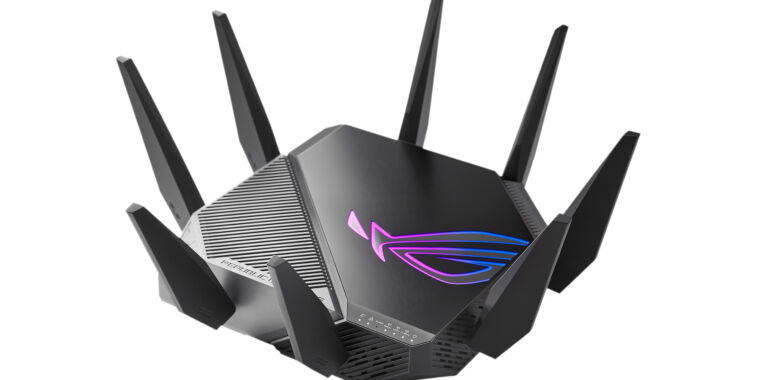
Ars Technica
We roundup the Wi-FI 6E routers, with Asus' model is launching as soon as this month.
Even ARS can't properly report on this
why the fuck would you be hyped for the next 'gamer' router
look at it ^ wtf is that.
 twin zealot
how much?
tame carbon
"World's first Wi-Fi 6E gaming router," but it finally got a release window: January 2021. Newegg currently has it for preorder for a cool $549.99
$549
O.o
 jaunty talon
well that isnt so bad?
twin zealot
thats about 548 to much
tame carbon
@jaunty talon its total garbage, considering a single AP costs 1/5th
twin zealot
jaunty talon
well that isnt so bad?
wifi 6e isnt really usefull
twin zealot
twin zealot
wifi 6e isnt really usefull
yet
jaunty talon
but that isnt a reason for it being bad? :D
twin zealot
no it isnt bad its too expensive
jaunty talon
it's like.. should I not build a WIFI6 network if I build wifi?
tame carbon
@jaunty talon price, the stupid choice in hardware (too many antennas) and get this
ASUS SUCKS at writing software
have you ever seen their router config page??
twin zealot
and why do you want rgb on your bloody router
tame carbon
yes.
jaunty talon
if yes. i doubt you can really build a pfsense that does it for much cheaper
with new hardware
twin zealot
mayby even better
tame carbon
@jaunty talon that router is so far out of the ball park
jaunty talon
nat 2.5G?
tame carbon
oh
jaunty talon
not sure i follow? :D
 jaunty talon
why is a sfp+ port wrong?
I would actually say its nice to have that in a router like that
tame carbon
@jaunty talon the point is, they use 2.5G RJ45
jaunty talon
Sure
tame carbon
I get that its the new and improved networking standard for home
but a router that costs $540
better have some fuckin' SFP+
jaunty talon
Netgate Security Gateway with pfSense firewall router software
It's not a strange pricing
tame carbon
@jaunty talon RB4011 still beats that
jaunty talon
doesnt mean everyone else should
tame carbon
@jaunty talon wow. I would not buy that SG3100.
twin zealot
tame carbon
you see that vpn speed??
twin zealot
tame carbon
450 mbit/s what is that.
twin zealot
and that all for under that price
jaunty talon
under 500usd?
tame carbon
@twin zealot unifi is also overpriced
MikroTik is a Latvian company which was founded in 1996 to develop routers and wireless ISP systems. MikroTik now provides hardware and software for Internet connectivity in most of the countries around the world.
This beats decimates all
jaunty talon
sounds strange that all those three would be under 500usd in total
jaunty talon
@tame carbon sure, but as I said. Just because there is one vendor that has a product that is super cheap doesn't mean that everyone else should have it too
different markets etc
tame carbon
@jaunty talon yeah but it just once again confirms that ASUS is just a total ripoff
omg
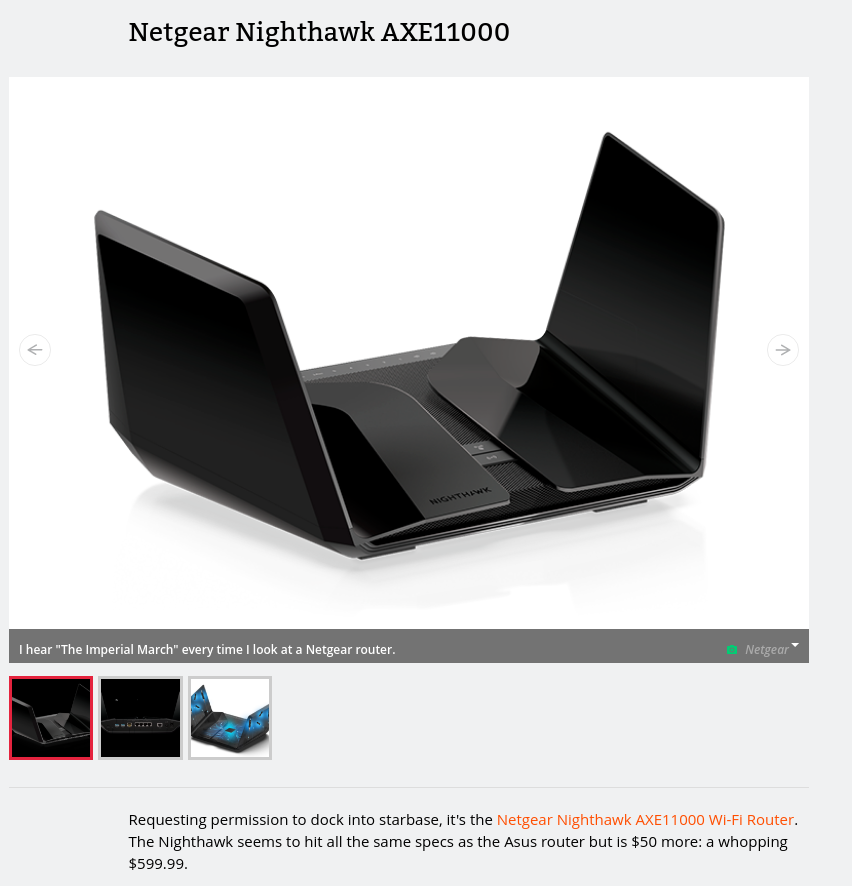
It gets better
these guys manage to slap another $50 ontop
with roughly same hardware
except it looks like Batman's spaceship
twin zealot
at tweakers.net they dont even talk about the rog one
tame carbon
@twin zealot yeah because tweakers.net still has somewhat of a reputation
twin zealot
yea it does
jaunty talon
what? :D
twin zealot
althoug iam not allowd to mod at tweakers anymore