#networking
1 messages · Page 263 of 1
 tribal ferry
this is the lines
cable definitely somewhere in there
that's 3 individual cables coming down the pole
two of those cables go directly into the box on the right
one goes into the left, then a white cables goes out into the box on the right
then that gray pipe goes into the ground
here's, what I think, is cable
 lean pebble
This box looks weird.
This cable looks like my coaxial cable from my tv provider
lean pebble
tribal ferry
This one
tribal ferry
The three black cables you see is what go into those two boxes
Here's the underneath of the two boxes:
lean pebble
That looks very messy
lean pebble
The block cable looks like fiber / coxial cable connection that used for network in some places.
I wish I had the option for fiber connection
You said they said that you have fiber there right?
tribal ferry
lean pebble
You said they said that you have fiber there right?
Yes
I have confirmed with Xfinity there is fiber available at my addreess
Not if it actually comes across the road, they said they'd have to send out a survey guy
Here's the other side of the pipes:
lean pebble
That looks like fiber
lean pebble
The cable
tribal ferry
Which picture?
lean pebble
tribal ferry
.
lean pebble
Ya
 lean pebble
I guess it is
tribal ferry
Is there anything in particular about it that makes you think it's fiber?
Some characteristic?
here's that cable you think is fiber going up the pole:
lean pebble
Because the connector

Most Common Fiber Optic Connectors Explained in Detail
http://www.fiberoptics4sale.com
SC, ST, FC, LC, MU, MTRJ, E2000, MTP, MPO, SMA 905, SMA 906 and obsolete ones such as D4, BICONIC
lean pebble
Looks like FC or BICONIC connector
tribal ferry
Typically that's the connector going into homes?
lean pebble
Depends
Here in my country I think they use something else
But ya usually FC goes into homes
tribal ferry
Alright
lean pebble
But depends on your ISP
 peak cloak
tribal ferry
https://media.discordapp.net/attachments/387022787480387605/798672871764525096/1...
peak cloak
tribal ferry
https://media.discordapp.net/attachments/387022787480387605/798672871764525096/1...
That's coax. That connector is a coax connector
tribal ferry
peak cloak
That's coax. That connector is a coax connector
Yeah, that's what I thought
peak cloak
I can't now because it's dark, but I'll show what the end of a the fios fiber looks like, not from up close though because it's on a pole
But it looks square
tribal ferry
peak cloak
I can't now because it's dark, but I'll show what the end of a the fios fiber lo...
My thought is that, maybe, they brought fiber across the road to the pole but never brought it under the road
since my pole is just for my house
peak cloak
This is what inside my house the termination looks like
Red circle is the fiber from the outside
 hollow marlin
lean pebble
But ya usually FC goes into homes
hollow marlin
lean pebble
But ya usually FC goes into homes
SC goes into the home. FC has been phasing out for a while
 primal ice
all the stuff you've shown looks like coax or Plain old telephone service. go down your street some and look for a black box about a foot in length and 6-8 inches height and maybe 2 inches in depth(thickness). that is going to be the fiber splitter/hook up box.

 waxen relic
wireless and the old unit needs to be reset weekly
 old magnet
waxen relic
wireless and the old unit needs to be reset weekly
old magnet
waxen relic
wireless and the old unit needs to be reset weekly
What kind of use?
And fyi, my router still needs to be reset periodically
waxen relic
constant data
old magnet
Then plan on maxing that budget 😉
peak cloak
honestly this is pretty damn good, can do everything, but I think it's out of stock https://mikrotik.com/product/hap_ac3

MikroTik is a Latvian company which was founded in 1996 to develop routers and wireless ISP systems. MikroTik now provides hardware and software for Internet connectivity in most of the countries around the world.
old magnet
Constant f's up lower end routers pretty bad.
peak cloak
a router shouldn't need to be reset
waxen relic
they should automate that resetting crap
peak cloak
let me check my uptime
waxen relic
7 to 14 days speed gos from 100 mbs to 20 mbs after reset pow its 120 mbs
peak cloak
old magnet
My on the way out router was bailing every day, end even when it was new, was reset about once every 2 weeks.
peak cloak
I only shutdown the router if I need to do some reconfiguration of my rack
Never had to restart it because it was misbehaving
Mikrotik's are pretty damn good, I want to get the HEX S eventually
old magnet
Rack, so you running a consumer router, or commercial.
peak cloak
Right now a ubiquity er-x
peak cloak
old magnet
Rack, so you running a consumer router, or commercial.
well I got a switch for free, which was rack mountable plus I run a little homelab for learning so I got a cheap used rack
 waxen relic
I need wifi bc it connects to a shed
old magnet
I had to pay for my switch. Got tired of multiple hubs.
peak cloak
nothing fancy
hubs?? that's like old tech
my dad's work was getting rid of their office, so they let me take it
I have 2 other distribution switches around the house all on the second floor, because I only have 2 ethernet lines going up to the second floor and don't want to cut into drywall too much
 waxen scroll
finally a new pic. i feel like ive seen Present's pic 500 times now
old magnet
Still haven't terminated alot of the lines I ran, since they arn't used yet.
peak cloak
old magnet
Still haven't terminated alot of the lines I ran, since they arn't used yet.
If you can I would get an Access Point and mount it somewhere in the middle of the house so you could have good wifi coverage instead of hiding the wifi router
old magnet
It's not hidden, and that is the middle of the house
peak cloak
ah, it looked hidden because of the unfinished walls
old magnet
Not sure how a house twice as big has better wifi than our old place, but not complaining.
Basement, under the stairs.
peak cloak
I have my AP out in the open mounted in on the stairwell wall
old magnet
Where the net and power panel are.
old magnet
Only counts as hidden if I had to go out of my way to 'hide' it. It's there because that where the fiber comes in, lol
It's not, all double layer drywall too. It's weird.
primal ice
my only question is why do you have three routers :p
old magnet
Me? I don't. I have a router and a swtich. The 3 on the wall are the telco's fiber box, modem, and battery backup.
And the white tall one is a NAS.
primal ice
okay two routers though you are calling one a modem yeah thought your nas was another one cause it looks similar to a coax router that comcast is now using. technically you should be able to remove the "modem" and just use the connection from the ONT (fiber box) to your tp-link router/wifi box.
 thick minnow
boys
boys
im trying to get my browser (edge chromium) to trust my truenas web portal, I installed the certificate machine wide and restarted the browser but it's still saying it doesnt trust it
thick minnow
does edge look somewhere else for certs?
peak cloak
No clue
thick minnow
peak cloak
I would click bypass
I would, except the warning comes up later
so its pointless
thick minnow
mine doesnt do that
I click it, then like an hour at most later, when I try logging in again it does the same shit
peak cloak
Do you have a domain?
thick minnow
nope
peak cloak
Because what I eventually plan on doing is create a wildcard cert from let's encrypt and install it on all my routers/APs/switches, etc.
old magnet
primal ice
okay two routers though you are calling one a modem yeah thought your nas was an...
Ohhh, you may be right, I have that router disabled...
 silk oracle
has anyone else managed to get the new versions of Feed the Beast Minecraft server working on docker, or Terminal only linux?
 surreal finch
Let'sEncrypt wildcard certs are freaking amazing. I love it personally. Use it on my Fortigates, Fortimanager, FortiAnalyzer
 quiet delta
so i had an electrician put a unifi ap lite in for me and he gave me the ssid and password
but when i try to connect it with my account it says wrong credentials
the credentials do work for the wifi but i cant manage any settings
surreal finch
Yeah if you don't have the credentials to locally log into the devices web UI, you will most likely have to default it or ask for the info from the electrician if they still have it
quiet delta
wdym by default?
surreal finch
reset the device to factory default setting (like when you just open the box and plug it in for the first time)
quiet delta
is there any other way to reset it without going into the attic and resetting it
surreal finch
No. You have to have physical access to the device if you don't know the password (security reasons)
quiet delta
oh ok
so if my electrician doesnt know i think i can scan the qr code
in the attic
tysm
surreal finch
Yeah that might work as well
I don't have much knowledge with Ubiquiti, but the concept is the same across most of the major vendors (Fortinet, Cisco, Meraki, etc)
 tame carbon
@thick minnow obviously SSL won't work there
it requires an FQDN
or a self signed certificate you imported on your local system
tame carbon
reload webserver?
 iron kelp
Yo was wondering if anyone had advice on networking stuff. I hit 5Mbps wirless but on wired connection its like 244ish Mbps. Ik wired is better but my parents wont let me run the cable. So I was wondering if there was anything I can do with like a second router I have.
Ik not alot about networking
I have a bunch of smart devices I was thinking to put them on their own network
My network is already split in 2.4ghz and 5ghz
tame carbon
wired, you get 244mbit/s?
run a cable
convince your parents that wifi is total garbage
 unborn sluice
and?
iron kelp
Imma go look at what router it is
Ah the router is a linksys EA8500
Idk if that information does anything
Weird thing my pc wont connect to internet via modem but it connects if i plug in to router
unborn sluice
you mean directly connecting the pc to the modem?
 sudden mesa
does an access point act as an add-on allowing you to connect to either your existing router downstairs or the access point? really patchy internet upstairs so that would fix it right/
?
peak cloak
@sudden mesa access point is another wifi emitter
A true router doesn't do wifi
So you need to connect an access point in order to do wifi
sudden mesa
erm i mean whatever came with my isp thought you called it a router lmao
yeah because upstairs one half has good wifi full speeds (directly above the router in living room) and the over half is absolutely terrible (like 200kb/s)
would an access point give them the full speed or atleast useable speeds too?
peak cloak
sudden mesa
would an access point give them the full speed or atleast useable speeds too?
yeah, just run ethernet to the other side of the house and place an Access Point there
sudden mesa
alright cheers guys
sudden mesa
i'm looking on amazon for a long maybe 50m ethernet cable but alot of the reviews have complaints about it being copper clad or something? does this matter? max speed i need is say 300mbps
sudden mesa
yeah most of the reviews are 5 star but a minority say stuff about "copper clad aluminum"
probably some niche thing that wont affect my uses im guessing lol
peak cloak
that means it's not 100% copper
sudden mesa
in the UK we dont have lowes i think
peak cloak
yeah, I was just giving an example
peak cloak
You could get a cable raceway if you wanted to
sudden mesa
Yeah, i just did a speed test on one i got 200 and then 5 minutes later i get 20
Same room, pc everything
 topaz delta
i have found out why i was only getting 100 megabit on a 500 megabit connection
i just had a really shitty cable
not really much of a problem but you know
cables matter
peak cloak
topaz delta
i have found out why i was only getting 100 megabit on a 500 megabit connection
yeah, it need to be a 4 pair cable
aka 8 wires
topaz delta
yee
peak cloak
1000 Base-T only works on 4 pairs, 100 Base-T only needs 2 pairs
don't worry, I did the same thing
topaz delta
well the old cable was a cat 5e cable so idk what was wrong with it
peak cloak
then defective prob
thick minnow
Hey guys anyone about to help?
waxen scroll
@tame carbon ask just to ask
tame carbon
?
 little schooner
@tame carbon funny enough there's also a ? in the user name
@waxen scroll triple threat ask ask ask
waxen scroll

thick minnow
Sorry bud that disappeared on me for some reason @peak cloak
Basically I have a router connected to the socket, works fine, speeds are great, wifi is great, in the room, but trash everywhere else
in the house we have a network switch in the attic which is where port one is being run to, and from there connected to my Pc and the other desktop in the house, however I want to expand that to other areas of the house,
For whatever reason, when i connect the switch
internet on nearly ever other device drives out completely
especially when my mesh system is plugged in
and for reference
peak cloak
I kinda don't understand? Could you draw a diagram of how everything is connected?
thick minnow
the mesh system worked totally find in the last house
urm
will try
my drawing is trash hahah
peak cloak
it's fine
peak cloak
yeah kinda
just don't understand the red and green circles
is that whole thing on the page is what you are trying to achive?
thick minnow
it's two wires because atm only direct is working
peak cloak
and the patch bay thing is kinda confusing
because what you want is a connection from a LAN port on the router into the switch
and then from switch to everything else
thick minnow
so the patchbay is literally just connecting all the j45's from room to the attic
peak cloak
so when you plug in the switch into a cable that is plugged into the LAN port of the router, internet doesn't work on other devices?
thick minnow
Yeah basically
peak cloak
hmm, what switch is it?
thick minnow
tplink
it's only a cheap one
however
This is the router
and it's not going well
peak cloak
oh yeah stupid filter
thick minnow
omggggggg
peak cloak
I clicked on the link
thick minnow
Bahahahhaha
thick minnow
Yeah
peak cloak
you only have one cable from router to switch?
thick minnow
at the moment two since as i said it's not working otherwise
thick minnow
yes, has to go through the patchbay, but that's basically the idea
mesh wifi extenders being the 'wifi'
 oak night
I'm stupid and probably wrong, but aren't the cables directional?
peak cloak
oak night
I'm stupid and probably wrong, but aren't the cables directional?
what cables? ethernet should be bidirectional
oak night
Ok i did not see that
thick minnow
They're supposed to be J45 Cat 6 through out
the only thing i could think of was the watch isn't getting enough power to have GB connection but i can't see that being the case when my PC is getting 200mbs down speeds going through exactly the same cable
peak cloak
yeah and?
 tall pagoda
To see if your ISP is on with time
tall pagoda
My home ISP (Ziggo/Libery/UPC) is ipv6 comptiable but my mobile ISP (Tele2) not
peak cloak
oh it's the opposite here
tall pagoda
Actually this is an interesting site too ^^, where you can find all ^4G, 5G, GSM-R, Radio Amatures, TETRA and VV antenna location and date of activation
oak night
Cool finally i'll know if i really had 5g on my phone
tall pagoda
550 antennas of many kinds in use in Arnhem
110 antennas on the antenna mast on the KEMA terrain in Arnhem wow
This is the TenneT tower in Arnhem
That one ^^
And this is also a interesting tower of communications. The Gerbrandytoren in IJsselstein. The tallest structure in the Netherlands
 obsidian token
tall pagoda
obsidian token
tall pagoda
Is it good or special to have ipv6?
peak cloak
obsidian token
Is it good or special to have ipv6?
ipv6 is the future of the internet, no NAT, each house should at least get a /64 assigned to them
currently you only get one ipv4 address or even worse under CGNAT
so each device on your lan gets a public ipv6 address
obsidian token
Could that be the reason why my port forwarding stuff for games didnt work?
obsidian token
Ohh ok interesting
peak cloak
some routers may lack the support of that for ipv6
obsidian token
So this is some advanced future stuff? Im surprised we have that here
peak cloak
Well ipv6 was originally created back in 1995
Just slow implementation
because in order to access an ipv6 website or service, you need ipv6 support along the whole path, (tunnels don't really count)
however ipv6 was launched in 2012
peak cloak
obsidian token
Could that be the reason why my port forwarding stuff for games didnt work?
so for example in ipv6, you would just create a firewall rule for example:
Allow
From: Any IP, port 80
To <specific ip of cmputer>, port 80
ipv6 also introduces new concepts such as link-local
anything starting such 2001 is a public ipv6 address
this for example is an ipv6 address 2001:0db8:85a3:0000:0000:8a2e:0370:7334
 clear igloo
depends, AT&T in the US starts with 2600
peak cloak
oh, I thought everything starts with 2001
clear igloo
depends on the registry but I believe right now 2000::/3 (so 2000 through 3fff) is "public"
peak cloak
ah ok
clear igloo
https://www.iana.org/assignments/ipv6-address-space/ipv6-address-space.xhtml
Current assignments
and then each RIR that has some now:
https://www.iana.org/assignments/ipv6-unicast-address-assignments/ipv6-unicast-address-assignments.xhtml
peak cloak
oh, site-local is deprecated?
so fec0::/10
I read about it a while back and thought it was still relevant
lean pebble
Pfsense masters are a wake ?
hollow marlin
@peak cloak it's not deprecated in the sense you are thinking. It's highly shunned for using outside specific use cases. People used it for nat66 because v4 is all they used so they basically said stop it, that's not why it should be used
peak cloak
ah ok
lean pebble
Someone can help me with port forwarding in pfsense for some reason it's not working
peak cloak
lean pebble
Someone can help me with port forwarding in pfsense for some reason it's not wor...
wait don't you have the HEX now?
lean pebble
I fixed it but I want to make it accessible only from my home IP
peak cloak
well for one you could do a vpn tunnel between the vps and home?
lean pebble
Now anyone that have the port can find what is behind this port
I want nat 😆
Just for practicing pfsense and port forwarding
lean pebble
I can but the nat give me option to connect without vpn
I know how to setup vpn already did it for a friend 😅
Long time since I used nat
This is so weird
lean pebble
When I changed it that it only accept connections to this port from my home IP it just not working
Fixed
peak cloak
lean pebble
Fixed
what was the issue
lean pebble
Well the source address are hidden I didn't noticed
I wrote my ip address in the wrong section
🤣
peak cloak
that would do it
lean pebble
peak cloak
that would do it
That's called "advanced"
peak cloak
I meant to type something else, I just fixed it
lean pebble
And by default this section is hidden
I wrote it in destination instead in source
Because source is hidden by default idk why
Rdp working to
 west vortex
Dang this thing really helped make my internet feel more responsive and better coverage at home. I was super skeptical.
 short relic
So I figured out why my internet cut out
My roommate had to "borrow" the ethernet for some server maintenance lol
west vortex
waxen scroll
And that is what
Amplifi Alien from Ubiquiti.
 mellow garden
Can someone with knowledge of how meraki aps work help me?
Router says its connected to the meraki cloud but the dashboard says it never has
Nvm figured it out
iron kelp
Would connecting all smart devoce to a different router be smart to save bandwith on main router?
unborn sluice

 ruby bramble
Is there a small sfp+ port in 4 rg45 out 10g network switch
Small as in non router non rack mount but the size of a router
 dire crag
iron kelp
Am i smoothbrain rn
dire crag
iron kelp
Am i smoothbrain rn
you can make an isolated VLAN for them with a switch and give your main devices a higher priority
peak cloak
ruby bramble
Is there a small sfp+ port in 4 rg45 out 10g network switch
MikroTik is a Latvian company which was founded in 1996 to develop routers and wireless ISP systems. MikroTik now provides hardware and software for Internet connectivity in most of the countries around the world.
?
little schooner
@waxen scroll I'm having problems with some staff working remote that we can't push out packages to their PCs. It really is terrible
Have to come into campus to fix their stuff but they don't want anyone back in yet so it's fine for now
Never knew it would be like this lol
 supple garden
peak cloak
https://mikrotik.com/product/crs305_1g_4s_in
supple garden
peak cloak
https://mikrotik.com/product/crs305_1g_4s_in
Their main latvian office is like 150 meters from my home 😆
peak cloak
little schooner
<@186123993412141057> I'm having problems with some staff working remote that we...
oh yeah, everyone's school laptop windows licences expired since they aren't able to connect to the KMS server and they didn't setup any soft of remote management I think
waxen scroll
i dont see why you cant
 waxen saddle
@little schooner VPN?
little schooner
@waxen saddle I think they didn't go with this due to bandwidth usage
And remote access is through a portal without VPN client so home users net doesn't travel into the business net
There was a malware infection one time that made them change policy. I wasnt around for that though
waxen saddle
Sounds like policy makers were unaware that their setup requires infrastructure
little schooner
@peak cloak at least with their kms, ours is public facing
waxen saddle
Ah
little schooner
My best thing to tell them is they show up to their office, connect and wait until packages or updates are pushed
Then leave shortly after
Bc really the campus is only skeleton crew at this point
waxen saddle
Same here. But we have all our laptops on VPN. The only time someone has to come in to the office is if their laptop has been off-network for months and requires a check-in to a DC before allowing logon, or someone forgets their password.
little schooner
I'd really like them to use VPN solution
At least just access to the deployment appliance
If anything
That way I can push scripts and stuff
Not necessarily push packages that use bandwidth
@waxen saddle we have some laptops that been off network for a year
Listed in the appliance
waxen saddle
Ouch
little schooner
Yeah but they didn't complain yet!
The agents on there are so old
I think like 15 versions behind
waxen saddle
Wow
 foggy pike
Does anyone have any experience with a RS232 serial to USB adapter not working with Windows 10? I have the driver for it from the companies website and I'm still getting a code 10 from device manager. When I try a different driver it tells me that it's been phased out since 2012. All their tech support is telling me is that it should would with Windows 10.
Product # is ICUSB232DB25
Not sure if this issue belongs in the networking or tech support chat considering it technically both
peak cloak
You will more likely find an answer here, but I have no clue
never worked with a RS232 cable
foggy pike
What do you usually use to console into a brand new switch?
foggy pike
I wish had that at this moment.
I might just end up buying a console to USB adapter to skip the serial portion
Never mind about my issue, I found a windows 7 machine with a serial port to console into the switch
hollow marlin
@foggy pike Just pick up a cheap usb to 232 branded for Cisco on Amazon. Also we have multi usb to serial adapters in the office, some a decade old and work with win 10 no problem. Instead of installing the vendor driver, in device manager choose update through windows update, then check the optional updates in windows update, if it populates then just install it and you should be good.
ruby bramble
peak cloak
https://mikrotik.com/product/crs305_1g_4s_in
unfortunately i need the oposite 1 sfp+ port and 4 rj45 ports
peak cloak
ruby bramble
unfortunately i need the oposite 1 sfp+ port and 4 rj45 ports
you could get sfp+ copper modules
but those can get hot
so wouldn't recommend them
ruby bramble
peak cloak
you could get sfp+ copper modules
yea and pricey
cuz i have 4 computers and my house only has fiber conections
peak cloak
ruby bramble
cuz i have 4 computers and my house only has fiber conections
get an sfp media converter?
ruby bramble
my server room with my router and nas has a sfp+ swich going to every room and i want a small solution to convert it because i made a case that has 3 mini itx mobos and a rasberry pi 4 so thats why i dont use cards to convert it so i wanna plug a fiber cable into that case and provide 10g etherneto all 4
 deft fog
Would any one tell me if this cable is worth getting for my server and switch?
deft fog
I don't know but there just 9.99 on amazon
peak cloak
are you even doing 10 gig
cat 6 is just fine
cat 6a if anything
@deft fog are you doing 10 gigabit even?
deft fog
Right now no but in the future I want to push past 10 gigs
peak cloak
deft fog
Right now no but in the future I want to push past 10 gigs
any cable at least cat5e will work
for gigabit
10 bucks for a cable is kinda expensive
deft fog
Ok thanks
peak cloak
Save the time and hassle of building Ethernet cables by using fixed-length UTP Cat6 Ethernet Network Cables from Monoprice™! The FLEXboot™ Series of cables feature a thi
for comparison
2 bucks
technically 3
obviously it isn't worth to buy from them for just 1 cable
tame carbon
10G copper is 
@ruby bramble whatcha looking for
I have a 10G home network
under 400 bucks total
I might be able to give you some advice
 fluid torrent
Nice, but what do you need 10g for?
tame carbon
highspeed NAS access
fluid torrent
nice
tame carbon
1G is crap
fluid torrent
+1
peak cloak
tame carbon
1G is crap
it's fine for almost everyone
tame carbon
not all devices here are 10G networked
fluid torrent
So what are you using your NAS for?
tame carbon
but as soon as you have multiple people hitting the NAS
tame carbon
@fluid torrent I dont need 10G
peak cloak
he has just local 10 gig, not 10gig internet
peak cloak
yeah like tbh I would want gigabit even, but I don't need it
fluid torrent
I know, you can't actually use 10G internet
tame carbon
and I did a bunch of research on the topic in the past
@fluid torrent sure you can
with the right hardware
I have a dual 10G card in my server
and a single 10G card in my workstation
fluid torrent
Damn
peak cloak
well not on a single connection to let's say youtube, I know where you are comming from
fluid torrent
What specs is your workstation?
tame carbon
Ryzen 3600
fluid torrent
any gpu?
tame carbon
nothing special
I do software development and information system management
I maintain some of my own systems
and this 10G
is more like a home lab
for experimenting
fluid torrent
What counts is that it gets the job done 🙂
tame carbon
but yeah, I basically managed to demonstrate
that a 10G home network is not out of reach for consumers
if you are willing to drop more money, you can even go 40G
and up
10G is still affordable
peak cloak
well anything past 10G is really expensive
tame carbon
anything above gets expensive quickly
10G SFP+ modules for singlemode fibers cost like 15-30 bucks
fluid torrent
Yep, only thing that might add to the expense is if your home it old, and the networking can't handle it
tame carbon
meanwhile
40G QSFP+ costs 200+
a single mode fiber can do 1G 10G 40G or 200G
it dont care
its a single wavelength (color) of light
turn off and on really quickly
fluid torrent
I mean, if you use old copper cables
peak cloak
yeah a single fiber can do terabit with mux/demux
tame carbon
@peak cloak yuh
@peak cloak they are experimenting now with modulating the output power of the laser
to get 400G
fluid torrent
damn
tame carbon
@fluid torrent if you think thats insane
tame carbon
peak cloak
yeah a single fiber can do terabit with mux/demux
this ^
You can multiplex multiple wavelengths together
modern systems can stack 96 channels
so if say, each link could do 100G
you'd have 9.6tbit/s
fluid torrent
What limits us is how fast the receiver can pick up the signals, and maybe a bit of signal loss along the way
But we would probably find a way around that
tame carbon
 fluid torrent
tame carbon
<@!222482269829332992> they are experimenting now with modulating the output pow...
fluid torrent
tame carbon
<@!222482269829332992> they are experimenting now with modulating the output pow...
Like just making it more powerful
tame carbon
@fluid torrent accuracy of the laser wavelength plays a role
since on DWDM, each channel is like 0.4nm wide
and not every wavelength of infrared travels as well through fiber as others
fluid torrent
I know
tame carbon
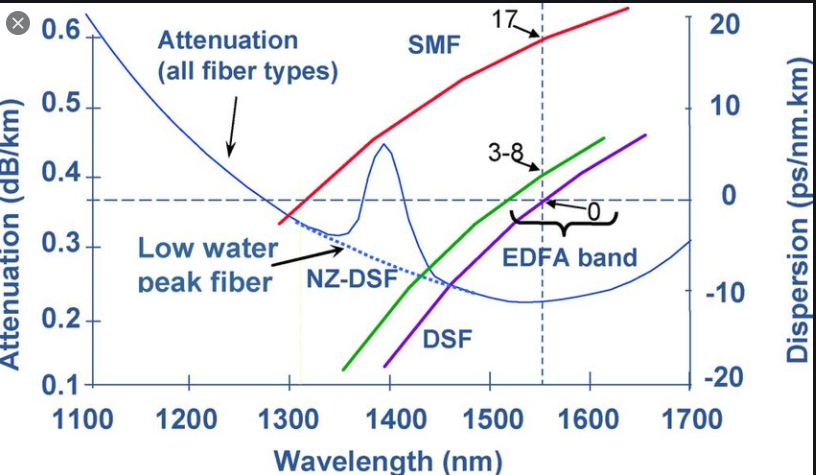 fluid torrent
It's like, when you take something under water, the green and blue colours are better at getting through
fluid torrent
tame carbon
https://i.imgur.com/YEt3NhU.png
Yep
peak cloak
theoretically you can get less world-wide latency by using lasers in space
because speed of light
tame carbon
in a vacuum yes
tame carbon
fiber speeds like 2/3c
fluid torrent
Even just lower pressure when you think about it
tame carbon
no just less particles in the way of the photons
less scattering
less absorbtion
@peak cloak but I guess for stock exchanges it make sense
but realistically, fiber optics' stability strongly offsets the marginal loss in latency
fluid torrent
I can't remember where, but some dudes in america dug through a mountain (I think), to decrease the amount of time it took for stock value changes to get to them, so they had an advantage over everyone else there
tame carbon
these kinds of tricks have been done ever since the first communications systems were deployed
The Great Fraud of Cowley was a hoax or fraud centred on a bank card found by what was speculated to be a local gang of pranksters.
They managed to trade with insider knowledge
by abusing the national semaphore network
to secretly transfer messages

they look like these
they are optical telegraphs
that require a human operator
peak cloak
one bit per minute
tame carbon
The network was reserved for government use, but an early case of wire fraud occurred in 1834 when two bankers, François and Joseph Blanc, bribed the operators at a station near Tours on the line between Paris and Bordeaux to pass Paris stock exchange information to an accomplice in Bordeaux. It took three days for the information to travel the 300 mile distance, giving the schemers plenty of time to play the market.
more like wireless fraud
@peak cloak there was a special 'correction code' in the semaphore protocol
that signals 'the last character was wrong'
so they used these errors to deliberately 'encode' a 2nd message
clever
until they were found out xD
tame carbon
@fluid torrent yeah so you had a series of these towers
the message propegated from one tower to the next
so if there was fog, gg.
after this came the telegraph stations with morse code
those same wires were eventually used for phone too
and later this brought the first kind of dialup
fax was actually possible with analog systems
fluid torrent
nice
tame carbon
@fluid torrent the guy who invented the idea of 'faxing' also invented raster scanning
using two synchronized pendulums moving over a piece of paper
and the transmitting side used conductive ink
pretty clever mechanism xD
 nocturne harness
fluid torrent
I can't remember where, but some dudes in america dug through a mountain (I thin...
nocturne harness
fluid torrent
I can't remember where, but some dudes in america dug through a mountain (I thin...
they dug up lots of stuff, to make a very direct line between the two cities, more direct = shorter = less transmission time
Similarly, there are a lot of microwave links in Manhattan that connect finance offices to DCs across the Hudson river in New Jersey, because the direct microwave link is a much shorter distance then travelling through all the fibre lines to get across the river (which don't run directly across, but to the north end of Manhattan first)
 plucky crescent
I could use some help with the simplest of network issues.
I dunno what's going on, maybe my router has lost its damn mind, or I just haven't done IP configuration on windows 10
I'm trying to get away from DHCP for all my devices in my home, and I tried setting the IP on the first device, and it's flipping out, not taking, and saying something about multiple gateway addresses.
I want to keep a DHCP pool for visitors who connect to wifi, so I have a 50-wide pool of addresses set aside for DHCP. I tried setting one computer to have an address outside of that pool, and it flat out is not working.
 fair grove
Does anyone know why I can’t connect to anything one of my friends hosts? I can’t connect to smash arenas that he hosts or if he is in one that one of my other friends hosts I can’t connect to that one either. And it’s the same thing the other way around he can’t connect to stuff I host. Another example of this is that when I try to connect to his Minecraft server that he runs at his house I can’t connect to that either unless I use a vpn. Not sure what causes this help pls
Ping me if you respond to this pls 🙂
peak cloak
plucky crescent
I'm trying to get away from DHCP for all my devices in my home, and I tried sett...
one question? whyyy?
why get rid of DHCP
plucky crescent
So my devices are always the same IP address, and I can set up rules and know what I'm pointing to.
I have a lot of devices on my network.
peak cloak
if you want security use something like 802.11X
plucky crescent
It's not for security, it's for stability.
peak cloak
plucky crescent
It's not for security, it's for stability.
kinda, counter-productive what you are doing. Just use static dhcp leases
plucky crescent
That's not something I'm familiar with.
peak cloak
basically it gives a device a static lease, and because it's in the DHCP table prevents collisions
plucky crescent
Maybe I'm old-school? I was taught to set up a DHCP pool specifically, and then you can set your home devices as specific local addresses.
I have no idea how to set up static DHCP leases.
to google, I guess
peak cloak
note the "map static ip" option
plucky crescent
Is that something the router does?
peak cloak
well the dhcp server, which is usually the router
plucky crescent
Lol ok my router doesn't have that function as far as I've seen.
peak cloak
because setting ip's manually on every device seems counter-intuitive if you want stability
or set the lease time really high?
plucky crescent
Once I've done it, I should never have to worry about it again, though.
tame carbon
@plucky crescent it just binds your mac address to a specific ip from the pool
so it always hands out the same address to the same device
useful if you have a LAN under DHCP and want to maintain networked devices like printers and such
because you don't want their addresses to change
plucky crescent
Yeah, I don't want any of my addresses to change on my network.
tame carbon
different vendors use different names
either called mac binding
static dhcp
or ip reservation
plucky crescent
I don't see anything like that on my RVS4000
which is odd, because it's a pretty capable router.
tame carbon
Security vulnerabilities of Cisco Rvs4000 : List of all related CVE security vulnerabilities.
CVSS Scores, vulnerability details and links to full CVE details and references.
that thing is riddled with exploits
its EoL too
plucky crescent
whale, guess it's time to use another router now
plucky crescent
can I not just DD WRT the rvs4000 to patch those exploits, or is that even worse?
peak cloak
is dd-wrt even as powerful as routerOS?
tame carbon
not by a mile
@peak cloak from what I have seen
they pretty much do what a home router does
- some extra config options
that you normally don't get
but its all very non-standard
and sometimes confusing to configure
because they actually use a lot of raw parameters that you sometimes you need to put in
cus it just modifies iptables xD
so bye bye hw accel
@plucky crescent reason I like these routers is cus they generally quite affordable
and all run the same software
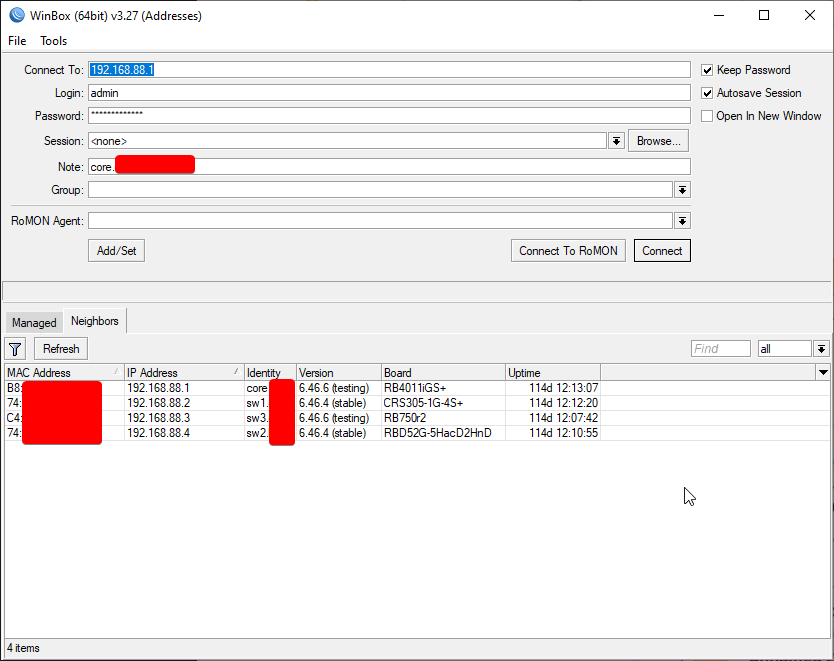
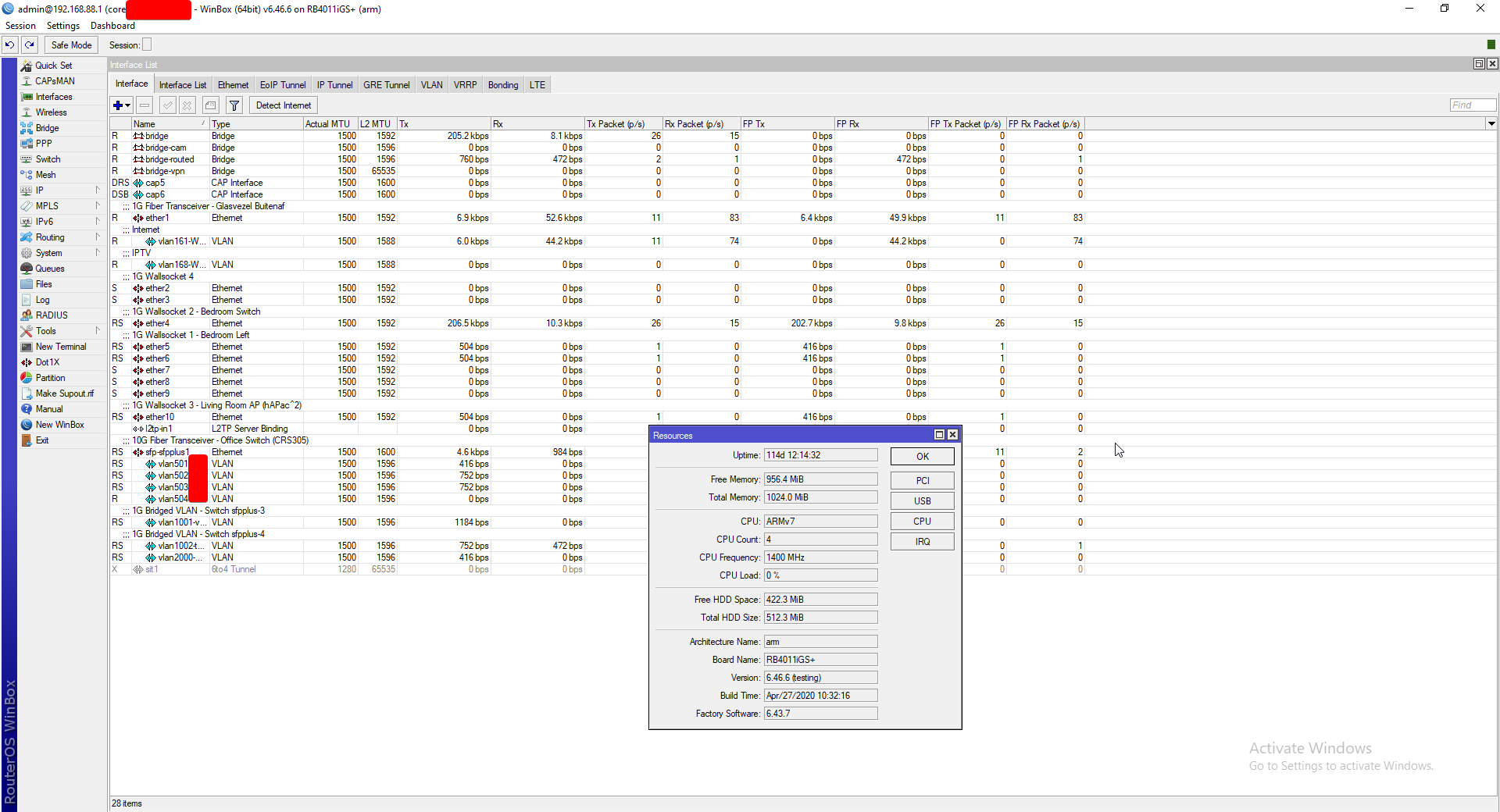
RouterOS is just really powerful
clear igloo
tame carbon
that thing is riddled with exploits
You mean 4 over several years before going end of software support 5 years after going end of sale in 2012? That's not what I call riddled with exploits
tame carbon
@clear igloo I wouldnt trust that thing to be secure today
clear igloo
Definitely not
I definitely wouldn't trust anything EoS for 5+ years let alone nearing 10 😛
tame carbon
have you seen how they patch exploits on their APIs ?

Cisco firmware update for RV320/RV325 routers simply blacklisted the user agent for curl. 🤦♂️ https://t.co/iWrUn98vcr
Retweets
192
Likes
380
 Twitter
·
clear igloo
Twitter
·
clear igloo
Someone made a huge mistake, not going to defend that
tame carbon

legendary
so this is what happens to old EoL updates
and apparently.. mainline too?
which seems odd
and mind you, this is 2019
the latest exploits are from 2017, thats the year they would have gone out of support
RouterOS claims 5 years support after purchase
but their RB2011 has been going for much longer
after 5 years, they still sell it
 merry raft
tame carbon
https://twitter.com/bad_packets/status/1110981011523977217
merry raft
tame carbon
https://twitter.com/bad_packets/status/1110981011523977217
User-Agent: notcurl/1.0.0
tame carbon
@merry raft yeah
merry raft
🤣
clear igloo
tame carbon
after 5 years, they still sell it
Yah, just depends on the product line, for example the Catalyst 6500-E will have had 20 years of life before it's finally done for good, lol. I'm sure there are some out there that will keep going beyond that without a reload, xD
clear igloo
haha, you mean things can last more than 1 year?!?
tame carbon
the first TV I ever used came with a manual, electrical diagram and replacement parts
now we have arrived at magic in a box
that dies after 3 years, and its worthless
clear igloo
Yup, pretty much
tame carbon
if things are built to last, they can last forever as long as they are maintained
technology from 50 years ago
was more reliable than the stuff we build now
clear igloo
Yah, part of it is complexity goes up but most of it is $$$ related
tame carbon
the market has the name and the behavior in it
consumer
they just consume
with every new internet plan that is made
a new router is built, shipped and deployed
after 3 years, they come iwth a new and improved one
and all the old ones
end up on garbage pile
thats how it was here
gone through 3 iterations of ISP routers
clear igloo
Yup, 3 years if you're lucky
tame carbon
while still using ADSL.
I honestly don't get it
like, have one standard little DSL box
and then you can just upsell em on the router
but dont do this all in one nonsense
ima go bed
gn
clear igloo
later
 fickle flare
hello everyone!i have at least 4 devices in my house.i have a modem-router and i was thinking if i get a switch will that help?
 burnt robin
What devices you got and what is your objective with your home network setup?
peak cloak
fickle flare
hello everyone!i have at least 4 devices in my house.i have a modem-router and i...
yeah, a switch will allow you to have more ports
fickle flare
i have 1 pc that's for semi-professional use.that means programs and some gaming of course.i have a nas.i have a google chromecast(i was thinking of getting a ethernet adapter for it).and in the near future there will be a smart tv
ohhh and i may move to a new house so if i get one i will get a 10 port one so i can connect an htpc and some other stuff
 versed nebula
anyone can help me with ddwrt?
merry raft
@fickle flare a good switch is very useful, my isp provided router only comes with 2 ports so having a switch has allowed me to actually use ethernet
fair grove
Does anyone know why I can’t connect to anything one of my friends hosts? I can’t connect to smash arenas that he hosts or if he is in one that one of my other friends hosts I can’t connect to that one either. And it’s the same thing the other way around he can’t connect to stuff I host. Another example of this is that when I try to connect to his Minecraft server that he runs at his house I can’t connect to that either unless I use a vpn. Not sure what causes this help pls
unborn sluice
You're on a different network?
peak cloak
fair grove
Does anyone know why I can’t connect to anything one of my friends hosts? I can’...
well if you are trying to connect to his minecraft server without portforwarding that would explain it
if you are trying to connect to a 192.168.x.x ip then there's your problem
Was just doing research on reserved ipv4 ips and never knew 100.64.0.0/10 was reserved for CGNAT
and 169.254.0.0/16 for link-local
unborn sluice
peak cloak
and `169.254.0.0/16` for link-local
Always has been
fair grove
unborn sluice
You're on a different network?
Yes
ruby bramble
tame carbon
<@!705479446546743412> whatcha looking for
Hi I am looking for a very small switch with 1 sfp+ port and 4 rj45 ports all 10g
plucky crescent
tame carbon
get a mikrotik
 winter panther
plucky crescent
so something like https://www.amazon.com/Mikrotik-RB750Gr3-5-port-Ethernet-Gigab...
winter panther
plucky crescent
so something like https://www.amazon.com/Mikrotik-RB750Gr3-5-port-Ethernet-Gigab...
that thing is great
i worked with them when i did my mikrotik course
tame carbon
@ruby bramble RB4011 if you are looking for a router. If you only need a switch, https://mikrotik.com/product/CSS326-24G-2SplusRM
MikroTik is a Latvian company which was founded in 1996 to develop routers and wireless ISP systems. MikroTik now provides hardware and software for Internet connectivity in most of the countries around the world.
@ruby bramble https://mikrotik.com/product/rb4011igs_rm
MikroTik is a Latvian company which was founded in 1996 to develop routers and wireless ISP systems. MikroTik now provides hardware and software for Internet connectivity in most of the countries around the world.
This one is capable of full 10G routing
it comes with two internal 2.5G switching chips (with 5x 1G ports each)
@plucky crescent I'd recommend the hEX S over that one. RB750 is relatively slow by comparison
@plucky crescent https://mikrotik.com/product/hex_s
MikroTik is a Latvian company which was founded in 1996 to develop routers and wireless ISP systems. MikroTik now provides hardware and software for Internet connectivity in most of the countries around the world.
tame carbon
@winter panther did my research on them before ye
@winter panther I own like 4 mtiks right now ;)
tame carbon
RB4011, CRS305, RB750-r2 and a hAP ac2
winter panther
i still dont get how cheap mikrotik products are
tame carbon
@winter panther lack of modularity
and routerboards themselves are relatively simple
winter panther
depends on the model
tame carbon
true
but they are no juniper
and no cisco ASR
@winter panther you can't really compare mtik to say, ASUS or Tplink
my issue with those two companies is that they sell networking appliances with the intent to consume
not built to last
tame carbon
mikrotik promises 5 years service period after purchase
one of their longest running devices, the RB2011
has been on sale for more than 5 years now
winter panther
ive seen so many asus products
tame carbon
so it has enjoyed at least 10 years of service now
tame carbon
lol I have one ASUS router here, as a downstream NAT & wifi AP
they rent internet from me
and I had to configure that router of theirs
@winter panther the DHCP client on that asus router, didnt honor the standards
winter panther
i dont doubt that
tame carbon
normally, the downstream DHCP for the LAN, inherits DNS and GW settings from the upstream DHCP client (WAN)
but ASUS routers, override the 'primary DNS' with the router's own DNS server
winter panther
it was prob a "gaming" DHCP client
tame carbon
@winter panther and I can tell you why they did this
because they want you to go to http://router.asus/
winter panther
LOL
tame carbon
itll send an HTTP 301, with a redirect to the FQDN
instead of just presenting the settings page
this means
if you do not use the DNS server of the device itself, you cannot view the settings page
simple fix: modify your hosts file and add router.asus
@winter panther ultimately ended up using static IP to configure it
so that asus router has a public IPv4 statically configured xD
winter panther
hahaha
tame carbon
I've been saying this before, asus should be banned from selling routers
tame carbon
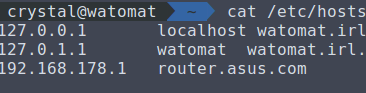
amount of entries my hosts file has lol
it has like 40+ entries
@winter panther RouterOS is confusing as hell if you are used to the consumer router config
but once you get used to it, going back to consumer routers is awful
winter panther
i was setting up a huawai router
took me more time that i would like to admit
to set up port fowarding
tame carbon
buttclench I am about to upload & deliver my graduation project :o
winter panther
what was it about
ruby bramble
tame carbon
<@!705479446546743412> https://mikrotik.com/product/rb4011igs_rm
Unfortunately I need a small one like hdd size
tame carbon
@winter panther almost done with school is what that means
@ruby bramble the RB4011 is a full fledge router
@ruby bramble you mentioned you only needed switching capabilities
winter panther
@tame carbon i was asking about the project
ruby bramble
I very much said small
tame carbon
@winter panther oh, I wrote a software framework that aids development of websites using a headless CMS
ruby bramble
ruby bramble
Hi I am looking for a very small switch with 1 sfp+ port and 4 rj45 ports all 10...
Very small
tame carbon
@ruby bramble CRS305
MikroTik is a Latvian company which was founded in 1996 to develop routers and wireless ISP systems. MikroTik now provides hardware and software for Internet connectivity in most of the countries around the world.
@ruby bramble that has 4x 10G
You can plug in RJ45 modules into that if you need
ruby bramble
tame carbon
<@!705479446546743412> CRS305
Yea they just get hot I was just wondering if there was the opposite of that
winter panther
tame carbon
<@!688142230262906900> oh, I wrote a software framework that aids development of...
remeber me when you are making $$
tame carbon
@winter panther in essence, I wrote a project boostrap tool

Umbraco Heartcore is the headless CMS version of Umbraco. A super friendly editor experience, managed APIs and CDN are just some of the things you get
content management, entirely API based
normally with Umbraco you use visual studio to generate all the controller/view stuff
but with the headless variant this does not exist, so I wrote a solution myself :)
winter panther

tame carbon
the tool itself is in javascript
the code it generates is typescript
<-- never used nodejs before this project
tame carbon
java is my primary skill yeah
winter panther
but nothing major
winter panther
i did a lot of thing in phyton
tame carbon
python I've used for data analysis before
winter panther
since i was working with arduions
tame carbon
^ yes :D
arduino outputs measurements to serial
python program reads, calculates and plots
winter panther
got my degree like 2 weeks ago
tame carbon
After the assessment on the 26th, I have one more small assignment I have to deliver
and hopefully I'll graduate by april
finally done with this stupid nonsense
winter panther
i know
its been 2 months
i had 3 100 page projects
im going mad
day by day
ive been working with IoT technologies
tame carbon
ruby bramble
Yea they just get hot I was just wondering if there was the opposite of that
what do you mean?
obviously, a 10G switch will get warm to the touch. Its passively cooled
winter panther
tame carbon
ye it dont care
winter panther
you can jerry rig a fan
just so it gets some help
people are rly paying me 5$
to make PC part lists
easy money
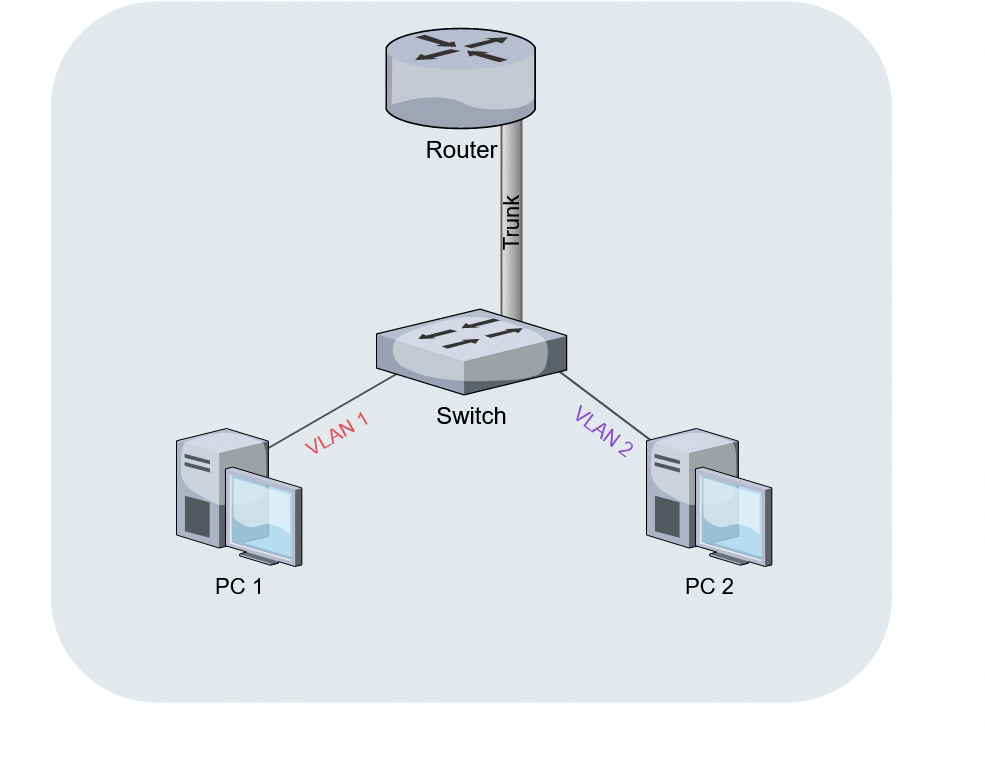
 winter panther
you dont need it
but if he is woried about the temps
its an easy fix
not that there is anything to fix
tame carbon
@ruby bramble CRS305 is quite a nice little switch. It also runs RouterOS and is capable of routing at around ~ 1200mbit/s
I use it as a backbone for a 10G LAN, configured with a bunch of VLANs
winter panther
in my 43 sqare meter flat
i have a problem
it will come in handy
in the future
ruby bramble
tame carbon
<@!705479446546743412> CRS305 is quite a nice little switch. It also runs Router...
I’ve got one Im gonna go with that
I will need the cables tho;(
tame carbon
@ruby bramble if you have SFP+ on either end, using fiber optics is cheaper
10G RJ45 is expensive
tame carbon
You have what, 10G copper on those itx boards?
tame carbon
SFP+ or RJ45?
ruby bramble
Rj45
 ruby bramble
Lucky
tame carbon
2x 10G SFP+
@ruby bramble what you can do, is plug an RJ45 SFP+ module into the CRS305

FS Germany
Check Generic 10gbe SFP+ transceiver module datasheet (10GBASE-T SFP+ Module, 30m, RJ45 connector) and price list. 100% Compatible, Order Now!
@ruby bramble the problem with RJ45 10G is that its expensive no matter what kind of interface you use
since the SFP+ RJ45 modules cost around 50 bucks..
meanwhile, fiber module costs maybe 10 bucks
lemme snap a pic of my CRS305
ruby bramble
Yea
ruby bramble
Yea I need 3 rj45 adapters
ruby bramble
Yea that’s my problem
tame carbon
SFP+ is just cheaper
@ruby bramble might actually be better off buying a different add-in card
ruby bramble
Oh shit I have an idea m.2 to 10g adapter
tame carbon
isnt that just PCIe ?
ruby bramble
Yes


 ruby bramble
Why did it take me a week to figure that out
ruby bramble
Yea I have a gpu I two of my mini itx boards
tame carbon
dont judge the cable mess
the case is tiny, the supply nonmodular
and didnt have enough sata connectors
so I cut off the leads
soldered some extension on it
:D
ruby bramble
I have shitty cable management too
tame carbon
@ruby bramble but ye you can see the RB4011 in there too
It has a single 10G port, which goes to the CRS305

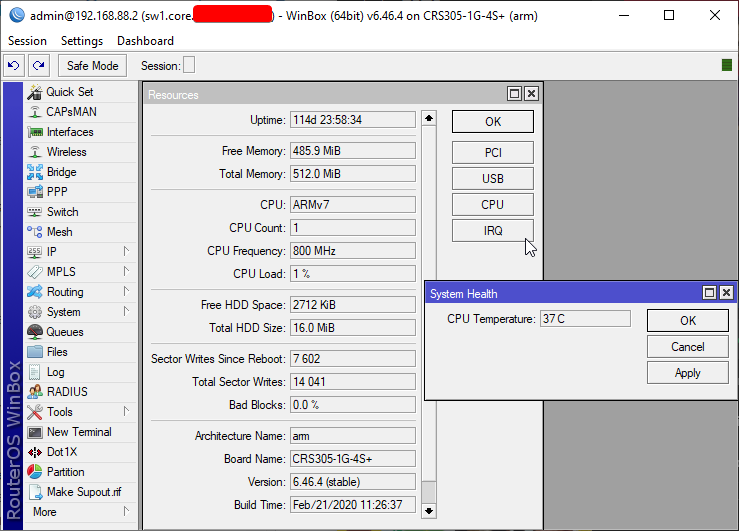
'10G router on a stick'
unborn sluice
that routers looks like 😆
tame carbon

Source of the music: https://youtu.be/QuFTCirwmoM
Please Subscribe to my Youtube Channel
Experience it yourself, call, text, or send pics to: +18589240180
tame carbon
sounds like a horror game with 20s music
waxen scroll
@cold geode what are you doing... they're gonna realize pog isnt woke anymore and remove it
waxen scroll
twitch banned pog emotes
peak cloak
and replaced it with a stupid one
waxen scroll

peak cloak
mikrotik is nice for cheap and good
not the most user freindly UI, but very powerful
wdym? But I have never seen an ad for microtik
what's your internet speed?
and do you also need a wifi router?
because this is pretty good
MikroTik is a Latvian company which was founded in 1996 to develop routers and wireless ISP systems. MikroTik now provides hardware and software for Internet connectivity in most of the countries around the world.
and this is even better
MikroTik is a Latvian company which was founded in 1996 to develop routers and wireless ISP systems. MikroTik now provides hardware and software for Internet connectivity in most of the countries around the world.
But I think it's out of stock
you could go for a cheaper one
MikroTik is a Latvian company which was founded in 1996 to develop routers and wireless ISP systems. MikroTik now provides hardware and software for Internet connectivity in most of the countries around the world.
this?
doesn't have wifi though
can't do gigabit though
no
that's the thing
the ports are limited to 100 Base-T
hmm
yea ik
what is your budget?
that way I may be able to help you better
yeah, maybe if you buy something local it would be better?
because import and all that stuff makes it more expensive
yeah it's stupid