#networking
1 messages · Page 262 of 1
 tame carbon
 ancient basin
Switching between the two wifi networks might not be that seamless with that setup.
 deft reef
ohhh
deft reef
tame carbon
<@!425662540849217538> you can give both APs the same SSID and password
that works?
deft reef
ancient basin
Switching between the two wifi networks might not be that seamless with that set...
that was my concern
tame carbon
@deft reef as long as they operate on different channels, they shouldn't interfere
deft reef
exactly
tame carbon
@deft reef what you are speaking of is seamless handoff & roaming
that's only supported by enterprise hardware
But in a home setting, two APs with same SSID works fine
ancient basin
But should only matter when moving from close to the one router to the other one.
deft reef
ancient basin
But should only matter when moving from close to the one router to the other one...
totally gonna happen tho
ancient basin
Yeah
deft reef
basic layman terms: If i have a smartphone in my hand and I turn on wifi: I will see two wifi networks available from the 2 different routers... i will enter password, etc of both... now myy device will auto connect to strongest wifi automatically?
deft reef
oh.... in my experience it hangs on to the one you connected although there is a stronger nearby one available
tame carbon
@deft reef Phones "remember" a network by storing the SSID and Password
but access points send out a BSID as well
that's a Basestation ID, unique to a wireless transmitter
so even if two devices have the same SSID, your phone still sees two different BSIDs
ancient basin
With some clients that can cause some issues with basic home AP's, so if you have random problems you can try to change one of the ssid's to something different
tame carbon
@ancient basin some chipsets yeah
they pick the weaker signal, instead of the stronger one
but this is usually, because the AP itself has too much transmit power
especially indoors if you have an Access point in each room
you'll want to reduce transmit power
deft reef
tame carbon
It looks at signal strength
if this works then there is no problem... i think i can even try this using my current wifi and a hotspot... it should connect to the stronger signal (i.e the mobile hotspot when i am too far away from wifi) in my experience, it doesnt connect to a different wifi unless i go completely out of range of one... it will cling to it untill signal is basically zero
deft reef
ah
tame carbon
some access points drop a client if the signal gets to weak
hoping that the client will reconnect to another AP
but if that doesnt happen...
you end up in a loop
where the phone tries to reconnect, the AP still thinks its too weak, and drops it again
deft reef
btw what we just discussed, will it create my second router as an "access point"
tame carbon
@deft reef yeah, an access point is like a switch, except wireless
deft reef
cool
tame carbon
by not using the WAN port, its in effect, just a switch/ap
@deft reef and if you want to have a more seamless wireless experience
some brands allow you to set up a managed network
deft reef
so it doesnt matter if the router doesnt have access point support or whatever inbuilt
tame carbon
Like mikrotik allows you to remotely control/configure access points
You can just add more APs and they join the network
deft reef
ohh, cool... unfortunately stuck with what i have
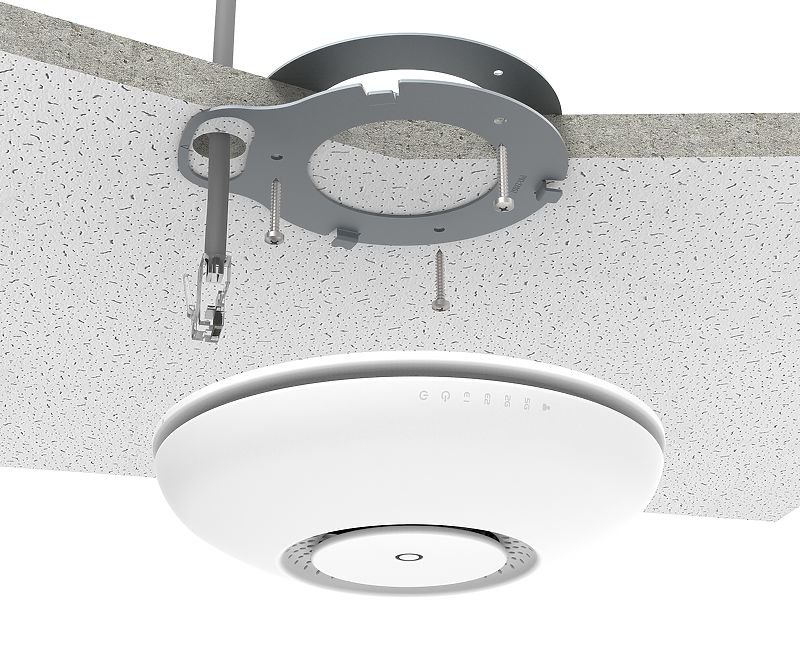 deft reef
ah! I have seen something similar in offices
tame carbon
@deft reef yeah and then i can see those interfaces here
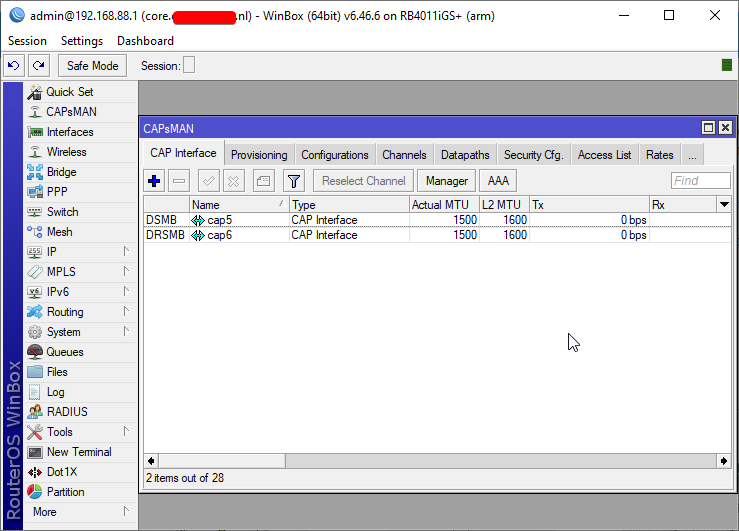
This is on a seperate device
those are "CAPs" controlled access points
remotely managed
mikrotiks are not that expensive, this is probably one of the better solutions for home
deft reef
btw i forgot password of my router settings page... the 192.168....
can i just reset it myself... i dont need to contact the isp to restart the connection or whatever right?
like reset to factory default
tame carbon
probably lol
deft reef
link?
tame carbon
@deft reef I can't make judgement, since i dont know what kind of gear you ahve
if that's an ISP router, itll probably be fine
I just know that I had to manually dial in my settings to get internet
and factory resetting would ruin my entire network
deft reef
oh ok
wait so i just connected my 2 routers using only lan ports
i can connect to the second one fine
but i cant seem to enter its config page
tame carbon
@deft reef make sure you disabled DHCP server, and set its IP to the same subnet as the rest of your network
deft reef
the default gateway printed on the router doesnt connect me to it
deft reef
tame carbon
<@!425662540849217538> make sure you disabled DHCP server, and set its IP to the...
dhcp of primary?
tame carbon
mh. can you speak english/do you want me to help you over screenshare ?
deft reef
sure
 trail hearth
doesn't seem like it yeah
and ive tested it with 2 routers just to make sure im not crazy
 peak cloak
ISP issue?
trail hearth
i feel like it is but my dad seems to think its my fault
peak cloak
Do they do DHCP or PPPoE
trail hearth
peak cloak
Do they do DHCP or PPPoE
not sure
peak cloak
Do you know how it was beforehand?
trail hearth
what i do know is i reset on router because it was starting to act up
trail hearth
peak cloak
Do you know how it was beforehand?
also no
tame carbon
@peak cloak lol I just helped @deft reef
peak cloak
Nice
tame carbon
he count access router page, he reset, and no internet
he called his isp, got the pppoe details luckily
deft reef
yep!
tame carbon
@trail hearth call your ISP, you may need PPPoE login details
peak cloak
I'm over here trying to remove an electrical box to run ethernet
New construction boxes that are nailed to the framing are a pain to remove later on
trail hearth
tame carbon
<@!220470729244803072> call your ISP, you may need PPPoE login details
if only i knew what that meant XD
IP address Subnet Mask and Gateway are all set to 0.0.0.0
tame carbon
@trail hearth PPPoE is a connection type
Point-To-Point Protocol over Ethernet
If you dont get an IP with DHCP, you probably have some other way of connecting
PPP is very common, ADSL uses it too
trail hearth
OHH
wait i think i have some more info
@tame carbon so there are 7 options for wan/internet type it is defaulted to DHCP but there is also PPPoE static PPTP L2TP 3G modem and disabled
tame carbon
Yeah, so DHCP is the typical mechanism, this is what typical home LAN uses
if you connect to wifi
thats what assigns IPs
Static means, you manually set it
And PPPoE, PPTP, L2TP are all tunnels
trail hearth
from what you've said and what i understand my ISP is using either PPPoE or PPTP which requires them to be here with a username and password
trail hearth
yeah welcome to living out side of the US/Canada/Normal western countrys
i am from the US tho
trail hearth
Yike
tame carbon
you have to call them
and ask
Just ask them for the connection type
and what login information you need
trail hearth
BAHAHAHHAA
tame carbon
did it obtain an address?
trail hearth
if i connect to the wifi or lan it still wont like connect
it says connected no internet
tame carbon
can you screenshot the router info page?
trail hearth
but under the WAN tab in router setting it does have all of the stuff i plugged into the static ip page
lemme DM it to you
 mellow heart
Is it okay to ask questions about Synology here? I'm having issue with it not syncing to my B2 bucket even though it says it is
 frozen juniper
Is there any way to change the wifi IP on different sessions?
LIke the wifi ip on discord is not the same as the wifi ip on youtube
if that makes sense
peak cloak
@frozen juniper huh, is this on some school wifi or hotel WiFi?
peak cloak
Huh?
peak cloak
I'm talking about your internet
peak cloak
Oh, you may be under cgnat
A small amount of public ips are shared by a large amount of people
frozen juniper
Is there any way to fix this?
tame carbon
aren't all the .io games fake multiplayer?
@frozen juniper there's nothing you can do. get different internet provider that doesnt use cgnat
or set up a reverse proxy
 waxen scroll
Reverse is for hosting things.
 thorny vector
Got some free college through my work. Best part? The .edu email account, signing up for all the free things!
 little schooner
@thorny vector youtube premium, spotify, microsoft imagine and many other things. yes its so great
ohh how could i forget prime lol
prime a big one.
thorny vector
Couldn’t care about those. Office, All autodesk products, GitHub, those are the good ones
Visio 2019!
 merry raft
Free jetbrains was so handy at uni
thorny vector
Forgot about that one. Although I usually use atom, anyways
little schooner
visio 2019 still crashes a lot for me
I thought from 2016 to 2019 would make a difference
nope.
 thick minnow
Guys, i am dying about this... what would be the best; a 5000sq feet wifi router, or a 5000sq feet BUDGET mesh network?
debating between the mesh TP-Link Deco M5 and the router ASUS RT-AC88U
tame carbon
@thick minnow asus routers are the worst
thick minnow
But, everywhere i look, its getting good reviews 😢 what to do what to do 😦 i was looking at Google mesh, but that would run me 350€ which is to much :/ i want to spend like 200€ max to have the same network all over my house
tame carbon
@thick minnow If I can give you a pro tip
stay away from meshing solutions
a wireless network backed by ethernet cables is a much more stable and reliable option
thick minnow
So you would also pick a long range wifi router over a mesh?
tame carbon
nah, you have multiple access points
all connected to the same LAN
you have access points in areas where you need connectivity
@thick minnow mikrotik sells the cAP ac

MikroTik is a Latvian company which was founded in 1996 to develop routers and wireless ISP systems. MikroTik now provides hardware and software for Internet connectivity in most of the countries around the world.
These are pure access points, cost around $60 each
they do 2.4 and 5GHz wifi
the idea behind this, is that you have one central router that acts as the controller to the wifi
and you can have as many of these access points as you want
thick minnow
but, isnt that the same as a mesh then?
tame carbon
nah, with mesh, the individual access points aren't fed by a cable
rather, they connect to eachother
wirelessly
thick minnow
aaahn but i do not have UTP everywhere
tame carbon
Even so, I still recommend running some cables
thick minnow
like no where tbh xD already have my solar panels connected through powerlines
tame carbon
All I can say is that when it comes to unreliable wifi
its often repeaters or mesh routers that are to blame
tame carbon
@thick minnow spending a weekend running some ethernet, will save you a mountain of anger having to deal with shitty wifi
thick minnow
my friend says to only get the expencive meshes, he told me that if i only wanted to spend about 200€ getting the asus long range is the best option. he also told me about wiring, but, this is a very old house, and my wife has an allergy to visible cables haha
thick minnow
But is there another brand that would do 3500+ sq feet for around 200€?
tame carbon
@thick minnow not without running some cables :/
a mikrotik setup with 3 APs and a controller is around 200-230 euros
https://mikrotik.com/product/cap_ac <-- AP's
MikroTik is a Latvian company which was founded in 1996 to develop routers and wireless ISP systems. MikroTik now provides hardware and software for Internet connectivity in most of the countries around the world.
MikroTik is a Latvian company which was founded in 1996 to develop routers and wireless ISP systems. MikroTik now provides hardware and software for Internet connectivity in most of the countries around the world.
And a router as controller
If you already have a router, the cAP ac can also act as a controller
you can 'promote' one of them to control the others
they all send out the same network
and your phone or laptop connects to the nearest one automatically
thick minnow
Alright, ill look into wiring some CAT7's, maybe over the outside walls of the house
thick minnow
I have 5gbps
tame carbon
5G uplink?
thick minnow
5000mbps down, around 500mbps up
thick minnow
but i do not have a router that can give me that speed haha
tame carbon
what.
why
MikroTik is a Latvian company which was founded in 1996 to develop routers and wireless ISP systems. MikroTik now provides hardware and software for Internet connectivity in most of the countries around the world.
thick minnow
i have a business fiber line
thick minnow
Haha but i am quiting my business, so i am thinking of downgrading to a regular customer plan 🙂 which is 400mbps down, 50mbps up
tame carbon
w-wha
ok whatever
@thick minnow well either way
give it some thought
if you need some pointers on what to buy if you consider getting mikrotik, feel free to ask
they have a lot of gear, and its very affordable but offers enterprise features
thick minnow
thanks ^^ anyway, ill still wire some utp's, and think about it in the meanwhile hehe ;p
tame carbon
MikroTik is a Latvian company which was founded in 1996 to develop routers and wireless ISP systems. MikroTik now provides hardware and software for Internet connectivity in most of the countries around the world.
they have that RB4011 also with wifi equipped ^ xD
I have this one mounted in a rack, so I have no need for wifi
I have two additional access points in the living room and bedroom
both are controlled by the RB4011 in the attic
https://cdn.discordapp.com/attachments/776722183119699988/777646103775674368/IMG-20200922-WA0001.jpg

:D
but yeah if you need highspeed routing at an affordable price
RB4011 is king
thick minnow
damn 😄 haha thats pretty hot xD
tame carbon
@thick minnow and with SFP+ if you have a compatible module
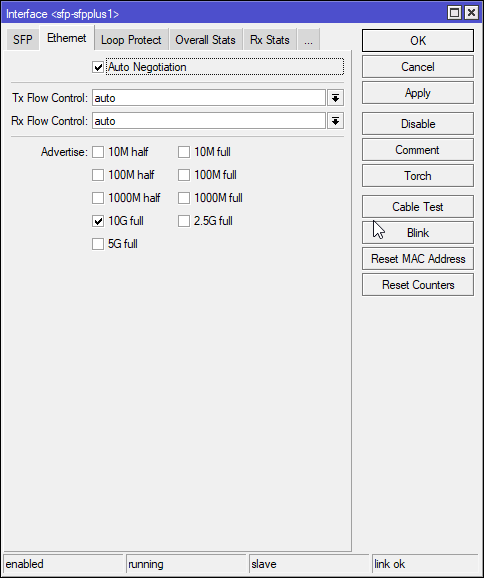
can do all those speeds ^
 buoyant shell
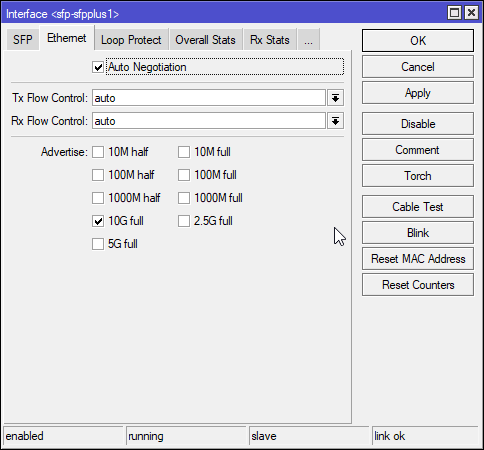
What do these mean?
Because I was messing around and it was on auto and it’s connected to a switch
Ik what full duplex is and half duplex is but confused on the numbers
 fleet widget
Cable fishing nightmare: trying to fit 2 cat6 cables along w/ 2 ftth fibers + 1 phone line in a <1cm radius tube that is embedded inside the wall
 vernal jacinth
@buoyant shell The numbers refer to the interface speed (10 is 10mbit), for details see https://en.m.wikipedia.org/wiki/Ethernet_over_twisted_pair#Naming. Keep in mind that you need to match the setting on both sides, you don’t want to set one side to auto and one side to a static setting, see https://en.m.wikipedia.org/wiki/Autonegotiation#Duplex_mismatch for some more details. If possible keeping both sides on auto is probably the best default
tame carbon
@buoyant shell Simplex is what a radio station does, one party sends, another receives
Duplex means you can have two-way conversations
That has two variants. Half-duplex, which is like a walkie talkie
only one side can speak at any one time
And then there's full-duplex, which allows both parties to talk at the same time
Duplex Gigabit is 1000mbit/s in either direction at one time
Full duplex gigabit means you can have 1G in both directions at the same time
 thorny vector
@hollow marlin https://interestingengineering.com/institute-breaks-transmission-world-record-with-125000-gbps-using-an-optical-fiber

To conduct their experiment, the researchers developed a wideband transceiver subsystem.
 clear igloo
1 petabit per second (125,000 Gbps)
capitalization matters dang it!!!!
waxen scroll
👀
little schooner
comcast should translate that to more upload speed for all customers.
clear igloo
They do, the translate it exponentially to more $$$ for them
 jolly shuttle
hay guys. i built a home nas running unraid. my hardware is a q9450 core 2 quad on a asus p5b deluxe with 8gb of ram (just some hardwware i had around) with 2 8tb wd red's. all works fine but the only issue i have is with download speed. i have a 1gb down 50mb up DOCSIS31. connection and when i run a speed test or download a torrent i only get like 650mb out of my 1000. on my pc i get the full 1000 so its not isp related and if i transfare files using SMB i get the full 1gbps. any idea what the issue could be ?
waxen scroll
@clear igloo lets put in some iWAN
blobs mom needs an SD-WAN solution for all the providers they waste money on

 spice sage
@jolly shuttle How are you testing the download speed? Don't know much about these kind of setups but if you're testing on your PC and saving to the NAS that might explain iut.
clear igloo
waxen scroll
<@!291198741862416384> lets put in some iWAN
iWAN you to buy DNAC license 😄
waxen scroll
no pls
 hallow nimbus
jolly shuttle
hay guys. i built a home nas running unraid. my hardware is a q9450 core 2 quad ...
hallow nimbus
jolly shuttle
hay guys. i built a home nas running unraid. my hardware is a q9450 core 2 quad ...
I smell ziggo 😂
jolly shuttle
hallow nimbus
I smell ziggo 😂
Ziggo??
jolly shuttle
hallow nimbus
They offer those same speeds
No am in Germany with Vodafone
thorny vector
`@jolly shuttle Are you downloading from a PC that saves to the NAS?
merry raft
would there be any significant difference in terminating a solid core cable with an RJ45 jack and plugging it into a switch
VS
terminating the solid core cable at a patch panel and then running a standard patch cable from the panel to the switch? (Assume the other end of the solid core cable is terminated at a wall outlet)
 visual crest
https://www.amazon.com/C2G-27229-Velocity-Mini-Coax-F-Type/dp/B0002J24PI/ref=sr_1_9?dchild=1&keywords=slim%2Bcoaxial%2Bcable&qid=1610332241&sr=8-9&th=1
would like work? or just as the reviews mentioned, the lack of shielding will make it not usable?
thorny vector
Lack of shielding is usually a non issue unless you're going to be running it by noisy stuff
Or power lines
 granite elm
merry raft
would there be any significant difference in terminating a solid core cable with...
granite elm
merry raft
would there be any significant difference in terminating a solid core cable with...
I believe the only major difference is organization and being more neat
visual crest
ahh, got it
really need to replace the stiff cable that keeps on pulling the modem
I'm seeing the coaxial cable has different types? RG6, RG316
are they similar?
thorny vector
Different coax types refer to their different resistance in ohms@visual crest
Really not much difference for consumers that are mainly receive only transmissions
 spiral drift
if I set an ISP issued gateway to cascade/ip passthrough to use my own router, can I still use the LAN ports on the gateway to hook in to my home network?
visual crest
@thorny vector ahh, gotta read into it when I have time. thanks!
thorny vector
@spiral drift probably not, if you’re passing your public IP through to your own router.
But if it’s just doing a NAT through, then potentially
 royal bane
Does anyone know how to prevent my network driver from updating?
 wheat haven
thorny vector
wheat haven
thorny vector
@royal bane In windows?
royal bane
@thorny vector yes
thorny vector
Why? newer driver unstable?
Discusses how to prevent a problematic driver from reinstalling automatically in Windows 10 the next time that Windows Updates are installed.
 subtle glen
 lean pebble
Hey guys, someone here familiar with openvpn and pfsense?
thorny vector
@lean pebble yep
lean pebble
Can you help me understand how to configure the openvpn rule in pfsense
I tried every combination and nothing worked untill I did rule in wan from any to any for testing
thorny vector
Let me see?
lean pebble
thorny vector
And this is for a openvpn server you're hosting?
lean pebble
My friend trying to configure it for his business
Now we're getting everything ready before he opening his business
 desert briar
If you use the automatic wizard for openvpn it does all the rules for you
lean pebble
We did but it didn't add the wan rule for some reason
thorny vector
Yeah ^. Then make sure you install the export wizard package for easy config export.
desert briar
OpenVPN is encryoted by default. You mean certificate auth?
lean pebble
Ya
desert briar
lean pebble
We did but it didn't add the wan rule for some reason
@lean pebble its a checkbox, somewhere in the wizard
lean pebble
Are you sure openvpn is encrypted ?
It uses udp @Lavenza#8272
thorny vector
Yes, it's encrypted regardless of TLS cert auth.
lean pebble
Ok
thorny vector
@desert briar Nah, fam. I do all my tunnels over telnet, lol
thorny vector
They can't track your data if you fill up their loggers and indexers with trash data
 desert briar
They cant track your data if you host your own services 
thorny vector
I recently reached a new benchmark. All the stuff I self host generates 26GB of logs a day
desert briar
@lean pebble there should be an option in the wizard too, to include certificates. Once thats done, download the plugin as roaldi said and u can easily export your configs with 1 click
Damn, thats a lot. For how long can you hold onto them?
thorny vector
Forever
thorny vector
desert briar
Ehm
You lucky ****
Im so jelaous
Lol
Splunk enterprise
Never got to work with that
thorny vector
Got that 50GB dev license
desert briar
Mostly use ELK
Ive read something about it, never researched it though
I just know the free tier isnt sufficient for me anymore
thorny vector
It's nice. Its easy to get a 10GB dev license, got the 50 through my team's splunk sales rep
desert briar
Yeah well, I doubt I can get my hands on it as im offensive security.
Have licensing for other cool tools though
Nessus, Burpsuite
Kind of useless for a homelab though 😄
thorny vector
Got a cobalt strike license? 🙂
desert briar
Nope 😆
But I might ehm
Have a working version of it
Dont like it much honestly. Although the newest addition (Beacon object files) are really cool, would love to research into it. Just dont have that time
thorny vector
I don't use it much to be honest. When I do any threat emulation, I prefer just using on system tools. Give me powershell, and I can usually do whatever I need to do.
Oh, speaking of fun stuff, read up on GoldenSAML yet?
desert briar
Yeah well, the thing is cobalt strike wont give you threat emulation. People using it will
I mean, as far as I know its an older attack. 2018 maybe? Never really payed much attention to it
But i guess that from the name
thorny vector
It's how they got into Orion
desert briar
Its similar to a Golden Ticket 😄
Yeah well, these people use some crazy methods. Some APTs are really mad
When it comes to their own tooling and exploits
Im trying to get a threat hunting certificate from elearnsecurity, so im doing their course. Its fun, similar to puzzles. Hunting attackers and their steps
Sophisticated APT attacks are very uncommon from what I’ve seen
thorny vector
Work for a private company?
desert briar
The danger of APTs is their persistent resources, and the fact that they can hammer your defenses 24/7 for 6 months straight due to the amount of people they have
After that time, its only a question of time until they get in
Their attacks though are often “basic” using very common techniques. Using tools like mimikatz and what not
The dangerous APTs which just pop 0days and what not... theres just few of them. And well, they are dangerous 😄
And I work for a pretty big corporate
thorny vector
My favorite one I've seen with a customer was an email exploit of postfix that did cli injection from the "TO:" header
desert briar
Yeah, a lot of stuff you can do with those
But again, a chance of you getting that sort of attack is really low
Mostly its phishing, password spraying, reuse of passwords
Human factor that fails, not the tech
I mean when I did a phishing exercise like maybe a year ago, we gathered a list of 110 employees of the bank which hired us. It was a nice targeted christmas themed attack
From the 110 employees, like 80 got phished?
What was even funnier was that we sent an email to the CEOs secretary who then resent it to her CEO. And he got phished too, lol
Eventhough we never included him in our attack due to rules saying not to touch the management
thorny vector
Yeah. I use the snort Emerging Threats, and GPLv2 ruleset on my WAN (and some of my own secret sauce). I have a fun little 30 day tracker for everything that's tried to hit my router. Most of it is the usual someone trying to sweep netblocks with easy exploits, but on occasion I have something coming out of known TOR exit nodes trying to hit me, or my websites
desert briar
It is what it is. On average it takes 3 minutes for a device with a known vulnerability to get hacked, if put on the open internet
Its almost never a targeted attack
That being said, rather safe than sorry. Employ proper detections and have audits once in a while.
Then hope you don’t get 0dayed, although chances of that are pretty low
thorny vector
If I get 0dayed, then someone REALLY wanted to burn it for all my super important memes.
desert briar
A project I want to do is to make an active directory lab with a financial look to it. Make a fake website and what not, expose it on the internet. Introduce an obvious vuln into the network and hunt for attackers
Idea being to capture some cool exploits, hence the financial sector
Im just worried that if someone poses with an exploit to move across active directory they also pose with an exploit to escape my virtual machine and pop my vcenter, lol
thorny vector
I've thought about doing some sort of honeypot too, but I get the same fear, lol
desert briar
So ill probs do it on AWS, once ill decide that I dont need no savings 😆
Would cost me like 130 a month for a basic network with 4 machines. Eventhough its not enough
thorny vector
Damn, really? I haven't touched AWS in a long time, didn't realize it was that much
desert briar
It is, windows VMs are expensive
thorny vector
Maybe linode?
desert briar
Meh, never used it
Im a digital ocean guy, or well, used to be. Have no need for any external stuff now
Run everything locally
Dont even expose stuff to the internet, have nothing to host 😦
thorny vector
I haven't either, but I hear good things about it
desert briar
I tried my luck with smtp once. But dkim and dmarc woke up suicidal tendencies i never had before
And i was like
No way in hell im doing this
 unborn sluice
You should
thorny vector
OH MY GOD. I roll my own email server, but if it went down, and I couldn't recover? I would NEVER rebuild it.
Worst build in my life
desert briar
That being said. I had it working
For like a month?
But every single damn email
Went to spam
unborn sluice
Your domain shady
desert briar
And whats a point of paying a service to forward those emails for you
thorny vector
Usually its not the domain, its the netblock
desert briar
Nah its not, i indexed google on it for 3 months haha
thorny vector
really? thats weird.
desert briar
Was classified safe as netgate or whatever it was
unborn sluice
You shady
desert briar
I could be
But i choose the ethical side
Hah
But yeah, screw running your own email. That thing is a hell
And as you said, its one of those things which even if you build
You dont touchy touch
You dont update or reboot
Because if you do and something screws up

“Boss, i recommend you just use gmail”
desert briar
😆
The closest I got to hosting was a minecraft server for a friend. But other than that, yeah. I have no use for external services
unborn sluice
thorny vector
Before every update, I snapshot that mofo
live dangerously , turn on auto update
 desert briar
All is on my internal network. Which im slowly migrating to 10gbit
thorny vector
I keep thinking about skipping 10gbe and using infiniband for that cool 40gbe
but the setup and compatibility with vmware...
desert briar
I mean my lab is 10gbit, talking about my whole network
Wifi6, 5ghz as well for wifi
And 40gbe is not worth it imo. Unless your storage is all SSDs, you wont be able to use it properly
Additionally, the heat from all those transceivers and what not is mad
thorny vector
I do a little iscsi, so I could definitely use it. Same with some docker gpu containers and gpu accelerated DB's that would benefit from as fast network speeds as possible
desert briar
 sand basin
best cable ties ever
sand basin
best cable ties ever
@sand basin 😉
And that would make sense. Have no HA at home, so no need for iscsi
My next plan would be to get a supermicro server though, one which can hold like 25 lff drives
And configure that for HA with my vcenter
$$$ though
Refurbed supermicro chasis Id like is like 400$. 12tb or 8tb drives arent exactly cheap either 😃
thorny vector
I still have unused drive bays I need to fill. Honestly, the worst part is taking down my SAN's to increase capacity. Everything else I can bring down pretty easy, and HA takes over and keeps my important hosts up.
But if I need to update and reboot or upgrade a storage node? Forget about it
thorny vector
Virtualize a san?
thorny vector
Thats.... ewww.
desert briar
No idea how its done
As I said though, next homelab upgrade, once I save up like 5k
thorny vector
And I have 2 SAN hosts, but they only replicate to each other when HA determines it needs to transfer storage hosts.
desert briar
Yeah, thats a coolio setup
 slow pivot
I need to fix up HA on my vcenter
desert briar
It is a lifechanger, but Id prefer to eat than having an extra 8tb drive
Being a student amidst pandemic
cough cough
Christmas sucked me pretty dry anyways. Next purchase for a homelab is far far away 😃
thorny vector
Combine that with 26 gb of logs a day... I'm always having to add storage to stay ahead of the curve.
desert briar
If I were you I’d just add a retention policy of like a month
Unless you are mandated to keep logs for longer by some regulations
But what you have sounds more like a business, not a homelab so 🤷♂️ 😄
thorny vector
Once it reaches 90 days, it goes to my frozen bucket location. But I'd like to keep logs at LEAST 3 years.
I also do full packet capture of my network, and I keep that for about a week before it rolls over.
slow pivot
This isn't for a home lab is it?
thorny vector
It's my homelab
slow pivot
That is pretty hard core for even most commercial setups
desert briar
I use securityonion with a retention policy of like 3 weeks
But thats about it
Called homelab for a reason 😆
Not enterprise-lab haha
Nice setup you have going though
thorny vector
oh god, I hate security onion. Especially 2. Stupid docker containers, stupid salt stack, WAAAAAAY overcomplicating how they do things
I'm busy rebuilding a full replacement, but the hard part will be selling to my work to stop using SO, and use my homebrew
desert briar
Yeah i dont like it much either tbh
Wouldnt use it in an “enterprise” environment
That saltstack documentation is pretty bad too
Took me 3 days to change some conf settings so that salt stack wouldnt revert them
And now im having issued where I need to login twice everytime
Im playing with standalone elk now, its really neat. In docker with tls
thorny vector
desert briar
Wouldnt use it in an “enterprise” environment
Wouldn't use it in an enterprise environment? Oh boy, you wouldn't believe.
desert briar
The stack also comes with an EDR, which is pretty basic but sufficient
And yah I know ppl use it. But Im saying that based on my personal experience
I wouldnt
The moment I get this elk stack working im removing so
What do you use for packet capture?
thorny vector
security onion (16.04)
thorny vector
Just a HEC forwarder in logstash
desert briar
Fair enough. I wonder if there are any other full packet capture tools or distros
Realistically speaking
I just need to capture pcaps in lets say 3 hour segments and then just store them
thorny vector
Molloch isn't half bad. Busy building my own, but fine tuning it is awkward.
For that, I would just use TCPdump
desert briar
Moloch is fine, never had luck with it
And yeah but tcpdump is dumb, lol
Like not dumb dumb but
Its a “hacky” implementation haha
desert briar
Nohup it, check for running processes to see if its up. If not start it again. Restart it every 3 hours yada yada
A lot of fine tuning
slow pivot
What tool(s) do you use to analyze those network dumps?
thorny vector
Everything gets dropped into splunk
Bro does a little pre-processing to extract some of that good-good (like files or classifying by protocol) but all the real searching is in splunk
desert briar
Wireshark, RITA
Theres one more, cant really recall
But it depends. You usually use some tools to look for anomalies. Once you identify an anomaly you look at a full pcap from that timeframe
Go in steps
thorny vector
Splunk cluster, just do it all at once 😉
desert briar
So like you either maybe gt a detection trigger on your dashboard and then you look at it closer with wireshark or some GUI
slow pivot
Yeah, looking through 60GB+ network caps in wireshark is rough
desert briar
or maybe you use network miner to look for some suspicious files, addresses, URIs, MACs
get a timeframe, and then investigate further
thorny vector
@slow pivot https://github.com/odedshimon/BruteShark

GitHub
Network Analysis Tool. Contribute to odedshimon/BruteShark development by creating an account on GitHub.
desert briar
you can use tshark and what not
thorny vector
BruteShark is like network miner. But better.
desert briar
this is generally a new field for me, I always focused on attacks, never on detections
so yeah, take my words with a reserve
thick minnow
hi guys i bought the quadcast along with a mic stand and it was working fine until i got the stand installed it and now it says advanced usb device and sounds really bad
desert briar
well, "never on detections". Never really payed attention to IOCs generated from certain tools. Looking for suspicious behaviour and what not. I know do's and dont's of "attacking", but never really looked at it from the eyes of a blue teamer
slow pivot
thorny vector
<@!189577713026072576> https://github.com/odedshimon/BruteShark
Thanks will have a look. My use case isn't security though. That large cap came from a high speed cluster that locked up over a couple of minutes
desert briar
@thick minnow , you might want to try one of the tech support chats. Other than that, make sure drivers are installed, its currently plugged correctly... See if the microphone cable isnt near power cables (interference, although unlikely)...
tame carbon
@thorny vector I've actually seen projects that actually program their filter rules and analysis into the network equipment
friend of mine worked on something like that, he couldn't share many details cus confidentiality
but apparently they write erlang rules into the forwarding software for networking switches/appliances
allowing them to do realtime analysis at rates of over 100gbit/s
waxen scroll
well ur friend sux, tell them you can go buy from gigamon or ixia instead
infact using anything but dedicated taps and aggregators is bad and your friend should feel bad
its even bad at lower speeds
if you're security minded, missing one packet could be critical. if you're performance minded missing one packet could be critical
know what happens when you use on-device packet fowarding? you miss packets. you cause load. you make performance issues
is that 100% of the time? no.
@hollow marlin tappy tap tap
 storm spire
Am I screwed because I have a ton of those n my house?
peak cloak
another reason not to trust cloud
storm spire

 vale reef
just change your password and turn on 2fa (for now)
storm spire
Alright...it's not my account actually it's my dad's. I'll let him know
I'm sure he already has it on
storm spire
I hate this year I wanna go back
little schooner
Zero trust is a thing
 hollow marlin
Zero trust is trying to be a thing. It never will
 waxen saddle
Not if web certificates keep forcing us to trust things.
 spark marsh
can some 1 tell me a wireless wifi card with monitor mode???
 astral harness
Anyone have any suggestions for how I can improve my internet speeds to my PC that I can't run wires to from my router? I'm using an ethernet powerline adapter and it works fine, but I have to switch to wifi to get good download speeds. Wifi would be OK but the latency sucks. I have 1gbps internet so I have quite a bit of headroom
peak cloak
astral harness
Anyone have any suggestions for how I can improve my internet speeds to my PC th...
if you have coax already in the walls, you could use a moca adapter
peak cloak
moca adapters are expensive tho
astral harness
looks like they're around the same price as a powerline adapter
thick minnow
when creating a firewall rule in ubiquiti, is the source port group referring to the ports that will be opened on the router? or are they the ports which incoming connections must originate from?
peak cloak
thick minnow
when creating a firewall rule in ubiquiti, is the source port group referring to...
I would assume from a physical port (aka interface)
thick minnow
so would that be the port that the source of the connection connects to?
for example, if I want to forward port 10 on a local machine to port 25 on the router, would I set destination port to 10, and the source port/port group to 25?
and then set the source IP to whatever IPs I want to allow connections from?
peak cloak
thick minnow
for example, if I want to forward port 10 on a local machine to port 25 on the r...
you don't port forward locally
that's only through NAT
peak cloak
thick minnow
so would that be the port that the source of the connection connects to?
no
I don't think so
wait
idk
UnFi makes simple things sometimes so complicated
peak cloak
thick minnow
for example, if I want to forward port 10 on a local machine to port 25 on the r...
I don't understand
meaning, between router and pc
thick minnow
like
if I want to port forward, but only to a specific range of IPs instead of allowing all connections, I use a rule because it supports IP groups instead of creating a seperate rule per IP
it seems that the source port is the port forwarded port
peak cloak
- You don't port forward on a LAN, port forward refers to NAT, you just want to open the firewall
- " I use a rule because it supports IP groups instead of creating a seperate rule per IP" - Yep, only need to update the group instead of having to update everything
thick minnow
peak cloak
1) You don't port forward on a LAN, port forward refers to NAT, you just want to...
it just sucks ubiquiti doesn't let you port forward using an ip group
peak cloak
port forward or a firewall rule?
I looked at the docs and I'm pretty sure you can make a firewall rule using an ip group
thick minnow
can you port forward through firewall rules?
peak cloak
thick minnow
can you port forward through firewall rules?
portforwarding is a NAT thing
forwarding a specific port to a specific device though NAT
on the LAN side, for example you want to allow one vlan to be able to talk to another vlan though a specific port. So you would create a firewall rule to allow new connections on port x from vlan 1 to vlan 2
and in the other direction as well
you would also need a Allow established and related rule
This image really helps
Doesn't cover everything, but I now understand firewall directions because of it
lean pebble
Does anyone knows how cloudflare Argo works and how to configure it to rdp ?
I followed the documentation without success.
 lavish plank
Hey guys, you know if there are any bandwith limiting apps for macos or windows that can help me reduce bandwith on certain devices?
My uncle takes up all the bandwith and data. I am using a JIOFI(India)
unborn sluice

thick minnow
Does anyone know what camera and software i would need to make a security camera with raspberry pi as server/storage
unborn sluice
have you considered
thick minnow
nono thats not waterproof
 jaunty talon
768 cores in one picture :D
jaunty talon
I dont know what I am going to do with them :D
clear igloo
Make a domino line? 😄
jaunty talon
hahaha
tame carbon
@jaunty talon time to run some ackermann calculations
jaunty talon
They're leftovers :D
 desert briar
Not that i have a motherboard which could fit those CPUs anyways, but damn man. Those are some epyc CPUs
Pun intended
Damn, these go for 3k refurbed on ebay
jaunty talon
haha yep :D
jaunty talon
Those look like demopool stuff :D
clear igloo
Nah, they were sitting at my desk for forever, they're back in the lab now
jaunty talon
@desert briar correct, i work as an infra architect
clear igloo
@desert briar Kind of, I'm a network engineer myself
desert briar
Yeah well, I hate both of you then 😄
jaunty talon
haha
desert briar
I love my job, but theres no chance for me to get any "old equipment"
well, good for you guys
Any plans for all the cores?
desert briar
weird flex but ok
jaunty talon
too much work to reinstall and bring it from dc etc :D
I might actually use one of those cpu's to upgrade a machine running irc-servers
beside that i dont know
desert briar
Nice. I mean I dont even know why I would need those CPUs 😄
I have 32 cores total at home
and I utilize like 20%?
jaunty talon
haha yeah
desert briar
Its just the feeling of having such powerful gear 
anyways, enjoy them!
and if you ever go bankrupt needing quick 300$ just let me know 😃 (yes, there is one missing 0)
waxen scroll
lurick = lab tech
sorry not sorry
xD
@clear igloo current job just calls almost everyone in IT "lead"
clear igloo
lol, I am far from lab tech but I will go into the lab without fear 😛
waxen scroll
when everyone is senior who is junior?
🤔
oh right. they decided not to hire juniors anymore

unborn sluice
clear igloo
Senior Super Lead Architect Knower of Stuff Person
tame carbon
accurate job description
lean pebble

waxen scroll
erina pls, why would you pay for nitro

oh nm i clicked it and saw nitro. read it too fast
 pale junco
Guys I'm having trouble setting up my asus rog rapture gaming router could anyone help me?
pale junco
what/
?*
Ive had this router for like a year now I still don't know how to set it up.
peak cloak
wdym by set up?
pale junco
Setup
peak cloak
have you been able to login into the router?
pale junco
yes
peak cloak
ok and what's the issue right now, anything specific?
pale junco
it doesnt have a network connection
i tried connecting two routers together and it didn't work
pale junco
do you want a picture
peak cloak
unless you can put the downstream router in AP mode
pale junco
whats an ap
peak cloak
access point
pale junco
how do i do that
peak cloak
well, show a diagram of your network first
pale junco
my english is bad whats a diagram
peak cloak
let me show an example, give me a sec
pale junco
ok
peak cloak
very bad rough diagram of my network
pale junco
man i am only 14 whats this stuff
pale junco
how do i give you a diagram
peak cloak
I did it in paint, then WIN + SHIFT + S, then paste in discord
peak cloak
because I don't understand what you are trying to do with 2 routers?
unless you can explain it?
pale junco
i take a ethernet cable plug it into the asus router and an another router
and it works but its still slow man
peak cloak
why? to increase wifi range?
pale junco
no
so i can put internet connection in the router
because i cant figure out how to do so
peak cloak

pale junco
hahaha
peak cloak
can put internet connection in the router
wdym
pale junco
is there subscription i can pay for
so i can have internet connection
because the router doesnt have internet connection like my old one
peak cloak
do you have an Internet Service Provider?
pale junco
yes i do
peak cloak
did they give you some sort of box
pale junco
i ordered it from a gaming site
and no
i didnt buy it from my internet service provider
peak cloak
ok, but where does the cable from ISP come?
pale junco
what cable
peak cloak
well for example I have fios, they have a fiber network. Their fiber cable gets plugged into an ONT which converts fiber to ethernet
which then plugs into my router
pale junco
yes on my old router
my service provider say they don't support asus
so i am confused
peak cloak
you know what type of medium your ISP uses? Fiber, cable (coax), dsl, LTE?
what is your ISP? maybe that would help
pale junco
its STS
peak cloak
oh STC
peak cloak
well that's a router
pale junco
yes router
peak cloak
that router kinda sucks tbh
pale junco
what does tbh mean
peak cloak
to be honest
peak cloak
overpriced, not much features, looks ridiculous, wifi is probably not much better than a 100 dollar business access point
 west vortex
Look what came today ooooh it’s so lovely
pale junco
actually it was like 800 dollar man
 pale junco
is that a router
peak cloak
well that's my whole rack
pale junco
ok
peak cloak
this is my router
pale junco
how do i do that
pale junco
yes
peak cloak
do you have fiber? DSL? 5g home internet?
pale junco
Where do i buy a modem
peak cloak
because something needs to connect to their 5g network
idk if modem is the correct wording
pale junco
so i need a modem so i can have internet in my router
peak cloak
which means NAT mostly, but also firewall, dhcp, dns, all that fun stuff
pale junco
so i need nat fire wall and dns
peak cloak
pale junco
so i need a modem so i can have internet in my router
I can't find find anything on 5g
peak cloak
pale junco
so i need nat fire wall and dns
no, I'm just saying what a router does
peak cloak
fiber
pale junco
how do i get fiber
pale junco
ask them what tho?
peak cloak
they need to run fiber to your home
pale junco
ok and how do i get a modem
peak cloak
you buy one, but I can only find things about 4g LTE, not 5g
pale junco
will the fiber thing dangerous?
peak cloak
what fiber thing
pale junco
the fiber runs through my home is it dangerous'
pale junco
so basically i need fiber and a modem so i can have good internet
pale junco
is their like a amazon cart full of those stuff that i can buy
peak cloak
you would need a 5g adapter things if you still want to use 5g internet from your ISP, or you can see if they have fiber at your location
pale junco
and one more question can i buy a server
peak cloak
a server for what
pale junco
for my internet
pale junco
no like i want to buy a company thing server proxy thing
like ninja
how much will it cost tho
peak cloak
that won't really help unless your ISP has really bad routes
pale junco
so basically i need fiber and a modem so i can get good internet
pale junco
whats verizon
peak cloak
an ISP here in the US
pale junco
ok
so ill just hit them up and say give me good service and fiber internet running through my whole house and a fiber ethernet cable and a fiber modem
peak cloak
pale junco
what do i say
peak cloak
you need fiber to the home
pale junco
is that a company \
peak cloak
you could run fiber to your pc, but that's not the ISP's job
pale junco
i dont have a pc
peak cloak
well then you can't run fiber to your xbox
peak cloak
what's needed for fiber to a computer
pale junco
fortnite
peak cloak
ew
peak cloak
talk to your ISP
peak cloak
well you don't even know what type of service you have
peak cloak
they gave you a 5g router?
 peak cloak
if you put it in passthough mode you could make it be a router and just pass internet traffic along to your asus router
what model is it, in the first place
peak cloak
model?
pale junco
sorry but if i give you it you will hack me
peak cloak
lol, no
pale junco
no sorry
pale junco
i dont want it
peak cloak
there
pale junco
kuwait city
peak cloak
that's not a model number
peak cloak
 pale junco
ok man thank you for your help i have to go sleep
waxen scroll
maybe file a lawsuit
peak cloak
lol
pale junco



 waxen scroll
@peak cloak lawsuit best way to get the speeds
peak cloak
use ethernet
 sudden mesa
So if i'm understanding right, does a wireless access point connect to my router downstairs via ethernet and then create another wifi channel which will be the same as out the router?
wifi is really shitty upstairs other than the room directly above the router, need better range
would that work?
peak cloak
sudden mesa
So if i'm understanding right, does a wireless access point connect to my router...
yeah, basically. I wouldn't get that one because one, it's N not AC, and two it's consumer tp-link which kind of sucks
I have this one:
sudden mesa
alright, whats a decent access point?
sudden mesa
ah cheers
peak cloak
If you don't need AC, then you could get the N300
sudden mesa
so that would extend the range and make my wifi good upstairs?
sudden mesa
idk the difference between ac and n and all this networking is not my expertise lol
i've got like 200mbps max out of my current isp if that changes anything
peak cloak
N is an older wireless standard which is on the 2.5ghz frequency and is limited to like theoretical 500 mb while AC can be close to gigabit because it's on the 5ghz
AX is the newest wireless standard iirc
AX is also known as wifi 6
but the different between AC and AX is minimal, only helps in congested areas
wifi 6e will be an increase in speed though
peak cloak
technically yeah, but if you want to future prove I would get at least AC
sudden mesa
alright cheers for the help
 tribal ferry
i'll steal this conversation now if you don't mind
sudden mesa
np
tribal ferry
so i'm back again with trying to decipher whether or not i have fiber on my telephone pole
i've recently learned that the pole is only for my house and not shared with my neighbor
i also have contacted xfinity and know that gigabit pro is available at my address since there is a fiber line going next to my house
i have photos of all my telecom equipment, i'll post them below to see if anyone can help me decipher if any of this is fiber
peak cloak
if you can get close up enough to see the writing, then it'll be easy
tribal ferry
picture of all lines on telephone pole:
well, I can, but I’ve been told before on here I have it even though nothing explicitly says fiber
top line is power
the bottom two is what’s confusing, I have cable internet so one is definitely cable
peak cloak
Whenever I'm in the passenger seat I always look at utility poles
The ISP's always make a mess
power company's wires are usually clean
tribal ferry
I'm pretty sure my cable lines have an optiloop on them
And I do know, as I said, xfinity gigabit pro fiber is available
meaning I definitely have fiber on my road
peak cloak
tribal ferry
I'm pretty sure my cable lines have an optiloop on them
ohhh, that's what those things are called
tribal ferry
yeah
peak cloak
always see them
tribal ferry
i have a video where i learned it
let me put it here
https://www.youtube.com/watch?v=cYezvfEZK0Y&list=PL1oxaMxfhqEsnsK75DrnKOQ1E0dBRThrf&index=76&t=2307s

In this video I explain the 3 most popular mediums of an Internet connection, and how to identify what type of Internet you can get on your road by identifying each line on the pole itself. I also show how to find buried fiber optic lines. First I go over a powerpoint that I created that explains the 3 most common mediums, Phone, Coaxial Cable, ...
but with what i was saying
there's definitely fiber on my road
it's just whether or not it's coming across, and if it is, whether it goes into my house
peak cloak
I see you have a conduit, is it going into the conduit?
or a seperate conduit
oh yeah because that's a dedicated power conduit
low and high voltage can't mix
fiber technically could
but still
tribal ferry
pulling up a picture