#networking
1 messages · Page 256 of 1
 peak cloak
you can't do that over wifi
nor normal ethernet
yeah that's 500 megabits
it is
wifi?
also speed is a 2 way thing
the server needs to be able to handle it
epic has a pretty good CDN
but depending on your ISP's peering, the link between your ISP and epic may be congested
that's english
peering is when your ISP basically "buys" internet from other ISP's
a good ISP has many peers
they will have some data
click on AS number link
mine has like 1000 ipv4 peers
you can have a really good speed to your isp's speedtest servers, but a poor one to a server outside of your ISP's network
 thick minnow
Fair assessment i see the solarwinds products are still on the azure marketplace so they are standing together.
 thorny vector
Well, they are patched for the hack. But their stock took a nose dive, and I doubt anyone will be readily trusting them again for a while.
I wouldn’t call it standing together. More like there’s not much to replace it yet. Companies with smaller shares like PTRG have a chance to gain a LARGE market share if they play this right.
Everyone should just convert to the almighty Splunk.
thick minnow
Do you think some of the functionality could be baked into Azure core in time? Microsoft aren't known for originality and their security and monitoring isn't terrible out of the box already. A lot of work done on compliance too which they stand out as a more mature one stop shop provider of infrastructure and software solutions
thorny vector
Ehhhhh, maybe. It gets dangerous muddling the waters like that. Adding that much management capability to an already essentially complete product means you have to slap on a lot of stuff it wasn’t originally designed for. Also, cloud and SaaS can die in a hole. People and organizations are becoming too reliant on having someone else control their infrastructure.
It has its place, especially when you start talking high availability and easy expansion of services during peak hours, but nowadays if a provider goes down, entire business sectors will go down. And that’s a dangerous thing.
thick minnow
Yeah we are all in with Azure. It's got its pros and cons but i would hate to on prem or co lo again so will take the rough with the smooth. We are simply e-commerce so no government worl, healthcare, military etc so we wouldn't be missed being offline for a dew hours as long as that's all it was.
Just passed my az-900 having been working on the platform for about a year, now going for the az-104
thorny vector
But do you have any loss of profit/sales assurances for missed opportunity costs for when you go down?
thick minnow
Yes there's that but its all a balance, whether you go high availability, hybrid, on prem etc the more 9s you add to the availability the more it costs, to the point it's better to accept small level of downtime over a higher level of cost. Sorry for slow and poor typing, on mobile right now.
thorny vector
No worries, same. I work for a cyber security team, so I get icky feelings whenever I don’t have physical control over my data/hosts. I even rolled my own email server so I could be in better control.
(Although I will never do THAT again)
thick minnow
thought you were a fellow pro, hence the friend request. Been working in IT since 1999 after college and dropping out of uni to start first business
thorny vector
Recent professional join. Been a script kiddie for years, finally got my act together and doing it professionally a few years ago.
Mix of red teaming and blue teaming, but mostly blue.
Before that I was just an infantry grunt.
thick minnow
Nice i am not that clever but can sysadmin fairly well and know my way around mysql and structured languages to know when i am being bullshitted by a contractor, which is what we do for the most part now. A full time in house team was v expensive.
thorny vector
It’s a a pretty steep curve, in my opinion, to become a well rounded analyst. But you do hit a critical mass at some point, and the big picture starts making a lot more sense.
Doing some dev work now, trying to replace some of the tools we use with some in house work. Goal being releasing it to the masses as a finished product.
thick minnow
Sounds great. I am just getting my daughter to bed, got to read her a story but will bbl
thorny vector
👍
 sand mason
So this is an internet question, I run a speed test and everything is working but when I try to stream obs is dropping 50% of frames and can't keep a stable bitrate. I've tried over Ethernet and WiFi, tried resetting router/modem and tried reinstalling obs, nothing is working. Any ideas what's wrong? it started happening last night
 icy oxide
Where were you streaming to?
thick minnow
what's ur PC specs?
I've noticed u want to change your bitrate if obs is doing that
sand mason
Just Twitch
It's a Ryzen 5 2600 and an RTX2060 Super FE with 32gb vengence 3000mhz on an msi x570 a-pro
icy oxide
Might have been a bad day yesterday, is it still going on today?
sand mason
yes
thick minnow
it should have no issue with running obs then
icy oxide
Let me install obs real quick, there's a setting that tells you if it's PC or network that drops the frames
Forgot what it's called
sand mason
It's definitely the network, even when I'm just on desktop its doing it
sand mason
I usually stream at 1080p 6mb/s and I dropped it to 720p 4.5mb/s and it's still struggling
thorny vector
What kind of internet connection do you have?
icy oxide
Is this enabled?
thorny vector
Most residential connections have severely ham-stringed upload speeds
sand mason
wdym roaldi
icy oxide
I found for whatever reason, with that turned on my frames would drop hard
thorny vector
@sand mason if you're you're connected to your ISP using a docsis modem, the way they do channel bonding, they select more download channels than upload
sand mason
Yeah I have 150mb/s down and 10mb/s up
sand mason
icy oxide
Is this enabled?
This didn't help it any
thorny vector
Yeah. Now imagine you have 6 of that 10 used by the upload, 1-2 of overhead, and then you have to deal with isp advertised speeds never being consistent...
sand mason
It was doing just fine until last night, and I usually am gettign 12mb/s for overhead
Yeah did nothing
thick minnow
I am back! Watched Bad Boys for Life, some real good belly laughs
 dusky yew
Anyone know how my brother is able to access files without me allowing the file to be shared.
Over the network
 waxen saddle
."\(IP or hostname)\c$" (and then a user account with access)
dusky yew
Where would I do that
waxen saddle
It would go in the explorer.exe url bar area. And it's a default administrative share. This may not be how your brother is accessing files, but it's the first thing that comes to my mind.
peak cloak
wait, windows has a default share? that's surprising
dusky yew
He was able to go to network on file explorer and go to windows media player and see all my music, game video,and photos
waxen saddle
Oh. No idea. I dunno how that junk works. I apparently don't even have Windows Media Player Installed.
peak cloak
considering windows has ping off by default (ICMP blocked)
waxen saddle
Administrative shares are hidden network shares created by Windows NT family of operating systems that allow system administrators to have remote access to every disk volume on a network-connected system. These shares may not be permanently deleted but may be disabled. Administrative shares cannot be accessed by users without administrative priv...
dusky yew
Since I tried to share files with him but I only had 1 file on the network but he couldn't get to my pc but click media player and access those files
I didn't have nothing to hide but was like umm I never allowed those files lol
thorny vector
@dusky yew That just means network sharing is turned on
waxen saddle
I suspect viewing the files with Windows media player is a bit different than raw access to the files. For example, I'm not certain he'd be able to delete or modify the files. That said, I'm curious how that works. Is the "Windows Media Player Network Sharing Service" the one advertising your files on your network?
dusky yew
Since I told him to try to play a song and it work while I removed all access to it lol
thorny vector
Yeah. Its just windows offering up those files through upnp
dusky yew
Okay
thorny vector
@dusky yew You can turn it off, if you want
 plucky crescent
I have a port forwarding question - Must each rule pertain to a specific IP address in my LAN, or can I set it to the router's IP, so it will pass that traffic for all devices on my network?
thorny vector
@plucky crescent 1 rule, 1 host. Why would you want to forward the same thing to multiple hosts?
peak cloak
plucky crescent
I have a port forwarding question - Must each rule pertain to a specific IP addr...
because of how NAT works, that would be close to impossible. You only get one public ipv4 IP, how would it know what device it should route the new traffic to?
plucky crescent
I ask because my router only has like 10 slots for port forwarding rules, and some of these games take a bunch of ports to be forwarded.
How do I forward all that for several machines?
 unborn sluice
Can't it port forward a range of ports
Like say port forward 1000-2000 for x.x.x.2 host
peak cloak
yeah
plucky crescent
But doesn't blindly forwarding so many ports increase the exposure of my computers?
 rain briar
Does anyone know what I am doing wrong???
waxen saddle
Are you transferring 1 big file? Or is it dozens of tiny files?
rain briar
Tiny
 velvet mason
um, would anyone be able to help me with this, just trying to download a game rn and my ethernet speed tanked, and the light on the port changed to orange
velvet mason
its usually green and yellow i think
its at basically nothing right now though
0kbps
in task manager at least
peak cloak
something happened with the cable?
velvet mason
no clue, it was at 90mbps (its average), then it tanked 30 minutes ago. i just restarted my pc and for a few seconds it was at its average
its been doing this (for short periods) for a week or so now @peak cloak
oh
its back now
weird
peak cloak
network card?
 plucky quarry
is it possible that an old dell prebuild like a dell vostro 410 be used as a NAS
thorny vector
Yes, very much so.
plucky quarry
i know what this years project is gonna be
unborn sluice
No
 honest magnet
Ok, router doesn't have a valid IP address. Any fix?
 tribal ferry
alright, would someone mind explaining what a core router is in the data center environment and why they need to be this large with removable vertical cards
 dusty osprey
Its the core router
Its the thing that actually connects to outside internet
Its big and fat because it has a lot of its own computational power also
And plus not all of them have that kinda style of cards, asr 1004 from cisco itself is like a 3U or something like that
 slow belfry
peak cloak
peering is when your ISP basically "buys" internet from other ISP's
slow belfry
peak cloak
peering is when your ISP basically "buys" internet from other ISP's
peering is an agreement, transit services you pay for**
slow belfry
tribal ferry
alright, would someone mind explaining what a core router is in the data center ...
They actually need to have the capacity of bigger uplinks =)
honest magnet
Ok I actually need help.
I got a router-switch and I would wanna use it as a LAN but the router itself doesn't have access to the internet so I can't see the other connected devices through windows, but I don't really need the internet as I just want device-to-device communication...
 robust sigil
So like homenetwork filesharing? I think i had it something like ip on first pc 192.168.0.1 and on the second one with 192.168.0.1 and subnet mask 255.255.255.0 . Then setup work group. Then give access to drive which you wan't to share files with and it should be good to go.
Ip think aint like must do thing, but something i like to do
honest magnet
The devices aren't showing. Even though it's connected to the same router
All fire-sharing settings are on. Even the firewall is disabled
hm...
unborn sluice
honest magnet
hm...
hm
honest magnet
Actually nevermind, I got it. Setting up LANs on Windows is a bit fiddly
unborn sluice

 tame carbon
@tribal ferry flexibility? Those routers often have modular cards that can be installed based on the needs
and those big cisco nexus enclosures can route multiple terrabits/s

Cisco
The Cisco ASR 9000 Series can serve as the foundation for next-generation Carrier Ethernet networks, providing up to 96 Tbps per system.
Those line cards can be replaced for 100GbE or 400GbE cards
modular routing platforms are wicked
because the specs are unreal :o
 clear igloo
Exactly, they are designed to not need to be ripped and replaced to be upgraded every time new stuff comes out
Although the ASR9000 series is now being replaced by the 9900 series which can do much more dense 100G and 400G deployments per slot
tame carbon

Daft Punk - Discovery :
℗ 2001 Daft Life under exclusive license to Parlophone Records Ltd./Parlophone Music, a division of Parlophone Music France
Youtube Playlist :
Daft Punk - Homework (Official album) : http://bit.ly/1TborpU
Daft Punk - Discovery (Official album) : http://bit.ly/1JKbKOn
Daft Punk - Human After All (Official album) : http://...
unborn sluice
nice networking
clear igloo
BUT the cool thing is you can use some of the "newer" ASR9000 series cards in the 9900 chassis saving you money in the transition
clear igloo
You can't use the old, iirc, Trident cards or something but the other Tomahawk cards can be reused
clear igloo
Ubiquiti modular failure when? 😄
Mikrotik I'm surprised they don't have something but there must not be enough of the demand for it
tame carbon
@clear igloo funny enough, their latest release the ac3 was a huge success, only failing because of its own success
its been out of stock for 3 months now
clear igloo
Yah, they make some nice stuff from what I've seen
clear igloo
Nice!
tame carbon

MikroTik is a Latvian company which was founded in 1996 to develop routers and wireless ISP systems. MikroTik now provides hardware and software for Internet connectivity in most of the countries around the world.
as of right now, I only know of switching at 40G
waiting on them to release a router capable of similair speeds
clear igloo
If they had that with mGig support I might be tempted
tame carbon
mgig?
clear igloo
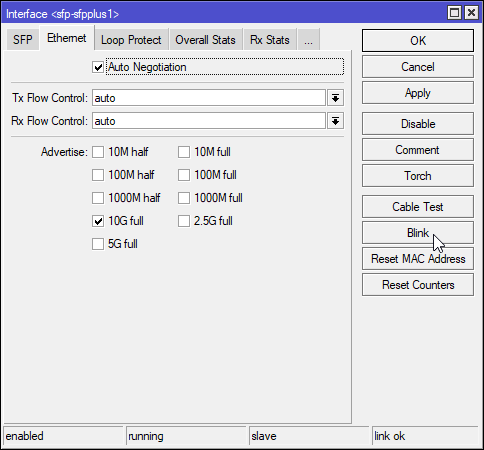
1/2.5/5/10
 clear igloo
Hmmm, on the copper ports though?
tame carbon
Thats on SFP/SFP+
clear igloo
Ah, yah, I'd need it on the copper ports 😦
tame carbon
no transceivers?
clear igloo
Well I already use my 4x10g ports
But I need copper because that can do PoE+ as well
clear igloo
Yah, it's fine, I'm happy with my current setup 🙂
tame carbon
mikrotik isnt known for their PoE capabilities
clear igloo
That's fair, PoE adds $$ too
tame carbon
MikroTik is a Latvian company which was founded in 1996 to develop routers and wireless ISP systems. MikroTik now provides hardware and software for Internet connectivity in most of the countries around the world.
This is their flagship PoE switch
48 ports, 700 watt max
4x 10G, 2x 40G, 48x 1G PoE
oh and a fast ethernet port cus why not
clear igloo
management 😄
tame carbon
All 48 Ethernet ports offer different power output options: Passive PoE, low voltage PoE, 802.3af/at (Type 1 “PoE” / Type 2 “PoE+”) with auto-sensing
@clear igloo this would do what you need it to
except no 10G PoE
they need to come up with some kind of powered fiber optics ;3
clear igloo
That would be amazing 😄
clear igloo
400G PoE switch when 😄
tame carbon
pretty sure we're not going quantum physics
 compact void
whaats the best
becus we runing a radio station and we need acses from oudside
to the nas
tame carbon
Does your nas have support for SFTP ?
@compact void I wouldnt expose an FTP server to the public internet like that
FTP does not have encryption by default
compact void
a okay yes it has sftp
tame carbon
@compact void SFTP should allow you to provide more secure access
It runs on port 22
In computing, the SSH File Transfer Protocol (also Secure File Transfer Protocol, or SFTP) is a network protocol that provides file access, file transfer, and file management over any reliable data stream. It was designed by the Internet Engineering Task Force (IETF) as an extension of the Secure Shell protocol (SSH) version 2.0 to provide secur...
@compact void I am unsure as to how your NAS handles user permissions specifically
make sure only the account used for access is allowed to connect over SFTP
and disallow root login
All you'd need to do then, is forward port 22 to your NAS
compact void
its a DS218play
tame carbon
@compact void that doesn't help me :/
I've only ever configured this stuff directly on linux
compact void
a okay
tame carbon
@compact void SFTP is basically file transfer over SSH, a remote logon protocol
@compact void your clients would mount the network drive like so: https://www.digitalocean.com/community/tutorials/how-to-use-sshfs-to-mount-remote-file-systems-over-ssh

DigitalOcean
Luckily there is a way to mount your VPS file system to your local computer so you can make changes on the fly and treat your droplet as local storage.
this will map the SFTP server to a regular network share you can access
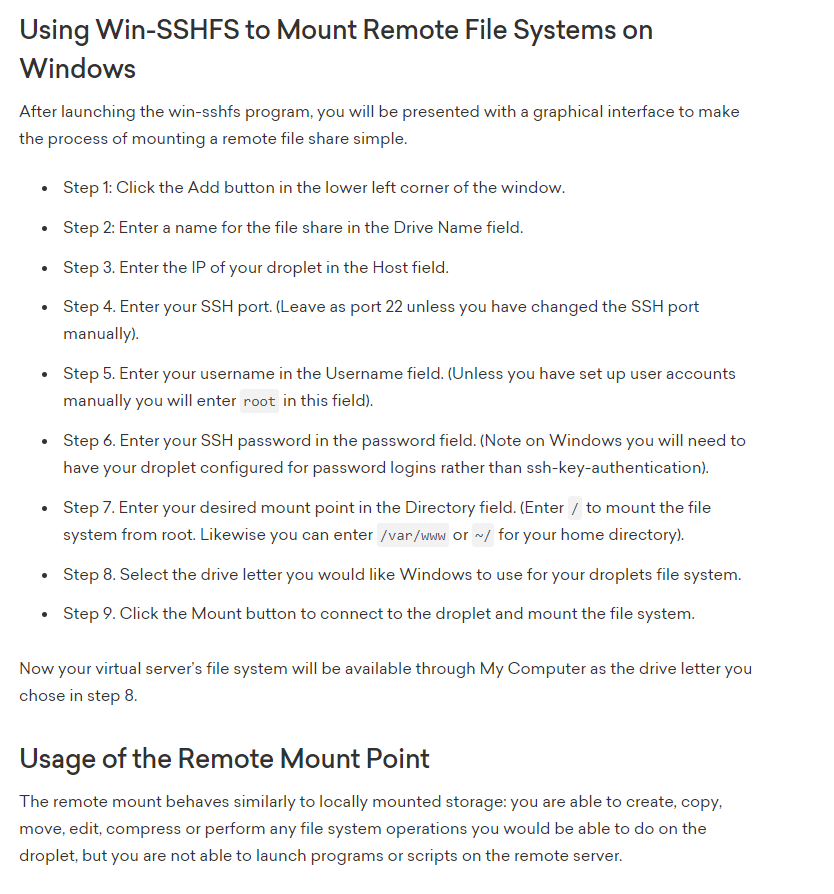
@compact void Alternative would be, providing a VPN and just using regular SMB shares
SMB shouldn't be exposed to the public internet, thats why a VPN is preffered
 tame carbon
Get out
tame carbon
@compact void what is not working
compact void
Port 22 is open
tame carbon
@compact void have you verified the SFTP server's functionality locally first?
before attempting to port forward
@compact void you can use the win-sshfs client, or use a regular SFTP tool like Filezilla
try connecting by its local IP first
tame carbon
sure
unborn sluice

 brazen bay
does port forwarding works if i have a private ip adress?
?
clear igloo
If your WAN port has a private IP address? Generally no
unborn sluice
You would love cgnat
clear igloo
Yah, if there is CGNAT involved it's a definite no (without buying a VPS or something and tunneling back). If it's local double nat, it's possible but not fun
dusty osprey
mine is msotly a local nat or something
going to the router settings i saw some weird 10.62.xxx.xxx with random numbers and such
tribal ferry
dusty osprey
Its the thing that actually connects to outside internet
Well, I’ve heard that core routers go at the “core” of a network. Wouldn’t the “edge” router be on the network edge?
peak cloak
The only acceptable cgnat is if you also get a ipv6 block
clear igloo
tribal ferry
Well, I’ve heard that core routers go at the “core” of a network. Wouldn’t the “...
Depends. Core usually means at the heart of the network either because that's where everything ends up to go to the internet or to be routed somewhere else. It doesn't have to be directly connected, you can put a firewall in between too
tribal ferry
clear igloo
Depends. Core usually means at the heart of the network either because that's wh...
Alright. I’ve also heard that these core routers connect to a lot of smaller routers for other networks. What’s the point of doing that when the core router could just do VLANs?
clear igloo
tribal ferry
Alright. I’ve also heard that these core routers connect to a lot of smaller rou...
Port density, distance, cost, etc.
Why hammer a "core" router with tons of traffic it doesn't need when another lower layer could take care of it for less. It's also dependent on the architecture too, in a spine/leaf for example your edge and internet connectivity is done at the leaf layer and the spine (core) is just for pushing packets as fast as possible. In a three tier legacy architecture the core is more for the know all aspect of getting anything anywhere that the lower layers don't have direct connectivity too.
 waxen scroll
@clear igloo in enterprise often times the actual core isnt a router but a switch that connects many such routers together rather than a massive router connecting other routers
😄
clear igloo
That too, depends on the network design, needs, etc.
tribal ferry
This sort of architecture?
clear igloo
Yah, that's legacy 3 tier
waxen scroll
"legacy" lmao
tribal ferry
What’s the up to date version then?
waxen scroll
most networks not buying into ACI, etc
clear igloo
lol, I mean spine/leaf is more "new" but there is even some bleeding edge stuff around 3 tier spine leaf for infinite expansion 😄
Legacy in terms of data center would be a better way of putting it.
waxen scroll
3 tier spine leaf isnt a term ive heard
tribal ferry
The whole point of spine and leaf is aggregation between all switches and only a very small drop in speed if a switch or routers were to fail, so I don’t know how it could be different lol
waxen scroll
the real point of spine leaf is a vlan being available anywhere in the network
you cant really do that in regular 3 tier
you can but shouldnt
it makes a mess
the other point is multiple unrelated users on the same network anywhere but still seperated
tribal ferry
It’s a mess but it’s reliable at least
clear igloo
Yup, spine/leaf is usually deployed alongside some form of VxLAN, application based deployment (ACI and whatnot), or segment routing
waxen scroll
it also raises the barrier to entry for the net eng career so you make more money with less competition
xD
 hollow marlin
clear igloo
Yup, spine/leaf is usually deployed alongside some form of VxLAN, application ba...
hollow marlin
clear igloo
Yup, spine/leaf is usually deployed alongside some form of VxLAN, application ba...
SR
clear igloo
hollow marlin
SR<:ping:464520626594381854>
😄 SRv6
tribal ferry
How are VxLAN’s different to normal prosumer VLAN’s?
i.e. Ubiquiti or MikroTik devices
waxen scroll
i was worried about spine/leaf and ACI until I tried to use it. muh ease of use. muh automation.
clear igloo
VxLAN is an encapsulation, you can have VLAN 100 on switch A and VLAN 100 on switch 9123 and they can talk over a routed network in between at Layer 2
hollow marlin
tribal ferry
How are VxLAN’s different to normal prosumer VLAN’s?
Its a way to tunnel VLANs across L3
tribal ferry
Oh, alright
hollow marlin
All the benefits of L3 with little of problems that come with L2
waxen scroll
@hollow marlin no love for OTV?
hollow marlin
Never worked with OTV. Thats the nexus L2 fabric right?
waxen scroll
layer 2 extention over wan
clear igloo
Why OTV when you can GENEVE
hollow marlin
Only dealt with Nexus' as core/dis, never had the need when each use can I am the WAN 
thick minnow
Need some help, When i play warzone on a profile on windows i don’t get any packet loss but when i switch to a different windows profile i get 6+ packet loss
clear igloo
hollow marlin
Only dealt with Nexus' as core/dis, never had the need when each use can I am th...
You don't want to NAT on a N9K? 😄
tribal ferry
Looking at the front of one of these routers makes me head hurt.
Where would the WAN even come in?
hollow marlin
Wherever you want it to. Enterprise gear doesn't have a WAN only port. Everything is configured
clear igloo
Yup ^
tribal ferry
Makes sense
dusty osprey
its totally configurable
some of them doesnt even need to have "internet" access
it could just be a router that locally connects many servers to gether
waxen scroll
@tribal ferry i played with those
its fun
@clear igloo i wanted them to buy me lab ones
denied.
clear igloo
rip 😦
tribal ferry
waxen scroll
<@!291198741862416384> i wanted them to buy me lab ones
core router "homelab"
lmao
a $60k homelab
tribal ferry
still, I don’t think they’d be too happy giving away even a older generation one of these
clear igloo
He wants it for a lab at work, not home, lol
waxen scroll
not give away, add it to the lab
i think the one I wanted was about $800k and I wanted two of them
imagine being a net eng for a place that loses a million an hour or whatever
server person touches a few at a time, we can make an oops and knock the whole thing out by touching one device
clear igloo
Just reload it real fast 😛
waxen scroll
yeah but 5min boot time
ASR might be 10min, i forgot
its slowwwwww
so anything thats new we have to go into the lab... not for vlan changes but for other things like migrations, big routing changes, bla bla
tribal ferry
I just got my rack and router installed in preparation for some short depth virtualization servers in the future.
waxen scroll
lol i have that same power strip
waxen scroll
too cheap for a rack UPS. i dont care
hollow marlin
Homelab is no more than a PC with EVE. I don't bother with hardware labs nor care putting too much into my home network
clear igloo
The 1841 is about 10-15 years old iirc
thick minnow
Well it was used in my dads old work and he has a ton of them
 little schooner
My prof bought a bunch of them and had to throw them out after spending several grand
He missed a detail in the fine print
clear igloo
Yah, they went end of support back in 2016 but end of sale in 2011
 distant radish
I've still got a Cisco 3640 router and some 1600's gathering dust in the garage, back from my CCNP homelab back in the early 2000's. Luckily I got them from my employer's field engineering dept. Where they had stacks and stacks of 1600's. As they were constantly swopping them out as they were dog slow.
waxen scroll
@hollow marlin hardware is lame for me. can barely get it up when a new ASR9k comes in. hell i dont even want to touch it
someone else rack it
lol
little schooner
I let the network admin handle the heavy hardware stuff. He is more built for that
I'm glad that I just use my brain to get the work done
Not really much physical stuff
hollow marlin
Last time I racked was a fully pop'd 10 slot 7k and here assisted with MX10003. 7k was a nightmare putting that in
 maiden lava
what is a good way to wire a ethernet though a doorway
plucky quarry
anyone got any good software for home NAS servers
peak cloak
plucky quarry
anyone got any good software for home NAS servers
freenas, now rebranded as truenas
uses ZFS for file system
plucky quarry
is it low resource because im running it off an extremly old pc with an intel core 2 quad q9400 and 3 gigs of ram
plucky quarry
ok thanks
 turbid storm
security venerability warning
https://www.zdnet.com/article/backdoor-account-discovered-in-more-than-100000-zyxel-firewalls-vpn-gateways/

ZDNet
The username and password (zyfwp/PrOw!aN_fXp) were visible in one of the Zyxel firmware binaries.
 alpine linden
Yo can someone help me I’m moving houses into a bit older house (built around 2005) and it doesn’t have Ethernet in the bedrooms but has coax. Is there anyway to connect through that with something like a mocha adapter? I’ve seen mocha adapters but don’t quite understand if they would work for my situation
 late geyser
i think you would just be better off wiring ethernet to the rooms
either by you or a pro
thorny vector
@alpine linden if the coax is run correctly, then a set of moca adapters would work nicely for you
Depending on the speeds you want, and how your house is wired powerline is also a potential
Then there’s always the route WiFi/mesh
alpine linden
I’m only 14 and my parents don’t want people to come out to check it out so how should I go about that. I want 1gb down and 60 up which is what we pay for and idk how it’s wired . Ive heard of power line but don’t know what will be easier or work better @thorny vector
thorny vector
Safest bet would be a wireless back bone. Less hassle worrying about circuits and cable runs, downside being you wouldn’t get that full gig download, which you honestly wouldn’t be able to reach most times anyways. A good wireless solution would get you to about 400-500mbps. I wouldn’t be able to recommend a good consumer wireless setup, as I haven’t touched anything but enterprise stuff for a while, but I know others here would have recommendations.
Additionally, depending on the house, running Ethernet along base boards and corners is also a viable option. Done correctly, the cable is invisible, but that’s a conversation you’d have to have with your parents.
@alpine linden
 silver needle
Can anyone suggest a VPN with dedicated IP support and port forwarding? Bonus if can be used with PFsense so I can just route multiple machines through it and supports multiple custom ports
silver needle
So would you suggest a VPS with a HA Proxy?
I'm just trying to figure out how I get around my ISPs dynamic ipv4 address for a few servers / services I'm hosting and would rather avoid having people connect directly to my network if i bought a dedicated ipv4 address from them
I need a static ipv4 address, domain/hostnames won't work for a few services I'm running
waxen saddle
I'm a little confused... you need a static IPv4 address for some services you're hosting, but don't want people to directly connect to it?
silver needle
I don't want people to directly connect to my network via ddns. I want to route them through a static ipv4 address through a VPN Provider / Self Hosted on a VPS with port forwarding for specific services. That traffic will then get routed through to my home network and then back out.
Essentially this, but without domain names and just a static IP. https://forum.level1techs.com/t/haproxy-wi-run-lots-of-public-services-on-your-home-server/159335

Level1Techs Forums
What on earth is this? Note: This how-to assumes you are familiar with the underlying technologies at least a bit: Comfortable on the Linux CLI, familiar with installing packages on your distro, familiar with SSH and key-based authentication. At least a vague notion about nginx, web services, port forwarding and network address translation (NAT)...
I've read the guide a few times, and i've read the replies saying it works with a dynamic IP on my side, but I'm struggling to understand how to set it up securely as I think I deviate from how its laid out in this post.
I mean I could be just wrong and stupid and not understand it correctly but, I'm struggling to understand how I could point say a VPS running a HA Proxy to my home network when my ipv4 address changes every 24hours and how would people stay connected to certain services when being routed like this as i assume there will be some delay on the VPS updating to route the traffic to my new ip address?
Like I could be completely wrong and this might not be how it works what so ever but if anyone could elaborate
unborn sluice

thorny vector
@silver needle just set up a dynamic dns service. Then you can either use a free sub domain from like no-up, or register your own domain, and have it update there.
silver needle
I already have a ddns service.
Like I said above, I don't want people directly connecting to my network via a hostname. I need them to connect via static ipv4 for certain services, which isn't my ISPs ipv4
unborn sluice
you don't want them to connect
thorny vector
Why do you not want to use a hostname?
silver needle
Some services I run don't allow hostnames
thorny vector
Like?
unborn sluice
Like?
thorny vector
And you’ve tried using a hostname? Because not using dns a poor net code makes
unborn sluice
yea it makes
thorny vector
Although it is dayz....
thorny vector
Well, that’s poorly made. Even Minecraft uses hostnames.
unborn sluice
Now, the solution is to play minecraft
unborn sluice
thorny vector
Well, that’s poorly made. Even Minecraft uses hostnames.
that's implying minecraft is bad
silver needle
I already have my mc server running on a hostname, but still thats directly connected to my network.
thorny vector
Then you can setup a vps that you have in a VPN to your server, and just port forward all the requests.
You’ll get some latency hits, but it’ll work.
silver needle
and how would I go about connecting the VPS to my server / router?
thorny vector
VPN would just resolve using host name.
silver needle
As I'll likely just have it connected to my pfsense box and split the routing there
so then how would we go about my ip updating and the delay of the hostname updating that ip?
wouldn't that cause everyone to lag off or connections to close or would they stay on as the connection is technically already made on their client?
or would that be service/server specific
thorny vector
Openvpn connection would be easiest.
Pfsense has an easy client config export add on
Don’t worry about updating the IP on the jumpbox, let dns do it’s job. And I wouldn’t worry about that. When I push dns record changes to my name servers, my services are unaffected.
silver needle
Even for something like gameservers that sometimes require ms of latency?
thorny vector
Changes are near instant. VPN reastablishing connection to a new IP usually takes my openvpn stuff 1-10 secs.
My guess would be some lag, but no drops.
silver needle
Are there any guides you would recommend on setting this up?
thorny vector
For pfsense. Then you just install the pfsense export plugin, and use it to generate a config, push it to the VPS, then use openvpn from the cli to launch it
After that, just set up port forwarding with iptables or another tool
Woooooow, just took a look at that webpage/tool you put the link in for.
silver needle
It's in depth but I can't wrap my head around it
silver needle
yeah
silver needle
Wouldn't it just be easier to get a vps and have OpenVPN?
and then have a VPN client on my pfsense?
thorny vector
That's what this is. Setting up the openvpn server for the VPS to connect to
silver needle
I think I've done this before with NordVPN but they kinda just had everything laid out on their website
so was pretty much copy and paste
thorny vector
nordvpn, you set up a CLIENT
Here you're doing the opposite, which is more involved
unborn sluice
Our sponsor, PIA
thorny vector
No lie, I've loved using PIA
silver needle
I looked at using PIA with a dedicated IP and just port forwarding through that
but I've read that you can't manually select which ports to open and close
thorny vector
Because you're just a client, you don't have any control. That's why you have t oset up your own
silver needle
which makes sense
silver needle
So I've gotten everything setup to the point where I need the ip tables to redirect the traffic
If I have any servers / services going through this interface/gateway will they still be able to connect to other subnets or will that require additional rules?
been following this
but using the VPS ip it won't connect. although my ddns picks up the vps ip and i can still connect through the hostname on that
silver needle
yeah
silver needle
on the client?
thorny vector
Look ipv4 local networks, and allow the appropriate subnets. And no, on the pfsense server.
silver needle
so tunnel network should be my servers subnet
and remote network the public ip of the vps?
thorny vector
No, tunnel network should be different, it's the subnet the VPN components communicate over. IPv4 Local Networks tells the client what subnets it can connect to.
thorny vector
So the VPS is the server?
thorny vector
It's easier to do it the other way around.
silver needle
and the vps is 98.x.x.x
vps is the server correct
So make pfsense the openvpn server
and the vps the client
thorny vector
Yeah. It'll make everything easier on you.
silver needle
And I'd need to make 2 servers then and bridge them for both tcp and udp?
along with 2 clients?
thorny vector
Mind if I just show you, in DM?
silver needle
sure
silver needle
Mega thanks to @thorny vector for the help and walking me through how to set it up correctly!
unborn sluice
silver needle
Mega thanks to <@!292850466671427584> for the help and walking me through how to...
Thank you for the feedback, we would give ⭐ to @thorny vector
 azure latch
i got a 175mbps, but mhhh
alpine linden
Does my modem need to be connected to the wall with Ethernet if I don’t have a router only the modem
alpine linden
K but I connected it and the bars show full but I have no connection
dusty osprey
hmm, that could be other issues specifically
alpine linden
I mean there was a lot of coax cables in a random closet does it need to be a specific coax cable
dusty osprey
Yes
Obvisuly it has to be the one your ISP told or configured it first for it to be used
alpine linden
Ok... not sure which one that would be cause we just moved and Cox told us that we just need to transfer the modem and we will be good
dusty osprey
hmm
waxen scroll
@clear igloo i got a new comcast story!
I checked my upgrade options cause my term is up next month (100mbit/$40) and they let me buy 100mbit for $35 right on the website and no need to call and make a threat
the fine print even said "new customer only"
clear igloo
lol, nice 😄
waxen scroll
my friends are like UGH 100mbit?
yeah!
who needs 200+ when you dont use it 99% of the time until you download
saves so much money
 burnt epoch
 little schooner
@waxen scroll 100mbit is plenty. im UGH rn about the 5mbps upload they hand out
and sometimes its 4mbps in reality!
oh and they still didnt send me a new contract
but again its not the 4th yet lol
work week.
waxen scroll
they dont send it. they increase your price and its no contract
little schooner
that would be better
but he did say contract so
the dean
the dean is running HR
waxen scroll
oh. i thought comcast
little schooner
oh
nah
comcast lucky i dont have contract
like $40 for 120/5
@waxen scroll my bad, somehow i mixed those two things in a weird way
i jumped thoughts xD
how long did you say you have to wait to get new member pricing?
was it like 1 day or 3 days?
waxen scroll
you cancel, they'll let your internet work for a month or less then all of a sudden it will die, then you use your phone to go online and sign up as a new customer
then service is reactivated in 5min after you order
waxen scroll
it varies but with me its 2 weeks to a month
they told me its just incase people change their minds
little schooner
makes sense
burnt epoch
I pay $75/m for 1g/1g
hollow marlin
waxen scroll
who needs 200+ when you dont use it 99% of the time until you download
For one of the upgrade projects I took netflow/SNMP from about ~500 customers that had gig and peak was 125 and average was around 20-40 excluding raw downloads which fell in the 1%. 100mbps is still just fine ATM
waxen scroll
yep
so why pay a $30+/m premium for stuff you dont need
you can have up to 3 subscription services instead
burnt epoch
Because I’d rather the peak speed than a subscription service I’ll never use
Especially since I also have a 1g connection at work so I ssh into my home pc to do things while at work when I need more power
Also it’s just an enthusiast thing. Why do car enthusiasts love cars with massive top speeds and acceleration even though they mostly drive on roads with 45 mph speed limits? Because it’s fun
hollow marlin
True, but I see many post on LTT and r/homenetworking complaining that unless they have gig speeds its pretty much unusable. $30 difference for 100/250 vs gig is not terrible but when people spend $100 extra is insanity
Like the amount of post of Sweden has 10g but in reality it was a contract deal and people jumped all over it not knowing its not going to make much of a difference. Its is $40 however.
waxen scroll
100 is best bang i think
I've had a gig before in a colo and I agree you basically cant use all of it
the only time you can is with usenet or perhaps torrents
direct downloads are all over the place
hollow marlin
299 for 2gig. F that
waxen scroll
that option they install a POP in your house
so thats part of the reason
10G juniper switch, i dont recall if theres a UPS too
hollow marlin
better be. Junos does not play well with power loss. Can brick them with 3 power cycles
They probably just install the 2300-12p, their smallest switch. 14 port with two being 10g.
waxen scroll
hollow marlin
Fuck the ACX, they are nothing but problems. Also there is no way they could afford to install them like that
hollow marlin
Even so the 2100 is $6-7k. 2300-12p is still $500
Unless they plan on these being customer routers with the port count. ACX does little switching
I have a maintenance in two weeks I think to tear out the last ACX in our network. Finally
 humble cloak
Flexin ma internet speed
Not bad for a 200mbps subscription, sometimes it even goes up to 300-400mbps
(DSL as well, not even fibre)
 small blaze
humble cloak
Flexin ma internet speed
small blaze
humble cloak
Flexin ma internet speed

Speedtest.net
Test your Internet connection bandwidth to locations around the world with this interactive broadband speed test from Ookla
humble cloak
Lol
I just realised
There are also 2 4K streams going at the same time as my game download
(One from YouTube and one from Netflix)
small blaze
dusty osprey
Dont let that fool you
Yes, but i do everything over remote desktop
humble cloak
No gpu tho so no gamin
thick minnow
So. Cheap raspberrypi nas. The perfect project https://www.instructables.com/PiNAS-the-Raspberry-Pi-NAS/#step20

Instructables
PiNAS - the Raspberry Pi NAS: Intro:This instructable describes the build of a very compact Raspberry Pi powered two bay network attached storage (NAS).Features: Super small Easy to build Simple setup Cheap Perfect for learning about network, file system, security mech…
I have no experience with NAS or Servers.
 empty beacon
heehee pinas
 hexed vault
Hmmm, as a thing to try out - should be interesting.
But to actually use as a NAS - I have big doubts. Considering you would like to have at least raid1 and it will be done by mdraid I guess.... I'm just afraid to ask how long the raid will rebuild =)
Although if you can fit a Pi with a raid card, then maybe =)
 deft fog
Hay any one know how to access eero router through a browser?
dusty osprey
hexed vault
Hmmm, as a thing to try out - should be interesting.
But to actually use as a NA...
Raid 0
 ocean pivot
deft fog
Hay any one know how to access eero router through a browser?
ocean pivot
deft fog
Hay any one know how to access eero router through a browser?
You can’t
 clever abyss
Bro
Does Germany not have 5Gbit or 10?
I know of 1 1Gbit provider and that’s the one I have currently and it’s awful. Literally moved here from the US so I’m used to something different but this.. this is just 1/10
I dont mind 1Gbit but let’s be honest... everyone wants to download the new game or update super fast....
hollow marlin
expecting 10g internet downloads is unrealistic. If 1g is awful for you than your expectations are already way too high
 obtuse patio
CSGO Server OFficial Ping: 90ms
Custom Server in the Same Location Ping: 35ms.
Please help.
Just installed Fiber Internet.
Nearby custom server in Kolkata is just 30ms but the official csgo server in the same location is 100ms.
My friend nearby gets 50ms to the bom official server. I get 85ms. Any ideas?
Other details:
Yes, I am on ethernet.
Current speed is 150Mbps upload and 150 download. No restrictions in CSGO.
Tried port forwarding it kept asking me destination ip address and not just a port range.
Disabled a ton of security features on the modem which helped me gain 5-10ms.
A nearby server about 300kms away shows 23ms. The bombay server is 2400kms away and the Kolkata server is 500kms
unborn sluice
Tried port forwarding it kept asking me destination ip address and not just a port range.
 tame carbon
@obtuse patio tracepath
 lean pebble
thick minnow
So. Cheap raspberrypi nas. The perfect project https://www.instructables.com/PiN...
lean pebble
thick minnow
So. Cheap raspberrypi nas. The perfect project https://www.instructables.com/PiN...
Nice idea
I think I would try it sometime
thick minnow
hexed vault
Hmmm, as a thing to try out - should be interesting.
But to actually use as a NA...
I’m just doing this as a experiment. An 80$ experiment, but oh well. I’m not too worried about the RAID times. I’m a person, what do I have that’s not in cloud storage, or not replaceable.
hexed vault
@thick minnow Nowadays it's more a philosophical question.
burnt epoch
SCCM is so finicky smh
thick minnow
hexed vault
<@456226577798135808> Nowadays it's more a philosophical question.
Eh, good point. 1tb of networked storage might be handy, but it’s more for the experience, and to get better at soldering and working with NAS systems
hexed vault
@thick minnow I'm happy with my Synology box, plus I sync up some things with a cloud storage as well. That way I have at least 2 locations, still have a copy on my hands and have access to files even if I have no internet connection.
thick minnow
Nice
And I can also back stuff up on my own hardware. WITH a RAID in case my old(er) drives fail
tame carbon
or btrfs
you can do btrfs raid 1 and get integrity checking as well
raid is not a backup
waxen scroll
@hollow marlin @clear igloo cisco.com full of social justice bs lol
anything to make a $
 waxen scroll
this reminds me of nike, which is a massive boys/white club but then they know how to manipulate consumers with social justice garbage because there's more profit in it than ignoring it
cisco is being low-political here, but nike blows it up :X
@tame carbon you think cisco is gonna back down from what they have on these pages once china asks for equipment?
hellll no
yes, master!
tame carbon
@waxen scroll nike is total bs lol
they have some mechanism here in europe, my country even enables them
allowing them to pay 0 taxes
waxen scroll
yikes
tame carbon
@waxen scroll netherlands does not have taxation on royalties
so Nike has a bunch of shell companies
Starbucks and google do this too
Netflix
Shell (Oil and gas)
oh well
waxen scroll
:\
waxen scroll
 wooden trench
looks like a ws-c3560 24port
 severe elk
If I’m a novice to networking, what would be the best way to integrate a dedicated monitoring system, that could monitor and manage my network. Please ping me if you have advice.
peak cloak
severe elk
If I’m a novice to networking, what would be the best way to integrate a dedicat...
depends on your current equipment
I haven't worked with SNMP myself, but you can use it to collect info (if your devices support it)
then you can have a snmp collector
for something like influxdb
or prometheus
that's all I know myself
hollow marlin
I have Grafana, Zabbix and mysql on a pi for some basic graphs. Unless you know specifically what you want to monitor I wouldn't bother
wooden trench
hollow marlin
I have Grafana, Zabbix and mysql on a pi for some basic graphs. Unless you know ...
Was about to type the same lol
wooden trench
severe elk
If I’m a novice to networking, what would be the best way to integrate a dedicat...
I would ask yourself what you want to monitor, and why you need something to administrate and monitor your network. For a simple home network, a simple Grafana/influxdb on a ubuntu box or PI-box would be plenty fine, but it wont "administrate" or "fix" issues, since it leans to you to be able to see the errors and go in and fix the networking issues yourself.
I know of some Management tools that are for enterprise grade, but unless you got a farm, then avoid that xD
(or get meraki kit and use their cloud service i dunno...)
tame carbon
SNMP for network level data gathering
you can also hook up any kind of datastream to influx as @hollow marlin rightly said
zabbix not unheard of either
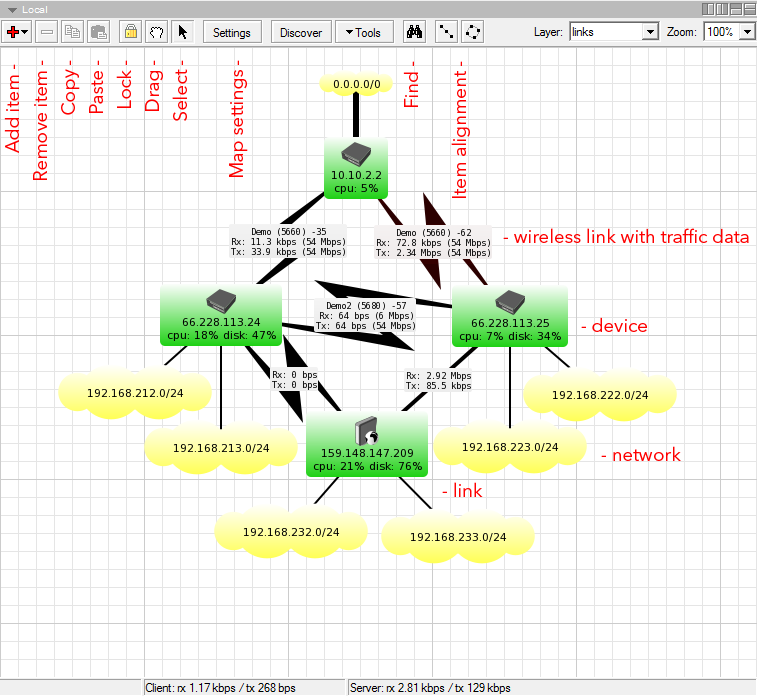
or if you use mikrotik  https://mikrotik.com/thedude
MikroTik is a Latvian company which was founded in 1996 to develop routers and wireless ISP systems. MikroTik now provides hardware and software for Internet connectivity in most of the countries around the world.
TheDude does all of this
 hollow marlin
Last company used thedude with Solarwinds tied in for management, updates, provisioning. I just wish thedude graphing had customizable icons and links. Its ugly as all hell
tame carbon
they probably got yeeted

Engadget
The SolarWinds hack may have compromised many more networks than first thought, and might have taken advantage of weaknesses in the US and Europe.
severe elk
wooden trench
I would ask yourself what you want to monitor, and why you need something to adm...
So I am running a web server and game server, I’d like to monitor incoming and outgoing traffic to not only those but to all my devices.
tame carbon
@severe elk probably going to want some kind of router that is capable of metrics
peak cloak
I know my edgerouter can log specific interfaces
and specific firewall rules
but idk how well b/c I never used it
tame carbon
I can just query the mikrotik API, for total traffic amounts
and then just delta the two values
severe elk
tame carbon
<@!719345309997727776> probably going to want some kind of router that is capabl...
Mind sending some sort of link? Price range definitely under a 100 if possible.
peak cloak
just an ethernet router?
tame carbon
MikroTik is a Latvian company which was founded in 1996 to develop routers and wireless ISP systems. MikroTik now provides hardware and software for Internet connectivity in most of the countries around the world.
@severe elk what device you'll want, really depends on the hardware needs you hvae
all these routers run the same operating system
severe elk
Then just go to the local ip and mange from there?
peak cloak
MikroTik is a Latvian company which was founded in 1996 to develop routers and wireless ISP systems. MikroTik now provides hardware and software for Internet connectivity in most of the countries around the world.
this is like a good basic one
tame carbon
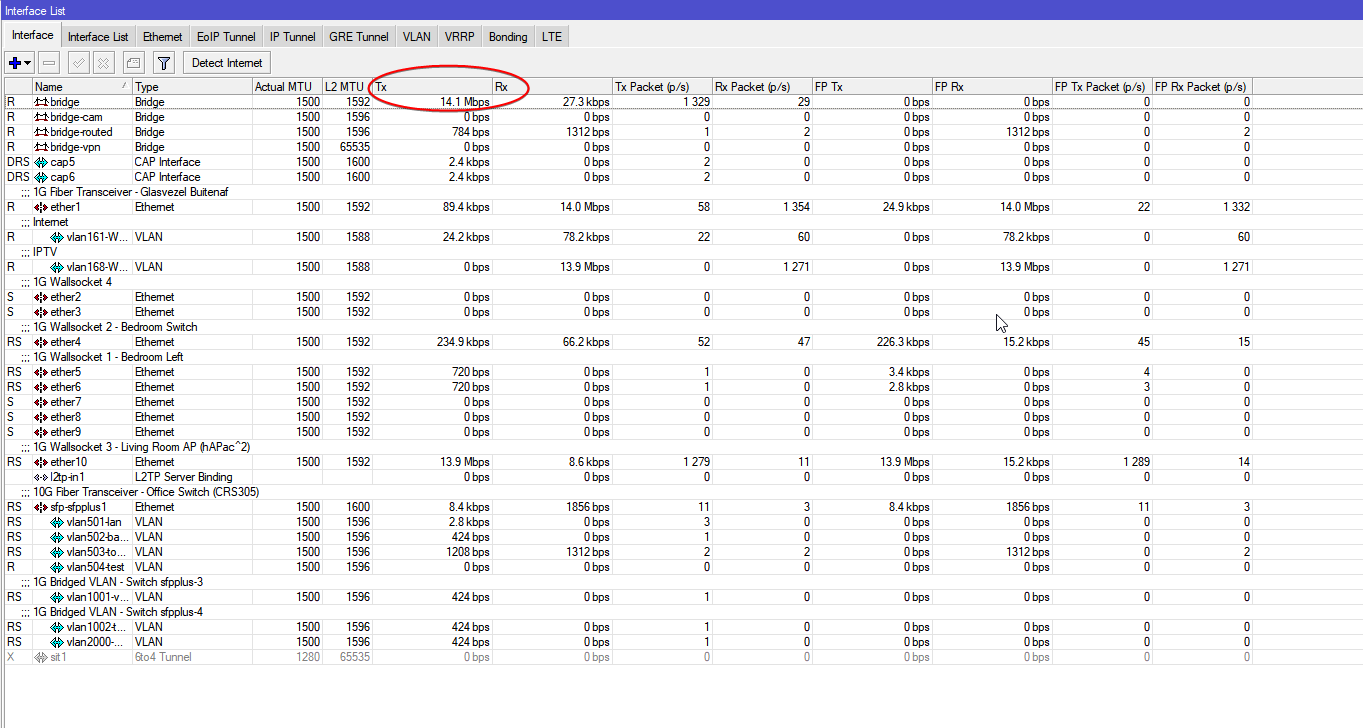
this just shows current traffic
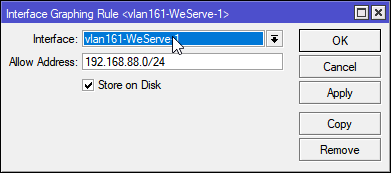
but you can set up graphing and logging for individual interfaces
peak cloak
tame carbon
https://i.imgur.com/5vb7BH9.png
can mtik log specific packets?
 peak cloak
nice
tame carbon
@peak cloak you can't do that for a packet, rather, you can set up logging rules per fw rule
peak cloak
ah ok
tame carbon
@peak cloak https://i.imgur.com/FEVFQAI.png
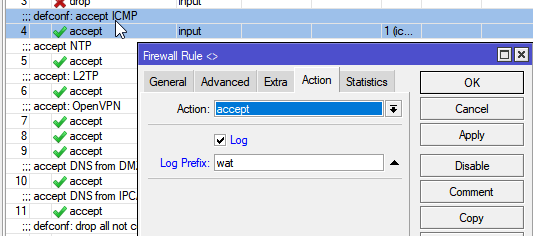
@peak cloak you can also add dummy rules
 peak cloak
and this is how the log looks like, right? (from mtik docs)
10.1.101.1:520->10.1.101.255:520, len 452
yeah
looks something like that
@peak cloak for more advanced filtering
stuff that might go below L4 firewall
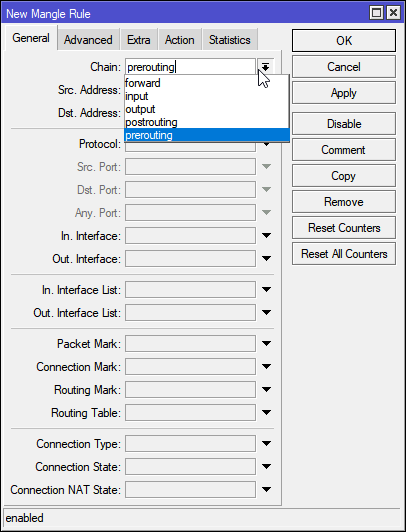
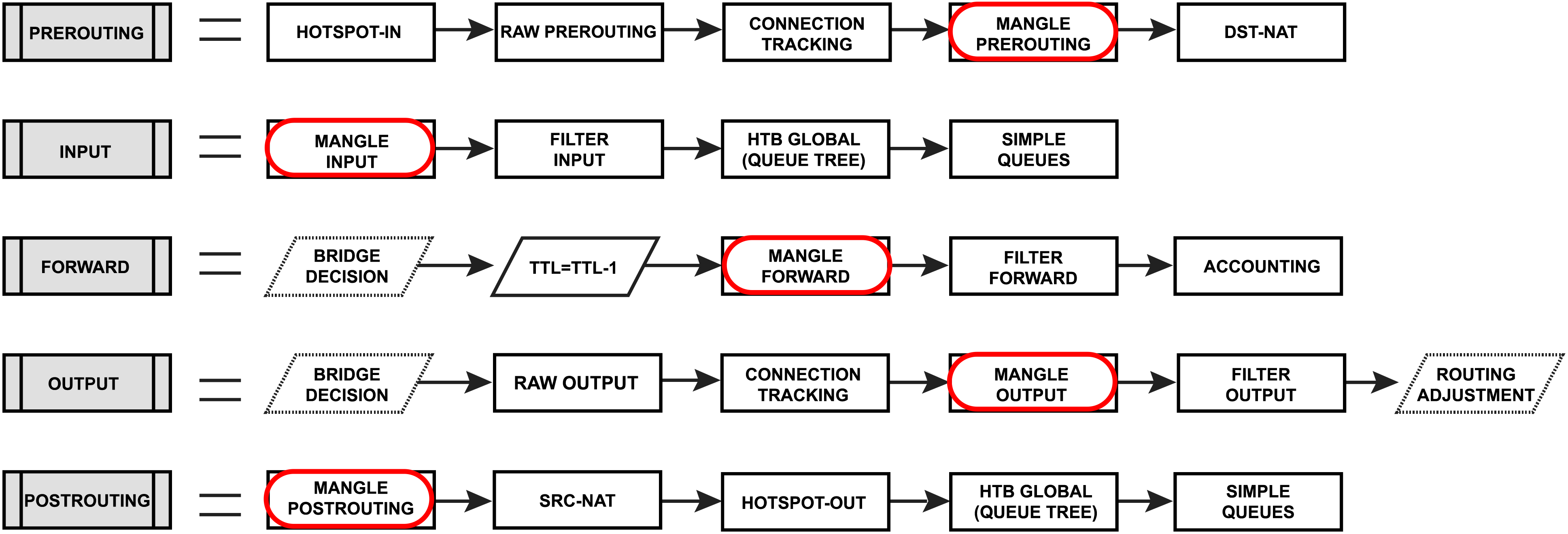
You can use mangle
and have access to pre and postrouting
see that 'Packet Mark' ?
I haven't used this much
someone briefly showed me how it works and waht you can do with it
tame carbon
but mangle is kinda what you use, if all regular features are exhausted, and you just have to get it to work
cus it taxes CPU
peak cloak
ah
tame carbon
@peak cloak ah perfect
thats the image I was looking for
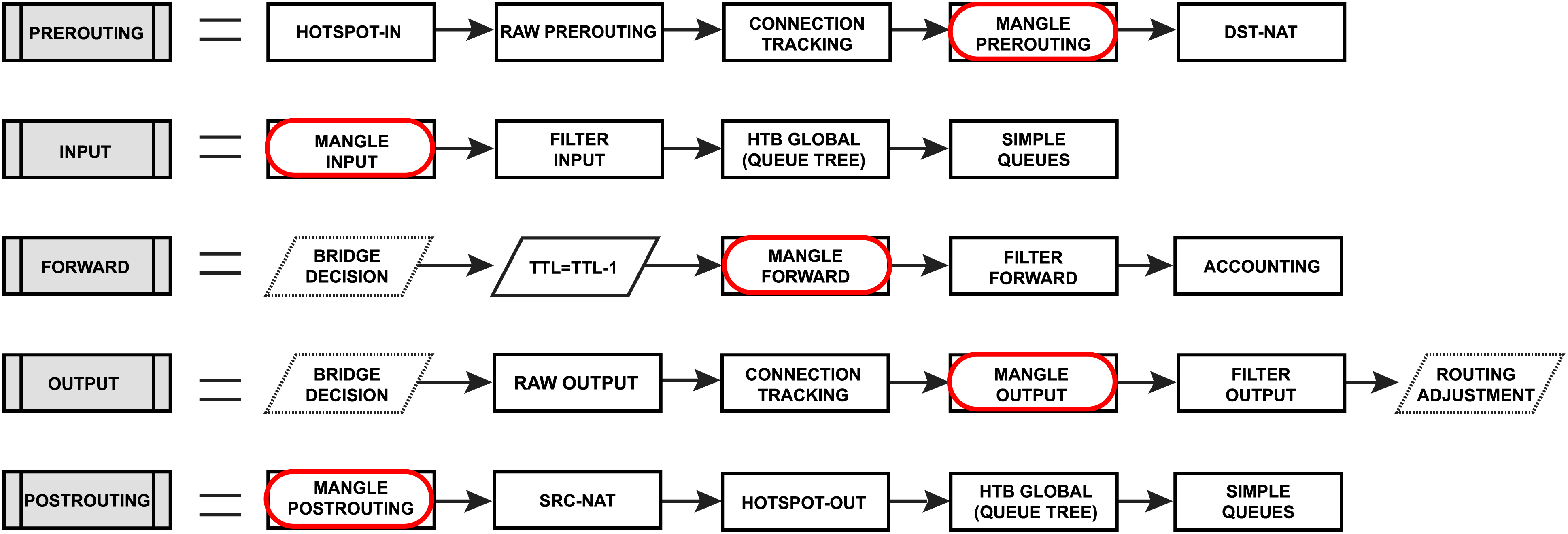
I think accounting
is specifically for this
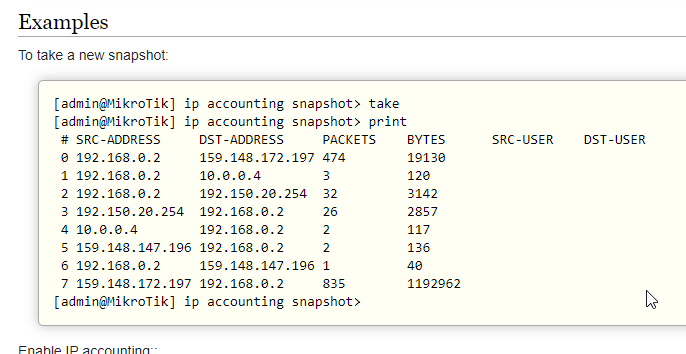
@peak cloak here you go ^
some mikrotiks have onboard storage you can expand
for logging this kind of stuff
peak cloak
nice
tame carbon
Traffic accounting requires additional memory
but I don't think that that is an issue
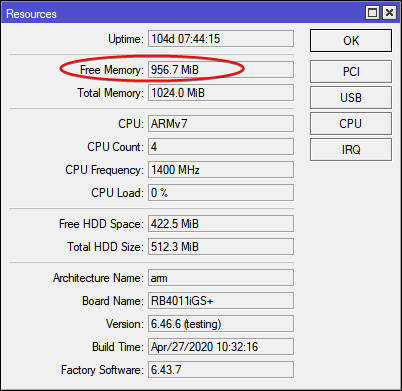 hollow marlin
severe elk
So I am running a web server and game server, I’d like to monitor incoming and o...
hollow marlin
severe elk
So I am running a web server and game server, I’d like to monitor incoming and o...
What exactly do you mean by monitor traffic? That can mean monitoring the amount of traffic, monitoring sessions with Netflow, IPS for security
tame carbon
@peak cloak lol that cpu usage though, I have currently about 80mbit/s internal traffic
hollow marlin
tame carbon
cus it taxes CPU
Not by much as the first packet and ACK hit the CPU anyway before fastrack kicks in
tame carbon
pretty sure that is off
because I use queues
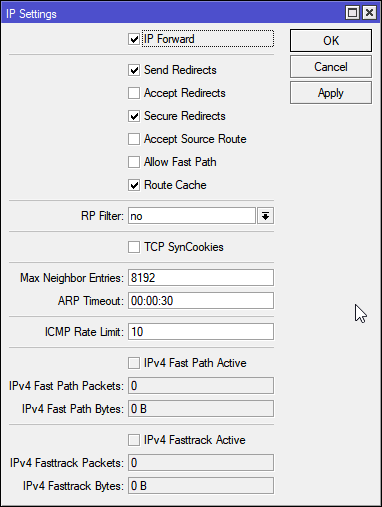
Yeah its off
no hw acceleration
Simple Queues don't work with Fast Path enabled
can be done, but I didnt want to bother messing about with mangle
hollow marlin
Is fastpath on?
hollow marlin
Oh yeah fastpath is there too
tame carbon
yeah its disabled
but the RB4011 don't really need it per se
I can hit it with 10gbit
and uses maybe 40% cpu
hollow marlin
I was going to say if its internal, fastpath is going to be used on the bridge, but the 4011's switchchips should be taking the load if the traffic is all off one of the two chips
hollow marlin
What I am saying if you are at 80mbps on internal traffic and CPU is at 0%, the switchchips are still being used for HW accell
tame carbon
oh yes
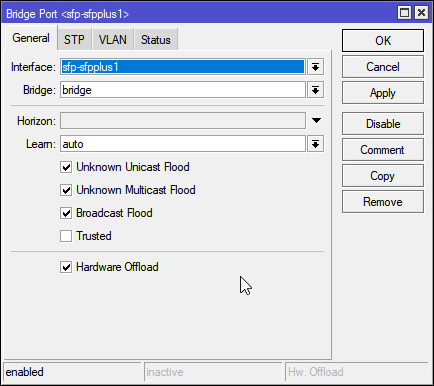
@hollow marlin I ment, 80mbit/s active routing
either between two internal subnets for security cams
or the WAN traffic
hollow marlin
If the 4011 had the same setup with only 1 additional SFP+ is would be the perfect prosumer router
tame carbon
yeah
@hollow marlin well
I paired it with a CRS305
that gives me all the 10G connectivity I need
since vlans can be hw offloaded
hollow marlin
well offloaded but not routing with HW accel
tame carbon
but I get what you mean, there's no 2 uplink ports
you may have a downstream router
or switch
or failover
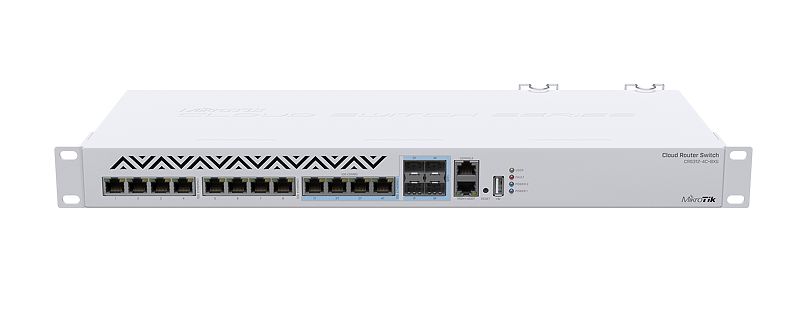
MikroTik is a Latvian company which was founded in 1996 to develop routers and wireless ISP systems. MikroTik now provides hardware and software for Internet connectivity in most of the countries around the world.
I think this would be a prosumer ^
hollow marlin
Yeah its the 10g router on a stick im not a fan of
tame carbon
its on a stick yes xD
yeah you limited in bandwidth
to 5G in worst case
@hollow marlin what about this little box?
500 bucks
Thats the only multi SFP+ router they have xD
but this gets expensive quickly
no RJ45
@hollow marlin damn. https://mikrotik.com/product/crs326_24g_2s_in#fndtn-testresults
MikroTik is a Latvian company which was founded in 1996 to develop routers and wireless ISP systems. MikroTik now provides hardware and software for Internet connectivity in most of the countries around the world.
This is actually quite insane
So its a more than capable switch
and routes at around 1.2gbit/s
most people at home don't need more routing than that
but can still enjoy large amount of local ports and high speed local storage on 10G
I wish there were modular routing platforms from mtik
most of their switching gear and hardware is already connected over PCIe
hollow marlin
$596 + 12 x $15-25 for SFP+ from fs.com. Expensive but no where near the cost if I were to do the same with Juniper/Cisco

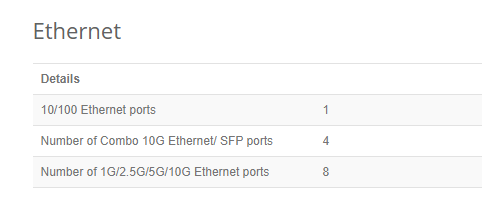 hollow marlin
I love the white, just like Ciena which have the most beautiful hardware
hollow marlin
The only silver that works is Apples space grey
Pure white in racks look so good
 brazen orchid
why dont people make a "micro ethernet"? Ethernet is very bulky
hollow marlin
wire gauge + proper distance to avoid cross talk on the RJ45
hollow marlin
correct
waxen scroll
@tame carbon thats not very woke of you
waxen saddle
Too woke to fix what's not broke.
tame carbon
@waxen scroll just making the connector smaller, electrically, without any other benefits just makes no sense
lean pebble
Still wondering when my ISP will call me back for get my fiber.
They opened the registration for it at 1.1.21.
tame carbon
like, the whole usb connection crap, I am glad ethernet is mostly RJ45
lean pebble
Its already here next my door
waxen saddle
I have a hard enough time crimping CAT6A cable. I really don't want that connector to be any smaller - even though it's the exact same RJ45 socket connector.
tame carbon
and usb cables barely more than 10 meters
3 meters even for high speed ones
ethernet is also limited in speed at distance, but supports quite long distance relatively
what we do need though
is a better standard for home fiber optic connectors
waxen saddle
Something I can make in about the same time as a CAT5e RJ45 crimp.
RJ45 CAT6A is an order of magnitude more difficult to crimp.
 edgy pasture
We need a standard for home fiber first, rj45 is copper, but fiber is super fragile
clear igloo
Maybe the cheap stuff but there is good fiber that's much more durable
edgy pasture
And much more expensive
I do dream of a day where we have fiber conectors instead of rj45
clear igloo
rj45 won't ever go away completely
 young tangle
I love RJ45
RJ11 is just a pain to deal with, I lose the connectors all the time and the government likes to save money so they break all the time too
little schooner
Wireless RJ45
 torn juniper
hey. my dad is being a dookie face and says the router needs to be in his office upstairs and my pc needs to me down stairs on the opposite end of the house. Are there any good routers that can sync and still provide HardWire speeds because we're paying like $175 for 1gb speeds, and when I'm hardwired i can get roughly 20-35 ping in games but now im getting 250-500
I heard of PowerLine Ethernet but all that is, is it syncs via wifi, but downstairs gets less than 20gbs of download
peak cloak
huh?
500ms ping is realllly bad
are you sure you are not talking about mbps?
20gbs of download?
you sure about that?
max a regular ethernet port can do is 1gbps
and wifi can't really beat hardwire speeds
although wifi 6 can beat just normal 1000Base-T
pretty expensive though
@torn juniper
just run a wire
wifi 5 can barely do gigabit
powerline is eh
success varies wildly
depends on the load on the electrical system, the quality, and lots of other's
torn juniper
i just did the test and i got 5.2mbs download and .25 upload from downstairs
i'll send a pic, 2 s
torn juniper
yep
peak cloak
best solution is to run ethernet
peak cloak
or use moca adapters if you have coax
torn juniper
what is Moca Adapters
peak cloak
basically tunnels ethernet traffic over a coaxial cable
peak cloak
wifi is wifi
torn juniper
lemme be a bit more specific
is it also like an extender
because i know you can get Wifi extenders
peak cloak
well extenders work over wifi, moca is not wireless
moca works over coax
you can connect an access point
AP's actually "make" wifi
peak cloak
router's just route
so most router's are actually routers, switches, and AP's in one box, some even add a modem in too
thick minnow
can you use a TP-Link Wifi 6 AX1500 Smart WiFi Router Archer AX10 as wifi?
i was too lazy to text this 2 times so i just copy it
anyone here?
@peak cloak
peak cloak
wifi router
thick minnow
what?
peak cloak
literally says wifi router in the name
peak cloak
modem?
peak cloak
you should only have 1 modem and 1 router per house basically
thick minnow
brb wont be long
peak cloak
modem converts cable or dsl to ethernet
peak cloak
router performs NAT, firewall, dhcp
and usually within routers there is also an AP that does wifi
if you just need wifi, get an access point
you would plug it into an existing router
peak cloak
thick minnow
well could a router work as wife?
a router just routes, but most home routers are wifi routers
this is a router
but has no wifi
thick minnow
so i want to put it in my room just for me and have my own wifi but can that work?
peak cloak
how are you planning on connecting to your ISP
thick minnow
isp???
peak cloak
internet service provider
thick minnow
no
this is what i want to do
i want to have this thing in my room right
and then i wish to use it for wifi
can that work without a modem? and isp?
peak cloak
well how are you going to connect it to the greater internet?
you can't turn it on and have internet
thick minnow
ok so i need a modem?
peak cloak
do you already have internet at your house?
peak cloak
then no, you can't just hook it up to a coax port and have internet
thick minnow
oh ok
peak cloak
you have bad speeds from your ISP or just bad wifi speeds?
thick minnow
just bad speeds
peak cloak
get yourself an ethernet cable and hook a computer up to your main home router directly and then do a speed test
thick minnow
so can i connect that router to the modem wireless? is that a thing i can do?
peak cloak

thick minnow
MY HEAD HURTS
peak cloak
mine does too
thick minnow
https://www.amazon.com/gp/product/B07ZSDR49S/ref=ox_sc_saved_title_2?smid=ATVPDKIKX0DER&psc=1 can this connt to my modem?
thick minnow
its a all in one
thick minnow
ap?
peak cloak
I'm talking ELI5 rn
thick minnow
eli5????







 thick minnow
i want router in room so wifi better now
peak cloak
I have this
AC1350 Wireless MU-MIMO Gigabit Ceiling Mount Access Point
can you run ethernet to your room though
thick minnow
not really
peak cloak
thick minnow
oh that thing yea
peak cloak
you would need to find where that terminates
and then you could run ethernet over a coax cable
thick minnow
what?
peak cloak
with moca
peak cloak
making a diageram
peak cloak
peak cloak
well whereever the coax terminates
thick minnow
?
peak cloak
I was just it as an example
where does the coax go from your room
I think moca may work over splitters, but that's black magic to me
thick minnow
uhh i dont know how do i fine out?
peak cloak
look around the house?
thick minnow
what so i look for?
peak cloak
or tbh, it may just be hooked up to your ISP directly
look outside your house, there may be wires on the walls
most ISP's do that
peak cloak
ah ok
thick minnow
like those lil house that look like you can use a car or something to move it
but you cant
peak cloak
yeah
thick minnow
so what do i do?
thick minnow
moca??????
peak cloak
ethernet over coax
thick minnow
what?
thick minnow
i just want to know if i can use this https://www.amazon.com/gp/product/B07ZSDR49S/ref=ox_sc_saved_title_2?smid=ATVPDKIKX0DER&psc=1 with my modem over wifi
peak cloak
well this is an excellent example of the https://xyproblem.info/
Asking about your attempted solution rather than your actual problem
you don't want a router if you already have one
thick minnow
but i want my own one if i do get one just for me does it do antthing to help with speed or any thing?
peak cloak
depends, you are trying to fix wifi right? So then you want a better/more AP. If you problem was an the ISP's end, then it won't help
that's why I'm asking what speeds you get wired into the router
because then that will see if it's ISP or Wifi
thick minnow
ok so if its not the isp we say what do we do?
peak cloak
if it's a wifi range issue, then I would add an AP where wifi is weak
thick minnow
in my room that it is