#networking
1 messages · Page 255 of 1
 peak cloak
an AP requires ethernet fyi
 stark notch
I mean like, 60mbps or less on a network where I'd normally get 200mbps or more.
peak cloak
so you would turn off wifi on your router and use the AP instead
 little schooner
yeah
then its just a router
I ran my wires too. Im not proud of all the holes i made though
some came out better than others
one of them i had to drill through 5 layers of wood
peak cloak
little schooner
it was ridiculous
stark notch
ah alright
peak cloak
@little schooner sunday I did another run and I made a hole in the wrong place, so now I have a hole right next to the outlet until I get to patching it and painting it
little schooner
thing with patching is that the original strength is all gone
peak cloak
@stark notch this one is also nice https://mikrotik.com/product/cap_ac

MikroTik is a Latvian company which was founded in 1996 to develop routers and wireless ISP systems. MikroTik now provides hardware and software for Internet connectivity in most of the countries around the world.
yeah
peak cloak
idk, I just like the simplicity of a wire
stark notch
I don't get why some people get on their knees for gigabit networking. I can have 3 intensive apps, including games, open at once with a 190mbps bandwidth and be just fine.
Probably even more, for that matter.
peak cloak
local servers
gigabit is the standard for LAN networking now
if you have some money to spend 10 gigabit isn't THAT expensive
some of the most expensive things are the sfp+ pcie cards
peak cloak
I don't have have the need or money for 10 gig
little schooner
i dont have the money for 10 gig
stark notch
I just don'e see the need besides servers though. I know everyday people who have this stuff, and it doesn't make sense.
little schooner
and also dont need it
stark notch
don't*
Well
I don't know people directly but I see these YouTubers, streamers, and gamers who do this stuff
and it's ridiculous
peak cloak
I would want gigabit WAN, but tbh I don't need it
instead we got 300/300 instead
but it's fiber so low latency
little schooner
gigabit WAN down, no. gigabit WAN up, absolutely
even 300/300 ill take
heck ill take 50/100
peak cloak
300/300 is fios's lowest fiber speed
little schooner
i upload a lot of stuff for work
peak cloak
isn't 300 mbps google's max upload speed>
stark notch
I could probably make ends meet on a 30mbps connection, tbh
little schooner
not sure. but i use onedrive
stark notch
As long as the latency is low, and it's not like 10mbps, it's fine for me.
But I am lucky enough to have a 200mbps connection (and about 150-200mbps uploads) with like 4-5ms of latency.
peak cloak
most of the time my WAN interface is at kbps
but again bandwidth is like a pipe, so it's better to have more than you need
little schooner
oh the reason i went full wifi was because running a cable across floor in apartment would look bad
peak cloak
my parent's are kinda the anti-wifi type, so I used that to my advantage
stark notch
anti-wifi in terms of it's more complex, or anti-wifi in terms of nutty conspiracy theorists?
peak cloak
second one kinda, more on the health aspect
like long term effects of wifi and stuff like that
idk
peak cloak
but unless you are out in the rural areas you still get hit with wifi radiation
even if you turn off your wifi
stark notch
I don't really understand 5G conspiracy theories. I mean... I do, but I don't believe in them at all. I can understand why people are afraid of new technology. It's called tribalism.
little schooner
i turn off all my wifi equipment every night
stark notch
Tribalism and caveman instincts
peak cloak
little schooner
i turn off all my wifi equipment every night
yeah I have the option to turn off the wifi radio as well, I just don't do it
scedule it that is
I'm wouldn't manually do that, I don't think your would either
little schooner
the killswitch is for all my electronics
oh yeah i do it manually via one button
peak cloak
really?
peak cloak
why? power usage?
peak cloak
makes sense
 rocky badge
I wanna fucking yeet this switch
its not fucking aggregating a port that I configured it to aggregate
🖕 unifi gui
rocky badge
and configuring a unifi switch from cli is useless
peak cloak
oh yeah unifi
rocky badge
"aggregating" with "port 47 & 48" https://blob.rocks/FgGNzZE6So.png

I DONT think SOOo https://blob.rocks/DMAir5ubtj.png

https://blob.rocks/HDrrsBLuDZ.png and showing the running config???

its only adding port 48 to the agg group
and not 47
little schooner
@peak cloak something like this but the 1pk https://www.amazon.com/gp/product/B07D2BDWTK/ref=ppx_yo_dt_b_search_asin_title?ie=UTF8&psc=1
connected to a power strip that has like 8
little schooner
@peak cloak because that would make too much sense
people dont like logic.
from the seller perspective
next thing that should be made cheap is the zwave flood sensor
 hollow marlin
@rocky badge are you configuring just through the cli?
rocky badge
no
People on Ubiquiti discord are suggesting to submit a forum post and hope a Ubiquiti employee sees it
 waxen scroll
buy juniper.
 dusty osprey
arIsTa
little schooner
unifi support is as good as alibaba's return process
waxen scroll
short BABA
 hollow axle
Um, $15k for a switch is expensive?
hollow marlin
Depends on the switch but not really
hollow axle
Lol, at my 9-5, we default to 93180YC-FX which list at like 55
Currently configuring some MDS 9706s (DS-C9710-V2K9) + DS-X9648-1536K9... I wish I could get reputable 100gig switches for that cheap
waxen scroll
i honestly dont know why LTT has no enterprise person
such a massive miss
they could even launch a new property specifically for it
im tired of thought leaders telling me what I should do when they have 0 hands on time
if you're gonna post videos about enterprise gear get someone who knows the concepts deep
you cant just stare at it like a cell phone and crap out a video
based on previous videos of theirs they dont understand subnetting, vlans, or any other topic slightly above basics
@hollow marlin 
you'd have to pay a premium though. I'd want $130k
peak cloak
waxen scroll
i honestly dont know why LTT has no enterprise person
Anthony is the closest to that that and yeah that would be cool
waxen scroll
is he? cause im sure i saw him on video removing all the vlans from the building cause they didnt understand why/how they worked
😷
peak cloak
closest
waxen scroll
xD
 unborn sluice

hollow marlin
waxen scroll
is he? cause im sure i saw him on video removing all the vlans from the building...
I think I remember him specifically saying "do I need to configure VLANs?"
waxen scroll
@hollow marlin you cant do BGP with a firewall.
oh I watch one LTT per 20 now
im only here for some people
hollow marlin
peak cloak
yeah, maybe not in networking, but at least in linux
Yeah he can walk circles around me in linux, but saying this is how something works without actually knowing it, like networking, is where the problem lies
peak cloak
the short circuit Brandon camera videos are nice
hollow marlin
waxen scroll
<@!462711605063450628> you cant do BGP with a firewall.
Maintenance at 3am with a customer for a peering on their SRX (Juniper Firewall)...
waxen scroll
i hate when the FW team is like NO so you have to do multihop + static routes
hollow marlin
They ever give a reasoning?
waxen scroll
yeah "its not tested"... "we dont want to add additional load"
bla bla bla
current job does this but we're getting new ones and will BGP to them
and then if you get them to agree to do it, they refuse to do much more. no modifiers or anything else
hollow marlin
Not sure why netops is not required to know networking, at least everytime I deal with them
waxen scroll
are they not?
ours know
well OK fine. the other companies didnt know much
they were alert monkeys
get alert, do basic check, ask for help
hollow marlin
I should say in terms of more than just focusing on types of traffic and not knowing how traffic flows from A-Z or what is protocols are involved in doing so. At least to the point where if you say OSPF or BGP their heads dont explode
waxen scroll
🤔
 outer lance
I have a networking question
waxen scroll
@tame carbon
peak cloak
finally got ipv6 up
outer lance
Anyone?
peak cloak
yeah just ask
outer lance
Oh ok
Instead of getting a new router can I just add a modem and a router to anywhere where I have coax?
And I don’t have hardwire Ethernet
peak cloak
to like expand wifi coverage, no
outer lance
Why not
peak cloak
you can only have one 1 modem and router
 queen lark
peak cloak
you can only have one 1 modem and router
queen lark
peak cloak
you can only have one 1 modem and router
WRONG
I'm using 2 routers
peak cloak
you technically can, but ISP won't like it
outer lance
Will they notice?
queen lark
I use one as a switch with the radio disabled
peak cloak
queen lark
WRONG
I'm using 2 routers
in what context
peak cloak
queen lark
I use one as a switch with the radio disabled
then it's not a router 
queen lark
One for WiFi/main ethernet
One as an Ethernet switch with the radio disabled because it fought with the main router
queen lark
They were within 1.5 feet of each other
outer lance
So my only hope to extend WiFi coverage is to run Ethernet or mesh system
peak cloak
double-NAT and dhcp conflicts
peak cloak
outer lance
So my only hope to extend WiFi coverage is to run Ethernet or mesh system
no, moca exists
peak cloak
it's like powerline, but over coax
outer lance
That’s kinda where I got the router modem ideas
Over COSZ
Coax
Actiontec 802.11ac Desktop WiFi Extender with 4 Internet Antennas 5GHz, Gigabit Ethernet, Bonded MoCA for Whole Home Fast WiFi (WCB6200Q)
Sorry for the long title
But is this not gonna work
peak cloak
that only has coax input
peak cloak
yeah that'll work as the "end" router
outer lance
Or running ether house
peak cloak
but boy is that overpriced
outer lance
Can I run multiple of those things
I mean can I run coax into it in my bedroom and run Ethernet from it to my pc
I mean part of the problem is we have an isp provided router
It doesn’t look cool
And it’s spotty in my room
peak cloak
draw a diagram of what you want to do, it'll make it easier
outer lance
Wdym
unborn sluice
outer lance
I mean part of the problem is we have an isp provided router
you can probably ask them about this, so you can replace it
outer lance
Ik
unborn sluice
2k
outer lance
This is also a problem in one of our offices
And it’s worse there since it’s an isp provided modem router combo
With no hardwire Ethernet
So what about a mesh system
unborn sluice
a combo without an ethernet?
outer lance
Like AIMesh
outer lance
unborn sluice
a combo without an ethernet?
Sorry if I wasn’t clear, the office doesn’t have Ethernet ports
Not the router
Or Razer Sila
 unborn sluice
Wish you are trolling
outer lance
But aimesh is the cheapest and most common place option available
So I’m at a bit of a personal crossroads
And the Razer router is ~$250
peak cloak
overpriced
unborn sluice
outer lance
So my idea is either two Razer routers

outer lance
Any suggestions
unborn sluice
that's some good sht you're smoking
outer lance
I mean
It’s not the worst idea
That would be to run Ethernet house wide without putting it in the wall
peak cloak
why can't you put it in the wall?
outer lance
The router is a floor below and about a hundred feet across
Meaning it has to go up two stories
Across my entire attic
peak cloak
I moved my router to the basement
outer lance
And back down Into my room
peak cloak
it's only a router so it has no issues
wifi AP is in the center of the house on a wall
peak cloak
best bet is 1 router, and use moca adapters
outer lance
It was already a pain when the spectrum guy who installed it
peak cloak
if you want to "extend" wifi use AP's not routers
outer lance
It’s a pain in the as to run Ethernet to the center
Then why are things like AIMesh so popular
Or Razer Sila
unborn sluice
is razer sila really popular?
peak cloak
popular != good
 outer lance
I mean
I am a Razer fanboy
So idk
But That’s besides the point
Why is a AP better than a mesh system
unborn sluice
Wired networking ftw
peak cloak
mesh is just an advanced word for a bunch of APs with one router and a wireless backhaul
unborn sluice

outer lance
So mesh or access points
peak cloak
mesh is a bunch of AP's
outer lance
Ik
unborn sluice

peak cloak
@unborn sluice how do I edit /etc/gai.conf so it prefers ipv4 over ipv6
my ipv6 connection is slow
I've looked online, but can't really find a concrete answer
unborn sluice
even the precedence doesn't work?
outer lance
What kind of access point do you recommend that’s under say 300 for a two pack, and is from a reputable company
unborn sluice
where is the mikrotik salesman when you need him @tame carbon
outer lance
And therein is wireless or wired better
unborn sluice
wired


 peak cloak
@unborn sluice got it, I was editing it wrong
outer lance
I mean then I must set forth and conquer
peak cloak
well, ping now defaults to ipv4, but not firefox
I can see when streaming from yt music, wireshark shows a bunch of ipv6 requests
do I need to reload a service or something?
unborn sluice
outer lance
I mean then I must set forth and conquer
no razer sila
outer lance
😦
unborn sluice
peak cloak
do I need to reload a service or something?
you didn't reload the processes?
unborn sluice
like firefox?
peak cloak
oh I restarted firefox
unborn sluice

peak cloak
ok so google chrome works
as in yt music doesn't constantly buffer every 5 seconds
@unborn sluice that explains it
unborn sluice
 peak cloak
it's free, so I'm not complaining
ok, so I'll make a vlan just for me so I don't mess up other's internet with slow ipv6
unborn sluice
I don't mess up other's internet with slow ipv6
This is an opportunity, they can technically access the internet but not quite

peak cloak
well, at least not though tunnel broker
little schooner
I remember watching a video where they tried to compare the differences
But it wasn't conclusive
peak cloak
if I paid for ipv6 tunnel it would probably be faster
and if fios had ipv6 that would be even better
 little schooner
I'm gonna have to try it sometime
I never actually did it with intention before
Only in Cisco books
Or Cisco training
peak cloak
little schooner
I'm gonna have to try it sometime
what tunnelbroker or ipv6?
little schooner
Ipv6
peak cloak
I don't really understand the whole router advert stuff
and the subnetting
and also scary hex digits
little schooner
I'm worried I might misinterpret the firewall rules
And allow stuff in by mistake
peak cloak
tunnelbroker has a thing where you can scan an ip
so you don't have to do it through some port scan website
I followed this guide for the most part (not exactly because I did it on a vif not an eth interface)

Krystal Blog
We’ve been using IPv6 for quite a while now on the aTech and Viaduct networks however my home ISP doesn’t support IPv6 natively. As you can imagine, this is quite...
little schooner
I see
peak cloak
it's the whole router-advert and assigning ips that confuses me
and these firewall rules (except dhcp)

Gist
Configuring IPv6 on EdgeRouter Lite. GitHub Gist: instantly share code, notes, and snippets.
little schooner
I see
peak cloak
this is the worst part, where some support ipv6 and some don't
 hallow nimbus
peak cloak
hallow nimbus
peak cloak
Thats some shoddy ass speeds
hollow marlin
little schooner
Is Ipv6 faster?
Technically yes. Do to its design of having the header as slim as possible and moving most fields that do not pertain to plain routing as extensions makes it quicker to process. Also other things such as no more NAT, QoS flow processing, etc
It can handle more PPS but to be noticeable in the real world, meh
peak cloak
Power is being weird rn, reminder I should get a ups
It's like flickering every so often
 tribal ferry
Does anyone know which POE injector USW-Flex-3 switch from Ubiquiti would use?
It doesn’t seem to be able to be powered by passive PoE, only 802.3at or bt
little schooner
@peak cloak my server had data corrupted on NTFS volume after a power outage. I only found it because I went to check my backups....
and they couldn't be restored.
now imagine if I really needed to restore from a backup
I am toast.
 waxen saddle
No QoS in IPv6?
 hazy river
I just upgraded to a new comcast router, the 1gb one, and my ethernet is getting about 20Mbps and wifi gets me from 150- over 300. Is there anything I can do to try and fix this?
 sacred fiber
Anyone know how to fix packetloss
Wait does installing or updating your network drivers help with packet loss?
dusty osprey
sacred fiber
Wait does installing or updating your network drivers help with packet loss?
Not really
Odd, google should accept pings and reply to them.
unborn sluice
You fix it somewhere else
dusty osprey
Updating network drivers has nothing to do with packet loss. We cant "fix" packet loss, there are many reasons behind it
Could be your isp, could be the website/game your tryna load,
unborn sluice
Could be you
sacred fiber
dusty osprey
Updating network drivers has nothing to do with packet loss. We cant "fix" packe...
Problem is I don't get packet loss on my ps4 only my pc for some reason
It has something to do with the pc
Some setting or idk man
 primal ice
tracert 1.1.1.1 or pathping 1.1.1.1
unborn sluice
Turn off packet loss
sacred fiber
unborn sluice
Turn off packet loss
Oh ya why didn't I think of that duh
dusty osprey
unborn sluice
Turn off packet loss

unborn sluice
it go brrr
unborn sluice
 tame carbon
<@!349203120082911242> you go brr
tame carbon
<@!349203120082911242> you go brr
I agree with that
 toxic citrus
Hey I've asked a similar question before but with a different setup. I'd like to be able to use an ax router for VR. it's not connected to the internet and I'd like to hook it up to the internet router in the house. I want the vr router to remain as the vr router as the house router is pretty bad. Is there any way i could hook it up so it gets internet access, while remaining as a separate entity in the network (not be a repeater)? Thank you 
I can do so wired with a Powerline adapter or wirelessly. Don't want speed or low ping, just any degree of internet access
toxic citrus
I mean i want the vr router to just have internet and not become a repeater for the house router. The house router has internet, the vr one currently does not
Basically, i want internet access for the vr router
toxic citrus
Yeah but then wouldn't it become a repeater?
unborn sluice
like a wifi repeater? (extender)
toxic citrus
Yes
waxen saddle
On VR router, disable DHCP and connect a LAN port to your house router
toxic citrus
Thank you, I'll try that right now 
waxen saddle
Oh, and set a static IP on it that isn’t in the House router DHCP range
toxic citrus
How would i identify an IP that isn't in its range?
waxen saddle
If your DHCP range is 192.168.1.50-192.168.1.200. And your House router is 192.168.1.1... you can use anything in 192.168.1.2-192.168.1.49 and 192.168.1.201-192.168.1.254
I usually group my routers close together IP-wise. So I’d choose 192.168.1.2
unborn sluice
edit the DHCP range of your router NAT
toxic citrus
Ah yes so the house router is x.x.8.1 so I'd make the vr router x.x.8.2 and make sure it's outside the DHCP range?
unborn sluice
you change the DHCP range for say, x.x.8.10
so it would only give dynamic IP in 10+ range
or maybe
most router NAT can give the static IP
soo
do that isntead

like assign x.x.8.2 to device 69:: (mac)
then that ip would only be assigned with the designated mac, and not be given to others
waxen saddle
@toxic citrus Correct
unborn sluice
you're right corewyyn
toxic citrus
Aight ima do this stuff so I'll be kicked offline for a bit. Thanks guys 
waxen saddle
I don’t think the VR router would request a DHCP address, which is why we have to set a static address to match the House router network. That’s been by experience at least.
I haven’t touched consumer-grade stuff in several years. Maybe things have changed.
 spark cedar
toxic citrus
spark cedar
toxic citrus
Aight so I gave the vr router a static IP now, that should be all yes?
waxen saddle
If you plug in to the VR router and your gateway router on your computer is set to your house router - it's working perfectly. We just need to know why you can't access the VR router any more...
toxic citrus
I can now yes
waxen saddle
Oh perfect.
Is your gateway router on your computer (connected to the VR router) set to the house router IP?
waxen saddle
Yea. If everything is working correctly, you should have 1 House network. 2 Different Wifi networks (House + VR).
(The 2 wifi SSID's just connect you to the single house network)
toxic citrus
Aight so if i play virtual desktop it won't use my house network to do the processing?
waxen saddle
If you have 2 devices that talk to each other and they are both plugged in and/or connected to the VR wifi network. Then yes, their traffic won't touch the rest of the household.
waxen saddle
That's perfect
waxen saddle
NP mate. In a nutshell: All your devices in your house will be able to talk to each other as they are on 1 network. They can all access the Internet too. Routing is efficient too - if 2 devices want to talk to each other and are plugged in to the same device, the traffic won't go to another switch/router and then bounce back. They'll just talk directly to each other.
Hopefully that makes sense. Try it out yourself too. 🙂
toxic citrus
I tested it there and it works almost perfectly! A few mins after i blocked access to house router, my vr headset lost connection as the vr router doesn't know how to assign IPs. However it wasn't actually using the house router for anything since it did work for a few mins with no connection to it. This is exactly what i wanted and I'm so glad you were able to help me out 
Only thing left to do now is optimise the vr router for low-latency throughout
Got it down from 15 to 12ms there, so far so good. Thank you 😊
waxen saddle
Nice. 🙂
peak cloak
hmm, for some reason browsers like chrome and firefox are not respecting the entry in /etc/gai.conf
system tools like apt and ping respect it
after a full system restart chrome now seems to default to ipv4
but firefox still doesn't
 kind pivot
I got a 2.5Gbps connection but from time to time I have to reboot the router from the fai because i only have 200mbps
It feels like it's done on purpose by the fai ...
peak cloak
2.5 gbps is pretty damn good
@kind pivot ISP router?
and ethernet or wifi
and with ethernet, most ethernet cards support only up to 1 gigabit
kind pivot
Yeah isp router
peak cloak
yeah isp router's suck
 thick minnow
I want more white hat hackers
kind pivot
My isp router and motherboard supports 2.5GbE
thick minnow
Dude stole my Crunchyroll account an hour ago
kind pivot
And i have them,just that sometimes I have to reboot the router to get it
I even have 5Gbps but not on the same line
Since my equipment are 2.5GbE
kind pivot
Something like 20 meters and cat 5E i believe
peak cloak
yeah cat5e isn't rated for anything higher than 1 gbit
thick minnow
@peak cloak can you make it so people never steal my Crunchyroll account again?
kind pivot
But I got my 2.5Gbps, it's just that sometimes it goes down to 200mbps and then I need to reboot the router to go back to 2gbps
peak cloak
kind pivot
But I got my 2.5Gbps, it's just that sometimes it goes down to 200mbps and then ...
yeah then it's router
 spiral drift
Anyone have any experience with AT&T fiber? I'm setting it up in a new place and if possible I'd like to use my own equipment as opposed to the ISP-provided combo box
peak cloak
I assume you have fiber?
peak cloak
spiral drift
Anyone have any experience with AT&T fiber? I'm setting it up in a new place and...
@rocky badge has at&t I think
rocky badge
I don't
kind pivot
I'm pretty sure my isp is bottlenecking me on purpose
rocky badge
@clear igloo does
peak cloak
ah
spiral drift
@kind pivot I'm trying to perform first time setup with my own equipment if possible to minimize ISP interference
peak cloak
kind pivot
I'm pretty sure my isp is bottlenecking me on purpose
I would say it's bad ISP router
do you know what model it is?
peak cloak
bad firmware, maybe memory leak
spiral drift
from what I can tell for my ISP anyway is that it's pretty straightforward to set up an additional network branching off the ISP box, but I'm trying to figure out if I can disable the routing and other functionality completely and just use the ISP box as a dumb modem
peak cloak
@kind pivot you could maybe try and see if it's just normal ethernet and plug your pc in the cable that goes to router
kind pivot
My PC is already plugged into the router via ethernet
kind pivot
Yeah
 hearty seal
Anybody need some more network bandwidth?
kind pivot
And this thing directly goes into the router
peak cloak
yeah then you could use your own router
kind pivot
The sfp cage
peak cloak
it's sfp+
kind pivot
Yeah
peak cloak
yeah then you could use your own router
you just to need to find a fast enough one
mikrotik have relativity cheap network devices
kind pivot
Wouldn't the ISP block it ?
peak cloak
how?
kind pivot
I don't know
peak cloak
and there are different fiber standards
kind pivot
I'm checking if I can use another router
peak cloak
you can get this https://mikrotik.com/product/rb4011igs_rm
MikroTik is a Latvian company which was founded in 1996 to develop routers and wireless ISP systems. MikroTik now provides hardware and software for Internet connectivity in most of the countries around the world.
has an sfp+ cage
hearty seal
There are different transmission standards and the transceivers are also coded, although Mikrotik usually works with all brands of transceivers
kind pivot
Apparently no
peak cloak
could you maybe a link the site so I could look at it?
kind pivot
Remplacer Freebox POP par un routeur
"L'ONT étant ingéré dans la Freebox POP, il est impossible de s'en passer.
De ce que j'ai compris, le SFP+ est un simple optique, la partie intelligent de l'ONT (qui intègre habituellement un CPU, dans le Ram et de la flash) est géré par la Freebox Delta."
Sorry it's in French
peak cloak
it's fine, google translate exists
kind pivot
I believe the easiest thing would be to try it out
A friend of mine has a LOT of high ends router, he must have one with a SFP+ cage
kind pivot
So the best thing we can do is use the box as a bridge
peak cloak
yeah, that's what I was about to suggest
and the output is only copper
which kinda sucks
kind pivot
And it wouldn't forcefully solve my problem
Maybe it's just overheating
It's like REALLY hot when I touche the SFP+ cage
It burns me
peak cloak
yeah, that's probobly it
kind pivot
Can't touch it for more than 2s
peak cloak
bad ISP router again
peak cloak
the whole problem is that it's PON, which is the same fiber tech my isp uses
which is why you can't just plug the SFP module in
peak cloak
outer lance
I have a problem
peak cloak
yes?
outer lance
My pc keeps disconnecting from the internet every 2-3 minurtes
And I rebooted the router already
Any clues why?
outer lance
It appears to be a problem with my pc
Because I’m streaming 1080p YouTube on another desktop and it’s not disconnected
peak cloak
wifi or ethernet?
outer lance
Wireless
WiFi
I half considered getting starlink when it comes out for that half of my home
It’s annoying as all heck
outer lance
I can’t
outer lance
It would be probably terribly expensive
peak cloak
ethernet is cheap
outer lance
It is
peak cloak
I got 1000ft of it for like 50 bucks
outer lance
I mean to have someone run it
peak cloak
to run it in walls, kinda annoying, but you can buy some shielded wiring and run it around the house outdoors
outer lance
If i wanted to run Ethernet, I’d hire someone and regardless
Anyways
What’s the cause of the problem
peak cloak
probobly wireless driver or something
outer lance
Oh ok
I could find it on YouTube
Also
Another small problem
Whenever I start my pc it’s always disconnected from the internet so I have to do it, but it takes like 2-3 minutes for it to start working, and recognize my network
Is it just the same driver nonsense
waxen saddle
I'm semi-familiar with PXE booting.
I know enough to make it work perfectly for my Ubuntu LTSP server
 stable warren
it's pretty weird, Vsphere 7.01b (or something latest version) Server 2019 WDS working on Vsphere, i can PXE boot/install etc, however when i try to re-image my laptop nothing
it boots from PXE, it shows loading files and windows logs show TFTP download fail
waxen saddle
I think you can have different images or something for PXE booting. You just need to point it to the right directory. Kind of hard to do if you're advertising PXE as a DHCP option on a network. You'd have to spin up another network with the correct PXE directory.
I'm assuming it's not loading the correct image.
stable warren
using windows server 2019 boot.wim
laptop is set to uefi/scm
it starts just shows error 4101 tftp download fail
waxen saddle
Does it tell you what the client was requesting?
stable warren
waxen saddle
oh the .wim file itself
stable warren
just replaced network cable just to be sure (the laptop has windows 10 on it and it had internet)
waxen saddle
https://social.technet.microsoft.com/Forums/windowsserver/en-US/aa063ef0-90ef-44c7-b1b7-ce65a2a66119/issues-with-wds-after-march-2019-cumulative-update?forum=winserversetup Try changing the Maximum Block size? There's a screenshot showing it a little past halfway down the page.
waxen saddle
Try setting the Maximum Block size to 1024.
waxen saddle
At the very bottom, it mentions a couple of KB's that fix the issue described in the article. Do you have both of those KB's installed?
stable warren
only see 13 updates :x
those 2 KB's aren't in catalog anymore :x
just don't get why from server 2019 vm to 'blank' vm it works just fine lol
works just fine on VM, not so much on laptop
weird af
works fine on VM
peak cloak
lol
dusty osprey
tame carbon
only a garbage OS requires a decrapifier
I may be understanding this wrong but WHAT is "DeCrapifier" ™️
If I have to guess, modified windows without any bloat, and optimizations
 frozen finch
Google Docs
Got that from this guy's video... https://www.youtube.com/watch?v=PdKMiFKGQuc
Secure your online accounts, and manage your passwords with NordPass. Download it for free by visiting https://NordPass.com/Craft, and a huge thanks to NordPass for sponsoring this video.
Let's face it... Windows Pro hasn't been a 'professional' operating system since the Windows 7 days.Between the lack of control over updates, and the 12 versi...
waxen saddle
That was an extremely informative and helpful video. Thanks for sharing mate.
 proud coral
I'm searching for an LTT Video. Something with shared cloud storage trough a NAS, different users and so on. What was it, I can't remember.
stable warren
well it's a great vid, and yes it works, great even from server->server (esxi 7/vcenter) however it doesn't work for my laptop, and some random board i used took about 1 hour to get the installer loaded and installation itself took about 7 minutes..

View announcements and review known issues and fixes for Windows 10 version 20H2 and Windows Server 20H2
that's right there
 thorny vector
Why not just virtulize everything? 😄
hollow marlin
shhhh...two more times and Phoenix is summoned
waxen saddle
Let's not summon him. It's much calmer here without him.
primal ice
@peak cloak firefox will always default to ipv6 unless you tell it to ignore ipv6.
peak cloak
that's a shame
my ipv6 connection is slow
as in low bandwidth
latency is pretty good
primal ice
yeah it was one thing I fought with when I first set up my ipv6 tunnel - firefox.
primal ice
its nice though it acts like an ad blocker - cause most of the ad servers are only ipv4
dusty osprey
I don't know or am sure but I heard chrome actually, when you click something or link it will send v6 and v4 requests at the same time and whichever reply it gets faster it will listen to that
primal ice
hrm is your ISP shaping your traffic?
peak cloak
idk
let me look it up
weird, because other's are saying tunnelbroker had fast speeds
primal ice
yeah mine is wide open I get the same speeds through the tunnel as my regular ipv4 traffic. just routed differently. maybe a few milliseconds more delay . though sometimes faster depending on the servers and routes being taken.
primal ice
yeah you could try another entry point.
peak cloak
I'll make another tunnel
primal ice
oh did you add ipv6 dns servers to your router?
peak cloak
yeah
primal ice
okay
peak cloak
let me double check, but I'm pretty sure I did
that shouldn't affect speed test though?
primal ice
it would affect a lot of things cause its trying to figure out the names of stuff but has to default back to ipv4 after erroring out for awhile.
My dns settings
peak cloak
things are a bit more complicated on an edgerouter lol
nope still slow
it's not dns
because majority of the time it's on Transferring data from <>
primal ice
yeah I am gonna guess your isp is treating your tunnel as like torrent traffic and bottlenecking it. (traffic shaping)
hollow marlin
peak cloak
maybe just the NY server? idk
You in NY?
hollow marlin
Ah, in NY here. If I can get a tunnel I can give it a shot. Fios here too
primal ice
https://tunnelbroker.net/ sign up do their tests free ipv6 tunnels.
peak cloak
hmm, looking at this: https://forums.verizon.com/t5/Fios-Internet/IPv6-support-and-ICMP-being-blocked/td-p/897508
it could be my edgerouter
hollow marlin
Yeah I know how, I thought I remembered recently they announced something along the lines of the tunnels are moving to a waiting list of sort
waxen scroll
@hollow marlin time to move
hollow marlin
Tell me about it. At least Im no where near the cities
peak cloak
my parents kinda want to move, but on the other hand everyone they know is in the NJ/NY area
waxen scroll
too bad so sad its a dump
high taxes, high cost of living
NJ is trynna raise taxes cause of work at home
hollow marlin
Yuuuup
 still zephyr
How can I see if I'm being ddos'd because I was on Omegle earlier and there was this brat with a fortnite poster that grabbed my ip
waxen scroll
watching louis' self help videos make me want NYC real estate to crash so hard
peak cloak
we wanted to add an extension to the house, but the tax increase made it not justifiable
thorny vector
-_- Can't grab someone's IP from omegle
still zephyr
You can
waxen scroll
@peak cloak dont permit the work and taxes wont go up
still zephyr
There's a script I've tested it
waxen scroll
i guess a damn extension will be noticed though
peak cloak
waxen scroll
<@!222482269829332992> dont permit the work and taxes wont go up
yeah, but that's sketchy, if you are out in the woods then nahh
it all depends on if neighbors report it
thorny vector
Huh, very well. That's a stupid implementation by omegle. @still zephyr
peak cloak
thorny vector
Huh, very well. That's a stupid implementation by omegle. <@!620723437798948864>
yeah it's P2P apparently
still zephyr
Yeah ik it connects the other person to your network I think it's really dumb
peak cloak
less server costs for them
thorny vector
You can monitor packet drop at your edge router. But unless you're hosting some kind of service, they have to throw an ungodly amount of traffic at you (aka, not feasible for a single person/script kiddie)
still zephyr
Hm, yeah probably nothing then, I was just suspicious when I was cutting out afterwards
peak cloak
weird how it starts and then just stops
one of the responses on ubiquity's forum
about tunnelbroker
going to try to change the tunnel to a different server then NY
waxen scroll
lmaooooo
primal ice
😒
little schooner
@peak cloak did you trying spinning up a pfsense instance on a laptop or something and see if you get the same outcome?
If you think it's the Edgerouter
peak cloak
little schooner
<@222482269829332992> did you trying spinning up a pfsense instance on a laptop ...
I could, problem is that pf sense would need to internet facing
because HE needs to ping it
I don't feel like messing with it rn
little schooner
I had strong hesitation taking down a windows enterprise ca from ad
I thought everything would break right away
I put it off for like a year
waxen scroll
@little schooner back to the "they better hire me or else they have BIOS to do"
let them not renew, it builds character
its time to get a $80k job
waxen scroll
That's great pay in SF for entry level at a non tech company
Chicago is high cost of living too and entry would be like 40-45k
little schooner
@waxen scroll the bios script was so good too. It basically handled all the Dell models
It suspends Bitlocker if detected and only runs if version is older and checks if user is currently logged in. Skips if they are
Before they had to create a new script for each model
Not as efficient
@waxen scroll I think they'll renew its just they are all on vacation
 covert hornet
Hi everyone I have a question about SMB share ACL permission in FreeNAS.
I have the following datasets
-Files
-Downloads
I want to give a user permission in Downloads but no permissions in Files. How do I do this?(edited)
right now I can only do this if I give the user permission in Files as well as Downloads
unborn sluice
covert hornet
Hi everyone I have a question about SMB share ACL permission in FreeNAS.
I have...

thick minnow
I found all the old networking equipment my dad use to use at his old job its crazy how networking equipment has change
I feeling like a archaeologist but for computer equipment
tame carbon
@thick minnow what do you mean, 10BASE-T over BNC ?
thorny vector
@covert hornet If you still need help, let me know
thick minnow
@tame carbon like network switch network cards old server power supplies 1 gig network switches ect.
i could start a small network all i would need to get is just storage
tame carbon
@thick minnow 1G is still useful to have around
never know when you might need another NIC
 buoyant reef
hmmm for some reason im getting only 500--700 kbps on a torrent even tho i have a 100 mbps plan
 clear igloo
Torrents aren't direct downloads
tame carbon
@buoyant reef if there aren't any seeders, speed is bad
clear igloo
That too ^
buoyant reef
ah i see
tame carbon
@buoyant reef torrents can take a few mins to speed up
takes a while for the client to build up the DHT
it slowly discovers new peers
tame carbon
whats this.

Sign up for Private Internet Access VPN at https://lmg.gg/pialinus2
Save 10% and Free Worldwide Shipping at Ridge Wallets by using offer code LINUS at https://www.ridge.com/LINUS
Back in 2018, we tried out a direct system-to-system 100GbE link with the help of Mellanox. This time, we've got a switch and a plan to deploy what will be our fastes...
lol fs.com
dusty osprey
I posted this veedio here few dais ago
xD
yeah that switch is only 25GbE for most part
Only few parts are 100gbe
What's the switching capacity on that tho
dusty osprey

clear igloo
dusty osprey
What's the switching capacity on that tho
3.6Tbps iirc
dusty osprey
Mmm yes I think
 dusty osprey
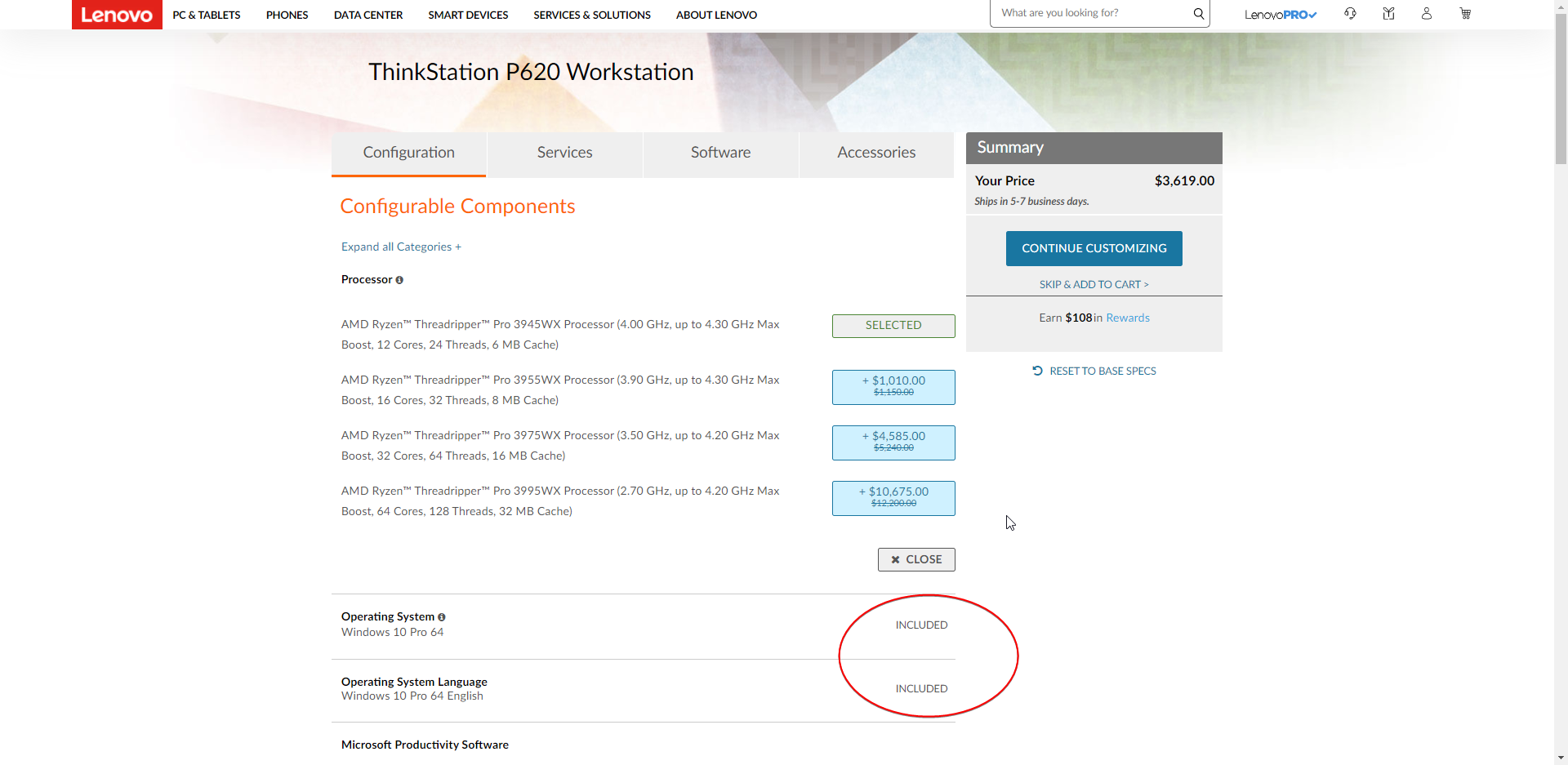
ThreadRipper Pro.
What is that even >.>
Basically EPYC but without EPYC in the name
tame carbon
those thinkstations look nice, maybe buy and old one and upgrade it
peak cloak
I've been thinking of upgrading my "prod" server
peak cloak
or I can ask about bringing home a server from school for "learning"
 odd notch
Have your internet provider ever messed up by giving you more speed than whats in the bundle?
odd notch
My package is 50/50 Right and Right now for the past 2 weeks its 550/550
 low herald
end of year gift 🙂
peak cloak
like we pay for 300/300, but this the speedtest.net speed
little schooner
I want that upload.
Then for work I can simply just make the labs here
and upload them to cloud
work pc isnt as great as my home pc
peak cloak
how bad it your upload?
peak cloak
ah, I had 200/30 for most of the time here
peak cloak
yeah, that's like more then 2x
little schooner
true
when i run the vms on my machine, everything is just instant
they dont have optane drives
they have those slow oem toshiba drives
peak cloak
maybe internal database error?
or maybe the "limiting" or whatever it's called isn't working properly in your area?
what's the max they offer?
odd notch
1.5gbps
peak cloak
yeah, probably database error
little schooner
@peak cloak thats a big error. Now if only that translated to bank accounts too
an extra zero wouldnt hurt
peak cloak
don't bank databases work on summing up transactions, not just a key value of your balance?
odd notch
The funny this about this is that I connected my provider and be honest they were shocked and just had to say its working perfectly fine. we usually receive calls regards to slow internet or down and they just said enjoy it while it last.
I guess I was one of the lucky gamers to get a bonus... lol
tame carbon
@dusty osprey so got sidetracked, continued the video
lol the windows again
and the explanation on that you need to get a special version of windows, so bad lmao
peak cloak
yeah ltt is not for advanced things
covert hornet
@covert hornet If you still need help, let me know
@thorny vector hi, yea I still need help with this
thorny vector
Alright, let me pull up my freenas so I can walk you through it
@covert hornet Ready?
@covert hornet
@unborn sluice Guess no help is needed. lol
unborn sluice
He wan't ready
tame carbon

Tom and Jerry classic collection; an old-wonderful cartoon series- Enjoy your watch!
توم و جيري القديم, الحلقات الكاملة :)
waxen scroll
@tame carbon i forgot to see what happened when i tagged you on someone asking just to ask yesterday
u give them the rant?
linus rant tips
peak cloak
huh, so I did an iperf speed test directly from my router and it shows a much much higher speed
so maybe it's my switch??
I doubt it though
I'll try directly connecting my pc to the router next
covert hornet
@covert hornet
@thorny vector hey sorry I was replying with my phone. If you're still available I CA an go through it now
thorny vector
Yeah
although, just so you know, you'll be doing permissions with a windows box, not through the freenas web page
dusty osprey
peak cloak
I'll try directly connecting my pc to the router next
wait u just said u did speedtest from router itself direcly
peak cloak
yeah
rocky badge
@clear igloo 802.1X assigned VLANs are cool!!
Mom signed into my laptop with her AD account, and she was put on VLAN 20 (main home VLAN) and UniFi shows the RADIUS user is her.
But if I sign into my laptop, I get put on VLAN 50 (my VLAN), and UniFi shows the RADIUS user is me
covert hornet
Ah ok that's what I had done before in freenas 9 or 11 but now that ACLs were out I tried doing that and couldn't get it to work
peak cloak
dusty osprey
wait u just said u did speedtest from router itself direcly
my logic is that the only thing between my pc and the router is the switch, so I'll try eliminating that. Before I was doing it my pc which resulted in kbits/s. The speedtest on the router eliminates a problem with the tunnel, but something with the switch and/or router
If I can get the switch out the equation I can be sure it's the router
 peak cloak
dusty osprey
what r u tunneling to exactly :p
peak cloak
dusty osprey
what r u tunneling to exactly :p
tunnelbroker ipv6 tunnel
fios doesn't have ipv6 here, at least to my knowledge
 peak cloak
I'm trying to learn ipv6
dusty osprey
yea my isp actually changed ftth modems, earlier we use dto fat huawei, now we use some thin huawei
I think changing the modems (becuz we upgraded from 12 Mbit to 250 max) they also set v6
they did 250 Down, 50 UP advertised, but i think they changed their mind for the price so did 261 MAX Down, and 102ish Mbps max Upload
rocky badge
my ISP isn't doing native v6 yet 😦
dusty osprey
hmm :/
my isp blocks v4 port forwarding fully. all prots
v6 works.
on some ports
peak cloak
ah that sucks
dusty osprey
but, SSH is on? then it means i can ssh even km;s away! my isps 4g also gives v6
rocky badge
and I have 2 IPs from them rn, I've had 4 at once before
peak cloak
I didn't try 80 or 443 on fios yet, I know wireguard and 25565 work
They only explicitly block 25 I think
rocky badge
 peak cloak
rocky badge
https://blob.rocks/hIH8P7LyNm.png
peak cloak
rocky badge
https://blob.rocks/hIH8P7LyNm.png
what ISP?
rocky badge
local
dusty osprey
you know whas funny? i went 160km away because family trip. ssh'ed on a top of a mountain with no one around (it was kidna middle of nowhere on a famous mountain here in UAE) and i got 35ms.
then 4 hours later when i was LIKE 1 KM near home, I sshed to my laptop, and then also checked ping
135ms.
@peak cloak
dusty osprey
hmm
where I live full country only 2 isp's

the govt. is strick here and regulates a lot of traffic going
dusty osprey
me: du, etisalat.
also me: forget the first option, they just send all their traffic to the 2nd option 🤣
peak cloak
I have optimum and fios as the only 2
well technically sat internet too, but ew
well optimum is now technically altice
clear igloo
rocky badge
<@!291198741862416384> 802.1X assigned VLANs are cool!!
Mom signed into my lapto...
Yah, that's fun stuff 😄
peak cloak
rocky badge
<@!291198741862416384> 802.1X assigned VLANs are cool!!
Mom signed into my lapto...
problem with this is that my parents would say it's too complicated
peak cloak
yeah ik
rocky badge
first.last
ur password
peak cloak
also I don't the experience in AD
peak cloak
when zenmap can't be installed from ubuntu repo because python 2 is deprecated so you need to compile it yourself from a dev build
thorny vector
@peak cloak Why use zenmap?
peak cloak
thorny vector
<@!222482269829332992> Why use zenmap?
gui to nmap, is there a better tool?
thorny vector
just nmap
putting a gui over nmap just kinda constrains it
especially once you start using ALL the features of nmap
peak cloak
hmm, alright I'll take some time to learn the cli
thorny vector
also, you might appreciate learning some of the fun stuff you can do with netcat
peak cloak
hmm, like what?
thorny vector
Anything and everything network connection
simple p2p chat connection. Simple file transfer. CLI over simple connection
peak cloak
ah, ok
thorny vector
You dream it, and if it needs a p2p connection, netcat can do it
tribal ferry
What would be the best UniFi switch that is powered by 802.3af or 802.3at power and can pass through 802.3af?
rocky badge
https://store.ui.com/collections/unifi-network-routing-switching/products/usw-flex
https://store.ui.com/collections/unifi-network-routing-switching/products/unifi-switch-8
@tribal ferry These are the only two I know of that are PoE powered and passes through PoE

Ubiquiti Inc.
5-Port managed PoE switch with (1) 802.3at/bt (PoE+/PoE++) input port and (4) 802.3af (PoE) Gigabit Ethernet ports
Build and expand your network with the UniFi® Switch, part of the UniFi Enterprise System. The UniFi Switch, model USW-Flex, is a configurable Layer 2 Gigabit switch with auto-sensing 802.3af PoE. It offers 5 RJ45 Gigabit Ethernet...

Ubiquiti Inc.
Expand and power your network with the UniFi® Switch 8, part of the Ubiquiti Networks® UniFi Enterprise System. The UniFi® Switch 8 is a compact, fully managed Gigabit switch, delivering robust performance and intelligent switching for enterprise networks.The UniFi® Switch 8 features the flexibility of being powered by PoE or by the included AC/...
tribal ferry
I did not know the Switch 8 had PoE in, thank you! Already knew about the Switch Flex but it did seem overkill.
peak cloak
Speaking of poe powered switches, anyone know of like a 2-5 port poe powered managed switch thats pretty cheap. Can't run another ethernet cable from downstairs, but my father wants ethernet connection however I want to be on a separate vlan than him
thorny vector
Happy new years on the east coast all!
 blazing violet
What is your guys recommendation for a router with these connection?
 solar leaf
never got such a good speed . anybody knows how to get better upload speeds?
blazing violet
thorny vector
Anything, really
Kinda they give us a bad router that worth about 2 USD that called ZTE f609 pretty bad to be honest I'm currently looking at 2 router I want to upgrade to the tenda ac6 and the archer a6
blazing violet
solar leaf
never got such a good speed . anybody knows how to get better upload speeds?
If you can change it to a 5ghz
blazing violet
Go to the router setting if you could find the setting where it said 802.11
solar leaf
ok
blazing violet
There should be a lot of option 802.11b/g/n this is the standard setting if possible choose the mixed option where it combine all 3 connection if there is an option for 802.11ac choose it
solar leaf
ok lemme see
no such thing in settings
is it in router settings or in network adapter settings?(i was in router settings)
@blazing violet
blazing violet
Hmm that's weird most router have that setting, well try network adapter settings


 tame carbon
@blazing violet those tplink routers are crap
and the ZTE routers provided by ISPs I've had issues with in the past too
blazing violet
So should I change to archer a6 or tenda ac6?
tame carbon
@blazing violet are you looking for just wireless connectivity, or a router as a whole?
I'm never going to recommend tplink
blazing violet
Well I'm looking for something more stable so that I don't get interrupted like unstable ping when I'm playing game
blazing violet
unborn sluice
what if his devices don't have 5ghz
If his router didn't have 5ghz it should display 802.11 b/g/n if his router did have 5ghz then another option would pop up for example 802.11ac
unborn sluice

 frozen cobalt
any idea of a way to get a nas set up on windows?
tribal ferry
peak cloak
Speaking of poe powered switches, anyone know of like a 2-5 port poe powered man...

Ubiquiti Inc.
5-Port managed Gigabit Ethernet switch powered by 802.3af/at PoE or 5V, 1A USB-C power adapter.
Build and expand your network with the UniFi® Switch, part of the Ubiquiti Networks® UniFi Enterprise System. The UniFi Switch, model USW-Flex-Mini, is a smart managed Gigabit switch. It offers 5 RJ45 Ethernet ports, providing 1 Gigabit links to you...
$30, 4 ports, and fully managed
thick minnow
Happy new year. You all hear M$ source code was accessed by the solarwinds hackers? What I cannot find out is what Microsoft was doing using their Orion product in the first place? Surely they would/should be using home grown Azure network monitoring and management tools?!
dusty osprey
Wait, really?
thick minnow
yeah
peak cloak
@tribal ferry from the looks of it, I need to setup unifi controller? I can't manage it without it?
tribal ferry
@peak cloak Only when you want to control it.
You’ll only loose statistics by not running it 24/7
You can run it on your computer and turn it on when you need to manage it
Or, if you have a homelab server or unused computer, you can install it on there and run it 24/7
 lean pebble
Hello
thick minnow
Hello
thorny vector
@thick minnow Because azure tools are for azure. When it comes to managing datacenter hosts, there aren't many competitors for Orion.
There's a reason why EVERYONE got bent over by this hack.