#networking
1 messages · Page 246 of 1
 rigid frigate
I've got a doubt
I have three wi-fi routers at my disposal that needs to be used to deliver an optimum signal strength to all the rooms at my home.
Only one of these has internet access, and I did set up the other two to act as wireless repeaters.
 tame carbon
repeaters?
rigid frigate
Even though the SSID is same from any of these routers, the connection drops when I move out of th range of the current router I'm connected to. This is especially an issue while dealing with video calls, say over whatsapp.
rigid frigate
tame carbon
repeaters?
I believe the configuration mentioned something like WISP
tame carbon
ew
repeaters 👎
@rigid frigate wired ethernet is the solution to poor wireless
repeaters cause lot of problems
rigid frigate
yes
I'm facing one such problem already
The earlier broadband I had subscribed to, used to deliver signal to the modem through a phone line that passed through an ADSL splitter. That modem gave me the power to use RJ45 connectors to get the job done
tame carbon
what, you got one of those all-in-one boxes now?
rigid frigate
But the current ISP uses some proprietary pin and wi-fi enabled modem that I cannot take and place elsewhere, owing to cabling issues
tame carbon
@rigid frigate does it not have ethernet at all?
rigid frigate
it does have four ethernet connectors as output
But there are 6 mobile devices and 3 computers at my home which share the same internet.
tame carbon
and?
rigid frigate
For the time being, I have connected these computers with RJ45.
tame carbon
that's good yeah
rigid frigate
That's working decently.
tame carbon
now for the other APs you have, to also be connected with a cable
instead of using wifi repeating
rigid frigate
Thanks for that suggestion. I need to try that. I will.
tame carbon
if you need more ports on the router
get a switch
8-Port 10/100/1000Mbps Desktop Switch
Something like this ^
rigid frigate
On the other hand, I also believe that getting these mobile devices to switch between APs seamlessly would also be a workaround
tame carbon
they should already do that
clients decide on what AP it connects to
it usually picks the one with the strongest signal
 unborn sluice
rigid frigate
On the other hand, I also believe that getting these mobile devices to switch be...
unborn sluice
rigid frigate
On the other hand, I also believe that getting these mobile devices to switch be...
imagine if a standard exists
like we could call it roaming
rigid frigate
The APs are currently positioned with interfering signal ranges
tame carbon
@rigid frigate reconfigure the channels they operate on
unborn sluice
tame carbon
its enterprise stuff
tbf, 2-3 second downtime while switching in AP isn't that crucial
tame carbon
2.4GHz has only three frequencies that don't interfere
@unborn sluice without 802.1k, a reconnect takes less than 0.5 second
rigid frigate
rigid frigate
The APs are currently positioned with interfering signal ranges
But that is intentional, to capture the signal as repeaters
unborn sluice
wait what
tame carbon
@rigid frigate yeah but I'm saying that repeaters are a terrible solution, and likely the origin of your problems
unborn sluice
oh repeaters
This man can get half the speeds, network engineers hate him. Click to know more
tame carbon
xD
 rigid frigate
lol
tame carbon
50mbit wat
unborn sluice
50mbit red
unborn sluice
I am in a 3rd world dude
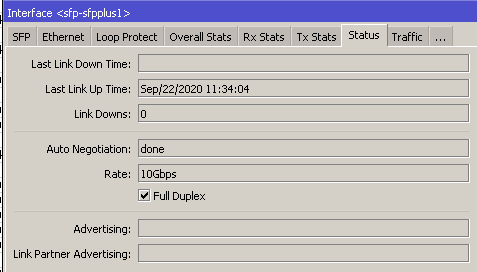
 tame carbon
I only use wireless on my phone
unborn sluice
agreed. phone over ethernet is ehh
tame carbon
lol dongle that stuff up
rigid frigate
rigid frigate
yes
rigid frigate
One thing I didn't mention is that 90% of the traffic is from just one computer.
👀
tame carbon
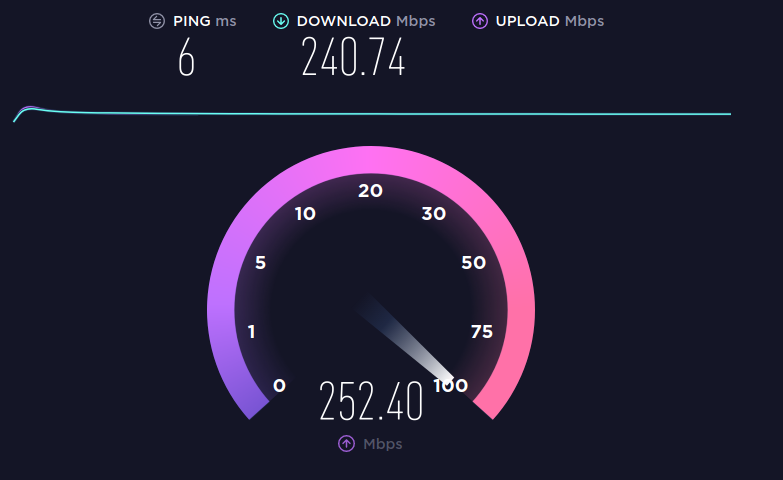 tame carbon
You can see the bandwidth shaping my ISP does at the beginning
the download goes to 500mbit/s initially
and then slows
rigid frigate
Not even my university has given me that kind of speeds
unborn sluice
qos kicking lel
rigid frigate
My plan is about 7$ /month

 thick minnow
ATT customer in the US, and speed test show it runs fast, but only with one computer on at a time. And my mother is a teacher.
rigid frigate
unlimited
tame carbon
I pay over $100/month
tame carbon
@unborn sluice 79 euros for 250M internet, but there's bunch of additional fees
like 13,50 for fiber itself, TV plan and extra /29 public IP
I think the 8 extra IPs I pay 16/month for
unborn sluice
well, static IPs in our area is reserved for businesses
tame carbon
This is a business line
I registered it with my own company
but my company address is same as my home address
rigid frigate
@tame carbon so you're saying that Indian ISPs give better bang for the buck for their customers?
tame carbon
probably lol
tame carbon
but I have a 6 hour SLA
so if something breaks, they fix it within 6 hours, or they pay for damages
 smoky basin
Here's some trickery bangladeshi ISPs do
tame carbon
@rigid frigate I also don't get a modem from my ISP
smoky basin
They give a price and promise like 10 MBPs
tame carbon
they provide just a fiber module, which plugs directly into my own gear
rigid frigate
tame carbon
<@!693334703578677318> I also don't get a modem from my ISP
Back in 2010, when we had our first broadband at home, they offered us 2 Mbps speed and a modem.
tame carbon
https://cdn.discordapp.com/attachments/776722183119699988/777646103775674368/IMG-20200922-WA0001.jpg

network cabinet @ home
thick minnow
Man I wish we didn’t have one of those crappy all I’m one router modems.
 rigid frigate
cries in ZTE
thick minnow
We had metronet before we moved and that was our favorite isp by far. They just sent the internet and we could do whatever we wanted to get it to our devices
tame carbon
@thick minnow I just have a DHCP client on a VLAN
the internet itself is just ethernet over fiber
no PPP involved
thick minnow
I think that’s probably what metronet did, but I’m not an expert. ATT and Comcast both encrypt it so you have to use their box
rigid frigate
tame carbon
they probably use PPPoE or the likes
thick minnow
Oh I don’t know the difference 😂🤣
tame carbon
PPPoE = Point-to-Point-Protocol over Ethernet
its a tunnel protocol
DSL routers use it to log in with your credentials
so you get your internet address
thick minnow
Oh ok
tame carbon
but its also used extensively on other internet connection types
rigid frigate
Now that you mentioned it, are DHCP and PPPoE two different tunneling protocols that get the same job done?
tame carbon
PPP is used over many types of physical networks, including serial cable, phone line, trunk line, cellular telephone, specialized radio links, and fiber optic links, such as SONET. Internet service providers (ISPs) have used PPP for customer dial-up access to the Internet, since IP packets cannot be transmitted over a modem line on their own without some data link protocol that can identify where the transmitted frame starts and where it ends.
rigid frigate
or are they fundamentally different?
tame carbon
@rigid frigate dhcp is a network configuration mechanism
my ISP doesn't use PPP to deliver internet
its just ethernet
rigid frigate
okay
tame carbon
and I get my public IP with dhcp
PPPoE is used over existing IP networks, to tunnel another IP network
rigid frigate
My university used to deliver internet to the hostel rooms through RJ45 connectors. Individual students had to use their own routers to use the network on mobile devices.
rigid frigate
okay
unborn sluice
deliver internet to the hostel rooms through RJ45 connectors
You mean dorms
hostel is kinda weird for me
tame carbon
hostel is a thing
unborn sluice
ik, but this in context
tame carbon
my school uses 801.1X for their network
so I have to connect to wifi, and ethernet using credentials
rigid frigate
There was an authentication portal, where each student had to log in for internet access for a preset amount of time.
unborn sluice
that's normal
tame carbon
@rigid frigate did they use a captive portal?
unborn sluice
that's what he meant lel
tame carbon
thats so bad lol
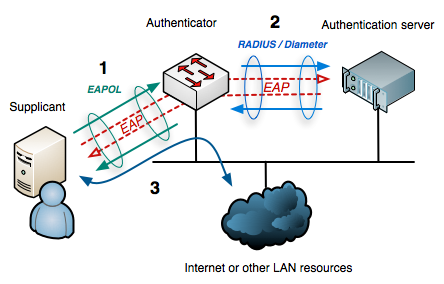
802.1X allows you to connect to a wifi network using username&password, instead of a PSK
rigid frigate
As I mentioned before, multiple users would share the internet from one wifi router. In such a case, only one device had to authenticate.
 unborn sluice
yea, I like having the raduis instead of captive portal
tame carbon
This is 802.1X in a nutshell ^
unborn sluice
using portal makes it seem like you are connecting to a public wifi
tame carbon
Radius is used for keeping track of users
unborn sluice
and good thing, raduis can integrate with AD
rigid frigate
On the other hand, if we switch come settingon the wifi router related to DHCP, each devices connected to it had to authenticate individually
tame carbon
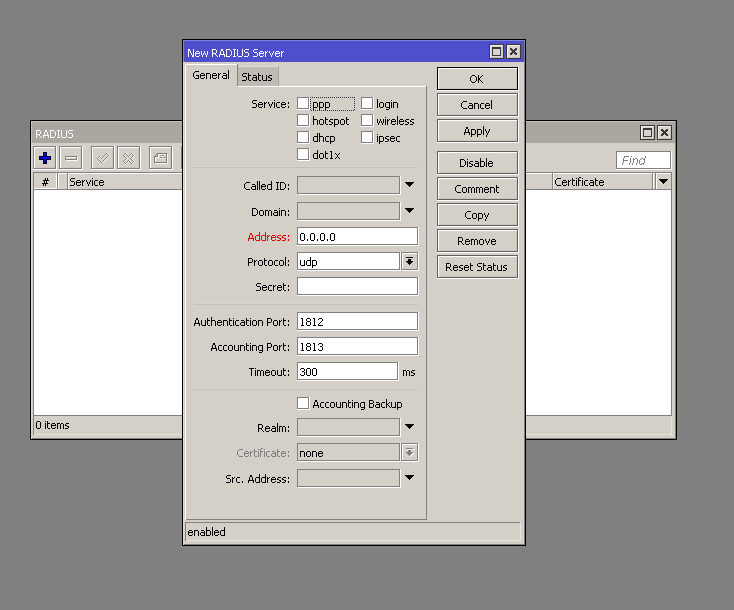
@unborn sluice ayy https://i.imgur.com/u1aAwwq.png
 unborn sluice
hmm raduis in the router itself?
tame carbon
it can do radius as well as relay
unborn sluice
i'd take one please
rigid frigate
rigid frigate
On the other hand, if we switch come settingon the wifi router related to DHCP, ...
But in case of power outages, it would f*#k up the whole switch handling that section of the hostel, or dorm, as you prefer to say it
unborn sluice
i wonder when is my friends in US would come home. maybe they could fetch me a hap ac3
now I want
hap ac3 -> switch (with poe) -> APs
tame carbon
@rigid frigate this is why captive portals are garbage
Dot1X solves this problem
by making the authentication part of the connection process
rigid frigate
I've seen that in other institutes
rigid frigate
we use sophos
tame carbon
rigid frigate
and the censorship policy is very bad.
unborn sluice
I remember when my school installed new equipment. we could play any online game
we had people playing dota in the hallway
good times
tame carbon
hehe
rigid frigate
What they did here is even better. They configured the authentication system to work in such a way that once a user is authenticated from one AP, nobody else could. (Nobody else had to, but people would try anyway)
unborn sluice
so you could only connect to one AP
rigid frigate
But in public places like the library and the reading rooms, each devices had to be authenticated seperatly
rigid frigate
unborn sluice
so you could only connect to one AP
That's funny. One could connect to many APs at once.
unborn sluice
so what do you mean then?
rigid frigate
People could be connected from APs that are geographically kilometres apart
One user*
rigid frigate
unborn sluice
so what do you mean then?
A second user couldn't log in to an AP if the first on is still authenticated.
unborn sluice
so a student can only use one device
@tame carbon also when they installed the new APs, there wasn't QoS in place for like a week,
I downloaded several sht in seconds

i hugged the bandwidth like a douchebag
rigid frigate
Say I return to my hostel after my class and I am trying to authenticate my device on this AP. I would get an error because some dude from the neighboring room had already authenticated from my wifi network.
unborn sluice
ah yes, interference party. i love it
rigid frigate
The hostels are older than I am, and it appears that they didn't anticipate the arrival of wifi.
They gave two ethernet ports per hostel room
 rigid frigate
If one wanted to use internet at university's expense on their mobile devices
unborn sluice
i'm not asking why they would have wifi. I'm asking why per room
rigid frigate
They did it when ethernet was the only option to access internet
Way before wifi became a thing
unborn sluice
I mean i used dial up back in the days
rigid frigate
They wanted everyone to have internet access in their own rooms.
So they gave each person an ethernet port in their room.
Setting up wifi Access points would have been simpler, but not in the 80s.
tame carbon
back when I first used internet
one person could be using it at a time
and no phone calls while its running
rigid frigate
I remember the time too
unborn sluice
guess we have the same experience
rigid frigate
dial-up!
unborn sluice
good times, way back when yahoo had games
and I was amazed when I could watch a youtube video while buffering in less than a minute
unborn sluice
I didin't
rigid frigate
and now it's just a static webpage
unborn sluice
i've used facebook back in the days
but I was late to the party
only joined when flash games were in
rigid frigate
I started using facebook for Farmville

 spare cypress
 lean pebble
I got fibre yesterday XD
https://www.speedtest.net/result/10514701164

Speedtest.net
Test your Internet connection bandwidth to locations around the world with this interactive broadband speed test from Ookla
spare cypress
lean pebble
Still old vdsl2
In my country nowadays it's either 4G/5G or Fibre
 peak cloak
getting fiber monday
lean pebble
Here it's 3G / 4G vdsl2 and fiber only for buildings
spare cypress
peak cloak
I could get up to a gig, but it's more expensive
I miss my old fibre line XD
lean pebble
I could to if they were connecting this stupid fiber to my house
peak cloak
major upgrade for upload from DOCISS
lean pebble
It's fucking under my house
lean pebble
I can go outside from my house at take a picture of the fiber
peak cloak
So can I
peak cloak
lean pebble
Just move the brick
peak cloak
All the wire mess is from isps not cleaning up old wires
peak cloak
also fun fact, I'm near the border between two towns so when the there was a hurricane like 4 years ago some trees fell on powerlines and one half of the street had power and other half didn't because my street is divided between two substations
so there are no powerlines directly in front of my house
lean pebble
Haha nice
Here if the powerline is down no one have power and you see all the neighborhood outside asking each other if they have power 😂
No one checking the status of their electrical cabinet at home
unborn sluice
peak cloak
so there are no powerlines directly in front of my house
ask the neighbor if you can run some extension cords
life hax

thick minnow
hey guys i need help finding a wifi router am trying to help my parents with there bill right now we have at&t let just to they paying to much for Tv and wifi i was wondering if paying separate tv and wifi maybe reduce the cost
 waxen saddle
You'd have to compare the price of the bundle vs. unbundling.
 little schooner
@lean pebble if possible, maybe you can run a second one since it's already there
lean pebble
I'm 2 lazy to fix it
little schooner
Tape and fish it up
lean pebble
I can replace it but I don't want another cable to be fucked up
little schooner
They sell outdoor rated cables
 ancient stream
have you got enough intact strands you can rewire the ends in a non-standard way and get it working? If you don't need gigabit or PoE then you can get away with four strands to save replacing it.
little schooner
They should last longer
lean pebble
The cable I have right now died because the weather here I asked to put it behind a shielded enclosure but no one listened to me ...
It's running from my second room to the basement through my external wall
I still have 60m cat 6 here but it's not outdoors rated
Now half of the house without internet
All the TV's for me more accurate
Smart tv is useless now and vod
Does anyone have a good vendor that sell outdoors network cables
 hollow marlin
What actually failed on the cable? Outdoor cabling just has slightly thicker shielding with UV protections but non-outdoor rated Cat can last as long as the shielding doesnt crack
hollow marlin
I get that lol. Have you inspected outside if the cable appears to be cracked
lean pebble
It's female connector from both sides
lean pebble
hollow marlin
I get that lol. Have you inspected outside if the cable appears to be cracked
It's not I checked twice
Just not working
I'm not 100% sure that it's not cracked because it's along cable
At least 25m
I can try to remake his female connector the second side
hollow marlin
I would try re-terminating the ends before running a new cable. You could also force each side to 10/half to see if the cable is broken as a certain point
lean pebble
Maybe someone put something on it and killed the wires
hollow marlin
Oh there is a keystone on one end?
hollow marlin
If you have a punch down then yeah try that. 99% of the time its always the ends. I have seen some brutal cables work flawlessly
lean pebble
Haha
I'll try the second end because he is ultra long
The end that in my room nothing can touch him except a person
I guess that this is the root problem for all the network issues that I have in the last 4.5 weeks
thick minnow
waxen saddle
You'd have to compare the price of the bundle vs. unbundling.
what do you mean bundle and unbundling.
lean pebble
hollow marlin
If you have a punch down then yeah try that. 99% of the time its always the ends...
Working or not I just remake the second keystone
Well it's dead
lean pebble
Half working
The cable only works when connecting straight to the mesh unit but when trying connect it straight to my second switch no link
lean pebble
I have all the tools I need haha
Even the tester
It's working but only when connected to the mesh if connecting to my switch not working
peak cloak
but like, at all? shouldn't a tester show what wires are working
lean pebble
It is
The cable working ok
The only suspicious thing that it's not working only when connected directly to my switch
hollow marlin
What switch? Look at the port configuration to see if auto-neg is set or statically set to like 1000/full
And if it works with other devices, check to see what its linking up at like 10/100 full/half
lean pebble
Same configuration as my main switch
Works with other devices
Cisco switch
Sg250-08
Automatically
Default and completely disabled unnecessary services like acl and etc
 waxen scroll
😷
lean pebble
Ya I'm with you
I still can't believe I bought cisco
I ended with using my old linksys router as switch instead my cisco switch at the basement
 clear igloo
Did you unshut the interface?
Do any of the interfaces come up?
lean pebble
All interfaces are working
I tried connect cables to all ports
But I still have this anoying issue with downloading
Internet is going down in 0 seconds
After 30 seconds of downloading all my network is getting disconnected
But router and bridge are ok
 leaden schooner
reset everything
leaden schooner
oof
lean pebble
Yap
3.5 weeks have this issue
Instead downloading a game in 40 minutes I'm downloading it in 4 hours
leaden schooner
contact your isp
lean pebble
They are idiots
Always blaming each other.
ISP blame the internet infrastructure and etc.
lean pebble
Then the support guy from the internet infrastructure hangout to my ISP and me
All the time
Then they blame my network devices
Router and etc.
leaden schooner
oh ok cant help with them im in vancouver
lean pebble
The worst internet infrastructure ever
Haha
Can you gimme fiber ?
😆
Straight line from Vancouver
lean pebble
Lol
I have 2 fibers under my house none of them connected to me.
One fiber is here 11 years but disconnected both sides
leaden schooner
thats rough
leaden schooner
probably not much
lean pebble
Well there is a problem
Finally I talked with someone that look in the logs
Bridge not stable
Now it looks stable I replaced the rj11 cable with the wall connector
Already more than 10 minutes of downloading
Without crash
Well just talked good job me
16mb before the end of the download all went offline
 reef cloak
Hey guys, I was just wondering if anyone would be interested in assisting with some research as part of my dissertation that I was gonna be carrying out at some point soon.
I was looking for some people (preferably outside of the UK) with a spare raspberry pi / computer, with consistent access to a residential IP. My research focuses on the deployment of ECN and where it is modified on the network. So I was looking for more 'vantage points' for observation.
The tool I'm using is open source (although currently incomplete) can be found here https://github.com/mylesalamb/IndividualProject

GitHub
Individual project focussing on implmentations of ECN under different transport protocols and how they interact with the wider network, with focusses on, removal of ECT fields by network devices, c...
unborn sluice
Gonna run 24/7 ?
reef cloak
Runs a dataset once a day as a cronjob, around 5-6k different hosts so will run for a fair few hours of the day
waxen scroll
@clear igloo @hollow marlin @little schooner https://www.amazon.com/Router-Guard-Large-WiFi/dp/B07MXD75TR/
hollow marlin
@waxen scroll $90 and 4.3 star. WTF
waxen scroll
go look at the customer images
you can see the guy with the meter and comcast modem has the last LED (wifi) off when the cage is over it
 peak cloak
yeah
they have good reviews too
bit worried about cpu clock speed though for a mc server
I want root access
I don't think mc servers have root access, but I asked in their discord
unborn sluice
Yea
Doesn't look like a VPS so it's cheaper
Looks like FTP access then use their server jars

 dusty osprey
peak cloak
bit worried about cpu clock speed though for a mc server
dusty osprey
peak cloak
bit worried about cpu clock speed though for a mc server
They probably use EPYC's or ryzen's depending on where the location or which other hosting company they bought the server from if its france or something near that probably ovh
peak cloak
nah they list their specs
have some of my friends arguing that repl.it is better than git
I hate it, so caotic other people changing your code around
lean pebble
peak cloak
and when they actually know how to program
True
I like git because it's like a cloud folder in my pc 😂
Sending homework to my teachers via git instead uploading it each time to google classroom or to the college website.
 rocky badge
peak cloak
rocky badge
peak cloak
 X5000 series
lean pebble
Well the problem with the download is the ISP just checked with another pppoe from different ISP and everything is good.
little schooner
@waxen scroll i had the talk after the network administrator gave me elevated privileges to the domain controller and the server network. They told me to be very careful and that someone is always watching
I'm glad I was able to get credentials like this so soon so I can do a lot of new script work
@lean pebble yeah git is pretty good with that
I like how it integrates into vs code too
rocky badge

Extension for Visual Studio Code - Supercharge the Git capabilities built into Visual Studio Code — Visualize code authorship at a glance via Git blame annotations and code lens, seamlessly navigate and explore Git repositories, gain valuable insights via powerful comparison commands, and so much more
peak cloak
the default implementation is already good, that makes it even bettr
little schooner
Nice
tame carbon
@peak cloak my experiences with git in visual studio are mixed
 polar root
Hey sorry to disturb but I have a question:
I am setting up a pihole and I while I was going through the visual interface and a warning message appeared (the one mentioned in the tutorial) and I stopped because I was worried the up might conflict, should I be?
Oh and I have a isp provided modem if that matters
lean pebble
Àaaaaaaa my ISP is broken
waxen scroll
its ur wiring
lean pebble
Nope
ISP username is not working no matter what username they gave me
Different ISP working properly
little schooner
admin/admin answers a lot of life problems
@lean pebble I know for my wiring that Comcast put a signal booster after the demarc point of the house to fix my speed issues
 hazy sandal
Anyone familiar with using haproxy to tunnel ssh over ssl? Tried an older guide a few times (https://julian.pawlowski.me/geeking-out-with-haproxy-on-pfsense-the-ultimate/) but didn't get it to work. Running HAProxy on pfSense.
 merry pilot
holy
lean pebble
little schooner
<@109801863771074560> I know for my wiring that Comcast put a signal booster aft...
No I got the right speed but can't download every 1 minute of downloading I'm getting disconnected
All home network just crashing
With this specific ISP
I'll get new free ISP at Sunday
 opaque juniper
my isp is 
get for what u pay
~30€ for Symetric gigabit and 1/2ms
and good stability af
waxen scroll
@little schooner wat
multiple comcast techs over the years tell me that booster is only meant for TV and not to loop modems through it
tame carbon
@waxen scroll I read the news
comcast is raising prices
and forcing traffic limits down people's throat
waxen scroll
thats only for some states... many states such as mine have been on those increases and limits for years
hollow marlin
waxen scroll
multiple comcast techs over the years tell me that booster is only meant for TV ...
Now thats its all done through MC I would assume it should be fine?
hollow marlin
tame carbon
still, but with raising prices and and all
Glad last and current org we never had caps nor raised cost. Don't take me wrong but running an ISP is insane expensive and the original reason for data caps had real reasoning behind them but both nowadays can shove it
waxen scroll
peering is a boys club based on IRL handshakes
im sure most of the deals are custom
juans company probably isnt involved with it
;o
its free or reduced cost cause you're agreeing to let the other side transit your network to other networks (not just customers in that network)
they agree on % of traffic allowed
peering in the sense that most of us call it is a mutually beneficial thing
hollow marlin
tame carbon
is peering so expensive then?
Peering on its own is pennies for an SP. The gear for transit is the cost. However, overall, especially with IX's in the core, transit traffic is not as high as you might think.
The cost is on labor. If you take into account running fiber, splicing the drop, installer on site, blah blah. A single install can average ~$1-3k overall. So even at say $100/m it takes time to recover that loss. Thats not including everything on the backend. DEMARK, blades, chassis, etc
 hollow marlin
That too.
waxen scroll
such a scam
you pay $300-400 which buys them 2-4 boxes of cable to begin with
then a monthly charge to use it
😄
tame carbon
@hollow marlin mh, I guess unless it gets subsidized, wont really be rolled out more
 tall pagoda
How can i improve my ping?
waxen scroll
you dont, that ping is amazing
proof
Reply from 2a0b:7280:100:0:1c00:97ff:fe00:2682: time=116ms
Reply from 2a0b:7280:100:0:1c00:97ff:fe00:2682: time=117ms
Reply from 2a0b:7280:100:0:1c00:97ff:fe00:2682: time=117ms
Reply from 2a0b:7280:100:0:1c00:97ff:fe00:2682: time=118ms```you're better than mine
hollow marlin
@tall pagoda what ms are you expecting?
tall pagoda
What is normal for DOCSIS connection?
For around 70 km from my computer to my server
waxen scroll
10ms from your house to ISP exit then the additional to the server
peak cloak
@tall pagoda for dociss that is expected
this is mine (on dociss)
oh yeah, fiber coming monday
lean pebble
I get 5/6ms to 1.1.1.1 / 1.0.0.1
 ruby nebula
question
how do i know if my wifi outlet is working
because I plugged in my modem and made sure the coax cable is tighten
and the thing was suppose to shine but its not shining
which means the modem is offline
 south blade
Hello, I need some help with RJ-45 wiring. :/
most cables you hook up from a router to a computer are standard patch cable, right?
So should be like this?
hollow marlin
@south blade Yep, both ends should be B
thick minnow
can someone explain to me what exactly the interface metric setting does
like the lower the number, does it prioritize my device over all other devices on the network?
or does it have something to do with having multiple adapters
 worthy whale
@thick minnow https://docs.microsoft.com/en-us/troubleshoot/windows-server/networking/automatic-metric-for-ipv4-routes

Introduces the Automatic Metric feature in Windows for IPv4 routes.
waxen saddle
@thick minnow It has to do with routing on your local computer. Specifically, which Interface your OS will prefer. The lower the metric, the more preferable the interface will be. It does not affect anything else on the network.
thick minnow
@waxen saddle so changing it won't affect connection speed or bandwidth priority?
waxen saddle
Correct. It's just used by the OS to try to determine which interface to use. For example, if you have 2 interfaces (with Metric 17 and Metric 1) connected to the same network and assuming all else is equal, the interface with metric 1 will be used.
tame carbon
@thick minnow thats only if your PC has multiple network interfaces
and more than one interface can offer a valid route, you can set prioritization
but this has nothing to do with service quality
thick minnow
oh ok
unborn sluice
oh ok
tame carbon
@thick minnow route metric is only really interesting if you have for example two ethernet connected at the same time. With wifi and ethernet it is less interesting because,
the OS by default will give the wired ethernet a lower route metric
because both interfaces offer a default gw to 0.0.0.0 (public internet)
hazy sandal
pfSense with 5 wans, is it possible to split traffic between them something like this:
wan1: all http/https/general traffic
wan2: gaming (steam, battlenet etc)
wan3 & wan4: load balanced, video/audio streams (twitch, yt, spotify, netflix, disney+, prime etc)
wan5: nothing (used for incoming vpn connections only)
Tried using the traffic shaper feature, but that only seems to be able to change traffic priorities, althou, new to this xD
lean pebble
Someone know a good router with 8 lan ports ?
unborn sluice
just get a switch man
lean pebble
No
I have one
Not working properly
Nothing here not working properly
I need router that does all.
Supports ADSL / vdsl2 / fiber / ssl vpn
peak cloak
you sure it's the switch?
unborn sluice
router routes
switch switches
access pointaccesses
peak cloak
a big enterprise one?
lean pebble
Now all my network is not stable
lean pebble
peak cloak
a big enterprise one?
Home one
peak cloak
ah
lean pebble
Sg250-08
unborn sluice
the one with the speeds not enabled cause you didn't paid enough
peak cloak
unborn sluice
the one with the speeds not enabled cause you didn't paid enough
yeah lol
 obsidian token
unborn sluice
the one with the speeds not enabled cause you didn't paid enough
obsidian token
unborn sluice
the one with the speeds not enabled cause you didn't paid enough
Are there differences?
lean pebble
I have wifi but mesh system not connected
unborn sluice
obsidian token
Are there differences?
Money would make it different
obsidian token
I mean shouldnt a 8 port gigabit switch be able to provide 8x1gbit?
peak cloak
it's a joke about enterprising licensing
lean pebble
4.5 weeks have one problem can't download 1gb files or bigger because all my network crash after 2 minutes, now nothing works
I have this fucking shitty fortiwifi
peak cloak
get a mikrotik
lean pebble
I need a good modem that support vdsl2 first
peak cloak
why, don't you want a stable router first
lean pebble
First modem because the modem not stable to
I can confirm that he is not stable
Lan LEDs are orange instead green
peak cloak
just buy a modem only
lean pebble
For 1 year
peak cloak
not router
obsidian token
What country are you in
lean pebble
Israel
obsidian token
Im guessing its your isp not your modem
lean pebble
lean pebble
Israel
That is the core of all network problems here
lean pebble
obsidian token
Im guessing its your isp not your modem
Ya
But all the rest network devices are mine
ISP modem sucks
obsidian token
I doubt it. Your gear can be as good as it gets, if your isp is unstable, your connection is too.
lean pebble
At 2019 they gave me vtech router and it was disaster
I switched it 7 times in one week
Their network devices sucks man
All their routers from 2014/15
lean pebble
It does they are not new
Their routers are renewed
It used somewhere else 800 times
 modern pewter
Forgive me please,
I used to have 3G on my phone for 7 years
modern pewter
i use ethernet to download stuff
i mean i use ethernet for everything on pc because it doesn't have a wifi card
and ethernet is a lot faster
lean pebble
I used usb because ethernet was 2 slow
peak cloak
wut
lean pebble
Ya
peak cloak
unless your cable was 2 pair
peak cloak
wdym by usb
lean pebble
Because 4g from my phone
peak cloak
ah ok
lean pebble
I had 400Mbps up/down
modern pewter
i have 800Mbps up/down on ethernet
lean pebble
What better than dsl?
modern pewter
gigabit routers aren't that expensive tho
lean pebble
You have fiber
peak cloak
@modern pewter ew
modern pewter
it works good tho
peak cloak
I just don't have gigabit because it's more expensive per month
lean pebble
Where you from?
modern pewter
ukraine
lean pebble
Oh
 modern pewter
damn
lean pebble
But monitored by the government am I right ?
peak cloak
vpn, dns
lean pebble
Hack the pentagon
modern pewter
oh
lean pebble
I want fiber to
peak cloak
I need to redo my pi setup and use docker so I can use it between multiple vlans
lean pebble
I thought to make vlan but I'm lazy
peak cloak
or use linux network namespaces
lean pebble
I don't remember anything in cisco
Couldn't even find the dhcp option
For the vlan
lean pebble
I'm familiar with fortigate vlans but not with cisco one
peak cloak
wait, the cisco is just a switch
lean pebble
Ya
lean pebble
Because I'm lazy to use all of his function
I know, but this switch should be able to do dhcp to
At least dhcp relay
peak cloak
why would you need that
thick minnow
Fellow Canadians dropping expensive things fans
I require some advice
my isp is trying to saddle me with this very sad, very lame modem/router combo
I already have a pretty ballin router
unborn sluice

thick minnow
Netgear R7800 with dd-wrt
and they want to charge me 10 bucks a month for this 60$ modem/router combo

eBay
Ubee Modem UBC1322BA00. Condition is "New". Provides channel lineup flexibility. “No block” tuner restrictions such as all DOCSIS bonding in certain frequency window. Enhanced Wireless. Four 10/100/1000 Ethernet interfaces provide high-speed LAN capability.
So now I'm thinking, surely I can just purchase a standalone modem, the question is which one
unborn sluice

 gloomy plover
?
peak cloak
is it a seperate SSID?
gloomy plover
I'm afraid I don't know what that is
peak cloak
wifi name
gloomy plover
Not that I know of, no.
peak cloak
is it a windows computer?
peak cloak
ok then go into device manager and check what wifi adapter it has
ok so it's ac, so it supports 5ghz
could you take a screenshot of your wifi's
gloomy plover
my wifi's....?
gloomy plover
I use ethernet, so the other listing is just for a wireless connection.
you probs already know that
 lavish hatch
i want to extend my wifi range using my old router
can anyone help me??
unborn sluice
lavish hatch
i want to extend my wifi range using my old router
can anyone help me??
depends
if you have ethernet, then forget 5ghz
lavish hatch
unborn sluice
depends
depends on what??
peak cloak
if you have ethernet why use wifi?
gloomy plover
I just don't get why it doesn't give me the option in the first place.
peak cloak
because it's on one SSID (wifi name)
unborn sluice
ngl, I think you already asked this question long ago and you are already answered
peak cloak
your network adapter chooses what to connect to
gloomy plover
So as long as I use an ethernet, I'm not missing out on much I take it?
unborn sluice
lavish hatch
depends on what??
fate
peak cloak
li-fi
gloomy plover
Alright. What about my iPhone 5S? Apparently iPhone 5 and later support 5Ghz but mine is listed as 2.4 in my router.
Is this to be expected?
my family's iphones are 5ghz but they are much later models
gloomy plover
How much faster is it anyway?
unborn sluice
tbh, you're more likely bottlenecked by your WAN speed than the wifi/ethernet
peak cloak
yep
gloomy plover
i see.
lavish hatch
my routers are
Main router (D-LINK DIR-615)
second router (MERCUSYS MW325R)
gloomy plover
Suppose I upgraded to a later phone model, would that use 5ghz out of curiousity?
(i wouldn't upgrade just for that reason, just wondering)
unborn sluice
lavish hatch
my routers are
Main router (D-LINK DIR-615)
second router (MERCUSYS MW325R)
that's cool
lavish hatch
lavish hatch
my routers are
Main router (D-LINK DIR-615)
second router (MERCUSYS MW325R)
pls help i want to extend wifi range using these routers
peak cloak
wifi or ethernet backbone?
lavish hatch
wifi
lavish hatch
but is it possible to do so
unborn sluice

lavish hatch
so it is not possible for me
unborn sluice
I wouldn't reccommend it though
lavish hatch
ok
thick minnow
i need help in vmware esxi
can someone help me?
 thick minnow
are there any experts on internet here at the moment?
lean pebble
@peak cloak what router you advise me to get? What kind of mikrotik?
lean pebble
Ok thanks I'll look at the price here in my country
peak cloak
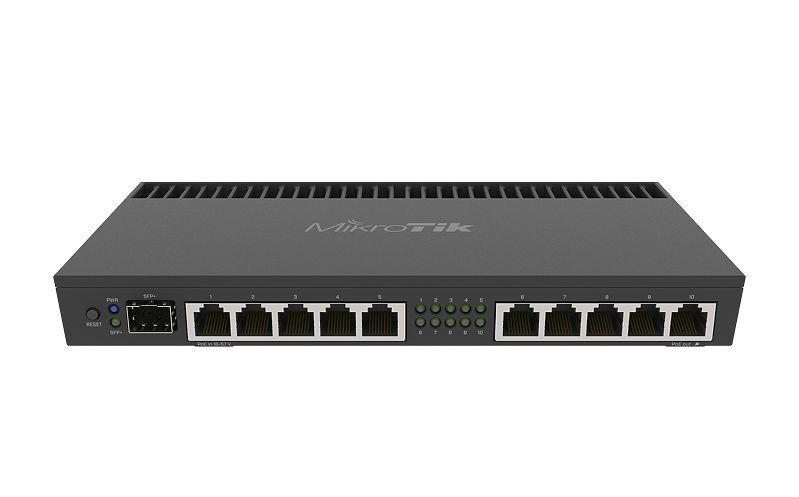
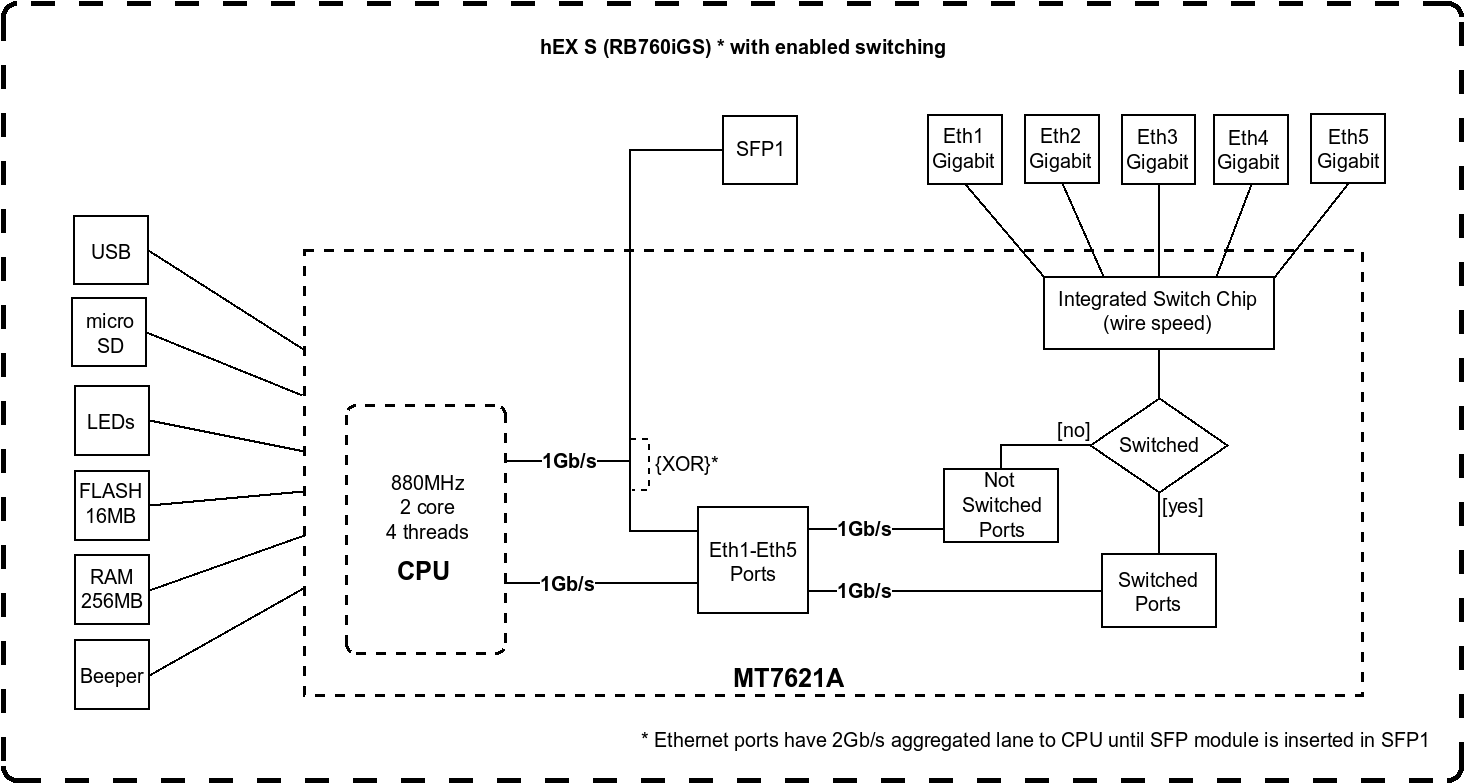
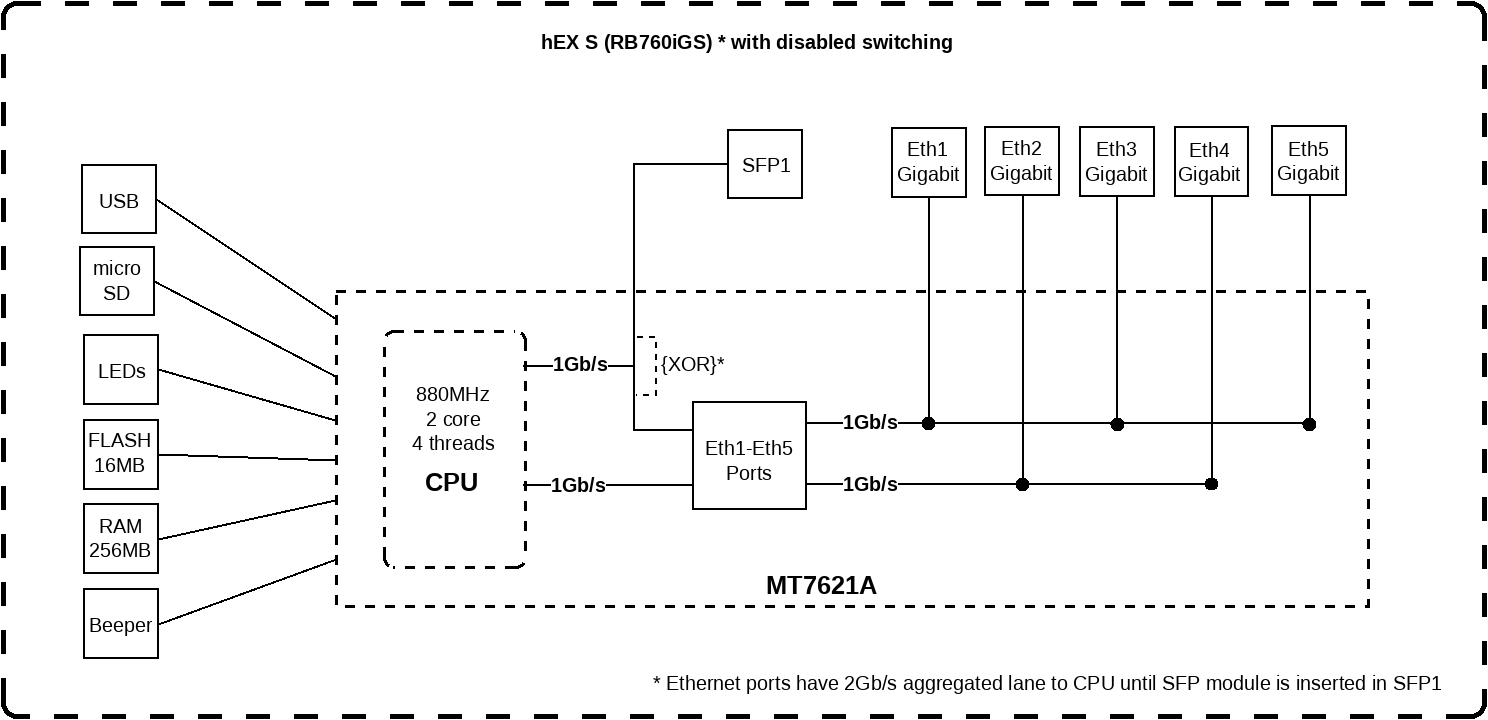
the hex S, yeah it's cheap
remember no wifi
just a router with a switch chip
they actually publish internal block diagrams


discord media proxy is broken
just click open original
lean pebble
peak cloak
remember no wifi
I have mesh at home I need router no more wifi products 😂
waxen scroll
why is there a beeper
 nimble sable
@somber meadow 1 laptop for NAS, 1 laptop for router. modded truck battery for UPS
 thorny vector
@thick minnow Still need that esxi help?
thick minnow
thorny vector
<@456226577798135808> Still need that esxi help?
Yes, but can you help me tomorrow?
thorny vector
yeah
thick minnow
Ok th
unborn sluice

thick minnow
nimble sable
<@!475452669306208257> 1 laptop for NAS, 1 laptop for router. modded truck batte...
Ahh, fellow homelabber
nimble sable
thick minnow
Ahh, fellow homelabber
someday i plan to buy one of those rack dealios
thorny vector
It'll change your life
thick minnow
Hello! I have a networking problem I am hoping someone might be able to help. I am running a hyper-V Server, with a static external IP I have a basic router, and setup a few TLDomains to point to the virtual machine, everything works as expected. Now I am adding more virtual machines and I want to point a specific TLD to a specific VM. Since I only have one Static IP from my ISP, how can i solve this problem? Do I have to setup a DC? Internal DNS server? I'm not sure. Any articles or direction is much appreciated! Thank you!
thorny vector
@thick minnow Look up reverse proxy servers.
thick minnow
@thorny vector Ok, i will look them up Thank you!
thorny vector
All the HTTP/S traffic goes to the proxy server, and based on the url, it'll redirect it to the correct internal upstream server
thick minnow
ahh
that makes sense! I am actually running NGINX on a virtual machine already.
I hopefully might be able to configure it!
thank you @thorny vector
thorny vector
no worries
peak cloak
yeah nginx can be used as a reverse proxy
 solemn yoke
Hi! Dose having 2 SSIDs in same router reduce the range? I know it reduce the bandwidth.
solemn yoke
@dusty osprey i couldn't find any information about this, all they say is it will reduce bandwidth.
dusty osprey
Does it reduce the bandwidth also, yea I reslly am not 100% sure about this myself actually
thorny vector
No range decrease
No bandwidth decrease either.
Minus maybe some broadcast scheduling conflicts
@dusty osprey
solemn yoke
@thorny vector @dusty osprey thank you both,
thorny vector
What's the issue?
thick minnow
peak cloak
could be just google
thorny vector
Where is the download from?
peak cloak
just because you have a fast speed to one server doesn't mean you have fast speed to another
but kb/s that's really slow
thorny vector
Seems to be hosted in NY
thick minnow
im on the other side of the country
thorny vector
May be part of it, as well as perhaps some weird routing because someone doesn't want their traffic through their ASN
thorny vector
Maybe a NY local VPN exit
I just did a route trace from me to their server, and it was 16 freaking hops, and I'm on the east coast
thick minnow
Time to downlaod free vpns ;-;
peak cloak
@thorny vector I'm right in NJ next to NY and it was 11
peak cloak
hosted by giganet?
thorny vector
Thier registered ISP is PureVoltage-Inc
peak cloak
gigenet, not giganet is the last hop
peak cloak
use a tunnel maybe idk
if you are advanced enough he.net has free ipv6 tunnels (kinda like a vpn)
thick minnow
Now im back to waiting even more ;-;
 somber meadow
I genuinely am stumped at how to setup IP passthrough cause according to my AT&T gateway the passthrough is set up right, but the router is having internet access seemingly disabled completely
nimble sable
pretty sure you can yea, make your own CA, i do that for my pfsense box
ofc youd then need to install the root certificate on everything
thorny vector
@thick minnow Yes you can. Beware, managing certs can be a pain
thorny vector
I'd use either windows server cert services, or pfsense to run your CA and sign certs
Relax, its good to be careful, but don't freak out so much
Unless you're portforwarding stuff, you shouldn't even be doing any WAN rules anyways. And even then, you can have a even if there's an open rule for something, if there's nothing behind it, there's no real harm
unborn sluice
@thorny vector hey, so uhh when you access windows server
do you RDP or Vnc
 thorny vector
You might be able to rearm it for 30 days
slmgr.vbs /rearm
Besides, don't need to be activated to RDP, if that's what you're thinking
 thorny vector
Nope
unborn sluice
oh , are we talking about home/pro
thorny vector
Both
unborn sluice
just you might be talking about windows server
thorny vector
Fairly certain its for all versions
thorny vector
Nope, RDP is for all windows things
thorny vector
Oops, I'm a liar. The wrapper for it is removed, but the core utilities are there
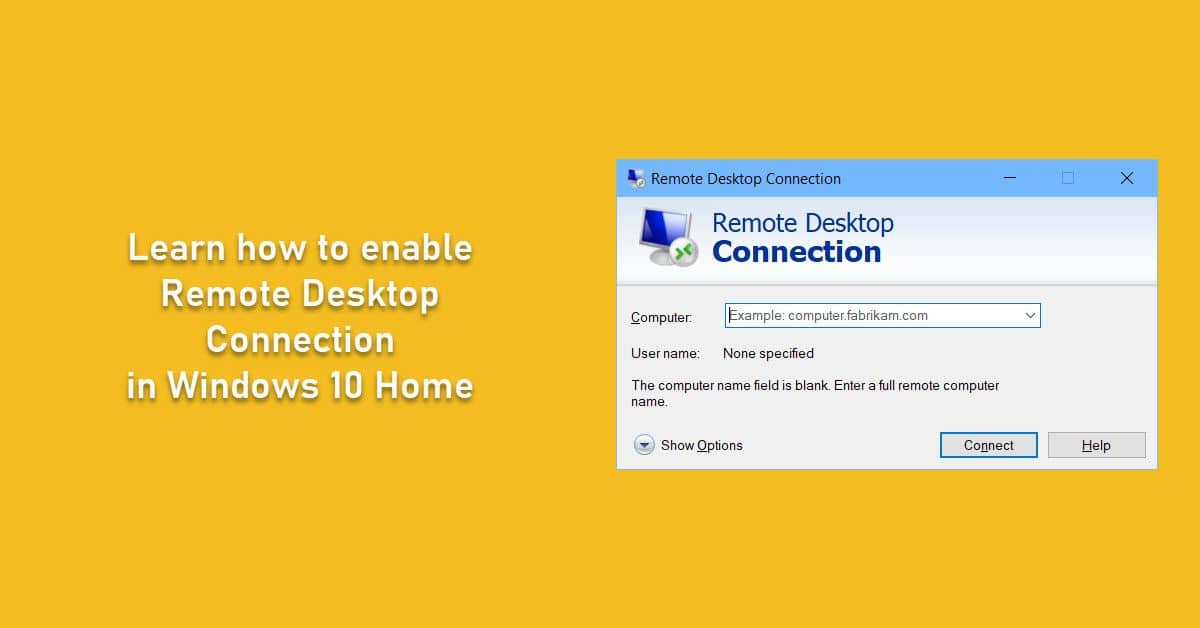
There is no Remote Desktop in Windows 10 Home. Since it was for home usage, Microsoft removed some features from Windows 10 home like group policy editor
Heres a windows 10 RDP workaround
unborn sluice
Oops, I'm a liar
Taking your word for it
but rn, I need to stop windows update
eating all of CPU time
fuck
there should be one easy button
"No update, I hate myself"
or something
thorny vector
net stop wuauserv
unborn sluice
oh nice, i didn't knew the update name
I was going to the services.msc route
good thing you were faster
thorny vector
For I am the keeper of Windows. All remains in my sight.
unborn sluice
so uh, any command to stop windws defender
unborn sluice
thorny vector
For I am the keeper of Windows. All remains in my sight.
good thing you're the first guy that comes to mind regarding windows
thorny vector
sc stop WinDefend
thorny vector
admin terminal
thorny vector
eh, powershell route
Set-MpPreference -DisableRealtimeMonitoring $true
or from an admin CMD window
powershell -c "Set-MpPreference -DisableRealtimeMonitoring $true"
unborn sluice
next up:
command to stop cortana
I should've gone to window server route
instead of installing windowsw pro

thorny vector

GitHub
Speedup windows 10 with batch powershell scripting - mujahed85/speedup-winodws10
One of the scripts I use for cleanup
 @thorny vector




 thorny vector
Well, it is RDP
But home edition doesn't have the main controlling application for RDP, so you just need a wrapper to hook into the utilities that still exist
unborn sluice
I'd take anything honestly. don't need special crap
thorny vector
Microsoft REEEEEALLY like doing that, just removing the frontend of an application to disable it.
unborn sluice
Atleast they leave the things intact so incase someone who knows what they are doing
or atleast someone who knows someone who know what they are doing
cause I don't honestly don't know much in windows crap
now I just need to prevent cortana and defend and update from starting after a restart
thorny vector
Eh, windows, Linux. At the end of the day, it’s just bending silicon to your will.
I think the GitHub repo I sent you has those as well.
unborn sluice
yea rn, I can't copy paste since I'm using on-browser VNC in my hypervisor
and edge won't bend to my will
oh nice it just started
thorny vector
If there is network there is a way. Hell, even some netcat wizardry.
unborn sluice
we'll see if I'd do it over smb or just type the github page

so uhh
windows would kill windows
hazy sandal
Anyone interested in answering a few questions about the work-life as a sysadmin? Since I'm a student I'm getting intros to a bunch of interesting stuff, and I don't know if some things are worth getting deeper knowledge about, or even get certifications (ie CCNA)
unborn sluice
yea sure
we are talking about sysadmin rn
although i'm mostly linux sht
@thorny vector can I interest you in a RDP problem
but serously, thank you looks likes I'll put this RDP activator in my windows belt
hazy sandal
I'm really into linux, virtualization, networking. I find it really fun (been messing with it as a hobby for a couple of years). We've been through some Windows Server administration (AD DS, AD CS, IIS, GPOs, ISCSI), Unix/Linux (basic stuff, lamp, pfsense, zabbix, using ubuntu,freebsd and centos), and has now just started with Cisco. Our teacher seems to act like working with Cisco excludes working with server people. He always makes a clear distinction between network guys and server guys. But as a mainly server guy, is CCNA worth it? cause I find it really interesting, but if that's nothing I'll have a use for, it would probably be a waste of time getting the actual certification, and keeping it up to date
unborn sluice
CCNA worth it
it's a must
I'm technically not a sysadmin. but CCNA is part of our curriculum
cause what if you broke AD, and the problem is network. CCNA should atleast point you in the right direction
He always makes a clear distinction between network guys and server guys.
On business side of things, this can happen. but it doesn't mean you can't be both. You should have knowledge in both
hazy sandal
Okey. That sounds good 😄
unborn sluice
it would probably be a waste of time getting the actual certification
The actual certificate is debatable
it's not like everyone here do have that piece of paper to slap the management
i actually don't know which @thorny vector (the good guy) does have.
but honestly I don't care
it's the knowledge more than the piece of paper
hazy sandal
Okey, then it sounds like these 6 weeks of Cisco might be enough since we're going through a lot of what is included in ICND1 & ICND2
unborn sluice
Remember, go beyond what CCNA can offer
be more than someone who holds a piece of paper
I find it really fun (been messing with it as a hobby for a couple of years)
This is what would help you grow
continue being curious
hazy sandal
Yeah, I'm not much for papers xD But actually getting an education for this to get a better understanding and an easier way to get into the industry. It was hard to get a job as a developer (php, js, c#, java, etc) w/o any education.
hazy sandal
Well, that's something I need to get more of. It's gotten better, but I'm really good at doubting my own knowledge and experience
unborn sluice
i doubt myself daily
thick minnow
thorny vector
yeah
can you help me?
hazy sandal
What I mean is that even if there's something I basically can do w/o thinking about it in my own environment, I doubt that I could do it in a professional environment.
unborn sluice
hazy sandal
What I mean is that even if there's something I basically can do w/o thinking ab...
We usually experiment on what comes to mind
You can try out multiple things and not do it in your company
it's fine, you got the experience
hazy sandal
My homelab is for experimenting. That's basically all I use it for (atm a single Dell PE T610 w/ Proxmox).
Just recently setup a virtualized pfSense as home router with 4 wans (get 4 public dynamic ips from my ISP) and 3 lans, one for the home network, one for my "working" vms/cts and one for labbing. And the stuff I want available publicly is using wan3 & wan4 (one domain each), openvpn on wan2 and ordinary traffic on wan1.
And well, to get back to the questions, I enjoy everything from setting up the physical network to setting up the applications on a VM or in a container. And preferably I'd like to be able to do all that as a job (low chance for that, at least around here) but being a jack-of-all-trades (usually) means either limited knowledge is some areas, or a lot of years of education, and if I could I would spend all that time on education, but since I can't do that right now, I need to focus more on some parts, and I'm not sure which I really need to focus on.
unborn sluice
(low chance for that, at least around here)
Keep your hope, I thought I was gonna be a developer. but turned out to be more of a sysadmin-like
If you can show and prove your knowledge for sysadmin you never know
 orchid trellis
gotta love it when my wifi extender's wifi is worse than being connected to my main one
unborn sluice
orchid trellis
gotta love it when my wifi extender's wifi is worse than being connected to my m...
i mean yea
hazy sandal
I know that feeling. Started programmin at age 9 (20+ years ago), starting with Windows applications, going to mobile (Windows Mobile 6.5-Windows 10 Mobile modding and apps, Sony Ericsson modding, Android app/ROM building, etc) with web development always as a side-thing. And that eventually led me to setup a local LAMP stack on an old gaming rigg, which then led me to buying my Dell PE, and that made me realize that the whole networking/server area is waaaay more fun, even thou programming still is one of my passions
orchid trellis
i realize that my statement did not make as much sense as it did coming out. my apologies. my wifi is just bad in general
however, im stuck with it
 granite nymph
So I just got a new Access Point but it refuses to connect via Ethernet and only works via Wi-Fi, which doesn't help me because I'm trying to add 5GHz to a 2.4GHz modem. Can anyone help?
The modem is a Keenetic Omni DSL (VDSL2) and the AP I'm trying to connect is a Keenetic City AC750
thick minnow
Refuse to connect via ethernet? wdym?
granite nymph
thick minnow
Refuse to connect via ethernet? wdym?
I can use it as a repeater but when I switch to the AP mode and connect it via Ethernet it just doesn't work
thick minnow
granite nymph
I can use it as a repeater but when I switch to the AP mode and connect it via E...
Prolly it's a dumb thing to say but, have u changed the ip of the ap?
granite nymph
I have assigned a unused IP, yes
thick minnow
granite nymph
I have assigned a unused IP, yes
What do you mean with doesn't work?
Like, you are connected but u get no internet
granite nymph
the wifi it creates does not have internet access, yes
thick minnow
Ohh, disable client isolation
granite nymph
It worked now, thanks