#networking
1 messages · Page 244 of 1
 tame carbon
 lean pebble
While he is connected to my server
I know how to use sshfs just don't see it as easy as just connecting to ssh and do anything there
tame carbon
... ?
lean pebble
I never used tools except ssh till my studies started
lean pebble
I'm not transferring
tame carbon
SSH can do tunnels, filetransfers, shell
lean pebble
Downloading directly to my server
tame carbon
Yeah, with sshfs you can turn any ssh host into a kind of network share
by mounting the remote system into your local one
lean pebble
Again you need to have better internet than adsl man
tame carbon
why?
lean pebble
My internet barely can download games and use zoom at the same time
tame carbon
if you don't open big files, it doesn't use a lot of data
file listings cost almost no bandwidth at all
lean pebble
Or downloading any file for be more accurate
tame carbon
if you are using SFTP to manually put watever.txt on your remote host
sshfs is much easier
especially if you have multiple files
lean pebble
But I'm not haha
tame carbon
then you are only using a small subset of the ssh features
lean pebble
I'm downloading directly to my server and editing there
tame carbon
its more than just a terminal
lean pebble
Ik but I don't need more than that
I love network drives but I can't use them normally .
I have storage server in germany and my upload speed is not even close to 4Mbps
tame carbon
@lean pebble I used to be on 4mbit down 0.5 up
and used linux exclusively
sshfs worked just as well
lean pebble
Where you from?
lean pebble
You see, it's different here
lean pebble
The internet infrastructure here as shit af
Rain and wind can disconnect me from the internet
 unborn sluice
lel rsync
tame carbon
@lean pebble thats just the side effect of poorly maintained copper lines
I had the same issue
except for me it was mostly rain and temperature related
unborn sluice
lean pebble
Rain and wind can disconnect me from the internet
that's why we have local file servers

lean pebble
For 3 days I have no internet connection between 2am to 4am
lean pebble
unborn sluice
that's why we have local file servers
Lol
lean pebble
tame carbon
except for me it was mostly rain and temperature related
Sounds that same here except the temperature part
We are living pretty close.
I love netherlands I'm from Israel.
The ISPs and internet infrastructure are 2 separated companies here.
Paying double and getting shit.
Only this year the government decided to make those companies change it to be 1 company that does all things together.
unborn sluice
The ISPs and internet infrastructure are 2 separated companies here.
Paying double and getting shit
Wait what
lean pebble
Ya
unborn sluice
That's not a yes or no, I'm asking how
lean pebble
Long time ago there was only 1 ISP here that called bezeq
tame carbon
@lean pebble pretty close?
lean pebble
That was under the government
tame carbon
not really, there's no sandcastles in this area
lean pebble
Ya 4 hours flight
unborn sluice
tame carbon
<@!109801863771074560> pretty close?
he loves the netherlands
unborn sluice
tame carbon
We're not even on the same continent :p
Ah yes, the best measurement
There are countries both close and far from russia, cause they are both in the same continent and isn't

lean pebble
unborn sluice
even if you pay thrice, you don't explain how it works
They was the only company that had internet infrastructure and ISP.
All the network in Israel got delayed because of them.
lean pebble
Paying 1 for user and password from ISP and one for the internet infrastructure lines to my home
unborn sluice
I mean that isn't internet then
tame carbon

lean pebble
Ya something like this
unborn sluice
1 for user and password
So like you configure your modem manually with the user and password
lean pebble
Well we're paying more than 50$ a month for adsl
tame carbon
250M fiber :)
lean pebble
unborn sluice
> 1 for user and password
So like you configure your modem manually with the use...
They own the modem
unborn sluice
tame carbon
250M fiber :)
350M÷10 fiber
tame carbon
My ISP didnt give me a modem
They just suggested me a router that is at least fast enough
but I got my own gear here
lean pebble
Configuration is done automatically while you connect it to the adsl and to your pc
unborn sluice
I wish they would give an option for combo units or modems
so I could snag the modem and buy me own router

tame carbon
@unborn sluice for people that want a no-bs internet connection?
lean pebble
Lol
unborn sluice
tame carbon
<@!349203120082911242> for people that want a no-bs internet connection?
my country's internet is BS altogether
lean pebble
I have 3 fibers moving near my house man
unborn sluice
then stop it
tame carbon
 tame carbon
Fiber plugs directly into my router ^
tame carbon
48U is fullsize
unborn sluice
what do you call 6U then
lean pebble
I can sent you a picture of the fiber here in my neighborhood
tame carbon
tiny
tame carbon
@unborn sluice https://i.imgur.com/Og4TKV6.png
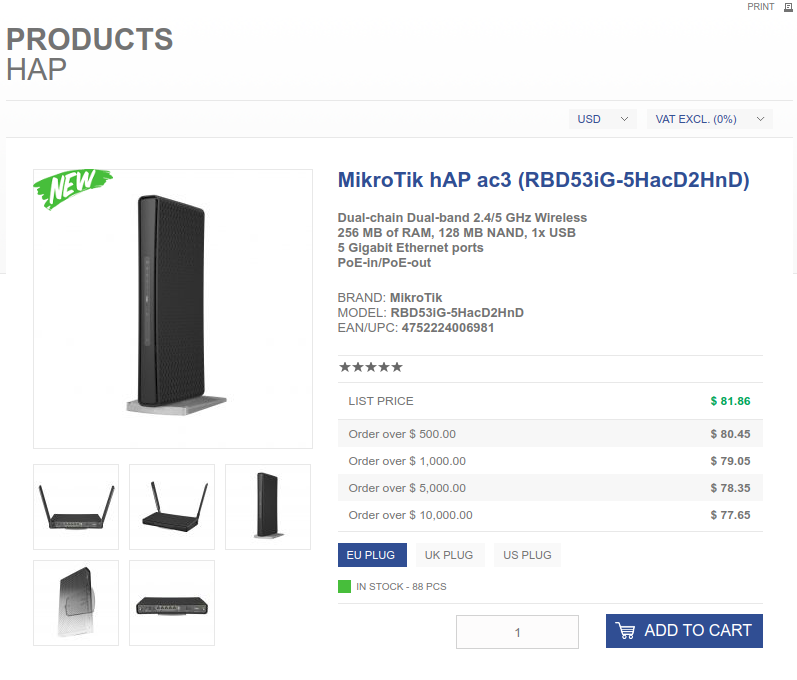
uw0t m8
how many do you need?
88 in stock
unborn sluice
tame carbon
how many do you need?
bro I'm not building a company
I only need 1
cause the fooking online shopping here is astronomically priced
lean pebble
The rack here is open for 7 years
Someone brake the door of this closest out doors
Paying 54$ a month for this internet configuration
unborn sluice
lean pebble
Paying 54$ a month for this internet configuration
$55 isn't so bad tbh
lean pebble
For shitty service it does
unborn sluice
@tame carbon I wonder how much is the package ship from netherlands to here

do you have DHL nearby?
tame carbon
@unborn sluice ye
unborn sluice
agree
tame carbon
speed test le broken
 dark crow
youtube isnt working
right now im using phone hotspot
im joking i used inspect
cya
unborn sluice
comedy king
tame carbon
@dark crow boring
dark crow
unborn sluice
comedy king
ikr
 astral yarrow
Hey, quick question. I have a shitty router that my ISP gave me, but I can’t change it bc I have landline and Most routers don’t have it. Could I connect a better router via Ethernet to boost the wifi signal?
astral yarrow
?? Wut
 peak cloak
yes you can
lean pebble
Dammit that is so weird ...
My WiFi is faster than cable connection for some reason 🤔.
Downloading the same file from the same server at my pc with cat 7 connected to my router and from my phone over WiFi and at my pc it takes 30 minutes and on my phone 8 minutes ...
Wtf
 waxen scroll
network gear?
waxen scroll
on linux post the whole ifconfig output for the NIC
lean pebble
I have 2 , 1x1GbE and 1x2.5GbE
 waxen scroll
bruh
unborn sluice

lean pebble
unborn sluice
Are you sure it negotiated gigabit (or higher)
Auto negotiation
unborn sluice
yea, my router with auto negotiation gave me 100M for some reason
so that doesn't count
unborn sluice
is it a local server or you mean downloading from the internet
lean pebble
Internet
Local is good
I guess
Almost good
Local
40MB/s
Network drive
Good enough
lean pebble
What is the problem with it
 quiet delta
thats like the best its been
the speed
i get 50 to the internet
and locally that hard drive can do 100
so idk wats the bottle neck
the router?
lean pebble
Are you connected with wifi or cable while transfer
lean pebble
Ok
lean pebble
Are you sure pc connected at 1Gbps port and your network drive to ?
lean pebble
What drive is it ? Nas or external drive ?
quiet delta
external
lean pebble
Connected directly to your router or you usb port ?
quiet delta
wdym
It is connected to the usb port in my router
but i wouldnt expect that slowness
should i?
lean pebble
Yap
quiet delta
i should?
lean pebble
Usb 3 or 1?
lean pebble
Are you sure both of them are usb 3?
quiet delta
wdym both
lean pebble
What brand of external
lean pebble
External?
lean pebble
Weird
quiet delta
ye
lean pebble
Never had that problem
lean pebble
My external seagate became internal
peak cloak
just get a nas, the router is probobly the issue
quiet delta
oh
lean pebble
And his usb
quiet delta
ye but my modem router is made out of dogcrap
peak cloak
tbh routers shouldn't do wifi either
lean pebble
I connected the drive to my pc and did network drive from my os
 grand flume
peak cloak
tbh routers shouldn't do wifi either
grand flume
peak cloak
tbh routers shouldn't do wifi either
Humans shouldn't use wifi either*
quiet delta
lol
peak cloak
@quiet delta access point
quiet delta
lean pebble
I connected the drive to my pc and did network drive from my os
i have a htpc but it runs window
peak cloak
not router
lean pebble
quiet delta
i have a htpc but it runs window
Ok
grand flume
Just usb to Ethernet on everything 😏
quiet delta
is the sharing drive feature on windows any good
lean pebble
You can connect it to your windows and use smb
lean pebble
I have a drive called Soka that shared
quiet delta
nice name
lean pebble
At the end it was windows fault
peak cloak
mikrotik
quiet delta
it looks promising
lean pebble
Preset you like mikrotik
lean pebble
My fortigate is pretty old so his usb port is 2.0
peak cloak
with ipv6
good router: https://mikrotik.com/product/hex_s

MikroTik is a Latvian company which was founded in 1996 to develop routers and wireless ISP systems. MikroTik now provides hardware and software for Internet connectivity in most of the countries around the world.
MikroTik is a Latvian company which was founded in 1996 to develop routers and wireless ISP systems. MikroTik now provides hardware and software for Internet connectivity in most of the countries around the world.
lean pebble
Mikrotik is good
peak cloak
bit more advanced
quiet delta
k not that budget
peak cloak
it's not bad
lean pebble
But I heard on them 2 late
quiet delta
im not looking for ap atm
peak cloak
the HEX is just a router
with a switch chip I think
no wifi
so you need HEX S + Access Point
or
quiet delta
peak cloak
MikroTik is a Latvian company which was founded in 1996 to develop routers and wireless ISP systems. MikroTik now provides hardware and software for Internet connectivity in most of the countries around the world.
lean pebble
Mine to even fortiwifi sucks
peak cloak
router + switch + wifi
quiet delta
oh
lean pebble
At least the one I got
quiet delta
but in my budget can i afford all 3?
tbh idk how to make my combo into a modem only
i have a 2 modem routers combo
but idk how to configure
my main has a bridged mode
is it any good?
peak cloak
the HAPac3 is good for budget
lean pebble
Maybe you can find one cheaper on ebay
quiet delta
idc about prettiness
peak cloak
you would need to learn a little bit about networking
peak cloak
^ demo for how the webui looks like
extremely powerful though
the more I try to do more advanced stuff the more I want to get rid of my erx and get an Hex S
peak cloak
it's kinda nerve-racking when you are one character away from breaking your system
lean pebble
Haha
I got it right
The funny part is I checked that is the letter of the new SSD but forgot to check the system one
In the worst case it was copying the shitty windows
Now testing the os upgrade on the backup drive
Usually in not a big fan of doing this shit
@peak cloak btw in the upgrade the network speed is great
So weird
tame carbon
@quiet delta all you get from us here for 'good' consumer networking gear
is mikrotik
They require a bit of knowledge on how to configure
but they are very reliable, have a lot of features
and above all, they are affordable.
@quiet delta all in one solutions are generally not that reliable
You could get a router & seperate access point
for 200-300 quid, you could even get multiple access points
I set someone up with this recently
With this router: https://i.imgur.com/XTi3ACE.png
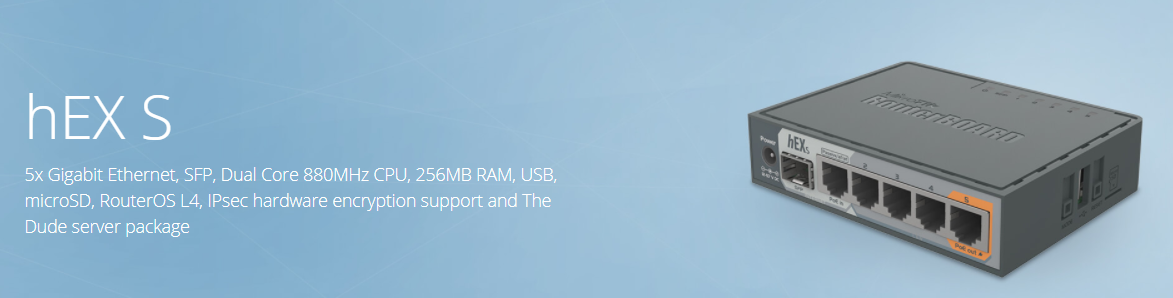
and these wifi access points: https://i.imgur.com/4Kx8TMA.png
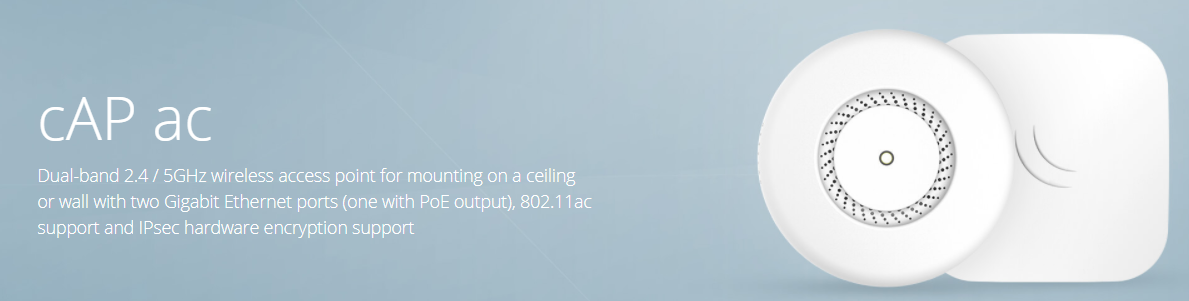
He had three
The router acts as a controller for the access points, so everything is still managed from 1 device
lean pebble
Nice
Mission accomplished fedora upgrade from 31 to 32 no issues
But still weird Network card related issue
I wonder if I'll update my bios if it'll fix it
waxen scroll
@tame carbon wb. How was your mandatory break?
tame carbon
@waxen scroll pretty good
I actually left the server because I was fed up with the level of plugged in braindead consumers
waxen scroll
lmao
peak cloak
Linux's permissions system finally "clicked" into my head (all those numbers and stuff)
peak cloak
still need to memorize the number <-> rwx thing
waxen scroll
no need, theres a cheat
waxen scroll
i never ended up learning the numbers because of that
lean pebble
Me to
Permissions Calculator provides a straight forward way to work out how to change permissions with the chmod command.
You can use this
Or this one
https://chmod-calculator.com/
@peak cloak
 shell moon
does anyone know what i can do to prevent double nat with my home internet system? bear in mind i do not know much about this stuff, but i have been disconnecting in the middle of zombies games on cold war and have searched every inch of the internet trying every solution i could find. until i realized it could be because i have a modem connected to a router (the one im using) and another router is connected to that one as an access point. I am trying to figure out how i can configure them to work correctly. I have heard i can bridge them, or set the third router to ap mode. can anyone help me with this?
 primal ice
@shell moon modem --- to router wan port - dhcp nat all that wonderful stuff ---- second router / wifi AP , disable dhcp plug into the 4 port switch do not use the wan port - wan port equals nat.
shell moon
@primal ice if the second router is in AP mode will dhcp automatically be off or associated with the main router?
peak cloak
it should be
primal ice
it doesn't need to be AP mode - but yes putting into AP mode basically turns it into an unmanned switch.
shell moon
it was plugged into the wan port aswell so i put it in the 1-4 ports like you said
this may sound stupid, but i have a wifi extender attached to the second router. will this affect that?
peak cloak
wifi extenders shouldn't
primal ice
nope
peak cloak
unless they are really badly designed
shell moon
okay so plugging the ethernet from my nighthawk (main router) into the linksys 1-4 ports should open my nat more right?
primal ice
you will only be using nat on the blackhawk then.
shell moon
ok so no double nat
primal ice
correct
shell moon
okay perfect, that is atleast if that was the problem the whole time
peak cloak
You only get one ip address from your ISP, that one ip is not enough for all your devices, the router does something known as NAT, to allow that one ip to service a lot more devices. The problem is that your devices are no longer reachable outside of the local network. When you double NAT, you are NATing both your public ip and a private IP to more private IP's. By having your second "router" NAT you are breaking up the network, computer A is not able to communicate with computer B if they are connected to the two routers separately. Usually when you have one home network you want it to be completely flat, with no seperate lans.
shell moon
peak cloak
You only get one ip address from your ISP, that one ip is not enough for all yo...
Thank you, that makes a lot of more sense now
 little schooner
@waxen scroll I was told a story by the network administrator. He said upper management requested that all computers in the school building be set to power off at 8pm every day. Since implementing this policy for about a year, hard drive failure is through the roof. It was estimated that 150 hard drives were replaced. On top of that, 12 server hard drives were failing in critical systems. Just yesterday, the net admin received overnight shipments of 3 hard drives and installed them today.
I wonder how many other stories there are about the maintenance of these computer systems
He told me all the servers didnt get updates for a full year, too.
waxen scroll
hmmm but was the power savings worth it?
little schooner
If they asked me, it would be clear to say that replacement costs outweigh the power savings and that we shouldn't use that policy
instead, power saving mode would be better
these intel pcs sip power when they are idle.
But coming next year, we are ordering ssds
And I will be part of the process this time.... well, I hope.
If its ssds, then I'd be okay to implement the power saving policy
but hard drives?? no...
I made a big effort to document any problems I face at work and their resolutions. So far I have 15 different entries available for reference. Its awful to have to spend time re-fixing an old problem. It should be referenced and be searchable.
waxen scroll
you need a promotion
little schooner
I'll find out by december-end
 waxen saddle
Sometimes funky games are played with regards to money buckets. For example, it may be acceptable to pay more for hard drives than the savings in power usage because they come from 2 different money buckets.
"We lose money overall, but my dept. saves money!"
 silk hare
Any thoughts on using Ubiquiti devices for a home network? Thinking about a Dream Machine Pro, AP-AC-Pros or BeaconHD's.
waxen saddle
I use Ubiquiti Unifi at home. Simply fantastic. Though, I use the older gear... Unifi Mesh AP, USG, USW, Cloud Key Gen 1
peak cloak
bit expensive and I've heard of ubiquity stuff being in an eternal beta
the only thing from ubiquity I have is an er-x and I hate it now
silk hare
Originally I would've used Open Mesh, but Datto aquired them and I would prefer to have a local controller that doesn't have a monthly payment.
peak cloak
yeah of course
waxen saddle
It works very well and is rock-solid. My only beef is that I can only have 1 external IP with Unifi.
silk hare
Although I am an Elite Datto Partner. I work with UniFi, Meraki and Open Mesh/Datto devices.
Monkey, lucky the dream machines now have a built in cloud key so thats one less thing I would need.
peak cloak
oh nice, I'm not too well versed in the newer ubiquity stuff, I've only used the edgemax software
maybe their newer stuff is better, but I'm always on a budget and all the unifi stuff isn't exactly budget
silk hare
Yeah well I think it really depends on what you're after too, a simple solution like Google Nest WiFi is great for the average consumer. However, if you want to be using VLANs, DPI, IPS/IDS, and other complex controls just for kicks, that UniFi starts hitting the spot.
peak cloak
mikrotik is nice for cheaper stuff
I want to get the hex S
can do more things than the er-x
silk hare
I am unfamiliar, I will need to take a look into those.
little schooner
I ditched unifi for my site 1 and use engenius ap. So much more stable than the FlexHD
Nothing but stable connections and working working working
It actually has working 802.1x too
802.1x with the FlexHD would sometimes fail for no apparent reason
silk hare
Lucky I am in the country side so we don't have anything more than 750Mbps down. So WiFi 6 isn't really a major concern at this time.
I however will keep that in mind with using Flexs.
little schooner
The uap ac pros work fine
I guess the flex line is just flexing the shortcomings of unifi
 rocky badge
little schooner
It actually has working 802.1x too
rocky badge
little schooner
It actually has working 802.1x too
Never had any issues with 802.1X on my UniFi
tame carbon
I've yet to try out .1X
tame carbon
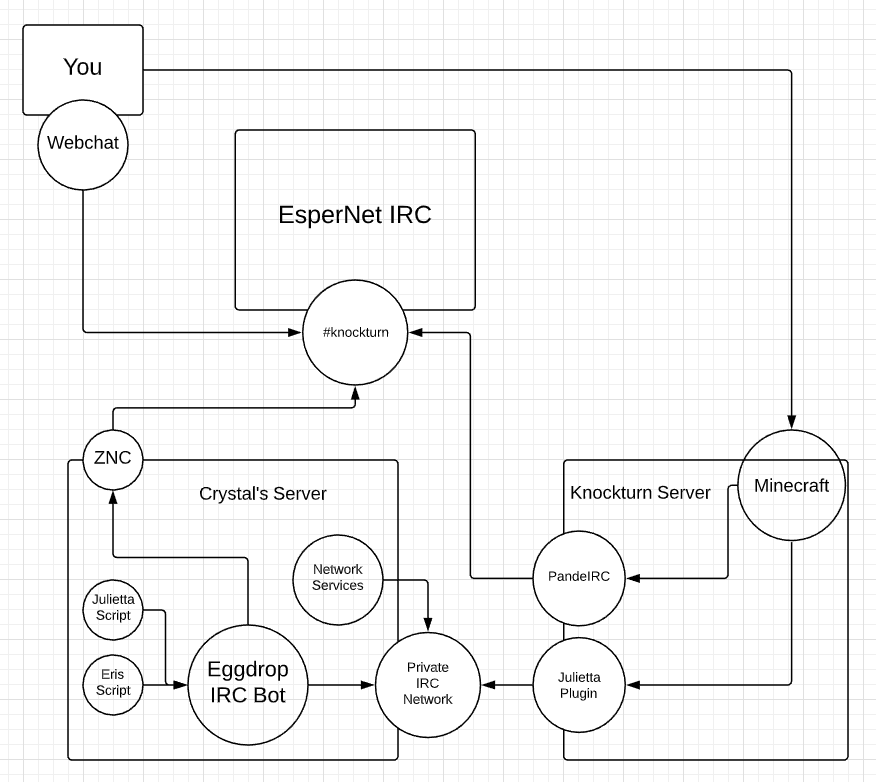
Diagram describing the chat system on my gameserver, a couple years ago
all the IRC stuff has been replaced by discord now
We had a couple IRC bots that were used to make NPCs 'come alive'
 jaunty talon
Haha, I run a irc-server on EsperNet :P
tame carbon
@jaunty talon That Julietta thing was quite the blast
it was an ancient irc bot, mangled in such a way
that players who went near the NPC, joined an IRC channel

GitHub
An Artificial Stupidity script for eggdrop bots. Contribute to jamesoff/bmotion development by creating an account on GitHub.
so the bot may respond to it, in hillarious manners
except I had to take it down a month later, because people were teaching the bot how to swear
and thats not OK on a PG-13 harry potter minecraft server xD
The NPC roamed around the great hall, and greeted people, it was quite cool
unborn sluice
tame carbon
except I had to take it down a month later, because people were teaching the bot...
oh nice you could teach the bot
unborn sluice
tame carbon
The NPC roamed around the great hall, and greeted people, it was quite cool
kewl
unborn sluice
@tame carbon
tame carbon
Anyone here got some experience with setting up strongswan?
tame carbon
@unborn sluice is having issues with this, and my iptables knowledge is rusty at best
unborn sluice
background story: setting up a VPN L2TP
tame carbon
with strongswan and xl2tp
 gloomy plover
What are basic things I can do to reduce the lag/connection stutter I get when playing multiplayer games? I use an ethernet already.
I've flushed my DNS recently, not sure if that would even make a difference. Just looking for really basic suggestions I can actually comprehend.
unborn sluice
stop anyone that connects to the internet using your connection
Mom is watching videos? disconnect her
Your sibling in facebook? turn it off
peak cloak
Eh
unborn sluice
Eh
iptables won't work
@tame carbon i deleted the table and ienternet works
but VPN still doesn't
 cedar igloo
is there any benefit in having a 10 gigabit ethernet (connected to NAS storage) plugged into a 10 gigabit switch if the devices which will use the NAS are only gigabit ethernet?
tame carbon
@cedar igloo can serve multiple clients at once
unborn sluice
gigabit doe
the benefit is you won't saturate your network with the NAS traffic alone
tame carbon
yeah that too
 smoky rune
What is the ip to the Minecraft server
unborn sluice
smoky rune
What is the ip to the Minecraft server
the IP that is given to it
smoky rune
Like to join
unborn sluice
Subscribe to join
smoky rune
Subscribe to...?
cedar igloo
sub to the LTT youtube channel then see #minecraft-info
smoky rune
I am subdued
unborn sluice
cedar igloo
there's nothing else we can do to help...
smoky rune
thx but i already found it lol
 tawdry veldt
hey I need some help with setting up some network shiz...
I have my PC connected via wifi, but I want to get hardwire because PS4 Remote play is shit on wifi, seeing as my room with my PC doesnt have any ethernet and I cant move my pc closer to my modem, would a moca adapter work? I have a coax port in my room and in the room with my router, a powerline adapter wouldn't work as my room and router are on separate circuits.
If moca is decent enough, is there any major downsides? Also what kind of 2 way moca bridge would you suggest? My router would probably need an adapter too. My internet speed is fine over wifi but when I try to do remote play and shit its choppy as hell, and apparently hardwiring the pc or playstation fixes the issue, hence my conundrum.
peak cloak
tawdry veldt
hey I need some help with setting up some network shiz...
I have my PC connecte...
downside of moca is the price
tame carbon
@tawdry veldt
@tawdry veldt gaming over wifi is terrible yeah.
MoCa is quite expensive
if powerline is not an option..
then use a drill
tawdry veldt
I rent, the agreement is I cant make unnecessary changes to the house, and this would be considered unnecessary, only basic repairs/maintenance @peak cloak @tame carbon
cant modify the house
moca price I can deal with
but I cant modify the house nor use powerline
so any tips and advice about moca would be appreciated
peak cloak
tawdry veldt
so any tips and advice about moca would be appreciated
I never used moca, so I don't want to give any bad advice
 thick minnow
How is it possible that after buying directional outdoor antena my signal significantly decreases
waxen saddle
Are you in the direction the antenna is pointing?
thick minnow
im pointing antena at closest transmitter
tame carbon
@tawdry veldt you're not leaving us with any options lol
powerline is what I'd recommend
but if that dont work
rip
wifi or bust
unless you lay a cable along the wall
small cableduct, you can get ones with glue
thick minnow
before, i've had -75dbi RSSI. then i swithed to 12 db normal antena and signal strenght increased to -69dbi, now i have 17 db directional antena and signal strenght decreased to wayy -85dbi
idk if router without antena at all have better signal
and i have now -112dbi RSRP
can you help why is it happening
weird think about this is that at 2-3 min i have speed up to 20Mb/s but after that it decreases to 2,5Mb/s
thick minnow
also i want to mention, that recieving/sendong ratio is huge
i have now 15Mb/s recieving, 5 min after turning off and on router, but my sending speed barely even reach 1Mb/s
now recieving speed slow down to 1,5Mb/s
 clear igloo
Cat5e that's not CCA grade is fine for up to 2.5Gbps
Higher spec isn't going to magically make things better unless you're doing 5 or 10Gbps at which point Cat6 is good for up to 100m or 55m respectively or Cat6a for 100m for 10Gbps
If you can't tell us why you need a "overkill" cable then you don't need it
thick minnow
Hei. Im looking for some help. Im from germany so my english may not be the best. Im looking for a tool to scan the wifi chanels for my new router. I need an IOS app or something for windows. Does someone have an idea.
thick minnow
Maybe im dumb but i cant see like the chanels witch 2,4 and 5 ghz wifi chanels other people in the house are using.
clear igloo
You'll only see channels other wifi devices broadcast on like a router or ap
peak cloak
@nocturne kraken if you want overkill get fiber
And use sfp media converters
There is almost no limit on fiber
Single mode fiber can do more than 400G with the right equipment
clear igloo
Single mode can do terabits
peak cloak
Yep with mux/demux
clear igloo
even multimode can do 400Gbps without issue although bidi transceivers aren't on the market yet (that I know of) so you're limited to multi-strand MTP/MPO cables
thick minnow
how much it cost to place fiber across 5 km (3miles) if its possible?
clear igloo
The fiber itself is probably going to run around $1000
To have someone else bury the cable, probably many thousands more. To do it yourself? The cost of whatever permits you'll need and time
clear igloo
peak cloak
Yep with mux/demux
800Gbps and beyond transceivers are in the works already which will just use single pair SM fibers as well but yes, today for terabit you'll need mux/demux
clear igloo
Yah, the spec is in revision now so probably another year or two before release at best but it's going to use the same QSFP-DD cage as 400G
thick minnow
do you know guys why my antena acts weird?
thick minnow
to me too, since it act chaotic
but why it say that i have only -89 dbi RSSI?
it should be at least -65
clear igloo
Any bulky appliances in the path that could cause interference?
thick minnow
like 2km of trees
but i had my previous antena with only 12 db and it gave me -68 dbi
 spark marsh
peak cloak
spark marsh
peak cloak
@spark marsh don't ask to ask just ask
thick minnow
what the hell?! -102 dbi RSSI ? is it even possible?
thick minnow
where i can ask those issues at least?
waxen scroll
@peak cloak we also need to remind them that this is a networking channel
Windows command prompt is not in scope
peak cloak
I mean windows server would be on the verge of networking
It's not hard to do <command> --help though
lean pebble
peak cloak
It's not hard to do ```<command> --help``` though
Does windows have this option ?
I thought you just need to write the command without parameters and it'll give you help 😅
waxen scroll
Windows is /?
tawdry veldt
@tame carbon thats why I'm asking about moca as it seems to be my only main option and I'm asking if there's anything I should be aware of it and if anyone knows of any good trusted kits and adapters
peak cloak
I'm amazed by just how tech illiterate even kids my age are
little schooner
@peak cloak I like how powershell is help <command name >
peak cloak
Never knew that
 fickle remnant
weird coincidence with today's short circuit video, but my family's looking to upgrade our gateway modem from our ISP's provided one. I was wondering if you guys have any good recommendations? Our ISP is Spectrum and currently our wired connection maxes at around 95 Mbps
 smoky gulch
Cool app - thanks @clear igloo
 inner lake
hey @peak cloak remember me
so i changed the coax cable and it worked
but uh
2 weeks later or whatever it just randomly turned off today at 18 military time
the funny thing is that it turned off right after a youtube ad got skipped
 nova igloo
@tame carbon What you think about Netgear dude. Recently, I see many people get this brand more than Cisco.
tame carbon
@nova igloo cus its more affordable, and documentation is more readily available
Netgear's home solutions are as bad as all the others
nova igloo
OOF😆
tame carbon
@nova igloo mainly because they have a short lifecycle
its rare to see software updates on those devices
nova igloo
lol short lifespan is a most painful one
tame carbon
@nova igloo what kind of networking gear have you got at your place then?
its all mikrotik here xD
except for a couple unmanaged switches from Cisco & TPlink (the PoE switch I have is from TPLink)
nova igloo
I use the ISP one, rebranded from Huawei and TP-Link
Huawei ONU and TP-Link Router(3in1 Magic Box)
Its working fine since only a server connected to them.
tame carbon
@nova igloo I had one of those ISP rebranded ZTE modems for many years
The UI and featureset was garbage, at least it supported DMZ
its firewall couldnt be disabled
or configured
and if something was wrong with it, you had to restart it
nova igloo
You can't change the Modem randomly right
Our Fiber Network Modem come with 4G LTE dongle plugged on it
so when ever the fiber broke or maintenance everything works fine, just higher ping.
tame carbon
failover LTE yeah
bunch of those mtiks also have an LTE option
the ones that don't have a USB port for it
nova igloo
But we got it for free/included in price
and for signing up the fiber network, I get a package which u can get Unlimited Bandwidth and Speed Cap for my phone
total of 50$
but as u know, no satic public ip
tame carbon
rip
 tall pagoda
Is this great or bad?
clear igloo
It's fine
tame carbon
not much you can screw up with those
they are unmanaged
ethernet frame in, ethernet frame out
clear igloo
Yup
 frozen cobalt
how good do you think is the tenda AC 1200 is?
unborn sluice
tall pagoda
Is this great or bad?
this is a new perspective. I thought people buy networking equipment in tech stores
though that looks like a grocery?
clear igloo
Walmart perhaps?
unborn sluice
Seems like it
thick minnow
i want to ask again. why my directional outdoor antena have much weaker signal, than default antena on the router, thought, he has faster speed connection by short time?
tame carbon
@thick minnow you sure you got the right antenna?
thick minnow
you mean right frequency
tame carbon
Yeah
There's double and quad antennas
has to do with the length
may have to adjust transmit power
thick minnow
i have 1800-2600 MHz antena and my closest transmitter is at 2600h
thick minnow
Tx power?
thick minnow
antena gain 17 dbi
tame carbon
thats a lot
@thick minnow do you have a phone?
There's an app you can install on android
called Wifi Analyzer
allows you to see the relative signal strength
of multiple APs
Swap antennas, see how that affects signal strength
thick minnow
we did that and it didnt change, till we get the antena inside
tame carbon
@thick minnow do you have a rough sketch of the layout of the coverage?
and maybe see what channels you are using
what have you got currently deployed?
I can't form a complete picture of the setup you have
are you sure you aren't just trying to use 5GHz over that antenna?
but havent noticed?
thick minnow
i was said in the shop that the closest one have that bad frequency
but how can i check that?
about my setup... antena 1800-2600 Mhz 17dbi is connected to the D-link DWR-921 Router with two connectors SMI, then from my router to my computer
-the simplest setup
tame carbon
you can usually set the channel in the wifi config somewhere
little schooner
Yesss. Finally I'm on my last paper for internship class where I can go full verbose-mode to explain my experience with the networking equipment and get an easy A.
My last two papers were forbidden to talk about anything related to the work I did
It is a strange assignment
 digital talon

inner lake
My router is being wack so it was offline last night but I just checked it like now and it was online
So I was like nice I have internet now so I connected to it on my pc
And then it had a stroke or something because before even loading one chrome tab it just went bloop
Anyone know why this problem is happening
I have unplugged it and plugged it back in
peak cloak
No clue
Could be you
Could be ISP
Anyone have any good reading/articles/videos/documentation for learning the more advanced part of ssh. I know how to login with password, but never messed with keys. I don't want to go into it blindly without knowing how it works under-the-hood.
inner lake
thanks spectrum for the 2 week of internet after being off for 5 days
Now it’s going to be off for 2 months to compensate
silk hare
I host a UniFi Cloud Controller with AWS, I would like to purchase the Dream Machine Pro for a few clients for better IPS throughput and some other features. However, I want to use my centralized cloud controller in AWS and no the built in controller in the dream machine, is this possible to adopt the Dream Machine Pro to my existing controller?
tall pagoda
clear igloo
Walmart perhaps?
Action for 10 euros
 hushed thistle
Should I get a VPN
little schooner
Based on the ltt video, its good if you want to watch other region content on streaming services
hushed thistle
Ok
 rough saffron
lol I pulled 700mb/s on my school wifi
waxen scroll
@little schooner most of the advertising for VPNs are irrelevant too
https is enough. nobodys gonna take your bank info on a public network
waxen scroll
most of the threat is on your own work laptop where they install their own CAs and hijack https for popular sites
proxy service is cheaper in most cases and just covers your torrent client 😄
rough saffron
vpns add another link which can be breached
like nordvpn had a huuuge breach
made people like actually vulnerable unlike their market claims that they say you will be if you dont have it
peak cloak
Whenever have their whole home connection vpn'ed I'm just like 🤦
rough saffron
waste of money
the only advantage is you can bypass bans on minecraft servers
which i dont do or reccomend doing
peak cloak
really? won't that be tied to your mc account
rough saffron
nno
peak cloak
unless you get a new account
rough saffron
there are ip bans and ign bans
peak cloak
pretty stupid to just ip ban someone
peak cloak
doesn't the /ban do both?
rough saffron
depends on the host
i dont think spigot does
without mods
you can still do /ipban
peak cloak
hmm, never knew that
rough saffron
this is getting off topic tho
 narrow spire
VPN is useful to get around geoblocking
can play new games 12 hours earlier on Uplay
watch all the netflix stuff thats "not available"
peak cloak
lots of popular services know what ip ranges vpn providers have
narrow spire
yet they dont block users who use VPNs
peak cloak
netflix does
thick minnow
This is my current situation. SATA over usb is painfully slow.
narrow spire
free VPNs are way worse
peak cloak
pi?
narrow spire
nothing is free, you pay with your privacy
peak cloak
I have a free vpn
narrow spire
how else would they profitable run a business
peak cloak
I run my own vpn
peak cloak
geoblock isn't a problem for me, but ok for geoblock I understand vpn's, but for privacy...
narrow spire
talking about geoblock
peak cloak
yeah, I understand geoblock
narrow spire
also if a government agency was after your data then it just checks the server owner and it leads back to you
peak cloak
if you want privacy you use tor
peak cloak
tor + vpn + mcdonalds wifi is
narrow spire
adding more layers is better ofc
but tor is known to have exposed nodes which are in control of governments
they control both exit nodes = you are fucked
thick minnow
We used to use a network extender off of Dunkin’ Donuts lmao
peak cloak
I mean Tor was created by the US navy I think
narrow spire
tor isnt terrible, you just have to be aware of the risks
NSA internal leaked documents state that tor usears are listed as extremists
so if you prefer not to automatically be on a radar for "extremism" for using Tor I suggest VPN use additionally. The VPN provider can't be under jurisdiction of the US as it defeats the purpsose.
narrow spire
according to the NSA, yes
they don't have to and won't tell you though whether you are being closely watched.
 finite kelp
Any good books on network security? I have no idea what else I want for Christmas besides books lmao
 tribal ferry
Does the flexHD come with a PoE injector?
Seems like it doesn’t.
Which POE injector should be good for it?

Ubiquiti Inc.
 spare bay
finite kelp
spare bay
finite kelp
Any books on network security and networking I should buy?
unborn sluice
You have no idea what else you want for Christmas besides books? lmao
 hollow marlin
@finite kelp MPLS in the SDN era is a must have 
finite kelp
Alright, thank you
hollow marlin
Im just kidding, what level books are you looking at because it goes from easy to expert real quick
unborn sluice
hollow marlin
<@274708024650629120> `MPLS in the SDN era` is a must have <:pepoJuice:670049444...
👀
👄
hollow marlin
unborn sluice
👀
As an engineer at a SP its pretty much a must read
unborn sluice
any book you could recommend for a beginner
hollow marlin
CCNA 200-301 Official Cert Guide, Volume 1/2. They are Cisco focused but contain mostly theory but outside the craptastic Net+ it at least puts practicality in
 thorny vector
Cuckoo's Egg, while not a "teaching book" is a good introduction to the cyber security realm.
 thorny vector
That's documentation
unborn sluice
I think the streaming server outright blocked datacenter ip blocks
so can't use my VPN server for that specifically

thorny vector
get an aws free tier server, route through that
unborn sluice
thorny vector
get an aws free tier server, route through that
I have azure and linode soo
2 VPN servers none working
hollow marlin
unborn sluice
i want higher than CCNA
You are going to want books related to service providers. Theres NA then NP it terms of level but SP has no in-between
hollow marlin
Not disagreeing
unborn sluice
thorny vector
hollow marlin
You are going to want books related to service providers. Theres NA then NP it t...
All the hoops networking has to jump through for all that crap makes me so happy security stuff is just open source, or sans courses
hollow marlin
Well its all RFC, so kinda open source? lol
thorny vector
The pain when the reference for something you're reading is "RFC xxxx"
hollow marlin
If you have a solid knowledge of routing, then the MPLS for SDN era would give you how routing in SPs work and half the book is on VPNs. While its on a protocol level, they do not differ much from even proprietary VPNS
unborn sluice
gotcha, time to amazon
solid knowledge of routing
I wouldn't say my knowledge is solid, but hey
time to learn
this?
thorny vector
Nope. Nope nope nope
I'm already drowning in documentation for the magic that is cuda
hollow marlin
unborn sluice
this?
Yep. Get ready
Also if you are going to be spending ~$50 on a book you might as well get an ACM.org account for $100/year which comes with an O'reilly membership. It has 99% of all the networking books out there.
O'reilly is basically networking, programming and little sysadmin. Books and videos. If I would have bought all the books I have gone through at $50/each I would be well over $2k
finite kelp
@hollow marlin Probably easy, I know nothing about the topic
I'm wanting to get into cybersecurity, and network security is my main interest
thorny vector
Cybersecurity you say?
finite kelp
Yeah
hollow marlin
If you are just getting into networking grab the CCNA volumes to get a run down first
thorny vector
I'll see if I can dig up any of my stuff. If you want to do networking security, the current industry standard/open source tool is security onion
Its a "turn-key" solution, but it has most of what you need to get started tool wise
(And get the older version, version 1, based off of ubuntu 16.04. Security Onion 2 is hot garbage)
finite kelp
Alright, thank you two
thorny vector
No worries
unborn sluice
hollow marlin
O'reilly is basically networking, programming and little sysadmin. Books and vid...
oh right I remember something
hopefully this book is enticing enough
@hollow marlin so 100/year for acm that grants me oreily for all books?
hollow marlin
Yep. Otherwise O'reilly is $500/yr. I got a membership from O'reilly at a discount of $200/yr then 2 months ago it was about to renew when I found a post about ACM and thats the route I took. Its even $75/yr for the first year if you can find the coupon
The only thing oreilly doesnt include for ACM is the live events which I never watched
unborn sluice
live events
Pass
hollow marlin
Yep. Cisco/Juniper live events are the only ones worth watching

 final steppe
so recently I've been getting intermittent like 5 second outages
anyone know where to start diagnosing this?
 manic nebula
Use Intels own ethernet port diagnostic software if you're using an Intel Ethernet port

unborn sluice
You need to check every 5 seconds
 maiden yew
final steppe
so recently I've been getting intermittent like 5 second outages
maiden yew
final steppe
so recently I've been getting intermittent like 5 second outages
1 of 3 things stand out , faulty hardware(cable, card , switch port), double IP address (most common home issue), Downstream issues (Unlikely to cause this kind of behavior)
waxen scroll
That messy wire reminds me of @little schooner
little schooner
@waxen scroll the spool of cat6 comes in the mail today but I am still waiting on the punch tool
And the low voltage wall brackets
thick minnow
Can someone help with with me issue... Had guest over and they couldn’t even load facebook and when i try to open youtube it loads for like 10 minutes and then when watching youtube on my Smart tv it will kick me off and say “ Network Error” or go to 144P. I have 1 gig down and 50 upload idk if it’s my Router or Modem
Also when playing games i get packet loss and high latency for some reason
unborn sluice

 solar badger
Anyone have the ASUS RT-AX86U AX5700 WiFi 6 Router from the ShortCircuit video the other day?
I'm thinking of ordering one to get off of my isp provided unit
 fervent stag
i found a network switch, and it works, but i cant find any 9v adapters that it needs, i can only find 12 or 5, i tried 5v and it doesnt work, when i try with 12 it does work, will it break if i keep using it?
peak cloak
probably not healthy for it
 quick trout
peak cloak
quick trout
peak cloak
does windows even see the ethernet adapter
quick trout
Where I check that
I have clicked this under windows settings :
Nothing happen;(
Nvm being locked off in a 2 min
peak cloak
@quick trout device manager
quick trout
My pc already begin the network rest thing
Hope it helps!
Nope z
.....
@peak cloak where is that
quick trout
Ok 2 sec
peak cloak
in cmd prompt type ipconfig /all
and show the full output
that will show all network adapters
quick trout
Ok
quick trout
It says Physical address
peak cloak
show everything
put in pastebin or something
yep ethernet adapter is disconnected
go to device manager
quick trout
How
quick trout
Uh another way to find it?
quick trout
Next
peak cloak
then type devmgmt.msc
quick trout
Network card or Intel 1219-V
peak cloak
Intel 1219-V
quick trout
What now
peak cloak
just copy and paste into google translate
yeah ik what you mean, I'm bilingual too and it can be hard
quick trout
I use Google translator app on phone since I can't copy and paste
quick trout
It has just been at repair shop for 2.5 week do I f have to send it in again 😫
peak cloak
no, it's a driver problem
give me a sec, I want to check something
Drivers & Software
Intel® Ethernet Adapter Complete Driver Pack
download this
 ornate jungle
If you haven't already tried, I'd uninstall the driver, then reinstall the driver? This is the specific driver for Intel® Ethernet Connection I219-V
https://downloadcenter.intel.com/download/25016/Intel-Network-Adapter-Driver-for-Windows-10?product=82186
Drivers & Software
Intel® Network Adapter Driver for Windows® 10
peak cloak
^
quick trout
HOW I have no internet on PC...
ornate jungle
quick trout
HOW I have no internet on PC...
Use another PC, then put the file/installer on a USB stick. Plug USB stick into this computer, and install driver. Or take back to the repair shop, whatever is easier / more cost effective for you. 🙂
peak cloak
do you not have a usb?
quick trout
I don't things
Thinks *
Back to repair shop it goes 😢
2-3 more fucking weeks I had it for 1 day bc got it home from repair shop but boom again it has to be sent it
quick trout
I will just send it to repair before I break something
Like make windows more broken thing
not breaking pc irl
little schooner
Yes and for free. Lots of videos on YouTube and help here as well
Take in the information slowly and one step at a time and it is very doable




 little schooner
The first motivation for me to learn about computers was when I was a child with a strong desire to play my Disney PC games. The family computer would get malware from time to time and I always had to wait for my mom to call an expensive technician to come and fix it. I disliked waiting weeks or months for a technician to arrive that I decided I was going to play around with the computer to see if there was anything built in that could fix it. My first discovery was the post screen. It had text that read "recovery" followed by a key that reloads the computer with a recovery image saved on the hard drive. I ran that and waited and to my surprise I could start playing games again! But any files and data on it were gone each time and that did not connect with me until much later.
Then from there I think I used AOL internet to learn a little more. And then played around exploring in windows. You can learn a lot from just exploring
I'm glad it turned into a career.
unborn sluice
I always had to wait for my mom to call an expensive technician
My mom taught me about system restore
so that's my solution everytime no matter the problem
so I had to store installers on my usb incase something goes bad again
Example:
I somehow managed to change the file association of executables (.exe)
that they would open in the browser.
So you basically can't do anything since any program would be piped to the browser.
Solution:
System restore
lean pebble
unborn sluice
Example:
I somehow managed to change the file association of executables (.exe)
...
Haha lol I did the same thing.
In windows 7 I changed the CMD by accident to open always in background along with the browser and I couldn't use it until I restored my system 😂
peak cloak
I honestly don't remember how it happened. I've just always played around with the "family' pc and whenever there was a problem I just googled it ( probobly helped that I had internet). Then after my family friend ungraded my psu and gpu I started to want to build my own pc and I eventually did that and it's the same pc I have now ( except with better fans, gpu, and psu)
little schooner
Gaming played a big part for me
Without gaming, the outcome might have been different
I'm not too sure
What I am sure about is that I accidentally printed 500 pages at school of notepad text
Looking back, I feel bad that I wasted so much. The poor trees!
@waxen scroll now my next problem is dealing with all these extra copper cables that I don't have a need for
At least 25 long ones
waxen scroll
i have the same issue. lots of cable scrap just laying around
i keep saying im going to trash it but then if I need a cable in the future i'd have to buy it
little schooner
Yeah. Earlier this year my professor got rid of at least 100 of them
He was loaded of different kinds
But we threw them because they were tested
And 100 so far were bad
There's still boxes full of it heh
Plastic waste
lean pebble
Does mikrotik good for home use? Does it have VPN option in it?
lean pebble
I'm thinking about switching my fortiwifi 60c
I think he is the source of all my problems here
lean pebble
peak cloak
it has wireguard iirc
Can I use it from Android device or only from windows
peak cloak
wireguard is everywhere