#networking
1 messages · Page 241 of 1
 spiral anchor
Hi, I'm looking to replace my free router from my ISP and I'm currently looking at the TP-LINK AX20 vs the D-LINK DIR-X1860. Which one should I go? or are there any other options? My house has 3 floors and if the router is able to cover all of them, it would be great. If not, I might be able to use the current router as a repeater
 tame carbon
consumer routers are bunk
spiral anchor
if so, do you have any suggestions?
tame carbon

MikroTik is a Latvian company which was founded in 1996 to develop routers and wireless ISP systems. MikroTik now provides hardware and software for Internet connectivity in most of the countries around the world.
 unborn sluice
ah yes the mikrotik sales
tame carbon

@unborn sluice besides mtik
there isn't really any other company that delivers that kind of featureset for that price
unify is overpriced
spiral anchor
nah i dont think i can find one in my country
spiral anchor
i see
unborn sluice
yea, maybe a few kilos is enough
spiral anchor
do they offer wifi as well?
unborn sluice

tame carbon
@spiral anchor generally what you'd do with mikrotik is buy 1 router, and then cover the rest of the house with access points
unborn sluice

tame carbon
the router controls the access points remotely
spiral anchor
@spiral anchor generally what you'd do with mikrotik is buy 1 router, and then cover the rest of the house with access points
@tame carbon so kinda like a mesh?
unborn sluice
no
tame carbon
eh.. no
unborn sluice
do they offer wifi as well?
Interesting, wifi
spiral anchor
im not quite sure what each type is
 spiral anchor
sheesh the price is a little too extreme for me D:
unborn sluice
D:
tame carbon
@spiral anchor what kind of speed do you have?
spiral anchor
Hi, I'm looking to replace my free router from my ISP and I'm currently looking at the TP-LINK AX20 vs the D-LINK DIR-X1860. Which one should I go? or are there any other options? My house has 3 floors and if the router is able to cover all of them, it would be great. If not, I might be able to use the current router as a repeater
@spiral anchor these are my current set budget/price
tame carbon
How much budget have you got?
I'm not going to look up listing prices for those devices
spiral anchor
roughly $100 (converted)
spiral anchor
@spiral anchor what kind of speed do you have?
@tame carbon my current plan is about 500Mbps/500Mbps. Might expand to gigabit later
tame carbon
big oof
spiral anchor
and you want to cover three floors?
@tame carbon if possible, if it's impossible it's ok
tame carbon
< $100 500mbit
with wifi
yeah, not gonna happen
you're looking at around $150-250
@spiral anchor https://mikrotik.com/product/hap_ac3
MikroTik is a Latvian company which was founded in 1996 to develop routers and wireless ISP systems. MikroTik now provides hardware and software for Internet connectivity in most of the countries around the world.
If you can get this in your country, its a new model they recently released
stock is a bit scarce right now, so may be hard to get your hands on one
Its a blazing fast quadcore router
spiral anchor
I see
tame carbon
It has wifi onboard, and you can augment it with additional APs
tame carbon
wifi repeaters are bad practice
spiral anchor
my pc is on the first floor connected via lan anyway
tame carbon
They interfere with one another and make your network unreliable
@spiral anchor first floor, groundfloor?
spiral anchor
just want the wifi to be somewhat usable on the third floor
@spiral anchor first floor, groundfloor?
@tame carbon yes
tame carbon
@spiral anchor do you know what dlan is ??
spiral anchor
don't think so, no
tame carbon
You can get adapters you plug into your power outlets
and it can use the house wiring to set up a connection between two locations
Tplink sells them too
spiral anchor
so they connect to each other wired?
 dusty osprey
You can get adapters you plug into your power outlets
@tame carbon is't this powerline adapters
These are also not the best practice
They loose a lot of power over much cables
tame carbon
@dusty osprey they are more reliable than wireless repeating
spiral anchor
something like this?
https://www.tp-link.com/en/home-networking/range-extender/re650/
The TP-Link Tri-band WiFi Range Extender, RE650, boosts WiFi signals throughout your home. Enjoy uninterrupted high speed internet and Eliminate WiFi dead zones once for all.
dusty osprey
Eh true
tame carbon
since they don't share the same medium
@spiral anchor https://www.tp-link.com/nl/home-networking/powerline/
 spiral anchor
ah
tame carbon
@spiral anchor best solution is to just run a cable to the third floor and attach it to an AP
but this allows you to not have to run a cable
its not as fast, and has a little latency (1-3ms)
spiral anchor
@spiral anchor best solution is to just run a cable to the third floor and attach it to an AP
@tame carbon i wanted to do that but my parents said no

dusty osprey
i think its way more than 3ms crystal. This shit is slow
spiral anchor
huh
tame carbon
@dusty osprey I got one at home here for my parents' office & desk
only because they decided on the room, after renovation
rest of the house has outlets
tame carbon
like 3ms
spiral anchor
the reason i was looking at the 2 said models is because they look quite promising to me I guess?
tame carbon
@dusty osprey ethernet has 0.1ms
spiral anchor
if I were to say, buy either of the 2 i posted, which one is more reliable? tplink or dlink?
also, what about mesh wifi?
tame carbon
@spiral anchor idk how your experiences have been with tplink, but I've had 3 of their routers in thepast
and they all died
dusty osprey
mesh wifi is also a bit unreliable i think
spiral anchor
i've had a bad experience with dlink sooo...
tame carbon
mesh wifi, especially on consumer routers are terrible
dusty osprey
I have had dlink routers tho they didn't die on me xD. But yeah seems like tplink is relibler
tame carbon
You don't need mesh, you just need more APs
and those APs should be fed by wire, not by air
spiral anchor
and those APs should be fed by wire, not by air
@tame carbon this is one of the problem
probably cant run wires
tame carbon
Like I said, powerline is one of the options you have
spiral anchor
I have had dlink routers tho they didn't die on me xD. But yeah seems like tplink is relibler
@dusty osprey this makes it really hard ahahahahah
Like I said, powerline is one of the options you have
@tame carbon how are they connected to each other?
i'm a bit confused
dusty osprey
I mean according to your experiences and crystals too dlink is trash sooo
They use some frequency on the live voltage line
I believe
tame carbon
@spiral anchor the house electrical system uses only 50 or 60Hz as frequency, but data uses a much higher frequency
so you can carry both power & data
dusty osprey
basically your baccfeeding data onto the power circuit
spiral anchor
so they technically connects "wirelessly" ?
tame carbon
@spiral anchor you plug one into the wall near your router
dusty osprey
not wirelessly tho it does use the wires itself
tame carbon
and the other upstairs
spiral anchor
not wirelessly tho it does use the wires itself
@dusty osprey but from the outlet?
dusty osprey
don't they both have to be on the same Phase also
dusty osprey
@dusty osprey but from the outlet?
@spiral anchor yes. The same outlet you have the thingitself plugged into
tame carbon
 dusty osprey
and they have to share rhe same phase also too
 spiral anchor
which i dont have to modify anything to my home electricity right
dusty osprey
Yes true
tame carbon
@spiral anchor they have a button to pair themselves
usually they work out of the box, you plug em in, either side of the house
dusty osprey
But you make sure the phase is same on the 3rd floor and the 1st fllor cuz if the phases for where the router near is is different it wont work
spiral anchor
But you make sure the phase is same on the 3rd floor and the 1st fllor cuz if the phases for where the router near is is different it wont work
@dusty osprey is there a way to check/figure it out before buying?
tame carbon
@spiral anchor open up the electrical distribution board xD
dusty osprey
Uhhhuhh thats a good question which, well your power panel where the breakers are may have it
Exactly
tame carbon
but I would advise against that lmao
dusty osprey
Open that board NOT OPEN it, just open and see for some papers maybe sticked that has the diagram
tame carbon
@spiral anchor buy a pair, and make use of the 14 day return policy (if you guys have that)
if they don't work, return them to the store
spiral anchor
@spiral anchor buy a pair, and make use of the 14 day return policy (if you guys have that)
@tame carbon i dont think we have that here lol
tame carbon
oh, I derived you being american from calling the groundfloor the 'first floor'
tame carbon
@spiral anchor what tplink calls 'mesh' isnt mesh
OneMesh™️
thats what they call it
its their own propietary crap
spiral anchor
i see
but the powerline system you mention is quite cheap?
i see it's not that pricey
but i dont have much options to choose from
tame carbon
They aren't too bad no
spiral anchor
seems like these are all we have lol
maybe the normal consumer routers are my last choice huh
tame carbon
Those tplink ones have a wifi antenna built in
I can't give you any advice on wifi from tplink, imo they are all trash
spiral anchor
yeah thats hard
tame carbon
MikroTik is a Latvian company which was founded in 1996 to develop routers and wireless ISP systems. MikroTik now provides hardware and software for Internet connectivity in most of the countries around the world.
spiral anchor
you've had a bad experience with tplink, i've had a bad experience with dlink 
tame carbon
I got this one in the living room
only problem with the hAP ac2 is that it has poor coverage, which is what the hAP ac3 solves
it has internal antennas
spiral anchor
i dont think we have hAP models here
currently searching
cant find a trusted source/retailer
tame carbon
MikroTik is a Latvian company which was founded in 1996 to develop routers and wireless ISP systems. MikroTik now provides hardware and software for Internet connectivity in most of the countries around the world.
They have listings of their suppliers
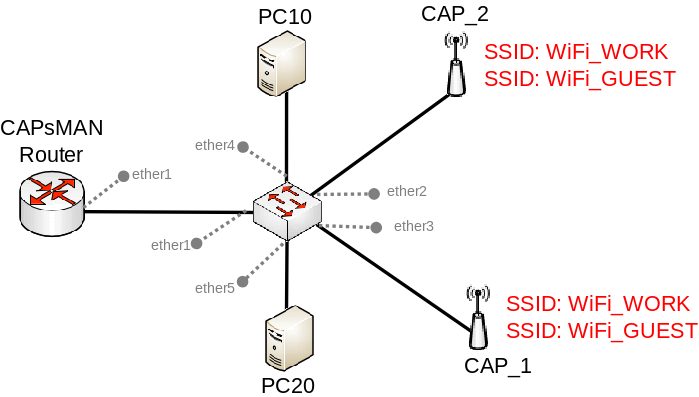
@spiral anchor the major benefit of using CAPsMAN is that you can easily add more access points to your network
just last week, I helped someone set up a hEX S with 3 access points
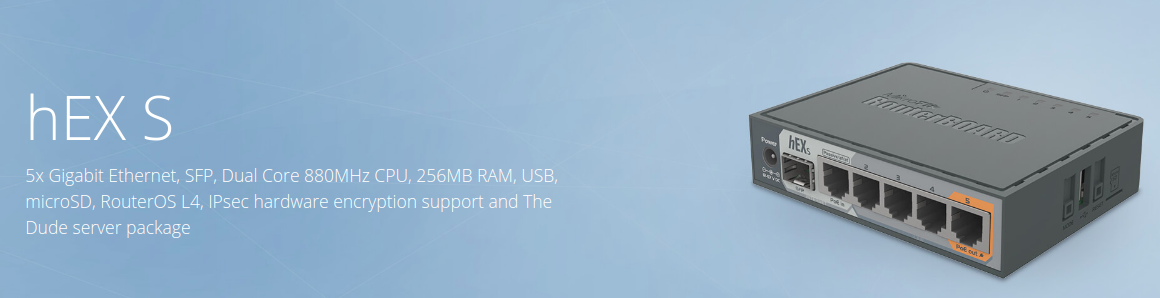
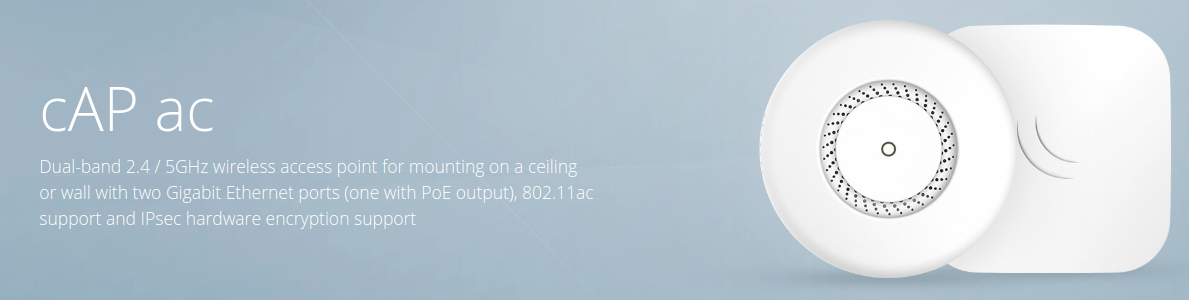
Those were the APs ^
spiral anchor
one question: what's the difference APs and repeaters?
spiral anchor
I kinda get it(?)
tame carbon
repeaters are not used in any real wireless networks
they are just a bodged attempt at making wireless better for home users
with sub-optimal results
tame carbon
asus should be banned from selling routers
they build insecure pieces of shit
with management panels that don't work properly
and DHCP client with a mind of its own
oh
spiral anchor
Ok, that's a pass
tame carbon
and the #1 problem with all consumer routers
they don't get updates.
ever.
mikrotik gets monthly bugfixes & patches
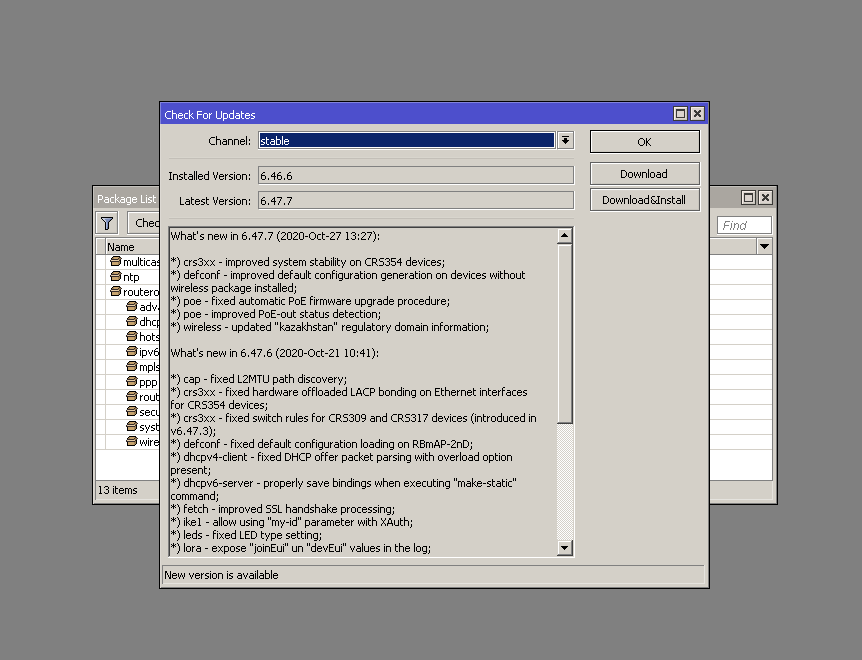
all the routers they sell run the same operating system
tame carbon
@dusty osprey Cisco takes security very serious.


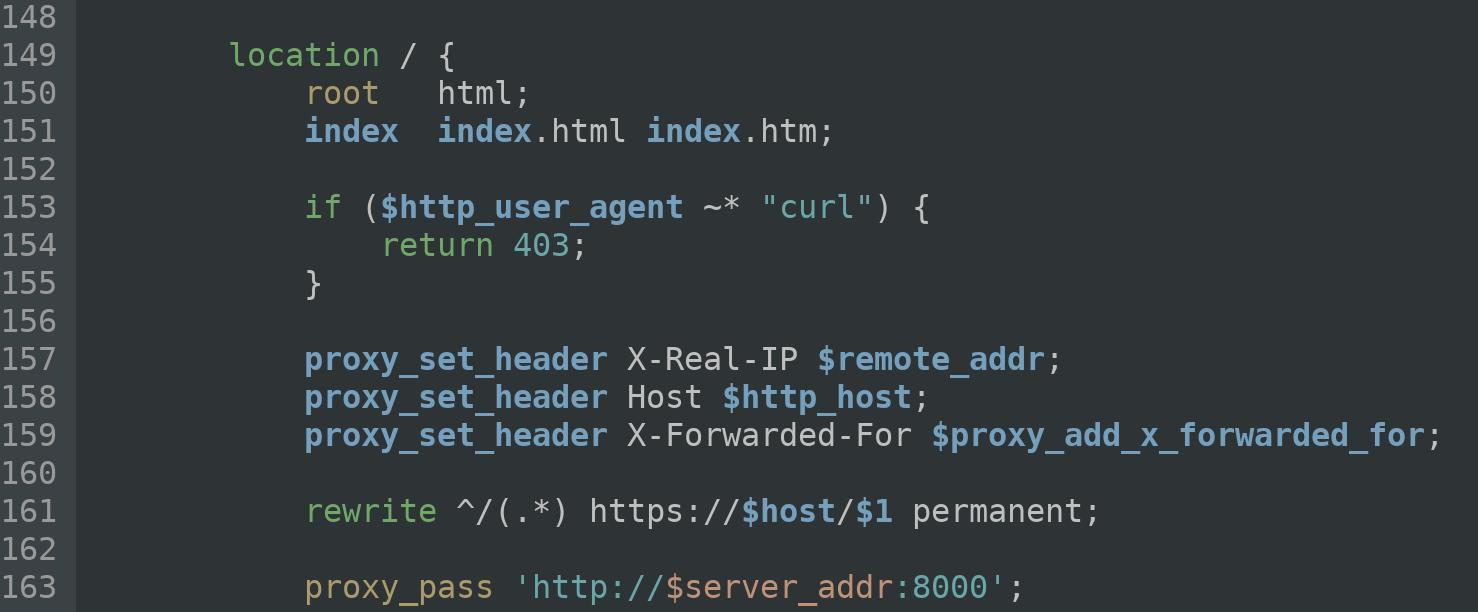
@info_dox @TheHackerNews @bad_packets @hrbrmstr We were also quite surprised to find this /etc/nginx.conf in 1.4.2.20
Retweets
479
Likes
1163
 Twitter
·
Twitter
·
Look at the fix they did ^
Their VPN API was exploitable
and this was their fix
curl the mark of evil
 tame carbon
-H "User-Agent: not-curl"
 tame carbon
@spiral anchor the benefit with mikrotik is that the devices don't loose their value that quickly
and they are extensible, with CAPsMAN you can always expand your wireless coverage
you configure the network from 1 location
dusty osprey
@dusty osprey Cisco takes security very serious.
@tame carbon ofc why all entreprices use them xD
dusty osprey
not to be confused with apples ios xd
dusty osprey
oh :p
tame carbon
@dusty osprey their vpn API endpoint was vulnerable
and so they just banned curl from accessing it xD
dusty osprey
Wowww
tame carbon
Not sure if you noticed my sarcasm xD
dusty osprey
No i did it's embarrassing of cisco tho
 thick minnow
how do you set your cable (or fiber) internet from your provider to my house 5km away?
cause for now i have wi-fi network
You should ask that to your isp.
ok
 peak cloak
ik, but you could use fiber to run a cable 5km
Cable Provider -> Modem -> Media Converter -> Fiber -> Media Converter -> Router
thick minnow
ahh that way i get it
tame carbon
Point to point antennas
or dig a trench and run fiber

FS
FS is a new brand in Data Center, Enterprise, Telecom Solutions. We make it easy and cost-effective for IT professionals to enable their business solutions.
 astral yarrow
Hello. I’m looking to extend the range of my wifi, from the router to my office. It is imposible to pass a cable, so ideally I’d like to get a wifi mesh or something similar (I’m a noob in networking). Changing the router is not an option, and I have a budget of 50-100USD. Anything you’d recomend?
tame carbon
nope
theres no solution to that problem for that budget and those constraints you submitted
and wifi extenders are not a solution in my opinion
astral yarrow
It’s about 10-15 feet and 2 walls in between (not think walls)
tame carbon
@astral yarrow what about ethernet over powerline?
astral yarrow
Tried that, it sucks
Actually, they’re 2 flats together, but the power is split, that’s why
peak cloak
a wifi extender would the absolute last thing I would do
tame carbon
@astral yarrow run a cable.
astral yarrow
Running a cable is not an option
Oferta ❤ Black Friday 2020 ❤ en tu Tenda Nova MW6 Sistema WiFi Mesh Dual Band Gigabit Pack 2 Unidades. Súper chollo del Black Friday en Wifi Mesh de PcComponentes!
Could I use this?
peak cloak
I mean you could, I would never use that tho
astral yarrow
It’s basically for gaming and Netflix, I have a 600Mb conexión but I need nowhere near that speed
 lean pebble
https://www.pccomponentes.com/tenda-nova-mw6-sistema-wifi-mesh-dual-band-gigabit-pack-2-unidades
@astral yarrow good product easy to use
Oferta ❤ Black Friday 2020 ❤ en tu Tenda Nova MW6 Sistema WiFi Mesh Dual Band Gigabit Pack 2 Unidades. Súper chollo del Black Friday en Wifi Mesh de PcComponentes!
tame carbon
lmfao you want to 'extend' a 600mbit connection through the air?
lol. good luck (not)
lean pebble
That's what I have like 12 years
Because those idiot dont want connect fiber to private houses
astral yarrow
Dude, it depends on what you want to do. I’d rather have a 40mbit stable connection than a 200 shitty one
tame carbon
@astral yarrow yeah but that implies that wireless extenders are stable
which they aren't.
lean pebble
I have 3 ISPs with fiber under my house and no one willing to connect me
tame carbon
@astral yarrow you're not the first person who comes in here with this question
I've seen over 20 people so far
lean pebble
If I dig a hole in my garden I can brake their fiber gg
astral yarrow
If I could hypothetically get a cable to my office, how could I expand my wifi (as well as using wired)
tame carbon
@astral yarrow add another access point
there's only so much speed in the air
by carrying it over a cable, you reduce the noise
astral yarrow
I’ll just buy an IPhone to get 5G
lean pebble
Lol
tame carbon
what
astral yarrow
joke
tame carbon
it better be
lean pebble
Waste of money to buy a phone only for 5G 😂
I hope that the cellular providers here will finish put their 4G on the near future
astral yarrow
I don’t even have 5G in my city, but I like the name. iPhone 12 mini pro max 5GX ultra flex
lean pebble
They started put 5G before 3G even finished
astral yarrow
And take a bite
lean pebble
Ya
peak cloak
My dad has a 5g phone from work, it's like ok 5g, but 4g would have worked fine as well
tame carbon
Apple forgot to sue the Unicode Consortium
peak cloak
nothing special
tame carbon
nobody allowed to use an apple logo
astral yarrow
I think it’s in the crafting table surrounded by gold blocks, my crafting skills are a lil rusty
tame carbon
@peak cloak netherlands has reduced frequency space for 4G, so we can deploy 5G
even though, 4G is still superior
tame carbon
They have phased out 3G
peak cloak
we have 5g here, but aren't there two types of 5g, the "normal" one and the super high freqency fast one
tame carbon
There's either 4G or EDGE here
astral yarrow
They’re deploying 5G to insert more chips through vaccines, no speed advantage over 4G
lean pebble
Haha here there are still 2G antennas
tame carbon
@lean pebble that's what EDGE uses
circuit switched
instead of packet switched
LTE is completely packet based
astral yarrow
They’re deploying 5G to insert more chips through vaccines, no speed advantage over 4G
@astral yarrow That was a joke, just in case
lean pebble
Man they need to finish the 4G first before they put 5G
peak cloak
sometimes I only get a 3g connection, but that's mainly in the forest or middle of nowhere
tame carbon

ABC News
Conspiracy theories linking new 5G mobile networks and the coronavirus pandemic are fueling arson attacks on cell towers in Europe
This is what has been happening in the netherlands ^
so far they have torched over 30 4G towers
thinking its 5G, causing corona
astral yarrow
In Spain were to lazy to do that XD
tame carbon
Siesta > Arson
lean pebble
In israel they are always behind the world in those networking stuff
astral yarrow
Careful with what u say about siesta
lean pebble
And all the other stuff
astral yarrow
Down here in Africa we do not comprehend technology
tame carbon
@astral yarrow we have people using leafblowers sunday afternoon
lean pebble
Siesta is good
tame carbon
@astral yarrow I was taught networking by a guy from Pretoria
He showed me the tradecraft
astral yarrow
Siesta is good
@lean pebble Ah yes, a person of culture, I see
peak cloak
@tame carbon I have one neighbor who always cuts his grass on Sunday, no other day
usually when we have guests over
tame carbon
@peak cloak go to your neighbor
lean pebble
@lean pebble Ah yes, a person of culture, I see
@astral yarrow Yap
tame carbon
offer him $2 for everytime he cuts his grass on saturday, instead of sunday
astral yarrow
offer him $2 for everytime he cuts his grass on saturday, instead of sunday
@tame carbon Or kill him with 5G, that ought to work
tame carbon
may take a while
its not even operational here xD
@astral yarrow back to the issue at hand
what about a cable
astral yarrow
I am in no rush, just in technical drawing class
tame carbon
@astral yarrow https://i.imgur.com/uWCRMPQ.png
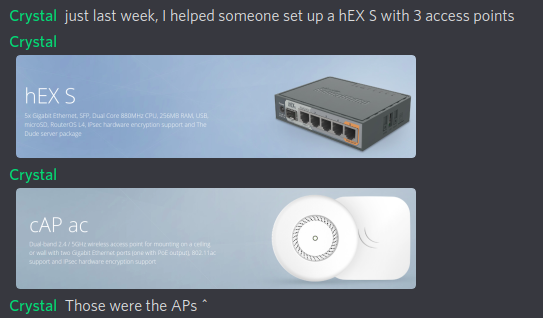
this setup ^ was capable of full gigabit speeds
astral yarrow
The first one is a switch, and the other one an access point?
tame carbon
APs cost about $60 each
and the first one, is a router
and in this setup, it also fulfilled the role as 'controller'
controlling the wireless radios
So the router provisions the wireless networks, and uses the APs to transmit this network
This is what consumers call 'mesh'
but its just a wireless network with multiple antennas
astral yarrow
But I’d meet more than 1 AP
tame carbon
Yeah, this setup works with a single AP, or multiple
astral yarrow
Need*
astral yarrow
How much is the AP plus the router
tame carbon
I forget what the limits are
router is $70 though there are other cheaper options
the APs are $60
Cheaper APs exist, but they won't benefit from the internet speed you have
astral yarrow
But I already have a router, can’t I use mine?
tame carbon
Because its not a mikrotik
though I guess, with the cAP ac
you could skip the router
and make one of the APs become the controller
It also has that capability
tame carbon
@astral yarrow all of them are connected to the same network
either via a switch, or directly on the router
astral yarrow
Ok, thanks. I’ll check them out later. Thanks a lot for the recomendation and the lols
tame carbon

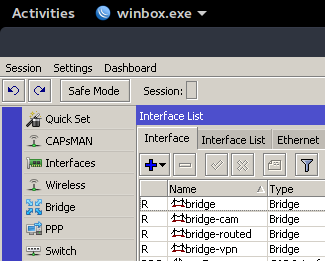
@astral yarrow this is the hAP ac2 I have in my living room
the wireless it has, is remotely controlled
as seen by the red text
Two interfaces, one for 2.4GHz and one for 5GHz
All the mikrotik routers and access points support this stuff
thats why I tend to recommend users to get this
They have advanced features for a reasonable price
@peak cloak LTT actually uses mikrotik too
and linus' 10G home network is powered by a CCR
I couldn't get a clear image from his yt videos
so idk what model they have
 waxen scroll
dat windows 95 GUI tho
 waxen scroll
:\
tame carbon
works out of the box on wine
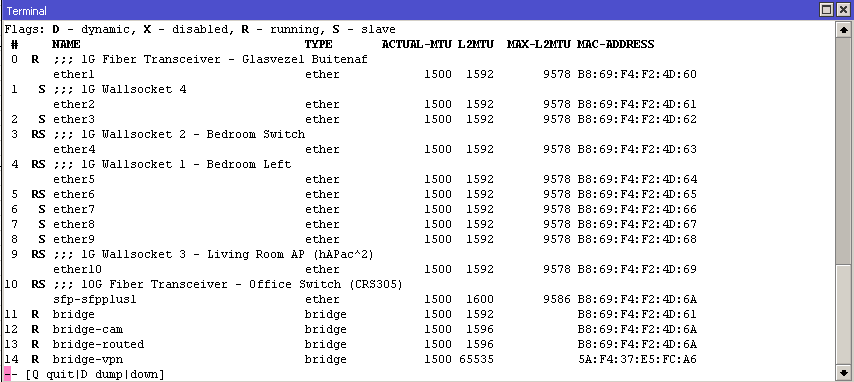
I like the mtik gui
its simple, uncomplicated
all the data the terminal returns is in the same style, just not as nicely tabulated
 peak cloak
but does it have dark mode 
tame carbon
hehe
dusty osprey
works out of the box on wine
@tame carbon t-here isn't a Linux version of that
wow, wow wow wow
lean pebble
I'm thinking of digging in my garden and connect all the 3 fibers here togther and connect myself to this fiber.
 hollow marlin
Like the ISP fiber underground?
peak cloak
that won't work lol
unborn sluice
just erect multiple poles
lean pebble
Disconnect all the area from the fiber with this connection solution
hollow marlin
Hope you are ready for $10k+ fines if you dig up an ISPs fiber
lean pebble
I'm digging in my garden
They can't do anything about it
If I dig enough I'll see it
It's near my house
peak cloak
it probably is a crime
lean pebble
Nah it's a crime that they don't connect vilas
hollow marlin
In the US even if its on your property if you do not consult the ISP or digsafe and cut the fiber its 10s of thousands in fines and jail time due to E911 services affected
lean pebble
Private houses
hollow marlin
Doesn't matter
lean pebble
1 fiber is free on the floor at the parking lot here
The ISP rack doesn't care that this closest is open for like 12 years
They just closed it with a rock
Everytime I'm parking my car I see the nice blue fiber sits there
Disconnected
peak cloak
just because there is fiber there, doesn't mean it connected on the other end
lean pebble
I know it's not
Their technician told me
The one that actually came and tried to fix all the network problems
I encountered for 10 years
And the internet infrastructure doesn't want to fix
Those idiots always refreshed my router without notice and broke my internet until I moved to fortigate and disabled all of their ports
peak cloak
umm, if you own the router, they can't access it
lean pebble
But soon it'll be the same as in the US, one company that does all
peak cloak
there is more than one company here
lean pebble
umm, if you own the router, they can't access it
@peak cloak I'm talking about their systems not the workers
there is more than one company here
@peak cloak I'm talking about ISP and internet infrastructure
Here it's separated
You need to pay to 2 companies for internet
peak cloak
explain to me, how they can access the router through their system if you own it and it's not backdoored
lean pebble
Adsl from one company and pppoe from other company
explain to me, how they can access the router through their system if you own it and it's not backdoored
@peak cloak they can't.
But even to my modem that I got from them they can't access and reboot him from their end
"modem" their router
I had times that they still had access to it and was able to do factory reset to it remotely
So now it's stable I think
Until I download a file
 inner lake
Okay so my internet is up I’m able to look at discord and see new messages pop up but I can’t say anything in the chat or search for anything
lean pebble
Why
 thorny vector
Got my “payment” for an article about my homelab I wrote for a website. 2 4TB enterprise HDD’s 🤘
 primal ice
wd golds?
waxen scroll
@thorny vector make sure you report it on your taxes
we dont condone tax fraud here at LTT discord
thorny vector
Lol. I can write off part of my homelab because I use it for work tasks, and I’ve bought new hardware this year
peak cloak
Best affordable vps provider for a mc server. I need to set one up for my troop
Ovh? Linode? Digital ocean?
lean pebble
Ya ovh is not so good
From my experience
@peak cloak you can use this one.
https://www.vultr.com/apps/minecraft

Vultr
We are simplifying the cloud. One Login, 10 Countries, 17 Cities, Infinite Possibilities.
They're pretty good
Today I'm using hetzner as hosting great company but their servers only in germany and Finland
They have the most stable network and servers so far.
From what I encountered.
 steep vapor
How long have you been running on Hetzner and how many servers are running on?(just curious)
tame carbon
@peak cloak Linode
@peak cloak https://i.imgur.com/njQsl5I.png
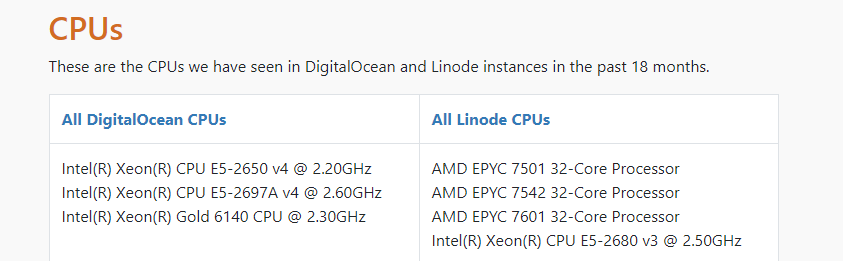
This is from an article from October 2020
Linode innovates more than DO
Though these VPSes are not ideal for minecraft
they lack clockspeed
lean pebble
How long have you been running on Hetzner and how many servers are running on?(just curious)
@steep vapor I'm using them now like 5 years.
And the company I used to work for have there more than 40 servers , vps and dedicated.
Though these VPSes are not ideal for minecraft
@tame carbon again you can use vultr
Good company
Oh you answered to present haha
tame carbon
users_converted_to_linux++
Mint & Cuda does not play ball
Ubuntu 20.04 LTS to the rescue, worked fine on the new RTX3080
unborn sluice
users_converted_to_linux++
interesting
tame carbon
@unborn sluice they needed all kinds of fancy stuff
like cuda, and cuDNN
main reason they needed linux was because the python library that they use is compiled for a system specifically
lean pebble
Ubuntu 20.04 LTS to the rescue, worked fine on the new RTX3080
@tame carbon you installed Ubuntu on GPU? 🤔
tame carbon
@lean pebble nvidia has propietary drivers
bit annoying to get those to properly install
lean pebble
Haha I have this problem on fedora
Always need to update via downloading and go to shell before the kde loads to update the driver
tame carbon
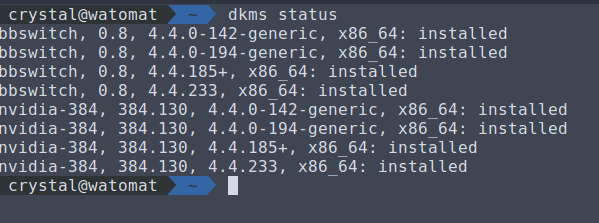
If you install it properly, it should just link the binary with dkms
and update along with the rest of the system
Dynamic Kernel Module Support (DKMS) is a program/framework that enables generating Linux kernel modules whose sources generally reside outside the kernel source tree. The concept is to have DKMS modules automatically rebuilt when a new kernel is installed.
lean pebble
If you install it properly, it should just link the binary with dkms
@tame carbon their gpu driver does it automatically but after kernel update you must do it again
tame carbon
@lean pebble thats what DKMS is for
it recompiles part of the driver to link to the new kernel
lean pebble
Not working as it should be
tame carbon
Like I said, its not always easy to get it to play ball
But that's how its done properly
I got that working on my laptop as well
lean pebble
I don't mind to run it everytime
 strange silo
@tame carbon I was talking to you about my hEX? Turns out my connection was never switched over to 1Gbps and was still set to 100Mbps lol
strange silo
pppoe thing
strange silo
Like it didn't matter before since my firewall 100% even at 100mbps but the hex can do 1000
tame carbon
you using fast ethernet?
tame carbon
derp
@strange silo how did you configure it now?
just set accept rules for the fw to the fortigate?
strange silo
Oh its just major hacked together atm
hey quick setup pppoe client
Fortigatr wan dhcp
Double nat haha
tame carbon
:3
I mean, if the fortigate is your endpoint for the VPN
doesnt really matter what happens inbetween the mtik <--> fortigate
since your network is behind the fortigate appliance
strange silo
But the sessions through the fortigate are hardware offloading now
tame carbon
neat
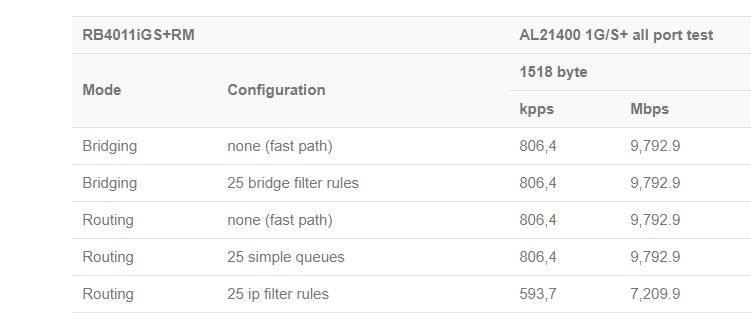
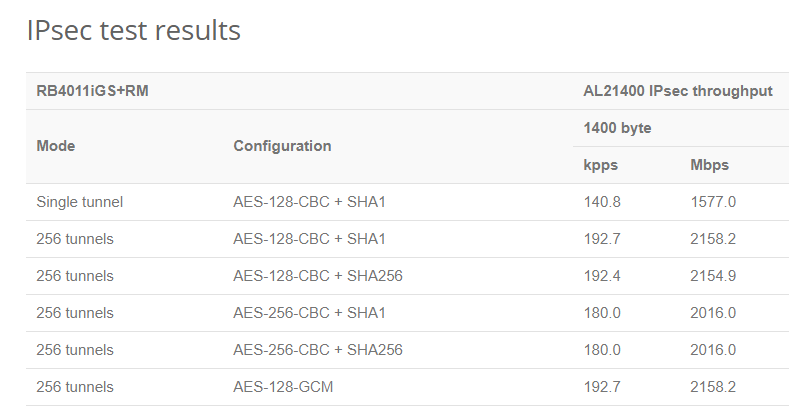
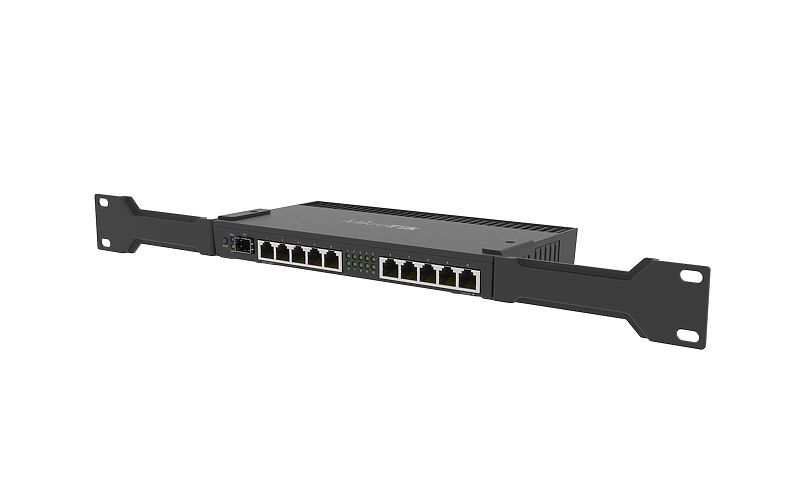
@strange silo https://mikrotik.com/product/rb4011igs_rm
MikroTik is a Latvian company which was founded in 1996 to develop routers and wireless ISP systems. MikroTik now provides hardware and software for Internet connectivity in most of the countries around the world.
strange silo
So cpu is like 1-5% instead of 100
 strange silo
Nice
tame carbon
 strange silo
I get my fortigate firewalls for free
 strange silo
600C back when it was current was around 14k
tame carbon
https://cdn.discordapp.com/attachments/776722183119699988/777646103775674368/IMG-20200922-WA0001.jpg
 tame carbon
The fiber on the left is from the ISP
I use a media converter right now, because I don't want to give up the single 10G port I have
since the fiber is only 1G
strange silo
Got 2 HPE 5900AF TOR switches I need to install
tame carbon
speedy switches
40G uplink
nice
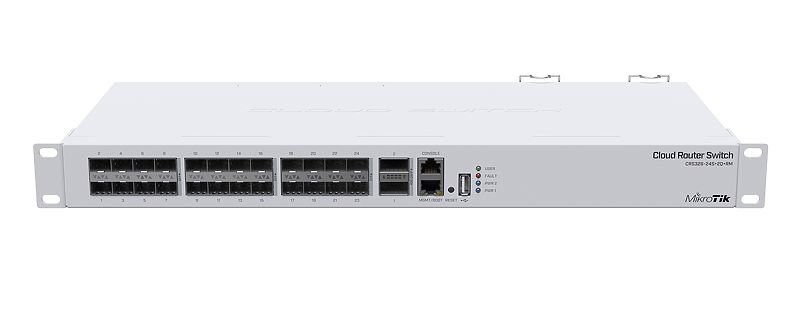
new mikrotiks that came out do 40G too
MikroTik is a Latvian company which was founded in 1996 to develop routers and wireless ISP systems. MikroTik now provides hardware and software for Internet connectivity in most of the countries around the world.
 strange silo
Yea they are just out of work
tame carbon
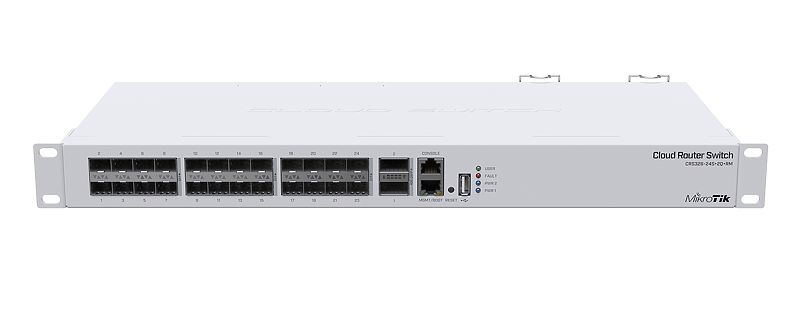
~320gbit/s total switching capacity
strange silo
Saved 2 of them from ewaste
tame carbon
lol but that CRS ^
has only 500mbit/s routing/bridging
its a fast switch, routing is terrible on it
strange silo
Lol yea but isn't that the case for all their switches?
tame carbon
well
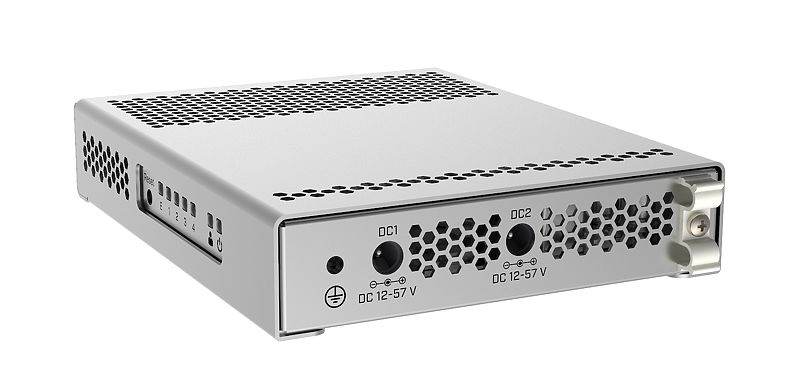
CRS305 has 4x 10G
and can do 1200mbit/s routing

I got one of these
they are cute & fast
and they get very hot
strange silo
Haha
tame carbon
there's even a warning label on the side

but
its got redundant power :D
12-57V
so its enterprise ready
strange silo
There is some similarly nice and small Huawei switches but a bit more feature rich
tame carbon
Huawei?
wat
I rather support a small European manufacturer than a company allegedly spying on people
same goes for Juniper and Cisco, its got NSA all over it
strange silo
Got a couple in at work for area that didn't have proper switch room and needed switches in with people's work area
Well we didn't get a choice
Lowest tender wins
Tada Huawei
🤣
Their equipment is actually top notch though, can't fault them on that
But it would have been cheaper to stay with HPE/Aruba
Things procurement/finance just don't understand
Like I'm actually super sad because we had the HPE wireless pre the Aruba buyout and in my last job we did a lot of Aruba installs
Huawei wireless solution is crap in comparison
tame carbon
brb
strange silo
And need twice the APs
 toxic citrus
There is some similarly nice and small Huawei switches but a bit more feature rich
the huawei routers are aboslutely godawful, so im not sure how theyve made good switches lol
 quiet delta
does anyone
know the best
mesh system for around 200aud
black friday around the corner so give or take like 30
pls @ me
tame carbon
why is every network noob so fascinated by mesh
consumer mesh wifi solutions are terrible
primal ice
ISP marketing gg
tame carbon
@quiet delta just get a decent router & wireless access points
mesh systems the way ISPs and consumer brands market them, is a lie
quiet delta
so i have a modem router combo
should i just use it as a modem
and buy a router
if so, what are good options
i know my modem/router supports bridging
primal ice
first look at the settings of it. is it a cable router? is it an adslv2 router? if its not then its probably just a dhcp router with wireless ap.
primal ice
how many devices are you trying to connect to it?
 little schooner
@tame carbon my dad likes a mesh system only because he doesn't need to run new wires
little schooner
Yes
tame carbon
You run electrical wires through your house
little schooner
But fortunately it's only support 2 devices
tame carbon
its 2020, why isnt data being treated the same way
peak cloak
because wifi
little schooner
Wifi is the new wire
peak cloak
some new builders don't bother to run ethernet because wifi exists
tame carbon
Bad
little schooner
If possible, my new home will have jacks all around the home
At least in spots where it makes sense
tame carbon
@quiet delta that technicolor had better support 'DMZ'
peak cloak
when we finish the basement, I will make sure the basement will have jacks everywhere
quiet delta
@quiet delta that technicolor had better support 'DMZ'
@tame carbon wdym
also i cant
peak cloak
also it will act as the office
quiet delta
wire much around my house
tame carbon
@quiet delta if it does, you can plug your own router into it, and forward all traffic
little schooner
At my mom's house, I will attempt to install new jacks where existing coax cabling is running now
tame carbon
So it becomes a pure modem
little schooner
I haven't bought the materials yet
tame carbon
time for shilling
MikroTik is a Latvian company which was founded in 1996 to develop routers and wireless ISP systems. MikroTik now provides hardware and software for Internet connectivity in most of the countries around the world.
little schooner
@tame carbon I was on the fence between mikrotik and edgerouter x
My dad needed a new router because his modem did not support Googles new QUIC protocol
Can you believe that?
little schooner
I guess
Yeah so the modem basically refused to load anything from videos to websites that used QUIC
It was stupid
little schooner
Yeah and he didn't tell me for months that this was happening
I only found out because my sister was trying to do Google classroom school
She couldn't access anything there or YouTube
And thanks to Wireshark....
I determined the issue to be QUIC
So for now I put a new laptop there acting as pfsense
Works perfectly
tame carbon
If you want to do filter actions on QUIC with mikrotik
you have to use mangle
/ip firewall mangle
add action=mark-connection chain=prerouting connection-state=new new-connection-mark=QUIC passthrough=yes port=80,443 protocol=udp comment=QUIC
add action=mark-packet chain=prerouting connection-mark=QUIC new-packet-mark=QUIC passthrough=no
Hmm that's useful
tame carbon
its not a protocol supported by default
little schooner
I see
little schooner
@waxen scroll I bet your happy I used Wireshark to solve the network problem in less than 6 minutes
The packets never lie
tame carbon
but UDP on port 80 and 443, is a 'clue' that its QUIC
little schooner
@tame carbon hmm I didn't check the ports but I believe that is right
I glanced over them
waxen scroll
@rich bobcat i found a random PVC in my houses basement. I went to the attic and was like.... YAAAAS
tame carbon
@waxen scroll empty?
waxen scroll
yep
little schooner
Yeah give it a job to do
waxen scroll
this was 7 years ago. the tube now has 5 cat6 and two thermostat wires
tame carbon
@little schooner https://en.wikipedia.org/wiki/HTTP/3
3 (three) is a number, numeral, and glyph. It is the natural number following 2 and preceding 4, and is the smallest odd prime number. It has religious or cultural significance in many societies.
^ discord fail
peak cloak
huh, embed works for me
waxen scroll
its a fail for me
tame carbon
 peak cloak
oh, lol I didn't notice the description
unborn sluice
I should've combine my messages next time
waxen scroll
@little schooner your coworkers must feel inferior
tame carbon
ARGH.
argh.
fuck
why.
HTTP "Accept-Languages"
is so annoying
ISO language codes are not the same
as the framework I am using
"en" == "en-US"
"nl" != "nl-NL" but just "nl"
waxen scroll
@little schooner you're so far ahead of typical entry level people. no wonder they CC manager
tame carbon
webdevelopment throws a wrench in my plans everytime
tame carbon
const getLanguageFromHeaders = (acceptLanguages: string) => { }
little schooner
My manager said she wants to keep me for next year with a new contract
tame carbon
I guess I have to now
little schooner
So my position is safe
I was concerned if it wasn't going to last going into next year
Because of the covid stuff.
lean pebble
build software with poor documentation
@tame carbon 🤣
Readme file with 1 sentence "keep me at work"
 waxen saddle
I was going over changes in the iOS Ubiquiti app this morning and noticed my wife’s phone had gigs of “QUIC” protocol usage. Makes sense if the YouTube app is using it.
I enjoyed reading the QUIC convo here.
little schooner
QUIC caused my sister to get marked absent in class
its QUIC to stir trouble in old modems like my dads lol
between mikrotik and edgerouter x, the x was in stock while the other one wasn't going to come until next month
im fine with either.
peak cloak
with the x, remember to turn on offloading. Idk why they don't just enable it by default
little schooner
noted.
peak cloak
originally qos didn't work with offload, but I'm pretty sure it works now. Without offload you can't get gigabit
tame carbon
mikrotik ftw
 delicate kettle
I'm surprised there's no unraid channel for as much as linus likes it.
peak cloak
that's #networking
although everyone knows unraid file system sucks for parity
zfs ftw
 topaz delta
i have a question
i have 500MB weird connection but i only get 100MB for some reason and I'm on a cat 5 cable that runs at most 30 feet in my attic
delicate kettle
How's ZFS with triple failure?
peak cloak
depends on how you set it up
@topaz delta is the cable running next to any electricty?
topaz delta
i dont think so
peak cloak
one problem with zfs is that it's expensive upfront in drive costs
delicate kettle
cat 5 or 5e?
topaz delta
5e
peak cloak
oh the 100MB is suspisous
topaz delta
i pay for 500 and when i plug strait into the router i get 500
peak cloak
what's in between the router and you?
topaz delta
and i go through a 10GB switch
peak cloak
show a pic
topaz delta
i dont have one on hand
peak cloak
what's the model?
topaz delta
im at school rn i dont know
peak cloak
also is the cable certified or did someone make it themselves (crimped themselves)
oh, then @ me when you get back, I can't help without you not being physically there
topaz delta
i got 150 feet of cat 5e and crimped it myself
peak cloak
did you test it
you probobly missed a pair or something, because 100 BASE-T only needs 2 good pairs (4 wires)
1000Base-T needs all the wires
topaz delta
ill look into it over the weekend
delicate kettle
I'm currently running unraid on a 8x8tb array with dual parity. Nothing on there is unreplaceable (everything important is backed up to a couple clouds) and it's easy enough to manage
peak cloak
unraid uses disks themselves for parity?
delicate kettle
yes
so 48TB usable
nice thing in my mind is for triple failure the rest of the disks are still readable
peak cloak
ah, zfs uses parts of disks I think
it's distributed
wait, yours would only be able to do 2 parity
if your 2 parity drives fail
peak cloak
the problem though is that those 2 drives have increased wear and tear?
delicate kettle
yeah, probably
peak cloak
yeah ZFS strips the parity across the drives
ZFS can also detect data corruption
idk if unraid can do that, but traditional RAID can't
delicate kettle
it can by comparing & and || parity
the biggest factor to me was the web gui though, tbh
peak cloak
ZFS isn't for noobs though, you need to do some reading beforehand
freenas uses zfs
well truenas now
delicate kettle
I've been thinking about adding a hp prodesk 400 as a separate plex transcoder, but i'm not happy about the lack of cheap rack-mountable QSV options - I would rather put it on a rack since everything else i have is on a rack
other option is upgrading my server to a 9th gen intel - but I'd need to replace the MB, CPU and ram, again not sure it's worth it just for quick sync video. Might just keep suffering my CPU spikes for transcoding.
just sucks if I want to use the server for something else at the time (like kubernetes deploy tests)
 misty terrace
i'm deploying my new storage server, i need suggestion for the os to use. i don't really need zfs or other software raid solutions since i already have a dedicated raid6 sas controller
peak cloak
I mean ZFS > RAID
delicate kettle
Is there a reason to use something other than ubuntu/centos/ whatever then?
it would mostly depend on what you are wanting to do with it
peak cloak
freenas has a gui
misty terrace
mostly pure storage, i may think about using it for containers later on, but not totally sure about it yet
delicate kettle
freenas would be easy in that case
misty terrace
also, i saw there's also truenas now, is there any real difference from regular old freenas?
delicate kettle
but doesn't support docker natively
If you were wanting docker-first server, you'd probably want something linux based (like coreos, centos, or ubuntu). Frenas is BSD iirc
primal ice
no difference between freenas and truenas they just put it together.
fedora and use samba for storage. :p
delicate kettle
TrueNAS SCALE is a port of freenas to debian for container support
but it's still alpha: https://www.truenas.com/truenas-scale/
TrueNAS Open Storage | ZFS for the Home to the Data Center
misty terrace
i'd rather not play with non-stable releases, i would be running backups on that thing
delicate kettle
so the main question would be what's more important - webgui or containers?
misty terrace
i'm ok with cli setups, containers would be a nice touch but an immediate need
delicate kettle
freenas would give you the first, coreos would give you the second. Unraid would give you both but i wouldn't really recommend for you unless you wanted to use their parity tools. Freenas supports jails and most popular software though, so the fact it doesn't do docker natively might be moot depending on what you are running
misty terrace
i'll give freenas a try, thanks
primal ice
TrueNAS Open Storage | ZFS for the Home to the Data Center
misty terrace
ye, the freenas download page already lists truenas core as the latest version
 split gate
Hey I've got a super dumb question. I just got fiber internet in my apartment but the router wall connection is a lot further away from my pc than my cable one. If I get a wifi extender with a Lan port, does that actually make a difference in increasing speeds when connected?
misty terrace
also, system requirements list 8gb of ram as an absolute minimum, will this be a problem, since i only have 8gb on this machine?
peak cloak
@split gate nope
primal ice
shouldn't be
peak cloak
still going over wifi
delicate kettle
if there's any way a hard line is possible, i'd recommend it, esp. for gaming
a lot of times you can pop it under the baseboard
split gate
i dont think i can do that with the materials this apartment is made from. the good news is my upload is like 10x faster on wifi than i was wired on cable so im dropping 0 frames doing a stream test
peak cloak
hmm, that cable is probobly not 3 paired then
hmm, I have this weird issue again with my father's work laptop that can only connect temporarily to wifi and then gets disconnected
I mean, it doesn't disconnect, just can't reach the gateway
it's over wifi, but all other wifi devices except his phone work just fine
mac address conflict?
primal ice
mhm shouldn't be unless you cloned it sometime.
you could try giving it a static route. but I am thinking some kind of signal interference.
delicate kettle
could be a driver issue - is it a hp?
peak cloak
nah thinkpad
it's a work laptop so I can't do much
just want to find the root of the issue
my mom had a kinda similar problem, but that was driver issues where it actually disconnected from wifi
here windows says there is wifi (internet)
but you can't ping 1.1.1.1
delicate kettle
yeah, iv'e seen that one a bunch - where the driver crashes every so often and disconnects
peak cloak
maybe the vpn?
delicate kettle
possibly? does it behave wired?
peak cloak
idk
it worked fine in the morning
I'll make a seperate vlan with a 192.168.x.x range and make a seperate wifi for that and see if it helps
lean pebble
Try use static IP to test if it still happen
I had the same issue on my kali laptop
It happens on every network , with every WiFi?
lean pebble
Only office ?
peak cloak
work from home, so I think it's the vpn
peak cloak
it's not, but I can create another vlan with a different subnet to test if it's an local - vpn ip conflict
lean pebble
Check the IP at home and the VPN IP
peak cloak
can't check rn, but last time it was a 192.168.x.x network
lean pebble
Home network or vpn or both?
peak cloak
home is 10.0.20.x, work was 192.168.x.x
peak cloak
like 5 min, it doesn't get disconnected per say, just I can't ping anything
peak cloak
unreachable
peak cloak
wdym, yeah windows says it's connected to the internet
lean pebble
Ok
Not pc problem
What kind of vpn ?
Fortigate vpn ? Or something else
Come from the program / office firewall
peak cloak
something cisco
peak cloak
cisco anyconnect
lean pebble
Ya
primal ice
its you pi hole
lean pebble
I need to know the protocol, the problem comes from your anyconnect
peak cloak
Instead, Cisco's premier client VPN solution, AnyConnect, uses SSL
primal ice
you will have to set him up like a seperate vlan with out the proxies. cause that is basically what anyconnect is trying to do - create a tunnel from your network to his work network.
lean pebble
If you know all the details user pass and ip you can try connect with different program
Like fortivpn program
peak cloak
@primal ice I don't have any proxies though, just pihole as dns
it's not forced dns either
lean pebble
Try use other program
peak cloak
The internet at the office working when it happen right ? I don't understand the question
Can't install anything
lean pebble
The internet at the office still works when you father loss his access to the internet
?
peak cloak
you mean at home?
lean pebble
Both sides
peak cloak
their office is far away, yeah everyone else at work can connect. No one else at home has no internet
peak cloak
yep
lean pebble
Try other client and try to connect.
and check windows firewall
he have firewall at home?
peak cloak
the thing is it worked for half a year
lean pebble
Did he did windows updates?
lean pebble
maybe one of the updates
peak cloak
doubt it
lean pebble
or the program got updated and now its broken
Did you try to use older version of anyconnect
?
lean pebble
I know I got alot of problems because windows defender cloud protection
I have lost pakcets like crazy
peak cloak
but works on the phone hotspot
and sometimes it also works normally
like this whole week was without issues
except today
lean pebble
check updates for windows
maybe his windows got updated in background
you can cehck eventlog
Event viewer
peak cloak
but where?
lean pebble
search in start Event viewer
taking alot of time loads my logs haha
haha I have so much errors on skyapp
because I disabled all windows store so no updates
@peak cloak Event viewer then Applications and Services Logs/Microsoft/Windows/NetworkProfile
then you'll log there doiuble click
peak cloak
alright I'll check when he's free
lean pebble
kk
But you need to know the currect time it happen
@peak cloak Application and Service Logs and below that you will find an option "Cisco Anyconnect Secure Mobility Client"
I just found this I think it'll be better for you to check
peak cloak
alright thanks
lean pebble
np
I have a cisco ASA 5525-X firewall, configured to accept AnyConnect VPN client (IKEv2) connection. Anyconnect VPN client can successfully login. During the 1st 10 minute after login, Anyconnect VPN client will lost VPN connection for a few seconds (ranging from 3 seconds to ...
lean pebble
@lean pebble thats what DKMS is for
@tame carbon well it wasn't install haha
 pseudo terrace




 waxen scroll

 fossil stirrup
What is a better alternative to FTP
peak cloak
scp
fossil stirrup
Do you know of any software that will let you stream videos and download them, i am using FTP for downloading and PLEX for streaming but if theres something out there that will do both that will be great.
i just learned FTP aint safe so i am looking to switch to something else
fossil stirrup
i can stream with that also if its a video file?
tame carbon
@fossil stirrup are you on a local network?
because for file sharing within a local network, SMB is easier
fossil stirrup
i am looking for something friends can use too over the internet
tame carbon
Set up a VPN
fossil stirrup
that kinda aint a option, the people that want to have access to the files dont know how to use any of that
i like FTP cause i can just send them a FTP:// url and can get the files super easy
primal ice
and so can anyone that stumbles upon your ftp. heh
tame carbon
@fossil stirrup You're looking for FTPS then
Its FTP with SSL Encryption
its widely supported
fossil stirrup
im not to conserned who can see the files, as long as they cant edit them in ay way
tame carbon
FTPS encrypts passwords and data that is transmitted
its secure
Its same technology that HTTPS uses
primal ice
^^ just have to give them a user name and password.
fossil stirrup
but if the files is a mp3 or mp4 can they just stream it instead of downloading it with FPTS
tame carbon
Its a file transfer protocol
so they download individual files, it doesn't stream in the way you are thinking
if you truely want to stream large files, like pause and continue
you'll be looking at protocols like SMB
windows network shares use SMB
I personally do not bother with FTP(S)
I use SFTP
fossil stirrup
can they access files from a browser via SMB like FTP
tame carbon
In computing, the SSH File Transfer Protocol (also Secure File Transfer Protocol, or SFTP) is a network protocol that provides file access, file transfer, and file management over any reliable data stream. It was designed by the Internet Engineering Task Force (IETF) as an ext...
@fossil stirrup no SMB is mapped as a network drive
peak cloak
smb over the net?
tame carbon
@peak cloak would require VPN
primal ice
oh the tunnels