#networking
1 messages · Page 236 of 1
 peak cloak
 tame carbon
there's really fancy termination tools
so you dont fiddle with getting the wires straight
@peak cloak I just spent an entire afternoon practicing this
 tame carbon
those are for shielded cat6a or cat7
yes
they have the metal flange at the back
that touches the shielding, and you can crimp around the cable to secure it
peak cloak
well yeah they are shielded, I'm talking more about the "sleds"
peak cloak
these
 gray ingot
Yea something like that
tame carbon
@gray ingot for fiber, https://fs.com/

FS
FS is a new brand in Data Center, Enterprise, Telecom Solutions. We make it easy and cost-effective for IT professionals to enable their business solutions.
the place to be
if you need some pointers on what to get for fiber links
there's people here who have plenty of experience to get you going
gray ingot
Might hit this back up when we get there. Thanks for the info guys!
My boss is really great at networking but this new building is throwing us for a loop 🤣🤣
It's got gremlins I swear.
tame carbon
@gray ingot we renovated this place when we moved in, so I got the chance to run ethernet everywhere
and the attic & my office have a 10G link

Server underneath, networking stack above
10gbit capable NAS :)
gray ingot
I pretty much ran everything here but we can't trust the cables in the data center because of the botched connectors
gray ingot
tame carbon
I've seen much worse
gray ingot
We have someone doing the patch bay for us now so that's only half done.
 stone kite
Or china
 waxen scroll
@tame carbon the secret to straight wires is using the right scissors
 dusky wigeon
Our server room is a mess man
 nova igloo
Our server room is a mess man
@dusky wigeon It's fine if it works XD
tame carbon
clean server rooms help when you need to debug an issue
esp if you have to guarantee high uptimes
 spiral drift
Hey I'm looking for some help/advice upgrading my home network to a mesh system, is this the right channel?
just read the pin, going straight for question: I currently have a big house that doesn't allow for good wifi coverage, I've worked around this by having two networks, but the primary router is kicking the bucket so I'm looking to upgrade to something cohesive
Current network is as follows:
Modem connects to a wired router which then connects to the AP in the kitchen (what's been the primary) as well as other devices on the first floor (console/TV). The way the ethernet is laid out means that the ethernet to the second and third floors can't be routed through the primary AP in the kitchen
The switch upstairs in my room also connects to a couple consoles as well as my PC. I've been having problems getting steam link and other local streaming to work properly, I think because there's some subnet conflicts
peak cloak
can you run wires? Mesh wouldn't help THAT much. As for the 2nd floor AP, is that an actual AP or just another router?
spiral drift
Actual AP, the 2nd floor device is delivering wifi to my parent's room
tame carbon
@spiral drift run them all on the same subnet
only enable dhcp on your primary gateway
spiral drift
That would be the basement router in the diagram, correct?
tame carbon
what range does your basement router use?
spiral drift
That's how I had it set up when it was working
tame carbon
like, what addresses have you got configured
tame carbon
networking diagrams usually include IP addreses of network devices
spiral drift
I think the basement is 192.168.1.1, kitchen is 192.168.1.2, and 2nd floor is 192.168.1.3
my bad
I'll redo it
peak cloak
run it all on the same subnet
peak cloak
yeah ik
tame carbon
but he is
peak cloak
unless you are using VLANS, you wouldn't want multiple subnets location specific for a small network like a house
spiral drift
Currently I can't get the kitchen AP to play nice for more than 20 minutes at a time, after that devices will connect to the AP but not to the internet
even though the 2nd floor AP is working fine
tame carbon
@spiral drift how are the APs connected?
spiral drift
ethernet
tame carbon
all of them?
tame carbon
have you looked at the system log on those APs that have any issues?
I really think you have a dhcp issue here
spiral drift
That would make sense for sure
tame carbon
@spiral drift make sure you properly configure your network devices like APs and routers with static IPs (or static dhcp mac binding)
spiral drift
Unfortunately whatever I'm doing wrong means that I can't access the configuration page without doing a hard reset of the AP
tame carbon
Yeah, you'll have to wipe it
but configuring it is like 1minute work
you just disable bunch of stuff
and then set it to static ip
do you have a laptop ?
I usually just unplug them, reset, and connect to it with lan on a laptop
spiral drift
I've messed around with the router a lot and the farthest I've got was getting it to work for about 20 minutes
spiral drift
ASUS
tame carbon
what model?
spiral drift
gimme a sec
tame carbon
@peak cloak asus needs to rethink their life
like, everyone here with networking issues
like, I've had issues too
it doesnt properly propegate DNS settings supplied by DHCP
spiral drift
AC66U
peak cloak
and what's the AP model?
tame carbon
@spiral drift can you send me a screenshot of the UI
xD I think I had that exact one
its absolute garbage
spiral drift
it's served well so far but I think it's definitely time to replace it
tame carbon
how large is the kitchen?
spiral drift
the 2nd floor AP is an old lynksis something running dd-wrt
pretty big, it's a big house with a lot of stone and brick
spiral drift
that was my stated intention.
tame carbon
instead of one big fat antenna
spiral drift
that is why I am here for advice on mesh networking
tame carbon
yeah, mesh is not going to make your internet more stable, but that's not the issue
I think he just means a big wireless network
tame carbon
@peak cloak lol CAPs
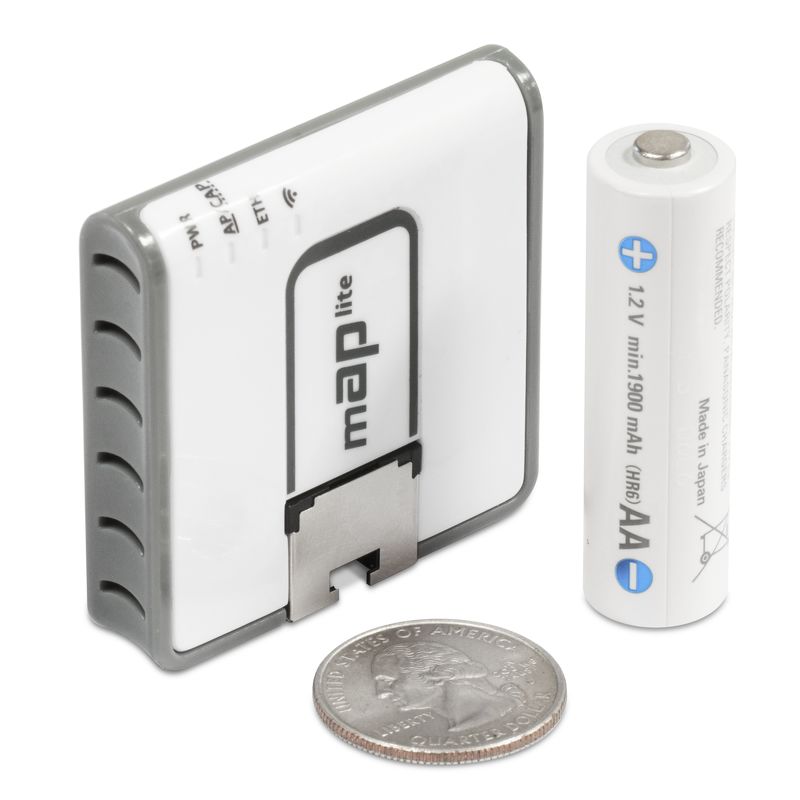
@spiral drift https://mikrotik.com/product/RBcAPL-2nD-307

MikroTik is a Latvian company which was founded in 1996 to develop routers and wireless ISP systems. MikroTik now provides hardware and software for Internet connectivity in most of the countries around the world.
spiral drift
yeah what I need is coverage for this ridiculously large house
peak cloak
@tame carbon only N though?
spiral drift
It looks like those only have one ethernet port though
peak cloak
@spiral drift yeah, they are only AP's
spiral drift
I try to have as much stuff on a wired connection as possible
peak cloak
so only ethernet in, they have no switch chips
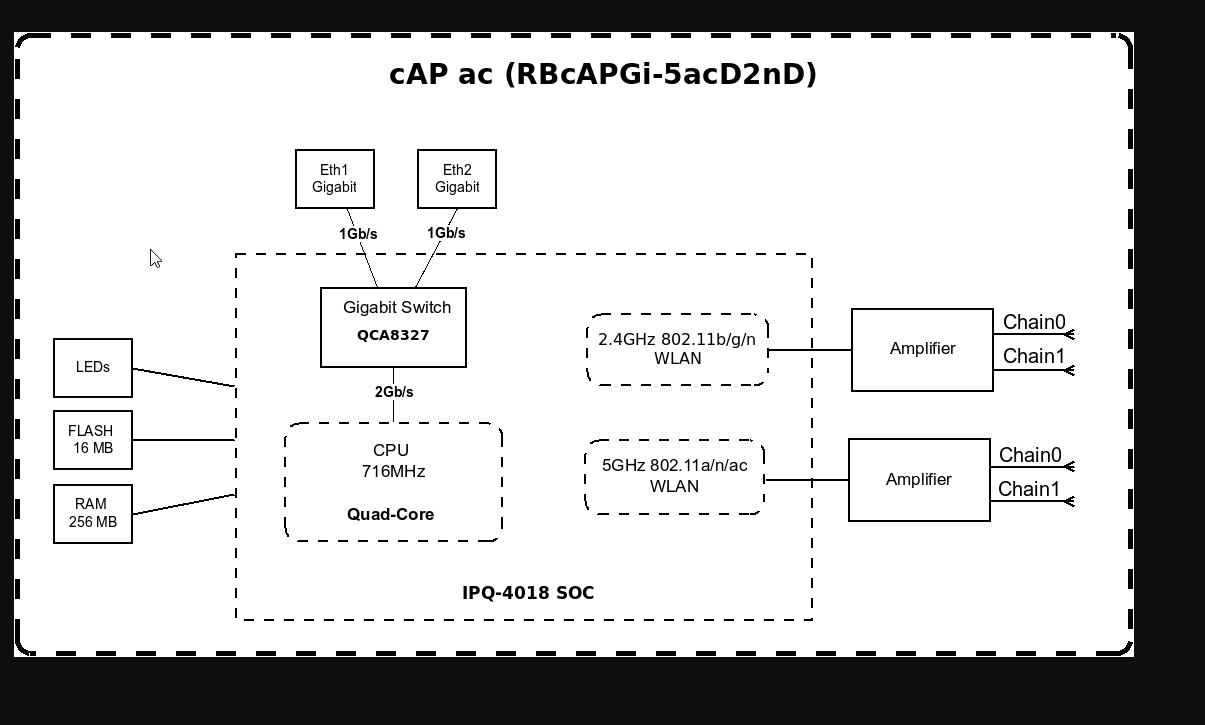 spiral drift
wait shit does AP refer to ONLY wireless? There are so many overlapping terms
peak cloak
@tame carbon oh
tame carbon
wireless interfaces are handled by the CPU
over pci bus I think
AP is "Access Point"
@spiral drift routers route traffic between different subnets
peak cloak
the CAP Lite doesn't have a switch chip
tame carbon
your basement router routes everything from and to your local network
spiral drift
I thought access point usually referred to the bundled router/switch/AP combo
tame carbon
all the communication with the APs is just switching
@spiral drift yeah consumer networking ecosystem is terrible
peak cloak
I have one of these in my house https://www.tp-link.com/us/business-networking/omada-sdn-access-point/eap225/
AC1350 Wireless MU-MIMO Gigabit Ceiling Mount Access Point
small wooden house, so I only need one
maybe will add a second one in the basement once it's finished

 tame carbon
you need more servers
peak cloak
I have an optiplex there now
k3s is being a pain, I can' seem to get the agent worker to connect to the master node
tame carbon
@spiral drift those mikrotiks are very good routers, they have a lot of features and can do basically anything you want to do on a network
and they get regular software updates, even on their oldest models
the nice thing about those APs, is that you can use one router to be the controller of your network, and you can set up one network with multiple radios (APs)
Unify can do this too, but its a bit more expensive
peak cloak
TP-Link Omada can do it too, just need a spare server or buy their dedicated controller
spiral drift
having just a little access point standalone puck would be cool, but like I said I try to have as many things on a wired connection as possible so I think each node is going to need to be a switch too
tame carbon
@peak cloak I used to swear by tplink
until I had 3 routers fail on me in a row, 3 years in a row
spiral drift
or I'll have to get separate switches for each room to route off of
peak cloak
fyi, switches don't route
spiral drift
switches serve as splitters basically, right?
tame carbon
@spiral drift think of your network as like a big street map
and you send packets of data with an address
when you want to talk to the internet, you just send a packet to connect, and the switches use special protocol to route the packet out the right port
but thats not routing
its packet switching

@spiral drift packets take shortest route usually
and network loops are bad, never loop a network
always branch
spiral drift
that makes sense, pathfinding algorithms hate loops
tame carbon
@spiral drift the MAC addresses is what is used by your switches
that table just matches the IP to your MAC
and each switch knows what MAC is currently connected on what port
switches dont care about the IP addresses
spiral drift
so switches don't really do any "thinking" in the same way a router or modem does
like arguably no set of automated processes think but switches seem more on the single diode end of the spectrum than like machine learned bots
tame carbon
networking architectures are very abstract
spiral drift
My functional understanding of a switch has been that it serves to allow multiple devices to connect through one actual connection, the tradeoff with a router being that it's very limited in the number of devices it can handle
tame carbon
@spiral drift they have special communication protocols, that dont need IP addresses, to talk to one another
spiral drift
so it's sort of bypassing some of the higher level stuff in favor of more direct communication?
tame carbon
@spiral drift they aren't little bots :)
peak cloak
a true router doesn't have a switch chip, so it can't actually switch within a subnet, at least within my understanding
tame carbon
this is something they came up with in 1980

This was to standardize the way we connect our computers on a network
me personally, I think this was one of humanities greatest archievements
tame carbon
@spiral drift think of these networking protocols as layers stacked ontop of eachother
spiral drift
it's like matrixes, I know how powerful and useful they are but I can't seem to wrap my tiny neurons around it
tame carbon
each layer serves a specific task, to send data between two machines
Layer 1 is the wire
or the radiowaves from your antenna
spiral drift
I'm assuming that as you climb the scale, a larger portion of the data being transmitted becomes overhead/metadata
tame carbon
layer gives each antenna or device talking on the wire, an address
@spiral drift yeah
its wrapped
so each layer has some information, and everything at the end is the "payload"
thats the next layer
and layer 7 is what programs use
and layer 8 is usually to blame
spiral drift
I'm actually a little surprised there is a layer 8
tame carbon

spiral drift
usually computer things go from 0 to power-of-two minus one
 hollow garnet
is there an actual term for a router that has a router/switch/AP combined compared to an actual router
tame carbon
Layer 8 is a term used to refer to "user" or "political" layer on top of the 7-layer OSI model of computer networking.The OSI model is a 7-layer abstract model that describes an architecture of data communications for networked computers. The layers build upon each other, allo...
tame carbon

spiral drift
monkey brains are layer 8
tame carbon
yup
tame carbon
@spiral drift so switches operate on layer 2, and introduce MAC addresses
serves as "physical" addresses
and then we also have logical addresses
things we can logically manipulate, or configure
like, Layer3. for IP addresses
so routers do routing between different IP networks
or, subnets
and then finally, layer 4 are the transport protcols
like UDP and TCP
HTTP for websites, uses TCP
voice calls and videostreams use UDP
in #networking we mostly care about these 4 https://i.imgur.com/ozqhrK6.png
 spiral drift
I'm going to assume TCP was designed for discreet packets/files and UDP is more oriented towards streaming?
tame carbon
for TCP you have to establish a connection
UDP you can just send
TCP makes sure data doesnt get corrupted
and retransmitted if needed
voice calls glitch a little if udp packet is missing
spiral drift
which would introduce hitching in a voice or video call
spiral drift
yes I do
tame carbon
@spiral drift what's your budget
and how many rooms do you want to cover
what networking speed have you got
spiral drift
the ASUS primary router grew an extra antenna a couple months ago when the power button stopped working and I had to jam it on with a toothpick
budget is approx $300, I'm aiming to have 3 APs
peak cloak
I would get the hexS for a primary router
peak cloak
yep
tame carbon
@peak cloak you'd want PoE though.
spiral drift
the one in the kitchen covers most of the house, the dead zones are going to be covered by putting additional routers in my and my parent's room
The ethernet ports are all right near outlets, POE could be nice I guess but I definitely don't need it
And I want the APs to serve as switches too, I have wired devices downstream of each node
tame carbon
@spiral drift https://mikrotik.com/product/RB960PGS
MikroTik is a Latvian company which was founded in 1996 to develop routers and wireless ISP systems. MikroTik now provides hardware and software for Internet connectivity in most of the countries around the world.
@spiral drift this router, can provide power over the 4 LAN ports too, so you wont need a power adapter with your APs
spiral drift
That would go in the basement right off of the modem, correct?
tame carbon
yeah
and then it can provide data and power to the APs
thats PoE, Power over Ethernet
spiral drift
yeah like I said that would be nice but it's not a requirement
spiral drift
Not opposed at all
tame carbon
Suggested price $79.00
spiral drift
I'm a sucker for streamlining
tame carbon
and then you can get up to 4 APs and connect them
and configure them from that main router
and that router also has a port for futureproofing ;)
it has a 1,25gbit port for fiber modules
tame carbon
I got a bit beefier setup here
I got 10gbit
1.25 gbit is not a lot
copper is 1gbit
spiral drift
Oh I misread because of the comma
So in this setup the router would serve as the brains and controller for all connected APs, correct?
spiral drift
lightspeed bitches
tame carbon
fiber on the left is from the ISP
dont need a modem for fiber
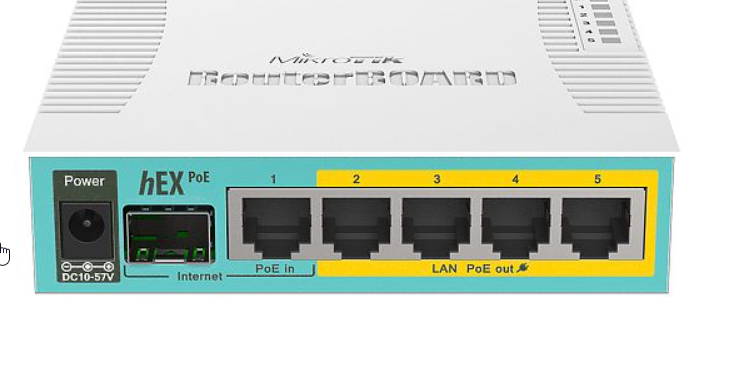
that 2^ port is where fiber plugs in
@spiral drift you can manage your APs remotely
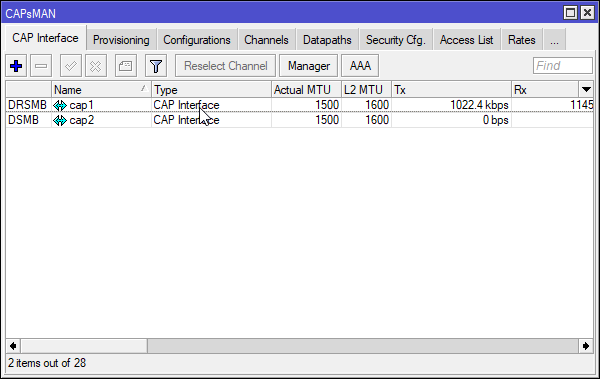
like so
spiral drift
so if the APs are running off the same brain, do you know if they would mesh?
Mesh is not a huge deal, but it would be nice
tame carbon
client decides which AP it connects to
it usually picks the one with the strongest signal
but with CAPsMAN you can manage them as one network
CAP = Controlled Access Point
MAN = Manager
if you need help setting this up at some point, there's plenty of people here that can help
spiral drift
so... it can be configured to act like a mesh?
tame carbon
not sure what you mean by that
peak cloak
so it's one SSID?
tame carbon
@spiral drift they all have the same network name & password
spiral drift
I mean that from client perspective, you're connected to internet upstairs then you move into range of another AP you don't lose connection
tame carbon
@spiral drift I think the term you are looking for is roaming
spiral drift
yeah that would be super nice
tame carbon
There are special enterprise APs that can do seamless roaming
but those rely on 802.11r/k and mikrotik does not support that
spiral drift
I don't need anything heavy duty like that, I just want to make life a little simpler for my mom
tame carbon
yeah in this case CAPs are perfect for you
spiral drift
sweet
tame carbon
the nice thing is you can just manage everything from 1 device
spiral drift
That would be huge
tame carbon
@spiral drift once you add remote APs
they just show up in the interface list
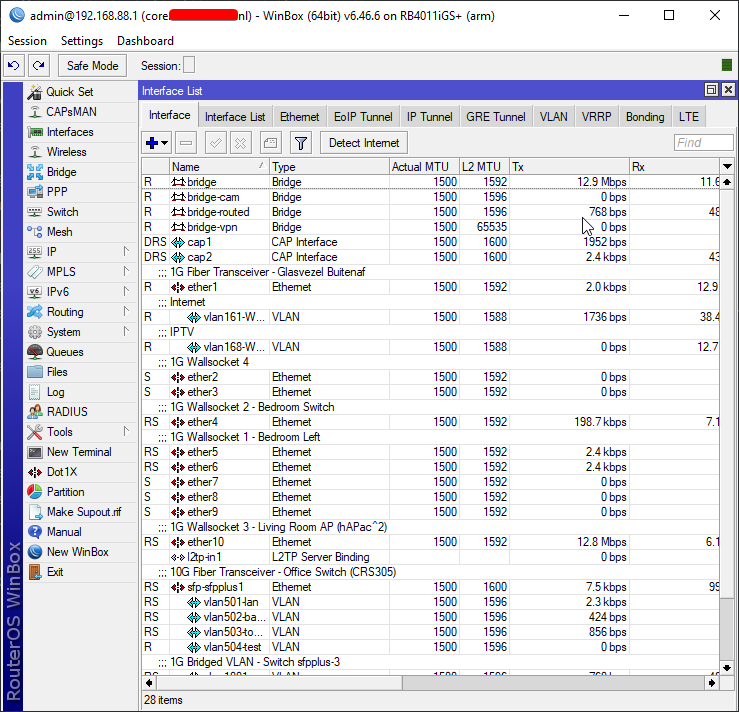
cap1 and cap2
I only have one access point here, but thats for 2.4GHz and 5GHz
spiral drift
sweet
I'm redoing the existing network map to be more accurate and representative then I'm going to start parting out and building the setup
I don't spend a ton of time on this server, is there any way I can give you guys any credit @tame carbon and @peak cloak ?
You've both been hugely helpful
tame carbon
let me make you a map ;)
spiral drift
You have firmly earned my trust, go for it
 spiral drift
nice!
here's what I came up with
diagramming this out reminded me of another question I have
spiral drift
There is a connection from the 3rd floor to the 2nd floor,and a connection from the 2nd floor to the basement.
There is not a connection from the third floor to the basement, so traffic to the third floor must route through a node on the second floor
tame carbon
you mean to chain them?
tame carbon
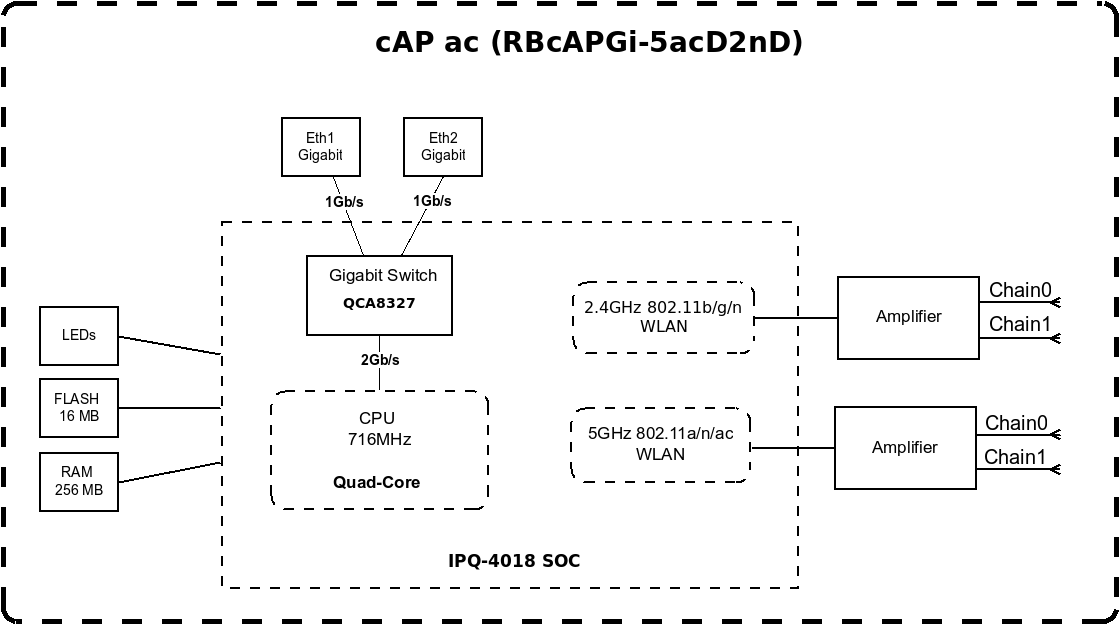
Those cAP ac's I linked, have two ports
so you could hook up another one after the first one
spiral drift
ok cool
tame carbon
they have a switch internally
spiral drift
it's not going to get mad about daisiy chaining because it's all being run off the brains in the basement router, correct?
spiral drift
so the 3rd floor AP would need to be plugged in to either an outlet or a POE injector?
tame carbon
so the APs connected directly othe basement router dont need a power adapter
you could use an injector, but isnt the point to not needing power on the 2nd floor?
you could do the injector on the third floor
or not use PoE
and just power it directly
spiral drift
POE would be nice but I don't really care much about it TBH
tame carbon
if you don't care about PoE at all
MikroTik is a Latvian company which was founded in 1996 to develop routers and wireless ISP systems. MikroTik now provides hardware and software for Internet connectivity in most of the countries around the world.
This is also a nice router ^
slightly more performance too
spiral drift
I'm not opposed to streamlining cable management at all but it's not a dealbreaker
tame carbon
Well, its up to you
spiral drift
hahaha, WTF is "The Dude server package"
does it come with a rug that really ties the network together? Maaaaaaan?
tame carbon
The Dude is a network analyzer
and the dude server pacakage is just the analyzer itself
that hEX S has a usb port for mass storage
so you can store metrics and data on that
spiral drift
I should toss a NAS in here as long as I'm redoing the network
tame carbon
yeah get a dedicated machine for that
@spiral drift thats why I went 10G here :)
the NAS is connected to the network at 10G, but individual clients are 1G
so multiple clients can hit the NAS at the same time
without it bottlenecking
spiral drift
like a full PC, not just an external drive?
spiral drift
that's a little out of my budget at the moment but someday...
spiral drift
I aspire to a server rack and a bunch of homebrew hardware one of these days
tame carbon
spiral drift
I saw earlier
tame carbon
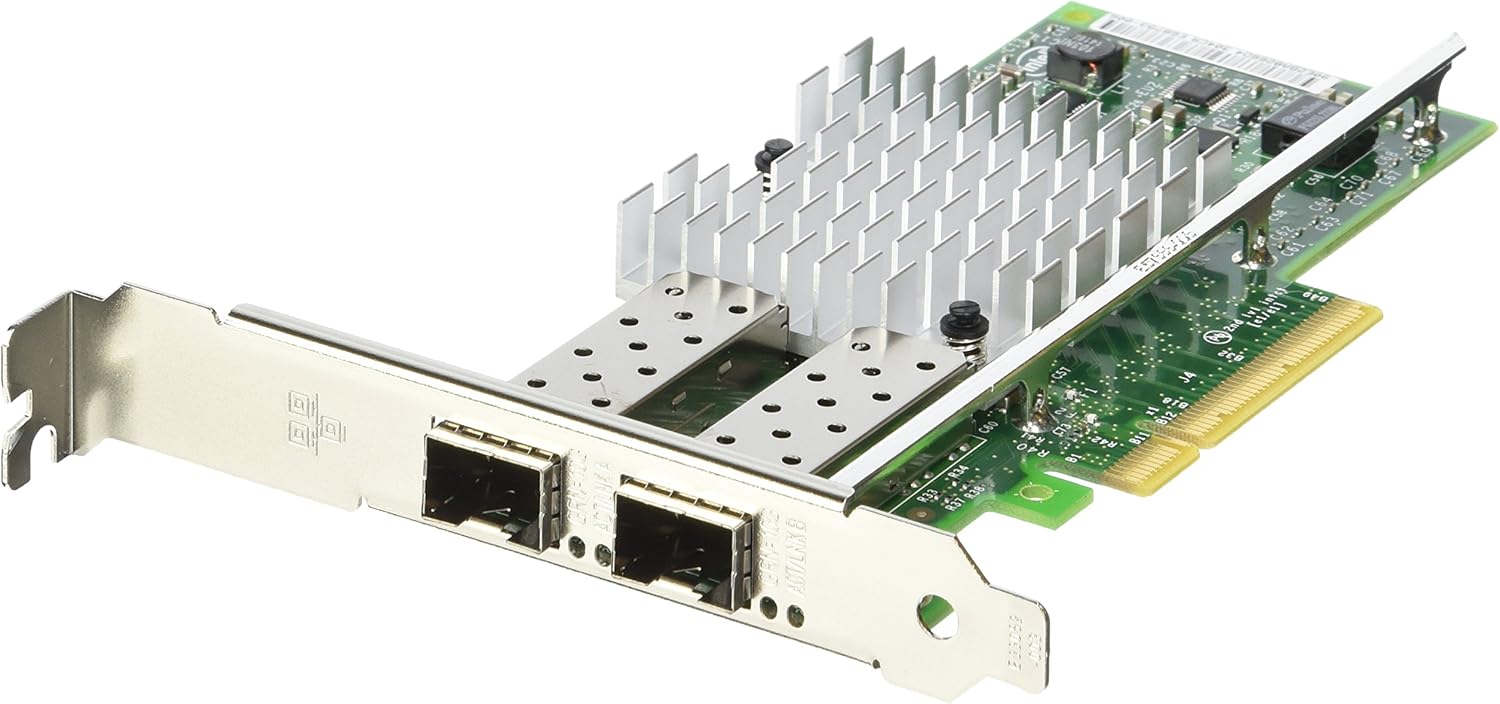
the PCIe card it has is a dual 10G card
spiral drift
I'm jelly of the big boys
tame carbon

those NICs are quite pricy
but the fiber optics themselves are dirt cheap
intel network card on an AMD system
spiral drift
now I gotta go see exactly how many ports are actually in use throughout the house
brb
tame carbon
🤣
spiral drift
Grew an extra antenna a couple weeks ago after the power button stopped working
In the interest of saving a few bucks, would it cause any problems to use a separate 5-port switch attached to the 3rd floor AP, and if so would it be better to put the switch upstream or downstream of the 3rd floor AP?
I'm going to try to get a device that can do both but I'm still curious
crap I might need to put the little switch in the basement
the basement router has 6 outgoing connections :/
tame carbon
@spiral drift yeah you can just use switches
spiral drift
ok, so a 5 port router and a 5 port switch in the basement, an AP with at least one outgoing ethernet port in the kitchen, an AP again with at least one ethernet port on the 2nd floor, and then preferably a single device AP/switch on the 3rd floor
If I do put a separate switch on the 3rd floor, does it matter if it's upstream or downstream of the AP?
I would think it doesn't matter because the router is in the basement but that's why I came to ask people who know things
@tame carbon
tame carbon
@spiral drift that main router actually has 6 ports in total
you can use the SFP port too
thats one on the left
spiral drift
oh I thought that was dedicated for fiber
tame carbon
@spiral drift nah you can plug all kinds of connections into that plug
its just different interface standard for high speed networking devices

The small form-factor pluggable (SFP) is a compact, hot-pluggable network interface module used for both telecommunication and data communications applications. An SFP interface on networking hardware is a modular slot for a media-specific transceiver in order to connect a fib...
they go into that hole
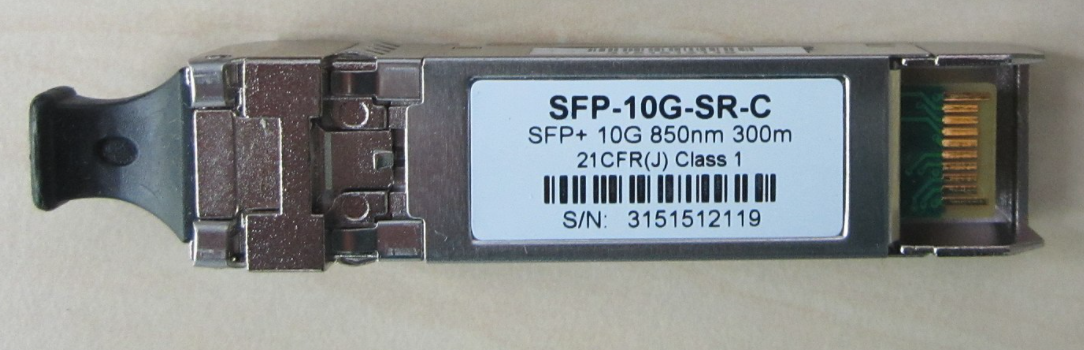
that plug is on there, so no dust can get in the optics
this one does, 10Gbit and for 300 meters max
these cost like $18
spiral drift
can the router use both of those ports simultaneously? looks like they're both keyed for internet in
tame carbon
@spiral drift thats for the noobs
you can configure them however you like
doesnt mean it has to be port 1
you can just change that in the software
its just how its configured by default
spiral drift
like my mobo supports enhanced SATA and M.2 but I can't use both at the same time because they route through the same pcie lanes
tame carbon
but it can do anything
spiral drift
ok cool
spiral drift
I'll still need to put the existing switch down there
g'night, sleep well
wait I might not need to put the switch downstairs after all
one of the connections is temporary because my PC isn't in my room right now I forgot about that
so I can probably get away with just the 5 outgoing ports
 balmy mango
hello anyone here that knows a thing about openvpn
i think i got everything set up but i cant connect
is there something i might be overlooking?
spiral drift
I have no expertise to offer
peak cloak
dumb question, but have you opened the port and port forwarded
balmy mango
i did port forward
peak cloak
on the server itself, is the port open
balmy mango
i think truenas does that for me?
when setting it up
is there a way to check

VPN servers allow you to securely connect back to your home network in order to connect to local assets. This means that you can connect to your TrueNAS Shares without having to harden anything for web hosting. OpenVPN is a great way to connect back securely with Mac Windows o...
i followed this tuturial
 tribal ferry
Anyone know of good access points besides Ubiquiti for a home?
Thinking of doing a proxmox pfsense router + firewall instead of a UDM pro.
spiral drift
I'm about to get a bunch of hardware from mikrotik on a recommendation from this channel
peak cloak
@tribal ferry mikrotik or tp-link business omada
 thorny vector
Mikrotik is great value gear, it punches up hard on other enterprise brands
peak cloak
mikrotik, I believe not, unless you are running multiple and want roaming
tribal ferry
Another thing.
In my planned setup, I'll have two UAP-AC-PRO's per floor since it's a 4k sq ft house.
I'll be setting these up on the same SSID, security, etc, and I know Ubiquiti AP's have auto-switching between multiple AP's.
I'd assume Microtik and tp-link do the same?
spiral drift
according to @tame carbon earlier the mikrotik ecosystem allows for that kind of setup
here is my current, semi-functional setup
peak cloak
Tp-Link Omada with a controller allows roaming
peak cloak
@tribal ferry pretty sure you need to configure it
tribal ferry
how difficult is it to do that?
i'm quite technically sound with this sort of stuff
spiral drift
here is my proposed new setup:
tribal ferry
spiral drift
@tribal ferry http://demo.mt.lv/webfig/
peak cloak
hmm, it's not the most noob friendly
spiral drift
crystal posted that link for a demo of the mikrotik software
tribal ferry
ah ok
spiral drift
I haven't started playing with it much but it seems obscenely granular
spiral drift
that's what crystal was saying
peak cloak
@tribal ferry one of thier routers can be uses as a AP controller
peak cloak
routerOS
tribal ferry
proprietary to them?
spiral drift
"client decides which AP it connects to
it usually picks the one with the strongest signal
but with CAPsMAN you can manage them as one network
CAP = Controlled Access Point
MAN = Manager
if you need help setting this up at some point, there's plenty of people here that can help"\
tribal ferry
didn't know if it was like pfsense and open source
and yeah ofc
also microtik seems extremely good value
24 port switch for $128?
spiral drift
I am also stunned by the value
spiral drift
this is going to be a much cheaper project than expected
peak cloak
or this crazy beast of a router https://mikrotik.com/product/ccr2004_1g_12s_2xs
MikroTik is a Latvian company which was founded in 1996 to develop routers and wireless ISP systems. MikroTik now provides hardware and software for Internet connectivity in most of the countries around the world.
tribal ferry
seems like it's easier to just buy a router with them and their ap's than use my own pfsense
probably more reliable
peak cloak
I would buy thier's, pfsense really isn't guaranteed gigabit
tribal ferry
is http://demo.mt.lv/webfig/ up to date?
tribal ferry
what ap from them would be equivalent to a ap ac pro
for reference
i've briefly looked at microtik but i'm not well-versed in their products
peak cloak
probably this one https://mikrotik.com/product/cap_ac
MikroTik is a Latvian company which was founded in 1996 to develop routers and wireless ISP systems. MikroTik now provides hardware and software for Internet connectivity in most of the countries around the world.
tribal ferry
same price as ap ac lite
well close to it
lower
and this all ties into router os?
spiral drift
I messed up my proposal diagram, whoops
it seems so, I'm trying to confirm before spending money
tribal ferry
this seems extremely promising, this would definitely bring me under 1k total for the whole setup.
spiral drift
actual proposal
I'm going to try to simulate the proposed setup in the demo
will report back
tribal ferry
alright
and i'd assume the ap's would tie into that central routeros on the main router?
tribal ferry
are they able to all be managed from one place or is individual login to each device required is more what I'm asking
tribal ferry
ah ok, good.
i'm really trying to get this all around ~$500, and I get around $800 now
issue is i have to get moca adapters for my house since we have essentially no ethernet except for a cable running to our 1st floor for a switch there
if the moca adapter's weren't an issue or if we could do only a single adapter per floor the price would be perfect with microtik
is there a specific ap that could possibly cover an entire floor?
 elfin socket
@tame carbon Yeah. ever since Google announced the retirement of compressed photos, looks like I'm going to be building a lot more NAS.
spiral drift
from the documentation: "if the CAP is not on the same L2 segment as CAPsMAN, it must be provisioned with the CAPsMAN IP address, because IP multicast based discovery does not work over Layer3"
so if I'm understanding correctly, this is saying that I'll be able to connect the 3rd floor AP/switch, but I'll have to do a little more configuring because it's passing through the 2nd floor AP/node, yeah?
peak cloak
@elfin socket oof our pictures are there too
guess I need to convince parents to pay for cloud storage from another storage provider (not google)
they don't want to support google
thorny vector
Local storage is always the answer
spiral drift
don't blame them unfortunately 😦
peak cloak
nah, need cloud backup
thorny vector
Self hosted cloud
spiral drift
layer 2 is MAC and layer 3 is IP, correct?
thorny vector
Yes
peak cloak
offsite backup
thorny vector
or you hide a server in their attic
@thorny vector
They don't need to know they do
spiral drift
from the mikrotik documentation: "if the CAP is not on the same L2 segment as CAPsMAN, it must be provisioned with the CAPsMAN IP address, because IP multicast based discovery does not work over Layer3"
so if I'm understanding correctly, this is saying that I'll be able to connect the 3rd floor AP/switch, but I'll have to do a little more configuring because it's passing through the 2nd floor AP/node, yeah?
thorny vector
Yes
spiral drift
I'm trying to be sure this is going to work before spending monies
peak cloak
@thorny vector are you sure, it'll all be on the same L2 network?
thorny vector
I said yes to the extra config
peak cloak
the CAP's are just doing switching
thorny vector
If they're both in that same 192.168.1.0/24 lan, they'll auto-discover
spiral drift
ok cool
huh so fuck is allowed but not p 0 0 p
weird
the webfig demo seems to be down 😦
peak cloak
yeah ik, ltt moderation is so weird
tame carbon
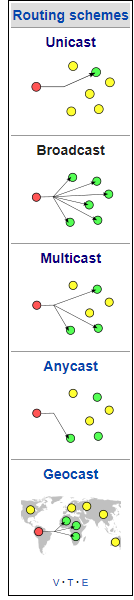
@spiral drift that just means you can't do multicast over wireless with caps
spiral drift
googles multicast
tame carbon
multicast is for things like IPTV
spiral drift
closes tab


 spiral drift
does local network streaming e.g. steam link rely on multicast?
thorny vector
Multicast
spiral drift
so for like a restaurant displaying the same menu on several screens or something
tame carbon
The Internet Group Management Protocol (IGMP) is a communications protocol used by hosts and adjacent routers on IPv4 networks to establish multicast group memberships. IGMP is an integral part of IP multicast and allows the network to direct multicast transmissions only to ho...
spiral drift
doesn't sound like I'll be missing anything without it
@tame carbon did you see the proposed map?
tame carbon
yuh
@spiral drift that hAP Lite TC is not so fast
its only 100M ethernet
and thats more a router tbf
spiral drift
I was thinking about getting the hap a2
tame carbon
MikroTik is a Latvian company which was founded in 1996 to develop routers and wireless ISP systems. MikroTik now provides hardware and software for Internet connectivity in most of the countries around the world.
This one yeah
spiral drift
I want to have at at least a built in switch upstairs
tame carbon
it has internal antenna
spiral drift
yeah I really want the 3 because of the external antennas but I don't feel like it's worth $100
tame carbon
8-Port 10/100/1000Mbps Desktop Switch
Get one of these on third floor
and you can always have the AP on this
spiral drift
I was maybe going to use a 5 port switch I already have upstairs
tame carbon
make sure its gigabit :)
spiral drift
I thought the cap acs would be a bottleneck but those are gigabit, whoda thunk
tame carbon
yeah
spiral drift
oh the lite definitely would have been a bottleneck
tame carbon
just get a standalone switch and an AP
you don't need a router
its cheaper
MikroTik is a Latvian company which was founded in 1996 to develop routers and wireless ISP systems. MikroTik now provides hardware and software for Internet connectivity in most of the countries around the world.
spiral drift
the cAP ac is the same price as the hAP2
tame carbon
@spiral drift yeah but it has way better antennas
those cAP ac have directional antennas
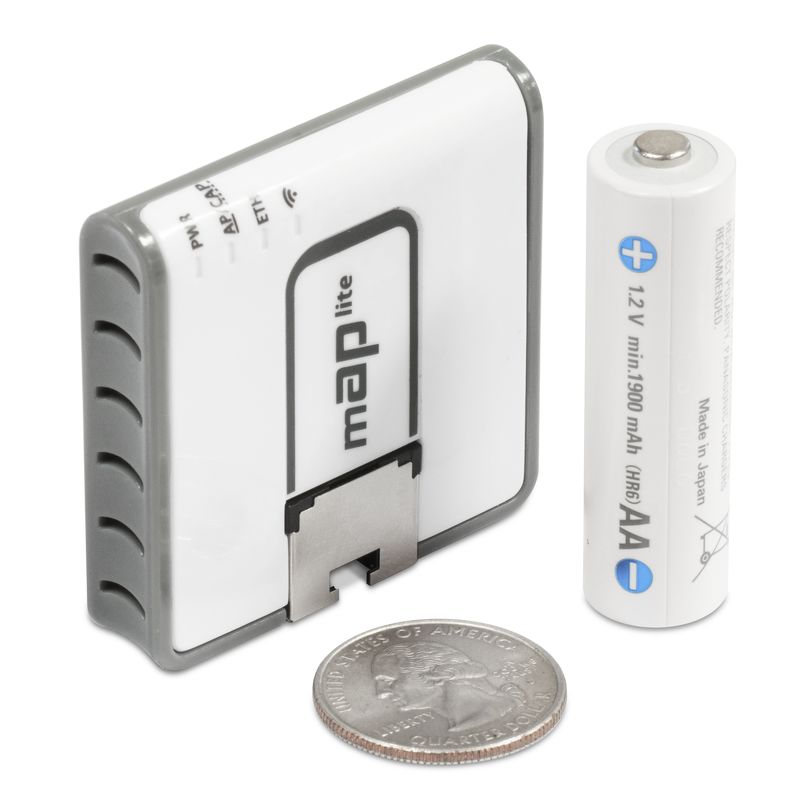
these APs are cute
spiral drift
holy shit that's adorable
spiral drift
only 2.4 ghz tho :/
yeah I was seeing that in the documentation, I'm looking forward to a unified interface
tame carbon
its a bit of a steep curve at first
because you kinda need a bit of networking knowhow
spiral drift
seems kinda like the arch of networking
tame carbon
cisco is much worse
peak cloak
but then you are glad because you can do almost everything
spiral drift
right
that's what put me off of a canned plug-and-play system like the google home, I wasn't sure I'd be able to get it to do what I want
tame carbon
@spiral drift that hEX S is nice, it has a encryption accelerator
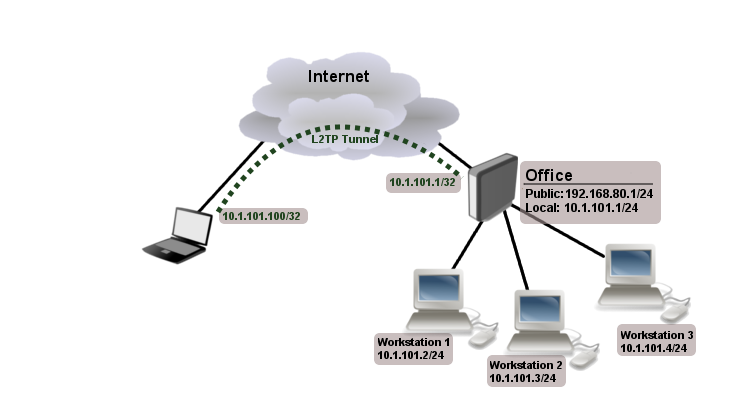
so you can set up a VPN server with it quite easily
I use this on my phone and laptop, so I can access my LAN when I am not at home
spiral drift
THAT would be amazing
Once I get this working next project is to try and set up a secure WOL for my PC
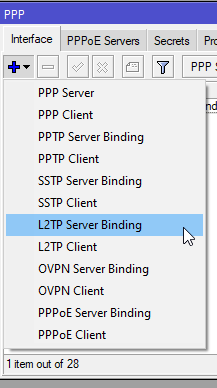
 spiral drift
alright, so one hEX S, three cAP acs, and gigabit switches to expand ethernet
will it matter if the 3rd floor switch is upstream or downstream of the AP?
spiral drift
yeah chained
tame carbon
These are the test results
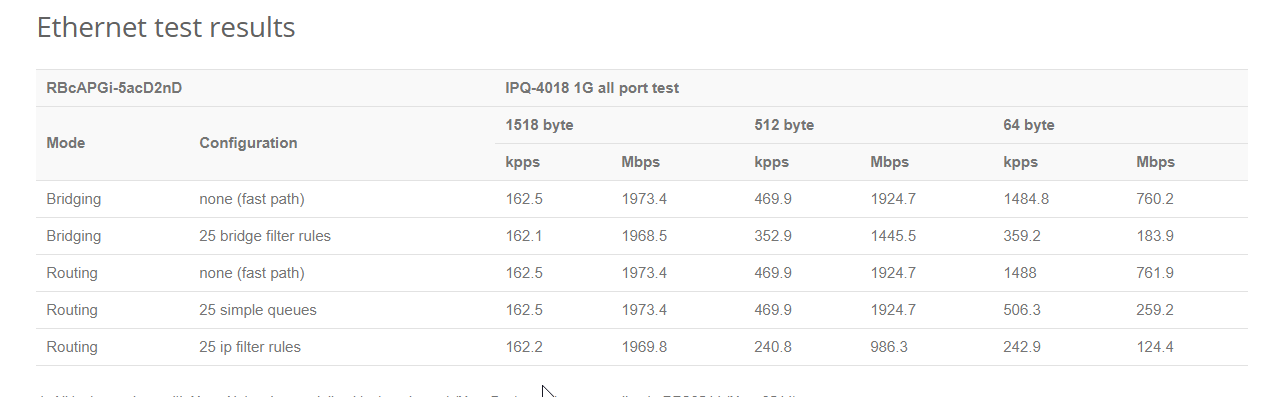
they did on the cAP ac
Bridging, it does 2gbit/s
which is 2x 1G
pps = packets per second
spiral drift
ok so I should look up test data for the switch and put the bottleneck downstream
tame carbon
wat
that tplink gigabit switch is not a bottleneck
@spiral drift ultimately, 1gbit will be your bottleneck throughout the network
but thats fast enough for home networks
spiral drift
My understanding has been that for most home applications modern equipment is more than adequate
tame carbon
meh, 1gbit network is still kinda slow by comparison to enterprise stuff
they can go 100G xD
spiral drift
yeah I guess if I build a beefy NAS that might become a problem down the road
but I'm not trying to transfer big files around, mostly local streaming
 unborn sluice
1g serves right for Nas, cause how much do you transfer everyday
tame carbon
steam streaming uses like 50-60mbit at most
spiral drift
I've never really had connection issues with steam link, just some latency but that's to be expected
unborn sluice
That's latency not speed
spiral drift
right
unborn sluice
Maybe not use 2.4ghz for remote play
spiral drift
that's what I'm saying, bandwidth has never been an isue
tame carbon
Pinging 1.1.1.1 with 32 bytes of data:
Reply from 1.1.1.1: bytes=32 time=7ms TTL=59
I only steam link over a wired connection
peak cloak
@tame carbon flexing your fiber ISP I see
elfin socket
nah, need cloud backup
@peak cloak
Plex server. Centralize photos. Then use backblaze to duplicate.
unborn sluice
My setup ^
spiral drift
jeebus
peak cloak
I honestly can't afford to manage a server, I'm not going to be in this house forever. Just want to setup something for parents. If it was my house then yeah probably. I'm only in high school.
spiral drift
so it doesn't matter which "side" of the 3rd floor AP the switch is on, correct?
tame carbon
@spiral drift all the ports on those mikrotiks are on the same internal switching chip
so you can just configure them to your liking
unborn sluice
I honestly can't afford to manage a server, I'm not going to be in this house forever. Just want to setup something for parents. If it was my house then yeah probably. I'm only in high school.
Couldn't agree more
We all come and go
We are gone in a blink of an eye
 spiral drift
I meant putting it between 2nd floor and 3rd floor AP vs. putting it between 3rd floor AP and devices
tame carbon
the switch? oh yeah it can be anywhere
spiral drift
so like the branch would either be
"upstream" or "downstream" of 3rd floor AP
ok that's what I thought
tame carbon
upstream and downstream have different meanings
spiral drift
I thought those were called uplink and downlink
 unborn sluice
F
 stable iceBOT
Speedtest screenshots do not belong in this channel.
peak cloak
waxen scroll
gets warned about no speed tests, posts one anyway ^
spiral drift
is there a way to reconfigure a router to act as just a switch?
spiral drift
I'm thinking about repurposing the basement router I'll be replacing
it would be nice to save some money on a dedicated switch by repurposing functional hardware
peak cloak
how many ports does it have on the back? Is it a generic home router?
welp, anyone else haveing issues with youtube?
spiral drift
yeah, the GUI and comments load but video is endlessly buffering
pretty sure it's got 9 ports total, it's just a generic TP link something or other
peak cloak
yeah, then maybe those are all switched. Does it have one dedicated internet port?
spiral drift
pretty sure, lemme check
tribal ferry
oh you're still here
been doing some research
do any of you think the cap ac is capable of covering an entire thousand square foot floor?
i'm trying to get my pricing down to $500 for this whole setup, i don't know if it's going to be possible lol
peak cloak
no clue tbh
tribal ferry
hm ok
peak cloak
never had any experience with it
tribal ferry
the thing that's screwing me is these moca adapter's
my house does not have ethernet wiring throughout
 willow hamlet
Speedtest screenshots do not belong in this channel.
@stable ice why
peak cloak
oh, you are using moca, yeah those are expensive
tribal ferry
would you think it can penetrate floors?
peak cloak
I mean what are your floors made of? wood?
tribal ferry
the place where one of the moca's would be is directly below where the upstairs ap would be
yep
spiral drift
my basement router has 8 lan ports and 1 wan port
willow hamlet
why cant you post speed tests
waxen scroll
@willow hamlet low effort posting
some people like to brag about their 500mb and then log off
willow hamlet
this is as dumb as the person who removed reactions from tech support channel
peak cloak
@spiral drift you could test it if it can work as a switch, just don't use the wan port as in and only use the other LAN ports. You won't get any advanced switch features as vlans but it should work as a dumb switch
spiral drift
that's totally fine
I'm planning for the hEX S to do all the "thinking"
just need more ports!
tribal ferry
so my plan is for two on each floor, if i can afford to do it.
i have ethernet running to my first floor tv underneath my heaters, so i'm planning on putting one ap behind my tv where a switch will be.
the other plan for the 1st floor is in the study directly below the networking equipment upstairs with moca. if a ap can penetrate the floors to below, then i wouldn't need one there
the plan for upstairs is one at the main networking area, and another in the master bedroom with moca
the proposed ap locations are in opposite corners of their respective floor
and here's a bad paint drawing of it
spiral drift
I don't think the cAP ac would, but maybe the ac3 that has external antennas?
tribal ferry
Yeah, that's $228.
spiral drift
disclaimer: I have never used either piece of equipment
peak cloak
I mean I have an EAP225 which doesn't have external antennas and it's able to cover my whole house
The house is 1,433 which wooden floors
I even have wifi in backyard right near the home
and wifi in the basement, a floor below
and the AP is mounted in the middle of the house in the stairwell
peak cloak
true, but that's what I have
tribal ferry
What do you use for routing?
tribal ferry
so it's a bunch of different things
tribal ferry
only one ap for the whole house?
peak cloak
yep
maybe will add one in the basement once it's finished but for now it works just fine
tribal ferry
I could maybe try adding just one AP upstairs and see how it goes.
I'm not sure if it could penetrate the floors.
My house is not open concept either, it was built in 1980.
waxen scroll
youtube has been down 8min+ now
tribal ferry
the most concern is downstairs for me
peak cloak
neither is mine, it's a cape cod built in like the 1940s
tribal ferry
ah ok
the upper left should be able to take all the green
i'm just more worried about getting coverage in the red area
tribal ferry
yep
the optimal config is this
but, expensive.
and i'm trying to get it close to $500 or under for the sake of my wallet.
peak cloak
can you place it in the center?
tribal ferry
I have a coax in my kitchen, but it's right on the counter.
Old owners used to have a TV there
My kitchen is being renovated soon, as well
I doubt we'll keep it
It's not exactly the most good looking port to keep.
peak cloak
hmm, what I did was run ethernet to the stairwell, because there was a phone line already running on the opposite side of the wall so I could fish the wire to the phone jack and then to the AP location
tribal ferry
never done any of that and i honestly do not trust myself
peak cloak
I mean it's really not that hard tbh
tribal ferry
There's nothing for me to pull really, I don't want to get rid of my coax.
nor pull out the wire, run fish cable, then run re-run coax, then run ethernet
having an electrician do it wouldn't save any money either
 thick minnow
should I get a firewall for my 2 minecraft servers? I am worried about DDOS
tribal ferry
at the orange dot, i do have a ethernet cable coming out of the floor.
peak cloak
electrican stapled cat5 to the wall
waxen scroll
ele will charge $600-1000/hr where as home theater can do it for way less
tribal ferry
but it's very close to the proposed ap and i don't think it would provide much coverage
thick minnow
so rip
peak cloak
here is a ddos packet, lets block it
thick minnow
sweating
peak cloak
no, ddos is a lot of requests to a server, you don't know which are legitimate or not
@thick minnow is it a public server?
thick minnow
yes its public, both the bedrock and java
peak cloak
so like you are advertising it?
tribal ferry
i'll just butt into this for when you two are all good
peak cloak
well, for one I wouldn't run a public (as in advertising it around) minecraft server at home
thick minnow
2
peak cloak
for proper ddos protection you need to have the traffic go through a proper ddos protection service
thick minnow
eventally gonna get a DNS and that
but for now Big and Small Potatoes remain unprotected
peak cloak
plus if you ever get ddosed, unless you have more than one ip, your own internet connection may get dosed
thick minnow
Its literally the name for each of them
peak cloak
DNS doesn't prevent ddos
thick minnow
I found I have a static ip so uh oh
hasn't changed in 2 years even with intermediate power outages
peak cloak
you probably don't have a proper static ip, just a dhcp lease with a longer lease time probably
if you aren't paying for it, you don't have it
changing DNS can be a DDOS mitigation strategy, but if you just have one ip it's useless
tribal ferry
i can probably give some advice on this
peak cloak
@tribal ferry change your router, that mikrotik one is old
peak cloak
MikroTik is a Latvian company which was founded in 1996 to develop routers and wireless ISP systems. MikroTik now provides hardware and software for Internet connectivity in most of the countries around the world.
but it's more expensive
or you can get a non-rackmountable one
I am getting the HEX S
peak cloak
because the one you choose has like 5 ports that are only 10/100
tribal ferry
I will be getting a rack soon ™️
yeah
probably why it's only $100
let me reexport that png with the pricing
I need to get this at least to the $500-$600 price range for this all.
peak cloak
wait, can't you get away with only 2 AP's
tribal ferry
I have a 4k square foot house, and it's not open concept as I said.
I really don't know if only two would work
Is the cAP ac leaning more towards being like an ap ac pro or a nanohd?
peak cloak
Apparently the ac pro has a max TX power of 22dBM while on the mtik it's a bit more complicated
also downdetector comments are cancerous: https://downdetector.com/status/youtube/
tribal ferry
I'd assume it would be good with handling speeds of 100-200 mbps?
peak cloak
oh yeah, for sure
tribal ferry
hm
it's just
i'll see if i can draw my floorplan
it's awful drawing but you get the gist
peak cloak
hmm yeah, maybe 4 may be needed. If only you could maybe place them more in the center, then you could get it down to like 2-3
tribal ferry
i mean, do you think upstairs could take one?
just the bottom right?
I can knock $100 off and get it to $654.26 if i can get away with just one upstairs.
tribal ferry
@peak cloak Don't know if you're still there but if you're available.
 potent seal
An oldie but a goodie. Who needs IP anyway, overrated IMO 🤣
ATA over Ethernet (AoE) is a network protocol developed by the Brantley Coile Company, designed for simple, high-performance access of block storage devices over Ethernet networks. It is used to build storage area networks (SANs) with low-cost, standard technologies.
tame carbon
Speedtest screenshots do not belong in this channel.
@stable ice Your moderation is not welcome here.
We're doing just fine without yuo.
go back to #public-chat
Stop enforcing arbitrary rules that make no sense.
thorny vector
Speedtest measuring contests are silly
tame carbon
yes, but nobody is bothered by them generally
thorny vector
I imagine the rule was put into place because of people
That's my usual assumption when I see rules like that
tame carbon
Its an arbitrary rule that makes no sense
so I rebell.
@thorny vector in #public-chat people post their Cinebench crap
thorny vector
Again, I doubt its arbitratry but 🤷♂️
tame carbon
its same thing, just different kind of benchmark.
thorny vector
that's general though, not a specific channel
thorny vector
More relevant are internal speedtests via iperf3
thorny vector
Internet speed tests, especially ones run by ISP's and CDN's aren't the best demonstrators of true speed, especially since they can influence the results
tame carbon
-.-
I don't need a lecture on different kinds of network tests
idk why you arguing with me in the first place
I've never seen you in #networking
thorny vector
wut
I hang out here all the time
Regardless, I'm just pointing out the rule likely has a good reason for existing
tame carbon
Did you?
thorny vector
Reviewing the above transcripts, yes.
But you are right, at the end of the day, this is a silly discussion
tame carbon
I imagine the rule was put into place because of people
@thorny vector wat
lets ban any form of chat, because of people
/s
 unborn sluice
you can't channel someone who isn't present
thorny vector
But you know what I'm getting at.
tame carbon
Phoenix ditched this place
thorny vector
Really? What went down there?
thorny vector
Eh, I get it. But tech literacy of the masses never gets unless people open up the gates (and occasionally drag people over the threshold)
unborn sluice
I mean yea, I want to lower the bar of entry.
But there are some people that just makes me sad

"bruh, have you even tried google"
tame carbon
I think Serpent was trying to get an ISO on their USB thumbdrive
for 3 days
and is still bothering people with their own incompetence
thorny vector
Some people need more help than others. Then there's the opposite side where I get to troubleshoot some really interesting problems
tame carbon
@thorny vector I gladly help those who listen, and ask relevant questions
unborn sluice
I'm okay with any problem really, but sometimes the people in tech support are entitled and lazy
thorny vector
I think I just have a lower bar from dealing with asvab waivers
tame carbon
@unborn sluice lol #public-chat was funny yesterday
bunch of apple fans, thinking that the M1 will be "revolutionary"
and they shut down any doubts that were raised with apple's claims
3.5x faster
thorny vector
lol, I can't wait to see the new apple "3 versions of a tablet" tank performance tests
tame carbon
I am pretty sure itll be a failure, esp for pro-sumers
unborn sluice
tbf m1 can be fast, but what they don't know is program compatibility
they expect things to just work

hope that m1 is fast enough to emualte x86/x64 suckers
tame carbon
Lot of special equipment relies on kernel drivers/extensions
those cannot be translated to arm
thorny vector
I'll be waiting for what nvidia is going to ARM. That stuff is exciting to watch
Especially since they bought up cumulus linux too
tame carbon
Unless the manufacturer recompiles the driver for arm
but we've seen how on windows, this is even hard from W7 -> W8 -> W10
unborn sluice
The thing that m1 can do is the 1st party apps and adobe suite
good thing dev utils are arm compatible
tame carbon
@unborn sluice rosetta2 was benchmarked on another chip
and it showed performance loss of upwards of 60%
thorny vector
Not even the full adobe suite yet though, right?
unborn sluice
Not even the full adobe suite yet though, right?
yea, I bet only the top apps
like photoshop etc
and it showed performance loss of upwards of 60%
@tame carbon lel, have fun on m1
thorny vector
lol, can you even imagine media encoder on arm?
tame carbon
why doesnt photoshop just release a linux version
so we can finally get on with our lives.
@thorny vector the m1 has transcode chips for those codecs
unborn sluice
even the rasp pi arm can encode/decode x256 if not mistake
tame carbon
Yeap
thorny vector
Oh really? Oh, I remember seeing that now. I was talking more along the lines of performance as well, though.
unborn sluice
oh yea lel h256, where did the X come from
 thorny vector
I want to know which apple engineer had fans hurt him as a child
tame carbon
@thorny vector https://i.imgur.com/axkd1BJ.png
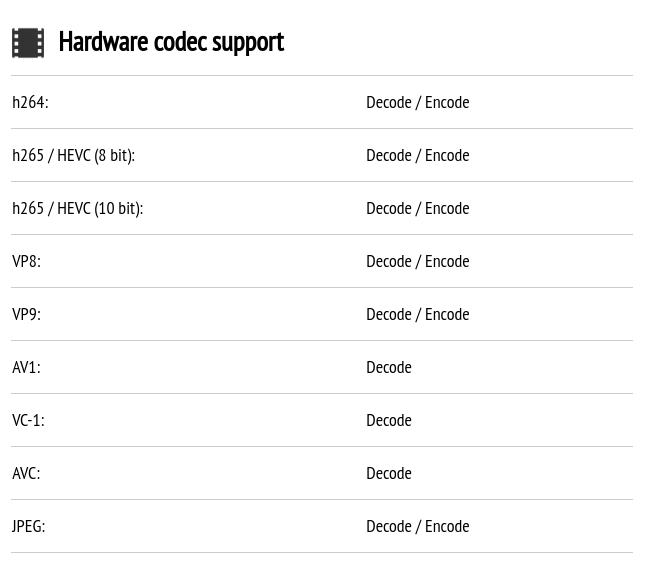
@unborn sluice I have some odd issues with video decoding on my Ryzen
unborn sluice
i don't decode on my ryzen