#networking
1 messages · Page 234 of 1
 waxen scroll
 stone kite
I already purchased this. Lol van anyone tell me if this brand or model suck?
GS1900-48 is the model
 primal ice
should be fine, what are you using it for?
stone kite
Currently, just a bunch of gigabit computers, 2 of which are NAS-ish. Lol
In the future, I'll have a network room in my house and I will have everything feed into it. For now it's just a few PCs and my secondary AP
primal ice
yeah it will work fine for that. enjoy setting it up 😄 - a smaller switch probably when of been better but lots of room for expansion.
 stiff python
I’m trying to download a 27gb ish game from the epic games store and it goes for a while then it dips and I have to reset my router. Is there any way I can fix this?
By dips I mean it just stops downloading
 unborn sluice
Restart your router before it dips
primal ice
if you can log into the router change the dns from get from isp to 1.1.1.1 and 9.9.9.9
stiff python
What server is 9.9.9.9
primal ice
quad 9
stiff python
Alright
primal ice
1.1.1.1 is cloudflare
stiff python
Alright thanks
primal ice
most likely its your isp blocking the download for what ever reason.
to many pings on their dns servers or what.
stiff python
Lol I had to restart my router so I could access the isp website
stiff python
Changed the dns and it didn’t change much
My isp had a thing called dynamic dns but it doesn’t sound like it improves much
unborn sluice
yup
primal ice
dynamic dns is a web service. you have to set that up. and hrm, maybe you are over heating or overloading the router. can you limit the download from epic store?
 tame carbon
You don't need dynamic dns for downloading content
And changing dns servers wont make your downloading faster
🤦
 clear igloo
@waxen scroll You need to port forward 445, 139, and permit ip any any
 thick minnow
Hey yall! Im trying to figure out if I should keep using my Ubiquiti EdgeRouter X as my main router, or switch the Ubiquiti Security Gateway?
 peak cloak
imo, neither
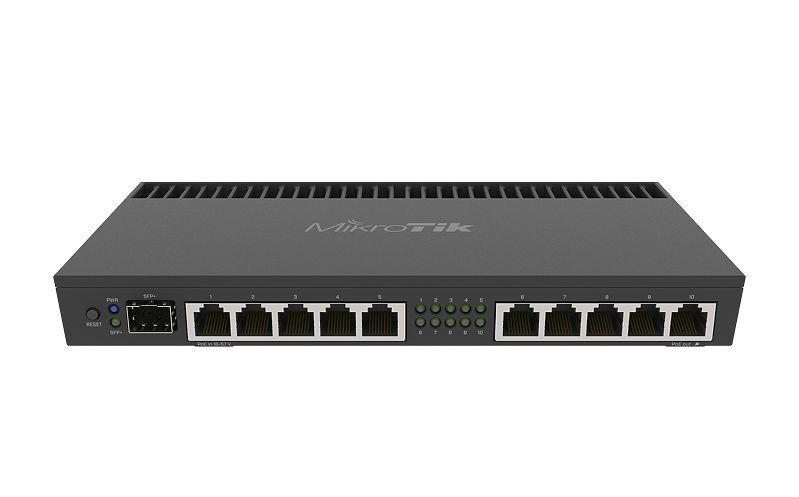
unless you are in the unifi ecosystem, I would get a mikrotik. I have an er-x and plan on switching to a hEX S

MikroTik is a Latvian company which was founded in 1996 to develop routers and wireless ISP systems. MikroTik now provides hardware and software for Internet connectivity in most of the countries around the world.
@thick minnow
 vale reef
Is Unifi controller 6.0.33 stable?
 silent spruce
How i conect to the internet:
My phone get's mobile data, and it is Sending it Through a USB cable to a Computer that is conected to my main computer Via ethernet, and the Computer where the Phone is conected has a adapter Bridge in software "configured" and sends through the signal to the Main computer.
man, that is long.
i could go a little more insane on Network conection if i had the Playroom...
silent spruce
well, i have the thing that Says unlimited... And i have to actualy share the conection.
tbh, i kinda have bad expirience with wifi sticks. (usb.)
 sacred ocean
Yeah, most of those are pretty bad.
silent spruce
k
thick minnow
@peak cloak Lol, what happened was I bought the ER-X first, started using it, and then a few months down the road, I came across the USG. And at first, I thought the USG was a stand-alone firewall. Come to find out after I bought one that its a router too.
@peak cloak So now, I have the ER-X supplying the whole house with internet, while the USG is just collecting dust in my office...
 indigo wing
Hello everyone, I have a problem with my internet speed. I don’t know why but it works well on my Mac but it doesn’t work properly on iPhone and PS4. Do you have any idea how to fix it ?
 cedar igloo
how is your playstation getting internet? Is it over WiFi or ethernet?
cedar igloo
the first thing that comes to mind is the early versions of the PS4 do not have 5GHz wifi
 dense blade
if he didnt have 5g wifi it wouldnt even show up
indigo wing
Well I live in Slovakia and we don’t have 5G and our speeds are not that great either so basic router should be enough
I am supposed to get 45Mbps and I get 1-6Mbps max
cedar igloo
oh, ok
indigo wing
And now it doesn’t work on my Mac either
And my provider says that everything is working fine
They cannot fix this issue for 4yrs
Basically what I want to say is that my internet is unstable and sometimes unusable. Is there any way to fix this of provider can’t do shit ?
And this is on my Mac
This is on my phone
waxen scroll
@clear igloo cant help but notice the topic updated
 ornate jungle
Hello everyone, I have a problem with my internet speed. I don’t know why but it works well on my Mac but it doesn’t work properly on iPhone and PS4. Do you have any idea how to fix it ?
@indigo wing if speeds are "okay" on your Mac computer but not great on phone or game console, I'd start to think about the locations of these devices in relation to where your WiFi is broadcast from, unless you have a way to use Ethernet.
Distance from your wireless modem and the individual capabilities of each device will impact speeds. (For example, most game consoles only have a 1x1 antenna configuration, which means WiFi isn't the best connection type - you're better off plugging into the modem/router with Ethernet.)
indigo wing
All devices are at the same spot and I was sitting right next to the WiFi router and the speeds were the same
peak cloak
@indigo wing 5ghz wifi isn't 5g mobile
indigo wing
It doesn’t matter right now
The internet worked fine (it was usable) but now it’s not
ornate jungle
The internet worked fine (it was usable) but now it’s not
@indigo wing ah, if it worked fine before but doesn't anymore, then something has changed. Can't say what though as I'm not familiar with your particular setup, so you may need to contact your ISP and/or device manufacturers to troubleshoot.
thick minnow
 glossy urchin
F
thick minnow
Getting OKish Speeds in Montana, Had symetric gigabit in Washington
and like fuck, there's no Fiber Company in Billings, only DSL or Cable, if i lived in another City could've gotten AT&T Symetrical fiber for like 60$ a month
 kind pond
Ive got a garbage router here, and i want to connect two computers to a hosted network on a local pc that im using as a server + hosting the network. While i can connect to the network, I cant connect to the server
I cant really reason how i would connect to a server on a router?
 native cradle
Is Unifi controller 6.0.33 stable?
@vale reef Depends what you call stable.
I have had a very buggy experience with adding different users but everything else has been fine.
tame carbon
oof
 rugged jolt
yea....
rugged jolt
yea lmao its terrible this is the best i can get where i am tho
tame carbon
oof
unborn sluice
oof
rugged jolt
yup
peak cloak
@kind pond can you reach the server with it's private ip
If you can, but you can't with the wan ip (dns hostname), the you need to enable nat reflection
 nova igloo
firewall? Your windows defender
tame carbon
usually windows firewall comes up when you first start an application that listens on a port
 naive tartan
Who wants to talk wifi routers? I’m looking around and I think I found 2 that seem decent without going overboard a linksys wifi 6 one and a tplink 4000 one, welcome thoughts as I’m just trying to avoid overkill
peak cloak
wifi 6 is overkill
naive tartan
The wifi 6 one is actually cheaper it looks like in this case
Most of what I’m finding is sever overkill for router speeds for my use, my internet is capped by my plan of 200/200, at most we have tv streaming live, one of us doing online conference calls, one of us gaming and live streaming twitch and as far as other clients probably a few phones and 3-4 smart home items, possibly more down the road obv, were in a small condo right now but will likely get a medium sized home soon
tame carbon
@naive tartan get a mikrotik
ditch the consumer space
software support is way better on enterprise gear
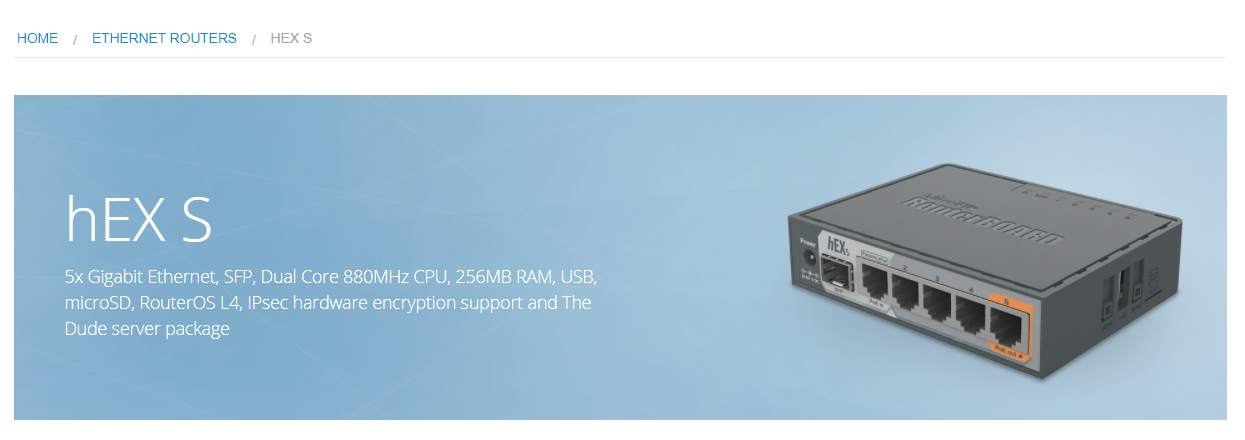
There's models with wireless included, or you do it the mikrotik way, and use CAPsMAN
attach the access points to one of the ports ,and manage it remotely
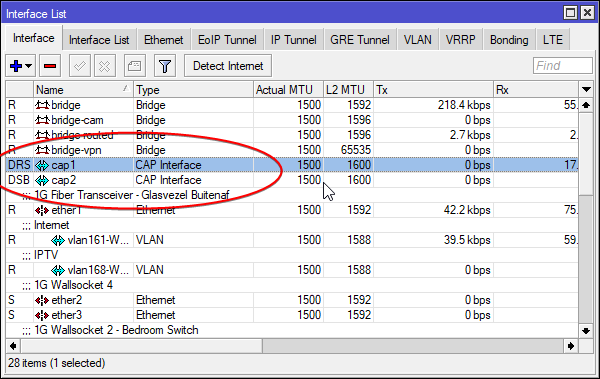
These two are remote interfaces
 spark lantern
Hello,
I'm having problems port forwarding on a Technicolor TG799vacXTREAM router in an attempt to achieve open/green NAT in games where it has for some reason turned moderate/yellow.
I have set up the port forwarding rules according to router instructions and portforward.com but according to online port checker websites the ports are all closed still.
Any tips?
 spark lantern
It shouldn't be, I've checked for that myself and talked to my ISP about it.
unborn sluice
So you just port forwarded it without anything bound for that port?
so it's just for the games
spark lantern
My router doesn't specify any applications, just destination IP to my pc, protocols and ports
Windows firewall has all the rules set already automatically
spark lantern
isn't it possible to check for that by using tracert and comparing IP adresses?
 ebon wasp
could be
but I have encountered cases where the ISP just reused "public" IPv4 addresses through their network
I just basically accept that I will never get open NAT untill they roll out IPv6
spark lantern
wouldn't that still show up with tracert though?
tame carbon
@spark lantern have you done a trace to 1.1.1.1 ?
is the first IP after your gateway (router/modem) a public IP or not?
if it is a public IP, you can rule out CGNAT
 hollow marlin
You can use public ranges with CGNAT
hollow marlin
Trace route, look at gateway then just google what's my IP and compare
 jaunty talon
Why on earth would you do that and have CGNAT? :D
spark lantern
first ip after gateway is public

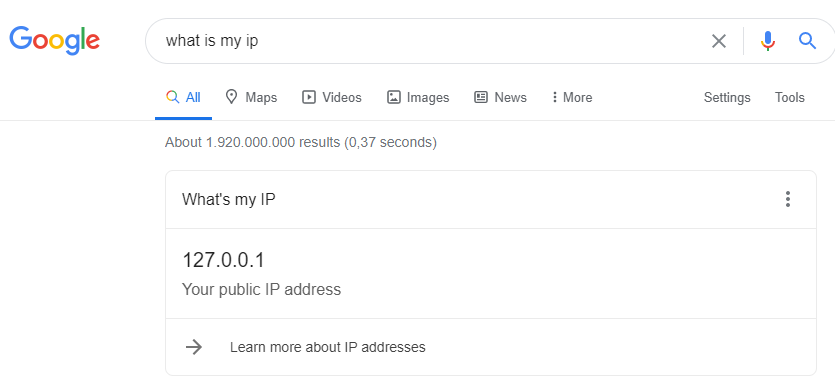 spark lantern
well no, my own public ip doesn't show in the trace at all, but my public ip and my gateway ip are the same
it uses the local ip in the trace
hollow marlin
@jaunty talon there was a live event where they did it a few years back but I cannot remember the design. It was mainly a design/management choice. I never do it
tame carbon
now that I think about it
public IP shouldnt show up in the trace
@spark lantern do a trace to your public IP
hollow marlin
The gateway will which you can compare with what the internet gives you
nova igloo
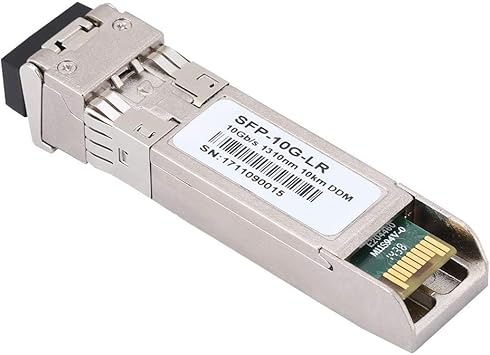
Can you use 1m fiber on 40km modules? Both side 40km compaitable
tame carbon
see if it stays within your network
hollow marlin
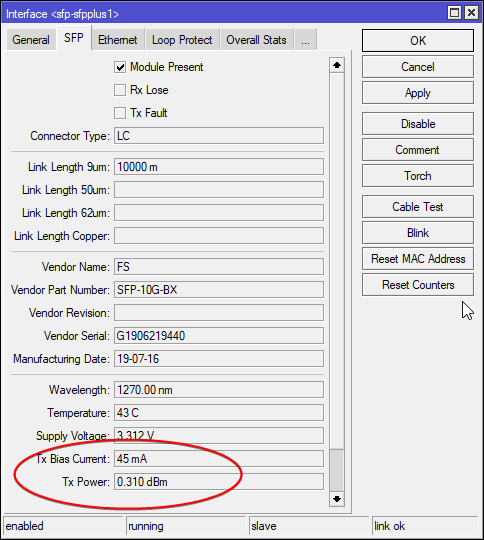
@nova igloo cutoff tends to be at 20km for Max TX being lower than RX. Just plug in the SFPs and look at the xcvrs min/max Tx Rx
spark lantern
my gateway uses it's local ip in the trace, so i can assume that's the gateway ip my router shows when i log into it right?
tame carbon
@spark lantern if your modem has the public IP that your browser reports
then you are without NAT
forward a port, put a service on it
see if you can reach it
nova igloo
@nova igloo cutoff tends to be at 20km for Max TX being lower than RX. Just plug in the SFPs and look at the xcvrs min/max Tx Rx
@hollow marlin What if both side same, will it got burnt ?
spark lantern
what do you mean by "put a service on it" ?
nova igloo
run a server on it
tame carbon
@spark lantern like a service that listens on the port
webserver, minecraft server, w/e
hollow marlin
@nova igloo if Tx is higher than Rx you have a chance of burning the optic.
tame carbon
@hollow marlin heh.
nova igloo
yeah i mean, both r same model module
tame carbon
@hollow marlin you can run 40km ZR modules in short distance
output bias will be increased
I've got 10km LR here, @ 30 meters
hollow marlin
Yeah it depends on optics but in general 40km tend to run hotter Tx than Rx
tame carbon
Yeah but as long as you don't go up to ZR+
you don't really run the risk of fiber fuse
worst case
you burn out the LDR on the receiving end
hollow marlin
By hot I mean too bright
 spark lantern
@spark lantern like a service that listens on the port
webserver, minecraft server, w/e
@tame carbon sorry if this is a dumb question but what would the the quickest and simplest method of doing this?
tame carbon
~1dB is what you want on the receiving end
hollow marlin
Not all vendors support changing power. Even with Juniper/Ciena only 1 or 2 models allow it unfortunately
nova igloo
Webserver i guess?
tame carbon
@spark lantern what are you trying to host or portforward for in the first place?
spark lantern
A game, The Crew 2 to be specific, ubisoft says it helps, nothing else has worked so i figured why not
tame carbon
@spark lantern what platform
spark lantern
PC
spark lantern
yes those are the ones i have port forwarded in my router settings
tame carbon
Testing with this, will be difficult
nova igloo
I see, so it's safe to use 2x 40km Module on a 1m SMF
spark lantern
idk how reliable port checker websites are but i tried like 3 different ones and they all say they're closed
tame carbon
@nova igloo 9micrometer SMF is all the same stuff
peak cloak
well on the pc side, the computer needs to respond, if there isn't a service running then it will say it's closed @spark lantern
did you use a portchecker while the game was running
 waxen saddle
Is your server getting the IP address via DHCP?
spark lantern
did you use a portchecker while the game was running
@peak cloak i have not tried that no
peak cloak
might want to try that
tame carbon
@nova igloo typical losses of SMF Singlemode loses 0.35 dB/km at 1310 nm and 0.25 dB/km at 1550 nm
You wont burn out the fiber with full TX power
often times, you don't even use the full budget
but as @hollow marlin said, not all appliances support power adjustments
in fact, I don't think burning out fibers is an issue at all
unless you start using EDFA or RAMAN
hollow marlin
Yeah you'll never burnout a fiber
tame carbon
@hollow marlin lol and if you do
it was shitty fiber
@hollow marlin though dust particles on the connector itself
can start a fiber fuse
but on LR and ZR this isnt an issue, because power is very low
you'll just get a lot of attenuation
@hollow marlin lol, the physics behind EDFA I can wrap my head around
but RAMAN just makes my brain stop working
nova igloo
Yeah you'll never burnout a fiber
@hollow marlin I mean burning the RX side
hollow marlin
Like I mentioned, just look at max Tx and Rx and make sure Tx is lower and your good
nova igloo
ok cool
spark lantern
did you use a portchecker while the game was running
@peak cloak Game running, still all ports closed, my router has upnp on and creates a rule for one of the ports when the game is running though. That port also still closed on port checker.
nova igloo
btw the Fiber Splicer is damn expensive
hollow marlin
Yeah our two most expensive ones are about 75k each
 hollow marlin
We buy rolls by the 100km
tame carbon
@hollow marlin you guys use MMF on site right?
hollow marlin
Nope
tame carbon
really?
hollow marlin
Done with MM. SM only
nova igloo
dont MMF for databases
tame carbon
@hollow marlin reliability issues?
nova igloo
for large bandwidth but short distance
tame carbon
MMF is just cheaper for short distance 100G
hollow marlin
@tame carbon You have to also take into cost of spares, extra fiber, etc. The cost is negligible at this point. Also easier to keep track of inventory
tame carbon
right
you reduce inventory complexity
@hollow marlin what about the connectors themselves?
I assume you guys use LC-Duplex?
nova igloo
SC ? Malaysia use SC Simplex
not sure why, when who the hell always plug and unplug the splicing box after installation lol
hollow marlin
Both UPC for LC and SC and GPON APC SC
nova igloo
why so many connectors?
hollow marlin
LC is for duplex, SC for simplex. UPC is unpolished and APC is angle polished for less attenuation
nova igloo
I thought most of the time are LC and SC only?
 hollow marlin
LC/SC is the connector. UPC/APC is the glass polish
Thats a first I have seen LC/APC
tame carbon
passive optical networks
nova igloo
different?
tame carbon
different architecture/topology
nova igloo
oh thats ONU thing
peak cloak
nova igloo
not connectors
tame carbon
Active optical networks are what we are talking about rn
PONs are used by ISPs stuck in the coaxial era
hollow marlin
Much. In the carrier space AE (active ethernet), basically just like you would use on a switch, is a direct fiber. GPON is where the fiber is spliced in the field and up to 64 ONTs can use the same fiber and bandwidth is shared
nova igloo
Oh really? I thought everyone using PON for cost saving
tame carbon
@hollow marlin GPON does physical addressing right?
peak cloak
verizon (only fiber isp in my area) uses GPON
hollow marlin
@tame carbon Yeah, it uses ethernet. The only difference is it uses TDM to separate the traffic
tame carbon
@hollow marlin is this cheaper than using WDM?
I'm glad my ISP rolls out singlemode here
and not PON
hollow marlin
Well WDM is for transport. WDM aggregates while GPON disaggregates
tame carbon
but any benefit?
hollow marlin
NGPON is very similar to WDM though
hollow marlin
Cost is about 10 fold less than AE, direct runs
tame carbon
i see
@hollow marlin the way they rolled it out here, they take an area, and make a huuuge circle
and houses are connected to this loop
2 lines, each line goes left or right way around the loop
so if theres a cut somewhere, you can tap over to the 2nd line
and go around the other way
but each house has their own pair of fibers
nova igloo
Clouds like GCP AWS n Azure, they r using ZFS or SAN?
hollow marlin
Pretty common to run rings in carrier space with ERPS
tame carbon
@hollow marlin what about ingress filtering
does GPON have any of that?
optical filters, to reduce noise?
hollow marlin
Thats what APC is for. The angle cuts loss a great amount
tame carbon
cus it sounds like it can suffer from the same issues that coaxial has
one coaxial modem can jam the entire medium
hollow marlin
Oh if a rouge ONT goes hay wire, yeah it will bring everyone on that fiber down with it. I've seen it. [wrong]
hollow marlin
NVM I am thinking AE. Like I said, GPON is TDM, its all the same light. Disregard what I said lol
Its been a long weekend
hollow marlin
Mmmm, basically
nova igloo
Malaysia dont use Coaxial, we use to use RJ11 which same as our phone line
tame carbon
DSL
nova igloo
yeah DSL
nova igloo
It blown up the 3in1 box twice due to strike, and cause half of the lights in my house bown up too XD
hollow marlin
Each ONT gets a time slot where it can send and receive based on the bandwidth profile you assign it. When over provisioned the slots overlap and will actually cause collisions
tame carbon
multiplexing dialup
remember when 56K modems supported "hold" ?
you could pause your internet, call someone
and be reconnected quickly, without having to redial completely
nova igloo
pause internet?
tame carbon
@nova igloo quick reconnect
hollow marlin
Im in my 20s, how old you think I am haha
nova igloo
60s' 😄 Dont kill me
nova igloo
But DSL is convenient
hollow marlin
@nova igloo Can never be too old for networking lol
nova igloo
I'm 18
nova igloo
i thought u asking us to guess ur age
hollow marlin
Oh haha
 tame carbon
Yup
nova igloo
I still have some of this lol
hollow marlin
Still never understood how those f@#$ers die at the rate they do
nova igloo
barely remember those days im using 2mbps...
hollow marlin
Im pretty sure we still have a single dial-up customer
peak cloak
I never remember using DSL or dialup, maybe I was just young
tame carbon
@hollow marlin at the company I worked at previously, we still used dialup heavily
peak cloak
This school I help at still uses DSL
tame carbon
@hollow marlin think of the telemetry on PLCs in sewer pumping stations
that was IP over phone lines
we've even implemented AMQP messages over SMS
for portable dataloggers
like groundwater datalogging
dialup is so simple
kind pond
@peak cloak I’m using the private IP, which is tequnically the router IP? It should be the same concept as routers hosting their web config dashboard that you access from its internal IP. I don’t know if I clarified enough that I’m using windows 10 hosted network, which creates a WiFi access point on my computer without a router
tame carbon
you can even do it today
all you need is two programs that can phone eachother
the handshake and data transfer is just sound
 subtle estuary
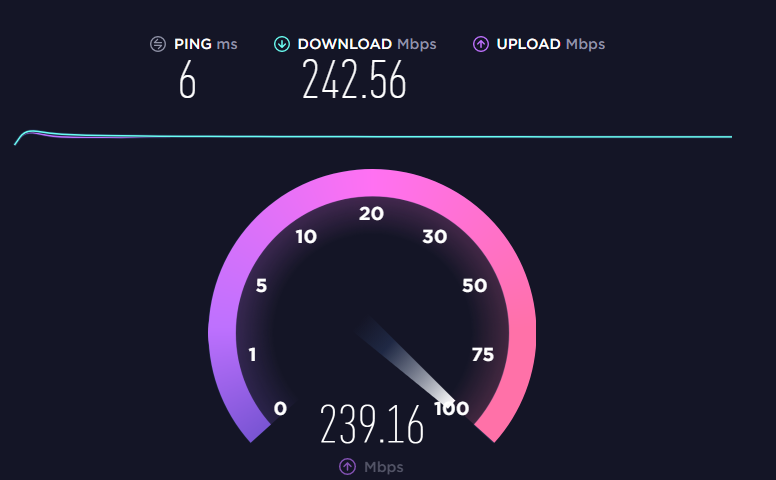
Is this a good speed
tame carbon
not bad
peak cloak
getting 500/500 soon
nova igloo
omg 1ms so fast
tame carbon
this is under load
subtle estuary
isn't that normal for fiber ?
tame carbon
I have about 6ms on my first hop to the datacenter
nova igloo
not sure is that mine problem
tame carbon
once I am in my private rack
I get like 2gbit/s
and upload is 1gbit/s
but its under load
nova igloo
Yes i guess? Its uploading to the server i think
tame carbon
@dusty epoch those cameras only send over the network when someone is viewing
if you have a storage device
its using it the entire time
yeah if you have a local storage device for the footage
that will be constantly under load
nova igloo
Why u need the cam if its not always on?
nova igloo
I dont think it consume Bandwidth cap if u r on local drive XD
tame carbon
@dusty epoch even if it is hosted on your local network, that doesn't mean you can't view it remotely
I have a 4 camera setup here
with 24/7 recording 1 month log
and an app on my phone
to view
only thing I had to set up, was a VPN between my phone and the home network
so I could connect to the camera server
A full-featured, open source, state-of-the-art video surveillance software system.
this is the app ^
yeah you need a small server
or box at home
that is just plugged in, and has network connection
it talks to the cameras over your local network and stores footage
locally, no, your ISP never sees any traffic
yes
when you go to view it when you are not at home
nova igloo
Yeah all traffifcs route in ur internal network
tame carbon
you just set up a VPN between your phone or laptop, to your home network
ehh..
You're in #networking
nova igloo
why not OpenVPN
tame carbon
I mean
if you not savvy
you can always use Zerotier
this is a mesh based VPN solution
functions as a cloud
@dusty epoch you have two problems here basically
 nova igloo
what about Hamachi XD
tame carbon
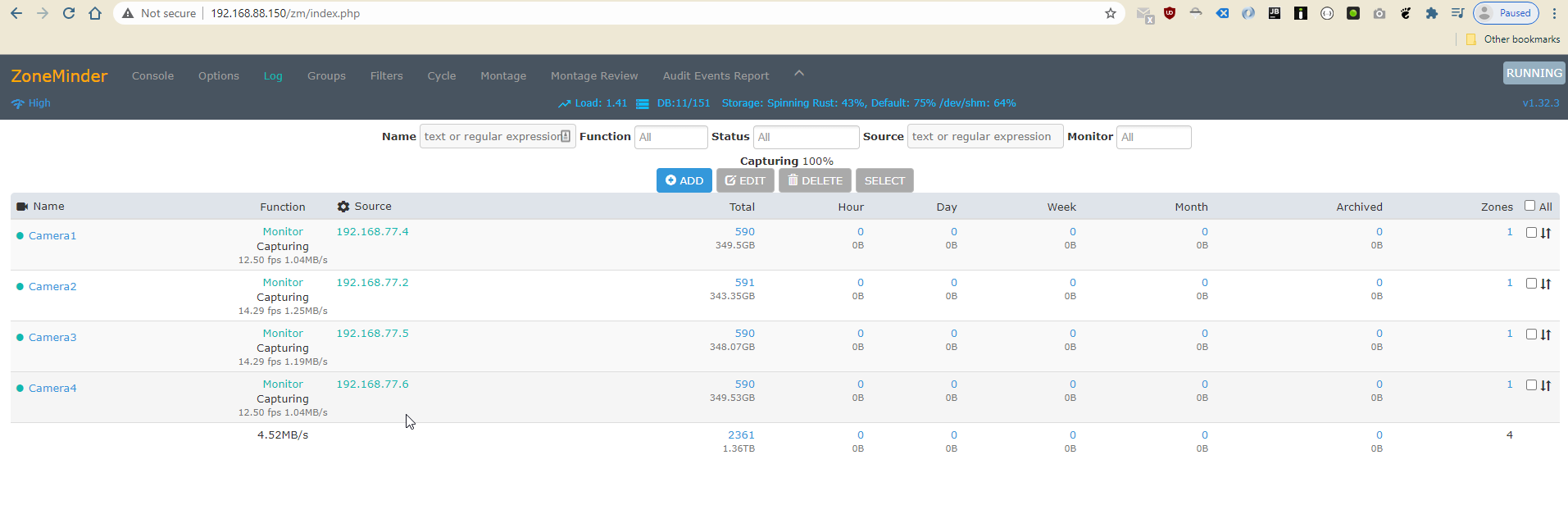
You need to set something like this up ^
Currently, my spinning rust is well, not spinning anymore
who knew, raid 1 can fail
xD
broke last week, so its not storing footage right now
@dusty epoch you can see the IP addresses of the left, of the cameras
and all it normally does is just write the footage to disk
and you can either have motion detection, or continuous recording
and it breaks these video frames up in like 10-20min however you want, clips
which you can browse
and even download to your computer
@dusty epoch yeah storage space you need to calculate
took me a while to tune
There's special harddrives for this kind of stuff
like HDDs but designed for things like NVRs
Networked Video Recorders
Seagate.com
Surveillance-optimized hard drives up to 18TB for NVR systems, DVR systems, and advanced-analytic AI systems.
seagate calls em nighthawk

Western Digital
Uncompromising Storage for 24/7, Always On Security Systems
"Purple"
with WD
but yeah you gonna have to learn how to use linux
if you attempt this
xD
Cloud solutions are terrible anyhow
well for one
government can watch too
and
cloud sucks
for the same reason
because you need it always connected lol
it uses up bandwidth for no reason
Like
I have 4 cameras
watch the network speed it needs
sec
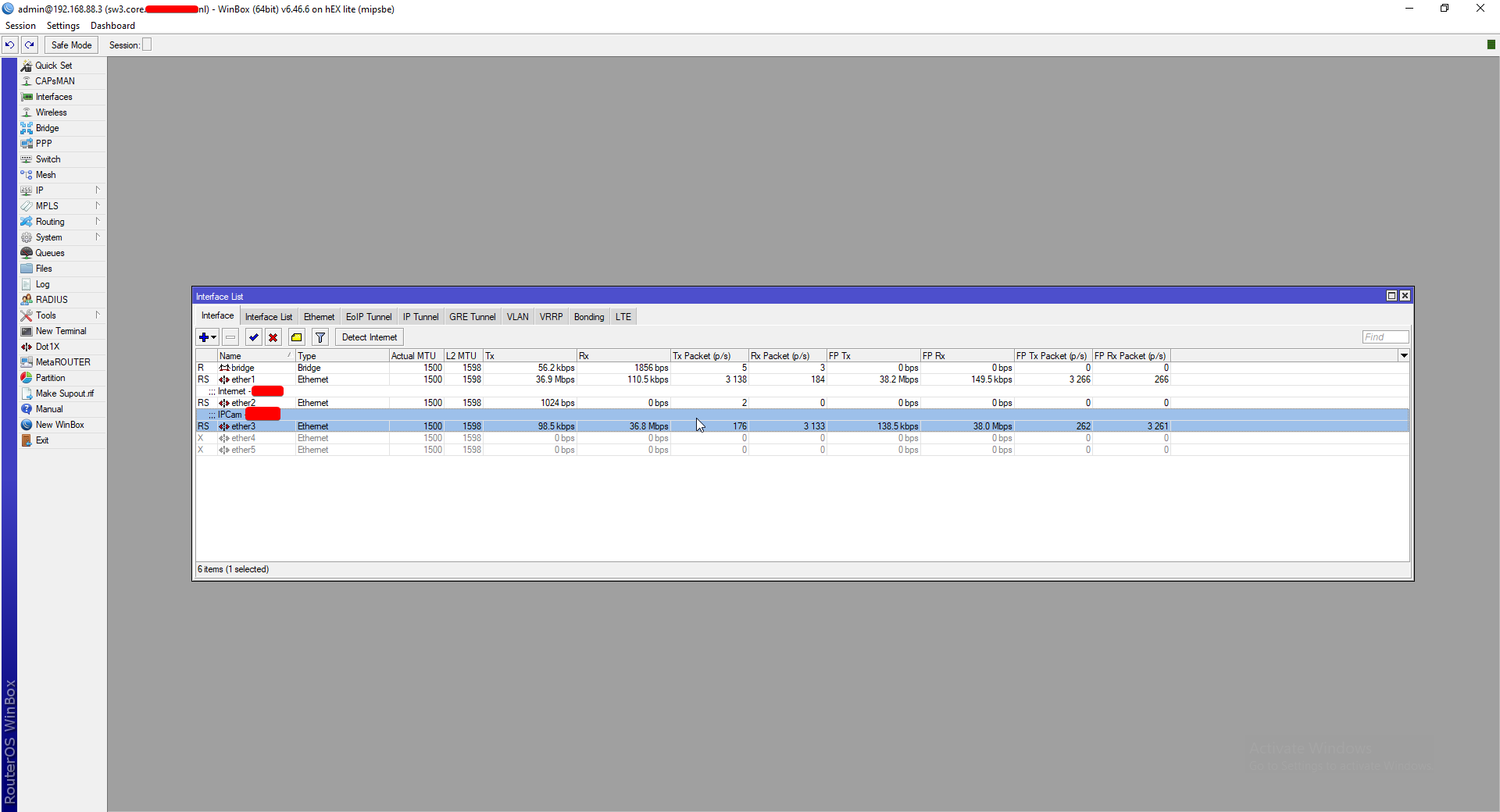
@dusty epoch ^
that's 36.8mbit/s
only 12,5 frames/second
so if you had higher framerate, it would be even worse
if you have a lot of cameras, like public offices
thats basically what they need a serverroom for
like one big server
with fat network pipe
in fact, my cameras cant even reach the internet
the timeserver they use, is on my router
and they can only talk to the NVR
yeah
so zoneminder, what I linked
usually has some kind of web interface
that you can open to view the streams
the trick is, to figure out a way to be able to access that from the wider internet
yeah, your router has a firewall
so you can only access it by its local ip
in my case, I have 192.168.88.150
so its just a webpage
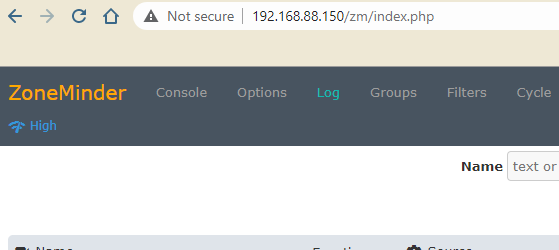
and you just enter the IP address of the NVR (server)
@dusty epoch not unless they can break through my firewall lol
peak cloak
or if you have a domain setup, you just enter a name like I can nvr.presentmonkey.tech
tame carbon
@peak cloak lol
peak cloak
I mean probobly more secure than unify
peak cloak
I like domains
tame carbon
I use dns prefixes here
so my laptop is watomat.irl.REDACTED.nl
but it does wildcard prefixing
so I can short it to watomat
peak cloak
yeah, so can I
tame carbon
@dusty epoch I wish more companies would sell a solution like nest and such
that didnt involve cloud
like, a small box you put behind your tv next to your modem
you plug it into your local network
yeah they abuse network bandwidth
for they cashgrab subscription
500 bucks gets you a decent NVR
cameras themselves are relatively cheap, like 50 bucks each
yeah but sell this to the masses.
main reason that this kind of stuff doesnt always sell
is because its easier for a device to phone home
than for the user to have to configure their router
so it can set up a secure tunnel
most home routers and ISP crappy routers don't support this
and if you are on mobile networks, that are behind a NAT, it wont work at all.
yeah
so they sell their soul
for the "easy" solution
which is also the worst
consumerism at its worst
you can have a decentralized cloud
but we need to standardize a way for people to have a "home" server
and you can just load apps onto it
like you would with phones

Support NODE through Patreon: https://patreon.com/N_O_D_E_
Actually
watch this one ^
Very interesting
@dusty epoch by giving up personal data, this is equivalent of selling your soul
because a user's facebook account data is worth like $10 to advertisers
nova igloo
10$ each account?
nova igloo
wow thats alot
tame carbon
facebook collects a lot of data
peak cloak
I was trying to buy something off facebook marketplace so I had to make an account, but they want everything. Like I couldn't use marketplace because I needed to somehow prove that my account is actually real
tame carbon
@dusty epoch you know what the worst part is
of doing security on systems like this properly
there's no "recover password" feature
if you loose your encryption key
its game over
well all ur data would be gone

ZDNet
Sonos walked away from the cliff. But abandonment of legacy customers is precisely what's wrong with IoT.
Sonos were those cloud connected devices
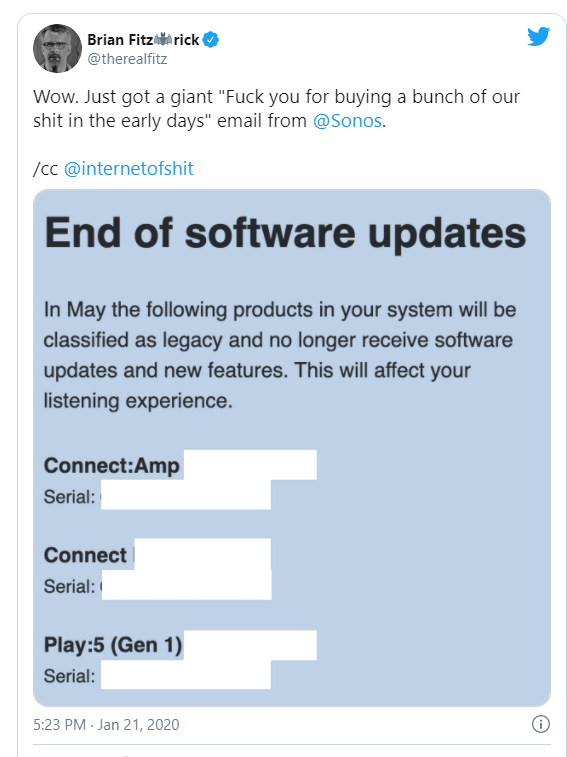
and well..
without a server
they are basically useless.
the code that runs on them, is closed source, so you cant run a server yourself
the password is in the form of an encryption key
usually a file
you can password protect the key
but ultimately if you forget the password, or loose the keyfile
you are rekt

Public-key cryptography, or asymmetric cryptography, is a cryptographic system that uses pairs of keys: public keys, which may be disseminated widely, and private keys, which are known only to the owner. The generation of such keys depends on cryptographic algorithms based on ...
the idea with a password on your private key
is that someone with the file, cannot use it without the password

You have two keys, a public and a private one
they each undo eachothers encryption
so if Bob encrypts a message with your public key
only the private key can decrypt it
https also uses this
no thats the message
forget the password for a moment
this is just encryption in general
but the idea from decentralization
is that you encrypt your data with your public key
and only you can access it
now, companies hold all your data
and you are not in control
@dusty epoch an interesting fact, that comes with this kind of cryptography
you can also it in reverse
if I encrypt a message with my private key, and send it to you
you can verify if it was sent by me
because it will only decrypt properly with my public key
@dusty epoch this stuff is called "assymetric key encryption"
and is basically unbreakable
unless you have a supercomputer the size of the galaxy, and then some

this is key signing
this is what you can use to verify if a message was sent by the proper authority
waxen scroll
i mean idk why the RRRRRREEEE on sonos, of course they're gonna stop updating
all vendors do it.
EVERYONE.
tame carbon
@waxen scroll yeah but its a fundamental problem with IoT
its consumerism at its worst
waxen scroll
thats why i chose zwave
peak cloak
@tame carbon soon ™️
peak cloak
One of my dad's friends is crazy about his nest cameras and was showing off how he can see moniter his home anywhere. Good luck when nest decides it's EOL.
paperweights
tame carbon
if you have a unify
you might be able to just configure a vpn directly into that
wat
unify protect
most ipcams use the same kind of protocols
its all either HTTP, MPEG, or just RTMP/RTSP
The Real Time Streaming Protocol (RTSP) is a network control protocol designed for use in entertainment and communications systems to control streaming media servers. The protocol is used for establishing and controlling media sessions between endpoints. Clients of media serve...
Thats what I use
cheap Reolink cameras
nothing fancy
if you want to get one of those unify cameras
I recommend just getting their NVR too
yeah
you will probably get lost in configuring this
they just have a drop in solution
its a small box, with harddrives in them
that decodes and records the footage
@dusty epoch it uses local network
none of these solutions need internet
@ancient vigil I got 4 cams, ~40mbit
@ancient vigil I use a streaming codec that doesnt need to be transcoded
so it can just write the stream straight to disk
yep
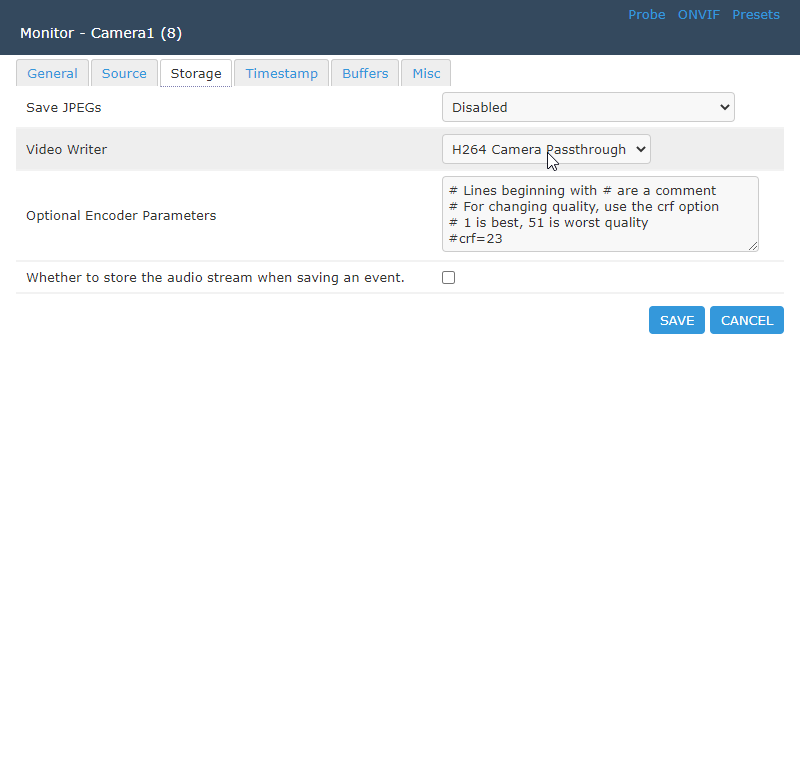
rtsp://admin:PASSWORD@192.168.77.4:554/h264Preview_01_main
zoneminder was a bit finecky to get going
@dusty epoch why do you so want it to be cloud?
you can still self-host content
I host services on my own internet
@ancient vigil I got a ryzen 2600
its low power chip
and it uses barely any cpu
its on a mini itx board
 rocky badge
@ancient vigil Are you using sightsound with Protect?
Ah ok, so that's your primary NVR?
Nice
tame carbon
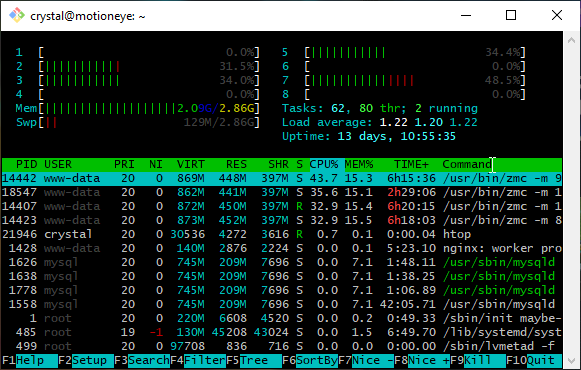 rocky badge
We've got Nest right now because I don't feel like leaving behind a NVR + UniFi Protect for parents, but I'm probably planning on doing either Protect or Axis/LTS
tame carbon
the vm name is completely wrong
its not motioneye, its zoneminder
all this cloud connected nonsense ought to be banned
like, its seriously bad for environment
clear igloo
Because everyone is tech savy enough to do it locally -.-
tame carbon
only permit open systems
rocky badge
if I had to replace Nest for my parents, I'd probably do this https://blob.rocks/qDJhXHRlIu.png
 tame carbon
so that even if the company surrenders
I mean, in a way this is right to repair
except the hardware isnt broken
the software is
clear igloo
That I'll agree with, they should give people an option for other support once the company wants to give up support
rocky badge
Our Avigilon at school does ALPRs as well as object detection
tame carbon

Enhance nearly any IP, traffic, or security camera with Rekor’s OpenALPR suite of solutions designed to create exciting new vehicle recognition capabilities!
I've used this before
but that was to build an app
where you could scan license plate, to get car info
The main problem with cloud services
rocky badge
peak cloak
anything similar to sighthound, but free?
tame carbon
is that our phones are so powerful, because all the processing is done elsewhere
but I see no problem, with a standardized way for developers to deploy their apps to a local kind of server
rocky badge
The Avigilon AI appliance just streams incoming data from the NVRs
tame carbon
the same way we buy phones, tvs and such
that have apps
why cant we have a kind of home server
rocky badge
And the NVR is ONVIF compliant
tame carbon
you can control with your phone.
rocky badge
I wish they continued to support Video
peak cloak
hmm, I will look into it
rocky badge
Although Protect looks cool, but I kinda don't like its limited to their NVRs
Video was self hostable, Protect is no longer self hostable
"self hostable" aka bring your own hw
their new Android app is actually quite interesting
They're actually unifying UniFi protect, network, talk, access now

Ubiquiti Community
They're trying to get a single user in UniFi to be recognized everywhere else iirc
So you can provision a user to be a UniFi network admin, but they're also in UniFi access for building access, talk for VOIP, and also have Protect access if required
Would be cool if they can deliver
rocky badge
I've got 3 UniFi APs, rock solid lol
The only time they go out is when my power goes out 😂
clear igloo
@rocky badge Y u no UPS for 10 hours?!?
rocky badge
😂
waxen scroll
finally @rocky badge came back
@clear igloo no UPS in this house
i use power filters on my A/V but thats about it
 gentle pawn
Not entirely sure if this is where i ask but
Anyone have experiences with NAS servers or things like Plex/Jellyfin?
unborn sluice
What's a NAS
waxen scroll
@unborn sluice dunno. i only use $1M SANs
 spare bay
Personally I love unraid, would recommend
unborn sluice

unborn sluice
badraid
waxen scroll
@peak cloak i highly recommend no nas so theres that 
make shares off your main machine so at least something has high speed storage
peak cloak
I mean, I want kinda want a NAS, but not enough use to justify it
waxen scroll
not speaking just to you, but realistically you're one person. you're not running 5 machines at the same time with external storage needs, you use one at a time. why then does it make sense to buy a NAS, burn more power, slow down storage to all machines... when you can make your main machine the storage and have high speed where you use it most and lower for the occasional other device use
peak cloak
If anything, it's main use would be family pictures and videos
but honestly, cloud storage exists for a reason
waxen scroll
yeah i use cloud for stuff like that TBH
unborn sluice
but honestly, cloud storage exists for a reason
What if you want to see your pictures at the lowest latency (other than local)

waxen scroll
lol
peak cloak
just use a vpn
waxen scroll
*smashes LIKE and subscribes to @unborn sluice
peak cloak
telaport the packets
waxen scroll
now, if you're gonna make a big VM server and you plop a samba on there or something... ok. fine. but other than that never do a nas IMO
peak cloak
my only servers are a rasp pi and an optiplex
rasp pi for critical things I need 24/7 like DNS, controllers, etc.
optiplex with proxmox for lab
waxen scroll
my ras pi is running all my home automations. sits quietly hidden ontop of a shelf unit and does its thing
my server stays unplugged 99% of the year
peak cloak
I once wanted to buy an HP G8 server, glad I didn't
waxen scroll
only reason i have one is i used to get free colo first two jobs
now tech has caught up so much vmware player is fine for my needs, plus i have no colo
my 9900k is just as good as my dual xeon r710 from 7 years ago
only difference is i dont have 300gb ram
i bought the 710 new mostly cause the crap i could get used was crap lol
VMs were still catching on
stone kite
Can a managed switch be used for hdmi over ethernet?
 sinful solar
curious question: I've been looking at the log for my firewall and see lot s of invalid tcp packets being dropped as they try to leave my network. is there any reason those should be blocked or can I change that rule to only block invalid packets from WAN?
 nova igloo
yeah switches, ap and everything use USB 😂😂
unborn sluice

unborn sluice
not all USB C have PD
hollow marlin
@sinful solar what's the exact log? FW shouldn't be dropping anything going out unless you are changing rules. Default FW policies are to drop invalid connections from WAN
 lethal marlin
sinful solar
lethal marlin
sinful solar
@hollow marlin
They’re being caught by rule #9. For now I changed it so that it’s only dropping invalid packets coming into wan.
I can’t think of a good reason to drop outgoing invalid packets
hollow marlin
That's fine. It's just timed out connections that don't have a state in the table
stone kite
The thing I was referring to earlier was this: I want to use cat5e/cat6 to run the video from my desktop to the TV in the other room. If I connect the ethernets with a managed switch, will I get the correct video signal? In other words, can a managed switch direct traffic from port 35 to 28 for example? I'm new to this sort of thing and wanted to check before I go buying adapters and stuff.
Please ping me so I know to check back. Lol sometimes I am forgetful. Lol
stone kite
Y u do dis?
waxen scroll
@stone kite no
You can only do a wire from a converter to a converter. They don't use the same frames as a standard network so a switch will not support it
I don't think you can even configure an IP on them
tame carbon
@stone kite switches use packet switching to route traffic
so you don't have to think about how the switch is going to handle it
it just works.
as long as your videosource can use IP
 fiery vale
ok so i have a question. where i live we have two independent internet lines, a 16mbps down and 2,5mbps up and a second 11mbps down and 1mbps up connection. one is our wifi and the other one is our lan (we did this to have more bandwidth for working at home). but i noticed that when i connect both lan and wifi windows sometimes uses both connections and effectively doubled my download speeds. but is is very inconsistent. is there any way to control that behavior to make it use both connections when i need it?
so the practical max speed of both of these connections is 1,1MB/s (or 9mbps). and i was downloading things at ~2,2MB/s
but it seems to randomly start and stop doing this every few minutes so i would like to be able to control it
currently it looks like this
reduced speed because others are also using it right now
tame carbon
@fiery vale you can't stack network connections like that
you could load balance between them, but a single datastream will only be as fast as the slowest link in the chain
fiery vale
why am i exceeding my max seed by 100% then? i had this connection for years and i can say with absolute certainty it does not go faster than 1.1MB/s
and it is not just wrong display i did an actual downlaod and it actually did download all that data
tame carbon
not sure if steam is capable of this on its own
 crude path
It definitely shouldn't be.
unborn sluice
as all things should be
tame carbon
@weary hill

this is a tiny 10gbit switch
you can use the single gigabit port for the "slower" part of your network
and have 4x 10gbit switching
 weary hill
Ohhh and then just use the 10Gigs for local network?
tame carbon
Yea
tame carbon
My router also does 10gbit
 weary hill
What ETN cables you need for 10gig now, cat6 or something?
weary hill
Ohhh okay
Snap.
Are there fiber optics cables available for just like plug and play use for networking?
Like ethernet standard?
peak cloak
yeah kinda
weary hill
I have this router ^ with that switch
@tame carbon Ballin'.
tame carbon
@weary hill yeah so highspeed interfaces use SFP
peak cloak
bascially on the switch/router side you have sfp
tame carbon

The small form-factor pluggable (SFP) is a compact, hot-pluggable network interface module used for both telecommunication and data communications applications. An SFP interface on networking hardware is a modular slot for a media-specific transceiver in order to connect a fib...
These can do SFP (1,25gbits)
SFP+ for 10G
and then there's all kinds of QSFP+ stuff for 25G, 100G, 200G
and even 400G
peak cloak
^that sfp is the interface between fiber and the electrical signals to the router/switch
tame carbon
exactly
 weary hill
For all the cable routing for the internet, do they use fiber optics for most stretches? They must right?
 peak cloak
yeah, the internet backbone is all fiber
weary hill
Oh nice
tame carbon
@weary hill backbone internet is all fiber
they even use WDM
so you can have multiple "colors" of light on the same fiber
for theoretical max of like 18tbit/s on a single pair of fibers
weary hill
Yeah. Then nodes and city networking and shit can be other shit?
Ohhhh
Yeah yeah
Cool
tame carbon
@weary hill long distance carriers use WDM
weary hill
That's so insane actually
tame carbon

In fiber-optic communications, wavelength-division multiplexing (WDM) is a technology which multiplexes a number of optical carrier signals onto a single optical fiber by using different wavelengths (i.e., colors) of laser light. This technique enables bidirectional communicat...
but WDM systems are expensive
weary hill
Inb4 Linus thumbnail: "I GOT WDM ROUTING IN MY HOUSE"
tame carbon
@weary hill its not really routing
there's no electronics involved in this
its just passive filters & prisms
weary hill
I mean just routing as in laying cable yuhno?
tame carbon
@weary hill most of the time, what you'll find, is we set up a physical network with fibers
and then you have a virtual network ontop
with VLANs
I do that at home too
that 10gbit link between the switch & router, does multiple networks
weary hill
VLAN = ? Not sure about that one
tame carbon
virtual lan
peak cloak
routing = selecting and moving packets between networks
peak cloak
no
tame carbon
WDM is physical
weary hill
It's fiber
 peak cloak
maybe crystal can explain routing better
tame carbon
@weary hill switches use layer 2
weary hill
But the packets and everything is contained in the light which is being moved through WDM / fiber optics no? Or am I being too simplistic in my thinking here?
tame carbon
it knows what device (MAC) is on what port
@weary hill fiber is just the physical link
you could use copper
but fiber is just faster and more reliable over long distances
peak cloak
@weary hill yeah, but that's all on the pysical layer to just move more packets through the same fiber
tame carbon
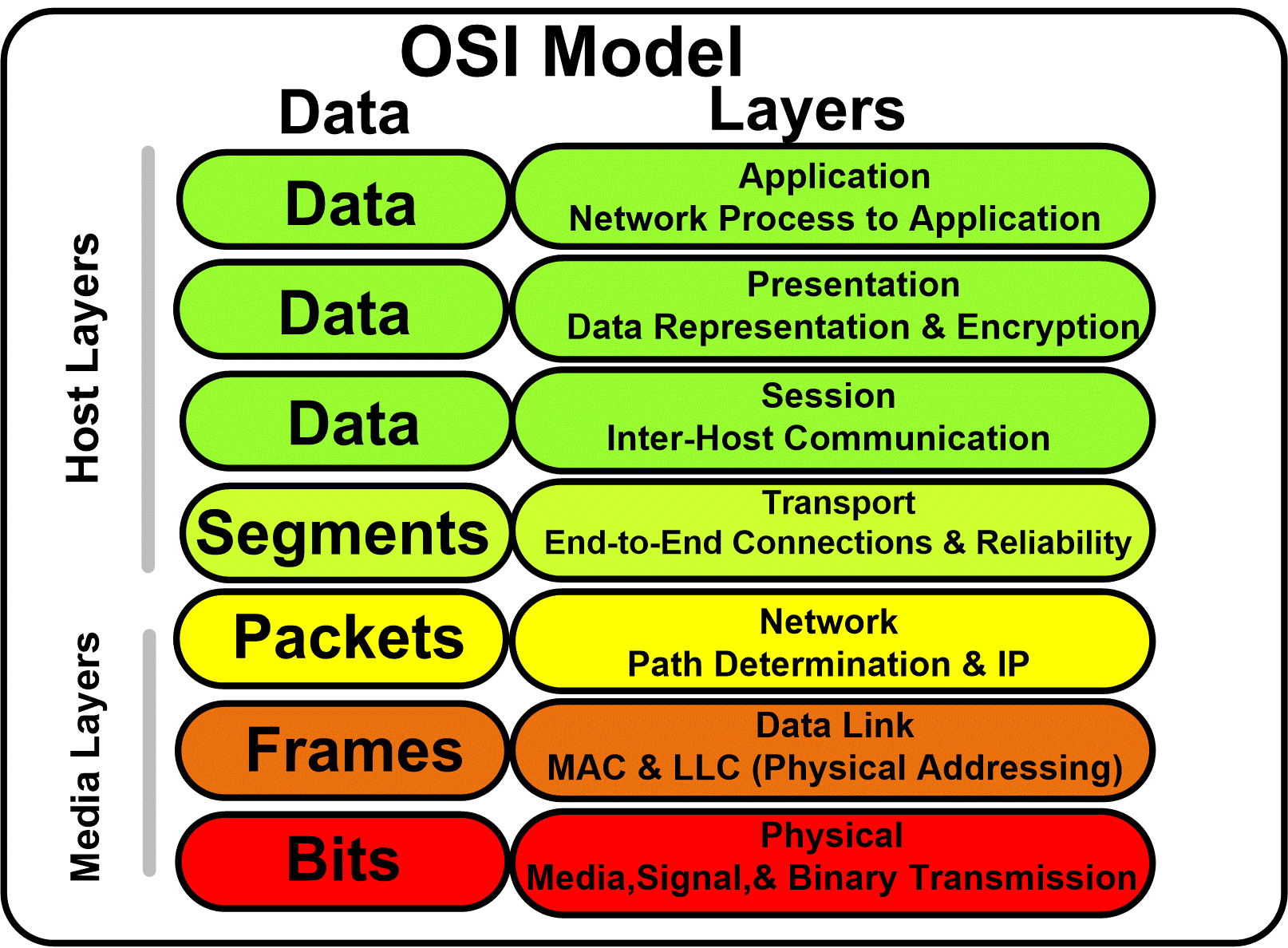
@weary hill think of these technologies as abstract layers
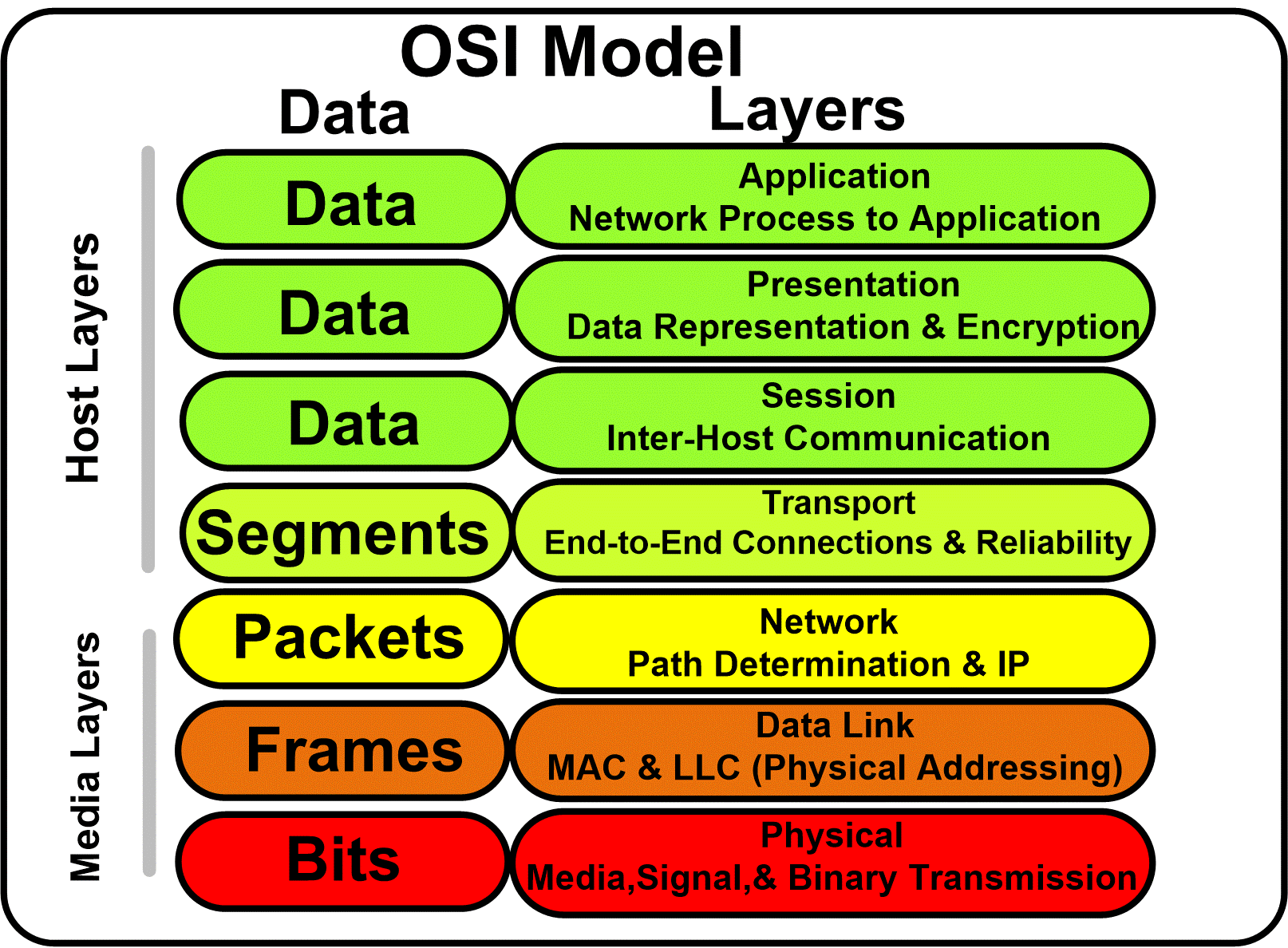
layer 1 provides a way for bits to be sent and received
between 2 devices
tame carbon
Layer 2, uses MAC addresses to physically give each device an address
wat
@peak cloak is that from your hw assignment?
Dijkstras, LETS GO.
peak cloak
no, just google
weary hill
😂
peak cloak
trying to explains routing
weary hill
hahaha
peak cloak
hmm, that won't help really
tame carbon
@weary hill so the layer 2 logic, switching packets between ports on a switch
does not care about layer 1
layer 1 can be fiber, can be wifi, or even smoke signals
doesnt matter
weary hill
This is why Networking was never my favorite to get in to, and why I chose programming hahahaha
tame carbon
@weary hill once you understand these layers
it makes a lot more sense
Routers operate on Layer 3
peak cloak
maybe this is better
tame carbon
Because layer 3 introduces IP addresses
weary hill
Right yes layer one is literally just a medium or a vehicle for data to physically travel from point A to point B
I get it
tame carbon
Layer 2 = physical addressing, layer 3 = logical addressing
@weary hill think of it this way
the mailman routes your parcel to your house address
weary hill
And then layer 2 is categorizing and dividing up stuff so that you can send it to a certain device, on a certain port etc etc
Yes?
tame carbon
but it doesnt give it to the person named on the parcel
think of the house address as layer 3 (ip address)
and the name, as the physical address
weary hill
Right
tame carbon
so you accept the parcel, and its not for you, but your housemate
weary hill
Okay so IP and port stuff would be layer 3?
tame carbon
layer 4 are the host protocols, not really part of the physical networking hardware
firewalls sit on layer 4
weary hill
Layer 1: Physical medium
Layer 2: MAC addresses, determining devices etc
Layer 3: IP addresses
Layer 4: UDP / TCP and by extension ports
That about right?
 tame carbon
@weary hill however, one thing this does not explain
if you have a packet, that is ment for say. 192.168.1.100
how does your router know, which port that device sits on?
weary hill
And trying to read up on packets and the uh... I forget if it was like TCP/IP protocols I think I was reading about and the different stages of a TCP/IP connection
Handshakes and like
tame carbon
The Address Resolution Protocol (ARP) is a communication protocol used for discovering the link layer address, such as a MAC address, associated with a given internet layer address, typically an IPv4 address. This mapping is a critical function in the Internet protocol suite. ...
This is a layer 2 protocol
weary hill
How the data is divided up
tame carbon
the network device, broadcasts to all connected devices
Who owns 192.168.1.100, tell <router mac>
weary hill
Ahhh
tame carbon
and the computer responds using layer 2
peak cloak
You can actually view this all on wireshark
weary hill
Interesting
tame carbon
so when a packet comes in, it just looks at the destination MAC
you can find the destination MAC, by using ARP
weary hill
And if it's not in there, it calls on all devices in the network to give it that information?
And adds it to the table?
or
No wait because if it relies on that table too much what if it changes and it just keeps using the table
tame carbon
Two computers in an office (Computer 1 and Computer 2) are connected to each other in a local area network by Ethernet cables and network switches, with no intervening gateways or routers. Computer 1 has a packet to send to Computer 2. Through DNS, it determines that Computer 2 has the IP address 192.168.0.55.

To send the message, it also requires Computer 2's MAC address. First, Computer 1 uses a cached ARP table to look up 192.168.0.55 for any existing records of Computer 2's MAC address (00:eb:24:b2:05:ac). If the MAC address is found, it sends an Ethernet frame with destination address 00:eb:24:b2:05:ac, containing the IP packet onto the link. If the cache did not produce a result for 192.168.0.55, Computer 1 has to send a broadcast ARP request message (destination FF:FF:FF:FF:FF:FF MAC address), which is accepted by all computers on the local network, requesting an answer for 192.168.0.55.

Computer 2 responds with an ARP response message containing its MAC and IP addresses. As part of fielding the request, Computer 2 may insert an entry for Computer 1 into its ARP table for future use.

Computer 1 receives and caches the response information in its ARP table and can now send the packet.[7]
That seems like it'd be an issue
tame carbon
once these ARP tables are built up
it can just reuse them
if a device gets a new IP
it usually announces this
you can 'broadcast' to all local layer 2 interfaces
same you can broadcast on layer 3, by sending data to 255.255.255.255
weary hill
Right so it DOES just use the cache
peak cloak
weary hill
But then what if the IP changes or even the MAC? How does it quickly remedy this?
 weary hill
Well you could give a different device the IP in which case the MAC would not be correct for where it's trying to deliver it, no?
tame carbon
MAC is to physically pass packets between devices
IP is to address these physical devices
but to jump from IP -> MAC
you can use ARP
@weary hill there;s also "networking hubs"
those are colloqually known as 'dumb switches'
they don't have an arp table
and every packet that comes in, goes out all the ports
but hubs are rare these days
almost all switches are layer 2 capable now
weary hill
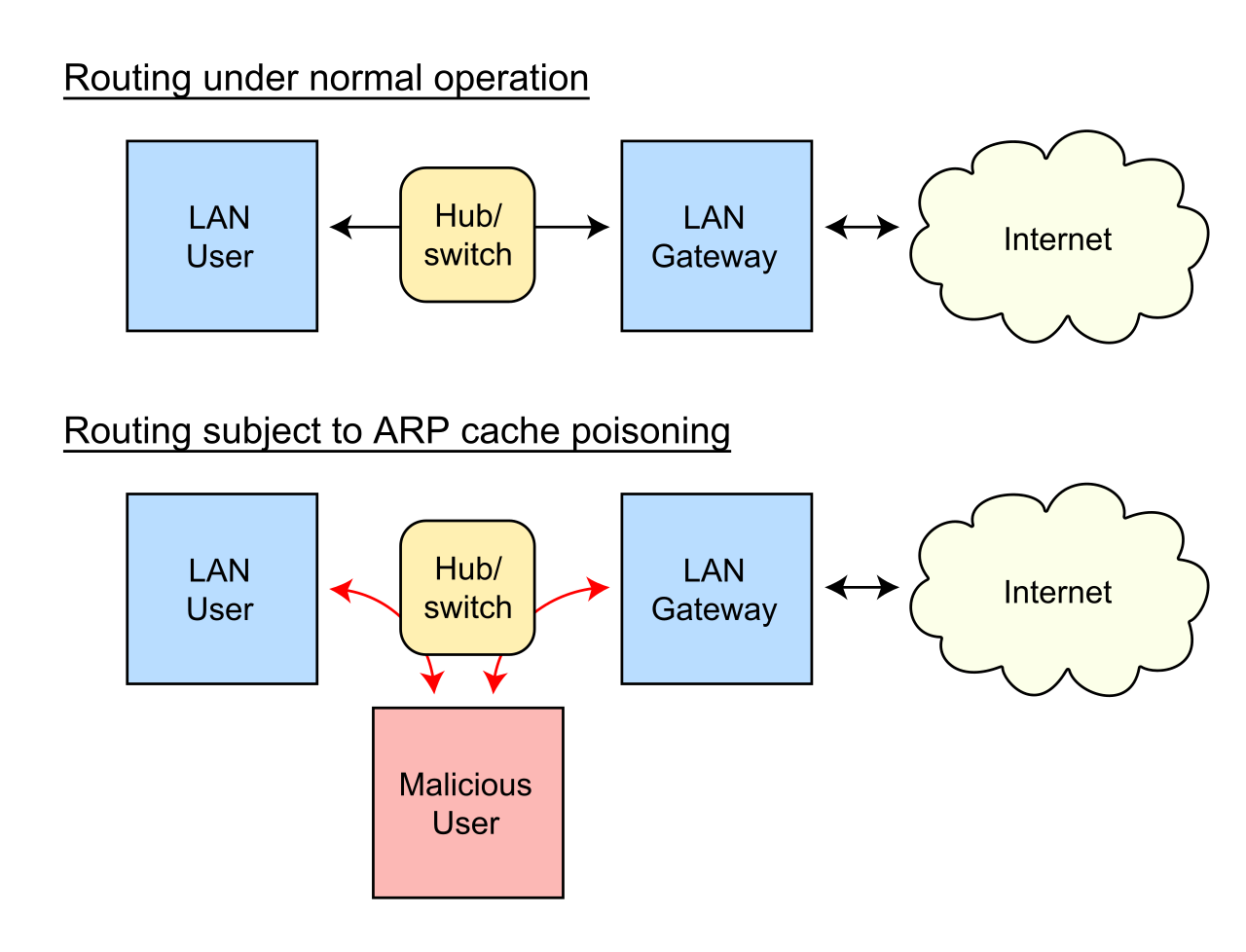
Okay, but what happens if a different device is assigned an IP in the ARP table or whatever, and it's trying to send packets to that IP, but the MAC is now different and the packets would end up at... the old device?
tame carbon

@weary hill yeah
you can poison the arp cache
by for example, pretending to be the router
weary hill
Mm right
tame carbon
you can prevent this somewhat
by making sure ARP requests are only forwarded by the proper authority
and on servers, and such, to be able to send arp requests manually, you usually need root permissions
@weary hill best way to prevent this
is to use static mac binding
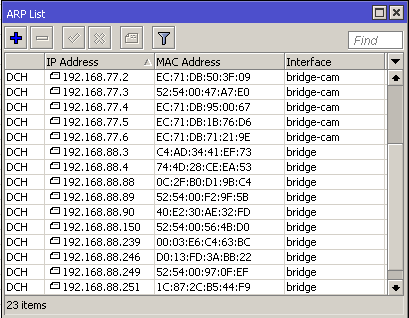
so routers will invalidate unrecognised MAC configurations
 peak cloak
ok, kinda need help with something. Everyone has internet access except my dad which can't even ping 1.1.1.1. I suspect this is some windows weridness
tame carbon
@peak cloak disable v6
try again
@peak cloak check for ipv4 conflicts
if there's two devices with same IP, you get all kinds of weird side effects
peak cloak
hmm alright, this is his work computer so I'm kinda limited
tame carbon
do they use VPN?
peak cloak
ye
weary hill
Ahh I see @tame carbon Cool
peak cloak
idk, he said it works now
tame carbon
@peak cloak reduce MTU to 1300 bytes
peak cloak
oh, he can't change that