
#networking
1 messages · Page 221 of 1
 twilit garnet
I can't put the cables at the ceiling because it'll ruin the design and i cant put it at the walls either since the router is placed at the living room of my house
 tame carbon
@twilit garnet does your house have gutters along the wall?
twilit garnet
my only options would be to run the cables at the ceiling
tame carbon
on the ground
is the place rented?
cus that limits you to gutters only
otherwise you could see if you can mod the drywall
xD
twilit garnet
yeahhhh i cant do thatt
tame carbon
cus I went the extra mile for my fiber optic installation
 twilit garnet
any drilling my dad dont want kek
tame carbon
I cut a slat into the drywall
installed the pipe
goes from the ground (from outside) up to the attic
then covered the pipe with cement
and then contractors redid the entire wall (we were renovating xD)
tame carbon
@twilit garnet yeah so you can get those very cheap at most home improvement stores
and you can cut them to your liking
making inward and outward corners ,takes bit of practice
but with one of those corner cutters I showed you

Helps getting that 45 degree angle
ahh
ok they called Miter boxes
twilit garnet
I'll think about it
thanksss
or what the other guy said
maybe ill just buy white cables
or painted
my ceiling is white anyways
tame carbon
if you can tuck em in the corner, not really an issue
or...
get white sleeved fiber optics
wait
nvm
cant make sharp turns
 unborn sluice

twilit garnet

tame carbon
straight runs would be ez
 topaz quarry
remember if your house has coax
tame carbon
I've abused old phone lines in a house for ethernet before
its twisted pair xD
like, in old houses all the phone wires just go to the electric meter
unborn sluice
moca or powerline whatever possible
tame carbon
at least, here they do
tame carbon
that works
its just copper xD not really a lot you can screw up with that
as long as its properly shielded and twisted, generally works
dirtiest network hack is still using a single CAT5 cable for two 100M links
if you go to customer to inspect network issue
and some other installer did this, instead of pulling another cable or setting up 1G with a Layer2 solution
termination was nasty, like 5cm of unsleeved wires, nontwisted
 rocky badge
@topaz quarry When the local ISP redid voice to replace Spectrum voice, they just used Cat5e lol. But my Internet coming into the house from the ONT is using Cat6. They usually just use Cat5e for residential customers but they were like, "if you have any Cat6 we can run that instead." They do fiber straight into the router for business but not residential :(
topaz quarry
At&t offered to run the fiber to my closet
if i hired a contractor to make the hole
and i was like nah
but they would've done it
rocky badge
My fiber comes all the way to the ONT outside of the house on the same exterior wall to where my shit is
So the Cat6 run inside isn't that long
topaz quarry
same
they put it in the garage wall/outside border
and the cat 6 run is like 10m to the closet
so i'm like nah it's not worth tearing up walls for this lol
topaz quarry
my life was a tad easier
my house has one of those centralized zones for wiring in the laundry room
so they just tugged a bit over there
and the house did the rest lol
rocky badge
topaz quarry
that makes sense
rocky badge
So other shit on the network could get a public IP through VLAN 69
rocky badge
lol
topaz quarry
i'm probably going to shift the "home network" from untangled to OPNSense
i tried untangled for an extended period
i'm like i get it, but why
also OPNSense and vyos can be automated
there was also a constant crashing issue with one of the boxes
so of courses i have a 3 node VRRP vRouter setup
it was all iscsi's fault
iscsi!!!
 waxen saddle
Anyone know of an on-site free DNS filter more advanced than pihole?
Time-based filtering, device/user filtering, etc...?
topaz quarry
adguard is a little bit more
if you want a more tailored solution it will require tooling
if you have a wish list just let me know
 topaz quarry
no
unborn sluice
yes
topaz quarry
rofl
 brave wagon
hello i dont know if its the right channel to post this but i want to change my ip from 10.0.0. ... to 192.168. ... and i dont know what to do
topaz quarry
but why
 clear igloo
connect to what? from where?
brave wagon
Connect to a minecraft server from a distant computer but i suppose its not the right place to ask help for this so i wont bother you any longer
clear igloo
That's not how it works, you need to use the PUBLIC IP address of the remote network
10.x.x.x and 192.168.x.x along with 172.16-31.x.x are private ranges, you cannot route them directly over the internet. You need to use the remote public address to access it or a VPN to connect to the remote IP and then use the private address
 stoic dune
 waxen scroll
@clear igloo all these flavors and you choose to be salty
clear igloo
I choose to be blunt when no information is given to start with 😛
waxen scroll
@rocky badge so what else have you found your school/ISP does?
rocky badge
?
waxen scroll
no lols?
topaz quarry
it's not salt
this person walked in and walk but why
which is fine
but then you get a buy response
maybe i'm jaded from tech support
waxen scroll
at least it wasnt a screenshot of a speed test and logoff
topaz quarry
ma rgb is causen maz wifiz to haxor my house
like some of the questions in tech support are like
are you for real
@brave wagon watch eli the tech guy

Follow the Insanity at: https://www.FailedNormal.com
Downloadable Podcasts at: https://failednormal.podbean.com
iTunes: https://itunes.apple.com/us/podcast/failed-normal/id1349818284?mt=2
55 Minutes
Synopsis:
This class introduces students to the equipment used in computer n...
it sounds like you're trying non trivial stuff
if you learn just a little bit
i swear it makes more sense
topaz quarry
it's fine
brave wagon
i really dont know anything about networking
topaz quarry
naw you're questions are fine
now if it was how do i connect ma rgb into my networking while getting plex to trigger alexa
then i would've been like bro
my above cringus statement is possible - internally contemplate the memes
waxen scroll
@rocky badge what RGB controllers you use
 primal ice
heh
waxen scroll
inb4 "i spend $80 on LED strips from hue"
topaz quarry
same
i'm literally doing an arduino LED controller
for like random stuff
i'll hook it up to my infra at one point
waxen scroll
i use zwave fibaro controllers but they're still more expensive than they should be
topaz quarry
maybe i'll render to the LEDs from the dockers using cuda
advanced rasterization treating each LED as a pixel
what could possibly go wrong
discovering nvidia-docker2
invites so many possibilities
 tough pendant
my dad is looking for a wordpress cheap host with at least 99.9% uptime
do you guys know any
waxen scroll
hostgator
 fresh copper
I made a big fail by writing generic firmware for a branded RAID card so that my server now won’t let me use it in the “storage only” PCIe slot.
 ornate jungle
@gentle pawn feel free to ask about routers over here in the #networking channel. With networking, you mostly get what you pay for, but also don't need to spend $300-$400 on a "gaming" router either. To get a feel for what you might want in a router, I'd start with the WireCutter's article going over their WiFi router recommendations, just to get your feet wet.
https://www.nytimes.com/wirecutter/reviews/best-wi-fi-router/

Wirecutter: Reviews for the Real World
We’ve tested the latest Wi-Fi routers to find the best ones—from budget options to top of the line—to make your wireless network faster and more responsive.
 gentle pawn
Thank you Kirashi!
 peak cloak
400 is overpriced tbh
peak cloak
you can get a gigabit router for 60, a switch for 50, and an AP for another 60
lol the UDM
gentle pawn
I want to get a sick Ubiquiti setup and learn more about home networking but rn i'm staying in a studio apartment while i try to buy a multi-family investment property so it's not the best time to invest in a sick setup
I think i'm gonna go for the TP-Link Archer A7
peak cloak
ubiquiti is a bit expensive, it's like the Apple of networking
gentle pawn
I send people blue text bubbles, it's all good fam
peak cloak
mikrotik is nice
gentle pawn
I do have 1 question for you guys
peak cloak
Omada for Access Points is also nice
ornate jungle
The Unifi Dream Machine (non-pro) is a REALLY nice all-in-one unit, and is great for learning the more complex side of networking, but it's not exactly cheap by any means. I too want to switch to Ubiquiti gear one day, but for now am getting by with routers that run TomatoWRT firmware.
peak cloak
Not really, like the router I use, the ER-X would perform worse on a custom firmware because of hardware acceleration
gentle pawn
Tomato, yeah that's one of those custom firmware things i've heard about
peak cloak
It really depends on the hardware
gentle pawn
I hear it's better for older hardware, i didn't know if it was some super sick networking secret or something that unlocked cool things you could do with your router; i only heard about it in passing
ornate jungle
Custom Firmware is generally easier to use, but can also cause problems if it borkens, usually due to bad configs set by the user. ahem I mean, what I have never accidentally done such things.
https://freshtomato.org/
peak cloak
With more advanced routers it's not really worth it tbh
But your cheap router that you want to see if you can get some extra life out of it, sure
gentle pawn
You're telling me i shouldn't try to put Tomato on my 300 Dram Mashin? 
ornate jungle
Agreed, plus, most ASUS Routers run firmware based on MerlinWRT anyway, which is already "custom" in and of itself. ASUS just builds their own version so they can "officially" support it.
 little schooner
@peak cloak dreams have no price that is too high
Oh your talking about the ubnt product....
That's a dream I don't need
peak cloak
any consumer router that is 400 is overpriced
gentle pawn
Says you
unborn sluice
any consumer router that is 400 is overpriced
But should udm be considered as consumer
It seems like a pronsumer
ornate jungle
But should udm be considered as consumer
@unborn sluice I consider UBNT gear to be prosumer, since 1) it's not sold at most retailers and 2) most consumers wouldn't want to go through the setup process. Sure, with ASUS and Netgear there is a setup process too, but it's much simpler and assumes you know nothing about networking.
unborn sluice
Yea my Asus router works by spamming next
little schooner
Supports vlans in a way that you can configure them
Asus router supports vlans but you can't configure it
That's consumer router
topaz quarry
yes if you want to be the cheapest person alive
but you're willing to learn everything about networking
mikrotik stuff
is overpowered
i'm convinced it's ran by the mafia
because those prices don't make any sense
 hollow marlin
I priced out the hAP ac2 parts before based off prices for consumers and it came to about ~$40 (without the shell). Even with their cost I don't think they make that much off hardware.
But also don't make anything off software so 🤷♂️....good for us though
waxen scroll
meanwhile i priced all new ubnt gear for home and it was close to $3k
dream machine pro, new 24 port poe switch, cameras, doorbell
hollow marlin
Nothing like their $450 top end cameras being destroyed by Amazon $40 cameras. I get the ecosystem but Ubiquiti has no concept of price
peak cloak
any recommended descent budget POE IP security cameras?
rocky badge
 UniFi protect
overpriced cams and no feature set
Other than being crazy expensive
@peak cloak Hiks, Axis, LTS

Ubiquiti Community
Phasing out UniFi-Video productsStarting January, 1st 2021 (01/01/2021) all available UniFi-Video resources will focus on UniFi Protect to accelerate its development in terms of features, scalability, security, and continuous efforts to create the best user experience for our ...
Don't forget about this 
 naive drum
For anyone running pfsense virtualized on KVM with vfio-nic, how much throughput do you get from vm to vm or vm to host? With vfio-nic on pfsense attached to two separate bridges on host. Right now i am getting ~800Mb/s and a lot of retransmission so i would like to know how you configure pfsense to work stable.
gentle pawn
Wut
It was only like $80
I think it was a refresh of one of the ones in the article Kirashi listed
The AX20
peak cloak
oh, google said 129
I mean it's ok, for everyday use, but for me it's eh
unless you can flash it
gentle pawn
I now have the power to be on the internet with more than 1 device, it's amazing
It's like magic
topaz quarry
@naive drum OPNSense has better virtio drivers
I have the LAN for my OPNSense vRouter on a VLAN and I have the WAN coming from the Modem in IP passthrough mode. I get the same results from bare metal throughput tests
I get better latency response times on bare metal by amounts that don't matter. If i really really really cared I would run SR-IOV with vyos.
naive drum
ok i'll try opnsense
you're right, with opnsense i get 1.2 gbit with iperf3 from vm to host in separate bridge and 5gbit from vm to vm on one same bridge. The tcp retransmission has reduced, though it still remain
hollow marlin
You're going to get retrans if you don't specify the target bandwidth with no burst
 elfin socket
@unborn sluice
UBNT is in a weird spot.
Consumers expect it to be perfect since it costs more than mainstream gear.
Professionals consider it to be crap cause its so cheap.
considering how they nuked video.ui. im hesitant on going whole house UBNT. Actuall screw that. I aint using it
but I might go for their doorbell though.
$200 new vs the $150 ring wants. and I already have the UDMP.
Whole house is going on a blue iris box or something similar. Prebuilt lorex boxes have burned me too many times
Still trying to decide if I should just get a basic switch with 2 poe cams for now (probably 4 port) (switch will be exclusive to cameras), or go for something in the $80s range and can be rack mountable
 rose gazelle
I was interested in going UBNT too
But I hear mixed results about the latest unifi os
One thing I am most concerned about is openvpn compatibility
Seems like some people are having trouble using thebinternet when using a vpn
elfin socket
I have the machine in my house and ran a smaller net but I havent gotten around to commiting to moving all the settings over.
plus I dont have the UPS I want for it yet.
gentle pawn
So like
My new Wal-Mart router can output a 2.4Ghz signal and 5Ghz signal
I'm living in a very small space here, should i just turn off the 2.4Ghz signal and only use 5Ghz?
elfin socket
@gentle pawn possibly. but 5 ghz gets attenuated far easier.
unless everything is line of sight
gentle pawn
Yeah i have a pretty open space so there's no reason to really have 2.4 up
elfin socket
dont forget that any devices, including phones have to still send singals back
your device might be able to get 5ghz SSID from the router
but it might not be able to send it back
gentle pawn
What does that mean?
I got an I-Phone X, it seems to work just fine on 5Ghz
But just for future reference
You mean some phones can connect but not actually use the signal?
elfin socket
You ever play with a guy on voice chat, and you keep talking but you're not sure his listening?
and then it turns out that the whole time he muted his mic.
elfin socket
I typically use a 5ghz signal, and use 2.4 for less important stuff.
or if i need to access my network from say the driveway.
or in the yard.
well. just try 5ghz.
If it fails turn on the 2.4ghz antennas.
rose gazelle
Ummm.... Can someone explain to me what the POE interface port section means?
Why is there a 2+ and a 6-?
Is the plus the only at port?
 radiant shell
Poe refers to Power over ethernet. the the plus and minus refer to passive poe and what wires in standard ethernet cable carry the positive and negative of the power
rose gazelle
I am planning to use APs that use af. So this means either one of those four ports will work right?
And if I plug it into the other ports, it won't work?
radiant shell
those numbers dont refer to ports, they refer to the individual wires in an ethernet cable
waxen scroll

how are Data Center networks designed? Let's learn about Spine-Leaf!! Ready to get your CCNA? Get prepped and ready with Boson: https://bit.ly/bosonexsimccna (Boson ExSim) (affiliate)
**Sponsored by Boson Software
It's time to get your CCNA!
--------------------------------...
imma learn somethin today
@clear igloo #woodchuck
clear igloo
lol, it was a decent video
waxen scroll
i always like seeing what youtubers claim vs how it actually is
i feel like he started off fine then got it all wrong. he jumps from north south only to spine/leaf
i havent worked in a DC where it was north south only
oh well. its not like a cisco breakout session
clear igloo
Yah, it's good at a really high level but even then there was some less than stellar info
 sonic coyote
ok so, 2 years ago i bought a netgear r7000 router. its worked fine ever since i set it up on my moms phone, but 2 weeks ago i factory reset the phone, so the router stopped working. no problem right? ill just download the app on my new phone. i installed the app on my phone and logged into my account and i couldnt find the router anywhere on it. i tried for a long time to set it up again, or to just get it working and eventually i decided i had to factory reset it. so i did, and now the router is "working" again but the problem is, i used to get 200mbps on all of my devices connected to the router, but now its only outputting 60mbps. i checked and things wired into the router directly get around 190mbps still so i seriously dont know whats going on. its on the latest version and i didnt change any settings. i can provide screenshots of the app and admin panel if i need to, i just need to get this router fixed quickly. if you have any ideas even if they are stupid please let me know
peak cloak
hmm, it could be using a different wifi standard, when you log into the router (ex: 192.168.1.1) what settings do you see?
sonic coyote
hold on, i am in class i apologize. i will check asap
 pulsar locust
anyone around to help with a reverse proxy issue? i'm trying to generate an ssl cert on a subdomain on a dyndns using letsencrypt on unraid, the ports are forwarded correctly from what i can see but i'm clearly getting a nat/port issue but i'm stumped!
peak cloak
what challenge are you using @pulsar locust
pulsar locust
@peak cloak http-01
pulsar locust
i'll give it a shot, cheers lad
peak cloak
idk if dyndns supports it though
pulsar locust
hmm could also be my ISP blocking port 80
time to investigate
well it's definitely not blocking port 80, it's something else
sonic coyote
@peak cloak i cant find anything in the app or the admin page that shows what wifi standard its using, but i can almost guarantee its using 802.11ac
peak cloak
hmm, a quick google search before showed only 802.11n, but now looking further yeah it's ac
sonic coyote
god i hate the netgear ecosystem
"ecosystem" i mean
so i wonder what can be done about my speed problems
i can probably convince my mom to bring me to best buy and buy a new router, but id like to avoid that if possible. we have 3 people here who do video calls and all that during the day so 60mbps isnt really enough
peak cloak
yeah, hmm idk. You are sure it isn't a problem uplink? I would do a speedtest directly hooked up to the Modem or ONT
sonic coyote
if i do a speedtest directly on the router it says 170mbps and my xbox directly connected to the back of the router gets 200mbps
peak cloak
or, try to do one hooked up with Ethernet
ok
so it's a wifi issue
what does the wifi channel space look like?
sonic coyote
what do you mean
peak cloak
there are some wifi analyzers that will tell you what channels other people's wifi are on
peak cloak
yeah
sonic coyote
so what do you recomend i use to check the channels
peak cloak

Optimize your WiFi network using WiFi Analyzer (open-source) by examining surrounding WiFi networks, measuring their signal strength as well as identifying crowded channels.
Beware of WiFi Analyzer (open-source) clones in Play Store, they may contain malicious code.
Users' p...
sonic coyote
installed it, what should i look at
peak cloak
channel rating and/or channel grapth
peak cloak
what speedtest did you use before?
sonic coyote
ive used fast.com, cloudflare speedtest, speedtest, and spectrum speed test
they all gave me 50 or 60mbps
peak cloak
hmm, that's werid, idk how accurate the one in the app is
sonic coyote
ok so 2.4ghz channels seem very cluttered, but it only identified like 2 channels being used for 5ghz
2 people using really high channel and me and one other person using low channels
peak cloak
hmm, I honestly don't know what the problem could be
when you login to the router on the web page, are there any wifi settings
sonic coyote
ok i changed to channel 7 and channel 40 and now the app is going all over the place
ill just leave it on auto and 40
when you login to the router on the web page, are there any wifi settings
@peak cloak wdym wifi settings
peak cloak
Ex:
sonic coyote
@peak cloak
peak cloak
are they the same SSID?
sonic coyote
no, one has -5G in the name
peak cloak
and you are on the 5G one?
sonic coyote
ye
sonic coyote
will getting a new router fix this you think?
peak cloak
it may be a hardware or software issue
updating the firmware could a last resort thing
sonic coyote
im gonna ask in some other places and ig if i cant figure it out in a week ill get a new router
 hollow mural
I've got 3 buildings, 50 metres apart, with 4 CCTV cams on each building. I can't run ethernet, so they need to be wirelessly linked up, and need to record to an NVR
Best kit to do this with?
sonic coyote
@peak cloak hey so i havent got a clue what the fuck i did but its now working at full speed again on all of my devices. maybe swapping channels back and forth did something? no clue
peak cloak
nice
@hollow mural some sort of p2p antenna system, idk much about that stuff but things like this https://mikrotik.com/products/group/antennas and this https://www.ui.com/products/#airfiber
hollow mural
ok ty
 cedar igloo
Not really networking, but i know there are many more linux users here then in the other chats. Anyone know the best way of letting a non-privileged user read and write data to another drive? should i mount it to /mnt/sdb & give permissions or is there a better way?
tame carbon
@hollow mural run PoE ethernet to each of the cameras
then set up a p2p antenna
between the buildings
@cedar igloo mount it to a directory like /mnt/foo
and then just change file permissions
cedar igloo
sorry, do you know how to do this & set permissions from /etc/fstab? (ubuntu)
im looking at the docs for mount options and they are confusing me a little
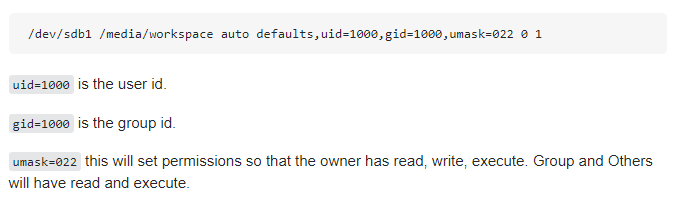
/dev/sdb /mnt/sdb1 auto, exec, rw, user
Would this work? (from /dev/sdb mounted to /mnt/sdb1 with execution, read and write for any user)
 tame carbon
those are file modes (permissions)
that's for chmod
but there's also chown
change owner
chown user:group file
 lucid flame
Anyone able to help with iDRAC?
peak cloak
@lucid flame Personally, I don't have any experience in iDRAC. I know there are a bunch of people in the homelab discord that do. I can give you an invite link if you want
lucid flame
Yes please @peak cloak
peak cloak
@lucid flame did you get my DM? I can't post discord links here
lucid flame
Yeah thanks, I joined it
 silver needle
So networking question:
I'm planning on hosting some servers and services which it would be a lot easier if they were on a static ipv4 address. I already have a DNS setup that updates with my residential IP changing via DuckDNS but not all my services accept a host name and some require an ipv4 address. My ISP offers a static ipv4 for x amount a month but if I'm honest I'd rather not have my residential ip be static for obvious reasons. So, is there a way i can use something like AWS to spin up a free VM on their network with a static IP and pass that down to my network and make sure it auto updates with my ipv4 address changing? I think this is called reverse proxy but I'm not 100%, I'm still dabbling my toes in networking if I'm honest. I'm currently running pfsense as an exposed host for my network as my ISPs router doesn't allow bridge mode.
unborn sluice
You could start from this simple text diagram
Home Service --VPN-- > AWS VM --STATIC IP--> Users
but not all my services accept a host name and some require an ipv4 address
What exactly is this
AWS to spin up a free VM
What is free
make sure it auto updates with my ipv4 address changing
From what I can understand, you think that the VM would use your dynamic public IP for reverse proxy
What I did is different, the services have a static IP through the VPN so the reverse proxy don't need to change which address to point to
imo, it's the sane way
But please note that you would point your DNS to the static IP of AWS
or just use a load balanacer

better not to expose the proxy to the internet
just to make sure you are notified: @silver needle
silver needle
Thanks for the ping, so are you suggesting I spin up a free tier AWS VM with OpenVPN and direct my servers to that?
@unborn sluice
silver needle
Simplest and safest
unborn sluice
This is just an example of what can done
silver needle
Would you know of any tutorial videos I could dive into to get a better understanding?
makes sense, I'll have a look around
thanks!
 worn yoke
lol this whole channel is literally like french to me
i'd like to learn more though anyone know of any videos i could use to dive deaper?
unborn sluice
Oui oui
topaz quarry
eli the it guy
 thick minnow
So networking question:
I'm planning on hosting some servers and services which it would be a lot easier if they were on a static ipv4 address. I already have a DNS setup that updates with my residential IP changing via DuckDNS but not all my services accept a host name and some require an ipv4 address. My ISP offers a static ipv4 for x amount a month but if I'm honest I'd rather not have my residential ip be static for obvious reasons. So, is there a way i can use something like AWS to spin up a free VM on their network with a static IP and pass that down to my network and make sure it auto updates with my ipv4 address changing? I think this is called reverse proxy but I'm not 100%, I'm still dabbling my toes in networking if I'm honest. I'm currently running pfsense as an exposed host for my network as my ISPs router doesn't allow bridge mode.
@silver needle u can make free google cloud it give u free $300 credits
silver needle
Yeah thats only for 90 days though which in the long term wouldn't work
thick minnow
just make new accounts
plus mine lasted longer then 90 days and i got an dud card assigned to it so i know they aint charged me
tame carbon
heh
@thick minnow
I'd rather not have my residential ip be static for obvious reasons.
reasons are not obvious to me
because dynamic IP is annoying

 quasi cliff
Ok everytime I attach an external SSD to the USB port of my modem/router it causes the router to reset after about 20 minutes how can I fix this?
tame carbon
is it some ghetto offbrand ISP router?
unborn sluice
don't attach external ssd
quasi cliff
I need to attach external SSD as it has all my media on it and right now I dont have enough storage on my laptop for it
Plus it was working before now suddenly its started playing up
tame carbon
@unborn sluice some phone terrorist just called me up lol
claiming they are my utility provider, and that they have a cheaper electricity plan for me
tame carbon
I immediately berated the guy on the phone, asked him how he got my phone number, and the has to cease calling me.
when he kept yappin
I just hung up
looked the phone number up
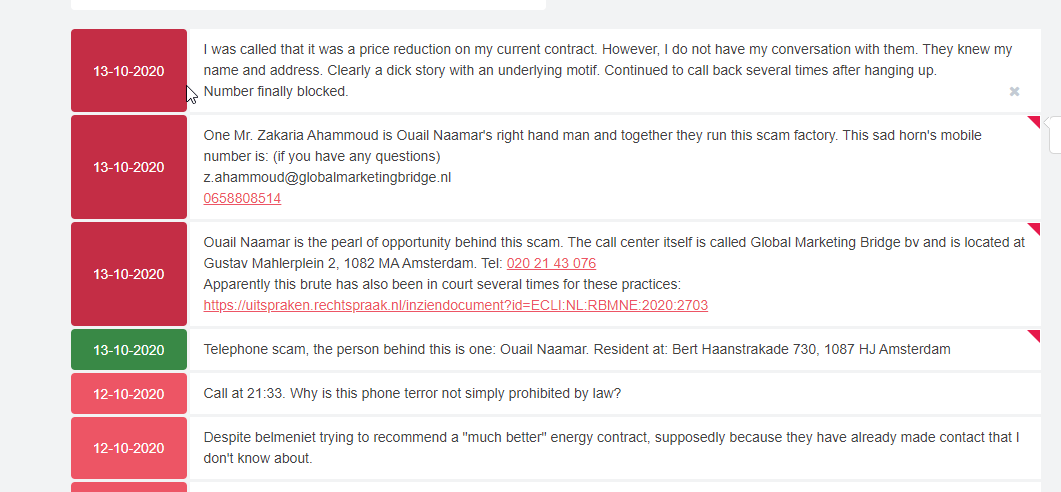
Recensie van het telefoonnummer +31202148458: Wil energie contract verlagen, We gaan uw energie contract verlagen, direct aangegeven geen interesse te…
sure enough
100s of people
say its spam
unborn sluice
Ah yes I can't read the site
tame carbon
translate it ;)
unborn sluice
But there's an APP already that warns you when a number is a reported scammer
 unborn sluice
so it's a local scam
tame carbon
I mean
in that image
someone has already d0xed them
so if they call me again
I'll just slap em in their face
unborn sluice
Couldn't the authority stepped in at this point
unborn sluice
Can't read it, it's all netherlands to me
tame carbon
what good does that do?
unborn sluice
so the fine doesn't increase
tame carbon
but they call with like 10 diff numbers
I know the prefix now though
so I am prepared for round 2
unborn sluice
so the next time, they would be fined 499 again
tame carbon
@unborn sluice ever since i registered my company
I've been receiving spamcalls regularly
 tame carbon
fine them for abusing personal data
tame carbon
@unborn sluice well..
thing is
this is public
because its a registered company
but.
they aren't allowed to use this for marketing
but who's going to stop them
 dusty osprey
Crystal, got any idea to open all my ports on a IP and then port scan it from a another system to see what all ports my isp blocks 😛
tame carbon
@dusty osprey unless there's a service running on said port, it will not be able to test
open ports means, there's a service listening
dusty osprey
can we quickly just open all ports, and run a scanner outside and then... yeah
peak cloak
what's your ISP?
dusty osprey
eh, my ISP a pretty strict one 😛 they block littrly everything and even have DPI's that dont allow VPN's even if they are custom made
peak cloak
also for example I have optimum, so port 80 and 25 are blocked by default but you can go into the web settings on their website and you can unblock port 80 and 25 on your modem if you want to
dusty osprey
weird. hm, for me IPv4 port forwarding itself in its own is blocked, and or just CG'Natted so I can't use them.
peak cloak
yeah, maybe it's NATed
dusty osprey
but my direct v6 allocation to the laptop's and such works.... in that, so far, port 80, 443, and 8080 are bocked (is only what I came across)
peak cloak
you couldn't even get a ipv6 tunnel could you?
because tunnelbroker requires the ability to ping your router
tame carbon
my dad's ISP blocks MTU Path Discovery
they think blocking ICMP is more "secure"
but all it does, is break VPN
dusty osprey
I by default get a v6 from ISP, the discovery of how I knew it worked was, some friend on accident SSH'ed to my laptop thinking it wouldn't work in which it did work 😛
Then, I tried nginx on port 80, blocked. changed it to 6070 and it just worked
tame carbon
@dusty osprey chances are, that your v4 is a NATed connection
tame carbon
so you cant port forward. on v4
dusty osprey
yes makes sense :p
peak cloak
how big of a v6 block did you get? a /64?
tame carbon
if they didnt give you a /64 I'd ditch that ISP
xD
since its smallest possible routing block for v6
dusty osprey
yes they gave me a /64 in which my laptop or the router scrambles into a /128 for each device
peak cloak
I've heard stories of ISP's giving a single ipv6 which they expect you to NAT v6
peak cloak
defeats the whole point of v6
tame carbon
you dont need NAT on v6
dusty osprey
my "/64" or the 2001:1231:1231:xxxx where "xxxx" or the "/64" of the SUBNET WOULD dynamically change within reboots
but the "1231:1231"(till the /48) will remain same always.
tame carbon
2001: is public v6
dusty osprey
i know
i was giving an example on how my /64 is actually dynamic 😛
it changes upon reboots of the router
clear igloo
Yah, Spectrum does that in the US, they give you a /56 or /64 but it changes on every reboot. But the IPv4 address they give you sticks to the MAC of the router (if not using a combo unit) for up to 7 days
So if you don't want to re-address your VLANs every time you look at the modem you have to do some 6to6 NAT 😄
hollow marlin
Cisco and Juniper at least can get around with that with PD. Juniper's way is pretty convoluted though
peak cloak
@hollow marlin what does PD stand-for, it stand for so many things idk what it is
hollow marlin
Prefix-delegation
peak cloak
oh, that's what the dhcpv6-pd config does on my edgerouter
hollow marlin
Not familiar with how edgerouter handles it but I would assume so. Ex. Cisco you assign ipv6 dhcp-client pd [prefix-name] under the WAN, then under the SVIs/interface you can specify ipv6 address [prefix-name] ::1/64 and it will use the prefix received and assigned the host bits. If the prefix changes it will update it with the same host bits
peak cloak
how would you work around android not supporting dhcpv6?
peak cloak
msfs is all sorts of weird
 proper fiber
no
 hallow nimbus
Green kinda sus
rocky badge

 swift hornet
I have a Linksys E900 plugged in to my main router (1gbps) and i only get like 60mbps wireless
but if i plug my pc to my main router i get 900 wired
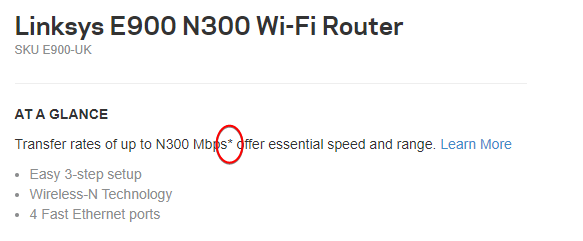
This router (cisco Linksys E900) should give me 300mbps
not 60
Any idea?
tame carbon
wireless is always slower than gigabit lan
but 60mbit, are you right next to the access point?
tame carbon
 dense radish
hmmmmmmmmmmm
tame carbon

dense radish
you think?
peak cloak
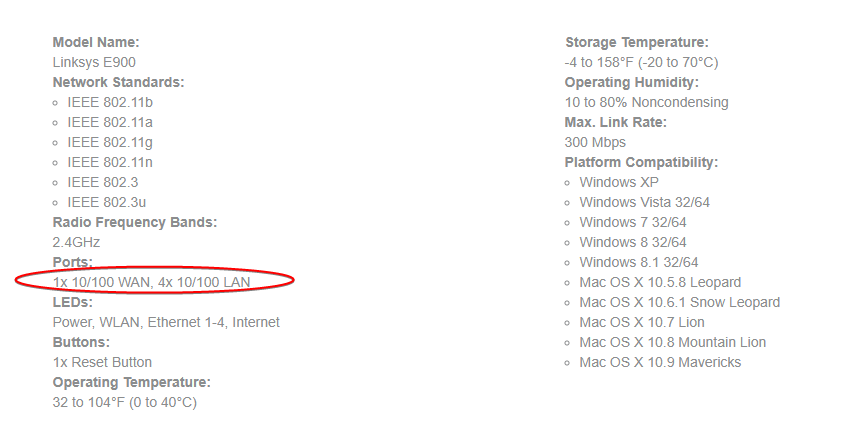
unless they have a different model, but that description says fast ethernet
tame carbon
@swift hornet
peak cloak
fast ethernet is 100BASE-T
swift hornet
linksys e900 is my secondary
tame carbon
 peak cloak
oh, then what's your primary
tame carbon
@swift hornet you can have LAN traffic > 100mbit/s
in total
a single client will never be able to do more than 100mbit/s
swift hornet
but they said 300mbps wifi
waxen scroll
peak cloak
but if your wired connection is your bottleneck then ...
swift hornet
^
tame carbon
they get 60mbit
max of 100
theoretically
have you checked channel width configuration on the linksys?
if its only 20MHz, you may not get full performance
peak cloak
oh, cisco web interface, my original router
tame carbon
oh my god
swift hornet
yeah
tame carbon
this thing is 16 quid on amazon
swift hornet
its old
tame carbon
no wonder its so bad
peak cloak
you can get a descent router for 50-60 bucks
swift hornet
and see if it changes at all
@tame carbon its still bad
tame carbon
Did you restart it?
swift hornet
you can get a descent router for 50-60 bucks
@peak cloak i currently have like $20 total
hollow marlin
Its FE so you are getting 100mbps no matter what. The 300mbps is the 802.11n theoretical max. If you WAN is more than 100 you will never get above that
swift hornet
Did you restart it?
@tame carbon yep
Its FE so you are getting 100mbps no matter what. The 300mbps is the 802.11n theoretical max. If you WAN is more than 100 you will never get above that
@hollow marlin ok thanks
 waxen scroll
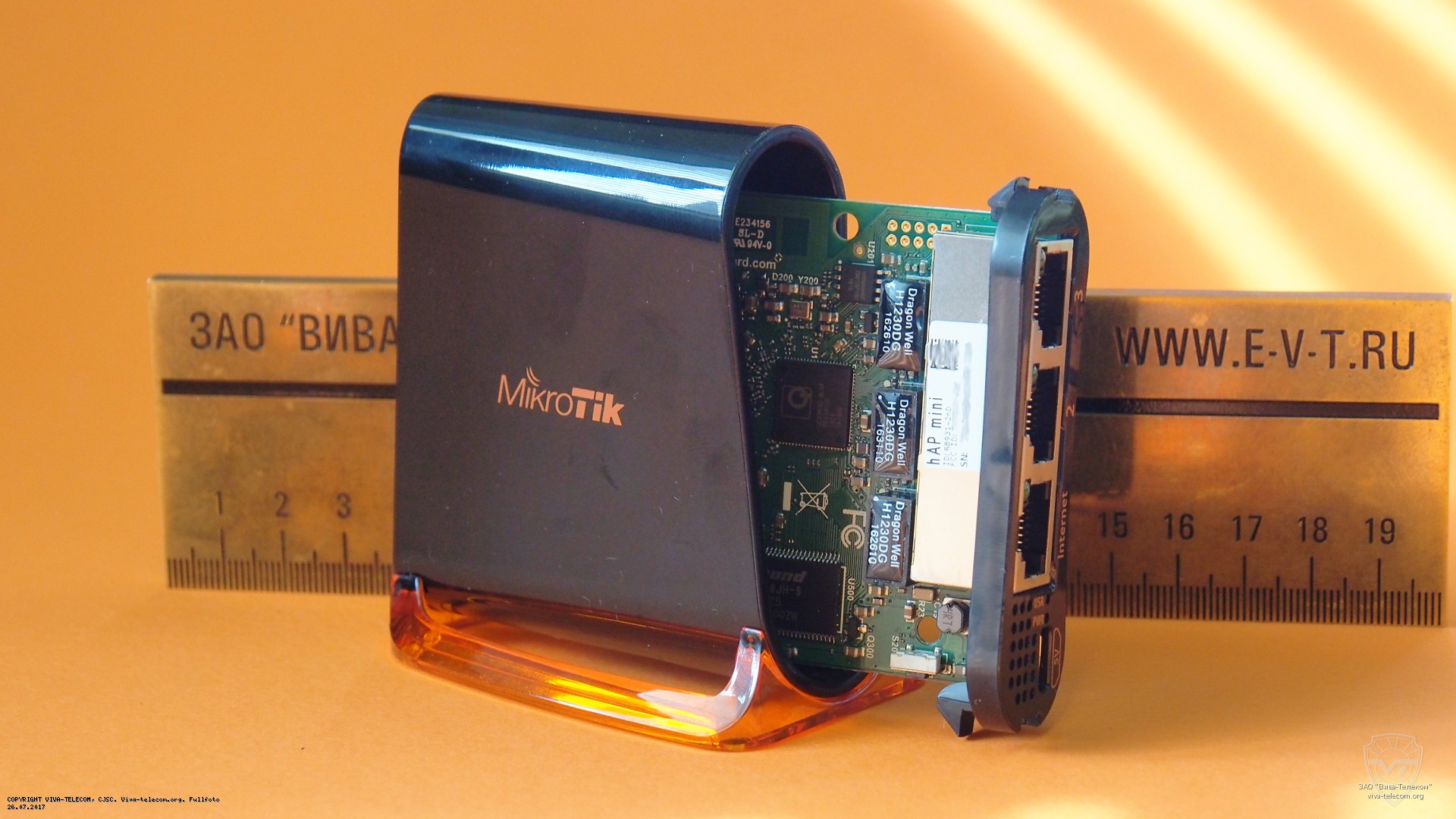
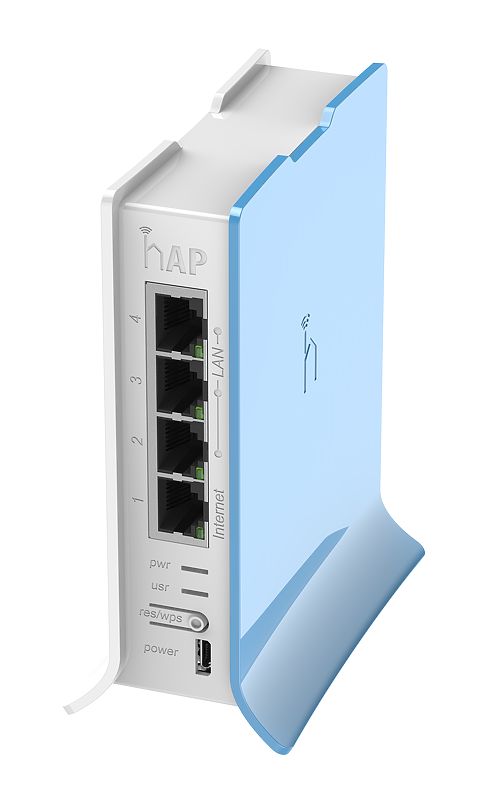
wow thats cute
tame carbon

3 fast ethernet ports
and 802.11n wifi
2.4GHz only
but its great, because it has only 5V supply
so you can use this with a laptop for things like DIY raspberry pi development
if you need small scale networking
hollow marlin
I used to have a hAP lite with me during traveling to remote sites because I could power it over usb
Thing was like $19.95
 hollow marlin
Yeppers
tame carbon
cute little routers
hollow marlin
Ability to power over usb was a life saver a few times
tame carbon
I have one of these in the warehouse
to do a vlan seperation
for two seperate offices
waxen scroll
kawaii
tame carbon
Not only it’s affordable, small, good looking and easy to use - It’s probably the most affordable MPLS capable router on the market! No more compromise between price and features - RB750r2 has both. With its compact design and clean looks, it will fit perfectly into any SOHO environment.
hollow marlin
It makes sense, MPLS was originally designed to easy routing/switching performance
peak cloak
i've been thinking of this as my next router https://mikrotik.com/product/hex_s#fndtn-specifications
hollow marlin
I use its for L2/L3 VPNs, such as VPLS, EVPN, etc.
tame carbon
@peak cloak that plastic they use btw, leaves fingerprints on it
its a soft finish
its same on the hAP ac2
its good if someone messed with your network
you can become holmes
tame carbon
the one in the living room is behind the TV, mounted
powered with PoE
supplies the TV settop and the smart TV
and the usb power goes to the chromecast
xD
you dont even see the router at all when TV is 'stowed'
you press button on the remote, and TV comes up out of the box
only thing now I need is a clap detector
 shell yarrow
I'm using lasers to build an ethernet optocoupler from scratch
at 100 megabit
10 megabit would be easier but I wanted to try something different and challenging
peak cloak
doesn't an optocoupler use LED's and a "solar panel" (don't know the exact name of it, but it basically converts the light off the LED and converts it into electricity)
shell yarrow
Photoresistors or photodiodes and an interruptible light source
peak cloak
photodiodes, that's the name
with a Photoresistors , I would assume you would need an external powersource
shell yarrow
Yes
Pulse Amplitude Modulation throws a wrench into things though
Basically in 100 megabit ethernet 4 bit signals are converted into 5 bit signals to prevent signal loss. Without this, there would be two high signals and two low signals. However to prevent signal loss, the voltage value changes for each bit.
peak cloak
hmm, I know none of this low level stuff. I've done some basic arduino stuff, with i2c but never looked into how ethernet works
shell yarrow
Yeah I have to use basic transistors because the switching speed is so high
10 megabit is really simple compared to faster standards
 coarse storm
what is icmp? i was shitting on a kid in valorant he asked for my discord and pulled my ip and said my icmp is on and stressed my router with a shitty stresser
shell yarrow
It diagnoses problems
peak cloak
and things like traceroute
yeah
icmp flood is a type of attack
you really need a large amount of combined power to cause a DOS via ICMP
plus, some router especially enterprise ones have systems in place to stop this such as filtering
coarse storm
@peak cloak @shell yarrow should i even worry about i’m booting me then? because i thought it was something to do with like my location or whatever
peak cloak
I mean an IP is always registered to a location, but that is just a general location, usually where your ISP is located
Also, how did he get your IP
@coarse storm
You would have to clicked on something, because discord and valorant don't use direct client - client conenction
Or he is just saying bs
coarse storm
@peak cloak honestly idk how he got it but he got my exact location and shut my wifi off
peak cloak
yeah you must have downloaded something or clicked on a link
peak cloak
^ or an older router with a security issue, or little firewall
shell yarrow
It honestly scares me how many people have default network logins
topaz quarry
well now that ISPs are trying to deploy ipv6
and stuff is globally addressable
if bad rules
then poof
peak cloak
also that ^
elfin socket
Some Consumer routers have an unchangble “admin” login
peak cloak
for ipv6 I have deny everything, unless I have allowed it
elfin socket
Same. One reason why I dislike ipv6
shell yarrow
Port forwarding a Plex Server
elfin socket
Are consumer routers even still vulnerable to LOIC?
peak cloak
not a reason to dislike it, it's how it should be. NAT is false security
topaz quarry
i genuinely think
it should be easy to masquerade ipv6 local addresses like fc00 or fcd00 addresses
to globall addressables
not for security
elfin socket
topaz quarry
but for the simple reason that if my ISP goes down
elfin socket
Honestly
topaz quarry
i want my stuff to work
shell yarrow
Microwave gun
topaz quarry
i'm trying to figure out how to do some version of translation of opnsense
even if it means making literally one to one translations
elfin socket
Every time I sent a print job on someone else’s network they’re Lvl configured for cloud print or air print
topaz quarry
since we have so many ipv6 addresses
shell yarrow
pfsense is fun to mess with
elfin socket
it’s like slingshotting your job around the xen relay
peak cloak
pfsense is nice, but a bit cluttered. I want to eventually learn vyOS when I have time
shell yarrow

Wired
An anonymous hacker has claimed credit for the prank, which is part of an ongoing YouTube subscriber feud.
elfin socket
I’m a pleb so I just use ubi OS
peak cloak
I have an ER-X for my core router
topaz quarry
i only run vRouters
shell yarrow
I actually use ReactOS 64 bit. 32bit isn't that hard to set up but 64bit is a pain
topaz quarry
i have 5 nodes in vrrp mode
if all 5 of them blow up at the same time
i give up
the L2 switches are hardware solutions though
shell yarrow
Imagine creating a lagg of many DSL modems
hollow marlin
I like dedicated physical hardware for critical things
@peak cloak I prefer them for my power bill.
peak cloak
true, also that
shell yarrow
Lagg on the router interface to the modems
hollow marlin
LAG still only uses one link per flow
topaz quarry
i don't understand ipv4 is literally just plug and play
why and how is ipv6 such a cluster fuck
hollow marlin
Its not though. Mainly issues with software
peak cloak
lack of proper support
topaz quarry
lol i've been using OPNSense for the past 3 days and Pop OS trying to get ipv6 running
what possible ecosystem could i possibly put it in to let it just work?
peak cloak
basically everything ipv6 on edgemax needs to be done through cli
topaz quarry
isn't this my initial compliant?
it's not plug and play?
i swear i get any router i plug it into modem
and it just goes with ipv4
my modem actually supports proper prefixes with ipv6 too
peak cloak
Idk, I need to setup a tunnel for ipv6 so idk if it works plug and play. I think it may
hollow marlin
It is, you still need configuration for SLAAC on the router. Depending on what router you will need PD to distribute the prefixes to interfaces
Outside of that v6 is PnP
shell yarrow
I use ipv4 and ipv6 on pfsense
topaz quarry
i don't want slaac because i want to give each client a DNS server
slaac makes assumptions about how i use my netwrok
peak cloak
I did
topaz quarry
not sure it'll matter




 hollow marlin
You can still define DNS with SLAAC. If you want more control you need to use DHCPv6
topaz quarry
yes but then i can't translate local ipv6 addresses to global ipv6 addresses
hollow marlin
There is no point translating v6
peak cloak
I ran ethernet in the wall
topaz quarry
i don't want my ISP giving each of my devices addresses?
peak cloak
There was a hole on the other side of the wall for a phone line, so it was easy to fish
topaz quarry
what if At&t is having a bad month
peak cloak
and there was a hole in the basement so that was easy as well
hollow marlin
Your ISP doesn't give each of your devices v6. You get a prefix and your router does
peak cloak
I think there is an IEEE standard for that
Ik Omada (the thing I have) allows for a controller for mesh and better roaming
@solemn viper have you tested the end of the cable the AP is connected to
access point
shell yarrow
Access point
topaz quarry
okay, so now if I want static assignments with ipv6
how do?
i have my globally addressable ip
and i can ping with it
how does each one claim an IP as a reservation?
APs getting to max speed is a pretty phenominal experience
it usually requires tuning
and LOS
peak cloak
mine does max speed
peak cloak
idk, I just had really good experience with Omada AP's
topaz quarry
okay so with APs you have to understand a critical piece of information
the bubble of wifi connecitivity created
changes as devices connect and disconnect
depending on where a device is in that bubble it will get different speeds
peak cloak
idk how to do that exactly, with stuff like the Omada the controller handles all that
topaz quarry
you need quick hand off technoogy to do that
the network appliances have to be aware of each other
peak cloak
yeah
but Omada is different
it's thier business lineup
I don't think the controller would work with thier consumer lineup
topaz quarry
you're basically asking for a software defined network
where the software dictates how clients connect to the network
if you have multiple pieces of wireless equipment
they have to be aware of each other somehow
for switching to occur
peak cloak
I havn't heard good things about flat cables
topaz quarry
flat cables are fine for anything that isn't poe
peak cloak
oh ok
 vivid oriole
Hey! I was trying to port forward on my router and I don't know what to input here. My router is also in spanish so I don't really know what this is called in english.
I'm using it to port forward a minecraft server
peak cloak
@vivid oriole Could you show a screenshot the whole page, idk what this really means without the context
vivid oriole
Sure.
thick minnow
Well, non of that for sure
vivid oriole
thick minnow
I guess you should try DNS
peak cloak
hmm, idk let me check the manual for that router
thick minnow
Your ISP allow port forward? @vivid oriole
thick minnow
yeah
peak cloak
or they just block common ports like 80 or 25
thick minnow
@vivid oriole try DNS, it should work
thick minnow
"Common Port Service"
vivid oriole
ahh ok ok
thank you
Your ISP allow port forward? @vivid oriole
@thick minnow i mean I bought my own router so I assume you can port forward just like that right? or can your ISP block port forwarding either way?
thick minnow
It's not about the router, it's about their system allow you to do it
peak cloak
no, if your ISP does cgnat for example it won't allow that
NAT fundamentally breaks the end-to-end principle of the internet
vivid oriole
Oh ok
peak cloak
that is why ipv6 is nice
NAT was needed because there were and still are few ipv4 addresses
on ipv6 every device on your network can host a server without port forwarding as your ISP should give you a /64 subnet
if not, you can get an ipv6 tunnel
but for an ipv6 tunnel your ISP can't be doing cgnat
peak cloak
yeah, tunnelbroker needs to be able to ping your address
thick minnow
To let ma bois access it
 prime timber
can someone help me right quick
thick minnow
dat suks
prime timber
i am on spectrum and just switched my router out for a nighthawk r8000 and i got it setup but now i only get half the speed i did before with the spectrum router
prime timber
we got over 400 down 22 up on old router but now we get only 200 down and around the same up
wired
we got 400 on 5g wifi and 400 wired on pc
im on my pc only getting around 200-225
peak cloak
I assume you are paying for 400mbps?
prime timber
yeah
it doesnt make sense cause all i did was switch routers
we were maxing the spectrum one out cause it only supported like 350-400 max
peak cloak
hmm, honestly I don't know where to start. Could you try doing a speedtest directly from the modem?
prime timber
not currently no
a lot of people are on it currently or i would but i dont want to take it down again
peak cloak
understandable, hmm. idk what else to try
prime timber
yeah its weird
thick minnow
You should contact your ISP
prime timber
it doesnt make sense how i get a better router but half speeds lmao
thick minnow
They should have a good reason
prime timber
true
could a setting be messed up in the nighthawk? i did have trouble setting it up because it wanted me to use the app to do it
peak cloak
yeah, I don't like consumer routers for these reasons
prime timber
it kept saying it couldnt find the router than i went on pc and finally got it working
peak cloak
nothing like a good ole mikrotik or edgerouter
prime timber
something has got to be configured wrong somewhere
ive never seen this happen before
peak cloak
I was thinking maybe to check the cpu but of course you can't check that
prime timber
get better speeds with a isp router vs your own
its a 1ghz cpu in the nighthawk
the isp was some outdated one
prime timber
how would i check
peak cloak
you can't
prime timber
yeah i updated the firmware
peak cloak
hmm
@prime timber https://community.netgear.com/t5/Nighthawk-WiFi-Routers/Nighthawk-R8000-Slow-Internet-Speeds/m-p/1835010
Hi everyone, Recently upgraded my internet from 500mb/s to a gig. Previously, my internet speeds on my 5Ghz wifi hovered at around 350-400 up/down. Over direct connection to the router, about 450. Before actually upgrading, I saw a slight decrease in my speeds which hovered ...
downgrading the firmware?
also is QOS on?
prime timber
where would i check that
prime timber
dynamic qos is off
peak cloak
hmm
prime timber
i just ran a speedtest in the routers page and got 300
that sounds about right paying for 400 correct?
and that was from my phone wifi
peak cloak
yeah, try wired
prime timber
i just did and got 220
makes zero sense considering before with the isp router i got 350-400+
i dont understand
peak cloak
yeah, it's probably something complicated that's above my knowledge. It's also annoying how these routers have basically no real troubleshooting tools like a CLI
prime timber
hmm
yeah it kinda sucks they also give you ZERO actual instructions on how to make sure its working fine
like they put a quick start guide card in the box and all it says is to download their app and plug it up
peak cloak
yeah, I complain about my edgerouter a lot, but I forgot the old days of infuriating routers
like I much rather have this
peak cloak
also in the future I would recommend mikrotiks's. A bit advanced but you can easily troubleshoot problems
yeah try that
prime timber
i do remember when i got my phone to hook to it i did a speedtest and i think i got 400
if i remember right
all i do is press factory reset
peak cloak
usually you hold it
prime timber
will it take me back before the update i did?
prime timber
i did everything in the app up until i tried to login to the router itself and mobile wouldnt let me past the login prompt
 vapid dune

reddit
94 votes and 11 comments so far on Reddit
prime timber
idk something is up with the connection to my pc wired because on 5ghz wifi literally 50ft away im getting 330 download and 22-24 upload in speedtest
im hoping someone can chime in that is good with this stuff that can help me solve this
thick minnow
hey i got a port forwarding question with a Cisco ASA 5506:
with this (https://pastebin.com/shfEmxr9) as my current rules on my router, this gets a dynamic IP adress from ISP.
i want outsiders (strangers) to allow access to a single inside device (10.10.110.202) with my public IP adress (whatever it may be at the time) on specific ports TCP: 25565 & UDP: 19132-19133,25565, does anyone have a clue what new rules i need to setup in my CMD access?
(basically there's a minecraft server running on 10.10.110.202 & i want my friends to be able to connect)
prime timber
its a 100ft cat5e cord its pretty old but it matches all the other wires that we were using before
i do plan to run another ethernet cord so i have 2 where my pc is for my ps4 and 1 for the pc
but it will be cat6 or newer
peak cloak
@thick minnow idk cisco, but I can show you what commands it takes on an edgerouter, it should be similar
thick minnow
to specifically do what to do there? (also there's already a extensive access filter list,... please peek in the pastebin, i do not wanna fuck up the existing stoof)
peak cloak
I'm having problem adding access to a NAS inside my network and I can't seem to understand why. ip nat inside source list 1 interface GigabitEthernet0/0 overload ip nat inside source list 103 interface GigabitEthernet0/0 overload access-list 1 permit 10.0.0.0 0.0.0.255 acces...
I found this
thick minnow
so, if i transated that correctly
ip nat inside source static 10.10.110.202 (portnumber) inside_4 (port number)?
and no access list 103 permit tcp any host 10.10.110.202 eq (port number)
peak cloak
I think, don't take my word for it, I've never done cisco stuff, only basics on edgemax. Learning vyos though
maybe someone with more experience can help
thick minnow
object network obj_any
 subnet 0.0.0.0 0.0.0.0
object network inside-out
 subnet 10.10.110.0 255.255.255.0
object network src-v4-inside
 subnet 10.10.110.0 255.255.255.0
object network src-v6-outside
 subnet 2001:DB8::/96
object network dst-v6-outside
 host 2001:DB8::8
object network dst-v4-inside
 host 8.8.8.8
nat (inside_1,outside) source static src-v4-inside src-v6-outside destination static dst-v4-inside dst-v6-outside
nat (inside_2,outside) source static src-v4-inside src-v6-outside destination static dst-v4-inside dst-v6-outside
nat (inside_3,outside) source static src-v4-inside src-v6-outside destination static dst-v4-inside dst-v6-outside
nat (inside_4,outside) source static src-v4-inside src-v6-outside destination static dst-v4-inside dst-v6-outside
nat (inside_5,outside) source static src-v4-inside src-v6-outside destination static dst-v4-inside dst-v6-outside
nat (inside_6,outside) source static src-v4-inside src-v6-outside destination static dst-v4-inside dst-v6-outside
nat (inside_7,outside) source static src-v4-inside src-v6-outside destination static dst-v4-inside dst-v6-outside```maybe @hollow marlin?
thick minnow
access-list inboundfilter extended deny tcp any any eq telnet log disable
access-list inboundfilter extended deny tcp any eq telnet any
access-list inboundfilter remark Deny NetBIOS and SMBv1
access-list inboundfilter extended deny tcp any any eq 445
access-list inboundfilter extended deny tcp any any eq 137
access-list inboundfilter extended deny tcp any any eq netbios-ssn
access-list inboundfilter extended deny udp any any eq netbios-ns
access-list inboundfilter extended deny udp any any eq netbios-dgm
access-list inboundfilter extended deny udp any any eq 139 ```access-list outboundfilter extended deny tcp any any eq 445
access-list outboundfilter extended deny tcp any any eq 137
access-list outboundfilter extended deny tcp any any eq netbios-ssn
access-list outboundfilter extended deny udp any any eq 139
access-list outboundfilter extended deny udp any any eq netbios-dgm
access-list outboundfilter extended deny udp any any eq netbios-ns
access-list outboundfilter remark Permit All Other Traffic
access-list outboundfilter extended permit ip any any ```