#networking
1 messages · Page 172 of 1
 hearty shale
 pseudo blade
Laptops and routers: two things I'll never buy consumer models of again. Being on ADSL2 you'd get enough speed, but don't expect the wireless to last after you upgrade to any other connection type.
hearty shale
As always thanks for the input
 little schooner
@waxen scroll so the conclusion of the inability to send smtp emails from a supermicro interface was Google's fault. But, in order to get in connection with Google support, I either have to use the free community forums or pay a Google 1 subscription in order to connect to a Google support line
I prefer the Google support line but I have to pay 10 dollars for a problem that shouldn't even be happening in the first place, with a brand new account
 waxen scroll
lmao
little schooner
@waxen scroll and they even gave me access to the account they were successful with
Supermicro Cali acct
 median ore
Hello all ! My ISP told me that I will Soon™ have fiber in my house and with my dad I would like to run a ethernet connection from my router which is in my ground floor to the first floor (my parent's room) and the 2nd floor which is my and my sister bedroom. And I would like to know how to do it in a way i will have the lowest speed loss and in the best case have only 1 cable coming from the router. Thanks
little schooner
And it worked perfectly. I think Google has something against my IP
Maybe my IP is spam registered?
Dumb in every case because it only happens when I am using port 465 for smtp
waxen scroll
@median ore you will need to share that one cable, and so there will be speed loss depending on usage. since its likely only internet you are using on the wire, it probably doesnt matter. you need to run a cable to the first floor, then on that floor make a 2 port jack, then run a second wire from that jack to the 2nd floor. you will need a switch on the first floor to duplicate the link
you can argue thats more expensive than 2 wires off the router
median ore
Yes that's what I was thinking. Or I will need to either remove something of my router or just add a switch and run two ethernet cable to the floor. But if I do that I will need to find a verry quiet switch because it will be on my living room behind the TV.
waxen scroll
almost all consumer switches do not have moving parts inside
waxen scroll
@radiant crane TI (accidently) L that you can take a netmiko session and dump it to multiple lines with no textfsm
variable1 = ssh command here
for line in variable1.split("\n")
i have a script to run one or more commands on a bunch of devices... i wanted the output of it logged into a spreadsheet (one column per device)
xlsxwriter needs you to define the cell to write
without splitting the whole output ends up in a cell
 radiant crane
pseudo blade
radiant crane
pseudo blade
@median ore Unmanaged gigabit switches go for like $30 at office supply stores and most if not all are completely silent.
 craggy parcel
Silent, and very easy to kill...
little schooner
And made of plastic, that is a very important Characteristic with metal here and there at that price point
little schooner
My favorite is when powerful hardware can still be run silent
craggy parcel
Yeah.. But small plastic SOHO switches are not powerful.. I used one at school between about 8 computers that each exposed an iSCSI endpoint, which was then combined on one of the machines using software RAID, and exposed to an ESXi server... The switch lasted about 2 days with the load. (We didn't actually have important data on that store, but hey, it was fun. 😉 )
 hollow marlin
I have a feeling there is more to the story than a high load killing a switch. Dumb Soho switches are essentially cheap asics with a basic CPU or even no CPU. You don't overload them unless you begin looping them until the thing burns out.
They are pretty much bullet proof besides that.
waxen scroll
agree
noticed dumb switches are bulletproof myself
i used to use a lot of netgear around my house
before i did a proper cable job to one switch
little schooner
I am still contemplating how in the world I will do a proper cable job to one switch with everything in the house already finished. Next year the room walls will be coming done, so perhaps that will be my chance to strike.
waxen scroll
how many floors? basement?
little schooner
2 floors and a basement
little schooner
Okay, i'll agree with you with that one.
Though i still need to take the walls off and maybe the floor
comcast ran it through the floor
waxen scroll
why? you make a hole where the jack is going and go into the basement and drill up
little schooner
Thats if my mom will even let me do it lol.
the house is so old any kind of drilling is scary
waxen scroll
for the attic you will need to do similar but this time you will route a 2-3" PVC into the walls
little schooner
that is for the cables to sit in?
little schooner
i see.
waxen scroll
my house has one
i accidently discovered it
someone else put it in and never used it
pseudo blade
@hollow marlin Ditto, even if you make switching loops happen they usually don't even get hot.
There's really nothing to basic gigabit switching at this point.
hollow marlin
@pseudo blade yeah they dont run hot at all. Some olders ones did but I would argue its next to impossible to kill a dumbswitch. So little to fail
pseudo blade
Switch chip, magnetics, AC>DC plugpack, DC-DC converter, a few LEDs and passives for the chip...
The actual ports themselves I guess.
waxen scroll
pseudo blade
Most of these are exceedingly hard to kill unless you mess up power
Just... don't use them for a real business, the lack of management just sucks way too much.
little schooner
@pseudo blade oops, my professor is guilty of doing just that
they started with a non-managable switch
and then ended up buying a cisco smb switch
If he would include me in the discussion, I could help him out a lot
They bought dell server without idrac enterprise license, which is minimum needed to do ikvm
I told him that it was so beneficial and just a couple dollars more
There was literally no reason not to get it
hollow marlin
@pseudo blade I would say the lack of visibility is the worst part. Most the time companies tuck them away and when you are running into issues they are usually not known about which leads to WTF is going on moments
pseudo blade
Hey Meagus we drop-shipped the customer cameras and an unconfigured NVR despite your protests can you isolate them from the rest of the-nope, unmanaged switch.
hearty shale
So I've been thinking @pseudo blade
pseudo blade
Ask away busy atm will respond later
hearty shale
I'll probably ask someone I might know who's coming from the US and purchase on black friday for me
pseudo blade
Ok
 frozen condor
Hi
So I want to setup a little plex box at my house
but apparently I'm behind a double NAT system
can anyone help me with how to solve this?
 lucid dagger
you want to use your plex server only on your lan or you want to use it remotely ?
pseudo blade
@frozen condor If you're running two routers at home get rid of the second one, else if the ISP's cgnatting you might have to use a VPN to a router in the cloud, forward the port from that.
frozen condor
wouldn't a VPN slow down performance unless it's hosted by me?
@lucid dagger I want to do both. TBH accessing plex isn't that important outside the network but just need to access my sonarr control panel
pseudo blade
Well yes you'd probably run your own VPN on the same box.
 hallow nimbus
https://bluecrazii.nl/images/k0lVc91EEE.png  totally not doing anything illigal

 sterile pasture
hmm
 olive thorn
Does anyone here know how to force Windows 10 to connect to 5ghz networks? I've got the Google mesh router and it broadcasts the 2.4 and 5ghz networks as the same SSID so I can't distinguish between them
 radiant shell
its not just windows 10, are you sure your wireless adapter/device supports 5ghz?
olive thorn
Yep. It will sometimes connect to it and sometimes won't. There's a significant speed difference between the two
radiant shell
how far away from your wireless access point are you?
olive thorn
~15 ft straight through but it's in another room
radiant shell
is it a laptop or desktop?
olive thorn
Desktop. I'll send a link to the wireless adapter
radiant shell
Yep
olive thorn
radiant shell
not highly recommended but if you go to control panel, network and sharing, adapter options, and go in to advanced mode on your Archer T6E you can change wireless mode to just 802.11ac
@olive thorn
olive thorn
Hm. I'm not seeing a 802.11ac only mode...
little schooner
Do you mean to do that in device manager?
There's a setting like that in device manager
olive thorn
You can get there both ways
little schooner
Ahh that is new for me. Cool
radiant shell
what modes do you see?
little schooner
My Hulu isn't working now =(
radiant shell
wasnt me Xeon
olive thorn
Found it. Under 'band preference'
radiant shell
look for a wireless mode option
radiant shell
that might be part of your problem i would go reinstall drivers for it
I finally have ipv6 set up at home for my self hosted stuff, i have to still redo my firewall. ive set it to drop everything at the moment and still using ipv4 but my isp gives me a static /54 prefix for everything so just over a septillion of public ips is great, i think ill have enough hardware to use them all....
olive thorn
I need to get around to setting up my plex server
radiant shell
yea i got plex, game servers, and a few more little fun things
olive thorn
As soon as I get a place to put all the things I want, I'd love to set up a bunch of stuff
radiant shell
believe it or not this is all on an australian 100/40 connection, the node is like 10 meters from my house
olive thorn
I've heard that Australia has not so great ISP options. Is that true?
radiant shell
No
People are just dumb
my isp is fantastic, i pay $75USD for 100 down 40 up, unlimited traffic, with static ip
little schooner
@radiant shell oh no, I mean Hulu is probably down for my geographic area
At the worst time
radiant shell
ik and i was joking and saying i didnt do it
little schooner
Yeah lol
radiant shell
how much are typical US isp for that kind of package?
olive thorn
I pay $90 a month for 300/40 but with a 1TB cap and no static IPs
radiant shell
thats rough
olive thorn
$75 a month is probably very common
It's not so bad. I haven't really gotten close to the cap
little schooner
I'm paying like $106 for 200 down / 6 up
olive thorn
Although the no static IP thing sucks if you want to bring your own router while using their modem
radiant shell
but its funny, telstra who is the biggest and shittest isp, starts at like $70USD for 25/5 and 250gb and goes up to like $120USD if you want 100/40 unlimited and you have to go to business to get a static ip
olive thorn
I used to have synchronous gigabit with static IPs and no cap for $70. Man I miss that
Also Comcast sucks
little schooner
I've been trying to get rid of them. Problem is they are the only cable providers here
Everyone else is dsl
radiant shell
that sucks, australians say a lot of crap about the NBNco(National Broadband Network) but i lived in 3 different areas all with NBN and havnt had a single problem
and the main reason is they tend to go with telstra which is funny
my "server" thats hosting everything is my old i7 4770K, 32GB of ram that a power surge blew up my usb hub which then blew up my usb controller on my motherboard
so only 1 usb port on it works which is the front panel usb 2.0
olive thorn
idk what I did before 3.0 or 3.1
radiant shell
what did we do before SSD's
olive thorn
Right?!
little schooner
I have a type C SanDisk portable ssd and man is it blazing fast to copy stuff
Yeah now I wonder how I waited so long in the past copying big files
It shouldn't of been lol
olive thorn
When I built my desktop almost 3 years ago they were super expensive and I just had a 240GB Sandisk for like $90. But now you can get 1TB ones for like $100-$120
little schooner
The price has rapidly come down... For the better though
olive thorn
I bought one for a friend as a present. 500GB for $50
little schooner
I have the crucial mx500 1TB
radiant shell
the sustained right on the Samsung QVO disk is only like 160mb/s
little schooner
And one optane, uh, was it 290GB?something like that
The optane absolutely blows everything out of the water
olive thorn
I've been wondering if I should bite the bullet and get a M.2
radiant shell
PCIE Gen 4 tho
little schooner
Gen 4 will be awesome. Less lanes needed for high perf stuff
More slots for other hardware
radiant shell
more slots for more SSD's
radiant shell
i need to redo my hard drives/ssds in my server and still trying to work out what im gonna do
olive thorn
What are you considering?
radiant shell
either stick with ssd boot/main drive and then hdds for bulk or go all out and get a few 4tb ssd's and be done with it
olive thorn
Are you being held back by the performance of the HDD?
radiant shell
i want to go 10gb between my pc and server and store eveything on my server because i have 4 hdd's in my pc that have about 12,000 hrs on them so i dont expect much more life out of them and i want to go mini itx becuase i move my pc around a bit
so im tempted to get 4 4tb ssd's in an array so to store everything for my PC and Server
by everything i mean games and large files
olive thorn
You must have a lot of stuff. I could maybe fill a 4TB drive with my stuff. All music, games, and vids
radiant shell
well i have 3.6tb uploaded to backblaze and thats not everything
i do a little bit of video editing on the side aswell so that takes up about 1.5tb
then i have 4tb's of movies, tv shows and game servers on my server
all from legitimate sources....
olive thorn
Of course!
radiant shell
im also tempted to upgrade my server to a 3900x and 128gb of ram
tbh i might get 2 2tb ssds in raid as main ubuntu boot drive with 3 8tb drives for hard storage
olive thorn
Do ittt
radiant shell
it would only cost $1600AUD
olive thorn
Only
radiant shell
~1100 USD
olive thorn
Some people would spend that on cars, other people would spend it on computer parts
radiant shell
i could save 150 if i didnt get ironwolf nas drives and just got standard barracudas
i find it odd that WD red nas drives spin at 5400rpm while the seagate nas drives spin at 7200rpm
Is anyone familiar with IPv6 Firewalls on EdgeOS?
olive thorn
Out of my league. Good luck
little schooner
@radiant shell yeah. Those are programmed via cli or the config browser tree
And it's off by default
radiant shell
ive got them basic rule to just drop all connections but i cant figure out how to do what im trying to do
little schooner
What exactly do you want it to do
With edge router, typically you need at least one allow rule and one established/related allow rule too
It's stateful if ip offloading is turned off I think....
It's not stateful if it's on
radiant shell
i want to add more address to my server so i want to open a range of ip's and let linux firewall handle it
little schooner
Does NAT work in your case?
Also your server can have more than one Ipv6 address
radiant shell
Nat doesnt exist on IPv6
little schooner
It does, it's just used differently
Say you want to redirect a port to a different port
It's useful for that
radiant shell
im running ubuntu and im 99% sure it can handle multiple v6 addresses
little schooner
Yes you are correct
They can have many link local addresses for example
Again, not that I've actually had to use outside of Cisco though
radiant shell
ideally i would like to run everything on default ports with just more ip's
little schooner
Hmm
Someone said reverse proxy can do such a thing
But I've not set that up
I would think it works via hostname?
radiant shell
i dont need reverse proxy, my isp give me a static public /56 ipv6 prefix
radiant shell
Ok, yea, my isp gives every user over a septillion public ipv6 address to use how they would like
pseudo blade
@olive thorn I've heard that Australia has not so great ISP options. Is that true? So the deal with this is that unlike most of the world the infrastructure the ISPs use is common and monopolized, belonging to the National Broadband Network (NBN). NBN dictates connection speeds and maximum contention ratios (~2mbps per customer, options of 12/1, 25/5, 50/20 and 100/40 with pricing vaguely possible for most consumers)
There are tons of ISP options and their performance depends on how much bandwidth they buy (extra over the 2mbps per customer minimum is something like $15/mo per megabit)
Thing is that during the evenings people can and will use more than 2mbps on average even if their connections aren't that fast, and our country uses VDSL2 and (over-contended) HFC primarily.
Due to government meddling, performing below promised speeds by near half on average is considered acceptable and far less during the evenings.
About 10% of the country is covered by a FTTP network, but it has the same pricing and plan structure as VDSL does so speeds above 100mbps were inaccessible until recently, and are now merely unaffordable ($350/mo for 250/100mbps with a 3TB cap and no promises of maintaining the speed, anyone?)
 silk oracle
It is nutz that isp just hand out blocks of /56 for home users lol
pseudo blade
Blame SLAAC
silk oracle
but then I know a college in my area that has multiple class b subnets (ipv4)
pseudo blade
My uni has printers and a DHCP server on public IPv4 addresses.
silk oracle
that can't possibly go wrong
dhcp server is meh... probably also a webserver of some kind
for edu in general they don't believe in separation of servers
especially with lots of legacy bs
pseudo blade
They're firewalled off, of course.
I suspect they're sitting on them due to incompetence, but if they were smart they'd keep doing it for a bit longer
silk oracle
yeah....
I used to work at a small isp
we had like 2 subnetts of /22 of ip space
it got tight
pseudo blade
AKA class B subnets are worth about 1.5 million dollars.
radiant shell
Meagus I think you mentioned the wrong person, I'm the Australian
silk oracle
I'm just a silly American midwesterner
pseudo blade
Oops, meant for @olive thorn
silk oracle
who needs spook worlders
radiant shell
I'm with Internode and they are a great ISP in Australia if you need an option
pseudo blade
Still expensive and slow like all other options.
Not their fault, just the nature of wholesale pricing under the NBN.
silk oracle
I am currently on DSL still
wish i had fiber but install cost is murder
it is only 45/15 but hey 17ms to google
silk oracle
one of my coworkers who still works where I did is one wireless link from a symmetric 1G fiber drop and pulls 200/200 with 4ms to google still want to mug his intertubes
radiant shell
I'm on VDSL autizmo might actually be on adsl
 strange silo
@pseudo blade We also have two /16 subnets, almost everything and I mean everything has public ipv4 addresses but similarly firewalled off
silk oracle
vdsl if i remember right, at the edge of 80/15 working if I remember
pseudo blade
Sit on them and they'll pay for new IT infrastructure in a year or two :P
strange silo
also edu
silk oracle
god my highschool was a mess there were about 5 10mbps HUBS deployed in 2010 when I threw them in the trash out of about 25 switches
strange silo
and just to get a dig in my ISP rang me yesterday after they sent out an email newsletter that they completed their backend upgrades and were upgrading me for no cost to 950/450 for my small business plan
NZ is better 🙂
strange silo
also at $119 + gst/month
strange silo
also the current/now former head of NBN is coming to my work heh
pseudo blade
I was listening to my grandparents and parents going on about how bad fiber optic was and that copper was cheaper like 7 years ago.
silk oracle
well in the US all the big ISP took billions to get gigabit internet to everyone in the early 2000s then turned around and sued the government saying that is unconstitutional after taking the money and running
kinda annoyed with that
pseudo blade
Now they complain their Netflix is slow.
silk oracle
Just got my controller unmurdered earlier yay
only took waaaaay too much finagling after it crashed for the third time...
quality UBNT programming
strange silo
they are both great and kinda rubbish
silk oracle
I worked doing wireless links with their PTP/PTMP for almost 5 years for an ISP
I know exactly how finnicky they can be
strange silo
lame looks like the speed upgrade didn't actually get done when they said it would, still 100/100
pseudo blade
My job currently is automating the design and build of PTP+PTMP wireless links and supporting infrastructure.
pseudo blade
Secret.
silk oracle
aww no fun
strange silo
doomsday prepers
pseudo blade
Sure, let's go with that. Sounds fun.
silk oracle
probably military field networking lol "secret" clearance
dang gvt and their not letting people talk about cool things
yay
anyways have fun, now if only I could figure out why my network transfer is bottlenecking at 9MBps I would be happy
pseudo blade
What kind of link?
silk oracle
doing some network transfers from my fileserver to a drobo 5n (nas box) using ResilioSync
pseudo blade
All ethernet between the two?
silk oracle
yep 1GB eth
pseudo blade
Everything's actually negotiating at that speed?
pseudo blade
Use iperf or something on another box to test if you're getting gigabit through the switch to it, then from there to the Drobo.
Assuming your switch lacks indicator lights.
pseudo blade
Try a different protocol to the Drobo.
pseudo blade
What's your latency like?
silk oracle
not sure why though
sub ms from server to drobo
I do know that the protocol has gotten far higher through puts on previous times
Just for some reason this time it's tapping out at 10MBps
pseudo blade
My router just rolled over and died. Bootloops and tries to beep, but crashes even when attempting to netinstall, power supply switched and known good...
 thick minnow
I am very happy. Found out I'll have fiber all the way to my modem in my house hell yeah
pseudo blade
Basically new, sat on a shelf for a month.
thick minnow
Also that sucks meagus
pseudo blade
I have a second one that was "installed" sideways in mud for a month without the weatherproof case, wifi died but otherwise still works.
...Somehow.
thick minnow
Wait... how
pseudo blade
The one of hundreds that saw basically no ill treatment at all was the one to die.
 hallow lintel
I just had an Asus RT AC1200 router (100Mb) roll over and die on me yesterday.
I am back up and running with a TP Link C2300 router with new Cat 7 cables.
Probably could have done without the cables, but I live in an RF challenged environment and figured the Cat 7 shielded cable would be a good upgrade.
Performance is significantly enhanced over the AC1200 router I was using previously.
hallow nimbus
*RF challenged environment * what kind of challanges then 👀
hallow lintel
Apartment complex with 15 other wireless routers with multiple bluetooth and wifi devices around
hallow nimbus
Oh ffs
That is a real challange
make one big wireless network with ur neightbors 👀
So everyone can have perfect wifi
sterile pasture
find out one person has 20 wifi IOT devices
 clear igloo
Step 1: Buy Ixia or Spirent WiFi traffic generator
Step 2: Power on and configure
Step 3: ????
Step 4: Profit and flood all channels 😄
sterile pasture
Step 5. Federal prison
hallow nimbus
Lol
sterile pasture
Step 6. Free food!
little schooner
step 9: repeat it all over again!
hallow nimbus
Yup
silk oracle
are we talking wireless mesh? or just though a second ethernet connection
as long as the second router is in "access point" it will be a switch if you have it set up as a router still it might ad some latency and then you would be double nat and that is not fun for some things lol
 covert ibex
Like, 1-3ms if it's Ethernet connections throughout.
craggy parcel
@plush peak Would you like the connection between "router" and "Another wifi router" to be wired or wireless? And what are you trying to archive with that setup?
 nimble coyote
Assuming all wired; not enough to care. If there is some wireless then.....
 dire hearth
Can anyone here help my with IIS ? I did a permanent redirect on the whole domain a while ago but now I don't need it anymore so I removed the redirect and it's been a week since then. The problem is the redirect still works even without it being enabled. Do you have any ideas on what I can do?
little schooner
Did you restart the IIS service after removing the permanent redirect?
dire hearth
yes I did
 jagged latch
Did you try on different devices/browsers? Try flushing cache or dns
 calm nebula
anyone here know how to setup open vpn on pfsense behind a modem/router combo specifically the nvg589 ?
 leaden topaz
so, there's a deal around town for a fujitsu primergy rx200 s8 for 500aud, so roughly 340usd, does that sound like a decent deal? mainly just wanna use it as a nas or cache server
thick minnow
Hey guys - quick question. When using an RDP - typically I can connect with just the IP address of the RDP server, however there is a option to input the gateway IP. I sthere any benefit to entering that as well?
little schooner
The gateway IP is if there is a remote desktop gateway server that is Internet-facing, as a means to connect to internal network computers through this secure and hardened server @thick minnow
The gateway server will show all the available RDP computers that you can connect to, once you connect to the gateway server.
So, no benefit if you don't have such a server
 olive basin
the network I am currently on uses zscaler
and that blocks all connections unless I use a vpn for some weird reason
betternet specifically
thick minnow
Messing with an RDP for the first time in a while - can't tell if the provider is shit, if I've been spoiled by latency such low latency (this RDP is around 90ms) or what. It's just so uncomfortably slow.
Using Remote Desktop (windows client.)
little schooner
@thick minnow unless they can switch to fiber, latency will be the thing that kills the experience. RDP still lacks the compensation tricks that other services like teamviewer, vnc and parsec
That way a slow connection isn't laggy like RDP makes it to be
pseudo blade
@leaden topaz I'd encourage you not to buy it, it's old and will probably murder your power bill unnecessarily. Instead... how fast do you need your storage, what drives do you want, just doing storage, no virtualization?
 quick hollow
Anyone here work in IT and use Google file stream on computers?
Just had google file stream start randomly syncing files on the past couple of days.
Totally crashed out the network. Maxing out our leased line.
Used 120GB bandwidth just this morning.
Can't just be us having the issue. Seems like a file stream bug to me.
But with 50+ computers syncing at max speed the network had no chance.
hallow nimbus
F
nimble coyote
F
Setup a local cache server if you can.
If you can't.....
F
waxen scroll
F
little schooner
Press F for respects
quick hollow
The thing is. Its not actually downloading anything. All files are set to available online only.
It just downloads it then the file vanishes.
So its a bug with File Stream. But very irritating.
Definitely thinking about a cache server.
quick hollow
Do I need an SSD for a cache server or will old ass SCSI suffice?
Got an old poweredge 6450 in the bottom of my server rack which was our old accounting server. Could be repurposed for cache. Its super old though.
silk oracle
a 5 minute search, not sure you can have a local cache
but you might be able to enable offline access and that would mean only changes would sync...
silk oracle
depending on how it works it might only make offline access for thing you actually have opened lately
not sure never played with gsuite
quick hollow
We use gsuite for everything
Entire company runs on it
It works really well honstly.
Never had an issue up until now.
Filestream has been working flawless for a long time.
silk oracle
yeah might just be a bug, might be worth it to try throwing a ticket at their support
especially if you log traffic for your network
quick hollow
Yeah I've already contacted google about it.
But i've been looking on forums. Seems other people have been having a similar issue a month or so back.
So i'm sure google is aware and working on it.
Its weird because 2/3 of the computers in the office were doing it. The other 1/3 were operating normally.
Before I knew that filestream was the issue I thought someone was just downloading a massive file by mistake or something so I started pulling patch cables in groups of 6. The speed never improved. Seems the process of elimination doesn't work when nearly everything is causing the problem haha.
silk oracle
it is odd that it is most but not all devices
do you have segregated file permissions?
could it be access to a certain folder/file or type of file?
quick hollow
Yeah we do. But it was happening on computers which were very limited and also my own PC which has access to everything.
It wasn't even downloading files from a certain folder.
It was just picking random files and downloading them.
And then they'd vanish.
It wasn't even storing them.
silk oracle
hmm almost sounds like they are playing with partial rollouts with buggy code that shouldn't have been pushed to prod lol
silk oracle
seems that more and more customers are gunea pigs lol
it has been that way with antivirus forever, the free users are the ones who get the bleading edge patches ironicaly
quick hollow
Yeah sucks
I don't use any anti-virus personally.
Windows defender is sufficient imo
It does a wonderful job on my system.
But at work I have the company on Bitdefender Gravityzone.
pseudo blade
@quick hollow We use File Stream. No issues to report.
quick hollow
Found the issue now.
Turns out the Antivirus software didn't realise that they were online files. How could it really. So when it went to scan it was just downloading every file.
I added the Filestream drive to the exclusion list now.
Pushed the new settings to all the computers in a single click. Internet speed rocketed up
hallow nimbus
Aka happy co workers again
little schooner
How should I setup the real time scanning of downloaded files? Do it on the client end as they download files or do the real-time scanning on the server-end (NVMe drive)?
Right now, anytime files are downloaded there is a huge delay because both computers are scanning the downloaded file before its available to be used
waxen scroll
You tell me. This is networking
We don't help with desktop support
@clear igloo 😘
clear igloo
lol
little schooner
I've decided. It will be scanned on server since that is centralized NAS storage @waxen scroll
 plain siren
@little schooner look into a server called paperless
little schooner
@plain siren that looks like a great project
 naive meadow
i just encounter something super strange about my laptop
the wifi was not going as fast as it is supposed with the hardware my laptop has and my network but when i actually checked the control panel it all fixed itself
 hardy kestrel
Is 100mbps enough for Streaming for Steam Link? (Ping if got an answer, I am barely active here)
little schooner
@hardy kestrel yes
Just make sure that is with a wire, not wireless
Latency was bad for me
hardy kestrel
odd thing is, I already went wired, and the video quality is awful
little schooner
@hardy kestrel was there settings on the steam link that can be configured for highest detail?
On steam client, there is settings to. Make it beautiful
hardy kestrel
When I tried to set it to beautiful, frame rate kinda drops
little schooner
Hmm.
Well, when I stream, quality was usually high the whole game play session. This was with the game Spyro
And I was crossing a router
hardy kestrel
mine is kinda awful, at the Steam Big Picture mode :P
little schooner
My 4k cameras for security using 25 mbps
And it never choppy over wire
But it never more than 100.mbps
hardy kestrel
Should I just go 1GBPS 🤔
little schooner
If you can, but the steam link only goes to 100 no?
little schooner
K
hardy kestrel
100mbit 😒
little schooner
@hardy kestrel yeah, because that's all it takes
Even 8k only use less than 50 mbps
hardy kestrel
I think it's my PC hardware or Network setup 🤔
waxen scroll
time for new everything
little schooner
We should be happy it doesn't demand high bandwidth
 shy laurel
If I change to like
the 1.1.1.1 dns
Will only my internet browsing speed me icnreased?
little schooner
@shy laurel the resolution lookup of ip to name might speed up, but, you'll have to play with it because other DNS servers may still be faster for you to use depending on where you are geographicly located
little schooner
In the early days of 1.1.1.1, some of the websites I visited claimed to have not existed
Now, I never see that issue anymore
sterile pasture
Now that folding month is over, I'm going to try replacing a Google fiber router with a computer and pfsense, I really have no idea how it'll do
waxen scroll
dont.
i hate this movement on replacing your router with pfsense
it wastes power, it has no performance gain unless your router is REALLLLLLYYYY shitty
@clear igloo GUH
clear igloo
the more watts it consumes the faster it will be right? 😛
little schooner
Instead of pfsense, replace it with tnsr
@waxen scroll I'm at a loss here. I would like to do 10gbps routing, but only between 3 devices. The cost effective method is to probably just use a layer 3 switch with static routing and basic fw and call it a day. Is this thinking wrong?
clear igloo
42
little schooner
It's hard to give up the advanced firewall functions
waxen scroll
its right
little schooner
I like some of them
waxen scroll
the FW will be a bottleneck tho unless you put multiple 10G on it
little schooner
Well, I was thinking the sw would have good enough fw so then there is no bottleneck
Fw on switch would be offloaded, is my guess
waxen scroll
ehhhh im not sure i would use the firewall on the switch, but whatever
i do this at work now but our firewalls are actual firewalls
little schooner
@waxen scroll well, as a firewall just for 2 internal vlans so they can route at 10gbps. As for to the internet, the Edgerouter will handle that.
So PCA in vlan 70 copies big files to SAN-A in vlan 100. L3 switch routes between vlan 70 and 100 to ensure they have a 10gbps pipe available. When PCA talks to other pcs in other vlans, Edgerouter will handle those route requests, at the slower speed
I just want the fw on switch to still be at 10gbps, even if it is basic
Right now, I have it directly connected to San server, which is awful
Just need to save up money now
@waxen scroll I'm not at your level of expertise but I'll get there once I start working and can then be able to play with any type of networking gear
It's hard sometimes to test the stuff I don't have
Cisco barely touched L3 switching
sterile pasture
The google router only translates VLAN 2 to a default format, so it's not in cheap router firmware but isn't that advanced. I did it on a 7$ dd-wrt router once
waxen scroll
oh, so you're running public IPs right now?
not even NAT?
then knock yourself out
sterile pasture
sorry, it does normal edge router functions too
waxen scroll

Ubiquiti Inc.
UDM-US
UniFi Dream Machine (UDM) is the easiest way to introduce UniFi to homes and businesses. The UDM includes everything you need for a small-scale wired or Wi-Fi network. It's easy to use and still offers all the benefits of UniFi for homes and businesses.
Features
High...
its so CUTE~~~~
little schooner
Controller built in?
waxen scroll
of course
little schooner
Instead of saying integrated cloud key, can't it just be integrated controller?
So they mean they fit an actual. Cloud key in There?
They throw the word enterprise carelessly
waxen scroll
why dont you buy it and do a teardown for us
little schooner
$200...
Well I know this one guy on YouTube will do just that
Crosstalk solutions man
 lean pollen
Cover on the middle thing was sadly bit completely on that photo, it little bit too far to the right
craggy parcel
What is that @lean pollen? A PBX of some sort? Or some kind of SCADA system?
@little schooner If you need to run 10 GBit, and so some sort of packet filtering, I would expect you need to same a LOT of money. Most low end equipment, with consumer friendly pricing, will do the pure switching with vlans quite well in hardware, but filtering, and other more "advanced" features, will be done in software, and handled by the CPU instead of the switching hardware. That means each and every frame has to be received, buffered, decoded, checked against the filters, encoded, buffered, and sent back out on the network. The process is a lot slower, even professional equipment can suck at doing that, from time to time. For instance, I had a "Cisco ASA 5508-X with firepower services" that on paper could handle about 100-200 Mbit, according to our supplier, but in reality, it struggled with our modest 40 Mbit load, once you activated the firepower part (Advanced traffic filtering, with application recognition.).
The main problem according to the consultant we hired to help figure out what we did wrong (Apparently we configured everything right, the hardware was just too low spec for our need), was the fact that most of the 40 Mbit is IP telephony, meaning lots and lots of very small packets, that each has to be processed individually, and it basically overloaded the CPU completely.
So unless you are willing to spend a lot of money on the project, I would either accept low performance and send it through the router, connect devices to the same VLAN, or do filtering on the end devices instead of the network.
silk oracle
So
The Federal Communications Commission has approved the T-Mobile-Sprint merger...
that should be fun
silk oracle
especially as sprint usually is the one leasing to the Subbrand carriers
Also fun fact did you know that cell towers are built by rednecks?
at least in my limited experience from working in Minnesota for a few months as a cell tower contractor
lean pollen
@craggy parcel as I said, it's not really networking, but didn't know where else to put it. It's and IO module for an PLC that I put together in a factory I am working in :)
Closest thing to networking is that it does communicate with the PLC and other stuff with Profibus that is not yet connected but whatever....
silk oracle
I am almost surprised there isn't a Arduino/project channel
craggy parcel
In that case, I'd consider it networking, just as much as TokenRing is networking. I would also consider CANBUS networking.
Why is the development channel not suitable enough for that?
silk oracle
true
but software programming, and hardware are similar but different subtle though, I have seen Audio and music on the same discord before
toys vs listening to music
overall I would agree though good point
craggy parcel
Yeah, if development is only for programming, I'd agree with you, but the term "development" by itself, extends to hardware/electronics as well, at least for me. 😉
lean pollen
If there was an Arduino channel it would have fitted better there than here 😛
craggy parcel
True. 😉
little schooner
thats really awful
Opt-out was in the back of their mind?
thats just not right
craggy parcel
It seems the score is a little high...
little schooner
@craggy parcel reminds me of the whole Unifi Protect scandal
Injecting advertisements into deployed setups
a big no no
waxen scroll
@little schooner you WOKE
waxen scroll
@little schooner that feel when you want to use azures always free services but the free account comes with a $200 credit for paid services that expires in 30 days
kind of stupid
what if i have no idea what paid services i want and i just want to establish a free IPsec tunnel right now and use free services

little schooner
@waxen scroll I know right? I just had all my credit money expire too last month
But I had the education plan so it lasted like a year
 jaunty talon
But if you only use free stuff it should matter what credit you have or dont have?
=)
 hearty tusk
HI, Sorry if wrong channel but i am having trouble with my new internet
We just got nbn but when i play rocket league its constantly dcing every like 30 seconds, as well as my discord voice
Although my family dont seem to have a problem, and when i play cod on ps4 there is no lag whatsoever in my voice and no noticeable lag ingame
Im wondering if its my network adapter? I use https://www.umart.com.au/Volans-AC600-Wireless-Dual-Band-USB-Adapter--VL-UW60_50253G.html

Buy Volans AC600 Wireless Dual Band USB Adapter (VL-UW60) - Umart.com.au Fast-Shipping & Pick-Up
hallow nimbus
Ausie internet 
waxen scroll
@jaunty talon it matters because I want to learn it for work as well and while I want to mess with free I'd rather not waste the good stuff and activate it later when I actually need it
jaunty talon
Ahh ok :)
 hot viper
Hey guys, I have smart plugs in my network and I noticed they are sending and receiving bit too much packets.. is that normal ?
data from 2 hours, 3 smart plugs one smart switch
clear igloo
5 to 10 packets per second isn't something that I would consider very high. Could be any number of things from streaming outlet information to the cloud, keepalives, version checks, time sync, etc.
hot viper
Is it using my internet bandwith ? I mean these smart plugs arent supposed to "eat" too much of internet data right ? Sometimes the sent packets reach million per day
clear igloo
Well it's going to use bandwidth if it's talking to the servers but it depends on the size of the packets. I assume they are going to be like 64 to 128KB packets or so which would be around 16 to 32Kbps
hot viper
I also checked one of the plug in wireshark, and all of the "data" have destination 255.255.255.255
can you explain this ?
clear igloo
Those are broadcast packets for the local network, which could be any number of things but most likely DHCP
little schooner
I've seen devices where they only way you can configure or set them is being on the same network as them. Because they are dumb units and only work with broadcast messages
hot viper
Yes I understand 255.255.255.255 is my local network, does this mean they are not sending any data out of my network?
clear igloo
255.255.255.255 is restricted to the local network so anything sent to that address will just stay local
little schooner
@hot viper the app you use to configure them listens for the broadcast
And maybe how's how you can control it
clear igloo
@little schooner I agree, could be for control with the app too
hot viper
I can control them anywhere from the world
little schooner
That is using another service
hot viper
Yes so its just for configuration purposes
little schooner
Think of it as if you didn't have that setup or initial setup
hot viper
I understand thanks
little schooner
But again, it's really dumb design. Unicast or multicast would of been much better
Very noisy over wifi antenna
hot viper
Does it affect my wifi/router/2.4ghz range or speed? I didnt notice any change after adding them to network though
little schooner
@hot viper more latency because 255.255.255.255 has to send a wireless frame to everything. That takes up airtime
More waiting
My scanner does the same thing. It's very bad
hot viper
Does it affect 5ghz wifi as well? Most of my devices (phones,computer,tvs) are on 5ghz
hot viper
Well only smart home stuff is on 2ghz, litterally everything else is on 5ghz or wired
little schooner
Well that's because range is preferred over speed for those devices
They send small bytes of data
hot viper
More its becouse they dont even have 5ghz to begin with haha
little schooner
Well they were given a choice when they designed it
5ghz costs a bit more
And doesn't reach far
That would mean more complaints
More support calls
Cost
hot viper
Yes I understand, it would have been useless
little schooner
Useless in the sense that it would cost them more money
Not because it was faster or anything
Now there is value from going from bluetooth 4.2 to 5.0
hot viper
I mean it just is weird that is always sending packets.. much more than my phone and I have sync, snapchat, messenger and all of these services and still send less packets
little schooner
That I don't understand
Companies SHOULD be using latest Bluetooth
@hot viper yeah. Well not every product is thoughtfully designed
They may have skipped over something
hot viper
I have these smart plugs which sent 50-60k packets since 20:00 (when i restarted router to monitor the activity) and the smart vacuum cleaner only send 10k packets
Anyways, I started thinking of just having one gateway which would receive RF signals from all smart stuff, and would be the only thing connected to wifi.. would make much more sense and less stress on network right ?
little schooner
Well, is it causing any slow down on your network?
As lurick pointed out, it is using very little bandwidth, not even close to make any kind of noticeable issue
As a point of reference, even my 4MP camera only uses like 20 mbps
hot viper
It doesnt make any slow down or difference.. but i mean its already 10-20 devices now.. may be more in the future..
having only one gateway that manages signals instead of 30-40 devices that would be connected separately..
little schooner
I have an access point that can handle 500 clients all at once, and it still wouldn't be a problem
Even 30-40, you still won't see a problem
It's too small of bytes
 finite vessel
clear igloo
finite vessel
clear igloo
Because you have a cable ISP*?
hallow nimbus
Because isps hate you?
little schooner
Looks like Comcast scam speeds
hallow nimbus
Yup
 carmine moss
just generic things most isp's do is say you get this download speed but you only get like 1/10th or less as your upload
little schooner
If I had better upload speed, cloud backup would be so much more manageable
hallow nimbus
Yup
Or media server duties would be better
Cause hosting a media server on 25Mbps upload is HORIBLE
thick minnow
Welp I'm in the new house. Have a asus ac 3100 as the router (wifi turned off), a ruckus Ltx 12 port switch, 2 ruckus 510's. I have fiber to my faraday cage with the router. How can one get a faster signal with this set up when hardwired in with my pc I'm getting 660 down and 550 up?
 spare bay
what wifi speeds are you getting?
spare bay
that looks suspiciously like youre connecting to 2.4ghz
spare bay
I assume the ruckus ap is set to have a single ssid?
thick minnow
spare bay
for both bands
thick minnow
Thanks. If I can get a signal to them I will.
I cant seem to get the ip right to log in
thick minnow
Oh true forgot that's how I did it last time
Should we try and use the channel fly setting, that optimizes and learns for better throughput?
hmm. okay then
 marsh socket
My subnet mask is set to 255.255.255.0, can I have 192.168.1.1 and 192.168.2.1?
waxen scroll
no
marsh socket
That'd be 255.255.0.0?
little schooner
@waxen scroll my prof would say that's too difficult to remember
He hates complex
waxen scroll
thats why your prof is a prof and not working enterprise
besides most of us use a calculator
little schooner
@waxen scroll I think the biggest issue is that he doesn't document changes
waxen scroll
you should force him to follow ITIL principals
 fickle lion
hey, question for the network folk... anyone knows a way to check for network communication of an app that tries to call to a server that is now offline for +5 years. I kinda want to spoof the dns locally to rewire it to my own database. Any other method than using wireshark to check these out going connections?
waxen scroll
for DNS, no. unless you host the DNS server its using and are logging it. it all goes back to wireshark
fickle lion
well i might fix it by readdressing it in the host file and stuff like that and set up a local server that will simulate the connection.
but I don't have a solid method of check which things to check for... also it's highly likely that it is using PHP API endpoints to handle things, which would mean that I only have to buy the domain. which from a development standpoint would make things easier.
but im afraid that only registration and pw recovery are part of it not the actual sign in and stuff like that.
waxen scroll
even wireshark isnt going to help with that. it'll help you change the DNS but you're trying to reverse engineer an app which server is offline and so you cant review the data flow. Also if the app was making encrypted calls you would also have issues
fickle lion
really ... ought i would be able to see the outgoing packages even if its loss or not. sure i won't know the right protocols to call but its a basic C++ redist so should be able to decompile it and get some stuff out of it.
 stiff panther
which is the best block storage protocol for linux when it comes to linux/UNIX systems?
ISCSI vs NFS
FreeNAS <--> Proxmox
 floral thorn
iSCSI is block-level
NFS is distributed file system
stiff panther
oh
floral thorn
they solve different problems
stiff panther
iscsi makes it possible to mount as a drive on computer via tcp protocol
little schooner
I see. But also it doesn't behave like a normal drive with deletion?
I tried it before and I couldn't reclaim free space
floral thorn
iscsi brings you virtual drive
NFS brings you virtual folder
waxen scroll
hi @little schooner ! hows your python learning
little schooner
@waxen scroll haven't started it yet. I'm not motivated =(
Also not doing so hot in physics or chemistry
I just finished up another powershell script for vcenter that gathers a set of vms with a specific naming convention and assigning them to specific net adapter from a netadapter array list if values
But now that's done, there is nothing left to automate.
Now, you could technically nuke vcenter and still get everything back within 2 hours of work. Since it's just lab environment, it works
Python will come later.
 warm pecan
Here is the situation.
There was a very simple home network with a set of Orbi, a single Gigabit Wan from the modem.
Now there are option to get another Gigabit Wan from the ISP (to do this they just simply unlock another port on the modem)
Now the problem is how to let the master PC get the most out of it with minimum cost.
The master PC already got two Gigabit ports (one Gigabit and one 2.5G)
What in my imagine is just plug the other wan to the Master PC, then use some software balancer on it.
Would that be a reasonable idea?
nimble coyote
not really, packets will ALWAYS use the shortest path as far as hops are concerned.... so what will likely happen is you just by-pass the internal infrastructure.....
....and open the master pc to the net assuming you disable any routing functions on the modem (if it's a dedicated modem only then you shouldn't do this at all).
Maybe try and find a router with 2 WANs and use those
I admit I'm not a professional networking guy but I can see how this will encounter problems. Use the 2.5g nic on the pc by default and hope.
carmine moss
just plug your system into the router don't do it into the modem if it's only a modem like it looks like on the picture
nimble coyote
^
warm pecan
The modem was from the ISP, it is in the house but I can't change its setting.
Effectively all I can tinker with are behind the two wans
And they do not apply vlan by default(I can ask them to apply vlan on that two lines).
nimble coyote
wait, you can't adjust anything about the modem in-software?
warm pecan
No, basically they want that to be a black box for the users.
nimble coyote
ffs
carmine moss
if you want to plug connect your pc on both nics just plug them into the router or the orbi satalite
clear igloo
A modem (not a modem/router combo) should NEVER need user tinkering because that's how they limit your speed based on the plan you buy
nimble coyote
From what I know it's mostly on their end
clear igloo
If it's a combo unit, that's a different story and you should have access to the router side
nimble coyote
for bandwidth allocation anyhow
stiff panther
ima re draw my home network topology
warm pecan
From what I heard the other side of the modem is a 10Gb fiber, there are 4 Gigabit ports on the modem and they will unlock one to four according the plan.
So effectively at the user point of view it is not much different from 1 to 4 Gigabit wan
carmine moss
still it's not a good idea to plug your pc into the modem and in the orbi at the same time
warm pecan
I heard that there are software balancer, how good (or useable) are they?
nimble coyote
Unless it's a homebrew router
clear igloo
@nimble coyote
The ISP pushes the config down to the modem which dictates channels to use and in turn determines speed. If it's on the ISP end then you'll have users blasting full speed to the ISP and them rate limiting and dropping packets there causing all sorts of issues
nimble coyote
The isp still sets the bar as the modem waits for that config
carmine moss
the best option is just to plug both of them in the orbi router
warm pecan
I am not sure if the Orbi can handle two wans and can do any balancing
nimble coyote
most routers include some basic balancing functionality, see the user manual.
At least from what I've seen
clear igloo
But that balancing functionality is not going to balance a single stream, it will hash individual streams across the links
but it won't do per packet balancing meaning you'll get not get above 1Gbit for a single download if you're balancing over 2 1Gbit links
stiff panther
separating SAN network with vlan vs physically
i guess physically for the security
warm pecan
So it sounds like software balancer is not a great solution?
stiff panther
me?
clear igloo
As far as I know, unless the ISP provides a bonding solution that can balance streams across both links, no load balancing solution will work the way you want it to
stiff panther
nvm
clear igloo
@stiff panther Why physically? A VLAN provides the same level of security in so far as separating traffic up to the L3
carmine moss
rudy i guess you got 1 connector working on the modem now and want more speed so they are opening a second port but can the port you have now handle the speeds you are paying for
it could be that the modem allows faster speed on the ports but that the orbi can only handle gigabit
stiff panther
lol rip i forgot to change my swich ip address before changing my whole network ip of my network
nimble coyote
rip
warm pecan
Lurick: So at most I can get an uninterrupted Gigabit on the master PC, I think that is why they provide the other Gigabit almost like a gift.
Drag: The modem can only handle Gigabit for each wan, it is a 10Gb fiber <> 4*Gigabit hardware as far as I know.
clear igloo
Pretty much, yes
clear igloo
You could get 2 streams at gigabit each (1 steam download + 1 browser download from somewhere) but not 1 stream at 2 Gbit
warm pecan
No, I paid for let me do some math, like 30 a month
For a 10Gb they ask for like 100+
I don't have hardware to take that 10Gb after all
It was supposed a Gigabit line
So it doesn't hurt to get another even I can't get a lot from it
carmine moss
becouse your isp could just open a second port but doesn't give you more speed so it balances the speed you pay from over both of the ports based on usage
warm pecan
I think it is still fair since they still have backbone to take care of.
Oh there is another option I can take, they have some "low latency line" that they guarantee certain latency over certain game servers or money back, sounds like some priority over others but that is all black box at the user end.
People on the internet did some traceroute, it seems to be using different routes but we still don't know a lot behind it.
carmine moss
what's the name of the isp?
warm pecan
Netvigator
carmine moss
if you get more speed if they open a second port you can use that but if they don't give you more speed you could get the low latency but that could just be a small upgrade
warm pecan
Both of that sounds like small upgrade, dedicated wan to master PC or some black box low latency guarantee.
Thanks for everyone answering :p
carmine moss
the best is to get 3 open as that would be the best upgrade as then you can plug your pc into the modem directly 2 times and then have the orbi it's own system
stiff panther
vlan is in hp procurve is confusing one misstake i will lock me outside of the network
strange silo
@little schooner an iSCSI device on the storage backend will either be thin provisioned (grow to size of non zero filesystem space) or thick provisioned (large as the size you created it as). For think provisioned if you use 1GB of space on this disk the backend usage is 1GB, if you delete that 1GB the backend provisioned space usage is 1GB but it's zeroed out so if you copy another different 1GB the space usage on the backend is still 1GB (unless the filesystem places the data in different sectors on this virtual disk).
More fancy enterprise systems have space reclaiming functions and can shrink down the usage when there are large portions of zero'd out space created by deletions. The reason for this is down to the fact that the storage backend is not in control of the filesystem inside the block device so has no idea which logical addresses contain data or do not after they have been used, it knows which addresses have never been used (thin provisioning) but is not able to know afterwards. Space reclaiming tools are run on the system the block device is presented to and the tool + host system tells the backend storage what is and is not in use and what logical address it can shrink back down to.
 night crescent
if I want to have multiple ovpn clients can I just follow the digitalocean guide and change the client common name for each client?
night crescent
nvm I got it
 sharp stone
hey guys, just wondering i'm thinking of building a home server in the future, is it hard to setup and build a server?
clear igloo
Depends on what you want to do
A file server is easy to setup and maintain, a VM server hosting various applications is much more complex to maintain but still roughly the same to setup from a hardware perspective
waxen scroll
its LOUD to build a home server
hope you like 24/7 hair dryer
2U+ isnt as bad... 1U is always bad
clear igloo
And that part also depends on the use case as well. If you just want a file share server then you can usually get away with a desktop chassis or maybe even a pre-built like a QNAP or Synology NAS
waxen scroll
we dont prebuild here at LTT
clear igloo
😛
sharp stone
@clear igloo just planning to use it for some basic file sharing and host a VM on it
clear igloo
Then you could toss it in a standard PC case if you wanted, you'll really only go rack mount if you have a reason/want to do it but it's basically just a standard PC anyway you just dedicate it to specific tasks
clear igloo
Completely depends on what you're setting up. ESXi, Windows Hyper-V, etc
sharp stone
oh ok
clear igloo
Docker on Ubuntu is another option depending on what VM you plan to run
clear igloo
Ah, you could do ESXi if you really want to get fancy but just a bare metal Windows server and then running VMs as needed is another option
ESXi itself is free and pretty easy to setup
clear igloo
Just keep in mind you'll need two VMs since ESXi itself isn't an OS that you can use directly for file sharing
But you just create a file share linux or whatever VM and assign it space as you see fit 🙂
 scarlet saffron
The more vms the more ram 2gb per one running ubuntu should be fine.
little schooner
At school, for some reason dell overspec the server and have like 580 something GB of memory
On another server, with 119 machines, it only has 69GB memory
Had it not been for esxi's shared memory feature, we would of run out much much earlier
scarlet saffron
What!
little schooner
@scarlet saffron also, to save a lot of space, linked clones are a good idea
The issue arises when you have to update the base VM.
All the linked clones become invalid
scarlet saffron
Oh yeah I forgot about that.
little schooner
@scarlet saffron but, if you treat the OS as disposable, it doesn't sound all that bad. Throw in a couple of installation scripts and it would be fine to simply blow away everything and start fresh within minutes
That is so much harder to do with consumer windows since app data is stored all over the place.
scarlet saffron
I just made a new directory to put all of my files
little schooner
I have my user data on a file share hosted on server 2019. I am using folder redirection so all users save their stuff on the central server, even on first logon
I don't redirect the desktop because that causes a lot of issues
Same goes for not redirecting app data folder
scarlet saffron
That is good Idea
waxen scroll
why do that when you can Riverbed SD-WAN? Would you like a whitepaper?
 buoyant badger
I was going to ask for help with my secondary edge router, for some reason BGP is stuck in opensent/openconfirm...
waxen scroll
i got nothing, i dont use DM. In theroy you should be able to use debug commands and show commands to understand why. Packet captures if nothing else
If BGP needs a tunnel up to work, then obviously check all those states too
usually BGP debug is pretty good for establishment issues
hollow marlin
@buoyant badger of you stuck in opensent then there is an issue with the neighborship. TCP is formed so you have connectivity. Check your settings to make sure the basics are correct. Remote-AS, AS, authentication, etc. If all looks good look at the debug for an immediate answer
buoyant badger
ok
 zealous mortar
hey guys, I'm trying to set up an MC server for my friends and I. I don't want to get a static IP (don't want to pay the extra that my ISP charges). do you guys know any software or anything which is relatively cheap and fast that can set up a quick and easy server which is open to the public. I was thinking portmap.io, or ngrok or possibly hamachi.
What do you guys think?
 ornate jungle
you could use a Dynamic DNS provider to map a domain to your dynamic IP
plain siren
@zealous mortar You could just manually update a DNS record to the new IP every time it changes.
As long as a session is open on the interface, the IP wont change
If you restart the router, it will.
So its already controlled as it is
But your modem should have port forwarding capabilities
zealous mortar
@plain siren my ip changes pretty frequently, i'm not sure that it would be efficient enough
for me
I'm thinking of just using Hamachi now
little schooner
@zealous mortar dynamic DNS would be the easiest solution. Hamachi is more work
waxen scroll
is hamachi more work? i feel like its not
little schooner
@waxen scroll ddns is quick to register for and plug in your credentials into a router to start the updating process.
It is more work if you get the free ddns name though, since you have to renew like every month
 kind ivy
So if anyone could help me that would be great... So I got 2 routers the main one being a "Sagemcom" and the second (New one) is a netgear. I have a Ethernet Cable running to my room where I hooked up my second router. I watched some videos online saying to plug the router into your computer first to configure it to not be a DNS server or something like that. So I did this and well apparently I cant access the routers menu because there is no default gateway if that's even possible... I have already tried resetting it. Any help would be great.
hallow nimbus
You need to cable manage ur shitz
 spare adder
i need help setting up my dasan ont to my router. can any1 help?
 strong tusk
@hallow nimbus not mine
clear igloo
@strong tusk Need some fire
scarlet saffron
Looks like my setup.
 muted grove
Hey guys and Gals, I'm new here. Let me introduce myself. I am from South Africa, I love watching LTT vods, i Run a small hosting company including Game Servers (which is necessary in South Africa because everyone here struggles with international ping a 200+ ping is what everyone in South Africa experiences). There are only a select few I can provide like steam games that has dedicated server support (30+) our clients experience pings based between 1-20ms which makes me happy and makes them happy. Its easy running game servers and getting amazing feedback from our customers. But lately all I have been doing is funneling hundreds of my own cash just to keep my company alive. I will never give up. NEVER !. its my passion. DM me for any advice i should follow or for more details, I do apologize about this long winded text message
waxen scroll
I hate to be that guy since you're pretty passionate. But game hosting and web hosting typically doesn't bring in money unless you oversubscribe it with 100s of users on one physical server. What happens in the US is that there are so many of these small hosts that they all try to beat each other on pricing and the people who purchase services like this are usually offended if they need to pay $1/m more than another place. Then the small companies are bought out by bigger hosts such as hostgator which now can afford to offer $5/m hosting because they have 1000s of users, many of which are barely using the services and they can get away with oversubscription.
Its easy for me to tell you "sell more" but it doesnt work that way.
Thats my 2 cents
@hollow marlin havent heard from you in a while 😉
muted grove
@waxen scroll Thanks for the advice, there are only 3 or 4 other hosting companies in south africa. so the competition is not as fierce. Adn we do not plan on going internationally. Only local, there is big potential here.
waxen scroll
im not a business and marketing person, but perhaps you need to do something to hook people in and once they realize they like it, they stay at a higher rate
muted grove
Our customers are extremely happy, they prefer us over the rest. It's just that my passion is taking a huge toll on my personal funds. That aside, Dedicated server rental in this country is ridiculously overpriced compared to the rest of the world and that is what is screwing me around
But, I will never NEVER give up
waxen scroll
maybe you should look into what a 1/4th cabinet and bandwidth costs + server that you own versus what you pay now. sometimes that can be cheaper in expensive markets
muted grove
I have, the cost pf 1/4th of a rack with an international breakout on a 100/100 mbps is the same price as renting higher 10+ higher end dedicated. This country is a tad backwards when it comes to that since they only aim for high end targets and huge companies
waxen scroll
is it possible to move it to the next country over? perhaps latency wont be hit too hard and prices are better
muted grove
Next would be Namibia, the ping is a little higher but I have done my research, its much worse there
waxen scroll
😦
muted grove
And dont even get me started on collocation prices
Right now we are doing dedicated serer rentals
waxen scroll
we have places out here which are like $400USD /m and that gets you a 42U w/ PDU and 1Gb/1Gb lol
thats the cost of like 2 good dedis
muted grove
Collocation with just 1 international break out in a local data center for a 100/100 1:1 ratio works out to ||$1500+ USD PER MONTH|| (Just for the internet line, excluding the actual rack being in their data center)
So that is not an option, I could run it at home since i have a static IP, and through DMZ, but that is also a risk
Which would only cost me $110 per month and saving tons but leaving the actual servers open to attacks
^ conversion mistake above, message edited
@waxen scroll I should move, thats cheap compared to the prices i get here in this country, but then again , the ping would be an issue for mine
waxen scroll
yep
muted grove
All i care about is customer satisfaction regarding low ping and high quality service. My current rating on my ticket system through whmcs is 9.7/10
I should save up and run my own DC
But that requires tons of cash 
waxen scroll
we have lots of vacant retail buildings for that in the US. so many went out of business and nobody wants the building
i happen to work inside of an old K-Mart (huge retailer from before the 2000s) thats converted into a datacenter
right in the middle of residential area and nobody has a clue its there. still looks empty
muted grove
lmao , our data centers are all in the commercial sections of the towns
Crazy idea [Start up data center from my garage]
could work but our fiber (FTTB) is way too costly
waxen scroll
you can cheat using ubiquiti products
muted grove
Generators, UPS's and all those other expenses incase of a power outage. So much to consider
I can ? 🙂
teach me
waxen scroll
its wireless backhaul... you get a building owner or friend who has the service to agree to let you use it for a fee, then you aim it to your house
muted grove
only ubiquiti product i have a is an AP AC lite
waxen scroll
bypasses the expense of running FTTB
muted grove
HAHA!
nice one, ive thought of that already
There is a data center 3 roads away from my residential area
i should make friends there
waxen scroll
many people do that but i believe many of them need you to have some sort of rack in there and dont just drop you a connection
muted grove
But for now, i will stick with the cost effective solution of dedicated rentals.
waxen scroll
going afk... probably wont be back today. good luck
muted grove
Thanks again friend 🙂
My wife and I want to move to Canada, maybe i could work for Linus 😉
little schooner
@muted grove I just want to work in general
I collect figurines and it gets expensive fast
muted grove
Come up with an idea, stick with it, start your own thing, work is hard to find
thick minnow
I live in Peru, My internet is too slow
hallow nimbus
I live in the netherlands and my internet is too slow
 cloud zinc
speedtest.net
copy score
hallow nimbus
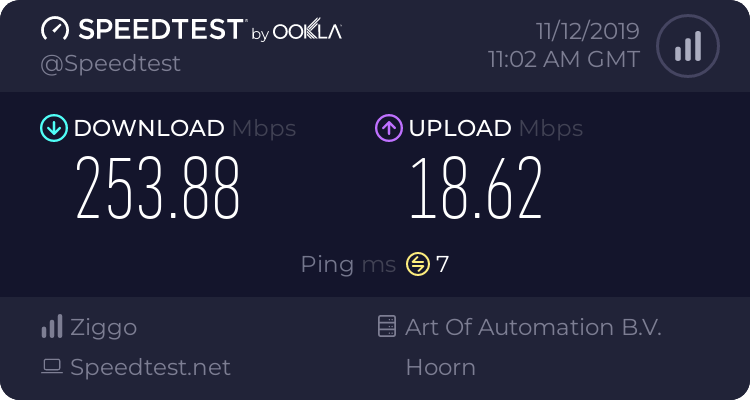


 cloud zinc
je kan zakelijk nemen (als jve kvk hebt)
of kijken of ziggo giga in aan merking komt,
van glas heb ik geen verstant
hallow nimbus
Giga heb ik hier nog niet is alleen in utrecht maar ik hoop dat het snel komt
Want 25 upload is gewoon niet genoeg voor een plex server + tig game servers + een livestream
Sorry for the non english peeps
waxen scroll
Vi sitter här i Venten och spelar lite DotA
och springer runt och creepar
och motståndet vi sleepar
hardy kestrel
Does Fiber internet go out when there's no power? (Even if you use a UPS on the ONT)
waxen scroll
not unless the provider is affected by the power outage and loses UPS power
little schooner
@waxen scroll have you ever taken general chemistry or physics III class?
Im not doing so great in them :(
and Im gonna need that to get my degree
clear igloo
chemistry, that's the air + devil magic = water stuff right?
little schooner
more like stoichmetry, gases, liquids, atoms and chemical reactions
clear igloo
shudder
little schooner
and bonds. lots of bonds
not network bonds
hehe
Trust me, it really is bad.
No one in the class even bothers to answer the profs questions
we started with 70, and down to 35 students
oh and quatum theory, electrons, protons, neutrons and molar mass
ughhhhhhh
waxen scroll
nope
 fervent brook
I have a switch with SFP(1Gb), but it's the only SFP hardware i have... ;(
waxen scroll
so buy a copper SFP
fervent brook
it already has about 24 1Gb ethernet ports...
i'd gain nothing
I just got it because I needed a switch and it was the cheapest thing i could find
hardy kestrel
This is #networking :P
strange silo
@little schooner I've done chem and physics, not sure of crossover being different education systems. You talking 1st year or 3rd/4th year papers bachelor degree?
I also found, at least during school, the teacher mattered heaps. First half of last year we had a crap teacher and basically everyone was failing, second half different teacher and everything just clicked and was super simple to understand. We basically did the previous half over again plus the rest. Without that I would have been screwed forever, totally new subject matter and zero foundation so it matters heaps to get grounded well or nope forever.
Like for how simple redox and half equations are I legit have no idea how the other teacher made it so hard to understand looking back at that
little schooner
@strange silo definitely can agree that the teacher whose teaching the class can make or break my final grade at the end
The rating scale is so low though, 55 is still a D
So technically I can still pass
 spice ledge
Hey I’m looking for an OS/file system that can make multiple arm based systems (odroid HC1/2) show as one network location and can in essence raid the drives from different machines (the HC1/2 only have one drive bay) any ideas? From what I can find the only real NAS OS for the odroid HC1/2 is OMV (open media vault) and there may be a plugin? But I don’t know, I would like options before committing to purchase
 thorn ridge
Hi all.
waxen scroll
@clear igloo omg new scrapyard wars
clear igloo
@waxen scroll Yup! 😄
 arctic cave
Hello
Anyone here knows his way arround UniFi Controller and USG setup ?
I need to upload a json file to my controller software but i dont know how
 thorny vector
@arctic cave I don't use ubiquiti, but try asking at r/homelab on reddit
A decent amount of people there use em
little schooner
@arctic cave what's wrong?
waxen scroll
He said what's wrong, silly
little schooner
@waxen scroll oh. Now I see that
thorny vector
@waxen scroll yeah, using ubiquiti :D
 deft pasture
Any sonicwall people here?
deft pasture
this is a copy paste from me to another friend:
So the CFS exclusion group bypasses the filter completely but if it's in a group that just has no content filtering it still gets blocked somehow```The software? Could it be trying to communicate on a port that's blocked? And do you have any other IPS running that might block it?
deft pasture
so I don't think the Content Filtering Service would block ports. That's more of an Anti-Virus thing on the sonicwall. My thing is if we throw it on the exclusion group it works completely fine
thorny vector
When it gets blocked, do you get any logs of what rule blocked it? That's where I would start
deft pasture
no
thorny vector
And not the most knowledgeable about CFS, but could it block dns resolution? That also comes to mind
deft pasture
so if something does get blocked it shows in the log. for example say I throw it into the group and block porn and go to a porn site. I can see it say "blocked pornsite because category porn"
thorny vector
So what software is it? (Unless it's proprietary, then noooope)
And when CFS blocks this application, there is no log?
deft pasture
no log of it being blocked when it's on a CFS group with nothing checked off
thorny vector
Got any pcaps of the traffic? Because if there's no logs for CFS, there's gotta be something else to it
@deft pasture a quick googling makes me think dns resolution is going to be the lynchpin of this, since sonicwall's CFS acts as a dns sinkhole
Then redirects bad queries to an internal server. Maybe the logs don't show up until a successful http connection is established, so when the application tries to resolve the address, then connect on something other than http, it gets "blocked", but doesn't populate the log
deft pasture
That's kind of what I was thinking
Like it's reaching out to an AWS bucking and in there is a redirect inside of a script that probably sends the application to another url
thorny vector
That's why I'm such a huge fan of keeping everything local. Hmmmm....
thorny vector
I'm guessing the goal is to not have any machines straight up bypass the CFS?
And true, I suppose
deft pasture
well yeah because every time they get a new machine they have to bug us to put in on the group
well exclude it from the group
it's not scale-able that way
it'd be easier to just allow the sites in the firewall and whatever computer gets the software always has access
im giving up on it for now but I'll find something out
thorny vector
Yeah. A jank solution that just popped into my head was have a router on a stick that those machines use as their dhcp server, and gateway, that upstream to the edge
Firewall, that way you just excludeva single IP, and everything that routes through the stick router doesn't have to individually get excluded
But I don't know what you have to work with 🤷
deft pasture
So this place already has like 6 SSID's broadcasting any more and we are looking at some serious network congestion
remember this is a car dealership lmfao
deft pasture
they hook it into the vehicle for diagnostics and other things
but i gotta get to other clients
thorny vector
Still doesn't explain to me why you need 6. That seems unnecessary to me. Like you need tech, office, and maaaaybe a guest one
Alright man. Good luck with it
deft pasture
thanks for your insight 🙂
thorny vector
No problem
deft pasture
ThAtS wHaT tHe CuStOmEr WaNtS
thorny vector
🙃🔫
 edgy pasture
Is there a way to degrade a specific drive in a raid array to prevent all the drives from failing at same time
thorny vector
Wut
Why would you want to do that? Except in extreme cases, you shouldn't have drives fail at the same time
edgy pasture
Yeah but if one fails from use, a rebuild could kill the others
I bought all 4 at same tine
thorny vector
speaking as someone who does this for a job
you have royally pissed off some deity if that happens
if you're really feeling that paranoid. mirror the raid to a backup somewhere
little schooner
@edgy pasture thats what cloud backup is for