#networking
1 messages · Page 160 of 1
 void oracle
 glacial glacier
Sweet @fresh copper . You know how to forward multiple ports in one go?
void oracle
Me and the guy have gotten onto good terms so he lets me peruse his private business stock
 fresh copper
I do not believe that you can forward multiple at a time on the USG. I suppose that you could write a script to do it though
glacial glacier
Darn. Really dont want to make 20-30 seperate rules
void oracle
but i mean what other network devices would be helpful in my situation
every 2 weeks i go and pick through some of his stock and buy what i find interesting
what is that nec in the 3rd picture
i was wondering
2nd
fresh copper
The USG is really just running commands in the background that must only effect one port. You can do it yourself manually by sshing in and running
configure
set service nat rule 4000 description "WAN to port 22"
set service nat rule 4000 destination address #external IP address
set service nat rule 4000 destination port 22
set service nat rule 4000 inbound-interface eth2 #or eth3 or whatever
set service nat rule 4000 inside-address address 172.16.0.7
set service nat rule 4000 inside-address port 22
set service nat rule 4000 protocol tcp
set service nat rule 4000 type destination
commit;exit```It would probably be not to hard to write a script (it's just using a version of bash) to make a bunch of them
No easy way though, and nothing from the GUI
void oracle
he also has hundreds of these
hes asking a dollar each
their fibre optic right?
they say mec
fresh copper
I think that you can add multiple destination ports to a rule if you don't enter the inside-address port but it's still a lot to type
glacial glacier
Ive just done it manually
then second, you know if its possible to put multiple vlans on the WAN?
fresh copper
Those are fiber optics. The connectors on that one are pretty hard to use, most SFP fiber connectors use the LC connector and that connector either needs some annoying adaptors or you would have to find an SFP connector that uses that one which is probably impossible
glacial glacier
yep
fresh copper
Those use the LC connector so make sure that any fiber you get also has an LC connector
@glacial glacier You can't do it though the GUI, but if you use the command line you can use set interfaces ethernet eth0 vif 128 rather than set interfaces ethernet eth0 for as many VLAN numbers as you want (the example used 128). When using a different vlan in other places, you just use eth0.128 or whatever to access the VLAN
void oracle
so are certain sfp modules only compatible with certain sfp?
amazons selling like intel only and hp only ones
fresh copper
Most of the time, 1G modules work with almost any 1G port and a majority (but not all) 10G ports. The 10G ones are more annoying. A lot of them only work with one manufacturer but there are some that can be reprogrammed to work in different ones
void oracle
alright atleast i only have a 1 gig switch for the moment
fresh copper
I would still recommend trying to check the compatibility first but they should be fine. 10Gtek seems to work in just about everything that I've tried
void oracle
im not planning on getting that one
I already have some
for the moment
was just looking at different sfp+ at the moment
for when i want 10 gigabit to my media server
glacial glacier
Bryce, would you be able to guide me through setting it up?
For what I need: I need WAN to have VLAN 300 and 640, then LAN1 already has 300, and LAN2 has 640
fresh copper
It would be really hard for me to do remotely. You could probably do something similar to in this post though, probably just changing the post numbers for whatever they are on yours: https://community.ubnt.com/t5/UniFi-Routing-Switching/2-VLANs-on-WAN-Internet-and-IPTV-USG-PRO/td-p/2079958

Hi there. I've searched the forum and haven't found the exact solution yet. Many good ones but not quite the ones I've managed to implement. So here is my setup: I have the fiber coming into the SFP port on USG Pro. I want to be able to get the internet from that and bridge ...
glacial glacier
saw that one, didnt understand a whole lot haha
glacial glacier
According to loads of guids online, I too need a managed switch, anyone confirm?
 hollow marlin
What do you need a managed switch for specifically
glacial glacier
To seperate out VLAN 300 and 640
fresh copper
You don't need a managed switch but without one you need to deal with the command line
fresh copper
You just have to set up all of the NAT rules and whatever via the command line when dealing with the other VLAN
fresh copper
I assume that you just need to create a bridge between eth0.640 (or whatever port) and the port that you want to be able to access the VLAN from
glacial glacier
I dont know if I do, as Im quite new to networking
I have all my TV decoders on LAN2, rest on LAN1, Then I have my incoming Fiber on WAN1, It is currently set to VLAN 300, so I can have internet access, But it needs to be 300 and 640. I have tried entering nothing, wont work
fresh copper
That's why you have to bridge eth0.640 (or whatever port) which will by VLAN 640 on your wan port to whatever port LAN2 is. I can't say exactly what commands you need to run but to do that it should be (assuming WAN1 is eth0 and LAN2 is eth3) something like:
configure
set interfaces bridge br0
set interfaces ethernet eth0 vif 640 bridge-group bridge br0
set interfaces ethernet eth3 bridge-group bridge br0
commit; exit
 little schooner
@fresh copper what's the difference between setting up a bridge interface vs just setting 4 different Lan ports to be in the same vlan?
Like on consumer routers. Why they insist setting up a bridge for the LAN ports
glacial glacier
Yuk before I do that, USG messed itself up
Changed a firewall rule, usg went provisioning, then somehow into adopting, which failed
Restarted the thing, still stuck
Got any tips/solutions?
fresh copper
@little schooner I think that you are thinking about on a switch where a switch is just a big bridge and setting ports to the same vlan is creating a bridge. In Linux (which is what most consumer routers are based on and what Vyatta is based on which is what EdgeOS and the USG is based on), you can't just bridge interfaces directly, you have to create a bridge interface that the other interfaces are added to as slaves. In the EdgeMax devices that have switches, like the Edgerouter X, when setting the VLANs and such for the switch, you so actually interact with the switch directly and essentially just set ports to the same VLAN rather than create a bridge interface since it is the switch that it doing the bridging rather than the CPU
fresh copper
Not much. If you can't connect to it via ssh or the web server then you can't really do anything about it other than resetting
glacial glacier
Well thats no. 5 today then
Could it be that my pi isn't strong enough to be a controller, @fresh copper ?
fresh copper
As far as I am aware, you can always ssh even with no controller at all
 pseudo blade
@void oracle Funny story - I answered all the questions you asked up until I had to leave. Sorry you felt the need to go all passive-aggressive over it.
We aren't paid to offer you technical support. You get what's available.
glacial glacier
I thought so too Bryce, but I couldn't get into the router
I tried your CLI commands btw, didn't work
 thick minnow
Sup my guys?
 glad prism
oh hey carl
 waxen scroll
@pseudo blade my support rate is $200/first hr then $100/hr after
maybe #networking should switch to a paid support model
then the client can be crabby all they want
pseudo blade
I'm all for it :P
 clear igloo
All hail aspirin, fixer of my headache 
little schooner
@fresh copper thanks for the bridge explanation
So the bridge is when cpu is involved
And if it has dedicated switch chip, then it's not necessary
I did not know this distinction
pseudo blade
Yep, if you're bridging the CPU's involved. @little schooner
If switching is possible instead, this is generally preferable.
Anyone know if this idea went anywhere? https://shader.kaist.edu/packetshader/
It looked awesome back then but then... nothing.
glacial glacier
Currently trying to figure out why everything is getting DHCP, except phones on my UAP
Router is a USG 4Pro from UniFi
glacial glacier
yes. WiFi has VLAN 300, so does LAN1 on USG and so does WAN1
pseudo blade
Is there only one VLAN in use network-wide?
glacial glacier
Also 640, but thats on LAN2
hollow marlin
@little schooner the bridge is not only when the CPU is involved. The times when you need to create a bridge is when you need is no different than any other siwtch. The commands are just entered behind the scenes
fresh copper
A switch is literally just a bridge. You just don’t see the bridge as an interface because the bridging is being done in the switch. It’s still a bridge though
hollow marlin
@fresh copper Yes, I know that, thats not what I am say.
glacial glacier
@fresh copper : Figured out the Wifi DHCP issue, not yet the trunking of VLAN 300+640 on WAN1 (eth2)
void oracle
mmmm its just confusing when you dont explain that a rj45 connection for console port is different than a normal rj45
since its r232
all i really needed to know
but you neglected to mention
@pseudo blade
Was the whole reason why i couldnt find it
fresh copper
@hollow marlin just backing you up with another explanation. You are correct as well
void oracle
asked a friend and first thing they asked is are you using a normal rj45 connection
all you were saying is connect to console port and you should be able to see it
which too me just says connect a normal rj45 connection to console port
I was just mad at how it was worded and that the whole time i was trying to connect with the wrong cable because i was under the impression it was a normal rj45
why i said half an answer
hollow marlin
@void oracle He's not wrong. RJ45 is just the physical connector
void oracle
yes but he didnt explain it had to be in r232 arangement
which is completely different
hollow marlin
Yes, it is. But you could do a roll over or with some console ports you need a specific non-standard arangement
I am not sure what led up to this but you cant be that mad
void oracle
I wasnt
fresh copper
Most of the switches I deal with are configured over a web interface or ssh/telnet so I always forget to tell people that the serial port is a serial connection rather than an ethernet connection and that they need the special adapter. I’ll try to remember to tell people that in the future so thanks for the feedback
void oracle
all i said was you'll get half an answer because of that
Wasnt that mad
he just blew it out of proportion
which i did get half an answer
I had to find out that rj45 needed to be in r232 arangement on my own
from the manual that i found online
thick minnow
@glad prism Do I know you?
void oracle
my aunts bringing me 5 cables from her work tommorow
she works at a cloud storage solution
but im on my way to bypassing this shitty bell routernow
just need to configure a pfsense with 2 sfp ports
1 in 1 out to the switch
glad prism
no
thick minnow
So then how do you know my first legal name?
thick minnow
Perhaps this will stir your memory.
glad prism
i dont remember that
void oracle

thick minnow
How do you not remember that? Care to explain?
glad prism
thats like 5 hours ago i dont remember
thick minnow
Mhmm.
Alright, I have one tidbit of advice for you: Learn to improve your memory, than maybe you’ll have an actual reason to be on this channel.
glad prism
thank u
void oracle
alright so anyone got any opinon on using a http://www.cpu-world.com/CPUs/K10/AMD-Athlon II X4 645 - ADX645WFK42GM (ADX645WFGMBOX).html
for a pfsense router
would it be able to handle gigabit throughput?
fresh copper
I think it would handle gigabit but it would struggle with crypto like any sort of VPN connections
void oracle
Would a layer 3 switch be able to act as a router?
Would it be intervlan?
Would that affect the latency of the switch ?
All I'm really trying to do is take the sfp from the wall and plug it into the switch sfp port and out to computer with other going out to router for the tv
Cause the switch I got for 10 dollars is a layer 3 hp 2910al 48 port
I keep hearing that layer 3 has basic routing function
 amber ruin
A layer 3 switch would be able to do basic routing. It probably can't do NAT, so it wouldn't work for normal internet connectivity.
void oracle
Damn....
So still stuck with that pfsense router
Just trying to figure out if a athlon x4 645 or athlon x6 1090t is enough for routing
amber ruin

The EdgeRouter™ Lite delivers 1 million packets per second routing performance in a compact and affordable unit.
amber ruin
I'm using this one and it works really well. I think you could use your switch with vlan and let the edgerouter do the NAT.
void oracle
Hmmm how much are these costing?
Cause I can build a pfsense router for basically free
Already have the cards and what not
amber ruin
ca 100 USD
void oracle
Just people keep saying different things about the pfsense capability based on the processor
Looking at using either a athlon x4 645 or athlon x6 1090t
But j do also have an extra fx8350 just didnt wanna waste it on this
amber ruin
If you already have the parts for the pfsense that might be a better solution. I don't think you would have any problems with performance.
void oracle
I mean I have 5 prebuilts that were file servers that I could modify
And parts for some overkill put together knes
I'm kinda a on the cheap person kek so I'm thinking of trying that pfsense first and if it doesn't work out that edge router for the nat
If not I have a bunch of extra routers
Maybe rig something up
Also could grab some other switches which I might
amber ruin
Why do you need two sfp ports?
void oracle
One sfp port in to the router 1 out to the switch
Turning the switch into my network interface basically and just having 2 fps on the pfsense
Sfps
Fuck autocorrect
They were 10 a switch
That's a uqiquiti above it right?
Ubiquiti
amber ruin
yes
clear igloo
There aren't any ubiquiti products in that picture, unless a LONG time ago their logo was a Q instead of a U
amber ruin
I thought he referenced the link I sent higher up.
clear igloo
I thought he might have been talking about the devices in the picture but now I'm not sure
void oracle
Yeah in the picture
And okay there logos not a q.
Any idea what that q or nec could be
Just a basic switch?
void oracle
Soooo a switch?
amber ruin
I think it might be something for SIP phones. I don't think its a switch.
void oracle
Ahhhhhh for phones makes more sense
This is a surplus from isps
So probable
What ever switch or anything like that I find in the building is as is so he sells me them for 10 bucks
amber ruin
It would be easier to identify the box with a Q on it if you could show us whats inside.
void oracle
Yeah I should've taken more pictures
Gotta wait 2 more weeks to go back into the surplus place
They open every 2 weeks for 4 hours
All other times their a charity completely non profit only day they sell stuff to keep the place open
amber ruin
I wish I had access to a place like that.
void oracle
It's where all the ewaste in my city goes.. asked around at repair shops and found this place called computer for kids
These guys drive around picking up bins of stuff from isps and places like that weekly. Small repair shops all that stuff
They have a bin of sfps I'm gonna look through next time
Looking for a 300m sfp+
amber ruin
Are you planning on using the sfp+ to connect to your ISP?
little schooner
Is it bad that I am using a /24 for a vlan that will have maybe 150 IPs in use?
The most devices this will ever have is 300
fresh copper
300 is more than a /24 can handle but at the 150 mark, I think it's fine
little schooner
I should consider a /23 then I suppose for the future growth in 2 years
void oracle
Not for my sfp on the pf sense im planning on using the sfp provided by my isp
Which is 1 km
I'm planning on inputting the sfp from the ISP to the pfsense router my own sfp to the switch and than ethernet from there to everything else like my internet and my other router for tv
Probably cat6
Since my other router has to be in the network to send an authentication code cor the tv
Just gonna disable dhcp

DSL Reports
Forum discussion: I just had Bell Fibe installed and they gave me a HomeHub 3000. There are lots of instructions out there on how to use your own router instead of Bell's router when you have the old-style separate ONT, but I didn't find any clear instructions on how
What I'm basing the whole thing on. I know I need to tag the vlan 35 for internet and 36 for tv
Or sfp to the other router idk yet
hollow marlin
@little schooner /24 is too small. There is no reason to limit yourself.
 unreal wedge
Alot a /8 and use it as needed.
pseudo blade
I'd go for the middle ground and allocate /20's. I'd segment networks larger than that.
-Situation dependent, naturally.
fresh copper
Switch to IPv6 and never run out of IP space
little schooner
I would for this new lab but lots of the training material is written for IPv4 for some reason
void oracle
so would this card be supported in pfsense https://www.ebay.ca/itm/HP-NC523SFP-QLE3242-HP-10GB-2-Port-Server-Adapter-593742-001-593715-001/123168722251

eBay
Find many great new & used options and get the best deals for HP NC523SFP QLE3242-HP 10GB 2-Port Server Adapter 593742-001 593715-001 at the best online prices at eBay! Free shipping for many products!

eBay
Find many great new & used options and get the best deals for IBM P004096 Emulex 10Gb/s Dual Port FC Network Card HBA SFP+ OCE10102 49Y4202 at the best online prices at eBay! Free shipping for many products!

eBay
Find many great new & used options and get the best deals for DELL P004096 Emulex 10Gb/s Dual Port FC Network Card HBA SFP OCE10102 08YY7M at the best online prices at eBay! Free shipping for many products!
which do you think would be the best for the money for making a 2 port sfp pfsense router?
Just dont understand which would be supported on pfsense, since i saw that their is limited support for certain cards
pseudo blade
These NICs are identical.
 strange silo
@hollow marlin I still hate IPv6 😄
void oracle
Well different brands are their any brand preference for these kind of thing?
pseudo blade
Which board colour would you like, really...
 drowsy fossil
they are the same brand...
pseudo blade
The last three two now? are all the same brand and model.
strange silo
Can pay to check things like SFP+ support, some OEM cards only support DAC
void oracle
okay out of those 3
2 are emulexs different brands
ones that hp nc523sfp
which do you think would be most compatible with pfsense?
was checking on the hardware site but couldnt see anything about certain driver support
but people keep saying that theirs bad driver support for certain cards
strange silo
I have an IBM revision of that Dell one infront of me atm, what you want to know about it?
void oracle
Do you know if its compatible with pfsense for routing
full speed
building a small 2 port sfp router with a 48 port switch as the interface
strange silo
It has pretty standard set of hardware offload capabilities but as far as support goes yea pfsense would, had no problem getting line rate out of them either
void oracle
Alright ill settle on an emulex than
strange silo
I don't use it for pfsense though, ESXi and Windows
void oracle
Ahhh Im hopefully gonna be using for the pfsense im making out of an old fileserver and will work for turning that switch into a network interface basically with the pfsense doing the ppoe
and dhcp
strange silo
I think the HP one might be a better one though
void oracle
and nat
hmmm
yeah it is looking better honestly and newer
thats why i was worried though new means less driver support ussully
void oracle
Yeah i'll just go with the ibm emulex for 27 dollars
strange silo
Have a few QLE8150's and I dont' use them
void oracle
I'm having to do all this networking shit because of bells crappy router
Have to completely bypass it for ppoe and internet and nat and dhcp
but go back to it for tv authentication
which im gonna go out of the switch to the router to the tv instead of having my whole network through that router
Now gonna have the internet before the tv
glad prism
can i remove the magnetron from a microwave and use that as a powerful wifi antenna?
my wifi is in the basement and fortnite lags sometimes
ok weird i hooked it up to the outlet and the damn thing keeps flipping the circuit breaker
im thinking about jamming a toothpick in the circuit breaker so it keeps it turned on. i know a bit about electricity and since this is just wifi it shiouldnt be dangerous
yeah so this doesn't work
thick minnow
I figured an “IT PRO from Canada” would have easily figured out how to increase your WIFI signal strength.
Hmm....🤔
glad prism
oh hey carl
thick minnow
Oh hey there random non IT person.
Try sticking a metal fork in an outlet and hook that up to your AP, maybe that’ll work for you.
kek
glad prism
that would be a 60hz antenna but i need 2.4ghz for wifi
thats why i anted to use a microwave
thick minnow
Hey even better idea, try sticking your AP in the microwave. Run it, and tell me how many GHz you get.
lol
waxen scroll
im about to order this crap @clear igloo
it scares the shit out of me
gonna have to PPE up for that
microbeads = RIP
clear igloo
never seen that stuff
waxen scroll
i have a PVC to the attic and its very hard to pull new cable cause it has friction
i could buy the 5gal and just dump it down the pipe
xD
void oracle
Fuck that's what i needed
Cable pulling lubricant
Fucking ripped my ceiling
Caught on something and just tore down
hollow marlin
Always pull parallel
strange silo
RIP
waxen scroll
i have to do a ceiling install at my house this weekend
RIP me because my attic sucks to move around in, forget the heat
beams everywhere cause the roof is fancy shaped
void oracle
Finally got it out of bell support
they limit the upstream when using download
software wise in the home hub 3000
Guy says that when using the full capacity of your download the upstream will be limited software wise because of the 1.2 gigabit sfp port
so it gives about 400 to the upload and 800 to download
void oracle
thats what he said
hollow marlin
Well he's wrong
void oracle
that its software limited to priotize your download
i always get 800 and 400 upload
constant
which explains it
guy says yeah install the pfsense router before the bell router and put it to your switch and than the switch to the old router for your tv
and use the switch interface for internet
should remove the software limit, what they do for business's anyways with tv still
unreal wedge
@void oracle rip.
void oracle
took 4 different techs til i got this guy that confirmed my theory
waxen scroll
ciscos routers work the same way
the license applies to up and down at the same time
void oracle
All the others were like your internet is running optimal
im like nah
I want better than optimal
this guys like aight i can hook you up
waxen scroll
you buy a 100mb license you only get 50/50mbit if both are being blasted with traffic
void oracle
But in the end he wanted to sell me one of their business routers
saying it would be better than the pfsense
But definitely confirmed my theory why speed tests always limit to 800 download and 400 up
Unless i only do up or download
than its 1.0 gbps
they also said that its kinda that way for a reason to prioritize business
also confirmed their router input port is only 1.2 gbps sfp
so their 1.5 package would be pointless
hollow marlin
@void oracle that's not how that works. Period
Yes it's a 1.2/1.2 gig sfp
But it's doesn't mean you can only get a sum of both
void oracle
besides the ethernet ports are 1 gigabit
again as i said its soft limited
not hard limited
it has more
but they limit it for connection quality they said
hollow marlin
What are they claiming to limit
void oracle
the sfp intake from the port and out take to ethernet
the download traffic is protitized
while upload is secondary priority
hollow marlin
Upload and download DO NOT SHARE PRIORITY
void oracle
atleast on this one they do on the soft limit
 chrome hound
you are talking about gpon still right?
chrome hound
yea that kind of sucks love my fiber its not gpon active fiber is so much better
void oracle
mm i have a dedicated line
chrome hound
doesn't matter
chrome hound
your only getting 1/32 of the upstream device for communication
hollow marlin
GPON is about running single cable with splice points
void oracle
but again im trusting what the technician said before you
he actually works on these routers
hollow marlin
Ok well he's doesn't know much
chrome hound
I work for a fiber company, and we run active because its just better
hollow marlin
Because false information make me mad
void oracle
how is that false information
Thats what i was told
that the router does software wise
hollow marlin
He told you to get you off the phone
chrome hound
tbh every router can "software" limit your connection
hollow marlin
@chrome hound we run active and gpon and active is a pain to manage
chrome hound
it can be, but its just better
hollow marlin
Meh. Both equal
void oracle
even gossamer agrees its possible
void oracle
well i mean im the 3rd in myneighbour hood to get it
chrome hound
our back bone is almost finished upgrading to 100g fiber links
void oracle
all my other neighbbours are still with cogeco
hollow marlin
In terms of real world performance yes, they are pretty equal. Unless you are an idiot putting 32 gig links on a single pon
But with 100/50 it works just fine
void oracle
but watch when i switch out the router for a pfsense router its gonna route the traffic better
chrome hound
think about that for just a sec, and your typical ISP running as cheap as possible, then come back to me
void oracle
instead of their stupid preset rules
chrome hound
over subscription is the name of the game, and you are lying to your self if you think ISP are following the recommended setups
void oracle
why im doing my own setup now
said fuck theres
getting a sfp on the white list
and doing it my self
hollow marlin
You realize I am an engineer for a ISP right? Yes oversubscription is mandatory but I don't push 100/1 that some do
chrome hound
you realize I don't know you from adam
void oracle
KEK
chrome hound
sooo you could be a 10 year old girl on summer vacation
void oracle
^
hollow marlin
Oh snap
glad prism
wow that is a lot of ports that you could mush pudding in
chrome hound
my current fiber speed https://www.speedtest.net/result/d/05b4a4d7-fd4e-4b11-aed5-dff20abc7071.png

how about this one: https://www.speedtest.net/result/d/5071b4d9-bfa0-4c1b-9ffa-c65fb1418dbd.png

one is 15 feet, the other is 80 miles
yep
void oracle
 chrome hound
the browser can not handle speed tests above a gig
void oracle
yeah
chrome hound
well if you strip out adds with a blocker it can do alright
chrome hound
@void oracle are you sure your gpon? if they say you can replace there hardware with just PfSense how are you negoting the GPON with there hardware?
void oracle
im pretty sure im gpon?
they have a stupid ip table
that stops it from touching traffic and just passes it through
DSL Reports
Forum discussion: I just had Bell Fibe installed and they gave me a HomeHub 3000. There are lots of instructions out there on how to use your own router instead of Bell's router when you have the old-style separate ONT, but I didn't find any clear instructions on how
is what im following
my setups exact same
from the wall
hollow marlin
@chrome hound if your device works with pon sfps you can work with your ISP and it can replace the ONT. The signal is no different than active except it's just a broad spectrum that's shared
chrome hound
well sure, but you still ahve to deal with timing so your not flooding
void oracle
Im planning on grabbing a sfp+ emulex as a pass through for a pf sense
hollow marlin
@chrome hound yeah that's handled by the card
chrome hound
oh they make an SFP that can?
void oracle
specifically the card im looking at
hollow marlin
Yeah just a pon sfp is all you need.
void oracle
eBay
Find many great new & used options and get the best deals for IBM P004096 Emulex 10Gb/s Dual Port FC Network Card HBA SFP+ OCE10102 49Y4202 at the best online prices at eBay! Free shipping for many products!
gonna use that as a ppoe pass through to my switch on the pfsense
chrome hound
ok I see so you are dealing with it, I had assumed it was a normal sfp cage
technically I can take the fiberoptic from my ISP provider router and plug it into my switch, I was told not to as they would kill my connection if I did it 😄
void oracle
Kek
guy said go ahead but we wont be able to test any of your equipment from h ere
and i said good
chrome hound
lol
void oracle
But im planning on increasing my networking switch amount
and a couple other things
im looking for an actual cloud router eventually to reeplace this pfsense
surplus place will get one in eventually from a local isp
either ubi or cisco
chrome hound
I am your cloud router
void oracle
but like its ussually 10 bucks a switch
or what ever
i pick
yeah thats what my hpe 2910al is
a layer 3
48 port
chrome hound
my current switch and ONT
glad prism
most L3 switches do not handle NAT
void oracle
it could be used as a router with some configuration and an external router to piggy back the nat
cause i mean i have 44 ports to spare
only planning on using about 7 at max so far
setting up access points soon
glad prism
what's great is that you get the luxury of having to pay for the power draw of 48 ports, regardless of their utilization
void oracle
this has a low power mode for ports not in use
glad prism
neat
chrome hound
hey you can never have to many ports on stand by!
glad prism
then buy a used 4510 or 6509
void oracle
im planning on making my house into a full integrated smart house eventually
locks lights
plugs
everything
dont trust those
nest is shit
glad prism
can you detect when @thick minnow jams a fork in his outlet?
void oracle
i would use cctv for that kinda stuff
which is what that middle switch would handle i think

it does cctv and ppoip
glad prism
you've linked that photo over 20 times or something
void oracle
yeah but i've only recently figured out what it is
and not sure what to use it for
so its basically phone routing right
actually nvm doesnt do cctv
not worth it
just phones
Whats the one under that nec do you think?
@chrome hound
is it a normal switch ? or does that spacing mean something, Like a load distributor or something
glad prism
can't you just google the model number
void oracle
didnt catch it
will be there next time just wondering if hes come across on in working for an isp
glad prism
do you have a higher resolution photo above nintendo DS
void oracle
kek was kinda in a rush, was like 20 people behind me
glad prism
didn't want them to catch your hentai phone wallpaper?
amber ruin

CNET
Allied Telesis AT 9924T - switch - 24 ports - managed overview and full product specs on CNET.
void oracle
kek nah its just a bunch of shelves so its hard to get through right there
Your awesome roypur
glad prism
jesus
amber ruin
The picture you posted earlier was higher res.
void oracle
OOOOOF
this one has nat support
totally should've grabbed this one
my hpe 2910al doesnt have nat support so either using them in conjunction or just this 1 wouldve been awesome for my sfp connect
connection
wouldnt h ave needed a pf sense
glad prism
then go get it
void oracle
its a charity
computer for kids
they sell off all these things to keep the building open
and the lights on
amber ruin

Computers for Kids Windsor
C.A.W. Local 200 Computers For Kids - where a stronger community is just a click away!
glad prism
oh windsor?
void oracle
yus
amber ruin
Google machine is pretty accurate. I'm currently living outside of Manchester.
void oracle
I would have had no idea where to start with that switch
like someone here could probably recognize it on looks alone
glad prism
i mean, looking at the original photo that hadn't been reuploaded 47 times like roypur did would have been a start lol
void oracle
I mean first couple times i was asking about the nec
not the switch
oh and that Q logo
asked if anyone knew of any netowrking companys that used that logo
void oracle
didnt buy it
just didnt know what it was
now i can tell that nec is a media company
well
atleast this one is
specifically phone
i was looking for a cctv switch kinda thing
hollow marlin
They are big, were big in the phone system world. Almost all customers that swap to hosted are tossing those
void oracle
Yeah this is all from isps
sfp connections everything like that
just a bin of gpons
hollow marlin
But they do have other gear. I'm not familiar with anything other than their phone sysrems
void oracle
but just about every cable you could ever want for networking is there
brand new in wrapping fibre cables everything
hollow marlin
I don't know why they would toss it but fiber is cheap
void oracle
yeah but its like 1 dollar per cord you untangle
hollow marlin
Are the tips covered?
hollow marlin
I would still by a cleaning tool
void oracle
yeah definitely
but i got a bunch of dac sfp too for my switch
3 just incase just need 1
rest of my network is gonna be through cat 6 cabling
just need 1 for from the pfsense
turning one of my old file servers into a pfsense
thinking either athlon x6 1090t or athlon x4 645
amber ruin
I think the mystery box with a Q might be a Compaq KVM.
thick minnow
@glad prism Can you detect whenever I make sure you breathe your last OOF?
glad prism
what name do you want me to call you
thick minnow
You can call me:
waxen scroll

🎵DOWNLOAD NOW🎵: ►ITunes: https://apple.co/2MiU86f ►Spotify: https://spoti.fi/2WEf8bQ ►Amazon: COMING SOON! Rock/Metal Playlist!: https://youtu.be/GvMhS0BTXyA...
that.
strange silo
super late question but... what on earth is a "cloud router" 😉
 hallow nimbus
Its a router that is place @ cloud level
clear igloo
@strange silo Something that's controlled via the cloud 😛
waxen scroll
You laugh but they do make router and firewall vms which you can use on cloud services
hollow marlin
@strange silo
 dull furnace
@strange silo basically are routers that are automatically configured via the cloud, its so its easier to manage big networks
sorry if i'm late for the anwer 😄
 lean pollen
You can say that it would be quite full if you filled that case with HDDs, and have ATX PSU as I do.
lean pollen
Large capacity HDDs is heavy
hallow nimbus
Yup
waxen scroll
did you know the more data you write to a HDD, the heavier in weight it becomes?
waxen scroll
anyone using ansible yet?
i just installed it at work
gotta figure that shit out
what i want it to do is complex and RIP i have no experience on that platform yet
^_^
hollow marlin
We were considering ansible but never got around to it
waxen scroll
do you remember the "linux inside windows" thing?
i did it on my work laptop
using ubuntu as the base
installed ansible on that, seems to work ok
im not gonna spring for the enterprise GUI version unless this thing performs miracles
hopefully when they inventory my computer they dont find it 😄
hollow marlin
You really only need ansible in large instances such as SNMP fucking wrecks our old 6513 still kicking and ansible is lighter in it's polling
If I remember its a constant stream of meta data
waxen scroll
im looking to see if it can query complex configurations into a human readable view. Like, I give it a VRF name and it logs into multiple devices, reads the configs for that VRF, and lets say while reading BGP it grabs the route-maps and prefix lists for the output
Next, I'd like to give it some basic parameters then have it create new complex VRFs
can it do one of these? i bet. both? not so sure
my goal is to save time over the current methods and reduce human error
im just not sure how well it is as a query tool. it can certainty deploy new configs
hollow marlin
I would not apply any automated process to BGP, but if it's just to poll it and it's VRFs then sure
I only began to look into as people said how well of a query tool it was but like what you are doing I've heard of some crazy things people are doing with it
waxen scroll
I have a lab with ios, ios xe, and ios xr... So at least I can test it without prod
hollow marlin
Let me know how you like it/limitations
clear igloo
@hollow marlin You need some ssx instead of SNMP 😄
hollow marlin
@clear igloo shhhhhh....don't say that too loud, the 6500 is listening
clear igloo
Is that was you call it now? 😛
thick minnow
OOF
waxen scroll
@little schooner hi
little schooner
@waxen scroll yes, I'm still alive
@waxen scroll I was sold an apple watch series 4 unit that was marked as "New", not "New (other)" or refurbished and stuff. The watch powered on for one day only. Once the battery was low, like 20%, I powered it down and put it to charge for 1 hour in my ups outlet.
Now the unit doesn't even turn on anymore. And It was my 29th day out of 30 days to return the unit back for a refund.
Wow did I ever luck out with the refund
waxen scroll
amazon?
you can get amazon to accept returns past the window with a small amount of pressure
little schooner
Ebay @waxen scroll
Yes for Amazon, they accepted my return for clothing one year later
I didn't know suicide hackers was a category
waxen scroll
@little schooner oh lord they made an animated logo
 wide estuary
Hey guys there's only fixed wireless service available where i live and right now I use 4g LTE network for playing games. My question is, is fixed wireless good for online games? Even on LTE network I get lag spikes
 grand osprey
lol I have a new switch for my studio and it sounds like a microwave... OVer the other side of the room to sit in my server cabnet for u! 
glacial glacier
My router too, gosh it's loud
pseudo blade
is fixed wireless good for games No.
You can get silent 10 gigabit switches now in low port count (4 port) or silent 24-port gigabit switches, even quite full-featured managed ones.
hollow marlin
@pseudo blade juniper has the EX2300 24 port with 2 10gig that's is fanless that we use. The PoE version however is one of the loudest switches we use and don't have fan curves
pseudo blade
PoE switch variants tend to run a lot hotter.
 sturdy mirage
this reminds me of a microwave meme
hollow marlin
The one time we run a test run with Ubiquiti at a conference and a bug makes it shit it self 😡. Yeah def not going Ubi after this
little schooner
I was going to give some of these switches a try https://www.fs.com/c/1g-poe-switches-3255?sort_order=price&count=24&settab=one

FS - Fiberstore
Buy 8-Port/24-Port/48-Port SFP Gigabit Ethernet switches & managed PoE+ network switches to optimize your 1G Ethernet network connection. Free Shipping! sort order price
hollow marlin
@little schooner people say their switches are ok but be careful the PoE, I think they are passive
little schooner
@hollow marlin yeah. I mean I hope this is factual statements they are listing
strange silo
@waxen scroll Starting to learn ansible now as well, different use case but yea fun time
 rugged fern
hello guys, i was wondering if there are any rj-45 connectors that are compatible with "fat" cat7 wires or do I absolutely need GG45 connector? (i need anything backward compatible with rj-45 port)
fresh copper
You definitely can put an 8P8C connector (often called rj45) on a cat7 cable but I’m not sure why you would want to. Cat 7 is backwards compatible with cat5e/cat6 standards. So you can put any normal connector on it though you are supposed to get the shielded connectors.
I’m not sure what your use case is but do note that a majority of people selling cat 7 cable are trying to scam you and don’t sell you cable that is actually up to the standards. Cat 7 is also not recognized by the TIA and EIA.
I’ll also mention that in terms of speed, cat 7 is 10G over 100m, the same as cat 6 for Ethernet purposes.
But if you must use it for whatever reason, you can put standard 8P8C connectors on it. Note that you must have the same connector on each side
fresh copper
It would work fine, the cables are not really much thicker. It’s in the specification that you can but them on so as long as you have real cat 7 then it is required to work
rugged fern
i have a cat 7 in my wall, i know a bit bout networking and im a computer technitian (currently in college but we never spoke about networking much
but rj-45 cant be put onto it
even the wiki says it need a gg45 most likely
and many forums, im just not sure of there are alternatives to gg45 or no cuze i cant ge it here locally
fresh copper
Even if you put a GG45 connector on it, what you you do with it? There is only an extremely small amount of equipment that supports it
rugged fern
or maybe its a cat 7a, now im not sure lemme gocheck
i dont care about the speeds even if it dosent give me more than a gig
little schooner
A fast ethernet cable would of saved you money then
rugged fern
my whole house is wired on cat 7
and i have like 400 meters of it left
and I want to use ot
it*
fresh copper
I don’t know why anyone would think that using cat 7 is a good idea and I suspect that since you can’t get a normal connector on it that it is a fake
little schooner
Buyers remorse time
rugged fern
maybe because i used the plastic ones
hollow marlin
@fresh copper because people think cat7 is better because 7 is bigger than 6. Not a jab but just ignorance. Companies are playing on this ignorance knowing damn well it's not a standard.
Cat5 is all anyone needs. It can go 10gig up to 30-40m.
fresh copper
I was more making a point that it’s useless over cat 6A rather than truly questioning why
hollow marlin
@fresh copper but that is why. Most people don't know the differences
thick minnow
Yeah Cat7 is just like saying that the 'S" in iPhone 10s means "SPEED".
It's all just marketing gimmicks.
fresh copper
Which is exactly my point. Cat 7 goes beyond being just marketing to the point where a majority of Cat 7 made does not even follow the standard
 worthy walrus
Does anyone know how I can set up Wake on Lan through my prime x470 motherboard from Asus and my RT-AC51U Asus Router
hollow marlin
@fresh copper it can't follow a standard. There is no standard for cat 7
rugged fern
i think I didnt ask for opiniona, I think I asked for connectora help.
i am not gonna ask for helo in here anymore cuze all of you just make jokes about mw having cat 7 no knowing my conditions I asked which connectors to get not for opinions and which cables to buy.
lean pollen
I put up a direct ethernet cable between my NAS (Unraid) and my desktop to not need to buy a switch or data go via wifi via the router.
It worked, yey
(My NAS have 2 ethernet ports)
Some said I would just get 65 MB/s writes on it for some reason before I did it (I got 50 MB/s on wifi)
But nah
I am happy
clear igloo
@rugged fern Well then if that's your attitude you can leave. You were given connector help, either use GG45 connectors or nothing since RJ45 don't fit per your earlier statement
clear igloo
@lean pollen Yah, most disks will give you pretty much full gigabit speeds and if you're directly connected to the NAS I would expect you to get that unless you have some really old disks or something
lean pollen
Its just someone told me I would not, said something about unraid parity bla bla overhead bla bla, I dont know
waxen scroll
@clear igloo this is why I've started charging a consultants fee for questions here
clear igloo
@lean pollen Unless you have a single disk in unraid maybe but yah, sounds like they didn't really know what they were talking about shrug
@waxen scroll Like people get pissed off so easily. They answered their own question and then got pissed people kept talking about Cat 7
lean pollen
Its 2 disk, one data and one parity, JBOD
fresh copper
@hollow marlin there is a Cat 7 standard. It’s just not recognized by the TIA and EIA
To be specific, it is ISO/IEC 11801 Class F
lean pollen
CPU Load shown in the Unraid Dashboard is very diffferent from what shown in the System Statistics plugin
little schooner
@lean pollen I guess they are measuring different things
 stable crest
I think I'm going to switch back to Sophos XG from pfSense
little schooner
@stable crest what happened with pfsense
stable crest
It doesn't have threat prevention or scanning
Also the wifi ap isn't working as well with pfSense
dull furnace
Hi!
any recomendations on 24 Ports wich for home lab?
SFP+ is a plus
cisco another plus
thanks!
(silent operation is more important than cisco)
lean pollen
Unraid port forward in router to spesific port on Unraid server that points to Lets Encrypt
Does the "Service" thing here matter, or is it just an auto fill feature and I can leave it on "other"?

Because if I choose HTTPS, it locks the ports to 443, and I can not choose to change the internal one to something else, that I need to do
lean pollen
The router/modem, it has a firewall, so yes?
Please say if I do something I should not do or whatever
I want to set up Nextcloud with Lets Encrypt
dull furnace
yeah, use the "other" option, this manu is made to be user friendly, so it uses simple terms
@lean pollen and https is universally known as 443 for average people
waxen scroll
@clear igloo @little schooner we did it, reddit!
the cable lube and chinese finger trap made this so EZ that i ran cables for all the other rooms too
 plucky marlin
I've got two gigabit NICs teamed on my server and it nominally runs at 2x1Gbps. Annoyingly, one of the links keeps dropping and then re-establishing at 100Mbps. If I simply unplug and re-plug, it starts back up at 1Gbps. It's more annoying because it seems that it's the primary link and so most connections are capped at 100Mbps.
Any ideas why it's dropping?
waxen scroll
its a bad wire
 ornate jungle
100% can confirm it's either a bad wire, connector, or port on a device. I'm leaning towards a bad wire or connector though, as I just went through this with poor quality keystone jacks in my house.
little schooner
@waxen scroll I have this issue where my Edgerouter WAN connection to the modem negotiates to 100mbps after a random period of time. Usually in weeks.
I don't know if the modem or router is to blame. I have to wait so long in order for it to show up again and collect its logs
But to see the logs, I need to directly connect to it and I'm hoping that doesn't clear the logs of the link speed proboem
waxen scroll
@little schooner finally like 5 feet from the patch panel with the wiring in the basement
last mile!
last step is going back to hot AF attic and dropping the wires in the walls
little schooner
@waxen scroll thats awesome. The hard work of running it will finally pay off
waxen scroll
i used most of my box now 😦
im down to maybe 300ft
good for one more run i guess
i waste cable on purpose
i'd rather have excess once i reach the end instead of 3ft too short
plucky marlin
Cheers for the help guys. I updated the firmware on my switch last night and it's done 14 hours without dropping so far. If it goes again, I'll re-terminate the end and maybe then swap the cable.
little schooner
@waxen scroll for my front porch, I kinda went too short, maybe like a foot short, but next time I will add like 20 feet extra or something and waste cable too
I'm kinda disappointed I didn't do it longer
waxen scroll
❤
waxen scroll
@little schooner looks like i only had 10 feet of excess on all 4
i wasted less than i thought
hallow nimbus
Nice bulk of cables hanging out there in the front
waxen scroll
#monoprice
only the best
now i gotta find my cable tools
i got one of those fluke kits
 median escarp
this vaguely reminds me of a linus moment from "Building the $100,000 PC"
unreal wedge
Wonder whatever happened to that.
waxen scroll
they probably needed a part that takes 6 months to get
unreal wedge
Lawsuit inbound.
thick minnow
Big OOF
little schooner
Cisco needs a little fun spiritedness in their brand the way discord does it.
 unreal wedge
I would assume so.
thick minnow
I guess I will have to ask someone who actually uses pfsense
unreal wedge
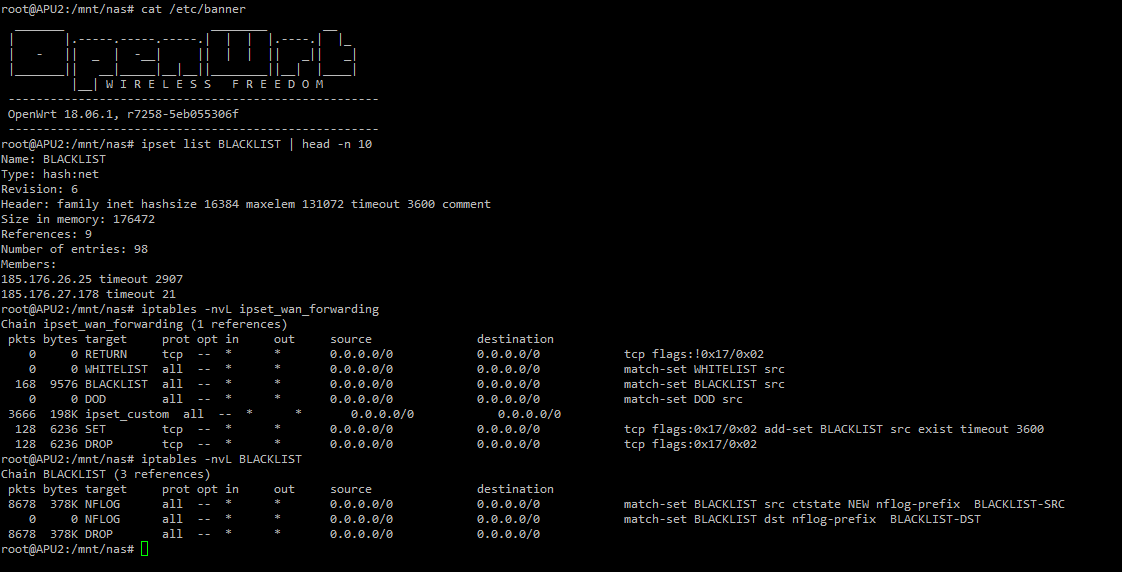
I use pfSense, cough cough. I'm a network engineer. What I'm referring to is that BSD might not have those exact flags, or the output may be a bit different, but it's still linux, so obviously it would have iptables.
drowsy fossil
how easy would it be to have pfsense also act as a nas?
unreal wedge
Don't. Setup something adjacent. Security reasons. pfSense is also ROM-based.
drowsy fossil
ok
so pfsense on a vm?
unreal wedge
If that's how you want it setup. I have one in a VM. Mostly stable.
unreal wedge
I say mostly stable because I've seen it crash rarely, few others have the same issue, and it could be my server being bad at the wrong time. Not easy to tell, but for yourself, you won't know unless you try it. Perhaps yours won't have any issues whatsoever.
drowsy fossil
the main problem for me is that it would have to be a set and forget thing
unreal wedge
Not the best idea when it comes to security, but otherwise, you'd never need to adjust settings so long as it's done right the first time.
drowsy fossil
oh also smart queuing
does pfsense support easy beginner stuff like fq-codel?
thick minnow
what do you mean by "output would be diff"
I use OpenWRT because its very open has a great community
easy to program for
and above all IT WORKS 😃
I can download ipsets from various sources (lists of IPs of known hackers and script kiddies)
which I can use with iptables in any way I see fit
mostly from https://iplists.firehol.org/

FireHOL IP Lists
350+ IP blacklists, IP blocklists and IP Reputation feeds, about Cybercrime, Fraud, Botnets, Μalware, Virus, Abuse, Attacks, Open Proxies, Anonymizers. See their changes and updates, size over time, retention policy, geographic coverage, comparisons and overlaps.
and with very little bash scripting (like 50 lines of code) I can use these lists in my firewall setup
only place I am struggling with right now is the logging to a central server (ELK stack) (Elasticsearch Logstash Kibana)
NFLOG (Netfilter Log) uses ULOGD2 and can give out JSON locally on my router but getting it sent to a remote server has been a challange
waxen scroll
TIL dooley is a netadmin. i assumed sysadmin
little schooner
The only network issue I'm facing is the negotiation of 1gbps downgrading to 100mbps on the WAN port.
The pfsense crashed the other day for me during an upgrade. A quick reboot brought it back. But I can imagine only having remote access and that thing needing a fix by physically going on location
hollow marlin
@little schooner that's why OOB APC power supplies are a life saver
 summer apex
my internet providers only give me 8mbps down and 0.8 up any way to get a solution to this?
clear igloo
Pay more money, move, or live with it. There isn't some way to magically up your speed outside of that
waxen scroll
@little schooner that could be by design
many providers make you hard code 100/full if you dont purchase over 100mbit
if the device does auto to 100/half, you know thats the issue
 low kernel
Hey guys I have a question about the gcp and my on premise network,, I almost tried everything and I am struggling with it. So here we go: I want to connect my on-premise Hyperv-server(s) with the Google cloud platform and use a public ip from Google. So clients and others can't see my home public ip. How do I do this?
waxen scroll
so, knowing nothing about google cloud. did you try running a linux box of some kind on google... perhaps a router distro... then using a VPN tunnel from on prem to the router in google, then making the VPN your on prem default gateway? The effect is the router on google will NAT and ta-da you have a google public IP
low kernel
No I did not tried that, I will give it a try @waxen scroll
waxen scroll
its basically a site to site VPN back to a datacenter like a corp network. if you didnt want that you can do the same linux distro per-computer with openvpn or something on each OS
low kernel
@waxen scroll oeff openvpn I wasted 2 weeks trying to set it up 😅
@waxen scroll with openvpn the computers could ping each other but the gateway was not forwarding incoming traffic from the outside
@waxen scroll but thanks, I will spin up a router os and try that. 
little schooner
@hollow marlin does that work if even that access is cut off to the power switch?
I would have to tell someone onsite to do that
hollow marlin
@little schooner that's what the second circuit is for
little schooner
Oh right.
hollow marlin
Also anyone going Cisco certs there has been a complete overhaul. https://www.cisco.com/c/en/us/training-events/training-certifications/certifications/professional/ccnp-routing-switching.html

Cisco
CCNP is a certification for engineers who are ready to advance their skills and work independently troubleshooting complex network solutions.
little schooner
Once upon a time, our schools iDRAC on two blade servers was visible and accessible on the public internet with default credentials
We are happy that no damage was done in the time it was active but reflashed the firmware for safe measure
hallow nimbus
F
unreal wedge
@waxen scroll I do both.
waxen scroll
ive done just as bad
RDP exposed to internet, just on a different port than standard
was at home and on purpose
little schooner
The reason it came about was that my teacher wanted a "quick and dirty" solution to start preparing the servers instead of waiting for the IT department to make an extra run back to the classroom wall jack. The wall jack had its run disconnected in the server room, which was needed for us to manage it outside of the server room, but there was a wait time and we wouldn't have access to the server room again for the next few days.
So he figured that he wanted to use some of the 4 available public IP addresses our switch had access to and place them on iDRAC so he could start using ikvm to install esxi and stuff
I am happy he was able to see the danger once I brought it up to him, as it was really unprotected and ping able, and could see login screen
That was the first time, also, that I dealt with a switch being able to allow hosts to assign themselves public IPs and start routing to internet right away
Unless the switch was a layer 3 device itself
But I don't know the details
thick minnow
So new cert layout coming from Cisco. Sounds like it will be interesting
little schooner
Glad it's dropped to two exams and you can pick the 2nd
hollow marlin
@little schooner you talking about NP?
little schooner
Yes
 summer arch
I'm looking for router recommendations. Preferably 802.11ax without breaking the bank with either options for custom firmware or something solid enough to config.
little schooner
802.11ax is not finalized, youre better off waiting until then
hollow marlin
@little schooner yeah the NP is two exams but route+switch are now one big massive exam and then just specialize.
I'm just waiting for confirmation that I can go straight to CCIE lab now
summer arch
Any AC recommendations then?
waxen scroll
i think im done with certs. with the announcement i have even less of a reason
my job history is the cert
nobody seems to pay for them anymore either
hollow marlin
New certs are moving in the right path. Job history only goes so far
waxen scroll
ive not had a single interview ask about my education or certs
nobody even checks the cert ID in a background check
hollow marlin
Most interviews try to get your knowledge out. Certs help get past HR but are still valuable
 prisma hawk
hey linus i want to hook up a sever with a flash drive and a netgear router so i can put stuff on it over my wifi
 tiny sandal
So.... i have a a 10g internet set up in my house locally and 1g to the data center, is their any good thunderbolt 3 10g Nic for my macbook pro mid19
thick minnow
Plus, at least to me having the cert shows that you can go and work hard on your own time to learn what is needed for the job. At least that's one way to look at it
hollow marlin
@thick minnow that has always been my view. Someone with a cert is showing their will to learn, especially if it was on their own time
little schooner
I don't get that definition of socks
How does it work behind firewall?
You mean like hiding traffic with a port like 443?
waxen scroll
@little schooner many corporate environment block * to the internet
They allow port 80/443 only from a proxy
The proxy blocks naughty websites
little schooner
I see
thick minnow
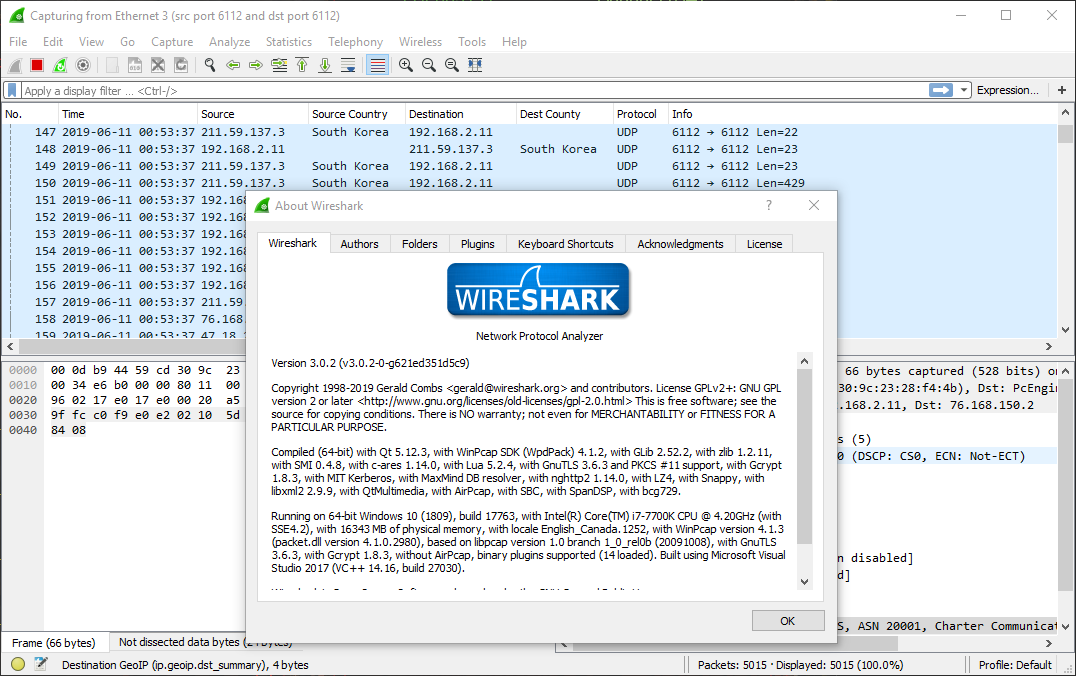
Just did a demo of the Boson netsim 12 software. It's pretty good


 hollow marlin
@thick minnow that's what I used for my CCNP. But I got it when it was bundled with the test as well. It's good but very buggy
waxen scroll
@thick minnow i hate wireshark
i LOVE opnet/riverbed products
you and @little schooner could be best friends tho
 subtle glen
How do you reset these things
little schooner
@waxen scroll sure, I could use another shark friend
waxen scroll
you unplug them
clear igloo
@subtle glen You need a call manager
waxen scroll
ask them for their call manager license and server
subtle glen
is this call manager a software or what
waxen scroll
@clear igloo i dont do voip cause F that why dont you explain
subtle glen
lol and i thought getting 2 voip phones was gonna be fun
waxen scroll
yes its a software but i dont know how you can get it or if its locked to servers using firmware
subtle glen
i got a tour of the server room and they are not getting rid of the voip servers tho
hope they have some spare license
waxen scroll
what do you do at this job
waxen scroll
and just now seeing the server room? ;o
subtle glen
its a school/work experience, don't know how you call it
waxen scroll
o
subtle glen
i started yesterday..
waxen scroll
lucky you. i wasnt able to find one when i was in school
subtle glen
i have to admit it's sad to see the empty racks. everything is getting moved to the main building somewhere
waxen scroll
i want an intern
subtle glen
lol
waxen scroll
@unreal wedge do you have interns?
subtle glen
for now im preparing pc's by booting a special ISO that makes a connection between the laptop i am configuring and a server room somewhere else, change people's docking stations, swap the VOIP phones with headphones that work with the laptop, registering badges etc
so, do i need a call manager license with the software running on a server mandatorily? even if i just want the 2 phones to talk to eachother?
hollow marlin
Asterisk is one of the well known open source PBX that everyone uses
waxen scroll
@subtle glen i think the phones can send data to eachother for a call, but not until the call manager helps set that stream up
again, i dont do voip. limited knowledge
subtle glen
@waxen scroll yep
@hollow marlin @little schooner might ask them for a license or something before trying them out
unreal wedge
@waxen scroll 
little schooner
I didn't setup voip but I saw a meeting where my college got some contract workers in to set it up so that they could ring different buildings without having to call an external number first
Also, the address book was totally out of date
subtle glen
why is this cisco stuff so complicated...
little schooner
Not sure, but I guess it's good job security
But mostly because people want their systems customizable in a business setting, which means there can't really be one easy solution that everyone can just adopt.
Making something customizable like that can be hard to make it simple to install, I figure
subtle glen
what if a small office buys like 3 voip phones
they have to buy a server, get a license etc
little schooner
Well you know Cisco and $$$
clear igloo
You don't buy three phones that require 6RU+ of server infra that's meant for large enterprises
little schooner
They can't separate
subtle glen
i get it that this office has a lot of phones on diferent floors and i understand having a centralized server
clear igloo
There are plenty of offers, even from Cisco, that are cheap and easy to setup but for robust deployments of tens of thousands of phones, things are going to be complex
little schooner
I've never installed those phones or voip but I'm sure it's an interesting configuration
@clear igloo Voip scares me because some of the phone calls I overhear in a teachers office sounds like they are literally in the same room
clear igloo
lol, that's a volume problem 😛
subtle glen
so if i took this phone from a thousand phone enterprise there is no way i can make it work without servers and software?
clear igloo
Not those models, no
little schooner
Which models are the small business ones? They are plug and play?
Surely the licensing can be tamed...
Bootleg Cisco
clear igloo
If you don't want servers or anything, you need to go cloud managed or as a service stuff
clear igloo
@little schooner For small business you have things like the small business 4000 call manager stuff
subtle glen
there were also some smaller phones, but i guess the dimension dont matter
little schooner
I see. Well that helps out a little bit
clear igloo
You can, for small branches and whatnot, run it on like an ISR router even
little schooner
Like the 1941?
little schooner
I have one of those
subtle glen
some cisco routers have VOIP functions??
clear igloo
Yah
little schooner
Someone bought the router from me already though
In the same state
That was pretty cool
subtle glen
i guess these dont
little schooner
It was through ebay
subtle glen
may be too old
clear igloo
Not sure about the 800 series routers but I'm pretty sure the 1700 wouldn't but I could be wrong
subtle glen
yeah but considering you can put the phone between the rj45 plug and your laptop, that creates a bottleneck for the laptop
little schooner
Oh right like for my example with Dell laptops.
They sold me last year with 10/100mbps port
It was 2018 and gig is that expensive that they cut the cost that way?
Anyway it was on sale for about 478 after tax
subtle glen
now that i think about it, the equipment the server room in the office where i work needs an upgrade. They still have those green-ish switches
i remember those to be kinda old
waxen scroll
you know what switch color really doesnt age well?
other than beige
@clear igloo extreme.
subtle glen
nope
waxen scroll
fuckin purple switches
subtle glen
LOL
subtle glen
also those SUN servers that are purple as well look old
 bold karma
I have a kind of odd need. I need a PoE wireless AP that also has a wired port. Concept: Ran a line from how to garage, so can still have cellular calls when garage door is shut. Have older computer in Garage as well that does not have a wifi adapter. Thus the need for the wired port. Alternatively, a switch that can get power over ethernet would work too. Not the most conventional setup, I know, but in the sticks we do things unconventional all the time.
if anyone knows of a brand and model, please PM me
waxen scroll
ubiquiti makes a few
i use one myself

The UniFi AC Pro AP features the latest Wi-Fi 802.11ac, 3x3 MIMO technology in a refined industrial design and is ideal for deployment of maximum‑performance wireless networks.
-or-
UAP‑AC‑HD
i use the HD, but for a garage i would use the Pro
 polar wraith
this wil work https://inwall.ui.com/